node-red-contrib-power-saver 2.0.1 → 2.0.5
This diff represents the content of publicly available package versions that have been released to one of the supported registries. The information contained in this diff is provided for informational purposes only and reflects changes between package versions as they appear in their respective public registries.
- package/CHANGELOG.md +17 -1
- package/README.md +45 -11
- package/doc/example-nordpool-current-state.md +166 -0
- package/doc/example-nordpool-events-state.md +153 -0
- package/doc/example-tibber-mqtt.md +189 -0
- package/doc/power-saver-nordpool-current-state.png +0 -0
- package/doc/power-saver-nordpool-events-state.png +0 -0
- package/doc/power-saver-tibber-mqtt.png +0 -0
- package/package.json +1 -1
- package/power-saver.js +2 -1
- package/utils.js +5 -0
package/CHANGELOG.md
CHANGED
|
@@ -2,6 +2,22 @@
|
|
|
2
2
|
|
|
3
3
|
List the most significant changes, starting in version 1.0.9.
|
|
4
4
|
|
|
5
|
+
## 2.0.5
|
|
6
|
+
|
|
7
|
+
* Update links to examples
|
|
8
|
+
|
|
9
|
+
## 2.0.4
|
|
10
|
+
|
|
11
|
+
* Update doc and add examples
|
|
12
|
+
|
|
13
|
+
## 2.0.3
|
|
14
|
+
|
|
15
|
+
* Bugfix
|
|
16
|
+
|
|
17
|
+
## 2.0.2
|
|
18
|
+
|
|
19
|
+
* Fix so Nordpool data can be read directly from the current state node
|
|
20
|
+
|
|
5
21
|
## 2.0.1
|
|
6
22
|
|
|
7
23
|
* Fix bug that caused no schedule
|
|
@@ -9,7 +25,7 @@ List the most significant changes, starting in version 1.0.9.
|
|
|
9
25
|
|
|
10
26
|
## 2.0.0
|
|
11
27
|
|
|
12
|
-
* New and better algorithm to
|
|
28
|
+
* New and better algorithm to calculate savings, resulting in a better schedule.
|
|
13
29
|
* Removed possibility to configure maximum hours to save per day, as this does not really make much sense.
|
|
14
30
|
* Round savings to 4 decimals.
|
|
15
31
|
* Set last savings hour to null when 0.
|
package/README.md
CHANGED
|
@@ -1,20 +1,34 @@
|
|
|
1
1
|
# node-red-contrib-power-saver
|
|
2
2
|
|
|
3
|
-
A Node-RED node to save money by
|
|
3
|
+
A Node-RED node to save money when power prices are changing. Saving is done by postponing power consumption until the price is lower.
|
|
4
|
+
|
|
5
|
+
You can configure maximum number of hours to save in a sequence, and minimum time to recover after a maximum saving period.
|
|
4
6
|
|
|
5
7
|

|
|
6
8
|
|
|
7
9
|
You can use it to control for example a heater, a water heater or any other power consumer that is acceptable to turn off now and then.
|
|
8
10
|
|
|
9
|
-
The node takes power prices per hour as input, and sends output to turn a switch on or off based on the power price. It also outputs the schedule that is planned, as well as how much you save per kWh for each of the hours that are turned off, assuming that the same power is used as soon as the power is
|
|
11
|
+
The node takes power prices per hour as input, and sends output to turn a switch on or off based on the power price. It also outputs the schedule that is planned, as well as how much you save per kWh for each of the hours that are turned off, assuming that the same power is used as soon as the power is turned on.
|
|
10
12
|
|
|
11
13
|
Power prices may be received from Tibber, Nordpool or any other source that gives price per hour for today and optionally tomorrow. It is primarily made to be used together with Home Assistant (HA), but there is no dependency to HA, so it can just as well be used by itself.
|
|
12
14
|
|
|
13
|
-
The node can also be used in combination with MagicMirror with the MMM-MQTT and MMM-Tibber modules, in order to get the savings displayed on the MM screen in the MMM-Tibber module
|
|
15
|
+
The node can also be used in combination with MagicMirror with the MMM-MQTT and MMM-Tibber modules, in order to get the savings displayed on the MM screen in the MMM-Tibber module.
|
|
16
|
+
|
|
17
|
+
**NB! WIP**
|
|
18
|
+
|
|
19
|
+
This node is currently rather new, and has been tried for a few weeks, enough to come in a version two with improved savings plan.
|
|
20
|
+
|
|
21
|
+
Feel free to try it, and report back problems or ideas as [Github issues](https://github.com/ottopaulsen/node-red-contrib-power-saver/issues).
|
|
14
22
|
|
|
15
|
-
|
|
23
|
+
## Installation
|
|
16
24
|
|
|
17
|
-
|
|
25
|
+
Install in Node-RED via the Manage Palette menu.
|
|
26
|
+
|
|
27
|
+
May also be installed via npm:
|
|
28
|
+
|
|
29
|
+
`npm install node-red-contrib-power-saver`
|
|
30
|
+
|
|
31
|
+
Make sure that you also upgrade now and then to get the latest version. See [changelog](CHANGELOG) for changes.
|
|
18
32
|
|
|
19
33
|
## Input
|
|
20
34
|
|
|
@@ -53,11 +67,19 @@ If you are a Tibber customer, you can use the `tibber-query` node from the [`nod
|
|
|
53
67
|
|
|
54
68
|
Send the result from the `tibber-query` node with the query above directly to the `power-saver` node. Make sure it is refreshed when new prices are ready. Prices for the next day are normally ready at 13:00, but refreshing every hour can be a good idea.
|
|
55
69
|
|
|
70
|
+
[See example with Tibber, a switch and MQTT](doc/example-tibber-mqtt.md)
|
|
71
|
+
|
|
72
|
+
|
|
56
73
|
### Nordpool input
|
|
57
74
|
|
|
58
75
|
This is especially designed to work for Home Assistant (HA), and the [Nordpool custom component](https://github.com/custom-components/nordpool). The Nordpool component provides a *sensor* that gives price per hour for today and tomorrow (after 13:00). Send the output from this sensor directly to the `power-saver` node. Make sure this is done whenever the node is updated, as well as when the system starts up.
|
|
59
76
|
|
|
60
|
-
|
|
77
|
+
Data can be sent from both the `current state` node or the `events: state` node.
|
|
78
|
+
|
|
79
|
+
[See example with Nordpool and `current state` node](doc/example-nordpool-current-state.md)
|
|
80
|
+
|
|
81
|
+
[See example with Nordpool and `events: state` node](doc/example-nordpool-events-state.md)
|
|
82
|
+
|
|
61
83
|
|
|
62
84
|
### Other input
|
|
63
85
|
|
|
@@ -127,7 +149,15 @@ Example of output:
|
|
|
127
149
|
"saving": null
|
|
128
150
|
},
|
|
129
151
|
...
|
|
130
|
-
]
|
|
152
|
+
],
|
|
153
|
+
"source": "Nordpool",
|
|
154
|
+
"config": {
|
|
155
|
+
"maxHoursToSaveInSequence": 3,
|
|
156
|
+
"minHoursOnAfterMaxSequenceSaved": "1",
|
|
157
|
+
"minSaving": 0.001,
|
|
158
|
+
"sendCurrentValueWhenRescheduling": true,
|
|
159
|
+
"outputIfNoSchedule": false
|
|
160
|
+
}
|
|
131
161
|
}
|
|
132
162
|
```
|
|
133
163
|
|
|
@@ -139,10 +169,10 @@ Currently there is only one strategy for saving. This is the *mostSaved* strateg
|
|
|
139
169
|
|
|
140
170
|
You can configure the following:
|
|
141
171
|
|
|
142
|
-
* Maximum number of hours to turn off during a day (24 hours).
|
|
143
172
|
* Maximum number of hours to turn off in a sequence.
|
|
144
173
|
* Minimum hours to turn on immediately after a period when turned off the maximum number of hours that is allowed to be turned off.
|
|
145
|
-
* Minimum amount to save per kWh in order to bother turning it off.
|
|
174
|
+
* Minimum amount to save per kWh in order to bother turning it off. It is recommended to have some amount here, e.g. 2 cents / 2 øre. No point in saving 0.001, is it?
|
|
175
|
+
* Wether to send on/off just after a reschedule is done without waiting until the next scheduled switch.
|
|
146
176
|
* What to do if there is no valid schedule any more (turn on or off).
|
|
147
177
|
|
|
148
178
|
## Integration with MagicMirror
|
|
@@ -152,10 +182,14 @@ Are you using [MagicMirror](https://magicmirror.builders/)? Are you also using [
|
|
|
152
182
|
|
|
153
183
|
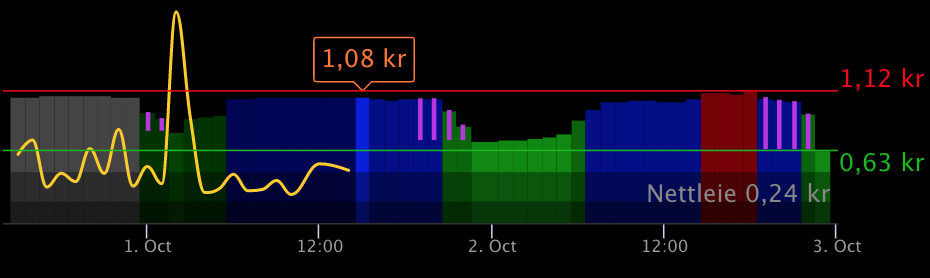
|
|
154
184
|
|
|
155
|
-
The purple lines show savings.
|
|
185
|
+
The purple lines show savings per kWh.
|
|
156
186
|
|
|
157
187
|
Read more about this in the [MMM-Tibber documentation](https://github.com/ottopaulsen/MMM-Tibber#show-savings).
|
|
158
188
|
|
|
159
189
|
## Change Log
|
|
160
190
|
|
|
161
|
-
[
|
|
191
|
+
See [CHANGELOG.md](CHANGELOG.md)
|
|
192
|
+
|
|
193
|
+
## Contribute
|
|
194
|
+
|
|
195
|
+
Contributions are welcome. Please start by creating a Github Issue with suggested changes, and state what you would like to do.
|
|
@@ -0,0 +1,166 @@
|
|
|
1
|
+
## Example with Nordpool and current state node
|
|
2
|
+
|
|
3
|
+
In this example, data is read from the Nordpool sensor in HA via the `current state` node.
|
|
4
|
+
|
|
5
|
+

|
|
6
|
+
|
|
7
|
+
Flow:
|
|
8
|
+
|
|
9
|
+
```json
|
|
10
|
+
[
|
|
11
|
+
{
|
|
12
|
+
"id": "e2578f6a.210a8",
|
|
13
|
+
"type": "debug",
|
|
14
|
+
"z": "d938c47f.3398f8",
|
|
15
|
+
"name": "Nordpool result",
|
|
16
|
+
"active": true,
|
|
17
|
+
"tosidebar": true,
|
|
18
|
+
"console": false,
|
|
19
|
+
"tostatus": false,
|
|
20
|
+
"complete": "true",
|
|
21
|
+
"targetType": "full",
|
|
22
|
+
"statusVal": "",
|
|
23
|
+
"statusType": "auto",
|
|
24
|
+
"x": 760,
|
|
25
|
+
"y": 460,
|
|
26
|
+
"wires": []
|
|
27
|
+
},
|
|
28
|
+
{
|
|
29
|
+
"id": "eff3b00f.d85f4",
|
|
30
|
+
"type": "power-saver",
|
|
31
|
+
"z": "d938c47f.3398f8",
|
|
32
|
+
"name": "Power Saver",
|
|
33
|
+
"maxHoursToSaveInSequence": 3,
|
|
34
|
+
"minHoursOnAfterMaxSequenceSaved": "1",
|
|
35
|
+
"minSaving": "0.001",
|
|
36
|
+
"sendCurrentValueWhenRescheduling": true,
|
|
37
|
+
"outputIfNoSchedule": true,
|
|
38
|
+
"x": 490,
|
|
39
|
+
"y": 420,
|
|
40
|
+
"wires": [
|
|
41
|
+
[
|
|
42
|
+
"a6f2769b.1a62a8"
|
|
43
|
+
],
|
|
44
|
+
[
|
|
45
|
+
"9fc75126.65dd3"
|
|
46
|
+
],
|
|
47
|
+
[
|
|
48
|
+
"e2578f6a.210a8"
|
|
49
|
+
]
|
|
50
|
+
]
|
|
51
|
+
},
|
|
52
|
+
{
|
|
53
|
+
"id": "48bcdcca.fe42a4",
|
|
54
|
+
"type": "api-current-state",
|
|
55
|
+
"z": "d938c47f.3398f8",
|
|
56
|
+
"name": "Read Nordpool",
|
|
57
|
+
"server": "ec4a12a1.b2be9",
|
|
58
|
+
"version": 1,
|
|
59
|
+
"outputs": 1,
|
|
60
|
+
"halt_if": "",
|
|
61
|
+
"halt_if_type": "str",
|
|
62
|
+
"halt_if_compare": "is",
|
|
63
|
+
"override_topic": false,
|
|
64
|
+
"entity_id": "sensor.nordpool_kwh_trheim_nok_3_095_025",
|
|
65
|
+
"state_type": "str",
|
|
66
|
+
"state_location": "",
|
|
67
|
+
"override_payload": "msg",
|
|
68
|
+
"entity_location": "",
|
|
69
|
+
"override_data": "msg",
|
|
70
|
+
"blockInputOverrides": false,
|
|
71
|
+
"x": 300,
|
|
72
|
+
"y": 420,
|
|
73
|
+
"wires": [
|
|
74
|
+
[
|
|
75
|
+
"eff3b00f.d85f4"
|
|
76
|
+
]
|
|
77
|
+
]
|
|
78
|
+
},
|
|
79
|
+
{
|
|
80
|
+
"id": "97cc8e58.4247a",
|
|
81
|
+
"type": "inject",
|
|
82
|
+
"z": "d938c47f.3398f8",
|
|
83
|
+
"name": "",
|
|
84
|
+
"props": [
|
|
85
|
+
{
|
|
86
|
+
"p": "payload"
|
|
87
|
+
},
|
|
88
|
+
{
|
|
89
|
+
"p": "topic",
|
|
90
|
+
"vt": "str"
|
|
91
|
+
}
|
|
92
|
+
],
|
|
93
|
+
"repeat": "",
|
|
94
|
+
"crontab": "",
|
|
95
|
+
"once": false,
|
|
96
|
+
"onceDelay": 0.1,
|
|
97
|
+
"topic": "",
|
|
98
|
+
"payload": "",
|
|
99
|
+
"payloadType": "date",
|
|
100
|
+
"x": 120,
|
|
101
|
+
"y": 420,
|
|
102
|
+
"wires": [
|
|
103
|
+
[
|
|
104
|
+
"48bcdcca.fe42a4"
|
|
105
|
+
]
|
|
106
|
+
]
|
|
107
|
+
},
|
|
108
|
+
{
|
|
109
|
+
"id": "a6f2769b.1a62a8",
|
|
110
|
+
"type": "api-call-service",
|
|
111
|
+
"z": "d938c47f.3398f8",
|
|
112
|
+
"name": "Turn on VVB",
|
|
113
|
+
"server": "ec4a12a1.b2be9",
|
|
114
|
+
"version": 1,
|
|
115
|
+
"debugenabled": false,
|
|
116
|
+
"service_domain": "switch",
|
|
117
|
+
"service": "turn_on",
|
|
118
|
+
"entityId": "switch.varmtvannsbereder_switch",
|
|
119
|
+
"data": "",
|
|
120
|
+
"dataType": "jsonata",
|
|
121
|
+
"mergecontext": "",
|
|
122
|
+
"output_location": "",
|
|
123
|
+
"output_location_type": "none",
|
|
124
|
+
"mustacheAltTags": false,
|
|
125
|
+
"x": 750,
|
|
126
|
+
"y": 380,
|
|
127
|
+
"wires": [
|
|
128
|
+
[]
|
|
129
|
+
]
|
|
130
|
+
},
|
|
131
|
+
{
|
|
132
|
+
"id": "9fc75126.65dd3",
|
|
133
|
+
"type": "api-call-service",
|
|
134
|
+
"z": "d938c47f.3398f8",
|
|
135
|
+
"name": "Turn off VVB",
|
|
136
|
+
"server": "ec4a12a1.b2be9",
|
|
137
|
+
"version": 1,
|
|
138
|
+
"debugenabled": true,
|
|
139
|
+
"service_domain": "switch",
|
|
140
|
+
"service": "turn_off",
|
|
141
|
+
"entityId": "switch.varmtvannsbereder_switch",
|
|
142
|
+
"data": "",
|
|
143
|
+
"dataType": "json",
|
|
144
|
+
"mergecontext": "",
|
|
145
|
+
"output_location": "",
|
|
146
|
+
"output_location_type": "none",
|
|
147
|
+
"mustacheAltTags": false,
|
|
148
|
+
"x": 750,
|
|
149
|
+
"y": 420,
|
|
150
|
+
"wires": [
|
|
151
|
+
[]
|
|
152
|
+
]
|
|
153
|
+
},
|
|
154
|
+
{
|
|
155
|
+
"id": "ec4a12a1.b2be9",
|
|
156
|
+
"type": "server",
|
|
157
|
+
"name": "Home Assistant",
|
|
158
|
+
"legacy": false,
|
|
159
|
+
"addon": true,
|
|
160
|
+
"rejectUnauthorizedCerts": true,
|
|
161
|
+
"ha_boolean": "y|yes|true|on|home|open",
|
|
162
|
+
"connectionDelay": true,
|
|
163
|
+
"cacheJson": true
|
|
164
|
+
}
|
|
165
|
+
]
|
|
166
|
+
```
|
|
@@ -0,0 +1,153 @@
|
|
|
1
|
+
## Example with Nordpool and events: state node
|
|
2
|
+
|
|
3
|
+
In this example, data is read from the Nordpool sensor in HA via the `events: state` node.
|
|
4
|
+
|
|
5
|
+

|
|
6
|
+
|
|
7
|
+
Flow:
|
|
8
|
+
|
|
9
|
+
```json
|
|
10
|
+
[
|
|
11
|
+
{
|
|
12
|
+
"id": "3662aca5.dfe974",
|
|
13
|
+
"type": "server-state-changed",
|
|
14
|
+
"z": "d938c47f.3398f8",
|
|
15
|
+
"name": "Nordpool sensor",
|
|
16
|
+
"server": "ec4a12a1.b2be9",
|
|
17
|
+
"version": 1,
|
|
18
|
+
"exposeToHomeAssistant": false,
|
|
19
|
+
"haConfig": [
|
|
20
|
+
{
|
|
21
|
+
"property": "name",
|
|
22
|
+
"value": ""
|
|
23
|
+
},
|
|
24
|
+
{
|
|
25
|
+
"property": "icon",
|
|
26
|
+
"value": ""
|
|
27
|
+
}
|
|
28
|
+
],
|
|
29
|
+
"entityidfilter": "sensor.nordpool_kwh_trheim_nok_3_095_025",
|
|
30
|
+
"entityidfiltertype": "exact",
|
|
31
|
+
"outputinitially": true,
|
|
32
|
+
"state_type": "str",
|
|
33
|
+
"haltifstate": "",
|
|
34
|
+
"halt_if_type": "str",
|
|
35
|
+
"halt_if_compare": "is",
|
|
36
|
+
"outputs": 1,
|
|
37
|
+
"output_only_on_state_change": true,
|
|
38
|
+
"for": 0,
|
|
39
|
+
"forType": "num",
|
|
40
|
+
"forUnits": "minutes",
|
|
41
|
+
"ignorePrevStateNull": false,
|
|
42
|
+
"ignorePrevStateUnknown": false,
|
|
43
|
+
"ignorePrevStateUnavailable": false,
|
|
44
|
+
"ignoreCurrentStateUnknown": false,
|
|
45
|
+
"ignoreCurrentStateUnavailable": false,
|
|
46
|
+
"x": 120,
|
|
47
|
+
"y": 620,
|
|
48
|
+
"wires": [
|
|
49
|
+
[
|
|
50
|
+
"fc7df8c4.e50c88"
|
|
51
|
+
]
|
|
52
|
+
]
|
|
53
|
+
},
|
|
54
|
+
{
|
|
55
|
+
"id": "fc7df8c4.e50c88",
|
|
56
|
+
"type": "power-saver",
|
|
57
|
+
"z": "d938c47f.3398f8",
|
|
58
|
+
"name": "Power Saver",
|
|
59
|
+
"maxHoursToSaveInSequence": 3,
|
|
60
|
+
"minHoursOnAfterMaxSequenceSaved": "1",
|
|
61
|
+
"minSaving": "0.001",
|
|
62
|
+
"sendCurrentValueWhenRescheduling": true,
|
|
63
|
+
"outputIfNoSchedule": true,
|
|
64
|
+
"x": 310,
|
|
65
|
+
"y": 620,
|
|
66
|
+
"wires": [
|
|
67
|
+
[
|
|
68
|
+
"32f17ab2.927cf6"
|
|
69
|
+
],
|
|
70
|
+
[
|
|
71
|
+
"2a3cd7db.0891f8"
|
|
72
|
+
],
|
|
73
|
+
[
|
|
74
|
+
"ed7202ff.b5725"
|
|
75
|
+
]
|
|
76
|
+
]
|
|
77
|
+
},
|
|
78
|
+
{
|
|
79
|
+
"id": "ed7202ff.b5725",
|
|
80
|
+
"type": "debug",
|
|
81
|
+
"z": "d938c47f.3398f8",
|
|
82
|
+
"name": "Nordpool result",
|
|
83
|
+
"active": true,
|
|
84
|
+
"tosidebar": true,
|
|
85
|
+
"console": false,
|
|
86
|
+
"tostatus": false,
|
|
87
|
+
"complete": "true",
|
|
88
|
+
"targetType": "full",
|
|
89
|
+
"statusVal": "",
|
|
90
|
+
"statusType": "auto",
|
|
91
|
+
"x": 580,
|
|
92
|
+
"y": 660,
|
|
93
|
+
"wires": []
|
|
94
|
+
},
|
|
95
|
+
{
|
|
96
|
+
"id": "32f17ab2.927cf6",
|
|
97
|
+
"type": "api-call-service",
|
|
98
|
+
"z": "d938c47f.3398f8",
|
|
99
|
+
"name": "Turn on VVB",
|
|
100
|
+
"server": "ec4a12a1.b2be9",
|
|
101
|
+
"version": 1,
|
|
102
|
+
"debugenabled": false,
|
|
103
|
+
"service_domain": "switch",
|
|
104
|
+
"service": "turn_on",
|
|
105
|
+
"entityId": "switch.varmtvannsbereder_switch",
|
|
106
|
+
"data": "",
|
|
107
|
+
"dataType": "jsonata",
|
|
108
|
+
"mergecontext": "",
|
|
109
|
+
"output_location": "",
|
|
110
|
+
"output_location_type": "none",
|
|
111
|
+
"mustacheAltTags": false,
|
|
112
|
+
"x": 570,
|
|
113
|
+
"y": 580,
|
|
114
|
+
"wires": [
|
|
115
|
+
[]
|
|
116
|
+
]
|
|
117
|
+
},
|
|
118
|
+
{
|
|
119
|
+
"id": "2a3cd7db.0891f8",
|
|
120
|
+
"type": "api-call-service",
|
|
121
|
+
"z": "d938c47f.3398f8",
|
|
122
|
+
"name": "Turn off VVB",
|
|
123
|
+
"server": "ec4a12a1.b2be9",
|
|
124
|
+
"version": 1,
|
|
125
|
+
"debugenabled": true,
|
|
126
|
+
"service_domain": "switch",
|
|
127
|
+
"service": "turn_off",
|
|
128
|
+
"entityId": "switch.varmtvannsbereder_switch",
|
|
129
|
+
"data": "",
|
|
130
|
+
"dataType": "json",
|
|
131
|
+
"mergecontext": "",
|
|
132
|
+
"output_location": "",
|
|
133
|
+
"output_location_type": "none",
|
|
134
|
+
"mustacheAltTags": false,
|
|
135
|
+
"x": 570,
|
|
136
|
+
"y": 620,
|
|
137
|
+
"wires": [
|
|
138
|
+
[]
|
|
139
|
+
]
|
|
140
|
+
},
|
|
141
|
+
{
|
|
142
|
+
"id": "ec4a12a1.b2be9",
|
|
143
|
+
"type": "server",
|
|
144
|
+
"name": "Home Assistant",
|
|
145
|
+
"legacy": false,
|
|
146
|
+
"addon": true,
|
|
147
|
+
"rejectUnauthorizedCerts": true,
|
|
148
|
+
"ha_boolean": "y|yes|true|on|home|open",
|
|
149
|
+
"connectionDelay": true,
|
|
150
|
+
"cacheJson": true
|
|
151
|
+
}
|
|
152
|
+
]
|
|
153
|
+
```
|
|
@@ -0,0 +1,189 @@
|
|
|
1
|
+
## Example with Tibber, a switch and MQTT
|
|
2
|
+
|
|
3
|
+
In this example, data is read from Tibber and used to turn on/off a switch. Data is also sent to MQTT for being displayed on Magic Mirror. This is optional, of course.
|
|
4
|
+
|
|
5
|
+

|
|
6
|
+
|
|
7
|
+
Flow:
|
|
8
|
+
|
|
9
|
+
```json
|
|
10
|
+
[
|
|
11
|
+
{
|
|
12
|
+
"id": "467a5fe.d0bbba",
|
|
13
|
+
"type": "mqtt out",
|
|
14
|
+
"z": "d938c47f.3398f8",
|
|
15
|
+
"name": "Send switch to MM",
|
|
16
|
+
"topic": "powersaver/switch",
|
|
17
|
+
"qos": "0",
|
|
18
|
+
"retain": "false",
|
|
19
|
+
"broker": "24fbcfb5.569ea",
|
|
20
|
+
"x": 730,
|
|
21
|
+
"y": 120,
|
|
22
|
+
"wires": []
|
|
23
|
+
},
|
|
24
|
+
{
|
|
25
|
+
"id": "8c533305.eacaa",
|
|
26
|
+
"type": "power-saver",
|
|
27
|
+
"z": "d938c47f.3398f8",
|
|
28
|
+
"name": "Power Saver",
|
|
29
|
+
"maxHoursToSaveInSequence": "3",
|
|
30
|
+
"minHoursOnAfterMaxSequenceSaved": "1",
|
|
31
|
+
"minSaving": "0.001",
|
|
32
|
+
"sendCurrentValueWhenRescheduling": true,
|
|
33
|
+
"outputIfNoSchedule": "true",
|
|
34
|
+
"x": 490,
|
|
35
|
+
"y": 120,
|
|
36
|
+
"wires": [
|
|
37
|
+
[
|
|
38
|
+
"5e485ff7.db156",
|
|
39
|
+
"467a5fe.d0bbba"
|
|
40
|
+
],
|
|
41
|
+
[
|
|
42
|
+
"9c978d1c.ee76",
|
|
43
|
+
"467a5fe.d0bbba"
|
|
44
|
+
],
|
|
45
|
+
[
|
|
46
|
+
"42d8b632.402e38"
|
|
47
|
+
]
|
|
48
|
+
]
|
|
49
|
+
},
|
|
50
|
+
{
|
|
51
|
+
"id": "ab2d599a.077738",
|
|
52
|
+
"type": "tibber-query",
|
|
53
|
+
"z": "d938c47f.3398f8",
|
|
54
|
+
"name": "Get Tibber prices",
|
|
55
|
+
"active": true,
|
|
56
|
+
"apiEndpointRef": "b70ec5d0.6f8f08",
|
|
57
|
+
"x": 290,
|
|
58
|
+
"y": 120,
|
|
59
|
+
"wires": [
|
|
60
|
+
[
|
|
61
|
+
"8c533305.eacaa"
|
|
62
|
+
]
|
|
63
|
+
]
|
|
64
|
+
},
|
|
65
|
+
{
|
|
66
|
+
"id": "4f11b5ae.4cc22c",
|
|
67
|
+
"type": "inject",
|
|
68
|
+
"z": "d938c47f.3398f8",
|
|
69
|
+
"name": "Refresh",
|
|
70
|
+
"props": [
|
|
71
|
+
{
|
|
72
|
+
"p": "payload"
|
|
73
|
+
}
|
|
74
|
+
],
|
|
75
|
+
"repeat": "3600",
|
|
76
|
+
"crontab": "",
|
|
77
|
+
"once": false,
|
|
78
|
+
"onceDelay": "1",
|
|
79
|
+
"topic": "",
|
|
80
|
+
"payload": "{ viewer { homes { currentSubscription{ priceInfo{ today { total startsAt } tomorrow { total startsAt } } } } } }",
|
|
81
|
+
"payloadType": "str",
|
|
82
|
+
"x": 100,
|
|
83
|
+
"y": 120,
|
|
84
|
+
"wires": [
|
|
85
|
+
[
|
|
86
|
+
"ab2d599a.077738"
|
|
87
|
+
]
|
|
88
|
+
]
|
|
89
|
+
},
|
|
90
|
+
{
|
|
91
|
+
"id": "42d8b632.402e38",
|
|
92
|
+
"type": "mqtt out",
|
|
93
|
+
"z": "d938c47f.3398f8",
|
|
94
|
+
"name": "Send schedule to MM",
|
|
95
|
+
"topic": "powersaver/plan",
|
|
96
|
+
"qos": "0",
|
|
97
|
+
"retain": "true",
|
|
98
|
+
"broker": "24fbcfb5.569ea",
|
|
99
|
+
"x": 740,
|
|
100
|
+
"y": 220,
|
|
101
|
+
"wires": []
|
|
102
|
+
},
|
|
103
|
+
{
|
|
104
|
+
"id": "5e485ff7.db156",
|
|
105
|
+
"type": "api-call-service",
|
|
106
|
+
"z": "d938c47f.3398f8",
|
|
107
|
+
"name": "Turn on VVB",
|
|
108
|
+
"server": "ec4a12a1.b2be9",
|
|
109
|
+
"version": 1,
|
|
110
|
+
"debugenabled": false,
|
|
111
|
+
"service_domain": "switch",
|
|
112
|
+
"service": "turn_on",
|
|
113
|
+
"entityId": "switch.varmtvannsbereder_switch",
|
|
114
|
+
"data": "",
|
|
115
|
+
"dataType": "jsonata",
|
|
116
|
+
"mergecontext": "",
|
|
117
|
+
"output_location": "",
|
|
118
|
+
"output_location_type": "none",
|
|
119
|
+
"mustacheAltTags": false,
|
|
120
|
+
"x": 710,
|
|
121
|
+
"y": 60,
|
|
122
|
+
"wires": [
|
|
123
|
+
[]
|
|
124
|
+
]
|
|
125
|
+
},
|
|
126
|
+
{
|
|
127
|
+
"id": "9c978d1c.ee76",
|
|
128
|
+
"type": "api-call-service",
|
|
129
|
+
"z": "d938c47f.3398f8",
|
|
130
|
+
"name": "Turn off VVB",
|
|
131
|
+
"server": "ec4a12a1.b2be9",
|
|
132
|
+
"version": 1,
|
|
133
|
+
"debugenabled": true,
|
|
134
|
+
"service_domain": "switch",
|
|
135
|
+
"service": "turn_off",
|
|
136
|
+
"entityId": "switch.varmtvannsbereder_switch",
|
|
137
|
+
"data": "",
|
|
138
|
+
"dataType": "json",
|
|
139
|
+
"mergecontext": "",
|
|
140
|
+
"output_location": "",
|
|
141
|
+
"output_location_type": "none",
|
|
142
|
+
"mustacheAltTags": false,
|
|
143
|
+
"x": 710,
|
|
144
|
+
"y": 180,
|
|
145
|
+
"wires": [
|
|
146
|
+
[]
|
|
147
|
+
]
|
|
148
|
+
},
|
|
149
|
+
{
|
|
150
|
+
"id": "24fbcfb5.569ea",
|
|
151
|
+
"type": "mqtt-broker",
|
|
152
|
+
"name": "MQTT",
|
|
153
|
+
"broker": "10.0.0.15",
|
|
154
|
+
"port": "1883",
|
|
155
|
+
"clientid": "",
|
|
156
|
+
"usetls": false,
|
|
157
|
+
"compatmode": false,
|
|
158
|
+
"keepalive": "60",
|
|
159
|
+
"cleansession": true,
|
|
160
|
+
"birthTopic": "",
|
|
161
|
+
"birthQos": "0",
|
|
162
|
+
"birthPayload": "",
|
|
163
|
+
"closeTopic": "",
|
|
164
|
+
"closeQos": "0",
|
|
165
|
+
"closePayload": "",
|
|
166
|
+
"willTopic": "",
|
|
167
|
+
"willQos": "0",
|
|
168
|
+
"willPayload": ""
|
|
169
|
+
},
|
|
170
|
+
{
|
|
171
|
+
"id": "b70ec5d0.6f8f08",
|
|
172
|
+
"type": "tibber-api-endpoint",
|
|
173
|
+
"feedUrl": "wss://api.tibber.com/v1-beta/gql/subscriptions",
|
|
174
|
+
"queryUrl": "https://api.tibber.com/v1-beta/gql",
|
|
175
|
+
"name": "Tibber API"
|
|
176
|
+
},
|
|
177
|
+
{
|
|
178
|
+
"id": "ec4a12a1.b2be9",
|
|
179
|
+
"type": "server",
|
|
180
|
+
"name": "Home Assistant",
|
|
181
|
+
"legacy": false,
|
|
182
|
+
"addon": true,
|
|
183
|
+
"rejectUnauthorizedCerts": true,
|
|
184
|
+
"ha_boolean": "y|yes|true|on|home|open",
|
|
185
|
+
"connectionDelay": true,
|
|
186
|
+
"cacheJson": true
|
|
187
|
+
}
|
|
188
|
+
]
|
|
189
|
+
```
|
|
Binary file
|
|
Binary file
|
|
Binary file
|
package/package.json
CHANGED
package/power-saver.js
CHANGED
|
@@ -175,7 +175,8 @@ function validateMsg(node, msg) {
|
|
|
175
175
|
validationFailure(node, "Payload missing");
|
|
176
176
|
return false;
|
|
177
177
|
}
|
|
178
|
-
const payload =
|
|
178
|
+
const payload =
|
|
179
|
+
msg.data?.new_state?.attributes ?? msg.data?.attributes ?? msg.payload;
|
|
179
180
|
if (typeof payload !== "object") {
|
|
180
181
|
validationFailure(node, "Payload must be an object");
|
|
181
182
|
return false;
|
package/utils.js
CHANGED
|
@@ -42,6 +42,11 @@ function convertMsg(msg) {
|
|
|
42
42
|
value: v.value,
|
|
43
43
|
start: v.start,
|
|
44
44
|
}));
|
|
45
|
+
} else if (msg.data?.attributes?.raw_tomorrow) {
|
|
46
|
+
tomorrow = msg.data.attributes.raw_tomorrow.map((v) => ({
|
|
47
|
+
value: v.value,
|
|
48
|
+
start: v.start,
|
|
49
|
+
}));
|
|
45
50
|
} else {
|
|
46
51
|
tomorrow = msg.payload?.tomorrow || [];
|
|
47
52
|
}
|