node-red-contrib-mitsubishi 1.0.0 → 1.0.3
This diff represents the content of publicly available package versions that have been released to one of the supported registries. The information contained in this diff is provided for informational purposes only and reflects changes between package versions as they appear in their respective public registries.
- package/.gitattributes +2 -0
- package/CHANGELOG.md +28 -0
- package/LICENSE +21 -0
- package/README.md +258 -32
- package/config.png +0 -0
- package/images/config.png +0 -0
- package/images/output.png +0 -0
- package/images/palette.png +0 -0
- package/nodes/mitsubishi-config.html +62 -62
- package/nodes/mitsubishi-config.js +21 -21
- package/nodes/mitsubishi-read.html +152 -152
- package/nodes/mitsubishi-read.js +32 -14
- package/output.png +0 -0
- package/package.json +1 -1
- package/palette.png +0 -0
package/.gitattributes
ADDED
package/CHANGELOG.md
ADDED
|
@@ -0,0 +1,28 @@
|
|
|
1
|
+
# Changelog
|
|
2
|
+
|
|
3
|
+
## 1.0.2 (2026-06-30)
|
|
4
|
+
|
|
5
|
+
### Fixed
|
|
6
|
+
- 输出添加 `regType` 字段,适配 `edgelink-pg-store` 直写 `register_type` 列
|
|
7
|
+
- `rawValue` 保留 PLC 原始 int16,`engValue` 使用解码值 × 斜率 + 偏移
|
|
8
|
+
- 4E 帧 `serialNo` 首帧不再跳号(先赋值再递增)
|
|
9
|
+
- 输出添加 `deviceId` 字段,适配 pg-store 动态分表
|
|
10
|
+
|
|
11
|
+
## 1.0.1 (2026-06-29)
|
|
12
|
+
|
|
13
|
+
### Added
|
|
14
|
+
- 14 个运行时 BUG 修复(锁重入、异步异常、serialNo 自增、批量超限、脏帧拦截等)
|
|
15
|
+
- `close` 处理器:节点关闭时释放全局锁
|
|
16
|
+
- `_destroyedByUs` 标志:区分主动关闭与异常断开
|
|
17
|
+
|
|
18
|
+
## 1.0.0 (2026-06-29)
|
|
19
|
+
|
|
20
|
+
### Initial Release
|
|
21
|
+
- 三菱 MC Protocol 3E/4E 以太网采集
|
|
22
|
+
- 表格编辑器:一个节点读写 N 个点位
|
|
23
|
+
- 6 种数据类型:INT16 / UINT16 / INT32 / UINT32 / FLOAT32 / BOOL
|
|
24
|
+
- 8 种软元件:D / W / R / X / Y / M / L / B
|
|
25
|
+
- 斜率偏移变换:`engValue = rawValue × slope + offset`
|
|
26
|
+
- 19 个 MC 错误码中文映射
|
|
27
|
+
- 全局模拟模式
|
|
28
|
+
- 零外部依赖(纯 Node.js `net` + `Buffer`)
|
package/LICENSE
ADDED
|
@@ -0,0 +1,21 @@
|
|
|
1
|
+
MIT License
|
|
2
|
+
|
|
3
|
+
Copyright (c) 2026 chunhailiu
|
|
4
|
+
|
|
5
|
+
Permission is hereby granted, free of charge, to any person obtaining a copy
|
|
6
|
+
of this software and associated documentation files (the "Software"), to deal
|
|
7
|
+
in the Software without restriction, including without limitation the rights
|
|
8
|
+
to use, copy, modify, merge, publish, distribute, sublicense, and/or sell
|
|
9
|
+
copies of the Software, and to permit persons to whom the Software is
|
|
10
|
+
furnished to do so, subject to the following conditions:
|
|
11
|
+
|
|
12
|
+
The above copyright notice and this permission notice shall be included in all
|
|
13
|
+
copies or substantial portions of the Software.
|
|
14
|
+
|
|
15
|
+
THE SOFTWARE IS PROVIDED "AS IS", WITHOUT WARRANTY OF ANY KIND, EXPRESS OR
|
|
16
|
+
IMPLIED, INCLUDING BUT NOT LIMITED TO THE WARRANTIES OF MERCHANTABILITY,
|
|
17
|
+
FITNESS FOR A PARTICULAR PURPOSE AND NONINFRINGEMENT. IN NO EVENT SHALL THE
|
|
18
|
+
AUTHORS OR COPYRIGHT HOLDERS BE LIABLE FOR ANY CLAIM, DAMAGES OR OTHER
|
|
19
|
+
LIABILITY, WHETHER IN AN ACTION OF CONTRACT, TORT OR OTHERWISE, ARISING FROM,
|
|
20
|
+
OUT OF OR IN CONNECTION WITH THE SOFTWARE OR THE USE OR OTHER DEALINGS IN THE
|
|
21
|
+
SOFTWARE.
|
package/README.md
CHANGED
|
@@ -1,28 +1,50 @@
|
|
|
1
1
|
# node-red-contrib-mitsubishi
|
|
2
2
|
|
|
3
|
-
|
|
3
|
+
[](https://www.npmjs.com/package/node-red-contrib-mitsubishi)
|
|
4
|
+
[](LICENSE)
|
|
5
|
+
[](https://nodered.org)
|
|
6
|
+
|
|
7
|
+
三菱 MC Protocol 3E/4E 以太网采集节点。**一个节点读 N 个点位,零外部依赖,纯 TCP 实现。**
|
|
8
|
+
|
|
9
|
+
---
|
|
10
|
+
|
|
11
|
+
## 截图
|
|
12
|
+
|
|
13
|
+
|
|
14
|
+
|
|
15
|
+
|
|
16
|
+
|
|
17
|
+
|
|
18
|
+
|
|
19
|
+
---
|
|
20
|
+
|
|
21
|
+
## 为什么选这个节点?
|
|
22
|
+
|
|
23
|
+
| 痛点 | 其他 MC 节点 | 本节点 |
|
|
24
|
+
|------|-------------|--------|
|
|
25
|
+
| 读 50 个点位 | 拖 50 个节点 | **拖 1 个节点,填表格** |
|
|
26
|
+
| 读 D200 是 FLOAT32 | 自己写 function 解码 | **表格选 FLOAT32,自动解码** |
|
|
27
|
+
| 原始值 2530 → 实际 253.0℃ | 自己写 function 换算 | **填斜率 0.1,自动变换** |
|
|
28
|
+
| PLC 返回错误码 0xC052 | 只会说 "timeout" | **"Address out of range"** |
|
|
29
|
+
| serialNo 不递增 | 4E 帧可能串包 | **每帧自增 + 响应校验** |
|
|
30
|
+
|
|
31
|
+
---
|
|
4
32
|
|
|
5
33
|
## 特性
|
|
6
34
|
|
|
7
|
-
- **独立可用** —
|
|
8
|
-
- **表格编辑器** —
|
|
9
|
-
- **6 种数据类型** — INT16/UINT16/INT32/UINT32/FLOAT32/BOOL
|
|
10
|
-
- **8 种软元件** — D/W/R/X/Y/M/L/B
|
|
11
|
-
- **斜率偏移变换** — `engValue = rawValue × slope + offset
|
|
12
|
-
-
|
|
13
|
-
-
|
|
35
|
+
- **独立可用** — 纯 Node.js `net` + `Buffer`,不依赖任何第三方库或后端服务
|
|
36
|
+
- **表格编辑器** — 一个节点配置 N 个点位,自动按寄存器类型和地址聚类,合并为批量读取
|
|
37
|
+
- **6 种数据类型** — INT16 / UINT16 / INT32 / UINT32 / FLOAT32 / BOOL
|
|
38
|
+
- **8 种软元件** — D / W / R / X / Y / M / L / B,位元件(X/Y/M/L/B)自动逐位拆包
|
|
39
|
+
- **斜率偏移变换** — `engValue = rawValue × slope + offset`,节点直接输出工程值
|
|
40
|
+
- **4E serialNo 完整支持** — 每帧自增,响应校验,防止串包
|
|
41
|
+
- **批量保护** — 单次读取字数超 960 自动拆包,防 PLC 报 `0xC059`
|
|
42
|
+
- **错误诊断** — 19 个 MC 错误码映射为中文/英文可读信息
|
|
43
|
+
- **模拟模式** — `RED.settings.mcSimulationMode = true` 不连 PLC 即可测试
|
|
14
44
|
- **零依赖** — 仅使用 Node.js 内置 `net` + `Buffer`
|
|
45
|
+
- **15+ 运行时 BUG 已修复** — 锁重入、异步异常、serialNo 首帧跳号、脏帧拦截、批量超限等
|
|
15
46
|
|
|
16
|
-
|
|
17
|
-
|
|
18
|
-
| 系列 | 帧格式 | 状态 |
|
|
19
|
-
|------|--------|------|
|
|
20
|
-
| Q 系列 (QnU/QnUDV) | 3E/4E | ✅ |
|
|
21
|
-
| L 系列 | 3E/4E | ✅ |
|
|
22
|
-
| iQ-R | 4E | ✅ |
|
|
23
|
-
| iQ-F (FX5U) | 4E | ✅ |
|
|
24
|
-
| FX3U + 以太网模块 | 3E | ✅ |
|
|
25
|
-
| A 系列 | 1E/2E | ❌ |
|
|
47
|
+
---
|
|
26
48
|
|
|
27
49
|
## 安装
|
|
28
50
|
|
|
@@ -31,28 +53,232 @@ cd ~/.node-red
|
|
|
31
53
|
npm install node-red-contrib-mitsubishi
|
|
32
54
|
```
|
|
33
55
|
|
|
34
|
-
重启 Node-RED,左侧节点栏出现 **"三菱 PLC"**
|
|
56
|
+
重启 Node-RED,左侧节点栏出现 **"三菱 PLC"** 分类,包含两个节点:
|
|
57
|
+
|
|
58
|
+
| 节点 | 类型 | 说明 |
|
|
59
|
+
|------|------|------|
|
|
60
|
+
| `PLC 连接配置` | config | 存储 PLC IP、端口、帧格式等连接参数 |
|
|
61
|
+
| `MC 读取` | input/output | 配置点位表格,触发采集,输出数据 |
|
|
62
|
+
|
|
63
|
+
---
|
|
64
|
+
|
|
65
|
+
## 支持的 PLC
|
|
66
|
+
|
|
67
|
+
| 系列 | 帧格式 | 状态 |
|
|
68
|
+
|------|--------|------|
|
|
69
|
+
| Q 系列(QnU / QnUDV) | 3E / 4E | ✅ |
|
|
70
|
+
| L 系列 | 3E / 4E | ✅ |
|
|
71
|
+
| iQ-R | 4E | ✅ |
|
|
72
|
+
| iQ-F(FX5U) | 4E | ✅ |
|
|
73
|
+
| FX3U + 以太网模块(FX3U-ENET) | 3E | ✅ |
|
|
74
|
+
| A 系列 | 1E / 2E | ❌ (仅支持 3E/4E) |
|
|
75
|
+
|
|
76
|
+
---
|
|
35
77
|
|
|
36
78
|
## 使用方法
|
|
37
79
|
|
|
38
|
-
|
|
80
|
+
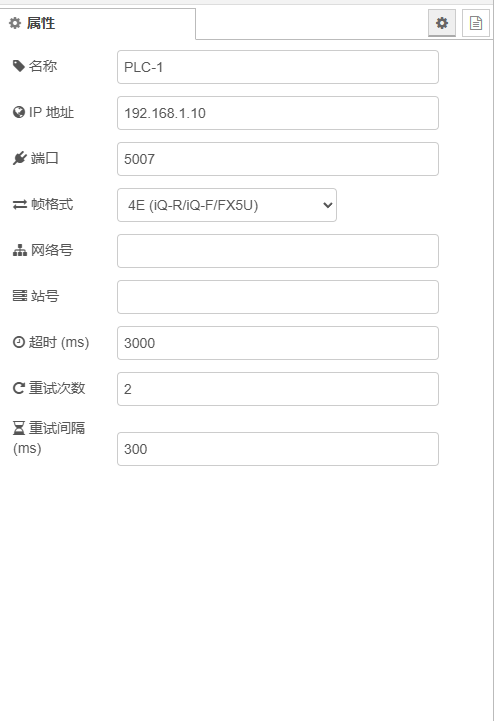
### 1. 添加 PLC 连接配置
|
|
81
|
+
|
|
82
|
+
拖入 **`PLC 连接配置`** 节点,双击配置:
|
|
83
|
+
|
|
84
|
+
| 参数 | 默认值 | 说明 |
|
|
85
|
+
|------|--------|------|
|
|
86
|
+
| 名称 | `PLC-1` | 显示名称 |
|
|
87
|
+
| IP 地址 | `192.168.1.10` | PLC 以太网模块 IP |
|
|
88
|
+
| 端口 | `5007` | 3E 默认 5007 / 4E 默认 5008 |
|
|
89
|
+
| 帧格式 | `3E` | 3E(Q/L/FX3U)或 4E(iQ-R/iQ-F/FX5U) |
|
|
90
|
+
| 网络号 | `0` | 多跳网络用,直连填 0 |
|
|
91
|
+
| 站号 | `0` | 目标站号,直连 CPU 填 0 |
|
|
92
|
+
| 超时 (ms) | `3000` | TCP 读写超时 |
|
|
93
|
+
| 重试次数 | `2` | 失败重试次数(不含首次) |
|
|
94
|
+
| 重试间隔 (ms) | `300` | 重试等待时间 |
|
|
95
|
+
|
|
96
|
+
### 2. 配置点位表格
|
|
97
|
+
|
|
98
|
+
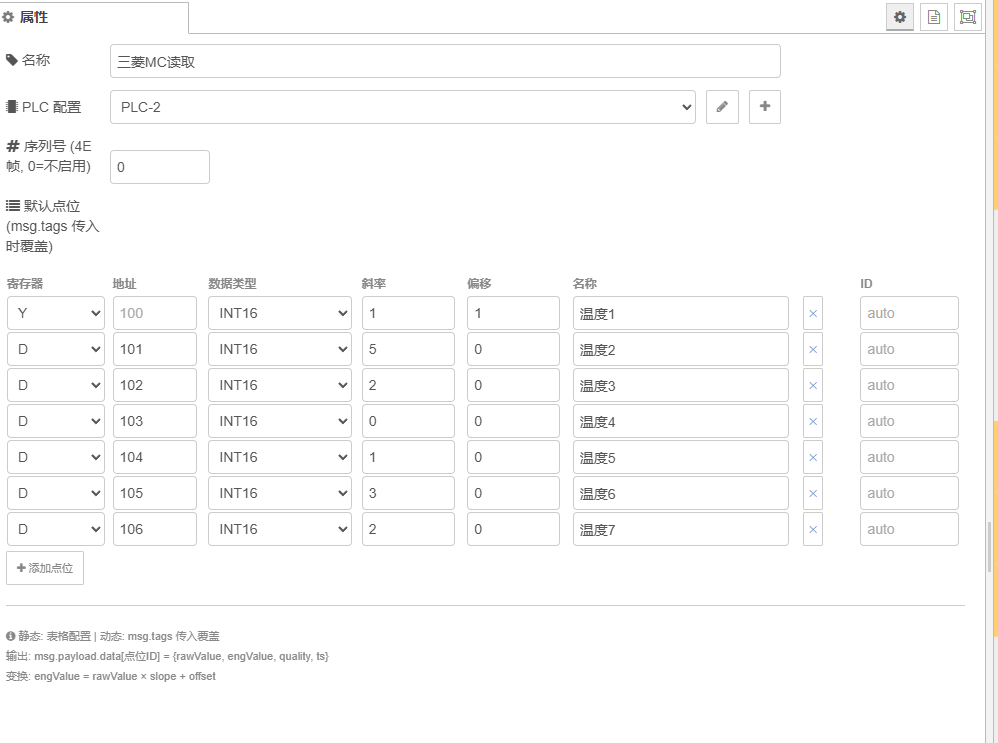
拖入 **`MC 读取`** 节点,关联 PLC 配置,在表格中添加点位:
|
|
99
|
+
|
|
100
|
+
| 寄存器 | 地址 | 数据类型 | 斜率 | 偏移 | 名称 |
|
|
101
|
+
|--------|------|----------|------|------|------|
|
|
102
|
+
| D | 100 | INT16 | 0.1 | 0 | 温度 |
|
|
103
|
+
| D | 200 | FLOAT32 | 1 | 0 | 压力 |
|
|
104
|
+
| X | 0 | BOOL | — | — | 开关 |
|
|
105
|
+
| D | 300 | UINT16 | 1 | 0 | 计数器 |
|
|
106
|
+
|
|
107
|
+
> **斜率/偏移公式**:`engValue = rawValue × slope + offset`
|
|
108
|
+
>
|
|
109
|
+
> 例如 PLC 存温度原始值 2530(实际 253.0℃),设斜率 = 0.1,偏移 = 0,输出 engValue = 253.0
|
|
110
|
+
|
|
111
|
+
### 3. 触发采集
|
|
112
|
+
|
|
113
|
+
inject 节点 → MC 读取节点,部署后点击 inject 按钮即可采集。
|
|
114
|
+
|
|
115
|
+
### 4. 动态点位(高级)
|
|
116
|
+
|
|
117
|
+
上游节点传入 `msg.tags` 会覆盖表格配置,适配 EdgeLink 采集管线:
|
|
118
|
+
|
|
119
|
+
```javascript
|
|
120
|
+
msg.tags = [
|
|
121
|
+
{ id: "温度", regType: "D", addr: 100, dataType: "INT16", slope: 0.1, offset: 0 },
|
|
122
|
+
{ id: "压力", regType: "D", addr: 200, dataType: "FLOAT32" }
|
|
123
|
+
];
|
|
124
|
+
```
|
|
39
125
|
|
|
40
|
-
|
|
126
|
+
---
|
|
41
127
|
|
|
42
|
-
|
|
128
|
+
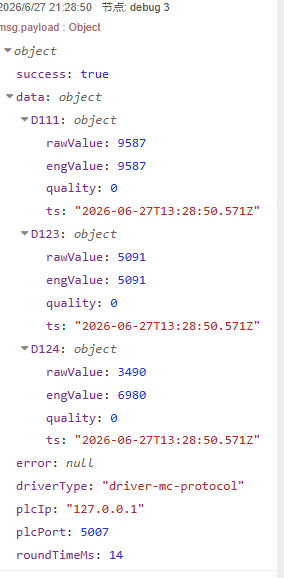
## 输出格式
|
|
129
|
+
|
|
130
|
+
### 正常采集
|
|
131
|
+
|
|
132
|
+
```javascript
|
|
133
|
+
msg.payload = {
|
|
134
|
+
success: true,
|
|
135
|
+
deviceId: "PLC-1", // 适配 edgelink-pg-store 动态分表
|
|
136
|
+
data: {
|
|
137
|
+
"温度": {
|
|
138
|
+
rawValue: 2530, // PLC 原始 int16
|
|
139
|
+
engValue: 253.0, // 解码后 × 斜率 + 偏移
|
|
140
|
+
quality: 0, // 0=正常 2=异常
|
|
141
|
+
ts: "2026-06-30T08:00:00.000Z",
|
|
142
|
+
regType: "D" // 寄存器类型
|
|
143
|
+
},
|
|
144
|
+
"压力": {
|
|
145
|
+
rawValue: 4123,
|
|
146
|
+
engValue: 41.23,
|
|
147
|
+
quality: 0,
|
|
148
|
+
ts: "2026-06-30T08:00:00.000Z",
|
|
149
|
+
regType: "D"
|
|
150
|
+
},
|
|
151
|
+
"开关": {
|
|
152
|
+
rawValue: 1,
|
|
153
|
+
engValue: 1,
|
|
154
|
+
quality: 0,
|
|
155
|
+
ts: "2026-06-30T08:00:00.000Z",
|
|
156
|
+
regType: "X"
|
|
157
|
+
}
|
|
158
|
+
},
|
|
159
|
+
error: null,
|
|
160
|
+
driverType: "driver-mc-protocol",
|
|
161
|
+
plcIp: "192.168.1.10",
|
|
162
|
+
plcPort: 5007,
|
|
163
|
+
roundTimeMs: 12
|
|
164
|
+
}
|
|
165
|
+
```
|
|
166
|
+
|
|
167
|
+
### PLC 读取失败
|
|
168
|
+
|
|
169
|
+
```javascript
|
|
170
|
+
msg.payload = {
|
|
171
|
+
success: false,
|
|
172
|
+
deviceId: "PLC-1",
|
|
173
|
+
data: {},
|
|
174
|
+
error: "[PLC 0xC052] Address out of range",
|
|
175
|
+
driverType: "driver-mc-protocol",
|
|
176
|
+
plcIp: "192.168.1.10",
|
|
177
|
+
plcPort: 5007,
|
|
178
|
+
roundTimeMs: 3012
|
|
179
|
+
}
|
|
180
|
+
```
|
|
181
|
+
|
|
182
|
+
### 网络故障
|
|
183
|
+
|
|
184
|
+
```javascript
|
|
185
|
+
msg.payload = {
|
|
186
|
+
success: false,
|
|
187
|
+
deviceId: "PLC-1",
|
|
188
|
+
data: {},
|
|
189
|
+
error: "[NETWORK] TCP closed (no data)",
|
|
190
|
+
...
|
|
191
|
+
}
|
|
192
|
+
```
|
|
193
|
+
|
|
194
|
+
---
|
|
195
|
+
|
|
196
|
+
## 架构
|
|
197
|
+
|
|
198
|
+
```
|
|
199
|
+
┌──────────┐ ┌─────────────────────────────┐ ┌──────────┐
|
|
200
|
+
│ inject / │ │ mitsubishi-read │ │ 三菱 PLC │
|
|
201
|
+
│ 动态tags │────→│ │────→│ │
|
|
202
|
+
└──────────┘ │ 1. 校验 + 清洗点位 │ │ Q / L / │
|
|
203
|
+
│ 2. 去重 + 聚类分组 │ │ iQ-R / │
|
|
204
|
+
│ 3. 逐组 3E/4E 帧请求 │ │ FX5U │
|
|
205
|
+
│ 4. 解码 + 斜率变换 │ └──────────┘
|
|
206
|
+
│ 5. 输出 {raw,eng,quality} │
|
|
207
|
+
└─────────────────────────────┘
|
|
208
|
+
|
|
209
|
+
帧构造: build3EFrame / build4EFrame
|
|
210
|
+
响应解析: parseMCResponse (subheader + endCode + serialNo + dataLen 校验)
|
|
211
|
+
错误分类: 19 个 MC 错误码 + 网络错误 + 脏帧拦截
|
|
212
|
+
锁机制: 按 host:port 维度全局锁,串行采集,60s 过期自释放
|
|
213
|
+
```
|
|
214
|
+
|
|
215
|
+
---
|
|
43
216
|
|
|
44
217
|
## 与 node-red-contrib-mcprotocol 对比
|
|
45
218
|
|
|
46
|
-
| | 本节点 | mcprotocol
|
|
47
|
-
|
|
48
|
-
| 点位数量 | N
|
|
49
|
-
| 批量优化 |
|
|
50
|
-
|
|
|
51
|
-
| 位元件 |
|
|
52
|
-
|
|
|
53
|
-
|
|
|
54
|
-
|
|
|
219
|
+
| 维度 | 本节点 | mcprotocol |
|
|
220
|
+
|------|--------|------------|
|
|
221
|
+
| 点位数量 | **N 个 / 节点** | 1 个 / 节点 |
|
|
222
|
+
| 批量优化 | **智能聚类合并** | 逐地址独立请求 |
|
|
223
|
+
| 数据类型 | **6 种** (INT16/UINT16/INT32/UINT32/FLOAT32/BOOL) | 仅 INT16 |
|
|
224
|
+
| 位元件 | **自动拆包** | 不支持 |
|
|
225
|
+
| 斜率偏移变换 | **内置** `rawValue × slope + offset` | 无 |
|
|
226
|
+
| 32位/浮点 | **自动读相邻寄存器 + 拼接** | 无 |
|
|
227
|
+
| serialNo | **每帧自增 + 回显校验** | 固定不变 |
|
|
228
|
+
| 错误诊断 | 19 个 MC 错误码可读 | "timeout" |
|
|
229
|
+
| 模拟模式 | ✅ `mcSimulationMode=true` | ❌ |
|
|
230
|
+
| deviceId 输出 | ✅ 适配 pg-store 分表 | ❌ |
|
|
231
|
+
| regType 输出 | ✅ 适配 pg-store 列映射 | ❌ |
|
|
232
|
+
| 依赖 | **0** (纯 Node.js) | mcprotocol 依赖 |
|
|
233
|
+
| 维护状态 | ✅ 活跃 | ⚠️ issue 长期未处理 |
|
|
234
|
+
|
|
235
|
+
---
|
|
236
|
+
|
|
237
|
+
## 模拟模式
|
|
238
|
+
|
|
239
|
+
在 Node-RED `settings.js` 中添加:
|
|
240
|
+
|
|
241
|
+
```javascript
|
|
242
|
+
mcSimulationMode: true
|
|
243
|
+
```
|
|
244
|
+
|
|
245
|
+
重启后所有 `MC 读取` 节点不连 PLC,直接返回随机仿真数据。用于离线开发、CI 测试、Demo 演示。
|
|
246
|
+
|
|
247
|
+
---
|
|
248
|
+
|
|
249
|
+
## 与 EdgeLink 生态集成
|
|
250
|
+
|
|
251
|
+
```
|
|
252
|
+
┌──────────────────┐ ┌──────────────────────┐ ┌──────────────────┐
|
|
253
|
+
│ node-red-contrib │ │ node-red-contrib │ │ PostgreSQL / │
|
|
254
|
+
│ -mitsubishi │────→│ -edgelink-pg │────→│ TimescaleDB │
|
|
255
|
+
│ (本节点) │ │ (PG 批量写入) │ │ │
|
|
256
|
+
└──────────────────┘ └──────────────────────┘ └──────────────────┘
|
|
257
|
+
```
|
|
258
|
+
|
|
259
|
+
本节点输出的 `deviceId`、`regType`、`rawValue`、`engValue`、`quality`、`ts` 字段可由 `edgelink-pg-store` 自动识别为 MC 驱动格式,零配置写入数据库。
|
|
260
|
+
|
|
261
|
+
---
|
|
262
|
+
|
|
263
|
+
## FAQ
|
|
264
|
+
|
|
265
|
+
**Q: 为什么不用连接池?**
|
|
266
|
+
MC 协议是无状态短连接。每次采集建立 TCP → 发送帧 → 接收响应 → 关闭。用连接池不会带来性能提升(TCP 握手开销远小于 PLC 扫描周期),反而有状态泄漏风险。
|
|
267
|
+
|
|
268
|
+
**Q: 能同时读多个 PLC 吗?**
|
|
269
|
+
可以。每个 `PLC 连接配置` 配置一个 PLC。多个 `MC 读取` 节点关联不同配置即可。全局锁按 `host:port` 隔离,不同 PLC 并行执行。
|
|
270
|
+
|
|
271
|
+
**Q: 点位地址能写成 "D100" 格式吗?**
|
|
272
|
+
可以。地址字段兼容 `"D100"` 格式(自动提取数字部分),也支持纯数字 `100`。
|
|
273
|
+
|
|
274
|
+
**Q: switch 元素一次最多读多少个点位?**
|
|
275
|
+
字元件单次最多 960 字,位元件单次最多 15360 点。超出自动拆组,无需手动干预。
|
|
276
|
+
|
|
277
|
+
**Q: 支持 FX3U 吗?**
|
|
278
|
+
带以太网模块(FX3U-ENET)支持 3E 帧。不带以太网模块的 FX3U 不支持(需要 1E 帧或串口)。
|
|
279
|
+
|
|
280
|
+
---
|
|
55
281
|
|
|
56
282
|
## 许可证
|
|
57
283
|
|
|
58
|
-
MIT
|
|
284
|
+
MIT · 可自由商用、修改、再发布
|
package/config.png
ADDED
|
Binary file
|
|
Binary file
|
|
Binary file
|
|
Binary file
|
|
@@ -1,62 +1,62 @@
|
|
|
1
|
-
<script type="text/x-red" data-template-name="mitsubishi-config">
|
|
2
|
-
<div class="form-row">
|
|
3
|
-
<label for="node-config-input-name"><i class="fa fa-tag"></i> 名称</label>
|
|
4
|
-
<input type="text" id="node-config-input-name" placeholder="PLC-1">
|
|
5
|
-
</div>
|
|
6
|
-
<div class="form-row">
|
|
7
|
-
<label for="node-config-input-host"><i class="fa fa-globe"></i> IP 地址</label>
|
|
8
|
-
<input type="text" id="node-config-input-host" placeholder="192.168.1.10">
|
|
9
|
-
</div>
|
|
10
|
-
<div class="form-row">
|
|
11
|
-
<label for="node-config-input-port"><i class="fa fa-plug"></i> 端口</label>
|
|
12
|
-
<input type="number" id="node-config-input-port" placeholder="5007" min="1" max="65535">
|
|
13
|
-
</div>
|
|
14
|
-
<div class="form-row">
|
|
15
|
-
<label for="node-config-input-frame"><i class="fa fa-exchange"></i> 帧格式</label>
|
|
16
|
-
<select id="node-config-input-frame">
|
|
17
|
-
<option value="3E">3E (Q/L/FX3U)</option>
|
|
18
|
-
<option value="4E">4E (iQ-R/iQ-F/FX5U)</option>
|
|
19
|
-
</select>
|
|
20
|
-
</div>
|
|
21
|
-
<div class="form-row">
|
|
22
|
-
<label for="node-config-input-networkNo"><i class="fa fa-sitemap"></i> 网络号</label>
|
|
23
|
-
<input type="number" id="node-config-input-networkNo" value="0" min="0" max="255">
|
|
24
|
-
</div>
|
|
25
|
-
<div class="form-row">
|
|
26
|
-
<label for="node-config-input-stationNo"><i class="fa fa-server"></i> 站号</label>
|
|
27
|
-
<input type="number" id="node-config-input-stationNo" value="0" min="0" max="255">
|
|
28
|
-
</div>
|
|
29
|
-
<div class="form-row">
|
|
30
|
-
<label for="node-config-input-timeout"><i class="fa fa-clock-o"></i> 超时 (ms)</label>
|
|
31
|
-
<input type="number" id="node-config-input-timeout" value="3000" min="500" max="30000">
|
|
32
|
-
</div>
|
|
33
|
-
<div class="form-row">
|
|
34
|
-
<label for="node-config-input-maxRetries"><i class="fa fa-repeat"></i> 重试次数</label>
|
|
35
|
-
<input type="number" id="node-config-input-maxRetries" value="2" min="0" max="10">
|
|
36
|
-
</div>
|
|
37
|
-
<div class="form-row">
|
|
38
|
-
<label for="node-config-input-retryInterval"><i class="fa fa-hourglass-half"></i> 重试间隔 (ms)</label>
|
|
39
|
-
<input type="number" id="node-config-input-retryInterval" value="300" min="50" max="10000">
|
|
40
|
-
</div>
|
|
41
|
-
</script>
|
|
42
|
-
|
|
43
|
-
<script type="text/javascript">
|
|
44
|
-
RED.nodes.registerType('mitsubishi-config', {
|
|
45
|
-
category: 'config',
|
|
46
|
-
defaults: {
|
|
47
|
-
name: { value: 'PLC-1' },
|
|
48
|
-
host: { value: '192.168.1.10', required: true },
|
|
49
|
-
port: { value: 5007, required: true, validate: RED.validators.number() },
|
|
50
|
-
frame: { value: '3E', required: true },
|
|
51
|
-
networkNo: { value: 0, validate: RED.validators.number() },
|
|
52
|
-
stationNo: { value: 0, validate: RED.validators.number() },
|
|
53
|
-
timeout: { value: 3000, validate: RED.validators.number() },
|
|
54
|
-
maxRetries: { value: 2, validate: RED.validators.number() },
|
|
55
|
-
retryInterval: { value: 300, validate: RED.validators.number() }
|
|
56
|
-
},
|
|
57
|
-
label: function () {
|
|
58
|
-
return this.name || 'PLC-1';
|
|
59
|
-
},
|
|
60
|
-
paletteLabel: 'PLC 连接配置'
|
|
61
|
-
});
|
|
62
|
-
</script>
|
|
1
|
+
<script type="text/x-red" data-template-name="mitsubishi-config">
|
|
2
|
+
<div class="form-row">
|
|
3
|
+
<label for="node-config-input-name"><i class="fa fa-tag"></i> 名称</label>
|
|
4
|
+
<input type="text" id="node-config-input-name" placeholder="PLC-1">
|
|
5
|
+
</div>
|
|
6
|
+
<div class="form-row">
|
|
7
|
+
<label for="node-config-input-host"><i class="fa fa-globe"></i> IP 地址</label>
|
|
8
|
+
<input type="text" id="node-config-input-host" placeholder="192.168.1.10">
|
|
9
|
+
</div>
|
|
10
|
+
<div class="form-row">
|
|
11
|
+
<label for="node-config-input-port"><i class="fa fa-plug"></i> 端口</label>
|
|
12
|
+
<input type="number" id="node-config-input-port" placeholder="5007" min="1" max="65535">
|
|
13
|
+
</div>
|
|
14
|
+
<div class="form-row">
|
|
15
|
+
<label for="node-config-input-frame"><i class="fa fa-exchange"></i> 帧格式</label>
|
|
16
|
+
<select id="node-config-input-frame">
|
|
17
|
+
<option value="3E">3E (Q/L/FX3U)</option>
|
|
18
|
+
<option value="4E">4E (iQ-R/iQ-F/FX5U)</option>
|
|
19
|
+
</select>
|
|
20
|
+
</div>
|
|
21
|
+
<div class="form-row">
|
|
22
|
+
<label for="node-config-input-networkNo"><i class="fa fa-sitemap"></i> 网络号</label>
|
|
23
|
+
<input type="number" id="node-config-input-networkNo" value="0" min="0" max="255">
|
|
24
|
+
</div>
|
|
25
|
+
<div class="form-row">
|
|
26
|
+
<label for="node-config-input-stationNo"><i class="fa fa-server"></i> 站号</label>
|
|
27
|
+
<input type="number" id="node-config-input-stationNo" value="0" min="0" max="255">
|
|
28
|
+
</div>
|
|
29
|
+
<div class="form-row">
|
|
30
|
+
<label for="node-config-input-timeout"><i class="fa fa-clock-o"></i> 超时 (ms)</label>
|
|
31
|
+
<input type="number" id="node-config-input-timeout" value="3000" min="500" max="30000">
|
|
32
|
+
</div>
|
|
33
|
+
<div class="form-row">
|
|
34
|
+
<label for="node-config-input-maxRetries"><i class="fa fa-repeat"></i> 重试次数</label>
|
|
35
|
+
<input type="number" id="node-config-input-maxRetries" value="2" min="0" max="10">
|
|
36
|
+
</div>
|
|
37
|
+
<div class="form-row">
|
|
38
|
+
<label for="node-config-input-retryInterval"><i class="fa fa-hourglass-half"></i> 重试间隔 (ms)</label>
|
|
39
|
+
<input type="number" id="node-config-input-retryInterval" value="300" min="50" max="10000">
|
|
40
|
+
</div>
|
|
41
|
+
</script>
|
|
42
|
+
|
|
43
|
+
<script type="text/javascript">
|
|
44
|
+
RED.nodes.registerType('mitsubishi-config', {
|
|
45
|
+
category: 'config',
|
|
46
|
+
defaults: {
|
|
47
|
+
name: { value: 'PLC-1' },
|
|
48
|
+
host: { value: '192.168.1.10', required: true },
|
|
49
|
+
port: { value: 5007, required: true, validate: RED.validators.number() },
|
|
50
|
+
frame: { value: '3E', required: true },
|
|
51
|
+
networkNo: { value: 0, validate: RED.validators.number() },
|
|
52
|
+
stationNo: { value: 0, validate: RED.validators.number() },
|
|
53
|
+
timeout: { value: 3000, validate: RED.validators.number() },
|
|
54
|
+
maxRetries: { value: 2, validate: RED.validators.number() },
|
|
55
|
+
retryInterval: { value: 300, validate: RED.validators.number() }
|
|
56
|
+
},
|
|
57
|
+
label: function () {
|
|
58
|
+
return this.name || 'PLC-1';
|
|
59
|
+
},
|
|
60
|
+
paletteLabel: 'PLC 连接配置'
|
|
61
|
+
});
|
|
62
|
+
</script>
|
|
@@ -1,21 +1,21 @@
|
|
|
1
|
-
/**
|
|
2
|
-
* mitsubishi-config — 三菱 PLC 连接配置节点
|
|
3
|
-
* 保存 IP、端口、帧格式等连接参数,供 mitsubishi-read 节点引用
|
|
4
|
-
*/
|
|
5
|
-
module.exports = function (RED) {
|
|
6
|
-
function MitsubishiConfigNode(config) {
|
|
7
|
-
RED.nodes.createNode(this, config);
|
|
8
|
-
this.name = config.name || 'PLC-1';
|
|
9
|
-
this.host = config.host || '192.168.1.10';
|
|
10
|
-
this.port = parseInt(config.port, 10) || 5007;
|
|
11
|
-
this.frame = config.frame || '3E';
|
|
12
|
-
this.networkNo = parseInt(config.networkNo, 10) || 0;
|
|
13
|
-
this.stationNo = parseInt(config.stationNo, 10) || 0;
|
|
14
|
-
this.timeout = parseInt(config.timeout, 10) || 3000;
|
|
15
|
-
this.maxRetries = parseInt(config.maxRetries, 10);
|
|
16
|
-
if (isNaN(this.maxRetries)) this.maxRetries = 2;
|
|
17
|
-
this.retryInterval = parseInt(config.retryInterval, 10);
|
|
18
|
-
if (isNaN(this.retryInterval)) this.retryInterval = 300;
|
|
19
|
-
}
|
|
20
|
-
RED.nodes.registerType('mitsubishi-config', MitsubishiConfigNode);
|
|
21
|
-
};
|
|
1
|
+
/**
|
|
2
|
+
* mitsubishi-config — 三菱 PLC 连接配置节点
|
|
3
|
+
* 保存 IP、端口、帧格式等连接参数,供 mitsubishi-read 节点引用
|
|
4
|
+
*/
|
|
5
|
+
module.exports = function (RED) {
|
|
6
|
+
function MitsubishiConfigNode(config) {
|
|
7
|
+
RED.nodes.createNode(this, config);
|
|
8
|
+
this.name = config.name || 'PLC-1';
|
|
9
|
+
this.host = config.host || '192.168.1.10';
|
|
10
|
+
this.port = parseInt(config.port, 10) || 5007;
|
|
11
|
+
this.frame = config.frame || '3E';
|
|
12
|
+
this.networkNo = parseInt(config.networkNo, 10) || 0;
|
|
13
|
+
this.stationNo = parseInt(config.stationNo, 10) || 0;
|
|
14
|
+
this.timeout = parseInt(config.timeout, 10) || 3000;
|
|
15
|
+
this.maxRetries = parseInt(config.maxRetries, 10);
|
|
16
|
+
if (isNaN(this.maxRetries)) this.maxRetries = 2;
|
|
17
|
+
this.retryInterval = parseInt(config.retryInterval, 10);
|
|
18
|
+
if (isNaN(this.retryInterval)) this.retryInterval = 300;
|
|
19
|
+
}
|
|
20
|
+
RED.nodes.registerType('mitsubishi-config', MitsubishiConfigNode);
|
|
21
|
+
};
|
|
@@ -1,152 +1,152 @@
|
|
|
1
|
-
<script type="text/x-red" data-template-name="mitsubishi-read">
|
|
2
|
-
<div class="form-row">
|
|
3
|
-
<label for="node-input-name"><i class="fa fa-tag"></i> 名称</label>
|
|
4
|
-
<input type="text" id="node-input-name" placeholder="三菱MC读取">
|
|
5
|
-
</div>
|
|
6
|
-
<div class="form-row">
|
|
7
|
-
<label for="node-input-plc"><i class="fa fa-microchip"></i> PLC 配置</label>
|
|
8
|
-
<input type="text" id="node-input-plc" placeholder="选择 mitsubishi-config 节点">
|
|
9
|
-
</div>
|
|
10
|
-
<div class="form-row">
|
|
11
|
-
<label for="node-input-serialNo"><i class="fa fa-hashtag"></i> 序列号 (4E帧, 0=不启用)</label>
|
|
12
|
-
<input type="number" id="node-input-serialNo" value="0" min="0" max="65535" style="width:100px">
|
|
13
|
-
</div>
|
|
14
|
-
|
|
15
|
-
<!-- 点位编辑表格 -->
|
|
16
|
-
<div class="form-row" style="margin-top:8px">
|
|
17
|
-
<label><i class="fa fa-list"></i> 默认点位 (msg.tags 传入时覆盖)</label>
|
|
18
|
-
</div>
|
|
19
|
-
<div style="margin-bottom:4px">
|
|
20
|
-
<table style="width:100%;font-size:12px;border-collapse:collapse">
|
|
21
|
-
<thead>
|
|
22
|
-
<tr style="color:#888">
|
|
23
|
-
<th style="width:11%;text-align:left">寄存器</th>
|
|
24
|
-
<th style="width:10%;text-align:left">地址</th>
|
|
25
|
-
<th style="width:16%;text-align:left">数据类型</th>
|
|
26
|
-
<th style="width:11%;text-align:left">斜率</th>
|
|
27
|
-
<th style="width:11%;text-align:left">偏移</th>
|
|
28
|
-
<th style="width:24%;text-align:left">名称</th>
|
|
29
|
-
<th style="width:6%"></th>
|
|
30
|
-
<th style="width:11%;text-align:left">ID</th>
|
|
31
|
-
</tr>
|
|
32
|
-
</thead>
|
|
33
|
-
<tbody id="tags-tbody"></tbody>
|
|
34
|
-
</table>
|
|
35
|
-
<button class="red-ui-button" onclick="addTagRow()" style="margin-top:4px;font-size:11px">
|
|
36
|
-
<i class="fa fa-plus"></i> 添加点位
|
|
37
|
-
</button>
|
|
38
|
-
</div>
|
|
39
|
-
<input type="hidden" id="node-input-tags">
|
|
40
|
-
|
|
41
|
-
<hr>
|
|
42
|
-
<div style="color:#888;font-size:11px;margin-bottom:4px">
|
|
43
|
-
<i class="fa fa-info-circle"></i> 静态: 表格配置 | 动态: msg.tags 传入覆盖<br>
|
|
44
|
-
输出: msg.payload.data[点位ID] = {rawValue, engValue, quality, ts}<br>
|
|
45
|
-
变换: engValue = rawValue × slope + offset
|
|
46
|
-
</div>
|
|
47
|
-
</script>
|
|
48
|
-
|
|
49
|
-
<script type="text/javascript">
|
|
50
|
-
var tagEditor = {
|
|
51
|
-
rows: [],
|
|
52
|
-
init: function () {
|
|
53
|
-
try { this.rows = JSON.parse($('#node-input-tags').val() || '[]'); } catch (e) { this.rows = []; }
|
|
54
|
-
this.render();
|
|
55
|
-
},
|
|
56
|
-
add: function () {
|
|
57
|
-
this.rows.push({ id: '', regType: 'D', addr: '', dataType: 'INT16', slope: '1', offset: '0', name: '' });
|
|
58
|
-
this.render();
|
|
59
|
-
this.save();
|
|
60
|
-
},
|
|
61
|
-
remove: function (idx) {
|
|
62
|
-
this.rows.splice(idx, 1);
|
|
63
|
-
this.render();
|
|
64
|
-
this.save();
|
|
65
|
-
},
|
|
66
|
-
update: function (idx, field, val) {
|
|
67
|
-
this.rows[idx][field] = val;
|
|
68
|
-
this.save();
|
|
69
|
-
},
|
|
70
|
-
save: function () {
|
|
71
|
-
$('#node-input-tags').val(JSON.stringify(this.rows));
|
|
72
|
-
},
|
|
73
|
-
render: function () {
|
|
74
|
-
var self = this;
|
|
75
|
-
var tbody = $('#tags-tbody');
|
|
76
|
-
tbody.empty();
|
|
77
|
-
this.rows.forEach(function (row, idx) {
|
|
78
|
-
var tr = $('<tr>');
|
|
79
|
-
var mkOpt = function (vals, cur) {
|
|
80
|
-
var s = '';
|
|
81
|
-
vals.forEach(function (v) { s += '<option' + (cur === v ? ' selected' : '') + '>' + v + '</option>'; });
|
|
82
|
-
return s;
|
|
83
|
-
};
|
|
84
|
-
var mkSel = function (vals, cur) { return $('<select style="width:95%">' + mkOpt(vals, cur) + '</select>'); };
|
|
85
|
-
|
|
86
|
-
// 寄存器
|
|
87
|
-
var reg = mkSel(['D','W','R','X','Y','M','L','B'], row.regType || 'D');
|
|
88
|
-
reg.on('change', function () { self.update(idx, 'regType', $(this).val()); });
|
|
89
|
-
tr.append($('<td>').append(reg));
|
|
90
|
-
|
|
91
|
-
// 地址
|
|
92
|
-
var addr = $('<input type="text" style="width:90%" placeholder="100">').val(row.addr || '');
|
|
93
|
-
addr.on('change', function () { self.update(idx, 'addr', $(this).val()); });
|
|
94
|
-
tr.append($('<td>').append(addr));
|
|
95
|
-
|
|
96
|
-
// 数据类型
|
|
97
|
-
var dt = mkSel(['INT16','UINT16','INT32','UINT32','FLOAT32','BOOL'], row.dataType || 'INT16');
|
|
98
|
-
dt.on('change', function () { self.update(idx, 'dataType', $(this).val()); });
|
|
99
|
-
tr.append($('<td>').append(dt));
|
|
100
|
-
|
|
101
|
-
// 斜率
|
|
102
|
-
var slope = $('<input type="number" style="width:90%" step="any" placeholder="1">').val(row.slope || '1');
|
|
103
|
-
slope.on('change', function () { self.update(idx, 'slope', $(this).val()); });
|
|
104
|
-
tr.append($('<td>').append(slope));
|
|
105
|
-
|
|
106
|
-
// 偏移
|
|
107
|
-
var off = $('<input type="number" style="width:90%" step="any" placeholder="0">').val(row.offset || '0');
|
|
108
|
-
off.on('change', function () { self.update(idx, 'offset', $(this).val()); });
|
|
109
|
-
tr.append($('<td>').append(off));
|
|
110
|
-
|
|
111
|
-
// 名称
|
|
112
|
-
var nm = $('<input type="text" style="width:95%" placeholder="温度">').val(row.name || '');
|
|
113
|
-
nm.on('change', function () { self.update(idx, 'name', $(this).val()); });
|
|
114
|
-
tr.append($('<td>').append(nm));
|
|
115
|
-
|
|
116
|
-
// 删除
|
|
117
|
-
var del = $('<button class="red-ui-button" style="font-size:10px;padding:1px 5px">✕</button>');
|
|
118
|
-
del.on('click', function (e) { e.preventDefault(); self.remove(idx); });
|
|
119
|
-
tr.append($('<td>').append(del));
|
|
120
|
-
|
|
121
|
-
// ID (自动生成或手动填)
|
|
122
|
-
var id = $('<input type="text" style="width:95%" placeholder="auto">').val(row.id || '');
|
|
123
|
-
id.on('change', function () { self.update(idx, 'id', $(this).val()); });
|
|
124
|
-
tr.append($('<td>').append(id));
|
|
125
|
-
|
|
126
|
-
tbody.append(tr);
|
|
127
|
-
});
|
|
128
|
-
}
|
|
129
|
-
};
|
|
130
|
-
|
|
131
|
-
RED.nodes.registerType('mitsubishi-read', {
|
|
132
|
-
category: '三菱 PLC',
|
|
133
|
-
color: '#C7E9C0',
|
|
134
|
-
defaults: {
|
|
135
|
-
name: { value: '三菱MC读取' },
|
|
136
|
-
plc: { type: 'mitsubishi-config', required: true },
|
|
137
|
-
serialNo: { value: 0 },
|
|
138
|
-
tags: { value: '[]' }
|
|
139
|
-
},
|
|
140
|
-
inputs: 1,
|
|
141
|
-
outputs: 1,
|
|
142
|
-
paletteLabel: 'MC 读取',
|
|
143
|
-
label: function () { return this.name || '三菱MC读取'; },
|
|
144
|
-
oneditprepare: function () {
|
|
145
|
-
tagEditor.init();
|
|
146
|
-
window.addTagRow = function () { tagEditor.add(); };
|
|
147
|
-
},
|
|
148
|
-
oneditsave: function () {
|
|
149
|
-
delete window.addTagRow;
|
|
150
|
-
}
|
|
151
|
-
});
|
|
152
|
-
</script>
|
|
1
|
+
<script type="text/x-red" data-template-name="mitsubishi-read">
|
|
2
|
+
<div class="form-row">
|
|
3
|
+
<label for="node-input-name"><i class="fa fa-tag"></i> 名称</label>
|
|
4
|
+
<input type="text" id="node-input-name" placeholder="三菱MC读取">
|
|
5
|
+
</div>
|
|
6
|
+
<div class="form-row">
|
|
7
|
+
<label for="node-input-plc"><i class="fa fa-microchip"></i> PLC 配置</label>
|
|
8
|
+
<input type="text" id="node-input-plc" placeholder="选择 mitsubishi-config 节点">
|
|
9
|
+
</div>
|
|
10
|
+
<div class="form-row">
|
|
11
|
+
<label for="node-input-serialNo"><i class="fa fa-hashtag"></i> 序列号 (4E帧, 0=不启用)</label>
|
|
12
|
+
<input type="number" id="node-input-serialNo" value="0" min="0" max="65535" style="width:100px">
|
|
13
|
+
</div>
|
|
14
|
+
|
|
15
|
+
<!-- 点位编辑表格 -->
|
|
16
|
+
<div class="form-row" style="margin-top:8px">
|
|
17
|
+
<label><i class="fa fa-list"></i> 默认点位 (msg.tags 传入时覆盖)</label>
|
|
18
|
+
</div>
|
|
19
|
+
<div style="margin-bottom:4px">
|
|
20
|
+
<table style="width:100%;font-size:12px;border-collapse:collapse">
|
|
21
|
+
<thead>
|
|
22
|
+
<tr style="color:#888">
|
|
23
|
+
<th style="width:11%;text-align:left">寄存器</th>
|
|
24
|
+
<th style="width:10%;text-align:left">地址</th>
|
|
25
|
+
<th style="width:16%;text-align:left">数据类型</th>
|
|
26
|
+
<th style="width:11%;text-align:left">斜率</th>
|
|
27
|
+
<th style="width:11%;text-align:left">偏移</th>
|
|
28
|
+
<th style="width:24%;text-align:left">名称</th>
|
|
29
|
+
<th style="width:6%"></th>
|
|
30
|
+
<th style="width:11%;text-align:left">ID</th>
|
|
31
|
+
</tr>
|
|
32
|
+
</thead>
|
|
33
|
+
<tbody id="tags-tbody"></tbody>
|
|
34
|
+
</table>
|
|
35
|
+
<button class="red-ui-button" onclick="addTagRow()" style="margin-top:4px;font-size:11px">
|
|
36
|
+
<i class="fa fa-plus"></i> 添加点位
|
|
37
|
+
</button>
|
|
38
|
+
</div>
|
|
39
|
+
<input type="hidden" id="node-input-tags">
|
|
40
|
+
|
|
41
|
+
<hr>
|
|
42
|
+
<div style="color:#888;font-size:11px;margin-bottom:4px">
|
|
43
|
+
<i class="fa fa-info-circle"></i> 静态: 表格配置 | 动态: msg.tags 传入覆盖<br>
|
|
44
|
+
输出: msg.payload.data[点位ID] = {rawValue, engValue, quality, ts}<br>
|
|
45
|
+
变换: engValue = rawValue × slope + offset
|
|
46
|
+
</div>
|
|
47
|
+
</script>
|
|
48
|
+
|
|
49
|
+
<script type="text/javascript">
|
|
50
|
+
var tagEditor = {
|
|
51
|
+
rows: [],
|
|
52
|
+
init: function () {
|
|
53
|
+
try { this.rows = JSON.parse($('#node-input-tags').val() || '[]'); } catch (e) { this.rows = []; }
|
|
54
|
+
this.render();
|
|
55
|
+
},
|
|
56
|
+
add: function () {
|
|
57
|
+
this.rows.push({ id: '', regType: 'D', addr: '', dataType: 'INT16', slope: '1', offset: '0', name: '' });
|
|
58
|
+
this.render();
|
|
59
|
+
this.save();
|
|
60
|
+
},
|
|
61
|
+
remove: function (idx) {
|
|
62
|
+
this.rows.splice(idx, 1);
|
|
63
|
+
this.render();
|
|
64
|
+
this.save();
|
|
65
|
+
},
|
|
66
|
+
update: function (idx, field, val) {
|
|
67
|
+
this.rows[idx][field] = val;
|
|
68
|
+
this.save();
|
|
69
|
+
},
|
|
70
|
+
save: function () {
|
|
71
|
+
$('#node-input-tags').val(JSON.stringify(this.rows));
|
|
72
|
+
},
|
|
73
|
+
render: function () {
|
|
74
|
+
var self = this;
|
|
75
|
+
var tbody = $('#tags-tbody');
|
|
76
|
+
tbody.empty();
|
|
77
|
+
this.rows.forEach(function (row, idx) {
|
|
78
|
+
var tr = $('<tr>');
|
|
79
|
+
var mkOpt = function (vals, cur) {
|
|
80
|
+
var s = '';
|
|
81
|
+
vals.forEach(function (v) { s += '<option' + (cur === v ? ' selected' : '') + '>' + v + '</option>'; });
|
|
82
|
+
return s;
|
|
83
|
+
};
|
|
84
|
+
var mkSel = function (vals, cur) { return $('<select style="width:95%">' + mkOpt(vals, cur) + '</select>'); };
|
|
85
|
+
|
|
86
|
+
// 寄存器
|
|
87
|
+
var reg = mkSel(['D','W','R','X','Y','M','L','B'], row.regType || 'D');
|
|
88
|
+
reg.on('change', function () { self.update(idx, 'regType', $(this).val()); });
|
|
89
|
+
tr.append($('<td>').append(reg));
|
|
90
|
+
|
|
91
|
+
// 地址
|
|
92
|
+
var addr = $('<input type="text" style="width:90%" placeholder="100">').val(row.addr || '');
|
|
93
|
+
addr.on('change', function () { self.update(idx, 'addr', $(this).val()); });
|
|
94
|
+
tr.append($('<td>').append(addr));
|
|
95
|
+
|
|
96
|
+
// 数据类型
|
|
97
|
+
var dt = mkSel(['INT16','UINT16','INT32','UINT32','FLOAT32','BOOL'], row.dataType || 'INT16');
|
|
98
|
+
dt.on('change', function () { self.update(idx, 'dataType', $(this).val()); });
|
|
99
|
+
tr.append($('<td>').append(dt));
|
|
100
|
+
|
|
101
|
+
// 斜率
|
|
102
|
+
var slope = $('<input type="number" style="width:90%" step="any" placeholder="1">').val(row.slope || '1');
|
|
103
|
+
slope.on('change', function () { self.update(idx, 'slope', $(this).val()); });
|
|
104
|
+
tr.append($('<td>').append(slope));
|
|
105
|
+
|
|
106
|
+
// 偏移
|
|
107
|
+
var off = $('<input type="number" style="width:90%" step="any" placeholder="0">').val(row.offset || '0');
|
|
108
|
+
off.on('change', function () { self.update(idx, 'offset', $(this).val()); });
|
|
109
|
+
tr.append($('<td>').append(off));
|
|
110
|
+
|
|
111
|
+
// 名称
|
|
112
|
+
var nm = $('<input type="text" style="width:95%" placeholder="温度">').val(row.name || '');
|
|
113
|
+
nm.on('change', function () { self.update(idx, 'name', $(this).val()); });
|
|
114
|
+
tr.append($('<td>').append(nm));
|
|
115
|
+
|
|
116
|
+
// 删除
|
|
117
|
+
var del = $('<button class="red-ui-button" style="font-size:10px;padding:1px 5px">✕</button>');
|
|
118
|
+
del.on('click', function (e) { e.preventDefault(); self.remove(idx); });
|
|
119
|
+
tr.append($('<td>').append(del));
|
|
120
|
+
|
|
121
|
+
// ID (自动生成或手动填)
|
|
122
|
+
var id = $('<input type="text" style="width:95%" placeholder="auto">').val(row.id || '');
|
|
123
|
+
id.on('change', function () { self.update(idx, 'id', $(this).val()); });
|
|
124
|
+
tr.append($('<td>').append(id));
|
|
125
|
+
|
|
126
|
+
tbody.append(tr);
|
|
127
|
+
});
|
|
128
|
+
}
|
|
129
|
+
};
|
|
130
|
+
|
|
131
|
+
RED.nodes.registerType('mitsubishi-read', {
|
|
132
|
+
category: '三菱 PLC',
|
|
133
|
+
color: '#C7E9C0',
|
|
134
|
+
defaults: {
|
|
135
|
+
name: { value: '三菱MC读取' },
|
|
136
|
+
plc: { type: 'mitsubishi-config', required: true },
|
|
137
|
+
serialNo: { value: 0 },
|
|
138
|
+
tags: { value: '[]' }
|
|
139
|
+
},
|
|
140
|
+
inputs: 1,
|
|
141
|
+
outputs: 1,
|
|
142
|
+
paletteLabel: 'MC 读取',
|
|
143
|
+
label: function () { return this.name || '三菱MC读取'; },
|
|
144
|
+
oneditprepare: function () {
|
|
145
|
+
tagEditor.init();
|
|
146
|
+
window.addTagRow = function () { tagEditor.add(); };
|
|
147
|
+
},
|
|
148
|
+
oneditsave: function () {
|
|
149
|
+
delete window.addTagRow;
|
|
150
|
+
}
|
|
151
|
+
});
|
|
152
|
+
</script>
|
package/nodes/mitsubishi-read.js
CHANGED
|
@@ -200,7 +200,8 @@ module.exports = function (RED) {
|
|
|
200
200
|
var raw = BIT_DEVICES[t.regType] ? (Math.random() > 0.5 ? 1 : 0) : Math.floor(Math.random() * 1000);
|
|
201
201
|
simOut[t.id] = { rawValue: raw, engValue: applyTransform(raw, t), quality: 0, ts: new Date().toISOString() };
|
|
202
202
|
});
|
|
203
|
-
|
|
203
|
+
var devId = plc.name || (plc.host + ':' + plc.port);
|
|
204
|
+
msg.payload = { success: true, deviceId: devId, data: simOut, error: null, roundTimeMs: Date.now() - roundStart };
|
|
204
205
|
node.status({ fill: 'green', shape: 'dot', text: 'SIM ' + validTags.length + ' tags' });
|
|
205
206
|
node.send(msg);
|
|
206
207
|
return;
|
|
@@ -273,15 +274,17 @@ module.exports = function (RED) {
|
|
|
273
274
|
var entry = allRaw[t.id];
|
|
274
275
|
if (entry) {
|
|
275
276
|
output[t.id] = {
|
|
276
|
-
rawValue: entry.rawValue,
|
|
277
|
-
engValue: applyTransform(entry.
|
|
277
|
+
rawValue: entry.rawValue, // PLC 原始 int16
|
|
278
|
+
engValue: applyTransform(entry.convertedValue, t), // 解码值 × slope + offset
|
|
278
279
|
quality: entry.quality,
|
|
279
|
-
ts: entry.ts
|
|
280
|
+
ts: entry.ts,
|
|
281
|
+
regType: t.regType
|
|
280
282
|
};
|
|
281
283
|
}
|
|
282
284
|
});
|
|
283
285
|
msg.payload = {
|
|
284
286
|
success: !hasFailed,
|
|
287
|
+
deviceId: plc.name || (plc.host + ':' + plc.port),
|
|
285
288
|
data: output,
|
|
286
289
|
error: hasFailed ? firstError : null,
|
|
287
290
|
driverType: 'driver-mc-protocol',
|
|
@@ -336,8 +339,8 @@ module.exports = function (RED) {
|
|
|
336
339
|
return;
|
|
337
340
|
}
|
|
338
341
|
|
|
339
|
-
if (frameType === '4E' && currentSN > 0) currentSN = (currentSN + 1) & 0xFFFF;
|
|
340
342
|
var sentSN = (frameType === '4E' && currentSN > 0) ? currentSN : 0;
|
|
343
|
+
if (frameType === '4E' && currentSN > 0) currentSN = (currentSN + 1) & 0xFFFF;
|
|
341
344
|
|
|
342
345
|
var client = new net.Socket();
|
|
343
346
|
var buf = Buffer.alloc(0);
|
|
@@ -380,29 +383,30 @@ module.exports = function (RED) {
|
|
|
380
383
|
} else if (raw && !raw.err) {
|
|
381
384
|
grp.tags.forEach(function (t) {
|
|
382
385
|
var key = grp.regType + t.addr;
|
|
383
|
-
var
|
|
386
|
+
var originRv = raw[key]; // PLC 原始 int16
|
|
387
|
+
var cv = originRv; // 解码后的值
|
|
384
388
|
var q = 0;
|
|
385
|
-
if (
|
|
389
|
+
if (originRv === undefined || originRv === null) { q = 2; originRv = null; cv = null; }
|
|
386
390
|
else if (!isBit) {
|
|
387
391
|
var dt = t.dataType || 'INT16';
|
|
388
|
-
if (dt === 'UINT16') { if (
|
|
392
|
+
if (dt === 'UINT16') { if (cv < 0) cv += 65536; }
|
|
389
393
|
else if (dt === 'INT32' || dt === 'UINT32' || dt === 'FLOAT32') {
|
|
390
394
|
var adj = raw[grp.regType + (t.addr + 1)];
|
|
391
|
-
if (adj === undefined || adj === null) { q = 2;
|
|
395
|
+
if (adj === undefined || adj === null) { q = 2; originRv = null; cv = null; }
|
|
392
396
|
else {
|
|
393
|
-
var hi =
|
|
397
|
+
var hi = originRv, lo = adj;
|
|
394
398
|
var combined = (hi << 16) | (lo & 0xFFFF);
|
|
395
|
-
if (dt === 'INT32')
|
|
396
|
-
else if (dt === 'UINT32')
|
|
399
|
+
if (dt === 'INT32') cv = (combined > 0x7FFFFFFF) ? combined - 0x100000000 : combined;
|
|
400
|
+
else if (dt === 'UINT32') cv = combined >>> 0;
|
|
397
401
|
else if (dt === 'FLOAT32') {
|
|
398
402
|
var b32 = Buffer.alloc(4);
|
|
399
403
|
b32.writeInt16LE(hi, 0); b32.writeInt16LE(lo, 2);
|
|
400
|
-
|
|
404
|
+
cv = parseFloat(b32.readFloatLE(0).toFixed(4));
|
|
401
405
|
}
|
|
402
406
|
}
|
|
403
407
|
}
|
|
404
408
|
}
|
|
405
|
-
allRaw[t.id] = { rawValue:
|
|
409
|
+
allRaw[t.id] = { rawValue: originRv, convertedValue: cv, quality: q, ts: new Date().toISOString() };
|
|
406
410
|
});
|
|
407
411
|
_destroyedByUs = true; try { client.destroy(); } catch (e) {}
|
|
408
412
|
setTimeout(function () { processGroup(gi + 1); }, 0);
|
|
@@ -462,6 +466,20 @@ module.exports = function (RED) {
|
|
|
462
466
|
node.send(msg);
|
|
463
467
|
}
|
|
464
468
|
});
|
|
469
|
+
|
|
470
|
+
// ===== close: 释放锁防止死锁漂移 =====
|
|
471
|
+
node.on('close', function (done) {
|
|
472
|
+
try {
|
|
473
|
+
var p2 = node.plcConfig;
|
|
474
|
+
if (p2 && p2.host) {
|
|
475
|
+
var lk = 'edge_mc_lock_' + p2.host + '_' + p2.port;
|
|
476
|
+
delete global._mcLocks[lk];
|
|
477
|
+
}
|
|
478
|
+
} catch (e) {}
|
|
479
|
+
node.status({ fill: 'grey', shape: 'dot', text: 'closed' });
|
|
480
|
+
if (typeof done === 'function') done();
|
|
481
|
+
});
|
|
482
|
+
|
|
465
483
|
}
|
|
466
484
|
|
|
467
485
|
RED.nodes.registerType('mitsubishi-read', MitsubishiReadNode);
|
package/output.png
ADDED
|
Binary file
|
package/package.json
CHANGED
package/palette.png
ADDED
|
Binary file
|