node-red-contrib-line-messaging-api 0.4.1 → 0.4.3
This diff represents the content of publicly available package versions that have been released to one of the supported registries. The information contained in this diff is provided for informational purposes only and reflects changes between package versions as they appear in their respective public registries.
- package/.claude/settings.local.json +12 -0
- package/CLAUDE.md +193 -0
- package/README.ja.md +171 -0
- package/README.md +94 -61
- package/nodes/_new/push/push.js +1 -1
- package/nodes/_new/reply/reply.html +6 -7
- package/nodes/_new/reply/reply.js +1 -1
- package/nodes/bloadcast/bloadcast.html +4 -4
- package/nodes/bloadcast/locales/ja/bloadcast.json +9 -0
- package/nodes/config/config.html +105 -31
- package/nodes/config/config.js +2 -2
- package/nodes/config/locales/en-US/config.json +14 -0
- package/nodes/config/locales/ja/config.json +14 -0
- package/nodes/getBotInfo/getBotInfo.html +11 -8
- package/nodes/getBotInfo/locales/en-US/getBotInfo.json +9 -0
- package/nodes/getBotInfo/locales/ja/getBotInfo.json +9 -0
- package/nodes/getProfile/getProfile.html +6 -6
- package/nodes/getProfile/locales/en-US/getProfile.json +8 -0
- package/nodes/getProfile/locales/ja/getProfile.json +8 -0
- package/nodes/limit/limit.html +3 -3
- package/nodes/limit/locales/ja/limit.json +8 -0
- package/nodes/loading/loading.html +7 -10
- package/nodes/loading/locales/ja/loading.json +10 -0
- package/nodes/push/locales/ja/push.json +10 -0
- package/nodes/push/push.html +4 -5
- package/nodes/reply/locales/ja/reply.json +7 -0
- package/nodes/reply/reply.html +5 -5
- package/nodes/webhook/locales/en-US/Webhook.json +8 -0
- package/nodes/webhook/locales/ja/Webhook.json +8 -0
- package/nodes/webhook/webhook.html +2 -2
- package/package.json +11 -7
- package/nodes/_new/notify/notify.html +0 -39
- package/nodes/_new/notify/notify.js +0 -57
- package/nodes/notify/notify.html +0 -42
- package/nodes/notify/notify.js +0 -38
package/CLAUDE.md
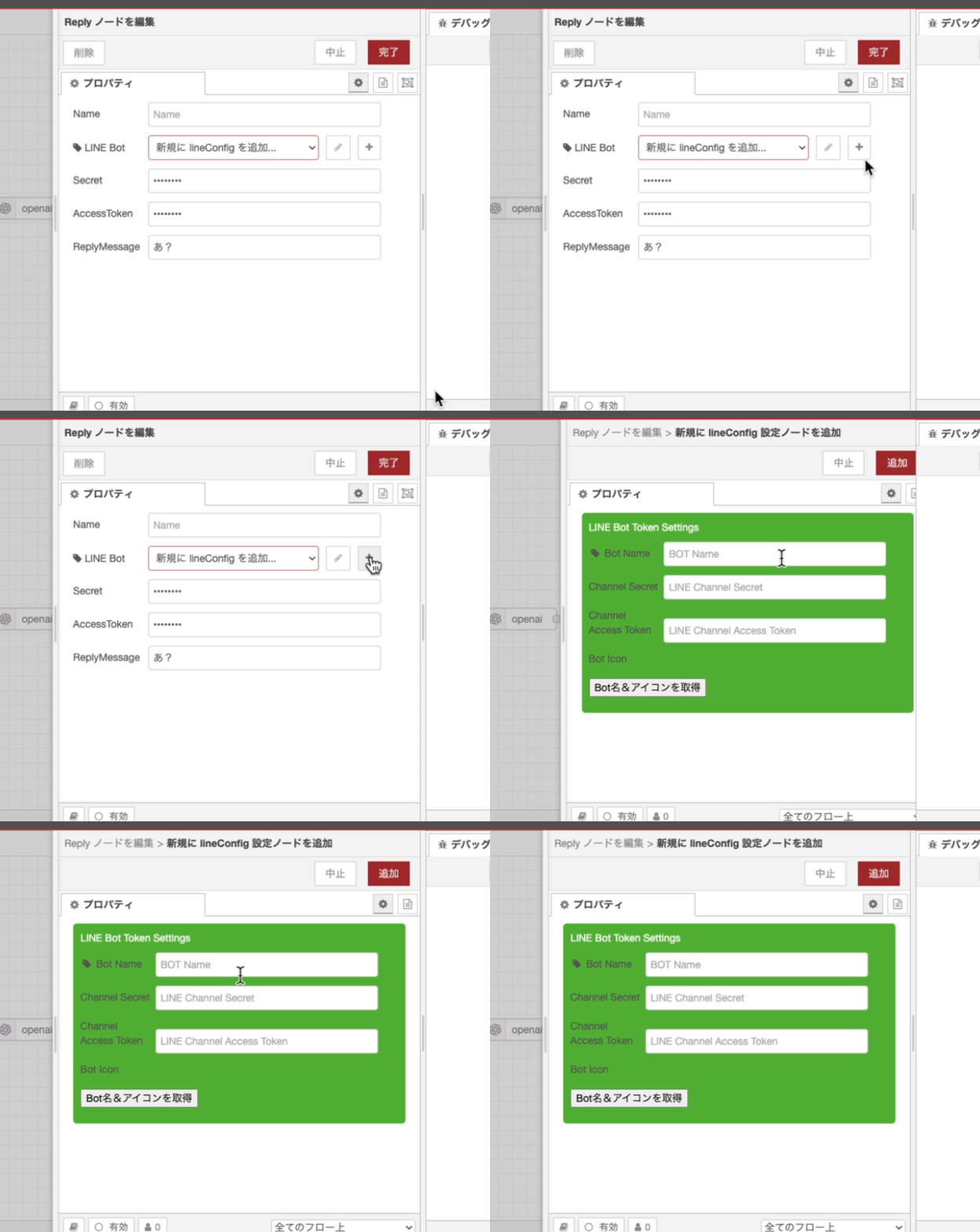
ADDED
|
@@ -0,0 +1,193 @@
|
|
|
1
|
+
# CLAUDE.md - AI Development Instructions
|
|
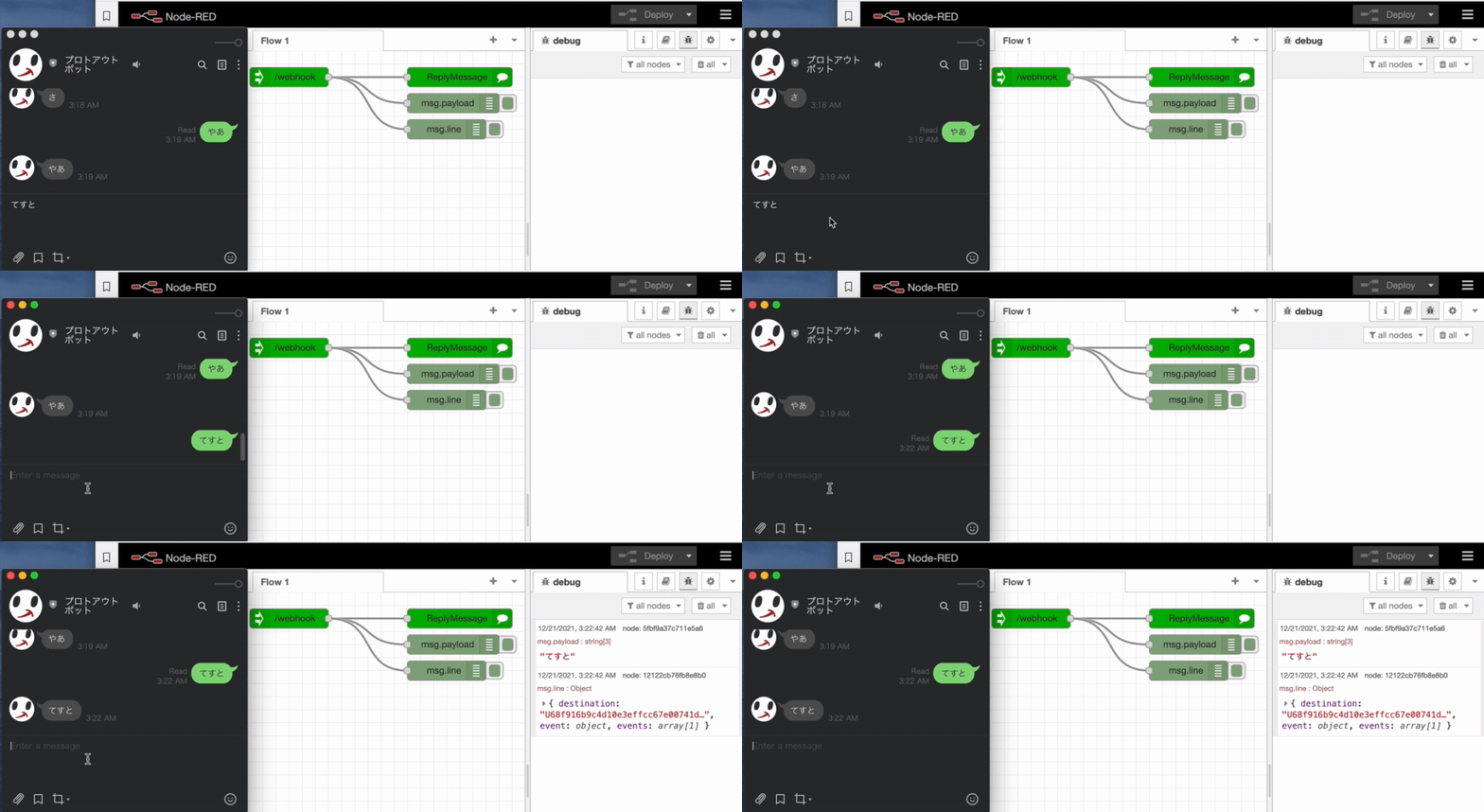
2
|
+
|
|
3
|
+
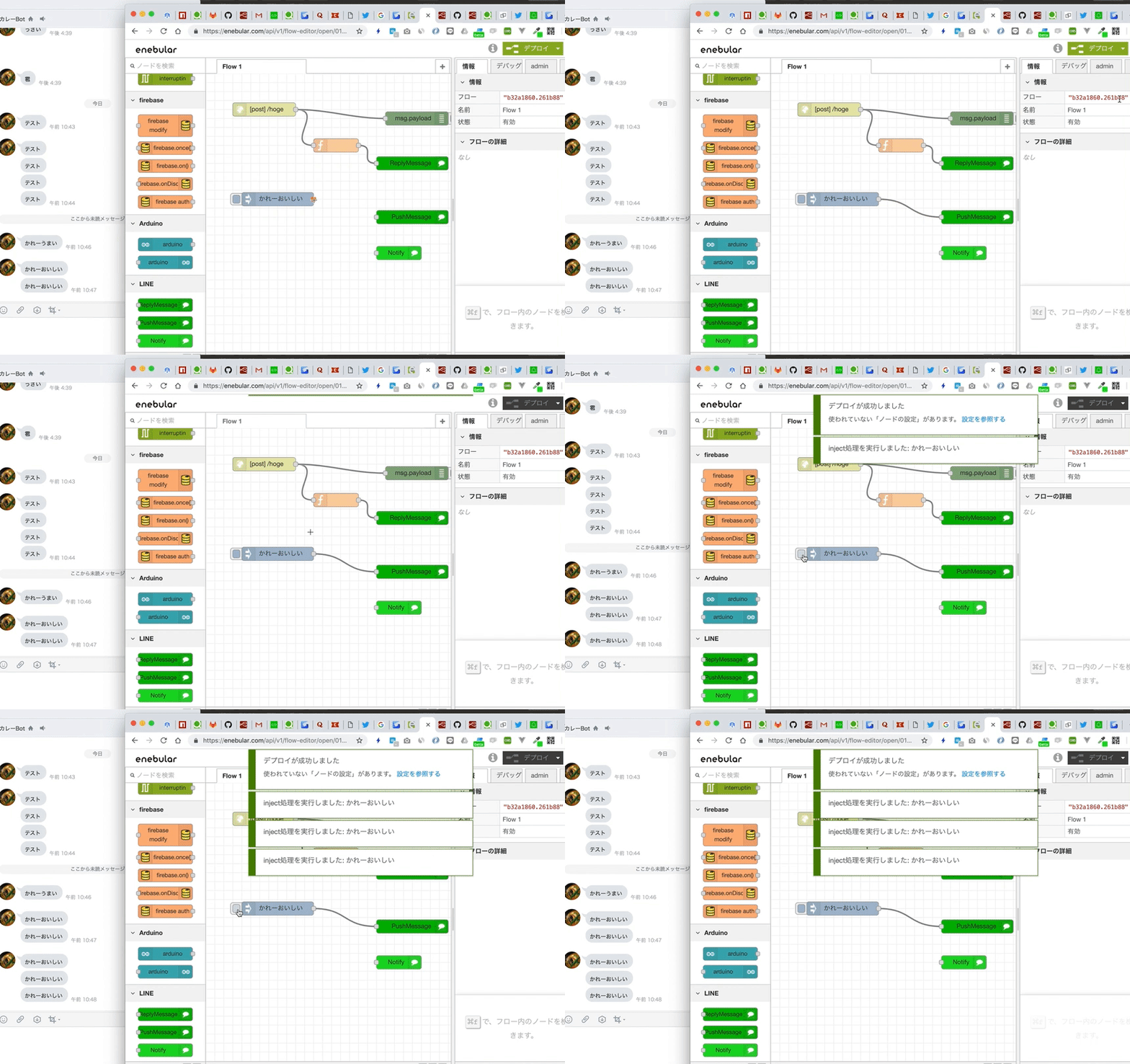
## Project Overview
|
|
4
|
+
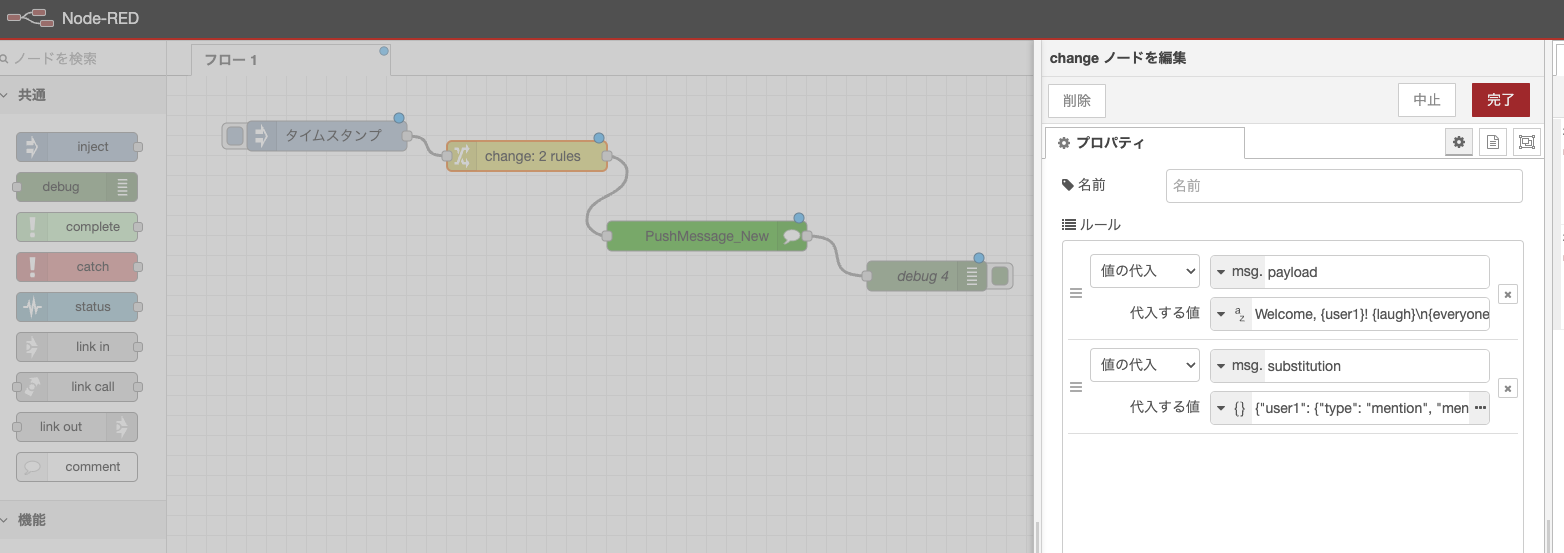
This is a Node-RED custom node package for LINE Messaging API integration that allows developers to build LINE bots using the visual Node-RED flow editor.
|
|
5
|
+
|
|
6
|
+
**Package Name**: `node-red-contrib-line-messaging-api`
|
|
7
|
+
**Version**: 0.4.1
|
|
8
|
+
**Author**: n0bisuke
|
|
9
|
+
**Main Purpose**: Enable LINE Bot development through Node-RED's visual programming interface
|
|
10
|
+
|
|
11
|
+
## Architecture & Key Components
|
|
12
|
+
|
|
13
|
+
### Core Dependencies
|
|
14
|
+
- `@line/bot-sdk`: Official LINE Bot SDK (v9.5.0)
|
|
15
|
+
- `express`: Web framework for HTTP endpoints
|
|
16
|
+
- `body-parser`: Parse incoming request bodies
|
|
17
|
+
- `cors`: Cross-Origin Resource Sharing middleware
|
|
18
|
+
|
|
19
|
+
### Node Types & Structure
|
|
20
|
+
The package provides 11 different node types for LINE Bot functionality:
|
|
21
|
+
|
|
22
|
+
#### 1. Configuration Node (`config.js`, `config.html`)
|
|
23
|
+
- **Purpose**: Stores LINE Bot credentials (Channel Secret, Channel Access Token)
|
|
24
|
+
- **Location**: `nodes/config/config.js`
|
|
25
|
+
- **Features**:
|
|
26
|
+
- Validates credential format and length
|
|
27
|
+
- Fetches bot info from LINE API
|
|
28
|
+
- Stores bot name and icon URL
|
|
29
|
+
- Provides HTTP Admin API endpoint at `/line-config/bot-info`
|
|
30
|
+
|
|
31
|
+
#### 2. Webhook Node (`webhook.js`, `webhook.html`)
|
|
32
|
+
- **Purpose**: Receives webhooks from LINE platform
|
|
33
|
+
- **Location**: `nodes/webhook/webhook.js`
|
|
34
|
+
- **Features**:
|
|
35
|
+
- Creates HTTP POST endpoint for LINE webhook events
|
|
36
|
+
- Processes LINE events and converts to Node-RED messages
|
|
37
|
+
- Supports all LINE event types (message, postback, follow, etc.)
|
|
38
|
+
- Automatically responds with 200 OK to LINE platform
|
|
39
|
+
|
|
40
|
+
#### 3. Reply Message Node (`reply.js`, `reply.html`)
|
|
41
|
+
- **Purpose**: Sends reply messages to LINE users
|
|
42
|
+
- **Location**: `nodes/reply/reply.js`
|
|
43
|
+
- **Features**:
|
|
44
|
+
- Supports both legacy and new message formats
|
|
45
|
+
- Handles text, image, and flex messages
|
|
46
|
+
- Uses reply tokens from webhook events
|
|
47
|
+
|
|
48
|
+
#### 4. Push Message Node (`push.js`, `push.html`)
|
|
49
|
+
- **Purpose**: Sends push messages to specific users
|
|
50
|
+
- **Location**: `nodes/push/push.js`
|
|
51
|
+
- **Features**:
|
|
52
|
+
- Sends messages without reply token
|
|
53
|
+
- Requires target user ID
|
|
54
|
+
- Supports text messages by default
|
|
55
|
+
|
|
56
|
+
#### 5. Other Nodes
|
|
57
|
+
- **Broadcast**: Send messages to all bot friends
|
|
58
|
+
- **Notify**: LINE Notify integration (deprecated)
|
|
59
|
+
- **Loading**: Display loading indicators
|
|
60
|
+
- **getProfile**: Retrieve user profile information
|
|
61
|
+
- **getBotInfo**: Retrieve bot information
|
|
62
|
+
- **Limit**: Rate limiting functionality
|
|
63
|
+
|
|
64
|
+
## Development Guidelines
|
|
65
|
+
|
|
66
|
+
### Code Style & Patterns
|
|
67
|
+
- Uses ES6 modules with `module.exports`
|
|
68
|
+
- Consistent error handling with try-catch blocks
|
|
69
|
+
- All nodes follow Node-RED's standard node structure
|
|
70
|
+
- Credential handling through Node-RED's secure credential system
|
|
71
|
+
|
|
72
|
+
### File Organization
|
|
73
|
+
```
|
|
74
|
+
nodes/
|
|
75
|
+
├── config/ # Bot configuration
|
|
76
|
+
├── webhook/ # Webhook receiver
|
|
77
|
+
├── reply/ # Reply messages
|
|
78
|
+
├── push/ # Push messages
|
|
79
|
+
├── bloadcast/ # Broadcast messages
|
|
80
|
+
├── notify/ # LINE Notify
|
|
81
|
+
├── loading/ # Loading indicators
|
|
82
|
+
├── getProfile/ # User profile
|
|
83
|
+
├── getBotInfo/ # Bot information
|
|
84
|
+
├── limit/ # Rate limiting
|
|
85
|
+
└── _new/ # New implementations
|
|
86
|
+
├── reply/
|
|
87
|
+
├── push/
|
|
88
|
+
└── notify/
|
|
89
|
+
```
|
|
90
|
+
|
|
91
|
+
### Key Implementation Details
|
|
92
|
+
|
|
93
|
+
#### Credential Management
|
|
94
|
+
- Channel Secret: 32-character string validation
|
|
95
|
+
- Channel Access Token: Minimum 150 characters
|
|
96
|
+
- Stored securely using Node-RED's credential system
|
|
97
|
+
- Validation includes whitespace and full-width character checks
|
|
98
|
+
|
|
99
|
+
#### Message Processing
|
|
100
|
+
- Webhook events are parsed and converted to Node-RED message format
|
|
101
|
+
- `msg.line.event` contains individual LINE events
|
|
102
|
+
- `msg.payload` contains human-readable event content
|
|
103
|
+
- Support for multiple message types (text, image, flex, etc.)
|
|
104
|
+
|
|
105
|
+
#### Error Handling
|
|
106
|
+
- Comprehensive validation in configuration UI
|
|
107
|
+
- API error responses are properly handled and logged
|
|
108
|
+
- User-friendly error messages in Japanese
|
|
109
|
+
|
|
110
|
+
## Testing & Deployment
|
|
111
|
+
|
|
112
|
+
### Available Scripts
|
|
113
|
+
- `npm run deploy`: Automated git commit and push
|
|
114
|
+
- No test suite currently implemented
|
|
115
|
+
|
|
116
|
+
### Local Development
|
|
117
|
+
- Playground folder contains test application
|
|
118
|
+
- Express server setup for local webhook testing
|
|
119
|
+
|
|
120
|
+
## Common Development Tasks
|
|
121
|
+
|
|
122
|
+
### Adding New Node Types
|
|
123
|
+
1. Create node directory under `nodes/`
|
|
124
|
+
2. Implement `.js` file with Node-RED registration
|
|
125
|
+
3. Create `.html` file with UI definition
|
|
126
|
+
4. Update `package.json` node-red section
|
|
127
|
+
5. Follow existing patterns for credential handling
|
|
128
|
+
|
|
129
|
+
### Modifying Existing Nodes
|
|
130
|
+
1. Always test with actual LINE Bot setup
|
|
131
|
+
2. Maintain backward compatibility
|
|
132
|
+
3. Update validation logic if changing credential formats
|
|
133
|
+
4. Test both legacy and new message formats
|
|
134
|
+
|
|
135
|
+
### Debugging
|
|
136
|
+
- Use `console.log` for development logging
|
|
137
|
+
- Check Node-RED debug panel for runtime errors
|
|
138
|
+
- Validate LINE webhook signatures for security
|
|
139
|
+
- Test with LINE Bot Simulator for development
|
|
140
|
+
|
|
141
|
+
## LINE API Integration Notes
|
|
142
|
+
|
|
143
|
+
### Webhook Events
|
|
144
|
+
- All events are automatically processed by webhook node
|
|
145
|
+
- Events include: message, postback, follow, unfollow, join, leave, etc.
|
|
146
|
+
- Each event generates separate Node-RED message
|
|
147
|
+
|
|
148
|
+
### Message Types
|
|
149
|
+
- Text messages: Simple string content
|
|
150
|
+
- Rich messages: JSON objects with type definitions
|
|
151
|
+
- Media messages: Images, videos, audio files
|
|
152
|
+
- Interactive messages: Buttons, carousels, flex messages
|
|
153
|
+
|
|
154
|
+
### Rate Limits & Quotas
|
|
155
|
+
- Push messages have monthly limits
|
|
156
|
+
- Reply messages are free but must use reply tokens
|
|
157
|
+
- Broadcast messages have restrictions based on friend count
|
|
158
|
+
|
|
159
|
+
## Security Considerations
|
|
160
|
+
- Never expose Channel Secret or Access Token in logs
|
|
161
|
+
- Use HTTPS for webhook endpoints in production
|
|
162
|
+
- Validate webhook signatures from LINE platform
|
|
163
|
+
- Store credentials securely using Node-RED's credential system
|
|
164
|
+
|
|
165
|
+
## Common Issues & Solutions
|
|
166
|
+
- **Token validation errors**: Check credential format and length
|
|
167
|
+
- **Webhook not receiving**: Verify URL and HTTP method (POST only)
|
|
168
|
+
- **Reply token expired**: Reply tokens are single-use and time-limited
|
|
169
|
+
- **Message format errors**: Ensure JSON structure matches LINE API specs
|
|
170
|
+
|
|
171
|
+
This documentation provides AI assistants with comprehensive context for maintaining and extending this LINE Bot Node-RED integration package.
|
|
172
|
+
|
|
173
|
+
---
|
|
174
|
+
|
|
175
|
+
## 【重要】getBotInfoノードの多言語化(i18n)設計方針まとめ
|
|
176
|
+
|
|
177
|
+
- UI要素のi18nは `getBotInfo.label.xxx` 形式でJSONファイルに記述し、テンプレートも同じ参照形式で統一する
|
|
178
|
+
- 例: `<span data-i18n="getBotInfo.label.lineConfig">LINE Bot設定</span>`
|
|
179
|
+
- JSON構造例:
|
|
180
|
+
```json
|
|
181
|
+
{
|
|
182
|
+
"getBotInfo": {
|
|
183
|
+
"label": {
|
|
184
|
+
"name": "名前",
|
|
185
|
+
"lineConfig": "LINE Bot設定",
|
|
186
|
+
"fetchBotInfo": "Bot情報を取得"
|
|
187
|
+
}
|
|
188
|
+
}
|
|
189
|
+
}
|
|
190
|
+
```
|
|
191
|
+
- `data-help-name`セクションのヘルプテキストはJSONからは参照できないため、英語で直接HTMLに記述する
|
|
192
|
+
- ヘルプの多言語化が必要な場合は、locales/ja/getBotInfo.html等を用意しHTML分離方式で対応する
|
|
193
|
+
- `data-i18n`は`data-template-name`セクション内のみ有効、`data-help-name`内では動作しない
|
package/README.ja.md
ADDED
|
@@ -0,0 +1,171 @@
|
|
|
1
|
+
# node-red-contrib-line-messaging-api
|
|
2
|
+
|
|
3
|
+
[English version](README.md)
|
|
4
|
+
|
|
5
|
+
LINE Messaging APIのNode-REDノードです。
|
|
6
|
+
Node-REDのビジュアルプログラミングインターフェースで簡単にLINE Botを構築できます。
|
|
7
|
+
|
|
8
|
+
---
|
|
9
|
+
|
|
10
|
+
## このプロジェクトについて
|
|
11
|
+
|
|
12
|
+
このパッケージはLINE Messaging APIと統合するためのNode-REDノードを提供し、Node-REDのビジュアルフローエディターを使用してLINE Botを作成できます。Webhook、メッセージ送信、LINE Botイベントの処理をシンプルなドラッグアンドドロップノードで実現できます。
|
|
13
|
+
|
|
14
|
+
---
|
|
15
|
+
|
|
16
|
+
## インストール
|
|
17
|
+
|
|
18
|
+
Node-REDのルートディレクトリで以下のコマンドを実行してください:
|
|
19
|
+
|
|
20
|
+
```sh
|
|
21
|
+
npm install node-red-contrib-line-messaging-api
|
|
22
|
+
```
|
|
23
|
+
|
|
24
|
+
またはNode-REDのパレットマネージャーを使用:
|
|
25
|
+
|
|
26
|
+
1. Node-REDメニューを開く
|
|
27
|
+
2. 「パレットの管理」を選択
|
|
28
|
+
3. 「ノードを追加」タブをクリック
|
|
29
|
+
4. 「line-messaging-api」を検索
|
|
30
|
+
5. インストールをクリック
|
|
31
|
+
|
|
32
|
+
---
|
|
33
|
+
|
|
34
|
+
## 設定
|
|
35
|
+
|
|
36
|
+
### LINE Bot設定ノード
|
|
37
|
+
|
|
38
|
+
LINE Botの認証情報(チャンネルシークレット、チャンネルアクセストークン)を保存する設定ノードです。このバックグラウンドノードはエディターには表示されず、ReplyやPushノードの設定UIからアクセスできます。
|
|
39
|
+
|
|
40
|
+
> 
|
|
41
|
+
|
|
42
|
+
作成したLINE Bot設定は複数のReplyノードやPushノードで共有できます。
|
|
43
|
+
|
|
44
|
+
---
|
|
45
|
+
|
|
46
|
+
## 利用できるAPIと利用イメージ
|
|
47
|
+
|
|
48
|
+
### Webhook & Reply Message
|
|
49
|
+
|
|
50
|
+
1. Webhookノードを配置し、ダブルクリックで設定を開き、指定した `/path` と自身のホスト名の組み合わせ(Webhook URL)を、LINE Developersであらかじめ作成したMessaging APIに登録します。
|
|
51
|
+
2. ReplyMessageノードを配置し、チャネルのシークレットとアクセストークンを設定します。
|
|
52
|
+
3. WebhookノードとReplyMessageノードを接続してLINEにメッセージを送るとオウム返しBotができます。
|
|
53
|
+
[](https://gyazo.com/7da2dbecfc69515edf852cf7a26d9196)
|
|
54
|
+
4. WebhookノードとReplyMessageノードの中間で `msg.payload` をうまく作成すると様々なメッセージが送れます。文字列を指定すると通常のテキストメッセージに、[LINEで定義されているメッセージオブジェクト](https://developers.line.biz/ja/reference/messaging-api/#message-objects)を指定すればそのメッセージを返信することができます。
|
|
55
|
+
|
|
56
|
+
### Push Message
|
|
57
|
+
|
|
58
|
+
Pushメッセージを送るときにmsg.payloadにテキストを入れることでテキストメッセージの送信ができます。
|
|
59
|
+
|
|
60
|
+
> 
|
|
61
|
+
|
|
62
|
+
#### テキストメッセージv2でユーザーにメンション
|
|
63
|
+
|
|
64
|
+
Pushメッセージを送るときにmsg.payloadに`{hoge}`などのテキストを入れつつ、msg.substitutionを設定することでテキストメッセージv2を使ってユーザーにメンションすることができます。
|
|
65
|
+
|
|
66
|
+
- msg.payload: `Welcome, {user1}! {laugh}\n{everyone} There is a newcomer!`
|
|
67
|
+
- msg.substitution:
|
|
68
|
+
|
|
69
|
+
```json
|
|
70
|
+
{"user1": {"type": "mention", "mentionee": {"type": "user", "userId": "Uxxxxxxxxxxxx"}},"laugh": {"type": "emoji","productId": "670e0cce840a8236ddd4ee4c","emojiId": "002"},"everyone": {"type": "mention","mentionee": {"type": "all"}}}
|
|
71
|
+
```
|
|
72
|
+
|
|
73
|
+
> 
|
|
74
|
+
|
|
75
|
+
#### 任意のメッセージ
|
|
76
|
+
|
|
77
|
+
msg.payloadに配列や[メッセージオブジェクト](https://developers.line.biz/ja/reference/messaging-api/#message-objects)を設定することで任意のメッセージを送信できます。
|
|
78
|
+
|
|
79
|
+
```js
|
|
80
|
+
msg.payload = [
|
|
81
|
+
{
|
|
82
|
+
type: "text",
|
|
83
|
+
text: "hogehoge",
|
|
84
|
+
},
|
|
85
|
+
{
|
|
86
|
+
type: "image",
|
|
87
|
+
originalContentUrl: 'https://i.gyazo.com/e772c3b48a07716226f7184d7f417cda.png',
|
|
88
|
+
previewImageUrl: 'https://i.gyazo.com/e772c3b48a07716226f7184d7f417cda.png'
|
|
89
|
+
}
|
|
90
|
+
]
|
|
91
|
+
|
|
92
|
+
return msg;
|
|
93
|
+
```
|
|
94
|
+
|
|
95
|
+
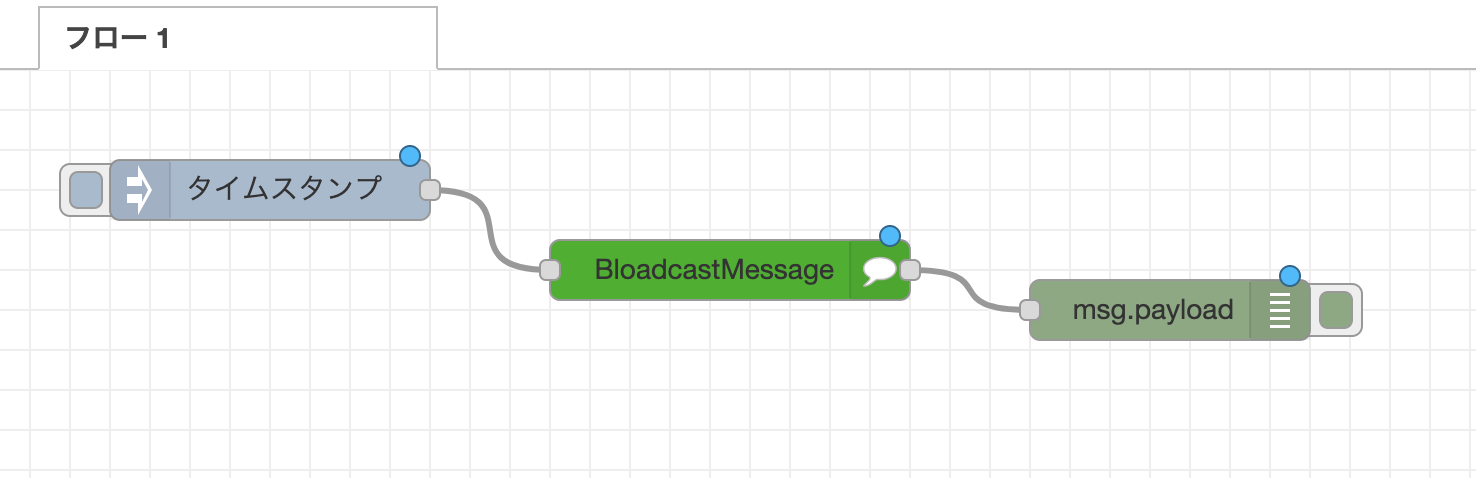
### Broadcast Message
|
|
96
|
+
|
|
97
|
+
友達全員にメッセージ配信します。
|
|
98
|
+
|
|
99
|
+
> 
|
|
100
|
+
|
|
101
|
+
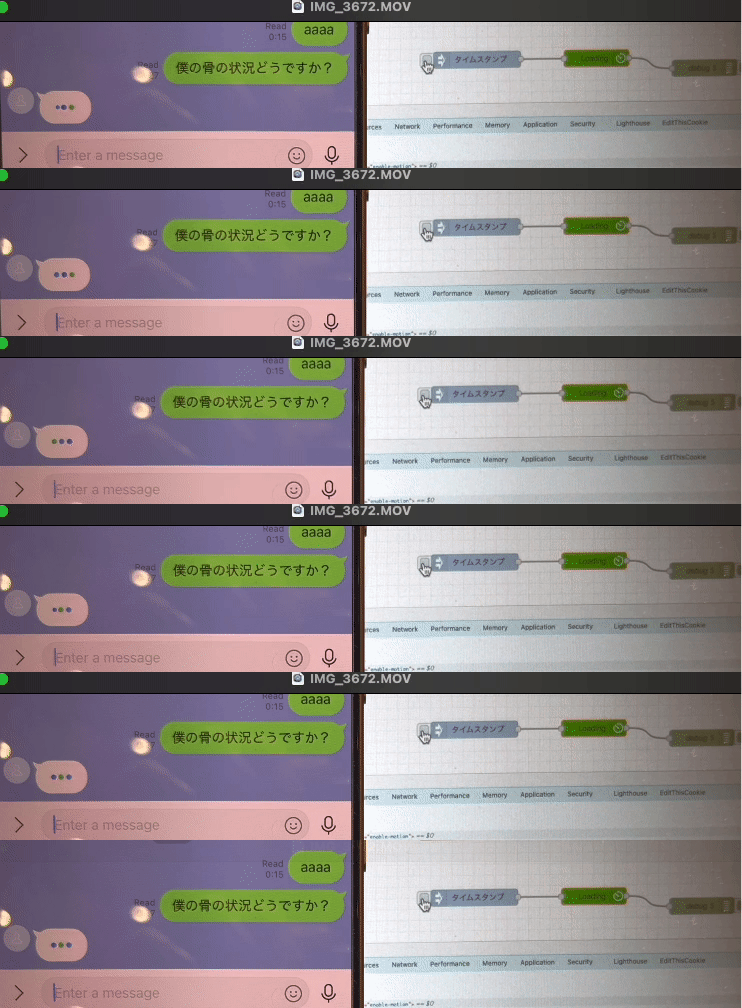
### Loading
|
|
102
|
+
|
|
103
|
+
ローディングアニメーションを表示させます。
|
|
104
|
+
|
|
105
|
+
> 
|
|
106
|
+
> https://developers.line.biz/ja/reference/messaging-api/#display-a-loading-indicator
|
|
107
|
+
|
|
108
|
+
### getProfile
|
|
109
|
+
|
|
110
|
+
ユーザーの情報を取得します。
|
|
111
|
+
https://developers.line.biz/ja/reference/messaging-api/#get-profile
|
|
112
|
+
|
|
113
|
+
### getBotInfo
|
|
114
|
+
|
|
115
|
+
BOTの情報を取得します。
|
|
116
|
+
https://developers.line.biz/ja/reference/messaging-api/#get-bot-info
|
|
117
|
+
|
|
118
|
+
---
|
|
119
|
+
|
|
120
|
+
## ノードタイプ
|
|
121
|
+
|
|
122
|
+
| ノードタイプ | 説明 |
|
|
123
|
+
|------------|------|
|
|
124
|
+
| **Webhook** | LINE プラットフォームからのwebhookを受信 |
|
|
125
|
+
| **Reply Message** | リプライトークンを使用して返信メッセージを送信 |
|
|
126
|
+
| **Push Message** | 特定のユーザーにプッシュメッセージを送信 |
|
|
127
|
+
| **Broadcast Message** | Bot友達全員にメッセージを送信 |
|
|
128
|
+
| **Loading** | ローディングインジケーターを表示 |
|
|
129
|
+
| **Get Profile** | ユーザープロフィール情報を取得 |
|
|
130
|
+
| **Get Bot Info** | Bot情報を取得 |
|
|
131
|
+
| **Limit** | メッセージクォータ制限を確認 |
|
|
132
|
+
| **LINE Bot Config** | Bot認証情報を保存(バックグラウンドノード) |
|
|
133
|
+
|
|
134
|
+
---
|
|
135
|
+
|
|
136
|
+
## 動作環境と要件
|
|
137
|
+
|
|
138
|
+
- **HTTPS必須**: 本番環境のwebhookエンドポイントには必要
|
|
139
|
+
- **LINE Developersアカウント**: LINE Bot作成に必要
|
|
140
|
+
- **Node-RED**: Node-RED v1.0+に対応
|
|
141
|
+
- **依存関係**: @line/bot-sdk, express, body-parser, cors
|
|
142
|
+
|
|
143
|
+
---
|
|
144
|
+
|
|
145
|
+
## リンク
|
|
146
|
+
|
|
147
|
+
* [Node-RED Flows](https://flows.nodered.org/node/node-red-contrib-line-messaging-api)
|
|
148
|
+
* [Libraries.io](https://libraries.io/npm/node-red-contrib-line-messaging-api)
|
|
149
|
+
* [npm](https://www.npmjs.com/package/node-red-contrib-line-messaging-api)
|
|
150
|
+
|
|
151
|
+
---
|
|
152
|
+
|
|
153
|
+
## リリースノート
|
|
154
|
+
|
|
155
|
+
- 2024/12/27: Loading / getProfile / configノードの追加
|
|
156
|
+
- 2023/12/11: Notify_newを追加。スタンプや画像も送れるように。
|
|
157
|
+
- 2021/8/1: Reply Messageが画像に対応(thanks [@ukkz](https://github.com/ukkz))
|
|
158
|
+
- 2020/12/17: Bloadcast Messageに対応、Reply MessageがFlex Messageに対応(thanks [@gaomar](https://github.com/gaomar))
|
|
159
|
+
- 2019/2/13: PUSH MessageとLINE Notify対応
|
|
160
|
+
- 2018/10/11: 基本的なリプライ機能で初回リリース
|
|
161
|
+
|
|
162
|
+
---
|
|
163
|
+
|
|
164
|
+
## コントリビューション・ライセンス
|
|
165
|
+
|
|
166
|
+
プルリクエストやバグレポートを歓迎します。
|
|
167
|
+
このプロジェクトは[Apache 2.0 ライセンス](https://www.apache.org/licenses/LICENSE-2.0)の下で提供されています。
|
|
168
|
+
|
|
169
|
+
作成者・メンテナー: [n0bisuke](https://github.com/n0bisuke)
|
|
170
|
+
|
|
171
|
+
---
|
package/README.md
CHANGED
|
@@ -1,47 +1,67 @@
|
|
|
1
|
-
|
|
1
|
+
# node-red-contrib-line-messaging-api
|
|
2
2
|
|
|
3
|
-
|
|
3
|
+
[日本語版はこちら (Japanese version)](README.ja.md)
|
|
4
4
|
|
|
5
|
-
LINE
|
|
5
|
+
[Node-RED](http://nodered.org) nodes for LINE Messaging API integration.
|
|
6
|
+
Build LINE Bots easily with Node-RED's visual programming interface.
|
|
6
7
|
|
|
7
|
-
|
|
8
|
+
---
|
|
8
9
|
|
|
10
|
+
## About this project
|
|
11
|
+
|
|
12
|
+
This package provides Node-RED nodes for integrating with LINE Messaging API, allowing you to create LINE Bots using Node-RED's visual flow editor. Create webhooks, send messages, and handle LINE Bot events with simple drag-and-drop nodes.
|
|
13
|
+
|
|
14
|
+
---
|
|
15
|
+
|
|
16
|
+
## Install
|
|
17
|
+
|
|
18
|
+
Run the following command in the root directory of your Node-RED install:
|
|
19
|
+
|
|
20
|
+
```sh
|
|
21
|
+
npm install node-red-contrib-line-messaging-api
|
|
9
22
|
```
|
|
10
|
-
npm i node-red-contrib-line-messaging-api
|
|
11
|
-
```
|
|
12
23
|
|
|
13
|
-
|
|
24
|
+
Or using Node-RED's Palette Manager:
|
|
25
|
+
|
|
26
|
+
1. Go to the Node-RED menu
|
|
27
|
+
2. Select "Manage palette"
|
|
28
|
+
3. Click the "Install" tab
|
|
29
|
+
4. Search for "line-messaging-api"
|
|
30
|
+
5. Click install
|
|
14
31
|
|
|
15
|
-
|
|
32
|
+
---
|
|
16
33
|
|
|
17
|
-
##
|
|
34
|
+
## Configuration
|
|
18
35
|
|
|
19
|
-
LINE Bot
|
|
20
|
-
|
|
36
|
+
### LINE Bot Config Node
|
|
37
|
+
|
|
38
|
+
The configuration node stores your LINE Bot credentials (Channel Secret and Channel Access Token). This background node isn't displayed in the editor but is accessible through the settings UI of Reply and Push nodes.
|
|
21
39
|
|
|
22
40
|
> 
|
|
23
41
|
|
|
24
|
-
|
|
42
|
+
Created LINE Bot configurations can be shared across multiple Reply and Push nodes.
|
|
43
|
+
|
|
44
|
+
---
|
|
25
45
|
|
|
26
|
-
##
|
|
46
|
+
## Available APIs and Usage
|
|
27
47
|
|
|
28
48
|
### Webhook & Reply Message
|
|
29
49
|
|
|
30
|
-
1. Webhook
|
|
31
|
-
2. ReplyMessage
|
|
32
|
-
3. Webhook
|
|
33
|
-
|
|
34
|
-
4.
|
|
50
|
+
1. Place a Webhook node and double-click to configure it. Set the `/path` and register the Webhook URL (your hostname + path) in the LINE Developers console for your Messaging API.
|
|
51
|
+
2. Place a ReplyMessage node and configure the channel secret and access token.
|
|
52
|
+
3. Connect the Webhook node to the ReplyMessage node to create an echo bot that responds to LINE messages.
|
|
53
|
+
[](https://gyazo.com/7da2dbecfc69515edf852cf7a26d9196)
|
|
54
|
+
4. Process `msg.payload` between the Webhook and ReplyMessage nodes to send various message types. Use plain text strings for text messages, or [LINE-defined message objects](https://developers.line.biz/en/reference/messaging-api/#message-objects) for rich messages.
|
|
35
55
|
|
|
36
56
|
### Push Message
|
|
37
57
|
|
|
38
|
-
|
|
58
|
+
Send push messages by setting text in `msg.payload` to send text messages.
|
|
39
59
|
|
|
40
60
|
> 
|
|
41
61
|
|
|
42
|
-
####
|
|
62
|
+
#### Text Message v2 with User Mentions
|
|
43
63
|
|
|
44
|
-
|
|
64
|
+
Send push messages with user mentions using Text Message v2 by setting `msg.payload` with `{placeholder}` text and configuring `msg.substitution`.
|
|
45
65
|
|
|
46
66
|
- msg.payload: `Welcome, {user1}! {laugh}\n{everyone} There is a newcomer!`
|
|
47
67
|
- msg.substitution:
|
|
@@ -52,9 +72,9 @@ Pushメッセージを送るときにmsg.payloadに`{hoge}`などのテキスト
|
|
|
52
72
|
|
|
53
73
|
> 
|
|
54
74
|
|
|
55
|
-
####
|
|
75
|
+
#### Custom Messages
|
|
56
76
|
|
|
57
|
-
|
|
77
|
+
Send custom messages by setting arrays or [message objects](https://developers.line.biz/en/reference/messaging-api/#message-objects) in `msg.payload`.
|
|
58
78
|
|
|
59
79
|
```js
|
|
60
80
|
msg.payload = [
|
|
@@ -72,67 +92,80 @@ msg.payload = [
|
|
|
72
92
|
return msg;
|
|
73
93
|
```
|
|
74
94
|
|
|
75
|
-
###
|
|
95
|
+
### Broadcast Message
|
|
76
96
|
|
|
77
|
-
|
|
97
|
+
Send messages to all bot friends.
|
|
78
98
|
|
|
79
99
|
> 
|
|
80
100
|
|
|
81
101
|
### Loading
|
|
82
102
|
|
|
83
|
-
|
|
103
|
+
Display loading indicators to users.
|
|
84
104
|
|
|
85
105
|
> 
|
|
86
|
-
> https://developers.line.biz/
|
|
106
|
+
> https://developers.line.biz/en/reference/messaging-api/#display-a-loading-indicator
|
|
87
107
|
|
|
88
|
-
###
|
|
108
|
+
### Get Profile
|
|
89
109
|
|
|
90
|
-
|
|
91
|
-
https://developers.line.biz/
|
|
110
|
+
Retrieve user profile information.
|
|
111
|
+
https://developers.line.biz/en/reference/messaging-api/#get-profile
|
|
92
112
|
|
|
93
|
-
###
|
|
113
|
+
### Get Bot Info
|
|
94
114
|
|
|
95
|
-
|
|
115
|
+
Retrieve bot information.
|
|
116
|
+
https://developers.line.biz/en/reference/messaging-api/#get-bot-info
|
|
96
117
|
|
|
97
|
-
|
|
118
|
+
---
|
|
98
119
|
|
|
99
|
-
|
|
120
|
+
## Node Types
|
|
100
121
|
|
|
101
|
-
|
|
122
|
+
| Node Type | Description |
|
|
123
|
+
|-----------|-------------|
|
|
124
|
+
| **Webhook** | Receives webhooks from LINE platform |
|
|
125
|
+
| **Reply Message** | Sends reply messages using reply tokens |
|
|
126
|
+
| **Push Message** | Sends push messages to specific users |
|
|
127
|
+
| **Broadcast Message** | Sends messages to all bot friends |
|
|
128
|
+
| **Loading** | Displays loading indicators |
|
|
129
|
+
| **Get Profile** | Retrieves user profile information |
|
|
130
|
+
| **Get Bot Info** | Retrieves bot information |
|
|
131
|
+
| **Limit** | Checks message quota limits |
|
|
132
|
+
| **LINE Bot Config** | Stores bot credentials (background node) |
|
|
102
133
|
|
|
103
|
-
|
|
134
|
+
---
|
|
104
135
|
|
|
105
|
-
|
|
136
|
+
## Browser Compatibility and Requirements
|
|
106
137
|
|
|
107
|
-
|
|
138
|
+
- **HTTPS Required**: For production webhook endpoints
|
|
139
|
+
- **LINE Developers Account**: Required for creating LINE Bots
|
|
140
|
+
- **Node-RED**: Compatible with Node-RED v1.0+
|
|
141
|
+
- **Dependencies**: @line/bot-sdk, express, body-parser, cors
|
|
108
142
|
|
|
109
|
-
|
|
143
|
+
---
|
|
110
144
|
|
|
111
|
-
|
|
145
|
+
## Links
|
|
112
146
|
|
|
113
|
-
-
|
|
147
|
+
* [Node-RED Flows](https://flows.nodered.org/node/node-red-contrib-line-messaging-api)
|
|
148
|
+
* [Libraries.io](https://libraries.io/npm/node-red-contrib-line-messaging-api)
|
|
149
|
+
* [npm](https://www.npmjs.com/package/node-red-contrib-line-messaging-api)
|
|
114
150
|
|
|
115
|
-
|
|
116
|
-
{
|
|
117
|
-
"stickerPackageId": "446",
|
|
118
|
-
"stickerId": "1988",
|
|
119
|
-
"message": "{{payload}}",
|
|
120
|
-
"imageThumbnail": "https://i.gyazo.com/a84c585225af440bd0d5fff881152792.png",
|
|
121
|
-
"imageFullsize": "https://i.gyazo.com/a84c585225af440bd0d5fff881152792.png"
|
|
122
|
-
}
|
|
123
|
-
```
|
|
151
|
+
---
|
|
124
152
|
|
|
125
|
-
##
|
|
153
|
+
## Release Notes
|
|
126
154
|
|
|
127
|
-
|
|
128
|
-
|
|
129
|
-
|
|
155
|
+
- 2024/12/27: Added Loading, getProfile, and config nodes
|
|
156
|
+
- 2023/12/11: Added Notify_new with sticker and image support
|
|
157
|
+
- 2021/8/1: Reply Message now supports images (thanks [@ukkz](https://github.com/ukkz))
|
|
158
|
+
- 2020/12/17: Added Broadcast Message support, Reply Message supports Flex Messages (thanks [@gaomar](https://github.com/gaomar))
|
|
159
|
+
- 2019/2/13: Added PUSH Message and LINE Notify support
|
|
160
|
+
- 2018/10/11: Initial release with basic reply functionality
|
|
161
|
+
|
|
162
|
+
---
|
|
163
|
+
|
|
164
|
+
## Contributing & License
|
|
165
|
+
|
|
166
|
+
Pull requests and bug reports are welcome.
|
|
167
|
+
This project is licensed under the [Apache 2.0 license](https://www.apache.org/licenses/LICENSE-2.0).
|
|
130
168
|
|
|
131
|
-
|
|
169
|
+
Created and maintained by [n0bisuke](https://github.com/n0bisuke).
|
|
132
170
|
|
|
133
|
-
|
|
134
|
-
- 2023/12/11: Notify_newを追加。スタンプや画像も送れるように。
|
|
135
|
-
- 2021/8/1: Reply Messageが画像に対応(thanks [@ukkz](https://github.com/ukkz))
|
|
136
|
-
- 2020/12/17: Bloadcast Messageに対応、Reply MessageがFlex Messageに対応(thanks [@gaomar](https://github.com/gaomar))
|
|
137
|
-
- 2019/2/13: PUSH MessageとLINE Notify対応
|
|
138
|
-
- 2018/10/11: 現状は簡単なリプライのみ実装されています。
|
|
171
|
+
---
|
package/nodes/_new/push/push.js
CHANGED
|
@@ -17,7 +17,7 @@ module.exports = (RED) => {
|
|
|
17
17
|
channelSecret: node.lineConfig.credentials.LineChannelSecret,
|
|
18
18
|
channelAccessToken: node.lineConfig.credentials.LineChannelAccessToken
|
|
19
19
|
};
|
|
20
|
-
console.log(`---共通lineConfigから---`);
|
|
20
|
+
// console.log(`---共通lineConfigから---`);
|
|
21
21
|
} catch (error) {
|
|
22
22
|
lineconfig = {
|
|
23
23
|
channelSecret: node.credentials.channelSecret,
|
|
@@ -24,7 +24,7 @@
|
|
|
24
24
|
|
|
25
25
|
<script type="text/html" data-template-name="ReplyMessage_New">
|
|
26
26
|
<div class="form-row">
|
|
27
|
-
<label for="node-input-name"><i class="icon-tag"></i> Name</label>
|
|
27
|
+
<label for="node-input-name"><i class="icon-tag"></i> <span data-i18n="common.label.name">Name</span></label>
|
|
28
28
|
<input type="text" id="node-input-name" placeholder="Name">
|
|
29
29
|
</div>
|
|
30
30
|
|
|
@@ -32,23 +32,22 @@
|
|
|
32
32
|
<div class="form-row">
|
|
33
33
|
<label for="node-input-lineConfig">
|
|
34
34
|
<i class="fa fa-tag"></i>
|
|
35
|
-
LINE Bot
|
|
36
|
-
|
|
37
|
-
</label> <input type="text" id="node-input-lineConfig" data-i18n="[placeholder]getProfile.desc.lineConfig">
|
|
35
|
+
<span data-i18n="common.label.bot">LINE Bot</span>
|
|
36
|
+
</label> <input type="text" id="node-input-lineConfig">
|
|
38
37
|
</div>
|
|
39
38
|
|
|
40
39
|
<div class="form-row">
|
|
41
|
-
<label for="node-input-channelSecret"><i class="icon-tag"></i> Secret</label>
|
|
40
|
+
<label for="node-input-channelSecret"><i class="icon-tag"></i> <span data-i18n="lineConfig.label.channelSecret">Secret</span></label>
|
|
42
41
|
<input type="password" id="node-input-channelSecret" placeholder="ChannelSecret">
|
|
43
42
|
</div>
|
|
44
43
|
|
|
45
44
|
<div class="form-row">
|
|
46
|
-
<label for="node-input-channelAccessToken"><i class="icon-tag"></i> AccessToken</label>
|
|
45
|
+
<label for="node-input-channelAccessToken"><i class="icon-tag"></i> <span data-i18n="lineConfig.label.channelAccessToken">AccessToken</span></label>
|
|
47
46
|
<input type="password" id="node-input-channelAccessToken" placeholder="ChannelAccessToken">
|
|
48
47
|
</div>
|
|
49
48
|
|
|
50
49
|
<div class="form-row">
|
|
51
|
-
<label for="node-input-replyMessage"><i class="icon-tag"></i> ReplyMessage</label>
|
|
50
|
+
<label for="node-input-replyMessage"><i class="icon-tag"></i> <span data-i18n="reply.label.message">ReplyMessage</span></label>
|
|
52
51
|
<input type="text" id="node-input-replyMessage" placeholder="static text message here">
|
|
53
52
|
</div>
|
|
54
53
|
</script>
|
|
@@ -16,7 +16,7 @@ module.exports = (RED) => {
|
|
|
16
16
|
channelSecret: node.lineConfig.credentials.LineChannelSecret,
|
|
17
17
|
channelAccessToken: node.lineConfig.credentials.LineChannelAccessToken
|
|
18
18
|
};
|
|
19
|
-
console.log(`---共通lineConfigから---`);
|
|
19
|
+
// console.log(`---共通lineConfigから---`);
|
|
20
20
|
} catch (error) {
|
|
21
21
|
lineconfig = {
|
|
22
22
|
channelSecret: node.credentials.channelSecret,
|