node-red-contrib-line-messaging-api 0.4.0 → 0.4.2
This diff represents the content of publicly available package versions that have been released to one of the supported registries. The information contained in this diff is provided for informational purposes only and reflects changes between package versions as they appear in their respective public registries.
- package/CLAUDE.md +171 -0
- package/README.md +12 -1
- package/nodes/_new/push/push.js +1 -1
- package/nodes/_new/reply/reply.js +1 -1
- package/nodes/config/config.html +87 -25
- package/package.json +1 -1
package/CLAUDE.md
ADDED
|
@@ -0,0 +1,171 @@
|
|
|
1
|
+
# CLAUDE.md - AI Development Instructions
|
|
2
|
+
|
|
3
|
+
## Project Overview
|
|
4
|
+
This is a Node-RED custom node package for LINE Messaging API integration that allows developers to build LINE bots using the visual Node-RED flow editor.
|
|
5
|
+
|
|
6
|
+
**Package Name**: `node-red-contrib-line-messaging-api`
|
|
7
|
+
**Version**: 0.4.1
|
|
8
|
+
**Author**: n0bisuke
|
|
9
|
+
**Main Purpose**: Enable LINE Bot development through Node-RED's visual programming interface
|
|
10
|
+
|
|
11
|
+
## Architecture & Key Components
|
|
12
|
+
|
|
13
|
+
### Core Dependencies
|
|
14
|
+
- `@line/bot-sdk`: Official LINE Bot SDK (v9.5.0)
|
|
15
|
+
- `express`: Web framework for HTTP endpoints
|
|
16
|
+
- `body-parser`: Parse incoming request bodies
|
|
17
|
+
- `cors`: Cross-Origin Resource Sharing middleware
|
|
18
|
+
|
|
19
|
+
### Node Types & Structure
|
|
20
|
+
The package provides 11 different node types for LINE Bot functionality:
|
|
21
|
+
|
|
22
|
+
#### 1. Configuration Node (`config.js`, `config.html`)
|
|
23
|
+
- **Purpose**: Stores LINE Bot credentials (Channel Secret, Channel Access Token)
|
|
24
|
+
- **Location**: `nodes/config/config.js`
|
|
25
|
+
- **Features**:
|
|
26
|
+
- Validates credential format and length
|
|
27
|
+
- Fetches bot info from LINE API
|
|
28
|
+
- Stores bot name and icon URL
|
|
29
|
+
- Provides HTTP Admin API endpoint at `/line-config/bot-info`
|
|
30
|
+
|
|
31
|
+
#### 2. Webhook Node (`webhook.js`, `webhook.html`)
|
|
32
|
+
- **Purpose**: Receives webhooks from LINE platform
|
|
33
|
+
- **Location**: `nodes/webhook/webhook.js`
|
|
34
|
+
- **Features**:
|
|
35
|
+
- Creates HTTP POST endpoint for LINE webhook events
|
|
36
|
+
- Processes LINE events and converts to Node-RED messages
|
|
37
|
+
- Supports all LINE event types (message, postback, follow, etc.)
|
|
38
|
+
- Automatically responds with 200 OK to LINE platform
|
|
39
|
+
|
|
40
|
+
#### 3. Reply Message Node (`reply.js`, `reply.html`)
|
|
41
|
+
- **Purpose**: Sends reply messages to LINE users
|
|
42
|
+
- **Location**: `nodes/reply/reply.js`
|
|
43
|
+
- **Features**:
|
|
44
|
+
- Supports both legacy and new message formats
|
|
45
|
+
- Handles text, image, and flex messages
|
|
46
|
+
- Uses reply tokens from webhook events
|
|
47
|
+
|
|
48
|
+
#### 4. Push Message Node (`push.js`, `push.html`)
|
|
49
|
+
- **Purpose**: Sends push messages to specific users
|
|
50
|
+
- **Location**: `nodes/push/push.js`
|
|
51
|
+
- **Features**:
|
|
52
|
+
- Sends messages without reply token
|
|
53
|
+
- Requires target user ID
|
|
54
|
+
- Supports text messages by default
|
|
55
|
+
|
|
56
|
+
#### 5. Other Nodes
|
|
57
|
+
- **Broadcast**: Send messages to all bot friends
|
|
58
|
+
- **Notify**: LINE Notify integration (deprecated)
|
|
59
|
+
- **Loading**: Display loading indicators
|
|
60
|
+
- **getProfile**: Retrieve user profile information
|
|
61
|
+
- **getBotInfo**: Retrieve bot information
|
|
62
|
+
- **Limit**: Rate limiting functionality
|
|
63
|
+
|
|
64
|
+
## Development Guidelines
|
|
65
|
+
|
|
66
|
+
### Code Style & Patterns
|
|
67
|
+
- Uses ES6 modules with `module.exports`
|
|
68
|
+
- Consistent error handling with try-catch blocks
|
|
69
|
+
- All nodes follow Node-RED's standard node structure
|
|
70
|
+
- Credential handling through Node-RED's secure credential system
|
|
71
|
+
|
|
72
|
+
### File Organization
|
|
73
|
+
```
|
|
74
|
+
nodes/
|
|
75
|
+
├── config/ # Bot configuration
|
|
76
|
+
├── webhook/ # Webhook receiver
|
|
77
|
+
├── reply/ # Reply messages
|
|
78
|
+
├── push/ # Push messages
|
|
79
|
+
├── bloadcast/ # Broadcast messages
|
|
80
|
+
├── notify/ # LINE Notify
|
|
81
|
+
├── loading/ # Loading indicators
|
|
82
|
+
├── getProfile/ # User profile
|
|
83
|
+
├── getBotInfo/ # Bot information
|
|
84
|
+
├── limit/ # Rate limiting
|
|
85
|
+
└── _new/ # New implementations
|
|
86
|
+
├── reply/
|
|
87
|
+
├── push/
|
|
88
|
+
└── notify/
|
|
89
|
+
```
|
|
90
|
+
|
|
91
|
+
### Key Implementation Details
|
|
92
|
+
|
|
93
|
+
#### Credential Management
|
|
94
|
+
- Channel Secret: 32-character string validation
|
|
95
|
+
- Channel Access Token: Minimum 150 characters
|
|
96
|
+
- Stored securely using Node-RED's credential system
|
|
97
|
+
- Validation includes whitespace and full-width character checks
|
|
98
|
+
|
|
99
|
+
#### Message Processing
|
|
100
|
+
- Webhook events are parsed and converted to Node-RED message format
|
|
101
|
+
- `msg.line.event` contains individual LINE events
|
|
102
|
+
- `msg.payload` contains human-readable event content
|
|
103
|
+
- Support for multiple message types (text, image, flex, etc.)
|
|
104
|
+
|
|
105
|
+
#### Error Handling
|
|
106
|
+
- Comprehensive validation in configuration UI
|
|
107
|
+
- API error responses are properly handled and logged
|
|
108
|
+
- User-friendly error messages in Japanese
|
|
109
|
+
|
|
110
|
+
## Testing & Deployment
|
|
111
|
+
|
|
112
|
+
### Available Scripts
|
|
113
|
+
- `npm run deploy`: Automated git commit and push
|
|
114
|
+
- No test suite currently implemented
|
|
115
|
+
|
|
116
|
+
### Local Development
|
|
117
|
+
- Playground folder contains test application
|
|
118
|
+
- Express server setup for local webhook testing
|
|
119
|
+
|
|
120
|
+
## Common Development Tasks
|
|
121
|
+
|
|
122
|
+
### Adding New Node Types
|
|
123
|
+
1. Create node directory under `nodes/`
|
|
124
|
+
2. Implement `.js` file with Node-RED registration
|
|
125
|
+
3. Create `.html` file with UI definition
|
|
126
|
+
4. Update `package.json` node-red section
|
|
127
|
+
5. Follow existing patterns for credential handling
|
|
128
|
+
|
|
129
|
+
### Modifying Existing Nodes
|
|
130
|
+
1. Always test with actual LINE Bot setup
|
|
131
|
+
2. Maintain backward compatibility
|
|
132
|
+
3. Update validation logic if changing credential formats
|
|
133
|
+
4. Test both legacy and new message formats
|
|
134
|
+
|
|
135
|
+
### Debugging
|
|
136
|
+
- Use `console.log` for development logging
|
|
137
|
+
- Check Node-RED debug panel for runtime errors
|
|
138
|
+
- Validate LINE webhook signatures for security
|
|
139
|
+
- Test with LINE Bot Simulator for development
|
|
140
|
+
|
|
141
|
+
## LINE API Integration Notes
|
|
142
|
+
|
|
143
|
+
### Webhook Events
|
|
144
|
+
- All events are automatically processed by webhook node
|
|
145
|
+
- Events include: message, postback, follow, unfollow, join, leave, etc.
|
|
146
|
+
- Each event generates separate Node-RED message
|
|
147
|
+
|
|
148
|
+
### Message Types
|
|
149
|
+
- Text messages: Simple string content
|
|
150
|
+
- Rich messages: JSON objects with type definitions
|
|
151
|
+
- Media messages: Images, videos, audio files
|
|
152
|
+
- Interactive messages: Buttons, carousels, flex messages
|
|
153
|
+
|
|
154
|
+
### Rate Limits & Quotas
|
|
155
|
+
- Push messages have monthly limits
|
|
156
|
+
- Reply messages are free but must use reply tokens
|
|
157
|
+
- Broadcast messages have restrictions based on friend count
|
|
158
|
+
|
|
159
|
+
## Security Considerations
|
|
160
|
+
- Never expose Channel Secret or Access Token in logs
|
|
161
|
+
- Use HTTPS for webhook endpoints in production
|
|
162
|
+
- Validate webhook signatures from LINE platform
|
|
163
|
+
- Store credentials securely using Node-RED's credential system
|
|
164
|
+
|
|
165
|
+
## Common Issues & Solutions
|
|
166
|
+
- **Token validation errors**: Check credential format and length
|
|
167
|
+
- **Webhook not receiving**: Verify URL and HTTP method (POST only)
|
|
168
|
+
- **Reply token expired**: Reply tokens are single-use and time-limited
|
|
169
|
+
- **Message format errors**: Ensure JSON structure matches LINE API specs
|
|
170
|
+
|
|
171
|
+
This documentation provides AI assistants with comprehensive context for maintaining and extending this LINE Bot Node-RED integration package.
|
package/README.md
CHANGED
|
@@ -19,7 +19,7 @@ AdminタブからInstall
|
|
|
19
19
|
LINE Botの設定(チャンネルシークレット、チャンネルアクセストークン)を設定しておく裏側のノードです。
|
|
20
20
|
このノードはエディターには表示されずReplyやPushなどのノードの設定UIからアクセスできます。
|
|
21
21
|
|
|
22
|
-
> 
|
|
23
23
|
|
|
24
24
|
作成したLINE Botの設定は別のReplyノードやPushノードで使いまわせます。
|
|
25
25
|
|
|
@@ -85,6 +85,17 @@ return msg;
|
|
|
85
85
|
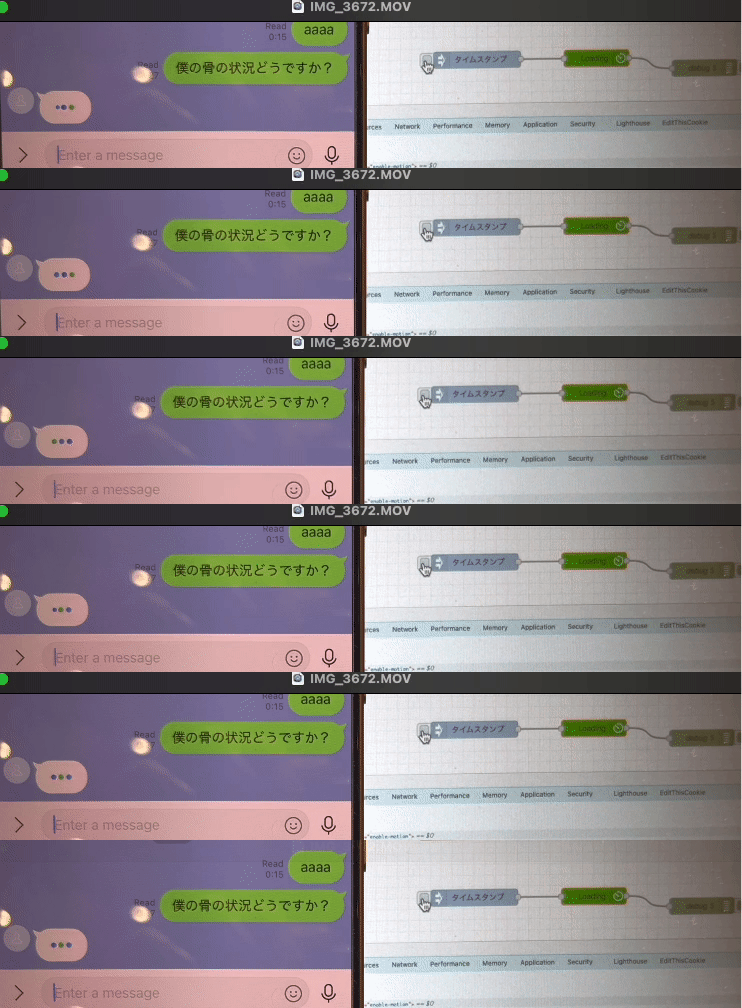
> 
|
|
86
86
|
> https://developers.line.biz/ja/reference/messaging-api/#display-a-loading-indicator
|
|
87
87
|
|
|
88
|
+
### getProfile
|
|
89
|
+
|
|
90
|
+
ユーザーの情報を取得します。
|
|
91
|
+
https://developers.line.biz/ja/reference/messaging-api/#get-profile
|
|
92
|
+
|
|
93
|
+
### getBotInfo
|
|
94
|
+
|
|
95
|
+
BOTの情報を取得します。
|
|
96
|
+
|
|
97
|
+
https://developers.line.biz/ja/reference/messaging-api/#get-bot-info
|
|
98
|
+
|
|
88
99
|
### LINE Notify (2024/12/22追記: API自体が終了するため廃止予定です。)
|
|
89
100
|
|
|
90
101
|
> 
|
package/nodes/_new/push/push.js
CHANGED
|
@@ -17,7 +17,7 @@ module.exports = (RED) => {
|
|
|
17
17
|
channelSecret: node.lineConfig.credentials.LineChannelSecret,
|
|
18
18
|
channelAccessToken: node.lineConfig.credentials.LineChannelAccessToken
|
|
19
19
|
};
|
|
20
|
-
console.log(`---共通lineConfigから---`);
|
|
20
|
+
// console.log(`---共通lineConfigから---`);
|
|
21
21
|
} catch (error) {
|
|
22
22
|
lineconfig = {
|
|
23
23
|
channelSecret: node.credentials.channelSecret,
|
|
@@ -16,7 +16,7 @@ module.exports = (RED) => {
|
|
|
16
16
|
channelSecret: node.lineConfig.credentials.LineChannelSecret,
|
|
17
17
|
channelAccessToken: node.lineConfig.credentials.LineChannelAccessToken
|
|
18
18
|
};
|
|
19
|
-
console.log(`---共通lineConfigから---`);
|
|
19
|
+
// console.log(`---共通lineConfigから---`);
|
|
20
20
|
} catch (error) {
|
|
21
21
|
lineconfig = {
|
|
22
22
|
channelSecret: node.credentials.channelSecret,
|
package/nodes/config/config.html
CHANGED
|
@@ -3,9 +3,7 @@
|
|
|
3
3
|
category: 'config',
|
|
4
4
|
color: '#00afd5',
|
|
5
5
|
defaults: {
|
|
6
|
-
// botName は既存のまま
|
|
7
6
|
botName: { value: "" },
|
|
8
|
-
// botIconUrl を追加
|
|
9
7
|
botIconUrl: { value: "" }
|
|
10
8
|
},
|
|
11
9
|
credentials: {
|
|
@@ -19,61 +17,121 @@
|
|
|
19
17
|
oneditprepare: function () {
|
|
20
18
|
const node = this;
|
|
21
19
|
|
|
22
|
-
//
|
|
20
|
+
// --- バリデーションのための設定 ---
|
|
21
|
+
const validationTip = $("#node-config-validation-tip");
|
|
22
|
+
|
|
23
|
+
function validate() {
|
|
24
|
+
let errorMessages = [];
|
|
25
|
+
const hasWhitespace = /\s/;
|
|
26
|
+
const hasFullWidth = /[^\x00-\x7F]/;
|
|
27
|
+
|
|
28
|
+
// 1. Bot Name のチェック
|
|
29
|
+
if ($("#node-config-input-botName").val() === "") {
|
|
30
|
+
errorMessages.push("・Bot Name は必須です。");
|
|
31
|
+
}
|
|
32
|
+
|
|
33
|
+
// 2. Channel Secret のチェック
|
|
34
|
+
const secret = $("#node-config-input-LineChannelSecret").val();
|
|
35
|
+
if (secret === "") {
|
|
36
|
+
errorMessages.push("・Channel Secret は必須です。");
|
|
37
|
+
} else if (hasWhitespace.test(secret)) {
|
|
38
|
+
errorMessages.push("・Channel Secret にスペースや改行は含められません。");
|
|
39
|
+
} else if (hasFullWidth.test(secret)) {
|
|
40
|
+
errorMessages.push("・Channel Secret に全角文字は含められません。");
|
|
41
|
+
} else if (secret.length !== 32) {
|
|
42
|
+
errorMessages.push("・Channel Secret は32文字で入力してください。");
|
|
43
|
+
}
|
|
44
|
+
|
|
45
|
+
// 3. Channel Access Token のチェック
|
|
46
|
+
const token = $("#node-config-input-LineChannelAccessToken").val();
|
|
47
|
+
if (token === "") {
|
|
48
|
+
errorMessages.push("・Channel Access Token は必須です。");
|
|
49
|
+
} else if (hasWhitespace.test(token)) {
|
|
50
|
+
errorMessages.push("・Channel Access Token にスペースや改行は含められません。");
|
|
51
|
+
} else if (hasFullWidth.test(token)) {
|
|
52
|
+
errorMessages.push("・Channel Access Token に全角文字は含められません。");
|
|
53
|
+
} else if (token.length < 150) {
|
|
54
|
+
errorMessages.push("・Channel Access Token が短すぎます。正しい値を貼り付けてください。");
|
|
55
|
+
}
|
|
56
|
+
|
|
57
|
+
if (errorMessages.length > 0) {
|
|
58
|
+
$("#node-config-dialog-ok").prop("disabled", true);
|
|
59
|
+
validationTip.html(errorMessages.join('<br/>'));
|
|
60
|
+
validationTip.show();
|
|
61
|
+
} else {
|
|
62
|
+
$("#node-config-dialog-ok").prop("disabled", false);
|
|
63
|
+
validationTip.hide();
|
|
64
|
+
}
|
|
65
|
+
}
|
|
66
|
+
|
|
67
|
+
$("#node-config-input-botName, #node-config-input-LineChannelSecret, #node-config-input-LineChannelAccessToken")
|
|
68
|
+
.on('keyup input change', validate);
|
|
69
|
+
|
|
70
|
+
validate(); // 初期チェック
|
|
71
|
+
|
|
72
|
+
// --- アイコン取得機能(復元) ---
|
|
73
|
+
|
|
74
|
+
// 起動時に保存済みのアイコンがあれば表示
|
|
23
75
|
if (node.botIconUrl) {
|
|
24
|
-
|
|
25
|
-
botIconImg.src = node.botIconUrl;
|
|
26
|
-
botIconImg.style.display = "block";
|
|
76
|
+
$("#node-config-botIcon").attr("src", node.botIconUrl).show();
|
|
27
77
|
}
|
|
28
78
|
|
|
29
|
-
// 「Bot
|
|
30
|
-
|
|
31
|
-
|
|
32
|
-
const
|
|
33
|
-
const channelAccessToken = document.getElementById("node-config-input-LineChannelAccessToken").value;
|
|
79
|
+
// 「Bot名&アイコンを取得」ボタンのクリックイベント
|
|
80
|
+
$("#node-config-fetch-info").on("click", async () => {
|
|
81
|
+
const channelSecret = $("#node-config-input-LineChannelSecret").val();
|
|
82
|
+
const channelAccessToken = $("#node-config-input-LineChannelAccessToken").val();
|
|
34
83
|
|
|
35
84
|
if (!channelSecret || !channelAccessToken) {
|
|
36
|
-
|
|
85
|
+
RED.notify("Channel Secret と Access Token を両方入力してから取得してください。", "warning");
|
|
37
86
|
return;
|
|
38
87
|
}
|
|
39
88
|
|
|
89
|
+
// ★★★ ここからがAPIに問い合わせる復元部分です ★★★
|
|
40
90
|
try {
|
|
41
91
|
const response = await fetch("line-config/bot-info", {
|
|
42
92
|
method: "POST",
|
|
43
93
|
headers: { "Content-Type": "application/json" },
|
|
44
94
|
body: JSON.stringify({ channelSecret, channelAccessToken })
|
|
45
95
|
});
|
|
96
|
+
|
|
46
97
|
if (!response.ok) {
|
|
47
|
-
|
|
98
|
+
const errorText = await response.text();
|
|
99
|
+
throw new Error("APIエラー: " + errorText);
|
|
48
100
|
}
|
|
49
101
|
|
|
50
102
|
const botInfo = await response.json();
|
|
51
103
|
|
|
52
|
-
// Bot Name
|
|
104
|
+
// Bot Name をテキストボックスに反映し、バリデーションを再実行
|
|
53
105
|
if (botInfo.displayName) {
|
|
54
|
-
|
|
106
|
+
$("#node-config-input-botName").val(botInfo.displayName).trigger('change');
|
|
55
107
|
}
|
|
56
108
|
|
|
57
109
|
// Icon URL を hidden input にセット + 実際に表示
|
|
58
110
|
if (botInfo.pictureUrl) {
|
|
59
|
-
|
|
60
|
-
|
|
61
|
-
botIconImg.style.display = "block";
|
|
62
|
-
|
|
63
|
-
document.getElementById("node-config-input-botIconUrl").value = botInfo.pictureUrl;
|
|
111
|
+
$("#node-config-botIcon").attr("src", botInfo.pictureUrl).show();
|
|
112
|
+
$("#node-config-input-botIconUrl").val(botInfo.pictureUrl);
|
|
64
113
|
} else {
|
|
65
|
-
|
|
66
|
-
|
|
114
|
+
$("#node-config-input-botIconUrl").val("");
|
|
115
|
+
$("#node-config-botIcon").hide();
|
|
67
116
|
}
|
|
117
|
+
RED.notify("Botの情報を取得しました。", "success");
|
|
68
118
|
} catch (err) {
|
|
69
|
-
|
|
119
|
+
RED.notify("Bot情報を取得できませんでした: " + err.message, "error");
|
|
70
120
|
}
|
|
121
|
+
// ★★★ ここまでが復元部分です ★★★
|
|
71
122
|
});
|
|
72
123
|
},
|
|
73
124
|
|
|
74
125
|
oneditsave: function() {
|
|
75
|
-
//
|
|
76
|
-
this.
|
|
126
|
+
// ★ alert() を削除し、console.log のみ残しました
|
|
127
|
+
if (this.isNew) {
|
|
128
|
+
console.log("新しい設定が追加されました。");
|
|
129
|
+
} else {
|
|
130
|
+
console.log("既存の設定が更新されました。");
|
|
131
|
+
}
|
|
132
|
+
|
|
133
|
+
// ★ アイコンURLを保存する処理を有効にしました
|
|
134
|
+
this.botIconUrl = $("#node-config-input-botIconUrl").val();
|
|
77
135
|
}
|
|
78
136
|
});
|
|
79
137
|
</script>
|
|
@@ -110,6 +168,10 @@
|
|
|
110
168
|
<!-- アイコンURLを保存するための隠し入力項目 -->
|
|
111
169
|
<input type="hidden" id="node-config-input-botIconUrl" />
|
|
112
170
|
|
|
171
|
+
<div class="form-row">
|
|
172
|
+
<div id="node-config-validation-tip" class="form-tips" style="display: none; color: #a94442;"></div>
|
|
173
|
+
</div>
|
|
174
|
+
|
|
113
175
|
<div class="form-row">
|
|
114
176
|
<button type="button" id="node-config-fetch-info">Bot名&アイコンを取得</button>
|
|
115
177
|
</div>
|