node-red-contrib-knx-ultimate 3.1.6 → 3.1.7
This diff represents the content of publicly available package versions that have been released to one of the supported registries. The information contained in this diff is provided for informational purposes only and reflects changes between package versions as they appear in their respective public registries.
- package/.github/ISSUE_TEMPLATE/README.md +2 -0
- package/.github/README.md +2 -0
- package/CHANGELOG.md +3 -0
- package/docs/README.md +15 -0
- package/docs/SUMMARY.md +45 -0
- package/docs/home/5.-faq-troubleshoot.md +170 -0
- package/docs/home/changelog.md +7 -0
- package/docs/home/protections.md +46 -0
- package/docs/home/security.md +34 -0
- package/docs/hue-bridge-configuration/README.md +25 -0
- package/docs/hue-bridge-configuration/hue-light.md +0 -0
- package/docs/img/datetime.png +0 -0
- package/docs/img/hude-config.png +0 -0
- package/docs/img/overrides.png +0 -0
- package/docs/img/overrides2.png +0 -0
- package/docs/img/overrides3.png +0 -0
- package/docs/img/overrides4.png +0 -0
- package/docs/img/read.png +0 -0
- package/docs/img/read2.png +0 -0
- package/docs/img/sample.png +0 -0
- package/docs/img/simple.png +0 -0
- package/docs/img/simple2.png +0 -0
- package/docs/img/yt.png +0 -0
- package/docs/other-knx-nodes/1.-gateway-configuration.md +143 -0
- package/docs/other-knx-nodes/2.-node-configuration.md +583 -0
- package/docs/other-knx-nodes/7.-watchdog-configuration.md +245 -0
- package/docs/other-knx-nodes/README.md +8 -0
- package/docs/other-knx-nodes/alerter-configuration.md +161 -0
- package/docs/other-knx-nodes/globalvariable.md +137 -0
- package/docs/other-knx-nodes/knxultimateviewer.md +75 -0
- package/docs/other-knx-nodes/loadcontrol-configuration.md +110 -0
- package/docs/other-knx-nodes/logger-configuration.md +178 -0
- package/docs/other-knx-nodes/scenecontroller-configuration.md +122 -0
- package/docs/samples/-Sample - Alexa.md +25 -0
- package/docs/samples/-Sample - Apple Homekit.md +67 -0
- package/docs/samples/-Sample - Control a scene actuator.md +154 -0
- package/docs/samples/-Sample - DateTime to BUS.md +41 -0
- package/docs/samples/-Sample - Dimming.md +50 -0
- package/docs/samples/-Sample - Google Assistant.md +25 -0
- package/docs/samples/-Sample - RGB Color.md +17 -0
- package/docs/samples/-Sample - RGBW Color plus White.md +18 -0
- package/docs/samples/-Sample - Read value from Device.md +23 -0
- package/docs/samples/-Sample - Subtype.md +23 -0
- package/docs/samples/-Sample - Switch light.md +95 -0
- package/docs/samples/-Sample - UnifiPOE.md +26 -0
- package/docs/samples/-Sample - Virtual Device.md +27 -0
- package/docs/samples/-Sample - WatchDog.md +89 -0
- package/docs/samples/-Sample---DPT2.md +32 -0
- package/docs/samples/-Sample---DPT213.md +23 -0
- package/docs/samples/-Sample---DPT22.md +54 -0
- package/docs/samples/-Sample---DPT222.md +29 -0
- package/docs/samples/-Sample---DPT237.md +34 -0
- package/docs/samples/-Sample-setConfig.md +42 -0
- package/docs/samples/-SamplesHome.md +21 -0
- package/docs/samples/README.md +17 -0
- package/docs/samples/Sample Scene Node.md +44 -0
- package/docs/samples/SampleAlerter.md +37 -0
- package/docs/samples/SampleGlobalContextNode.md +76 -0
- package/docs/samples/SampleLoadControl.md +47 -0
- package/docs/samples/alerter-node-sample.md +39 -0
- package/docs/samples/alexa.md +27 -0
- package/docs/samples/datapoint-2.md +38 -0
- package/docs/samples/datapoint-213.md +29 -0
- package/docs/samples/datapoint-22.md +60 -0
- package/docs/samples/datapoint-222.md +35 -0
- package/docs/samples/datapoint-237.md +2 -0
- package/docs/samples/date-time-to-the-knx-bus.md +35 -0
- package/docs/samples/dimming-a-lamp.md +53 -0
- package/docs/samples/global-context-node-sample.md +83 -0
- package/docs/samples/google-assistant.md +27 -0
- package/docs/samples/homekit-with-siri.md +85 -0
- package/docs/samples/load-control-sample.md +52 -0
- package/docs/samples/logger-sample.md +74 -0
- package/docs/samples/poe-on-off.md +28 -0
- package/docs/samples/programmatically-change-the-node-config.md +46 -0
- package/docs/samples/read-request-to-the-knx-bus.md +25 -0
- package/docs/samples/rgb-color-datpoint-232.600.md +20 -0
- package/docs/samples/rgbw-datapoint-251.600.md +21 -0
- package/docs/samples/scene-actuator-controller.md +2 -0
- package/docs/samples/scene-controller-node-samples.md +38 -0
- package/docs/samples/subtype-value-sample.md +2 -0
- package/docs/samples/switching-a-lamp.md +95 -0
- package/docs/samples/virtual-device.md +27 -0
- package/docs/samples/watchdog-node.md +97 -0
- package/nodes/hue-config.html +8 -2
- package/nodes/knxUltimate.js +17 -21
- package/package.json +1 -1
package/CHANGELOG.md
CHANGED
|
@@ -6,6 +6,9 @@
|
|
|
6
6
|
|
|
7
7
|
# CHANGELOG
|
|
8
8
|
|
|
9
|
+
**Version 3.1.7** - August 2024<br/>
|
|
10
|
+
- KNX Node: KNX Function: async/await caused some race condition issues, so the code is now sync.<br/>
|
|
11
|
+
|
|
9
12
|
**Version 3.1.6** - August 2024<br/>
|
|
10
13
|
- KNX Node: KNX Function: added "self", "toggle" and "setGAValue" function. See the help.<br/>
|
|
11
14
|
- KNX Node: KNX Function: the code runs now in async/await mode.<br/>
|
package/docs/README.md
ADDED
|
@@ -0,0 +1,15 @@
|
|
|
1
|
+
# Home
|
|
2
|
+
|
|
3
|
+

|
|
4
|
+
|
|
5
|
+
Control your KNX intallation via Node-Red! A bunch of KNX nodes, with integrated Philips HUE control and ETS group address importer. Easy to use and highly configurable.
|
|
6
|
+
|
|
7
|
+
> \[!TIP] I'm putting many effort, money and free time to this node, so please consider [making a little donation](https://www.paypal.me/techtoday) if you're using KNX-Ultimate. Thanks!
|
|
8
|
+
|
|
9
|
+
#### WORKING WITH THE ETS CSV FILE
|
|
10
|
+
|
|
11
|
+
Instead of create a knx device node for each Group Address to control, you can import your ETS csv group addresses file. Thanks to that, the knx device node where you selected **Listen to all Group Addresses**, becomes an universal input/output node, aware of all Datapoints, Group Addresses and Device's name (ex: Living Room Lamp). Just send the payload to the knx-ultimate node, and it'll encode it with the right datapoint and send it to the bus. Likewise, when the knx-ultimate node receives a telegram from the bus, it outputs a right decoded payload using the datapoint specified in the ETS file.
|
|
12
|
+
|
|
13
|
+
> You can work with a mix of knx-ultimate nodes, some with **Listen to all Group Addresses** checked and some not. You are absolutely free! See this youtube video,
|
|
14
|
+
|
|
15
|
+
[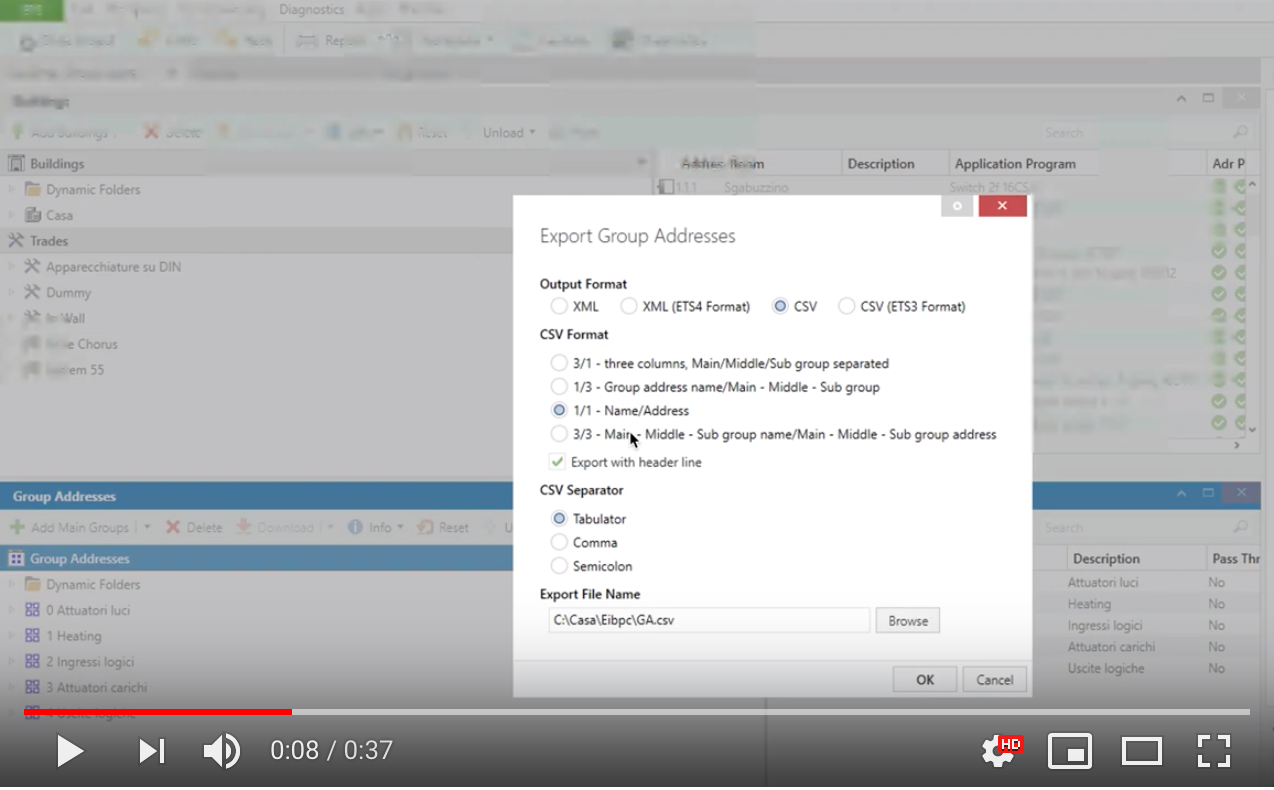](https://youtu.be/egRbR\_KwP9I)
|
package/docs/SUMMARY.md
ADDED
|
@@ -0,0 +1,45 @@
|
|
|
1
|
+
# Table of contents
|
|
2
|
+
|
|
3
|
+
* [Home](README.md)
|
|
4
|
+
* [Changelog](home/changelog.md)
|
|
5
|
+
* [FAQ AND TROUBLESHOOT](home/5.-faq-troubleshoot.md)
|
|
6
|
+
* [Security Policy](home/security.md)
|
|
7
|
+
* [Node self protection](home/protections.md)
|
|
8
|
+
* [ KNX NODES](other-knx-nodes/README.md)
|
|
9
|
+
* [KNX Gateway configuration](other-knx-nodes/1.-gateway-configuration.md)
|
|
10
|
+
* [KNX Device Node configuration](other-knx-nodes/2.-node-configuration.md)
|
|
11
|
+
* [Load Control configuration](other-knx-nodes/loadcontrol-configuration.md)
|
|
12
|
+
* [Scene Controller configuration](other-knx-nodes/scenecontroller-configuration.md)
|
|
13
|
+
* [WatchDog configuration](other-knx-nodes/7.-watchdog-configuration.md)
|
|
14
|
+
* [ETS Logger configuration](other-knx-nodes/logger-configuration.md)
|
|
15
|
+
* [Global Context configuration](other-knx-nodes/globalvariable.md)
|
|
16
|
+
* [Alerter configuration](other-knx-nodes/alerter-configuration.md)
|
|
17
|
+
* [Viewer configuration](other-knx-nodes/knxultimateviewer.md)
|
|
18
|
+
* [PHILIPS HUE NODES](hue-bridge-configuration/README.md)
|
|
19
|
+
* [HUE Light](hue-bridge-configuration/hue-light.md)
|
|
20
|
+
* [SAMPLES](samples/README.md)
|
|
21
|
+
* [DATE / TIME TO THE KNX BUS](samples/date-time-to-the-knx-bus.md)
|
|
22
|
+
* [Datapoint 2](samples/datapoint-2.md)
|
|
23
|
+
* [Datapoint 22](samples/datapoint-22.md)
|
|
24
|
+
* [Datapoint 222](samples/datapoint-222.md)
|
|
25
|
+
* [Datapoint 213](samples/datapoint-213.md)
|
|
26
|
+
* [Datapoint 237](samples/datapoint-237.md)
|
|
27
|
+
* [RGBW, Datapoint 251.600](samples/rgbw-datapoint-251.600.md)
|
|
28
|
+
* [RGB color, Datpoint 232.600](samples/rgb-color-datpoint-232.600.md)
|
|
29
|
+
* [SCENE CONTROLLER NODE SAMPLES](samples/scene-controller-node-samples.md)
|
|
30
|
+
* [Alexa](samples/alexa.md)
|
|
31
|
+
* [POE On/Off](samples/poe-on-off.md)
|
|
32
|
+
* [WATCHDOG NODE](samples/watchdog-node.md)
|
|
33
|
+
* [VIRTUAL DEVICE](samples/virtual-device.md)
|
|
34
|
+
* [LOAD CONTROL SAMPLE](samples/load-control-sample.md)
|
|
35
|
+
* [Google Assistant](samples/google-assistant.md)
|
|
36
|
+
* [Switching a lamp](samples/switching-a-lamp.md)
|
|
37
|
+
* [Dimming a lamp](samples/dimming-a-lamp.md)
|
|
38
|
+
* [Homekit with Siri](samples/homekit-with-siri.md)
|
|
39
|
+
* [Read Request to the KNX BUS](samples/read-request-to-the-knx-bus.md)
|
|
40
|
+
* [ALERTER NODE SAMPLE](samples/alerter-node-sample.md)
|
|
41
|
+
* [PROGRAMMATICALLY CHANGE THE NODE CONFIG](samples/programmatically-change-the-node-config.md)
|
|
42
|
+
* [Global Context Node Sample](samples/global-context-node-sample.md)
|
|
43
|
+
* [Scene actuator controller](samples/scene-actuator-controller.md)
|
|
44
|
+
* [Subtype Value Sample](samples/subtype-value-sample.md)
|
|
45
|
+
* [ETS Logger sample](samples/logger-sample.md)
|
|
@@ -0,0 +1,170 @@
|
|
|
1
|
+
# FAQ AND TROUBLESHOOT
|
|
2
|
+
|
|
3
|
+
_First of all, thank you to use one of my node-red nodes! I worked a lot on this node and i hope you'll enjoy my efforts in offering my work to all users._\
|
|
4
|
+
_If you're here, you may have some issues. I'm sorry about that._\
|
|
5
|
+
_**Don't worry and relax**, we'll find what your problem is, because the **knx-ultimate node WORKS**, it has about thousand installations around the world and i have it installed as well for my home. So please follow the FAQ and if you "i'm still having problem", contact me._
|
|
6
|
+
|
|
7
|
+
<details>
|
|
8
|
+
|
|
9
|
+
<summary>THE NODE DOESN'T WORK</summary>
|
|
10
|
+
|
|
11
|
+
**Follow this checklist**
|
|
12
|
+
|
|
13
|
+
* Do you have created the [Gateway configuration node](https://github.com/Supergiovane/node-red-contrib-knx-ultimate/wiki/1.-Gateway-configuration) with the IP and Port pointing to your KNX/IP Router/Interface?
|
|
14
|
+
* If you've a KNX/IP **Router**, you need to put in the **Host** field, the multicast KNX IP address **224.0.23.12** and port **3671**
|
|
15
|
+
* If you've a KNX/IP **Interface**, you need to put in the **Host** field, the Interface's IP address, for example **192.168.1.22** and port **3671**
|
|
16
|
+
* If you have **two or more Ehternet interfaces** (like Raspberry PI), either specify the Ethernet interface to use in the [Gateway configuration node](https://github.com/Supergiovane/node-red-contrib-knx-ultimate/wiki/1.-Gateway-configuration), or totally disable the WIFI interface. Remember to **restart node-red**!
|
|
17
|
+
* Use only certified pure KNX/IP Router (preferable) or pure KNX/IP Interfaces. Do not use "all in one" devices, or proxies, or devices that, besides other functions, do KNX/IP routing as well. A stable connection between **LAN and KNX is the most important thing**, and it need to work. Spend money on that and you'll setup and forget it.
|
|
18
|
+
* If you have **an IP interface** try to disable the ACK by selecting _Suppress ACK request_ in the [Gateway configuration node](https://github.com/Supergiovane/node-red-contrib-knx-ultimate/wiki/1.-Gateway-configuration).
|
|
19
|
+
* Follow the **I CAN ONLY RECEIVE TELEGRAMS, NOT SEND - OR VICE VERSA** checklist
|
|
20
|
+
* If you're running Node-Red in a container, **delay the start of node-red after the container boots up**. Some users report that the Ethernet card is still DOWN when node-red starts. You can try it by manually stop node-red, disabling auto start of noder-red at boot, reboot the container, wait 2-3 minutes and manually start node-red. If KNX-Ultimate works, the issue is that.
|
|
21
|
+
|
|
22
|
+
</details>
|
|
23
|
+
|
|
24
|
+
<details>
|
|
25
|
+
|
|
26
|
+
<summary>AFTER SOME TIME THE NODE STOPS WORKING</summary>
|
|
27
|
+
|
|
28
|
+
**Follow this checklist**
|
|
29
|
+
|
|
30
|
+
* Read the **THE NODE DOESN'T WORK** faq.
|
|
31
|
+
* Check and eventually **disable** DDOS protection or UDP flood protection on your switches/routers. This as general rule. UDP KNX packets can be blocked otherwise.
|
|
32
|
+
* Try to directly connect your KNX/IP Router/Interface and your node-red PC.
|
|
33
|
+
* If you've a cheap KNX/IP Interface, specially if is an "all in onde" device, it can hangs. Go buy a real KNX/IP Router.
|
|
34
|
+
* If you use an KNX/IP Interface, be sure that you haven't reached the maximum connection limit (see your KNX/IP Interface's user manual). **KNX/IP Routers** are preferable instead, they doesn't have connection limits.
|
|
35
|
+
|
|
36
|
+
</details>
|
|
37
|
+
|
|
38
|
+
<details>
|
|
39
|
+
|
|
40
|
+
<summary>KNXD CONFIGURATION</summary>
|
|
41
|
+
|
|
42
|
+
**Follow this checklist**
|
|
43
|
+
|
|
44
|
+
* If you're running **knxd** on the same machine of node-red, please use 127.0.0.1 as interface address, otherwise knxd will have problems.
|
|
45
|
+
* If you're using **knxd**, please check the filtering tables and change the KNX config-node's physycal address accordingly.
|
|
46
|
+
* Enable the **Echo sent message to all node with same Group Address** in the gateway config-node, under advanded options.
|
|
47
|
+
|
|
48
|
+
</details>
|
|
49
|
+
|
|
50
|
+
<details>
|
|
51
|
+
|
|
52
|
+
<summary>I SEE THE TELEGRAM IN ETS, BUT MY ACTUATOR WON'T REACT</summary>
|
|
53
|
+
|
|
54
|
+
**Follow this checklist**
|
|
55
|
+
|
|
56
|
+
You may have other Node-Red KNX Plug-ins installed.
|
|
57
|
+
|
|
58
|
+
* Remove all KNX Plugin from node-red Palette. Leave only knx-ultimate. Remember to remove the config nodes as well, they are hidden.
|
|
59
|
+
* If you have **an IP interface** try to disable the ACK by selecting _Suppress ACK request_ in the [Gateway configuration node](https://github.com/Supergiovane/node-red-contrib-knx-ultimate/wiki/1.-Gateway-configuration).
|
|
60
|
+
|
|
61
|
+
</details>
|
|
62
|
+
|
|
63
|
+
<details>
|
|
64
|
+
|
|
65
|
+
<summary>I CAN ONLY RECEIVE TELEGRAMS, NOT SEND - OR VICE VERSA</summary>
|
|
66
|
+
|
|
67
|
+
**Follow this checklist**
|
|
68
|
+
|
|
69
|
+
Your KNX/IP Router/Interface may have filtering active.
|
|
70
|
+
|
|
71
|
+
* Check in ETS if the router has filtering enabled. If yes, either allow **forwarding** in all configuration pages of your KNX Router, or change the physical address of the knx-ultimate config node according to your router's filter tables.
|
|
72
|
+
* If you're using **knxd**, please check the filtering tables and change the KNX config node physycal address accordingly.
|
|
73
|
+
|
|
74
|
+
</details>
|
|
75
|
+
|
|
76
|
+
<details>
|
|
77
|
+
|
|
78
|
+
<summary>WRONG VALUES FROM THE NODE</summary>
|
|
79
|
+
|
|
80
|
+
**Follow this checklist**
|
|
81
|
+
|
|
82
|
+
* Make sure to use the right datapoint. For example, for temperature, use 9.001
|
|
83
|
+
* When possible, import the ETS csv file in the Gateway configuration node. You'lll have always the right Datapoints!
|
|
84
|
+
* Make sure not to have two or more knx-ultimate nodes, having **same Group Address** but **different Datapoint**.
|
|
85
|
+
|
|
86
|
+
</details>
|
|
87
|
+
|
|
88
|
+
<details>
|
|
89
|
+
|
|
90
|
+
<summary>IF I SEND A MESSAGE TO A NODE FROM NODE-RED, OTHER NODES IN THE FLOWS HAVING THE SAME GROUP ADDRESS, DOESN'T RECEIVE/DON'T REACT TO THIS MESSAGE</summary>
|
|
91
|
+
|
|
92
|
+
**This happens if you use a tunneling/unicast connection, like KNX/IP Interfaces or knxd does.**
|
|
93
|
+
|
|
94
|
+
* Enable the **Echo sent message to all node with same Group Address** in the gateway config-node, under advanded options.
|
|
95
|
+
|
|
96
|
+
</details>
|
|
97
|
+
|
|
98
|
+
<details>
|
|
99
|
+
|
|
100
|
+
<summary>DOES IT WORK WITH SECURE KNX ROUTER/INTERFACES?</summary>
|
|
101
|
+
|
|
102
|
+
**Follow this checklist**
|
|
103
|
+
|
|
104
|
+
Secure IP Router/Interfaces doesn't work if set to secure. It works, instead, if you allow unsecure connections to you router.
|
|
105
|
+
|
|
106
|
+
* Make sure to disable the secure routing or to allow unsecure connections.
|
|
107
|
+
* If you feel that you can be hacked, you can use a second ethernet card, straight connecting node-red machine to your KNX Router/Inteface with a dedicated LAN cable. In the knx-ultimate config node **Bind to local interface** option, you can then set this interface to be the default KNX/IP interface.
|
|
108
|
+
* Secure connection will be implemented one day.
|
|
109
|
+
|
|
110
|
+
</details>
|
|
111
|
+
|
|
112
|
+
<details>
|
|
113
|
+
|
|
114
|
+
<summary>FLOOD PROTECTION KICKS IN. WHAT THE HELL IS THAT?</summary>
|
|
115
|
+
|
|
116
|
+
**Follow this checklist**
|
|
117
|
+
|
|
118
|
+
Flood protection avoids your node-red UI to become unresponsive, due to a too high amount of messages sent to te input pin of the node in a specified time frame of 1 second.\
|
|
119
|
+
The max number of msg you can send to a node is 120 each second. If you need to send a lot of msg to the node, please consider a "delay" node, to delay each message a bit.\
|
|
120
|
+
[See here](https://github.com/Supergiovane/node-red-contrib-knx-ultimate/wiki/-Protections)
|
|
121
|
+
|
|
122
|
+
* Review your flow. Send less messages to the node or use a **delay** node.
|
|
123
|
+
* Use RBE filter, to discard messages having the payload equal to the current node's payload.
|
|
124
|
+
|
|
125
|
+
</details>
|
|
126
|
+
|
|
127
|
+
<details>
|
|
128
|
+
|
|
129
|
+
<summary>I'VE IMPORTED ETS FILE BUT THERE ARE WARNINGS ABOUT DATAPOINTS</summary>
|
|
130
|
+
|
|
131
|
+
**Follow this checklist**
|
|
132
|
+
|
|
133
|
+
In a ETS installation, setting Datapoints is mandatory, at least for professional one.\
|
|
134
|
+
With Datapoints, all youd visualization and control devices know how to handle the telegram and how to perform a right decondinf of values.\
|
|
135
|
+
You'll see that ALL devices, control software, visualization systems and all the entire KNX world need Datapoints, so why not to thanks knx-ultimate, to force you to finally fix your ETS installation, that wait so long to be fixed? :-)\
|
|
136
|
+
|
|
137
|
+
|
|
138
|
+
* Put an headphone on your head, with good music, open ETS and start adding datapoints.
|
|
139
|
+
* Or... import ETS file by selecting the option "if Group Address has no Datapoint", to "Import with a fake 1.001 datapoint (Not recommended)", or to skip affected datapoint.
|
|
140
|
+
* Remember to set the FULL datapoint (main type + subtype), otherwise the importer will set a default .001 subtype. Please see this image 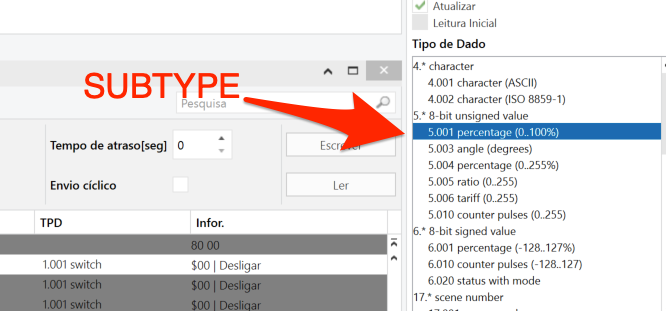
|
|
141
|
+
|
|
142
|
+
</details>
|
|
143
|
+
|
|
144
|
+
<details>
|
|
145
|
+
|
|
146
|
+
<summary>CIRCULAR REFERENCE PROTECTION KICKS IN. WHAT THE HELL IS THAT?</summary>
|
|
147
|
+
|
|
148
|
+
**Follow this checklist**
|
|
149
|
+
|
|
150
|
+
Circular reference protection avoids your node-red UI to become unresponsive and your KNX installation to be flooded, by disabling two nodes with same Group Address link toghether.\
|
|
151
|
+
For example, if you link the **output** pin of a node having Group Address 0/1/1, to the **input** ping of another node having the same Group Address 0/1/1, the protection will kicks in.\
|
|
152
|
+
[See here](https://github.com/Supergiovane/node-red-contrib-knx-ultimate/wiki/-Protections)
|
|
153
|
+
|
|
154
|
+
* Review your flow. Detach the two identical nodes or out something inbetween, acting as "moderator".
|
|
155
|
+
* Use RBE filter, to discard messages having the payload equal to the current node's payload.
|
|
156
|
+
|
|
157
|
+
</details>
|
|
158
|
+
|
|
159
|
+
<details>
|
|
160
|
+
|
|
161
|
+
<summary>I'M STILL HAVING PROBLEM</summary>
|
|
162
|
+
|
|
163
|
+
**Use one of the channels below to reach me (i ever prefer gitHub)**
|
|
164
|
+
|
|
165
|
+
* Open an issue on [Github](https://github.com/Supergiovane/node-red-contrib-knx-ultimate/issues). Whenever you open an issue, i receive an email and i can sort it out immediately.
|
|
166
|
+
* Send me a PM on [Knx-User-Forum](https://knx-user-forum.de). I'm here as TheMax74. Mein Deutsch ist nicht so gut, daher bitte auf Englisch schreiben!
|
|
167
|
+
|
|
168
|
+
</details>
|
|
169
|
+
|
|
170
|
+
Now that your issue has been resolved, you can [](https://www.paypal.me/techtoday)
|
|
@@ -0,0 +1,46 @@
|
|
|
1
|
+
# Node self protection
|
|
2
|
+
|
|
3
|
+
KNX-Ultimate has two types of internal protection, to protect your KNX Bus from being flooded and your Node-RED GUI from being unresponsive, if you make some mistake in your flows.\
|
|
4
|
+
Let's have **some fun** with these protections!\
|
|
5
|
+
|
|
6
|
+
|
|
7
|
+
## FLOOD PROTECTION
|
|
8
|
+
|
|
9
|
+
Flood protection avoids your node-red UI to become unresponsive, due to a too high amount of messages sent to te input pin of the node in a specified time frame of 1 second.\
|
|
10
|
+
The max number of msg you can send to a node is 120 each second. If you need to send a lot of msg to the node, please consider a "delay" node, to delay each message a bit.\
|
|
11
|
+
|
|
12
|
+
|
|
13
|
+
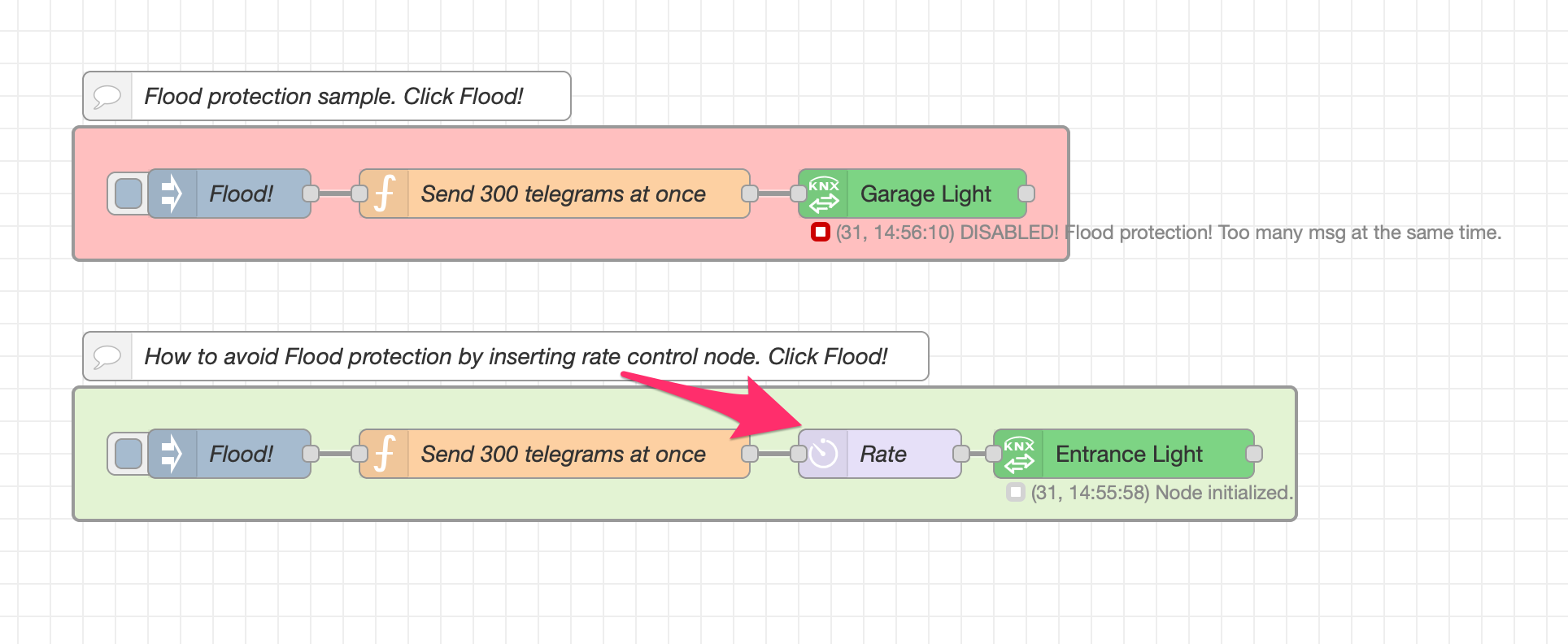\
|
|
14
|
+
|
|
15
|
+
|
|
16
|
+
**Copy this code and paste it into your flow**
|
|
17
|
+
|
|
18
|
+
```javascript
|
|
19
|
+
|
|
20
|
+
[{"id":"f91f45d.66cd538","type":"comment","z":"3e6a6a12ba5593cb","name":"Flood protection sample. Click Flood!","info":"","x":270,"y":140,"wires":[]},{"id":"d37f901.ab92c7","type":"comment","z":"3e6a6a12ba5593cb","name":"How to avoid Flood protection by inserting rate control node. Click Flood!","info":"","x":380,"y":300,"wires":[]},{"id":"c2fcf850cd98f5ea","type":"group","z":"3e6a6a12ba5593cb","name":"","style":{"fill":"#ffbfbf","label":true},"nodes":["c190dcf9.50bd4","5cf9789e.f8a6e8","477e25ad.e2efa4"],"x":114,"y":159,"w":612,"h":82},{"id":"c190dcf9.50bd4","type":"inject","z":"3e6a6a12ba5593cb","g":"c2fcf850cd98f5ea","name":"Flood!","props":[{"p":"payload"},{"p":"topic","vt":"str"}],"repeat":"","crontab":"","once":false,"onceDelay":0.1,"topic":"","payload":"false","payloadType":"bool","x":210,"y":200,"wires":[["5cf9789e.f8a6e8"]]},{"id":"5cf9789e.f8a6e8","type":"function","z":"3e6a6a12ba5593cb","g":"c2fcf850cd98f5ea","name":"Send 300 telegrams at once","func":"for (var i = 0; i < 300; i++) { \n node.send({payload:false});\n}","outputs":1,"noerr":0,"initialize":"","finalize":"","libs":[],"x":410,"y":200,"wires":[["477e25ad.e2efa4"]]},{"id":"477e25ad.e2efa4","type":"knxUltimate","z":"3e6a6a12ba5593cb","g":"c2fcf850cd98f5ea","server":"64df43b53180c04b","topic":"0/1/1","outputtopic":"","dpt":"1.001","initialread":false,"notifyreadrequest":false,"notifyresponse":false,"notifywrite":true,"notifyreadrequestalsorespondtobus":false,"notifyreadrequestalsorespondtobusdefaultvalueifnotinitialized":"0","listenallga":false,"name":"Garage Light","outputtype":"write","outputRBE":false,"inputRBE":false,"formatmultiplyvalue":"1","formatnegativevalue":"leave","formatdecimalsvalue":"999","passthrough":"no","x":630,"y":200,"wires":[[]]},{"id":"64df43b53180c04b","type":"knxUltimate-config","host":"224.0.23.12","port":"3671","physAddr":"15.15.22","hostProtocol":"Multicast","suppressACKRequest":false,"csv":"\"Group name\"\t\"Address\"\t\"Central\"\t\"Unfiltered\"\t\"Description\"\t\"DatapointType\"\t\"Security\"\n\"Attuatori luci\"\t\"0/-/-\"\t\"\"\t\"\"\t\"\"\t\"\"\t\"Auto\"\n\"Luci primo piano\"\t\"0/0/-\"\t\"\"\t\"\"\t\"\"\t\"\"\t\"Auto\"\n\"Luce camera da letto\"\t\"0/0/1\"\t\"\"\t\"\"\t\"\"\t\"DPST-1-8\"\t\"Auto\"\n\"Luce loggia camera da letto\"\t\"0/0/2\"\t\"\"\t\"\"\t\"\"\t\"DPST-1-1\"\t\"Auto\"\n\"Luce camera armadi\"\t\"0/0/3\"\t\"\"\t\"\"\t\"\"\t\"DPST-1-1\"\t\"Auto\"\n\"Luce bagno grande (switch)\"\t\"0/0/4\"\t\"\"\t\"\"\t\"\"\t\"DPST-1-1\"\t\"Auto\"\n\"Luce loggia bagno grande\"\t\"0/0/5\"\t\"\"\t\"\"\t\"\"\t\"DPST-1-1\"\t\"Auto\"\n\"Luce specchio bagno grande (switch)\"\t\"0/0/6\"\t\"\"\t\"\"\t\"\"\t\"DPST-1-1\"\t\"Auto\"\n\"Luce lavanderia\"\t\"0/0/7\"\t\"\"\t\"\"\t\"\"\t\"DPST-1-1\"\t\"Auto\"\n\"Luce specchio lavanderia (switch)\"\t\"0/0/8\"\t\"\"\t\"\"\t\"\"\t\"DPST-1-1\"\t\"Auto\"\n\"Luce studio\"\t\"0/0/9\"\t\"\"\t\"\"\t\"\"\t\"DPST-1-1\"\t\"Auto\"\n\"Plafoniera soggiorno (switch)\"\t\"0/0/10\"\t\"\"\t\"\"\t\"\"\t\"DPST-1-1\"\t\"Auto\"\n\"Applique soggiorno (switch)\"\t\"0/0/11\"\t\"\"\t\"\"\t\"\"\t\"DPST-1-1\"\t\"Auto\"\n\"Luce loggia soggiorno cucina\"\t\"0/0/12\"\t\"\"\t\"\"\t\"\"\t\"DPST-1-1\"\t\"Auto\"\n\"Luce cucina\"\t\"0/0/13\"\t\"\"\t\"\"\t\"\"\t\"DPT-1\"\t\"Auto\"\n\"Pensili cucina\"\t\"0/0/14\"\t\"\"\t\"\"\t\"\"\t\"DPT-1\"\t\"Auto\"\n\"Luce corridoio\"\t\"0/0/15\"\t\"\"\t\"\"\t\"\"\t\"DPST-1-1\"\t\"Auto\"\n\"LED scala\"\t\"0/0/16\"\t\"\"\t\"\"\t\"\"\t\"DPST-1-1\"\t\"Auto\"\n\"Applique soggiorno brightness value\"\t\"0/0/17\"\t\"\"\t\"\"\t\"\"\t\"DPST-5-1\"\t\"Auto\"\n\"Luce specchio bagno grande(dim)\"\t\"0/0/18\"\t\"\"\t\"\"\t\"\"\t\"DPST-3-7\"\t\"Auto\"\n\"Plafoniera soggiorno brightness value\"\t\"0/0/19\"\t\"\"\t\"\"\t\"\"\t\"DPST-5-1\"\t\"Auto\"\n\"Luce specchio lavanderia (dim)\"\t\"0/0/20\"\t\"\"\t\"\"\t\"\"\t\"DPST-3-7\"\t\"Auto\"\n\"LED cambiacolori RGB scala\"\t\"0/0/21\"\t\"\"\t\"\"\t\"\"\t\"DPST-1-1\"\t\"Auto\"\n\"Luce specchio bagno grande brightness value\"\t\"0/0/22\"\t\"\"\t\"\"\t\"\"\t\"DPST-5-1\"\t\"Auto\"\n\"Plafoniera soggiorno (dim)\"\t\"0/0/23\"\t\"\"\t\"\"\t\"\"\t\"DPST-3-7\"\t\"Auto\"\n\"Applique soggiorno (dim)\"\t\"0/0/24\"\t\"\"\t\"\"\t\"\"\t\"DPST-3-7\"\t\"Auto\"\n\"Luce specchio lavanderia brightness value\"\t\"0/0/25\"\t\"\"\t\"\"\t\"\"\t\"DPST-5-1\"\t\"Auto\"\n\"Plafoniera soggiorno switch Stato\"\t\"0/0/26\"\t\"\"\t\"\"\t\"\"\t\"DPST-1-1\"\t\"Auto\"\n\"Applique soggiorno switch Stato\"\t\"0/0/27\"\t\"\"\t\"\"\t\"\"\t\"DPST-1-1\"\t\"Auto\"\n\"Luce camera armadi Stato\"\t\"0/0/28\"\t\"\"\t\"\"\t\"\"\t\"DPST-1-1\"\t\"Auto\"\n\"Luce bagno grande (switch) Stato\"\t\"0/0/29\"\t\"\"\t\"\"\t\"\"\t\"DPST-1-1\"\t\"Auto\"\n\"Luce specchio bagno grande Stato\"\t\"0/0/30\"\t\"\"\t\"\"\t\"\"\t\"DPST-5-1\"\t\"Auto\"\n\"Luce specchio lavanderia Stato\"\t\"0/0/31\"\t\"\"\t\"\"\t\"\"\t\"DPST-5-1\"\t\"Auto\"\n\"Luce lavanderia Stato\"\t\"0/0/32\"\t\"\"\t\"\"\t\"\"\t\"DPST-1-1\"\t\"Auto\"\n\"Plafoniera soggiorno (colore)\"\t\"0/0/33\"\t\"\"\t\"\"\t\"\"\t\"DPST-232-600\"\t\"Auto\"\n\"Plafoniera soggiorno brightness value Stato\"\t\"0/0/34\"\t\"\"\t\"\"\t\"\"\t\"DPST-5-1\"\t\"Auto\"\n\"Applique soggiorno brightness value Stato\"\t\"0/0/35\"\t\"\"\t\"\"\t\"\"\t\"DPST-5-1\"\t\"Auto\"\n\"Luce bagno grande (brightness value)\"\t\"0/0/36\"\t\"\"\t\"\"\t\"\"\t\"DPST-5-1\"\t\"Auto\"\n\"Luce bagno grande (brightness value) Stato\"\t\"0/0/37\"\t\"\"\t\"\"\t\"\"\t\"DPST-5-1\"\t\"Auto\"\n\"Luce bagno grande (dim)\"\t\"0/0/38\"\t\"\"\t\"\"\t\"\"\t\"DPST-3-7\"\t\"Auto\"\n\"Luce bagno grande (color)\"\t\"0/0/39\"\t\"\"\t\"\"\t\"\"\t\"DPST-232-600\"\t\"Auto\"\n\"Luce bagno grande (color) Stato\"\t\"0/0/40\"\t\"\"\t\"\"\t\"\"\t\"DPST-232-600\"\t\"Auto\"\n\"Applique soggiorno (color)\"\t\"0/0/41\"\t\"\"\t\"\"\t\"\"\t\"DPST-232-600\"\t\"Auto\"\n\"Applique soggiorno (color) Stato\"\t\"0/0/42\"\t\"\"\t\"\"\t\"\"\t\"DPST-232-600\"\t\"Auto\"\n\"Luce bagno grande scena cambio colori (ON/OFF)\"\t\"0/0/43\"\t\"\"\t\"\"\t\"\"\t\"DPST-1-1\"\t\"Auto\"\n\"Luci piano terra\"\t\"0/1/-\"\t\"\"\t\"\"\t\"Luci piano terra\"\t\"\"\t\"Auto\"\n\"Luce corridoio e scala\"\t\"0/1/0\"\t\"\"\t\"\"\t\"\"\t\"DPST-1-1\"\t\"Auto\"\n\"Luce tavolo taverna\"\t\"0/1/1\"\t\"\"\t\"\"\t\"\"\t\"DPST-1-1\"\t\"Auto\"\n\"Applique taverna\"\t\"0/1/2\"\t\"\"\t\"\"\t\"\"\t\"DPST-1-1\"\t\"Auto\"\n\"Luce cameretta\"\t\"0/1/3\"\t\"\"\t\"\"\t\"\"\t\"DPST-1-1\"\t\"Auto\"\n\"Luce bagno piano terra\"\t\"0/1/4\"\t\"\"\t\"\"\t\"Bagno piano terra Luce\"\t\"DPST-1-1\"\t\"Auto\"\n\"Luce timer garage (ON)\"\t\"0/1/5\"\t\"\"\t\"\"\t\"\"\t\"DPST-1-1\"\t\"Auto\"\n\"Luci marciapiedi giardino\"\t\"0/1/6\"\t\"\"\t\"\"\t\"\"\t\"DPST-1-1\"\t\"Auto\"\n\"Fari allarme giardino\"\t\"0/1/7\"\t\"\"\t\"\"\t\"\"\t\"DPST-1-1\"\t\"Auto\"\n\"Controsoffitto taverna (switch)\"\t\"0/1/8\"\t\"\"\t\"\"\t\"\"\t\"DPST-1-1\"\t\"Auto\"\n\"Controsoffitto taverna (dim)\"\t\"0/1/9\"\t\"\"\t\"\"\t\"\"\t\"DPST-3-7\"\t\"Auto\"\n\"Controsoffitto scena cambio colori taverna (ON/OFF)\"\t\"0/1/10\"\t\"\"\t\"\"\t\"\"\t\"DPST-1-1\"\t\"Auto\"\n\"IR Luci taverna (ON/OFF)\"\t\"0/1/11\"\t\"\"\t\"\"\t\"\"\t\"DPST-1-1\"\t\"Auto\"","KNXEthInterface":"Auto","KNXEthInterfaceManuallyInput":"","statusDisplayLastUpdate":true,"statusDisplayDeviceNameWhenALL":true,"statusDisplayDataPoint":false,"stopETSImportIfNoDatapoint":"stop","loglevel":"debug","name":"KNX Gateway 224.0.23.12","localEchoInTunneling":true,"delaybetweentelegrams":"50","delaybetweentelegramsfurtherdelayREAD":"1","ignoreTelegramsWithRepeatedFlag":false,"keyringFileXML":"","autoReconnect":"yes"},{"id":"31dd699c74532e18","type":"group","z":"3e6a6a12ba5593cb","name":"","style":{"fill":"#e3f3d3","label":true},"nodes":["7fe40a28.710acc","6be47a90.25445c","2f6d18b7.00ee1","904f53e5.a02f1"],"x":114,"y":319,"w":752,"h":82},{"id":"7fe40a28.710acc","type":"inject","z":"3e6a6a12ba5593cb","g":"31dd699c74532e18","name":"Flood!","props":[{"p":"payload"},{"p":"topic","vt":"str"}],"repeat":"","crontab":"","once":false,"onceDelay":0.1,"topic":"","payload":"false","payloadType":"bool","x":210,"y":360,"wires":[["6be47a90.25445c"]]},{"id":"6be47a90.25445c","type":"function","z":"3e6a6a12ba5593cb","g":"31dd699c74532e18","name":"Send 300 telegrams at once","func":"for (var i = 0; i < 300; i++) { \n node.send({payload:false});\n}","outputs":1,"noerr":0,"initialize":"","finalize":"","libs":[],"x":410,"y":360,"wires":[["904f53e5.a02f1"]]},{"id":"2f6d18b7.00ee1","type":"knxUltimate","z":"3e6a6a12ba5593cb","g":"31dd699c74532e18","server":"64df43b53180c04b","topic":"0/1/2","outputtopic":"","dpt":"1.001","initialread":false,"notifyreadrequest":false,"notifyresponse":false,"notifywrite":true,"notifyreadrequestalsorespondtobus":false,"notifyreadrequestalsorespondtobusdefaultvalueifnotinitialized":"0","listenallga":false,"name":"Entrance Light","outputtype":"write","outputRBE":false,"inputRBE":false,"formatmultiplyvalue":"1","formatnegativevalue":"leave","formatdecimalsvalue":"999","passthrough":"no","x":760,"y":360,"wires":[[]]},{"id":"904f53e5.a02f1","type":"delay","z":"3e6a6a12ba5593cb","g":"31dd699c74532e18","name":"Rate","pauseType":"rate","timeout":"5","timeoutUnits":"milliseconds","rate":"10","nbRateUnits":"1","rateUnits":"second","randomFirst":"1","randomLast":"5","randomUnits":"seconds","drop":false,"outputs":1,"x":610,"y":360,"wires":[["2f6d18b7.00ee1"]]}]
|
|
21
|
+
|
|
22
|
+
```
|
|
23
|
+
|
|
24
|
+
\
|
|
25
|
+
|
|
26
|
+
|
|
27
|
+
## CIRCULAR REFERENCE PROTECTION
|
|
28
|
+
|
|
29
|
+
Circular reference protection avoids your node-red UI to become unresponsive and your KNX installation to be flooded, by disabling two nodes with same Group Address link toghether.\
|
|
30
|
+
For example, if you link the **output** pin of a node having Group Address 0/1/1, to the **input** ping of another node having the same Group Address 0/1/1, the protection will kicks in.\
|
|
31
|
+
|
|
32
|
+
|
|
33
|
+
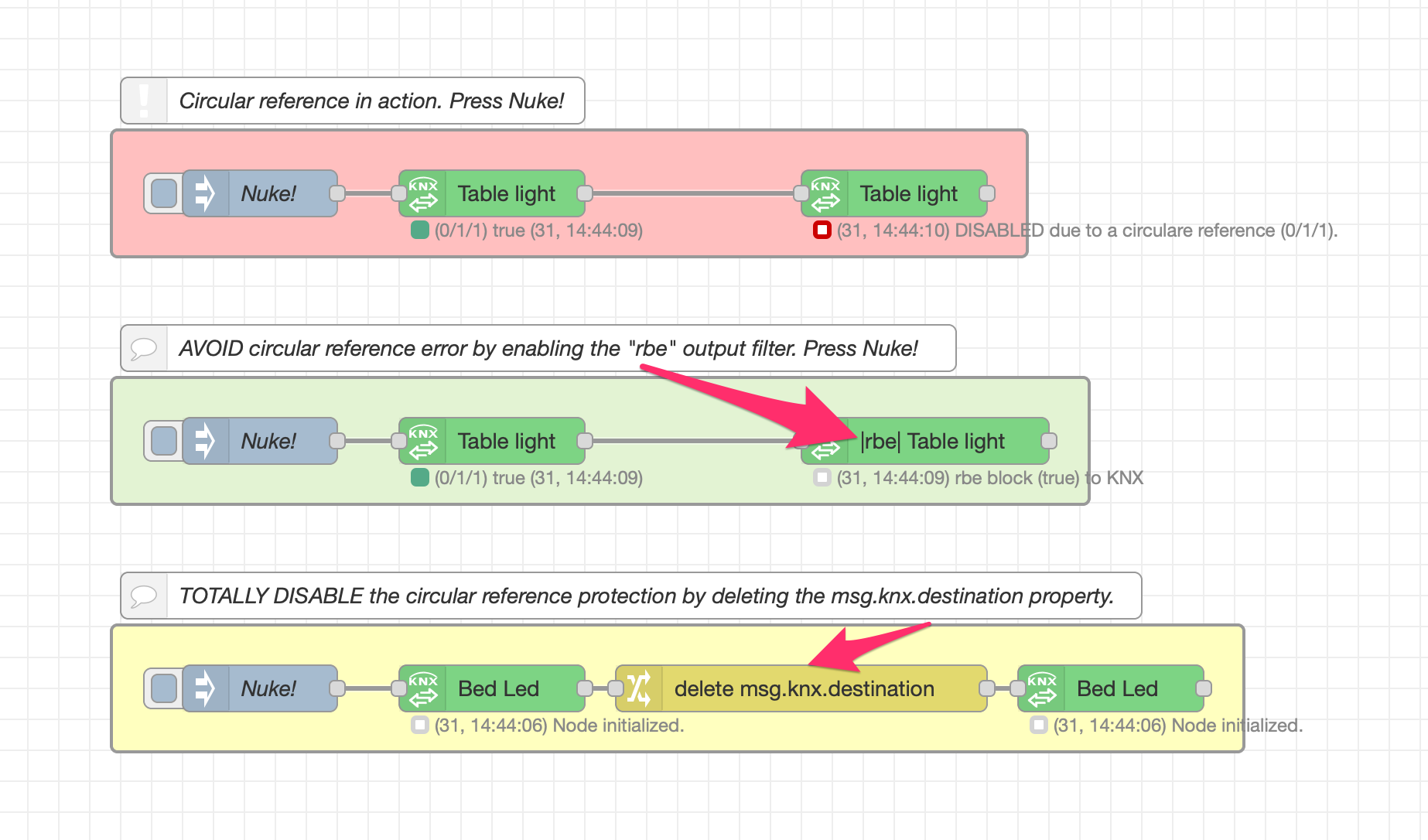\
|
|
34
|
+
|
|
35
|
+
|
|
36
|
+
**Copy this code and paste it into your flow**
|
|
37
|
+
|
|
38
|
+
```javascript
|
|
39
|
+
|
|
40
|
+
[{"id":"40a2def50bbedd29","type":"comment","z":"bde887538cf27686","name":"AVOID circular reference error by enabling the \"rbe\" output filter. Press Nuke!","info":"","x":350,"y":280,"wires":[]},{"id":"e3d2eae710199011","type":"comment","z":"bde887538cf27686","name":"TOTALLY DISABLE the circular reference protection by deleting the msg.knx.destination property.","info":"","x":410,"y":440,"wires":[]},{"id":"24a9630758a10955","type":"comment","z":"bde887538cf27686","name":"Circular reference in action. Press Nuke!","info":"","x":230,"y":120,"wires":[],"icon":"node-red/alert.svg"},{"id":"3080af98055a1e80","type":"group","z":"bde887538cf27686","name":"","style":{"fill":"#ffbfbf","label":true},"nodes":["98a01d3c5fef2aca","de469c89030c1b57","050e8dad9f27fb9d"],"x":74,"y":139,"w":592,"h":82},{"id":"98a01d3c5fef2aca","type":"knxUltimate","z":"bde887538cf27686","g":"3080af98055a1e80","server":"64df43b53180c04b","topic":"0/1/1","outputtopic":"","dpt":"1.001","initialread":0,"notifyreadrequest":false,"notifyresponse":false,"notifywrite":true,"notifyreadrequestalsorespondtobus":false,"notifyreadrequestalsorespondtobusdefaultvalueifnotinitialized":"0","listenallga":false,"name":"Table light","outputtype":"write","outputRBE":false,"inputRBE":false,"formatmultiplyvalue":1,"formatnegativevalue":"leave","formatdecimalsvalue":999,"passthrough":"no","x":320,"y":180,"wires":[["de469c89030c1b57"]]},{"id":"de469c89030c1b57","type":"knxUltimate","z":"bde887538cf27686","g":"3080af98055a1e80","server":"64df43b53180c04b","topic":"0/1/1","outputtopic":"","dpt":"1.001","initialread":0,"notifyreadrequest":false,"notifyresponse":false,"notifywrite":true,"notifyreadrequestalsorespondtobus":false,"notifyreadrequestalsorespondtobusdefaultvalueifnotinitialized":"0","listenallga":false,"name":"Table light","outputtype":"write","outputRBE":false,"inputRBE":false,"formatmultiplyvalue":1,"formatnegativevalue":"leave","formatdecimalsvalue":999,"passthrough":"no","x":580,"y":180,"wires":[[]]},{"id":"050e8dad9f27fb9d","type":"inject","z":"bde887538cf27686","g":"3080af98055a1e80","name":"Nuke!","props":[{"p":"payload"},{"p":"topic","vt":"str"}],"repeat":"","crontab":"","once":false,"onceDelay":0.1,"topic":"","payload":"true","payloadType":"bool","x":170,"y":180,"wires":[["98a01d3c5fef2aca"]]},{"id":"64df43b53180c04b","type":"knxUltimate-config","host":"224.0.23.12","port":"3671","physAddr":"15.15.22","hostProtocol":"Multicast","suppressACKRequest":false,"csv":"\"Group name\"\t\"Address\"\t\"Central\"\t\"Unfiltered\"\t\"Description\"\t\"DatapointType\"\t\"Security\"\n\"Attuatori luci\"\t\"0/-/-\"\t\"\"\t\"\"\t\"\"\t\"\"\t\"Auto\"\n\"Luci primo piano\"\t\"0/0/-\"\t\"\"\t\"\"\t\"\"\t\"\"\t\"Auto\"\n\"Luce camera da letto\"\t\"0/0/1\"\t\"\"\t\"\"\t\"\"\t\"DPST-1-8\"\t\"Auto\"\n\"Luce loggia camera da letto\"\t\"0/0/2\"\t\"\"\t\"\"\t\"\"\t\"DPST-1-1\"\t\"Auto\"\n\"Luce camera armadi\"\t\"0/0/3\"\t\"\"\t\"\"\t\"\"\t\"DPST-1-1\"\t\"Auto\"\n\"Luce bagno grande (switch)\"\t\"0/0/4\"\t\"\"\t\"\"\t\"\"\t\"DPST-1-1\"\t\"Auto\"\n\"Luce loggia bagno grande\"\t\"0/0/5\"\t\"\"\t\"\"\t\"\"\t\"DPST-1-1\"\t\"Auto\"\n\"Luce specchio bagno grande (switch)\"\t\"0/0/6\"\t\"\"\t\"\"\t\"\"\t\"DPST-1-1\"\t\"Auto\"\n\"Luce lavanderia\"\t\"0/0/7\"\t\"\"\t\"\"\t\"\"\t\"DPST-1-1\"\t\"Auto\"\n\"Luce specchio lavanderia (switch)\"\t\"0/0/8\"\t\"\"\t\"\"\t\"\"\t\"DPST-1-1\"\t\"Auto\"\n\"Luce studio\"\t\"0/0/9\"\t\"\"\t\"\"\t\"\"\t\"DPST-1-1\"\t\"Auto\"\n\"Plafoniera soggiorno (switch)\"\t\"0/0/10\"\t\"\"\t\"\"\t\"\"\t\"DPST-1-1\"\t\"Auto\"\n\"Applique soggiorno (switch)\"\t\"0/0/11\"\t\"\"\t\"\"\t\"\"\t\"DPST-1-1\"\t\"Auto\"\n\"Luce loggia soggiorno cucina\"\t\"0/0/12\"\t\"\"\t\"\"\t\"\"\t\"DPST-1-1\"\t\"Auto\"\n\"Luce cucina\"\t\"0/0/13\"\t\"\"\t\"\"\t\"\"\t\"DPT-1\"\t\"Auto\"\n\"Pensili cucina\"\t\"0/0/14\"\t\"\"\t\"\"\t\"\"\t\"DPT-1\"\t\"Auto\"\n\"Luce corridoio\"\t\"0/0/15\"\t\"\"\t\"\"\t\"\"\t\"DPST-1-1\"\t\"Auto\"\n\"LED scala\"\t\"0/0/16\"\t\"\"\t\"\"\t\"\"\t\"DPST-1-1\"\t\"Auto\"\n\"Applique soggiorno brightness value\"\t\"0/0/17\"\t\"\"\t\"\"\t\"\"\t\"DPST-5-1\"\t\"Auto\"\n\"Luce specchio bagno grande(dim)\"\t\"0/0/18\"\t\"\"\t\"\"\t\"\"\t\"DPST-3-7\"\t\"Auto\"\n\"Plafoniera soggiorno brightness value\"\t\"0/0/19\"\t\"\"\t\"\"\t\"\"\t\"DPST-5-1\"\t\"Auto\"\n\"Luce specchio lavanderia (dim)\"\t\"0/0/20\"\t\"\"\t\"\"\t\"\"\t\"DPST-3-7\"\t\"Auto\"\n\"LED cambiacolori RGB scala\"\t\"0/0/21\"\t\"\"\t\"\"\t\"\"\t\"DPST-1-1\"\t\"Auto\"\n\"Luce specchio bagno grande brightness value\"\t\"0/0/22\"\t\"\"\t\"\"\t\"\"\t\"DPST-5-1\"\t\"Auto\"\n\"Plafoniera soggiorno (dim)\"\t\"0/0/23\"\t\"\"\t\"\"\t\"\"\t\"DPST-3-7\"\t\"Auto\"\n\"Applique soggiorno (dim)\"\t\"0/0/24\"\t\"\"\t\"\"\t\"\"\t\"DPST-3-7\"\t\"Auto\"\n\"Luce specchio lavanderia brightness value\"\t\"0/0/25\"\t\"\"\t\"\"\t\"\"\t\"DPST-5-1\"\t\"Auto\"\n\"Plafoniera soggiorno switch Stato\"\t\"0/0/26\"\t\"\"\t\"\"\t\"\"\t\"DPST-1-1\"\t\"Auto\"\n\"Applique soggiorno switch Stato\"\t\"0/0/27\"\t\"\"\t\"\"\t\"\"\t\"DPST-1-1\"\t\"Auto\"\n\"Luce camera armadi Stato\"\t\"0/0/28\"\t\"\"\t\"\"\t\"\"\t\"DPST-1-1\"\t\"Auto\"\n\"Luce bagno grande (switch) Stato\"\t\"0/0/29\"\t\"\"\t\"\"\t\"\"\t\"DPST-1-1\"\t\"Auto\"\n\"Luce specchio bagno grande Stato\"\t\"0/0/30\"\t\"\"\t\"\"\t\"\"\t\"DPST-5-1\"\t\"Auto\"\n\"Luce specchio lavanderia Stato\"\t\"0/0/31\"\t\"\"\t\"\"\t\"\"\t\"DPST-5-1\"\t\"Auto\"\n\"Luce lavanderia Stato\"\t\"0/0/32\"\t\"\"\t\"\"\t\"\"\t\"DPST-1-1\"\t\"Auto\"\n\"Plafoniera soggiorno (colore)\"\t\"0/0/33\"\t\"\"\t\"\"\t\"\"\t\"DPST-232-600\"\t\"Auto\"\n\"Plafoniera soggiorno brightness value Stato\"\t\"0/0/34\"\t\"\"\t\"\"\t\"\"\t\"DPST-5-1\"\t\"Auto\"\n\"Applique soggiorno brightness value Stato\"\t\"0/0/35\"\t\"\"\t\"\"\t\"\"\t\"DPST-5-1\"\t\"Auto\"\n\"Luce bagno grande (brightness value)\"\t\"0/0/36\"\t\"\"\t\"\"\t\"\"\t\"DPST-5-1\"\t\"Auto\"\n\"Luce bagno grande (brightness value) Stato\"\t\"0/0/37\"\t\"\"\t\"\"\t\"\"\t\"DPST-5-1\"\t\"Auto\"\n\"Luce bagno grande (dim)\"\t\"0/0/38\"\t\"\"\t\"\"\t\"\"\t\"DPST-3-7\"\t\"Auto\"\n\"Luce bagno grande (color)\"\t\"0/0/39\"\t\"\"\t\"\"\t\"\"\t\"DPST-232-600\"\t\"Auto\"\n\"Luce bagno grande (color) Stato\"\t\"0/0/40\"\t\"\"\t\"\"\t\"\"\t\"DPST-232-600\"\t\"Auto\"\n\"Applique soggiorno (color)\"\t\"0/0/41\"\t\"\"\t\"\"\t\"\"\t\"DPST-232-600\"\t\"Auto\"\n\"Applique soggiorno (color) Stato\"\t\"0/0/42\"\t\"\"\t\"\"\t\"\"\t\"DPST-232-600\"\t\"Auto\"\n\"Luce bagno grande scena cambio colori (ON/OFF)\"\t\"0/0/43\"\t\"\"\t\"\"\t\"\"\t\"DPST-1-1\"\t\"Auto\"\n\"Luci piano terra\"\t\"0/1/-\"\t\"\"\t\"\"\t\"Luci piano terra\"\t\"\"\t\"Auto\"\n\"Luce corridoio e scala\"\t\"0/1/0\"\t\"\"\t\"\"\t\"\"\t\"DPST-1-1\"\t\"Auto\"\n\"Luce tavolo taverna\"\t\"0/1/1\"\t\"\"\t\"\"\t\"\"\t\"DPST-1-1\"\t\"Auto\"\n\"Applique taverna\"\t\"0/1/2\"\t\"\"\t\"\"\t\"\"\t\"DPST-1-1\"\t\"Auto\"\n\"Luce cameretta\"\t\"0/1/3\"\t\"\"\t\"\"\t\"\"\t\"DPST-1-1\"\t\"Auto\"\n\"Luce bagno piano terra\"\t\"0/1/4\"\t\"\"\t\"\"\t\"Bagno piano terra Luce\"\t\"DPST-1-1\"\t\"Auto\"\n\"Luce timer garage (ON)\"\t\"0/1/5\"\t\"\"\t\"\"\t\"\"\t\"DPST-1-1\"\t\"Auto\"\n\"Luci marciapiedi giardino\"\t\"0/1/6\"\t\"\"\t\"\"\t\"\"\t\"DPST-1-1\"\t\"Auto\"\n\"Fari allarme giardino\"\t\"0/1/7\"\t\"\"\t\"\"\t\"\"\t\"DPST-1-1\"\t\"Auto\"\n\"Controsoffitto taverna (switch)\"\t\"0/1/8\"\t\"\"\t\"\"\t\"\"\t\"DPST-1-1\"\t\"Auto\"\n\"Controsoffitto taverna (dim)\"\t\"0/1/9\"\t\"\"\t\"\"\t\"\"\t\"DPST-3-7\"\t\"Auto\"\n\"Controsoffitto scena cambio colori taverna (ON/OFF)\"\t\"0/1/10\"\t\"\"\t\"\"\t\"\"\t\"DPST-1-1\"\t\"Auto\"\n\"IR Luci taverna (ON/OFF)\"\t\"0/1/11\"\t\"\"\t\"\"\t\"\"\t\"DPST-1-1\"\t\"Auto\"","KNXEthInterface":"Auto","KNXEthInterfaceManuallyInput":"","statusDisplayLastUpdate":true,"statusDisplayDeviceNameWhenALL":true,"statusDisplayDataPoint":false,"stopETSImportIfNoDatapoint":"stop","loglevel":"debug","name":"KNX Gateway 224.0.23.12","localEchoInTunneling":true,"delaybetweentelegrams":"50","delaybetweentelegramsfurtherdelayREAD":"1","ignoreTelegramsWithRepeatedFlag":false,"keyringFileXML":"","autoReconnect":"yes"},{"id":"6e422304896ccc5f","type":"group","z":"bde887538cf27686","name":"","style":{"fill":"#e3f3d3","label":true},"nodes":["0b9bab778f3b15f3","380b7b3249b49c1d","0d717072e99434ae"],"x":74,"y":299,"w":632,"h":82},{"id":"0b9bab778f3b15f3","type":"knxUltimate","z":"bde887538cf27686","g":"6e422304896ccc5f","server":"64df43b53180c04b","topic":"0/1/1","outputtopic":"","dpt":"1.001","initialread":0,"notifyreadrequest":false,"notifyresponse":false,"notifywrite":true,"notifyreadrequestalsorespondtobus":false,"notifyreadrequestalsorespondtobusdefaultvalueifnotinitialized":"0","listenallga":false,"name":"Table light","outputtype":"write","outputRBE":false,"inputRBE":false,"formatmultiplyvalue":1,"formatnegativevalue":"leave","formatdecimalsvalue":999,"passthrough":"no","x":320,"y":340,"wires":[["380b7b3249b49c1d"]]},{"id":"380b7b3249b49c1d","type":"knxUltimate","z":"bde887538cf27686","g":"6e422304896ccc5f","server":"64df43b53180c04b","topic":"0/1/1","outputtopic":"","dpt":"1.001","initialread":0,"notifyreadrequest":false,"notifyresponse":false,"notifywrite":true,"notifyreadrequestalsorespondtobus":false,"notifyreadrequestalsorespondtobusdefaultvalueifnotinitialized":"0","listenallga":false,"name":"Table light","outputtype":"write","outputRBE":true,"inputRBE":false,"formatmultiplyvalue":1,"formatnegativevalue":"leave","formatdecimalsvalue":999,"passthrough":"no","x":600,"y":340,"wires":[[]]},{"id":"0d717072e99434ae","type":"inject","z":"bde887538cf27686","g":"6e422304896ccc5f","name":"Nuke!","props":[{"p":"payload"},{"p":"topic","vt":"str"}],"repeat":"","crontab":"","once":false,"onceDelay":0.1,"topic":"","payload":"true","payloadType":"bool","x":170,"y":340,"wires":[["0b9bab778f3b15f3"]]},{"id":"20ce8ce8686e8354","type":"group","z":"bde887538cf27686","name":"","style":{"fill":"#ffffbf","label":true},"nodes":["bcd4f654095901c0","b8fdb7228b50ab57","52f169de1714bb44","bf6565d5a68a8d9d"],"x":74,"y":459,"w":732,"h":82},{"id":"bcd4f654095901c0","type":"knxUltimate","z":"bde887538cf27686","g":"20ce8ce8686e8354","server":"64df43b53180c04b","topic":"0/1/2","outputtopic":"","dpt":"1.001","initialread":0,"notifyreadrequest":false,"notifyresponse":false,"notifywrite":true,"notifyreadrequestalsorespondtobus":false,"notifyreadrequestalsorespondtobusdefaultvalueifnotinitialized":"0","listenallga":false,"name":"Bed Led","outputtype":"write","outputRBE":false,"inputRBE":false,"formatmultiplyvalue":1,"formatnegativevalue":"leave","formatdecimalsvalue":999,"passthrough":"no","x":320,"y":500,"wires":[["bf6565d5a68a8d9d"]]},{"id":"b8fdb7228b50ab57","type":"knxUltimate","z":"bde887538cf27686","g":"20ce8ce8686e8354","server":"64df43b53180c04b","topic":"0/1/2","outputtopic":"","dpt":"1.001","initialread":0,"notifyreadrequest":false,"notifyresponse":false,"notifywrite":true,"notifyreadrequestalsorespondtobus":false,"notifyreadrequestalsorespondtobusdefaultvalueifnotinitialized":"0","listenallga":false,"name":"Bed Led","outputtype":"write","outputRBE":false,"inputRBE":false,"formatmultiplyvalue":1,"formatnegativevalue":"leave","formatdecimalsvalue":999,"passthrough":"no","x":720,"y":500,"wires":[[]]},{"id":"52f169de1714bb44","type":"inject","z":"bde887538cf27686","g":"20ce8ce8686e8354","name":"Nuke!","props":[{"p":"payload"},{"p":"topic","vt":"str"}],"repeat":"","crontab":"","once":false,"onceDelay":0.1,"topic":"","payload":"true","payloadType":"bool","x":170,"y":500,"wires":[["bcd4f654095901c0"]]},{"id":"bf6565d5a68a8d9d","type":"change","z":"bde887538cf27686","g":"20ce8ce8686e8354","name":"","rules":[{"t":"delete","p":"knx.destination","pt":"msg"}],"action":"","property":"","from":"","to":"","reg":false,"x":520,"y":500,"wires":[["b8fdb7228b50ab57"]]}]
|
|
41
|
+
|
|
42
|
+
```
|
|
43
|
+
|
|
44
|
+
\
|
|
45
|
+
\
|
|
46
|
+
\
|
|
@@ -0,0 +1,34 @@
|
|
|
1
|
+
---
|
|
2
|
+
cover: >-
|
|
3
|
+
https://images.unsplash.com/photo-1493129922668-fcb1a8514643?crop=entropy&cs=srgb&fm=jpg&ixid=M3wxOTcwMjR8MHwxfHNlYXJjaHw4fHxsb2NrfGVufDB8fHx8MTcyNDQwODE2Mnww&ixlib=rb-4.0.3&q=85
|
|
4
|
+
coverY: 0
|
|
5
|
+
---
|
|
6
|
+
|
|
7
|
+
# Security Policy
|
|
8
|
+
|
|
9
|
+
Home automation is not a joke. Please consider all dangers involving the use of this repository to control your home or building. A single light that remains ON while you're not at home, for example, **can become a serious danger of fire**.\
|
|
10
|
+
All unattended devices put your building at risk.\
|
|
11
|
+
Not to mention if, for your fault or for a BUG in the knx-ultimate repository, a garage doors closes while a child is sitting inbetween. The **building security** must be your primary concern.\
|
|
12
|
+
Please use knx-ultimate (but it's generally the same for ALL repositories) only to control actuators that have been secured by other certified means.\
|
|
13
|
+
For the example above, the garage door must be secured by a **CERTIFIED mechanical or electronical system**, preventing damages to people, animals or things. The developer of knx-ultimate repository and all developers involved in this project, are not responsible in any way for any damage, as stated in the MIT License you can find [here](../../LICENSE/).\
|
|
14
|
+
|
|
15
|
+
|
|
16
|
+
## Home automation rules
|
|
17
|
+
|
|
18
|
+
In my experience, i developed some **best practices** to secure my home from fire, damages and risks for third persons.\
|
|
19
|
+
Some interesting things are below, for you. Hope you appreciate that.\
|
|
20
|
+
|
|
21
|
+
|
|
22
|
+
* Install one or more main power switches, that cut off the power in your whole house while you're away, leaving powered only the minimal number of necessary devices (like refirgerator, alarm panel, internet router and so on). If you need some automation while youre away, you can temporarly switch on the main power switch and regain full access. This is worthful to avoid possible hacking of your home by someone having access, for example, to an improperly secured, always powered IOT device.
|
|
23
|
+
* Install a redundant internet router using another wan line, for example an LTE connection. In case you lost one wan, you have another one to rely to.
|
|
24
|
+
* Find a way to **enter** in your home, even in case of power outages (for example, a phisycal mechanichal key somewhere in the garden).
|
|
25
|
+
* Find a way to **exit** your home, even in case of power outages (for example, a phisycal mechanichal key somewhere near your main door).
|
|
26
|
+
* Find a way to **escape** from your home in case of bulgary or fire alarm (for example, by means of an extensible ladder from a balcony).
|
|
27
|
+
* Use only professional and certified bulgary/fire security system and command it by KNX. Be aware, the KNX part of your security system, becomes a backdoor for possible problems. Never ever allow the KNX node to disarm your security system without a password. If you use a touchscreen, avoid **single button disarm** capability. Create buttons simulating a security panel **keypad** pression instead.
|
|
28
|
+
* Install a **medical emergency** KNX pushbutton and put it, for example, near your bed. In case of emergency, automatically notify your family or someone that can help you, turn on all significant lights, create a **visible entrance pattern** for paramedics, unlock doors and the pathway to allow them to reach you even in case you become inconscious. Repeat an audio message to help **paramedics equipe**, using for example you Sonos speakers, stating **how to find you** in your home, **who parents to call**, what pre-existing **diseases** do you have. You can even use Alexa, Siri or Google Home to trigger this KNX pushbutton (see in the example section of the wiki), in case you've a stroke and you can't move.
|
|
29
|
+
* Install a **panic** KNX pushbutton
|
|
30
|
+
* Take this into consideration: never enter your home in case of someone forces and threats you to do that, expecially if your family is inside. Once you're inside, **the offender can do whatever he wants** and no one outside can care about you. Install a **panic** button somewhere near your external doors and garages.
|
|
31
|
+
* If you've installed external perimeter sensors, light up hour home by means of at least 4 (one for each angle of your home) powerful LEDs projector as soon as someone enters the perimeter at dusk or night.
|
|
32
|
+
* Do an announcement via alarm keypads as soon as someone opens a window, external door or blind, even if you're at home.
|
|
33
|
+
|
|
34
|
+
## REMEMBER: YOU ARE THE ONLY RESPONSIBLE OF THE SECURITY OF YOUR PROPERTY. FOLLOW THE LAW, CONSIDER THIS KNX-ULTIMATE NODE ONLY AS AUTOMATION HELP, RELY ONLY ON CERTIFIED AND MECHANICALLY OR ELECTRONICALLY SECURED AUTOMATION DEVICES. THINK ABOUT YOUR SAFETY. THINK THAT SOMETHING CAN GO WRONG OR FAIL, SO HAVE A BACKUP AND, FOR HEALT AND SAFETY RISKS, HAVE DOUBLE SECURITY BACKUP. ONLY THEN, YOU CAN ENJOY YOUR LIFE WITH THE HELP AND FUN OF HOME AUTOMATION!
|
|
@@ -0,0 +1,25 @@
|
|
|
1
|
+
# PHILIPS HUE NODES
|
|
2
|
+
|
|
3
|
+
\
|
|
4
|
+
|
|
5
|
+
|
|
6
|
+
<div align="center">
|
|
7
|
+
|
|
8
|
+
<img src="https://raw.githubusercontent.com/Supergiovane/node-red-contrib-knx-ultimate/master/img/huehub.jpg" alt="" width="40%">
|
|
9
|
+
|
|
10
|
+
</div>
|
|
11
|
+
|
|
12
|
+
The HUE nodeset has been integrated to allow anyone to link KNX and HUE in a simpler manner as possible.
|
|
13
|
+
|
|
14
|
+
The HUE nodeset is using the V2 clip API version.
|
|
15
|
+
|
|
16
|
+
In this page, you can learn how to link the things toghether. First of all, you need to have a Bridge V2 (square bridge). Then you can add it to the HUE node. The process is very straightforward.
|
|
17
|
+
|
|
18
|
+
Just set the Bridge's IP and click **CONNECT** button.
|
|
19
|
+
|
|
20
|
+
| Property | Description |
|
|
21
|
+
| -------- | ----------------------------------------------- |
|
|
22
|
+
| IP | Put here the bridge's IP (the IP must be fixed) |
|
|
23
|
+
| Name | The bridge's name |
|
|
24
|
+
|
|
25
|
+

|
|
File without changes
|
|
Binary file
|
|
Binary file
|
|
Binary file
|
|
Binary file
|
|
Binary file
|
|
Binary file
|
|
Binary file
|
|
Binary file
|
|
Binary file
|
|
Binary file
|
|
Binary file
|
package/docs/img/yt.png
ADDED
|
Binary file
|