node-red-contrib-ai-agent 0.0.1 → 0.0.3
This diff represents the content of publicly available package versions that have been released to one of the supported registries. The information contained in this diff is provided for informational purposes only and reflects changes between package versions as they appear in their respective public registries.
- package/README.md +80 -9
- package/agent/ai-agent-icon.svg +11 -0
- package/agent/ai-agent.html +96 -0
- package/agent/ai-agent.js +216 -0
- package/model/ai-model-icon.svg +11 -0
- package/model/ai-model.html +338 -0
- package/model/ai-model.js +73 -0
- package/package.json +52 -36
- package/tool/ai-tool-icon.svg +8 -0
- package/tool/ai-tool.html +159 -0
- package/tool/ai-tool.js +220 -0
- package/.gitpod.yml +0 -10
- package/ai-agent.html +0 -35
- package/ai-agent.js +0 -18
- package/icons/icon.svg +0 -0
package/README.md
CHANGED
|
@@ -1,9 +1,80 @@
|
|
|
1
|
-
# AI Agent
|
|
2
|
-
|
|
3
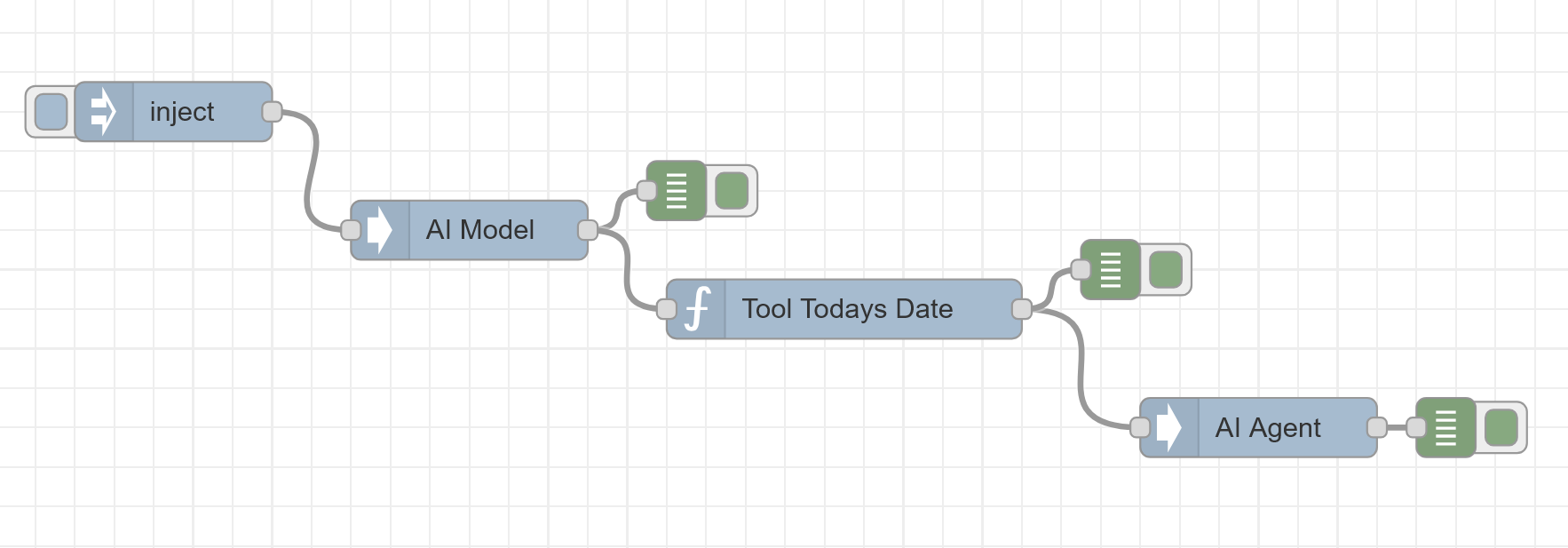
|
-
|
|
4
|
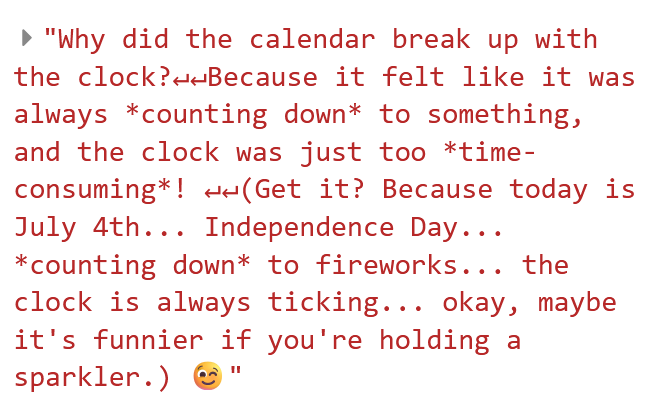
-
|
|
5
|
-
|
|
6
|
-
|
|
7
|
-
|
|
8
|
-
|
|
9
|
-
|
|
1
|
+
# Node-RED AI Agent
|
|
2
|
+
|
|
3
|
+
> **Note**: This project is currently in **beta** and under active development. It is not yet stable, and many changes are expected. Use in production with caution.
|
|
4
|
+
|
|
5
|
+
## Overview
|
|
6
|
+
|
|
7
|
+
A powerful AI Agent for Node-RED that enables natural language processing and tool integration. This node allows you to create AI-powered flows with support for function calling and external tool integration.
|
|
8
|
+
|
|
9
|
+
## ⚠️ Beta Notice
|
|
10
|
+
|
|
11
|
+
This project is currently in **beta** and under active development. Please be aware that:
|
|
12
|
+
- Breaking changes may occur between releases
|
|
13
|
+
- Not all features are fully implemented or stable
|
|
14
|
+
- Documentation may be incomplete
|
|
15
|
+
- Performance optimizations are still in progress
|
|
16
|
+
|
|
17
|
+
Your feedback and contributions are highly appreciated!
|
|
18
|
+
|
|
19
|
+
## Features
|
|
20
|
+
|
|
21
|
+
- Integration with OpenRouter's AI models
|
|
22
|
+
- Support for function calling and tool execution
|
|
23
|
+
- Easy configuration through Node-RED's interface
|
|
24
|
+
- Conversation context management
|
|
25
|
+
- Extensible with custom tools
|
|
26
|
+
|
|
27
|
+
## Getting Started
|
|
28
|
+
|
|
29
|
+
1. Install the package via the Node-RED palette manager
|
|
30
|
+
2. Add an AI Model node to configure your OpenRouter API key and model
|
|
31
|
+
3. Add AI Tool nodes to define custom functions
|
|
32
|
+
4. Connect to an AI Agent node to process messages
|
|
33
|
+
|
|
34
|
+
## Example: Today's Joke
|
|
35
|
+
|
|
36
|
+
Here's an example flow that tells a joke related to today's date using a custom tool:
|
|
37
|
+
|
|
38
|
+
|
|
39
|
+
|
|
40
|
+
### Flow Output
|
|
41
|
+
|
|
42
|
+
When executed, the flow will generate a joke related to the current date:
|
|
43
|
+
|
|
44
|
+
|
|
45
|
+
|
|
46
|
+
## Basic Usage
|
|
47
|
+
|
|
48
|
+
1. **AI Model Node**: Configure your AI model and API settings
|
|
49
|
+
2. **AI Tool Node**: Define custom functions and tools
|
|
50
|
+
3. **AI Agent Node**: Process messages with AI and tool integration
|
|
51
|
+
|
|
52
|
+
## Advanced Features
|
|
53
|
+
|
|
54
|
+
- **Tool Integration**: Extend functionality with custom tools
|
|
55
|
+
- **Context Management**: Maintain conversation history
|
|
56
|
+
- **Flexible Configuration**: Customize model parameters and behavior
|
|
57
|
+
|
|
58
|
+
## Contributing
|
|
59
|
+
|
|
60
|
+
Contributions are welcome! Whether you want to report bugs, suggest features, or submit code changes, please feel free to open an issue or submit a pull request.
|
|
61
|
+
|
|
62
|
+
### How to Contribute
|
|
63
|
+
1. Report bugs or suggest features by opening an issue
|
|
64
|
+
2. Submit pull requests for bug fixes or new features
|
|
65
|
+
3. Help improve documentation
|
|
66
|
+
4. Test the package and report any issues you find
|
|
67
|
+
|
|
68
|
+
### Reporting Issues
|
|
69
|
+
When reporting issues, please include:
|
|
70
|
+
- Node-RED version
|
|
71
|
+
- Package version
|
|
72
|
+
- Steps to reproduce the issue
|
|
73
|
+
- Any error messages received
|
|
74
|
+
|
|
75
|
+
### Development
|
|
76
|
+
To contribute to development:
|
|
77
|
+
1. Fork the repository
|
|
78
|
+
2. Create a feature branch
|
|
79
|
+
3. Make your changes
|
|
80
|
+
4. Submit a pull request
|
|
@@ -0,0 +1,11 @@
|
|
|
1
|
+
<?xml version="1.0" encoding="UTF-8"?>
|
|
2
|
+
<svg width="100" height="100" viewBox="0 0 100 100" xmlns="http://www.w3.org/2000/svg">
|
|
3
|
+
<defs>
|
|
4
|
+
<linearGradient id="agentGradient" x1="0%" y1="0%" x2="100%" y2="100%">
|
|
5
|
+
<stop offset="0%" style="stop-color:#4a90e2;stop-opacity:1" />
|
|
6
|
+
<stop offset="100%" style="stop-color:#7b68ee;stop-opacity:1" />
|
|
7
|
+
</linearGradient>
|
|
8
|
+
</defs>
|
|
9
|
+
<circle cx="50" cy="50" r="45" fill="url(#agentGradient)" stroke="#3a7bc8" stroke-width="2"/>
|
|
10
|
+
<path d="M35 40 Q50 25 65 40 M35 60 Q50 75 65 60" stroke="white" stroke-width="5" stroke-linecap="round" fill="none"/>
|
|
11
|
+
</svg>
|
|
@@ -0,0 +1,96 @@
|
|
|
1
|
+
<script type="text/javascript">
|
|
2
|
+
RED.nodes.registerType('ai-agent', {
|
|
3
|
+
category: 'AI Agent',
|
|
4
|
+
color: '#a6bbcf',
|
|
5
|
+
defaults: {
|
|
6
|
+
name: { value: '' },
|
|
7
|
+
systemPrompt: {
|
|
8
|
+
value: 'You are a helpful AI assistant.',
|
|
9
|
+
required: true
|
|
10
|
+
},
|
|
11
|
+
responseType: {
|
|
12
|
+
value: 'text',
|
|
13
|
+
required: true,
|
|
14
|
+
validate: function(val) {
|
|
15
|
+
return ['text', 'object'].includes(val);
|
|
16
|
+
}
|
|
17
|
+
}
|
|
18
|
+
},
|
|
19
|
+
inputs: 1,
|
|
20
|
+
outputs: 1,
|
|
21
|
+
icon: 'agent/ai-agent-icon.svg',
|
|
22
|
+
label: function() {
|
|
23
|
+
return this.name || 'AI Agent';
|
|
24
|
+
},
|
|
25
|
+
paletteLabel: 'AI Agent',
|
|
26
|
+
oneditprepare: function() {
|
|
27
|
+
// Always show OpenRouter help since we only support OpenRouter now
|
|
28
|
+
$('#openrouter-help').show();
|
|
29
|
+
}
|
|
30
|
+
});
|
|
31
|
+
</script>
|
|
32
|
+
|
|
33
|
+
<!-- START: Template -->
|
|
34
|
+
<script type="text/x-red" data-template-name="ai-agent">
|
|
35
|
+
<div class="form-row">
|
|
36
|
+
<label for="node-input-name"><i class="fa fa-tag"></i> Name</label>
|
|
37
|
+
<input type="text" id="node-input-name" placeholder="AI Agent">
|
|
38
|
+
</div>
|
|
39
|
+
|
|
40
|
+
<div class="form-row">
|
|
41
|
+
<label for="node-input-systemPrompt"><i class="fa fa-comment"></i> System Prompt</label>
|
|
42
|
+
<textarea type="text" id="node-input-systemPrompt" placeholder="You are a helpful AI assistant." style="width: 100%; height: 80px; resize: vertical; font-family: monospace;"></textarea>
|
|
43
|
+
</div>
|
|
44
|
+
|
|
45
|
+
<div class="form-row">
|
|
46
|
+
<label><i class="fa fa-robot"></i> AI Agent</label>
|
|
47
|
+
<div class="form-tips" style="width: 70%;">
|
|
48
|
+
<p>This node uses OpenRouter for AI responses. Connect an <b>AI Model</b> node to configure the model and API key.</p>
|
|
49
|
+
</div>
|
|
50
|
+
</div>
|
|
51
|
+
|
|
52
|
+
<div class="form-row">
|
|
53
|
+
<label for="node-input-responseType"><i class="fa fa-reply"></i> Response Format</label>
|
|
54
|
+
<select id="node-input-responseType" style="width: 100%;">
|
|
55
|
+
<option value="text">Text Only</option>
|
|
56
|
+
<option value="object">Structured Object</option>
|
|
57
|
+
</select>
|
|
58
|
+
</div>
|
|
59
|
+
|
|
60
|
+
<div id="openrouter-help" class="form-tips" style="display: none; margin-top: 15px; padding: 10px; background: #f8f9fa; border-radius: 4px; border-left: 3px solid #3b78e7;">
|
|
61
|
+
<p><i class="fa fa-info-circle"></i> <strong>Note:</strong> When using OpenRouter, connect an AI Model node to provide the model and API key configuration.</p>
|
|
62
|
+
<p>The AI Model node will add an <code>aiagent</code> property to the message with the required configuration.</p>
|
|
63
|
+
</div>
|
|
64
|
+
</script>
|
|
65
|
+
<!-- END: Template -->
|
|
66
|
+
|
|
67
|
+
<!-- START: Help -->
|
|
68
|
+
<script type="text/x-red" data-help-name="ai-agent">
|
|
69
|
+
<h3>AI Agent Node</h3>
|
|
70
|
+
<p>An intelligent agent that processes and responds to messages with configurable behavior.</p>
|
|
71
|
+
|
|
72
|
+
<h4>Features</h4>
|
|
73
|
+
<ul>
|
|
74
|
+
<li>Multiple agent types (Assistant, Chatbot)</li>
|
|
75
|
+
<li>Configurable response formats</li>
|
|
76
|
+
<li>Conversation context tracking</li>
|
|
77
|
+
<li>Error handling and status reporting</li>
|
|
78
|
+
</ul>
|
|
79
|
+
|
|
80
|
+
<h4>Usage</h4>
|
|
81
|
+
<ol>
|
|
82
|
+
<li>Connect the node to a message source (e.g., HTTP input, inject node)</li>
|
|
83
|
+
<li>Configure the agent type and response format</li>
|
|
84
|
+
<li>Process the response in your flow</li>
|
|
85
|
+
</ol>
|
|
86
|
+
|
|
87
|
+
<h4>Output Formats</h4>
|
|
88
|
+
<p><b>Text Only:</b> Simple string response</p>
|
|
89
|
+
<p><b>Structured Object:</b> Detailed response including metadata and context</p>
|
|
90
|
+
|
|
91
|
+
<h4>Examples</h4>
|
|
92
|
+
<p><b>Input:</b> "Hello"</p>
|
|
93
|
+
<p><b>Assistant Output:</b> "Hello! How can I assist you today?"</p>
|
|
94
|
+
<p><b>Chatbot Output:</b> "Hi there! What would you like to chat about?"</p>
|
|
95
|
+
</script>
|
|
96
|
+
<!-- END: Help -->
|
|
@@ -0,0 +1,216 @@
|
|
|
1
|
+
const axios = require('axios');
|
|
2
|
+
|
|
3
|
+
module.exports = function (RED) {
|
|
4
|
+
function AiAgentNode(config) {
|
|
5
|
+
RED.nodes.createNode(this, config)
|
|
6
|
+
var node = this
|
|
7
|
+
|
|
8
|
+
// Configuration
|
|
9
|
+
this.agentName = config.name || 'AI Agent'
|
|
10
|
+
this.systemPrompt = config.systemPrompt || 'You are a helpful AI assistant.'
|
|
11
|
+
this.responseType = config.responseType || 'text'
|
|
12
|
+
|
|
13
|
+
// Initialize agent state
|
|
14
|
+
this.context = {
|
|
15
|
+
conversation: [],
|
|
16
|
+
lastInteraction: null
|
|
17
|
+
}
|
|
18
|
+
|
|
19
|
+
// Default responses
|
|
20
|
+
this.defaultResponse = 'I understand you said: '
|
|
21
|
+
|
|
22
|
+
// Handle node cleanup
|
|
23
|
+
node.on('close', function (done) {
|
|
24
|
+
// Clean up any resources here
|
|
25
|
+
node.status({})
|
|
26
|
+
if (done) done()
|
|
27
|
+
})
|
|
28
|
+
|
|
29
|
+
// Process incoming messages
|
|
30
|
+
node.on('input', async function (msg, send, done) {
|
|
31
|
+
// Set status to processing
|
|
32
|
+
node.status({ fill: 'blue', shape: 'dot', text: 'processing...' });
|
|
33
|
+
|
|
34
|
+
// Validate AI configuration
|
|
35
|
+
const validateAIConfig = () => {
|
|
36
|
+
if (!msg.aiagent || !msg.aiagent.model || !msg.aiagent.apiKey) {
|
|
37
|
+
const errorMsg = 'Missing required AI configuration. Ensure an AI Model node is properly connected and configured.';
|
|
38
|
+
node.status({ fill: 'red', shape: 'ring', text: 'Error: Missing AI config' });
|
|
39
|
+
node.error(errorMsg, msg);
|
|
40
|
+
throw new Error(errorMsg);
|
|
41
|
+
}
|
|
42
|
+
};
|
|
43
|
+
|
|
44
|
+
try {
|
|
45
|
+
validateAIConfig();
|
|
46
|
+
|
|
47
|
+
// Get input from message or use default
|
|
48
|
+
const input = msg.payload || {};
|
|
49
|
+
const inputText = typeof input === 'string' ? input : JSON.stringify(input);
|
|
50
|
+
|
|
51
|
+
// Update conversation context
|
|
52
|
+
node.context.lastInteraction = new Date();
|
|
53
|
+
node.context.conversation.push({
|
|
54
|
+
role: 'user',
|
|
55
|
+
content: inputText,
|
|
56
|
+
timestamp: node.context.lastInteraction
|
|
57
|
+
});
|
|
58
|
+
|
|
59
|
+
let response;
|
|
60
|
+
|
|
61
|
+
try {
|
|
62
|
+
// Use OpenRouter for AI responses
|
|
63
|
+
response = await generateAIResponse.call(node, inputText, msg.aiagent);
|
|
64
|
+
} catch (error) {
|
|
65
|
+
const errorMsg = error.response?.data?.error?.message || error.message;
|
|
66
|
+
node.status({fill:"red", shape:"ring", text:"API Error: " + (errorMsg || 'Unknown error').substring(0, 30)});
|
|
67
|
+
node.error('OpenRouter API Error: ' + errorMsg, msg);
|
|
68
|
+
if (done) done(error);
|
|
69
|
+
return;
|
|
70
|
+
}
|
|
71
|
+
|
|
72
|
+
// Update context with AI response
|
|
73
|
+
node.context.conversation.push({ role: 'assistant', content: response, timestamp: new Date() })
|
|
74
|
+
|
|
75
|
+
// Format response based on configuration
|
|
76
|
+
if (node.responseType === 'object') {
|
|
77
|
+
msg.payload = {
|
|
78
|
+
agent: node.agentName,
|
|
79
|
+
type: 'ai',
|
|
80
|
+
input: input,
|
|
81
|
+
response: response,
|
|
82
|
+
timestamp: new Date().toISOString(),
|
|
83
|
+
context: {
|
|
84
|
+
conversationLength: node.context.conversation.length,
|
|
85
|
+
lastInteraction: node.context.lastInteraction
|
|
86
|
+
}
|
|
87
|
+
}
|
|
88
|
+
} else {
|
|
89
|
+
msg.payload = response
|
|
90
|
+
}
|
|
91
|
+
|
|
92
|
+
// Send the message
|
|
93
|
+
send(msg)
|
|
94
|
+
|
|
95
|
+
// Update status
|
|
96
|
+
node.status({ fill: 'green', shape: 'dot', text: 'ready' })
|
|
97
|
+
|
|
98
|
+
// Complete processing
|
|
99
|
+
if (done) {
|
|
100
|
+
done()
|
|
101
|
+
}
|
|
102
|
+
} catch (error) {
|
|
103
|
+
// Handle errors
|
|
104
|
+
const errorMsg = error.message || 'Unknown error occurred'
|
|
105
|
+
node.status({ fill: 'red', shape: 'ring', text: 'error' })
|
|
106
|
+
node.error('Error in AI Agent: ' + errorMsg, msg)
|
|
107
|
+
if (done) {
|
|
108
|
+
done(error)
|
|
109
|
+
}
|
|
110
|
+
}
|
|
111
|
+
})
|
|
112
|
+
|
|
113
|
+
// Generate AI response using OpenRouter API
|
|
114
|
+
async function generateAIResponse(input, aiConfig) {
|
|
115
|
+
const messages = [
|
|
116
|
+
{
|
|
117
|
+
role: 'system',
|
|
118
|
+
content: node.systemPrompt
|
|
119
|
+
},
|
|
120
|
+
{
|
|
121
|
+
role: 'user',
|
|
122
|
+
content: input
|
|
123
|
+
}
|
|
124
|
+
];
|
|
125
|
+
|
|
126
|
+
node.status({fill:"blue", shape:"dot", text:"Calling " + aiConfig.model + "..."});
|
|
127
|
+
|
|
128
|
+
// Prepare tools array if available
|
|
129
|
+
const tools = aiConfig.tools ? aiConfig.tools.map(tool => ({
|
|
130
|
+
type: 'function',
|
|
131
|
+
function: {
|
|
132
|
+
name: tool.name,
|
|
133
|
+
description: tool.description,
|
|
134
|
+
parameters: tool.parameters || {}
|
|
135
|
+
}
|
|
136
|
+
})) : [];
|
|
137
|
+
|
|
138
|
+
// Initial API call
|
|
139
|
+
const response = await axios.post(
|
|
140
|
+
'https://openrouter.ai/api/v1/chat/completions',
|
|
141
|
+
{
|
|
142
|
+
model: aiConfig.model,
|
|
143
|
+
messages: messages,
|
|
144
|
+
temperature: aiConfig.temperature || 0.7,
|
|
145
|
+
max_tokens: aiConfig.maxTokens || 1000,
|
|
146
|
+
tools: tools.length > 0 ? tools : undefined,
|
|
147
|
+
tool_choice: tools.length > 0 ? 'auto' : 'none'
|
|
148
|
+
},
|
|
149
|
+
{
|
|
150
|
+
headers: {
|
|
151
|
+
'Authorization': `Bearer ${aiConfig.apiKey}`,
|
|
152
|
+
'Content-Type': 'application/json',
|
|
153
|
+
'HTTP-Referer': 'https://nodered.org/',
|
|
154
|
+
'X-Title': 'Node-RED AI Agent'
|
|
155
|
+
}
|
|
156
|
+
}
|
|
157
|
+
);
|
|
158
|
+
|
|
159
|
+
const responseMessage = response.data.choices[0].message;
|
|
160
|
+
|
|
161
|
+
// Check if the model wants to call a tool
|
|
162
|
+
const toolCalls = responseMessage.tool_calls;
|
|
163
|
+
if (toolCalls && toolCalls.length > 0) {
|
|
164
|
+
// Process each tool call
|
|
165
|
+
for (const toolCall of toolCalls) {
|
|
166
|
+
const functionName = toolCall.function.name;
|
|
167
|
+
const functionArgs = JSON.parse(toolCall.function.arguments || '{}');
|
|
168
|
+
|
|
169
|
+
// Find the tool
|
|
170
|
+
const tool = aiConfig.tools?.find(t => t.name === functionName);
|
|
171
|
+
if (!tool) {
|
|
172
|
+
throw new Error(`Tool ${functionName} not found`);
|
|
173
|
+
}
|
|
174
|
+
|
|
175
|
+
// Execute the tool
|
|
176
|
+
const toolResponse = await tool.execute(functionArgs);
|
|
177
|
+
|
|
178
|
+
// Add the tool response to the messages
|
|
179
|
+
messages.push({
|
|
180
|
+
role: 'tool',
|
|
181
|
+
content: JSON.stringify(toolResponse),
|
|
182
|
+
tool_call_id: toolCall.id
|
|
183
|
+
});
|
|
184
|
+
}
|
|
185
|
+
|
|
186
|
+
// Make a second request with the tool responses
|
|
187
|
+
const secondResponse = await axios.post(
|
|
188
|
+
'https://openrouter.ai/api/v1/chat/completions',
|
|
189
|
+
{
|
|
190
|
+
model: aiConfig.model,
|
|
191
|
+
messages: messages,
|
|
192
|
+
temperature: aiConfig.temperature || 0.7,
|
|
193
|
+
max_tokens: aiConfig.maxTokens || 1000,
|
|
194
|
+
tools: tools,
|
|
195
|
+
tool_choice: 'none' // Force the model to respond normally
|
|
196
|
+
},
|
|
197
|
+
{
|
|
198
|
+
headers: {
|
|
199
|
+
'Authorization': `Bearer ${aiConfig.apiKey}`,
|
|
200
|
+
'Content-Type': 'application/json',
|
|
201
|
+
'HTTP-Referer': 'https://nodered.org/',
|
|
202
|
+
'X-Title': 'Node-RED AI Agent'
|
|
203
|
+
}
|
|
204
|
+
}
|
|
205
|
+
);
|
|
206
|
+
|
|
207
|
+
return secondResponse.data.choices[0].message.content.trim();
|
|
208
|
+
}
|
|
209
|
+
|
|
210
|
+
return responseMessage.content.trim();
|
|
211
|
+
}
|
|
212
|
+
}
|
|
213
|
+
|
|
214
|
+
// Registering the node-red type
|
|
215
|
+
RED.nodes.registerType('ai-agent', AiAgentNode)
|
|
216
|
+
}
|
|
@@ -0,0 +1,11 @@
|
|
|
1
|
+
<?xml version="1.0" encoding="UTF-8"?>
|
|
2
|
+
<svg width="100" height="100" viewBox="0 0 100 100" xmlns="http://www.w3.org/2000/svg">
|
|
3
|
+
<defs>
|
|
4
|
+
<linearGradient id="modelGradient" x1="0%" y1="0%" x2="100%" y2="100%">
|
|
5
|
+
<stop offset="0%" style="stop-color:#32cd32;stop-opacity:1" />
|
|
6
|
+
<stop offset="100%" style="stop-color:#228b22;stop-opacity:1" />
|
|
7
|
+
</linearGradient>
|
|
8
|
+
</defs>
|
|
9
|
+
<rect x="5" y="25" width="90" height="50" rx="10" fill="url(#modelGradient)" stroke="#1e7a1e" stroke-width="2"/>
|
|
10
|
+
<circle cx="25" cy="50" r="8" fill="white" opacity="0.8"/>
|
|
11
|
+
</svg>
|