network-ai 3.3.4 → 3.3.6
This diff represents the content of publicly available package versions that have been released to one of the supported registries. The information contained in this diff is provided for informational purposes only and reflects changes between package versions as they appear in their respective public registries.
- package/README.md +60 -1
- package/package.json +1 -1
package/README.md
CHANGED
|
@@ -4,7 +4,7 @@
|
|
|
4
4
|
|
|
5
5
|
[](https://github.com/jovanSAPFIONEER/Network-AI/actions/workflows/ci.yml)
|
|
6
6
|
[](https://github.com/jovanSAPFIONEER/Network-AI/actions/workflows/codeql.yml)
|
|
7
|
-
[](https://github.com/jovanSAPFIONEER/Network-AI/releases)
|
|
8
8
|
[](https://www.npmjs.com/package/network-ai)
|
|
9
9
|
[](https://clawhub.ai/skills/network-ai)
|
|
10
10
|
[](https://nodejs.org)
|
|
@@ -60,6 +60,16 @@ console.log(result.data); // "Hello, World! Your task: welcome"
|
|
|
60
60
|
|
|
61
61
|
That's it. No config files, no setup wizards. Add more agents, swap frameworks, layer on security -- all optional.
|
|
62
62
|
|
|
63
|
+
## Demo
|
|
64
|
+
|
|
65
|
+
[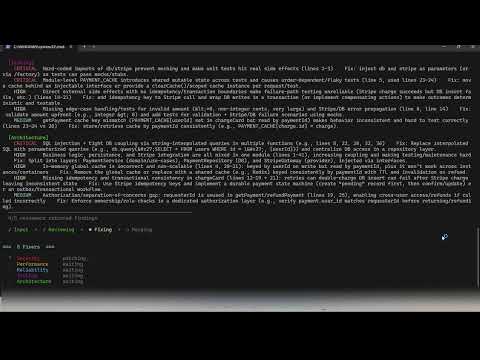](https://youtu.be/UyMsNhaw9lU)
|
|
66
|
+
|
|
67
|
+
*5-agent code review swarm — parallel specialist agents coordinated through a shared blackboard*
|
|
68
|
+
|
|
69
|
+
> The demo shows a code review swarm, but Network-AI is not a code review tool. The same orchestration pattern works for research pipelines, data processing, content moderation, customer support routing, document analysis, financial workflows — any task where multiple agents need to coordinate without stepping on each other.
|
|
70
|
+
|
|
71
|
+
> **Run the demo yourself:** `05-code-review-swarm.ts` is in the repo. Copy `.env.example` to `.env`, add your `OPENAI_API_KEY`, then run `npx ts-node examples/05-code-review-swarm.ts`. Supports 4 modes: built-in code review, paste your own code, system design document, or custom role for any content type (proposals, policies, job descriptions, emails). Examples `01`–`03` cover all core framework features with no API key required. `04-live-swarm.ts` (live AI research swarm) is coming soon.
|
|
72
|
+
|
|
63
73
|
## Why This Exists -- The Multi-Agent Race Condition Problem
|
|
64
74
|
|
|
65
75
|
Most agent frameworks let you run multiple AI agents in parallel. None of them protect you when those agents write to the same resource at the same time.
|
|
@@ -236,6 +246,55 @@ npm run setup -- --list # List all 12 available adapters
|
|
|
236
246
|
npm run setup:example # Generate a starter example.ts
|
|
237
247
|
```
|
|
238
248
|
|
|
249
|
+
### Running in PowerShell (Windows)
|
|
250
|
+
|
|
251
|
+
All commands work in PowerShell. The only difference from bash is how you set environment variables.
|
|
252
|
+
|
|
253
|
+
**Set your API key for the current session:**
|
|
254
|
+
|
|
255
|
+
```powershell
|
|
256
|
+
$env:OPENAI_API_KEY = "sk-..."
|
|
257
|
+
```
|
|
258
|
+
|
|
259
|
+
**Or load it from `.env` automatically** — copy the template first:
|
|
260
|
+
|
|
261
|
+
```powershell
|
|
262
|
+
Copy-Item .env.example .env # then open .env and fill in your key
|
|
263
|
+
```
|
|
264
|
+
|
|
265
|
+
**Run the examples (no API key needed):**
|
|
266
|
+
|
|
267
|
+
```powershell
|
|
268
|
+
npx ts-node examples/01-hello-swarm.ts
|
|
269
|
+
npx ts-node examples/02-fsm-pipeline.ts
|
|
270
|
+
npx ts-node examples/03-parallel-agents.ts
|
|
271
|
+
```
|
|
272
|
+
|
|
273
|
+
**Run the interactive launcher** (picks which example to run):
|
|
274
|
+
|
|
275
|
+
```powershell
|
|
276
|
+
npx ts-node run.ts
|
|
277
|
+
```
|
|
278
|
+
|
|
279
|
+
**Run the AI code review swarm demo** (requires `OPENAI_API_KEY`):
|
|
280
|
+
|
|
281
|
+
```powershell
|
|
282
|
+
$env:OPENAI_API_KEY = "sk-..."
|
|
283
|
+
npx ts-node examples/05-code-review-swarm.ts
|
|
284
|
+
```
|
|
285
|
+
|
|
286
|
+
**Run the tests:**
|
|
287
|
+
|
|
288
|
+
```powershell
|
|
289
|
+
npm test # Core orchestrator (79 tests)
|
|
290
|
+
npm run test:security # Security module (33 tests)
|
|
291
|
+
npm run test:adapters # Adapter system (139 tests)
|
|
292
|
+
npm run test:priority # Priority & preemption (64 tests)
|
|
293
|
+
npm run test:all # All suites in sequence
|
|
294
|
+
```
|
|
295
|
+
|
|
296
|
+
> **Tip:** To persist `OPENAI_API_KEY` across sessions, add it to your PowerShell profile or set it as a user environment variable via *System Properties → Environment Variables*.
|
|
297
|
+
|
|
239
298
|
### For OpenClaw Users
|
|
240
299
|
|
|
241
300
|
Copy this skill into your OpenClaw workspace:
|
package/package.json
CHANGED
|
@@ -1,6 +1,6 @@
|
|
|
1
1
|
{
|
|
2
2
|
"name": "network-ai",
|
|
3
|
-
"version": "3.3.
|
|
3
|
+
"version": "3.3.6",
|
|
4
4
|
"description": "AI agent orchestration framework for TypeScript/Node.js - plug-and-play multi-agent coordination with 12 frameworks (LangChain, AutoGen, CrewAI, OpenAI Assistants, LlamaIndex, Semantic Kernel, Haystack, DSPy, Agno, MCP, OpenClaw). Built-in security, swarm intelligence, and agentic workflow patterns.",
|
|
5
5
|
"main": "dist/index.js",
|
|
6
6
|
"types": "dist/index.d.ts",
|