nestia 3.1.6 → 4.0.0
This diff represents the content of publicly available package versions that have been released to one of the supported registries. The information contained in this diff is provided for informational purposes only and reflects changes between package versions as they appear in their respective public registries.
- package/README.md +174 -612
- package/bin/CommandParser.d.ts +3 -0
- package/bin/CommandParser.js +21 -0
- package/bin/CommandParser.js.map +1 -0
- package/bin/NestiaSetupWizard.d.ts +5 -0
- package/bin/NestiaSetupWizard.js +90 -0
- package/bin/NestiaSetupWizard.js.map +1 -0
- package/bin/NestiaStarter.d.ts +3 -0
- package/{lib/executable/internal → bin}/NestiaStarter.js +25 -26
- package/bin/NestiaStarter.js.map +1 -0
- package/{lib/executable/nestia.d.ts → bin/index.d.ts} +0 -0
- package/bin/index.js +113 -0
- package/bin/index.js.map +1 -0
- package/package.json +44 -76
- package/CONTRIBUTING.md +0 -72
- package/bundle/HttpError.ts +0 -1
- package/bundle/IConnection.ts +0 -1
- package/bundle/Primitive.ts +0 -1
- package/bundle/__internal/AesPkcs5.ts +0 -1
- package/bundle/__internal/Fetcher.ts +0 -1
- package/lib/IConfiguration.d.ts +0 -110
- package/lib/IConfiguration.js +0 -3
- package/lib/IConfiguration.js.map +0 -1
- package/lib/NestiaApplication.d.ts +0 -11
- package/lib/NestiaApplication.js +0 -156
- package/lib/NestiaApplication.js.map +0 -1
- package/lib/analyses/ControllerAnalyzer.d.ts +0 -6
- package/lib/analyses/ControllerAnalyzer.js +0 -106
- package/lib/analyses/ControllerAnalyzer.js.map +0 -1
- package/lib/analyses/GenericAnalyzer.d.ts +0 -5
- package/lib/analyses/GenericAnalyzer.js +0 -41
- package/lib/analyses/GenericAnalyzer.js.map +0 -1
- package/lib/analyses/ImportAnalyzer.d.ts +0 -13
- package/lib/analyses/ImportAnalyzer.js +0 -86
- package/lib/analyses/ImportAnalyzer.js.map +0 -1
- package/lib/analyses/PathAnalyzer.d.ts +0 -5
- package/lib/analyses/PathAnalyzer.js +0 -51
- package/lib/analyses/PathAnalyzer.js.map +0 -1
- package/lib/analyses/ReflectAnalyzer.d.ts +0 -4
- package/lib/analyses/ReflectAnalyzer.js +0 -230
- package/lib/analyses/ReflectAnalyzer.js.map +0 -1
- package/lib/analyses/SourceFinder.d.ts +0 -4
- package/lib/analyses/SourceFinder.js +0 -70
- package/lib/analyses/SourceFinder.js.map +0 -1
- package/lib/executable/internal/CompilerOptions.d.ts +0 -11
- package/lib/executable/internal/CompilerOptions.js +0 -18
- package/lib/executable/internal/CompilerOptions.js.map +0 -1
- package/lib/executable/internal/NestiaCommand.d.ts +0 -4
- package/lib/executable/internal/NestiaCommand.js +0 -128
- package/lib/executable/internal/NestiaCommand.js.map +0 -1
- package/lib/executable/internal/NestiaConfig.d.ts +0 -4
- package/lib/executable/internal/NestiaConfig.js +0 -536
- package/lib/executable/internal/NestiaConfig.js.map +0 -1
- package/lib/executable/internal/NestiaStarter.d.ts +0 -3
- package/lib/executable/internal/NestiaStarter.js.map +0 -1
- package/lib/executable/internal/nestia.config.getter.d.ts +0 -1
- package/lib/executable/internal/nestia.config.getter.js +0 -24
- package/lib/executable/internal/nestia.config.getter.js.map +0 -1
- package/lib/executable/nestia.js +0 -86
- package/lib/executable/nestia.js.map +0 -1
- package/lib/generates/FileGenerator.d.ts +0 -5
- package/lib/generates/FileGenerator.js +0 -137
- package/lib/generates/FileGenerator.js.map +0 -1
- package/lib/generates/FunctionGenerator.d.ts +0 -5
- package/lib/generates/FunctionGenerator.js +0 -204
- package/lib/generates/FunctionGenerator.js.map +0 -1
- package/lib/generates/SdkGenerator.d.ts +0 -7
- package/lib/generates/SdkGenerator.js +0 -47
- package/lib/generates/SdkGenerator.js.map +0 -1
- package/lib/generates/SwaggerGenerator.d.ts +0 -6
- package/lib/generates/SwaggerGenerator.js +0 -244
- package/lib/generates/SwaggerGenerator.js.map +0 -1
- package/lib/index.d.ts +0 -2
- package/lib/index.js +0 -28
- package/lib/index.js.map +0 -1
- package/lib/module.d.ts +0 -2
- package/lib/module.js +0 -19
- package/lib/module.js.map +0 -1
- package/lib/structures/IController.d.ts +0 -23
- package/lib/structures/IController.js +0 -3
- package/lib/structures/IController.js.map +0 -1
- package/lib/structures/IRoute.d.ts +0 -24
- package/lib/structures/IRoute.js +0 -3
- package/lib/structures/IRoute.js.map +0 -1
- package/lib/structures/ISwagger.d.ts +0 -48
- package/lib/structures/ISwagger.js +0 -3
- package/lib/structures/ISwagger.js.map +0 -1
- package/lib/structures/ITypeTuple.d.ts +0 -5
- package/lib/structures/ITypeTuple.js +0 -3
- package/lib/structures/ITypeTuple.js.map +0 -1
- package/lib/structures/MethodType.d.ts +0 -4
- package/lib/structures/MethodType.js +0 -14
- package/lib/structures/MethodType.js.map +0 -1
- package/lib/structures/ParamCategory.d.ts +0 -1
- package/lib/structures/ParamCategory.js +0 -3
- package/lib/structures/ParamCategory.js.map +0 -1
- package/lib/structures/TypeEntry.d.ts +0 -9
- package/lib/structures/TypeEntry.js +0 -21
- package/lib/structures/TypeEntry.js.map +0 -1
- package/lib/test/TestBuilder.d.ts +0 -4
- package/lib/test/TestBuilder.js +0 -60
- package/lib/test/TestBuilder.js.map +0 -1
- package/lib/test/index.d.ts +0 -1
- package/lib/test/index.js +0 -62
- package/lib/test/index.js.map +0 -1
- package/lib/test/test.builder.executor.d.ts +0 -1
- package/lib/test/test.builder.executor.js +0 -24
- package/lib/test/test.builder.executor.js.map +0 -1
- package/lib/utils/ArrayUtil.d.ts +0 -5
- package/lib/utils/ArrayUtil.js +0 -39
- package/lib/utils/ArrayUtil.js.map +0 -1
- package/lib/utils/DirectoryUtil.d.ts +0 -5
- package/lib/utils/DirectoryUtil.js +0 -62
- package/lib/utils/DirectoryUtil.js.map +0 -1
- package/lib/utils/ImportDictionary.d.ts +0 -6
- package/lib/utils/ImportDictionary.js +0 -50
- package/lib/utils/ImportDictionary.js.map +0 -1
- package/lib/utils/MapUtil.d.ts +0 -3
- package/lib/utils/MapUtil.js +0 -16
- package/lib/utils/MapUtil.js.map +0 -1
- package/lib/utils/StripEnums.d.ts +0 -3
- package/lib/utils/StripEnums.js +0 -3
- package/lib/utils/StripEnums.js.map +0 -1
package/README.md
CHANGED
|
@@ -1,76 +1,17 @@
|
|
|
1
1
|
# Nestia
|
|
2
|
-
|
|
3
|
-
|
|
4
|
-
[](https://github.com/samchon/nestia/blob/master/LICENSE)
|
|
5
|
-
[](https://www.npmjs.com/package/nestia)
|
|
6
|
-
[](https://www.npmjs.com/package/nestia)
|
|
7
|
-
[](https://github.com/samchon/nestia/actions?query=workflow%3Abuild)
|
|
2
|
+
[](https://github.com/samchon/nestia/blob/master/LICENSE)
|
|
3
|
+
[](https://github.com/samchon/nestia/actions?query=workflow%3Abuild)
|
|
8
4
|
[](https://github.com/samchon/nestia/wiki)
|
|
9
5
|
|
|
10
|
-
|
|
11
|
-
- NPM: https://www.npmjs.com/package/nestia
|
|
12
|
-
- Guide Documents: https://github.com/samchon/nestia/wiki
|
|
13
|
-
|
|
14
|
-
`nestia` is an evolved `SDK` and `Swagger` generator, which analyzes your `NestJS` server code in the compilation level. With `nestia` and compilation level analyzer, you don't need to write any swagger or class-validator decorators. All you need to do is use the `nestia` CLI as shown below.
|
|
6
|
+
Nestia is a helper library set for NestJS, supporting below features:
|
|
15
7
|
|
|
16
|
-
|
|
8
|
+
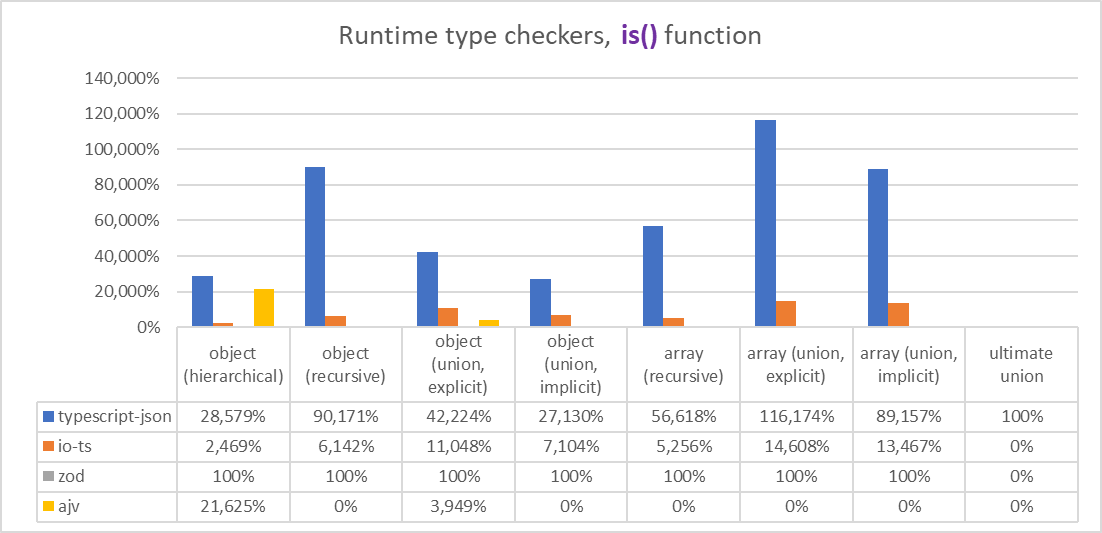
- [`@nestia/core`](#nestiacore): **15,000x times faster** validation decorator using [typia](https://github.com/samchon/typia)
|
|
9
|
+
- [`@nestia/sdk`](#nestiasdk): evolved **SDK** and **Swagger** generator for `@nestia/core`
|
|
10
|
+
- `nestia`: just CLI (command line interface) tool
|
|
17
11
|
|
|
18
|
-
|
|
19
|
-
-----------|---|---|---
|
|
20
|
-
Pure DTO interface | ✔ | ✔ | ❌
|
|
21
|
-
Description comments | ✔ | ✔ | ❌
|
|
22
|
-
Simple structure | ✔ | ✔ | ✔
|
|
23
|
-
Generic type | ✔ | ✔ | ❌
|
|
24
|
-
Union type | ✔ | ✔ | ▲
|
|
25
|
-
Intersection type | ✔ | ✔ | ▲
|
|
26
|
-
Conditional type | ✔ | ▲ | ❌
|
|
27
|
-
Auto completion | ✔ | ❌ | ❌
|
|
28
|
-
Type hints | ✔ | ❌ | ❌
|
|
29
|
-
5x faster `JSON.stringify()` | ✔ | ❌ | ❌
|
|
30
|
-
Ensure type safety | ✅ | ❌ | ❌
|
|
12
|
+
%20Core(TM)%20i5-1135G7%20%40%202.40GHz/images/is.svg)
|
|
31
13
|
|
|
32
|
-
|
|
33
|
-
// IMPORT SDK LIBRARY GENERATED BY NESTIA
|
|
34
|
-
import api from "@samchon/shopping-api";
|
|
35
|
-
import { IPage } from "@samchon/shopping-api/lib/structures/IPage";
|
|
36
|
-
import { ISale } from "@samchon/shopping-api/lib/structures/ISale";
|
|
37
|
-
import { ISaleQuestion } from "@samchon/shopping-api/lib/structures/ISaleQuestion";
|
|
38
|
-
|
|
39
|
-
export async function trace_sale_question_and_comment
|
|
40
|
-
(connection: api.IConnection): Promise<void>
|
|
41
|
-
{
|
|
42
|
-
// LIST UP SALE SUMMARIES
|
|
43
|
-
const index: IPage<ISale.ISummary> = await api.functional.shoppings.sales.index
|
|
44
|
-
(
|
|
45
|
-
connection,
|
|
46
|
-
"general",
|
|
47
|
-
{ limit: 100, page: 1 }
|
|
48
|
-
);
|
|
49
|
-
|
|
50
|
-
// PICK A SALE
|
|
51
|
-
const sale: ISale = await api.functional.shoppings.sales.at
|
|
52
|
-
(
|
|
53
|
-
connection,
|
|
54
|
-
"general",
|
|
55
|
-
index.data[0].id
|
|
56
|
-
);
|
|
57
|
-
console.log("sale", sale);
|
|
58
|
-
|
|
59
|
-
// WRITE A QUESTION
|
|
60
|
-
const question: ISaleQuestion = await api.functional.shoppings.sales.questions.store
|
|
61
|
-
(
|
|
62
|
-
connection,
|
|
63
|
-
"general",
|
|
64
|
-
sale.id,
|
|
65
|
-
{
|
|
66
|
-
title: "How to use this product?",
|
|
67
|
-
body: "The description is not fully enough. Can you introduce me more?",
|
|
68
|
-
files: []
|
|
69
|
-
}
|
|
70
|
-
);
|
|
71
|
-
console.log("question", question);
|
|
72
|
-
}
|
|
73
|
-
```
|
|
14
|
+
> Measured on [Intel i5-1135g7, Surface Pro 8](https://github.com/samchon/typia/tree/master/benchmark/results/11th%20Gen%20Intel(R)%20Core(TM)%20i5-1135G7%20%40%202.40GHz#is)
|
|
74
15
|
|
|
75
16
|
|
|
76
17
|
|
|
@@ -81,642 +22,263 @@ export async function trace_sale_question_and_comment
|
|
|
81
22
|
npx nestia start <directory>
|
|
82
23
|
```
|
|
83
24
|
|
|
84
|
-
Just run
|
|
85
|
-
|
|
86
|
-
When the installation has been completed, you can start NestJS backend development directly. and you also can generate SDK library or Swagger documents by running below command. You can get more information by reading [README](https://github.com/samchon/nestia-template) content of the boilderplate project.
|
|
25
|
+
Just run above command, then boilerplate project would be constructed.
|
|
87
26
|
|
|
27
|
+
### Setup Wizard
|
|
88
28
|
```bash
|
|
89
|
-
|
|
90
|
-
npm run build:sdk
|
|
91
|
-
npm run build:swagger
|
|
29
|
+
npx nestia setup
|
|
92
30
|
```
|
|
93
31
|
|
|
94
|
-
|
|
95
|
-
configuring DB or preparing non-distruptive update system, visit [samchon/backend](https://github.com/samchon/backend) and create a new repository from that.
|
|
32
|
+
When you want to use `nestia` in orindary project, just type above command.
|
|
96
33
|
|
|
97
|
-
|
|
98
|
-
If you need to manual install, follow below step.
|
|
34
|
+
All installation and configuration processes would be automatically done.
|
|
99
35
|
|
|
100
|
-
|
|
36
|
+
Also, you can specify package manager by `--manage` argument like below:
|
|
101
37
|
|
|
102
|
-
```
|
|
103
|
-
|
|
104
|
-
|
|
105
|
-
|
|
106
|
-
npm install --save-dev typescript
|
|
107
|
-
npm install --save-dev ttypescript
|
|
108
|
-
npm install --save-dev ts-node
|
|
38
|
+
```bash
|
|
39
|
+
npx nestia setup --manager npm
|
|
40
|
+
npx nestia setup --manager pnpm
|
|
41
|
+
npx nestia setup --manager yarn
|
|
109
42
|
```
|
|
110
43
|
|
|
111
|
-
After the
|
|
112
|
-
|
|
113
|
-
```json
|
|
114
|
-
{
|
|
115
|
-
"compilerOptions": {
|
|
116
|
-
"module": "CommonJS",
|
|
117
|
-
"strict": true,
|
|
118
|
-
"plugins": [
|
|
119
|
-
{ "transform": "nestia-helper/lib/transform" }
|
|
120
|
-
]
|
|
121
|
-
}
|
|
122
|
-
}
|
|
123
|
-
```
|
|
44
|
+
After the setup, you can compile `@nestia/core` utilization code by using `ttsc` ([`ttypescript`](https://github.com/cevek/ttypescript)) command. If you want to run your TypeScript file directly through `ts-node`, add `-C ttypescript` argument like below:
|
|
124
45
|
|
|
125
|
-
|
|
46
|
+
```bash
|
|
47
|
+
# COMPILE THROUGH TTYPESCRIPT
|
|
48
|
+
npx ttsc
|
|
126
49
|
|
|
127
|
-
|
|
128
|
-
npx
|
|
129
|
-
npx nestia swagger "src/**/*.controller" --out "swagger.json"
|
|
50
|
+
# RUN TS-NODE WITH TTYPESCRIPT
|
|
51
|
+
npx ts-node -C ttypescript src/index.ts
|
|
130
52
|
```
|
|
131
53
|
|
|
132
|
-
|
|
133
|
-
|
|
134
|
-
> ```sh
|
|
135
|
-
> npx nestia sdk "src/controllers" --out "src/api"
|
|
136
|
-
> npx nestia swagger "src/controllers" --out "swagger.json"
|
|
137
|
-
> ```
|
|
138
|
-
>
|
|
139
|
-
> You can omit all of the parameters if you've configured the [nestia.config.ts](#configuration) file.
|
|
140
|
-
>
|
|
141
|
-
> ```sh
|
|
142
|
-
> npx nestia sdk
|
|
143
|
-
> npx nestia swagger
|
|
144
|
-
> ```
|
|
54
|
+
### Manual Setup
|
|
55
|
+
If you want to install and configure `nestia` manually, read [Guide Documents - Setup](https://github.com/samchon/nestia/wiki/Setup).
|
|
145
56
|
|
|
146
57
|
|
|
147
58
|
|
|
148
59
|
|
|
149
|
-
##
|
|
150
|
-
|
|
151
|
-
|
|
60
|
+
## `@nestia/core`
|
|
61
|
+
[](https://www.npmjs.com/package/@nestia/core)
|
|
62
|
+
[](https://www.npmjs.com/package/@nestia/core)
|
|
152
63
|
|
|
153
|
-
|
|
64
|
+
Super-fast validation decorators for NestJS.
|
|
154
65
|
|
|
155
|
-
|
|
66
|
+
`@nestia/core` is a transformer library of NestJS, supporting super-fast validation decorators, by wrapping [typia](https://github.com/samchon/typia). Comparing validation speed with `class-validator`, `typia` is maximum **15,000x times faster** and it is even much safer.
|
|
156
67
|
|
|
157
|
-
|
|
158
|
-
- Generic interfaces
|
|
159
|
-
- grandparent interface, [`ISaleArticle<Content>`](https://github.com/samchon/nestia/tree/master/demo/generic/src/api/structures/ISaleArticle.ts)
|
|
160
|
-
- parent interface, [`ISaleInquiry<Content>`](https://github.com/samchon/nestia/tree/master/demo/generic/src/api/structures/ISaleInquiry.ts)
|
|
161
|
-
- 1st sub-type interface, [`ISaleQuestion`](https://github.com/samchon/nestia/tree/master/demo/generic/src/api/structures/ISaleQuestion.ts)
|
|
162
|
-
- 2nd sub-type interface, [`ISaleReview`](https://github.com/samchon/nestia/tree/master/demo/generic/src/api/structures/ISaleReview.ts)
|
|
163
|
-
- Union alias type [`ISaleEntireArticle`](https://github.com/samchon/nestia/tree/master/demo/union/src/api/structures/ISaleEntireArticle.ts)
|
|
68
|
+
Furthermore, `@nestia/core` can use pure interface typed DTO with **only one line**.
|
|
164
69
|
|
|
165
|
-
|
|
166
|
-
/**
|
|
167
|
-
* Comment wrote on a sale related article.
|
|
168
|
-
*
|
|
169
|
-
* When an article of a sale has been enrolled, all of the participants like consumers and
|
|
170
|
-
* sellers can write a comment on that article. However, when the writer is a consumer, the
|
|
171
|
-
* consumer can hide its name through the annoymous option.
|
|
172
|
-
*
|
|
173
|
-
* Also, writing a reply comment for a specific comment is possible and in that case, the
|
|
174
|
-
* {@link ISaleArticleComment.parent_id} property would be activated.
|
|
175
|
-
*
|
|
176
|
-
* @author Jeongho Nam - https://github.com/samchon
|
|
177
|
-
*/
|
|
178
|
-
export interface ISaleArticleComment
|
|
179
|
-
{
|
|
180
|
-
/**
|
|
181
|
-
* Primary Key.
|
|
182
|
-
*/
|
|
183
|
-
id: number;
|
|
184
|
-
|
|
185
|
-
/**
|
|
186
|
-
* Parent comment ID.
|
|
187
|
-
*
|
|
188
|
-
* Only When this comment has been written as a reply.
|
|
189
|
-
*/
|
|
190
|
-
parent_id: number | null;
|
|
70
|
+
Therefore, it does not require any extra dedication like defining JSON schema (`@nestjs/swagger`), or using class definition with decorator function calls (`class-validator`). Just enjoy the superfast decorators with pure TypeScript type.
|
|
191
71
|
|
|
192
|
-
|
|
193
|
-
|
|
194
|
-
|
|
195
|
-
writer_type: "seller" | "consumer";
|
|
72
|
+
```typescript
|
|
73
|
+
import { Controller } from "@nestjs/common";
|
|
74
|
+
import { TypedBody, TypedRoute } from "@nestia/core";
|
|
196
75
|
|
|
197
|
-
|
|
198
|
-
* Name of the writer.
|
|
199
|
-
*
|
|
200
|
-
* When this is a type of anonymous comment, writer name would be hidden.
|
|
201
|
-
*/
|
|
202
|
-
writer_name: string | null;
|
|
76
|
+
import { IBbsArticle } from "@bbs-api/structures/IBbsArticle";
|
|
203
77
|
|
|
204
|
-
|
|
205
|
-
|
|
78
|
+
@Controller("bbs/articles")
|
|
79
|
+
export class BbsArticlesController {
|
|
80
|
+
/**
|
|
81
|
+
* Store a new content.
|
|
206
82
|
*
|
|
207
|
-
*
|
|
208
|
-
*
|
|
209
|
-
* the content has been changed.
|
|
83
|
+
* @param inupt Content to store
|
|
84
|
+
* @returns Newly archived article
|
|
210
85
|
*/
|
|
211
|
-
|
|
212
|
-
|
|
213
|
-
|
|
214
|
-
|
|
215
|
-
*/
|
|
216
|
-
created_at: string;
|
|
86
|
+
@TypedRoute.Post() // 10x faster and safer JSON.stringify()
|
|
87
|
+
public async store(
|
|
88
|
+
@TypedBody() input: IBbsArticle.IStore // supoer-fast validator
|
|
89
|
+
): Promise<IBbsArticle>;
|
|
217
90
|
}
|
|
218
91
|
```
|
|
219
92
|
|
|
93
|
+
### TypedBody
|
|
94
|
+
`TypedBody()` is a decorator function of `application/json` typed request body.
|
|
220
95
|
|
|
96
|
+
Also, it supports super-fast validation pipe, which is maximum **15,000x times faster** then `nest.Body()` function using `class-validator`.
|
|
221
97
|
|
|
98
|
+
### TypedRoute
|
|
99
|
+
`TypedRoute` is a set of decorator functions for `application/json` typed response body.
|
|
222
100
|
|
|
101
|
+
Also, it supports safe and fast JSON stringify function pipe, which is maximum 10x times faster than native `JSON.stringify()` function. Furthermore, it is **type safe** through validation.
|
|
223
102
|
|
|
224
|
-
|
|
225
|
-
|
|
226
|
-
|
|
227
|
-
|
|
228
|
-
|
|
229
|
-
In the Controller case, it's same with the upper DTO story. With `nestia`, defining a generic typed controller class is also possible, too. By defining a generic typed controller class as a super-type class, you can reduce both duplicated code and description comments.
|
|
230
|
-
|
|
231
|
-
Look at the below code and feel how powerful `nestia` is.
|
|
103
|
+
- `TypedRoute.Get()`
|
|
104
|
+
- `TypedRoute.Post()`
|
|
105
|
+
- `TypedRoute.Put()`
|
|
106
|
+
- `TypedRoute.Patch()`
|
|
107
|
+
- `TypedRoute.Delete()`
|
|
232
108
|
|
|
233
|
-
|
|
234
|
-
|
|
235
|
-
- abstract controller, [`SaleInquiriesController<Content, Store, Json>`](https://github.com/samchon/nestia/tree/master/demo/generic/src/controllers/SaleInquiriesController.ts)
|
|
236
|
-
- 1st sub-type controller, [`ConsumerSaleQuestionsController`](https://github.com/samchon/nestia/tree/master/demo/generic/src/controllers/ConsumerSaleQuestionsController.ts)
|
|
237
|
-
- 2nd sub-type controller, [`ConsumerSaleQuestionsController`](https://github.com/samchon/nestia/tree/master/demo/generic/src/controllers/ConsumerSaleQuestionsController.ts)
|
|
238
|
-
- Union controller, [`ConsumerSaleEntireArticlesController`](https://github.com/samchon/nestia/tree/master/demo/union/src/controllers/ConsumerSaleEntireArticlesController.ts)
|
|
109
|
+
### Comment Tags
|
|
110
|
+
You can enhance DTO type validation by writing comment tags.
|
|
239
111
|
|
|
240
|
-
|
|
241
|
-
|
|
242
|
-
|
|
112
|
+
If you want to know about it detaily, visit [Guide Documents of typia](https://github.com/samchon/typia/wiki/Runtime-Validators#comment-tags).
|
|
243
113
|
|
|
244
114
|
```typescript
|
|
245
|
-
|
|
246
|
-
|
|
247
|
-
|
|
115
|
+
export interface IBbsArticle {
|
|
116
|
+
/**
|
|
117
|
+
* @format uuid
|
|
118
|
+
*/
|
|
119
|
+
id: string;
|
|
248
120
|
|
|
249
|
-
|
|
121
|
+
writer: IBbsArticle.IWriter;
|
|
250
122
|
|
|
251
|
-
@Controller("consumers/:section/sales/:saleId/articles/:articleId/comments")
|
|
252
|
-
export class ConsumerSaleArticleCommentsController {
|
|
253
123
|
/**
|
|
254
|
-
*
|
|
255
|
-
*
|
|
256
|
-
* Write a comment on a sale article. If you configure the comment to be
|
|
257
|
-
* `anonymous`, only administrator, you and seller of the sale can read
|
|
258
|
-
* the content.
|
|
259
|
-
*
|
|
260
|
-
* @param request Instance of the Express.Request
|
|
261
|
-
* @param sectionCode Code of the target section
|
|
262
|
-
* @param saleId ID of the target sale
|
|
263
|
-
* @param articleId ID of the target article
|
|
264
|
-
* @param body Content to write
|
|
265
|
-
* @return Newly archived comment
|
|
266
|
-
*
|
|
267
|
-
* @throw 400 bad request error when type of the input data is not valid
|
|
268
|
-
* @throw 401 unauthorized error when you've not logged in yet
|
|
269
|
-
* @throw 403 forbidden error when you're a seller and the sale is not yours
|
|
270
|
-
* @throw 404 not found error when unable to find the matched record
|
|
124
|
+
* @minItems 1
|
|
271
125
|
*/
|
|
272
|
-
|
|
273
|
-
public async store(
|
|
274
|
-
@Request() request: express.Request,
|
|
275
|
-
@Param("section") sectionCode: string,
|
|
276
|
-
@Param("saleId") saleId: string,
|
|
277
|
-
@Param("articleId") articleId: string,
|
|
278
|
-
@TypedBody() body: ISaleArticleComment.IStore, // auto validation
|
|
279
|
-
): Promise<ISaleArticleComment>;
|
|
126
|
+
contents: IBbsArticle.IContent[];
|
|
280
127
|
}
|
|
281
|
-
|
|
282
|
-
|
|
283
|
-
|
|
284
|
-
|
|
285
|
-
|
|
286
|
-
|
|
287
|
-
> `Swagger` is torturing client developers.
|
|
288
|
-
>
|
|
289
|
-
> If you're a backend developer and you deliver a `Swagger` to your companion client developers, they should analyze the `Swagger` and implement duplicated router functions with DTO interfaces by themselves. During those jobs, if a client developer takes a mistake by mis-reading the `Swagger`, it becomes a critical runtime error directly.
|
|
290
|
-
>
|
|
291
|
-
> Why are you torturing the client developers such like that? If you deliver an SDK (Software Development Kit) instead of the `Swagger`, the client developers don't need to read the `Swagger` file. They never need to implement the duplicated DTO interfaces with router functions, either.
|
|
292
|
-
>
|
|
293
|
-
> Therefore, just build the SDK through this `nestia` and deliver the SDK. Your client developers would be anticipated from the long time torturing and become happy. Your solution would be much more reliable and efficient, too.
|
|
294
|
-
|
|
295
|
-
Looking at the SDK library file, generated by `nestia`, it is perfect.
|
|
296
|
-
|
|
297
|
-
Route method, path and parameters are well-formed and DTO structures are correctly imported. Also, descriptive comments are fully revived in the SDK library, regardless of where they are written.
|
|
298
|
-
|
|
299
|
-
Furthermore, there's not any problem even when a generic typed controller class comes. `nestia` will specialize the generic arguments exactly, by analyzing your `NestJS` server code, in the compilation level.
|
|
300
|
-
|
|
301
|
-
- [simple/.../comments/index.ts](https://github.com/samchon/nestia/blob/master/demo/safe/src/api/functional/consumers/sales/articles/comments/index.ts)
|
|
302
|
-
- [generic/.../questions/index.ts](https://github.com/samchon/nestia/tree/master/demo/generic/src/api/functional/consumers/sales/questions/index.ts)
|
|
303
|
-
- [generic/.../reviews/index.ts](https://github.com/samchon/nestia/tree/master/demo/generic/src/api/functional/consumers/sales/reviews/index.ts)
|
|
304
|
-
- [union/.../entire_articles/index.ts](https://github.com/samchon/nestia/tree/master/demo/union/src/api/functional/consumers/sales/entire_articles/index.ts)
|
|
305
|
-
|
|
306
|
-
```typescript
|
|
307
|
-
/**
|
|
308
|
-
* @packageDocumentation
|
|
309
|
-
* @module api.functional.consumers.sales.reviews
|
|
310
|
-
* @nestia Generated by Nestia - https://github.com/samchon/nestia
|
|
311
|
-
*/
|
|
312
|
-
//================================================================
|
|
313
|
-
import { Fetcher, Primitive } from "nestia-fetcher";
|
|
314
|
-
import type { IConnection } from "nestia-fetcher";
|
|
315
|
-
import TSON from "typescript-json";
|
|
316
|
-
|
|
317
|
-
import type { ISaleReview } from "./../../../../structures/ISaleReview";
|
|
318
|
-
import type { ISaleInquiry } from "./../../../../structures/ISaleInquiry";
|
|
128
|
+
export namespace IBbsArticle {
|
|
129
|
+
export interface IWriter {
|
|
130
|
+
/**
|
|
131
|
+
* @minLength 3
|
|
132
|
+
*/
|
|
133
|
+
name: string;
|
|
319
134
|
|
|
320
|
-
/**
|
|
321
|
-
|
|
322
|
-
|
|
323
|
-
|
|
324
|
-
*
|
|
325
|
-
* @param connection connection Information of the remote HTTP(s) server with headers (+encryption password)
|
|
326
|
-
* @param request Instance of the Express.Request
|
|
327
|
-
* @param section Code of the target section
|
|
328
|
-
* @param saleId ID of the target sale
|
|
329
|
-
* @param input Content to archive
|
|
330
|
-
* @return Newly archived inquiry
|
|
331
|
-
* @throw 400 bad request error when type of the input data is not valid
|
|
332
|
-
* @throw 401 unauthorized error when you've not logged in yet
|
|
333
|
-
*
|
|
334
|
-
* @controller ConsumerSaleReviewsController.store()
|
|
335
|
-
* @path POST /consumers/:section/sales/:saleId/reviews
|
|
336
|
-
* @nestia Generated by Nestia - https://github.com/samchon/nestia
|
|
337
|
-
*/
|
|
338
|
-
export function store
|
|
339
|
-
(
|
|
340
|
-
connection: IConnection,
|
|
341
|
-
section: string,
|
|
342
|
-
saleId: string,
|
|
343
|
-
input: Primitive<store.Input>
|
|
344
|
-
): Promise<store.Output>
|
|
345
|
-
{
|
|
346
|
-
return Fetcher.fetch
|
|
347
|
-
(
|
|
348
|
-
connection,
|
|
349
|
-
store.ENCRYPTED,
|
|
350
|
-
store.METHOD,
|
|
351
|
-
store.path(section, saleId),
|
|
352
|
-
input,
|
|
353
|
-
store.stringify
|
|
354
|
-
);
|
|
355
|
-
}
|
|
356
|
-
export namespace store
|
|
357
|
-
{
|
|
358
|
-
export type Input = Primitive<ISaleReview.IStore>;
|
|
359
|
-
export type Output = Primitive<ISaleInquiry<ISaleReview.IContent>>;
|
|
135
|
+
/**
|
|
136
|
+
* @format email
|
|
137
|
+
*/
|
|
138
|
+
email: string;
|
|
360
139
|
|
|
361
|
-
|
|
362
|
-
|
|
363
|
-
|
|
364
|
-
|
|
365
|
-
response: false,
|
|
366
|
-
};
|
|
367
|
-
|
|
368
|
-
export function path(section: string, saleId: string): string
|
|
369
|
-
{
|
|
370
|
-
return `/consumers/${section}/sales/${saleId}/reviews`;
|
|
371
|
-
}
|
|
372
|
-
export const stringify = (input: Input) => TSON.stringify(input);
|
|
373
|
-
}
|
|
140
|
+
/**
|
|
141
|
+
* @pattern ^0[0-9]{7,16}
|
|
142
|
+
*/
|
|
143
|
+
mobile: string;
|
|
374
144
|
|
|
375
|
-
/**
|
|
376
|
-
|
|
377
|
-
|
|
378
|
-
|
|
379
|
-
* {@link ISaleInquiry.IContent}, but be accumulated into the {@link ISaleInquiry.contents}.
|
|
380
|
-
* Therefore, all of the poeple can read how the content has been changed.
|
|
381
|
-
*
|
|
382
|
-
* @param connection connection Information of the remote HTTP(s) server with headers (+encryption password)
|
|
383
|
-
* @param request Instance of the Express.Request
|
|
384
|
-
* @param section Code of the target section
|
|
385
|
-
* @param saleId ID of the target sale
|
|
386
|
-
* @param id ID of the target article to be updated
|
|
387
|
-
* @param input New content to be overwritten
|
|
388
|
-
* @return The newly created content record
|
|
389
|
-
* @throw 400 bad request error when type of the input data is not valid
|
|
390
|
-
* @throw 401 unauthorized error when you've not logged in yet
|
|
391
|
-
* @throw 403 forbidden error when the article is not yours
|
|
392
|
-
*
|
|
393
|
-
* @controller ConsumerSaleReviewsController.update()
|
|
394
|
-
* @path PUT /consumers/:section/sales/:saleId/reviews/:id
|
|
395
|
-
* @nestia Generated by Nestia - https://github.com/samchon/nestia
|
|
396
|
-
*/
|
|
397
|
-
export function update
|
|
398
|
-
(
|
|
399
|
-
connection: IConnection,
|
|
400
|
-
section: string,
|
|
401
|
-
saleId: string,
|
|
402
|
-
id: number,
|
|
403
|
-
input: Primitive<update.Input>
|
|
404
|
-
): Promise<update.Output>
|
|
405
|
-
{
|
|
406
|
-
return Fetcher.fetch
|
|
407
|
-
(
|
|
408
|
-
connection,
|
|
409
|
-
update.ENCRYPTED,
|
|
410
|
-
update.METHOD,
|
|
411
|
-
update.path(section, saleId, id),
|
|
412
|
-
input,
|
|
413
|
-
update.stringify
|
|
414
|
-
);
|
|
415
|
-
}
|
|
416
|
-
export namespace update
|
|
417
|
-
{
|
|
418
|
-
export type Input = Primitive<ISaleReview.IStore>;
|
|
419
|
-
export type Output = Primitive<ISaleInquiry<ISaleReview.IContent>>;
|
|
420
|
-
|
|
421
|
-
export const METHOD = "PUT" as const;
|
|
422
|
-
export const PATH: string = "/consumers/:section/sales/:saleId/reviews/:id";
|
|
423
|
-
export const ENCRYPTED: Fetcher.IEncrypted = {
|
|
424
|
-
request: false,
|
|
425
|
-
response: false,
|
|
426
|
-
};
|
|
427
|
-
|
|
428
|
-
export function path(section: string, saleId: string, id: number): string
|
|
429
|
-
{
|
|
430
|
-
return `/consumers/${section}/sales/${saleId}/reviews/${id}`;
|
|
145
|
+
/**
|
|
146
|
+
* @minimum 18
|
|
147
|
+
*/
|
|
148
|
+
age: number;
|
|
431
149
|
}
|
|
432
|
-
export const stringify = (input: Input) => TSON.stringify(input);
|
|
433
150
|
}
|
|
434
151
|
```
|
|
435
152
|
|
|
436
153
|
|
|
437
154
|
|
|
438
155
|
|
|
439
|
-
|
|
440
|
-
|
|
441
|
-
|
|
442
|
-
Looking at the [simple/swagger.json](https://editor.swagger.io/?url=https%3A%2F%2Fraw.githubusercontent.com%2Fsamchon%2Fnestia%2Fmaster%2Fdemo%2Fsimple%2Fswagger.json) file, generated by `nestia`, everything is perfect. Route method, path and parameters are well-formed. Also, schema definitions are exactly matched with the pure interface type `ISaleArticleComment`. Of course, descriptive comments are perfectly resurrected in the `description` properties of the `swagger.json` file.
|
|
443
|
-
|
|
444
|
-
Looking at the another file [generic/swagger.json](https://editor.swagger.io/?url=https%3A%2F%2Fraw.githubusercontent.com%2Fsamchon%2Fnestia%2Fmaster%2Fdemo%2Fgeneric%2Fswagger.json), you can find that there isn't any problem even when a generic typed DTO and controller come. The last file [union/swagger.json](https://editor.swagger.io/?url=https%3A%2F%2Fraw.githubusercontent.com%2Fsamchon%2Fnestia%2Fmaster%2Fdemo%2Funion%2Fswagger.json), there's no problem on the union type, either.
|
|
445
|
-
|
|
446
|
-
- View in the `Swagger Editor`
|
|
447
|
-
- [simple/swagger.json](https://editor.swagger.io/?url=https%3A%2F%2Fraw.githubusercontent.com%2Fsamchon%2Fnestia%2Fmaster%2Fdemo%2Fsafe%2Fswagger.json)
|
|
448
|
-
- [generic/swagger.json](https://editor.swagger.io/?url=https%3A%2F%2Fraw.githubusercontent.com%2Fsamchon%2Fnestia%2Fmaster%2Fdemo%2Fgeneric%2Fswagger.json)
|
|
449
|
-
- [union/swagger.json](https://editor.swagger.io/?url=https%3A%2F%2Fraw.githubusercontent.com%2Fsamchon%2Fnestia%2Fmaster%2Fdemo%2Funion%2Fswagger.json)
|
|
156
|
+
## `@nestia/sdk`
|
|
157
|
+
[](https://www.npmjs.com/package/@nestia/sdk)
|
|
158
|
+
[](https://www.npmjs.com/package/@nestia/sdk)
|
|
450
159
|
|
|
451
|
-
|
|
160
|
+
Automatic *SDK* and *Swagger* generator for [@nestia/core](#nestiacore).
|
|
452
161
|
|
|
162
|
+
With [@nestia/core](#nestiacore), you can boost up validation speed maximum **15,000x times faster**. However, as `@nestjs/swagger` does not support [@nestia/core](#nestiacore), you can't generate swagger documents from `@nestjs/swagger` more.
|
|
453
163
|
|
|
164
|
+
Instead, I provide you `@nestia/sdk` module, which can generate not only swagger documents, but also SDK (Software Development Kit) library.
|
|
454
165
|
|
|
455
|
-
|
|
456
|
-
|
|
457
|
-
Components | `nestia.config.ts` | `CLI` | `@nestjs/swagger`
|
|
458
|
-
-----------------------------|--------------------|-------|------------------
|
|
459
|
-
Swagger Generation | ✔ | ✔ | ✔
|
|
460
|
-
SDK Generation | ✔ | ✔ | ❌
|
|
461
|
-
5x faster `JSON.stringify()` | ✔ | ❌ | ❌
|
|
462
|
-
Type check in runtime | ✔ | ❌ | ❌
|
|
463
|
-
Custom compiler options | ✔ | ❌ | ❌
|
|
464
|
-
|
|
465
|
-
`nestia` can configure generator options by two ways: CLI and configuration file.
|
|
466
|
-
|
|
467
|
-
At first, the CLI (Command Line Interface) is convenient, but does not support detailed options.
|
|
468
|
-
|
|
469
|
-
```sh
|
|
166
|
+
### Usage
|
|
167
|
+
```bash
|
|
470
168
|
# BASIC COMMAND
|
|
471
169
|
npx nestia <sdk|swagger> <source_directories_or_patterns> \
|
|
472
170
|
--exclude <exclude_directory_or_pattern> \
|
|
473
171
|
--out <output_directory_or_file>
|
|
474
172
|
|
|
475
173
|
# EXAMPLES
|
|
476
|
-
npx nestia sdk "src
|
|
477
|
-
npx nestia swagger "src
|
|
478
|
-
|
|
479
|
-
--exclude "src/main/test" \
|
|
480
|
-
--out "composite.swagger.json"
|
|
174
|
+
npx nestia sdk "src/**/*.controller.ts" --out "src/api"
|
|
175
|
+
npx nestia swagger "src/controllers" --out "dist/swagger.json"
|
|
176
|
+
```
|
|
481
177
|
|
|
482
|
-
|
|
178
|
+
You can generate sdk or swagger documents by above commands.
|
|
179
|
+
|
|
180
|
+
If you've configured `nestia.config.ts` file, you can omit all options like below. About the `nestia.config.ts` file, read [Guide Documents - Configuration](https://github.com/samchon/nestia/wiki/Configuration)
|
|
181
|
+
|
|
182
|
+
```bash
|
|
483
183
|
npx nestia sdk
|
|
484
184
|
npx nestia swagger
|
|
485
185
|
```
|
|
486
186
|
|
|
487
|
-
|
|
488
|
-
|
|
489
|
-
The detailed options are listed up to the `IConfiguration` interface. You can utilize the `IConfiguration` type like below. If you want to know more about those options, please check the [Guide Documents](https://github.com/samchon/nestia/wiki/Configuration).
|
|
490
|
-
|
|
491
|
-
<details>
|
|
492
|
-
<summary> Read <code>IConfiguration</code> </summary>
|
|
187
|
+
### Demonstration
|
|
188
|
+
When you generate SDK library through `npx nestia sdk` command, `@nestia/sdk` will generate below code, by analyzing your backend source code in the compilation level.
|
|
493
189
|
|
|
494
190
|
```typescript
|
|
495
|
-
import
|
|
496
|
-
import
|
|
191
|
+
import { Fetcher, IConnection } from "@nestia/fetcher";
|
|
192
|
+
import { IBbsArticle } from "../../../structures/IBbsArticle";
|
|
497
193
|
|
|
498
194
|
/**
|
|
499
|
-
*
|
|
500
|
-
*
|
|
501
|
-
* @
|
|
195
|
+
* Store a new content.
|
|
196
|
+
*
|
|
197
|
+
* @param input Content to store
|
|
198
|
+
* @returns Newly archived article
|
|
502
199
|
*/
|
|
503
|
-
export
|
|
504
|
-
|
|
505
|
-
|
|
506
|
-
|
|
507
|
-
|
|
508
|
-
|
|
509
|
-
|
|
510
|
-
|
|
511
|
-
|
|
512
|
-
|
|
513
|
-
|
|
514
|
-
output?: string;
|
|
515
|
-
|
|
516
|
-
/**
|
|
517
|
-
* Compiler options for the TypeScript.
|
|
518
|
-
*
|
|
519
|
-
* If you've omitted this property or the assigned property cannot fully cover the
|
|
520
|
-
* `tsconfig.json`, the properties from the `tsconfig.json` would be assigned to here.
|
|
521
|
-
* Otherwise, this property has been configured and it's detailed values are different
|
|
522
|
-
* with the `tsconfig.json`, this property values would be used instead.
|
|
523
|
-
*
|
|
524
|
-
* ```typescript
|
|
525
|
-
* import ts from "typescript";
|
|
526
|
-
*
|
|
527
|
-
* const tsconfig: ts.TsConfig;
|
|
528
|
-
* const nestiaConfig: IConfiguration;
|
|
529
|
-
*
|
|
530
|
-
* const compilerOptions: ts.CompilerOptions = {
|
|
531
|
-
* ...tsconfig.compilerOptions,
|
|
532
|
-
* ...(nestiaConfig.compilerOptions || {})
|
|
533
|
-
* }
|
|
534
|
-
* ```
|
|
535
|
-
*/
|
|
536
|
-
compilerOptions?: StripEnums<ts.CompilerOptions>;
|
|
537
|
-
|
|
538
|
-
/**
|
|
539
|
-
* Whether to assert parameter types or not.
|
|
540
|
-
*
|
|
541
|
-
* If you configure this property to be `true`, all of the function parameters would be
|
|
542
|
-
* checked through the [typescript-json](https://github.com/samchon/typescript-json#runtime-type-checkers).
|
|
543
|
-
* This option would make your SDK library slower, but would enahcne the type safety even
|
|
544
|
-
* in the runtime level.
|
|
545
|
-
*
|
|
546
|
-
* @default false
|
|
547
|
-
*/
|
|
548
|
-
assert?: boolean;
|
|
549
|
-
|
|
550
|
-
/**
|
|
551
|
-
* Whether to optimize JSON string conversion 2x faster or not.
|
|
552
|
-
*
|
|
553
|
-
* If you configure this property to be `true`, the SDK library would utilize the
|
|
554
|
-
* [typescript-json](https://github.com/samchon/typescript-json#fastest-json-string-converter)
|
|
555
|
-
* and the JSON string conversion speed really be 2x faster.
|
|
556
|
-
*
|
|
557
|
-
* @default false
|
|
558
|
-
*/
|
|
559
|
-
json?: boolean;
|
|
560
|
-
|
|
561
|
-
/**
|
|
562
|
-
* Whether to wrap DTO by primitive type.
|
|
563
|
-
*
|
|
564
|
-
* If you don't configure this property as `false`, all of DTOs in the
|
|
565
|
-
* SDK library would be automatically wrapped by {@link Primitive} type.
|
|
566
|
-
*
|
|
567
|
-
* For refenrece, if a DTO type be capsuled by the {@link Primitive} type,
|
|
568
|
-
* all of methods in the DTO type would be automatically erased. Also, if
|
|
569
|
-
* the DTO has a `toJSON()` method, the DTO type would be automatically
|
|
570
|
-
* converted to return type of the `toJSON()` method.
|
|
571
|
-
*
|
|
572
|
-
* @default true
|
|
573
|
-
*/
|
|
574
|
-
primitive?: boolean;
|
|
575
|
-
|
|
576
|
-
/**
|
|
577
|
-
* Building `swagger.json` is also possible.
|
|
578
|
-
*
|
|
579
|
-
* If not specified, you can't build the `swagger.json`.
|
|
580
|
-
*/
|
|
581
|
-
swagger?: IConfiguration.ISwagger;
|
|
200
|
+
export function store(
|
|
201
|
+
connection: api.IConnection,
|
|
202
|
+
input: IBbsArticle.IStore
|
|
203
|
+
): Promise<IBbsArticle> {
|
|
204
|
+
return Fetcher.fetch(
|
|
205
|
+
connection,
|
|
206
|
+
store.ENCRYPTED,
|
|
207
|
+
store.METHOD,
|
|
208
|
+
store.path(),
|
|
209
|
+
input
|
|
210
|
+
);
|
|
582
211
|
}
|
|
583
|
-
export namespace
|
|
584
|
-
|
|
585
|
-
|
|
586
|
-
|
|
587
|
-
*/
|
|
588
|
-
export interface IInput {
|
|
589
|
-
/**
|
|
590
|
-
* List of files or directories containing the NestJS controller classes.
|
|
591
|
-
*/
|
|
592
|
-
include: string[];
|
|
593
|
-
|
|
594
|
-
/**
|
|
595
|
-
* List of files or directories to be excluded.
|
|
596
|
-
*/
|
|
597
|
-
exclude?: string[];
|
|
598
|
-
}
|
|
599
|
-
|
|
600
|
-
/**
|
|
601
|
-
* Building `swagger.json` is also possible.
|
|
602
|
-
*/
|
|
603
|
-
export interface ISwagger {
|
|
604
|
-
/**
|
|
605
|
-
* Output path of the `swagger.json`.
|
|
606
|
-
*
|
|
607
|
-
* If you've configured only directory, the file name would be the `swagger.json`.
|
|
608
|
-
* Otherwise you've configured the full path with file name and extension, the
|
|
609
|
-
* `swagger.json` file would be renamed to it.
|
|
610
|
-
*/
|
|
611
|
-
output: string;
|
|
212
|
+
export namespace store {
|
|
213
|
+
export const METHOD = "POST" as const;
|
|
214
|
+
export function path(): string {
|
|
215
|
+
return "/bbs/articles";
|
|
612
216
|
}
|
|
613
217
|
}
|
|
614
|
-
|
|
615
|
-
```
|
|
616
|
-
</details>
|
|
617
|
-
|
|
618
|
-
```typescript
|
|
619
|
-
import type { IConfiguration } from "nestia";
|
|
620
|
-
|
|
621
|
-
export const NESTIA_CONFIG: IConfiguration = {
|
|
622
|
-
input: "./src/controllers",
|
|
623
|
-
output: "./src/api",
|
|
624
|
-
json: true,
|
|
625
|
-
swagger: {
|
|
626
|
-
output: "./public/swagger.json"
|
|
627
|
-
}
|
|
628
|
-
};
|
|
629
|
-
export default NESTIA_CONFIG;
|
|
630
218
|
```
|
|
631
219
|
|
|
220
|
+
With SDK library, client developers would get take advantages of TypeScript like below.
|
|
632
221
|
|
|
222
|
+
If you want to learn how to distribute SDK library, visit and read [Guide Documents - Distribution](https://github.com/samchon/nestia/wiki/Distribution).
|
|
633
223
|
|
|
224
|
+
```typescript
|
|
225
|
+
import api from "@bbs-api";
|
|
226
|
+
import typia from "typia";
|
|
634
227
|
|
|
635
|
-
|
|
636
|
-
|
|
637
|
-
|
|
638
|
-
|
|
639
|
-
|
|
640
|
-
|
|
641
|
-
|
|
642
|
-
|
|
643
|
-
|
|
644
|
-
|
|
645
|
-
|
|
646
|
-
|
|
228
|
+
export async function test_bbs_article_store(connection: api.IConnection) {
|
|
229
|
+
const article: IBbsArticle = await api.functional.bbs.articles.store(
|
|
230
|
+
connection,
|
|
231
|
+
{
|
|
232
|
+
name: "John Doe",
|
|
233
|
+
title: "some title",
|
|
234
|
+
content: "some content",
|
|
235
|
+
}
|
|
236
|
+
);
|
|
237
|
+
typia.assert(article);
|
|
238
|
+
console.log(article);
|
|
239
|
+
}
|
|
647
240
|
```
|
|
648
241
|
|
|
649
|
-
### Nestia-Helper
|
|
650
|
-
https://github.com/samchon/nestia-helper
|
|
651
242
|
|
|
652
|
-
If you utilize `nestia` with [nestia-helper](https://github.com/samchon/nestia-helper), you can automatically validatea pure DTO interace without any extra dedication. It analyzes your backend server code in the compilation level and add request body validation code automatically.
|
|
653
243
|
|
|
654
|
-
```typescript
|
|
655
|
-
import helper from "nestia-helper";
|
|
656
|
-
import { Controller } from "@nestjs/common";
|
|
657
244
|
|
|
658
|
-
|
|
659
|
-
|
|
660
|
-
|
|
661
|
-
|
|
662
|
-
|
|
663
|
-
//----
|
|
664
|
-
// `TSON.assert()` for `IBbsArticle.IStore`
|
|
665
|
-
// If client request body is not following type type,
|
|
666
|
-
// `BadRequestException` (status code: 400) would be thrown
|
|
667
|
-
//----
|
|
668
|
-
@helper.TypedRoute.Post()
|
|
669
|
-
public async store(
|
|
670
|
-
// automatic validation
|
|
671
|
-
@helper.TypedBody() input: IBbsArticle.IStore
|
|
672
|
-
): Promise<IBbsArticle> {
|
|
673
|
-
const article: BbsArticle = await BbsArticeProvider.store(input);
|
|
674
|
-
const json: IBbsArticle = await BbsArticleProvider.json().getOne(article);
|
|
675
|
-
|
|
676
|
-
// 5x times faster JSON conversion
|
|
677
|
-
return Paginator.paginate(stmt, input);
|
|
678
|
-
}
|
|
679
|
-
}
|
|
680
|
-
```
|
|
245
|
+
## Appendix
|
|
246
|
+
### Typia
|
|
247
|
+
> https://github.com/samchon/typia
|
|
248
|
+
>
|
|
249
|
+
> `@nestia/core` is wrapping `typia` and the `typia` is:
|
|
681
250
|
|
|
682
|
-
|
|
683
|
-
https://
|
|
251
|
+
[](https://github.com/samchon/typia/blob/master/LICENSE)
|
|
252
|
+
[](https://www.npmjs.com/package/typia)
|
|
253
|
+
[](https://www.npmjs.com/package/typia)
|
|
254
|
+
[](https://github.com/samchon/typia/actions?query=workflow%3Abuild)
|
|
255
|
+
[](https://github.com/samchon/typia/wiki)
|
|
684
256
|
|
|
685
257
|
```typescript
|
|
686
|
-
import TSON from "typescript-json";
|
|
687
|
-
|
|
688
|
-
//----
|
|
689
258
|
// RUNTIME VALIDATORS
|
|
690
|
-
|
|
691
|
-
//
|
|
692
|
-
|
|
693
|
-
|
|
694
|
-
|
|
695
|
-
|
|
696
|
-
|
|
697
|
-
|
|
698
|
-
|
|
699
|
-
|
|
700
|
-
|
|
701
|
-
|
|
702
|
-
//
|
|
703
|
-
|
|
704
|
-
|
|
705
|
-
TSON.application<[T, U, V], "swagger">(); // JSON schema application generator
|
|
706
|
-
TSON.create<T>(input); // 2x faster object creator (only one-time construction)
|
|
259
|
+
export function is<T>(input: unknown | T): input is T; // returns boolean
|
|
260
|
+
export function assert<T>(input: unknown | T): T; // throws TypeGuardError
|
|
261
|
+
export function validate<T>(input: unknown | T): IValidation<T>; // detailed
|
|
262
|
+
|
|
263
|
+
// STRICT VALIDATORS
|
|
264
|
+
export function equals<T>(input: unknown | T): input is T;
|
|
265
|
+
export function assertEquals<T>(input: unknown | T): T;
|
|
266
|
+
export function validateEquals<T>(input: unknown | T): IValidation<T>;
|
|
267
|
+
|
|
268
|
+
// JSON
|
|
269
|
+
export function application<T>(): IJsonApplication; // JSON schema
|
|
270
|
+
export function assertParse<T>(input: string): T; // type safe parser
|
|
271
|
+
export function assertStringify<T>(input: T): string; // safe and faster
|
|
272
|
+
// +) isParse, validateParse
|
|
273
|
+
// +) stringify, isStringify, validateStringify
|
|
707
274
|
```
|
|
708
275
|
|
|
709
|
-
`
|
|
276
|
+
`typia` is a transformer library of TypeScript, supporting below features:
|
|
710
277
|
|
|
711
|
-
-
|
|
712
|
-
|
|
713
|
-
|
|
714
|
-
- Maximum 9,000x faster than other libraries
|
|
715
|
-
- 5x faster `JSON.stringify()` function:
|
|
716
|
-
- Performed by only one line: `TSON.stringify<T>(input)`
|
|
717
|
-
- Only one library which can stringify union type
|
|
718
|
-
- 10,000x faster optimizer construction time than similar libraries
|
|
278
|
+
- Super-fast Runtime Validators
|
|
279
|
+
- Safe JSON parse and fast stringify functions
|
|
280
|
+
- JSON schema generator
|
|
719
281
|
|
|
720
|
-
|
|
282
|
+
All functions in `typia` require **only one line**. You don't need any extra dedication like JSON schema definitions or decorator function calls. Just call `typia` function with only one line like `typia.assert<T>(input)`.
|
|
721
283
|
|
|
722
|
-
Also, its performance
|
|
284
|
+
Also, as `typia` performs AOT (Ahead of Time) compilation skill, its performance is much faster than other competitive libaries. For an example, when comparing validate function `is()` with other competitive libraries, `typia` is maximum **15,000x times faster** than `class-validator`.
|