neo.mjs 10.3.2 → 10.3.3
This diff represents the content of publicly available package versions that have been released to one of the supported registries. The information contained in this diff is provided for informational purposes only and reflects changes between package versions as they appear in their respective public registries.
- package/.github/RELEASE_NOTES/v10.3.3.md +14 -0
- package/README.md +2 -1
- package/ServiceWorker.mjs +2 -2
- package/apps/portal/index.html +1 -1
- package/apps/portal/resources/data/blog.json +12 -0
- package/apps/portal/view/home/FooterContainer.mjs +1 -1
- package/learn/blog/v10-deep-dive-vdom-revolution.md +284 -59
- package/learn/comparisons/NeoVsAngular.md +15 -0
- package/learn/comparisons/NeoVsReact.md +15 -0
- package/learn/comparisons/NeoVsVue.md +15 -0
- package/package.json +3 -3
- package/src/DefaultConfig.mjs +2 -2
- package/.github/epic-string-based-templates.md +0 -690
|
@@ -0,0 +1,14 @@
|
|
|
1
|
+
# Neo.mjs v10.3.3 Release Notes
|
|
2
|
+
|
|
3
|
+
This patch release introduces a major new deep-dive article on our rendering architecture and enhances our framework comparison documentation.
|
|
4
|
+
|
|
5
|
+
## New Content & Documentation
|
|
6
|
+
|
|
7
|
+
- **New Blog Post: The Surgical Update: From JSON Blueprints to Flawless UI**
|
|
8
|
+
- A comprehensive deep dive into the Neo.mjs off-thread rendering engine.
|
|
9
|
+
- Explores key concepts like the secure `DomApiRenderer`, asymmetric update batching, and how our architecture preserves DOM state (e.g., for a playing `<video>`).
|
|
10
|
+
- This is the fourth article in the v10 blog post series.
|
|
11
|
+
|
|
12
|
+
- **Enhanced Framework Comparisons**
|
|
13
|
+
- The comparison documents for React, Vue, and Angular have been updated with a new section: **"Component Mobility: Portals vs. True Persistence."**
|
|
14
|
+
- This section details the architectural advantages of Neo.mjs's persistent component model for moving stateful DOM elements, a common challenge for single-threaded frameworks.
|
package/README.md
CHANGED
|
@@ -124,7 +124,8 @@ That’s Neo.mjs in action — solving problems others can’t touch.
|
|
|
124
124
|
* **Multi-Window & Single-Page Applications (SPAs)***: Beyond traditional SPAs, Neo.mjs excels at complex multi-window applications.
|
|
125
125
|
Its unique architecture, powered by seamless cross-worker communication (enabled by `Neo.worker.mixin.RemoteMethodAccess`) and
|
|
126
126
|
extensible Main Thread addons (`Neo.main.addon.*`), enables truly native-like, persistent experiences across browser windows,
|
|
127
|
-
all without a native shell.
|
|
127
|
+
all without a native shell. This is made possible by the same efficient delta-based DOM update engine, which can surgically
|
|
128
|
+
move and update components across window boundaries with unparalleled performance.
|
|
128
129
|
|
|
129
130
|
* **No npm Dependency Hell**: Neo.mjs apps run with **zero runtime dependencies**, just a few dev dependencies for tooling.
|
|
130
131
|
This means smaller bundles, fewer conflicts, and a simpler dependency graph.
|
package/ServiceWorker.mjs
CHANGED
package/apps/portal/index.html
CHANGED
|
@@ -1,4 +1,16 @@
|
|
|
1
1
|
[{
|
|
2
|
+
"author" : "Tobias Uhlig",
|
|
3
|
+
"authorImage" : "author_TobiasUhlig.jpeg",
|
|
4
|
+
"date" : "Aug 04, 2025",
|
|
5
|
+
"id" : 68,
|
|
6
|
+
"image" : "VdomRevolution.png",
|
|
7
|
+
"name" : "The Surgical Update: From JSON Blueprints to Flawless UI",
|
|
8
|
+
"provider" : "Medium",
|
|
9
|
+
"publisher" : "ITNEXT",
|
|
10
|
+
"selectedInto": [],
|
|
11
|
+
"type" : "Blog Post",
|
|
12
|
+
"url" : "https://itnext.io/the-surgical-update-from-json-blueprints-to-flawless-ui-fcba31575f44?source=friends_link&sk=d2084a1ed9d5fc512859320895550080"
|
|
13
|
+
}, {
|
|
2
14
|
"author" : "Tobias Uhlig",
|
|
3
15
|
"authorImage" : "author_TobiasUhlig.jpeg",
|
|
4
16
|
"date" : "Jul 28, 2025",
|
|
@@ -1,56 +1,137 @@
|
|
|
1
|
-
# The
|
|
1
|
+
# The Surgical Update: From JSON Blueprints to Flawless UI
|
|
2
2
|
|
|
3
|
-
|
|
4
|
-
|
|
5
|
-
UI rendering and diffing can never block user interactions.
|
|
3
|
+
**A deep dive into our off-thread rendering engine, which uses asymmetric batching and a secure `DomApiRenderer` to
|
|
4
|
+
eliminate jank at an architectural level.**
|
|
6
5
|
|
|
7
|
-
|
|
8
|
-
|
|
9
|
-
|
|
6
|
+
In a world where some frameworks declare the VDOM "pure overhead," we've made a radical bet: we've doubled down on the
|
|
7
|
+
VDOM and moved it entirely off the main thread. This isn't a defense of the traditional VDOM;
|
|
8
|
+
it's a redefinition of its purpose.
|
|
9
|
+
|
|
10
|
+
The debate between VDOM-based and "VDOM-less" frameworks misses the point. Both are fundamentally limited by the same
|
|
11
|
+
bottleneck: the single main thread where your application logic, state management, and rendering all compete for resources.
|
|
12
|
+
The result is inevitable—every complex calculation is a potential source of UI jank.
|
|
13
|
+
|
|
14
|
+
The recent introduction of the React Compiler is a brilliant validation of this very problem. By automating memoization,
|
|
15
|
+
the React team acknowledges that managing performance on the main thread is a major burden. But automated memoization is
|
|
16
|
+
still memoization—an extra layer of overhead added to your application, just hidden by a tool. It’s the most advanced
|
|
17
|
+
solution possible for a single-threaded architecture.
|
|
18
|
+
|
|
19
|
+
Neo.mjs offers a different path. Our architecture is designed to make the cost of updates so low that performance
|
|
20
|
+
memoization becomes unnecessary. We don't automate the tax; we eliminate it.
|
|
21
|
+
|
|
22
|
+
Neo.mjs solves this by changing the battlefield. For any true off-main-thread architecture, a VDOM isn't a choice—it's a
|
|
23
|
+
**necessity**. Since a Web Worker cannot directly access the DOM, it needs a serializable, abstract representation of
|
|
24
|
+
the UI to send to the main thread. That representation *is* a Virtual DOM. We treat it not as a rendering engine, but
|
|
25
|
+
as the essential **cross-thread communication protocol**. This same protocol is the foundation for true multi-window
|
|
26
|
+
applications, allowing a single App Worker to seamlessly synchronize the UI across multiple browser windows—a feat
|
|
27
|
+
impossible for single-threaded frameworks.
|
|
28
|
+
|
|
29
|
+
This architectural shift is the real revolution. It forces us to answer fascinating new questions: How do you best
|
|
30
|
+
communicate UI changes between threads? And, most critically, what is the ideal language for describing a UI when it's
|
|
31
|
+
being built not by a human, but by a machine? The answer is simple, structured data—a language that AI understands natively.
|
|
32
|
+
This is the foundation for the next generation of applications.
|
|
10
33
|
|
|
11
34
|
This article explores the solutions to those problems, focusing on two key concepts:
|
|
12
|
-
1. **
|
|
35
|
+
1. **Three Philosophies of UI Definition:** How Neo.mjs offers multiple layers of abstraction for building UIs, from
|
|
36
|
+
high-level declarative trees to low-level VDOM blueprints.
|
|
13
37
|
2. **Asymmetric Rendering:** How using different, specialized strategies for creating new UI vs. updating existing UI
|
|
14
|
-
|
|
38
|
+
leads to a more performant and secure system.
|
|
15
39
|
|
|
16
40
|
*(Part 4 of 5 in the v10 blog series. Details at the bottom.)*
|
|
17
41
|
|
|
18
42
|
---
|
|
19
43
|
|
|
20
|
-
## Part 1: The
|
|
44
|
+
## Part 1: The Three Philosophies of UI Definition
|
|
45
|
+
|
|
46
|
+
Before diving into *how* the VDOM works, it's crucial to understand *what* we're building. Neo.mjs offers three distinct
|
|
47
|
+
approaches to defining your UI, each with its own strengths.
|
|
48
|
+
|
|
49
|
+
### 1. The OOP Way: Abstracting the DOM Away
|
|
50
|
+
|
|
51
|
+
The most powerful and abstract way to build complex applications in Neo.mjs is the Object-Oriented approach. You compose
|
|
52
|
+
your UI by creating `Container` classes and declaratively defining their child `items` as a configuration object.
|
|
53
|
+
|
|
54
|
+
```javascript
|
|
55
|
+
// Example of a declarative component tree
|
|
56
|
+
import Container from '../../../../src/container/Base.mjs';
|
|
57
|
+
import Toolbar from '../../../../src/toolbar/Base.mjs';
|
|
58
|
+
import Button from '../../../../src/button/Base.mjs';
|
|
59
|
+
|
|
60
|
+
class MyComponent extends Container {
|
|
61
|
+
static config = {
|
|
62
|
+
className: 'MyComponent',
|
|
63
|
+
layout : {ntype: 'vbox', align: 'stretch'},
|
|
64
|
+
items : [{
|
|
65
|
+
module: Toolbar,
|
|
66
|
+
items : [{module: Button, text: 'Button 1'}]
|
|
67
|
+
}, {
|
|
68
|
+
ntype: 'component',
|
|
69
|
+
text : 'Content Area'
|
|
70
|
+
}]
|
|
71
|
+
}
|
|
72
|
+
}
|
|
73
|
+
```
|
|
74
|
+
|
|
75
|
+
With this method, you are not thinking about HTML, divs, or even the VDOM. You are describing your application in terms
|
|
76
|
+
of its logical components and their relationships. This is the classic approach for building robust, enterprise-scale
|
|
77
|
+
applications where separation of concerns and maintainability are paramount.
|
|
78
|
+
|
|
79
|
+
From a Micro-Frontends perspective: The **named** configs here are the contract (API) available from the outside.
|
|
80
|
+
Any run-time value change is reactive and will update the UI.
|
|
81
|
+
|
|
82
|
+
### 2. The Functional Way: Direct VDOM Control with JSON Blueprints
|
|
83
|
+
|
|
84
|
+
For functional components, or when you need to dynamically generate UI structures, you can drop down a level of
|
|
85
|
+
abstraction and work directly with **JSON Blueprints**. This is the "native language" of the Neo.mjs rendering engine.
|
|
21
86
|
|
|
22
|
-
The
|
|
23
|
-
and streaming HTML is a brilliant solution. But for complex, stateful applications—the kind needed for AI cockpits, IDEs,
|
|
24
|
-
and enterprise dashboards—is sending pre-rendered HTML the ultimate endgame?
|
|
87
|
+
The component's `render()` method returns a structured JSON object that describes the VDOM tree.
|
|
25
88
|
|
|
26
|
-
We've seen this movie before. In the world of APIs, the verbose, heavyweight XML standard was
|
|
27
|
-
simpler, and more machine-friendly JSON. We believe the same evolution is
|
|
89
|
+
We've seen this movie before. In the world of APIs, the verbose, heavyweight, and human-readable XML standard was
|
|
90
|
+
inevitably supplanted by the lighter, simpler, and more machine-friendly JSON. We believe the same evolution is happening
|
|
91
|
+
for defining complex UIs. While HTML is the language of the document, structured data is the language of the application.
|
|
28
92
|
|
|
29
|
-
|
|
30
|
-
The server's job is to provide a compact, structured description of the component tree—its configuration, state, and
|
|
31
|
-
relationships. Think of it as sending the architectural plans, not pre-fabricated walls.
|
|
93
|
+
This approach has profound advantages:
|
|
32
94
|
|
|
33
|
-
|
|
95
|
+
* **Extreme Data Efficiency:** A JSON blueprint is drastically smaller than its equivalent rendered HTML.
|
|
96
|
+
* **AI's Native Language:** This is the most critical advantage for the next generation of applications. An LLM's
|
|
97
|
+
natural output is structured text. Asking it to generate a valid JSON object that conforms to a component's API is
|
|
98
|
+
a far more reliable and constrained task than asking it to generate nuanced HTML.
|
|
99
|
+
* **Ultimate Control:** It gives you precise, programmatic control over the generated VDOM.
|
|
34
100
|
|
|
35
|
-
|
|
36
|
-
|
|
37
|
-
* **AI's Native Language:** This is the most critical advantage for the next generation of applications.
|
|
38
|
-
An LLM's natural output is structured text. Asking it to generate a valid JSON object that conforms to a component's
|
|
39
|
-
configuration is a far more reliable and constrained task than asking it to generate nuanced HTML with embedded logic
|
|
40
|
-
and styles. The component's config becomes a clean, well-defined API for the AI to target, making UI generation less
|
|
41
|
-
error-prone and more predictable.
|
|
42
|
-
* **True Separation of Concerns:** The server provides the "what" (the UI blueprint); the client's worker-based engine
|
|
43
|
-
expertly handles the "how" (rendering, interactivity, and state management).
|
|
101
|
+
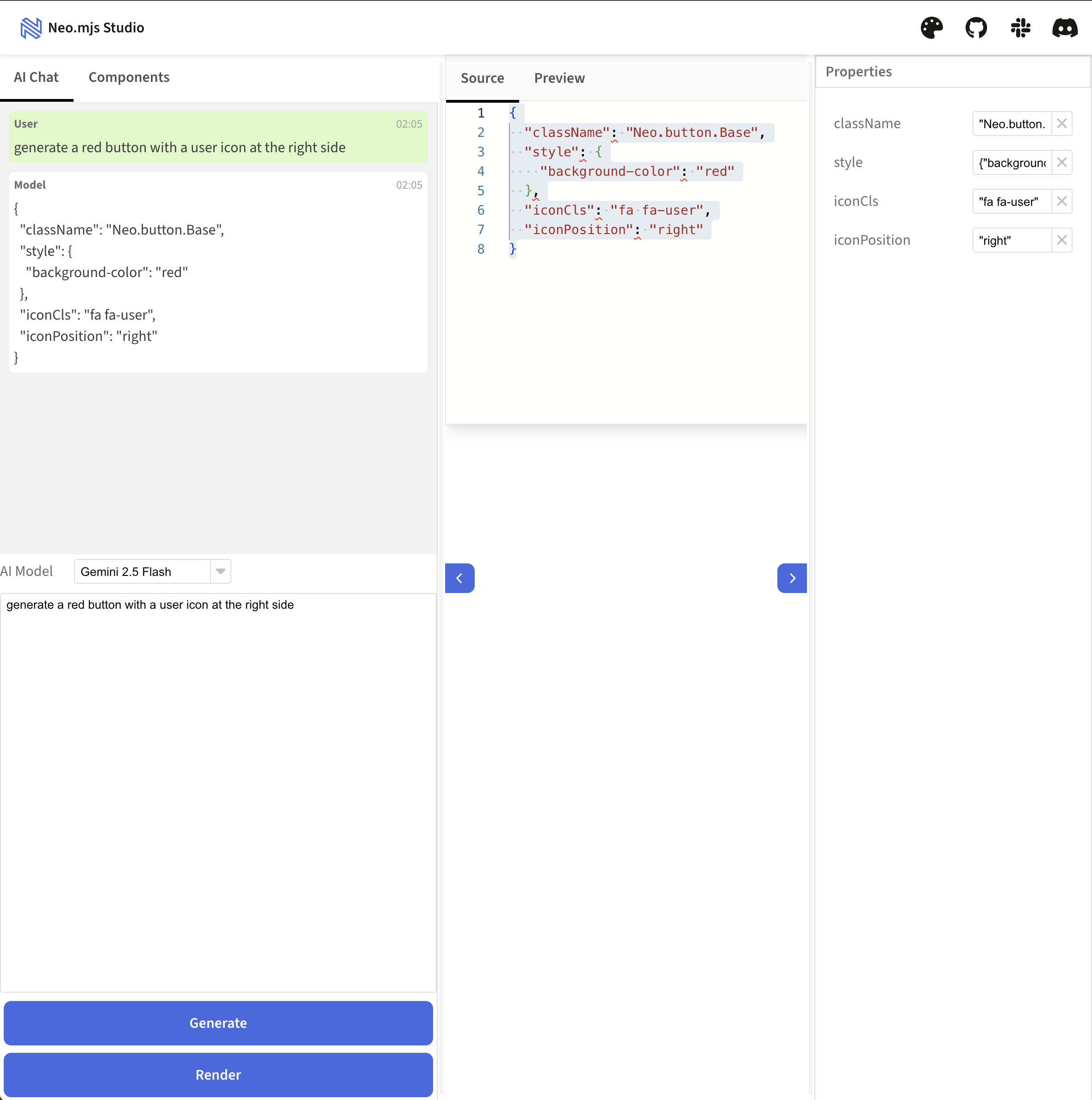
This philosophy is the engine behind our AI-powered **Neo Studio** (super early spoiler),, which generates these JSON
|
|
102
|
+
blueprints from natural language prompts.
|
|
44
103
|
|
|
45
|
-
|
|
46
|
-
is the core engine behind a new tool we are developing: **Neo Studio**. It's a multi-window, browser-based IDE
|
|
47
|
-
where we're integrating AI to generate component blueprints from natural language. The AI doesn't write JSX; it
|
|
48
|
-
generates the clean, efficient JSON that the framework then renders into a live UI. It's the first step towards
|
|
49
|
-
the vision of scaffolding entire applications this way.
|
|
104
|
+
|
|
50
105
|
|
|
51
|
-
|
|
106
|
+
### 3. The Onboarding Ramp: Developer-Friendly HTML Templates
|
|
52
107
|
|
|
53
|
-
JSON
|
|
108
|
+
While JSON is the framework's native tongue, we recognize the universal fluency of HTML. To lower the barrier to entry
|
|
109
|
+
and provide a familiar authoring experience, the recent [v10.3.0 release](../../.github/RELEASE_NOTES/v10.3.0.md)
|
|
110
|
+
introduced an intuitive, HTML-like syntax built on standard JavaScript Tagged Template Literals.
|
|
111
|
+
|
|
112
|
+
```javascript
|
|
113
|
+
// Inside a component's render() method:
|
|
114
|
+
return html`
|
|
115
|
+
<div class="my-container">
|
|
116
|
+
<p>${config.myText}</p>
|
|
117
|
+
<${Button} text="Click Me" handler="${this.onButtonClick}" />
|
|
118
|
+
</div>
|
|
119
|
+
`;
|
|
120
|
+
```
|
|
121
|
+
|
|
122
|
+
This is the **beginner mode**—an easy on-ramp for developers new to the framework. Crucially, this is **not JSX**. It's
|
|
123
|
+
built on our core principle of a **zero-builds development experience**, running directly in the browser.
|
|
124
|
+
|
|
125
|
+
To achieve this without sacrificing performance, we use a dual-mode architecture:
|
|
126
|
+
1. **Development:** Templates are parsed live in the browser.
|
|
127
|
+
2. **Production:** A build-time process transforms the templates directly into the same optimized **JSON VDOM blueprints**
|
|
128
|
+
used by the functional approach. The parser is completely removed, resulting in zero runtime overhead.
|
|
129
|
+
|
|
130
|
+
This gives developers a choice: start with the familiar comfort of HTML templates, or use the raw power of JSON
|
|
131
|
+
blueprints. For complex functional components, we still recommend using JSON directly for maximum clarity and performance.
|
|
132
|
+
But for simpler components or for developers who prefer it, the template syntax is a powerful and welcome alternative.
|
|
133
|
+
|
|
134
|
+
All three philosophies feed into the same revolutionary rendering engine. Now let's look at that engine.
|
|
54
135
|
|
|
55
136
|
---
|
|
56
137
|
|
|
@@ -69,6 +150,7 @@ the DOM in the Main Thread.
|
|
|
69
150
|
|
|
70
151
|
On the Main Thread, the `Neo.main.DeltaUpdates` manager acts as a central orchestrator. It receives a stream of commands
|
|
71
152
|
from the VDOM worker and uses the right tool for every job.
|
|
153
|
+
Deltas are pushed into `requestAnimationFrame()`.
|
|
72
154
|
|
|
73
155
|
#### For Creating New DOM: The `DomApiRenderer`
|
|
74
156
|
|
|
@@ -76,12 +158,41 @@ Whenever a new piece of UI needs to be created, the VDOM worker sends an `insert
|
|
|
76
158
|
initial page load. It applies any time you dynamically add a new component to a container or, in a capability that
|
|
77
159
|
showcases the power of the multi-threaded architecture, move an entire component tree into a **new browser window**.
|
|
78
160
|
|
|
79
|
-
For all these creation tasks, our pipeline uses the
|
|
80
|
-
**secure by default**. It
|
|
81
|
-
|
|
82
|
-
`
|
|
161
|
+
For all these creation tasks, our pipeline uses the [DomApiRenderer](../../src/main/render/DomApiRenderer.mjs).
|
|
162
|
+
This renderer is not only fast but also **secure by default**. It achieves this by treating all content as plain text
|
|
163
|
+
unless explicitly told otherwise. When processing a VDOM blueprint, it uses the safe `node.textContent` property for any
|
|
164
|
+
`text` configs. This simple default required a framework-wide effort to ensure our entire component library uses `text`
|
|
165
|
+
instead of `html`, fundamentally eliminating the risk of XSS attacks that plague `innerHTML`-based rendering. While
|
|
166
|
+
developers can still use the `html` property at their own risk for trusted content, the framework's secure-by-default
|
|
167
|
+
posture provides a crucial safety net, especially for UIs where an LLM might generate content or even structure.
|
|
168
|
+
This zero-trust approach to rendering means that even if a malicious or malformed string were to be injected into a
|
|
169
|
+
component's data, it is physically incapable of being executed as code in the browser.
|
|
170
|
+
|
|
171
|
+
The renderer builds the entire new UI tree on a `DocumentFragment` that is detached from the live DOM, preventing layout
|
|
172
|
+
thrashing. Only when the entire structure is complete is it appended to the document in a single, efficient operation.
|
|
173
|
+
|
|
174
|
+
```javascript
|
|
175
|
+
// A simplified look at the DomApiRenderer's core logic
|
|
176
|
+
// Note: This runs on the Main Thread
|
|
177
|
+
const createFragment = (vnode) => {
|
|
178
|
+
const fragment = document.createDocumentFragment();
|
|
179
|
+
|
|
180
|
+
// Recursively build the entire tree off-screen
|
|
181
|
+
vnode.childNodes?.forEach(child => {
|
|
182
|
+
const el = document.createElement(child.tag);
|
|
183
|
+
// ... logic for setting attributes, styles, etc.
|
|
184
|
+
fragment.appendChild(el);
|
|
185
|
+
});
|
|
186
|
+
|
|
187
|
+
return fragment;
|
|
188
|
+
};
|
|
189
|
+
|
|
190
|
+
// Later, in a single operation:
|
|
191
|
+
parentElement.appendChild(createFragment(vnode));
|
|
192
|
+
```
|
|
83
193
|
|
|
84
|
-
Enabling this superior rendering engine is as simple as setting a flag in your project's configuration
|
|
194
|
+
Enabling this superior rendering engine is as simple as setting a flag in your project's configuration
|
|
195
|
+
(Default value in v10):
|
|
85
196
|
|
|
86
197
|
```json
|
|
87
198
|
{
|
|
@@ -90,6 +201,22 @@ Enabling this superior rendering engine is as simple as setting a flag in your p
|
|
|
90
201
|
}
|
|
91
202
|
```
|
|
92
203
|
|
|
204
|
+
But its real genius lies in how it handles complex insertions. This isn't just about performance; it's about **preserving
|
|
205
|
+
the state of live DOM nodes**.
|
|
206
|
+
|
|
207
|
+
Consider a `<video>` element that is currently playing. In many frameworks, moving that video component to a different
|
|
208
|
+
part of the UI would destroy the old DOM node and create a new one, causing the video to jarringly restart from the
|
|
209
|
+
beginning. This is because the rendering engine only knows how to create new things, not how to relocate existing ones.
|
|
210
|
+
|
|
211
|
+
Neo.mjs avoids this entirely. Our architecture understands that the component instance is a persistent entity. When you
|
|
212
|
+
move it, the [DomApiVnodeCreator](../../src/vdom/util/DomApiVnodeCreator.mjs) sees that the video component's DOM
|
|
213
|
+
already exists. Instead of generating a VDOM blueprint to recreate it, it **prunes that entire branch** from the
|
|
214
|
+
`insertNode` delta. The VDOM worker then issues a separate, highly efficient `moveNode` delta.
|
|
215
|
+
|
|
216
|
+
The result on the main thread is a single, clean DOM operation: the existing `<video>` element is simply moved to its
|
|
217
|
+
new location, **continuing to play without interruption**. This is the power of the pruned graph: it's an optimization
|
|
218
|
+
that not only boosts performance but preserves the integrity and state of your UI.
|
|
219
|
+
|
|
93
220
|
#### For Modifying Existing DOM: Surgical Updates
|
|
94
221
|
|
|
95
222
|
When you change a property on an existing component—like its text, style, or attributes—the VDOM worker sends different
|
|
@@ -119,17 +246,107 @@ However, this had a limitation. The `updateDepth` was an "all or nothing" switch
|
|
|
119
246
|
Consider a toolbar with ten buttons. If the toolbar's own structure needed to change *and* just one of those ten buttons
|
|
120
247
|
also needed to update, the v9 model wasn't ideal.
|
|
121
248
|
|
|
122
|
-
This is the exact challenge that **v10's Asymmetric Blueprints** were designed to solve.
|
|
249
|
+
This is the exact challenge that **v10's Asymmetric Blueprints** were designed to solve. The magic lies in a
|
|
250
|
+
sophisticated **pre-processing and negotiation phase** that happens entirely within the App Worker, *before* anything
|
|
251
|
+
is sent to the VDOM worker.
|
|
252
|
+
|
|
253
|
+
Here's how it works, with a more realistic example. Imagine a dashboard container with four cards. A user action causes
|
|
254
|
+
the container's background to change, and simultaneously, the content of the second and fourth cards needs to update.
|
|
255
|
+
|
|
256
|
+
**1. Negotiation & Aggregation:**
|
|
257
|
+
The `VDomUpdate` manager is notified of three separate changes: one for the container and one for each of the two cards.
|
|
258
|
+
Instead of sending three separate update requests across the worker boundary (which would be inefficient), it aggregates
|
|
259
|
+
them. It initiates a single update on the top-most component in the hierarchy (the container) and passes the IDs of the
|
|
260
|
+
other changed components (`card-2`, `card-4`) into the `TreeBuilder` via the `mergedChildIds` parameter.
|
|
261
|
+
|
|
262
|
+
**2. The Asymmetric Build:**
|
|
263
|
+
The [TreeBuilder](../../src/util/vdom/TreeBuilder.mjs) is called on the container. It knows it needs to generate the
|
|
264
|
+
container's own VDOM, but instead of expanding all children, it follows a simple rule: "Expand only the children whose
|
|
265
|
+
IDs are in the `mergedChildIds` set. For all others, create a lightweight placeholder."
|
|
266
|
+
|
|
267
|
+
Here is the power of this approach in action.
|
|
268
|
+
|
|
269
|
+
**Before: The Container's Own VDOM Blueprint**
|
|
270
|
+
This is the simple structure the container holds before the update. It just references its children.
|
|
271
|
+
```javascript
|
|
272
|
+
// The container's vdom property just lists its children
|
|
273
|
+
{
|
|
274
|
+
id: 'dashboard-container-1',
|
|
275
|
+
tag: 'div',
|
|
276
|
+
cn: [
|
|
277
|
+
{ componentId: 'card-1' },
|
|
278
|
+
{ componentId: 'card-2' },
|
|
279
|
+
{ componentId: 'card-3' },
|
|
280
|
+
{ componentId: 'card-4' }
|
|
281
|
+
]
|
|
282
|
+
}
|
|
283
|
+
```
|
|
284
|
+
|
|
285
|
+
**After: The Optimized Blueprint Sent to the VDOM Worker**
|
|
286
|
+
The `TreeBuilder` produces a highly specific, asymmetric blueprint. It's a mix of detailed VDOM for the changed items
|
|
287
|
+
and placeholders for the unchanged ones.
|
|
123
288
|
|
|
124
|
-
|
|
125
|
-
|
|
126
|
-
|
|
127
|
-
1
|
|
128
|
-
|
|
129
|
-
|
|
289
|
+
```javascript
|
|
290
|
+
// The TreeBuilder intelligently expands only what's necessary
|
|
291
|
+
{
|
|
292
|
+
id: 'dashboard-container-1',
|
|
293
|
+
tag: 'div',
|
|
294
|
+
style: { background: '#f0f0f0' }, // The container's own change
|
|
295
|
+
cn: [
|
|
296
|
+
// Card 1 is untouched, so it becomes a placeholder
|
|
297
|
+
{ componentId: 'card-1', neoIgnore: true },
|
|
298
|
+
|
|
299
|
+
// Card 2 changed, so its full VDOM is included
|
|
300
|
+
{
|
|
301
|
+
id: 'card-2',
|
|
302
|
+
tag: 'section',
|
|
303
|
+
cn: [
|
|
304
|
+
{ tag: 'h2', text: 'Card 2 Header' },
|
|
305
|
+
{ tag: 'p', text: 'This is the NEW updated content.' }
|
|
306
|
+
]
|
|
307
|
+
},
|
|
308
|
+
|
|
309
|
+
// Card 3 is untouched
|
|
310
|
+
{ componentId: 'card-3', neoIgnore: true },
|
|
311
|
+
|
|
312
|
+
// Card 4 also changed
|
|
313
|
+
{
|
|
314
|
+
id: 'card-4',
|
|
315
|
+
tag: 'section',
|
|
316
|
+
cn: [
|
|
317
|
+
{ tag: 'h2', text: 'Card 4 Header' },
|
|
318
|
+
{ tag: 'p', text: 'Another card with new text.' }
|
|
319
|
+
]
|
|
320
|
+
}
|
|
321
|
+
]
|
|
322
|
+
}
|
|
323
|
+
```
|
|
324
|
+
|
|
325
|
+
**The Result: A Revolution in Efficiency and Correctness**
|
|
326
|
+
|
|
327
|
+
The VDOM worker receives this pre-optimized blueprint. When it sees a node with `neoIgnore: true`, it **completely skips
|
|
328
|
+
diffing that entire branch of the UI**, saving significant computation time.
|
|
130
329
|
|
|
131
|
-
|
|
132
|
-
|
|
330
|
+
But the placeholders serve a second, equally critical purpose: **they preserve the structural integrity of the child
|
|
331
|
+
list**. By keeping the original order and count of siblings intact, they ensure the diffing engine can correctly
|
|
332
|
+
calculate where to insert a new node or move an existing one. Without them, the engine would see a list of two items
|
|
333
|
+
instead of four and incorrectly create deltas to delete the other two cards. The placeholders allow the engine to
|
|
334
|
+
distinguish between a simple update and a structural change, producing a minimal and—most importantly—*accurate* set of
|
|
335
|
+
deltas to send to the main thread.
|
|
336
|
+
|
|
337
|
+
This is the essence of the Asymmetric VDOM. It's not just about batching updates; it's about creating the smartest,
|
|
338
|
+
most minimal blueprint possible *before* the expensive diffing process even begins.
|
|
339
|
+
|
|
340
|
+
#### Inside the VDOM Worker: The Diffing Engine
|
|
341
|
+
Once the optimized blueprint arrives at the VDOM worker, the second half of the revolution begins. Here, the plain JSON
|
|
342
|
+
blueprint is inflated into a tree of `VNode` instances. This is a key architectural point: the `VNode` is a very
|
|
343
|
+
lightweight wrapper class that exists *only* inside the VDOM worker. It performs no complex logic, but normalizes the
|
|
344
|
+
raw JSON blueprint, ensuring every node has a consistent structure (e.g., an `id` and a `childNodes` array) for the
|
|
345
|
+
diffing engine to process reliably.
|
|
346
|
+
|
|
347
|
+
The `vdom.Helper` singleton then acts as the core diffing engine. It compares the new `VNode` tree to the previous one
|
|
348
|
+
and, instead of generating HTML, produces an array of **deltas**—highly specific, low-level instructions for the main
|
|
349
|
+
thread to execute.
|
|
133
350
|
|
|
134
351
|
It’s the ultimate optimization: instead of sending the entire blueprint for a skyscraper just to fix a window,
|
|
135
352
|
we now send the floor plan for the lobby *and* the specific blueprint for that one window on the 50th floor,
|
|
@@ -140,22 +357,30 @@ and the framework automatically creates the most efficient update possible.
|
|
|
140
357
|
|
|
141
358
|
## Conclusion: An Engine Built for Tomorrow
|
|
142
359
|
|
|
143
|
-
The VDOM Revolution in Neo.mjs isn't just a performance enhancement; it's a paradigm shift
|
|
360
|
+
The VDOM Revolution in Neo.mjs isn't just a performance enhancement; it's a paradigm shift that fundamentally changes
|
|
361
|
+
what's possible on the web.
|
|
144
362
|
|
|
145
363
|
By combining the declarative power of **JSON Blueprints** with the intelligent efficiency of **Asymmetric Rendering**,
|
|
146
|
-
we've created an architecture that
|
|
364
|
+
we've created an architecture that delivers on the promise of a truly non-blocking UI. For you, the developer,
|
|
365
|
+
this means you can finally build applications that are:
|
|
147
366
|
|
|
148
|
-
- **
|
|
149
|
-
|
|
150
|
-
|
|
151
|
-
|
|
152
|
-
|
|
153
|
-
|
|
367
|
+
- **Fast by Default:** Blazing-fast initial renders and surgically precise updates keep the UI fluid at all times,
|
|
368
|
+
without you having to think about it.
|
|
369
|
+
- **Intelligent & Unrestricted:** The multi-threaded design allows for intensive AI logic, complex calculations,
|
|
370
|
+
or heavy data processing to run in the background without ever freezing the user experience.
|
|
371
|
+
- **Future-Proof & AI-Native:** An engine where AI is not an afterthought, but a first-class citizen.
|
|
372
|
+
It provides the perfect, secure, and efficient foundation for building applications *with* AI, where LLMs can generate,
|
|
373
|
+
manipulate, and render complex UIs by speaking their native language: structured data.
|
|
154
374
|
|
|
155
375
|
This is what it means to build a framework not just for the web of today, but for the applications of tomorrow.
|
|
156
376
|
|
|
157
|
-
|
|
158
|
-
|
|
377
|
+
### What's Next?
|
|
378
|
+
|
|
379
|
+
- **See it in Action:** Explore our [Online Examples](https://neomjs.com/dist/esm/apps/portal/) to experience the fluid UI for yourself.
|
|
380
|
+
- **Dive into the Code:** The entire framework is open source. [Check out the repo on GitHub](https://github.com/neomjs/neo) and see how it works.
|
|
381
|
+
- **Join the Community:** Have questions? Join our [Slack Channel](https://join.slack.com/t/neomjs/shared_invite/zt-6c50ueeu-3E1~M4T9xkNnb~M_prEEOA) and connect with the team and other developers.
|
|
382
|
+
|
|
383
|
+
In our final article, we'll bring all three revolutions—Reactivity, Functional Components, and the VDOM—together and show you why it's time to fall in love with frontend development all over again.
|
|
159
384
|
|
|
160
385
|
---
|
|
161
386
|
|
|
@@ -66,6 +66,21 @@ This is where the two frameworks diverge significantly, each offering unique tra
|
|
|
66
66
|
* **Benefit:** This offers unparalleled speed and debugging clarity. Code changes are reflected instantly. Developers work directly with the real code in the browser's dev tools, eliminating the need for source maps and vastly simplifying debugging.
|
|
67
67
|
* While Neo.mjs provides a robust architecture, it offers significant flexibility within that structure (e.g., plain JS for VDOM, choice of functional or class components), allowing developers more freedom without sacrificing consistency.
|
|
68
68
|
|
|
69
|
+
### 5. Component Mobility: Portals vs. True Persistence
|
|
70
|
+
|
|
71
|
+
A critical architectural difference emerges when dealing with moving components around the UI, especially those with internal state (like a playing `<video>` or a complex third-party widget).
|
|
72
|
+
|
|
73
|
+
* **Angular: The CDK Portal**
|
|
74
|
+
* Angular uses its Component Dev Kit (CDK) `cdkPortal` and `cdkPortalOutlet` to solve a common CSS layout problem: rendering a component's DOM subtree in a different physical location in the DOM (e.g., a modal at the end of `<body>`). This is a **rendering trick**.
|
|
75
|
+
* The component's logical position in the Angular tree remains the same, but its DOM is "teleported" elsewhere.
|
|
76
|
+
* **The Limitation:** If the component that *defines* the portal is destroyed (e.g., via `*ngIf`), its state is destroyed. The portal's content is completely recreated from scratch. A playing video would jarringly restart.
|
|
77
|
+
|
|
78
|
+
* **Neo.mjs: True Mobility by Design**
|
|
79
|
+
* This is not a special feature in Neo.mjs; it is a **natural consequence of the architecture**.
|
|
80
|
+
* Because component instances are stable and persistent, moving a component is a controlled data operation. A developer programmatically modifies the `items` arrays of the relevant containers, then calls `update()` on the **closest common ancestor**. This signals the framework to perform a single, efficient reconciliation that correctly identifies the component move. While calling `update()` on a higher-level ancestor would also work, targeting the closest one is a best practice that minimizes the scope of the update, showcasing the framework's focus on performance and developer control. This explicit, batch-friendly approach is a core architectural feature, not a hack.
|
|
81
|
+
* The framework recognizes that the component's DOM node already exists. It issues a single, efficient `moveNode` command to the Main Thread.
|
|
82
|
+
* **The Benefit:** The existing DOM node, with all its internal state, is simply unplugged from its old parent and plugged into the new one. A playing video continues to play, uninterrupted. This enables a level of UI fluidity and state preservation that is architecturally impossible in a single-threaded model where component identity is tied to its place in the template.
|
|
83
|
+
|
|
69
84
|
### Other Considerations:
|
|
70
85
|
|
|
71
86
|
* **Framework Rigidity vs. Flexible Structure:** Angular is often perceived as a "straightjacket" due to its highly opinionated and prescriptive nature, dictating specific patterns (e.g., NgModules, decorators, strict DI) that can limit flexibility and make it challenging to deviate from "the Angular way." Neo.mjs, while also a comprehensive framework, offers a different kind of opinionation. Its core architectural choices (worker-based, unified config system, `Neo.core.Base` for any class-based entity) provide a robust structure, but within that structure, it offers significant flexibility (e.g., plain JS for VDOM, choice of functional or class components, integrated features reducing external dependencies), allowing developers more freedom without sacrificing consistency.
|
|
@@ -136,6 +136,21 @@ This is where the two frameworks diverge significantly, each offering unique tra
|
|
|
136
136
|
* Neo.mjs's architecture makes props drilling an obsolete anti-pattern. The integrated `state.Provider` allows a deeply nested component to subscribe *only* to the precise slice of state it needs via its `bind` config or a `useConfig` hook.
|
|
137
137
|
* This creates a direct, performant, and surgical link between the state and the component that needs it, completely bypassing all intermediate components. It is more akin to a selector in a dedicated state management library, but it's a native, architectural feature of the framework.
|
|
138
138
|
|
|
139
|
+
### 6. Component Mobility: Portals vs. True Persistence
|
|
140
|
+
|
|
141
|
+
A critical architectural difference emerges when dealing with moving components around the UI, especially those with internal state (like a playing `<video>` or a complex third-party widget).
|
|
142
|
+
|
|
143
|
+
* **React: The Portal "Trick"**
|
|
144
|
+
* React uses `ReactDOM.createPortal()` to solve a common CSS layout problem: rendering a component's DOM subtree in a different physical location in the DOM (e.g., a modal at the end of `<body>`). This is a **rendering trick**.
|
|
145
|
+
* The component's logical position in the React tree remains the same, but its DOM is "teleported" elsewhere.
|
|
146
|
+
* **The Limitation:** If the component that *defines* the portal is unmounted and remounted in a new location, its state is destroyed. The portal's content is completely recreated from scratch. A playing video would jarringly restart.
|
|
147
|
+
|
|
148
|
+
* **Neo.mjs: True Mobility by Design**
|
|
149
|
+
* This is not a special feature in Neo.mjs; it is a **natural consequence of the architecture**.
|
|
150
|
+
* Because component instances are stable and persistent, moving a component is a controlled data operation. A developer programmatically modifies the `items` arrays of the relevant containers, then calls `update()` on the **closest common ancestor**. This signals the framework to perform a single, efficient reconciliation that correctly identifies the component move. While calling `update()` on a higher-level ancestor would also work, targeting the closest one is a best practice that minimizes the scope of the update, showcasing the framework's focus on performance and developer control. This explicit, batch-friendly approach is a core architectural feature, not a hack.
|
|
151
|
+
* The framework recognizes that the component's DOM node already exists. It issues a single, efficient `moveNode` command to the Main Thread.
|
|
152
|
+
* **The Benefit:** The existing DOM node, with all its internal state, is simply unplugged from its old parent and plugged into the new one. A playing video continues to play, uninterrupted. This enables a level of UI fluidity and state preservation that is architecturally impossible in a single-threaded, ephemeral component model.
|
|
153
|
+
|
|
139
154
|
### Other Considerations:
|
|
140
155
|
|
|
141
156
|
* **Development & Deployment Environments:** Neo.mjs offers four distinct environments, providing unparalleled flexibility:
|
|
@@ -53,6 +53,21 @@ This is where the two frameworks diverge significantly, each offering unique tra
|
|
|
53
53
|
* **`initAsync()`**: This hook runs *after* construction but *before* the component is considered "ready." It allows for asynchronous setup (like data fetching or lazy-loading modules) to complete *before* the first render. This eliminates entire classes of UI flicker and race conditions at an architectural level.
|
|
54
54
|
* **`afterSetMounted()` & True Persistence**: A Neo.mjs component is a stable, persistent instance. It can be unmounted from the DOM (`mounted: false`) and later remounted without being destroyed. `afterSetMounted` fires reliably for both state changes. This persistence is the key to enabling true multi-window applications, where a component instance can be moved from one browser window to another while retaining its full state and logic.
|
|
55
55
|
|
|
56
|
+
### 4. Component Mobility: Portals vs. True Persistence
|
|
57
|
+
|
|
58
|
+
A critical architectural difference emerges when dealing with moving components around the UI, especially those with internal state (like a playing `<video>` or a complex third-party widget).
|
|
59
|
+
|
|
60
|
+
* **Vue.js: The `<Teleport>` Component**
|
|
61
|
+
* Vue uses its built-in `<Teleport>` component to solve a common CSS layout problem: rendering a component's DOM subtree in a different physical location in the DOM (e.g., a modal at the end of `<body>`). This is a **rendering trick**.
|
|
62
|
+
* The component's logical position in the Vue tree remains the same, but its DOM is "teleported" elsewhere.
|
|
63
|
+
* **The Limitation:** If the component that *contains* the `<Teleport>` tag is unmounted and remounted in a new location (e.g., via `v-if`), its state is destroyed. The teleported content is completely recreated from scratch. A playing video would jarringly restart.
|
|
64
|
+
|
|
65
|
+
* **Neo.mjs: True Mobility by Design**
|
|
66
|
+
* This is not a special feature in Neo.mjs; it is a **natural consequence of the architecture**.
|
|
67
|
+
* Because component instances are stable and persistent, moving a component is a controlled data operation. A developer programmatically modifies the `items` arrays of the relevant containers, then calls `update()` on the **closest common ancestor**. This signals the framework to perform a single, efficient reconciliation that correctly identifies the component move. While calling `update()` on a higher-level ancestor would also work, targeting the closest one is a best practice that minimizes the scope of the update, showcasing the framework's focus on performance and developer control. This explicit, batch-friendly approach is a core architectural feature, not a hack.
|
|
68
|
+
* The framework recognizes that the component's DOM node already exists. It issues a single, efficient `moveNode` command to the Main Thread.
|
|
69
|
+
* **The Benefit:** The existing DOM node, with all its internal state, is simply unplugged from its old parent and plugged into the new one. A playing video continues to play, uninterrupted. This enables a level of UI fluidity and state preservation that is architecturally impossible in a single-threaded model where component identity is tied to its place in the template.
|
|
70
|
+
|
|
56
71
|
### Other Considerations:
|
|
57
72
|
|
|
58
73
|
* **Development & Deployment Environments:** Neo.mjs offers four distinct environments, providing unparalleled flexibility:
|
package/package.json
CHANGED
|
@@ -1,6 +1,6 @@
|
|
|
1
1
|
{
|
|
2
2
|
"name": "neo.mjs",
|
|
3
|
-
"version": "10.3.
|
|
3
|
+
"version": "10.3.3",
|
|
4
4
|
"description": "Neo.mjs: The multi-threaded UI framework for building ultra-fast, desktop-like web applications with uncompromised responsiveness, inherent security, and a transpilation-free dev mode.",
|
|
5
5
|
"type": "module",
|
|
6
6
|
"repository": {
|
|
@@ -83,7 +83,7 @@
|
|
|
83
83
|
"acorn": "^8.15.0",
|
|
84
84
|
"astring": "^1.9.0",
|
|
85
85
|
"autoprefixer": "^10.4.21",
|
|
86
|
-
"chalk": "^5.
|
|
86
|
+
"chalk": "^5.5.0",
|
|
87
87
|
"clean-webpack-plugin": "^4.0.0",
|
|
88
88
|
"commander": "^14.0.0",
|
|
89
89
|
"cssnano": "^7.1.0",
|
|
@@ -93,7 +93,7 @@
|
|
|
93
93
|
"highlightjs-line-numbers.js": "^2.9.0",
|
|
94
94
|
"html-minifier-terser": "^7.2.0",
|
|
95
95
|
"inquirer": "^12.9.0",
|
|
96
|
-
"marked": "^16.1.
|
|
96
|
+
"marked": "^16.1.2",
|
|
97
97
|
"monaco-editor": "0.50.0",
|
|
98
98
|
"neo-jsdoc": "1.0.1",
|
|
99
99
|
"neo-jsdoc-x": "1.0.5",
|
package/src/DefaultConfig.mjs
CHANGED
|
@@ -299,12 +299,12 @@ const DefaultConfig = {
|
|
|
299
299
|
useVdomWorker: true,
|
|
300
300
|
/**
|
|
301
301
|
* buildScripts/injectPackageVersion.mjs will update this value
|
|
302
|
-
* @default '10.3.
|
|
302
|
+
* @default '10.3.3'
|
|
303
303
|
* @memberOf! module:Neo
|
|
304
304
|
* @name config.version
|
|
305
305
|
* @type String
|
|
306
306
|
*/
|
|
307
|
-
version: '10.3.
|
|
307
|
+
version: '10.3.3'
|
|
308
308
|
};
|
|
309
309
|
|
|
310
310
|
Object.assign(DefaultConfig, {
|