nemfile 1.0.0
This diff represents the content of publicly available package versions that have been released to one of the supported registries. The information contained in this diff is provided for informational purposes only and reflects changes between package versions as they appear in their respective public registries.
- package/LICENSE +21 -0
- package/README.md +162 -0
- package/bin/nemfile.js +2 -0
- package/package.json +89 -0
- package/server.js +918 -0
package/LICENSE
ADDED
|
@@ -0,0 +1,21 @@
|
|
|
1
|
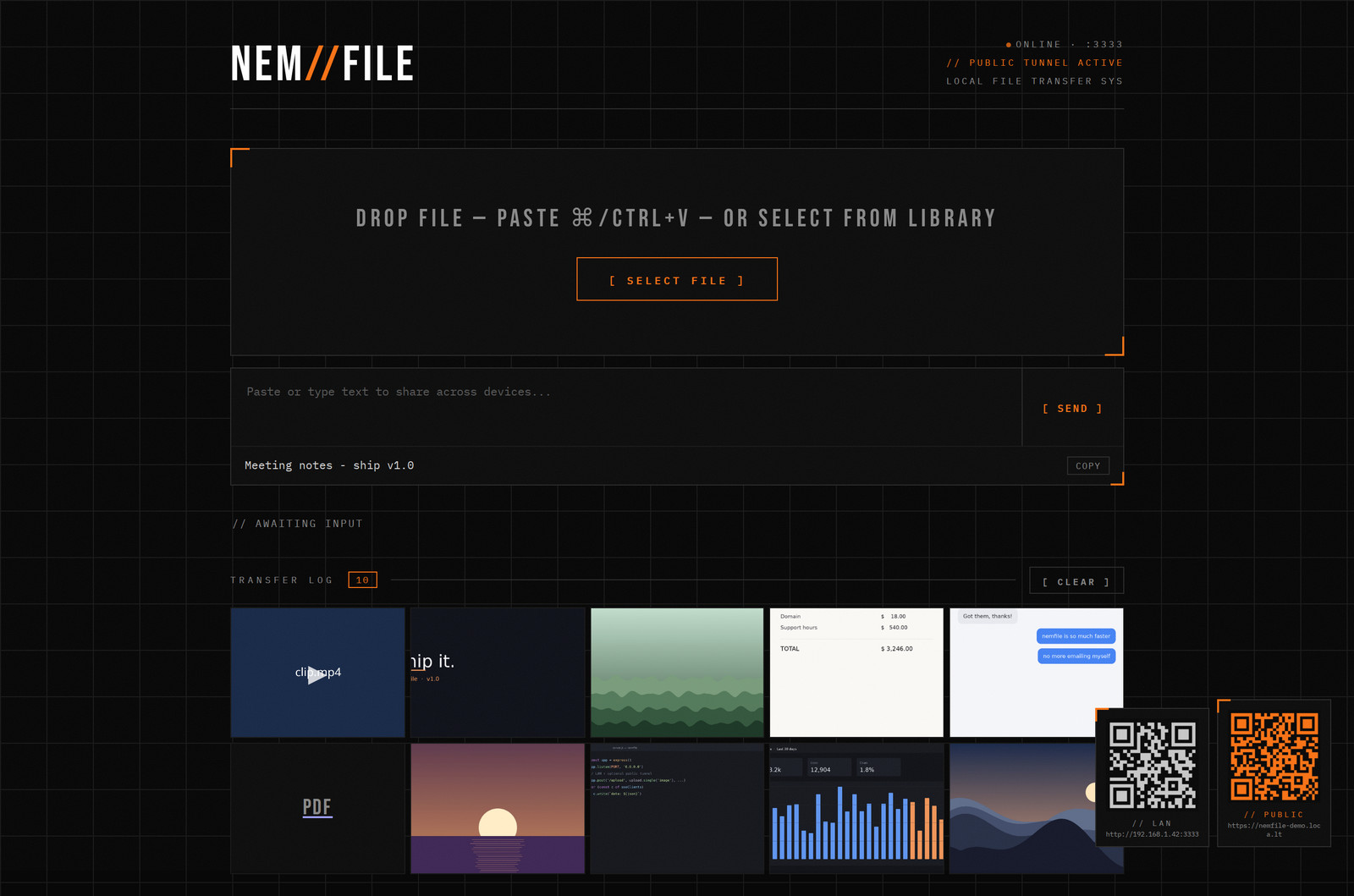
+
MIT License
|
|
2
|
+
|
|
3
|
+
Copyright (c) 2026 phamquyetthang
|
|
4
|
+
|
|
5
|
+
Permission is hereby granted, free of charge, to any person obtaining a copy
|
|
6
|
+
of this software and associated documentation files (the "Software"), to deal
|
|
7
|
+
in the Software without restriction, including without limitation the rights
|
|
8
|
+
to use, copy, modify, merge, publish, distribute, sublicense, and/or sell
|
|
9
|
+
copies of the Software, and to permit persons to whom the Software is
|
|
10
|
+
furnished to do so, subject to the following conditions:
|
|
11
|
+
|
|
12
|
+
The above copyright notice and this permission notice shall be included in all
|
|
13
|
+
copies or substantial portions of the Software.
|
|
14
|
+
|
|
15
|
+
THE SOFTWARE IS PROVIDED "AS IS", WITHOUT WARRANTY OF ANY KIND, EXPRESS OR
|
|
16
|
+
IMPLIED, INCLUDING BUT NOT LIMITED TO THE WARRANTIES OF MERCHANTABILITY,
|
|
17
|
+
FITNESS FOR A PARTICULAR PURPOSE AND NONINFRINGEMENT. IN NO EVENT SHALL THE
|
|
18
|
+
AUTHORS OR COPYRIGHT HOLDERS BE LIABLE FOR ANY CLAIM, DAMAGES OR OTHER
|
|
19
|
+
LIABILITY, WHETHER IN AN ACTION OF CONTRACT, TORT OR OTHERWISE, ARISING FROM,
|
|
20
|
+
OUT OF OR IN CONNECTION WITH THE SOFTWARE OR THE USE OR OTHER DEALINGS IN THE
|
|
21
|
+
SOFTWARE.
|
package/README.md
ADDED
|
@@ -0,0 +1,162 @@
|
|
|
1
|
+
# nemfile
|
|
2
|
+
|
|
3
|
+
**nemfile is a zero-config file transfer tool that moves files, screenshots and text between your phone, iPad and computer over your local Wi-Fi network — no cloud, no account, and no app to install on the phone.** You run one command on your computer, scan a QR code with your phone, and drop files straight into the browser.
|
|
4
|
+
|
|
5
|
+
```bash
|
|
6
|
+
npx nemfile
|
|
7
|
+
```
|
|
8
|
+
|
|
9
|
+
That's it. Open the printed URL or scan the QR code on your phone. Files land in an `uploads/` folder next to where you ran the command.
|
|
10
|
+
|
|
11
|
+
[](https://www.npmjs.com/package/nemfile)
|
|
12
|
+
[](https://www.npmjs.com/package/nemfile)
|
|
13
|
+
[](./LICENSE)
|
|
14
|
+
[](https://nodejs.org)
|
|
15
|
+
|
|
16
|
+
|
|
17
|
+
|
|
18
|
+
<sub>The page you open on your phone and on your computer — drop zone, shared text clips, transfer log, and the two pairing QR codes.</sub>
|
|
19
|
+
|
|
20
|
+
---
|
|
21
|
+
|
|
22
|
+
## Why nemfile
|
|
23
|
+
|
|
24
|
+
Getting a screenshot off an iPhone and onto a Windows or Linux machine usually means emailing yourself, uploading to a cloud drive, or plugging in a cable. AirDrop only works between Apple devices. nemfile replaces all of that with a local web page:
|
|
25
|
+
|
|
26
|
+
- **No account, no cloud** — files never leave your network unless you turn on the public tunnel.
|
|
27
|
+
- **Nothing to install on the phone** — the phone just opens a browser.
|
|
28
|
+
- **Works across every platform** — iPhone, iPad, Android, Windows, macOS, Linux.
|
|
29
|
+
- **Instant** — transfers run at Wi-Fi speed, not upload speed.
|
|
30
|
+
|
|
31
|
+
## Features
|
|
32
|
+
|
|
33
|
+
| Feature | Description |
|
|
34
|
+
| --- | --- |
|
|
35
|
+
| Drag-and-drop upload | Drop any file type into the page, up to 2 GB per file |
|
|
36
|
+
| Phone camera roll upload | Pick photos and videos straight from the iOS/Android picker |
|
|
37
|
+
| QR code pairing | Scan to open the page — no typing IP addresses |
|
|
38
|
+
| Live gallery | Image and video thumbnails appear on every connected device instantly |
|
|
39
|
+
| Realtime sync | Server-sent events push new uploads to all open tabs, no refresh |
|
|
40
|
+
| Text clips | Paste text on one device, read it on another — a cross-platform clipboard |
|
|
41
|
+
| One-click copy | Copy an image to the system clipboard, or copy its LAN URL |
|
|
42
|
+
| Download buttons | Grab any uploaded file back down to whatever device you're on |
|
|
43
|
+
| Public tunnel | Optional `localtunnel` URL so the page works outside your Wi-Fi |
|
|
44
|
+
| Standalone binaries | Prebuilt executables for Linux, macOS and Windows — no Node needed |
|
|
45
|
+
|
|
46
|
+
## Install
|
|
47
|
+
|
|
48
|
+
### Run it without installing (recommended)
|
|
49
|
+
|
|
50
|
+
```bash
|
|
51
|
+
npx nemfile
|
|
52
|
+
```
|
|
53
|
+
|
|
54
|
+
### Install globally
|
|
55
|
+
|
|
56
|
+
```bash
|
|
57
|
+
npm install -g nemfile
|
|
58
|
+
nemfile
|
|
59
|
+
```
|
|
60
|
+
|
|
61
|
+
### Standalone binary — no Node.js required
|
|
62
|
+
|
|
63
|
+
Download the executable for your OS from the [latest release](https://github.com/quytstudio/nemfile/releases/latest):
|
|
64
|
+
|
|
65
|
+
```bash
|
|
66
|
+
# Linux
|
|
67
|
+
chmod +x nemfile-linux && ./nemfile-linux
|
|
68
|
+
|
|
69
|
+
# macOS
|
|
70
|
+
chmod +x nemfile-macos && ./nemfile-macos
|
|
71
|
+
```
|
|
72
|
+
|
|
73
|
+
On Windows, run `nemfile-win.exe`.
|
|
74
|
+
|
|
75
|
+
## Usage
|
|
76
|
+
|
|
77
|
+
Start the server on the computer you want the files to end up on:
|
|
78
|
+
|
|
79
|
+
```bash
|
|
80
|
+
cd ~/Desktop # files will be saved to ~/Desktop/uploads
|
|
81
|
+
npx nemfile
|
|
82
|
+
```
|
|
83
|
+
|
|
84
|
+
nemfile prints three addresses:
|
|
85
|
+
|
|
86
|
+
```
|
|
87
|
+
Local: http://localhost:3333
|
|
88
|
+
LAN: http://192.168.1.10:3333 ← open this on your phone
|
|
89
|
+
Public: https://xxxx.loca.lt ← works outside your Wi-Fi
|
|
90
|
+
```
|
|
91
|
+
|
|
92
|
+
Open the **LAN** address on your phone — or scan the QR code shown on the page — and you get an upload box. Anything you drop there appears in the gallery on every connected device, and is written to `uploads/` on your computer.
|
|
93
|
+
|
|
94
|
+
To share text instead of a file, paste into the text box and hit send; it shows up as a clip on every other device.
|
|
95
|
+
|
|
96
|
+
## How it works
|
|
97
|
+
|
|
98
|
+
nemfile starts a small Express server on port `3333` bound to `0.0.0.0`, so any device on the same Wi-Fi can reach it. Uploads are handled by `multer` and written to `./uploads`. A server-sent-events stream keeps every open browser tab in sync, and `qrcode` renders the pairing QR codes. Optionally, `localtunnel` exposes the same page on a public HTTPS URL for when the two devices aren't on the same network.
|
|
99
|
+
|
|
100
|
+
There is no database, no telemetry, and no external service in the default path — the LAN transfer is a direct HTTP request from your phone to your computer.
|
|
101
|
+
|
|
102
|
+
## FAQ
|
|
103
|
+
|
|
104
|
+
### How do I transfer files from iPhone to Windows without iTunes or iCloud?
|
|
105
|
+
|
|
106
|
+
Run `npx nemfile` on the Windows machine, then open the printed LAN address on the iPhone and pick your photos. The files are written straight to the `uploads/` folder on Windows. No iTunes, no iCloud, no cable.
|
|
107
|
+
|
|
108
|
+
### Is nemfile an AirDrop alternative for Windows and Android?
|
|
109
|
+
|
|
110
|
+
Yes — it covers the same job (send a file to a nearby device) but works between any two platforms, because the receiving side is just a web page. It is not a native AirDrop implementation; it uses your Wi-Fi network and a browser.
|
|
111
|
+
|
|
112
|
+
### Do my files get uploaded to a cloud server?
|
|
113
|
+
|
|
114
|
+
No. By default the transfer stays entirely on your local network. Files are saved to a folder on your own computer. The only exception is the optional public tunnel, which relays traffic through `loca.lt` so devices outside your Wi-Fi can reach the page — skip it if you don't need it.
|
|
115
|
+
|
|
116
|
+
### What's the maximum file size?
|
|
117
|
+
|
|
118
|
+
2 GB per file. Since transfers happen over local Wi-Fi rather than your internet upload link, large videos move at LAN speed.
|
|
119
|
+
|
|
120
|
+
### What file types are supported?
|
|
121
|
+
|
|
122
|
+
All of them. Images (`png`, `jpg`, `heic`, `webp`, `avif`, `gif`) and videos (`mp4`, `mov`, `webm`, `mkv`) get inline thumbnails and previews; everything else uploads fine and shows a file-type icon.
|
|
123
|
+
|
|
124
|
+
### Do I need to install an app on my phone?
|
|
125
|
+
|
|
126
|
+
No. The phone only needs a browser. That's the main reason nemfile exists.
|
|
127
|
+
|
|
128
|
+
### Does it work without internet?
|
|
129
|
+
|
|
130
|
+
Yes, for LAN transfers — you only need the two devices on the same Wi-Fi, not a working internet connection. The optional public tunnel does require internet.
|
|
131
|
+
|
|
132
|
+
### Which port does nemfile use?
|
|
133
|
+
|
|
134
|
+
Port `3333`, bound to all interfaces so other devices on the network can connect. Make sure your firewall allows it.
|
|
135
|
+
|
|
136
|
+
### Where are uploaded files saved?
|
|
137
|
+
|
|
138
|
+
In an `uploads/` directory created inside the folder you ran the command from. `cd` somewhere else first if you want them elsewhere.
|
|
139
|
+
|
|
140
|
+
### Is it safe to leave running?
|
|
141
|
+
|
|
142
|
+
On a trusted home or office network, yes — but note that anyone who can reach the port can upload and browse files. Don't leave the public tunnel open on an untrusted network, and stop the server (`Ctrl+C`) when you're done.
|
|
143
|
+
|
|
144
|
+
## Requirements
|
|
145
|
+
|
|
146
|
+
- Node.js 18 or newer (only for the `npx`/npm install path — the standalone binaries need nothing)
|
|
147
|
+
- Both devices on the same Wi-Fi network, for LAN mode
|
|
148
|
+
|
|
149
|
+
## Contributing
|
|
150
|
+
|
|
151
|
+
Issues and pull requests are welcome at [github.com/quytstudio/nemfile](https://github.com/quytstudio/nemfile).
|
|
152
|
+
|
|
153
|
+
```bash
|
|
154
|
+
git clone https://github.com/quytstudio/nemfile.git
|
|
155
|
+
cd nemfile
|
|
156
|
+
npm install
|
|
157
|
+
npm start
|
|
158
|
+
```
|
|
159
|
+
|
|
160
|
+
## License
|
|
161
|
+
|
|
162
|
+
MIT © [phamquyetthang](https://github.com/phamquyetthang)
|
package/bin/nemfile.js
ADDED
package/package.json
ADDED
|
@@ -0,0 +1,89 @@
|
|
|
1
|
+
{
|
|
2
|
+
"name": "nemfile",
|
|
3
|
+
"version": "1.0.0",
|
|
4
|
+
"description": "Send files, screenshots and text between your phone, iPad and computer over local Wi-Fi — no cloud, no account, no app install. One command: npx nemfile.",
|
|
5
|
+
"keywords": [
|
|
6
|
+
"file-transfer",
|
|
7
|
+
"share-files",
|
|
8
|
+
"send-files",
|
|
9
|
+
"airdrop",
|
|
10
|
+
"airdrop-alternative",
|
|
11
|
+
"airdrop-for-windows",
|
|
12
|
+
"airdrop-for-android",
|
|
13
|
+
"phone-to-pc",
|
|
14
|
+
"iphone-to-pc",
|
|
15
|
+
"ipad-to-pc",
|
|
16
|
+
"android-to-pc",
|
|
17
|
+
"wifi-transfer",
|
|
18
|
+
"lan",
|
|
19
|
+
"local-network",
|
|
20
|
+
"localhost",
|
|
21
|
+
"qr-code",
|
|
22
|
+
"upload",
|
|
23
|
+
"drag-and-drop",
|
|
24
|
+
"screenshot",
|
|
25
|
+
"clipboard",
|
|
26
|
+
"clipboard-sync",
|
|
27
|
+
"paste",
|
|
28
|
+
"text-share",
|
|
29
|
+
"self-hosted",
|
|
30
|
+
"no-cloud",
|
|
31
|
+
"offline",
|
|
32
|
+
"privacy",
|
|
33
|
+
"tunnel",
|
|
34
|
+
"localtunnel",
|
|
35
|
+
"express",
|
|
36
|
+
"cli",
|
|
37
|
+
"zero-config",
|
|
38
|
+
"npx"
|
|
39
|
+
],
|
|
40
|
+
"homepage": "https://github.com/quytstudio/nemfile#readme",
|
|
41
|
+
"repository": {
|
|
42
|
+
"type": "git",
|
|
43
|
+
"url": "git+https://github.com/quytstudio/nemfile.git"
|
|
44
|
+
},
|
|
45
|
+
"bugs": {
|
|
46
|
+
"url": "https://github.com/quytstudio/nemfile/issues"
|
|
47
|
+
},
|
|
48
|
+
"license": "MIT",
|
|
49
|
+
"author": "phamquyetthang <quyetthang.phucchi@gmail.com>",
|
|
50
|
+
"main": "server.js",
|
|
51
|
+
"bin": {
|
|
52
|
+
"nemfile": "./bin/nemfile.js"
|
|
53
|
+
},
|
|
54
|
+
"files": [
|
|
55
|
+
"bin/",
|
|
56
|
+
"server.js",
|
|
57
|
+
"README.md",
|
|
58
|
+
"LICENSE"
|
|
59
|
+
],
|
|
60
|
+
"engines": {
|
|
61
|
+
"node": ">=18"
|
|
62
|
+
},
|
|
63
|
+
"os": [
|
|
64
|
+
"darwin",
|
|
65
|
+
"linux",
|
|
66
|
+
"win32"
|
|
67
|
+
],
|
|
68
|
+
"scripts": {
|
|
69
|
+
"start": "node server.js",
|
|
70
|
+
"build": "npx @yao-pkg/pkg . --compress GZip --out-path dist"
|
|
71
|
+
},
|
|
72
|
+
"pkg": {
|
|
73
|
+
"targets": [
|
|
74
|
+
"node20-linux-x64",
|
|
75
|
+
"node20-macos-x64",
|
|
76
|
+
"node20-win-x64"
|
|
77
|
+
],
|
|
78
|
+
"assets": [
|
|
79
|
+
"node_modules/qrcode/**/*"
|
|
80
|
+
],
|
|
81
|
+
"outputPath": "dist"
|
|
82
|
+
},
|
|
83
|
+
"dependencies": {
|
|
84
|
+
"express": "^4.18.2",
|
|
85
|
+
"localtunnel": "^2.0.2",
|
|
86
|
+
"multer": "^1.4.5-lts.1",
|
|
87
|
+
"qrcode": "^1.5.4"
|
|
88
|
+
}
|
|
89
|
+
}
|
package/server.js
ADDED
|
@@ -0,0 +1,918 @@
|
|
|
1
|
+
const express = require('express');
|
|
2
|
+
const multer = require('multer');
|
|
3
|
+
const path = require('path');
|
|
4
|
+
const fs = require('fs');
|
|
5
|
+
const os = require('os');
|
|
6
|
+
const QRCode = require('qrcode');
|
|
7
|
+
const localtunnel = require('localtunnel');
|
|
8
|
+
|
|
9
|
+
const app = express();
|
|
10
|
+
const PORT = 3333;
|
|
11
|
+
const UPLOADS_DIR = path.join(process.cwd(), 'uploads');
|
|
12
|
+
|
|
13
|
+
if (!fs.existsSync(UPLOADS_DIR)) fs.mkdirSync(UPLOADS_DIR);
|
|
14
|
+
|
|
15
|
+
const storage = multer.diskStorage({
|
|
16
|
+
destination: UPLOADS_DIR,
|
|
17
|
+
filename: (req, file, cb) => {
|
|
18
|
+
const ext = path.extname(file.originalname) || '';
|
|
19
|
+
const base = path.basename(file.originalname, ext).replace(/[^a-zA-Z0-9_-]/g, '_').slice(0, 40);
|
|
20
|
+
cb(null, `${Date.now()}-${base}${ext}`);
|
|
21
|
+
},
|
|
22
|
+
});
|
|
23
|
+
|
|
24
|
+
const upload = multer({ storage, limits: { fileSize: 2 * 1024 * 1024 * 1024 } }); // 2GB
|
|
25
|
+
|
|
26
|
+
const sseClients = new Set();
|
|
27
|
+
const textClips = []; // in-memory, max 50
|
|
28
|
+
let publicUrl = null;
|
|
29
|
+
|
|
30
|
+
app.use(express.json());
|
|
31
|
+
|
|
32
|
+
// The tunnel URL is publicly reachable, and everything served here is the
|
|
33
|
+
// user's own private drop folder. Keep crawlers out of all of it.
|
|
34
|
+
app.use((req, res, next) => {
|
|
35
|
+
res.set('X-Robots-Tag', 'noindex, nofollow, noarchive');
|
|
36
|
+
next();
|
|
37
|
+
});
|
|
38
|
+
|
|
39
|
+
app.get('/robots.txt', (req, res) => {
|
|
40
|
+
res.type('text/plain').send('User-agent: *\nDisallow: /\n');
|
|
41
|
+
});
|
|
42
|
+
|
|
43
|
+
app.use('/uploads', express.static(UPLOADS_DIR));
|
|
44
|
+
|
|
45
|
+
app.get('/events', (req, res) => {
|
|
46
|
+
res.set({ 'Content-Type': 'text/event-stream', 'Cache-Control': 'no-cache', Connection: 'keep-alive' });
|
|
47
|
+
res.flushHeaders();
|
|
48
|
+
sseClients.add(res);
|
|
49
|
+
req.on('close', () => sseClients.delete(res));
|
|
50
|
+
});
|
|
51
|
+
|
|
52
|
+
function getLocalIP() {
|
|
53
|
+
for (const list of Object.values(os.networkInterfaces())) {
|
|
54
|
+
for (const net of list) {
|
|
55
|
+
if (net.family === 'IPv4' && !net.internal) return net.address;
|
|
56
|
+
}
|
|
57
|
+
}
|
|
58
|
+
return 'localhost';
|
|
59
|
+
}
|
|
60
|
+
|
|
61
|
+
app.get('/', async (req, res) => {
|
|
62
|
+
const files = fs.readdirSync(UPLOADS_DIR).sort().reverse();
|
|
63
|
+
|
|
64
|
+
const isImage = f => /\.(png|jpg|jpeg|gif|webp|heic|avif)$/i.test(f);
|
|
65
|
+
const isVideo = f => /\.(mp4|mov|webm|avi|mkv|m4v)$/i.test(f);
|
|
66
|
+
|
|
67
|
+
const gallery = files.map(f => {
|
|
68
|
+
const url = `/uploads/${f}`;
|
|
69
|
+
const preview = isImage(f)
|
|
70
|
+
? `<img src="${url}" loading="lazy">`
|
|
71
|
+
: isVideo(f)
|
|
72
|
+
? `<video src="${url}" muted playsinline preload="metadata"></video><div class="play-icon">▶</div>`
|
|
73
|
+
: `<div class="file-icon">${path.extname(f).slice(1).toUpperCase() || 'FILE'}</div>`;
|
|
74
|
+
const copyBtn = isImage(f)
|
|
75
|
+
? `<button class="thumb-cp" data-url="${url}" onclick="copyImage(this)" title="Copy image">⎘</button>`
|
|
76
|
+
: '';
|
|
77
|
+
return `
|
|
78
|
+
<div class="thumb">
|
|
79
|
+
<a href="${url}" target="_blank">
|
|
80
|
+
${preview}
|
|
81
|
+
<div class="thumb-meta">${f}</div>
|
|
82
|
+
</a>
|
|
83
|
+
<a class="thumb-dl" href="${url}" download="${f}" title="Download">↓</a>
|
|
84
|
+
<button class="thumb-ln" data-url="${url}" onclick="copyLink(this)" title="Copy LAN link">URL</button>
|
|
85
|
+
${copyBtn}
|
|
86
|
+
</div>`;
|
|
87
|
+
}).join('');
|
|
88
|
+
|
|
89
|
+
const lanUrl = `http://${getLocalIP()}:${PORT}`;
|
|
90
|
+
const qrLan = await QRCode.toDataURL(lanUrl, {
|
|
91
|
+
width: 140, margin: 1,
|
|
92
|
+
color: { dark: '#c8c8c8', light: '#0a0a0a' },
|
|
93
|
+
});
|
|
94
|
+
const qrPublic = publicUrl ? await QRCode.toDataURL(publicUrl, {
|
|
95
|
+
width: 140, margin: 1,
|
|
96
|
+
color: { dark: '#f97316', light: '#0a0a0a' },
|
|
97
|
+
}) : null;
|
|
98
|
+
|
|
99
|
+
res.send(`<!DOCTYPE html>
|
|
100
|
+
<html lang="en">
|
|
101
|
+
<head>
|
|
102
|
+
<meta charset="UTF-8">
|
|
103
|
+
<meta name="viewport" content="width=device-width, initial-scale=1, viewport-fit=cover">
|
|
104
|
+
<title>NEM//FILE \u2014 drop files from any device</title>
|
|
105
|
+
<meta name="description" content="Drop files, screenshots and text from your phone or tablet straight onto this computer over local Wi-Fi.">
|
|
106
|
+
<!-- This page serves the user's own private files, including over the public tunnel. Never index it. -->
|
|
107
|
+
<meta name="robots" content="noindex, nofollow, noarchive">
|
|
108
|
+
<meta name="referrer" content="no-referrer">
|
|
109
|
+
<meta name="theme-color" content="#080808">
|
|
110
|
+
<meta name="color-scheme" content="dark">
|
|
111
|
+
<meta name="format-detection" content="telephone=no">
|
|
112
|
+
<meta name="apple-mobile-web-app-capable" content="yes">
|
|
113
|
+
<meta name="apple-mobile-web-app-title" content="NEM//FILE">
|
|
114
|
+
<meta name="apple-mobile-web-app-status-bar-style" content="black-translucent">
|
|
115
|
+
<link rel="icon" href="data:image/svg+xml,%3Csvg xmlns='http://www.w3.org/2000/svg' viewBox='0 0 32 32'%3E%3Crect width='32' height='32' fill='%23080808'/%3E%3Cpath d='M16 6v14m0 0l-6-6m6 6l6-6M7 25h18' stroke='%23f97316' stroke-width='2.5' fill='none' stroke-linecap='round'/%3E%3C/svg%3E">
|
|
116
|
+
<link rel="preconnect" href="https://fonts.googleapis.com">
|
|
117
|
+
<link href="https://fonts.googleapis.com/css2?family=Bebas+Neue&family=IBM+Plex+Mono:wght@400;500;600&display=swap" rel="stylesheet">
|
|
118
|
+
<style>
|
|
119
|
+
:root {
|
|
120
|
+
--bg: #080808;
|
|
121
|
+
--surface: #0e0e0e;
|
|
122
|
+
--border: #1a1a1a;
|
|
123
|
+
--border-hi: #2c2c2c;
|
|
124
|
+
--accent: #f97316;
|
|
125
|
+
--accent-dim: rgba(249,115,22,0.08);
|
|
126
|
+
--text: #d4d4d4;
|
|
127
|
+
--muted: #8a8a8a;
|
|
128
|
+
--faint: #5a5a5a;
|
|
129
|
+
--mono: 'IBM Plex Mono', monospace;
|
|
130
|
+
--display: 'Bebas Neue', sans-serif;
|
|
131
|
+
}
|
|
132
|
+
* { box-sizing: border-box; margin: 0; padding: 0; }
|
|
133
|
+
|
|
134
|
+
body {
|
|
135
|
+
font-family: var(--mono);
|
|
136
|
+
background-color: var(--bg);
|
|
137
|
+
background-image:
|
|
138
|
+
linear-gradient(var(--border) 1px, transparent 1px),
|
|
139
|
+
linear-gradient(90deg, var(--border) 1px, transparent 1px);
|
|
140
|
+
background-size: 48px 48px;
|
|
141
|
+
color: var(--text);
|
|
142
|
+
min-height: 100vh;
|
|
143
|
+
}
|
|
144
|
+
|
|
145
|
+
/* grain */
|
|
146
|
+
body::after {
|
|
147
|
+
content: '';
|
|
148
|
+
position: fixed;
|
|
149
|
+
inset: 0;
|
|
150
|
+
pointer-events: none;
|
|
151
|
+
z-index: 9999;
|
|
152
|
+
opacity: 0.35;
|
|
153
|
+
background-image: url("data:image/svg+xml,%3Csvg xmlns='http://www.w3.org/2000/svg' width='300' height='300'%3E%3Cfilter id='n'%3E%3CfeTurbulence type='fractalNoise' baseFrequency='0.75' numOctaves='4' stitchTiles='stitch'/%3E%3C/filter%3E%3Crect width='300' height='300' filter='url(%23n)' opacity='0.08'/%3E%3C/svg%3E");
|
|
154
|
+
}
|
|
155
|
+
|
|
156
|
+
/* bottom padding clears the fixed QR panel (~150px + 24px offset) */
|
|
157
|
+
.wrap { max-width: 980px; margin: 0 auto; padding: 36px 28px 200px; }
|
|
158
|
+
|
|
159
|
+
/* ── Header ── */
|
|
160
|
+
header {
|
|
161
|
+
display: flex;
|
|
162
|
+
align-items: flex-end;
|
|
163
|
+
justify-content: space-between;
|
|
164
|
+
border-bottom: 1px solid var(--border-hi);
|
|
165
|
+
padding-bottom: 18px;
|
|
166
|
+
margin-bottom: 40px;
|
|
167
|
+
}
|
|
168
|
+
.logo {
|
|
169
|
+
font-family: var(--display);
|
|
170
|
+
font-size: 3.2rem;
|
|
171
|
+
color: #fff;
|
|
172
|
+
letter-spacing: 3px;
|
|
173
|
+
line-height: 1;
|
|
174
|
+
}
|
|
175
|
+
.logo em { color: var(--accent); font-style: normal; }
|
|
176
|
+
.header-right {
|
|
177
|
+
text-align: right;
|
|
178
|
+
font-size: 0.6rem;
|
|
179
|
+
text-transform: uppercase;
|
|
180
|
+
letter-spacing: 2px;
|
|
181
|
+
color: var(--muted);
|
|
182
|
+
line-height: 2;
|
|
183
|
+
}
|
|
184
|
+
.pulse {
|
|
185
|
+
display: inline-block;
|
|
186
|
+
width: 5px; height: 5px;
|
|
187
|
+
background: var(--accent);
|
|
188
|
+
border-radius: 50%;
|
|
189
|
+
margin-right: 5px;
|
|
190
|
+
vertical-align: middle;
|
|
191
|
+
animation: blink 2s ease infinite;
|
|
192
|
+
}
|
|
193
|
+
@keyframes blink { 0%,100%{opacity:1} 50%{opacity:.2} }
|
|
194
|
+
|
|
195
|
+
/* ── Upload zone ── */
|
|
196
|
+
.drop-zone {
|
|
197
|
+
position: relative;
|
|
198
|
+
background: var(--surface);
|
|
199
|
+
border: 1px solid var(--border-hi);
|
|
200
|
+
padding: 56px 32px;
|
|
201
|
+
text-align: center;
|
|
202
|
+
cursor: pointer;
|
|
203
|
+
margin-bottom: 12px;
|
|
204
|
+
transition: border-color .15s, background .15s;
|
|
205
|
+
}
|
|
206
|
+
/* corner brackets */
|
|
207
|
+
.drop-zone::before, .drop-zone::after,
|
|
208
|
+
.drop-zone .corner-br, .drop-zone .corner-tl-inner {
|
|
209
|
+
content: '';
|
|
210
|
+
position: absolute;
|
|
211
|
+
width: 18px; height: 18px;
|
|
212
|
+
}
|
|
213
|
+
.drop-zone::before { top:-1px; left:-1px; border-top:2px solid var(--accent); border-left:2px solid var(--accent); }
|
|
214
|
+
.drop-zone::after { bottom:-1px; right:-1px; border-bottom:2px solid var(--accent); border-right:2px solid var(--accent); }
|
|
215
|
+
|
|
216
|
+
.drop-zone.drag, .drop-zone.paste, .drop-zone:hover {
|
|
217
|
+
border-color: var(--accent);
|
|
218
|
+
background: var(--accent-dim);
|
|
219
|
+
}
|
|
220
|
+
.drop-zone.paste { animation: pasteFlash .5s ease; }
|
|
221
|
+
@keyframes pasteFlash {
|
|
222
|
+
0% { background: rgba(249,115,22,0.35); }
|
|
223
|
+
100% { background: var(--accent-dim); }
|
|
224
|
+
}
|
|
225
|
+
.drop-label {
|
|
226
|
+
font-family: var(--display);
|
|
227
|
+
font-size: 1.6rem;
|
|
228
|
+
letter-spacing: 4px;
|
|
229
|
+
color: var(--muted);
|
|
230
|
+
display: block;
|
|
231
|
+
margin-bottom: 24px;
|
|
232
|
+
}
|
|
233
|
+
input[type=file] { display:none; }
|
|
234
|
+
.btn {
|
|
235
|
+
font-family: var(--mono);
|
|
236
|
+
font-size: 0.7rem;
|
|
237
|
+
font-weight: 600;
|
|
238
|
+
text-transform: uppercase;
|
|
239
|
+
letter-spacing: 2.5px;
|
|
240
|
+
background: transparent;
|
|
241
|
+
color: var(--accent);
|
|
242
|
+
border: 1px solid var(--accent);
|
|
243
|
+
padding: 12px 32px;
|
|
244
|
+
cursor: pointer;
|
|
245
|
+
transition: background .12s, color .12s;
|
|
246
|
+
-webkit-tap-highlight-color: transparent;
|
|
247
|
+
}
|
|
248
|
+
.btn:hover, .btn:active { background: var(--accent); color: #000; }
|
|
249
|
+
|
|
250
|
+
/* ── Text clip zone ── */
|
|
251
|
+
.text-zone {
|
|
252
|
+
position: relative;
|
|
253
|
+
background: var(--surface);
|
|
254
|
+
border: 1px solid var(--border-hi);
|
|
255
|
+
margin-bottom: 32px;
|
|
256
|
+
}
|
|
257
|
+
.text-zone::after {
|
|
258
|
+
content: '';
|
|
259
|
+
position: absolute;
|
|
260
|
+
bottom:-1px; right:-1px;
|
|
261
|
+
width:12px; height:12px;
|
|
262
|
+
border-bottom:2px solid var(--accent);
|
|
263
|
+
border-right:2px solid var(--accent);
|
|
264
|
+
}
|
|
265
|
+
.text-area-wrap { display: flex; gap: 0; }
|
|
266
|
+
textarea {
|
|
267
|
+
flex: 1;
|
|
268
|
+
background: transparent;
|
|
269
|
+
border: none;
|
|
270
|
+
border-right: 1px solid var(--border-hi);
|
|
271
|
+
color: var(--text);
|
|
272
|
+
font-family: var(--mono);
|
|
273
|
+
font-size: 0.75rem;
|
|
274
|
+
padding: 14px 16px;
|
|
275
|
+
resize: none;
|
|
276
|
+
height: 80px;
|
|
277
|
+
outline: none;
|
|
278
|
+
line-height: 1.6;
|
|
279
|
+
}
|
|
280
|
+
textarea::placeholder { color: var(--faint); }
|
|
281
|
+
.btn-send {
|
|
282
|
+
font-family: var(--mono);
|
|
283
|
+
font-size: 0.65rem;
|
|
284
|
+
font-weight: 600;
|
|
285
|
+
text-transform: uppercase;
|
|
286
|
+
letter-spacing: 2px;
|
|
287
|
+
background: transparent;
|
|
288
|
+
color: var(--accent);
|
|
289
|
+
border: none;
|
|
290
|
+
padding: 0 20px;
|
|
291
|
+
cursor: pointer;
|
|
292
|
+
transition: background .12s, color .12s;
|
|
293
|
+
white-space: nowrap;
|
|
294
|
+
}
|
|
295
|
+
.btn-send:hover { background: var(--accent); color: #000; }
|
|
296
|
+
.clips { border-top: 1px solid var(--border); }
|
|
297
|
+
.clip-item {
|
|
298
|
+
display: flex;
|
|
299
|
+
align-items: flex-start;
|
|
300
|
+
gap: 10px;
|
|
301
|
+
padding: 10px 14px;
|
|
302
|
+
border-bottom: 1px solid var(--border);
|
|
303
|
+
transition: background .12s;
|
|
304
|
+
}
|
|
305
|
+
.clip-item:last-child { border-bottom: none; }
|
|
306
|
+
.clip-item:hover { background: rgba(255,255,255,0.02); }
|
|
307
|
+
.clip-text {
|
|
308
|
+
flex: 1;
|
|
309
|
+
font-size: 0.72rem;
|
|
310
|
+
color: var(--text);
|
|
311
|
+
line-height: 1.6;
|
|
312
|
+
word-break: break-all;
|
|
313
|
+
white-space: pre-wrap;
|
|
314
|
+
}
|
|
315
|
+
.clip-copy {
|
|
316
|
+
font-family: var(--mono);
|
|
317
|
+
font-size: 0.55rem;
|
|
318
|
+
text-transform: uppercase;
|
|
319
|
+
letter-spacing: 1.5px;
|
|
320
|
+
background: transparent;
|
|
321
|
+
color: var(--muted);
|
|
322
|
+
border: 1px solid var(--border-hi);
|
|
323
|
+
padding: 3px 8px;
|
|
324
|
+
cursor: pointer;
|
|
325
|
+
flex-shrink: 0;
|
|
326
|
+
transition: color .12s, border-color .12s;
|
|
327
|
+
}
|
|
328
|
+
.clip-copy:hover { color: var(--accent); border-color: var(--accent); }
|
|
329
|
+
.clip-copy.ok { color: #4c4; border-color: #4c4; }
|
|
330
|
+
|
|
331
|
+
/* ── Status ── */
|
|
332
|
+
#status {
|
|
333
|
+
font-size: 0.65rem;
|
|
334
|
+
text-transform: uppercase;
|
|
335
|
+
letter-spacing: 2px;
|
|
336
|
+
color: var(--muted);
|
|
337
|
+
min-height: 20px;
|
|
338
|
+
margin: 10px 0 32px;
|
|
339
|
+
padding-left: 2px;
|
|
340
|
+
transition: color .2s;
|
|
341
|
+
}
|
|
342
|
+
#status.live { color: var(--accent); }
|
|
343
|
+
|
|
344
|
+
/* ── Gallery header ── */
|
|
345
|
+
.gallery-header {
|
|
346
|
+
display: flex;
|
|
347
|
+
align-items: center;
|
|
348
|
+
gap: 14px;
|
|
349
|
+
margin-bottom: 14px;
|
|
350
|
+
}
|
|
351
|
+
.g-label {
|
|
352
|
+
font-size: 0.6rem;
|
|
353
|
+
text-transform: uppercase;
|
|
354
|
+
letter-spacing: 3px;
|
|
355
|
+
color: var(--muted);
|
|
356
|
+
white-space: nowrap;
|
|
357
|
+
}
|
|
358
|
+
.g-count {
|
|
359
|
+
font-size: 0.6rem;
|
|
360
|
+
color: var(--accent);
|
|
361
|
+
border: 1px solid currentColor;
|
|
362
|
+
padding: 1px 7px;
|
|
363
|
+
letter-spacing: 1px;
|
|
364
|
+
}
|
|
365
|
+
.g-line { flex:1; height:1px; background: var(--border-hi); }
|
|
366
|
+
.btn-clear {
|
|
367
|
+
font-family: var(--mono);
|
|
368
|
+
font-size: 0.6rem;
|
|
369
|
+
font-weight: 600;
|
|
370
|
+
text-transform: uppercase;
|
|
371
|
+
letter-spacing: 2px;
|
|
372
|
+
background: transparent;
|
|
373
|
+
color: var(--muted);
|
|
374
|
+
border: 1px solid var(--border-hi);
|
|
375
|
+
padding: 4px 12px;
|
|
376
|
+
cursor: pointer;
|
|
377
|
+
transition: color .12s, border-color .12s;
|
|
378
|
+
}
|
|
379
|
+
.btn-clear:hover { color: #e55; border-color: #e55; }
|
|
380
|
+
|
|
381
|
+
/* ── Gallery grid ── */
|
|
382
|
+
.gallery {
|
|
383
|
+
display: grid;
|
|
384
|
+
grid-template-columns: repeat(auto-fill, minmax(168px, 1fr));
|
|
385
|
+
gap: 5px;
|
|
386
|
+
}
|
|
387
|
+
.thumb {
|
|
388
|
+
position: relative;
|
|
389
|
+
border: 1px solid var(--border);
|
|
390
|
+
overflow: hidden;
|
|
391
|
+
aspect-ratio: 4/3;
|
|
392
|
+
background: var(--surface);
|
|
393
|
+
transition: border-color .15s;
|
|
394
|
+
}
|
|
395
|
+
.thumb:hover { border-color: var(--border-hi); }
|
|
396
|
+
.thumb a { display:block; height:100%; }
|
|
397
|
+
.thumb a.thumb-dl { height:26px; }
|
|
398
|
+
.thumb img {
|
|
399
|
+
width:100%; height:100%;
|
|
400
|
+
object-fit: cover;
|
|
401
|
+
display: block;
|
|
402
|
+
transition: transform .3s ease, opacity .2s;
|
|
403
|
+
}
|
|
404
|
+
.thumb:hover img { transform: scale(1.03); opacity: .88; }
|
|
405
|
+
.thumb-meta {
|
|
406
|
+
position: absolute;
|
|
407
|
+
bottom: 0; left: 0; right: 0;
|
|
408
|
+
padding: 5px 8px;
|
|
409
|
+
background: linear-gradient(transparent, rgba(0,0,0,.85));
|
|
410
|
+
font-size: 0.52rem;
|
|
411
|
+
color: #aaa;
|
|
412
|
+
white-space: nowrap;
|
|
413
|
+
overflow: hidden;
|
|
414
|
+
text-overflow: ellipsis;
|
|
415
|
+
opacity: 0;
|
|
416
|
+
transition: opacity .15s;
|
|
417
|
+
}
|
|
418
|
+
.thumb:hover .thumb-meta { opacity: 1; }
|
|
419
|
+
.thumb video { width:100%; height:100%; object-fit:cover; display:block; }
|
|
420
|
+
.play-icon {
|
|
421
|
+
position: absolute;
|
|
422
|
+
inset: 0;
|
|
423
|
+
display: flex; align-items: center; justify-content: center;
|
|
424
|
+
font-size: 1.6rem;
|
|
425
|
+
color: rgba(255,255,255,0.8);
|
|
426
|
+
pointer-events: none;
|
|
427
|
+
}
|
|
428
|
+
.file-icon {
|
|
429
|
+
width:100%; height:100%;
|
|
430
|
+
display: flex; align-items: center; justify-content: center;
|
|
431
|
+
font-family: var(--display);
|
|
432
|
+
font-size: 1.4rem;
|
|
433
|
+
color: var(--muted);
|
|
434
|
+
letter-spacing: 2px;
|
|
435
|
+
}
|
|
436
|
+
.thumb-dl {
|
|
437
|
+
position: absolute;
|
|
438
|
+
top: 6px; right: 6px;
|
|
439
|
+
width: 26px; height: 26px;
|
|
440
|
+
background: rgba(0,0,0,0.7);
|
|
441
|
+
border: 1px solid var(--border-hi);
|
|
442
|
+
color: var(--text);
|
|
443
|
+
display: flex; align-items: center; justify-content: center;
|
|
444
|
+
opacity: 0;
|
|
445
|
+
transition: opacity .15s, background .12s;
|
|
446
|
+
cursor: pointer;
|
|
447
|
+
text-decoration: none;
|
|
448
|
+
font-size: 11px;
|
|
449
|
+
}
|
|
450
|
+
.thumb:hover .thumb-dl { opacity: 1; }
|
|
451
|
+
.thumb-dl:hover { background: var(--accent); color: #000; border-color: var(--accent); }
|
|
452
|
+
.thumb-ln {
|
|
453
|
+
position: absolute;
|
|
454
|
+
top: 6px; right: 36px;
|
|
455
|
+
width: 26px; height: 26px;
|
|
456
|
+
background: rgba(0,0,0,0.7);
|
|
457
|
+
border: 1px solid var(--border-hi);
|
|
458
|
+
color: var(--text);
|
|
459
|
+
display: flex; align-items: center; justify-content: center;
|
|
460
|
+
opacity: 0;
|
|
461
|
+
transition: opacity .15s, background .12s;
|
|
462
|
+
cursor: pointer;
|
|
463
|
+
font-family: var(--mono);
|
|
464
|
+
font-size: 8px;
|
|
465
|
+
font-weight: 600;
|
|
466
|
+
letter-spacing: 0.5px;
|
|
467
|
+
padding: 0;
|
|
468
|
+
box-sizing: border-box;
|
|
469
|
+
}
|
|
470
|
+
.thumb:hover .thumb-ln { opacity: 1; }
|
|
471
|
+
.thumb-ln:hover { background: var(--accent); color: #000; border-color: var(--accent); }
|
|
472
|
+
.thumb-ln.copied { background: #2a2; border-color: #2a2; color: #fff; opacity: 1; }
|
|
473
|
+
.thumb-cp {
|
|
474
|
+
position: absolute;
|
|
475
|
+
top: 6px; right: 66px;
|
|
476
|
+
width: 26px; height: 26px;
|
|
477
|
+
background: rgba(0,0,0,0.7);
|
|
478
|
+
border: 1px solid var(--border-hi);
|
|
479
|
+
color: var(--text);
|
|
480
|
+
display: flex; align-items: center; justify-content: center;
|
|
481
|
+
opacity: 0;
|
|
482
|
+
transition: opacity .15s, background .12s;
|
|
483
|
+
cursor: pointer;
|
|
484
|
+
font-size: 11px;
|
|
485
|
+
padding: 0;
|
|
486
|
+
box-sizing: border-box;
|
|
487
|
+
}
|
|
488
|
+
.thumb:hover .thumb-cp { opacity: 1; }
|
|
489
|
+
.thumb-cp:hover { background: var(--accent); color: #000; border-color: var(--accent); }
|
|
490
|
+
.thumb-cp.copied { background: #2a2; border-color: #2a2; color: #fff; opacity: 1; }
|
|
491
|
+
/* new badge (fades after 4s via JS) */
|
|
492
|
+
.thumb-new { border-color: var(--accent) !important; }
|
|
493
|
+
.thumb-new::after {
|
|
494
|
+
content: 'NEW';
|
|
495
|
+
position: absolute;
|
|
496
|
+
top: 6px; right: 6px;
|
|
497
|
+
font-size: 0.48rem;
|
|
498
|
+
font-weight: 600;
|
|
499
|
+
letter-spacing: 1.5px;
|
|
500
|
+
background: var(--accent);
|
|
501
|
+
color: #000;
|
|
502
|
+
padding: 2px 5px;
|
|
503
|
+
}
|
|
504
|
+
|
|
505
|
+
.empty {
|
|
506
|
+
grid-column: 1/-1;
|
|
507
|
+
text-align: center;
|
|
508
|
+
padding: 48px 0;
|
|
509
|
+
font-size: 0.65rem;
|
|
510
|
+
text-transform: uppercase;
|
|
511
|
+
letter-spacing: 3px;
|
|
512
|
+
color: var(--muted);
|
|
513
|
+
}
|
|
514
|
+
|
|
515
|
+
/* ── QR ── */
|
|
516
|
+
.qr-group {
|
|
517
|
+
position: fixed;
|
|
518
|
+
bottom: 24px; right: 24px;
|
|
519
|
+
display: flex;
|
|
520
|
+
gap: 8px;
|
|
521
|
+
align-items: flex-end;
|
|
522
|
+
z-index: 100;
|
|
523
|
+
}
|
|
524
|
+
.qr {
|
|
525
|
+
position: relative;
|
|
526
|
+
background: var(--surface);
|
|
527
|
+
border: 1px solid var(--border-hi);
|
|
528
|
+
padding: 10px 10px 8px;
|
|
529
|
+
}
|
|
530
|
+
.qr::before {
|
|
531
|
+
content: '';
|
|
532
|
+
position: absolute;
|
|
533
|
+
top:-1px; left:-1px;
|
|
534
|
+
width:12px; height:12px;
|
|
535
|
+
border-top:2px solid var(--accent);
|
|
536
|
+
border-left:2px solid var(--accent);
|
|
537
|
+
}
|
|
538
|
+
.qr.tunnel::before { border-color: var(--accent); }
|
|
539
|
+
.qr img { display:block; width:96px; height:96px; }
|
|
540
|
+
.qr-tag {
|
|
541
|
+
font-size: 0.5rem;
|
|
542
|
+
text-transform: uppercase;
|
|
543
|
+
letter-spacing: 2px;
|
|
544
|
+
color: var(--muted);
|
|
545
|
+
text-align: center;
|
|
546
|
+
margin-top: 7px;
|
|
547
|
+
}
|
|
548
|
+
.qr.tunnel .qr-tag { color: var(--accent); }
|
|
549
|
+
.qr-url {
|
|
550
|
+
font-size: 0.44rem;
|
|
551
|
+
color: var(--muted);
|
|
552
|
+
text-align: center;
|
|
553
|
+
margin-top: 2px;
|
|
554
|
+
word-break: break-all;
|
|
555
|
+
max-width: 96px;
|
|
556
|
+
}
|
|
557
|
+
/* ── Touch devices ──
|
|
558
|
+
The thumb actions are hover-revealed, which never fires on a phone —
|
|
559
|
+
the device most files arrive from. Show them permanently instead. */
|
|
560
|
+
@media (hover: none) {
|
|
561
|
+
.thumb-dl, .thumb-ln, .thumb-cp { opacity: 1; }
|
|
562
|
+
.thumb-meta { opacity: 1; }
|
|
563
|
+
}
|
|
564
|
+
|
|
565
|
+
/* ── Phones ── */
|
|
566
|
+
@media (max-width: 640px) {
|
|
567
|
+
body { background-size: 32px 32px; }
|
|
568
|
+
.wrap { padding: 22px 16px 40px; }
|
|
569
|
+
|
|
570
|
+
header {
|
|
571
|
+
flex-direction: column;
|
|
572
|
+
align-items: flex-start;
|
|
573
|
+
gap: 12px;
|
|
574
|
+
padding-bottom: 14px;
|
|
575
|
+
margin-bottom: 26px;
|
|
576
|
+
}
|
|
577
|
+
.logo { font-size: 2.4rem; letter-spacing: 2px; }
|
|
578
|
+
.header-right { text-align: left; line-height: 1.9; }
|
|
579
|
+
|
|
580
|
+
.drop-zone { padding: 32px 18px; }
|
|
581
|
+
.drop-label { font-size: 0.62rem; letter-spacing: 1px; }
|
|
582
|
+
|
|
583
|
+
/* stack the send button under the textarea instead of squeezing both */
|
|
584
|
+
.text-area-wrap { flex-direction: column; }
|
|
585
|
+
textarea { height: 64px; border-right: none; border-bottom: 1px solid var(--border-hi); }
|
|
586
|
+
.btn-send { padding: 13px 0; }
|
|
587
|
+
|
|
588
|
+
/* 168px minimum leaves a single giant column at this width */
|
|
589
|
+
.gallery { grid-template-columns: repeat(auto-fill, minmax(124px, 1fr)); }
|
|
590
|
+
}
|
|
591
|
+
|
|
592
|
+
/* ── Anywhere the floating panel would sit on top of the page ──
|
|
593
|
+
Pinned bottom-right, it covers the transfer log on a narrow screen and
|
|
594
|
+
blocks the [CLEAR] button on a short one (1024x768, say). Only let it
|
|
595
|
+
float when the viewport is both wide and tall enough for it to stay out
|
|
596
|
+
of the way; otherwise inline it. The panel is last in the DOM, so it
|
|
597
|
+
lands at the end of the page — and the QR codes are for pairing from a
|
|
598
|
+
second device anyway, so they don't need to be pinned. */
|
|
599
|
+
@media (max-width: 900px), (max-height: 859px) {
|
|
600
|
+
.wrap { padding-bottom: 40px; }
|
|
601
|
+
.qr-group {
|
|
602
|
+
position: static;
|
|
603
|
+
justify-content: center;
|
|
604
|
+
padding: 0 16px 40px;
|
|
605
|
+
}
|
|
606
|
+
}
|
|
607
|
+
</style>
|
|
608
|
+
</head>
|
|
609
|
+
<body>
|
|
610
|
+
<div class="wrap">
|
|
611
|
+
<header>
|
|
612
|
+
<div class="logo">NEM<em>//</em>FILE</div>
|
|
613
|
+
<div class="header-right">
|
|
614
|
+
<span class="pulse"></span>ONLINE · :${PORT}<br>
|
|
615
|
+
${publicUrl ? '<span style="color:var(--accent)">// PUBLIC TUNNEL ACTIVE</span>' : '// LAN ONLY'}<br>
|
|
616
|
+
LOCAL FILE TRANSFER SYS
|
|
617
|
+
</div>
|
|
618
|
+
</header>
|
|
619
|
+
|
|
620
|
+
<div class="drop-zone" id="dropzone">
|
|
621
|
+
<span class="drop-label">DROP FILE — PASTE ⌘/CTRL+V — OR SELECT FROM LIBRARY</span>
|
|
622
|
+
<input type="file" id="fileInput" multiple>
|
|
623
|
+
<button class="btn" onclick="document.getElementById('fileInput').click()">[ SELECT FILE ]</button>
|
|
624
|
+
</div>
|
|
625
|
+
|
|
626
|
+
<div class="text-zone">
|
|
627
|
+
<div class="text-area-wrap">
|
|
628
|
+
<textarea id="textInput" placeholder="Paste or type text to share across devices..."></textarea>
|
|
629
|
+
<button class="btn-send" onclick="sendText()">[ SEND ]</button>
|
|
630
|
+
</div>
|
|
631
|
+
<div class="clips" id="clips">
|
|
632
|
+
${textClips.map(c => `<div class="clip-item" data-id="${c.id}"><span class="clip-text">${c.text.replace(/</g,'<')}</span><button class="clip-copy" onclick="copyClip(this)">COPY</button></div>`).join('') }
|
|
633
|
+
</div>
|
|
634
|
+
</div>
|
|
635
|
+
|
|
636
|
+
<div id="status">// AWAITING INPUT</div>
|
|
637
|
+
|
|
638
|
+
<div class="gallery-header">
|
|
639
|
+
<span class="g-label">Transfer Log</span>
|
|
640
|
+
<span class="g-count" id="count">${files.length}</span>
|
|
641
|
+
<div class="g-line"></div>
|
|
642
|
+
<button class="btn-clear" id="clearBtn" onclick="clearFiles()">[ CLEAR ]</button>
|
|
643
|
+
</div>
|
|
644
|
+
|
|
645
|
+
<div class="gallery" id="gallery">
|
|
646
|
+
${files.length === 0 ? '<p class="empty">// NO FILES TRANSFERRED</p>' : gallery}
|
|
647
|
+
</div>
|
|
648
|
+
</div>
|
|
649
|
+
|
|
650
|
+
<div class="qr-group">
|
|
651
|
+
<div class="qr">
|
|
652
|
+
<img src="${qrLan}" alt="LAN QR">
|
|
653
|
+
<div class="qr-tag">// LAN</div>
|
|
654
|
+
<div class="qr-url">${lanUrl}</div>
|
|
655
|
+
</div>
|
|
656
|
+
${qrPublic ? `<div class="qr tunnel">
|
|
657
|
+
<img src="${qrPublic}" alt="Public QR">
|
|
658
|
+
<div class="qr-tag">// PUBLIC</div>
|
|
659
|
+
<div class="qr-url">${publicUrl}</div>
|
|
660
|
+
</div>` : ''}
|
|
661
|
+
</div>
|
|
662
|
+
|
|
663
|
+
<script>
|
|
664
|
+
const LAN_BASE = '${lanUrl}';
|
|
665
|
+
const input = document.getElementById('fileInput');
|
|
666
|
+
const statusEl = document.getElementById('status');
|
|
667
|
+
const dropzone = document.getElementById('dropzone');
|
|
668
|
+
const countEl = document.getElementById('count');
|
|
669
|
+
|
|
670
|
+
function setStatus(msg, active) {
|
|
671
|
+
statusEl.textContent = msg;
|
|
672
|
+
statusEl.className = active ? 'live' : '';
|
|
673
|
+
}
|
|
674
|
+
|
|
675
|
+
input.addEventListener('change', () => uploadFiles(Array.from(input.files)));
|
|
676
|
+
dropzone.addEventListener('dragover', e => { e.preventDefault(); dropzone.classList.add('drag'); });
|
|
677
|
+
dropzone.addEventListener('dragleave', () => dropzone.classList.remove('drag'));
|
|
678
|
+
dropzone.addEventListener('drop', e => {
|
|
679
|
+
e.preventDefault();
|
|
680
|
+
dropzone.classList.remove('drag');
|
|
681
|
+
uploadFiles(Array.from(e.dataTransfer.files));
|
|
682
|
+
});
|
|
683
|
+
|
|
684
|
+
// Paste screenshot / image from clipboard (Ctrl+V / Cmd+V)
|
|
685
|
+
document.addEventListener('paste', e => {
|
|
686
|
+
const cd = e.clipboardData || window.clipboardData;
|
|
687
|
+
if (!cd) return;
|
|
688
|
+
const stamp = Date.now();
|
|
689
|
+
const files = Array.from(cd.items || [])
|
|
690
|
+
.filter(it => it.kind === 'file' && it.type.startsWith('image/'))
|
|
691
|
+
.map(it => it.getAsFile())
|
|
692
|
+
.filter(Boolean)
|
|
693
|
+
.map((f, i) => {
|
|
694
|
+
const ext = (f.type.split('/')[1] || 'png').replace('jpeg', 'jpg');
|
|
695
|
+
const generic = !f.name || /^(image|pasted)/i.test(f.name);
|
|
696
|
+
if (!generic) return f;
|
|
697
|
+
const name = 'screenshot-' + stamp + (i ? '-' + i : '') + '.' + ext;
|
|
698
|
+
return new File([f], name, { type: f.type });
|
|
699
|
+
});
|
|
700
|
+
if (!files.length) return;
|
|
701
|
+
e.preventDefault();
|
|
702
|
+
dropzone.classList.add('paste');
|
|
703
|
+
setTimeout(() => dropzone.classList.remove('paste'), 600);
|
|
704
|
+
uploadFiles(files);
|
|
705
|
+
});
|
|
706
|
+
|
|
707
|
+
async function uploadFiles(files) {
|
|
708
|
+
for (const file of files) {
|
|
709
|
+
setStatus('// UPLOADING ' + file.name, true);
|
|
710
|
+
const fd = new FormData();
|
|
711
|
+
fd.append('image', file);
|
|
712
|
+
try {
|
|
713
|
+
const res = await fetch('/upload', { method: 'POST', body: fd });
|
|
714
|
+
const data = await res.json();
|
|
715
|
+
if (data.ok) {
|
|
716
|
+
setStatus('// OK — ' + data.filename, true);
|
|
717
|
+
} else {
|
|
718
|
+
setStatus('// ERR: ' + data.error, false);
|
|
719
|
+
}
|
|
720
|
+
} catch {
|
|
721
|
+
setStatus('// CONNECTION FAILED — SAME WIFI?', false);
|
|
722
|
+
}
|
|
723
|
+
}
|
|
724
|
+
setTimeout(() => setStatus('// AWAITING INPUT', false), 3000);
|
|
725
|
+
}
|
|
726
|
+
|
|
727
|
+
const isImg = f => /\.(png|jpg|jpeg|gif|webp|heic|avif)$/i.test(f);
|
|
728
|
+
const isVid = f => /\.(mp4|mov|webm|avi|mkv|m4v)$/i.test(f);
|
|
729
|
+
|
|
730
|
+
function prependToGallery(filename, url, isNew) {
|
|
731
|
+
const gallery = document.getElementById('gallery');
|
|
732
|
+
const empty = gallery.querySelector('.empty');
|
|
733
|
+
if (empty) empty.remove();
|
|
734
|
+
const ext = filename.split('.').pop().toUpperCase();
|
|
735
|
+
const preview = isImg(filename)
|
|
736
|
+
? '<img src="' + url + '" loading="lazy">'
|
|
737
|
+
: isVid(filename)
|
|
738
|
+
? '<video src="' + url + '" muted playsinline preload="metadata"></video><div class="play-icon">▶</div>'
|
|
739
|
+
: '<div class="file-icon">' + ext + '</div>';
|
|
740
|
+
const copyBtn = isImg(filename)
|
|
741
|
+
? '<button class="thumb-cp" data-url="' + url + '" onclick="copyImage(this)" title="Copy image">⎘</button>'
|
|
742
|
+
: '';
|
|
743
|
+
const div = document.createElement('div');
|
|
744
|
+
div.className = 'thumb' + (isNew ? ' thumb-new' : '');
|
|
745
|
+
div.innerHTML = '<a href="' + url + '" target="_blank">' + preview + '<div class="thumb-meta">' + filename + '</div></a><a class="thumb-dl" href="' + url + '" download="' + filename + '" title="Download">↓</a><button class="thumb-ln" data-url="' + url + '" onclick="copyLink(this)" title="Copy LAN link">URL</button>' + copyBtn;
|
|
746
|
+
gallery.prepend(div);
|
|
747
|
+
countEl.textContent = gallery.querySelectorAll('.thumb').length;
|
|
748
|
+
if (isNew) setTimeout(() => div.classList.remove('thumb-new'), 4000);
|
|
749
|
+
}
|
|
750
|
+
|
|
751
|
+
async function sendText() {
|
|
752
|
+
const ta = document.getElementById('textInput');
|
|
753
|
+
const text = ta.value.trim();
|
|
754
|
+
if (!text) return;
|
|
755
|
+
ta.value = '';
|
|
756
|
+
await fetch('/text', { method: 'POST', headers: {'Content-Type':'application/json'}, body: JSON.stringify({ text }) });
|
|
757
|
+
}
|
|
758
|
+
|
|
759
|
+
document.getElementById('textInput').addEventListener('keydown', e => {
|
|
760
|
+
if ((e.metaKey || e.ctrlKey) && e.key === 'Enter') sendText();
|
|
761
|
+
});
|
|
762
|
+
|
|
763
|
+
function prependClip(clip) {
|
|
764
|
+
const clips = document.getElementById('clips');
|
|
765
|
+
const div = document.createElement('div');
|
|
766
|
+
div.className = 'clip-item';
|
|
767
|
+
div.dataset.id = clip.id;
|
|
768
|
+
div.innerHTML = '<span class="clip-text">' + clip.text.replace(/</g,'<') + '</span><button class="clip-copy" onclick="copyClip(this)">COPY</button>';
|
|
769
|
+
clips.prepend(div);
|
|
770
|
+
}
|
|
771
|
+
|
|
772
|
+
// navigator.clipboard needs a secure context — plain http:// on LAN falls back
|
|
773
|
+
async function copyText(text) {
|
|
774
|
+
try {
|
|
775
|
+
if (navigator.clipboard && window.isSecureContext) {
|
|
776
|
+
await navigator.clipboard.writeText(text);
|
|
777
|
+
return true;
|
|
778
|
+
}
|
|
779
|
+
} catch {}
|
|
780
|
+
const ta = document.createElement('textarea');
|
|
781
|
+
ta.value = text;
|
|
782
|
+
ta.setAttribute('readonly', '');
|
|
783
|
+
ta.style.cssText = 'position:fixed;top:0;left:0;opacity:0';
|
|
784
|
+
document.body.appendChild(ta);
|
|
785
|
+
ta.select();
|
|
786
|
+
ta.setSelectionRange(0, ta.value.length);
|
|
787
|
+
let ok = false;
|
|
788
|
+
try { ok = document.execCommand('copy'); } catch {}
|
|
789
|
+
ta.remove();
|
|
790
|
+
return ok;
|
|
791
|
+
}
|
|
792
|
+
|
|
793
|
+
function flashBtn(btn, label, cls) {
|
|
794
|
+
const prev = btn.textContent;
|
|
795
|
+
btn.textContent = label;
|
|
796
|
+
btn.classList.add(cls);
|
|
797
|
+
setTimeout(() => { btn.textContent = prev; btn.classList.remove(cls); }, 2000);
|
|
798
|
+
}
|
|
799
|
+
|
|
800
|
+
async function copyClip(btn) {
|
|
801
|
+
const text = btn.previousElementSibling.textContent;
|
|
802
|
+
const ok = await copyText(text);
|
|
803
|
+
flashBtn(btn, ok ? 'OK' : 'ERR', 'ok');
|
|
804
|
+
}
|
|
805
|
+
|
|
806
|
+
// Copy the file's LAN address, e.g. http://192.168.1.10:3333/uploads/x.png
|
|
807
|
+
async function copyLink(btn) {
|
|
808
|
+
const ok = await copyText(LAN_BASE + btn.dataset.url);
|
|
809
|
+
flashBtn(btn, ok ? 'OK' : 'ERR', 'copied');
|
|
810
|
+
setStatus(ok ? '// LINK COPIED — ' + LAN_BASE + btn.dataset.url : '// COPY FAILED', ok);
|
|
811
|
+
setTimeout(() => setStatus('// AWAITING INPUT', false), 3000);
|
|
812
|
+
}
|
|
813
|
+
|
|
814
|
+
async function copyImage(btn) {
|
|
815
|
+
const url = btn.dataset.url;
|
|
816
|
+
try {
|
|
817
|
+
const res = await fetch(url);
|
|
818
|
+
const blob = await res.blob();
|
|
819
|
+
const mime = blob.type.startsWith('image/') ? blob.type : 'image/png';
|
|
820
|
+
await navigator.clipboard.write([new ClipboardItem({ [mime]: blob })]);
|
|
821
|
+
btn.textContent = '✓';
|
|
822
|
+
btn.classList.add('copied');
|
|
823
|
+
setTimeout(() => { btn.textContent = '⎘'; btn.classList.remove('copied'); }, 2000);
|
|
824
|
+
} catch {
|
|
825
|
+
btn.textContent = '✗';
|
|
826
|
+
setTimeout(() => { btn.textContent = '⎘'; }, 2000);
|
|
827
|
+
}
|
|
828
|
+
}
|
|
829
|
+
|
|
830
|
+
async function clearFiles() {
|
|
831
|
+
if (!confirm('Delete all files?')) return;
|
|
832
|
+
const res = await fetch('/clear', { method: 'DELETE' });
|
|
833
|
+
const data = await res.json();
|
|
834
|
+
if (data.ok) {
|
|
835
|
+
document.getElementById('gallery').innerHTML = '<p class="empty">// NO FILES TRANSFERRED</p>';
|
|
836
|
+
countEl.textContent = '0';
|
|
837
|
+
setStatus('// CLEARED — ' + data.deleted + ' FILE(S)', true);
|
|
838
|
+
setTimeout(() => setStatus('// AWAITING INPUT', false), 3000);
|
|
839
|
+
}
|
|
840
|
+
}
|
|
841
|
+
|
|
842
|
+
// Realtime from any device
|
|
843
|
+
const es = new EventSource('/events');
|
|
844
|
+
es.onmessage = e => {
|
|
845
|
+
const { filename, url } = JSON.parse(e.data);
|
|
846
|
+
prependToGallery(filename, url, true);
|
|
847
|
+
setStatus('// RECEIVED — ' + filename, true);
|
|
848
|
+
setTimeout(() => setStatus('// AWAITING INPUT', false), 3000);
|
|
849
|
+
};
|
|
850
|
+
es.addEventListener('clip', e => {
|
|
851
|
+
const clip = JSON.parse(e.data);
|
|
852
|
+
prependClip(clip);
|
|
853
|
+
});
|
|
854
|
+
</script>
|
|
855
|
+
</body>
|
|
856
|
+
</html>`);
|
|
857
|
+
});
|
|
858
|
+
|
|
859
|
+
app.post('/text', (req, res) => {
|
|
860
|
+
const text = (req.body.text || '').trim();
|
|
861
|
+
if (!text) return res.json({ ok: false, error: 'Empty' });
|
|
862
|
+
const clip = { id: Date.now(), text };
|
|
863
|
+
textClips.unshift(clip);
|
|
864
|
+
if (textClips.length > 50) textClips.pop();
|
|
865
|
+
for (const client of sseClients) {
|
|
866
|
+
client.write(`event: clip\ndata: ${JSON.stringify(clip)}\n\n`);
|
|
867
|
+
}
|
|
868
|
+
res.json({ ok: true, clip });
|
|
869
|
+
});
|
|
870
|
+
|
|
871
|
+
app.delete('/clear', (req, res) => {
|
|
872
|
+
const files = fs.readdirSync(UPLOADS_DIR);
|
|
873
|
+
files.forEach(f => fs.unlinkSync(path.join(UPLOADS_DIR, f)));
|
|
874
|
+
res.json({ ok: true, deleted: files.length });
|
|
875
|
+
});
|
|
876
|
+
|
|
877
|
+
app.post('/upload', upload.single('image'), (req, res) => {
|
|
878
|
+
if (!req.file) return res.json({ ok: false, error: 'No file received' });
|
|
879
|
+
const payload = { filename: req.file.filename, url: '/uploads/' + req.file.filename };
|
|
880
|
+
// Push event to all connected browsers
|
|
881
|
+
for (const client of sseClients) {
|
|
882
|
+
client.write(`data: ${JSON.stringify(payload)}\n\n`);
|
|
883
|
+
}
|
|
884
|
+
res.json({ ok: true, ...payload });
|
|
885
|
+
});
|
|
886
|
+
|
|
887
|
+
app.listen(PORT, '0.0.0.0', async () => {
|
|
888
|
+
console.log('\nnemfile is running:\n');
|
|
889
|
+
console.log(' Local: http://localhost:' + PORT);
|
|
890
|
+
|
|
891
|
+
for (const list of Object.values(os.networkInterfaces())) {
|
|
892
|
+
for (const net of list) {
|
|
893
|
+
if (net.family === 'IPv4' && !net.internal) {
|
|
894
|
+
console.log(' LAN: http://' + net.address + ':' + PORT);
|
|
895
|
+
}
|
|
896
|
+
}
|
|
897
|
+
}
|
|
898
|
+
|
|
899
|
+
console.log('\n Starting public tunnel...');
|
|
900
|
+
try {
|
|
901
|
+
const tunnel = await localtunnel({ port: PORT });
|
|
902
|
+
publicUrl = tunnel.url;
|
|
903
|
+
console.log(' Public: ' + publicUrl + ' ← use this outside LAN\n');
|
|
904
|
+
console.log(' (First visit may ask for confirmation — click "Click to Continue")\n');
|
|
905
|
+
|
|
906
|
+
tunnel.on('close', () => {
|
|
907
|
+
publicUrl = null;
|
|
908
|
+
console.log(' Tunnel closed.');
|
|
909
|
+
});
|
|
910
|
+
tunnel.on('error', err => {
|
|
911
|
+
publicUrl = null;
|
|
912
|
+
console.error(' Tunnel error:', err.message);
|
|
913
|
+
});
|
|
914
|
+
} catch (err) {
|
|
915
|
+
console.error(' Could not create tunnel:', err.message);
|
|
916
|
+
console.log(' → LAN only.\n');
|
|
917
|
+
}
|
|
918
|
+
});
|