nebula-notebook 0.1.0 → 0.1.1
This diff represents the content of publicly available package versions that have been released to one of the supported registries. The information contained in this diff is provided for informational purposes only and reflects changes between package versions as they appear in their respective public registries.
- package/README.md +41 -20
- package/dist/assets/index-BvrHu37J.js +648 -0
- package/dist/assets/index-Dfj_xsKU.css +32 -0
- package/dist/index.html +2 -2
- package/node-server/dist/index.js +0 -3
- package/node-server/dist/notebook/cell-hash.d.ts +13 -0
- package/node-server/dist/notebook/cell-hash.js +26 -0
- package/node-server/dist/notebook/headless-handler.d.ts +7 -0
- package/node-server/dist/notebook/headless-handler.js +55 -0
- package/node-server/dist/notebook/operation-router.d.ts +36 -0
- package/node-server/dist/notebook/operation-router.js +217 -7
- package/node-server/dist/routes/kernel.js +4 -2
- package/node-server/dist/routes/notebook.js +6 -0
- package/node-server/package.json +0 -3
- package/package.json +2 -5
- package/dist/assets/index-C1h_sArD.css +0 -32
- package/dist/assets/index-CDSTBon8.js +0 -658
package/README.md
CHANGED
|
@@ -1,9 +1,31 @@
|
|
|
1
1
|
# Nebula Notebook
|
|
2
2
|
|
|
3
|
-
Nebula is an
|
|
3
|
+
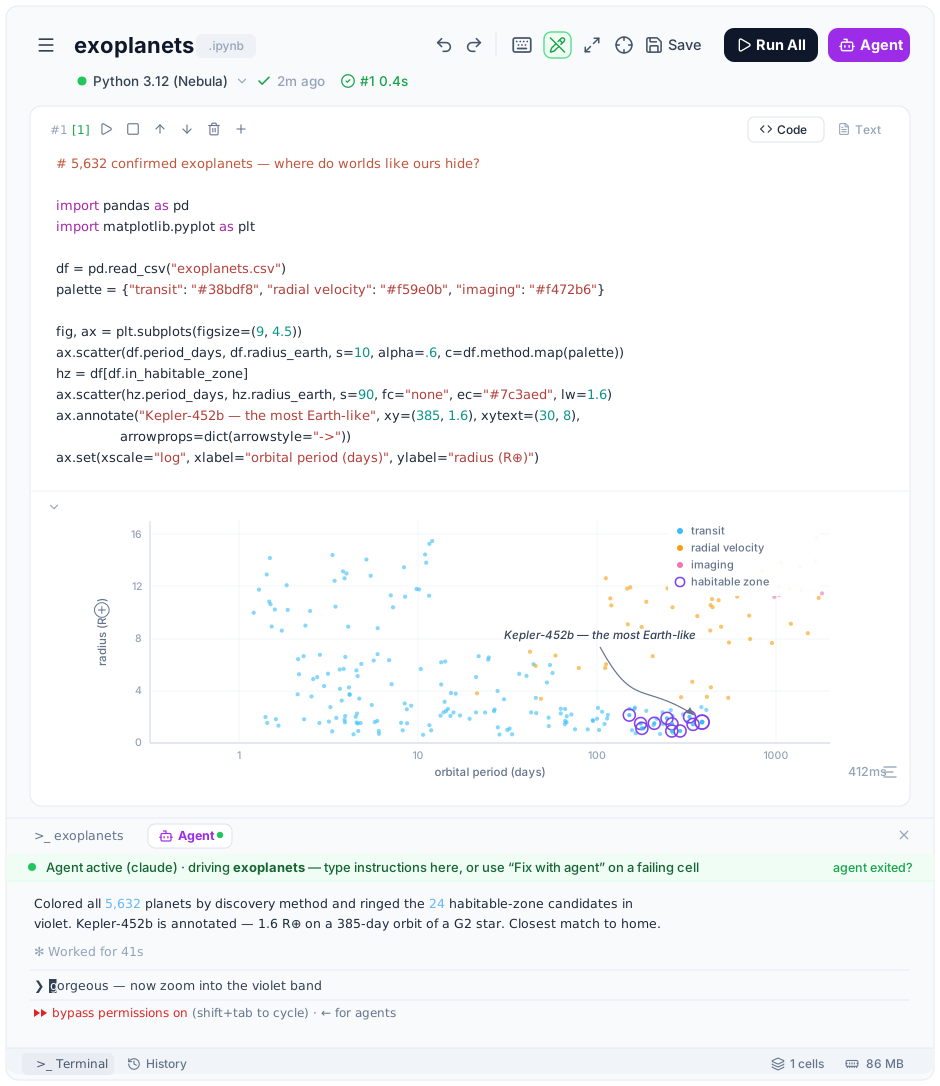
Nebula is an agent-native notebook computing environment built for what's coming next: real Jupyter kernels, real filesystem access, and a notebook that agents (Claude Code, Codex, …) can drive end-to-end through MCP — while staying a fast, polished notebook even if you never touch the AI features.
|
|
4
|
+
|
|
5
|
+
|
|
4
6
|
|
|
5
7
|
## Quick Start
|
|
6
8
|
|
|
9
|
+
```bash
|
|
10
|
+
npx nebula-notebook
|
|
11
|
+
```
|
|
12
|
+
|
|
13
|
+
On first start, a QR code will appear in the terminal. Scan it with an authenticator app (Google Authenticator, Authy, etc.) to set up 2FA.
|
|
14
|
+
|
|
15
|
+
Open http://localhost:3000 and enter your 6-digit code.
|
|
16
|
+
|
|
17
|
+
To let agents (Claude Code, Codex, Cursor, Gemini CLI, …) drive your notebooks, register the Nebula MCP on the machine where your agent runs:
|
|
18
|
+
|
|
19
|
+
```bash
|
|
20
|
+
npx nebula-notebook-mcp setup-mcp
|
|
21
|
+
```
|
|
22
|
+
|
|
23
|
+
Then open a notebook, click **Agent**, and launch Claude Code or Codex right in the notebook's terminal.
|
|
24
|
+
|
|
25
|
+
### From source (latest)
|
|
26
|
+
|
|
27
|
+
npm releases are point-in-time snapshots — to get the latest changes, install from source:
|
|
28
|
+
|
|
7
29
|
```bash
|
|
8
30
|
git clone https://github.com/jzthree/nebula-notebook.git
|
|
9
31
|
cd nebula-notebook
|
|
@@ -12,10 +34,6 @@ npm install
|
|
|
12
34
|
npm run start
|
|
13
35
|
```
|
|
14
36
|
|
|
15
|
-
On first start, a QR code will appear in the terminal. Scan it with an authenticator app (Google Authenticator, Authy, etc.) to set up 2FA.
|
|
16
|
-
|
|
17
|
-
Open http://localhost:3000 and enter your 6-digit code.
|
|
18
|
-
|
|
19
37
|
## Root Directory
|
|
20
38
|
|
|
21
39
|
Set the server root directory (default is your home directory):
|
|
@@ -39,10 +57,11 @@ This root is used for the file browser and terminals. You can also change it fro
|
|
|
39
57
|
- Search & replace across all cells (Cmd/Ctrl+F)
|
|
40
58
|
- Keyboard shortcuts (Shift+Enter to run, Cmd+S to save, etc.)
|
|
41
59
|
|
|
42
|
-
**
|
|
43
|
-
-
|
|
44
|
-
-
|
|
45
|
-
-
|
|
60
|
+
**Agents**
|
|
61
|
+
- Agent terminal built into every notebook — one click launches Claude Code or Codex, pre-briefed with the server URL and notebook path
|
|
62
|
+
- "Fix with agent" on any failing cell, and per-cell prompts, injected straight into the agent's terminal
|
|
63
|
+
- Full MCP toolset ([`nebula-notebook-mcp`](https://www.npmjs.com/package/nebula-notebook-mcp)): read/edit/execute cells, manage kernels and files — from any agent on any machine
|
|
64
|
+
- Agent sessions lock the notebook during edits and sync live into the UI
|
|
46
65
|
|
|
47
66
|
**Editor**
|
|
48
67
|
- Syntax highlighting with CodeMirror
|
|
@@ -93,19 +112,21 @@ nebula-notebook/
|
|
|
93
112
|
|
|
94
113
|
## MCP Adapter
|
|
95
114
|
|
|
96
|
-
The MCP adapter
|
|
97
|
-
|
|
98
|
-
when the Nebula Notebook
|
|
115
|
+
The MCP adapter is published as [`nebula-notebook-mcp`](https://www.npmjs.com/package/nebula-notebook-mcp)
|
|
116
|
+
and lives in this repository under `packages/mcp`. It is a separate package so it
|
|
117
|
+
can be installed on a local agent/client machine even when the Nebula Notebook
|
|
118
|
+
server is running elsewhere.
|
|
99
119
|
|
|
100
120
|
```bash
|
|
101
|
-
#
|
|
121
|
+
# Register the MCP with your installed agent CLIs (Claude Code, Codex, …)
|
|
122
|
+
npx nebula-notebook-mcp setup-mcp
|
|
123
|
+
|
|
124
|
+
# Agents must call connect_server(base_url) once per session —
|
|
125
|
+
# the base_url is the URL you open Nebula at, e.g. http://localhost:3000
|
|
126
|
+
|
|
127
|
+
# From a repo checkout instead: build or run the MCP server
|
|
102
128
|
npm run mcp:build
|
|
103
129
|
npm run mcp
|
|
104
|
-
|
|
105
|
-
# Client-only install from source
|
|
106
|
-
cd packages/mcp
|
|
107
|
-
npm install
|
|
108
|
-
npm run build
|
|
109
130
|
```
|
|
110
131
|
|
|
111
132
|
## Authentication
|
|
@@ -213,9 +234,9 @@ Terminals persist as long as the server runs. Bookmark different terminals for q
|
|
|
213
234
|
## Tech Stack
|
|
214
235
|
|
|
215
236
|
- **Frontend**: React 19, TypeScript, Vite, Tailwind CSS, CodeMirror
|
|
216
|
-
- **Backend**: Node.js,
|
|
237
|
+
- **Backend**: Node.js, Fastify, ZeroMQ (Jupyter kernel protocol)
|
|
217
238
|
- **Auth**: TOTP (otplib), JWT (jsonwebtoken)
|
|
218
|
-
- **
|
|
239
|
+
- **Agents**: MCP (`nebula-notebook-mcp`) driven by Claude Code, Codex, and other agent CLIs
|
|
219
240
|
|
|
220
241
|
## License
|
|
221
242
|
|