n8n-nodes-sendzen 1.0.0 → 1.0.2
This diff represents the content of publicly available package versions that have been released to one of the supported registries. The information contained in this diff is provided for informational purposes only and reflects changes between package versions as they appear in their respective public registries.
- package/LICENSE.md +21 -21
- package/README.md +193 -280
- package/dist/credentials/SendZenApi.credentials.js +0 -1
- package/dist/credentials/SendZenWebhookApi.credentials.d.ts +7 -0
- package/dist/credentials/SendZenWebhookApi.credentials.js +21 -0
- package/dist/nodes/SendZen/SendZen.node.js +0 -1
- package/dist/nodes/SendZen/SendZen.node.json +3 -3
- package/dist/nodes/SendZen/SendZenTrigger.node.js +44 -2
- package/dist/nodes/SendZen/SendZenTrigger.node.json +20 -0
- package/dist/shared/constants.js +0 -1
- package/dist/shared/nodeProperties.js +0 -1
- package/dist/shared/template/template.api.types.d.ts +2 -2
- package/dist/shared/template/template.api.types.js +0 -1
- package/dist/shared/template/template.builder.js +1 -2
- package/dist/shared/type.js +0 -1
- package/dist/shared/utils.js +0 -1
- package/index.js +1 -10
- package/package.json +33 -26
- package/dist/credentials/SendZenApi.credentials.js.map +0 -1
- package/dist/nodes/SendZen/SendZen.node.js.map +0 -1
- package/dist/nodes/SendZen/SendZenTrigger.node.js.map +0 -1
- package/dist/package.json +0 -76
- package/dist/shared/constants.js.map +0 -1
- package/dist/shared/nodeProperties.js.map +0 -1
- package/dist/shared/template/template.api.types.js.map +0 -1
- package/dist/shared/template/template.builder.js.map +0 -1
- package/dist/shared/type.js.map +0 -1
- package/dist/shared/utils.js.map +0 -1
- package/jest.config.js +0 -22
- package/n8n-nodes-sendzen-1.0.0.tgz +0 -0
- package/nodes/SendZen/SendZen.node.json +0 -20
- package/nodes/SendZen/sendzen.svg +0 -1
- package/shared/constants.ts +0 -1
- package/shared/nodeProperties.ts +0 -197
- package/shared/template/template.api.types.ts +0 -435
- package/shared/template/template.builder.ts +0 -223
- package/shared/type.ts +0 -40
- package/shared/utils.ts +0 -16
package/LICENSE.md
CHANGED
|
@@ -1,21 +1,21 @@
|
|
|
1
|
-
MIT License
|
|
2
|
-
|
|
3
|
-
Copyright (c)
|
|
4
|
-
|
|
5
|
-
Permission is hereby granted, free of charge, to any person obtaining a copy
|
|
6
|
-
of this software and associated documentation files (the "Software"), to deal
|
|
7
|
-
in the Software without restriction, including without limitation the rights
|
|
8
|
-
to use, copy, modify, merge, publish, distribute, sublicense, and/or sell
|
|
9
|
-
copies of the Software, and to permit persons to whom the Software is
|
|
10
|
-
furnished to do so, subject to the following conditions:
|
|
11
|
-
|
|
12
|
-
The above copyright notice and this permission notice shall be included in all
|
|
13
|
-
copies or substantial portions of the Software.
|
|
14
|
-
|
|
15
|
-
THE SOFTWARE IS PROVIDED "AS IS", WITHOUT WARRANTY OF ANY KIND, EXPRESS OR
|
|
16
|
-
IMPLIED, INCLUDING BUT NOT LIMITED TO THE WARRANTIES OF MERCHANTABILITY,
|
|
17
|
-
FITNESS FOR A PARTICULAR PURPOSE AND NONINFRINGEMENT. IN NO EVENT SHALL THE
|
|
18
|
-
AUTHORS OR COPYRIGHT HOLDERS BE LIABLE FOR ANY CLAIM, DAMAGES OR OTHER
|
|
19
|
-
LIABILITY, WHETHER IN AN ACTION OF CONTRACT, TORT OR OTHERWISE, ARISING FROM,
|
|
20
|
-
OUT OF OR IN CONNECTION WITH THE SOFTWARE OR THE USE OR OTHER DEALINGS IN THE
|
|
21
|
-
SOFTWARE.
|
|
1
|
+
MIT License
|
|
2
|
+
|
|
3
|
+
Copyright (c) 2026 SendZen
|
|
4
|
+
|
|
5
|
+
Permission is hereby granted, free of charge, to any person obtaining a copy
|
|
6
|
+
of this software and associated documentation files (the "Software"), to deal
|
|
7
|
+
in the Software without restriction, including without limitation the rights
|
|
8
|
+
to use, copy, modify, merge, publish, distribute, sublicense, and/or sell
|
|
9
|
+
copies of the Software, and to permit persons to whom the Software is
|
|
10
|
+
furnished to do so, subject to the following conditions:
|
|
11
|
+
|
|
12
|
+
The above copyright notice and this permission notice shall be included in all
|
|
13
|
+
copies or substantial portions of the Software.
|
|
14
|
+
|
|
15
|
+
THE SOFTWARE IS PROVIDED "AS IS", WITHOUT WARRANTY OF ANY KIND, EXPRESS OR
|
|
16
|
+
IMPLIED, INCLUDING BUT NOT LIMITED TO THE WARRANTIES OF MERCHANTABILITY,
|
|
17
|
+
FITNESS FOR A PARTICULAR PURPOSE AND NONINFRINGEMENT. IN NO EVENT SHALL THE
|
|
18
|
+
AUTHORS OR COPYRIGHT HOLDERS BE LIABLE FOR ANY CLAIM, DAMAGES OR OTHER
|
|
19
|
+
LIABILITY, WHETHER IN AN ACTION OF CONTRACT, TORT OR OTHERWISE, ARISING FROM,
|
|
20
|
+
OUT OF OR IN CONNECTION WITH THE SOFTWARE OR THE USE OR OTHER DEALINGS IN THE
|
|
21
|
+
SOFTWARE.
|
package/README.md
CHANGED
|
@@ -1,359 +1,272 @@
|
|
|
1
|
-
|
|
1
|
+
[](https://www.npmjs.com/package/n8n-nodes-sendzen)
|
|
2
|
+
[](LICENSE.md)
|
|
3
|
+
[](https://n8n.io)
|
|
2
4
|
|
|
3
|
-
|
|
5
|
+
# n8n-nodes-sendzen
|
|
4
6
|
|
|
5
|
-
|
|
7
|
+
This is an n8n community node for integrating **SendZen** with your workflows.
|
|
6
8
|
|
|
7
|
-
|
|
9
|
+
SendZen provides an API on top of the **official WhatsApp Cloud API**, so you can send messages (session + templates) and receive inbound WhatsApp messages via webhooks.
|
|
8
10
|
|
|
9
|
-
|
|
10
|
-
|
|
11
|
-
[Credentials](#credentials)
|
|
12
|
-
[Compatibility](#compatibility)
|
|
13
|
-
[Usage](#usage)
|
|
14
|
-
[Resources](#resources)
|
|
15
|
-
[Version history](#version-history)
|
|
11
|
+
- Website: https://www.sendzen.io
|
|
12
|
+
- Docs: https://sendzen.io/docs
|
|
16
13
|
|
|
17
14
|
---
|
|
18
15
|
|
|
19
|
-
##
|
|
20
|
-
|
|
21
|
-
|
|
16
|
+
## Table of Contents
|
|
17
|
+
|
|
18
|
+
- [Overview](#overview)
|
|
19
|
+
- [Installation](#installation)
|
|
20
|
+
- [Authentication](#authentication)
|
|
21
|
+
- [Features](#features)
|
|
22
|
+
- [How to Use the SendZen Action Node](#how-to-use-the-sendzen-action-node)
|
|
23
|
+
- [How to Use the SendZen Trigger Node](#how-to-use-the-sendzen-trigger-node)
|
|
24
|
+
- [Common Use Cases](#common-use-cases)
|
|
25
|
+
- [Best Practices](#best-practices)
|
|
26
|
+
- [Troubleshooting](#troubleshooting)
|
|
27
|
+
- [Compatibility](#compatibility)
|
|
28
|
+
- [Resources](#resources)
|
|
29
|
+
- [Running Locally](#running-locally)
|
|
30
|
+
- [Contributing](#contributing)
|
|
31
|
+
- [Support](#support)
|
|
32
|
+
- [License](#license)
|
|
22
33
|
|
|
23
34
|
---
|
|
24
35
|
|
|
25
|
-
##
|
|
36
|
+
## Overview
|
|
26
37
|
|
|
27
|
-
|
|
38
|
+
SendZen helps developers and software platforms use WhatsApp reliably without dealing with all the Meta Cloud API complexity directly.
|
|
28
39
|
|
|
29
|
-
|
|
40
|
+
With this n8n node, you can:
|
|
41
|
+
- Send **session messages** (within 24-hour customer care window)
|
|
42
|
+
- Send **template messages** (for business-initiated conversations)
|
|
43
|
+
- Mark messages as read
|
|
44
|
+
- Show typing indicator
|
|
45
|
+
- Receive inbound messages via **webhook trigger**
|
|
30
46
|
|
|
31
|
-
|
|
32
|
-
Send a free-form text message to a WhatsApp recipient. This operation allows you to send messages within an active 24-hour conversation window.
|
|
47
|
+
---
|
|
33
48
|
|
|
34
|
-
|
|
35
|
-
- Send text messages with optional URL preview
|
|
36
|
-
- Support for E.164 phone number format
|
|
37
|
-
- Automatic phone number validation
|
|
49
|
+
## Screenshots
|
|
38
50
|
|
|
39
|
-
|
|
40
|
-
- WABA Account: Select your WhatsApp Business Account
|
|
41
|
-
- Recipient Phone Number: Phone number in E.164 format (e.g., +1234567890)
|
|
42
|
-
- Reply Message: The message text to send
|
|
51
|
+
### Send Session Message
|
|
43
52
|
|
|
44
|
-
|
|
45
|
-
- Enable URL Preview: Automatically generate link previews for URLs in the message
|
|
53
|
+
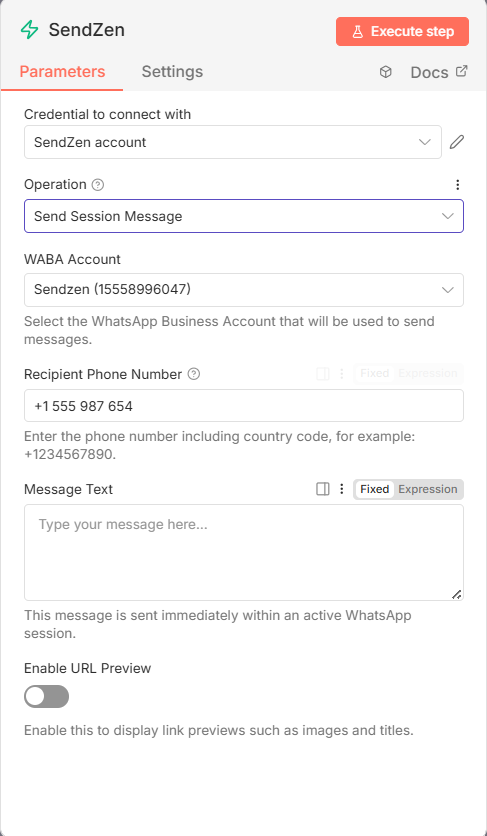
|
|
46
54
|
|
|
47
|
-
|
|
48
|
-
Send a pre-approved WhatsApp message template to recipients. Templates are required for initiating conversations outside the 24-hour window or for sending structured messages.
|
|
55
|
+
### Send Template Message
|
|
49
56
|
|
|
50
|
-
|
|
51
|
-
- Dynamic template variable mapping
|
|
52
|
-
- Support for templates with headers, body, buttons, and carousels
|
|
53
|
-
- Automatic template discovery from your WABA account
|
|
54
|
-
- Resource mapper for easy variable mapping
|
|
57
|
+
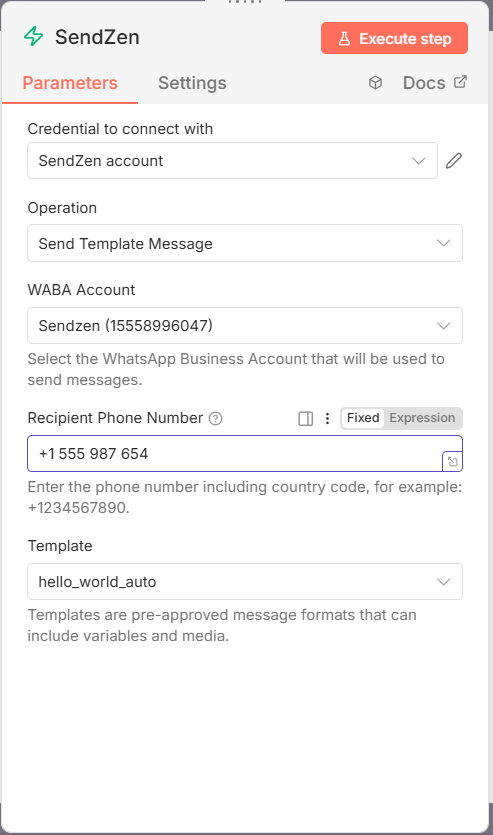
|
|
55
58
|
|
|
56
|
-
|
|
57
|
-
- WABA Account: Select your WhatsApp Business Account
|
|
58
|
-
- Recipient Phone Number: Phone number in E.164 format
|
|
59
|
-
- Template: Select from your approved templates
|
|
60
|
-
- Template Variables: Map values to template variables (automatically detected)
|
|
59
|
+
---
|
|
61
60
|
|
|
62
|
-
|
|
63
|
-
- Text headers with variables
|
|
64
|
-
- Body text with variables
|
|
65
|
-
- Media headers (Image, Video, Document)
|
|
66
|
-
- Interactive buttons (URL, Quick Reply, Flow)
|
|
67
|
-
- Carousel components
|
|
61
|
+
## Installation
|
|
68
62
|
|
|
69
|
-
|
|
70
|
-
Mark an incoming message as read. This operation helps maintain proper message status tracking in your WhatsApp conversations.
|
|
63
|
+
Follow the [installation guide](https://docs.n8n.io/integrations/community-nodes/installation/) in the n8n community nodes documentation.
|
|
71
64
|
|
|
72
|
-
|
|
73
|
-
- Automatic message ID detection from trigger data
|
|
74
|
-
- Automatic phone number ID detection
|
|
75
|
-
- Manual override options for both IDs
|
|
65
|
+
---
|
|
76
66
|
|
|
77
|
-
|
|
78
|
-
- Phone Number ID: Automatically detected from trigger, or manually specified
|
|
79
|
-
- Message ID: Automatically detected from trigger, or manually specified
|
|
67
|
+
## Authentication
|
|
80
68
|
|
|
81
|
-
|
|
82
|
-
Display a typing indicator to the recipient, indicating that a response is being prepared.
|
|
69
|
+
To use this node, you need a **SendZen API Key**.
|
|
83
70
|
|
|
84
|
-
|
|
85
|
-
|
|
86
|
-
|
|
87
|
-
- Manual override options for both IDs
|
|
71
|
+
1. Sign up at https://www.sendzen.io
|
|
72
|
+
2. Go to your dashboard and generate an API key (Dashboard → API Keys)
|
|
73
|
+
3. Connect your WhatsApp Business Account (WABA) inside SendZen (required to send messages)
|
|
88
74
|
|
|
89
|
-
|
|
90
|
-
|
|
91
|
-
|
|
75
|
+
> Note: Keep your API key secure and never commit it to code or share it publicly.
|
|
76
|
+
|
|
77
|
+
---
|
|
78
|
+
|
|
79
|
+
## Features
|
|
80
|
+
|
|
81
|
+
### SendZen Action Node
|
|
82
|
+
- **Send Session Message**
|
|
83
|
+
- Send free-form text messages within the active 24-hour window
|
|
84
|
+
- Supports URL previews and E.164 validation
|
|
85
|
+
- **Send Template Message**
|
|
86
|
+
- Send pre-approved templates to start conversations
|
|
87
|
+
- Dynamic template + variable mapping (body, header, buttons)
|
|
88
|
+
- Supports media headers (image, video, document, audio)
|
|
89
|
+
- Supports CTA and quick reply buttons
|
|
90
|
+
- **Mark as Read**
|
|
91
|
+
- Mark inbound messages as read (useful for UX and analytics)
|
|
92
|
+
- Auto-detects message identifiers when connected from the trigger
|
|
93
|
+
- **Show Typing Indicator**
|
|
94
|
+
- Show “Typing…” to make automations feel more natural
|
|
92
95
|
|
|
93
96
|
### SendZen Trigger Node
|
|
97
|
+
- Receive inbound WhatsApp messages in real time via webhook
|
|
98
|
+
- Outputs full message payload (text, media, location, contacts)
|
|
99
|
+
- Simple webhook setup: copy URL from node → paste in SendZen dashboard
|
|
94
100
|
|
|
95
|
-
|
|
101
|
+
---
|
|
96
102
|
|
|
97
|
-
|
|
98
|
-
- Webhook-based message reception
|
|
99
|
-
- Automatic workflow activation on message receipt
|
|
100
|
-
- Full message payload passed to workflow
|
|
103
|
+
## How to Use the SendZen Action Node
|
|
101
104
|
|
|
102
|
-
|
|
103
|
-
|
|
104
|
-
|
|
105
|
-
|
|
106
|
-
|
|
105
|
+
### Prerequisites
|
|
106
|
+
- A SendZen account
|
|
107
|
+
- A connected WhatsApp Business Account (WABA) in SendZen
|
|
108
|
+
- Access to n8n
|
|
109
|
+
|
|
110
|
+
### Setup Process
|
|
111
|
+
|
|
112
|
+
1. **Create your SendZen API key**
|
|
113
|
+
- Open SendZen dashboard
|
|
114
|
+
- Go to **API Keys**
|
|
115
|
+
- Copy the key and store it securely
|
|
116
|
+
|
|
117
|
+
2. **Connect your WABA**
|
|
118
|
+
- Complete the WABA connection flow in SendZen
|
|
119
|
+
- Ensure at least one phone number is connected and active
|
|
120
|
+
|
|
121
|
+
### Integration Steps (n8n)
|
|
122
|
+
|
|
123
|
+
1. Create a new workflow in n8n
|
|
124
|
+
2. Add any trigger (Webhook, Schedule, CRM trigger, etc.)
|
|
125
|
+
3. Add **SendZen** node
|
|
126
|
+
4. In SendZen node:
|
|
127
|
+
- Select **Credentials** → **Create New**
|
|
128
|
+
- Choose **SendZen API**
|
|
129
|
+
- Paste your API key
|
|
130
|
+
- Save
|
|
131
|
+
5. Choose an operation and fill required fields
|
|
132
|
+
6. Click **Test Step**
|
|
133
|
+
7. Save and activate your workflow
|
|
107
134
|
|
|
108
135
|
---
|
|
109
136
|
|
|
110
|
-
##
|
|
111
|
-
|
|
112
|
-
To use the SendZen nodes, you need to authenticate with your SendZen API key.
|
|
137
|
+
## How to Use the SendZen Trigger Node
|
|
113
138
|
|
|
114
139
|
### Prerequisites
|
|
140
|
+
- A SendZen account
|
|
141
|
+
- A connected WABA phone number
|
|
142
|
+
- Access to n8n
|
|
115
143
|
|
|
116
|
-
|
|
117
|
-
- Visit [SendZen Website](https://www.sendzen.io/)
|
|
118
|
-
- [Create an account](https://app.sendzen.io/signup) or [log in to your existing account](https://app.sendzen.io/login)
|
|
144
|
+
### Webhook signature verification (HMAC-SHA256) — recommended
|
|
119
145
|
|
|
120
|
-
|
|
121
|
-
- Navigate to your SendZen dashboard
|
|
122
|
-
- Go to API Keys section
|
|
123
|
-
- Generate or copy your API key
|
|
124
|
-
- Keep your API key secure and never share it publicly
|
|
146
|
+
SendZen signs every webhook payload using **HMAC-SHA256** and includes the signature in the `X-Hub-Signature-256` header in this format:
|
|
125
147
|
|
|
126
|
-
|
|
127
|
-
- Connect your WhatsApp Business Account in SendZen
|
|
128
|
-
- Complete Meta's business verification if required
|
|
129
|
-
- Ensure your WABA accounts are properly configured
|
|
148
|
+
- `X-Hub-Signature-256: sha256=<hex>`
|
|
130
149
|
|
|
131
|
-
|
|
150
|
+
To enable signature verification in n8n:
|
|
132
151
|
|
|
133
|
-
1. **
|
|
134
|
-
|
|
135
|
-
-
|
|
136
|
-
-
|
|
152
|
+
1. In the **SendZen dashboard** webhook settings, set a **Secret Key** (recommended).
|
|
153
|
+
2. In n8n, create credentials:
|
|
154
|
+
- Credentials type: **SendZen Webhook API**
|
|
155
|
+
- Set **Secret Key** to the same value you configured in SendZen.
|
|
156
|
+
3. In the **SendZen Trigger** node, select those **SendZen Webhook API** credentials.
|
|
137
157
|
|
|
138
|
-
|
|
139
|
-
- Paste your SendZen API key in the "API Key" field
|
|
140
|
-
- Optionally enable "Return Full Response" if you need complete HTTP response details
|
|
141
|
-
- Give your credential a descriptive name (e.g., "SendZen Production")
|
|
158
|
+
If credentials are set, the trigger will return **401** for missing/invalid signatures.
|
|
142
159
|
|
|
143
|
-
|
|
144
|
-
- Click "Save" to store your credentials
|
|
145
|
-
- Test the connection by selecting a WABA account in the node
|
|
160
|
+
Important: signature verification requires hashing the **raw request body**. Avoid any middleware/proxies that reformat/pretty-print the JSON payload.
|
|
146
161
|
|
|
147
|
-
|
|
162
|
+
### Setup Process
|
|
148
163
|
|
|
149
|
-
|
|
164
|
+
1. **Get your webhook URL from n8n**
|
|
165
|
+
- Add **SendZen Trigger** node in your workflow
|
|
166
|
+
- At the top of the node, find **Webhook URLs**
|
|
167
|
+
- Copy the **Production URL**
|
|
150
168
|
|
|
151
|
-
|
|
169
|
+
2. **Add webhook URL in SendZen**
|
|
170
|
+
- Open SendZen dashboard webhook settings
|
|
171
|
+
- Paste the Production URL
|
|
172
|
+
- Save changes
|
|
173
|
+
|
|
174
|
+
3. **Test and activate**
|
|
175
|
+
- In n8n, click **Test Step**
|
|
176
|
+
- Send a WhatsApp message to your connected number to verify the trigger fires
|
|
177
|
+
- Save workflow and toggle **Active**
|
|
178
|
+
|
|
179
|
+
---
|
|
152
180
|
|
|
153
|
-
|
|
154
|
-
- **Node.js version:** >=18.10
|
|
155
|
-
- **Tested with n8n:** 1.89.2+
|
|
181
|
+
## Common Use Cases
|
|
156
182
|
|
|
157
|
-
|
|
183
|
+
- **Lead capture + instant reply**: Trigger on inbound message, capture details, respond with next steps
|
|
184
|
+
- **Order updates**: Trigger on order status change, send template message
|
|
185
|
+
- **Appointment reminders**: Scheduled trigger, send template reminders
|
|
186
|
+
- **Support automation**: Trigger on inbound support message, route based on keywords, reply
|
|
187
|
+
- **Payment reminders**: Trigger from billing system, send WhatsApp template
|
|
158
188
|
|
|
159
189
|
---
|
|
160
190
|
|
|
161
|
-
##
|
|
162
|
-
|
|
163
|
-
|
|
164
|
-
|
|
165
|
-
|
|
166
|
-
|
|
167
|
-
|
|
168
|
-
4. **Configure the node:**
|
|
169
|
-
- Select your SendZen API credentials
|
|
170
|
-
- Choose "Send Session Message" as the operation
|
|
171
|
-
- Select your WABA Account
|
|
172
|
-
- Enter the recipient phone number (E.164 format: +1234567890)
|
|
173
|
-
- Enter your message text
|
|
174
|
-
- Optionally enable URL preview
|
|
175
|
-
5. **Test and activate** your workflow
|
|
176
|
-
|
|
177
|
-
### Advanced Workflow: Send Template Message with Variables
|
|
178
|
-
|
|
179
|
-
1. **Set up your template** in SendZen/Meta Business Manager
|
|
180
|
-
2. **Create a workflow** with a trigger (e.g., form submission, database update)
|
|
181
|
-
3. **Add the SendZen node**
|
|
182
|
-
4. **Configure the node:**
|
|
183
|
-
- Select "Send Template Message" operation
|
|
184
|
-
- Choose your WABA Account
|
|
185
|
-
- Select your template from the dropdown
|
|
186
|
-
- Use the Resource Mapper to map template variables:
|
|
187
|
-
- Body variables (e.g., `{{1}}`, `{{2}}`)
|
|
188
|
-
- Header variables (if applicable)
|
|
189
|
-
- Button variables (if applicable)
|
|
190
|
-
- Media URLs (for media headers)
|
|
191
|
-
5. **Map your data** from previous nodes to template variables
|
|
192
|
-
6. **Test and activate** your workflow
|
|
193
|
-
|
|
194
|
-
### Incoming Message Workflow
|
|
195
|
-
|
|
196
|
-
1. **Add the SendZen Trigger node** to your workflow
|
|
197
|
-
2. **Copy the webhook URL** from the node
|
|
198
|
-
3. **Configure webhook in SendZen:**
|
|
199
|
-
- Go to your SendZen dashboard
|
|
200
|
-
- Navigate to Webhooks settings
|
|
201
|
-
- Paste the webhook URL
|
|
202
|
-
- Save the configuration
|
|
203
|
-
4. **Add action nodes** to process incoming messages:
|
|
204
|
-
- Use "Mark as Read" to acknowledge messages
|
|
205
|
-
- Use "Show Typing Indicator" to show you're responding
|
|
206
|
-
- Use "Send Session Message" to reply
|
|
207
|
-
5. **Activate the workflow** to start receiving messages
|
|
208
|
-
|
|
209
|
-
### Phone Number Format
|
|
210
|
-
|
|
211
|
-
All phone numbers must be in **E.164 format**:
|
|
212
|
-
- Start with `+` followed by country code
|
|
213
|
-
- Include area code and number
|
|
214
|
-
- Example: `+1234567890` (US), `+447911123456` (UK)
|
|
215
|
-
|
|
216
|
-
The node automatically adds the `+` prefix if missing, but you should ensure the full number including country code is provided.
|
|
217
|
-
|
|
218
|
-
### Template Variables
|
|
219
|
-
|
|
220
|
-
When using template messages, the node automatically detects variables in your templates:
|
|
221
|
-
- **Body variables:** Detected from `{{1}}`, `{{2}}`, etc. in template body
|
|
222
|
-
- **Header variables:** Detected from `{{1}}` in text headers
|
|
223
|
-
- **Button variables:** Detected from URL or text parameters in buttons
|
|
224
|
-
- **Media headers:** Require a media URL to be provided
|
|
225
|
-
|
|
226
|
-
Use the Resource Mapper feature to easily map your workflow data to template variables.
|
|
191
|
+
## Best Practices
|
|
192
|
+
|
|
193
|
+
- Use **template messages** to start conversations (business-initiated).
|
|
194
|
+
- Use **session messages** only within the active 24-hour window.
|
|
195
|
+
- Keep API keys only inside **n8n Credentials**.
|
|
196
|
+
- For production workflows, log failures and add retries (for example using IF + Wait + Retry patterns).
|
|
197
|
+
- When using templates, prefer mapping variables explicitly so workflows remain readable.
|
|
227
198
|
|
|
228
199
|
---
|
|
229
200
|
|
|
230
|
-
##
|
|
201
|
+
## Troubleshooting
|
|
231
202
|
|
|
232
|
-
|
|
233
|
-
|
|
234
|
-
|
|
235
|
-
|
|
236
|
-
|
|
203
|
+
- **401 / auth error**: Re-check API key and credential selected in the node
|
|
204
|
+
- **No WABA accounts listed**: Confirm WABA is connected inside SendZen
|
|
205
|
+
- **Trigger not firing**:
|
|
206
|
+
- Ensure webhook URL is saved in SendZen
|
|
207
|
+
- Confirm the URL is publicly reachable
|
|
208
|
+
- Confirm workflow is active in n8n
|
|
209
|
+
- **Template missing**: Ensure template exists and is approved in your WhatsApp Business Manager
|
|
237
210
|
|
|
238
211
|
---
|
|
239
212
|
|
|
240
|
-
##
|
|
213
|
+
## Compatibility
|
|
241
214
|
|
|
242
|
-
|
|
243
|
-
-
|
|
244
|
-
- Support for sending session messages
|
|
245
|
-
- Support for sending template messages with dynamic variables
|
|
246
|
-
- Support for marking messages as read
|
|
247
|
-
- Support for showing typing indicators
|
|
248
|
-
- Webhook trigger for incoming messages
|
|
249
|
-
- Automatic WABA account discovery
|
|
250
|
-
- Automatic template discovery
|
|
251
|
-
- Resource mapper for template variables
|
|
252
|
-
- Support for templates with headers, body, buttons, and carousels
|
|
215
|
+
- **n8n**: 1.0.0+ (tested on 1.89.2+)
|
|
216
|
+
- **Node.js**: >= 18.10
|
|
253
217
|
|
|
254
218
|
---
|
|
255
219
|
|
|
256
|
-
##
|
|
220
|
+
## Resources
|
|
257
221
|
|
|
258
|
-
|
|
259
|
-
|
|
260
|
-
|
|
261
|
-
```bash
|
|
262
|
-
git clone https://github.com/sendzen-io/n8n-nodes-sendzen.git
|
|
263
|
-
cd n8n-nodes-sendzen
|
|
264
|
-
```
|
|
265
|
-
|
|
266
|
-
2. **Install dependencies**
|
|
267
|
-
```bash
|
|
268
|
-
pnpm install
|
|
269
|
-
```
|
|
270
|
-
|
|
271
|
-
3. **Build the project**
|
|
272
|
-
```bash
|
|
273
|
-
pnpm build
|
|
274
|
-
```
|
|
275
|
-
|
|
276
|
-
4. **Run tests**
|
|
277
|
-
```bash
|
|
278
|
-
pnpm test
|
|
279
|
-
```
|
|
280
|
-
|
|
281
|
-
5. **Link the node to your local n8n instance**
|
|
282
|
-
- Follow [n8n's community node development guide](https://docs.n8n.io/integrations/community-nodes/create/)
|
|
283
|
-
- Typically, you can run:
|
|
284
|
-
```bash
|
|
285
|
-
pnpm link --global
|
|
286
|
-
cd ~/.n8n/custom
|
|
287
|
-
pnpm link --global n8n-nodes-sendzen
|
|
288
|
-
```
|
|
289
|
-
- Restart your n8n instance to load the custom node
|
|
290
|
-
|
|
291
|
-
6. **Test your node**
|
|
292
|
-
- Open n8n in your browser (usually at `http://localhost:5678`)
|
|
293
|
-
- Create a workflow and add your custom node to test its functionality
|
|
294
|
-
|
|
295
|
-
> **Note:** Make sure you have [Node.js](https://nodejs.org/) (>=18.10) and [pnpm](https://pnpm.io/) installed on your machine.
|
|
222
|
+
- SendZen Documentation: https://sendzen.io/docs
|
|
223
|
+
- WhatsApp Cloud API Reference: https://developers.facebook.com/docs/whatsapp
|
|
224
|
+
- n8n Community Nodes: https://docs.n8n.io/integrations/community-nodes/
|
|
296
225
|
|
|
297
226
|
---
|
|
298
227
|
|
|
299
|
-
##
|
|
228
|
+
## Version history
|
|
300
229
|
|
|
301
|
-
|
|
302
|
-
|
|
303
|
-
|
|
304
|
-
|
|
305
|
-
|
|
306
|
-
|
|
307
|
-
|
|
308
|
-
|
|
309
|
-
-
|
|
310
|
-
- Add or update documentation as needed
|
|
311
|
-
- Run linter and tests before submitting
|
|
312
|
-
```bash
|
|
313
|
-
pnpm lint
|
|
314
|
-
pnpm test
|
|
315
|
-
```
|
|
316
|
-
4. **Commit your changes**
|
|
317
|
-
```bash
|
|
318
|
-
git commit -m "Add your message here"
|
|
319
|
-
```
|
|
320
|
-
5. **Push to your fork**
|
|
321
|
-
```bash
|
|
322
|
-
git push origin feature/your-feature-name
|
|
323
|
-
```
|
|
324
|
-
6. **Open a Pull Request**
|
|
325
|
-
- Go to the GitHub page for your fork
|
|
326
|
-
- Click "Compare & pull request"
|
|
327
|
-
- Describe your changes and submit the PR
|
|
328
|
-
|
|
329
|
-
### Reporting Issues
|
|
330
|
-
|
|
331
|
-
If you find a bug or have a feature request, please [open an issue](https://github.com/sendzen-io/n8n-nodes-sendzen/issues) with:
|
|
332
|
-
- Detailed description of the issue
|
|
333
|
-
- Steps to reproduce
|
|
334
|
-
- Expected vs actual behavior
|
|
335
|
-
- n8n version and node version
|
|
336
|
-
- Any relevant error messages or logs
|
|
337
|
-
|
|
338
|
-
### Code of Conduct
|
|
339
|
-
|
|
340
|
-
Please be respectful and follow our [Code of Conduct](CODE_OF_CONDUCT.md) when participating in this project.
|
|
230
|
+
### 1.0.1
|
|
231
|
+
* **Robustness:** Added comprehensive Jest test suite for Triggers, Actions, and Template Builders.
|
|
232
|
+
* **Optimization:** Reduced package size by excluding development files.
|
|
233
|
+
|
|
234
|
+
### 1.0.0
|
|
235
|
+
* Initial release
|
|
236
|
+
* Support for Session Messages, Templates, Mark as Read, Typing Indicators.
|
|
237
|
+
* Webhook Trigger support.
|
|
238
|
+
* Auto-discovery for WABA Accounts and Templates.
|
|
341
239
|
|
|
342
240
|
---
|
|
343
241
|
|
|
344
|
-
##
|
|
242
|
+
## Running Locally
|
|
345
243
|
|
|
346
|
-
|
|
244
|
+
If you want to contribute or modify this node:
|
|
245
|
+
|
|
246
|
+
1. **Clone:** `git clone https://github.com/sendzen-io/n8n-nodes-sendzen.git`
|
|
247
|
+
2. **Install:** `pnpm install`
|
|
248
|
+
3. **Build:** `pnpm build`
|
|
249
|
+
4. **Test:** `pnpm test` (Runs the Jest test suite)
|
|
250
|
+
5. **Link:** Follow the [n8n custom node guide](https://docs.n8n.io/integrations/community-nodes/create/) to link `dist` to your local n8n instance.
|
|
347
251
|
|
|
348
252
|
---
|
|
349
253
|
|
|
254
|
+
## Contributing
|
|
255
|
+
|
|
256
|
+
We welcome contributions! Please follow these steps:
|
|
257
|
+
|
|
258
|
+
1. Fork the repository.
|
|
259
|
+
2. Create a feature branch.
|
|
260
|
+
3. **Run Tests:** Ensure `pnpm test` passes.
|
|
261
|
+
4. Submit a Pull Request.
|
|
262
|
+
|
|
350
263
|
## Support
|
|
351
264
|
|
|
352
|
-
|
|
265
|
+
- Email: [milan@sendzen.io](mailto:milan@sendzen.io)
|
|
266
|
+
- Issues: use GitHub Issues in this repository
|
|
353
267
|
|
|
354
|
-
|
|
355
|
-
- **Email Support**: Contact support at milan@sendzen.io
|
|
356
|
-
- **GitHub Issues**: [Report issues](https://github.com/sendzen-io/n8n-nodes-sendzen/issues)
|
|
268
|
+
---
|
|
357
269
|
|
|
358
|
-
|
|
270
|
+
## License
|
|
359
271
|
|
|
272
|
+
[MIT](LICENSE.md)
|
|
@@ -0,0 +1,21 @@
|
|
|
1
|
+
"use strict";
|
|
2
|
+
Object.defineProperty(exports, "__esModule", { value: true });
|
|
3
|
+
exports.SendZenWebhookApi = void 0;
|
|
4
|
+
class SendZenWebhookApi {
|
|
5
|
+
constructor() {
|
|
6
|
+
this.name = 'sendZenWebhookApi';
|
|
7
|
+
this.displayName = 'SendZen Webhook API';
|
|
8
|
+
this.documentationUrl = 'https://sendzen.io/docs';
|
|
9
|
+
this.properties = [
|
|
10
|
+
{
|
|
11
|
+
displayName: 'Secret Key',
|
|
12
|
+
name: 'secretKey',
|
|
13
|
+
type: 'string',
|
|
14
|
+
typeOptions: { password: true },
|
|
15
|
+
default: '',
|
|
16
|
+
description: 'Webhook signing secret from SendZen. Used to verify X-Hub-Signature-256 (sha256=...) for incoming webhooks.',
|
|
17
|
+
},
|
|
18
|
+
];
|
|
19
|
+
}
|
|
20
|
+
}
|
|
21
|
+
exports.SendZenWebhookApi = SendZenWebhookApi;
|
|
@@ -1,5 +1,5 @@
|
|
|
1
1
|
{
|
|
2
|
-
"node": "n8n-nodes-
|
|
2
|
+
"node": "n8n-nodes-sendzen.sendZen",
|
|
3
3
|
"nodeVersion": "1.0",
|
|
4
4
|
"codexVersion": "1.0",
|
|
5
5
|
"categories": [
|
|
@@ -8,12 +8,12 @@
|
|
|
8
8
|
"resources": {
|
|
9
9
|
"credentialDocumentation": [
|
|
10
10
|
{
|
|
11
|
-
"url": "https://sendzen.io/docs"
|
|
11
|
+
"url": "https://www.sendzen.io/docs"
|
|
12
12
|
}
|
|
13
13
|
],
|
|
14
14
|
"primaryDocumentation": [
|
|
15
15
|
{
|
|
16
|
-
"url": "https://sendzen.io/docs"
|
|
16
|
+
"url": "https://www.sendzen.io/docs"
|
|
17
17
|
}
|
|
18
18
|
]
|
|
19
19
|
}
|