my-provider-dash-manager 0.7.0 → 0.9.0
This diff represents the content of publicly available package versions that have been released to one of the supported registries. The information contained in this diff is provided for informational purposes only and reflects changes between package versions as they appear in their respective public registries.
- package/README.md +147 -22
- package/docs/screenshots/home.png +0 -0
- package/docs/screenshots/navigation.png +0 -0
- package/docs/screenshots/services.png +0 -0
- package/package.json +31 -9
- package/src/main.js +802 -43
package/README.md
CHANGED
|
@@ -1,25 +1,42 @@
|
|
|
1
|
-
# My Provider Dash Manager
|
|
2
|
-
|
|
3
|
-
|
|
4
|
-
|
|
5
|
-
|
|
6
|
-
|
|
1
|
+
# My Provider Dash Manager — every account. One window.
|
|
2
|
+
|
|
3
|
+
[](https://github.com/FiredMosquito831/my-provider-dash-manager/releases/latest)
|
|
4
|
+
[](https://providers.danubelabs.net)
|
|
5
|
+
[](https://www.npmjs.com/package/my-provider-dash-manager)
|
|
6
|
+
[](https://www.npmjs.com/package/my-provider-dash-manager)
|
|
7
|
+
[](https://github.com/FiredMosquito831/my-provider-dash-manager)
|
|
8
|
+
[](LICENSE)
|
|
9
|
+
[](#requirements)
|
|
10
|
+
|
|
11
|
+
**For freelancers, agencies and developers running client plus personal infrastructure:** one desktop
|
|
12
|
+
app for every account you own. Keep several Google, Microsoft, AWS, Vercel, Netlify, Cloudflare,
|
|
13
|
+
Supabase, GitHub, npm, Stripe, Gmail, Outlook and Proton Mail accounts (37 services built in, any
|
|
14
|
+
site by URL) signed in at the same time, each in a fully isolated session, and switch between them
|
|
15
|
+
instantly — the way a browser handles tabs, but built around *accounts* instead of pages.
|
|
16
|
+
|
|
17
|
+
**Website:** [providers.danubelabs.net](https://providers.danubelabs.net) ·
|
|
18
|
+
**Install:** [`npx my-provider-dash-manager`](#install) or [GitHub Releases](https://github.com/FiredMosquito831/my-provider-dash-manager/releases) ·
|
|
19
|
+
**Docs:** [features](https://providers.danubelabs.net/features.html) · [security](https://providers.danubelabs.net/security.html) · [FAQ](https://providers.danubelabs.net/faq.html)
|
|
7
20
|
|
|
8
21
|
<sub>Windows desktop app · Electron 43 · local-first · no telemetry, no account, no server ·
|
|
9
22
|
source-available licence: free for personal and commercial use</sub>
|
|
10
23
|
|
|
11
|
-

|
|
24
|
+
|
|
12
25
|
|
|
13
26
|
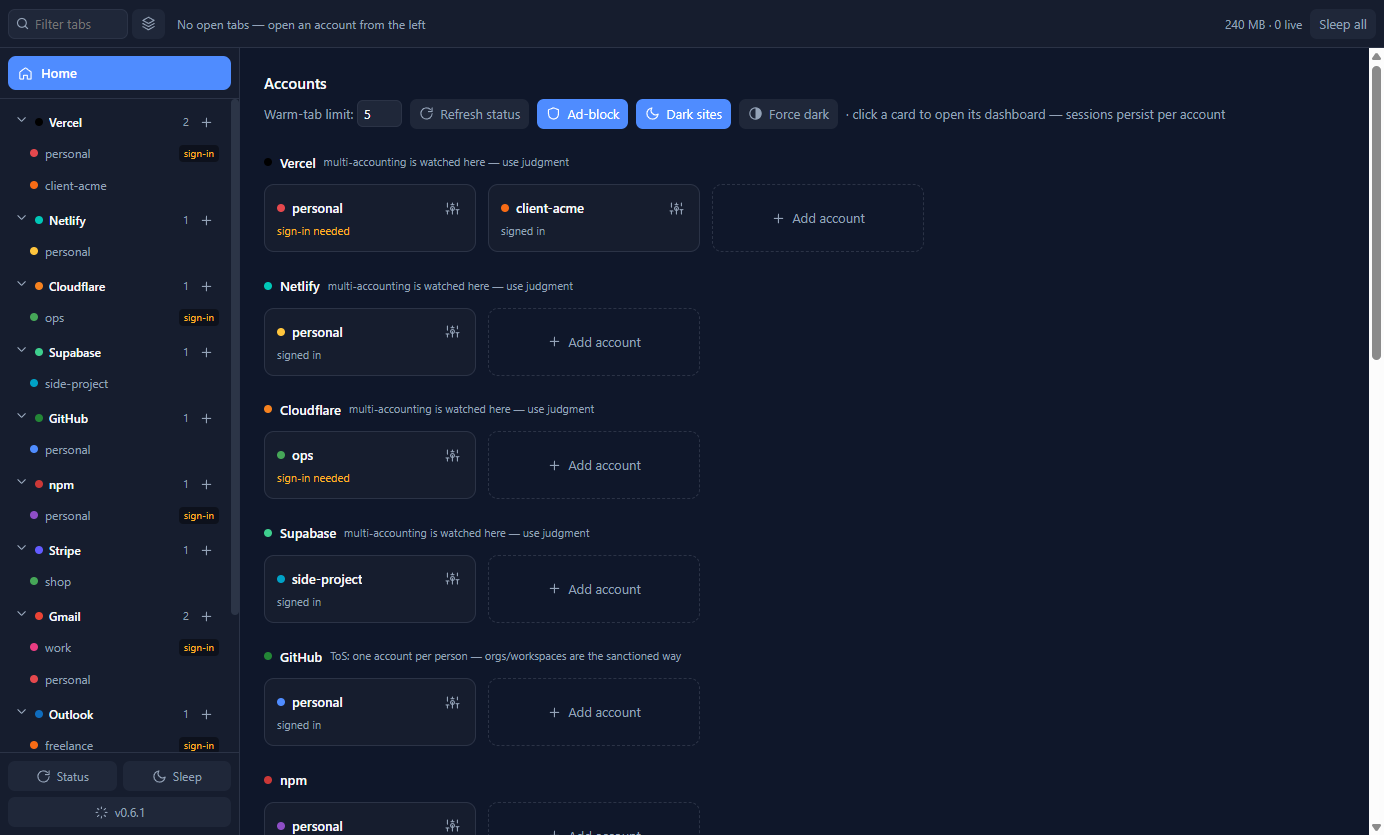
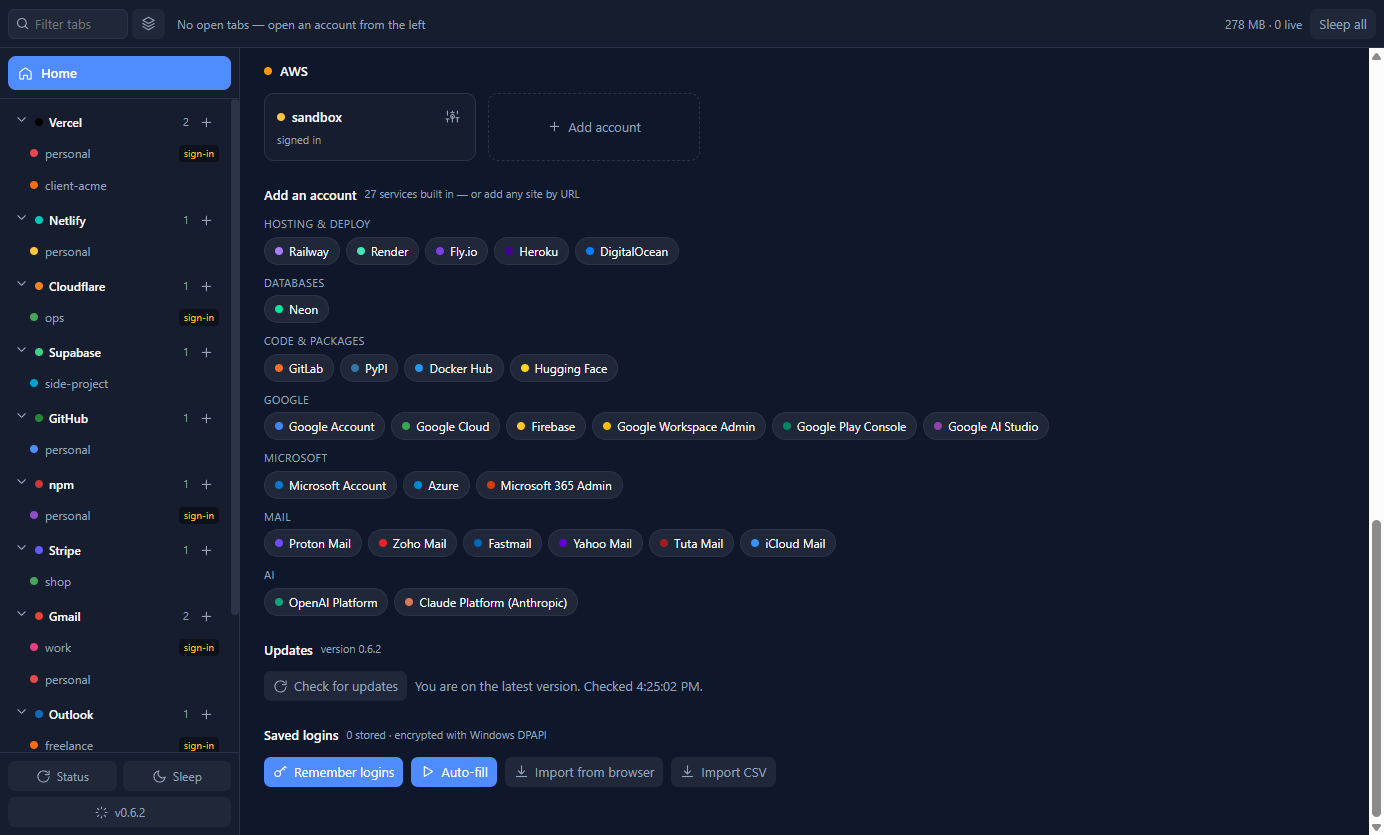
Further down Home: the **Add an account** picker with every built-in service you are not using yet
|
|
14
27
|
(37 in total, or add any site by URL), the **Updates** panel with the installed version, and the
|
|
15
28
|
saved-login controls. Install with `npx my-provider-dash-manager` or straight from
|
|
16
29
|
[Releases](https://github.com/FiredMosquito831/my-provider-dash-manager/releases) — see [Install](#install).
|
|
17
30
|
|
|
18
|
-

|
|
31
|
+
|
|
32
|
+
|
|
33
|
+
|
|
19
34
|
|
|
20
|
-
|
|
35
|
+
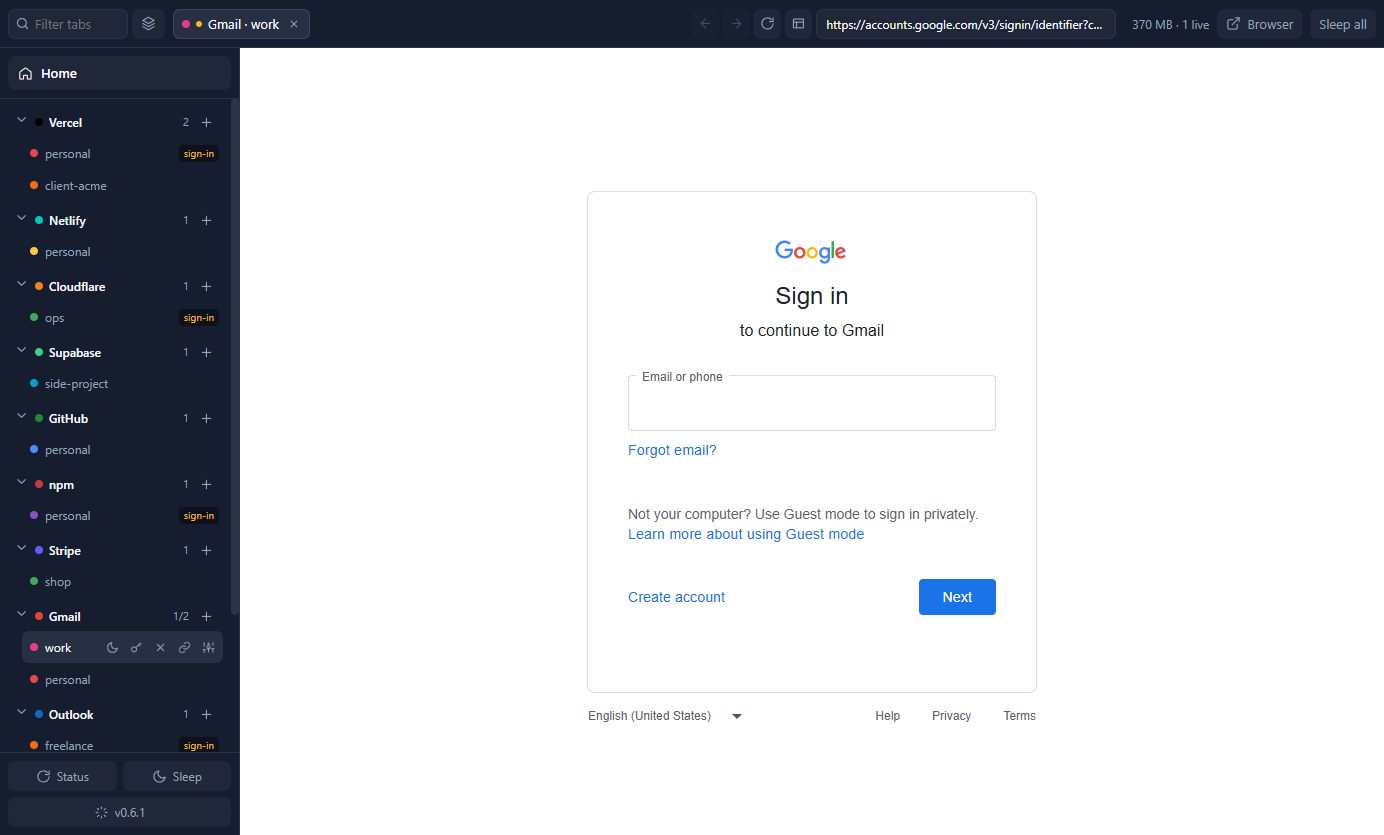
<sub>Screenshots come from a demo profile on v0.6.x. The service-picker capture shows 27 services
|
|
36
|
+
because that was the registry at the time; the current build has 37. Account names are examples.
|
|
37
|
+
Current UI additions — the single Dark mode toggle and Manage logins — are in the
|
|
38
|
+
[changelog](docs/CHANGELOG.md).</sub>
|
|
21
39
|
|
|
22
|
-
<sub>Screenshots use a demo profile with placeholder account names.</sub>
|
|
23
40
|
|
|
24
41
|
---
|
|
25
42
|
|
|
@@ -103,7 +120,7 @@ sessions, one place.
|
|
|
103
120
|
|
|
104
121
|
---
|
|
105
122
|
|
|
106
|
-
##
|
|
123
|
+
## Quickstart
|
|
107
124
|
|
|
108
125
|
1. **Add an account.** Click **Add account** at the bottom of the rail (or the `+` next to a provider
|
|
109
126
|
you already use), pick the service from the searchable picker, name the account, then choose
|
|
@@ -127,7 +144,9 @@ Keyboard: `Ctrl+W` sleep tab · `Ctrl+Shift+W` sleep all · `Ctrl+Tab` cycle ·
|
|
|
127
144
|
## Features
|
|
128
145
|
|
|
129
146
|
### Accounts and sessions
|
|
130
|
-
|
|
147
|
+
|
|
148
|
+
**Multi-account session isolation** — every account in its own Chromium partition:
|
|
149
|
+
- **Unlimited accounts per service.** Each account gets its own storage partition — separate
|
|
131
150
|
cookies, localStorage, IndexedDB and cache. Accounts can never see each other's session.
|
|
132
151
|
- **Sessions persist across restarts.** Sign in once; you stay signed in (verified by an automated
|
|
133
152
|
restart test that counts real cookies after relaunch).
|
|
@@ -170,10 +189,25 @@ Every login page is verified to load inside an isolated partition, landing on a
|
|
|
170
189
|
guard trusts (`npm run smoke:services`). Google sign-in was verified against Google's own flow and
|
|
171
190
|
works in the app. Anything else can be added by URL or as a plugin.
|
|
172
191
|
|
|
173
|
-
###
|
|
192
|
+
### Password manager with per-service import
|
|
174
193
|
- **Remembers logins you type** inside an account tab, bound to *that* account, so two accounts on the
|
|
175
194
|
same service refill with different credentials.
|
|
176
|
-
- **
|
|
195
|
+
- **See each account's logins.** Open an account's **Manage** (gear) window and its *Saved logins* list
|
|
196
|
+
shows exactly the logins that belong to it, with **Use** to make one that account's default and fill
|
|
197
|
+
it into the open tab. A small key on the rail row marks every account that has a saved login, even
|
|
198
|
+
while its tab is asleep.
|
|
199
|
+
- **Auto-fills sign-in pages** when it recognises one (toggleable), and now **tells you**: a banner
|
|
200
|
+
above the page says what was filled, offers **Undo**, and asks you to choose when several logins
|
|
201
|
+
match instead of silently doing nothing. Any single account can opt out with **Never auto-fill for
|
|
202
|
+
this account** in its Manage window; the Home toggle stays the master switch.
|
|
203
|
+
- **Manage logins** from Home → Saved logins → *Manage logins…*: every stored login as its own row,
|
|
204
|
+
filterable by service or by account, with set/clear default and delete. No password is ever shown.
|
|
205
|
+
- **Choose which login fills:** when more than one matches a site the app asks instead of guessing,
|
|
206
|
+
and your choice is remembered as that account's default (marked ★ in the manager).
|
|
207
|
+
- **Fills from anywhere** on the service's own site: if the page you are on has no matching login (a
|
|
208
|
+
dashboard, say), the account's login for that service is used. Filling on any other domain is
|
|
209
|
+
refused, and a fill that cannot happen now says why instead of failing quietly.
|
|
210
|
+
- **Re-importing updates changed passwords** instead of silently keeping the old one.
|
|
177
211
|
- **Imports existing passwords** from installed Chromium browsers (Chrome, Edge, Brave, Vivaldi,
|
|
178
212
|
Opera) or from a CSV exported by any browser, including Firefox.
|
|
179
213
|
- Encrypted at rest with Windows DPAPI. Passwords never reach the app's own UI process.
|
|
@@ -188,7 +222,7 @@ are upload-only), latest deploy state on Vercel, account name plus charges/payou
|
|
|
188
222
|
The token field says which credential each service expects. Tokens are validated before being stored,
|
|
189
223
|
encrypted with DPAPI, revocable in one click, and never leave the main process.
|
|
190
224
|
|
|
191
|
-
###
|
|
225
|
+
### Automatic silent updates
|
|
192
226
|
- **Silent in-place updates** by default: downloaded in the background, installed without a wizard
|
|
193
227
|
when the app closes or on **Restart & update**, relaunched on the new version.
|
|
194
228
|
- **Auto-update toggle** for people who want to press every button themselves.
|
|
@@ -197,12 +231,17 @@ encrypted with DPAPI, revocable in one click, and never leave the main process.
|
|
|
197
231
|
- Updates panel on Home: installed vs latest, release notes, progress. Startup and hourly checks
|
|
198
232
|
against the public release feed. The interactive installer is only for first installs.
|
|
199
233
|
|
|
200
|
-
###
|
|
234
|
+
### Built-in ad-blocking and dark mode
|
|
201
235
|
- **Ad-blocking** driven by EasyList (~52,000 blocked hosts plus generic cosmetic rules, refreshed
|
|
202
236
|
weekly), applied per account partition. Main-frame navigation and sign-in infrastructure are never
|
|
203
|
-
blocked.
|
|
204
|
-
|
|
205
|
-
|
|
237
|
+
blocked. uBlock Origin cannot run inside Electron — its service worker needs browser APIs Electron
|
|
238
|
+
does not expose — so this built-in blocker covers that need.
|
|
239
|
+
- **Dark mode** for every account tab, powered by Dark Reader's own engine: one toggle on Home
|
|
240
|
+
applies it everywhere. Flipping it is instant — pages do not reload, so your scroll position and
|
|
241
|
+
anything half-typed into a form is preserved. It runs Dark Reader inside each tab's isolated
|
|
242
|
+
session, costing roughly 2 MB per open account. Dark Reader's browser extension cannot run in
|
|
243
|
+
Electron (its background worker needs APIs Electron does not expose, and its content script
|
|
244
|
+
would touch the page's own JavaScript), so the engine is bundled and driven directly.
|
|
206
245
|
|
|
207
246
|
### Extensibility
|
|
208
247
|
- **Add any service by URL** — it gets its own rail row and isolated per-account sessions.
|
|
@@ -242,6 +281,78 @@ http/https only. Nothing syncs anywhere: there is no server, no account and no t
|
|
|
242
281
|
|
|
243
282
|
---
|
|
244
283
|
|
|
284
|
+
## Requirements
|
|
285
|
+
|
|
286
|
+
- **Windows 10 or 11** (64-bit). The app is Windows-only today; macOS and Linux are not supported yet.
|
|
287
|
+
- About **350 MB** of memory with all tabs asleep, plus roughly **125 MB per live dashboard** and
|
|
288
|
+
**2 MB per open account** when dark mode is on. A machine with 8 GB of RAM handles the default
|
|
289
|
+
five warm tabs comfortably.
|
|
290
|
+
- **Node.js 18+ only for the `npx` route** — the app itself is a standalone Windows executable and
|
|
291
|
+
needs nothing else installed.
|
|
292
|
+
|
|
293
|
+
## Frequently asked questions
|
|
294
|
+
|
|
295
|
+
**Can I be signed into two accounts on the same service at once?**
|
|
296
|
+
Yes. Each account gets its own Chromium storage partition, so both stay signed in simultaneously and
|
|
297
|
+
you switch between them like tabs. Nothing is ever signed out to reach the other.
|
|
298
|
+
|
|
299
|
+
**How much memory does an extra account use?**
|
|
300
|
+
Roughly 125 MB of private memory per live dashboard (the figure Task Manager reports), on a ~350 MB
|
|
301
|
+
baseline with everything asleep. The app keeps five tabs warm by default and sleeps the rest; slept
|
|
302
|
+
tabs stay in the strip and resume on click.
|
|
303
|
+
|
|
304
|
+
**Is it safe to store my passwords?**
|
|
305
|
+
Saved logins are encrypted with Windows DPAPI and bound to the account *and* the service's own
|
|
306
|
+
domains — a password typed on an unrelated page reached from a tab is never captured, and a saved
|
|
307
|
+
password is never filled into a page outside the service's domains. DPAPI protects against another
|
|
308
|
+
user on the machine, a stolen disk and casual copying; it does not protect against malware running as
|
|
309
|
+
you, which no desktop app can. Passwords never reach the app's own UI process.
|
|
310
|
+
|
|
311
|
+
**Does it work on macOS or Linux?**
|
|
312
|
+
Not yet — the app and its installer are Windows-only. The architecture is cross-platform, so other
|
|
313
|
+
operating systems stay open as future work.
|
|
314
|
+
|
|
315
|
+
**How do I import passwords from Chrome or Edge?**
|
|
316
|
+
Home → *Import from browser* reads installed Chromium browsers directly. Chrome 127 and newer lock
|
|
317
|
+
some entries with app-bound encryption that no other app can read; export those to CSV from the
|
|
318
|
+
browser and use *Import CSV* instead. Firefox always uses the CSV path. Re-importing updates
|
|
319
|
+
passwords you have changed.
|
|
320
|
+
|
|
321
|
+
**Why does SmartScreen warn me?**
|
|
322
|
+
The installer is not code-signed yet, so Windows shows a warning the first time. Choose **More info →
|
|
323
|
+
Run anyway**. Code signing is planned and removes the warning entirely.
|
|
324
|
+
|
|
325
|
+
**Can I add a service that is not on the list?**
|
|
326
|
+
Yes — *Add service by URL* gives any site its own rail row and isolated per-account sessions, and
|
|
327
|
+
JSON plugin manifests can define a service plus how to read its API for status cards.
|
|
328
|
+
|
|
329
|
+
**What happens to my accounts when I update?**
|
|
330
|
+
Nothing is lost. Accounts, sessions, saved logins and settings live in
|
|
331
|
+
`%APPDATA%\multi-acc-manager` and survive updates and reinstalls. Updates install silently in place
|
|
332
|
+
and relaunch the app.
|
|
333
|
+
|
|
334
|
+
## Compared to the alternatives
|
|
335
|
+
|
|
336
|
+
| Approach | What it gives you | What it does not |
|
|
337
|
+
|---|---|---|
|
|
338
|
+
| Separate browser profiles | Isolated sessions per profile | One window each, no single place to see every account, no per-account password management |
|
|
339
|
+
| Incognito / private windows | A throwaway session | Nothing persists — you sign in again every time, and juggling windows is manual |
|
|
340
|
+
| Other multi-account managers | Similar switching | Usually extension-based in a normal browser, so one crash or update can take every session with it |
|
|
341
|
+
| **This app** | One window, persistent isolated sessions, a password manager, ad-blocking, dark mode and silent updates | Windows-only, unsigned installer, and no Chrome Web Store extensions (Electron cannot run them) |
|
|
342
|
+
|
|
343
|
+
## Troubleshooting
|
|
344
|
+
|
|
345
|
+
- **SmartScreen warns on first run.** Expected while the installer is unsigned: **More info → Run
|
|
346
|
+
anyway**.
|
|
347
|
+
- **A service will not load inside the app** (Google Cloud Console is a known case). Use the
|
|
348
|
+
**Browser** button in the strip to open that page in your system browser — it keeps working from
|
|
349
|
+
there, and the rest of the app is unaffected.
|
|
350
|
+
- **"Which account am I in right now?"** Every tab and rail row is colour-coded and labelled by
|
|
351
|
+
account, and the tab strip shows the service and account name together. The active tab is
|
|
352
|
+
highlighted; slept tabs are dimmed.
|
|
353
|
+
|
|
354
|
+
---
|
|
355
|
+
|
|
245
356
|
## Development
|
|
246
357
|
|
|
247
358
|
```bash
|
|
@@ -249,10 +360,11 @@ npm start # run the app
|
|
|
249
360
|
npm run smoke # sessions, registry, partitions, tab navigation (12 checks)
|
|
250
361
|
npm run smoke:restore # sessions survive a restart (real cookies)
|
|
251
362
|
npm run smoke:tokens # DPAPI round-trip + live fake-token rejection per provider (15)
|
|
252
|
-
npm run smoke:creds # import, per-account
|
|
253
|
-
npm run smoke:autofill # real page: form detection, fill, capture, origin guard (
|
|
363
|
+
npm run smoke:creds # import, per-account/manager lists, defaults, fill fallback, auto-fill plan, encryption at rest (39)
|
|
364
|
+
npm run smoke:autofill # real page: form detection, fill + request ids, undo, capture, origin guard (15)
|
|
254
365
|
npm run smoke:updates # version comparison, silent-install mode, auto-update toggle, real release-feed check (11)
|
|
255
366
|
npm run smoke:services # every built-in login page loads inside an isolated partition (42)
|
|
367
|
+
npm run smoke:dark # Dark Reader darkens a white page, stays out of the page's own JS, re-injects after navigation (9)
|
|
256
368
|
npm run capture # screenshot the running shell (--capture-out, --capture-open svc::id, --capture-js)
|
|
257
369
|
npm run spike # memory benchmark
|
|
258
370
|
npm run dist # build the Windows installer locally
|
|
@@ -261,13 +373,26 @@ npm start -- --print-paths # show the app name, version and data fold
|
|
|
261
373
|
npm start -- --open vercel::personal # open an account on launch
|
|
262
374
|
```
|
|
263
375
|
|
|
264
|
-
The suite is
|
|
376
|
+
The suite is 145 checks across eight modes. `MAM_USER_DATA=<dir>` points any command at an isolated
|
|
265
377
|
profile.
|
|
266
378
|
|
|
267
379
|
Releases are cut by pushing a `v*` tag: GitHub Actions checks the tag against `package.json`, builds
|
|
268
380
|
the NSIS installer, publishes the GitHub release with the update feed, and publishes the npm package
|
|
269
381
|
through npm trusted publishing (OIDC, with a provenance attestation — no tokens involved).
|
|
270
382
|
|
|
383
|
+
## Links
|
|
384
|
+
|
|
385
|
+
- **Website:** [providers.danubelabs.net](https://providers.danubelabs.net)
|
|
386
|
+
- **Features:** [providers.danubelabs.net/features.html](https://providers.danubelabs.net/features.html)
|
|
387
|
+
- **Install & requirements:** [providers.danubelabs.net/install.html](https://providers.danubelabs.net/install.html)
|
|
388
|
+
- **Security & privacy:** [providers.danubelabs.net/security.html](https://providers.danubelabs.net/security.html)
|
|
389
|
+
- **FAQ:** [providers.danubelabs.net/faq.html](https://providers.danubelabs.net/faq.html)
|
|
390
|
+
- **Changelog:** [providers.danubelabs.net/changelog.html](https://providers.danubelabs.net/changelog.html) · [docs/CHANGELOG.md](docs/CHANGELOG.md)
|
|
391
|
+
- **Source & issues:** [github.com/FiredMosquito831/my-provider-dash-manager](https://github.com/FiredMosquito831/my-provider-dash-manager)
|
|
392
|
+
- **Releases:** [latest installer](https://github.com/FiredMosquito831/my-provider-dash-manager/releases/latest)
|
|
393
|
+
- **npm:** [my-provider-dash-manager](https://www.npmjs.com/package/my-provider-dash-manager)
|
|
394
|
+
- **Design notes:** [DESIGN.md](DESIGN.md)
|
|
395
|
+
|
|
271
396
|
## Licence
|
|
272
397
|
|
|
273
398
|
Source-available, © 2026 FiredMosquito831 — see [LICENSE](LICENSE).
|
|
Binary file
|
|
Binary file
|
|
Binary file
|
package/package.json
CHANGED
|
@@ -1,7 +1,7 @@
|
|
|
1
1
|
{
|
|
2
2
|
"name": "my-provider-dash-manager",
|
|
3
|
-
"version": "0.
|
|
4
|
-
"description": "
|
|
3
|
+
"version": "0.9.0",
|
|
4
|
+
"description": "CLI to install and update My Provider Dash Manager: a free Windows desktop app that keeps many accounts per service (Vercel, Netlify, Supabase, Cloudflare, AWS, Google, Microsoft, GitHub, Gmail) signed in at once, each in a fully isolated session. Also available as mpdm.",
|
|
5
5
|
"main": "src/main.js",
|
|
6
6
|
"scripts": {
|
|
7
7
|
"start": "electron .",
|
|
@@ -17,6 +17,7 @@
|
|
|
17
17
|
"internal:log": "git --git-dir=.internal-git --work-tree=. log --oneline",
|
|
18
18
|
"smoke:updates": "electron . --smoke-updates",
|
|
19
19
|
"smoke:services": "electron . --smoke-services",
|
|
20
|
+
"smoke:dark": "electron . --smoke-dark",
|
|
20
21
|
"install:latest": "node scripts/install-latest.js"
|
|
21
22
|
},
|
|
22
23
|
"devDependencies": {
|
|
@@ -31,6 +32,7 @@
|
|
|
31
32
|
"productName": "My Provider Dash Manager",
|
|
32
33
|
"files": [
|
|
33
34
|
"src/**/*",
|
|
35
|
+
"vendor/**/*",
|
|
34
36
|
"package.json"
|
|
35
37
|
],
|
|
36
38
|
"win": {
|
|
@@ -57,6 +59,7 @@
|
|
|
57
59
|
"files": [
|
|
58
60
|
"scripts/cli.js",
|
|
59
61
|
"scripts/install-latest.js",
|
|
62
|
+
"docs/screenshots",
|
|
60
63
|
"README.md",
|
|
61
64
|
"LICENSE"
|
|
62
65
|
],
|
|
@@ -72,17 +75,36 @@
|
|
|
72
75
|
"keywords": [
|
|
73
76
|
"multi-account",
|
|
74
77
|
"account-manager",
|
|
78
|
+
"account-switcher",
|
|
79
|
+
"session-isolation",
|
|
80
|
+
"browser-profiles",
|
|
81
|
+
"isolated-sessions",
|
|
82
|
+
"desktop-app",
|
|
83
|
+
"electron",
|
|
84
|
+
"windows",
|
|
85
|
+
"developer-tools",
|
|
86
|
+
"dashboard",
|
|
87
|
+
"ad-block",
|
|
88
|
+
"adblocker",
|
|
89
|
+
"dark-mode",
|
|
90
|
+
"password-manager",
|
|
91
|
+
"password-importer",
|
|
75
92
|
"vercel",
|
|
76
93
|
"netlify",
|
|
77
94
|
"supabase",
|
|
78
95
|
"cloudflare",
|
|
79
|
-
"
|
|
80
|
-
"
|
|
96
|
+
"aws",
|
|
97
|
+
"azure",
|
|
98
|
+
"google",
|
|
99
|
+
"microsoft",
|
|
100
|
+
"google-cloud",
|
|
81
101
|
"github",
|
|
82
|
-
"
|
|
83
|
-
"
|
|
84
|
-
"
|
|
85
|
-
"
|
|
102
|
+
"gitlab",
|
|
103
|
+
"npm",
|
|
104
|
+
"stripe",
|
|
105
|
+
"gmail",
|
|
106
|
+
"proton-mail",
|
|
107
|
+
"cli"
|
|
86
108
|
],
|
|
87
109
|
"os": [
|
|
88
110
|
"win32"
|
|
@@ -93,4 +115,4 @@
|
|
|
93
115
|
"engines": {
|
|
94
116
|
"node": ">=18"
|
|
95
117
|
}
|
|
96
|
-
}
|
|
118
|
+
}
|