modscape 1.1.8 → 1.3.0
This diff represents the content of publicly available package versions that have been released to one of the supported registries. The information contained in this diff is provided for informational purposes only and reflects changes between package versions as they appear in their respective public registries.
- package/README.ja.md +160 -24
- package/README.md +144 -33
- package/package.json +5 -4
- package/src/export.js +57 -1
- package/src/import-dbt.js +181 -0
- package/src/index.js +38 -1
- package/src/init.js +17 -7
- package/src/merge.js +74 -0
- package/src/sync-dbt.js +146 -0
- package/src/templates/claude/codegen.md +15 -0
- package/src/templates/claude/{command.md → modeling.md} +0 -2
- package/src/templates/codegen-rules.md +138 -0
- package/src/templates/codex/modscape-codegen/SKILL.md +20 -0
- package/src/templates/codex/{SKILL.md → modscape-modeling/SKILL.md} +10 -0
- package/src/templates/default-model.yaml +1 -1
- package/src/templates/gemini/modscape-codegen/SKILL.md +23 -0
- package/src/templates/gemini/{SKILL.md → modscape-modeling/SKILL.md} +5 -3
- package/src/templates/rules.md +681 -72
- package/visualizer/package.json +1 -1
- package/visualizer-dist/assets/index-D-14ykQt.js +63 -0
- package/visualizer-dist/assets/index-DHPAF3El.css +1 -0
- package/visualizer-dist/index.html +2 -2
- package/visualizer-dist/assets/index-BRGvsqv2.css +0 -1
- package/visualizer-dist/assets/index-D8jperx8.js +0 -63
package/README.ja.md
CHANGED
|
@@ -8,7 +8,13 @@
|
|
|
8
8
|
|
|
9
9
|
**Modscape** は、モダンなデータ基盤(Modern Data Stack)に特化した、YAML駆動のデータモデリング・ビジュアライザーです。物理的なスキーマとビジネスロジックのギャップを埋め、データチームがデータを通じた「ストーリー」を設計、文書化、共有することを可能にします。
|
|
10
10
|
|
|
11
|
-
|
|
11
|
+
|
|
12
|
+
🌐 **Live Demo:**
|
|
13
|
+
https://yujikawa.github.io/modscape/
|
|
14
|
+
|
|
15
|
+
|
|
16
|
+
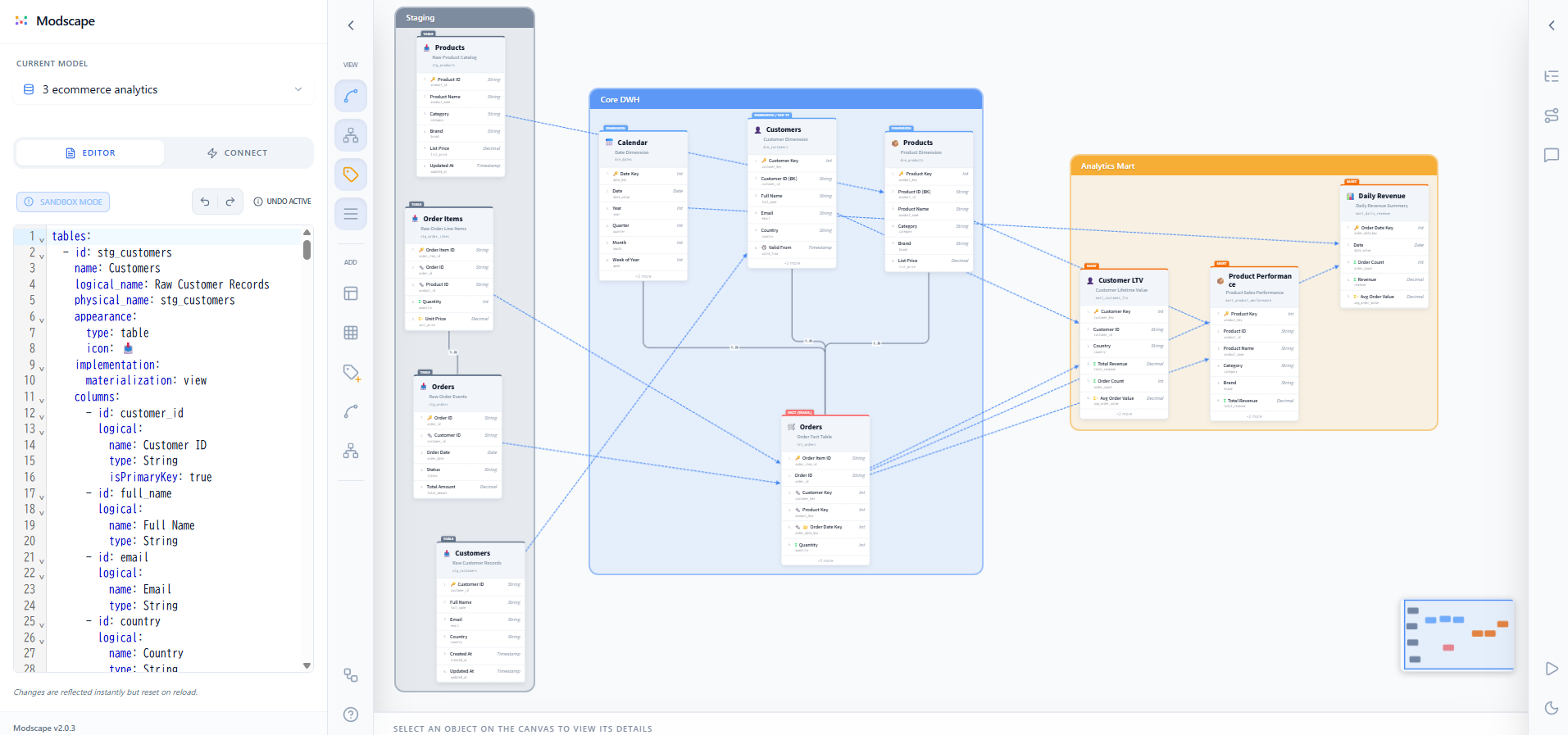
|
|
17
|
+
|
|
12
18
|
|
|
13
19
|
## なぜ Modscape なのか?
|
|
14
20
|
|
|
@@ -26,7 +32,7 @@
|
|
|
26
32
|
- **刷新されたモデリング・ノード**: 左上に突き出した「インデックス・タブ」で種類(FACT, DIM, HUB等)を明示。長い物理名は自動省略され、プロフェッショナルな外観を維持。
|
|
27
33
|
- **インタラクティブなビジュアルキャンバス**:
|
|
28
34
|
- **ドラッグで接続**: カラム間のリレーションを直感的に作成。吸着機能で快適な操作感。
|
|
29
|
-
- **意味的なエッジバッジ**: 接続点に `( 1 )` や `[
|
|
35
|
+
- **意味的なエッジバッジ**: 接続点に `( 1 )` や `[ N ]` バッジを表示し、カーディナリティ(多重度)を視覚化。
|
|
30
36
|
- **データリネージ・モード**: データの流れをアニメーション付きの点線矢印で可視化。
|
|
31
37
|
- **ドメイン階層ナビゲーション**: テーブルをビジネスドメインごとに整理し、構造化されたサイドバーから素早くアクセス。
|
|
32
38
|
- **統合 Undo/Redo & オートセーブ**:
|
|
@@ -34,7 +40,7 @@
|
|
|
34
40
|
- オートセーブにより、ローカルのYAMLを常に最新の状態に維持。
|
|
35
41
|
- **ダーク/ライトモード対応**: 利用環境やドキュメント作成の用途に合わせて、ワンクリックでテーマを切り替え可能。
|
|
36
42
|
- **データ分析特化のモデリング**: `fact`, `dimension`, `mart`, `hub`, `link`, `satellite` に加え、汎用的な `table` タイプを標準サポート。
|
|
37
|
-
- **AIエージェント対応**: **Gemini, Claude, Codex**
|
|
43
|
+
- **AIエージェント対応**: **Gemini CLI, Claude Code, Codex** 用の雛形を内蔵。モデリング(`/modscape:modeling`)と実装コード生成(`/modscape:codegen`)の両方でLLMを活用できます。
|
|
38
44
|
|
|
39
45
|
## インストール
|
|
40
46
|
|
|
@@ -47,15 +53,27 @@ npm install -g modscape
|
|
|
47
53
|
## はじめに
|
|
48
54
|
|
|
49
55
|
### A: AI駆動のモデリング(推奨)
|
|
50
|
-
1. **初期化**: 使用するAI
|
|
56
|
+
1. **初期化**: 使用するAIエージェントに合わせてルールファイルとコマンドを生成します。
|
|
51
57
|
```bash
|
|
52
|
-
modscape init --gemini
|
|
58
|
+
modscape init --gemini # Gemini CLI
|
|
59
|
+
modscape init --claude # Claude Code
|
|
60
|
+
modscape init --codex # Codex
|
|
61
|
+
modscape init --all # 3つすべて
|
|
53
62
|
```
|
|
63
|
+
`.modscape/rules.md`(YAMLスキーマのルール)と `.modscape/codegen-rules.md`(実装コード生成のルール)、および各エージェント用のコマンドファイルが生成されます。
|
|
64
|
+
|
|
54
65
|
2. **起動**: ビジュアライザーを起動します。
|
|
55
66
|
```bash
|
|
56
67
|
modscape dev model.yaml
|
|
57
68
|
```
|
|
58
|
-
|
|
69
|
+
|
|
70
|
+
3. **データモデルの設計** — `/modscape:modeling` でモデルを作成・編集します。
|
|
71
|
+
> *".modscape/rules.md のルールに従って、model.yaml に新しい 'Marketing' ドメインを追加して。"*
|
|
72
|
+
|
|
73
|
+
4. **実装コードの生成** — `/modscape:codegen` でYAMLをdbt / SQLMesh / Spark SQLに変換します。
|
|
74
|
+
> *".modscape/codegen-rules.md に従って、model.yaml からdbtモデルを生成して。"*
|
|
75
|
+
|
|
76
|
+
エージェントは `lineage.upstream` を元に依存関係の順でモデルを生成し、YAMLで定義しきれない箇所には `-- TODO:` コメントを残します。
|
|
59
77
|
|
|
60
78
|
### B: 手動モデリング
|
|
61
79
|
1. **YAML作成**: `model.yaml` ファイルを作成します。
|
|
@@ -68,39 +86,157 @@ npm install -g modscape
|
|
|
68
86
|
|
|
69
87
|
## モデルの定義 (YAML)
|
|
70
88
|
|
|
89
|
+
YAMLのルートレベル構造は以下の通りです:
|
|
90
|
+
|
|
91
|
+
```
|
|
92
|
+
domains – 関連テーブルをまとめるビジュアルコンテナ
|
|
93
|
+
tables – 3階層メタデータを持つエンティティ定義
|
|
94
|
+
relationships – テーブル間のERカーディナリティ
|
|
95
|
+
annotations – キャンバス上のスティッキーノート・吹き出し
|
|
96
|
+
layout – 全座標データ(tables/domains の中に x/y を書いてはいけない)
|
|
97
|
+
```
|
|
98
|
+
|
|
99
|
+
### Domains(ドメイン)
|
|
100
|
+
|
|
71
101
|
```yaml
|
|
72
|
-
# 1. Domains: 関連するテーブルをグループ化するコンテナ
|
|
73
102
|
domains:
|
|
74
103
|
- id: core_sales
|
|
75
|
-
name: 主要売上
|
|
76
|
-
|
|
77
|
-
|
|
104
|
+
name: "主要売上"
|
|
105
|
+
description: "営業チームのトランザクションデータ。" # 任意
|
|
106
|
+
color: "rgba(59, 130, 246, 0.1)" # 背景色
|
|
107
|
+
tables: [orders, dim_customers]
|
|
108
|
+
isLocked: false # true にするとキャンバスでの誤ドラッグを防止
|
|
109
|
+
```
|
|
110
|
+
|
|
111
|
+
### Tables(テーブル)
|
|
78
112
|
|
|
79
|
-
|
|
113
|
+
```yaml
|
|
80
114
|
tables:
|
|
81
115
|
- id: orders
|
|
82
|
-
name: 注文
|
|
83
|
-
logical_name: "顧客注文履歴"
|
|
84
|
-
physical_name: "fct_retail_sales"
|
|
116
|
+
name: 注文 # 概念名(大)
|
|
117
|
+
logical_name: "顧客注文履歴" # 論理名(中)
|
|
118
|
+
physical_name: "fct_retail_sales" # 物理名(小)
|
|
119
|
+
|
|
85
120
|
appearance:
|
|
86
|
-
type: fact
|
|
87
|
-
sub_type: transaction
|
|
88
|
-
|
|
121
|
+
type: fact # fact | dimension | mart | hub | link | satellite | table
|
|
122
|
+
sub_type: transaction # transaction | periodic | accumulating など
|
|
123
|
+
scd: type2 # ディメンション用 SCD タイプ: type0〜type6
|
|
124
|
+
icon: "💰"
|
|
125
|
+
color: "#e0f2fe" # 任意のヘッダーカラー
|
|
126
|
+
|
|
127
|
+
conceptual: # 任意 – AIエージェント向けビジネスコンテキスト
|
|
128
|
+
description: "1行 = 1注文明細。"
|
|
129
|
+
tags: [WHO, WHAT, WHEN] # BEAM* タグ
|
|
130
|
+
businessDefinitions:
|
|
131
|
+
revenue: "割引・返品後の純売上"
|
|
132
|
+
|
|
133
|
+
lineage: # mart/集計テーブルのみに定義
|
|
134
|
+
upstream:
|
|
135
|
+
- fct_sales
|
|
136
|
+
- dim_dates
|
|
137
|
+
|
|
138
|
+
implementation: # 任意 – AIコード生成へのヒント
|
|
139
|
+
materialization: incremental # table | view | incremental | ephemeral
|
|
140
|
+
incremental_strategy: merge # merge | append | delete+insert
|
|
141
|
+
unique_key: order_id
|
|
142
|
+
partition_by:
|
|
143
|
+
field: order_date # DATE/TIMESTAMP型カラムを指定(サロゲートキーは不可)
|
|
144
|
+
granularity: day # day | month | year | hour
|
|
145
|
+
cluster_by: [customer_id]
|
|
146
|
+
grain: [month_key] # GROUP BY カラム(martのみ)
|
|
147
|
+
measures: # 集計定義(martのみ)
|
|
148
|
+
- column: total_revenue
|
|
149
|
+
agg: sum # sum | count | count_distinct | avg | min | max
|
|
150
|
+
source_column: fct_sales.amount
|
|
151
|
+
|
|
89
152
|
columns:
|
|
90
153
|
- id: order_id
|
|
91
154
|
logical:
|
|
92
|
-
name:
|
|
155
|
+
name: "注文ID"
|
|
156
|
+
type: Int # Int | String | Decimal | Date | Timestamp | Boolean など
|
|
157
|
+
description: "サロゲートキー。"
|
|
93
158
|
isPrimaryKey: true
|
|
94
|
-
|
|
95
|
-
|
|
159
|
+
isForeignKey: false
|
|
160
|
+
isPartitionKey: false
|
|
161
|
+
isMetadata: false # 監査カラム(load_date, record_source)は true
|
|
162
|
+
additivity: fully # fully | semi | non
|
|
163
|
+
physical: # 任意 – ウェアハウスの物理定義を上書き
|
|
164
|
+
name: order_id
|
|
165
|
+
type: "BIGINT"
|
|
166
|
+
constraints: [NOT NULL]
|
|
167
|
+
|
|
168
|
+
sampleData: # 2次元配列。先頭行 = カラムID
|
|
96
169
|
- [order_id, amount, status]
|
|
97
170
|
- [1001, 50.0, "COMPLETED"]
|
|
171
|
+
- [1002, 120.5, "PENDING"]
|
|
172
|
+
```
|
|
173
|
+
|
|
174
|
+
**テーブルタイプと `appearance.type` の使い分け:**
|
|
175
|
+
|
|
176
|
+
| type | 用途 |
|
|
177
|
+
|------|------|
|
|
178
|
+
| `fact` | 取引・イベント・測定値 |
|
|
179
|
+
| `dimension` | エンティティ・マスタ・参照リスト |
|
|
180
|
+
| `mart` | 集計・消費者向けテーブル(`lineage.upstream` を必ず定義) |
|
|
181
|
+
| `hub` | Data Vault のビジネスキー |
|
|
182
|
+
| `link` | Data Vault のハブ間結合・トランザクション |
|
|
183
|
+
| `satellite` | Data Vault のハブに紐づく履歴属性 |
|
|
184
|
+
| `table` | 汎用 |
|
|
98
185
|
|
|
99
|
-
|
|
186
|
+
### Relationships(リレーションシップ)
|
|
187
|
+
|
|
188
|
+
```yaml
|
|
100
189
|
relationships:
|
|
101
|
-
- from:
|
|
102
|
-
|
|
103
|
-
|
|
190
|
+
- from:
|
|
191
|
+
table: dim_customers # テーブル ID
|
|
192
|
+
column: customer_id # カラム ID(任意)
|
|
193
|
+
to:
|
|
194
|
+
table: fct_orders
|
|
195
|
+
column: customer_id
|
|
196
|
+
type: one-to-many # one-to-one | one-to-many | many-to-one | many-to-many
|
|
197
|
+
```
|
|
198
|
+
|
|
199
|
+
> **データリネージ**は `lineage.upstream` で定義し、リネージモードでアニメーション矢印として表示されます。`relationships` に重複して記載しないでください。
|
|
200
|
+
|
|
201
|
+
### Annotations(アノテーション)
|
|
202
|
+
|
|
203
|
+
```yaml
|
|
204
|
+
annotations:
|
|
205
|
+
- id: note_001
|
|
206
|
+
type: sticky # sticky | callout
|
|
207
|
+
text: "粒度:1行 = 1注文明細"
|
|
208
|
+
color: "#fef9c3" # 任意の背景色
|
|
209
|
+
targetId: fct_orders # 貼り付け先のオブジェクト ID(任意)
|
|
210
|
+
targetType: table # table | domain | relationship | column
|
|
211
|
+
offset:
|
|
212
|
+
x: 100 # 対象の左上からのオフセット(targetId 未指定時は絶対座標)
|
|
213
|
+
y: -80
|
|
214
|
+
```
|
|
215
|
+
|
|
216
|
+
### Layout(レイアウト)
|
|
217
|
+
|
|
218
|
+
全座標データはオブジェクト ID をキーとして `layout` に記述します。**`tables` や `domains` の中に `x`/`y` を書いてはいけません。**
|
|
219
|
+
|
|
220
|
+
```yaml
|
|
221
|
+
layout:
|
|
222
|
+
# ドメイン – width と height が必要
|
|
223
|
+
core_sales:
|
|
224
|
+
x: 0
|
|
225
|
+
y: 0
|
|
226
|
+
width: 880
|
|
227
|
+
height: 480
|
|
228
|
+
isLocked: false # true でキャンバスのドラッグを防止
|
|
229
|
+
|
|
230
|
+
# ドメイン内のテーブル – 座標はドメインの原点からの相対値
|
|
231
|
+
orders:
|
|
232
|
+
x: 280
|
|
233
|
+
y: 200
|
|
234
|
+
parentId: core_sales # ドメインへの所属を宣言
|
|
235
|
+
|
|
236
|
+
# スタンドアロンテーブル – キャンバス絶対座標
|
|
237
|
+
mart_summary:
|
|
238
|
+
x: 1060
|
|
239
|
+
y: 200
|
|
104
240
|
```
|
|
105
241
|
|
|
106
242
|
---
|
package/README.md
CHANGED
|
@@ -8,7 +8,10 @@
|
|
|
8
8
|
|
|
9
9
|
**Modscape** is a YAML-driven data modeling visualizer specialized for **Modern Data Stack** architectures. It bridges the gap between raw physical schemas and high-level business logic, empowering data teams to design, document, and share their data stories.
|
|
10
10
|
|
|
11
|
-
|
|
11
|
+
🌐 **Live Demo:**
|
|
12
|
+
https://yujikawa.github.io/modscape/
|
|
13
|
+
|
|
14
|
+

|
|
12
15
|
|
|
13
16
|
## Why Modscape?
|
|
14
17
|
|
|
@@ -26,7 +29,7 @@ In modern data analysis platforms, data modeling is no longer just about drawing
|
|
|
26
29
|
- **Redesigned Modeling Nodes**: Protruding "Index Tabs" for entity types (FACT, DIM, HUB, LINK, etc.) and auto-truncating physical names for a professional look.
|
|
27
30
|
- **Interactive Visual Canvas**:
|
|
28
31
|
- **Drag-to-Connect**: Create relationships between columns intuitively with "Magnetic Snapping".
|
|
29
|
-
- **Semantic Edge Badges**: Visually identify cardinality with `( 1 )` and `[
|
|
32
|
+
- **Semantic Edge Badges**: Visually identify cardinality with `( 1 )` and `[ N ]` badges at the connection points.
|
|
30
33
|
- **Data Lineage Mode**: Visualize data flow with animated dashed arrows.
|
|
31
34
|
- **Domain-Grouped Navigation**: Organize tables into visual business domains and navigate them via a structured sidebar.
|
|
32
35
|
- **Unified Undo/Redo & Auto-save**:
|
|
@@ -34,7 +37,7 @@ In modern data analysis platforms, data modeling is no longer just about drawing
|
|
|
34
37
|
- Optional **Auto-save** ensures your local YAML is always up-to-date.
|
|
35
38
|
- **Dark/Light Mode Support**: Switch between themes seamlessly for better eye comfort or documentation exports.
|
|
36
39
|
- **Specialized Modeling Types**: Native support for entity types like `fact`, `dimension`, `mart`, `hub`, `link`, `satellite`, and generic `table`.
|
|
37
|
-
- **AI-Agent Ready**: Built-in scaffolding for **Gemini, Claude, and Codex**
|
|
40
|
+
- **AI-Agent Ready**: Built-in scaffolding for **Gemini CLI, Claude Code, and Codex** — both for modeling (`/modscape:modeling`) and implementation code generation (`/modscape:codegen`).
|
|
38
41
|
|
|
39
42
|
## Installation
|
|
40
43
|
|
|
@@ -51,22 +54,27 @@ npm install -g modscape
|
|
|
51
54
|
### Path A: AI-Driven Modeling (Recommended)
|
|
52
55
|
Leverage AI coding assistants (**Gemini CLI, Claude Code, or Codex**) to build your models.
|
|
53
56
|
|
|
54
|
-
1. **Initialize**: Scaffold modeling rules and
|
|
57
|
+
1. **Initialize**: Scaffold modeling rules and commands for your preferred agent.
|
|
55
58
|
```bash
|
|
56
|
-
#
|
|
57
|
-
modscape init --
|
|
58
|
-
|
|
59
|
-
#
|
|
60
|
-
modscape init --claude
|
|
61
|
-
|
|
62
|
-
# For Codex
|
|
63
|
-
modscape init --codex
|
|
59
|
+
modscape init --gemini # Gemini CLI
|
|
60
|
+
modscape init --claude # Claude Code
|
|
61
|
+
modscape init --codex # Codex
|
|
62
|
+
modscape init --all # all three
|
|
64
63
|
```
|
|
64
|
+
This creates `.modscape/rules.md` (YAML schema rules) and `.modscape/codegen-rules.md` (code generation rules), plus agent-specific command files.
|
|
65
|
+
|
|
65
66
|
2. **Start Dev**: Launch the visualizer.
|
|
66
67
|
```bash
|
|
67
68
|
modscape dev model.yaml
|
|
68
69
|
```
|
|
69
|
-
|
|
70
|
+
|
|
71
|
+
3. **Model with AI** — use `/modscape:modeling` to design your data model:
|
|
72
|
+
> *"Use the rules in .modscape/rules.md to add a new 'Marketing' domain with a 'campaign_performance' fact table."*
|
|
73
|
+
|
|
74
|
+
4. **Generate implementation code** — use `/modscape:codegen` to turn your YAML into dbt / SQLMesh / Spark SQL:
|
|
75
|
+
> *"Follow .modscape/codegen-rules.md and generate dbt models from model.yaml."*
|
|
76
|
+
|
|
77
|
+
The agent generates models in the correct dependency order and adds `-- TODO:` comments wherever the YAML doesn't fully specify the logic.
|
|
70
78
|
|
|
71
79
|
### Path B: Manual Modeling
|
|
72
80
|
Best for direct architectural control.
|
|
@@ -81,42 +89,145 @@ Best for direct architectural control.
|
|
|
81
89
|
|
|
82
90
|
## Defining Your Model (YAML)
|
|
83
91
|
|
|
84
|
-
Modscape uses a schema designed for data analysis contexts.
|
|
92
|
+
Modscape uses a schema designed for data analysis contexts. The full YAML structure is:
|
|
93
|
+
|
|
94
|
+
```
|
|
95
|
+
domains – visual containers grouping related tables
|
|
96
|
+
tables – entity definitions with tri-layer metadata
|
|
97
|
+
relationships – ER cardinality between tables
|
|
98
|
+
annotations – sticky notes / callouts on the canvas
|
|
99
|
+
layout – ALL coordinate data (never put x/y inside tables or domains)
|
|
100
|
+
```
|
|
101
|
+
|
|
102
|
+
### Domains
|
|
85
103
|
|
|
86
104
|
```yaml
|
|
87
|
-
# 1. Domains: Visual containers for grouping business logic
|
|
88
105
|
domains:
|
|
89
106
|
- id: core_sales
|
|
90
|
-
name: Core Sales
|
|
91
|
-
|
|
92
|
-
|
|
107
|
+
name: "Core Sales"
|
|
108
|
+
description: "Transactional data for the sales team." # optional
|
|
109
|
+
color: "rgba(59, 130, 246, 0.1)" # background fill
|
|
110
|
+
tables: [orders, dim_customers]
|
|
111
|
+
isLocked: false # prevent accidental drag when true
|
|
112
|
+
```
|
|
93
113
|
|
|
94
|
-
|
|
114
|
+
### Tables
|
|
115
|
+
|
|
116
|
+
```yaml
|
|
95
117
|
tables:
|
|
96
118
|
- id: orders
|
|
97
|
-
name: Orders
|
|
98
|
-
logical_name: "Customer Purchase Record"
|
|
99
|
-
physical_name: "fct_retail_sales"
|
|
119
|
+
name: Orders # Conceptual name (large)
|
|
120
|
+
logical_name: "Customer Purchase Record" # Logical name (medium)
|
|
121
|
+
physical_name: "fct_retail_sales" # Physical table name (small)
|
|
122
|
+
|
|
100
123
|
appearance:
|
|
101
|
-
type: fact
|
|
102
|
-
sub_type: transaction
|
|
103
|
-
|
|
124
|
+
type: fact # fact | dimension | mart | hub | link | satellite | table
|
|
125
|
+
sub_type: transaction # transaction | periodic | accumulating | etc.
|
|
126
|
+
scd: type2 # SCD type for dimensions: type0–type6
|
|
127
|
+
icon: "💰"
|
|
128
|
+
color: "#e0f2fe" # optional custom header color
|
|
129
|
+
|
|
130
|
+
conceptual: # optional – business context for AI agents
|
|
131
|
+
description: "One row per order line item."
|
|
132
|
+
tags: [WHO, WHAT, WHEN] # BEAM* tags
|
|
133
|
+
businessDefinitions:
|
|
134
|
+
revenue: "Net revenue after discounts"
|
|
135
|
+
|
|
136
|
+
lineage: # for mart/aggregated tables only
|
|
137
|
+
upstream:
|
|
138
|
+
- fct_sales
|
|
139
|
+
- dim_dates
|
|
140
|
+
|
|
141
|
+
implementation: # optional – hints for AI code generation
|
|
142
|
+
materialization: incremental # table | view | incremental | ephemeral
|
|
143
|
+
incremental_strategy: merge # merge | append | delete+insert
|
|
144
|
+
unique_key: order_id
|
|
145
|
+
partition_by:
|
|
146
|
+
field: order_date # use a DATE/TIMESTAMP column, not a surrogate key
|
|
147
|
+
granularity: day # day | month | year | hour
|
|
148
|
+
cluster_by: [customer_id]
|
|
149
|
+
grain: [month_key] # GROUP BY columns (mart only)
|
|
150
|
+
measures: # aggregation definitions (mart only)
|
|
151
|
+
- column: total_revenue
|
|
152
|
+
agg: sum # sum | count | count_distinct | avg | min | max
|
|
153
|
+
source_column: fct_sales.amount
|
|
154
|
+
|
|
104
155
|
columns:
|
|
105
156
|
- id: order_id
|
|
106
157
|
logical:
|
|
107
|
-
name:
|
|
108
|
-
type: Int
|
|
158
|
+
name: "Order ID"
|
|
159
|
+
type: Int # Int | String | Decimal | Date | Timestamp | Boolean | ...
|
|
160
|
+
description: "Surrogate key."
|
|
109
161
|
isPrimaryKey: true
|
|
110
|
-
|
|
111
|
-
|
|
162
|
+
isForeignKey: false
|
|
163
|
+
isPartitionKey: false
|
|
164
|
+
isMetadata: false # true for audit cols (load_date, record_source)
|
|
165
|
+
additivity: fully # fully | semi | non
|
|
166
|
+
physical: # optional warehouse overrides
|
|
167
|
+
name: order_id
|
|
168
|
+
type: "BIGINT"
|
|
169
|
+
constraints: [NOT NULL]
|
|
170
|
+
|
|
171
|
+
sampleData: # 2D array; first row = column IDs
|
|
112
172
|
- [order_id, amount, status]
|
|
113
173
|
- [1001, 50.0, "COMPLETED"]
|
|
174
|
+
- [1002, 120.5, "PENDING"]
|
|
175
|
+
```
|
|
114
176
|
|
|
115
|
-
|
|
177
|
+
### Relationships
|
|
178
|
+
|
|
179
|
+
```yaml
|
|
116
180
|
relationships:
|
|
117
|
-
- from:
|
|
118
|
-
|
|
119
|
-
|
|
181
|
+
- from:
|
|
182
|
+
table: dim_customers # table ID
|
|
183
|
+
column: customer_id # column ID (optional)
|
|
184
|
+
to:
|
|
185
|
+
table: fct_orders
|
|
186
|
+
column: customer_id
|
|
187
|
+
type: one-to-many # one-to-one | one-to-many | many-to-one | many-to-many
|
|
188
|
+
```
|
|
189
|
+
|
|
190
|
+
> **Data Lineage** connections are driven by `lineage.upstream` and rendered as animated arrows in Lineage Mode. Do **not** duplicate them as `relationships` entries.
|
|
191
|
+
|
|
192
|
+
### Annotations
|
|
193
|
+
|
|
194
|
+
```yaml
|
|
195
|
+
annotations:
|
|
196
|
+
- id: note_001
|
|
197
|
+
type: sticky # sticky | callout
|
|
198
|
+
text: "Grain: one row per invoice line item."
|
|
199
|
+
color: "#fef9c3" # optional background color
|
|
200
|
+
targetId: fct_orders # ID of the attached object (optional)
|
|
201
|
+
targetType: table # table | domain | relationship | column
|
|
202
|
+
offset:
|
|
203
|
+
x: 100 # offset from target's top-left (or absolute if no target)
|
|
204
|
+
y: -80
|
|
205
|
+
```
|
|
206
|
+
|
|
207
|
+
### Layout
|
|
208
|
+
|
|
209
|
+
All coordinate data lives in `layout`, keyed by object ID. **Never** place `x`/`y` inside `tables` or `domains`.
|
|
210
|
+
|
|
211
|
+
```yaml
|
|
212
|
+
layout:
|
|
213
|
+
# Domain – requires width and height
|
|
214
|
+
core_sales:
|
|
215
|
+
x: 0
|
|
216
|
+
y: 0
|
|
217
|
+
width: 880
|
|
218
|
+
height: 480
|
|
219
|
+
isLocked: false # prevent drag in canvas
|
|
220
|
+
|
|
221
|
+
# Table inside a domain – coordinates are relative to domain origin
|
|
222
|
+
orders:
|
|
223
|
+
x: 280
|
|
224
|
+
y: 200
|
|
225
|
+
parentId: core_sales # declare domain membership
|
|
226
|
+
|
|
227
|
+
# Standalone table – absolute canvas coordinates
|
|
228
|
+
mart_summary:
|
|
229
|
+
x: 1060
|
|
230
|
+
y: 200
|
|
120
231
|
```
|
|
121
232
|
|
|
122
233
|
---
|
package/package.json
CHANGED
|
@@ -1,6 +1,6 @@
|
|
|
1
1
|
{
|
|
2
2
|
"name": "modscape",
|
|
3
|
-
"version": "1.
|
|
3
|
+
"version": "1.3.0",
|
|
4
4
|
"description": "Modscape: A YAML-driven data modeling visualizer CLI",
|
|
5
5
|
"repository": {
|
|
6
6
|
"type": "git",
|
|
@@ -20,9 +20,10 @@
|
|
|
20
20
|
"scripts": {
|
|
21
21
|
"build-ui": "cd visualizer && npm run build && rm -rf ../visualizer-dist && mv dist ../visualizer-dist",
|
|
22
22
|
"dev": "node src/index.js dev",
|
|
23
|
-
"test:
|
|
24
|
-
"test:
|
|
25
|
-
"test:
|
|
23
|
+
"test:cli": "playwright test tests/import-dbt.spec.ts",
|
|
24
|
+
"test:e2e": "cp tests/fixtures/test-model.yaml tests/fixtures/test-model-runtime.yaml && playwright test",
|
|
25
|
+
"test:all": "npm run build-ui && npm run test:cli",
|
|
26
|
+
"test:update": "npm run build-ui && sleep 1 && npm run test:e2e -- --update-snapshots"
|
|
26
27
|
},
|
|
27
28
|
"dependencies": {
|
|
28
29
|
"@inquirer/prompts": "^8.3.0",
|
package/src/export.js
CHANGED
|
@@ -180,11 +180,67 @@ export function generateMarkdown(schema, modelName) {
|
|
|
180
180
|
md += '## Table Catalog\n\n';
|
|
181
181
|
schema.tables.forEach(table => {
|
|
182
182
|
md += `### ${table.name} ${table.appearance?.icon || ''}\n`;
|
|
183
|
+
if (table.logical_name) md += `*${table.logical_name}*\n\n`;
|
|
183
184
|
if (table.conceptual?.description) {
|
|
184
185
|
md += `**Description**: ${table.conceptual.description}\n\n`;
|
|
185
186
|
}
|
|
187
|
+
|
|
188
|
+
// Type + SCD
|
|
186
189
|
if (table.appearance?.type) {
|
|
187
|
-
|
|
190
|
+
const scd = table.appearance.scd ? ` · SCD ${table.appearance.scd}` : '';
|
|
191
|
+
md += `**Type**: \`${table.appearance.type.toUpperCase()}\`${scd}\n\n`;
|
|
192
|
+
}
|
|
193
|
+
|
|
194
|
+
// Physical name
|
|
195
|
+
if (table.physical_name) {
|
|
196
|
+
md += `**Physical Name**: \`${table.physical_name}\`\n\n`;
|
|
197
|
+
}
|
|
198
|
+
|
|
199
|
+
// Lineage
|
|
200
|
+
if (table.lineage?.upstream?.length > 0) {
|
|
201
|
+
const upstreamNames = table.lineage.upstream.map(upId => {
|
|
202
|
+
const t = schema.tables.find(t => t.id === upId);
|
|
203
|
+
return t ? t.name : upId;
|
|
204
|
+
});
|
|
205
|
+
md += `**Upstream**: ${upstreamNames.map(n => `\`${n}\``).join(' → ')}\n\n`;
|
|
206
|
+
}
|
|
207
|
+
|
|
208
|
+
// Implementation
|
|
209
|
+
if (table.implementation) {
|
|
210
|
+
const impl = table.implementation;
|
|
211
|
+
md += '#### Implementation\n\n';
|
|
212
|
+
md += '| Property | Value |\n| --- | --- |\n';
|
|
213
|
+
if (impl.materialization) md += `| Materialization | \`${impl.materialization}\` |\n`;
|
|
214
|
+
if (impl.incremental_strategy) md += `| Incremental Strategy | \`${impl.incremental_strategy}\` |\n`;
|
|
215
|
+
if (impl.unique_key) {
|
|
216
|
+
const uk = Array.isArray(impl.unique_key) ? impl.unique_key.join(', ') : impl.unique_key;
|
|
217
|
+
md += `| Unique Key | \`${uk}\` |\n`;
|
|
218
|
+
}
|
|
219
|
+
if (impl.partition_by) {
|
|
220
|
+
const pb = impl.partition_by;
|
|
221
|
+
const field = pb.field || pb[0]?.field;
|
|
222
|
+
const gran = pb.granularity || pb[0]?.granularity;
|
|
223
|
+
md += `| Partition By | \`${field}\`${gran ? ` (${gran})` : ''} |\n`;
|
|
224
|
+
}
|
|
225
|
+
if (impl.cluster_by) {
|
|
226
|
+
const cb = Array.isArray(impl.cluster_by) ? impl.cluster_by.join(', ') : impl.cluster_by;
|
|
227
|
+
md += `| Cluster By | \`${cb}\` |\n`;
|
|
228
|
+
}
|
|
229
|
+
if (impl.grain) {
|
|
230
|
+
const grain = Array.isArray(impl.grain) ? impl.grain.join(', ') : impl.grain;
|
|
231
|
+
md += `| Grain (GROUP BY) | \`${grain}\` |\n`;
|
|
232
|
+
}
|
|
233
|
+
md += '\n';
|
|
234
|
+
|
|
235
|
+
// Measures
|
|
236
|
+
if (impl.measures?.length > 0) {
|
|
237
|
+
md += '#### Measures\n\n';
|
|
238
|
+
md += '| Column | Aggregation | Source Column |\n| --- | --- | --- |\n';
|
|
239
|
+
impl.measures.forEach(m => {
|
|
240
|
+
md += `| \`${m.column}\` | \`${m.agg}\` | ${m.source_column ? `\`${m.source_column}\`` : '-'} |\n`;
|
|
241
|
+
});
|
|
242
|
+
md += '\n';
|
|
243
|
+
}
|
|
188
244
|
}
|
|
189
245
|
|
|
190
246
|
// Columns Table (Enhanced with Physical info)
|