minimal-homepage 2.0.2
This diff represents the content of publicly available package versions that have been released to one of the supported registries. The information contained in this diff is provided for informational purposes only and reflects changes between package versions as they appear in their respective public registries.
- package/LICENSE +21 -0
- package/README-en.md +277 -0
- package/README.md +278 -0
- package/index.html +16 -0
- package/main.config.js +75 -0
- package/package.json +46 -0
- package/public/favicon.svg +1 -0
- package/public/icons.svg +24 -0
- package/src/App.vue +27 -0
- package/src/assets/hero.png +0 -0
- package/src/assets/vite.svg +1 -0
- package/src/assets/vue.svg +1 -0
- package/src/atom.xml +651 -0
- package/src/components/AboutMe.vue +38 -0
- package/src/components/AppFooter.vue +33 -0
- package/src/components/CardSection.vue +147 -0
- package/src/components/HelloWorld.vue +93 -0
- package/src/components/HeroSection.vue +53 -0
- package/src/components/MyProject.vue +160 -0
- package/src/components/NavBar.vue +109 -0
- package/src/components/RSSSection.vue +138 -0
- package/src/components/ThemeToggle.vue +51 -0
- package/src/components/theme-button-element.js +245 -0
- package/src/config.js +1 -0
- package/src/index.js +5 -0
- package/src/main.js +48 -0
- package/src/pages/AboutPage.vue +9 -0
- package/src/pages/HomePage.vue +15 -0
- package/src/router.js +27 -0
- package/src/style.css +96 -0
- package/vite.config.js +32 -0
package/LICENSE
ADDED
|
@@ -0,0 +1,21 @@
|
|
|
1
|
+
MIT License
|
|
2
|
+
|
|
3
|
+
Copyright (c) 2026 mete0rxsc
|
|
4
|
+
|
|
5
|
+
Permission is hereby granted, free of charge, to any person obtaining a copy
|
|
6
|
+
of this software and associated documentation files (the "Software"), to deal
|
|
7
|
+
in the Software without restriction, including without limitation the rights
|
|
8
|
+
to use, copy, modify, merge, publish, distribute, sublicense, and/or sell
|
|
9
|
+
copies of the Software, and to permit persons to whom the Software is
|
|
10
|
+
furnished to do so, subject to the following conditions:
|
|
11
|
+
|
|
12
|
+
The above copyright notice and this permission notice shall be included in all
|
|
13
|
+
copies or substantial portions of the Software.
|
|
14
|
+
|
|
15
|
+
THE SOFTWARE IS PROVIDED "AS IS", WITHOUT WARRANTY OF ANY KIND, EXPRESS OR
|
|
16
|
+
IMPLIED, INCLUDING BUT NOT LIMITED TO THE WARRANTIES OF MERCHANTABILITY,
|
|
17
|
+
FITNESS FOR A PARTICULAR PURPOSE AND NONINFRINGEMENT. IN NO EVENT SHALL THE
|
|
18
|
+
AUTHORS OR COPYRIGHT HOLDERS BE LIABLE FOR ANY CLAIM, DAMAGES OR OTHER
|
|
19
|
+
LIABILITY, WHETHER IN AN ACTION OF CONTRACT, TORT OR OTHERWISE, ARISING FROM,
|
|
20
|
+
OUT OF OR IN CONNECTION WITH THE SOFTWARE OR THE USE OR OTHER DEALINGS IN THE
|
|
21
|
+
SOFTWARE.
|
package/README-en.md
ADDED
|
@@ -0,0 +1,277 @@
|
|
|
1
|
+
# Personal Homepage Template (Vue 3 + Vite)
|
|
2
|
+
[中文版本](./README.md)
|
|
3
|
+
|
|
4
|
+
A personal homepage project built with Vue 3 + Vite + Tailwind CSS, supporting:
|
|
5
|
+
|
|
6
|
+
- Home / About Me route switching
|
|
7
|
+
- Light/Dark theme toggle (nice touch)
|
|
8
|
+
- Social link cards
|
|
9
|
+
- GitHub repository display (API mode / manual mode optional)
|
|
10
|
+
- RSS blog post fetching and display
|
|
11
|
+
- Global configuration (`main.config.js`)
|
|
12
|
+
|
|
13
|
+
## Preview
|
|
14
|
+
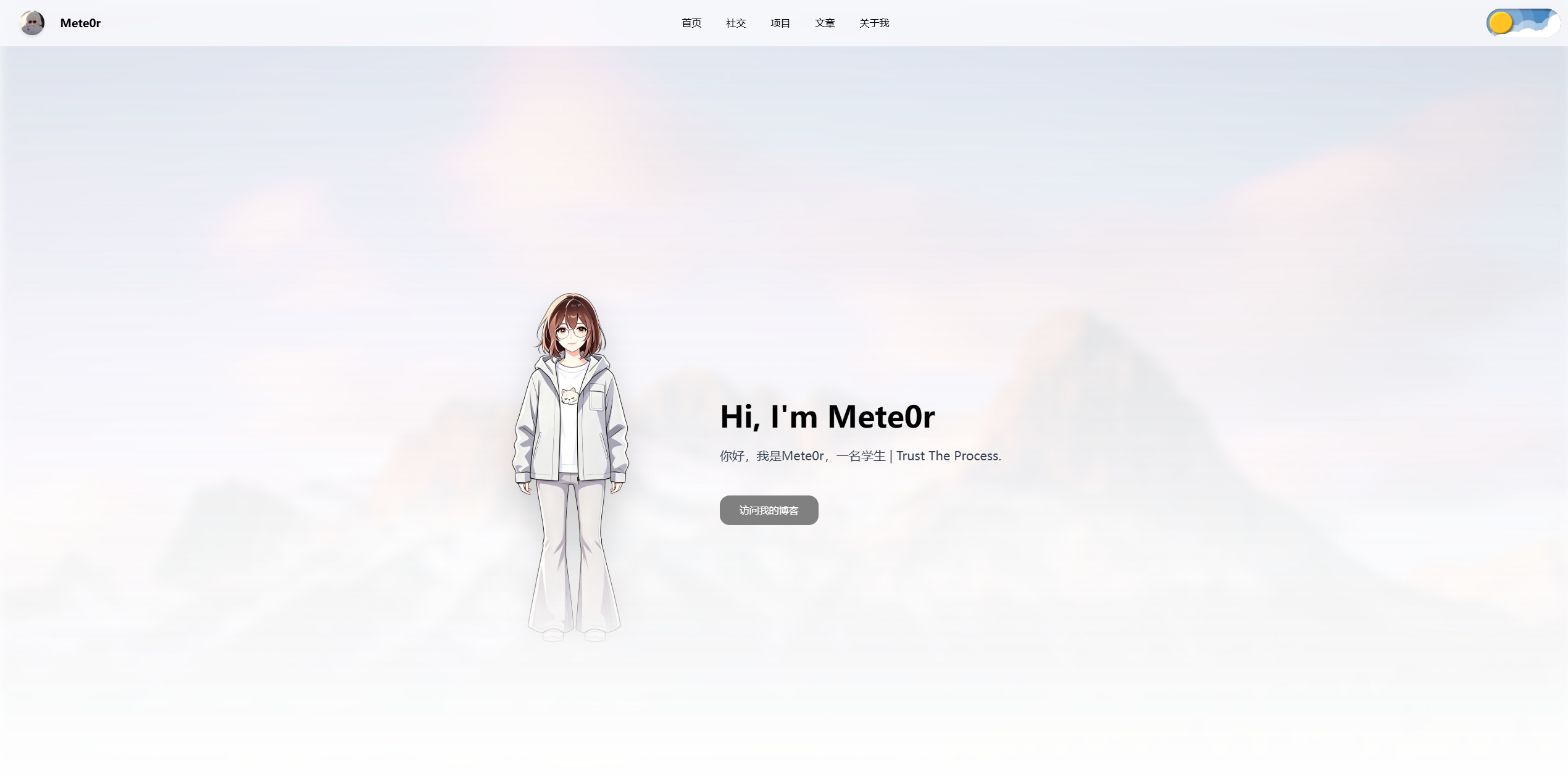
|
|
15
|
+
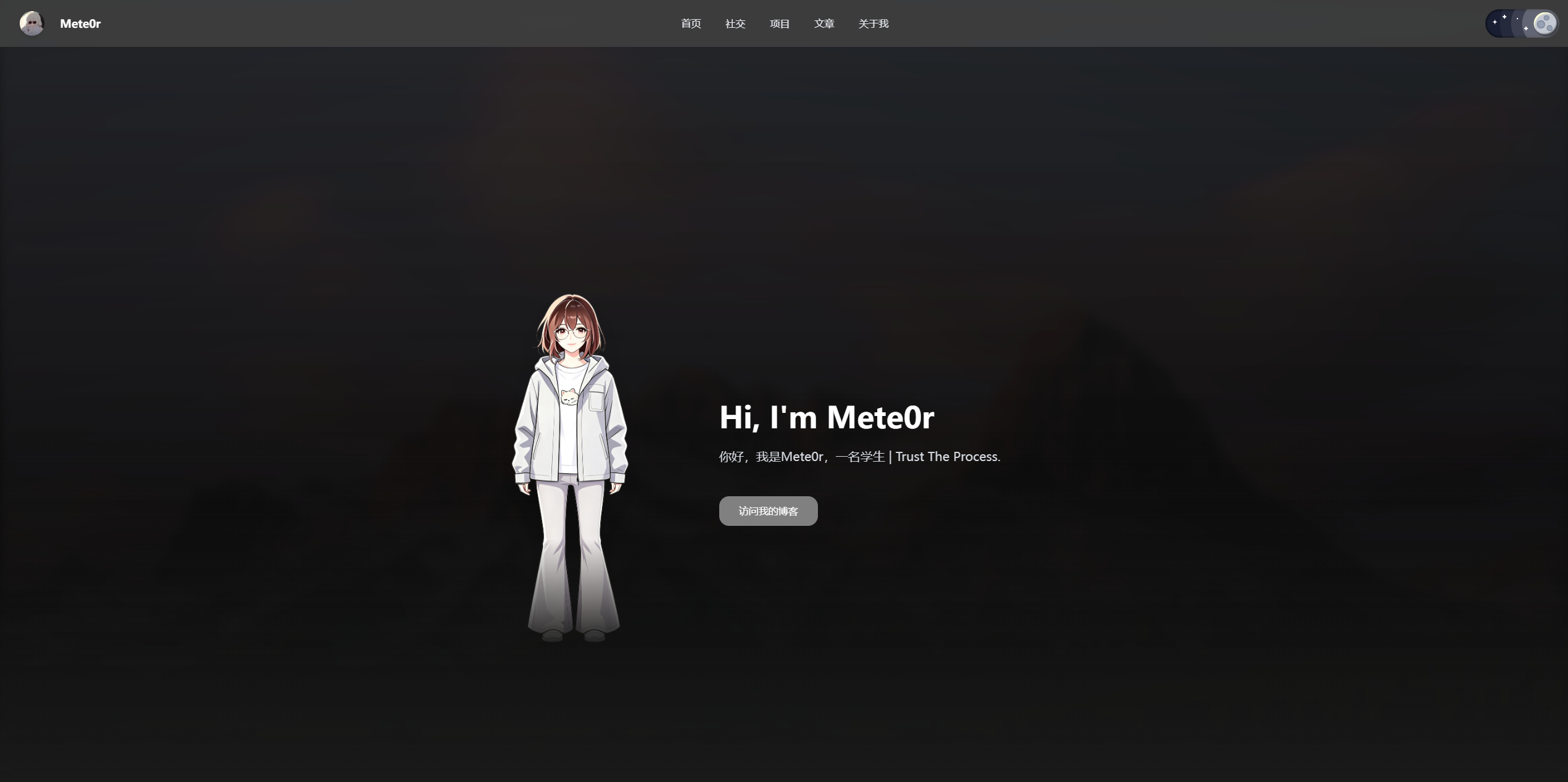
|
|
16
|
+
|
|
17
|
+
## Table of Contents
|
|
18
|
+
|
|
19
|
+
- [Live Demo](#live-demo)
|
|
20
|
+
- [Features](#features)
|
|
21
|
+
- [Tech Stack](#tech-stack)
|
|
22
|
+
- [Quick Start](#quick-start)
|
|
23
|
+
- [Deployment Methods](#deployment-methods)
|
|
24
|
+
- [Configuration File Guide](#configuration-file-guide)
|
|
25
|
+
- [GitHub Repository Configuration (Important)](#github-repository-configuration-important)
|
|
26
|
+
- [RSS Configuration Guide](#rss-configuration-guide)
|
|
27
|
+
- [FAQ](#faq)
|
|
28
|
+
- [Open Source Tips](#open-source-tips)
|
|
29
|
+
|
|
30
|
+
## Live Demo
|
|
31
|
+
|
|
32
|
+
- `https://www.xscnet.cn`
|
|
33
|
+
|
|
34
|
+
## Features
|
|
35
|
+
|
|
36
|
+
1. Page Structure
|
|
37
|
+
- Home: Avatar/Bio, Social Section, Projects Section, Articles Section
|
|
38
|
+
- About Me: Separate route page
|
|
39
|
+
|
|
40
|
+
2. Animation Experience
|
|
41
|
+
- Route transition animations
|
|
42
|
+
- Article expand/collapse animations
|
|
43
|
+
- Theme toggle animations
|
|
44
|
+
- Heart effect on mouse click
|
|
45
|
+
|
|
46
|
+
3. Configuration-Driven
|
|
47
|
+
- Site title, favicon, background image
|
|
48
|
+
- Author info, navigation, social links
|
|
49
|
+
- GitHub repository source mode switching
|
|
50
|
+
- RSS URL and article cover strategy
|
|
51
|
+
|
|
52
|
+
## Tech Stack
|
|
53
|
+
|
|
54
|
+
- Vue 3
|
|
55
|
+
- Vue Router 4
|
|
56
|
+
- Vite 8
|
|
57
|
+
- Tailwind CSS 4
|
|
58
|
+
|
|
59
|
+
## Quick Start
|
|
60
|
+
|
|
61
|
+
### 1) Installation
|
|
62
|
+
#### Install via npm
|
|
63
|
+
1. Install
|
|
64
|
+
|
|
65
|
+
```bash
|
|
66
|
+
npm install @mete0r/minimal-homepage
|
|
67
|
+
```
|
|
68
|
+
|
|
69
|
+
2. Enter the project directory
|
|
70
|
+
|
|
71
|
+
```bash
|
|
72
|
+
cd @mete0r/minimal-homepage
|
|
73
|
+
```
|
|
74
|
+
|
|
75
|
+
3. Install dependencies
|
|
76
|
+
|
|
77
|
+
```bash
|
|
78
|
+
npm install
|
|
79
|
+
```
|
|
80
|
+
|
|
81
|
+
#### Install via Git
|
|
82
|
+
|
|
83
|
+
1. Clone the repository
|
|
84
|
+
|
|
85
|
+
```bash
|
|
86
|
+
git clone https://github.com/mete0rxsc/minimal-homepage.git
|
|
87
|
+
```
|
|
88
|
+
|
|
89
|
+
2. Enter the project directory
|
|
90
|
+
|
|
91
|
+
```bash
|
|
92
|
+
cd minimal-homepage
|
|
93
|
+
```
|
|
94
|
+
|
|
95
|
+
3. Install dependencies
|
|
96
|
+
|
|
97
|
+
```bash
|
|
98
|
+
npm install
|
|
99
|
+
```
|
|
100
|
+
|
|
101
|
+
### 2) Local Development
|
|
102
|
+
|
|
103
|
+
```bash
|
|
104
|
+
npm run dev
|
|
105
|
+
```
|
|
106
|
+
|
|
107
|
+
### 3) Production Build
|
|
108
|
+
|
|
109
|
+
```bash
|
|
110
|
+
npm run build
|
|
111
|
+
```
|
|
112
|
+
|
|
113
|
+
### 4) Local Preview of Build Output
|
|
114
|
+
|
|
115
|
+
```bash
|
|
116
|
+
npm run preview
|
|
117
|
+
```
|
|
118
|
+
|
|
119
|
+
## Deployment Methods
|
|
120
|
+
|
|
121
|
+
### Method A: Static Hosting Platform (Recommended)
|
|
122
|
+
|
|
123
|
+
Suitable for Vercel / Netlify / Cloudflare Pages / GitHub Pages, etc.
|
|
124
|
+
|
|
125
|
+
- Build Command: `npm run build`
|
|
126
|
+
- Output Directory: `dist`
|
|
127
|
+
|
|
128
|
+
### Method B: Nginx / BT Panel / Cloud Server
|
|
129
|
+
|
|
130
|
+
1. Build locally:
|
|
131
|
+
|
|
132
|
+
```bash
|
|
133
|
+
npm run build
|
|
134
|
+
```
|
|
135
|
+
|
|
136
|
+
2. Upload the `dist` directory to your server's website root
|
|
137
|
+
3. Nginx Example (Required for History Mode Routing):
|
|
138
|
+
|
|
139
|
+
```nginx
|
|
140
|
+
location / {
|
|
141
|
+
try_files $uri $uri/ /index.html;
|
|
142
|
+
}
|
|
143
|
+
```
|
|
144
|
+
|
|
145
|
+
## Configuration File Guide
|
|
146
|
+
|
|
147
|
+
Core configuration file: [`main.config.js`](./main.config.js)
|
|
148
|
+
|
|
149
|
+
### `site`
|
|
150
|
+
|
|
151
|
+
```js
|
|
152
|
+
site: {
|
|
153
|
+
title: 'Website Title',
|
|
154
|
+
icon: 'Website Favicon URL',
|
|
155
|
+
background: 'Global Background Image URL'
|
|
156
|
+
}
|
|
157
|
+
```
|
|
158
|
+
|
|
159
|
+
### `author`
|
|
160
|
+
|
|
161
|
+
```js
|
|
162
|
+
author: {
|
|
163
|
+
name: 'Your Name',
|
|
164
|
+
avatar: 'Avatar URL',
|
|
165
|
+
intro: 'Homepage Bio',
|
|
166
|
+
aiPortrait: 'Character Image URL',
|
|
167
|
+
mbti: 'INTP',
|
|
168
|
+
aboutMeintro: 'About Me Description'
|
|
169
|
+
}
|
|
170
|
+
```
|
|
171
|
+
|
|
172
|
+
### `navLinks`
|
|
173
|
+
|
|
174
|
+
```js
|
|
175
|
+
navLinks: [
|
|
176
|
+
{ name: 'Home', url: '/' },
|
|
177
|
+
{ name: 'Social', url: '#socials' },
|
|
178
|
+
{ name: 'Projects', url: '#projects' },
|
|
179
|
+
{ name: 'Articles', url: '#articles' },
|
|
180
|
+
{ name: 'About Me', url: '/about' }
|
|
181
|
+
]
|
|
182
|
+
```
|
|
183
|
+
|
|
184
|
+
### `socials` / `footer`
|
|
185
|
+
|
|
186
|
+
- `socials` controls social cards
|
|
187
|
+
- `footer` controls footer text, ICP record number, bottom links
|
|
188
|
+
|
|
189
|
+
## GitHub Repository Configuration (Important)
|
|
190
|
+
|
|
191
|
+
`main.config.js -> github` supports two modes:
|
|
192
|
+
|
|
193
|
+
### Mode 1: Use GitHub API
|
|
194
|
+
|
|
195
|
+
```js
|
|
196
|
+
github: {
|
|
197
|
+
useGithubApi: true,
|
|
198
|
+
username: 'your-github-name',
|
|
199
|
+
maxRepos: 10,
|
|
200
|
+
excludeForks: true,
|
|
201
|
+
covers: {
|
|
202
|
+
'repo-name': 'https://example.com/repo-cover.jpg'
|
|
203
|
+
},
|
|
204
|
+
manualRepos: []
|
|
205
|
+
}
|
|
206
|
+
```
|
|
207
|
+
|
|
208
|
+
Description:
|
|
209
|
+
- Fetches repositories from `username`
|
|
210
|
+
- Displays star count
|
|
211
|
+
- `covers` allows custom cover images by repository name
|
|
212
|
+
|
|
213
|
+
Optional: Configure `.env` (to increase API rate limit)
|
|
214
|
+
|
|
215
|
+
```env
|
|
216
|
+
VITE_GITHUB_TOKEN=your_github_token
|
|
217
|
+
```
|
|
218
|
+
|
|
219
|
+
### Mode 2: Manual Repository List (No API)
|
|
220
|
+
|
|
221
|
+
```js
|
|
222
|
+
github: {
|
|
223
|
+
useGithubApi: false,
|
|
224
|
+
manualRepos: [
|
|
225
|
+
{
|
|
226
|
+
name: 'My Project',
|
|
227
|
+
url: 'https://github.com/xxx/yyy',
|
|
228
|
+
description: 'Project Description',
|
|
229
|
+
language: 'JavaScript',
|
|
230
|
+
visibility: 'public',
|
|
231
|
+
cover: 'https://example.com/cover.jpg'
|
|
232
|
+
}
|
|
233
|
+
]
|
|
234
|
+
}
|
|
235
|
+
```
|
|
236
|
+
|
|
237
|
+
Description:
|
|
238
|
+
- No requests to GitHub API
|
|
239
|
+
- No star count displayed
|
|
240
|
+
- Custom cover image for each project
|
|
241
|
+
|
|
242
|
+
## RSS Configuration Guide
|
|
243
|
+
|
|
244
|
+
Configure in `main.config.js -> blog`:
|
|
245
|
+
|
|
246
|
+
```js
|
|
247
|
+
blog: {
|
|
248
|
+
url: 'https://your-blog.com',
|
|
249
|
+
rssFeed: 'https://your-blog.com/atom.xml',
|
|
250
|
+
randomCoverApi: 'https://your-cover-api.com/img'
|
|
251
|
+
}
|
|
252
|
+
```
|
|
253
|
+
|
|
254
|
+
Recommendations:
|
|
255
|
+
- Use full URL for `rssFeed`
|
|
256
|
+
- Ensure the target RSS supports CORS (Cross-Origin Resource Sharing)
|
|
257
|
+
|
|
258
|
+
## FAQ
|
|
259
|
+
|
|
260
|
+
### 1) Changes to `site.title` / `site.icon` not taking effect
|
|
261
|
+
|
|
262
|
+
- Favicon cache is common, hard-refresh your browser (`Ctrl + F5`)
|
|
263
|
+
- Check if the favicon URL is directly accessible
|
|
264
|
+
|
|
265
|
+
### 2) Anchor links from "About Me" not scrolling to position
|
|
266
|
+
|
|
267
|
+
- Cross-route anchor retry scrolling is implemented
|
|
268
|
+
- If issues persist, check if the target section `id` exists
|
|
269
|
+
|
|
270
|
+
### 3) RSS not displaying
|
|
271
|
+
|
|
272
|
+
- Check if `rssFeed` URL is accessible
|
|
273
|
+
- Check if blocked by CORS policy on the target site
|
|
274
|
+
|
|
275
|
+
## Open Source Tips
|
|
276
|
+
|
|
277
|
+
If you have configured GITHUB_TOKEN in .env, **DO NOT** upload this file to GitHub
|
package/README.md
ADDED
|
@@ -0,0 +1,278 @@
|
|
|
1
|
+
# 个人主页模板 (Vue 3 + Vite)
|
|
2
|
+
|
|
3
|
+
[English Version](./README-en.md)
|
|
4
|
+
|
|
5
|
+
一个基于 Vue 3 + Vite + Tailwind CSS 的个人主页项目,支持:
|
|
6
|
+
|
|
7
|
+
- 首页 / 关于我 路由切换
|
|
8
|
+
- 日夜主题切换(小巧思)
|
|
9
|
+
- 社交链接卡片
|
|
10
|
+
- GitHub 项目展示(可选择 API 模式 / 手动模式)
|
|
11
|
+
- RSS 博客文章拉取与展示
|
|
12
|
+
- 全局配置化(`main.config.js`)
|
|
13
|
+
|
|
14
|
+
## 预览
|
|
15
|
+

|
|
16
|
+

|
|
17
|
+
|
|
18
|
+
## 目录
|
|
19
|
+
|
|
20
|
+
- [在线预览](#在线预览)
|
|
21
|
+
- [功能特性](#功能特性)
|
|
22
|
+
- [技术栈](#技术栈)
|
|
23
|
+
- [快速开始](#快速开始)
|
|
24
|
+
- [部署方式](#部署方式)
|
|
25
|
+
- [配置文件说明](#配置文件说明)
|
|
26
|
+
- [GitHub 项目配置(重点)](#github-项目配置重点)
|
|
27
|
+
- [RSS 配置说明](#rss-配置说明)
|
|
28
|
+
- [常见问题](#常见问题)
|
|
29
|
+
- [开源建议](#开源建议)
|
|
30
|
+
|
|
31
|
+
## 在线预览
|
|
32
|
+
|
|
33
|
+
- `https://www.xscnet.cn`
|
|
34
|
+
|
|
35
|
+
## 功能特性
|
|
36
|
+
|
|
37
|
+
1. 页面结构
|
|
38
|
+
- 首页:头像/简介、社交区、项目区、文章区
|
|
39
|
+
- 关于我:单独路由页面
|
|
40
|
+
|
|
41
|
+
2. 动效体验
|
|
42
|
+
- 路由切换动画
|
|
43
|
+
- 文章展开/收起动画
|
|
44
|
+
- 主题切换动画
|
|
45
|
+
- 鼠标点击爱心效果
|
|
46
|
+
|
|
47
|
+
3. 配置驱动
|
|
48
|
+
- 站点标题、图标、背景图
|
|
49
|
+
- 作者信息、导航、社交链接
|
|
50
|
+
- GitHub 项目来源模式切换
|
|
51
|
+
- RSS 地址和文章封面策略
|
|
52
|
+
|
|
53
|
+
## 技术栈
|
|
54
|
+
|
|
55
|
+
- Vue 3
|
|
56
|
+
- Vue Router 4
|
|
57
|
+
- Vite 8
|
|
58
|
+
- Tailwind CSS 4
|
|
59
|
+
|
|
60
|
+
## 快速开始
|
|
61
|
+
|
|
62
|
+
### 1) 安装
|
|
63
|
+
#### 使用 npm 安装
|
|
64
|
+
1. 安装
|
|
65
|
+
|
|
66
|
+
```bash
|
|
67
|
+
npm install @mete0r/minimal-homepage
|
|
68
|
+
```
|
|
69
|
+
|
|
70
|
+
2. 进入项目
|
|
71
|
+
|
|
72
|
+
```bash
|
|
73
|
+
cd @mete0r/minimal-homepage
|
|
74
|
+
```
|
|
75
|
+
|
|
76
|
+
3. 安装依赖
|
|
77
|
+
|
|
78
|
+
```bash
|
|
79
|
+
npm install
|
|
80
|
+
```
|
|
81
|
+
|
|
82
|
+
#### 使用 git 安装
|
|
83
|
+
|
|
84
|
+
1. 克隆仓库
|
|
85
|
+
|
|
86
|
+
```bash
|
|
87
|
+
git clone https://github.com/mete0rxsc/minimal-homepage.git
|
|
88
|
+
```
|
|
89
|
+
|
|
90
|
+
2. 进入项目
|
|
91
|
+
|
|
92
|
+
```bash
|
|
93
|
+
cd minimal-homepage
|
|
94
|
+
```
|
|
95
|
+
|
|
96
|
+
3. 安装依赖
|
|
97
|
+
|
|
98
|
+
```bash
|
|
99
|
+
npm install
|
|
100
|
+
```
|
|
101
|
+
|
|
102
|
+
### 2) 本地开发
|
|
103
|
+
|
|
104
|
+
```bash
|
|
105
|
+
npm run dev
|
|
106
|
+
```
|
|
107
|
+
|
|
108
|
+
### 3) 生产构建
|
|
109
|
+
|
|
110
|
+
```bash
|
|
111
|
+
npm run build
|
|
112
|
+
```
|
|
113
|
+
|
|
114
|
+
### 4) 本地预览构建产物
|
|
115
|
+
|
|
116
|
+
```bash
|
|
117
|
+
npm run preview
|
|
118
|
+
```
|
|
119
|
+
|
|
120
|
+
## 部署方式
|
|
121
|
+
|
|
122
|
+
### 方式 A:静态托管平台(推荐)
|
|
123
|
+
|
|
124
|
+
适用于 Vercel / Netlify / Cloudflare Pages / GitHub Pages 等。
|
|
125
|
+
|
|
126
|
+
- Build Command: `npm run build`
|
|
127
|
+
- Output Directory: `dist`
|
|
128
|
+
|
|
129
|
+
### 方式 B:Nginx / 宝塔 / 云服务器
|
|
130
|
+
|
|
131
|
+
1. 本地构建:
|
|
132
|
+
|
|
133
|
+
```bash
|
|
134
|
+
npm run build
|
|
135
|
+
```
|
|
136
|
+
|
|
137
|
+
2. 上传 `dist` 目录到服务器网站根目录
|
|
138
|
+
3. Nginx 示例(History 路由必配):
|
|
139
|
+
|
|
140
|
+
```nginx
|
|
141
|
+
location / {
|
|
142
|
+
try_files $uri $uri/ /index.html;
|
|
143
|
+
}
|
|
144
|
+
```
|
|
145
|
+
|
|
146
|
+
## 配置文件说明
|
|
147
|
+
|
|
148
|
+
核心配置文件:[`main.config.js`](./main.config.js)
|
|
149
|
+
|
|
150
|
+
### `site`
|
|
151
|
+
|
|
152
|
+
```js
|
|
153
|
+
site: {
|
|
154
|
+
title: '网站标题',
|
|
155
|
+
icon: '网站图标 URL',
|
|
156
|
+
background: '全局背景图 URL'
|
|
157
|
+
}
|
|
158
|
+
```
|
|
159
|
+
|
|
160
|
+
### `author`
|
|
161
|
+
|
|
162
|
+
```js
|
|
163
|
+
author: {
|
|
164
|
+
name: '你的名字',
|
|
165
|
+
avatar: '头像 URL',
|
|
166
|
+
intro: '首页简介',
|
|
167
|
+
aiPortrait: '角色图 URL',
|
|
168
|
+
mbti: 'INTP',
|
|
169
|
+
aboutMeintro: '关于我介绍'
|
|
170
|
+
}
|
|
171
|
+
```
|
|
172
|
+
|
|
173
|
+
### `navLinks`
|
|
174
|
+
|
|
175
|
+
```js
|
|
176
|
+
navLinks: [
|
|
177
|
+
{ name: '首页', url: '/' },
|
|
178
|
+
{ name: '社交', url: '#socials' },
|
|
179
|
+
{ name: '项目', url: '#projects' },
|
|
180
|
+
{ name: '文章', url: '#articles' },
|
|
181
|
+
{ name: '关于我', url: '/about' }
|
|
182
|
+
]
|
|
183
|
+
```
|
|
184
|
+
|
|
185
|
+
### `socials` / `footer`
|
|
186
|
+
|
|
187
|
+
- `socials` 控制社交卡片
|
|
188
|
+
- `footer` 控制页脚文本、备案号、底部链接
|
|
189
|
+
|
|
190
|
+
## GitHub 项目配置(重点)
|
|
191
|
+
|
|
192
|
+
`main.config.js -> github` 支持两种模式:
|
|
193
|
+
|
|
194
|
+
### 模式 1:使用 GitHub API
|
|
195
|
+
|
|
196
|
+
```js
|
|
197
|
+
github: {
|
|
198
|
+
useGithubApi: true,
|
|
199
|
+
username: 'your-github-name',
|
|
200
|
+
maxRepos: 10,
|
|
201
|
+
excludeForks: true,
|
|
202
|
+
covers: {
|
|
203
|
+
'repo-name': 'https://example.com/repo-cover.jpg'
|
|
204
|
+
},
|
|
205
|
+
manualRepos: []
|
|
206
|
+
}
|
|
207
|
+
```
|
|
208
|
+
|
|
209
|
+
说明:
|
|
210
|
+
- 会读取 `username` 的仓库
|
|
211
|
+
- 会显示 Star
|
|
212
|
+
- `covers` 可按仓库名配置封面
|
|
213
|
+
|
|
214
|
+
可选:配置 `.env`(用于提升 API 额度)
|
|
215
|
+
|
|
216
|
+
```env
|
|
217
|
+
VITE_GITHUB_TOKEN=your_github_token
|
|
218
|
+
```
|
|
219
|
+
|
|
220
|
+
### 模式 2:手动项目列表(不使用 API)
|
|
221
|
+
|
|
222
|
+
```js
|
|
223
|
+
github: {
|
|
224
|
+
useGithubApi: false,
|
|
225
|
+
manualRepos: [
|
|
226
|
+
{
|
|
227
|
+
name: 'My Project',
|
|
228
|
+
url: 'https://github.com/xxx/yyy',
|
|
229
|
+
description: '项目介绍',
|
|
230
|
+
language: 'JavaScript',
|
|
231
|
+
visibility: 'public',
|
|
232
|
+
cover: 'https://example.com/cover.jpg'
|
|
233
|
+
}
|
|
234
|
+
]
|
|
235
|
+
}
|
|
236
|
+
```
|
|
237
|
+
|
|
238
|
+
说明:
|
|
239
|
+
- 不请求 GitHub API
|
|
240
|
+
- 不显示 Star
|
|
241
|
+
- 每个项目可单独设置封面
|
|
242
|
+
|
|
243
|
+
## RSS 配置说明
|
|
244
|
+
|
|
245
|
+
在 `main.config.js -> blog` 中配置:
|
|
246
|
+
|
|
247
|
+
```js
|
|
248
|
+
blog: {
|
|
249
|
+
url: 'https://your-blog.com',
|
|
250
|
+
rssFeed: 'https://your-blog.com/atom.xml',
|
|
251
|
+
randomCoverApi: 'https://your-cover-api.com/img'
|
|
252
|
+
}
|
|
253
|
+
```
|
|
254
|
+
|
|
255
|
+
建议:
|
|
256
|
+
- `rssFeed` 优先使用完整 URL
|
|
257
|
+
- 确认目标 RSS 支持跨域(CORS)
|
|
258
|
+
|
|
259
|
+
## 常见问题
|
|
260
|
+
|
|
261
|
+
### 1) 改了 `site.title` / `site.icon` 没生效
|
|
262
|
+
|
|
263
|
+
- 图标缓存常见,先强刷浏览器(`Ctrl + F5`)
|
|
264
|
+
- 检查图标 URL 是否可直接访问
|
|
265
|
+
|
|
266
|
+
### 2) 从“关于我”点导航锚点没滚到位置
|
|
267
|
+
|
|
268
|
+
- 已实现跨路由锚点重试滚动
|
|
269
|
+
- 仍异常时检查目标 section 的 `id` 是否存在
|
|
270
|
+
|
|
271
|
+
### 3) RSS 不显示
|
|
272
|
+
|
|
273
|
+
- 检查 `rssFeed` 是否可访问
|
|
274
|
+
- 检查是否被目标站点 CORS 拒绝
|
|
275
|
+
|
|
276
|
+
## 开源建议
|
|
277
|
+
|
|
278
|
+
如果您配置了.env中的GITHUB_TOKEN,请**不要**将此文件上传到GitHub
|
package/index.html
ADDED
|
@@ -0,0 +1,16 @@
|
|
|
1
|
+
<!doctype html>
|
|
2
|
+
<html lang="en">
|
|
3
|
+
|
|
4
|
+
<head>
|
|
5
|
+
<meta charset="UTF-8" />
|
|
6
|
+
<link rel="icon" type="image/svg+xml" href="/favicon.svg" />
|
|
7
|
+
<meta name="viewport" content="width=device-width, initial-scale=1.0" />
|
|
8
|
+
<title>my-homepage</title>
|
|
9
|
+
</head>
|
|
10
|
+
|
|
11
|
+
<body>
|
|
12
|
+
<div id="app"></div>
|
|
13
|
+
<script type="module" src="/src/main.js"></script>
|
|
14
|
+
</body>
|
|
15
|
+
|
|
16
|
+
</html>
|
package/main.config.js
ADDED
|
@@ -0,0 +1,75 @@
|
|
|
1
|
+
export default {
|
|
2
|
+
site: {
|
|
3
|
+
title: 'Mete0r 的个人主页', //网站标题
|
|
4
|
+
icon: 'https://img.xscnet.cn//i/2026/04/11/69da42c41efd5.png', //网站图标
|
|
5
|
+
background: 'https://img.xscnet.cn//i/2026/04/11/69da185da44e4.png' //网站背景
|
|
6
|
+
},
|
|
7
|
+
author: {
|
|
8
|
+
name: 'Mete0r', //你的名称
|
|
9
|
+
avatar: 'https://img.xscnet.cn//i/2026/04/11/69da166816afc.jpg', //你的头像
|
|
10
|
+
intro: '你好,我是Mete0r,一名学生 | Trust The Process.', //你的简介
|
|
11
|
+
aiPortrait: 'https://img.xscnet.cn//i/2026/04/11/69da42c41efd5.png', //你的画像
|
|
12
|
+
mbti: 'INTP', //你的MBTI人格类型(影响到关于我页面)
|
|
13
|
+
aboutMeintro: '一名高中生,⌈ 给时光以生命,给岁月以文明 ⌋ | 小王子说:你要对你种下的玫瑰花负责。 保护她的刺,保护她的花瓣。 是你在那朵玫瑰花上耗费的时间和经历,才使得他变得如此重要。 「因为被这朵玫瑰花驯养,所以我们彼此互相需要 。」' //关于我的介绍
|
|
14
|
+
},
|
|
15
|
+
navLinks: [ //导航栏
|
|
16
|
+
{ name: '首页', url: '/' },
|
|
17
|
+
{ name: '社交', url: '#socials' },
|
|
18
|
+
{ name: '项目', url: '#projects' },
|
|
19
|
+
{ name: '文章', url: '#articles' },
|
|
20
|
+
{ name: '关于我', url: '/about' }
|
|
21
|
+
],
|
|
22
|
+
blog: { //跳转博客相关配置
|
|
23
|
+
url: 'https://www.xscnet.cn',
|
|
24
|
+
rssFeed: 'https://www.xscnet.cn/atom.xml',
|
|
25
|
+
randomCoverApi: 'https://rand.xscnet.cn/mix' //随机封面API(可选,文章列表会使用这个接口获取随机封面图)
|
|
26
|
+
},
|
|
27
|
+
github: {
|
|
28
|
+
useGithubApi: true, // 是否使用 GitHub API 获取项目(如果为 false,则只显示 manualRepos 中的项目)
|
|
29
|
+
username: 'mete0rxsc', // GitHub 用户名
|
|
30
|
+
maxRepos: 10, // 最大显示仓库数量
|
|
31
|
+
excludeForks: true, // 是否排除 Fork 的仓库
|
|
32
|
+
|
|
33
|
+
// API 模式下:按仓库名称匹配封面
|
|
34
|
+
covers: {
|
|
35
|
+
// 'repo-name': 'https://example.com/repo-cover.jpg'
|
|
36
|
+
},
|
|
37
|
+
|
|
38
|
+
// 非 API 模式下:手动维护项目(不会显示 Star)
|
|
39
|
+
manualRepos: [
|
|
40
|
+
// {
|
|
41
|
+
// name: 'My Awesome Project',
|
|
42
|
+
// url: 'https://github.com/your-name/your-repo',
|
|
43
|
+
// description: '项目简介',
|
|
44
|
+
// language: 'JavaScript',
|
|
45
|
+
// visibility: 'public',
|
|
46
|
+
// cover: 'https://example.com/cover.jpg'
|
|
47
|
+
// }
|
|
48
|
+
]
|
|
49
|
+
},
|
|
50
|
+
socials: [ //社交链接
|
|
51
|
+
{ name: 'GitHub', label: 'Open Source', icon: 'https://res.xscnet.cn/BlogStatic/Icon/svg/github-line.svg', url: 'https://github.com/mete0rxsc/' },
|
|
52
|
+
{ name: 'X', label: 'Daily Life', icon: 'https://res.xscnet.cn/BlogStatic/Icon/svg/twitter-x-line.svg', url: 'https://x.com/Cqmoyuan/' },
|
|
53
|
+
{ name: 'Bilibili', label: 'Videos', icon: 'https://res.xscnet.cn/BlogStatic/Icon/svg/bilibili-line.svg', url: 'https://space.bilibili.com/482787121' },
|
|
54
|
+
{ name: '163Music', label: 'Music', icon: 'https://res.xscnet.cn/BlogStatic/Icon/svg/MdiMusicClefTreble.svg', url: 'https://music.163.com/#/artist?id=95704903' },
|
|
55
|
+
{ name: 'Email', label: 'Contact Me', icon: 'https://res.xscnet.cn/BlogStatic/Icon/svg/mail-line.svg', url: 'mailto:Mete0r_xsc@hotmail.com' },
|
|
56
|
+
{ name: 'Youtube', label: 'Community', icon: 'https://res.xscnet.cn/BlogStatic/Icon/svg/LineMdYoutubeFilled.svg', url: 'https://www.youtube.com/@Mete0r7023' }
|
|
57
|
+
],
|
|
58
|
+
footer: {
|
|
59
|
+
icp: '吉ICP备2025026551号-2', //ICP备案号
|
|
60
|
+
copyright: '© 2026 Mete0r. All rights reserved.', //版权信息
|
|
61
|
+
email: 'Mete0r_xsc@hotmail.com', //联系邮箱
|
|
62
|
+
links: [ //页脚右下角链接,可不写icon
|
|
63
|
+
{
|
|
64
|
+
name: 'Email',
|
|
65
|
+
icon: 'https://res.xscnet.cn/BlogStatic/Icon/svg/mail-line.svg',
|
|
66
|
+
url: 'mailto:Mete0r_xsc@hotmail.com'
|
|
67
|
+
},
|
|
68
|
+
{
|
|
69
|
+
name: 'GitHub',
|
|
70
|
+
icon: 'https://res.xscnet.cn/BlogStatic/Icon/svg/github-line.svg',
|
|
71
|
+
url: 'https://github.com/mete0rxsc/'
|
|
72
|
+
}
|
|
73
|
+
]
|
|
74
|
+
}
|
|
75
|
+
}
|
package/package.json
ADDED
|
@@ -0,0 +1,46 @@
|
|
|
1
|
+
{
|
|
2
|
+
"name": "minimal-homepage",
|
|
3
|
+
"private": false,
|
|
4
|
+
"version": "2.0.2",
|
|
5
|
+
"type": "module",
|
|
6
|
+
"files": [
|
|
7
|
+
"src",
|
|
8
|
+
"public",
|
|
9
|
+
"index.html",
|
|
10
|
+
"vite.config.js",
|
|
11
|
+
"README.md",
|
|
12
|
+
"main.config.js",
|
|
13
|
+
"index.html",
|
|
14
|
+
"README-en.md"
|
|
15
|
+
],
|
|
16
|
+
"scripts": {
|
|
17
|
+
"dev": "vite",
|
|
18
|
+
"build": "vite build",
|
|
19
|
+
"preview": "vite preview"
|
|
20
|
+
},
|
|
21
|
+
"dependencies": {
|
|
22
|
+
"@tailwindcss/vite": "^4.2.2",
|
|
23
|
+
"vue": "^3.5.32",
|
|
24
|
+
"vue-router": "^4.6.4"
|
|
25
|
+
},
|
|
26
|
+
"devDependencies": {
|
|
27
|
+
"@vitejs/plugin-vue": "^6.0.5",
|
|
28
|
+
"autoprefixer": "^10.4.27",
|
|
29
|
+
"clean-publish": "^6.0.5",
|
|
30
|
+
"postcss": "^8.5.9",
|
|
31
|
+
"tailwindcss": "^4.2.2",
|
|
32
|
+
"vite": "^8.0.4"
|
|
33
|
+
},
|
|
34
|
+
"keywords": [
|
|
35
|
+
"vite",
|
|
36
|
+
"vue",
|
|
37
|
+
"homepage",
|
|
38
|
+
"personal-website",
|
|
39
|
+
"template"
|
|
40
|
+
],
|
|
41
|
+
"license": "MIT",
|
|
42
|
+
"repository": {
|
|
43
|
+
"type": "git",
|
|
44
|
+
"url": "git+https://github.com/mete0rxsc/minimal-homepage.git"
|
|
45
|
+
}
|
|
46
|
+
}
|