mind-elixir 5.11.1-beta.2 → 5.11.1-beta.3
This diff represents the content of publicly available package versions that have been released to one of the supported registries. The information contained in this diff is provided for informational purposes only and reflects changes between package versions as they appear in their respective public registries.
- package/dist/MindElixir.iife.js +1 -1
- package/dist/MindElixir.js +1 -1
- package/dist/MindElixirLite.iife.js +1 -1
- package/dist/MindElixirLite.js +1 -1
- package/package.json +17 -17
- package/readme/es.md +0 -453
- package/readme/fr.md +0 -437
- package/readme/ja.md +0 -452
- package/readme/ko.md +0 -435
- package/readme/pt.md +0 -436
- package/readme/ru.md +0 -435
- package/readme/zh.md +0 -453
package/readme/zh.md
DELETED
|
@@ -1,453 +0,0 @@
|
|
|
1
|
-
<p align="center">
|
|
2
|
-
<a href="https://docs.mind-elixir.com" target="_blank" rel="noopener noreferrer">
|
|
3
|
-
<img width="150" src="https://raw.githubusercontent.com/ssshooter/mind-elixir-core/master/images/logo2.png" alt="mindelixir logo2">
|
|
4
|
-
</a>
|
|
5
|
-
<h1 align="center">Mind Elixir</h1>
|
|
6
|
-
</p>
|
|
7
|
-
|
|
8
|
-
<p align="center">
|
|
9
|
-
<a href="https://trendshift.io/repositories/13049" target="_blank"><img src="https://trendshift.io/api/badge/repositories/13049" alt="SSShooter%2Fmind-elixir-core | Trendshift" style="width: 250px; height: 55px;" width="250" height="55"/></a>
|
|
10
|
-
</p>
|
|
11
|
-
|
|
12
|
-
<p align="center">
|
|
13
|
-
<a href="https://www.npmjs.com/package/mind-elixir">
|
|
14
|
-
<img src="https://img.shields.io/npm/v/mind-elixir" alt="version">
|
|
15
|
-
</a>
|
|
16
|
-
<a href="https://github.com/ssshooter/mind-elixir-core/blob/master/LICENSE">
|
|
17
|
-
<img src="https://img.shields.io/npm/l/mind-elixir" alt="license">
|
|
18
|
-
</a>
|
|
19
|
-
<a href="https://app.codacy.com/gh/ssshooter/mind-elixir-core?utm_source=github.com&utm_medium=referral&utm_content=ssshooter/mind-elixir-core&utm_campaign=Badge_Grade_Settings">
|
|
20
|
-
<img src="https://api.codacy.com/project/badge/Grade/09fadec5bf094886b30cea6aabf3a88b" alt="code quality">
|
|
21
|
-
</a>
|
|
22
|
-
<a href="https://bundlephobia.com/result?p=mind-elixir">
|
|
23
|
-
<img src="https://badgen.net/bundlephobia/dependency-count/mind-elixir" alt="dependency-count">
|
|
24
|
-
</a>
|
|
25
|
-
<a href="https://packagephobia.com/result?p=mind-elixir">
|
|
26
|
-
<img src="https://packagephobia.com/badge?p=mind-elixir" alt="package size">
|
|
27
|
-
</a>
|
|
28
|
-
</p>
|
|
29
|
-
|
|
30
|
-
[English](/readme.md) |
|
|
31
|
-
[中文](/readme/zh.md) |
|
|
32
|
-
[Español](/readme/es.md) |
|
|
33
|
-
[Français](/readme/fr.md) |
|
|
34
|
-
[Português](/readme/pt.md) |
|
|
35
|
-
[Русский](/readme/ru.md) |
|
|
36
|
-
[日本語](/readme/ja.md) |
|
|
37
|
-
[한국어](/readme/ko.md)
|
|
38
|
-
|
|
39
|
-
Mind elixir 是一个开源的 JavaScript 思维导图核心。你可以在任何前端框架中使用它。
|
|
40
|
-
|
|
41
|
-
## 特性
|
|
42
|
-
|
|
43
|
-
### 🎨 **用户体验**
|
|
44
|
-
|
|
45
|
-
- **流畅的交互** - 流畅直观的交互体验
|
|
46
|
-
- **精心设计** - 现代简洁的界面
|
|
47
|
-
- **移动端友好** - 支持移动设备的触摸事件
|
|
48
|
-
- **高效快捷键** - 为高级用户提供的键盘快捷键
|
|
49
|
-
|
|
50
|
-
### ⚡ **性能与架构**
|
|
51
|
-
|
|
52
|
-
- **轻量级** - 最小的打包体积
|
|
53
|
-
- **高性能** - 针对大型思维导图优化
|
|
54
|
-
- **框架无关** - 可与任何前端框架配合使用
|
|
55
|
-
- **插件化** - 可扩展的架构
|
|
56
|
-
|
|
57
|
-
### 🛠️ **核心功能**
|
|
58
|
-
|
|
59
|
-
- **交互式编辑** - 内置拖放和节点编辑功能
|
|
60
|
-
- **批量操作** - 多节点选择和操作
|
|
61
|
-
- **撤销/重做** - 完整的操作历史
|
|
62
|
-
- **节点连接与总结** - 自定义节点连接和内容总结
|
|
63
|
-
|
|
64
|
-
### 📤 **导出与定制**
|
|
65
|
-
|
|
66
|
-
- **多种导出格式** - SVG / PNG / HTML 导出
|
|
67
|
-
- **轻松样式化** - 使用 CSS 变量自定义思维导图
|
|
68
|
-
- **主题支持** - 内置主题和自定义样式
|
|
69
|
-
|
|
70
|
-
[v5 破坏性变更](https://github.com/SSShooter/mind-elixir-core/wiki/Breaking-Change#500)
|
|
71
|
-
|
|
72
|
-
<details>
|
|
73
|
-
<summary>目录</summary>
|
|
74
|
-
|
|
75
|
-
- [特性](#特性)
|
|
76
|
-
- [🎨 **用户体验**](#-用户体验)
|
|
77
|
-
- [⚡ **性能与架构**](#-性能与架构)
|
|
78
|
-
- [🛠️ **核心功能**](#️-核心功能)
|
|
79
|
-
- [📤 **导出与定制**](#-导出与定制)
|
|
80
|
-
- [立即试用](#立即试用)
|
|
81
|
-
- [演示](#演示)
|
|
82
|
-
- [文档](#文档)
|
|
83
|
-
- [使用](#使用)
|
|
84
|
-
- [安装](#安装)
|
|
85
|
-
- [NPM](#npm)
|
|
86
|
-
- [Script 标签](#script-标签)
|
|
87
|
-
- [初始化](#初始化)
|
|
88
|
-
- [数据结构](#数据结构)
|
|
89
|
-
- [事件处理](#事件处理)
|
|
90
|
-
- [数据导出和导入](#数据导出和导入)
|
|
91
|
-
- [Markdown 支持](#markdown-支持)
|
|
92
|
-
- [操作守卫](#操作守卫)
|
|
93
|
-
- [导出为图片](#导出为图片)
|
|
94
|
-
- [已弃用的 API](#已弃用的-api)
|
|
95
|
-
- [主题](#主题)
|
|
96
|
-
- [快捷键](#快捷键)
|
|
97
|
-
- [谁在使用](#谁在使用)
|
|
98
|
-
- [生态系统](#生态系统)
|
|
99
|
-
- [开发](#开发)
|
|
100
|
-
- [感谢](#感谢)
|
|
101
|
-
- [贡献者](#贡献者)
|
|
102
|
-
|
|
103
|
-
</details>
|
|
104
|
-
|
|
105
|
-
## 立即试用
|
|
106
|
-
|
|
107
|
-
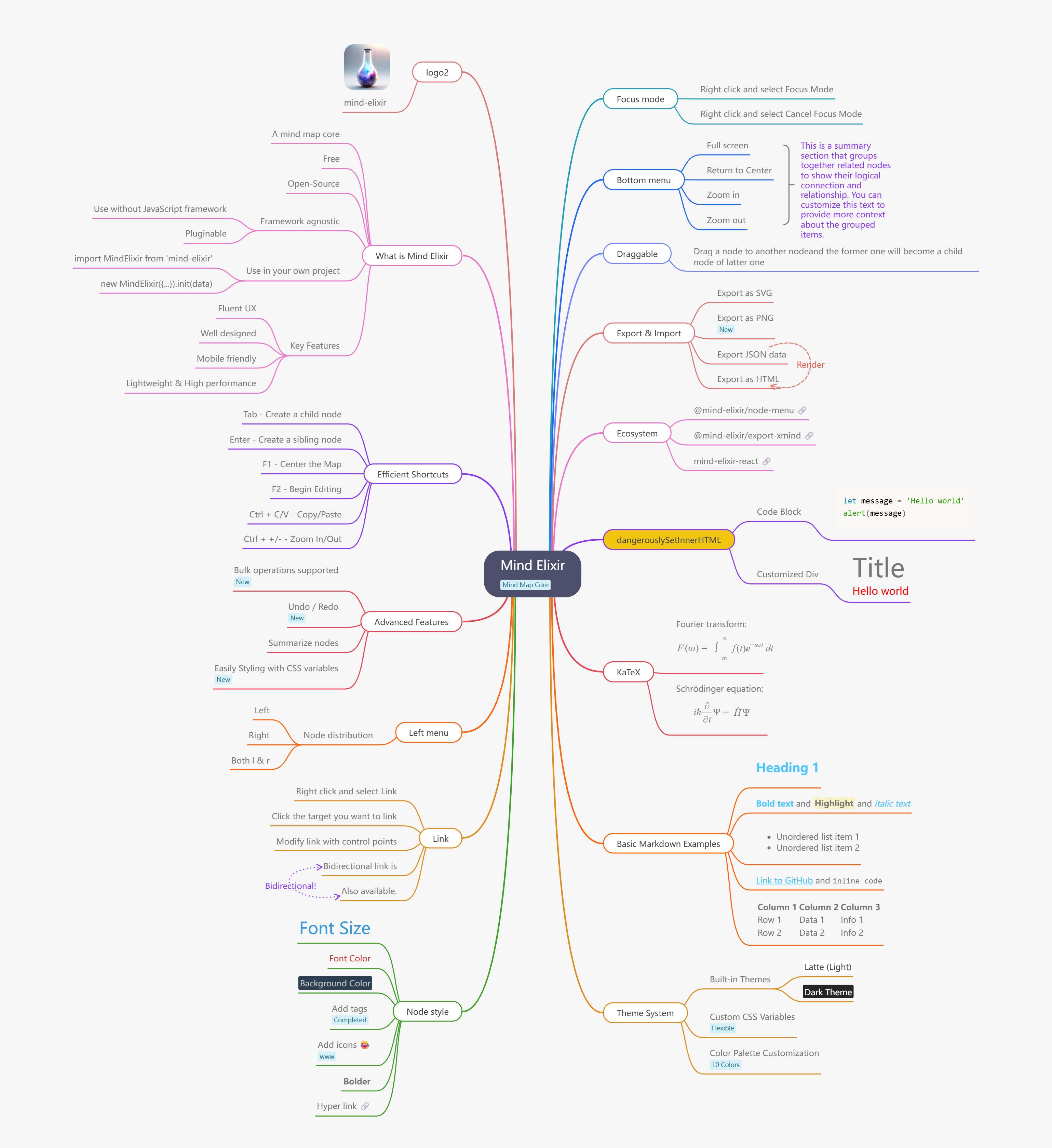
|
|
108
|
-
|
|
109
|
-
https://mind-elixir.com/
|
|
110
|
-
|
|
111
|
-
### 演示
|
|
112
|
-
|
|
113
|
-
- Vanilla JS - https://codepen.io/ssshooter/pen/vEOqWjE
|
|
114
|
-
- React - https://codesandbox.io/p/devbox/mind-elixir-3-x-react-18-x-forked-f3mtcd
|
|
115
|
-
- Vue3 - https://codesandbox.io/p/sandbox/mind-elixir-3-x-vue3-lth484
|
|
116
|
-
|
|
117
|
-
## 文档
|
|
118
|
-
|
|
119
|
-
https://docs.mind-elixir.com/
|
|
120
|
-
|
|
121
|
-
## 使用
|
|
122
|
-
|
|
123
|
-
### 安装
|
|
124
|
-
|
|
125
|
-
#### NPM
|
|
126
|
-
|
|
127
|
-
```bash
|
|
128
|
-
npm i mind-elixir -S
|
|
129
|
-
```
|
|
130
|
-
|
|
131
|
-
```javascript
|
|
132
|
-
import MindElixir from 'mind-elixir'
|
|
133
|
-
```
|
|
134
|
-
|
|
135
|
-
#### Script 标签
|
|
136
|
-
|
|
137
|
-
```html
|
|
138
|
-
<script type="module" src="https://cdn.jsdelivr.net/npm/mind-elixir/dist/MindElixir.js"></script>
|
|
139
|
-
```
|
|
140
|
-
|
|
141
|
-
并在你的 CSS 文件中添加:
|
|
142
|
-
|
|
143
|
-
```css
|
|
144
|
-
@import 'https://cdn.jsdelivr.net/npm/mind-elixir/dist/style.css';
|
|
145
|
-
```
|
|
146
|
-
|
|
147
|
-
### 初始化
|
|
148
|
-
|
|
149
|
-
```html
|
|
150
|
-
<div id="map"></div>
|
|
151
|
-
<style>
|
|
152
|
-
#map {
|
|
153
|
-
height: 500px;
|
|
154
|
-
width: 100%;
|
|
155
|
-
}
|
|
156
|
-
</style>
|
|
157
|
-
```
|
|
158
|
-
|
|
159
|
-
**重大变更** 自 1.0.0 起,`data` 应传递给 `init()`,而不是 `options`。
|
|
160
|
-
|
|
161
|
-
```javascript
|
|
162
|
-
import MindElixir from 'mind-elixir'
|
|
163
|
-
import { en } from 'mind-elixir/i18n'
|
|
164
|
-
import example from 'mind-elixir/dist/example1'
|
|
165
|
-
|
|
166
|
-
let options = {
|
|
167
|
-
el: '#map', // 或 HTMLDivElement
|
|
168
|
-
direction: MindElixir.LEFT,
|
|
169
|
-
draggable: true, // 默认 true
|
|
170
|
-
contextMenu: true, // 默认 true
|
|
171
|
-
toolBar: true, // 默认 true
|
|
172
|
-
keypress: true, // 默认 true
|
|
173
|
-
overflowHidden: false, // 默认 false
|
|
174
|
-
mouseSelectionButton: 0, // 0 为左键,2 为右键,默认 0
|
|
175
|
-
contextMenuOption: {
|
|
176
|
-
locale: en, // [cn,zh_CN,zh_TW,en,ru,ja,pt,it,es,fr,ko,ro,da,fi,de,nl,nb,sv]
|
|
177
|
-
focus: true,
|
|
178
|
-
link: true,
|
|
179
|
-
extend: [
|
|
180
|
-
{
|
|
181
|
-
name: '节点编辑',
|
|
182
|
-
onclick: () => {
|
|
183
|
-
alert('扩展菜单')
|
|
184
|
-
},
|
|
185
|
-
},
|
|
186
|
-
],
|
|
187
|
-
},
|
|
188
|
-
before: {
|
|
189
|
-
insertSibling(el, obj) {
|
|
190
|
-
return true
|
|
191
|
-
},
|
|
192
|
-
async addChild(el, obj) {
|
|
193
|
-
await sleep()
|
|
194
|
-
return true
|
|
195
|
-
},
|
|
196
|
-
},
|
|
197
|
-
}
|
|
198
|
-
|
|
199
|
-
let mind = new MindElixir(options)
|
|
200
|
-
|
|
201
|
-
mind.install(plugin) // 安装你的插件
|
|
202
|
-
|
|
203
|
-
// 创建新的地图数据
|
|
204
|
-
const data = MindElixir.new('new topic')
|
|
205
|
-
// 或 `example`
|
|
206
|
-
// 或从 `.getData()` 返回的数据
|
|
207
|
-
mind.init(data)
|
|
208
|
-
|
|
209
|
-
// 获取一个节点
|
|
210
|
-
MindElixir.E('node-id')
|
|
211
|
-
```
|
|
212
|
-
|
|
213
|
-
### 数据结构
|
|
214
|
-
|
|
215
|
-
```javascript
|
|
216
|
-
// 到目前为止的整个节点数据结构
|
|
217
|
-
const nodeData = {
|
|
218
|
-
topic: '节点主题',
|
|
219
|
-
id: 'bd1c24420cd2c2f5',
|
|
220
|
-
style: { fontSize: '32', color: '#3298db', background: '#ecf0f1' },
|
|
221
|
-
expanded: true,
|
|
222
|
-
parent: null,
|
|
223
|
-
tags: ['标签'],
|
|
224
|
-
icons: ['😀'],
|
|
225
|
-
hyperLink: 'https://github.com/ssshooter/mind-elixir-core',
|
|
226
|
-
image: {
|
|
227
|
-
url: 'https://raw.githubusercontent.com/ssshooter/mind-elixir-core/master/images/logo2.png', // 必填
|
|
228
|
-
// 你需要查询图片的高度和宽度,并计算显示图片的适当值
|
|
229
|
-
height: 90, // 必填
|
|
230
|
-
width: 90, // 必填
|
|
231
|
-
},
|
|
232
|
-
children: [
|
|
233
|
-
{
|
|
234
|
-
topic: '子节点',
|
|
235
|
-
id: 'xxxx',
|
|
236
|
-
// ...
|
|
237
|
-
},
|
|
238
|
-
],
|
|
239
|
-
}
|
|
240
|
-
```
|
|
241
|
-
|
|
242
|
-
### 事件处理
|
|
243
|
-
|
|
244
|
-
```javascript
|
|
245
|
-
mind.bus.addListener('operation', operation => {
|
|
246
|
-
console.log(operation)
|
|
247
|
-
// 返回 {
|
|
248
|
-
// name: 操作名称,
|
|
249
|
-
// obj: 目标对象
|
|
250
|
-
// }
|
|
251
|
-
|
|
252
|
-
// name: [insertSibling|addChild|removeNode|beginEdit|finishEdit]
|
|
253
|
-
// obj: 目标
|
|
254
|
-
|
|
255
|
-
// name: moveNode
|
|
256
|
-
// obj: {from:目标1,to:目标2}
|
|
257
|
-
})
|
|
258
|
-
|
|
259
|
-
mind.bus.addListener('selectNodes', nodes => {
|
|
260
|
-
console.log(nodes)
|
|
261
|
-
})
|
|
262
|
-
|
|
263
|
-
mind.bus.addListener('expandNode', node => {
|
|
264
|
-
console.log('expandNode: ', node)
|
|
265
|
-
})
|
|
266
|
-
```
|
|
267
|
-
|
|
268
|
-
### 数据导出和导入
|
|
269
|
-
|
|
270
|
-
```javascript
|
|
271
|
-
// 数据导出
|
|
272
|
-
const data = mind.getData() // JavaScript 对象,见 src/example.js
|
|
273
|
-
mind.getDataString() // 字符串化对象
|
|
274
|
-
|
|
275
|
-
// 数据导入
|
|
276
|
-
// 初始化
|
|
277
|
-
let mind = new MindElixir(options)
|
|
278
|
-
mind.init(data)
|
|
279
|
-
// 数据更新
|
|
280
|
-
mind.refresh(data)
|
|
281
|
-
```
|
|
282
|
-
|
|
283
|
-
### Markdown 支持
|
|
284
|
-
|
|
285
|
-
Mind Elixir 支持自定义 markdown 解析:
|
|
286
|
-
|
|
287
|
-
```javascript
|
|
288
|
-
// 禁用 markdown(默认)
|
|
289
|
-
let mind = new MindElixir({
|
|
290
|
-
// 省略 markdown 选项 - 不进行 markdown 处理
|
|
291
|
-
})
|
|
292
|
-
|
|
293
|
-
// 使用自定义 markdown 解析器
|
|
294
|
-
let mind = new MindElixir({
|
|
295
|
-
markdown: text => {
|
|
296
|
-
// 你的自定义 markdown 实现
|
|
297
|
-
return text
|
|
298
|
-
.replace(/\*\*(.*?)\*\*/g, '<strong>$1</strong>')
|
|
299
|
-
.replace(/\*(.*?)\*/g, '<em>$1</em>')
|
|
300
|
-
.replace(/`(.*?)`/g, '<code>$1</code>')
|
|
301
|
-
},
|
|
302
|
-
})
|
|
303
|
-
|
|
304
|
-
// 使用任何 markdown 库(例如 marked、markdown-it 等)
|
|
305
|
-
import { marked } from 'marked'
|
|
306
|
-
let mind = new MindElixir({
|
|
307
|
-
markdown: text => marked(text),
|
|
308
|
-
})
|
|
309
|
-
```
|
|
310
|
-
|
|
311
|
-
### 操作守卫
|
|
312
|
-
|
|
313
|
-
```javascript
|
|
314
|
-
let mind = new MindElixir({
|
|
315
|
-
// ...
|
|
316
|
-
before: {
|
|
317
|
-
insertSibling(el, obj) {
|
|
318
|
-
console.log(el, obj)
|
|
319
|
-
if (this.currentNode.nodeObj.parent.root) {
|
|
320
|
-
return false
|
|
321
|
-
}
|
|
322
|
-
return true
|
|
323
|
-
},
|
|
324
|
-
async addChild(el, obj) {
|
|
325
|
-
await sleep()
|
|
326
|
-
if (this.currentNode.nodeObj.parent.root) {
|
|
327
|
-
return false
|
|
328
|
-
}
|
|
329
|
-
return true
|
|
330
|
-
},
|
|
331
|
-
},
|
|
332
|
-
})
|
|
333
|
-
```
|
|
334
|
-
|
|
335
|
-
## 导出为图片
|
|
336
|
-
|
|
337
|
-
安装 `@zumer/snapdom`,然后:
|
|
338
|
-
|
|
339
|
-
```typescript
|
|
340
|
-
import { snapdom } from '@zumer/snapdom'
|
|
341
|
-
|
|
342
|
-
const download = async () => {
|
|
343
|
-
const result = await snapdom(mind.nodes)
|
|
344
|
-
await result.download({ format: 'jpg', filename: 'my-capture' })
|
|
345
|
-
}
|
|
346
|
-
```
|
|
347
|
-
|
|
348
|
-
有关其他导出格式和高级选项,请参阅 [Mind Elixir 文档](https://ssshooter.com/en/how-to-use-mind-elixir/#exporting-images)。
|
|
349
|
-
|
|
350
|
-
### 已弃用的 API
|
|
351
|
-
|
|
352
|
-
> ⚠️ **已弃用**:`mind.exportSvg()` 方法已弃用,将在未来版本中移除。
|
|
353
|
-
|
|
354
|
-
```typescript
|
|
355
|
-
// 已弃用 - 请不要在新项目中使用
|
|
356
|
-
const svgData = await mind.exportSvg()
|
|
357
|
-
```
|
|
358
|
-
|
|
359
|
-
## 主题
|
|
360
|
-
|
|
361
|
-
```javascript
|
|
362
|
-
const options = {
|
|
363
|
-
// ...
|
|
364
|
-
theme: {
|
|
365
|
-
name: 'Dark',
|
|
366
|
-
// 主线颜色调色板
|
|
367
|
-
palette: ['#848FA0', '#748BE9', '#D2F9FE', '#4145A5', '#789AFA', '#706CF4', '#EF987F', '#775DD5', '#FCEECF', '#DA7FBC'],
|
|
368
|
-
// 覆盖 CSS 变量
|
|
369
|
-
cssVar: {
|
|
370
|
-
'--main-color': '#ffffff',
|
|
371
|
-
'--main-bgcolor': '#4c4f69',
|
|
372
|
-
'--color': '#cccccc',
|
|
373
|
-
'--bgcolor': '#252526',
|
|
374
|
-
'--panel-color': '255, 255, 255',
|
|
375
|
-
'--panel-bgcolor': '45, 55, 72',
|
|
376
|
-
},
|
|
377
|
-
// 所有变量见 /src/index.less
|
|
378
|
-
},
|
|
379
|
-
// ...
|
|
380
|
-
}
|
|
381
|
-
|
|
382
|
-
// ...
|
|
383
|
-
|
|
384
|
-
mind.changeTheme({
|
|
385
|
-
name: 'Latte',
|
|
386
|
-
palette: ['#dd7878', '#ea76cb', '#8839ef', '#e64553', '#fe640b', '#df8e1d', '#40a02b', '#209fb5', '#1e66f5', '#7287fd'],
|
|
387
|
-
cssVar: {
|
|
388
|
-
'--main-color': '#444446',
|
|
389
|
-
'--main-bgcolor': '#ffffff',
|
|
390
|
-
'--color': '#777777',
|
|
391
|
-
'--bgcolor': '#f6f6f6',
|
|
392
|
-
},
|
|
393
|
-
})
|
|
394
|
-
```
|
|
395
|
-
|
|
396
|
-
请注意,Mind Elixir 不会观察 `prefers-color-scheme` 的变化。当方案变化时,请**手动**更改主题。
|
|
397
|
-
|
|
398
|
-
## 快捷键
|
|
399
|
-
|
|
400
|
-
请参阅 [快捷键指南](https://docs.mind-elixir.com/docs/guides/shortcuts) 获取详细信息。
|
|
401
|
-
|
|
402
|
-
## 谁在使用
|
|
403
|
-
|
|
404
|
-
- [Mind Elixir Desktop](https://desktop.mind-elixir.com/)
|
|
405
|
-
|
|
406
|
-
## 生态系统
|
|
407
|
-
|
|
408
|
-
- [@mind-elixir/node-menu](https://github.com/ssshooter/node-menu)
|
|
409
|
-
- [@mind-elixir/node-menu-neo](https://github.com/ssshooter/node-menu-neo)
|
|
410
|
-
- [@mind-elixir/export-xmind](https://github.com/ssshooter/export-xmind)
|
|
411
|
-
- [@mind-elixir/export-html](https://github.com/ssshooter/export-html)
|
|
412
|
-
- [mind-elixir-react](https://github.com/ssshooter/mind-elixir-react)
|
|
413
|
-
|
|
414
|
-
欢迎 PR!
|
|
415
|
-
|
|
416
|
-
## 开发
|
|
417
|
-
|
|
418
|
-
```
|
|
419
|
-
pnpm i
|
|
420
|
-
pnpm dev
|
|
421
|
-
```
|
|
422
|
-
|
|
423
|
-
使用 `dev.dist.ts` 测试生成的文件:
|
|
424
|
-
|
|
425
|
-
```
|
|
426
|
-
pnpm build
|
|
427
|
-
pnpm link ./
|
|
428
|
-
```
|
|
429
|
-
|
|
430
|
-
更新文档:
|
|
431
|
-
|
|
432
|
-
```
|
|
433
|
-
# 安装 api-extractor
|
|
434
|
-
pnpm install -g @microsoft/api-extractor
|
|
435
|
-
# 维护 /src/docs.ts
|
|
436
|
-
# 生成文档
|
|
437
|
-
pnpm doc
|
|
438
|
-
pnpm doc:md
|
|
439
|
-
```
|
|
440
|
-
|
|
441
|
-
使用 [DeepWiki](https://deepwiki.com/SSShooter/mind-elixir-core) 了解更多关于 Mind Elixir 的信息
|
|
442
|
-
|
|
443
|
-
## 感谢
|
|
444
|
-
|
|
445
|
-
- [@viselect/vanilla](https://github.com/simonwep/selection/tree/master/packages/vanilla)
|
|
446
|
-
|
|
447
|
-
## 贡献者
|
|
448
|
-
|
|
449
|
-
感谢你们对 Mind Elixir 的贡献!你们的支持和奉献使这个项目变得更好。
|
|
450
|
-
|
|
451
|
-
<a href="https://github.com/SSShooter/mind-elixir-core/graphs/contributors">
|
|
452
|
-
<img src="https://contrib.rocks/image?repo=SSShooter/mind-elixir-core" />
|
|
453
|
-
</a>
|