meta-compare 1.0.4 → 1.0.6
This diff represents the content of publicly available package versions that have been released to one of the supported registries. The information contained in this diff is provided for informational purposes only and reflects changes between package versions as they appear in their respective public registries.
- package/README.html +86 -0
- package/README.md +14 -10
- package/package.json +1 -1
package/README.html
ADDED
|
@@ -0,0 +1,86 @@
|
|
|
1
|
+
|
|
2
|
+
<!DOCTYPE html>
|
|
3
|
+
<html lang="en" class="dark">
|
|
4
|
+
<head>
|
|
5
|
+
<meta charset="UTF-8">
|
|
6
|
+
<meta name="viewport" content="width=device-width, initial-scale=1.0">
|
|
7
|
+
<title>Markdown Viewer</title>
|
|
8
|
+
<script src="https://cdn.tailwindcss.com"></script>
|
|
9
|
+
<style>
|
|
10
|
+
body {
|
|
11
|
+
font-family: 'Inter', sans-serif;
|
|
12
|
+
min-height: 100vh;
|
|
13
|
+
display: flex;
|
|
14
|
+
flex-direction: column;
|
|
15
|
+
}
|
|
16
|
+
main {
|
|
17
|
+
flex: 1;
|
|
18
|
+
}
|
|
19
|
+
</style>
|
|
20
|
+
</head>
|
|
21
|
+
<body class="bg-gray-900 text-gray-100">
|
|
22
|
+
<header class="bg-gray-800 sticky top-0 z-10 shadow">
|
|
23
|
+
<div class="max-w-4xl mx-auto py-4 px-6">
|
|
24
|
+
<h1 class="text-2xl font-bold">Markdown Viewer</h1>
|
|
25
|
+
</div>
|
|
26
|
+
</header>
|
|
27
|
+
|
|
28
|
+
<main class="max-w-4xl mx-auto py-8 px-6 prose prose-invert">
|
|
29
|
+
<h1>Salesforce Metadata Comparer (meta-compare)</h1>
|
|
30
|
+
<blockquote>
|
|
31
|
+
<p>A CLI tool to compare Salesforce metadata between two orgs, view KPIs, and export CSV results.</p>
|
|
32
|
+
</blockquote>
|
|
33
|
+
<hr>
|
|
34
|
+
<h2>Features</h2>
|
|
35
|
+
<ul>
|
|
36
|
+
<li><p>Authenticate multiple Salesforce orgs using CLI aliases or usernames.</p>
|
|
37
|
+
</li>
|
|
38
|
+
<li><p>Fetch metadata types like:</p>
|
|
39
|
+
<ul>
|
|
40
|
+
<li>Apex Classes</li>
|
|
41
|
+
<li>Triggers</li>
|
|
42
|
+
<li>Custom Objects</li>
|
|
43
|
+
<li>Flows</li>
|
|
44
|
+
<li>Page Layouts</li>
|
|
45
|
+
<li>Profiles</li>
|
|
46
|
+
<li>Permission Sets</li>
|
|
47
|
+
<li>Validation Rules</li>
|
|
48
|
+
</ul>
|
|
49
|
+
<p><a href="https://mchinnappan100.github.io/pages2/metadata/search.html">View all supported metadata types</a>
|
|
50
|
+
</p>
|
|
51
|
+
</li>
|
|
52
|
+
<li><p>Compare metadata between two orgs:</p>
|
|
53
|
+
<ul>
|
|
54
|
+
<li>Identify common components</li>
|
|
55
|
+
<li>List components only in Source Org</li>
|
|
56
|
+
<li>List components only in Target Org</li>
|
|
57
|
+
</ul>
|
|
58
|
+
</li>
|
|
59
|
+
<li><p>Interactive data tables with:</p>
|
|
60
|
+
<ul>
|
|
61
|
+
<li>Search</li>
|
|
62
|
+
<li>Column sorting</li>
|
|
63
|
+
<li>CSV export</li>
|
|
64
|
+
</ul>
|
|
65
|
+
</li>
|
|
66
|
+
<li><p>KPI summary with large-font counts.</p>
|
|
67
|
+
</li>
|
|
68
|
+
</ul>
|
|
69
|
+
<hr>
|
|
70
|
+
<h2>Installation</h2>
|
|
71
|
+
<p>Install globally via npm:</p>
|
|
72
|
+
<pre><code class="language-bash">npm install -g meta-compare
|
|
73
|
+
</code></pre>
|
|
74
|
+
<h2>Usage</h2>
|
|
75
|
+
<pre><code class="language-bash">meta-compare compare -s <source-org-alias> -t <target-org-alias> -m ApexTrigger
|
|
76
|
+
</code></pre>
|
|
77
|
+
|
|
78
|
+
</main>
|
|
79
|
+
|
|
80
|
+
<footer class="bg-gray-800 sticky bottom-0 z-10 shadow">
|
|
81
|
+
<div class="max-w-4xl mx-auto py-4 px-6 text-sm">
|
|
82
|
+
<p>Generated by Markdown-to-HTML CLI</p>
|
|
83
|
+
</div>
|
|
84
|
+
</footer>
|
|
85
|
+
</body>
|
|
86
|
+
</html>
|
package/README.md
CHANGED
|
@@ -8,14 +8,14 @@
|
|
|
8
8
|
|
|
9
9
|
- Authenticate multiple Salesforce orgs using CLI aliases or usernames.
|
|
10
10
|
- Fetch metadata types like:
|
|
11
|
-
- Apex Classes
|
|
12
|
-
- Triggers
|
|
13
|
-
- Custom Objects
|
|
14
|
-
- Flows
|
|
15
|
-
- Page Layouts
|
|
16
|
-
- Profiles
|
|
17
|
-
- Permission Sets
|
|
18
|
-
- Validation Rules
|
|
11
|
+
- Apex Classes (ApexClass)
|
|
12
|
+
- Triggers (ApexTrigger)
|
|
13
|
+
- Custom Objects (CustomObject)
|
|
14
|
+
- Flows (Flow)
|
|
15
|
+
- Page Layouts (PageLayout)
|
|
16
|
+
- Profiles (Profile)
|
|
17
|
+
- Permission Sets (PermissionSet)
|
|
18
|
+
- Validation Rules
|
|
19
19
|
|
|
20
20
|
[View all supported metadata types](https://mchinnappan100.github.io/pages2/metadata/search.html)
|
|
21
21
|
|
|
@@ -28,11 +28,14 @@
|
|
|
28
28
|
- Column sorting
|
|
29
29
|
- CSV export
|
|
30
30
|
- KPI summary with large-font counts.
|
|
31
|
-
|
|
32
|
-
- Dark theme UI for comfortable viewing.
|
|
31
|
+
|
|
33
32
|
|
|
34
33
|
---
|
|
35
34
|
|
|
35
|
+
## Screenshot
|
|
36
|
+
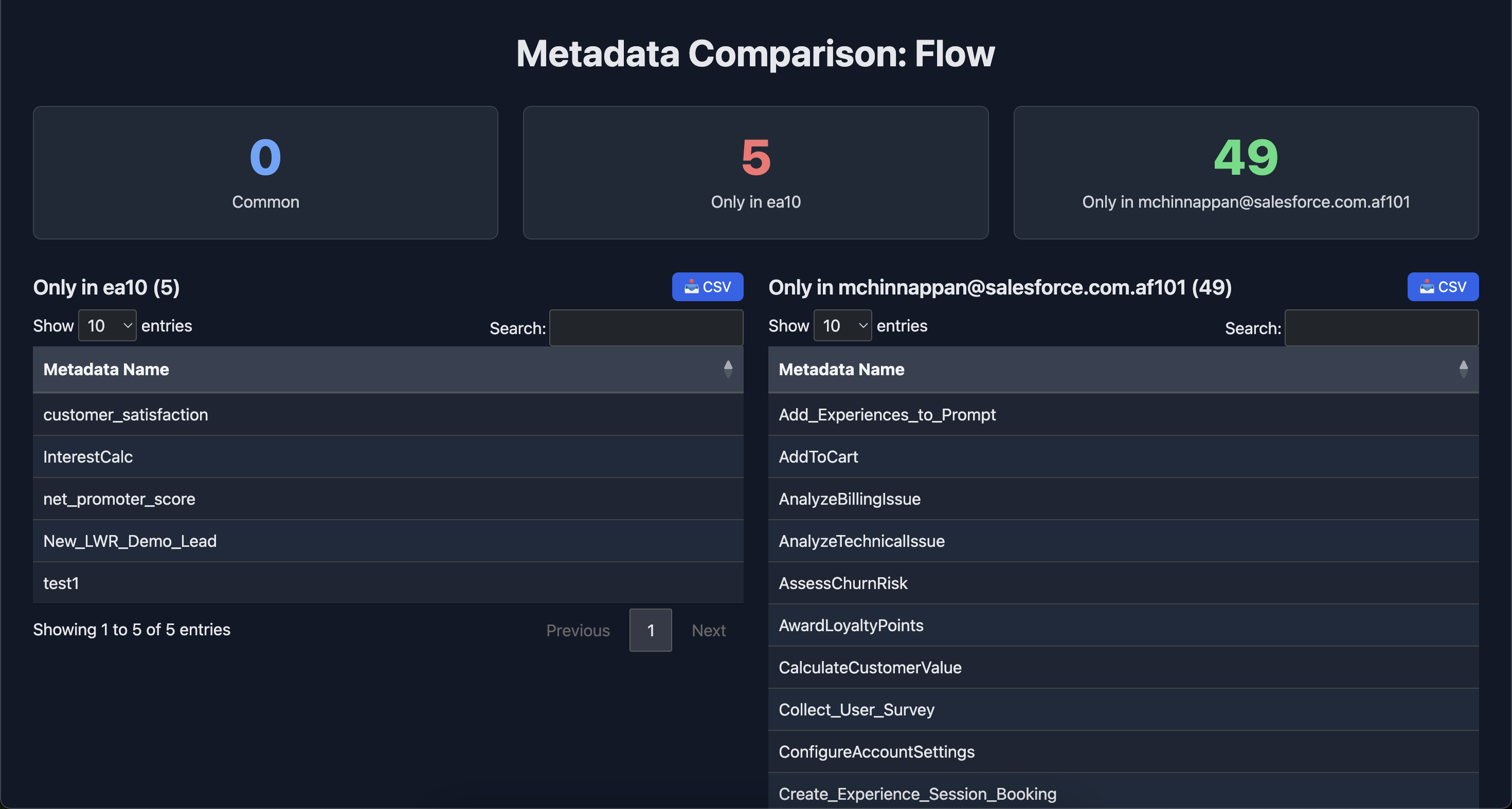
|
|
37
|
+
|
|
38
|
+
|
|
36
39
|
## Installation
|
|
37
40
|
|
|
38
41
|
Install globally via npm:
|
|
@@ -44,5 +47,6 @@ npm install -g meta-compare
|
|
|
44
47
|
## Usage
|
|
45
48
|
```bash
|
|
46
49
|
meta-compare compare -s <source-org-alias> -t <target-org-alias> -m ApexTrigger
|
|
50
|
+
meta-compare compare -s <source-org-alias> -t <target-org-alias> -m Flow
|
|
47
51
|
|
|
48
52
|
```
|