memorix 1.0.7 → 1.0.8
This diff represents the content of publicly available package versions that have been released to one of the supported registries. The information contained in this diff is provided for informational purposes only and reflects changes between package versions as they appear in their respective public registries.
- package/CHANGELOG.md +36 -9
- package/README.md +469 -409
- package/README.zh-CN.md +468 -415
- package/TEAM.md +106 -0
- package/dist/cli/index.js +31325 -26915
- package/dist/cli/index.js.map +1 -1
- package/dist/dashboard/static/app.js +49 -49
- package/dist/dashboard/static/index.html +2 -2
- package/dist/index.js +1061 -234
- package/dist/index.js.map +1 -1
- package/dist/sdk.d.ts +677 -0
- package/dist/sdk.js +18962 -0
- package/dist/sdk.js.map +1 -0
- package/dist/types.d.ts +10 -10
- package/dist/types.js +10 -10
- package/dist/types.js.map +1 -1
- package/docs/AGENT_OPERATOR_PLAYBOOK.md +684 -0
- package/docs/AI_CONTEXT.md +18 -0
- package/docs/API_REFERENCE.md +687 -0
- package/docs/ARCHITECTURE.md +488 -0
- package/docs/CLOUD_SYNC_AND_MULTI_AGENT_RESEARCH.md +470 -0
- package/docs/CONFIGURATION.md +265 -0
- package/docs/DESIGN_DECISIONS.md +358 -0
- package/docs/DEVELOPMENT.md +317 -0
- package/docs/DOCKER.md +138 -0
- package/docs/GIT_MEMORY.md +221 -0
- package/docs/KNOWN_ISSUES_AND_ROADMAP.md +149 -0
- package/docs/MEMORY_FORMATION_PIPELINE.md +224 -0
- package/docs/MODULES.md +383 -0
- package/docs/PERFORMANCE.md +64 -0
- package/docs/README.md +79 -0
- package/docs/SETUP.md +521 -0
- package/docs/hooks-architecture.md +108 -0
- package/package.json +24 -23
package/README.zh-CN.md
CHANGED
|
@@ -1,435 +1,488 @@
|
|
|
1
|
-
<p align="center">
|
|
2
|
-
<img src="https://raw.githubusercontent.com/AVIDS2/memorix/main/assets/readme-logo-bridge.png" alt="Memorix Bridge" width="720">
|
|
3
|
-
</p>
|
|
4
|
-
|
|
5
|
-
<h1 align="center">Memorix</h1>
|
|
6
|
-
|
|
1
|
+
<p align="center">
|
|
2
|
+
<img src="https://raw.githubusercontent.com/AVIDS2/memorix/main/assets/readme-logo-bridge.png" alt="Memorix Bridge" width="720">
|
|
3
|
+
</p>
|
|
4
|
+
|
|
5
|
+
<h1 align="center">Memorix</h1>
|
|
6
|
+
|
|
7
7
|
<p align="center">
|
|
8
8
|
<strong>面向 Coding Agent 的开源跨 Agent Memory Layer。</strong><br>
|
|
9
|
-
通过 MCP 为 Cursor、Claude Code、Codex、Windsurf、Gemini CLI、GitHub Copilot、Kiro、OpenCode、Antigravity
|
|
10
|
-
</p>
|
|
11
|
-
|
|
12
|
-
<p align="center">
|
|
13
|
-
<a href="https://www.npmjs.com/package/memorix"><img src="https://img.shields.io/npm/v/memorix.svg?style=flat-square&color=cb3837" alt="npm"></a>
|
|
14
|
-
<a href="https://www.npmjs.com/package/memorix"><img src="https://img.shields.io/npm/dm/memorix.svg?style=flat-square&color=blue" alt="downloads"></a>
|
|
15
|
-
<a href="LICENSE"><img src="https://img.shields.io/badge/license-Apache%202.0-green.svg?style=flat-square" alt="license"></a>
|
|
16
|
-
<a href="https://github.com/AVIDS2/memorix/actions/workflows/ci.yml"><img src="https://img.shields.io/github/actions/workflow/status/AVIDS2/memorix/ci.yml?style=flat-square&label=CI" alt="CI"></a>
|
|
17
|
-
<a href="https://github.com/AVIDS2/memorix"><img src="https://img.shields.io/github/stars/AVIDS2/memorix?style=flat-square&color=yellow" alt="stars"></a>
|
|
18
|
-
</p>
|
|
19
|
-
|
|
20
|
-
<p align="center">
|
|
21
|
-
<strong>Git Memory</strong> | <strong>Reasoning Memory</strong> | <strong>跨 Agent 召回</strong> | <strong>Control Plane Dashboard</strong>
|
|
9
|
+
通过 MCP 为 Cursor、Claude Code、Codex、Windsurf、Gemini CLI、GitHub Copilot、Kiro、OpenCode、Antigravity、Trae 以及其他兼容 MCP 的客户端提供分级支持。
|
|
22
10
|
</p>
|
|
23
|
-
|
|
24
|
-
<p align="center">
|
|
25
|
-
<a href="
|
|
26
|
-
<a href="
|
|
27
|
-
<a href="
|
|
28
|
-
<a href="
|
|
29
|
-
<a href="
|
|
30
|
-
|
|
31
|
-
|
|
32
|
-
|
|
33
|
-
|
|
34
|
-
|
|
35
|
-
|
|
36
|
-
|
|
37
|
-
|
|
38
|
-
|
|
39
|
-
|
|
40
|
-
|
|
41
|
-
|
|
42
|
-
|
|
43
|
-
|
|
44
|
-
|
|
45
|
-
|
|
46
|
-
|
|
47
|
-
|
|
48
|
-
|
|
49
|
-
|
|
50
|
-
|
|
51
|
-
|
|
52
|
-
Memorix
|
|
53
|
-
|
|
54
|
-
|
|
55
|
-
|
|
56
|
-
|
|
57
|
-
|
|
58
|
-
|
|
59
|
-
|
|
60
|
-
|
|
61
|
-
|
|
62
|
-
|
|
63
|
-
|
|
64
|
-
|
|
65
|
-
|
|
66
|
-
|
|
67
|
-
|
|
68
|
-
|
|
69
|
-
|
|
70
|
-
|
|
71
|
-
|
|
72
|
-
|
|
73
|
-
|
|
74
|
-
|
|
75
|
-
|
|
76
|
-
|
|
77
|
-
|
|
|
78
|
-
|
|
79
|
-
|
|
80
|
-
|
|
81
|
-
|
|
82
|
-
|
|
83
|
-
|
|
84
|
-
|
|
85
|
-
|
|
86
|
-
|
|
87
|
-
|
|
88
|
-
|
|
89
|
-
|
|
90
|
-
|
|
91
|
-
|
|
92
|
-
|
|
93
|
-
|
|
94
|
-
|
|
95
|
-
|
|
96
|
-
|
|
97
|
-
|
|
98
|
-
|
|
99
|
-
|
|
100
|
-
|
|
101
|
-
|
|
102
|
-
|
|
103
|
-
|
|
104
|
-
|
|
105
|
-
|
|
106
|
-
|
|
107
|
-
|
|
108
|
-
|
|
109
|
-
|
|
110
|
-
|
|
111
|
-
|
|
112
|
-
|
|
|
113
|
-
|
|
|
114
|
-
|
|
115
|
-
|
|
116
|
-
|
|
117
|
-
|
|
118
|
-
|
|
119
|
-
|
|
120
|
-
|
|
121
|
-
|
|
122
|
-
|
|
123
|
-
|
|
124
|
-
|
|
125
|
-
|
|
126
|
-
|
|
127
|
-
|
|
128
|
-
|
|
129
|
-
|
|
130
|
-
|
|
131
|
-
|
|
132
|
-
|
|
133
|
-
|
|
134
|
-
|
|
135
|
-
|
|
136
|
-
|
|
137
|
-
|
|
138
|
-
|
|
139
|
-
|
|
140
|
-
|
|
141
|
-
|
|
142
|
-
|
|
143
|
-
|
|
144
|
-
|
|
145
|
-
|
|
146
|
-
|
|
147
|
-
|
|
148
|
-
|
|
149
|
-
|
|
150
|
-
|
|
151
|
-
|
|
152
|
-
|
|
153
|
-
|
|
154
|
-
|
|
155
|
-
|
|
156
|
-
|
|
157
|
-
|
|
158
|
-
|
|
159
|
-
|
|
160
|
-
|
|
161
|
-
|
|
162
|
-
|
|
163
|
-
|
|
164
|
-
|
|
165
|
-
|
|
166
|
-
|
|
167
|
-
|
|
168
|
-
|
|
169
|
-
|
|
170
|
-
|
|
171
|
-
|
|
172
|
-
|
|
173
|
-
|
|
174
|
-
|
|
175
|
-
|
|
176
|
-
|
|
177
|
-
|
|
178
|
-
|
|
179
|
-
|
|
180
|
-
|
|
181
|
-
|
|
182
|
-
|
|
183
|
-
|
|
184
|
-
|
|
185
|
-
|
|
186
|
-
|
|
187
|
-
|
|
188
|
-
|
|
189
|
-
}
|
|
190
|
-
|
|
191
|
-
|
|
192
|
-
|
|
193
|
-
|
|
194
|
-
|
|
195
|
-
|
|
196
|
-
```
|
|
197
|
-
|
|
198
|
-
|
|
199
|
-
|
|
200
|
-
|
|
201
|
-
|
|
202
|
-
|
|
203
|
-
|
|
204
|
-
|
|
205
|
-
|
|
206
|
-
|
|
207
|
-
|
|
208
|
-
|
|
209
|
-
|
|
210
|
-
|
|
211
|
-
|
|
212
|
-
|
|
213
|
-
|
|
214
|
-
|
|
215
|
-
|
|
216
|
-
|
|
217
|
-
|
|
218
|
-
|
|
219
|
-
|
|
220
|
-
|
|
221
|
-
|
|
222
|
-
|
|
223
|
-
|
|
224
|
-
|
|
225
|
-
|
|
226
|
-
|
|
227
|
-
|
|
228
|
-
|
|
229
|
-
|
|
230
|
-
|
|
231
|
-
|
|
232
|
-
|
|
233
|
-
|
|
234
|
-
|
|
235
|
-
```
|
|
236
|
-
|
|
237
|
-
|
|
238
|
-
|
|
239
|
-
```
|
|
240
|
-
|
|
241
|
-
|
|
242
|
-
|
|
243
|
-
|
|
244
|
-
|
|
245
|
-
|
|
246
|
-
|
|
247
|
-
|
|
248
|
-
|
|
249
|
-
|
|
250
|
-
|
|
251
|
-
|
|
252
|
-
|
|
253
|
-
|
|
254
|
-
|
|
255
|
-
|
|
256
|
-
|
|
257
|
-
|
|
258
|
-
|
|
259
|
-
|
|
260
|
-
|
|
261
|
-
|
|
262
|
-
memorix
|
|
263
|
-
|
|
264
|
-
|
|
265
|
-
|
|
266
|
-
|
|
267
|
-
|
|
268
|
-
|
|
269
|
-
|
|
270
|
-
|
|
271
|
-
|
|
272
|
-
|
|
273
|
-
|
|
274
|
-
|
|
275
|
-
|
|
276
|
-
|
|
11
|
+
|
|
12
|
+
<p align="center">
|
|
13
|
+
<a href="https://www.npmjs.com/package/memorix"><img src="https://img.shields.io/npm/v/memorix.svg?style=flat-square&color=cb3837" alt="npm"></a>
|
|
14
|
+
<a href="https://www.npmjs.com/package/memorix"><img src="https://img.shields.io/npm/dm/memorix.svg?style=flat-square&color=blue" alt="downloads"></a>
|
|
15
|
+
<a href="LICENSE"><img src="https://img.shields.io/badge/license-Apache%202.0-green.svg?style=flat-square" alt="license"></a>
|
|
16
|
+
<a href="https://github.com/AVIDS2/memorix/actions/workflows/ci.yml"><img src="https://img.shields.io/github/actions/workflow/status/AVIDS2/memorix/ci.yml?style=flat-square&label=CI" alt="CI"></a>
|
|
17
|
+
<a href="https://github.com/AVIDS2/memorix"><img src="https://img.shields.io/github/stars/AVIDS2/memorix?style=flat-square&color=yellow" alt="stars"></a>
|
|
18
|
+
</p>
|
|
19
|
+
|
|
20
|
+
<p align="center">
|
|
21
|
+
<strong>三层记忆</strong> | <strong>团队协作</strong> | <strong>工作区同步</strong> | <strong>多 Agent 编排</strong> | <strong>Dashboard</strong>
|
|
22
|
+
</p>
|
|
23
|
+
|
|
24
|
+
<p align="center">
|
|
25
|
+
<a href="README.md">English</a> |
|
|
26
|
+
<a href="#快速开始">快速开始</a> |
|
|
27
|
+
<a href="#docker">Docker</a> |
|
|
28
|
+
<a href="#支持的客户端">支持的客户端</a> |
|
|
29
|
+
<a href="#常用工作流">常用工作流</a> |
|
|
30
|
+
<a href="#文档导航">文档导航</a> |
|
|
31
|
+
<a href="docs/SETUP.md">安装与接入</a>
|
|
32
|
+
</p>
|
|
33
|
+
|
|
34
|
+
---
|
|
35
|
+
|
|
36
|
+
> 如果你是通过 Cursor、Windsurf、Claude Code、Codex 或其他 AI coding agent 来操作 Memorix,请先读 [Agent Operator Playbook](docs/AGENT_OPERATOR_PLAYBOOK.md)。那份文档是面向 agent 的安装、MCP、hook 和排障手册。
|
|
37
|
+
|
|
38
|
+
## Memorix 是什么?
|
|
39
|
+
|
|
40
|
+
**Memorix 是一个面向 Coding Agent 的、本地优先的记忆控制面。**
|
|
41
|
+
|
|
42
|
+
它把项目记忆、推理上下文、Git 导出的工程事实,以及可选的自主 Agent Team 状态放在同一套本地系统里,让你可以在 IDE、终端、不同 session 和自主 agent 运行之间持续推进同一个项目,而不丢失项目真相。
|
|
43
|
+
|
|
44
|
+
对大多数用户来说,默认路径其实很简单:直接用本地 TUI/CLI,或者把一个 IDE 通过 stdio MCP 接进来。HTTP 更适合作为你主动启用的共享控制面模式,用在长驻后台服务、多个客户端共享 MCP、或需要 live dashboard endpoint 的场景里。
|
|
45
|
+
|
|
46
|
+
## 为什么选择 Memorix
|
|
47
|
+
|
|
48
|
+
大多数 Coding Agent 只记得当前线程。Memorix 提供的是一层共享、持久、可检索的项目记忆,让不同 IDE、不同 Agent、不同会话都能在同一套本地记忆库上继续工作。
|
|
49
|
+
|
|
50
|
+
<table>
|
|
51
|
+
<tr><td><b>🧠 三层记忆</b></td><td>Observation(what/how)、Reasoning(why/权衡)、Git Memory(不可变 commit 事实 + 噪音过滤)</td></tr>
|
|
52
|
+
<tr><td><b>🔍 Source-Aware 检索</b></td><td>"改了什么"倾向 Git Memory;"为什么"倾向推理记忆;默认项目作用域,可切全局</td></tr>
|
|
53
|
+
<tr><td><b>⚙️ 记忆质量管线</b></td><td>Formation(LLM 评估)、去重、合并、保留衰减——记忆保持干净,不会越积越噪</td></tr>
|
|
54
|
+
<tr><td><b>🔄 工作区 & 规则同步</b></td><td>一条命令迁移 MCP 配置、工作流、规则、技能到 Cursor/Windsurf/Claude Code/Codex/Copilot/Kiro 等</td></tr>
|
|
55
|
+
<tr><td><b>👥 Agent Team</b></td><td>面向自主 CLI Agent 的显式状态:任务板(角色认领)、Agent 间消息、文件锁、态势感知 poll</td></tr>
|
|
56
|
+
<tr><td><b>🤖 多 Agent 编排</b></td><td><code>memorix orchestrate</code> 运行结构化协作循环——计划→并行执行→验证→修复→审查——带能力路由和 worktree 隔离</td></tr>
|
|
57
|
+
<tr><td><b>📋 Session 生命周期</b></td><td>Session start/end + 交接摘要、水位线追踪(上次以来的新记忆)、跨 session 上下文恢复</td></tr>
|
|
58
|
+
<tr><td><b>🎯 项目技能</b></td><td>从记忆模式自动生成 SKILL.md;将观察提升为永久 mini-skill,session 启动时自动注入</td></tr>
|
|
59
|
+
<tr><td><b>📊 Dashboard</b></td><td>本地 Web UI:浏览记忆、Git 历史、会话,以及只读自主 Agent Team 状态</td></tr>
|
|
60
|
+
<tr><td><b>🔒 本地 & 私有</b></td><td>SQLite 为权威存储、Orama 为检索引擎、无云依赖——一切留在你的机器上</td></tr>
|
|
61
|
+
</table>
|
|
62
|
+
|
|
63
|
+
## 支持的客户端
|
|
64
|
+
|
|
65
|
+
| 层级 | 客户端 |
|
|
66
|
+
|------|---------|
|
|
67
|
+
| ★ 核心 | Claude Code, Cursor, Windsurf |
|
|
68
|
+
| ◆ 扩展 | GitHub Copilot, Kiro, Codex |
|
|
69
|
+
| ○ 社区 | Gemini CLI, OpenCode, Antigravity, Trae |
|
|
70
|
+
|
|
71
|
+
**核心** = 完整 hook 集成 + 测试过的 MCP + 规则同步。**扩展** = hook 集成但有平台限制。**社区** = 尽力适配,兼容性由社区反馈。
|
|
72
|
+
|
|
73
|
+
如果某个客户端能通过 MCP 连接本地命令或 HTTP 端点,通常也可以接入 Memorix,即使它暂时不在上面的列表里。
|
|
74
|
+
|
|
75
|
+
---
|
|
76
|
+
|
|
77
|
+
## 快速开始
|
|
78
|
+
|
|
79
|
+
全局安装:
|
|
80
|
+
|
|
81
|
+
```bash
|
|
82
|
+
npm install -g memorix
|
|
83
|
+
```
|
|
84
|
+
|
|
85
|
+
初始化 Memorix 配置:
|
|
86
|
+
|
|
87
|
+
```bash
|
|
88
|
+
memorix init
|
|
89
|
+
```
|
|
90
|
+
|
|
91
|
+
`memorix init` 会让你在 `Global defaults` 和 `Project config` 之间选择作用域。
|
|
92
|
+
|
|
93
|
+
Memorix 使用两类文件:
|
|
94
|
+
|
|
95
|
+
- `memorix.yml`:行为配置和项目设置
|
|
96
|
+
- `.env`:API key 等 secrets
|
|
97
|
+
|
|
98
|
+
然后按你的目标选择一条最顺手的路径:
|
|
99
|
+
|
|
100
|
+
| 你想做什么 | 运行命令 | 适合场景 |
|
|
101
|
+
| --- | --- | --- |
|
|
102
|
+
| 交互式终端工作台 | `memorix` | 默认起手式:本地搜索、聊天、记忆录入、诊断都在一个全屏 TUI 里完成 |
|
|
103
|
+
| 先把 Memorix 快速接到一个 IDE 里 | `memorix serve` | 默认 MCP 路径,适合 Cursor、Claude Code、Codex、Windsurf、Gemini CLI 等 stdio 客户端 |
|
|
104
|
+
| 在后台长期运行 HTTP MCP + Dashboard | `memorix background start` | 当你明确需要共享控制面、多个客户端 MCP 或 live dashboard endpoint 时再启用 |
|
|
105
|
+
| 把 HTTP 模式放在前台调试或自定义端口 | `memorix serve-http --port 3211` | 调试、手动观察日志、自定义启动方式 |
|
|
106
|
+
|
|
107
|
+
对大多数用户来说,选上面前两条之一就够了。只有在你明确想要共享后台服务、多客户端 MCP 或 live dashboard endpoint 时,再切到 HTTP。
|
|
108
|
+
|
|
109
|
+
常见路径:
|
|
110
|
+
|
|
111
|
+
| 目标 | 使用 | 原因 |
|
|
112
|
+
| --- | --- | --- |
|
|
113
|
+
| 在终端里直接操作 | `memorix` 或 `memorix <command>` | CLI/TUI 是主要产品入口。 |
|
|
114
|
+
| 通过 MCP 接入 IDE 或 Coding Agent | 优先 `memorix serve`;需要时再用 HTTP + `memorix_session_start` | 启动轻量记忆会话;默认不加入 Agent Team。 |
|
|
115
|
+
| 运行自主多 Agent 执行 | `memorix orchestrate` | 结构化计划→启动→验证→修复→审查循环。 |
|
|
116
|
+
| 在浏览器里观察项目记忆和 Agent Team 状态 | `memorix dashboard` | 独立只读 Dashboard,展示记忆、会话和自主 Agent Team 状态。 |
|
|
117
|
+
|
|
118
|
+
配套命令:`memorix background status|logs|stop`。多工作区 HTTP session 需用 `memorix_session_start(projectRoot=...)` 绑定。
|
|
119
|
+
|
|
120
|
+
更细的启动根路径选择、项目绑定、配置优先级和 agent 操作说明:[docs/SETUP.md](docs/SETUP.md) 和 [Agent Operator Playbook](docs/AGENT_OPERATOR_PLAYBOOK.md)。
|
|
121
|
+
|
|
122
|
+
### TUI 工作台
|
|
123
|
+
|
|
124
|
+
|
|
125
|
+
|
|
126
|
+
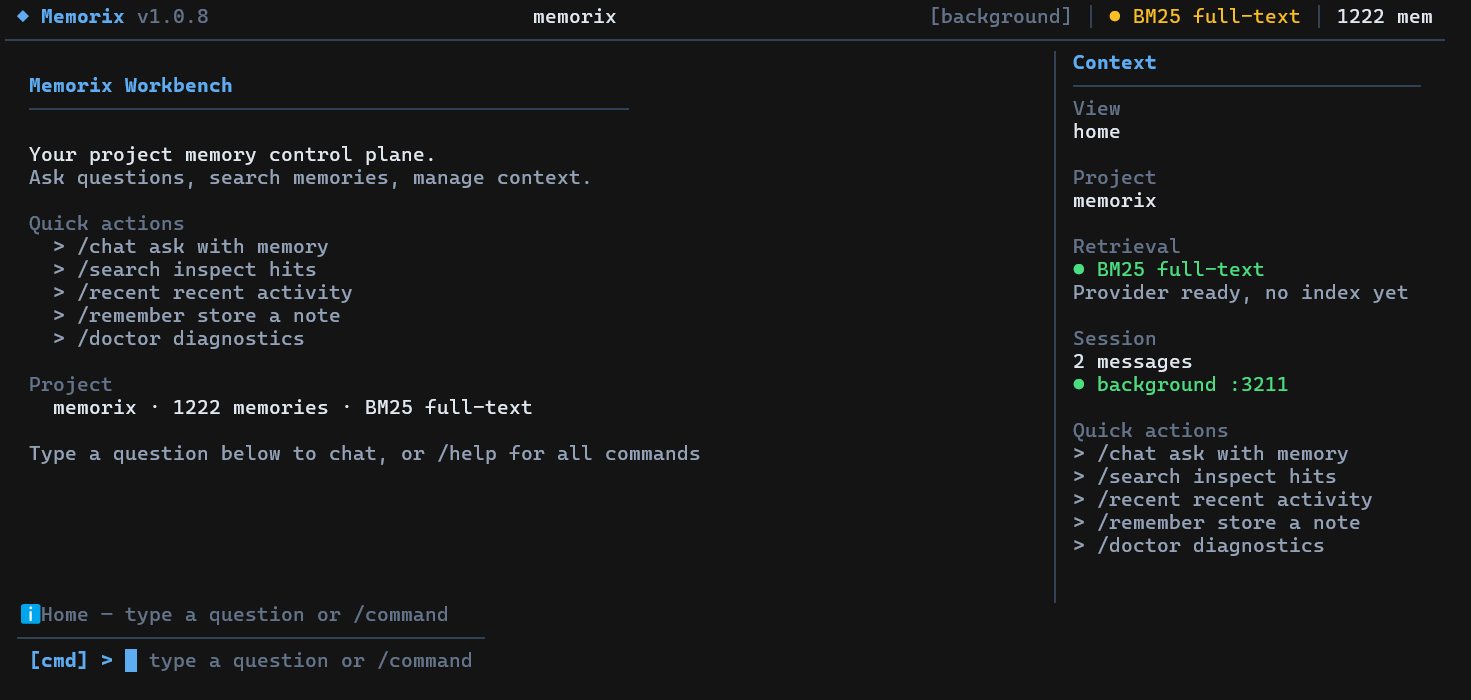
在终端中直接运行 `memorix`(不带参数)即可打开交互式全屏 TUI(需要 TTY)。它适合用于项目记忆问答、搜索、快速存储、诊断、后台服务控制、Dashboard 打开和 IDE 配置。进入 TUI 后用 `/help` 查看当前命令列表。
|
|
127
|
+
|
|
128
|
+
单次聊天(不进 TUI):`memorix ask "your question"`。
|
|
129
|
+
|
|
130
|
+
### Operator CLI
|
|
131
|
+
|
|
132
|
+
Memorix 提供了一套 **CLI-first 的 operator 命令面**。当你想直接在终端里检查或控制当前项目时使用。MCP 继续作为 IDE 和 Agent 的集成协议层。
|
|
133
|
+
|
|
134
|
+
```bash
|
|
135
|
+
memorix session start --agent codex-main --agentType codex
|
|
136
|
+
memorix memory search --query "docker control plane"
|
|
137
|
+
memorix reasoning search --query "why sqlite"
|
|
138
|
+
memorix retention status
|
|
139
|
+
memorix team status
|
|
140
|
+
memorix task list
|
|
141
|
+
memorix audit project
|
|
142
|
+
memorix sync workspace --action scan
|
|
143
|
+
```
|
|
144
|
+
|
|
145
|
+
这组 CLI 故意做成**任务导向**的命名空间,而不是把 MCP 工具名原样搬出来。原生能力可以通过这些命名空间进入:`session`、`memory`、`reasoning`、`retention`、`formation`、`audit`、`transfer`、`skills`、`team`、`task`、`message`、`lock`、`handoff`、`poll`、`sync`、`ingest`。MCP 继续保留为 IDE、Agent 和可选 graph-compatibility 工具的接入层。
|
|
146
|
+
|
|
147
|
+
## Docker
|
|
148
|
+
|
|
149
|
+
Memorix 现在包含了面向 **HTTP control plane** 的官方 Docker 部署路径。
|
|
150
|
+
|
|
151
|
+
快速启动:
|
|
152
|
+
|
|
153
|
+
```bash
|
|
154
|
+
docker compose up --build -d
|
|
155
|
+
```
|
|
156
|
+
|
|
157
|
+
启动后可访问:
|
|
158
|
+
|
|
159
|
+
- Dashboard:`http://localhost:3211`
|
|
160
|
+
- MCP:`http://localhost:3211/mcp`
|
|
161
|
+
- 健康检查:`http://localhost:3211/health`
|
|
162
|
+
|
|
163
|
+
需要注意:Docker 支持的是 `serve-http`,不是 `memorix serve`。如果容器看不到你要绑定的仓库路径,那么项目级 Git / 配置语义不会完整生效。
|
|
164
|
+
|
|
165
|
+
完整 Docker 指南:[docs/DOCKER.md](docs/DOCKER.md)
|
|
166
|
+
|
|
167
|
+
将 Memorix 添加到你的 MCP 客户端:
|
|
168
|
+
|
|
169
|
+
### 通用 stdio MCP 配置
|
|
170
|
+
|
|
171
|
+
```json
|
|
172
|
+
{
|
|
173
|
+
"mcpServers": {
|
|
174
|
+
"memorix": {
|
|
175
|
+
"command": "memorix",
|
|
176
|
+
"args": ["serve"]
|
|
177
|
+
}
|
|
178
|
+
}
|
|
179
|
+
}
|
|
180
|
+
```
|
|
181
|
+
|
|
182
|
+
### 通用 HTTP MCP 配置
|
|
183
|
+
|
|
184
|
+
```json
|
|
185
|
+
{
|
|
186
|
+
"mcpServers": {
|
|
187
|
+
"memorix": {
|
|
188
|
+
"transport": "http",
|
|
189
|
+
"url": "http://localhost:3211/mcp"
|
|
190
|
+
}
|
|
191
|
+
}
|
|
192
|
+
}
|
|
193
|
+
```
|
|
194
|
+
|
|
195
|
+
下面这些客户端示例展示的是最简单的 stdio 形态。如果你更想使用共享的 HTTP control plane,请沿用上面的通用 HTTP 配置块,并到 [docs/SETUP.md](docs/SETUP.md) 查看各客户端字段差异。
|
|
196
|
+
|
|
197
|
+
<details open>
|
|
198
|
+
<summary><strong>Cursor</strong> | <code>.cursor/mcp.json</code></summary>
|
|
199
|
+
|
|
200
|
+
```json
|
|
201
|
+
{
|
|
202
|
+
"mcpServers": {
|
|
203
|
+
"memorix": {
|
|
204
|
+
"command": "memorix",
|
|
205
|
+
"args": ["serve"]
|
|
206
|
+
}
|
|
207
|
+
}
|
|
208
|
+
}
|
|
209
|
+
```
|
|
210
|
+
</details>
|
|
211
|
+
|
|
212
|
+
<details>
|
|
213
|
+
<summary><strong>Claude Code</strong></summary>
|
|
214
|
+
|
|
215
|
+
```bash
|
|
216
|
+
claude mcp add memorix -- memorix serve
|
|
217
|
+
```
|
|
218
|
+
</details>
|
|
219
|
+
|
|
220
|
+
<details>
|
|
221
|
+
<summary><strong>Codex</strong> | <code>~/.codex/config.toml</code></summary>
|
|
222
|
+
|
|
223
|
+
```toml
|
|
224
|
+
[mcp_servers.memorix]
|
|
225
|
+
command = "memorix"
|
|
226
|
+
args = ["serve"]
|
|
227
|
+
```
|
|
228
|
+
</details>
|
|
229
|
+
|
|
230
|
+
完整 IDE 配置矩阵、Windows 注意事项和排障说明见 [docs/SETUP.md](docs/SETUP.md)。
|
|
231
|
+
|
|
232
|
+
---
|
|
233
|
+
|
|
234
|
+
## 常用工作流
|
|
235
|
+
|
|
236
|
+
| 你想做什么 | 使用方式 | 详细说明 |
|
|
237
|
+
| --- | --- | --- |
|
|
238
|
+
| 保存和检索项目记忆 | `memorix memory store/search/detail/resolve` 或 MCP `memorix_store/search/detail/resolve` | [API Reference](docs/API_REFERENCE.md#3-core-memory-tools) |
|
|
239
|
+
| 捕获 Git 真相 | `memorix git-hook --force`、`memorix ingest commit`、`memorix ingest log` | [Git Memory Guide](docs/GIT_MEMORY.md) |
|
|
240
|
+
| 运行 Dashboard + HTTP MCP | `memorix background start` | [Setup Guide](docs/SETUP.md)、[Docker](docs/DOCKER.md) |
|
|
241
|
+
| 保持记忆会话轻量 | `memorix_session_start(projectRoot=...)` 或 `memorix session start` | [Agent Operator Playbook](docs/AGENT_OPERATOR_PLAYBOOK.md#8-what-an-agent-should-do-at-session-start) |
|
|
242
|
+
| 显式加入 Agent 团队 | `memorix session start --joinTeam` 或 `memorix team join` | [TEAM.md](TEAM.md)、[API Reference](docs/API_REFERENCE.md#9-agent-team-tools) |
|
|
243
|
+
| 运行自主多 Agent 工作 | `memorix orchestrate --goal "..."` | [API Reference](docs/API_REFERENCE.md) |
|
|
244
|
+
| 同步 Agent 配置/规则 | `memorix sync workspace ...`、`memorix sync rules ...` | [Setup Guide](docs/SETUP.md) |
|
|
245
|
+
| 在代码里直接调用 | `import { createMemoryClient } from 'memorix/sdk'` | [API Reference](docs/API_REFERENCE.md) |
|
|
246
|
+
|
|
247
|
+
最常见的循环故意保持很小:
|
|
248
|
+
|
|
249
|
+
```bash
|
|
250
|
+
memorix memory store --text "Auth tokens expire after 24h" --title "Auth token TTL" --entity auth --type decision
|
|
251
|
+
memorix memory search --query "auth token ttl"
|
|
252
|
+
memorix session start --agent codex-main --agentType codex
|
|
253
|
+
```
|
|
254
|
+
|
|
255
|
+
当多个 HTTP session 同时存在时,每个 session 都应先用 `memorix_session_start(projectRoot=...)` 显式绑定当前工作区,再去调用项目级记忆工具。
|
|
256
|
+
|
|
257
|
+
HTTP MCP session 默认 30 分钟空闲后过期。如果你的客户端不会自动从陈旧 HTTP session ID 中恢复,可以在启动控制面前设置更长超时:
|
|
258
|
+
|
|
259
|
+
```bash
|
|
260
|
+
MEMORIX_SESSION_TIMEOUT_MS=86400000 memorix background start # 24h
|
|
261
|
+
```
|
|
262
|
+
|
|
263
|
+
Team 协作**不是**普通记忆启动路径,也**不是**多个 IDE 对话窗口之间的聊天室。只有需要任务、消息、文件锁,或结构化自主 Agent 工作流时,才加入 team。真正的多 Agent 执行优先使用:
|
|
264
|
+
|
|
265
|
+
```bash
|
|
266
|
+
memorix orchestrate --goal "Add user authentication" --agents claude-code,cursor,codex
|
|
267
|
+
```
|
|
268
|
+
|
|
269
|
+
## 资源占用
|
|
270
|
+
|
|
271
|
+
Memorix 的普通记忆路径设计为轻量运行:
|
|
272
|
+
|
|
273
|
+
- stdio MCP 按需启动,随客户端退出
|
|
274
|
+
- HTTP background 模式是一个本地 Node 进程,加 SQLite/Orama 状态
|
|
275
|
+
- LLM enrichment 是可选能力;没有 API key 时会回退到本地启发式去重和检索
|
|
276
|
+
- 更重的路径主要是 build/test、Docker 镜像构建、Dashboard 浏览、大批量导入和可选 LLM-backed formation
|
|
277
|
+
|
|
278
|
+
在这台 Windows 开发机上,健康的 HTTP 控制面空闲数小时后观测到约 16 MB working set。这只是本机观测值,不是跨平台承诺。更多旋钮和取舍见 [Performance and Resource Notes](docs/PERFORMANCE.md)。
|
|
279
|
+
|
|
280
|
+
## 编程 SDK
|
|
281
|
+
|
|
282
|
+
直接在你自己的 TypeScript/Node.js 项目中 import Memorix —— 无需 MCP 或 CLI:
|
|
283
|
+
|
|
284
|
+
```ts
|
|
285
|
+
import { createMemoryClient } from 'memorix/sdk';
|
|
286
|
+
|
|
287
|
+
const client = await createMemoryClient({ projectRoot: '/path/to/repo' });
|
|
288
|
+
|
|
289
|
+
// 存储记忆
|
|
290
|
+
await client.store({
|
|
291
|
+
entityName: 'auth-module',
|
|
292
|
+
type: 'decision',
|
|
293
|
+
title: 'Use JWT for API auth',
|
|
294
|
+
narrative: 'Chose JWT over session cookies for stateless API.',
|
|
295
|
+
});
|
|
296
|
+
|
|
297
|
+
// 搜索
|
|
298
|
+
const results = await client.search({ query: 'authentication' });
|
|
299
|
+
|
|
300
|
+
// 查询、归档、计数
|
|
301
|
+
const obs = await client.get(1);
|
|
302
|
+
const all = await client.getAll();
|
|
303
|
+
await client.resolve([1, 2]);
|
|
304
|
+
|
|
305
|
+
await client.close();
|
|
306
|
+
```
|
|
307
|
+
|
|
308
|
+
三个子路径导出:
|
|
309
|
+
|
|
310
|
+
| Import | 内容 |
|
|
311
|
+
| --- | --- |
|
|
312
|
+
| `memorix/sdk` | `createMemoryClient`、`createMemorixServer`、`detectProject`、全部类型 |
|
|
313
|
+
| `memorix/types` | 纯类型 —— interface、enum、常量 |
|
|
314
|
+
| `memorix` | MCP stdio 入口(不适合编程使用) |
|
|
315
|
+
|
|
316
|
+
---
|
|
317
|
+
|
|
277
318
|
## 工作原理
|
|
278
319
|
|
|
279
320
|
```mermaid
|
|
280
321
|
flowchart LR
|
|
281
|
-
subgraph
|
|
282
|
-
|
|
283
|
-
|
|
284
|
-
|
|
285
|
-
|
|
322
|
+
subgraph ING["接入入口"]
|
|
323
|
+
A["Git Hooks<br/>commit + ingest"]
|
|
324
|
+
B["MCP Tools<br/>search, store, recall"]
|
|
325
|
+
C["CLI / TUI<br/>operator workflows"]
|
|
326
|
+
D["Dashboard<br/>read-mostly project view"]
|
|
286
327
|
end
|
|
287
328
|
|
|
288
|
-
subgraph
|
|
289
|
-
|
|
290
|
-
|
|
291
|
-
|
|
329
|
+
subgraph RUN["运行时"]
|
|
330
|
+
E["stdio MCP Server<br/>memorix serve"]
|
|
331
|
+
F["HTTP Control Plane<br/>background / serve-http"]
|
|
332
|
+
G["项目绑定<br/>git root + config"]
|
|
292
333
|
end
|
|
293
334
|
|
|
294
|
-
subgraph
|
|
295
|
-
|
|
296
|
-
|
|
297
|
-
|
|
298
|
-
|
|
335
|
+
subgraph MEM["记忆层"]
|
|
336
|
+
H["Observation<br/>事实、坑点、修复"]
|
|
337
|
+
I["Reasoning<br/>原因、权衡、风险"]
|
|
338
|
+
J["Git Memory<br/>commit-derived ground truth"]
|
|
339
|
+
K["Session + Agent Team<br/>显式加入的任务、锁、交接"]
|
|
299
340
|
end
|
|
300
341
|
|
|
301
|
-
subgraph
|
|
302
|
-
|
|
303
|
-
|
|
304
|
-
|
|
305
|
-
|
|
342
|
+
subgraph PROC["处理层"]
|
|
343
|
+
L["Formation<br/>质量整理"]
|
|
344
|
+
M["Embedding + Index<br/>混合检索"]
|
|
345
|
+
N["Graph Linking<br/>实体关系"]
|
|
346
|
+
O["Dedup + Retention<br/>长期收敛"]
|
|
306
347
|
end
|
|
307
348
|
|
|
308
|
-
subgraph
|
|
309
|
-
|
|
310
|
-
|
|
311
|
-
|
|
349
|
+
subgraph USE["使用面"]
|
|
350
|
+
P["Search / Timeline / Detail"]
|
|
351
|
+
Q["Dashboard / Agent Team View<br/>只读为主的状态面板"]
|
|
352
|
+
R["Recall / Handoff / Resume"]
|
|
353
|
+
S["Skills / Sync / Orchestrate"]
|
|
312
354
|
end
|
|
313
355
|
|
|
314
|
-
|
|
315
|
-
|
|
316
|
-
|
|
317
|
-
|
|
318
|
-
|
|
319
|
-
|
|
320
|
-
|
|
321
|
-
|
|
322
|
-
|
|
323
|
-
|
|
324
|
-
|
|
325
|
-
|
|
326
|
-
|
|
327
|
-
|
|
328
|
-
|
|
329
|
-
|
|
330
|
-
|
|
331
|
-
|
|
332
|
-
|
|
333
|
-
|
|
334
|
-
|
|
335
|
-
|
|
336
|
-
|
|
337
|
-
|
|
338
|
-
|
|
339
|
-
|
|
340
|
-
|
|
341
|
-
|
|
342
|
-
|
|
356
|
+
A --> E
|
|
357
|
+
B --> E
|
|
358
|
+
C --> E
|
|
359
|
+
D --> F
|
|
360
|
+
|
|
361
|
+
E --> G
|
|
362
|
+
F --> G
|
|
363
|
+
|
|
364
|
+
G --> H
|
|
365
|
+
G --> I
|
|
366
|
+
G --> J
|
|
367
|
+
G --> K
|
|
368
|
+
|
|
369
|
+
H --> L
|
|
370
|
+
H --> M
|
|
371
|
+
I --> L
|
|
372
|
+
I --> N
|
|
373
|
+
J --> M
|
|
374
|
+
J --> N
|
|
375
|
+
K --> O
|
|
376
|
+
|
|
377
|
+
H --> P
|
|
378
|
+
I --> P
|
|
379
|
+
J --> P
|
|
380
|
+
K --> Q
|
|
381
|
+
H --> R
|
|
382
|
+
I --> R
|
|
383
|
+
J --> R
|
|
384
|
+
K --> S
|
|
343
385
|
```
|
|
344
386
|
|
|
345
387
|
Memorix 不是一条单线流水线。它从多个入口接收记忆,把内容落到多种记忆基底上,经过异步质量与索引处理,再通过不同的检索和协作界面提供给用户与 agent。
|
|
346
|
-
|
|
347
|
-
### 记忆层
|
|
348
|
-
|
|
349
|
-
- **Observation Memory
|
|
350
|
-
- **Reasoning Memory
|
|
351
|
-
- **Git Memory
|
|
352
|
-
|
|
353
|
-
### 检索模型
|
|
354
|
-
|
|
355
|
-
- 默认搜索是**当前项目作用域**
|
|
356
|
-
- `scope="global"` 可以跨项目搜索
|
|
357
|
-
- 全局结果可通过带项目信息的 ref 再展开
|
|
358
|
-
- source-aware retrieval
|
|
359
|
-
|
|
360
|
-
---
|
|
361
|
-
|
|
362
|
-
## 文档导航
|
|
363
|
-
|
|
364
|
-
|
|
365
|
-
|
|
366
|
-
|
|
367
|
-
|
|
368
|
-
|
|
369
|
-
|
|
370
|
-
|
|
371
|
-
|
|
372
|
-
|
|
373
|
-
|
|
374
|
-
|
|
375
|
-
|
|
376
|
-
|
|
377
|
-
|
|
378
|
-
|
|
379
|
-
|
|
380
|
-
|
|
381
|
-
|
|
382
|
-
|
|
383
|
-
- [
|
|
384
|
-
- [
|
|
385
|
-
|
|
386
|
-
|
|
387
|
-
|
|
388
|
-
|
|
389
|
-
|
|
390
|
-
|
|
391
|
-
|
|
392
|
-
|
|
393
|
-
|
|
394
|
-
|
|
395
|
-
|
|
396
|
-
|
|
397
|
-
|
|
398
|
-
|
|
399
|
-
|
|
400
|
-
|
|
401
|
-
|
|
402
|
-
|
|
403
|
-
|
|
404
|
-
|
|
405
|
-
|
|
406
|
-
|
|
407
|
-
|
|
408
|
-
|
|
409
|
-
|
|
410
|
-
memorix
|
|
411
|
-
|
|
412
|
-
|
|
413
|
-
|
|
414
|
-
|
|
415
|
-
|
|
416
|
-
|
|
417
|
-
|
|
418
|
-
|
|
419
|
-
|
|
420
|
-
|
|
421
|
-
|
|
422
|
-
|
|
423
|
-
|
|
424
|
-
|
|
425
|
-
|
|
426
|
-
|
|
427
|
-
|
|
428
|
-
|
|
429
|
-
|
|
430
|
-
|
|
431
|
-
|
|
432
|
-
|
|
433
|
-
|
|
434
|
-
|
|
435
|
-
|
|
388
|
+
|
|
389
|
+
### 记忆层
|
|
390
|
+
|
|
391
|
+
- **Observation Memory**:记录"改了什么 / 系统怎么工作 / 踩过什么坑"
|
|
392
|
+
- **Reasoning Memory**:记录"为什么这么做 / 替代方案 / 权衡 / 风险"
|
|
393
|
+
- **Git Memory**:记录从提交中提炼出的不可变工程事实
|
|
394
|
+
|
|
395
|
+
### 检索模型
|
|
396
|
+
|
|
397
|
+
- 默认搜索是**当前项目作用域**
|
|
398
|
+
- `scope="global"` 可以跨项目搜索
|
|
399
|
+
- 全局结果可通过带项目信息的 ref 再展开
|
|
400
|
+
- source-aware retrieval 会对"发生了什么"问题偏向 Git Memory,对"为什么"问题偏向 reasoning memory
|
|
401
|
+
|
|
402
|
+
---
|
|
403
|
+
|
|
404
|
+
## 文档导航
|
|
405
|
+
|
|
406
|
+
📖 **[文档地图](docs/README.md)** — 最快找到你需要的文档。
|
|
407
|
+
|
|
408
|
+
| 章节 | 内容 |
|
|
409
|
+
| --- | --- |
|
|
410
|
+
| [安装与接入](docs/SETUP.md) | 安装、stdio vs HTTP control plane、各客户端配置 |
|
|
411
|
+
| [Docker 部署](docs/DOCKER.md) | 官方容器路径、compose、healthcheck 和路径注意事项 |
|
|
412
|
+
| [性能与资源](docs/PERFORMANCE.md) | 资源画像、空闲/运行时成本、优化旋钮 |
|
|
413
|
+
| [配置指南](docs/CONFIGURATION.md) | `memorix.yml`、`.env`、项目覆盖 |
|
|
414
|
+
| [Agent Operator Playbook](docs/AGENT_OPERATOR_PLAYBOOK.md) | AI 面向的正式操作手册:安装、绑定、hooks、排障 |
|
|
415
|
+
| [架构](docs/ARCHITECTURE.md) | 系统形态、记忆层、数据流、模块图 |
|
|
416
|
+
| [API 参考](docs/API_REFERENCE.md) | MCP / HTTP / CLI 命令面 |
|
|
417
|
+
| [Git Memory 指南](docs/GIT_MEMORY.md) | 摄入、噪音过滤、检索语义 |
|
|
418
|
+
| [开发指南](docs/DEVELOPMENT.md) | 贡献者工作流、构建、测试、发布 |
|
|
419
|
+
|
|
420
|
+
更多深度参考:
|
|
421
|
+
|
|
422
|
+
- [Memory Formation Pipeline](docs/MEMORY_FORMATION_PIPELINE.md)
|
|
423
|
+
- [Design Decisions](docs/DESIGN_DECISIONS.md)
|
|
424
|
+
- [Modules](docs/MODULES.md)
|
|
425
|
+
- [Known Issues and Roadmap](docs/KNOWN_ISSUES_AND_ROADMAP.md)
|
|
426
|
+
- [AI Context Note](docs/AI_CONTEXT.md)
|
|
427
|
+
- [`llms.txt`](llms.txt)
|
|
428
|
+
- [`llms-full.txt`](llms-full.txt)
|
|
429
|
+
|
|
430
|
+
---
|
|
431
|
+
|
|
432
|
+
## 1.0.8 更新亮点
|
|
433
|
+
|
|
434
|
+
`1.0.8` 在 1.0.7 的多 Agent 协调 / SQLite / 团队身份基线上,进一步收成了 CLI-first operator surface、官方 Docker 路径、Dashboard 语义分层和大量 Hooks 修复。
|
|
435
|
+
|
|
436
|
+
- **CLI-First 产品面**:所有 Memorix 原生能力都已经有面向人的 CLI 路径 — `session`、`memory`、`reasoning`、`retention`、`formation`、`audit`、`transfer`、`skills`、`team`、`task`、`message`、`lock`、`handoff`、`poll`、`sync`、`ingest`。MCP 保留为标准接入协议和可选 graph-compatibility 层。
|
|
437
|
+
- **Docker 部署**:官方 `Dockerfile`、`compose.yaml`、健康检查、`--host` 绑定,详见 [DOCKER.md](docs/DOCKER.md)。
|
|
438
|
+
- **多 Agent 协调器**:`memorix orchestrate` 运行计划、并行执行、验证、修复、审查和合并循环。支持 Claude、Codex、Gemini CLI、OpenCode,含能力路由、worktree 隔离和 Agent 回退。
|
|
439
|
+
- **SQLite 统一存储**:Observation、mini-skill、session、archive 全部 SQLite。共享 DB 句柄,检索前自动刷新,已删除废弃的 `JsonBackend`。
|
|
440
|
+
- **显式协作空间**:任务板、消息、文件锁、交接产物和协作者心跳状态。`session_start` 默认保持轻量;只有 `joinTeam` 或 `team_manage join` 才会显式加入协作空间。
|
|
441
|
+
- **Dashboard 语义分层**:Team 页面过滤标签(Active / Recent / Historical);历史 Agent 降低显示权重;项目选择器按 真实 / 临时 / 占位 分组;Identity 页面优化。
|
|
442
|
+
- **Hooks 修复**:OpenCode 事件键映射 + `Bun.spawn` → `spawnSync`;Copilot `pwsh` 回退 + 全局 hooks 拦截;hook handler 诊断日志。
|
|
443
|
+
- **编程 SDK**:`import { createMemoryClient } from 'memorix/sdk'` 可直接在代码中 store / search / get / resolve,无需 MCP 或 CLI。同时导出 `createMemorixServer` 和 `detectProject`。
|
|
444
|
+
- **测试稳定化**:E2e 和 live-LLM 测试从默认套件中排除;负载敏感测试隔离运行,让默认验证路径保持确定。
|
|
445
|
+
|
|
446
|
+
---
|
|
447
|
+
|
|
448
|
+
## 开发
|
|
449
|
+
|
|
450
|
+
```bash
|
|
451
|
+
git clone https://github.com/AVIDS2/memorix.git
|
|
452
|
+
cd memorix
|
|
453
|
+
npm install
|
|
454
|
+
|
|
455
|
+
npm run dev
|
|
456
|
+
npm test
|
|
457
|
+
npm run build
|
|
458
|
+
```
|
|
459
|
+
|
|
460
|
+
常用本地命令:
|
|
461
|
+
|
|
462
|
+
```bash
|
|
463
|
+
memorix status
|
|
464
|
+
memorix dashboard
|
|
465
|
+
memorix background start
|
|
466
|
+
memorix serve-http --port 3211
|
|
467
|
+
memorix git-hook --force
|
|
468
|
+
```
|
|
469
|
+
|
|
470
|
+
---
|
|
471
|
+
|
|
472
|
+
## 鸣谢
|
|
473
|
+
|
|
474
|
+
Memorix 借鉴了 [mcp-memory-service](https://github.com/doobidoo/mcp-memory-service)、[MemCP](https://github.com/maydali28/memcp)、[claude-mem](https://github.com/anthropics/claude-code)、[Mem0](https://github.com/mem0ai/mem0) 和整个 MCP 生态中的许多思路。
|
|
475
|
+
|
|
476
|
+
## Star 历史
|
|
477
|
+
|
|
478
|
+
<a href="https://star-history.com/#AVIDS2/memorix&Date">
|
|
479
|
+
<picture>
|
|
480
|
+
<source media="(prefers-color-scheme: dark)" srcset="https://api.star-history.com/svg?repos=AVIDS2/memorix&type=Date&theme=dark" />
|
|
481
|
+
<source media="(prefers-color-scheme: light)" srcset="https://api.star-history.com/svg?repos=AVIDS2/memorix&type=Date" />
|
|
482
|
+
<img alt="Star History Chart" src="https://api.star-history.com/svg?repos=AVIDS2/memorix&type=Date" width="600" />
|
|
483
|
+
</picture>
|
|
484
|
+
</a>
|
|
485
|
+
|
|
486
|
+
## License
|
|
487
|
+
|
|
488
|
+
[Apache 2.0](LICENSE)
|