massarg 2.0.0-pre.8 → 2.0.0
This diff represents the content of publicly available package versions that have been released to one of the supported registries. The information contained in this diff is provided for informational purposes only and reflects changes between package versions as they appear in their respective public registries.
- package/README.md +58 -193
- package/command.d.ts +25 -25
- package/command.d.ts.map +1 -1
- package/command.js +98 -83
- package/command.js.map +1 -1
- package/error.js.map +1 -1
- package/example.js.map +1 -1
- package/help.d.ts +139 -29
- package/help.d.ts.map +1 -1
- package/help.js +70 -49
- package/help.js.map +1 -1
- package/index.d.ts +2 -0
- package/index.d.ts.map +1 -1
- package/index.js +2 -0
- package/index.js.map +1 -1
- package/massarg.d.ts +14 -2
- package/massarg.d.ts.map +1 -1
- package/massarg.js +12 -0
- package/massarg.js.map +1 -1
- package/option.d.ts +65 -21
- package/option.d.ts.map +1 -1
- package/option.js +69 -37
- package/option.js.map +1 -1
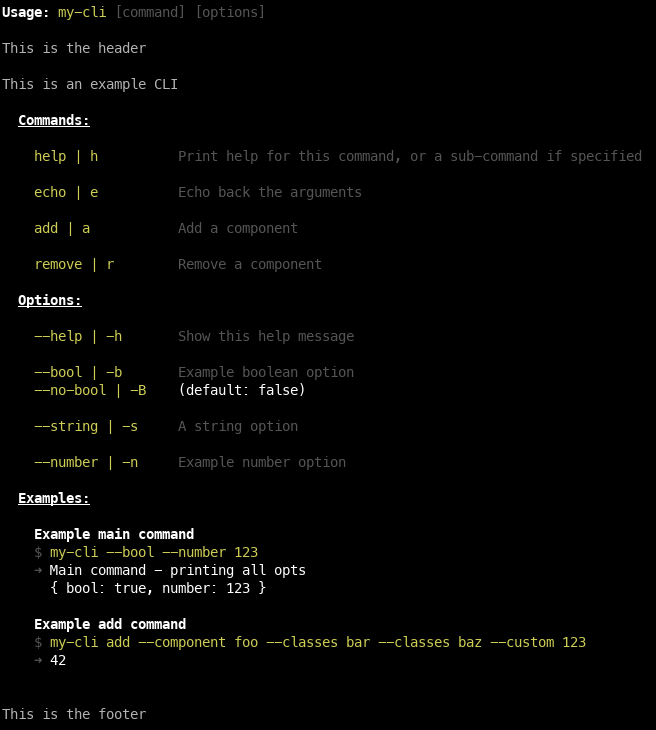
- package/package.json +17 -13
- package/style.js +3 -3
- package/style.js.map +1 -1
- package/utils.d.ts +5 -5
- package/utils.d.ts.map +1 -1
- package/utils.js +8 -8
- package/utils.js.map +1 -1
package/README.md
CHANGED
|
@@ -1,19 +1,30 @@
|
|
|
1
1
|
# massarg
|
|
2
2
|
|
|
3
|
-
|
|
3
|
+
<h2 align="center">
|
|
4
|
+
|
|
5
|
+
[GitHub](https://github.com/chenasraf/massarg) |
|
|
6
|
+
[Documentation](https://chenasraf.github.io/massarg) | [NPM](https://npmjs.com/package/massarg) |
|
|
7
|
+
[casraf.dev](https://casraf.dev)
|
|
8
|
+
|
|
9
|
+

|
|
10
|
+

|
|
11
|
+
|
|
12
|
+
</h2>
|
|
13
|
+
|
|
14
|
+
Massarg is a modern, flexible, powerful, and simple-to-use command/argument parser for JS
|
|
4
15
|
applications, allowing you to create complex but easy applications that consume command-line
|
|
5
16
|
arguments and commands.
|
|
6
17
|
|
|
7
18
|
It allows you to both parse argument options and flags, as well as hierarchal subcommands, both of
|
|
8
|
-
which can be parsed into an automatic help command or flag that displays all the information
|
|
9
|
-
with customizable styles, and content.
|
|
19
|
+
which can be parsed into an **automatic help command or flag** that displays all the information
|
|
20
|
+
easily, with customizable styles, and content.
|
|
10
21
|
|
|
11
22
|
You should only focus on actually writing the functionality of your CLI, and not waste it on writing
|
|
12
23
|
a way to parse the chain of commands, flags or options.
|
|
13
24
|
|
|
14
25
|
And it should look good too, right?
|
|
15
26
|
|
|
16
|
-
|
|
17
28
|
|
|
18
29
|
## Features
|
|
19
30
|
|
|
@@ -59,25 +70,38 @@ Call the default export function `massarg`, or create a new instance manually us
|
|
|
59
70
|
and then you can start chaining commands. Use `.parse()` to do the final parsing and run the
|
|
60
71
|
commands and options.
|
|
61
72
|
|
|
62
|
-
|
|
63
|
-
documentation
|
|
73
|
+
Each function and option is documented. See
|
|
74
|
+
[the full documentation](https://chenasraf.github.io/massarg) for details.
|
|
75
|
+
|
|
76
|
+
JSDoc comments are also provided.
|
|
77
|
+
|
|
78
|
+
Here is an example with some commonly used examples to get you started.
|
|
64
79
|
|
|
65
80
|
```ts
|
|
66
81
|
const parser = massarg({
|
|
67
82
|
name: 'my-cli',
|
|
68
83
|
description: "Does really amazing stuff, you wouldn't believe!",
|
|
69
84
|
}) // or: new Massarg()
|
|
85
|
+
// The main command - runs when no commands are specified. If not provided, an error is thrown for
|
|
86
|
+
// required arguments.
|
|
70
87
|
.main((options) => console.log('main command', options))
|
|
88
|
+
// A subcommand example
|
|
71
89
|
.command({
|
|
72
90
|
name: 'foo',
|
|
73
|
-
description: 'a
|
|
91
|
+
description: 'a foo command',
|
|
74
92
|
aliases: ['f'],
|
|
75
|
-
|
|
93
|
+
// default prefixes:
|
|
94
|
+
optionPrefix: '--',
|
|
95
|
+
aliasPrefix: '-',
|
|
96
|
+
// The function to run for this command
|
|
97
|
+
run: (options) => console.log('foo command', options),
|
|
76
98
|
})
|
|
99
|
+
// A subcommand example, which contains its own set of options or sub commands. This is infinitely
|
|
100
|
+
// nestible.
|
|
77
101
|
.command(
|
|
78
102
|
massarg({
|
|
79
103
|
name: 'bar',
|
|
80
|
-
description: '
|
|
104
|
+
description: 'a bar command',
|
|
81
105
|
aliases: ['s'],
|
|
82
106
|
run: (options) => console.log('bar command', options),
|
|
83
107
|
}).option({
|
|
@@ -87,21 +111,28 @@ const parser = massarg({
|
|
|
87
111
|
parse: (filename) => path.resolve(process.cwd(), filename),
|
|
88
112
|
}),
|
|
89
113
|
)
|
|
114
|
+
// A CLI option - argument with a value
|
|
90
115
|
.option({
|
|
91
116
|
name: 'my-string',
|
|
92
117
|
description: 'A string argument',
|
|
93
118
|
aliases: ['s'],
|
|
94
119
|
})
|
|
120
|
+
// A CLI flg - boolean argument with no value
|
|
95
121
|
.flag({
|
|
96
122
|
name: 'flag',
|
|
97
123
|
description: 'a flag that will be related to any command (main or sub)',
|
|
98
124
|
aliases: ['f'],
|
|
125
|
+
negatble: true,
|
|
126
|
+
negateName: 'no-flag', // Override the default negation name
|
|
127
|
+
negateAliases: ['F'], // Override the default negation aliases
|
|
99
128
|
})
|
|
129
|
+
// Usage examples for your CLI. Use this to describe various common usages or quirks.
|
|
100
130
|
.example({
|
|
101
131
|
description: 'Run the sub command',
|
|
102
132
|
input: 'my-bin --flag sub',
|
|
103
133
|
output: 'Sub command: flag is true',
|
|
104
134
|
})
|
|
135
|
+
// Configuration of the automated help section
|
|
105
136
|
.help({
|
|
106
137
|
bindCommand: true,
|
|
107
138
|
footerText: `Copyright © ${new Date().getFullYear()} Me, Myself and I`,
|
|
@@ -112,193 +143,27 @@ const parser = massarg({
|
|
|
112
143
|
})
|
|
113
144
|
```
|
|
114
145
|
|
|
115
|
-
##
|
|
116
|
-
|
|
117
|
-
The main command is the one that runs when you supply no other commands.
|
|
118
|
-
|
|
119
|
-
If no command is specified, and no main command is present, the help usage is automatically printed.
|
|
120
|
-
|
|
121
|
-
### Example
|
|
122
|
-
|
|
123
|
-
#### JS/TS
|
|
124
|
-
|
|
125
|
-
```ts
|
|
126
|
-
parser.main((options) => {
|
|
127
|
-
console.log('Parsed options:', options)
|
|
128
|
-
// do stuff
|
|
129
|
-
})
|
|
130
|
-
```
|
|
131
|
-
|
|
132
|
-
#### Shell
|
|
133
|
-
|
|
134
|
-
```shell
|
|
135
|
-
$ ./mybin
|
|
136
|
-
# Main command runs without options
|
|
137
|
-
|
|
138
|
-
$ ./mybin --my-string "Some string"
|
|
139
|
-
# Main command runs with options { myString: "Some string" }
|
|
140
|
-
|
|
141
|
-
$ ./mybin foo
|
|
142
|
-
# Foo sub command run with options {}
|
|
143
|
-
```
|
|
144
|
-
|
|
145
|
-
## Commands
|
|
146
|
-
|
|
147
|
-
Commands are activated when their keyword is included in the args. The first command that matches
|
|
148
|
-
will be executed, skipping the rest. Options before will be parsed on the main parser, while
|
|
149
|
-
anything after the command will be parsed for that subcommand only.
|
|
150
|
-
|
|
151
|
-
### Options
|
|
152
|
-
|
|
153
|
-
| Name | Type | Required | Example | Description |
|
|
154
|
-
| ------------- | ----------------------------------- | -------- | ------------------------------------------------- | -------------------------------------------------------------------------------------------------------------------- |
|
|
155
|
-
| `name` | `string` | ✅ | `"my-command"` | The name of the command, which will be used in the CLI to trigger it |
|
|
156
|
-
| `aliases` | `string[]` | | `["m", "mc"]` | Alternate names for the command, available for use in addition to `name` |
|
|
157
|
-
| `description` | `string` | | `"Description of the command"` | Description for the command, only displayed with `--help` or `printHelp()` |
|
|
158
|
-
| `run` | `function(options, parser) => void` | ✅ | `(options) => console.log("my-command", options)` | Main function that runs this command. The supplied argument is the options passed via the CLI and parsed by massarg. |
|
|
159
|
-
|
|
160
|
-
### Example
|
|
161
|
-
|
|
162
|
-
#### JS/TS
|
|
163
|
-
|
|
164
|
-
```ts
|
|
165
|
-
parser.command({
|
|
166
|
-
name: 'do-something',
|
|
167
|
-
description: 'This command does something',
|
|
168
|
-
aliases: ['do', 'd'],
|
|
169
|
-
run: (options) => {
|
|
170
|
-
console.log('Parsed options:', options)
|
|
171
|
-
// do stuff
|
|
172
|
-
},
|
|
173
|
-
})
|
|
174
|
-
```
|
|
175
|
-
|
|
176
|
-
#### Shell
|
|
177
|
-
|
|
178
|
-
```shell
|
|
179
|
-
$ ./mybin my-command
|
|
180
|
-
# Specified "my-command" runs without options
|
|
181
|
-
|
|
182
|
-
$ ./mybin my-command --my-string "Some string"
|
|
183
|
-
# Specified "my-command" runs with option { myString: "Some string" }
|
|
184
|
-
```
|
|
185
|
-
|
|
186
|
-
## Options
|
|
187
|
-
|
|
188
|
-
Options are variables you can accept via CLI and parse to use in your commands, e.g. `--my-bool`,
|
|
189
|
-
`--my-string string`, `--my-number 1`.
|
|
190
|
-
|
|
191
|
-
Aliases use the shorthand syntax, as such: `-s string`, `-n 1`.
|
|
192
|
-
|
|
193
|
-
### Options
|
|
194
|
-
|
|
195
|
-
| Name | Type | Required | Default | Example | Description |
|
|
196
|
-
| ------------- | --------------------------------- | -------- | ------------------ | ------------------------------------- | ---------------------------------------------------------------------------------------------------------------------------------------------------------------------------------------------------------------- |
|
|
197
|
-
| `name` | `string` | ✅ | | `"my-number"` | The name of the option, which will be used in the CLI to apply it |
|
|
198
|
-
| `aliases` | `string[]` | | | `["n"]` | Alternate names for the option, available for use in addition to `name` |
|
|
199
|
-
| `description` | `string` | | | `"Description of the command"` | Description for the command, only displayed with `--help` or `printHelp()` |
|
|
200
|
-
| `parse` | `function(value, options) => any` | | `(s) => String(s)` | `(value, options) => parseInt(value)` | Function that parses this option. The supplied arguments are the string value from the arg, and other options passed via the CLI and parsed by massarg before this one. Not all options will be available. |
|
|
201
|
-
| `isDefault` | `boolean` | | `false` | | When `true`, any args placed without name will be applied to this option. When more than one arg is supplied this way, only the last given will be used (unless the option is an array type). |
|
|
202
|
-
| `array` | `boolean` | | `false` | | When set to true, you will be able to take multiple values when using the same option more than once. They will all be parsed properly and put into an array. |
|
|
203
|
-
| `required` | `boolean` | | `false` | | When an option is required, parsing will throw a `RequiredError` if it was not given a proper value. If it is attached to a specific (or several) commands, it will only throw if the relevant command was used. |
|
|
204
|
-
|
|
205
|
-
### Example
|
|
206
|
-
|
|
207
|
-
#### JS/TS
|
|
208
|
-
|
|
209
|
-
```ts
|
|
210
|
-
parser.option({
|
|
211
|
-
name: 'number',
|
|
212
|
-
aliases: ['n'],
|
|
213
|
-
description:
|
|
214
|
-
'This is a number arg, if you include this option, you must supply it with a numeric value.',
|
|
215
|
-
defaultValue: 0,
|
|
216
|
-
parse: (v) => parseInt(v),
|
|
217
|
-
})
|
|
218
|
-
```
|
|
219
|
-
|
|
220
|
-
#### Shell
|
|
221
|
-
|
|
222
|
-
```shell
|
|
223
|
-
$ ./mybin my-command
|
|
224
|
-
# Specified "my-command" runs without options
|
|
146
|
+
## Documentation
|
|
225
147
|
|
|
226
|
-
|
|
227
|
-
|
|
228
|
-
```
|
|
148
|
+
The full documentation can be found here:
|
|
149
|
+
[Massarg Documentation](https://chenasraf.github.io/massarg)
|
|
229
150
|
|
|
230
|
-
|
|
151
|
+
- [Massarg](https://chenasraf.github.io/massarg/docs/api/classes/massarg.Massarg)
|
|
152
|
+
- [MassargOption](https://chenasraf.github.io/massarg/docs/api/classes/option.MassargOption)
|
|
153
|
+
- [MassargFlag](https://chenasraf.github.io/massarg/docs/api/classes/option.MassargFlag)
|
|
154
|
+
- [MassargExample](https://chenasraf.github.io/massarg/docs/api/classes/example.MassargExample)
|
|
231
155
|
|
|
232
|
-
|
|
233
|
-
above the footer.
|
|
156
|
+
## Contributing
|
|
234
157
|
|
|
235
|
-
|
|
236
|
-
|
|
158
|
+
I am developing this package on my free time, so any support, whether code, issues, or just stars is
|
|
159
|
+
very helpful to sustaining its life. If you are feeling incredibly generous and would like to donate
|
|
160
|
+
just a small amount to help sustain this project, I would be very very thankful!
|
|
237
161
|
|
|
238
|
-
|
|
239
|
-
|
|
240
|
-
|
|
241
|
-
|
|
242
|
-
|
|
243
|
-
| `output` | `string` | ✅ | | `"you entered my-cmd with the number 10, which is larger than 5"` | The output line, an example of the command's output that will be displayed as "shell" output. The prefix is customizable through the `help()` options. |
|
|
244
|
-
| `description` | `string` | | | `"Run the my-cmd command with a number parameter"` | An explanation of the input/output that will be display as a title above the input if specified. |
|
|
245
|
-
|
|
246
|
-
### Example
|
|
247
|
-
|
|
248
|
-
#### JS/TS
|
|
249
|
-
|
|
250
|
-
```ts
|
|
251
|
-
parser.example({
|
|
252
|
-
input: 'my-cmd --number 10',
|
|
253
|
-
output: 'you entered my-cmd with the number 10, which is larger than 5',
|
|
254
|
-
description: 'Run the my-cmd command with a number parameter',
|
|
255
|
-
})
|
|
256
|
-
```
|
|
257
|
-
|
|
258
|
-
## Help/Usage Command
|
|
259
|
-
|
|
260
|
-
You can modify some of the styles and behavior of the help text. None of the options are required,
|
|
261
|
-
you may override their defaults to modify the behavior.
|
|
262
|
-
|
|
263
|
-
### Options
|
|
264
|
-
|
|
265
|
-
| Name | Type | Default | Description |
|
|
266
|
-
| ---------------------- | -------------------- | ---------------------- | ------------------------------------------------------------------------------------------------------------- |
|
|
267
|
-
| `binName` | `string` | running script name | The name of the binary, to be used when outputting usage information. |
|
|
268
|
-
| `printWidth` | `number` | `80` | The amount of characters to allow per line. Use `0` to disable wrapping. |
|
|
269
|
-
| `normalColors` | `string \| string[]` | `"dim"` | Colors to use on normal text (descriptions, usage example, etc.) |
|
|
270
|
-
| `highlightColors` | `string \| string[]` | `"yellow"` | Colors to use on highlighted text (command names, option names, binary name, etc) |
|
|
271
|
-
| `titleColors` | `string \| string[]` | `["bold", "white"]` | Colors to use on title text ("Options", "Usage", etc) |
|
|
272
|
-
| `subtitleColors` | `string \| string[]` | `["bold", "dim"]` | Colors to use on subtitle text (e.g. command titles for non-gloal options) |
|
|
273
|
-
| `bodyColors` | `string \| string[]` | `"white"` | Colors to use on special body text (header, footer, and default value) |
|
|
274
|
-
| `header` | `string` | | Additional content to display below the usage line, and above the rest. |
|
|
275
|
-
| `footer` | `string` | | Additional content to display below the commands and options, at the very bottom. |
|
|
276
|
-
| `commandNameSeparator` | `string` | `" \| "` | Separator for command name & its aliases. |
|
|
277
|
-
| `optionNameSeparator` | `string` | `"\|"` | Separator for option name & its aliases. |
|
|
278
|
-
| `useGlobalColumns` | `boolean` | `true` | Decides whether to align the columns of the option/command names and their descriptions globally or per table |
|
|
279
|
-
| `usageExample` | `string` | `"[command] [option]"` | Default text to use as suffix for the `binName`, which will be used in the "Usage" line of the help text |
|
|
280
|
-
| `useColors` | `boolean` | `true` | When false, no colors will be output in the help. Good for non-supporting systems. |
|
|
281
|
-
| `includeDefaults` | `boolean` | `true` | When false, the default values will not be specified after the description of each option. |
|
|
282
|
-
|
|
283
|
-
### Example
|
|
284
|
-
|
|
285
|
-
#### JS/TS
|
|
286
|
-
|
|
287
|
-
```ts
|
|
288
|
-
parser.help({
|
|
289
|
-
printWidth: 80,
|
|
290
|
-
binName: 'my-app',
|
|
291
|
-
normalColors: 'dim',
|
|
292
|
-
highlightColors: 'yellow',
|
|
293
|
-
titleColors: 'white',
|
|
294
|
-
subtitleColors: ['bold', 'dim'],
|
|
295
|
-
header: 'Header text',
|
|
296
|
-
footer: 'Footer text',
|
|
297
|
-
commandNameSeparator: ' | ',
|
|
298
|
-
optionNameSeparator: '|',
|
|
299
|
-
useGlobalColumns: true,
|
|
300
|
-
usageExample: 'command [option]',
|
|
301
|
-
})
|
|
302
|
-
```
|
|
162
|
+
<a href="https://ko-fi.com/casraf" target="_blank">
|
|
163
|
+
<img height="36"
|
|
164
|
+
src="https://cdn.ko-fi.com/cdn/kofi1.png?v=3"
|
|
165
|
+
alt="Buy Me a Coffee at ko-fi.com" />
|
|
166
|
+
</a>
|
|
303
167
|
|
|
304
|
-
|
|
168
|
+
I welcome any issues or pull requests on GitHub. If you find a bug, or would like a new feature,
|
|
169
|
+
don't hesitate to open an appropriate issue and I will do my best to reply promptly.
|
package/command.d.ts
CHANGED
|
@@ -3,7 +3,7 @@ import { HelpConfig } from './help';
|
|
|
3
3
|
import { MassargOption, MassargFlag, TypedOptionConfig, Prefixes, FlagConfig } from './option';
|
|
4
4
|
import { DeepRequired } from './utils';
|
|
5
5
|
import { MassargExample, ExampleConfig } from './example';
|
|
6
|
-
export declare const CommandConfig: <RunArgs extends
|
|
6
|
+
export declare const CommandConfig: <RunArgs extends ArgsObject = ArgsObject>(args: z.ZodType<RunArgs, z.ZodTypeDef, RunArgs>) => z.ZodObject<{
|
|
7
7
|
/** Command name */
|
|
8
8
|
name: z.ZodString;
|
|
9
9
|
/** Command description, displayed in the help output */
|
|
@@ -15,35 +15,30 @@ export declare const CommandConfig: <RunArgs extends object = object>(args: z.Zo
|
|
|
15
15
|
* instance of Massarg used to invoke this command (the top-level instance)
|
|
16
16
|
*/
|
|
17
17
|
run: z.ZodType<Runner<RunArgs>, z.ZodTypeDef, Runner<RunArgs>>;
|
|
18
|
-
/**
|
|
18
|
+
/** The prefix to match before option names, e.g. `--` */
|
|
19
19
|
optionPrefix: z.ZodOptional<z.ZodDefault<z.ZodString>>;
|
|
20
|
-
/**
|
|
21
|
-
|
|
22
|
-
/** Prefix of aliases of options understood by this command */
|
|
23
|
-
optionAliasPrefix: z.ZodOptional<z.ZodDefault<z.ZodString>>;
|
|
24
|
-
/** Prefix of aliases of negated flags understood by this command */
|
|
25
|
-
negateAliasPrefix: z.ZodOptional<z.ZodDefault<z.ZodString>>;
|
|
20
|
+
/** The prefix to match before option aliases, e.g. `-` */
|
|
21
|
+
aliasPrefix: z.ZodOptional<z.ZodDefault<z.ZodString>>;
|
|
26
22
|
}, "strip", z.ZodTypeAny, {
|
|
27
23
|
name: string;
|
|
28
24
|
description: string;
|
|
29
25
|
run: Runner<RunArgs>;
|
|
30
26
|
aliases?: string[] | undefined;
|
|
31
27
|
optionPrefix?: string | undefined;
|
|
32
|
-
|
|
33
|
-
optionAliasPrefix?: string | undefined;
|
|
34
|
-
negateAliasPrefix?: string | undefined;
|
|
28
|
+
aliasPrefix?: string | undefined;
|
|
35
29
|
}, {
|
|
36
30
|
name: string;
|
|
37
31
|
description: string;
|
|
38
32
|
run: Runner<RunArgs>;
|
|
39
33
|
aliases?: string[] | undefined;
|
|
40
34
|
optionPrefix?: string | undefined;
|
|
41
|
-
|
|
42
|
-
optionAliasPrefix?: string | undefined;
|
|
43
|
-
negateAliasPrefix?: string | undefined;
|
|
35
|
+
aliasPrefix?: string | undefined;
|
|
44
36
|
}>;
|
|
45
37
|
export type CommandConfig<RunArgs extends ArgsObject = ArgsObject> = z.infer<ReturnType<typeof CommandConfig<RunArgs>>>;
|
|
46
|
-
|
|
38
|
+
/**
|
|
39
|
+
* An object with string keys and any values.
|
|
40
|
+
*/
|
|
41
|
+
export type ArgsObject = Record<string | number | symbol, any>;
|
|
47
42
|
export type Runner<Args extends ArgsObject> = (options: Args, instance: MassargCommand<Args>) => Promise<void> | void;
|
|
48
43
|
/**
|
|
49
44
|
* A command is a named function that can be invoked with a set of options.
|
|
@@ -64,7 +59,7 @@ export type Runner<Args extends ArgsObject> = (options: Args, instance: MassargC
|
|
|
64
59
|
* })
|
|
65
60
|
* ```
|
|
66
61
|
*/
|
|
67
|
-
export declare class MassargCommand<Args extends ArgsObject = ArgsObject> {
|
|
62
|
+
export declare class MassargCommand<Args extends ArgsObject = ArgsObject> implements Omit<CommandConfig<Args>, 'run'> {
|
|
68
63
|
name: string;
|
|
69
64
|
description: string;
|
|
70
65
|
aliases: string[];
|
|
@@ -76,12 +71,9 @@ export declare class MassargCommand<Args extends ArgsObject = ArgsObject> {
|
|
|
76
71
|
private _helpConfig;
|
|
77
72
|
parent?: MassargCommand<any>;
|
|
78
73
|
optionPrefix: string;
|
|
79
|
-
|
|
80
|
-
optionAliasPrefix: string;
|
|
81
|
-
negateAliasPrefix: string;
|
|
74
|
+
aliasPrefix: string;
|
|
82
75
|
constructor(options: CommandConfig<Args>, parent?: MassargCommand<any>);
|
|
83
76
|
get optionPrefixes(): Prefixes;
|
|
84
|
-
private getPrefixes;
|
|
85
77
|
get helpConfig(): DeepRequired<HelpConfig>;
|
|
86
78
|
/**
|
|
87
79
|
* Add a sub-command to this command.
|
|
@@ -92,8 +84,8 @@ export declare class MassargCommand<Args extends ArgsObject = ArgsObject> {
|
|
|
92
84
|
* While options are not inherited, they will be passed from any parent commands
|
|
93
85
|
* to the sub-command when invoked.
|
|
94
86
|
*/
|
|
95
|
-
command<A extends ArgsObject = Args>(config: CommandConfig<A>): MassargCommand<Args>;
|
|
96
|
-
command<A extends ArgsObject = Args>(config: MassargCommand<A>): MassargCommand<Args>;
|
|
87
|
+
command<A extends ArgsObject = Args>(config: CommandConfig<A>): MassargCommand<Args & A>;
|
|
88
|
+
command<A extends ArgsObject = Args>(config: MassargCommand<A>): MassargCommand<Args & A>;
|
|
97
89
|
/**
|
|
98
90
|
* Adds a flag to this command.
|
|
99
91
|
*
|
|
@@ -101,9 +93,10 @@ export declare class MassargCommand<Args extends ArgsObject = ArgsObject> {
|
|
|
101
93
|
* a boolean value, or to indicate that a command should be run in a different
|
|
102
94
|
* mode.
|
|
103
95
|
*
|
|
104
|
-
* A flag can be negated by
|
|
105
|
-
*
|
|
106
|
-
*
|
|
96
|
+
* A flag can be negated by using `negatable: true`. By default, the negated name is the same
|
|
97
|
+
* as the option name, prefixed by `no-`, and each of the aliases will be uppercased.
|
|
98
|
+
* For example, `--verbose` and `--no-verbose`, or `-v` and `-V`.
|
|
99
|
+
* This behavior can be overridden by the `negatedName` and `negatedAliases` options.
|
|
107
100
|
*/
|
|
108
101
|
flag(config: FlagConfig): MassargCommand<Args>;
|
|
109
102
|
flag(config: MassargFlag): MassargCommand<Args>;
|
|
@@ -158,6 +151,7 @@ export declare class MassargCommand<Args extends ArgsObject = ArgsObject> {
|
|
|
158
151
|
* use `getArgs` instead.
|
|
159
152
|
*/
|
|
160
153
|
parse(argv?: string[], args?: Partial<Args>, parent?: MassargCommand<Args>): Promise<void> | void;
|
|
154
|
+
private printError;
|
|
161
155
|
private parseOption;
|
|
162
156
|
/** Parse the given arguments and return the output args. */
|
|
163
157
|
getArgs(argv: string[], __args?: Partial<Args>, parent?: MassargCommand<any>, parseCommands?: false): Promise<void> | void;
|
|
@@ -172,6 +166,12 @@ export declare class MassargCommand<Args extends ArgsObject = ArgsObject> {
|
|
|
172
166
|
*/
|
|
173
167
|
printHelp(): void;
|
|
174
168
|
}
|
|
169
|
+
/**
|
|
170
|
+
* A command that prints help for this command, or a sub-command if specified.
|
|
171
|
+
*
|
|
172
|
+
* This command is automatically added to the top-level command if you use `bindCommand: true` in `help()`.
|
|
173
|
+
* You can also add it manually to any command.
|
|
174
|
+
*/
|
|
175
175
|
export declare class MassargHelpCommand<T extends {
|
|
176
176
|
command?: string;
|
|
177
177
|
} = {
|
package/command.d.ts.map
CHANGED
|
@@ -1 +1 @@
|
|
|
1
|
-
{"version":3,"file":"command.d.ts","sourceRoot":"","sources":["../src/command.ts"],"names":[],"mappings":"AAAA,OAAO,EAAE,CAAC,EAAE,MAAM,KAAK,CAAA;AAEvB,OAAO,EAAqB,UAAU,EAAiB,MAAM,QAAQ,CAAA;AACrE,OAAO,EACL,aAAa,EACb,WAAW,EACX,iBAAiB,
|
|
1
|
+
{"version":3,"file":"command.d.ts","sourceRoot":"","sources":["../src/command.ts"],"names":[],"mappings":"AAAA,OAAO,EAAE,CAAC,EAAE,MAAM,KAAK,CAAA;AAEvB,OAAO,EAAqB,UAAU,EAAiB,MAAM,QAAQ,CAAA;AACrE,OAAO,EACL,aAAa,EACb,WAAW,EACX,iBAAiB,EAIjB,QAAQ,EACR,UAAU,EACX,MAAM,UAAU,CAAA;AACjB,OAAO,EAAE,YAAY,EAAuD,MAAM,SAAS,CAAA;AAC3F,OAAO,EAAE,cAAc,EAAE,aAAa,EAAE,MAAM,WAAW,CAAA;AAGzD,eAAO,MAAM,aAAa;IAEtB,mBAAmB;;IAEnB,wDAAwD;;IAExD,sBAAsB;;IAEtB;;;OAGG;;IAKH,yDAAyD;;IAEzD,0DAA0D;;;;;;;;;;;;;;;;EAE1D,CAAA;AAEJ,MAAM,MAAM,aAAa,CAAC,OAAO,SAAS,UAAU,GAAG,UAAU,IAAI,CAAC,CAAC,KAAK,CAC1E,UAAU,CAAC,OAAO,aAAa,CAAC,OAAO,CAAC,CAAC,CAC1C,CAAA;AAED;;GAEG;AACH,MAAM,MAAM,UAAU,GAAG,MAAM,CAAC,MAAM,GAAG,MAAM,GAAG,MAAM,EAAE,GAAG,CAAC,CAAA;AAE9D,MAAM,MAAM,MAAM,CAAC,IAAI,SAAS,UAAU,IAAI,CAC5C,OAAO,EAAE,IAAI,EACb,QAAQ,EAAE,cAAc,CAAC,IAAI,CAAC,KAC3B,OAAO,CAAC,IAAI,CAAC,GAAG,IAAI,CAAA;AAEzB;;;;;;;;;;;;;;;;;;GAkBG;AACH,qBAAa,cAAc,CAAC,IAAI,SAAS,UAAU,GAAG,UAAU,CAC9D,YAAW,IAAI,CAAC,aAAa,CAAC,IAAI,CAAC,EAAE,KAAK,CAAC;IAE3C,IAAI,EAAE,MAAM,CAAA;IACZ,WAAW,EAAE,MAAM,CAAA;IACnB,OAAO,EAAE,MAAM,EAAE,CAAA;IACjB,OAAO,CAAC,IAAI,CAAC,CAAc;IAC3B,QAAQ,EAAE,cAAc,CAAC,GAAG,CAAC,EAAE,CAAK;IACpC,OAAO,EAAE,aAAa,EAAE,CAAK;IAC7B,QAAQ,EAAE,cAAc,EAAE,CAAK;IAC/B,IAAI,EAAE,OAAO,CAAC,IAAI,CAAC,CAAK;IACxB,OAAO,CAAC,WAAW,CAAY;IAC/B,MAAM,CAAC,EAAE,cAAc,CAAC,GAAG,CAAC,CAAA;IAC5B,YAAY,SAA0B;IACtC,WAAW,SAA2B;gBAE1B,OAAO,EAAE,aAAa,CAAC,IAAI,CAAC,EAAE,MAAM,CAAC,EAAE,cAAc,CAAC,GAAG,CAAC;IAatE,IAAI,cAAc,IAAI,QAAQ,CAK7B;IAED,IAAI,UAAU,IAAI,YAAY,CAAC,UAAU,CAAC,CAgBzC;IAED;;;;;;;;OAQG;IACH,OAAO,CAAC,CAAC,SAAS,UAAU,GAAG,IAAI,EAAE,MAAM,EAAE,aAAa,CAAC,CAAC,CAAC,GAAG,cAAc,CAAC,IAAI,GAAG,CAAC,CAAC;IACxF,OAAO,CAAC,CAAC,SAAS,UAAU,GAAG,IAAI,EAAE,MAAM,EAAE,cAAc,CAAC,CAAC,CAAC,GAAG,cAAc,CAAC,IAAI,GAAG,CAAC,CAAC;IA8BzF;;;;;;;;;;;OAWG;IACH,IAAI,CAAC,MAAM,EAAE,UAAU,GAAG,cAAc,CAAC,IAAI,CAAC;IAC9C,IAAI,CAAC,MAAM,EAAE,WAAW,GAAG,cAAc,CAAC,IAAI,CAAC;IAoB/C;;;;;;;;;;;;OAYG;IACH,MAAM,CAAC,CAAC,GAAG,MAAM,EAAE,CAAC,SAAS,UAAU,GAAG,IAAI,EAAE,MAAM,EAAE,aAAa,CAAC,CAAC,EAAE,CAAC,CAAC,GAAG,cAAc,CAAC,IAAI,CAAC;IAClG,MAAM,CAAC,CAAC,GAAG,MAAM,EAAE,CAAC,SAAS,UAAU,GAAG,IAAI,EAC5C,MAAM,EAAE,iBAAiB,CAAC,CAAC,EAAE,CAAC,CAAC,GAC9B,cAAc,CAAC,IAAI,CAAC;IA0BvB,OAAO,CAAC,kBAAkB;IAyB1B,OAAO,CAAC,oBAAoB;IAe5B;;;;;;;OAOG;IACH,OAAO,CAAC,MAAM,EAAE,aAAa,GAAG,cAAc,CAAC,IAAI,CAAC;IAKpD;;;;;;;;OAQG;IACH,IAAI,CAAC,MAAM,EAAE,UAAU,GAAG,cAAc,CAAC,IAAI,CAAC;IAY9C;;;;;OAKG;IACH,IAAI,CAAC,GAAG,EAAE,MAAM,CAAC,IAAI,CAAC,GAAG,cAAc,CAAC,IAAI,CAAC;IAK7C;;;;;;OAMG;IACH,KAAK,CACH,IAAI,WAAwB,EAC5B,IAAI,CAAC,EAAE,OAAO,CAAC,IAAI,CAAC,EACpB,MAAM,CAAC,EAAE,cAAc,CAAC,IAAI,CAAC,GAC5B,OAAO,CAAC,IAAI,CAAC,GAAG,IAAI;IAQvB,OAAO,CAAC,UAAU;IAKlB,OAAO,CAAC,WAAW;IAoBnB,4DAA4D;IAC5D,OAAO,CACL,IAAI,EAAE,MAAM,EAAE,EACd,MAAM,CAAC,EAAE,OAAO,CAAC,IAAI,CAAC,EACtB,MAAM,CAAC,EAAE,cAAc,CAAC,GAAG,CAAC,EAC5B,aAAa,CAAC,EAAE,KAAK,GACpB,OAAO,CAAC,IAAI,CAAC,GAAG,IAAI;IACvB,OAAO,CACL,IAAI,EAAE,MAAM,EAAE,EACd,MAAM,CAAC,EAAE,OAAO,CAAC,IAAI,CAAC,EACtB,MAAM,CAAC,EAAE,cAAc,CAAC,GAAG,CAAC,EAC5B,aAAa,CAAC,EAAE,IAAI,GACnB,IAAI;IAmFP,OAAO,CAAC,cAAc;IAatB;;OAEG;IACH,UAAU,IAAI,MAAM;IAIpB;;OAEG;IACH,SAAS,IAAI,IAAI;CAGlB;AAED;;;;;GAKG;AACH,qBAAa,kBAAkB,CAC7B,CAAC,SAAS;IAAE,OAAO,CAAC,EAAE,MAAM,CAAA;CAAE,GAAG;IAAE,OAAO,CAAC,EAAE,MAAM,CAAA;CAAE,CACrD,SAAQ,cAAc,CAAC,CAAC,CAAC;gBACb,MAAM,GAAE,OAAO,CAAC,IAAI,CAAC,aAAa,CAAC,CAAC,CAAC,EAAE,KAAK,CAAC,CAAM;CAgChE"}
|