mars3d 3.9.4 → 3.9.6
This diff represents the content of publicly available package versions that have been released to one of the supported registries. The information contained in this diff is provided for informational purposes only and reflects changes between package versions as they appear in their respective public registries.
- package/README.md +49 -44
- package/mars3d.css +2 -2
- package/mars3d.d.ts +64 -32
- package/mars3d.js +3 -3
- package/package.json +1 -1
package/README.md
CHANGED
|
@@ -1,6 +1,6 @@
|
|
|
1
1
|
|
|
2
2
|
<p align="center">
|
|
3
|
-
<img src="
|
|
3
|
+
<img src="http://mars3d.cn/logo.png" width="200px" />
|
|
4
4
|
</p>
|
|
5
5
|
|
|
6
6
|
<p align="center">🌎 一款基于WebGL技术实现的三维地球客户端开发平台</p>
|
|
@@ -20,42 +20,37 @@
|
|
|
20
20
|
</a>
|
|
21
21
|
</p>
|
|
22
22
|
|
|
23
|
-
[**English**](./README_EN.md) |[**中文**](./README.md)
|
|
24
23
|
|
|
25
24
|
|
|
25
|
+
当前仓库包含SDK更新日志、和其他仓库导航。
|
|
26
26
|
|
|
27
|
-
|
|
28
|
-
|
|
29
|
-
使用 Node 环境下的现代 web 前端技术栈时,可以使用 npm 或 cnpm 或 yarn 等方式来安装 mars3d 包
|
|
27
|
+
Github:[https://github.com/marsgis/mars3d](https://github.com/marsgis/mars3d)
|
|
30
28
|
|
|
31
|
-
|
|
32
|
-
//安装mars3d主库
|
|
33
|
-
npm install mars3d mars3d-cesium @turf/turf --save
|
|
34
|
-
```
|
|
29
|
+
国内Gitee:[https://gitee.com/marsgis/mars3d](https://gitee.com/marsgis/mars3d)
|
|
35
30
|
|
|
31
|
+
更新日志: [CHANGE.md](./CHANGE.md)
|
|
36
32
|
|
|
37
|
-
|
|
33
|
+
|
|
38
34
|
|
|
39
|
-
|
|
40
|
-
|
|
41
|
-
|
|
42
|
-
|
|
43
|
-
import * as mars3d from "mars3d";
|
|
44
|
-
```
|
|
35
|
+
## 平台介绍
|
|
36
|
+
|
|
37
|
+
`Mars3D平台` 是[火星科技](http://marsgis.cn/)研发的一款基于 WebGL 技术实现的三维客户端开发平台,基于[Cesium](https://cesium.com/cesiumjs/)优化提升与B/S架构设计,支持多行业扩展的轻量级高效能GIS开发平台,能够免安装、无插件地在浏览器中高效运行,并可快速接入与使用多种GIS数据和三维模型,呈现三维空间的可视化,完成平台在不同行业的灵活应用。
|
|
38
|
+
|
|
45
39
|
|
|
46
|
-
> 关于引入后的具体如何使用,请参考教程[Mars3D集成到项目](http://mars3d.cn/docs/guide/npm-integration/)中了解更多信息。
|
|
47
40
|
|
|
41
|
+
## 学习资料
|
|
48
42
|
|
|
43
|
+
- Mars3D官网:[http://mars3d.cn](http://mars3d.cn)
|
|
44
|
+
- 开发教程:[http://mars3d.cn/docs/](http://mars3d.cn/docs/)
|
|
45
|
+
- API文档:[http://mars3d.cn/api/](http://mars3d.cn/api/)
|
|
49
46
|
|
|
50
|
-
当前仓库包含SDK更新日志、和其他仓库导航。
|
|
51
47
|
|
|
48
|
+
### 反馈问题
|
|
49
|
+
为了方便交流及留存,所有bug及建议均统一提交至:[github issues](https://github.com/marsgis/mars3d/issues) 或
|
|
50
|
+
[国内gitee issues](https://gitee.com/marsgis/mars3d/issues)
|
|
52
51
|
|
|
53
52
|
|
|
54
|
-
Github:[https://github.com/marsgis/mars3d](https://github.com/marsgis/mars3d)
|
|
55
53
|
|
|
56
|
-
国内Gitee:[https://gitee.com/marsgis/mars3d](https://gitee.com/marsgis/mars3d)
|
|
57
|
-
|
|
58
|
-
更新日志: [CHANGE.md](./CHANGE.md)
|
|
59
54
|
|
|
60
55
|
|
|
61
56
|
## 功能示例
|
|
@@ -96,44 +91,54 @@ Github:[https://github.com/marsgis/mars3d](https://github.com/marsgis/mars3d)
|
|
|
96
91
|
|
|
97
92
|
|
|
98
93
|
|
|
99
|
-
|
|
100
|
-
## 平台介绍
|
|
101
|
-
|
|
102
|
-
`Mars3D平台` 是[火星科技](http://marsgis.cn/)研发的一款基于 WebGL 技术实现的三维客户端开发平台,基于[Cesium](https://cesium.com/cesiumjs/)优化提升与B/S架构设计,支持多行业扩展的轻量级高效能GIS开发平台,能够免安装、无插件地在浏览器中高效运行,并可快速接入与使用多种GIS数据和三维模型,呈现三维空间的可视化,完成平台在不同行业的灵活应用。
|
|
103
|
-
|
|
104
|
-
## 学习资料
|
|
105
|
-
|
|
106
|
-
- 开发教程: [http://mars3d.cn/docs/](http://mars3d.cn/docs/)
|
|
107
|
-
- API文档:[http://mars3d.cn/api/](http://mars3d.cn/api/)
|
|
108
|
-
- Mars3D官网:[http://mars3d.cn](http://mars3d.cn)
|
|
109
94
|
|
|
95
|
+
|
|
110
96
|
|
|
111
|
-
### 反馈问题
|
|
112
|
-
为了方便交流及留存,所有bug及建议均统一提交至:[github issues](https://github.com/marsgis/mars3d/issues) 或
|
|
113
|
-
[国内gitee issues](https://gitee.com/marsgis/mars3d/issues)
|
|
114
97
|
|
|
115
98
|
|
|
116
99
|
## 平台相关效果
|
|
117
100
|
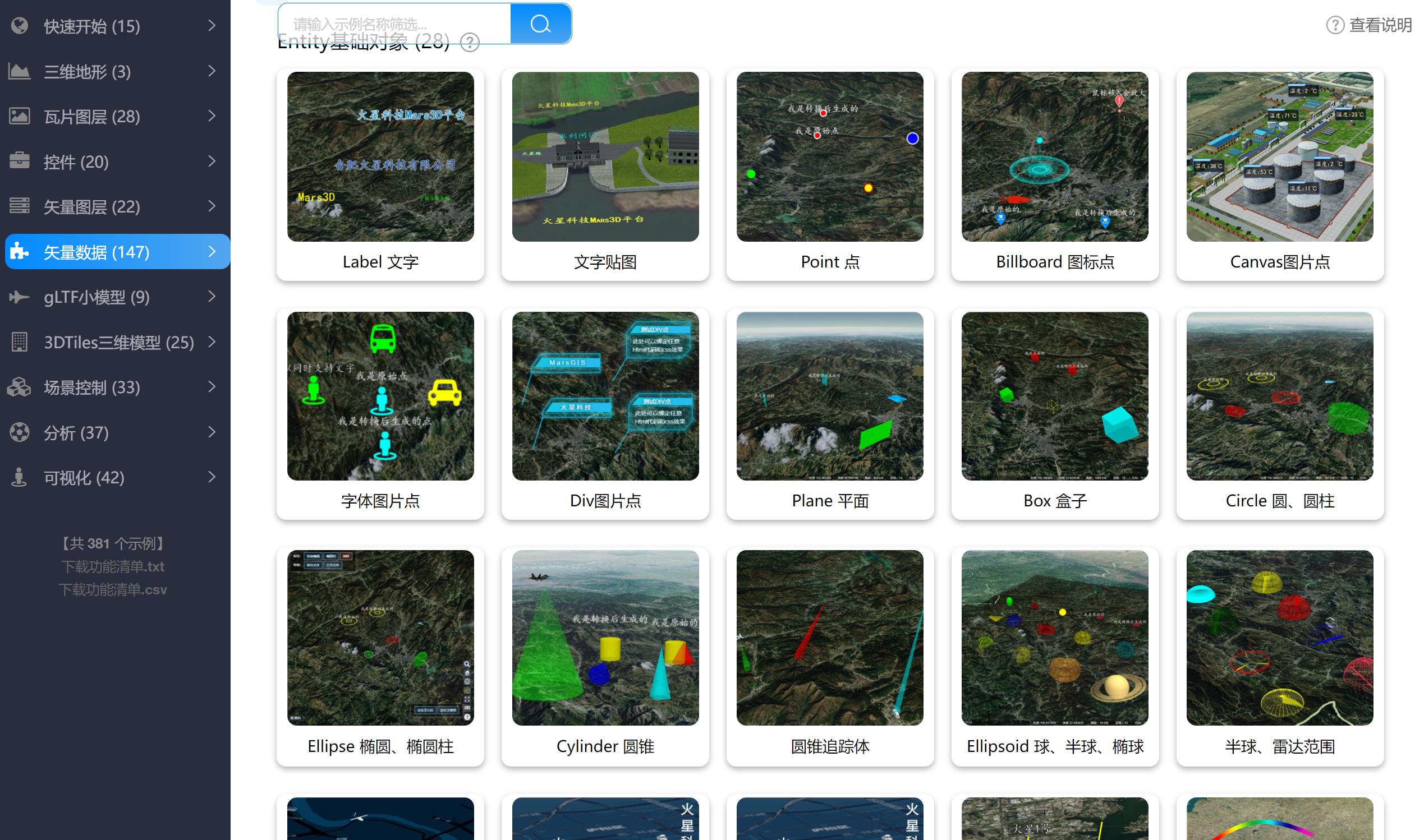
功能示例:
|
|
118
101
|
|
|
119
102
|
|
|
120
|
-
|
|
103
|
+
通用项目-Vue版:[在线体验](http://mars3d.cn/project/vue/)
|
|
121
104
|
|
|
122
|
-

|
|
123
106
|
|
|
124
|
-
|
|
107
|
+
通用项目-原生JS版:[在线体验](http://mars3d.cn/project/es5/)
|
|
125
108
|
|
|
126
|
-

|
|
127
110
|
|
|
128
|
-
|
|
129
|
-
|
|
111
|
+
通用项目-React版:[在线体验](http://mars3d.cn/project/react/)
|
|
112
|
+
|
|
113
|
+

|
|
114
|
+
|
|
115
|
+
三维地球-APP版:[在线体验](http://mars3d.cn/project/app/)
|
|
130
116
|
|
|
131
|
-

|
|
118
|
+
|
|
119
|
+
|
|
120
|
+
工厂园区项目:[在线体验](http://mars3d.cn/project/vue-gcyq/)
|
|
121
|
+
|
|
122
|
+

|
|
123
|
+
|
|
124
|
+
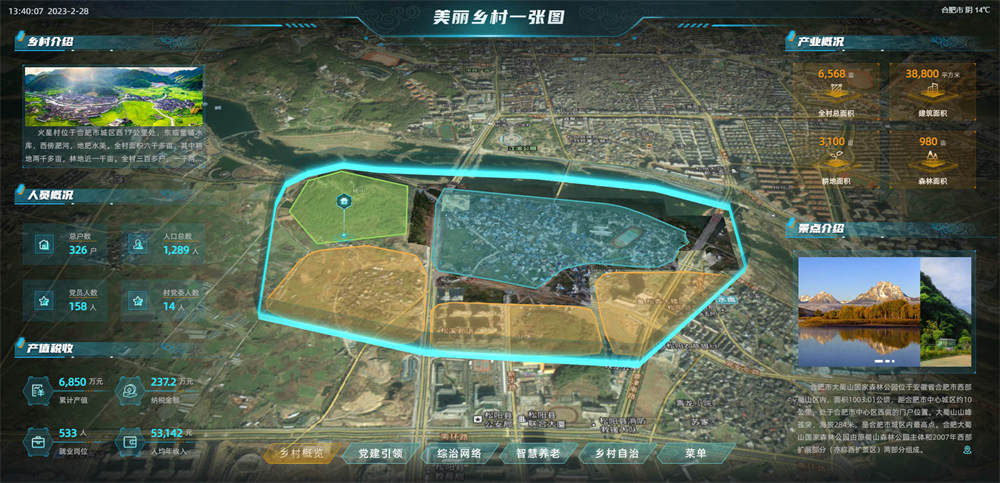
美丽乡村项目:[在线体验](http://mars3d.cn/project/vue-mlxc/)
|
|
125
|
+
|
|
126
|
+
|
|
132
127
|
|
|
133
128
|
|
|
134
|
-
|
|
129
|
+
图层配置工具:[在线体验](http://studio.mars3d.cn/project-map/offline-layer.html)
|
|
130
|
+
|
|
131
|
+

|
|
132
|
+
|
|
133
|
+
|
|
134
|
+
图上标绘工具:[在线体验](http://studio.mars3d.cn/project-map/offline-plot.html)
|
|
135
|
+
|
|
136
|
+

|
|
137
|
+
|
|
138
|
+
|
|
139
|
+
地图场景配置工具:[在线体验](http://studio.mars3d.cn/project-map/offline-map.html)
|
|
135
140
|
|
|
136
|
-

|
|
137
142
|
|
|
138
143
|
|
|
139
144
|
|
package/mars3d.css
CHANGED
package/mars3d.d.ts
CHANGED
|
@@ -2,8 +2,8 @@
|
|
|
2
2
|
/**
|
|
3
3
|
* Mars3D三维可视化平台 mars3d
|
|
4
4
|
*
|
|
5
|
-
* 版本信息:v3.9.
|
|
6
|
-
* 编译日期:2025-
|
|
5
|
+
* 版本信息:v3.9.6
|
|
6
|
+
* 编译日期:2025-04-15 22:19
|
|
7
7
|
* 版权所有:Copyright by 火星科技 http://mars3d.cn
|
|
8
8
|
* 使用单位:火星科技免费公开版 ,2025-02-01
|
|
9
9
|
*/
|
|
@@ -1765,7 +1765,8 @@ declare namespace MaterialType {
|
|
|
1765
1765
|
* @property [color = new Cesium.Color(1.0, 1.0, 0.0, 1.0)] - 颜色
|
|
1766
1766
|
* @property [speed = 10] - 速度,值越大越快
|
|
1767
1767
|
* @property [count = 1] - 圆圈个数
|
|
1768
|
-
* @property [gradient = 0.1] -
|
|
1768
|
+
* @property [gradient = 0.1] - count>1时,透明度的幂方(0-1),0表示无虚化效果,1表示虚化成均匀渐变
|
|
1769
|
+
* @property [diffusePower = 1.6] - 漫射系数
|
|
1769
1770
|
*/
|
|
1770
1771
|
const CircleWave: string;
|
|
1771
1772
|
/**
|
|
@@ -4814,7 +4815,7 @@ declare namespace BaseGraphic {
|
|
|
4814
4815
|
altColumn?: string;
|
|
4815
4816
|
};
|
|
4816
4817
|
/**
|
|
4817
|
-
*
|
|
4818
|
+
* 【时序的动态线面坐标】,说明:仅部分Entity对象有效
|
|
4818
4819
|
* @property type - 固定传入:"time", 用于内部区分类型
|
|
4819
4820
|
* @property list - 时序列表
|
|
4820
4821
|
* @property [timeField = "time"] - list数组中已有时间值的对应字段名称
|
|
@@ -13580,7 +13581,7 @@ declare namespace PolygonEntity {
|
|
|
13580
13581
|
*/
|
|
13581
13582
|
declare class PolygonEntity extends BasePolyEntity {
|
|
13582
13583
|
constructor(options: {
|
|
13583
|
-
positions: LngLatPoint[] | Cesium.Cartesian3[] | Cesium.PositionProperty | any[];
|
|
13584
|
+
positions: LngLatPoint[] | Cesium.Cartesian3[] | Cesium.PositionProperty | any[] | BaseGraphic.TimePolyPositions;
|
|
13584
13585
|
style: PolygonEntity.StyleOptions | any;
|
|
13585
13586
|
attr?: any | BaseGraphic.AjaxAttr;
|
|
13586
13587
|
availability?: Cesium.TimeIntervalCollection | Cesium.TimeInterval | any[] | any;
|
|
@@ -13693,7 +13694,7 @@ declare namespace PolylineEntity {
|
|
|
13693
13694
|
* @property [depthFail] - 是否显示遮挡
|
|
13694
13695
|
* @property [depthFailColor] - 遮挡处颜色
|
|
13695
13696
|
* @property [depthFailOpacity] - 遮挡处透明度
|
|
13696
|
-
* @property [snakeAnimationDelay = 1] - 延迟多少秒执行执行流动生长(贪吃蛇)
|
|
13697
|
+
* @property [snakeAnimationDelay = 1] - 延迟多少秒执行执行流动生长(贪吃蛇)动画, 延迟期间不显示
|
|
13697
13698
|
* @property [snakeAnimationDuration] - 执行流动生长(贪吃蛇)动画的时长(内部执行startSnakeAnimation方法),单位:秒
|
|
13698
13699
|
* @property [distanceDisplayCondition = false] - 是否按视距显示 或 指定此框将显示在与摄像机的多大距离。
|
|
13699
13700
|
* @property [distanceDisplayCondition_far = number.MAX_VALUE] - 最大距离
|
|
@@ -13789,7 +13790,7 @@ declare namespace PolylineEntity {
|
|
|
13789
13790
|
*/
|
|
13790
13791
|
declare class PolylineEntity extends BasePolyEntity {
|
|
13791
13792
|
constructor(options: {
|
|
13792
|
-
positions: LngLatPoint[] | Cesium.Cartesian3[] | any[] | Cesium.PositionProperty | any;
|
|
13793
|
+
positions: LngLatPoint[] | Cesium.Cartesian3[] | any[] | Cesium.PositionProperty | BaseGraphic.TimePolyPositions | any;
|
|
13793
13794
|
style: PolylineEntity.StyleOptions | any;
|
|
13794
13795
|
attr?: any | BaseGraphic.AjaxAttr;
|
|
13795
13796
|
availability?: Cesium.TimeIntervalCollection | Cesium.TimeInterval | any[] | any;
|
|
@@ -13830,14 +13831,16 @@ declare class PolylineEntity extends BasePolyEntity {
|
|
|
13830
13831
|
/**
|
|
13831
13832
|
* 开始播放 流动生长(贪吃蛇)动画
|
|
13832
13833
|
* @param options - 参数
|
|
13833
|
-
* @param [options.delay = 0
|
|
13834
|
+
* @param [options.delay = 0] - 延迟多少秒后执行(秒) , 延迟期间不显示
|
|
13834
13835
|
* @param [options.duration = 8] - 总时长(秒)
|
|
13835
|
-
* @param [options.
|
|
13836
|
+
* @param [options.autoStop] - 完成后自动调用
|
|
13837
|
+
* @param [options.callback] - 完成后回调stopSnakeAnimation
|
|
13836
13838
|
* @returns 无
|
|
13837
13839
|
*/
|
|
13838
13840
|
startSnakeAnimation(options: {
|
|
13839
13841
|
delay?: number;
|
|
13840
13842
|
duration?: number;
|
|
13843
|
+
autoStop?: boolean;
|
|
13841
13844
|
callback?: (...params: any[]) => any;
|
|
13842
13845
|
}): void;
|
|
13843
13846
|
/**
|
|
@@ -17120,10 +17123,6 @@ declare class BasePrimitive extends BaseGraphic {
|
|
|
17120
17123
|
* 当加载primitive数据的内部Cesium容器
|
|
17121
17124
|
*/
|
|
17122
17125
|
readonly primitiveCollection: Cesium.PrimitiveCollection | Cesium.LabelCollection | Cesium.BillboardCollection | Cesium.PointPrimitiveCollection | Cesium.CloudCollection;
|
|
17123
|
-
/**
|
|
17124
|
-
* 当加载贴地primitive数据的内部Cesium容器
|
|
17125
|
-
*/
|
|
17126
|
-
readonly groundPrimitiveCollection: Cesium.PrimitiveCollection;
|
|
17127
17126
|
/**
|
|
17128
17127
|
* 矢量数据对应的 Cesium内部对象
|
|
17129
17128
|
*/
|
|
@@ -17372,6 +17371,7 @@ declare namespace BillboardIndicator {
|
|
|
17372
17371
|
* @param [options.position] - 坐标位置
|
|
17373
17372
|
* @param options.style - 样式信息
|
|
17374
17373
|
* @param [options.attr] - 附件的属性信息,可以任意附加属性,导出geojson或json时会自动处理导出。
|
|
17374
|
+
* @param [options.frameRate = 5] - 当postion为时序坐标时,多少帧获取一次数据。用于控制效率,如果卡顿就把该数值调大一些。
|
|
17375
17375
|
* @param [options.backwardExtrapolationType = Cesium.ExtrapolationType.HOLD] - 当使用addTimePosition时,在第1个开始时间之前,NONE时不显示,HOLD时显示开始时间对应坐标位置
|
|
17376
17376
|
* @param [options.forwardExtrapolationType = Cesium.ExtrapolationType.HOLD] - 当使用addTimePosition时,在最后1个结束时间之后,NONE时不显示,HOLD时显示结束时间对应坐标位置
|
|
17377
17377
|
* @param [options.clampToTileset] - 当使用addTimePosition设置为动画轨迹位置时,是否进行贴模型。
|
|
@@ -17395,6 +17395,7 @@ declare class BillboardIndicator extends BillboardPrimitive {
|
|
|
17395
17395
|
position?: LngLatPoint | Cesium.Cartesian3 | Cesium.PositionProperty | BaseGraphic.AjaxPosition | BaseGraphic.TimePosition | number[] | string;
|
|
17396
17396
|
style: BillboardIndicator.StyleOptions | any;
|
|
17397
17397
|
attr?: any | BaseGraphic.AjaxAttr;
|
|
17398
|
+
frameRate?: number;
|
|
17398
17399
|
backwardExtrapolationType?: Cesium.ExtrapolationType | number;
|
|
17399
17400
|
forwardExtrapolationType?: Cesium.ExtrapolationType | number;
|
|
17400
17401
|
clampToTileset?: boolean;
|
|
@@ -17441,6 +17442,7 @@ declare class BillboardIndicator extends BillboardPrimitive {
|
|
|
17441
17442
|
* @param [options.position] - 坐标位置
|
|
17442
17443
|
* @param options.style - 样式信息
|
|
17443
17444
|
* @param [options.attr] - 附件的属性信息,可以任意附加属性,导出geojson或json时会自动处理导出。
|
|
17445
|
+
* @param [options.frameRate = 5] - 当postion为时序坐标时,多少帧获取一次数据。用于控制效率,如果卡顿就把该数值调大一些。
|
|
17444
17446
|
* @param [options.backwardExtrapolationType = Cesium.ExtrapolationType.HOLD] - 当使用addTimePosition时,在第1个开始时间之前,NONE时不显示,HOLD时显示开始时间对应坐标位置
|
|
17445
17447
|
* @param [options.forwardExtrapolationType = Cesium.ExtrapolationType.HOLD] - 当使用addTimePosition时,在最后1个结束时间之后,NONE时不显示,HOLD时显示结束时间对应坐标位置
|
|
17446
17448
|
* @param [options.clampToTileset] - 当使用addTimePosition设置为动画轨迹位置时,是否进行贴模型。
|
|
@@ -17464,6 +17466,7 @@ declare class BillboardPrimitive extends BasePointPrimitive {
|
|
|
17464
17466
|
position?: LngLatPoint | Cesium.Cartesian3 | Cesium.PositionProperty | BaseGraphic.AjaxPosition | BaseGraphic.TimePosition | number[] | string;
|
|
17465
17467
|
style: BillboardEntity.StyleOptions | any;
|
|
17466
17468
|
attr?: any | BaseGraphic.AjaxAttr;
|
|
17469
|
+
frameRate?: number;
|
|
17467
17470
|
backwardExtrapolationType?: Cesium.ExtrapolationType | number;
|
|
17468
17471
|
forwardExtrapolationType?: Cesium.ExtrapolationType | number;
|
|
17469
17472
|
clampToTileset?: boolean;
|
|
@@ -18650,6 +18653,7 @@ declare namespace DivBillboardPrimitive {
|
|
|
18650
18653
|
* @param [options.position] - 坐标位置
|
|
18651
18654
|
* @param options.style - 样式信息
|
|
18652
18655
|
* @param [options.attr] - 附件的属性信息,可以任意附加属性,导出geojson或json时会自动处理导出。
|
|
18656
|
+
* @param [options.frameRate = 5] - 当postion为时序坐标时,多少帧获取一次数据。用于控制效率,如果卡顿就把该数值调大一些。
|
|
18653
18657
|
* @param [options.clampToTileset] - 当使用addTimePosition设置为动画轨迹位置时,是否进行贴模型。
|
|
18654
18658
|
* @param [options.frameRateHeight = 30] - 当使用addTimePosition设置为动画轨迹位置时,并clampToTileset:true时,多少帧计算一次贴模型高度
|
|
18655
18659
|
* @param [options.popup] - 绑定的popup弹窗值,也可以bindPopup方法绑定
|
|
@@ -18670,6 +18674,7 @@ declare class DivBillboardPrimitive extends BillboardPrimitive {
|
|
|
18670
18674
|
position?: LngLatPoint | Cesium.Cartesian3 | Cesium.PositionProperty | BaseGraphic.AjaxPosition | BaseGraphic.TimePosition | number[] | string;
|
|
18671
18675
|
style: DivBillboardPrimitive.StyleOptions | any;
|
|
18672
18676
|
attr?: any | BaseGraphic.AjaxAttr;
|
|
18677
|
+
frameRate?: number;
|
|
18673
18678
|
clampToTileset?: boolean;
|
|
18674
18679
|
frameRateHeight?: number;
|
|
18675
18680
|
popup?: string | any[] | ((...params: any[]) => any);
|
|
@@ -18696,16 +18701,17 @@ declare namespace DoubleSidedPlane {
|
|
|
18696
18701
|
* 双面渲染图片平面 支持的样式信息
|
|
18697
18702
|
* @property [dimensions_x = 100] - 长度
|
|
18698
18703
|
* @property [dimensions_y = 100] - 宽度
|
|
18699
|
-
* @property [
|
|
18704
|
+
* @property [heading = 0] - 方向角 (度数值,0-360度)
|
|
18705
|
+
* @property [pitch = 0] - 俯仰角(度数值,0-360度)
|
|
18706
|
+
* @property [roll = 0] - 翻滚角(度数值,0-360度)
|
|
18707
|
+
* @property [materialType = "Color"] - 填充材质类型 ,可选项:{@link MaterialType}
|
|
18708
|
+
* @property [materialOptions] - materialType对应的{@link MaterialType}中材质参数
|
|
18709
|
+
* @property [image] - 默认支持直接设置图片,对应的填充的图片
|
|
18700
18710
|
* @property [opacity = 1.0] - 透明度, 取值范围:0.0-1.0
|
|
18701
|
-
* @property [color = Cesium.Color.WHITE] - 颜色
|
|
18702
|
-
* @property [speed = 0] - 不为0时呈现图片滚动效果,数字代表滚动速度
|
|
18703
18711
|
* @property [flipx = false] - 是否X方向翻转图片
|
|
18704
18712
|
* @property [flipy = false] - 是否Y方向翻转图片
|
|
18705
18713
|
* @property [noWhite = true] - 是否不显示白色,true时没有加载完成前的白色闪烁,但也不支持纯白色的图片
|
|
18706
|
-
* @property [
|
|
18707
|
-
* @property [pitch = 0] - 俯仰角(度数值,0-360度)
|
|
18708
|
-
* @property [roll = 0] - 翻滚角(度数值,0-360度)
|
|
18714
|
+
* @property [speed = 0] - 不为0时呈现图片滚动效果,数字代表滚动速度
|
|
18709
18715
|
*
|
|
18710
18716
|
* //以下是 这是MaterialAppearance的参数
|
|
18711
18717
|
* @property [flat = false] - 当true时,在片段着色器中使用平面着色,不考虑光照。
|
|
@@ -18720,16 +18726,17 @@ declare namespace DoubleSidedPlane {
|
|
|
18720
18726
|
type StyleOptions = any | {
|
|
18721
18727
|
dimensions_x?: number;
|
|
18722
18728
|
dimensions_y?: number;
|
|
18729
|
+
heading?: number;
|
|
18730
|
+
pitch?: number;
|
|
18731
|
+
roll?: number;
|
|
18732
|
+
materialType?: string;
|
|
18733
|
+
materialOptions?: any;
|
|
18723
18734
|
image?: string;
|
|
18724
18735
|
opacity?: number;
|
|
18725
|
-
color?: string | Cesium.Color;
|
|
18726
|
-
speed?: number;
|
|
18727
18736
|
flipx?: boolean;
|
|
18728
18737
|
flipy?: boolean;
|
|
18729
18738
|
noWhite?: boolean;
|
|
18730
|
-
|
|
18731
|
-
pitch?: number;
|
|
18732
|
-
roll?: number;
|
|
18739
|
+
speed?: number;
|
|
18733
18740
|
flat?: boolean;
|
|
18734
18741
|
faceForward?: boolean;
|
|
18735
18742
|
translucent?: boolean;
|
|
@@ -19244,6 +19251,7 @@ declare class FrustumPrimitive extends BasePointPrimitive {
|
|
|
19244
19251
|
* @param [options.position] - 坐标位置
|
|
19245
19252
|
* @param options.style - 样式信息
|
|
19246
19253
|
* @param [options.attr] - 附件的属性信息,可以任意附加属性,导出geojson或json时会自动处理导出。
|
|
19254
|
+
* @param [options.frameRate = 5] - 当postion为时序坐标时,多少帧获取一次数据。用于控制效率,如果卡顿就把该数值调大一些。
|
|
19247
19255
|
* @param [options.backwardExtrapolationType = Cesium.ExtrapolationType.HOLD] - 当使用addTimePosition时,在第1个开始时间之前,NONE时不显示,HOLD时显示开始时间对应坐标位置
|
|
19248
19256
|
* @param [options.forwardExtrapolationType = Cesium.ExtrapolationType.HOLD] - 当使用addTimePosition时,在最后1个结束时间之后,NONE时不显示,HOLD时显示结束时间对应坐标位置
|
|
19249
19257
|
* @param [options.clampToTileset] - 当使用addTimePosition设置为动画轨迹位置时,是否进行贴模型。
|
|
@@ -19267,6 +19275,7 @@ declare class LabelPrimitive extends BasePointPrimitive {
|
|
|
19267
19275
|
position?: LngLatPoint | Cesium.Cartesian3 | Cesium.PositionProperty | BaseGraphic.AjaxPosition | BaseGraphic.TimePosition | number[] | string;
|
|
19268
19276
|
style: LabelEntity.StyleOptions | any;
|
|
19269
19277
|
attr?: any | BaseGraphic.AjaxAttr;
|
|
19278
|
+
frameRate?: number;
|
|
19270
19279
|
backwardExtrapolationType?: Cesium.ExtrapolationType | number;
|
|
19271
19280
|
forwardExtrapolationType?: Cesium.ExtrapolationType | number;
|
|
19272
19281
|
clampToTileset?: boolean;
|
|
@@ -23572,10 +23581,6 @@ declare class GraphicLayer extends BaseGraphicLayer {
|
|
|
23572
23581
|
* 当加载普通 primitive类型数据的内部Cesium容器 {@link BasePrimitive}
|
|
23573
23582
|
*/
|
|
23574
23583
|
primitiveCollection: Cesium.PrimitiveCollection;
|
|
23575
|
-
/**
|
|
23576
|
-
* 当加载普通 贴地的 primitive类型数据的内部Cesium容器 {@link BasePrimitive}
|
|
23577
|
-
*/
|
|
23578
|
-
groundPrimitiveCollection: Cesium.PrimitiveCollection;
|
|
23579
23584
|
/**
|
|
23580
23585
|
* 当加载 DivGraphic 数据的内部DOM容器 {@link DivGraphic}
|
|
23581
23586
|
*/
|
|
@@ -25843,6 +25848,10 @@ declare class GroupLayer extends BaseGraphicLayer {
|
|
|
25843
25848
|
* @param [options.requestVertexNormals = true] - 是否应该从服务器请求额外的光照信息,如果可用,以每个顶点法线的形式。
|
|
25844
25849
|
* @param [options.requestWaterMask = false] - 是否应该向服务器请求每个瓦的水掩膜(如果有的话)。
|
|
25845
25850
|
* @param [options.requestMetadata = true] - 是否应该从服务器请求每个块元数据(如果可用)。
|
|
25851
|
+
* @param [options.proxy] - 加载资源时要使用的代理服务url。
|
|
25852
|
+
* @param [options.templateValues] - url模版,用于替换Url中的模板值的键/值对
|
|
25853
|
+
* @param [options.queryParameters] - 一个对象,其中包含在检索资源时将发送的查询参数。比如:queryParameters: {'access_token': '123-435-456-000'}
|
|
25854
|
+
* @param [options.headers] - 一个对象,将发送的其他HTTP标头。比如:headers: { 'X-My-Header': 'valueOfHeader' }
|
|
25846
25855
|
* @param [options.id = mars3d.Util.createGuid()] - 图层id标识
|
|
25847
25856
|
* @param [options.pid] - 图层父级的id,一般图层管理中使用
|
|
25848
25857
|
* @param [options.name] - 图层名称
|
|
@@ -25857,6 +25866,10 @@ declare class TerrainLayer extends BaseLayer {
|
|
|
25857
25866
|
requestVertexNormals?: boolean;
|
|
25858
25867
|
requestWaterMask?: boolean;
|
|
25859
25868
|
requestMetadata?: boolean;
|
|
25869
|
+
proxy?: string;
|
|
25870
|
+
templateValues?: any;
|
|
25871
|
+
queryParameters?: any;
|
|
25872
|
+
headers?: any;
|
|
25860
25873
|
id?: string | number;
|
|
25861
25874
|
pid?: string | number;
|
|
25862
25875
|
name?: string;
|
|
@@ -29439,6 +29452,7 @@ declare namespace Map {
|
|
|
29439
29452
|
* @property [setPitchRange] - 设置鼠标操作限定的Pitch范围, 同{@link Map#setPitchRange }
|
|
29440
29453
|
* @property setPitchRange.max - 最大值(角度值)
|
|
29441
29454
|
* @property [setPitchRange.min = -90] - 最小值(角度值)
|
|
29455
|
+
* @property [setPitchRange.enabled = true] - 开启或开关控制,默认是开启的
|
|
29442
29456
|
* @property [setCameraViewList] - 定位到多个相机视角位置,按数组顺序播放, 同{@link Map#setCameraViewList }
|
|
29443
29457
|
* @property setCameraViewList.list - arr 视角参数数组, 内部参数见{@link Map#setCameraViewList }
|
|
29444
29458
|
* @property [setCameraViewList.maximumHeight] - 飞行高峰时的最大高度。
|
|
@@ -29446,14 +29460,17 @@ declare namespace Map {
|
|
|
29446
29460
|
* @property [setCameraViewList.flyOverLongitude] - 地球上的两点之间总有两条路。这个选项迫使相机选择战斗方向飞过那个经度。
|
|
29447
29461
|
* @property [setCameraViewList.flyOverLongitudeWeight] - 仅在通过flyOverLongitude指定的lon上空飞行,只要该方式的时间不超过flyOverLongitudeWeight的短途时间。
|
|
29448
29462
|
* @property [setCameraViewList.convert = true] - 是否将目的地从世界坐标转换为场景坐标(仅在不使用3D时相关)。
|
|
29463
|
+
* @property [setCameraViewList.enabled = true] - 开启或开关控制,默认是开启的
|
|
29449
29464
|
* @property [openFlyAnimation] - 执行开场动画,动画播放地球飞行定位到指定区域(1.旋转地球+2.降低高度+3.指定视角), 同{@link Map#openFlyAnimation }
|
|
29450
29465
|
* @property [openFlyAnimation.center = getCameraView()] - 飞行到的指定区域视角参数
|
|
29451
29466
|
* @property [openFlyAnimation.duration1 = 2] - 第一步旋转地球时长,单位:秒
|
|
29452
29467
|
* @property [openFlyAnimation.duration2 = 2] - 第二步降低高度时长,单位:秒
|
|
29453
29468
|
* @property [openFlyAnimation.duration3 = 2] - 第三步指定视角飞行时长,单位:秒
|
|
29469
|
+
* @property [openFlyAnimation.enabled = true] - 开启或开关控制,默认是开启的
|
|
29454
29470
|
* @property [rotateAnimation] - 执行旋转地球动画, 同{@link Map#rotateAnimation }
|
|
29455
29471
|
* @property [rotateAnimation.duration = 10] - 动画时长(单位:秒)
|
|
29456
29472
|
* @property [rotateAnimation.center = getCameraView()] - 飞行到的指定区域视角参数
|
|
29473
|
+
* @property [rotateAnimation.enabled = true] - 开启或开关控制,默认是开启的
|
|
29457
29474
|
*/
|
|
29458
29475
|
type methodOptions = {
|
|
29459
29476
|
chinaCRS?: ChinaCRS | string;
|
|
@@ -29472,6 +29489,7 @@ declare namespace Map {
|
|
|
29472
29489
|
setPitchRange?: {
|
|
29473
29490
|
max: number;
|
|
29474
29491
|
min?: number;
|
|
29492
|
+
enabled?: boolean;
|
|
29475
29493
|
};
|
|
29476
29494
|
setCameraViewList?: {
|
|
29477
29495
|
list: any;
|
|
@@ -29480,16 +29498,19 @@ declare namespace Map {
|
|
|
29480
29498
|
flyOverLongitude?: number;
|
|
29481
29499
|
flyOverLongitudeWeight?: number;
|
|
29482
29500
|
convert?: boolean;
|
|
29501
|
+
enabled?: boolean;
|
|
29483
29502
|
};
|
|
29484
29503
|
openFlyAnimation?: {
|
|
29485
29504
|
center?: any;
|
|
29486
29505
|
duration1?: number;
|
|
29487
29506
|
duration2?: number;
|
|
29488
29507
|
duration3?: number;
|
|
29508
|
+
enabled?: boolean;
|
|
29489
29509
|
};
|
|
29490
29510
|
rotateAnimation?: {
|
|
29491
29511
|
duration?: number;
|
|
29492
29512
|
center?: any;
|
|
29513
|
+
enabled?: boolean;
|
|
29493
29514
|
};
|
|
29494
29515
|
};
|
|
29495
29516
|
/**
|
|
@@ -30929,7 +30950,8 @@ declare class BaseMaterialProperty {
|
|
|
30929
30950
|
* @param [options.speed = 10] - 速度
|
|
30930
30951
|
* @param [options.duration] - 播放总时长,单位:秒 (会覆盖speed参数)
|
|
30931
30952
|
* @param [options.count = 1] - 圆圈个数
|
|
30932
|
-
* @param [options.gradient = 0.1] -
|
|
30953
|
+
* @param [options.gradient = 0.1] - count>1时,透明度的幂方(0-1),0表示无虚化效果,1表示虚化成均匀渐变
|
|
30954
|
+
* @param [options.diffusePower = 1.6] - 漫射系数
|
|
30933
30955
|
*/
|
|
30934
30956
|
declare class CircleWaveMaterialProperty extends BaseMaterialProperty {
|
|
30935
30957
|
constructor(options?: {
|
|
@@ -30938,6 +30960,7 @@ declare class CircleWaveMaterialProperty extends BaseMaterialProperty {
|
|
|
30938
30960
|
duration?: number;
|
|
30939
30961
|
count?: number;
|
|
30940
30962
|
gradient?: number;
|
|
30963
|
+
diffusePower?: number;
|
|
30941
30964
|
});
|
|
30942
30965
|
/**
|
|
30943
30966
|
* 颜色
|
|
@@ -30959,6 +30982,10 @@ declare class CircleWaveMaterialProperty extends BaseMaterialProperty {
|
|
|
30959
30982
|
* 透明度的幂方(0-1),0表示无虚化效果,1表示虚化成均匀渐变
|
|
30960
30983
|
*/
|
|
30961
30984
|
gradient: number;
|
|
30985
|
+
/**
|
|
30986
|
+
* 漫射系数
|
|
30987
|
+
*/
|
|
30988
|
+
diffusePower: number;
|
|
30962
30989
|
/**
|
|
30963
30990
|
* 获取 材质名称
|
|
30964
30991
|
* @param [time] - 检索值的时间。
|
|
@@ -40006,12 +40033,17 @@ declare namespace PolyUtil {
|
|
|
40006
40033
|
*/
|
|
40007
40034
|
function bufferPoints(points: LngLatPoint[] | Cesium.Cartesian3[] | any[], width: number, steps?: number): LngLatPoint[];
|
|
40008
40035
|
/**
|
|
40009
|
-
*
|
|
40036
|
+
* 整体平移 坐标数组
|
|
40010
40037
|
* @param points - 坐标数组
|
|
40011
|
-
* @param
|
|
40038
|
+
* @param options - 参数:
|
|
40039
|
+
* @param [options.center] - [方式1] 移动到新的中心点坐标
|
|
40040
|
+
* @param [options.offset] - [方式2] 按移动的变量
|
|
40012
40041
|
* @returns 移动后的坐标点数组
|
|
40013
40042
|
*/
|
|
40014
|
-
function movePoints(points: LngLatPoint[] | Cesium.Cartesian3[] | any[],
|
|
40043
|
+
function movePoints(points: LngLatPoint[] | Cesium.Cartesian3[] | any[], options: {
|
|
40044
|
+
center?: Cesium.Cartesian3;
|
|
40045
|
+
offset?: Cesium.Cartesian3;
|
|
40046
|
+
}): Cesium.Cartesian3[];
|
|
40015
40047
|
/**
|
|
40016
40048
|
* 求坐标数组的矩形范围内 按 splitNum网格数插值的 granularity值
|
|
40017
40049
|
* @param positions - 坐标数组
|