markdown-text-editor 1.5.0 → 1.5.2
This diff represents the content of publicly available package versions that have been released to one of the supported registries. The information contained in this diff is provided for informational purposes only and reflects changes between package versions as they appear in their respective public registries.
- package/README.md +89 -74
- package/dist/markdown-text-editor.es.js +498 -457
- package/dist/markdown-text-editor.es.js.map +1 -1
- package/dist/markdown-text-editor.min.js +51 -51
- package/dist/markdown-text-editor.min.js.map +1 -1
- package/dist/markdown-text-editor.umd.js +51 -51
- package/dist/markdown-text-editor.umd.js.map +1 -1
- package/package.json +25 -30
package/README.md
CHANGED
|
@@ -1,4 +1,6 @@
|
|
|
1
|
-
# MarkdownEditor —
|
|
1
|
+
# MarkdownEditor — Lightweight JavaScript Markdown Editor with WYSIWYG & Plain Mode
|
|
2
|
+
|
|
3
|
+
### The Native-First JavaScript Markdown Editor
|
|
2
4
|
|
|
3
5
|
[![npm installs][npm_installs]](https://www.npmjs.com/package/markdown-text-editor)
|
|
4
6
|
[![Jsdelivr hits][jsdelivr]](https://cdn.jsdelivr.net/npm/markdown-text-editor)
|
|
@@ -7,143 +9,156 @@
|
|
|
7
9
|
[](https://snyk.io/test/github/nezanuha/markdown-text-editor)
|
|
8
10
|

|
|
9
11
|
|
|
10
|
-
A lightweight,
|
|
12
|
+
A lightweight, embeddable JavaScript Markdown editor that transforms a standard HTML `<textarea>` into a full-featured editing experience — without breaking native form submission. Works with any backend (Django, Laravel, PHP, Node.js, Rails) out of the box.
|
|
11
13
|
|
|
12
|
-
|
|
14
|
+
A native-first Markdown editor built on a standard textarea. No data binding, no API — just drop it in and your forms keep working as-is.
|
|
13
15
|
|
|
14
|
-
|
|
16
|
+
> **No complex APIs. No data binding. No JSON schemas.** Just a `<textarea>` that types Markdown and submits like any normal form field — enhanced with a rich toolbar, live preview, and WYSIWYG hybrid mode.
|
|
15
17
|
|
|
16
|
-
|
|
18
|
+
## ⭐ Why developers choose this over EasyMDE / SimpleMDE
|
|
17
19
|
|
|
18
|
-
|
|
20
|
+
Most JavaScript markdown editors (EasyMDE, SimpleMDE, CodeMirror-based editors) replace your `<textarea>` with a custom element — which means you have to write extra code to extract the value before form submission, sync state manually, and learn a new API just to read or set content.
|
|
19
21
|
|
|
20
|
-
|
|
21
|
-
- **No New Syntax**: Use standard JavaScript to get or set values
|
|
22
|
-
- **Seamless Integration**: Works with any backend (Node, PHP, Python, etc.) just like a normal form field
|
|
22
|
+
**MarkdownEditor is different.** It sits transparently on top of your existing `<textarea>`:
|
|
23
23
|
|
|
24
|
-
|
|
24
|
+
| Feature | MarkdownEditor | EasyMDE / SimpleMDE |
|
|
25
|
+
|---|---|---|
|
|
26
|
+
| Native `<textarea>` preserved | ✅ | ❌ Replaced |
|
|
27
|
+
| Form submission works as-is | ✅ | ❌ Requires extra JS |
|
|
28
|
+
| Get/set value via `.value` | ✅ | ❌ Custom API needed |
|
|
29
|
+
| WYSIWYG hybrid mode | ✅ | ❌ |
|
|
30
|
+
| CSP-compatible (no inline JS) | ✅ | ❌ |
|
|
31
|
+
| Zero CSS conflicts | ✅ | ❌ |
|
|
32
|
+
| RTL support | ✅ | ❌ |
|
|
33
|
+
| Built-in Find & Replace | ✅ | ❌ |
|
|
34
|
+
| Keyboard shortcuts | ✅ | Partial |
|
|
35
|
+
| Dark mode / theming | ✅ | Limited |
|
|
36
|
+
| ~116KB bundle | ✅ | ~300KB+ |
|
|
25
37
|
|
|
26
|
-
|
|
38
|
+
## 🚀 Quick Start
|
|
27
39
|
|
|
28
|
-
|
|
40
|
+
### Install via NPM
|
|
29
41
|
|
|
30
42
|
```bash
|
|
31
43
|
npm install markdown-text-editor
|
|
32
44
|
```
|
|
33
45
|
|
|
34
|
-
|
|
35
|
-
|
|
36
|
-
#### CDN
|
|
46
|
+
### Or use a CDN
|
|
37
47
|
|
|
38
48
|
```html
|
|
39
49
|
<script src="https://cdn.jsdelivr.net/npm/markdown-text-editor"></script>
|
|
40
50
|
```
|
|
41
51
|
|
|
42
|
-
###
|
|
43
|
-
|
|
44
|
-
Simply place a `<textarea>` inside your standard form. No special wrappers required.
|
|
52
|
+
### Basic Setup
|
|
45
53
|
|
|
46
54
|
```html
|
|
47
|
-
<form method="post" action="
|
|
48
|
-
<
|
|
49
|
-
|
|
50
|
-
<textarea id="markdown-editor" name="content"># Heading level 1</textarea>
|
|
51
|
-
|
|
52
|
-
<button type="submit">Submit Post</button>
|
|
55
|
+
<form method="post" action="/submit">
|
|
56
|
+
<textarea id="markdown-editor" name="content"># Hello World</textarea>
|
|
57
|
+
<button type="submit">Save</button>
|
|
53
58
|
</form>
|
|
54
|
-
```
|
|
55
59
|
|
|
56
|
-
|
|
60
|
+
<script>
|
|
61
|
+
import MarkdownEditor from "markdown-text-editor";
|
|
62
|
+
new MarkdownEditor('#markdown-editor');
|
|
63
|
+
</script>
|
|
64
|
+
```
|
|
57
65
|
|
|
58
|
-
|
|
66
|
+
That's it. Form submission, `.value` access, and all native textarea behaviour work exactly as before.
|
|
59
67
|
|
|
60
|
-
|
|
61
|
-
import MarkdownEditor from "markdown-text-editor";
|
|
68
|
+
## ✨ Features
|
|
62
69
|
|
|
63
|
-
|
|
64
|
-
|
|
65
|
-
|
|
66
|
-
|
|
67
|
-
|
|
68
|
-
|
|
70
|
+
- 🔌 **Native Form Integration** — Works exactly like a standard `<textarea>`. No complex APIs — just use `.value` or the `name` attribute. Compatible with Django, Laravel, PHP, Rails, Node.js
|
|
71
|
+
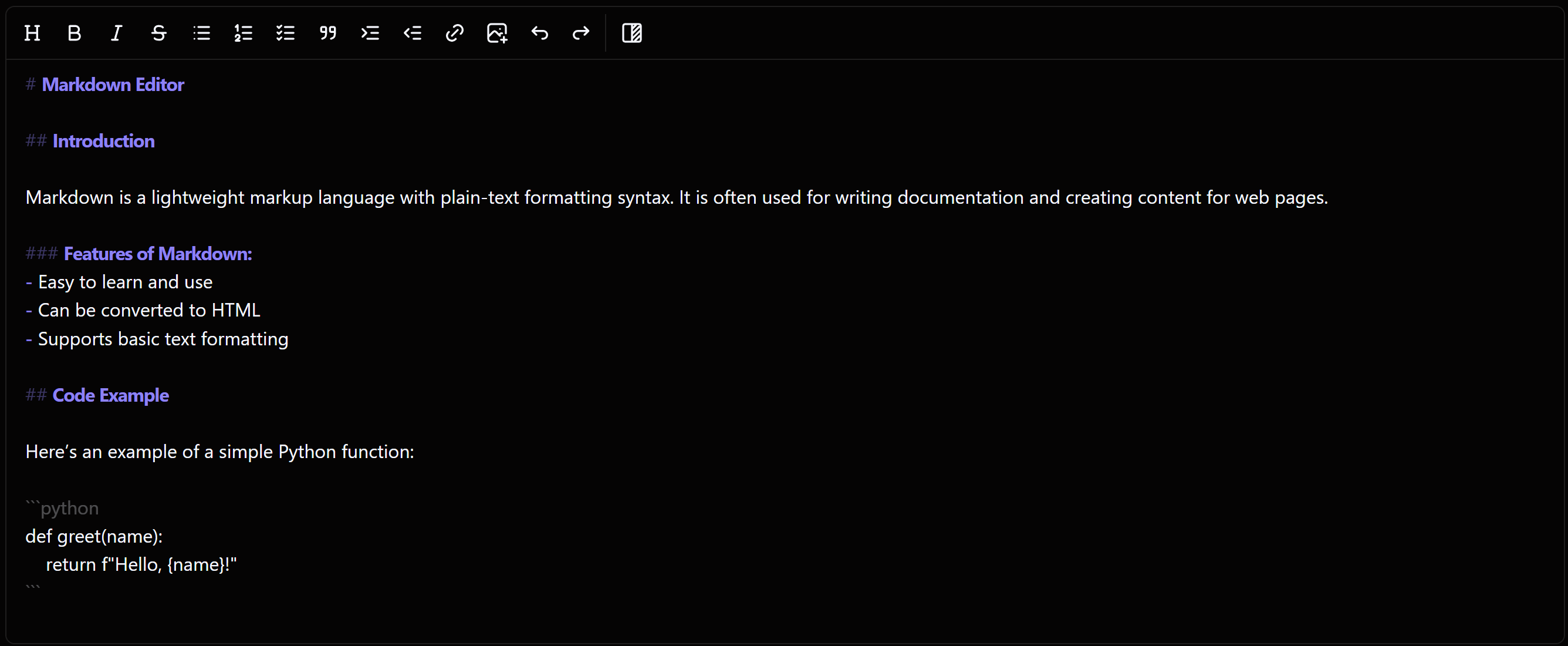
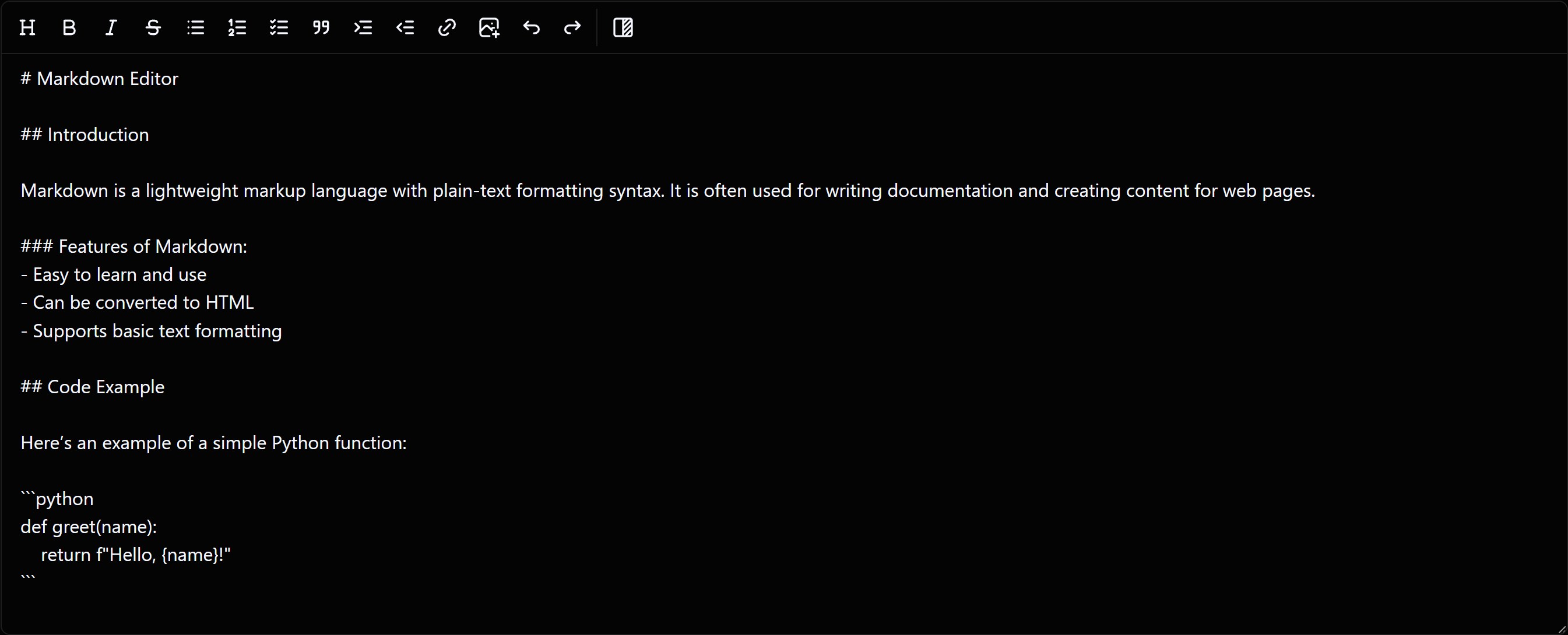
- 🔀 **WYSIWYG Hybrid Mode** — Renders bold, italic, headings, and code live as you type while keeping the underlying Markdown. Switch to plain mode for raw syntax editing
|
|
72
|
+
- ⚡ **Live Preview** — Full side-by-side Markdown preview with clickable task list checkboxes that sync back to the source instantly
|
|
73
|
+
- 🖼️ **Advanced Image Upload** — Upload images directly to your server or S3. Avoids heavy Base64 strings for better performance and SEO
|
|
74
|
+
- 🔍 **Find & Replace** — Built-in panel (`Ctrl+F` / `Ctrl+H`) with live match counter, next/prev navigation, case-sensitive toggle, and replace all
|
|
75
|
+
- ⌨️ **Keyboard Shortcuts** — `Ctrl+B`, `Ctrl+I`, `Ctrl+K`, `Ctrl+Z`, `Ctrl+1`–`Ctrl+3` for headings, and more
|
|
76
|
+
- 📝 **Smart List Continuation** — GitHub-style: press `Enter` inside a list and the bullet/number continues automatically
|
|
77
|
+
- 🔄 **Undo / Redo** — Full diff-based history with exact cursor restoration. Works with `Ctrl+Z`, `Ctrl+Y`, `Ctrl+Shift+Z`
|
|
78
|
+
- ♿ **Accessible by Default** — `role="toolbar"`, `aria-pressed`, `aria-disabled`, `disabled`, screen-reader-friendly SVGs, and correct focus restoration on modal close
|
|
79
|
+
- 🛡️ **XSS Safe** — Preview output sanitized via [DOMPurify](https://github.com/cure53/DOMPurify) before rendering
|
|
80
|
+
- 🛡️ **CSP Compatible** — No inline event handlers. Works with strict Content Security Policy headers
|
|
81
|
+
- 🌍 **RTL Support** — Native Right-to-Left support for Arabic, Urdu, Farsi, and other RTL languages
|
|
82
|
+
- 🌙 **Dark Mode & Theming** — Inherits `data-theme` from any ancestor element. Built-in light, dark, snowberry, and darkberry themes. Fully customizable via CSS variables
|
|
83
|
+
- 🎛️ **Modular Toolbar** — Pick exactly which tools appear and in what order
|
|
84
|
+
- 📦 **Universal Module Support** — ESM, CommonJS, UMD, and IIFE. Works with Vite, webpack, Rollup, or directly via `<script src>` CDN — no configuration needed
|
|
85
|
+
- 🚀 **High Performance** — ~116KB bundle. Debounced preview, cached layout calculations, conflict-free Tab/Enter handling for large documents
|
|
69
86
|
|
|
70
87
|
## 🛠 Developer Workflow
|
|
71
88
|
|
|
72
|
-
### Getting Content
|
|
73
|
-
|
|
74
|
-
You don't need a custom library method to get the text. Just target the ID:
|
|
89
|
+
### Getting & Setting Content
|
|
75
90
|
|
|
76
91
|
```javascript
|
|
92
|
+
// Get — just like any textarea
|
|
77
93
|
const markdown = document.getElementById('markdown-editor').value;
|
|
78
|
-
|
|
94
|
+
|
|
95
|
+
// Set — editor UI updates automatically
|
|
96
|
+
document.getElementById('markdown-editor').value = '## Updated content';
|
|
79
97
|
```
|
|
80
98
|
|
|
81
|
-
###
|
|
99
|
+
### React to every change with `onChange`
|
|
100
|
+
|
|
101
|
+
```javascript
|
|
102
|
+
const editor = new MarkdownEditor('#markdown-editor', {
|
|
103
|
+
onChange(value) {
|
|
104
|
+
console.log('Content changed:', value.length, 'characters');
|
|
105
|
+
}
|
|
106
|
+
});
|
|
107
|
+
```
|
|
82
108
|
|
|
83
|
-
|
|
109
|
+
### Auto-save draft to localStorage
|
|
84
110
|
|
|
85
111
|
```javascript
|
|
86
112
|
const textarea = document.getElementById('markdown-editor');
|
|
87
|
-
|
|
88
|
-
|
|
89
|
-
|
|
113
|
+
const saved = localStorage.getItem('draft');
|
|
114
|
+
if (saved && !textarea.value) textarea.value = saved;
|
|
115
|
+
|
|
116
|
+
const editor = new MarkdownEditor('#markdown-editor', {
|
|
117
|
+
onChange(value) {
|
|
118
|
+
localStorage.setItem('draft', value);
|
|
119
|
+
}
|
|
120
|
+
});
|
|
90
121
|
```
|
|
91
122
|
|
|
92
|
-
|
|
123
|
+
### Tear down in SPAs
|
|
93
124
|
|
|
94
|
-
|
|
95
|
-
|
|
96
|
-
|
|
97
|
-
|
|
98
|
-
- ♿ **Accessible by Default**: Full ARIA support out of the box — toolbar landmark (`role="toolbar"`), labelled preview region, screen-reader-friendly tool buttons (SVGs marked `aria-hidden`), `aria-pressed` on the preview toggle, `aria-disabled` on inactive buttons, and correct focus restoration when modals close
|
|
99
|
-
- 🛡️ **Zero CSS Conflicts**: Editor styles are fully scoped to the `.markdown-editor-wrapper` element and Tailwind's global preflight is excluded — no bleed into Bootstrap, Tailwind, or any other CSS framework on the same page
|
|
100
|
-
- 🌍 **Built-in RTL Support**: Native support for Right-to-Left (RTL) languages like Arabic, Urdu, and Farsi, making it globally accessible
|
|
101
|
-
- 🌙 **Adaptive Theming**: Features automatic Dark Mode support that follows your system or website settings for a seamless visual experience
|
|
102
|
-
- 🎨 **Frutjam UI Ready**: Effortless integration with the **Frutjam** UI library, including automatic theme adjustments to match your UI components
|
|
103
|
-
- 🚀 **High Performance**:
|
|
104
|
-
- **Lightweight**: Tiny bundle size (~116KB minified)
|
|
105
|
-
- **Heavy Content**: Optimized to handle long documents and large files without performance lag
|
|
106
|
-
- **Smart rendering**: Debounced preview updates, cached style calculations, and conflict-free keyboard handling between list continuation and indentation
|
|
107
|
-
- 📱 **Fully Responsive**: A fluid UI that adapts perfectly to desktops, tablets, and smartphones
|
|
108
|
-
- 📝 **Smart Editing**: GitHub-style automatic list continuation—press `Enter` and the editor handles the bullets/numbers for you. Supports ordered lists, unordered lists, and checklists
|
|
109
|
-
- 🔄 **Undo / Redo**: Full history system using granular diffs — restores both text content and exact cursor position. Integrated with `Ctrl+Z`, `Ctrl+Y`, and `Ctrl+Shift+Z`
|
|
110
|
-
- 🎛️ **Effortless Customization**: Quickly match your brand's look and feel using simple CSS variables
|
|
111
|
-
- 📦 **Universal Module Support**: Compatible with **ESM**, **UMD**, **CommonJS**, and **IIFE** — works with Vite, webpack, Rollup, or directly via CDN (`<script src>`) with no extra configuration
|
|
112
|
-
- 🔄 **Actively Maintained**: Regularly updated with new features, optimizations, and community-driven improvements
|
|
125
|
+
```javascript
|
|
126
|
+
// Removes editor UI, restores original textarea, cleans up all event listeners
|
|
127
|
+
editor.destroy();
|
|
128
|
+
```
|
|
113
129
|
|
|
114
130
|
## 📖 Documentation
|
|
115
131
|
|
|
116
|
-
|
|
132
|
+
Full API reference, configuration options, theming guide, and advanced image upload docs:
|
|
133
|
+
👉 **[frutjam.com/plugins/markdown-editor](https://frutjam.com/plugins/markdown-editor)**
|
|
117
134
|
|
|
118
|
-
## WYSIWYG
|
|
135
|
+
## WYSIWYG Hybrid Mode vs Plain Mode
|
|
119
136
|
|
|
120
|
-
### Hybrid Mode
|
|
137
|
+
### Hybrid Mode — live formatting as you type
|
|
121
138
|
|
|
122
139
|
|
|
123
140
|
|
|
124
|
-
### Plain
|
|
141
|
+
### Plain Mode — raw Markdown syntax
|
|
125
142
|
|
|
126
143
|
|
|
127
144
|
|
|
128
145
|
---
|
|
129
146
|
|
|
130
|
-
##
|
|
147
|
+
## 🤝 Contributing
|
|
131
148
|
|
|
132
|
-
Contributions
|
|
149
|
+
Contributions are welcome! Bug fixes, feature requests, and improvements — open an issue or submit a pull request.
|
|
133
150
|
|
|
134
151
|
---
|
|
135
152
|
|
|
136
153
|
## License
|
|
137
154
|
|
|
138
|
-
|
|
155
|
+
[MIT License](LICENSE)
|
|
139
156
|
|
|
140
157
|
---
|
|
141
158
|
|
|
142
|
-
Thank you for choosing the MarkdownEditor Plugin – your reliable, feature-rich solution for seamless markdown editing and content creation with **easy integration**. Happy coding!
|
|
143
|
-
|
|
144
159
|
## ⭐ Support
|
|
145
160
|
|
|
146
|
-
If
|
|
161
|
+
If this saves you time, consider giving it a star — it helps others find this project!
|
|
147
162
|
|
|
148
163
|
[](https://github.com/nezanuha/markdown-text-editor/stargazers)
|
|
149
164
|
|