markdown-text-editor 1.0.0 → 1.1.0
This diff represents the content of publicly available package versions that have been released to one of the supported registries. The information contained in this diff is provided for informational purposes only and reflects changes between package versions as they appear in their respective public registries.
- package/README.md +113 -17
- package/dist/markdown-text-editor.es.js +2570 -0
- package/dist/markdown-text-editor.es.js.map +1 -0
- package/dist/markdown-text-editor.umd.js +213 -0
- package/dist/markdown-text-editor.umd.js.map +1 -0
- package/package.json +25 -25
- package/dist/index.css +0 -5
- package/dist/index.css.map +0 -1
- package/dist/index.js +0 -3
- package/dist/index.js.LICENSE.txt +0 -1
- package/dist/index.js.map +0 -1
- package/dist/markdown-text-editor.css +0 -5
- package/dist/markdown-text-editor.css.map +0 -1
- package/dist/markdown-text-editor.js +0 -3
- package/dist/markdown-text-editor.js.LICENSE.txt +0 -3
- package/dist/markdown-text-editor.js.map +0 -1
package/README.md
CHANGED
|
@@ -1,4 +1,4 @@
|
|
|
1
|
-
|
|
1
|
+
# MarkdownEditor — The Native-First JavaScript Markdown Editor
|
|
2
2
|
|
|
3
3
|
[![npm installs][npm_installs]](https://www.npmjs.com/package/markdown-text-editor)
|
|
4
4
|
[![Jsdelivr hits][jsdelivr]](https://cdn.jsdelivr.net/npm/markdown-text-editor)
|
|
@@ -7,27 +7,123 @@
|
|
|
7
7
|
[](https://snyk.io/test/github/nezanuha/markdown-text-editor)
|
|
8
8
|

|
|
9
9
|
|
|
10
|
+
A lightweight, developer-friendly Markdown editor that transforms a standard HTML `<textarea>` into a feature-rich editing experience without breaking native form submission.
|
|
10
11
|
|
|
11
|
-
|
|
12
|
+
> A native `<textarea>` can be enhanced into an advanced Markdown editor while still functioning like a standard textarea, allowing developers to submit its content through a normal form, retrieve the Markdown value using JavaScript via `id`, `name`, or any selector, and set the content programmatically with the editor automatically reflecting the changes.
|
|
12
13
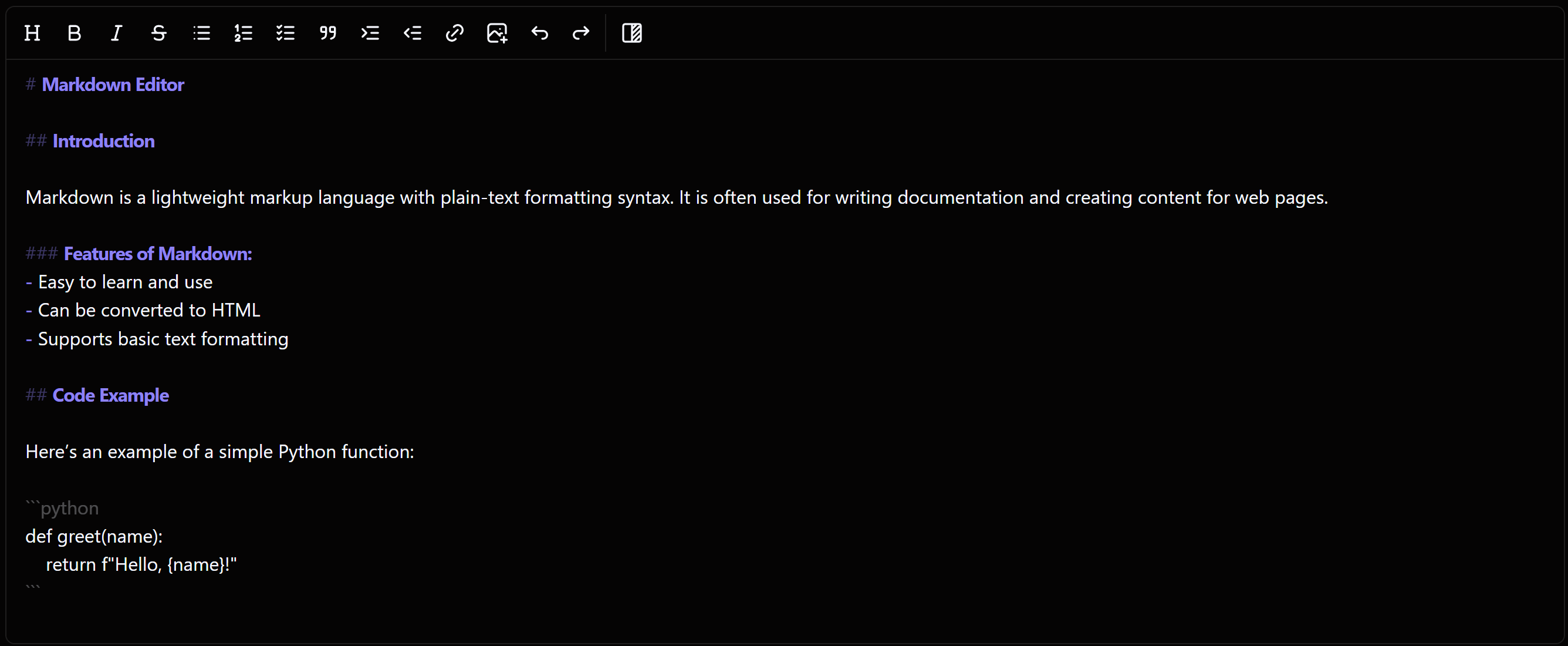
|
|
|
13
|
-
##
|
|
14
|
+
## 💡 The Concept: Native Power
|
|
14
15
|
|
|
15
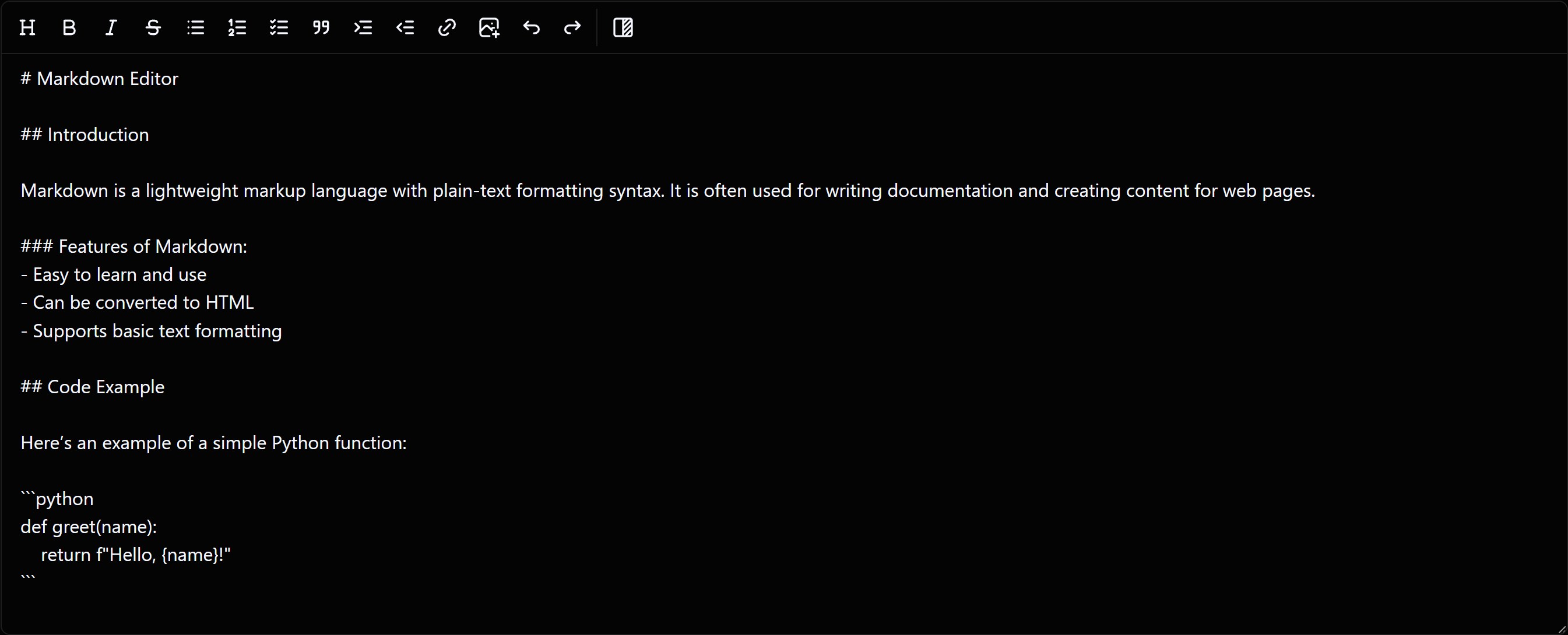
|
-
|
|
16
|
+
Most advanced editors require complex APIs to get or set data. This editor stays true to the web: **if you know how to use a `<textarea>`, you know how to use this editor**.
|
|
16
17
|
|
|
17
|
-
|
|
18
|
-
- ✅ **Effortless Frutjam UI Integration**: Easily integrate the Frutjam UI library with automatic editor theme adjustments based on the selected theme.
|
|
19
|
-
- ✅ **Actively Maintenaning**: The plugin receives regular updates to stay up to date.
|
|
20
|
-
- ✅ **User-Friendly**: It offers a WYSIWYG-style interface, making it great for non-technical users.
|
|
21
|
-
- ✅ **Simple Markdown _Get/Set_**: No complicated techniques are required to get and set the markdown content. You can use the <textarea> value or name attribute to get and set markdown content.
|
|
22
|
-
- ✅ **Responsive**: The editor is fully responsive, providing a seamless experience across all screen sizes.
|
|
23
|
-
- ✅ **RTL Support**: By default Right-to-Left (RTL) text is supported, making it ideal for languages like Arabic, Urdu, and Farsi.
|
|
24
|
-
- ✅ **Module Support**: Supports ESM, UMD, and CommonJS modules, making it easy to integrate with different module systems.
|
|
25
|
-
- ✅ **Live Preview Mode**: Watch your markdown content render while you type, providing a real-time preview of formatting, links, images, and more.
|
|
26
|
-
- ✅ **Automatic Dark Mode Support**: The editor follows your system's or website's dark mode settings, giving a seamless experience.
|
|
18
|
+
It acts as a transparent layer over your native element. This means:
|
|
27
19
|
|
|
28
|
-
|
|
20
|
+
- **Automatic Form Submission**: Since it's a `<textarea>`, the content is automatically included in your POST requests
|
|
21
|
+
- **No New Syntax**: Use standard JavaScript to get or set values
|
|
22
|
+
- **Seamless Integration**: Works with any backend (Node, PHP, Python, etc.) just like a normal form field
|
|
29
23
|
|
|
30
|
-
|
|
24
|
+
## 🚀 Quick Start
|
|
25
|
+
|
|
26
|
+
### 1. Installation
|
|
27
|
+
|
|
28
|
+
#### NPM
|
|
29
|
+
|
|
30
|
+
```bash
|
|
31
|
+
npm install markdown-text-editor
|
|
32
|
+
```
|
|
33
|
+
|
|
34
|
+
——— OR ———
|
|
35
|
+
|
|
36
|
+
#### CDN
|
|
37
|
+
|
|
38
|
+
```html
|
|
39
|
+
<script src="https://cdn.jsdelivr.net/npm/markdown-text-editor@1.0.1/dist/markdown-text-editor.min.js"></script>
|
|
40
|
+
```
|
|
41
|
+
|
|
42
|
+
### 2. The HTML Structure
|
|
43
|
+
|
|
44
|
+
Simply place a `<textarea>` inside your standard form. No special wrappers required.
|
|
45
|
+
|
|
46
|
+
```html
|
|
47
|
+
<form method="post" action="api/submit-form">
|
|
48
|
+
<input type="text" name="title" placeholder="Article Title">
|
|
49
|
+
|
|
50
|
+
<textarea id="markdown-editor" name="content"># Heading level 1</textarea>
|
|
51
|
+
|
|
52
|
+
<button type="submit">Submit Post</button>
|
|
53
|
+
</form>
|
|
54
|
+
```
|
|
55
|
+
|
|
56
|
+
### 3. Initialization
|
|
57
|
+
|
|
58
|
+
Works out of the box with any bundler (Vite, webpack, Rollup) or via CDN — no extra configuration needed. CSS is injected automatically, so a single import is all you need.
|
|
59
|
+
|
|
60
|
+
```javascript
|
|
61
|
+
import MarkdownEditor from "markdown-text-editor";
|
|
62
|
+
|
|
63
|
+
// Plain mode (default) — raw Markdown syntax
|
|
64
|
+
const editor = new MarkdownEditor('#markdown-editor');
|
|
65
|
+
|
|
66
|
+
// Hybrid mode — WYSIWYG-inspired, renders formatting live as you type
|
|
67
|
+
const editor = new MarkdownEditor('#markdown-editor', { mode: 'hybrid' });
|
|
68
|
+
```
|
|
69
|
+
|
|
70
|
+
## 🛠 Developer Workflow
|
|
71
|
+
|
|
72
|
+
### Getting Content
|
|
73
|
+
|
|
74
|
+
You don't need a custom library method to get the text. Just target the ID:
|
|
75
|
+
|
|
76
|
+
```javascript
|
|
77
|
+
const markdown = document.getElementById('markdown-editor').value;
|
|
78
|
+
console.log(markdown);
|
|
79
|
+
```
|
|
80
|
+
|
|
81
|
+
### Setting Content
|
|
82
|
+
|
|
83
|
+
The editor listens for changes. When you update the textarea value via JavaScript, the preview/editor UI updates automatically:
|
|
84
|
+
|
|
85
|
+
```javascript
|
|
86
|
+
const textarea = document.getElementById('markdown-editor');
|
|
87
|
+
textarea.value = "## New Content Loaded via JS";
|
|
88
|
+
|
|
89
|
+
// The editor UI reflects this immediately
|
|
90
|
+
```
|
|
91
|
+
|
|
92
|
+
## ✨ Features
|
|
93
|
+
|
|
94
|
+
- 🔌 **Native Form Integration**: Works exactly like a standard `<textarea>`. No complex APIs—just use the `value` or `name` attribute to get or set content. It "just works" with standard HTML form submissions
|
|
95
|
+
- 🖼️ **Advanced Image Upload**: Easily configure image uploads to your own server. Set your custom image paths via an API to ensure faster page loads and better SEO by avoiding heavy Base64 strings
|
|
96
|
+
- 🔀 **Hybrid & Plain Modes**: Choose between a **Hybrid (WYSIWYG)** experience for visual editing or a Plain Markdown mode for a traditional coding feel
|
|
97
|
+
- ⚡ **Real-time Live Preview**: Watch your Markdown render instantly as you type, including support for links, images, and complex formatting. Task list checkboxes in the preview pane are clickable and sync back to the markdown source instantly
|
|
98
|
+
- ♿ **Accessible by Default**: Full ARIA support out of the box — toolbar landmark (`role="toolbar"`), labelled preview region, screen-reader-friendly tool buttons (SVGs marked `aria-hidden`), `aria-pressed` on the preview toggle, `aria-disabled` on inactive buttons, and correct focus restoration when modals close
|
|
99
|
+
- 🛡️ **Zero CSS Conflicts**: Editor styles are fully scoped to the `.markdown-editor-wrapper` element and Tailwind's global preflight is excluded — no bleed into Bootstrap, Tailwind, or any other CSS framework on the same page
|
|
100
|
+
- 🌍 **Built-in RTL Support**: Native support for Right-to-Left (RTL) languages like Arabic, Urdu, and Farsi, making it globally accessible
|
|
101
|
+
- 🌙 **Adaptive Theming**: Features automatic Dark Mode support that follows your system or website settings for a seamless visual experience
|
|
102
|
+
- 🎨 **Frutjam UI Ready**: Effortless integration with the **Frutjam** UI library, including automatic theme adjustments to match your UI components
|
|
103
|
+
- 🚀 **High Performance**:
|
|
104
|
+
- **Lightweight**: Tiny bundle size (~116KB minified)
|
|
105
|
+
- **Heavy Content**: Optimized to handle long documents and large files without performance lag
|
|
106
|
+
- **Smart rendering**: Debounced preview updates, cached style calculations, and conflict-free keyboard handling between list continuation and indentation
|
|
107
|
+
- 📱 **Fully Responsive**: A fluid UI that adapts perfectly to desktops, tablets, and smartphones
|
|
108
|
+
- 📝 **Smart Editing**: GitHub-style automatic list continuation—press `Enter` and the editor handles the bullets/numbers for you. Supports ordered lists, unordered lists, and checklists
|
|
109
|
+
- 🔄 **Undo / Redo**: Full history system using granular diffs — restores both text content and exact cursor position. Integrated with `Ctrl+Z`, `Ctrl+Y`, and `Ctrl+Shift+Z`
|
|
110
|
+
- 🎛️ **Effortless Customization**: Quickly match your brand's look and feel using simple CSS variables
|
|
111
|
+
- 📦 **Universal Module Support**: Compatible with **ESM**, **UMD**, and **CommonJS** — works with Vite, webpack, Rollup, or directly via CDN with no extra configuration
|
|
112
|
+
- 🔄 **Actively Maintained**: Regularly updated with new features, optimizations, and community-driven improvements
|
|
113
|
+
|
|
114
|
+
## 📖 Documentation
|
|
115
|
+
|
|
116
|
+
For the complete API reference, advanced configuration, and styling guides, visit the official [Markdown Editor Documentation](https://frutjam.com/plugins/markdown-editor).
|
|
117
|
+
|
|
118
|
+
## WYSIWYG (Hybrid) & Plain Mode Markdown Editing Experience
|
|
119
|
+
|
|
120
|
+
### Hybrid Mode (WYSIWYG + Markdown): See how the editor combines WYSIWYG and Markdown editing in one interface
|
|
121
|
+
|
|
122
|
+
|
|
123
|
+
|
|
124
|
+
### Plain Markdown Mode: Experience editing Markdown directly with full control over formatting
|
|
125
|
+
|
|
126
|
+
|
|
31
127
|
|
|
32
128
|
---
|
|
33
129
|
|
|
@@ -54,4 +150,4 @@ If you like this project, consider giving it a star! 🌟
|
|
|
54
150
|
---
|
|
55
151
|
|
|
56
152
|
[jsdelivr]: https://badgen.net/jsdelivr/hits/npm/markdown-text-editor
|
|
57
|
-
[npm_installs]: https://badgen.net/npm/dt/markdown-text-editor
|
|
153
|
+
[npm_installs]: https://badgen.net/npm/dt/markdown-text-editor
|