markdown-review 0.0.5 → 0.0.6
This diff represents the content of publicly available package versions that have been released to one of the supported registries. The information contained in this diff is provided for informational purposes only and reflects changes between package versions as they appear in their respective public registries.
- package/README.md +94 -50
- package/package.json +1 -1
package/README.md
CHANGED
|
@@ -1,55 +1,126 @@
|
|
|
1
1
|
<p align="center">
|
|
2
|
-
<img src="
|
|
2
|
+
<img src="https://raw.githubusercontent.com/rwoll/markdown-review/main/packages/vscode/images/logo.png" width="160" height="160" alt="Plan Review logo">
|
|
3
3
|
</p>
|
|
4
4
|
|
|
5
|
-
<h1 align="center">
|
|
5
|
+
<h1 align="center">Markdown Review</h1>
|
|
6
6
|
|
|
7
7
|
<p align="center">
|
|
8
|
-
<
|
|
9
|
-
<a href="https://github.com/rwoll/markdown-review/blob/main/LICENSE"><img src="https://img.shields.io/badge/License-MIT-yellow.svg" alt="License: MIT"></a>
|
|
8
|
+
<strong>A markdown viewer with inline commenting for the AI era — read any <code>.md</code> file, annotate sections, answer AI-embedded questions, and export structured feedback.</strong>
|
|
10
9
|
</p>
|
|
11
10
|
|
|
12
11
|
<p align="center">
|
|
13
|
-
<
|
|
12
|
+
<a href="vscode:extension/rwoll.markdown-review"><img src="https://img.shields.io/badge/VS%20Code-Install-0078d4?logo=visualstudiocode&logoColor=white" alt="Install in VS Code"></a>
|
|
13
|
+
<a href="vscode-insiders:extension/rwoll.markdown-review"><img src="https://img.shields.io/badge/VS%20Code%20Insiders-Install-24bfa5?logo=visualstudiocode&logoColor=white" alt="Install in VS Code Insiders"></a>
|
|
14
|
+
<a href="#copilot-cli-plugin"><img src="https://img.shields.io/badge/Copilot%20CLI%20Plugin-Available-24292f?logo=github" alt="Copilot CLI Plugin Available"></a>
|
|
15
|
+
<a href="https://www.npmjs.com/package/markdown-review"><img src="https://img.shields.io/npm/v/markdown-review" alt="npm version"></a>
|
|
14
16
|
</p>
|
|
15
17
|
|
|
16
18
|
---
|
|
17
19
|
|
|
18
|
-
##
|
|
20
|
+
## Demo
|
|
21
|
+
|
|
22
|
+

|
|
23
|
+
|
|
24
|
+
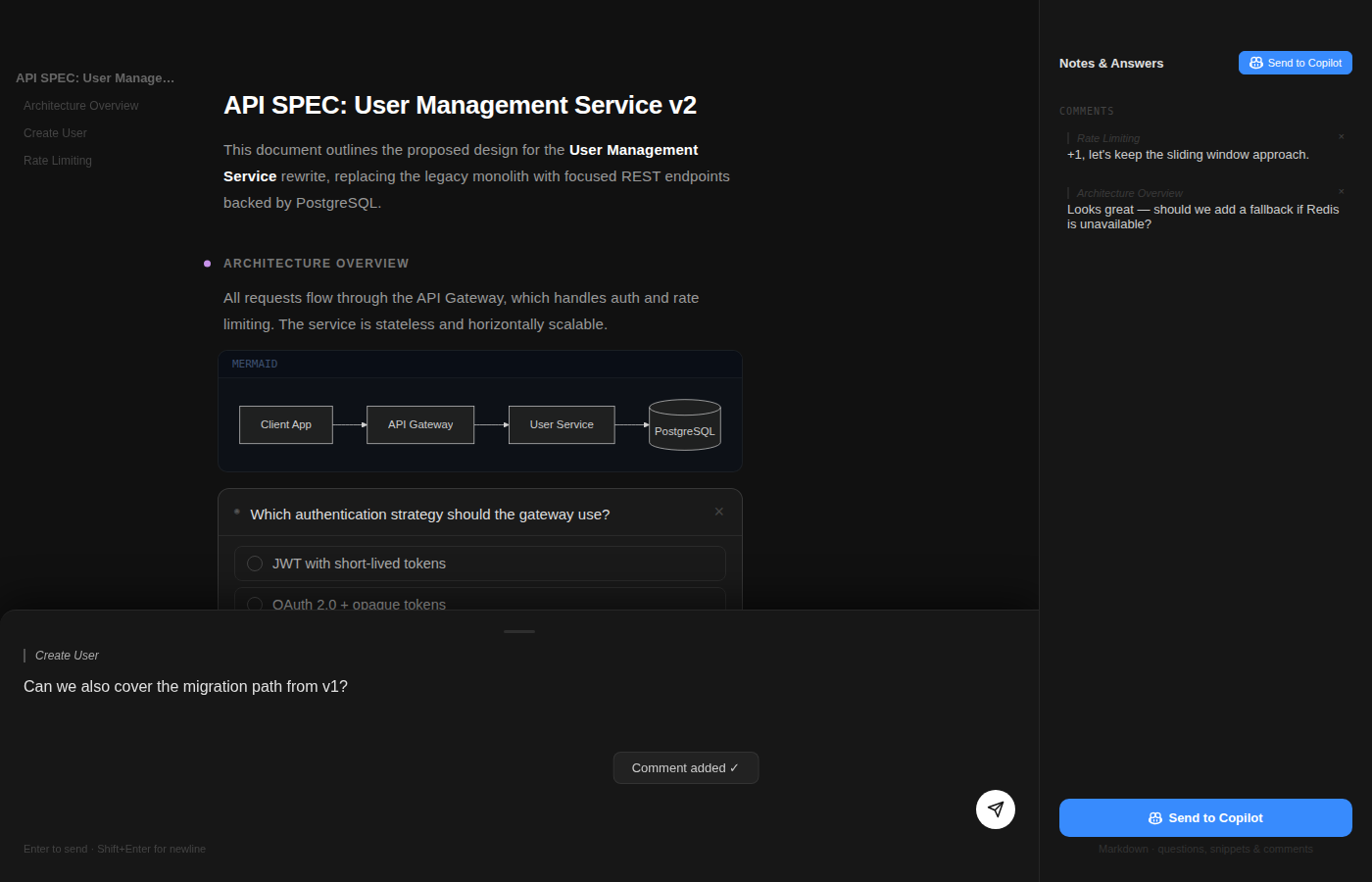
### Screenshot
|
|
25
|
+
|
|
26
|
+
|
|
27
|
+
|
|
28
|
+
---
|
|
29
|
+
|
|
30
|
+
## Why Markdown Review?
|
|
19
31
|
|
|
20
|
-
|
|
32
|
+
Markdown Review turns any `.md` file into a review surface — read it, annotate it, answer embedded questions, and send structured feedback back to an AI agent or your team:
|
|
21
33
|
|
|
22
|
-
|
|
34
|
+
- 🔍 **Read markdown as a document, not a chat message** — clean, readable layout with a live outline and notes panel.
|
|
35
|
+
- ❓ **Answer AI-embedded questions in context** — agents can drop `question:open`, `question:choice`, and `question:checkbox` blocks directly into the document.
|
|
36
|
+
- ✏️ **Annotate any section with one click** — leave comments on paragraphs, headings, code blocks, or list items.
|
|
37
|
+
- 🚀 **Send structured feedback in one click** — your answers and annotations flow back to the agent automatically, ready for it to act on.
|
|
23
38
|
|
|
24
|
-
|
|
39
|
+
Whether you're reviewing a `PLAN.md`, a `SPEC.md`, an `API.md`, or any other markdown file — Markdown Review gives you a commenting layer that works with AI agents out of the box. Point at a paragraph and say "change this" instead of manually quoting text in a chat thread.
|
|
25
40
|
|
|
26
41
|
---
|
|
27
42
|
|
|
28
|
-
|
|
29
|
-
|
|
30
|
-
[
|
|
43
|
+
## VS Code Extension
|
|
44
|
+
|
|
45
|
+
Install the extension from the [Visual Studio Marketplace](https://marketplace.visualstudio.com/items?itemName=rwoll.markdown-review) to review any markdown file directly inside VS Code.
|
|
46
|
+
|
|
47
|
+
Once installed, open any `.md` file — Markdown Review opens automatically as the default editor for Markdown files. Read the document, answer any embedded questions, and click sections to annotate. Close the panel (or press the **Export** button) — structured feedback is sent to Copilot chat.
|
|
48
|
+
|
|
49
|
+
> **Tip:** To switch between the standard Markdown preview and Markdown Review, right-click a `.md` file in Explorer → **Open With…** and choose your preferred editor. Optionally choose **Set as Default** to persist that preference.
|
|
50
|
+
|
|
51
|
+
### Copilot Agent Skill
|
|
52
|
+
|
|
53
|
+
The extension ships with a built-in **Agent Skill** (`markdown-plan-review-feedback`) that Copilot and other AI agents can automatically discover and use. When the skill is active, the agent knows:
|
|
54
|
+
|
|
55
|
+
- The full Markdown Review workflow — generate a structured `.md` file, the user reviews it, feedback flows back to the agent.
|
|
56
|
+
- The `question:open`, `question:choice`, and `question:checkbox` block syntax for embedding interactive questions.
|
|
57
|
+
- Best practices for structuring a reviewable document (headings, question placement, annotatable blocks).
|
|
31
58
|
|
|
32
|
-
|
|
59
|
+
Simply ask Copilot to *"draft a plan for X"* or *"write a spec for Y"* and it will produce a question-rich Markdown file ready to open in Markdown Review — no manual prompt engineering required.
|
|
60
|
+
|
|
61
|
+
---
|
|
62
|
+
|
|
63
|
+
## Copilot CLI Plugin
|
|
64
|
+
|
|
65
|
+
The Copilot CLI plugin adds a **review** skill to [GitHub Copilot in the terminal](https://docs.github.com/en/copilot/how-tos/copilot-cli). When invoked, Copilot writes a markdown file to disk, opens it in a browser-based review UI, and waits for your feedback — all without leaving the terminal.
|
|
66
|
+
|
|
67
|
+
### Install
|
|
33
68
|
|
|
34
69
|
```bash
|
|
35
|
-
|
|
36
|
-
npx markdown-review PLAN.md -o fb.md # write feedback to file
|
|
37
|
-
npx markdown-review PLAN.md --json # JSON output instead of markdown
|
|
70
|
+
copilot plugin install rwoll/markdown-review
|
|
38
71
|
```
|
|
39
72
|
|
|
73
|
+
Or from within an interactive Copilot CLI session:
|
|
74
|
+
|
|
75
|
+
```
|
|
76
|
+
/plugin install rwoll/markdown-review
|
|
77
|
+
```
|
|
78
|
+
|
|
79
|
+
### How It Works
|
|
80
|
+
|
|
81
|
+
1. Copilot writes a markdown file (e.g. `plan.md`, `spec.md`, or any `.md` file).
|
|
82
|
+
2. It runs `npx -y markdown-review@latest plan.md`, which starts a local server and opens your browser.
|
|
83
|
+
3. You review, annotate, and answer embedded questions in the browser UI.
|
|
84
|
+
4. You click **Submit** — feedback is sent back to Copilot and the server exits.
|
|
85
|
+
5. Copilot incorporates your feedback and continues.
|
|
86
|
+
|
|
87
|
+
### Manage
|
|
88
|
+
|
|
89
|
+
```bash
|
|
90
|
+
copilot plugin list # view installed plugins
|
|
91
|
+
copilot plugin update markdown-review # update to latest version
|
|
92
|
+
copilot plugin uninstall markdown-review # remove the plugin
|
|
93
|
+
```
|
|
94
|
+
|
|
95
|
+
---
|
|
96
|
+
|
|
97
|
+
## CLI
|
|
98
|
+
|
|
99
|
+
`markdown-review` is a zero-install CLI that opens a local browser UI for reviewing any markdown file.
|
|
100
|
+
|
|
101
|
+
```bash
|
|
102
|
+
npx markdown-review README.md # review in browser, feedback to stdout
|
|
103
|
+
npx markdown-review SPEC.md -o fb.md # write feedback to file
|
|
104
|
+
npx markdown-review PLAN.md --json # JSON output instead of markdown
|
|
105
|
+
```
|
|
106
|
+
|
|
107
|
+
---
|
|
108
|
+
|
|
40
109
|
## Features
|
|
41
110
|
|
|
42
111
|
- **Document rendering** — headings, paragraphs, lists, blockquotes, syntax-highlighted code, and mermaid diagrams
|
|
43
|
-
- **Embedded AI questions** — open-text, single-choice, and multi-checkbox
|
|
112
|
+
- **Embedded AI questions** — open-text, single-choice, and multi-checkbox with "Other" option
|
|
44
113
|
- **Inline annotations** — click any block to leave a comment
|
|
45
114
|
- **General feedback** — start typing anywhere to open the comment sheet
|
|
46
|
-
- **Export** —
|
|
115
|
+
- **Export** — download `PLAN-feedback.md` with responses, annotations, and notes
|
|
116
|
+
- **Responsive** — mobile (< 800 px), tablet (800–1099 px), desktop (≥ 1100 px)
|
|
47
117
|
- **Dark theme** — high-contrast, reading-optimised
|
|
48
118
|
|
|
49
119
|
## Embedding Questions
|
|
50
120
|
|
|
51
|
-
|
|
52
|
-
|
|
121
|
+
Question blocks are authored in markdown by AI tools (for example Copilot or other agent workflows), and reviewers answer them directly in the UI.
|
|
122
|
+
|
|
123
|
+
Use fenced code blocks with a `question:` language tag:
|
|
53
124
|
|
|
54
125
|
````markdown
|
|
55
126
|
```question:open
|
|
@@ -70,37 +141,10 @@ options: Feature 1 | Feature 2 | Feature 3
|
|
|
70
141
|
```
|
|
71
142
|
````
|
|
72
143
|
|
|
73
|
-
##
|
|
144
|
+
## Contributing
|
|
74
145
|
|
|
75
|
-
|
|
76
|
-
install the **review** plugin and Copilot will automatically open plans for
|
|
77
|
-
review — no manual `npx` needed:
|
|
78
|
-
|
|
79
|
-
```bash
|
|
80
|
-
copilot plugin install rwoll/markdown-review:packages/copilot-plugin
|
|
81
|
-
```
|
|
82
|
-
|
|
83
|
-
Once installed, Copilot writes a plan → opens the review UI in your browser →
|
|
84
|
-
waits for your feedback → incorporates it and continues. The whole loop happens
|
|
85
|
-
without leaving the terminal.
|
|
86
|
-
|
|
87
|
-
```bash
|
|
88
|
-
copilot plugin list # view installed plugins
|
|
89
|
-
copilot plugin update markdown-review # update to latest
|
|
90
|
-
copilot plugin uninstall markdown-review # remove
|
|
91
|
-
```
|
|
92
|
-
|
|
93
|
-
## 🧩 VS Code Extension
|
|
94
|
-
|
|
95
|
-
Prefer to stay in your editor? Install the
|
|
96
|
-
[Plan Review extension](https://marketplace.visualstudio.com/items?itemName=rwoll.markdown-review)
|
|
97
|
-
to review markdown plans directly inside VS Code — feedback is forwarded
|
|
98
|
-
straight to Copilot chat.
|
|
99
|
-
|
|
100
|
-
```
|
|
101
|
-
ext install rwoll.markdown-review
|
|
102
|
-
```
|
|
146
|
+
See [CONTRIBUTING.md](CONTRIBUTING.md) for development setup, testing, and PR guidelines.
|
|
103
147
|
|
|
104
148
|
## License
|
|
105
149
|
|
|
106
|
-
[MIT](
|
|
150
|
+
[MIT](LICENSE)
|
package/package.json
CHANGED