markdown-pdf-export 2.0.1 → 2.0.3
This diff represents the content of publicly available package versions that have been released to one of the supported registries. The information contained in this diff is provided for informational purposes only and reflects changes between package versions as they appear in their respective public registries.
- package/README.md +27 -23
- package/cli.mjs +86 -2
- package/default.css +0 -4
- package/export.mjs +6 -0
- package/lib/editor-setup.mjs +23 -2
- package/lib/page-breaks.mjs +51 -0
- package/lib/settings-schema.mjs +1 -1
- package/lib/types.mjs +1 -1
- package/package.json +5 -5
- package/schema/settings.schema.json +1 -1
- package/studio/app.mjs +56 -8
- package/studio/style.css +18 -6
- package/templates/academic.json +1 -1
- package/templates/corporate.json +1 -1
- package/templates/minimal.json +1 -1
- package/templates/simple.json +1 -1
- package/templates/two-logo.json +1 -1
package/README.md
CHANGED
|
@@ -2,15 +2,19 @@
|
|
|
2
2
|
|
|
3
3
|
[](https://www.npmjs.com/package/markdown-pdf-export)
|
|
4
4
|
[](https://www.npmjs.com/package/markdown-pdf-export)
|
|
5
|
-
[](https://github.com/matinfo/markdown-pdf-export/actions/workflows/ci.yml)
|
|
6
|
-
[](https://github.com/matinfo/markdown-pdf-export/blob/main/LICENSE)
|
|
5
|
+
[](https://github.com/matinfo-tech/markdown-pdf-export/actions/workflows/ci.yml)
|
|
6
|
+
[](https://github.com/matinfo-tech/markdown-pdf-export/blob/main/LICENSE)
|
|
7
7
|
|
|
8
8
|
Turn Markdown files into clean PDFs from VS Code, Zed, Cursor, Claude or any AI assistant, or from
|
|
9
9
|
the command line.
|
|
10
10
|
|
|
11
|
-
|
|
11
|
+
<p align="center">
|
|
12
|
+
<img src="https://raw.githubusercontent.com/matinfo-tech/markdown-pdf-export/main/docs/public/img/banner.jpeg" alt="Markdown PDF Export: Markdown to polished PDFs from VS Code, Copilot, Cursor, any MCP client or the command line" width="100%">
|
|
13
|
+
</p>
|
|
12
14
|
|
|
13
|
-
|
|
15
|
+
Full documentation: <https://markdown-pdf.matinfo.tech/>
|
|
16
|
+
|
|
17
|
+
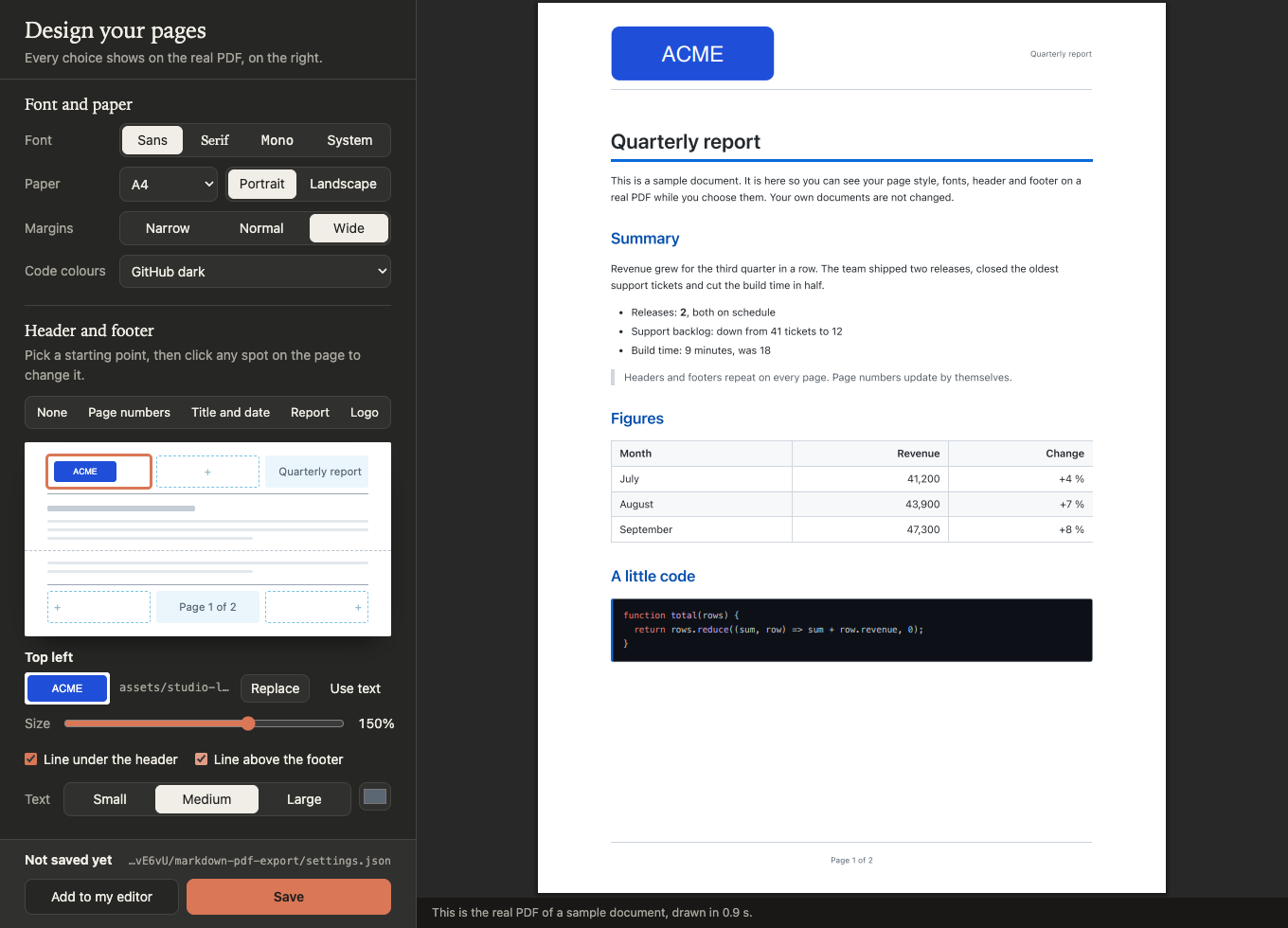
|
|
14
18
|
|
|
15
19
|
## Get started
|
|
16
20
|
|
|
@@ -32,9 +36,9 @@ real PDF update as you go. Click **Save**, then **Add to my editor**, and you ar
|
|
|
32
36
|
There is nothing to install first: `npx` downloads the package on first use and reuses it after.
|
|
33
37
|
Prefer the terminal? Run `npx -y markdown-pdf-export` with no arguments for a small menu.
|
|
34
38
|
|
|
35
|
-
More: [Get started](https://
|
|
36
|
-
[Studio](https://
|
|
37
|
-
[Design online, no install](https://
|
|
39
|
+
More: [Get started](https://markdown-pdf.matinfo.tech/start) ·
|
|
40
|
+
[Studio](https://markdown-pdf.matinfo.tech/studio) ·
|
|
41
|
+
[Design online, no install](https://markdown-pdf.matinfo.tech/online)
|
|
38
42
|
|
|
39
43
|
## Export a file
|
|
40
44
|
|
|
@@ -46,7 +50,7 @@ More: [Get started](https://matinfo.github.io/markdown-pdf-export/start) ·
|
|
|
46
50
|
|
|
47
51
|
The PDF is saved next to the Markdown file. To add the task or the assistant tool by hand, run
|
|
48
52
|
`npx -y markdown-pdf-export setup`, or see
|
|
49
|
-
[Editors](https://
|
|
53
|
+
[Editors](https://markdown-pdf.matinfo.tech/editors).
|
|
50
54
|
|
|
51
55
|
## What you get
|
|
52
56
|
|
|
@@ -60,18 +64,18 @@ The PDF is saved next to the Markdown file. To add the task or the assistant too
|
|
|
60
64
|
|
|
61
65
|
## Go further
|
|
62
66
|
|
|
63
|
-
- [Advanced topics](https://
|
|
64
|
-
- [Settings file](https://
|
|
65
|
-
- [Per-document settings](https://
|
|
66
|
-
- [Header and footer](https://
|
|
67
|
-
- [Styling](https://
|
|
68
|
-
- [Content](https://
|
|
69
|
-
- [Command line](https://
|
|
70
|
-
- [Assistant tools](https://
|
|
71
|
-
- [Browser](https://
|
|
72
|
-
- [Recipes](https://
|
|
73
|
-
- [Settings reference](https://
|
|
74
|
-
- [Placeholders reference](https://
|
|
67
|
+
- [Advanced topics](https://markdown-pdf.matinfo.tech/advanced/): a one-page map of everything below.
|
|
68
|
+
- [Settings file](https://markdown-pdf.matinfo.tech/advanced/settings-file): where it lives and how files are combined.
|
|
69
|
+
- [Per-document settings](https://markdown-pdf.matinfo.tech/advanced/per-document): change one document with front matter.
|
|
70
|
+
- [Header and footer](https://markdown-pdf.matinfo.tech/advanced/header-footer): zones, logos, page numbers and dates.
|
|
71
|
+
- [Styling](https://markdown-pdf.matinfo.tech/advanced/styling): your own CSS, fonts and code colours.
|
|
72
|
+
- [Content](https://markdown-pdf.matinfo.tech/advanced/content): maths, contents list, images and page breaks.
|
|
73
|
+
- [Command line](https://markdown-pdf.matinfo.tech/advanced/cli): every command and option.
|
|
74
|
+
- [Assistant tools](https://markdown-pdf.matinfo.tech/advanced/assistant-tools): the MCP server and its two tools.
|
|
75
|
+
- [Browser](https://markdown-pdf.matinfo.tech/advanced/browser): which browser is used and how to pick another.
|
|
76
|
+
- [Recipes](https://markdown-pdf.matinfo.tech/advanced/recipes): ready-made setups for common jobs.
|
|
77
|
+
- [Settings reference](https://markdown-pdf.matinfo.tech/reference/settings): every setting.
|
|
78
|
+
- [Placeholders reference](https://markdown-pdf.matinfo.tech/reference/placeholders): `{page}`, `{title}`, `{date}` and more.
|
|
75
79
|
|
|
76
80
|
## Help
|
|
77
81
|
|
|
@@ -82,12 +86,12 @@ npx -y markdown-pdf-export doctor
|
|
|
82
86
|
```
|
|
83
87
|
|
|
84
88
|
You can also ask the assistant: "Run doctor_markdown_pdf". For common problems, see
|
|
85
|
-
[Help](https://
|
|
89
|
+
[Help](https://markdown-pdf.matinfo.tech/help).
|
|
86
90
|
|
|
87
91
|
## Contributing
|
|
88
92
|
|
|
89
|
-
See [CONTRIBUTING.md](https://github.com/matinfo/markdown-pdf-export/blob/main/CONTRIBUTING.md) for development setup, tests and how the project is built.
|
|
93
|
+
See [CONTRIBUTING.md](https://github.com/matinfo-tech/markdown-pdf-export/blob/main/CONTRIBUTING.md) for development setup, tests and how the project is built.
|
|
90
94
|
|
|
91
95
|
## Licence
|
|
92
96
|
|
|
93
|
-
MIT. See [LICENSE](https://github.com/matinfo/markdown-pdf-export/blob/main/LICENSE).
|
|
97
|
+
MIT. See [LICENSE](https://github.com/matinfo-tech/markdown-pdf-export/blob/main/LICENSE).
|
package/cli.mjs
CHANGED
|
@@ -6,6 +6,7 @@
|
|
|
6
6
|
* markdown-pdf-export studio design pages in the browser (live preview)
|
|
7
7
|
* markdown-pdf-export doctor [file.md] check browser + settings
|
|
8
8
|
* markdown-pdf-export init [--template t] create the settings file
|
|
9
|
+
* markdown-pdf-export init --from file install a settings file (e.g. from the online designer)
|
|
9
10
|
* markdown-pdf-export setup [editor] print editor task + MCP snippets
|
|
10
11
|
* markdown-pdf-export install-browser download Playwright's Chromium (~200 MB)
|
|
11
12
|
* markdown-pdf-export mcp run as an MCP server on stdio
|
|
@@ -18,6 +19,7 @@
|
|
|
18
19
|
*/
|
|
19
20
|
import { spawn } from "node:child_process";
|
|
20
21
|
import fs from "node:fs";
|
|
22
|
+
import os from "node:os";
|
|
21
23
|
import path from "node:path";
|
|
22
24
|
import process from "node:process";
|
|
23
25
|
import readline from "node:readline/promises";
|
|
@@ -79,6 +81,7 @@ Usage:
|
|
|
79
81
|
${BIN} studio [--project] [--file <doc.md>] design pages in the browser
|
|
80
82
|
${BIN} doctor [file.md] [--json]
|
|
81
83
|
${BIN} init [--look <n>] [--font <n>] [--template <n>] [--project] [--force] [--list]
|
|
84
|
+
${BIN} init --from <file> [--project] [--force]
|
|
82
85
|
${BIN} setup [${EDITOR_IDS.join("|")}|all] [--write]
|
|
83
86
|
${BIN} install-browser
|
|
84
87
|
${BIN} mcp
|
|
@@ -483,6 +486,77 @@ async function promptInit(templates) {
|
|
|
483
486
|
}
|
|
484
487
|
}
|
|
485
488
|
|
|
489
|
+
/** Image paths a settings object refers to in its header and footer, as written. */
|
|
490
|
+
function referencedImages(data) {
|
|
491
|
+
const found = [];
|
|
492
|
+
const walk = (node, key) => {
|
|
493
|
+
if (typeof node === "string") {
|
|
494
|
+
if (key === "src" || key?.endsWith("_image")) found.push(node);
|
|
495
|
+
} else if (Array.isArray(node)) {
|
|
496
|
+
for (const item of node) walk(item, key);
|
|
497
|
+
} else if (node && typeof node === "object") {
|
|
498
|
+
for (const [k, v] of Object.entries(node)) walk(v, k);
|
|
499
|
+
}
|
|
500
|
+
};
|
|
501
|
+
walk(data.header);
|
|
502
|
+
walk(data.footer);
|
|
503
|
+
return [...new Set(found)];
|
|
504
|
+
}
|
|
505
|
+
|
|
506
|
+
/** Where an image reference of a settings file at `dir` points on disk. */
|
|
507
|
+
function imageLocation(ref, data, dir) {
|
|
508
|
+
if (ref.startsWith("@/")) return path.resolve(dir, data.assets_directory ?? ".", ref.slice(2));
|
|
509
|
+
if (ref.startsWith("~/")) return path.join(os.homedir(), ref.slice(2));
|
|
510
|
+
return path.resolve(dir, ref);
|
|
511
|
+
}
|
|
512
|
+
|
|
513
|
+
/** `init --from`: validate a settings file (for example the one downloaded from the online designer) and install it. */
|
|
514
|
+
function installSettingsFile(from, target, force) {
|
|
515
|
+
const source = path.resolve(from);
|
|
516
|
+
let text;
|
|
517
|
+
try {
|
|
518
|
+
text = fs.readFileSync(source, "utf8").replace(/^\uFEFF/, "");
|
|
519
|
+
} catch (error) {
|
|
520
|
+
throw new UsageError(`Cannot read ${source}: ${error.message}`);
|
|
521
|
+
}
|
|
522
|
+
let data;
|
|
523
|
+
try {
|
|
524
|
+
data = JSON.parse(text);
|
|
525
|
+
} catch (error) {
|
|
526
|
+
throw new UsageError(`${source} is not valid JSON: ${error.message}`);
|
|
527
|
+
}
|
|
528
|
+
if (!data || typeof data !== "object" || Array.isArray(data)) {
|
|
529
|
+
throw new UsageError(`${source}: the top level must be a JSON object.`);
|
|
530
|
+
}
|
|
531
|
+
const { warnings } = applyPresets(data);
|
|
532
|
+
for (const warning of warnings) process.stderr.write(`${source}: ${warning}\n`);
|
|
533
|
+
|
|
534
|
+
const exists = fs.existsSync(target);
|
|
535
|
+
if (path.resolve(target) === source) {
|
|
536
|
+
process.stderr.write(`${BIN}: ${target} is already the settings file.\n`);
|
|
537
|
+
return 0;
|
|
538
|
+
}
|
|
539
|
+
if (exists && !force) {
|
|
540
|
+
process.stderr.write(`${BIN}: ${target} already exists — not overwriting (use --force).\n`);
|
|
541
|
+
return 1;
|
|
542
|
+
}
|
|
543
|
+
fs.mkdirSync(path.dirname(target), { recursive: true });
|
|
544
|
+
if (exists) {
|
|
545
|
+
fs.copyFileSync(target, `${target}.bak`);
|
|
546
|
+
process.stderr.write(`Kept the previous file as ${target}.bak\n`);
|
|
547
|
+
}
|
|
548
|
+
fs.writeFileSync(target, text.endsWith("\n") ? text : `${text}\n`);
|
|
549
|
+
process.stderr.write("Installed your settings to:\n");
|
|
550
|
+
process.stdout.write(`${target}\n`);
|
|
551
|
+
|
|
552
|
+
const dir = path.dirname(target);
|
|
553
|
+
for (const ref of referencedImages(data)) {
|
|
554
|
+
const where = imageLocation(ref, data, dir);
|
|
555
|
+
if (!fs.existsSync(where)) process.stderr.write(`Put your logo at ${where} (settings say "${ref}")\n`);
|
|
556
|
+
}
|
|
557
|
+
return 0;
|
|
558
|
+
}
|
|
559
|
+
|
|
486
560
|
async function runInit(argv) {
|
|
487
561
|
const flags = parseSubArgs(argv, {
|
|
488
562
|
template: "string",
|
|
@@ -491,12 +565,16 @@ async function runInit(argv) {
|
|
|
491
565
|
project: "boolean",
|
|
492
566
|
force: "boolean",
|
|
493
567
|
list: "boolean",
|
|
568
|
+
from: "string",
|
|
494
569
|
});
|
|
495
570
|
if (flags.help) {
|
|
496
571
|
process.stdout.write(
|
|
497
|
-
`Usage: ${BIN} init [--look <n>] [--font <n>] [--template <n>] [--project] [--force] [--list]\n
|
|
572
|
+
`Usage: ${BIN} init [--look <n>] [--font <n>] [--template <n>] [--project] [--force] [--list]\n` +
|
|
573
|
+
` ${BIN} init --from <file> [--project] [--force]\n\n` +
|
|
498
574
|
`Creates ${userSettingsPath()}\n` +
|
|
499
|
-
`(or ./${PROJECT_SETTINGS_FILENAME} with --project) from a template.\n
|
|
575
|
+
`(or ./${PROJECT_SETTINGS_FILENAME} with --project) from a template.\n` +
|
|
576
|
+
"--from installs a settings file you already have, such as the one downloaded from\n" +
|
|
577
|
+
"the online designer. It is checked first; an existing file is kept as .bak with --force.\n",
|
|
500
578
|
);
|
|
501
579
|
return 0;
|
|
502
580
|
}
|
|
@@ -510,6 +588,12 @@ async function runInit(argv) {
|
|
|
510
588
|
const target = flags.project
|
|
511
589
|
? path.resolve(PROJECT_SETTINGS_FILENAME)
|
|
512
590
|
: userSettingsPath();
|
|
591
|
+
if (flags.from !== undefined) {
|
|
592
|
+
if (flags.template || flags.look || flags.font) {
|
|
593
|
+
throw new UsageError("--from cannot be combined with --template, --look or --font.");
|
|
594
|
+
}
|
|
595
|
+
return installSettingsFile(flags.from, target, flags.force);
|
|
596
|
+
}
|
|
513
597
|
if (fs.existsSync(target) && !flags.force) {
|
|
514
598
|
process.stderr.write(
|
|
515
599
|
`${BIN}: ${target} already exists — not overwriting (use --force).\n`,
|
package/default.css
CHANGED
package/export.mjs
CHANGED
|
@@ -29,6 +29,7 @@ import {
|
|
|
29
29
|
userSettingsPath,
|
|
30
30
|
} from "./lib/settings-loader.mjs";
|
|
31
31
|
import { applyPresets } from "./lib/looks.mjs";
|
|
32
|
+
import { PAGE_BREAK_CSS, pageBreakComments } from "./lib/page-breaks.mjs";
|
|
32
33
|
import {
|
|
33
34
|
createPlaceholderResolver,
|
|
34
35
|
createRenderContext,
|
|
@@ -690,6 +691,8 @@ async function createMarkdown(options) {
|
|
|
690
691
|
highlight: highlightFn,
|
|
691
692
|
});
|
|
692
693
|
|
|
694
|
+
md.use(pageBreakComments);
|
|
695
|
+
|
|
693
696
|
if (options.emoji) {
|
|
694
697
|
try {
|
|
695
698
|
const emoji = await getEmojiPlugin();
|
|
@@ -1274,6 +1277,9 @@ async function renderMarkdownToHtmlWithBody(inputPath, body, title, options) {
|
|
|
1274
1277
|
}
|
|
1275
1278
|
}
|
|
1276
1279
|
|
|
1280
|
+
// Page break markers work with or without the default stylesheet.
|
|
1281
|
+
styleBlocks += `<style>${PAGE_BREAK_CSS}</style>\n `;
|
|
1282
|
+
|
|
1277
1283
|
// Custom stylesheet
|
|
1278
1284
|
const stylesheetPath = resolveStylesheetPath(
|
|
1279
1285
|
path.dirname(inputPath),
|
package/lib/editor-setup.mjs
CHANGED
|
@@ -15,7 +15,7 @@ export const SERVER_NAME = "markdown-pdf-export";
|
|
|
15
15
|
/** Key of the MCP server entry and task label — match the docs. */
|
|
16
16
|
export const MCP_KEY = "markdown-pdf";
|
|
17
17
|
export const TASK_LABEL = "Markdown: Export to PDF";
|
|
18
|
-
export const EDITOR_IDS = ["zed", "vscode", "cursor", "claude-code", "claude-desktop"];
|
|
18
|
+
export const EDITOR_IDS = ["zed", "vscode", "cursor", "claude-code", "claude-desktop", "copilot-cli"];
|
|
19
19
|
|
|
20
20
|
/**
|
|
21
21
|
* Version managers install node under a version-specific directory; editors
|
|
@@ -196,7 +196,7 @@ export function buildEditorSetup(editor, launch, ctx = {}) {
|
|
|
196
196
|
];
|
|
197
197
|
return {
|
|
198
198
|
id: editor,
|
|
199
|
-
name: isCursor ? "Cursor" : "VS Code",
|
|
199
|
+
name: isCursor ? "Cursor" : "VS Code (Copilot)",
|
|
200
200
|
detected: exists(userDir) || (isCursor && exists(path.join(home, ".cursor"))),
|
|
201
201
|
items,
|
|
202
202
|
};
|
|
@@ -225,6 +225,27 @@ export function buildEditorSetup(editor, launch, ctx = {}) {
|
|
|
225
225
|
],
|
|
226
226
|
};
|
|
227
227
|
|
|
228
|
+
case "copilot-cli": {
|
|
229
|
+
// GitHub Copilot in the terminal keeps its own list (~/.copilot/mcp-config.json),
|
|
230
|
+
// separate from VS Code's; its CLI writes it.
|
|
231
|
+
const args = ["mcp", "add", MCP_KEY, "--", server.command, ...server.args];
|
|
232
|
+
return {
|
|
233
|
+
id: "copilot-cli",
|
|
234
|
+
name: "Copilot CLI",
|
|
235
|
+
detected: exists(path.join(home, ".copilot")),
|
|
236
|
+
items: [
|
|
237
|
+
{
|
|
238
|
+
kind: "mcp",
|
|
239
|
+
label: "Copilot CLI MCP server",
|
|
240
|
+
file: null,
|
|
241
|
+
write: "command",
|
|
242
|
+
run: { cmd: "copilot", args },
|
|
243
|
+
snippet: shellJoin(["copilot", ...args], platform),
|
|
244
|
+
},
|
|
245
|
+
],
|
|
246
|
+
};
|
|
247
|
+
}
|
|
248
|
+
|
|
228
249
|
case "claude-desktop": {
|
|
229
250
|
const file = path.join(r.appData, "Claude", "claude_desktop_config.json");
|
|
230
251
|
return {
|
|
@@ -0,0 +1,51 @@
|
|
|
1
|
+
/**
|
|
2
|
+
* @fileoverview Page break markers. A document can start a new page with any
|
|
3
|
+
* of these, so people can write what they already know:
|
|
4
|
+
*
|
|
5
|
+
* <div class="page"></div> (also page-break, pagebreak, page_break,
|
|
6
|
+
* <div class="new-page"></div> new-page, newpage, break-page)
|
|
7
|
+
* <hr class="page-break">
|
|
8
|
+
* <!-- page-break --> (also pagebreak, page_break, new-page,
|
|
9
|
+
* newpage, page)
|
|
10
|
+
* <div style="page-break-after: always"></div> (plain CSS, always worked)
|
|
11
|
+
*
|
|
12
|
+
* `<div class="page-break-before">` breaks before the element instead.
|
|
13
|
+
*/
|
|
14
|
+
|
|
15
|
+
export const PAGE_BREAK_CLASSES = [
|
|
16
|
+
"page",
|
|
17
|
+
"page-break",
|
|
18
|
+
"pagebreak",
|
|
19
|
+
"page_break",
|
|
20
|
+
"new-page",
|
|
21
|
+
"newpage",
|
|
22
|
+
"break-page",
|
|
23
|
+
];
|
|
24
|
+
|
|
25
|
+
/** CSS that makes the classes work. Always added, even without the default stylesheet. */
|
|
26
|
+
export const PAGE_BREAK_CSS =
|
|
27
|
+
`${PAGE_BREAK_CLASSES.map((c) => `.${c}`).join(",")}{break-after:page;page-break-after:always}` +
|
|
28
|
+
`.page-break-before{break-before:page;page-break-before:always}`;
|
|
29
|
+
|
|
30
|
+
const COMMENT = /^<!--\s*(?:page[-_ ]?break|new[-_ ]?page|page)\s*-->\s*$/i;
|
|
31
|
+
|
|
32
|
+
/**
|
|
33
|
+
* markdown-it plugin: turn `<!-- page-break -->` style comments into a page
|
|
34
|
+
* break element. Comments inside code blocks are untouched (they are not html tokens).
|
|
35
|
+
* @param {import("markdown-it")} md
|
|
36
|
+
*/
|
|
37
|
+
export function pageBreakComments(md) {
|
|
38
|
+
md.core.ruler.push("page_break_comments", (state) => {
|
|
39
|
+
for (const token of state.tokens) {
|
|
40
|
+
if (token.type === "html_block" && COMMENT.test(token.content.trim())) {
|
|
41
|
+
token.content = '<div class="page-break"></div>\n';
|
|
42
|
+
} else if (token.type === "inline" && token.children) {
|
|
43
|
+
for (const child of token.children) {
|
|
44
|
+
if (child.type === "html_inline" && COMMENT.test(child.content.trim())) {
|
|
45
|
+
child.content = '<span class="page-break"></span>';
|
|
46
|
+
}
|
|
47
|
+
}
|
|
48
|
+
}
|
|
49
|
+
}
|
|
50
|
+
});
|
|
51
|
+
}
|
package/lib/settings-schema.mjs
CHANGED
|
@@ -10,7 +10,7 @@ import { LOOKS, FONTS, TEMPLATES } from "./looks.mjs";
|
|
|
10
10
|
import { BUILTIN_PLACEHOLDERS, ELEMENT_TYPES, SHORTHAND_MAPPINGS } from "./types.mjs";
|
|
11
11
|
|
|
12
12
|
export const SETTINGS_SCHEMA_URL =
|
|
13
|
-
"https://
|
|
13
|
+
"https://markdown-pdf.matinfo.tech/schema/settings.schema.json";
|
|
14
14
|
|
|
15
15
|
/** Export options that make no sense in a settings file. */
|
|
16
16
|
const CALL_ONLY = new Set(["input_path", "output_path"]);
|
package/lib/types.mjs
CHANGED
package/package.json
CHANGED
|
@@ -1,9 +1,9 @@
|
|
|
1
1
|
{
|
|
2
2
|
"name": "markdown-pdf-export",
|
|
3
|
-
"version": "2.0.
|
|
3
|
+
"version": "2.0.3",
|
|
4
4
|
"description": "Markdown to PDF with your header, footer, page numbers and logo. Design pages in Studio, export from VS Code, Zed, Cursor, Claude or any MCP client, or the command line.",
|
|
5
5
|
"type": "module",
|
|
6
|
-
"mcpName": "io.github.matinfo/markdown-pdf-export",
|
|
6
|
+
"mcpName": "io.github.matinfo-tech/markdown-pdf-export",
|
|
7
7
|
"main": "export.mjs",
|
|
8
8
|
"exports": {
|
|
9
9
|
".": "./export.mjs",
|
|
@@ -87,11 +87,11 @@
|
|
|
87
87
|
"license": "MIT",
|
|
88
88
|
"repository": {
|
|
89
89
|
"type": "git",
|
|
90
|
-
"url": "git+https://github.com/matinfo/markdown-pdf-export.git"
|
|
90
|
+
"url": "git+https://github.com/matinfo-tech/markdown-pdf-export.git"
|
|
91
91
|
},
|
|
92
|
-
"homepage": "https://
|
|
92
|
+
"homepage": "https://markdown-pdf.matinfo.tech/",
|
|
93
93
|
"bugs": {
|
|
94
|
-
"url": "https://github.com/matinfo/markdown-pdf-export/issues"
|
|
94
|
+
"url": "https://github.com/matinfo-tech/markdown-pdf-export/issues"
|
|
95
95
|
},
|
|
96
96
|
"packageManager": "npm@11.12.1",
|
|
97
97
|
"devDependencies": {
|
|
@@ -1,6 +1,6 @@
|
|
|
1
1
|
{
|
|
2
2
|
"$schema": "http://json-schema.org/draft-07/schema#",
|
|
3
|
-
"$id": "https://
|
|
3
|
+
"$id": "https://markdown-pdf.matinfo.tech/schema/settings.schema.json",
|
|
4
4
|
"title": "markdown-pdf-export settings",
|
|
5
5
|
"description": "User settings (~/.config/markdown-pdf-export/settings.json) or project settings (.markdown-pdf.json).",
|
|
6
6
|
"type": "object",
|
package/studio/app.mjs
CHANGED
|
@@ -481,6 +481,13 @@ async function save() {
|
|
|
481
481
|
}
|
|
482
482
|
}
|
|
483
483
|
|
|
484
|
+
const EDITOR_ORDER = ["vscode", "copilot-cli", "claude-code", "claude-desktop", "cursor", "zed"];
|
|
485
|
+
const EDITOR_NOTES = {
|
|
486
|
+
vscode: "Works with GitHub Copilot Chat in agent mode.",
|
|
487
|
+
"copilot-cli": "For GitHub Copilot in the terminal (the copilot command).",
|
|
488
|
+
};
|
|
489
|
+
let editorTab = "";
|
|
490
|
+
|
|
484
491
|
async function openEditors() {
|
|
485
492
|
const dialog = $("editors");
|
|
486
493
|
const list = $("editors-list");
|
|
@@ -498,7 +505,8 @@ async function openEditors() {
|
|
|
498
505
|
el(
|
|
499
506
|
"div",
|
|
500
507
|
{ class: "editor" },
|
|
501
|
-
|
|
508
|
+
editor.detected ? el("p", { class: "found-note", text: `${editor.name} is on this computer.` }) : null,
|
|
509
|
+
EDITOR_NOTES[editor.id] ? el("p", { class: "editor-note", text: EDITOR_NOTES[editor.id] }) : null,
|
|
502
510
|
...editor.items.map((item, index) => {
|
|
503
511
|
const result = el("div", { class: "result", role: "status" });
|
|
504
512
|
const copy = el("button", {
|
|
@@ -543,13 +551,53 @@ async function openEditors() {
|
|
|
543
551
|
}),
|
|
544
552
|
);
|
|
545
553
|
|
|
546
|
-
|
|
547
|
-
const
|
|
548
|
-
const
|
|
549
|
-
|
|
550
|
-
|
|
551
|
-
}
|
|
552
|
-
|
|
554
|
+
// One tab per editor, in a fixed order; open on the first one found on this computer.
|
|
555
|
+
const sorted = EDITOR_ORDER.map((id) => editors.find((e) => e.id === id)).filter(Boolean);
|
|
556
|
+
for (const e of editors) if (!sorted.includes(e)) sorted.push(e);
|
|
557
|
+
let current = sorted.find((e) => e.id === editorTab) ?? sorted.find((e) => e.detected) ?? sorted[0];
|
|
558
|
+
|
|
559
|
+
const tabs = el("div", { class: "tabs", role: "tablist", "aria-label": "Editors" });
|
|
560
|
+
const panel = el("div", { class: "tab-panel", role: "tabpanel" });
|
|
561
|
+
const buttons = new Map();
|
|
562
|
+
|
|
563
|
+
const select = (editor, focus = false) => {
|
|
564
|
+
current = editor;
|
|
565
|
+
editorTab = editor.id;
|
|
566
|
+
for (const [id, button] of buttons) {
|
|
567
|
+
const on = id === editor.id;
|
|
568
|
+
button.setAttribute("aria-selected", String(on));
|
|
569
|
+
button.tabIndex = on ? 0 : -1;
|
|
570
|
+
if (on && focus) button.focus();
|
|
571
|
+
}
|
|
572
|
+
panel.setAttribute("aria-labelledby", `tab-${editor.id}`);
|
|
573
|
+
panel.replaceChildren(card(editor));
|
|
574
|
+
};
|
|
575
|
+
|
|
576
|
+
sorted.forEach((editor, i) => {
|
|
577
|
+
const button = el(
|
|
578
|
+
"button",
|
|
579
|
+
{
|
|
580
|
+
type: "button",
|
|
581
|
+
role: "tab",
|
|
582
|
+
id: `tab-${editor.id}`,
|
|
583
|
+
class: "tab",
|
|
584
|
+
onclick: () => select(editor),
|
|
585
|
+
onkeydown: (event) => {
|
|
586
|
+
const step = { ArrowRight: 1, ArrowLeft: -1 }[event.key];
|
|
587
|
+
if (!step) return;
|
|
588
|
+
event.preventDefault();
|
|
589
|
+
select(sorted[(i + step + sorted.length) % sorted.length], true);
|
|
590
|
+
},
|
|
591
|
+
},
|
|
592
|
+
editor.name,
|
|
593
|
+
editor.detected ? el("span", { class: "found", title: "Found on this computer", "aria-label": "found on this computer" }) : null,
|
|
594
|
+
);
|
|
595
|
+
buttons.set(editor.id, button);
|
|
596
|
+
tabs.append(button);
|
|
597
|
+
});
|
|
598
|
+
|
|
599
|
+
list.replaceChildren(tabs, panel);
|
|
600
|
+
select(current);
|
|
553
601
|
}
|
|
554
602
|
|
|
555
603
|
// ── start ───────────────────────────────────────────────────────────────────
|
package/studio/style.css
CHANGED
|
@@ -449,8 +449,9 @@ input[type="range"] { accent-color: var(--accent); }
|
|
|
449
449
|
|
|
450
450
|
/* ── editors dialog ─────────────────────────────────────────────────────── */
|
|
451
451
|
dialog {
|
|
452
|
-
width: min(
|
|
452
|
+
width: min(720px, calc(100vw - 40px));
|
|
453
453
|
max-height: calc(100vh - 60px);
|
|
454
|
+
min-height: 640px;
|
|
454
455
|
border: 1px solid var(--rule);
|
|
455
456
|
border-radius: 10px;
|
|
456
457
|
padding: 22px 24px;
|
|
@@ -462,11 +463,23 @@ dialog::backdrop { background: rgba(0, 0, 0, 0.6); }
|
|
|
462
463
|
.dialog-head h2 { margin: 0; font-size: 21px; }
|
|
463
464
|
dialog .hint { margin: 0 0 6px; }
|
|
464
465
|
|
|
465
|
-
.
|
|
466
|
-
.
|
|
467
|
-
|
|
466
|
+
.tabs { display: flex; gap: 2px; margin: 12px 0 0; border-bottom: 1px solid var(--rule); overflow-x: auto; overflow-y: hidden; }
|
|
467
|
+
.tab {
|
|
468
|
+
display: inline-flex; align-items: center; gap: 6px;
|
|
469
|
+
padding: 8px 9px; margin-bottom: -1px;
|
|
470
|
+
font: 600 13.5px var(--ui); white-space: nowrap; cursor: pointer;
|
|
471
|
+
color: var(--quiet); background: none;
|
|
472
|
+
border: 0; border-bottom: 2px solid transparent;
|
|
473
|
+
}
|
|
474
|
+
.tab:hover { color: var(--text); }
|
|
475
|
+
.tab[aria-selected="true"] { color: var(--text); border-bottom-color: var(--accent); }
|
|
476
|
+
.tab:focus-visible { outline: 2px solid var(--accent); outline-offset: -2px; border-radius: 4px; }
|
|
477
|
+
.tab .found { width: 7px; height: 7px; border-radius: 50%; background: var(--ok); }
|
|
478
|
+
.tab-panel { padding-top: 14px; min-height: 260px; }
|
|
479
|
+
.editor-note { margin: 0 0 10px; font-size: 13px; }
|
|
480
|
+
.found-note { margin: 0 0 10px; font-size: 13px; color: var(--quiet); }
|
|
468
481
|
.step { margin-bottom: 12px; }
|
|
469
|
-
.step-head { display: flex; align-items: center; justify-content: space-between; gap: 10px; }
|
|
482
|
+
.step-head { display: flex; align-items: center; justify-content: space-between; gap: 10px; margin-bottom: 10px; }
|
|
470
483
|
.step-file { font: 11.5px var(--mono); color: var(--quiet); overflow-wrap: anywhere; margin: 2px 0 5px; }
|
|
471
484
|
.step pre {
|
|
472
485
|
margin: 0;
|
|
@@ -480,7 +493,6 @@ dialog .hint { margin: 0 0 6px; }
|
|
|
480
493
|
}
|
|
481
494
|
.step .result { margin-top: 5px; color: var(--ok); }
|
|
482
495
|
.step .result.bad { color: var(--error); }
|
|
483
|
-
details.others summary { cursor: pointer; padding: 12px 0; color: var(--quiet); border-top: 1px solid var(--rule); }
|
|
484
496
|
|
|
485
497
|
/* ── small screens: form first, preview below ───────────────────────────── */
|
|
486
498
|
@media (max-width: 860px) {
|
package/templates/academic.json
CHANGED
package/templates/corporate.json
CHANGED
package/templates/minimal.json
CHANGED
package/templates/simple.json
CHANGED
package/templates/two-logo.json
CHANGED