markdown-design-doc-viewer 1.2.0 → 1.3.0
This diff represents the content of publicly available package versions that have been released to one of the supported registries. The information contained in this diff is provided for informational purposes only and reflects changes between package versions as they appear in their respective public registries.
- package/README.ja.md +2 -1
- package/README.md +2 -1
- package/dist/cli.js +38 -37
- package/dist/export.css +1 -1
- package/dist/export.js +1 -1
- package/dist/webview.js +451 -451
- package/package.json +1 -1
package/README.ja.md
CHANGED
|
@@ -10,7 +10,7 @@
|
|
|
10
10
|
|
|
11
11
|
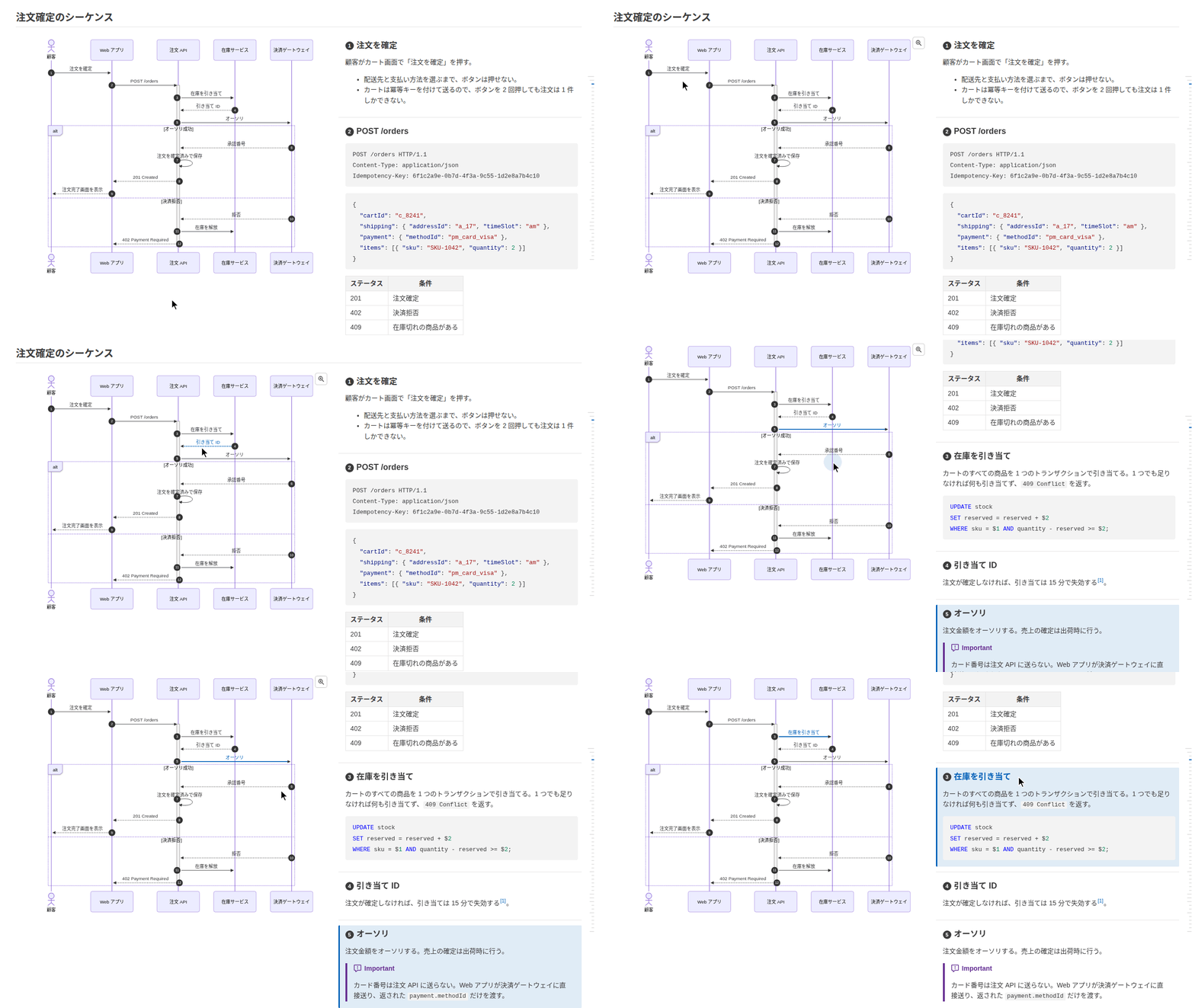
書き出す HTML は VS Code 拡張の `設計書を HTML にエクスポート` コマンドと同じです。**mermaid のシーケンス図やフローチャートと処理概要を横並びにして**表示し、図の矢印(フローチャートではノード)と見出しが紐付いて、マウスを載せたりクリックしたりするとハイライトします。図はヘッドレス Chrome で描画し、ローカルの画像は埋め込むので、どのブラウザでも開けて、印刷から PDF にもできます。
|
|
12
12
|
|
|
13
|
-
|
|
14
14
|
|
|
15
15
|
**[サンプル](https://playree.github.io/markdown-design-doc-viewer/ja/sample/)**: このコマンドで [examples/screenshot.ja.md](https://github.com/playree/markdown-design-doc-viewer/blob/main/examples/screenshot.ja.md) から書き出した HTML です。
|
|
16
16
|
|
|
@@ -49,6 +49,7 @@ md-design-doc export docs -o site
|
|
|
49
49
|
| `--no-front-matter` | YAML front matter(メタ情報の表、`type: design_doc` ではヘッダ)を表示しない |
|
|
50
50
|
| `--no-sticky-table-header` | 長い表のヘッダ行をスクロール中に上端に固定しない |
|
|
51
51
|
| `--no-table-tree-highlight` | ツリーとして表示する表(表のオプションの `level=`)で、マウスを乗せた行の親と子をハイライトしない |
|
|
52
|
+
| `--no-toc` | ページの右端にマウスを乗せると開く目次(見出し h1〜h3)を表示しない |
|
|
52
53
|
| `--chrome <path>` | 図の描画に使う Chrome か Chromium |
|
|
53
54
|
| `--strict` | 警告(壊れた `@ref` や置き場所の誤ったマーカーなどの紐付けの警告、適用できない表のオプション)があれば失敗にする。紐付いていないだけの矢印・見出しでは失敗しない |
|
|
54
55
|
| `--diff-base <rev>` | 各文書の、git のリビジョン `<rev>`(タグ・コミット・ブランチ)からの差分を表示する。VS Code 拡張の履歴との比較と同じく、追加・変更・削除したブロックに緑・青・赤の帯を付け、変わった語を強調し、変更した図には変更前の図を折りたたんで添える。ページ下部のバーで前後の変更へ移動したり、差分を隠したり表示したりできる。そのリビジョンの同じパスにない文書(その後に追加・名前を変更したもの)は全体を追加として表示する。git と、クローンにそのリビジョンまでの履歴が必要([GitHub Actions](#github-actions) を参照)。`--index` と使うと、一覧に各文書の差分の列が付く |
|
package/README.md
CHANGED
|
@@ -10,7 +10,7 @@ The command line of [Markdown Design Doc Viewer](https://github.com/playree/mark
|
|
|
10
10
|
|
|
11
11
|
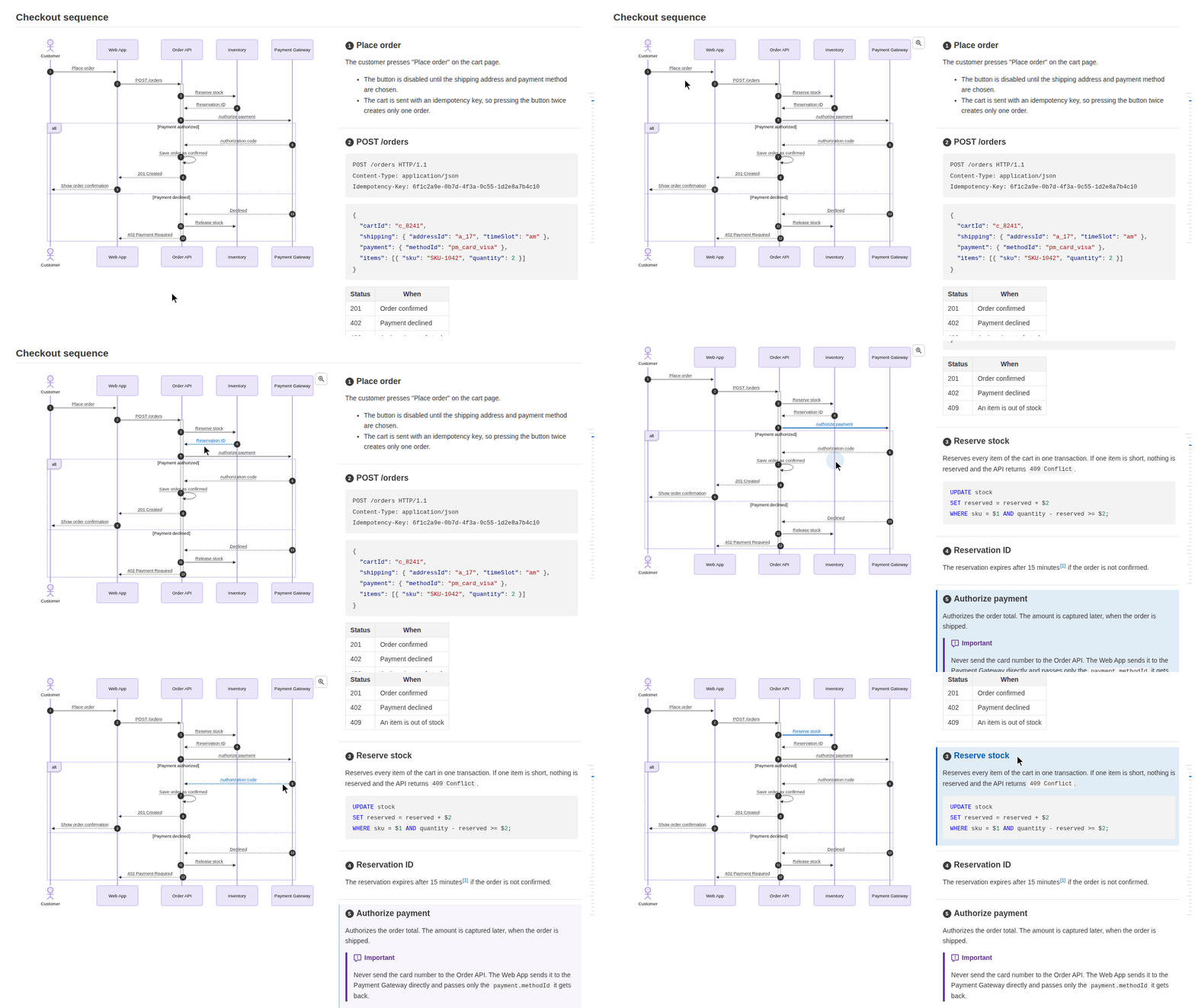
The HTML is the same as the VS Code extension's `Export Design Doc as HTML` command writes: **mermaid sequence diagrams and flowcharts are shown side by side with their step descriptions**, and each arrow (or flowchart node) is linked to its heading, highlighted when hovered or clicked. The diagrams are rendered with headless Chrome and local images are embedded, so the file can be opened in any browser or printed to PDF.
|
|
12
12
|
|
|
13
|
-
|
|
14
14
|
|
|
15
15
|
**[Live sample](https://playree.github.io/markdown-design-doc-viewer/sample/)**: an HTML file written by this command from [examples/screenshot.md](https://github.com/playree/markdown-design-doc-viewer/blob/main/examples/screenshot.md).
|
|
16
16
|
|
|
@@ -49,6 +49,7 @@ md-design-doc export docs -o site
|
|
|
49
49
|
| `--no-front-matter` | Hide the YAML front matter (shown as a table of metadata, or as a header with `type: design_doc`). |
|
|
50
50
|
| `--no-sticky-table-header` | Do not keep the header row of a long table at the top while scrolling. |
|
|
51
51
|
| `--no-table-tree-highlight` | Do not highlight the parents and children of the row under the pointer in the tables shown as trees (`level=` of the table options). |
|
|
52
|
+
| `--no-toc` | Do not show the table of contents (headings h1-h3) that opens when hovering the right edge of the page. |
|
|
52
53
|
| `--chrome <path>` | Chrome or Chromium to render the diagrams with. |
|
|
53
54
|
| `--strict` | Fail when a document has a warning: a link warning (a broken `@ref` or a misplaced marker), or table options that cannot be applied. Arrows and headings that are only not linked do not fail. |
|
|
54
55
|
| `--diff-base <rev>` | Show the changes of each document since the git revision `<rev>` (a tag, a commit or a branch), as the VS Code extension shows its differences from a revision: the blocks added, changed and deleted are marked with green, blue and red bands, the words changed are highlighted, and the old version of a changed diagram is shown folded below it. A bar at the bottom of the page goes from one change to the next, and hides or shows them. A document the revision does not have at its path (added or renamed since) is shown as all added. Requires git, and the history of the revision in the clone (see [GitHub Actions](#github-actions)). With `--index`, the list has a column of the changes of each document. |
|