markdown-design-doc-viewer 1.0.0 → 1.1.0
This diff represents the content of publicly available package versions that have been released to one of the supported registries. The information contained in this diff is provided for informational purposes only and reflects changes between package versions as they appear in their respective public registries.
- package/README.ja.md +7 -5
- package/README.md +7 -5
- package/ThirdPartyNotices.txt +2654 -0
- package/dist/cli.js +51 -45
- package/dist/export.css +1 -1
- package/dist/export.js +1 -1
- package/dist/webview.css +1 -1
- package/dist/webview.js +438 -437
- package/l10n/bundle.l10n.ja.json +71 -1
- package/package.json +1 -1
package/README.ja.md
CHANGED
|
@@ -12,7 +12,7 @@
|
|
|
12
12
|
|
|
13
13
|
|
|
14
14
|
|
|
15
|
-
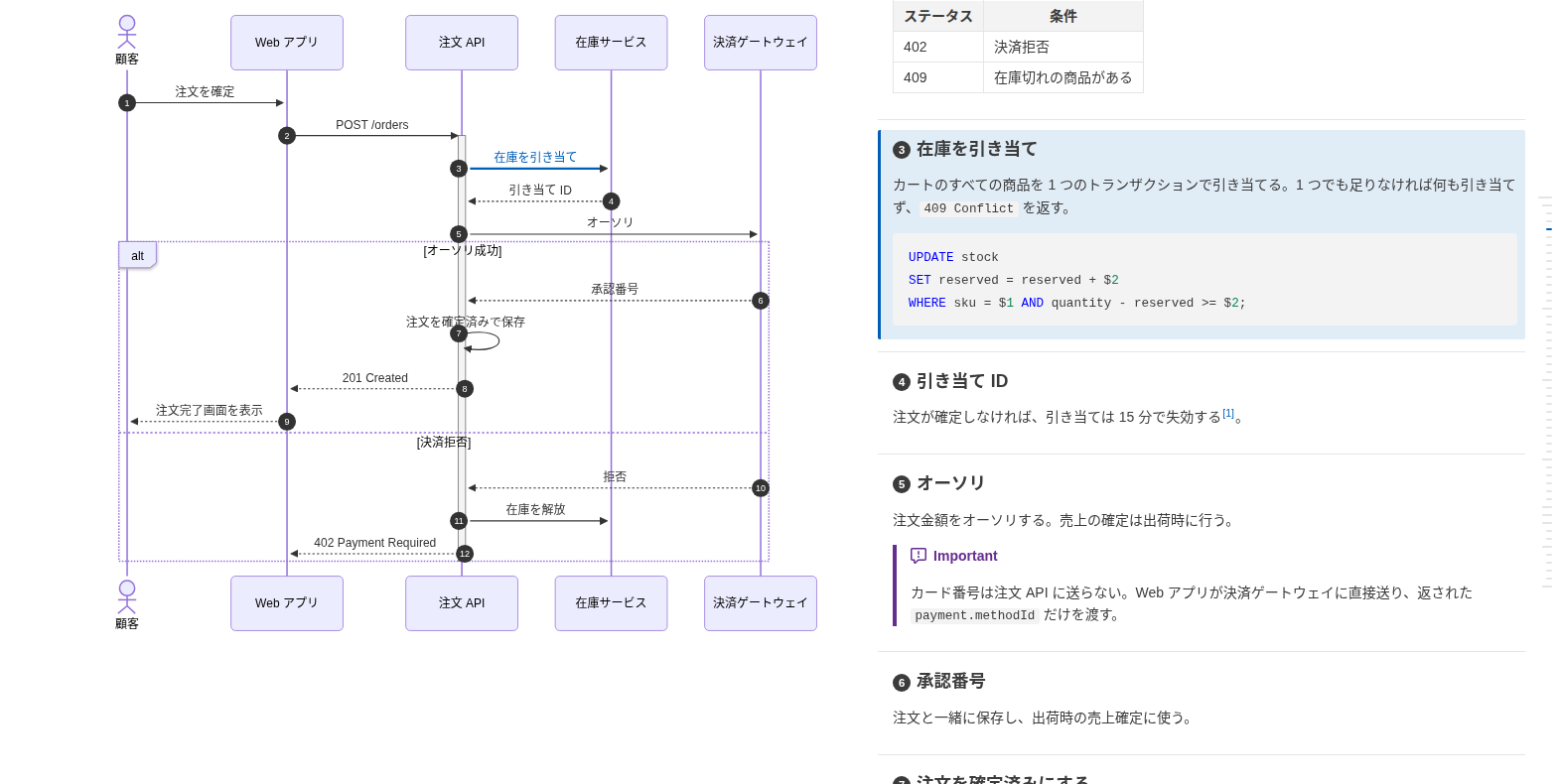
**[サンプル](https://playree.github.io/markdown-design-doc-viewer/ja/)**: このコマンドで [examples/screenshot.ja.md](https://github.com/playree/markdown-design-doc-viewer/blob/main/examples/screenshot.ja.md) から書き出した HTML です。
|
|
15
|
+
**[サンプル](https://playree.github.io/markdown-design-doc-viewer/ja/sample/)**: このコマンドで [examples/screenshot.ja.md](https://github.com/playree/markdown-design-doc-viewer/blob/main/examples/screenshot.ja.md) から書き出した HTML です。
|
|
16
16
|
|
|
17
17
|
## 使い方
|
|
18
18
|
|
|
@@ -47,16 +47,18 @@ md-design-doc export docs -o site
|
|
|
47
47
|
| `--no-heading-numbers` | 紐付いた見出しの先頭に矢印の番号(`autonumber`)を表示しない |
|
|
48
48
|
| `--no-front-matter` | YAML front matter(メタ情報の表、`type: design_doc` ではヘッダ)を表示しない |
|
|
49
49
|
| `--no-sticky-table-header` | 長い表のヘッダ行をスクロール中に上端に固定しない |
|
|
50
|
+
| `--no-table-tree-highlight` | ツリーとして表示する表(表のオプションの `level=`)で、マウスを乗せた行の親と子をハイライトしない |
|
|
50
51
|
| `--chrome <path>` | 図の描画に使う Chrome か Chromium |
|
|
51
|
-
| `--strict` |
|
|
52
|
-
| `--index` | 書き出した文書の一覧を `--out-dir`(必須)の `index.html` にも書き出す。フォルダごとの表に、タイトル(リンク)・ファイル名と、front matter の `version`・`product`・`status`・`updated`
|
|
52
|
+
| `--strict` | 警告(壊れた `@ref` や置き場所の誤ったマーカーなどの紐付けの警告、適用できない表のオプション)があれば失敗にする。紐付いていないだけの矢印・見出しでは失敗しない |
|
|
53
|
+
| `--index` | 書き出した文書の一覧を `--out-dir`(必須)の `index.html` にも書き出す。フォルダごとの表に、タイトル(リンク)・ファイル名と、front matter の `version`・`product`・`status`・`updated` を載せる。ページの検索欄で文書を絞り込め、列見出しで並べ替えられる |
|
|
53
54
|
| `--index-title <title>` | `index.html` のタイトル。既定は `Design Docs`(`--lang ja` では `設計書一覧`) |
|
|
55
|
+
| `--index-design-docs` | `index.html` に設計書(front matter に `type: design_doc`)だけを載せる。ほかの文書もエクスポートはする |
|
|
54
56
|
| `-h`, `--help` | ヘルプを表示する |
|
|
55
57
|
| `-v`, `--version` | バージョンを表示する |
|
|
56
58
|
|
|
57
|
-
フォルダはサブフォルダも含めて `*.md` と `*.markdown` を探します(`node_modules`
|
|
59
|
+
フォルダはサブフォルダも含めて `*.md` と `*.markdown` を探します(`node_modules` とドットで始まるフォルダは除く)。紐付けの警告と表のオプションの警告は標準エラーに出します(GitHub Actions では注釈になります)。
|
|
58
60
|
|
|
59
|
-
文書を書き出せなかったとき、mermaid が描画できない図があったとき(HTML は書き出します)、`--strict`
|
|
61
|
+
文書を書き出せなかったとき、mermaid が描画できない図があったとき(HTML は書き出します)、`--strict` で警告があったときは終了コード 1、コマンドラインの誤りは 2 で終わります。
|
|
60
62
|
|
|
61
63
|
## GitHub Actions
|
|
62
64
|
|
package/README.md
CHANGED
|
@@ -12,7 +12,7 @@ The HTML is the same as the VS Code extension's `Export Design Doc as HTML` comm
|
|
|
12
12
|
|
|
13
13
|
|
|
14
14
|
|
|
15
|
-
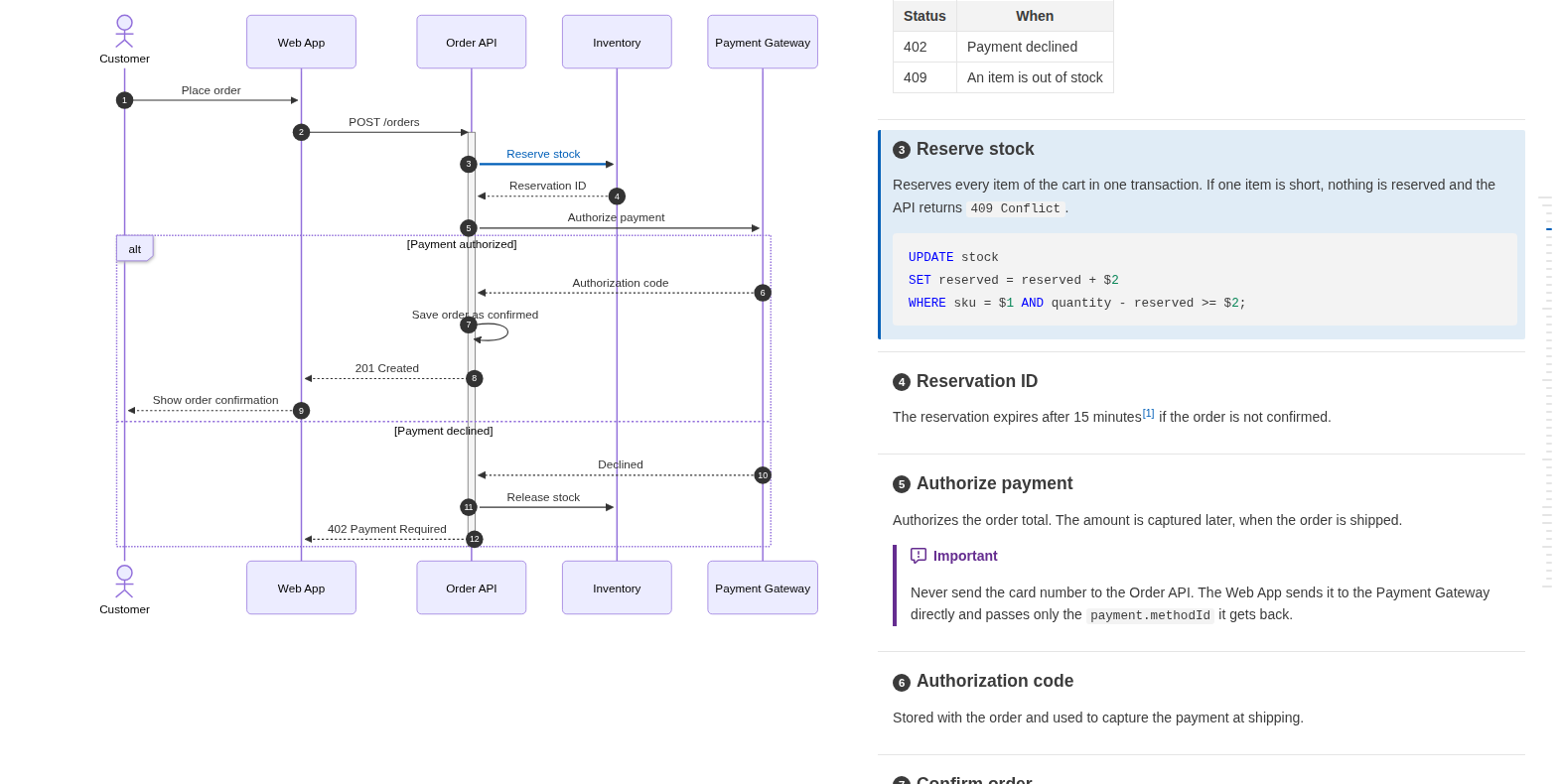
**[Live sample](https://playree.github.io/markdown-design-doc-viewer/)**: an HTML file written by this command from [examples/screenshot.md](https://github.com/playree/markdown-design-doc-viewer/blob/main/examples/screenshot.md).
|
|
15
|
+
**[Live sample](https://playree.github.io/markdown-design-doc-viewer/sample/)**: an HTML file written by this command from [examples/screenshot.md](https://github.com/playree/markdown-design-doc-viewer/blob/main/examples/screenshot.md).
|
|
16
16
|
|
|
17
17
|
## Usage
|
|
18
18
|
|
|
@@ -47,16 +47,18 @@ md-design-doc export docs -o site
|
|
|
47
47
|
| `--no-heading-numbers` | Do not show the arrow numbers (`autonumber`) at the start of the linked headings. |
|
|
48
48
|
| `--no-front-matter` | Hide the YAML front matter (shown as a table of metadata, or as a header with `type: design_doc`). |
|
|
49
49
|
| `--no-sticky-table-header` | Do not keep the header row of a long table at the top while scrolling. |
|
|
50
|
+
| `--no-table-tree-highlight` | Do not highlight the parents and children of the row under the pointer in the tables shown as trees (`level=` of the table options). |
|
|
50
51
|
| `--chrome <path>` | Chrome or Chromium to render the diagrams with. |
|
|
51
|
-
| `--strict` | Fail when a document has a link warning (a broken `@ref` or a misplaced marker). Arrows and headings that are only not linked do not fail. |
|
|
52
|
-
| `--index` | Also write `index.html` in `--out-dir` (required), a list of the exported documents: a table for each folder, with their title (linked), file name, and the `version`, `product`, `status` and `updated` of their front matter. |
|
|
52
|
+
| `--strict` | Fail when a document has a warning: a link warning (a broken `@ref` or a misplaced marker), or table options that cannot be applied. Arrows and headings that are only not linked do not fail. |
|
|
53
|
+
| `--index` | Also write `index.html` in `--out-dir` (required), a list of the exported documents: a table for each folder, with their title (linked), file name, and the `version`, `product`, `status` and `updated` of their front matter. The page has a search box that filters the documents, and its column headers sort them. |
|
|
53
54
|
| `--index-title <title>` | Title of `index.html`. Default: `Design Docs` (`設計書一覧` with `--lang ja`). |
|
|
55
|
+
| `--index-design-docs` | List only the design docs (`type: design_doc` in their front matter) in `index.html`. The other documents are still exported. |
|
|
54
56
|
| `-h`, `--help` | Show the help. |
|
|
55
57
|
| `-v`, `--version` | Show the version. |
|
|
56
58
|
|
|
57
|
-
Folders are searched for `*.md` and `*.markdown` files, including their subfolders, except `node_modules` and folders starting with a dot. Link warnings are written to the standard error (as annotations in GitHub Actions).
|
|
59
|
+
Folders are searched for `*.md` and `*.markdown` files, including their subfolders, except `node_modules` and folders starting with a dot. Link warnings and the warnings of table options are written to the standard error (as annotations in GitHub Actions).
|
|
58
60
|
|
|
59
|
-
The exit status is 1 when a document could not be exported or has a diagram mermaid cannot render (its HTML is written anyway), or with `--strict` a
|
|
61
|
+
The exit status is 1 when a document could not be exported or has a diagram mermaid cannot render (its HTML is written anyway), or with `--strict` a warning, and 2 for a wrong command line.
|
|
60
62
|
|
|
61
63
|
## GitHub Actions
|
|
62
64
|
|