markdown-design-doc-viewer 0.5.0 → 1.0.0
This diff represents the content of publicly available package versions that have been released to one of the supported registries. The information contained in this diff is provided for informational purposes only and reflects changes between package versions as they appear in their respective public registries.
- package/README.ja.md +7 -2
- package/README.md +7 -2
- package/dist/cli.js +45 -34
- package/dist/export.css +1 -1
- package/l10n/bundle.l10n.ja.json +4 -1
- package/package.json +1 -1
package/README.ja.md
CHANGED
|
@@ -12,10 +12,13 @@
|
|
|
12
12
|
|
|
13
13
|
|
|
14
14
|
|
|
15
|
+
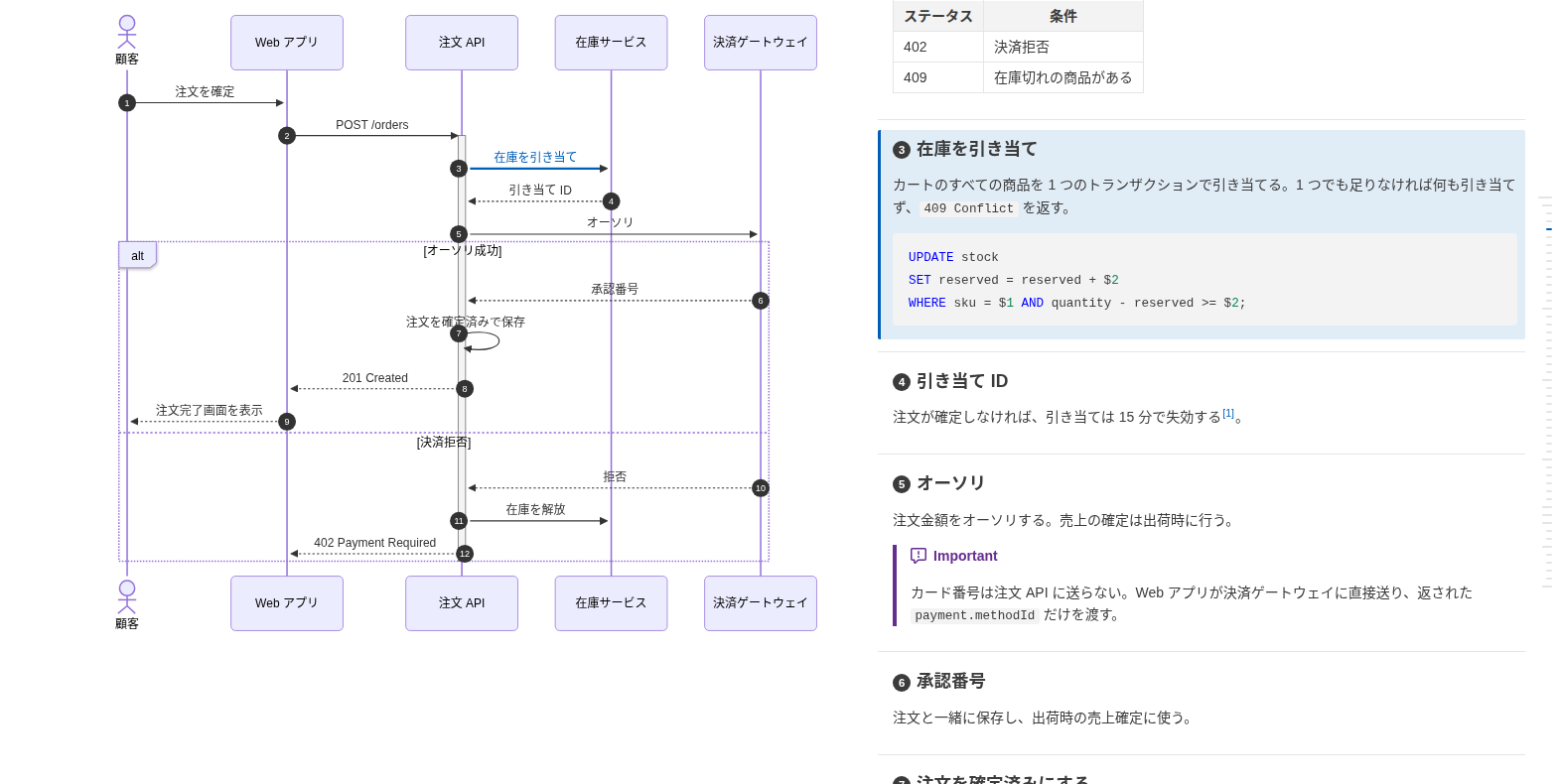
**[サンプル](https://playree.github.io/markdown-design-doc-viewer/ja/)**: このコマンドで [examples/screenshot.ja.md](https://github.com/playree/markdown-design-doc-viewer/blob/main/examples/screenshot.ja.md) から書き出した HTML です。
|
|
16
|
+
|
|
15
17
|
## 使い方
|
|
16
18
|
|
|
17
19
|
```sh
|
|
18
20
|
npx markdown-design-doc-viewer export docs -o site # docs/ 以下の Markdown をすべて site/docs/*.html に
|
|
21
|
+
npx markdown-design-doc-viewer export docs -o site --index # 加えて文書の一覧を site/index.html に
|
|
19
22
|
npx markdown-design-doc-viewer export README.md # 隣に README.html を
|
|
20
23
|
```
|
|
21
24
|
|
|
@@ -46,10 +49,12 @@ md-design-doc export docs -o site
|
|
|
46
49
|
| `--no-sticky-table-header` | 長い表のヘッダ行をスクロール中に上端に固定しない |
|
|
47
50
|
| `--chrome <path>` | 図の描画に使う Chrome か Chromium |
|
|
48
51
|
| `--strict` | 紐付けの警告(壊れた `@ref` や置き場所の誤ったマーカーなど)があれば失敗にする。紐付いていないだけの矢印・見出しでは失敗しない |
|
|
52
|
+
| `--index` | 書き出した文書の一覧を `--out-dir`(必須)の `index.html` にも書き出す。フォルダごとの表に、タイトル(リンク)・ファイル名と、front matter の `version`・`product`・`status`・`updated` を載せる |
|
|
53
|
+
| `--index-title <title>` | `index.html` のタイトル。既定は `Design Docs`(`--lang ja` では `設計書一覧`) |
|
|
49
54
|
| `-h`, `--help` | ヘルプを表示する |
|
|
50
55
|
| `-v`, `--version` | バージョンを表示する |
|
|
51
56
|
|
|
52
|
-
|
|
57
|
+
フォルダはサブフォルダも含めて `*.md` と `*.markdown` を探します(`node_modules` とドットで始まるフォルダは除く)。紐付けの警告は標準エラーに出します(GitHub Actions では注釈になります)。
|
|
53
58
|
|
|
54
59
|
文書を書き出せなかったとき、mermaid が描画できない図があったとき(HTML は書き出します)、`--strict` で紐付けの警告があったときは終了コード 1、コマンドラインの誤りは 2 で終わります。
|
|
55
60
|
|
|
@@ -70,7 +75,7 @@ md-design-doc export docs -o site
|
|
|
70
75
|
|
|
71
76
|
## 書き方
|
|
72
77
|
|
|
73
|
-
図の中に `%% @link-headings` を書くと、その図が後ろの見出しと紐付きます。矢印・ノードと見出しは文言で、または `%% @ref` で対応付けます。記法は [書き方](https://github.com/playree/markdown-design-doc-viewer/blob/main/README.ja.md#書き方) を、AI アシスタントにこの形式で書かせるには [AI 向けの記法ガイド](https://github.com/playree/markdown-design-doc-viewer/blob/main/docs/ai-authoring-guide.ja.md)
|
|
78
|
+
図の中に `%% @link-headings` を書くと、その図が後ろの見出しと紐付きます。矢印・ノードと見出しは文言で、または `%% @ref` で対応付けます。記法は [書き方](https://github.com/playree/markdown-design-doc-viewer/blob/main/README.ja.md#書き方) を、AI アシスタントにこの形式で書かせるには [AI 向けの記法ガイド](https://github.com/playree/markdown-design-doc-viewer/blob/main/docs/ai-authoring-guide.ja.md) を参照してください。ガイドとこのコマンドの使い方は Agent Skill の [markdown-design-doc-skill.zip](https://github.com/playree/markdown-design-doc-viewer/releases/latest/download/markdown-design-doc-skill.zip) にもしてあります。
|
|
74
79
|
|
|
75
80
|
エディタとプレビューを同期させながら書くには、[VS Code 拡張](https://marketplace.visualstudio.com/items?itemName=playree.markdown-design-doc-viewer)を使ってください。
|
|
76
81
|
|
package/README.md
CHANGED
|
@@ -12,10 +12,13 @@ The HTML is the same as the VS Code extension's `Export Design Doc as HTML` comm
|
|
|
12
12
|
|
|
13
13
|
|
|
14
14
|
|
|
15
|
+
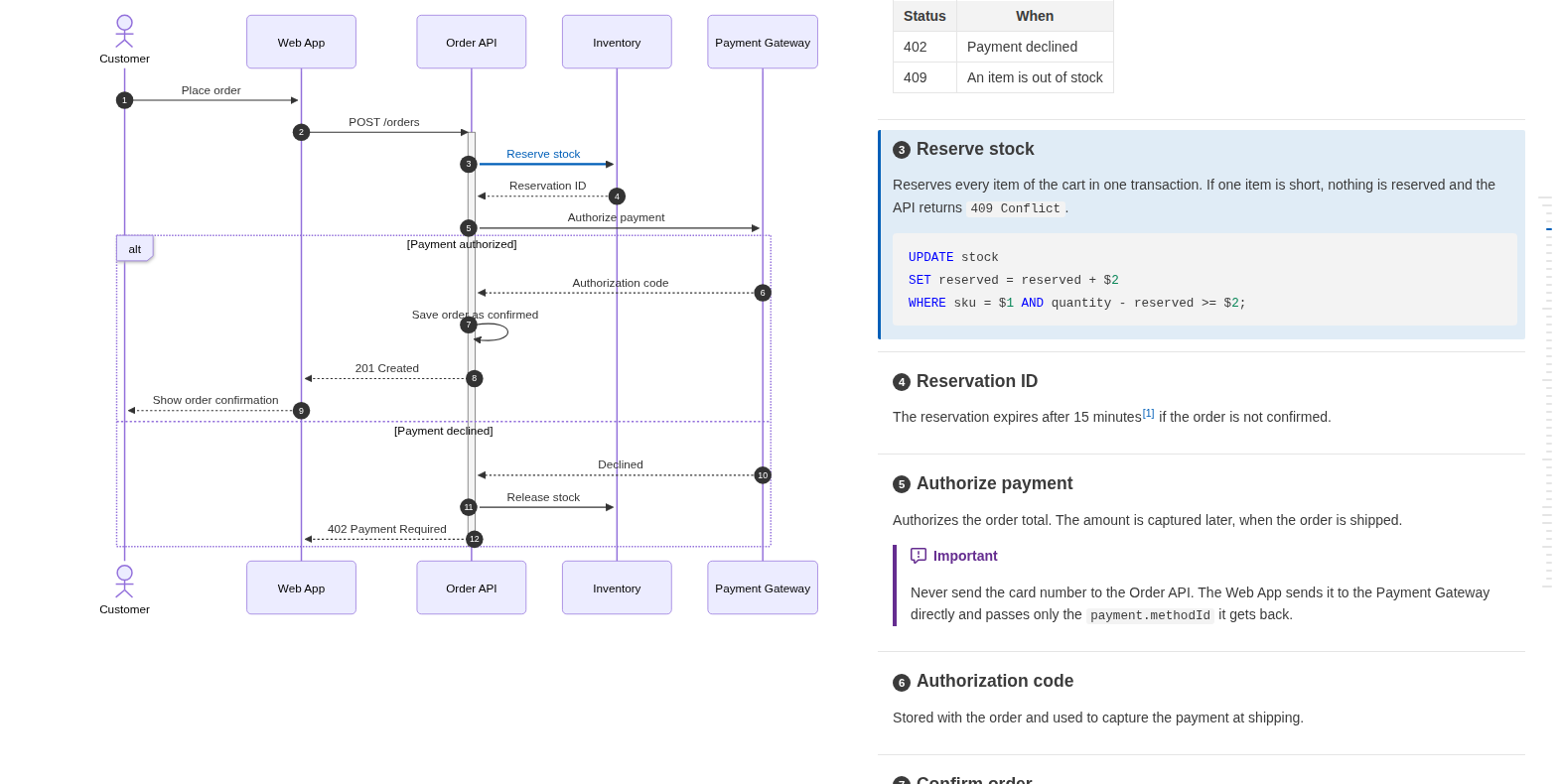
**[Live sample](https://playree.github.io/markdown-design-doc-viewer/)**: an HTML file written by this command from [examples/screenshot.md](https://github.com/playree/markdown-design-doc-viewer/blob/main/examples/screenshot.md).
|
|
16
|
+
|
|
15
17
|
## Usage
|
|
16
18
|
|
|
17
19
|
```sh
|
|
18
20
|
npx markdown-design-doc-viewer export docs -o site # all the Markdown files under docs/ to site/docs/*.html
|
|
21
|
+
npx markdown-design-doc-viewer export docs -o site --index # plus site/index.html, a list of the documents
|
|
19
22
|
npx markdown-design-doc-viewer export README.md # README.html next to it
|
|
20
23
|
```
|
|
21
24
|
|
|
@@ -46,10 +49,12 @@ md-design-doc export docs -o site
|
|
|
46
49
|
| `--no-sticky-table-header` | Do not keep the header row of a long table at the top while scrolling. |
|
|
47
50
|
| `--chrome <path>` | Chrome or Chromium to render the diagrams with. |
|
|
48
51
|
| `--strict` | Fail when a document has a link warning (a broken `@ref` or a misplaced marker). Arrows and headings that are only not linked do not fail. |
|
|
52
|
+
| `--index` | Also write `index.html` in `--out-dir` (required), a list of the exported documents: a table for each folder, with their title (linked), file name, and the `version`, `product`, `status` and `updated` of their front matter. |
|
|
53
|
+
| `--index-title <title>` | Title of `index.html`. Default: `Design Docs` (`設計書一覧` with `--lang ja`). |
|
|
49
54
|
| `-h`, `--help` | Show the help. |
|
|
50
55
|
| `-v`, `--version` | Show the version. |
|
|
51
56
|
|
|
52
|
-
Folders are searched for `*.md` and `*.markdown` files, except
|
|
57
|
+
Folders are searched for `*.md` and `*.markdown` files, including their subfolders, except `node_modules` and folders starting with a dot. Link warnings are written to the standard error (as annotations in GitHub Actions).
|
|
53
58
|
|
|
54
59
|
The exit status is 1 when a document could not be exported or has a diagram mermaid cannot render (its HTML is written anyway), or with `--strict` a link warning, and 2 for a wrong command line.
|
|
55
60
|
|
|
@@ -70,7 +75,7 @@ For example, to publish the documents of a repository as an artifact of each bui
|
|
|
70
75
|
|
|
71
76
|
## Writing linked documents
|
|
72
77
|
|
|
73
|
-
A diagram is linked to the headings after it with `%% @link-headings` in the diagram; arrows and nodes are matched with the headings by their text, or with `%% @ref`. See [Writing linked documents](https://github.com/playree/markdown-design-doc-viewer#writing-linked-documents) for the syntax, and the [authoring guide for AI](https://github.com/playree/markdown-design-doc-viewer/blob/main/docs/ai-authoring-guide.md) to have an AI assistant write documents in this format.
|
|
78
|
+
A diagram is linked to the headings after it with `%% @link-headings` in the diagram; arrows and nodes are matched with the headings by their text, or with `%% @ref`. See [Writing linked documents](https://github.com/playree/markdown-design-doc-viewer#writing-linked-documents) for the syntax, and the [authoring guide for AI](https://github.com/playree/markdown-design-doc-viewer/blob/main/docs/ai-authoring-guide.md) to have an AI assistant write documents in this format. The guide and the usage of this command are also packaged as an Agent Skill: [markdown-design-doc-skill.zip](https://github.com/playree/markdown-design-doc-viewer/releases/latest/download/markdown-design-doc-skill.zip).
|
|
74
79
|
|
|
75
80
|
To preview the documents while writing them, with the editor and the preview in sync, use the [VS Code extension](https://marketplace.visualstudio.com/items?itemName=playree.markdown-design-doc-viewer).
|
|
76
81
|
|