markdown-design-doc-viewer 0.0.0-stage → 0.5.0
This diff represents the content of publicly available package versions that have been released to one of the supported registries. The information contained in this diff is provided for informational purposes only and reflects changes between package versions as they appear in their respective public registries.
- package/LICENSE +21 -0
- package/README.ja.md +79 -0
- package/README.md +78 -2
- package/ThirdPartyNotices.txt +28 -0
- package/dist/cli.js +111 -0
- package/dist/export.css +1 -0
- package/dist/export.js +1 -0
- package/dist/webview.css +1 -0
- package/dist/webview.js +4334 -0
- package/l10n/bundle.l10n.ja.json +58 -0
- package/package.json +29 -4
package/LICENSE
ADDED
|
@@ -0,0 +1,21 @@
|
|
|
1
|
+
MIT License
|
|
2
|
+
|
|
3
|
+
Copyright (c) 2026 playree
|
|
4
|
+
|
|
5
|
+
Permission is hereby granted, free of charge, to any person obtaining a copy
|
|
6
|
+
of this software and associated documentation files (the "Software"), to deal
|
|
7
|
+
in the Software without restriction, including without limitation the rights
|
|
8
|
+
to use, copy, modify, merge, publish, distribute, sublicense, and/or sell
|
|
9
|
+
copies of the Software, and to permit persons to whom the Software is
|
|
10
|
+
furnished to do so, subject to the following conditions:
|
|
11
|
+
|
|
12
|
+
The above copyright notice and this permission notice shall be included in all
|
|
13
|
+
copies or substantial portions of the Software.
|
|
14
|
+
|
|
15
|
+
THE SOFTWARE IS PROVIDED "AS IS", WITHOUT WARRANTY OF ANY KIND, EXPRESS OR
|
|
16
|
+
IMPLIED, INCLUDING BUT NOT LIMITED TO THE WARRANTIES OF MERCHANTABILITY,
|
|
17
|
+
FITNESS FOR A PARTICULAR PURPOSE AND NONINFRINGEMENT. IN NO EVENT SHALL THE
|
|
18
|
+
AUTHORS OR COPYRIGHT HOLDERS BE LIABLE FOR ANY CLAIM, DAMAGES OR OTHER
|
|
19
|
+
LIABILITY, WHETHER IN AN ACTION OF CONTRACT, TORT OR OTHERWISE, ARISING FROM,
|
|
20
|
+
OUT OF OR IN CONNECTION WITH THE SOFTWARE OR THE USE OR OTHER DEALINGS IN THE
|
|
21
|
+
SOFTWARE.
|
package/README.ja.md
ADDED
|
@@ -0,0 +1,79 @@
|
|
|
1
|
+
# markdown-design-doc-viewer
|
|
2
|
+
|
|
3
|
+
[](https://www.npmjs.com/package/markdown-design-doc-viewer)
|
|
4
|
+
[](https://github.com/playree/markdown-design-doc-viewer/actions/workflows/ci.yml)
|
|
5
|
+
[](https://github.com/playree/markdown-design-doc-viewer/blob/main/LICENSE)
|
|
6
|
+
|
|
7
|
+
[English](https://github.com/playree/markdown-design-doc-viewer/blob/main/docs/cli.md) | 日本語
|
|
8
|
+
|
|
9
|
+
[Markdown 設計書ビューア](https://github.com/playree/markdown-design-doc-viewer/blob/main/README.ja.md)のコマンドライン版です。Markdown で書いた設計書を、CI やバッチ処理で VS Code なしに 1 つの HTML ファイルへ書き出します。
|
|
10
|
+
|
|
11
|
+
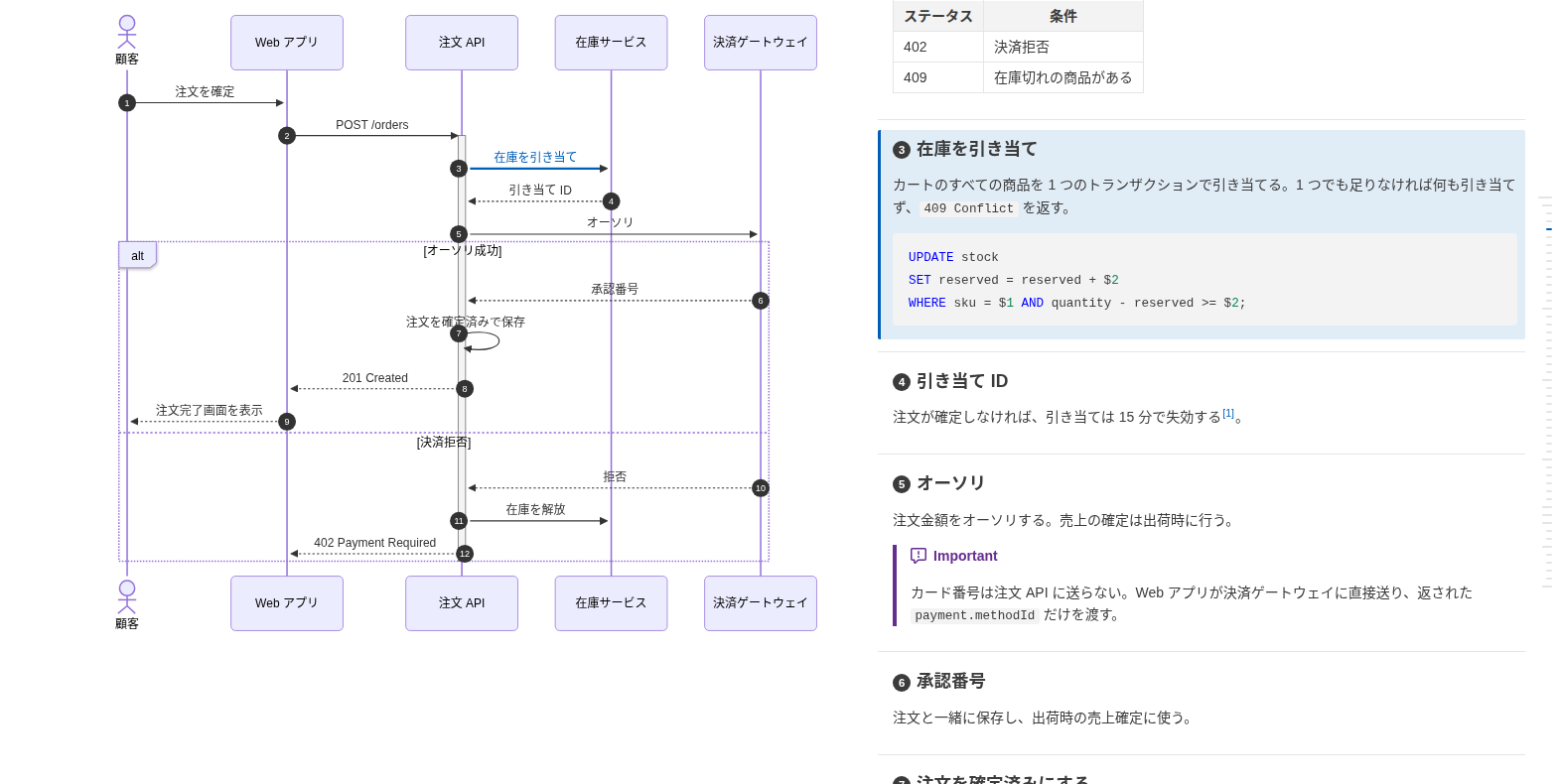
書き出す HTML は VS Code 拡張の `設計書を HTML にエクスポート` コマンドと同じです。**mermaid のシーケンス図やフローチャートと処理概要を横並びにして**表示し、図の矢印(フローチャートではノード)と見出しが紐付いて、マウスを載せたりクリックしたりするとハイライトします。図はヘッドレス Chrome で描画し、ローカルの画像は埋め込むので、どのブラウザでも開けて、印刷から PDF にもできます。
|
|
12
|
+
|
|
13
|
+
|
|
14
|
+
|
|
15
|
+
## 使い方
|
|
16
|
+
|
|
17
|
+
```sh
|
|
18
|
+
npx markdown-design-doc-viewer export docs -o site # docs/ 以下の Markdown をすべて site/docs/*.html に
|
|
19
|
+
npx markdown-design-doc-viewer export README.md # 隣に README.html を
|
|
20
|
+
```
|
|
21
|
+
|
|
22
|
+
プロジェクトにインストールした場合(`npm install --save-dev markdown-design-doc-viewer`)、コマンド名は `md-design-doc` です。
|
|
23
|
+
|
|
24
|
+
```sh
|
|
25
|
+
md-design-doc export docs -o site
|
|
26
|
+
```
|
|
27
|
+
|
|
28
|
+
## 必要なもの
|
|
29
|
+
|
|
30
|
+
- Node.js 22 以降。
|
|
31
|
+
- Chrome か Chromium。`--chrome <パス>` か `$CHROME_PATH`、なければ `npx playwright-core install chromium` で入れた Chromium、それもなければシステムにインストールされた Google Chrome(GitHub Actions の Ubuntu ランナーには入っています)を使います。
|
|
32
|
+
- 日本語などの CJK の文書には、そのフォント(Debian / Ubuntu では `fonts-noto-cjk`)。ないと図の文字が四角で描かれます。
|
|
33
|
+
|
|
34
|
+
## オプション
|
|
35
|
+
|
|
36
|
+
| オプション | 説明 |
|
|
37
|
+
|---|---|
|
|
38
|
+
| `-o`, `--out-dir <dir>` | HTML をこのフォルダに、`--root` 以下での文書と同じサブフォルダ構成で書き出す。省略時は各文書の隣に書き出す |
|
|
39
|
+
| `--root <dir>` | `/` で始まる画像パスの基準のフォルダ(VS Code のワークスペースに相当)。この中と文書のフォルダの画像は埋め込み、それ以外はリンクのまま。既定はカレントフォルダ |
|
|
40
|
+
| `--lang <lang>` | 文書に加える文言と紐付けの警告の言語。`en`(既定)か `ja` |
|
|
41
|
+
| `--diagram-look <look>` | 図の見た目。`neo`(既定。mermaid の標準で、フローチャートのノードに影が付く)か `classic`(影のない平坦な見た目) |
|
|
42
|
+
| `--split-min-width <px>` | 図と処理概要を横並びにする最小のウィンドウ幅 (px)。既定は `1000` |
|
|
43
|
+
| `--full-width` | 本文を最大 1280px の中央の列に収めない |
|
|
44
|
+
| `--no-heading-numbers` | 紐付いた見出しの先頭に矢印の番号(`autonumber`)を表示しない |
|
|
45
|
+
| `--no-front-matter` | YAML front matter(メタ情報の表、`type: design_doc` ではヘッダ)を表示しない |
|
|
46
|
+
| `--no-sticky-table-header` | 長い表のヘッダ行をスクロール中に上端に固定しない |
|
|
47
|
+
| `--chrome <path>` | 図の描画に使う Chrome か Chromium |
|
|
48
|
+
| `--strict` | 紐付けの警告(壊れた `@ref` や置き場所の誤ったマーカーなど)があれば失敗にする。紐付いていないだけの矢印・見出しでは失敗しない |
|
|
49
|
+
| `-h`, `--help` | ヘルプを表示する |
|
|
50
|
+
| `-v`, `--version` | バージョンを表示する |
|
|
51
|
+
|
|
52
|
+
フォルダは `*.md` と `*.markdown` を探します(`node_modules` とドットで始まるフォルダは除く)。紐付けの警告は標準エラーに出します(GitHub Actions では注釈になります)。
|
|
53
|
+
|
|
54
|
+
文書を書き出せなかったとき、mermaid が描画できない図があったとき(HTML は書き出します)、`--strict` で紐付けの警告があったときは終了コード 1、コマンドラインの誤りは 2 で終わります。
|
|
55
|
+
|
|
56
|
+
## GitHub Actions
|
|
57
|
+
|
|
58
|
+
たとえば、リポジトリの設計書をビルドごとに成果物として公開するには:
|
|
59
|
+
|
|
60
|
+
```yaml
|
|
61
|
+
- uses: actions/setup-node@v4
|
|
62
|
+
with:
|
|
63
|
+
node-version: 22
|
|
64
|
+
- run: npx markdown-design-doc-viewer export docs -o site
|
|
65
|
+
- uses: actions/upload-artifact@v4
|
|
66
|
+
with:
|
|
67
|
+
name: design-docs
|
|
68
|
+
path: site
|
|
69
|
+
```
|
|
70
|
+
|
|
71
|
+
## 書き方
|
|
72
|
+
|
|
73
|
+
図の中に `%% @link-headings` を書くと、その図が後ろの見出しと紐付きます。矢印・ノードと見出しは文言で、または `%% @ref` で対応付けます。記法は [書き方](https://github.com/playree/markdown-design-doc-viewer/blob/main/README.ja.md#書き方) を、AI アシスタントにこの形式で書かせるには [AI 向けの記法ガイド](https://github.com/playree/markdown-design-doc-viewer/blob/main/docs/ai-authoring-guide.ja.md) を参照してください。
|
|
74
|
+
|
|
75
|
+
エディタとプレビューを同期させながら書くには、[VS Code 拡張](https://marketplace.visualstudio.com/items?itemName=playree.markdown-design-doc-viewer)を使ってください。
|
|
76
|
+
|
|
77
|
+
## ライセンス
|
|
78
|
+
|
|
79
|
+
[MIT](https://github.com/playree/markdown-design-doc-viewer/blob/main/LICENSE)
|
package/README.md
CHANGED
|
@@ -1,3 +1,79 @@
|
|
|
1
|
-
#
|
|
1
|
+
# markdown-design-doc-viewer
|
|
2
2
|
|
|
3
|
-
|
|
3
|
+
[](https://www.npmjs.com/package/markdown-design-doc-viewer)
|
|
4
|
+
[](https://github.com/playree/markdown-design-doc-viewer/actions/workflows/ci.yml)
|
|
5
|
+
[](https://github.com/playree/markdown-design-doc-viewer/blob/main/LICENSE)
|
|
6
|
+
|
|
7
|
+
English | [日本語](https://github.com/playree/markdown-design-doc-viewer/blob/main/docs/cli.ja.md)
|
|
8
|
+
|
|
9
|
+
The command line of [Markdown Design Doc Viewer](https://github.com/playree/markdown-design-doc-viewer), to export design documents written in Markdown to single HTML files, in CI or in a batch, without VS Code.
|
|
10
|
+
|
|
11
|
+
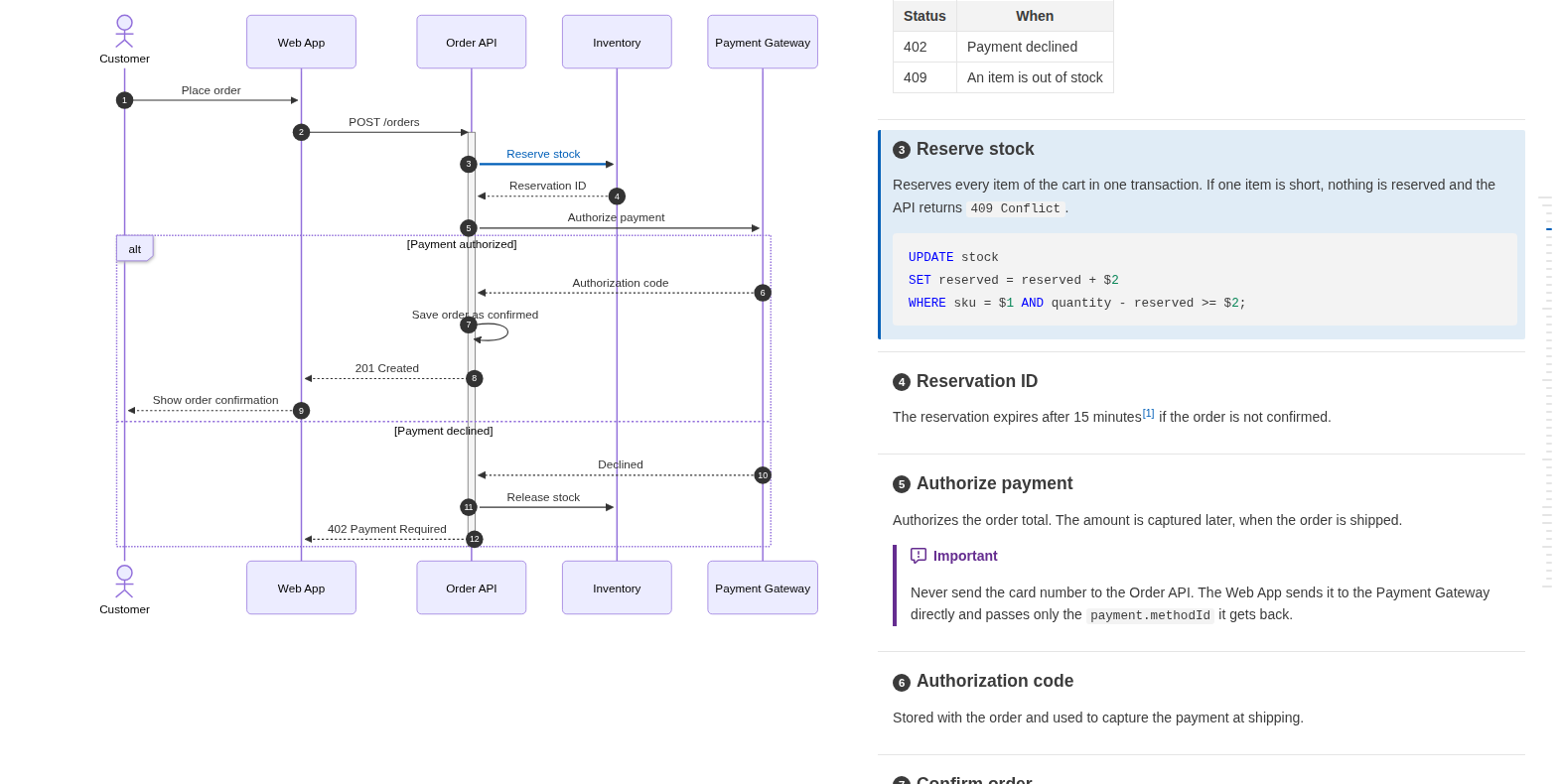
The HTML is the same as the VS Code extension's `Export Design Doc as HTML` command writes: **mermaid sequence diagrams and flowcharts are shown side by side with their step descriptions**, and each arrow (or flowchart node) is linked to its heading, highlighted when hovered or clicked. The diagrams are rendered with headless Chrome and local images are embedded, so the file can be opened in any browser or printed to PDF.
|
|
12
|
+
|
|
13
|
+
|
|
14
|
+
|
|
15
|
+
## Usage
|
|
16
|
+
|
|
17
|
+
```sh
|
|
18
|
+
npx markdown-design-doc-viewer export docs -o site # all the Markdown files under docs/ to site/docs/*.html
|
|
19
|
+
npx markdown-design-doc-viewer export README.md # README.html next to it
|
|
20
|
+
```
|
|
21
|
+
|
|
22
|
+
Installed in a project (`npm install --save-dev markdown-design-doc-viewer`), the command is `md-design-doc`:
|
|
23
|
+
|
|
24
|
+
```sh
|
|
25
|
+
md-design-doc export docs -o site
|
|
26
|
+
```
|
|
27
|
+
|
|
28
|
+
## Requirements
|
|
29
|
+
|
|
30
|
+
- Node.js 22 or later.
|
|
31
|
+
- Chrome or Chromium: `--chrome <path>` or `$CHROME_PATH`, else a Chromium installed with `npx playwright-core install chromium`, else the Google Chrome installed on the system (GitHub Actions' Ubuntu runners have one).
|
|
32
|
+
- For documents in Japanese or other CJK languages, a font for them (`fonts-noto-cjk` on Debian / Ubuntu), or their diagrams are drawn with boxes.
|
|
33
|
+
|
|
34
|
+
## Options
|
|
35
|
+
|
|
36
|
+
| Option | Description |
|
|
37
|
+
|---|---|
|
|
38
|
+
| `-o`, `--out-dir <dir>` | Write the HTML files to this folder, in the same subfolders as the documents under `--root`. By default, each one is written next to its document. |
|
|
39
|
+
| `--root <dir>` | Folder that image paths starting with `/` are relative to (the workspace in VS Code). Images in it or in the document's folder are embedded; others stay links. Default: the current folder. |
|
|
40
|
+
| `--lang <lang>` | Language of the texts added to the document and of the link warnings: `en` (default) or `ja`. |
|
|
41
|
+
| `--diagram-look <look>` | Look of the diagrams: `neo` (default, mermaid's, with shadows on flowchart nodes) or `classic` (flat). |
|
|
42
|
+
| `--split-min-width <px>` | Minimum window width (px) for the diagrams beside their steps. Default: `1000`. |
|
|
43
|
+
| `--full-width` | Do not keep the text in a centered column up to 1280px wide. |
|
|
44
|
+
| `--no-heading-numbers` | Do not show the arrow numbers (`autonumber`) at the start of the linked headings. |
|
|
45
|
+
| `--no-front-matter` | Hide the YAML front matter (shown as a table of metadata, or as a header with `type: design_doc`). |
|
|
46
|
+
| `--no-sticky-table-header` | Do not keep the header row of a long table at the top while scrolling. |
|
|
47
|
+
| `--chrome <path>` | Chrome or Chromium to render the diagrams with. |
|
|
48
|
+
| `--strict` | Fail when a document has a link warning (a broken `@ref` or a misplaced marker). Arrows and headings that are only not linked do not fail. |
|
|
49
|
+
| `-h`, `--help` | Show the help. |
|
|
50
|
+
| `-v`, `--version` | Show the version. |
|
|
51
|
+
|
|
52
|
+
Folders are searched for `*.md` and `*.markdown` files, except in `node_modules` and folders starting with a dot. Link warnings are written to the standard error (as annotations in GitHub Actions).
|
|
53
|
+
|
|
54
|
+
The exit status is 1 when a document could not be exported or has a diagram mermaid cannot render (its HTML is written anyway), or with `--strict` a link warning, and 2 for a wrong command line.
|
|
55
|
+
|
|
56
|
+
## GitHub Actions
|
|
57
|
+
|
|
58
|
+
For example, to publish the documents of a repository as an artifact of each build:
|
|
59
|
+
|
|
60
|
+
```yaml
|
|
61
|
+
- uses: actions/setup-node@v4
|
|
62
|
+
with:
|
|
63
|
+
node-version: 22
|
|
64
|
+
- run: npx markdown-design-doc-viewer export docs -o site
|
|
65
|
+
- uses: actions/upload-artifact@v4
|
|
66
|
+
with:
|
|
67
|
+
name: design-docs
|
|
68
|
+
path: site
|
|
69
|
+
```
|
|
70
|
+
|
|
71
|
+
## Writing linked documents
|
|
72
|
+
|
|
73
|
+
A diagram is linked to the headings after it with `%% @link-headings` in the diagram; arrows and nodes are matched with the headings by their text, or with `%% @ref`. See [Writing linked documents](https://github.com/playree/markdown-design-doc-viewer#writing-linked-documents) for the syntax, and the [authoring guide for AI](https://github.com/playree/markdown-design-doc-viewer/blob/main/docs/ai-authoring-guide.md) to have an AI assistant write documents in this format.
|
|
74
|
+
|
|
75
|
+
To preview the documents while writing them, with the editor and the preview in sync, use the [VS Code extension](https://marketplace.visualstudio.com/items?itemName=playree.markdown-design-doc-viewer).
|
|
76
|
+
|
|
77
|
+
## License
|
|
78
|
+
|
|
79
|
+
[MIT](https://github.com/playree/markdown-design-doc-viewer/blob/main/LICENSE)
|
|
@@ -0,0 +1,28 @@
|
|
|
1
|
+
Markdown Design Doc Viewer includes the following third-party material.
|
|
2
|
+
|
|
3
|
+
================================================================================
|
|
4
|
+
GitHub Octicons (https://github.com/primer/octicons)
|
|
5
|
+
Used for the icons of GitHub alerts (src/markdownExtras.ts).
|
|
6
|
+
================================================================================
|
|
7
|
+
|
|
8
|
+
MIT License
|
|
9
|
+
|
|
10
|
+
Copyright (c) 2026 GitHub Inc.
|
|
11
|
+
|
|
12
|
+
Permission is hereby granted, free of charge, to any person obtaining a copy
|
|
13
|
+
of this software and associated documentation files (the "Software"), to deal
|
|
14
|
+
in the Software without restriction, including without limitation the rights
|
|
15
|
+
to use, copy, modify, merge, publish, distribute, sublicense, and/or sell
|
|
16
|
+
copies of the Software, and to permit persons to whom the Software is
|
|
17
|
+
furnished to do so, subject to the following conditions:
|
|
18
|
+
|
|
19
|
+
The above copyright notice and this permission notice shall be included in all
|
|
20
|
+
copies or substantial portions of the Software.
|
|
21
|
+
|
|
22
|
+
THE SOFTWARE IS PROVIDED "AS IS", WITHOUT WARRANTY OF ANY KIND, EXPRESS OR
|
|
23
|
+
IMPLIED, INCLUDING BUT NOT LIMITED TO THE WARRANTIES OF MERCHANTABILITY,
|
|
24
|
+
FITNESS FOR A PARTICULAR PURPOSE AND NONINFRINGEMENT. IN NO EVENT SHALL THE
|
|
25
|
+
AUTHORS OR COPYRIGHT HOLDERS BE LIABLE FOR ANY CLAIM, DAMAGES OR OTHER
|
|
26
|
+
LIABILITY, WHETHER IN AN ACTION OF CONTRACT, TORT OR OTHERWISE, ARISING FROM,
|
|
27
|
+
OUT OF OR IN CONNECTION WITH THE SOFTWARE OR THE USE OR OTHER DEALINGS IN THE
|
|
28
|
+
SOFTWARE.
|