markdown-design-doc-viewer-embed 0.0.0-stage → 1.5.0
This diff represents the content of publicly available package versions that have been released to one of the supported registries. The information contained in this diff is provided for informational purposes only and reflects changes between package versions as they appear in their respective public registries.
- package/LICENSE +21 -0
- package/README.ja.md +106 -0
- package/README.md +105 -2
- package/ThirdPartyNotices.txt +2667 -0
- package/index.js +27366 -0
- package/package.json +53 -4
- package/react.js +45 -0
- package/types/embed/react.d.ts +23 -0
- package/types/embed/viewer.d.ts +66 -0
- package/types/src/shared/protocol.d.ts +111 -0
- package/viewer.css +1763 -0
package/LICENSE
ADDED
|
@@ -0,0 +1,21 @@
|
|
|
1
|
+
MIT License
|
|
2
|
+
|
|
3
|
+
Copyright (c) 2026 playree
|
|
4
|
+
|
|
5
|
+
Permission is hereby granted, free of charge, to any person obtaining a copy
|
|
6
|
+
of this software and associated documentation files (the "Software"), to deal
|
|
7
|
+
in the Software without restriction, including without limitation the rights
|
|
8
|
+
to use, copy, modify, merge, publish, distribute, sublicense, and/or sell
|
|
9
|
+
copies of the Software, and to permit persons to whom the Software is
|
|
10
|
+
furnished to do so, subject to the following conditions:
|
|
11
|
+
|
|
12
|
+
The above copyright notice and this permission notice shall be included in all
|
|
13
|
+
copies or substantial portions of the Software.
|
|
14
|
+
|
|
15
|
+
THE SOFTWARE IS PROVIDED "AS IS", WITHOUT WARRANTY OF ANY KIND, EXPRESS OR
|
|
16
|
+
IMPLIED, INCLUDING BUT NOT LIMITED TO THE WARRANTIES OF MERCHANTABILITY,
|
|
17
|
+
FITNESS FOR A PARTICULAR PURPOSE AND NONINFRINGEMENT. IN NO EVENT SHALL THE
|
|
18
|
+
AUTHORS OR COPYRIGHT HOLDERS BE LIABLE FOR ANY CLAIM, DAMAGES OR OTHER
|
|
19
|
+
LIABILITY, WHETHER IN AN ACTION OF CONTRACT, TORT OR OTHERWISE, ARISING FROM,
|
|
20
|
+
OUT OF OR IN CONNECTION WITH THE SOFTWARE OR THE USE OR OTHER DEALINGS IN THE
|
|
21
|
+
SOFTWARE.
|
package/README.ja.md
ADDED
|
@@ -0,0 +1,106 @@
|
|
|
1
|
+
# markdown-design-doc-viewer-embed
|
|
2
|
+
|
|
3
|
+
[](https://www.npmjs.com/package/markdown-design-doc-viewer-embed)
|
|
4
|
+
[](https://github.com/playree/markdown-design-doc-viewer/blob/main/LICENSE)
|
|
5
|
+
|
|
6
|
+
[English](https://github.com/playree/markdown-design-doc-viewer/blob/main/docs/embed.md) | 日本語
|
|
7
|
+
|
|
8
|
+
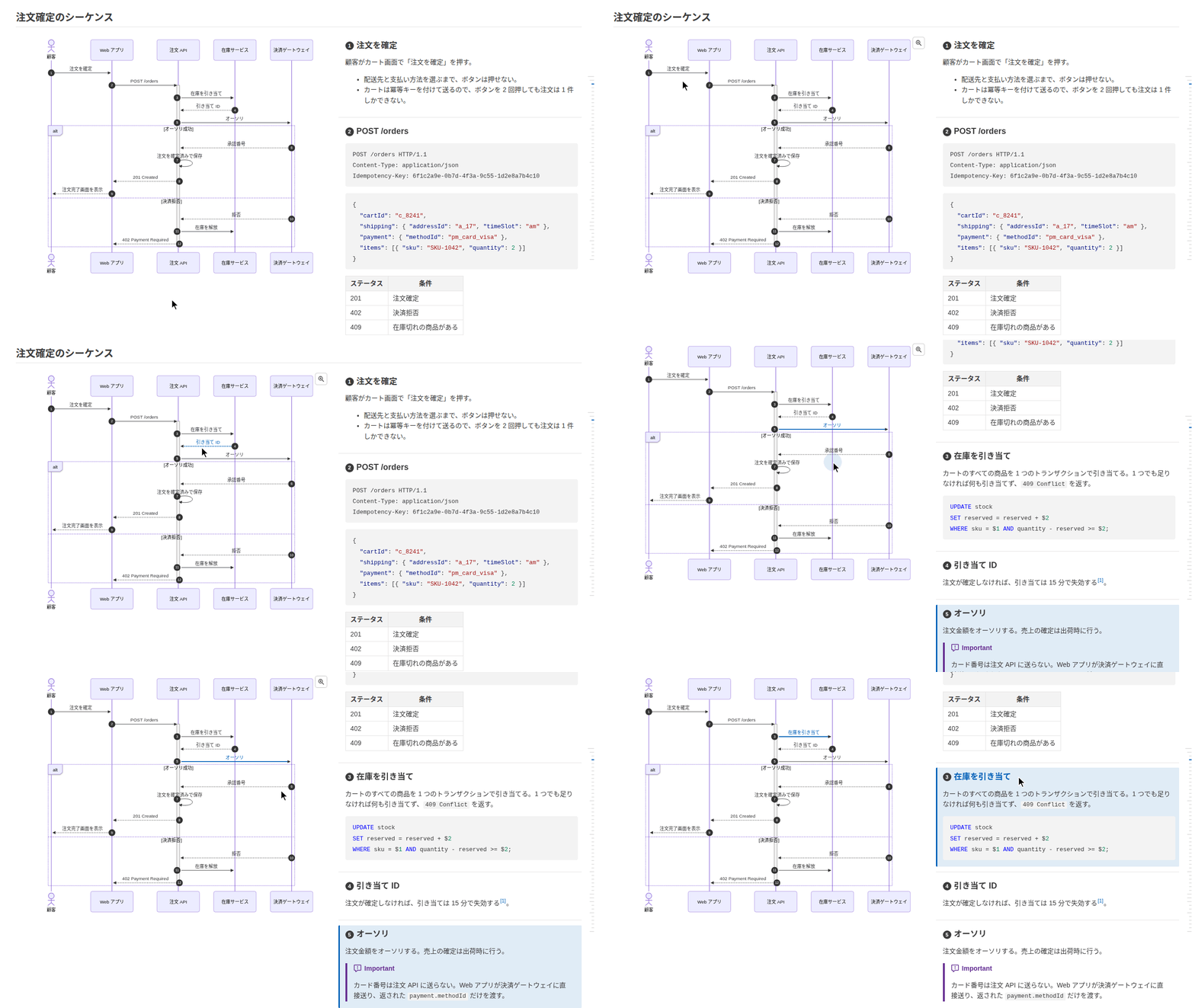
[Markdown 設計書ビューア](https://github.com/playree/markdown-design-doc-viewer/blob/main/README.ja.md)のビューアを、Web アプリの部品にしたものです。Markdown で書いた設計書を、VS Code 拡張のプレビューと同じようにページの要素の中に表示します。**mermaid のシーケンス図・フローチャート・ER 図・状態遷移図と処理概要を横並びにして**、矢印(ノード)と見出しを紐付け、画面のワイヤーフレームと項目の表も紐付けます。目次、front matter の設計書のヘッダ、ライト・ダークのテーマもあります。
|
|
9
|
+
|
|
10
|
+
|
|
11
|
+
|
|
12
|
+
## インストール
|
|
13
|
+
|
|
14
|
+
```sh
|
|
15
|
+
npm install markdown-design-doc-viewer-embed mermaid
|
|
16
|
+
```
|
|
17
|
+
|
|
18
|
+
図を描く [mermaid](https://www.npmjs.com/package/mermaid)(`^12.3.0`)は peer dependency です。React の部品を使うときは React と React DOM(`^19.3.1`)も要ります。ほかに使うライブラリ(markdown-it、DOMPurify、highlight.js など)は同梱しています。
|
|
19
|
+
|
|
20
|
+
アプリのバンドラ(Vite、webpack、Next.js、esbuild など)で取り込む ES モジュールです。
|
|
21
|
+
|
|
22
|
+
## React
|
|
23
|
+
|
|
24
|
+
```tsx
|
|
25
|
+
import { DesignDocViewer } from 'markdown-design-doc-viewer-embed/react';
|
|
26
|
+
import 'markdown-design-doc-viewer-embed/viewer.css';
|
|
27
|
+
|
|
28
|
+
export function DesignDoc({ markdown }: { markdown: string }) {
|
|
29
|
+
return <DesignDocViewer markdown={markdown} baseUrl="https://example.com/docs/" style={{ height: 600 }} />;
|
|
30
|
+
}
|
|
31
|
+
```
|
|
32
|
+
|
|
33
|
+
- **高さが要ります。** ビューアはその高さいっぱいに広がり、中でスクロールします。
|
|
34
|
+
- props は下のオプションと、要素に付ける `className`・`style` です。
|
|
35
|
+
- `readFile` と `resolveResource` が変わると描画し直すので、描画のたびに変わらないようにします(`useCallback`)。ほかのコールバックは変わってもかまいません。
|
|
36
|
+
- `lang` はビューアを作るときだけ読みます。変わるとビューアを作り直します。
|
|
37
|
+
- `ref` で `scrollToLine(line)`・`markLine(line)` を呼べます(`DesignDocViewerHandle`)。
|
|
38
|
+
- `react.js` はクライアントコンポーネント(`'use client'`)なので、Next.js のサーバーコンポーネントからも使えます。設計書はブラウザで表示します。
|
|
39
|
+
|
|
40
|
+
## React を使わない場合
|
|
41
|
+
|
|
42
|
+
```ts
|
|
43
|
+
import { createViewer } from 'markdown-design-doc-viewer-embed';
|
|
44
|
+
import 'markdown-design-doc-viewer-embed/viewer.css';
|
|
45
|
+
|
|
46
|
+
const viewer = createViewer(element, { markdown, baseUrl: 'https://example.com/docs/' });
|
|
47
|
+
await viewer.ready; // 図も含めて表示し終わった
|
|
48
|
+
await viewer.update({ markdown: edited, theme: 'dark' }); // documentId が同じならスクロール位置を保つ
|
|
49
|
+
viewer.destroy();
|
|
50
|
+
```
|
|
51
|
+
|
|
52
|
+
`createViewer(container, options)` は `container`(高さが要ります)の中にビューアを作ります。返す `Viewer` には次があります。
|
|
53
|
+
|
|
54
|
+
| | |
|
|
55
|
+
| --- | --- |
|
|
56
|
+
| `ready` | 図も含めて設計書を表示し終わると解決します。 |
|
|
57
|
+
| `update(options)` | オプション(`lang` 以外)を変えて描画し直します。表示し終わると解決します。 |
|
|
58
|
+
| `scrollToLine(line)` | Markdown のこの行(0 始まり)が先頭に来るようにスクロールします。 |
|
|
59
|
+
| `markLine(line)` | この行(0 始まり)の要素に印を付け、見えるところまでスクロールします(エディタのカーソルの行など)。 |
|
|
60
|
+
| `destroy()` | ビューアを要素から取り除きます。 |
|
|
61
|
+
|
|
62
|
+
## オプション
|
|
63
|
+
|
|
64
|
+
| オプション | 既定値 | |
|
|
65
|
+
| --- | --- | --- |
|
|
66
|
+
| `markdown` | (必須) | 設計書の Markdown。 |
|
|
67
|
+
| `documentId` | | 文書を見分けます。変わると別の文書として先頭から表示し、同じ間は(編集したときのように)スクロール位置を保って更新します。 |
|
|
68
|
+
| `baseUrl` | | 設計書のフォルダの URL。画像とワイヤーフレームのパスをここから解決します(`readFile` がなければワイヤーフレームを `fetch` で読みます)。 |
|
|
69
|
+
| `readFile` | `baseUrl` から `fetch` | `(path) => Promise<string \| undefined>`: ワイヤーフレームのファイル(HTML とそのスタイルシート)を読みます。`path` は設計書に書いたパス(設計書からの相対パス、`/` で始まればルートから)をデコードしたもの。読めなければ undefined を返します。 |
|
|
70
|
+
| `resolveResource` | `baseUrl` から解決 | `(src) => string`: 設計書の画像の `src` の URL。 |
|
|
71
|
+
| `lang` | ブラウザの言語 | `'en'` か `'ja'`: ビューアの文言の言語。ビューアを作るときだけ読みます。 |
|
|
72
|
+
| `theme` | `'auto'` | `'light'`、`'dark'`、またはシステムに合わせる `'auto'`。 |
|
|
73
|
+
| `diagramLook` | `'neo'` | 図の見た目。`'neo'` か `'classic'`(フラット)。 |
|
|
74
|
+
| `splitMinWidth` | `1000` | 図と処理概要を横並びにするビューアの幅(px)。 |
|
|
75
|
+
| `toc` | `true` | 右側の目次。 |
|
|
76
|
+
| `limitContentWidth` | `true` | 本文の幅を制限します。 |
|
|
77
|
+
| `stickyTableHeader` | `true` | 長い表のヘッダ行をスクロールしても上に固定します。 |
|
|
78
|
+
| `tableTreeHighlight` | `true` | 木構造で表示した表の行の親子をハイライトします。 |
|
|
79
|
+
| `frontMatter` | `true` | front matter を(設計書のヘッダ、または表として)表示します。 |
|
|
80
|
+
| `headingNumbers` | `true` | 紐付いた見出しに `autonumber` の番号を表示します。 |
|
|
81
|
+
| `onOpenLink` | `openLinkInNewTab` | `(href) => void`: 設計書のリンク(ビューアがスクロールする `#見出し` 以外)を開きます。既定では http(s) と mailto のリンクを新しいタブで開き、ほかは何もしません。 |
|
|
82
|
+
| `onRevealLine` | | `(line) => void`: ビューアでダブルクリックした Markdown の行(0 始まり)で呼ばれます(エディタでその行を表示するなど)。ないときはダブルクリックしても何もしません。 |
|
|
83
|
+
|
|
84
|
+
## スタイル
|
|
85
|
+
|
|
86
|
+
`viewer.css` はビューアのスタイルで、すべてビューアの要素(`.seqnotes-viewer`)の下に効き、ライト・ダークのテーマの色も含みます。**カスケードレイヤーに入れずに**(`@import "…" layer(components)` などにせずに)そのまま読み込んでください。設計書の要素(見出し・リスト・表など)のスタイルは詳細度を持たない(`:where()`)もので、ビューアはレイヤーに入れた CSS リセット(レイヤー `base` に入る Tailwind CSS v4 の preflight など)が消すブラウザの既定のスタイルを戻します。レイヤーの外にあるので、それらに勝ちます。レイヤーの外にある、ページの要素に対するグローバルなスタイル(`h1 { … }` や、Tailwind CSS v3 の preflight・normalize.css などのリセット)はビューアの中にも効きます。
|
|
87
|
+
|
|
88
|
+
## サーバーサイドレンダリング
|
|
89
|
+
|
|
90
|
+
モジュールはサーバー(Next.js など)で import できます。document や window を使うのはビューアを作るときだけです。`DesignDocViewer` はビューアを effect の中、つまりブラウザで作ります。
|
|
91
|
+
|
|
92
|
+
## 制約
|
|
93
|
+
|
|
94
|
+
- mermaid の設定はグローバルです。ページの複数のビューアは図を順番に描き、ビューアが自分の設定で mermaid を初期化します。mermaid は自分の DOMPurify にフックを足します。
|
|
95
|
+
- ワイヤーフレームの `@font-face` は、Shadow DOM の中ではフォントを読み込まないので、ページに追加します(`document.adoptedStyleSheets`)。
|
|
96
|
+
- 拡大した図と脚注のポップアップは、ページ全体の上に表示します(`position: fixed`)。
|
|
97
|
+
- 画像は同期で解決します(`resolveResource`)。URL から読むようにしてください。
|
|
98
|
+
- リビジョンとの差分(拡張の Git の比較)は表示できません。
|
|
99
|
+
|
|
100
|
+
## 書き方
|
|
101
|
+
|
|
102
|
+
図に `%% @link-headings` を書くと、その後ろの見出しに紐付きます。矢印・ノードと見出しは文言、または `%% @ref` で対応付けます。記法は[書き方](https://github.com/playree/markdown-design-doc-viewer/blob/main/README.ja.md#書き方)を、画面は[ワイヤーフレーム](https://github.com/playree/markdown-design-doc-viewer/blob/main/README.ja.md#ワイヤーフレーム)を見てください。
|
|
103
|
+
|
|
104
|
+
## ライセンス
|
|
105
|
+
|
|
106
|
+
[MIT](https://github.com/playree/markdown-design-doc-viewer/blob/main/LICENSE)。同梱したライブラリのライセンスは ThirdPartyNotices.txt にあります。
|
package/README.md
CHANGED
|
@@ -1,3 +1,106 @@
|
|
|
1
|
-
#
|
|
1
|
+
# markdown-design-doc-viewer-embed
|
|
2
2
|
|
|
3
|
-
|
|
3
|
+
[](https://www.npmjs.com/package/markdown-design-doc-viewer-embed)
|
|
4
|
+
[](https://github.com/playree/markdown-design-doc-viewer/blob/main/LICENSE)
|
|
5
|
+
|
|
6
|
+
English | [日本語](https://github.com/playree/markdown-design-doc-viewer/blob/main/docs/embed.ja.md)
|
|
7
|
+
|
|
8
|
+
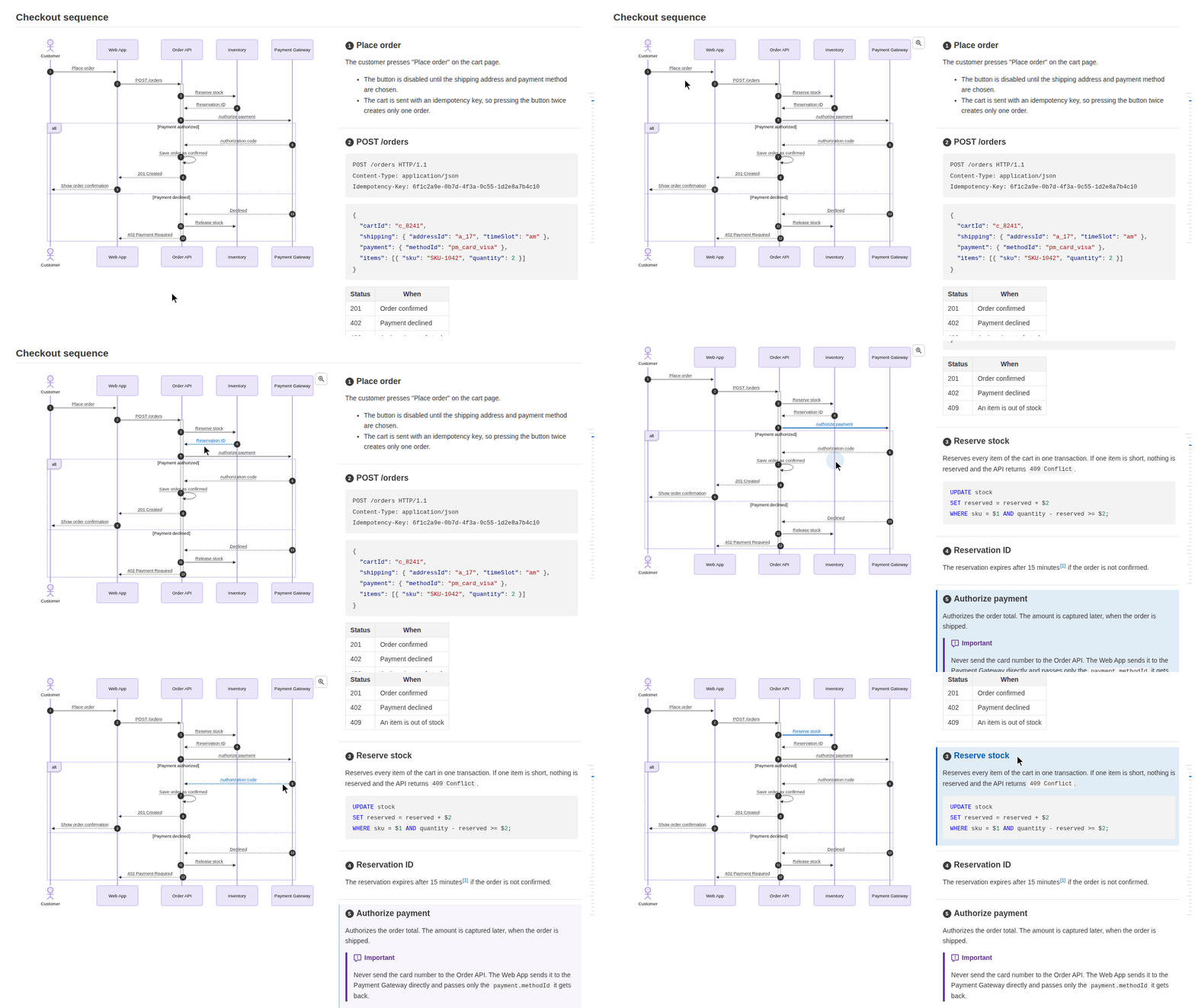
The viewer of [Markdown Design Doc Viewer](https://github.com/playree/markdown-design-doc-viewer) as a component of a web app: it shows a design document written in Markdown in an element of your page, as the VS Code extension's preview does. **Mermaid sequence diagrams, flowcharts, ER diagrams and state diagrams are shown side by side with their step descriptions**, each arrow (or node) linked to its heading, and wireframes of screens linked to their item tables, with the table of contents, the document header of the front matter, and the light and dark themes.
|
|
9
|
+
|
|
10
|
+
|
|
11
|
+
|
|
12
|
+
## Install
|
|
13
|
+
|
|
14
|
+
```sh
|
|
15
|
+
npm install markdown-design-doc-viewer-embed mermaid
|
|
16
|
+
```
|
|
17
|
+
|
|
18
|
+
[mermaid](https://www.npmjs.com/package/mermaid) (`^12.3.0`) is a peer dependency (it draws the diagrams), and so are React and React DOM (`^19.3.1`) for the React component. The other libraries it uses (markdown-it, DOMPurify, highlight.js...) are bundled in it.
|
|
19
|
+
|
|
20
|
+
It is made of ES modules for the bundler of your app (Vite, webpack, Next.js, esbuild...).
|
|
21
|
+
|
|
22
|
+
## React
|
|
23
|
+
|
|
24
|
+
```tsx
|
|
25
|
+
import { DesignDocViewer } from 'markdown-design-doc-viewer-embed/react';
|
|
26
|
+
import 'markdown-design-doc-viewer-embed/viewer.css';
|
|
27
|
+
|
|
28
|
+
export function DesignDoc({ markdown }: { markdown: string }) {
|
|
29
|
+
return <DesignDocViewer markdown={markdown} baseUrl="https://example.com/docs/" style={{ height: 600 }} />;
|
|
30
|
+
}
|
|
31
|
+
```
|
|
32
|
+
|
|
33
|
+
- **It needs a height**, which the viewer fills: it scrolls inside it.
|
|
34
|
+
- Its props are the options below, with `className` and `style` for its element.
|
|
35
|
+
- `readFile` and `resolveResource` render the document again when they change: keep them the same across renders (`useCallback`). The other callbacks may change freely.
|
|
36
|
+
- `lang` is read when the viewer is created: when it changes, the viewer is created again.
|
|
37
|
+
- Its `ref` has `scrollToLine(line)` and `markLine(line)` (`DesignDocViewerHandle`).
|
|
38
|
+
- `react.js` is a client component (`'use client'`), which the server components of Next.js can render: it shows the document in the browser.
|
|
39
|
+
|
|
40
|
+
## Without React
|
|
41
|
+
|
|
42
|
+
```ts
|
|
43
|
+
import { createViewer } from 'markdown-design-doc-viewer-embed';
|
|
44
|
+
import 'markdown-design-doc-viewer-embed/viewer.css';
|
|
45
|
+
|
|
46
|
+
const viewer = createViewer(element, { markdown, baseUrl: 'https://example.com/docs/' });
|
|
47
|
+
await viewer.ready; // the document is shown, with its diagrams
|
|
48
|
+
await viewer.update({ markdown: edited, theme: 'dark' }); // keeps the scrolling while documentId stays the same
|
|
49
|
+
viewer.destroy();
|
|
50
|
+
```
|
|
51
|
+
|
|
52
|
+
`createViewer(container, options)` adds the viewer into `container`, which needs a height. The `Viewer` it returns has:
|
|
53
|
+
|
|
54
|
+
| | |
|
|
55
|
+
| --- | --- |
|
|
56
|
+
| `ready` | Resolves once the document is shown, with its diagrams. |
|
|
57
|
+
| `update(options)` | Changes some options (all but `lang`) and renders the document again. Resolves once it is shown. |
|
|
58
|
+
| `scrollToLine(line)` | Scrolls the viewer so that this line (0-based) of the Markdown is at the top. |
|
|
59
|
+
| `markLine(line)` | Marks the element of this line (0-based), and scrolls it into view: e.g. the line of the cursor of an editor. |
|
|
60
|
+
| `destroy()` | Removes the viewer from its element. |
|
|
61
|
+
|
|
62
|
+
## Options
|
|
63
|
+
|
|
64
|
+
| Option | Default | |
|
|
65
|
+
| --- | --- | --- |
|
|
66
|
+
| `markdown` | (required) | The Markdown of the design document. |
|
|
67
|
+
| `documentId` | | Tells the documents apart: when it changes, the viewer shows another document, from its top. While it stays the same, an update keeps the scrolling, as when the document is edited. |
|
|
68
|
+
| `baseUrl` | | The URL of the folder of the document, from which the paths of its images and wireframes are resolved (and the wireframes read with `fetch`, without `readFile`). |
|
|
69
|
+
| `readFile` | `fetch` from `baseUrl` | `(path) => Promise<string \| undefined>`: reads a file of a wireframe (its HTML, or a style sheet of it), given its path as written in the document (relative to it, or to the root with a leading `/`), decoded. Returns undefined when it cannot be read. |
|
|
70
|
+
| `resolveResource` | resolved from `baseUrl` | `(src) => string`: the URL of an image `src` of the document. |
|
|
71
|
+
| `lang` | that of the browser | `'en'` or `'ja'`: the language of the texts of the viewer. Only read when the viewer is created. |
|
|
72
|
+
| `theme` | `'auto'` | `'light'`, `'dark'`, or those of the system (`'auto'`). |
|
|
73
|
+
| `diagramLook` | `'neo'` | `'neo'` or `'classic'` (flat) diagrams. |
|
|
74
|
+
| `splitMinWidth` | `1000` | The width (px) of the viewer from which the diagrams and their steps are side by side. |
|
|
75
|
+
| `toc` | `true` | The table of contents at the right. |
|
|
76
|
+
| `limitContentWidth` | `true` | Limits the width of the document. |
|
|
77
|
+
| `stickyTableHeader` | `true` | Keeps the header row of a long table at the top while it scrolls. |
|
|
78
|
+
| `tableTreeHighlight` | `true` | Highlights the parent and children of a row of a table shown as a tree. |
|
|
79
|
+
| `frontMatter` | `true` | Shows the front matter (as the header of a design document, or as a table). |
|
|
80
|
+
| `headingNumbers` | `true` | Shows the `autonumber` numbers on the linked headings. |
|
|
81
|
+
| `onOpenLink` | `openLinkInNewTab` | `(href) => void`: opens a link of the document (other than `#heading`, which the viewer scrolls to). By default, http(s) and mailto links open in a new tab, and the others do nothing. |
|
|
82
|
+
| `onRevealLine` | | `(line) => void`: called with the line (0-based) of the Markdown double-clicked in the viewer, e.g. to show it in an editor. Without it, a double-click does nothing. |
|
|
83
|
+
|
|
84
|
+
## Styles
|
|
85
|
+
|
|
86
|
+
`viewer.css` has the styles of the viewer, all under its element (`.seqnotes-viewer`), with the colors of its light and dark themes. Import it as is, **not in a cascade layer** (such as `@import "…" layer(components)`): the styles of the elements of the document (headings, lists, tables...) have no specificity (`:where()`), and the viewer gives back the defaults of the browser that a CSS reset in a layer takes away (such as the preflight of Tailwind CSS v4, in its layer `base`): they win over it because they are not in a layer. The global styles of your page for elements outside a layer (`h1 { … }`, or a reset such as Tailwind CSS v3's preflight or normalize.css) still apply in the viewer.
|
|
87
|
+
|
|
88
|
+
## Server-side rendering
|
|
89
|
+
|
|
90
|
+
The modules can be imported on a server (Next.js, for instance): they use the document and the window only when a viewer is created. `DesignDocViewer` creates it in an effect, in the browser.
|
|
91
|
+
|
|
92
|
+
## Limitations
|
|
93
|
+
|
|
94
|
+
- The configuration of mermaid is global: the viewers of a page render their diagrams one after another, and the viewer initializes mermaid with its own settings. mermaid adds hooks to its DOMPurify.
|
|
95
|
+
- The `@font-face` rules of wireframes are added to the page (`document.adoptedStyleSheets`), since fonts are not loaded in a shadow root otherwise.
|
|
96
|
+
- The zoomed diagrams and the popups of the footnotes are over the whole page (`position: fixed`).
|
|
97
|
+
- Images are resolved synchronously (`resolveResource`): read them from URLs.
|
|
98
|
+
- The differences from a revision (the extension's Git comparison) are not shown.
|
|
99
|
+
|
|
100
|
+
## Writing linked documents
|
|
101
|
+
|
|
102
|
+
A diagram is linked to the headings after it with `%% @link-headings` in the diagram; arrows and nodes are matched with the headings by their text, or with `%% @ref`. See [Writing linked documents](https://github.com/playree/markdown-design-doc-viewer#writing-linked-documents) for the syntax, and [Wireframes](https://github.com/playree/markdown-design-doc-viewer#wireframes) for screens.
|
|
103
|
+
|
|
104
|
+
## License
|
|
105
|
+
|
|
106
|
+
[MIT](https://github.com/playree/markdown-design-doc-viewer/blob/main/LICENSE). The licenses of the bundled libraries are in ThirdPartyNotices.txt.
|