mapcachetools 2.2.6 → 2.3.0
This diff represents the content of publicly available package versions that have been released to one of the supported registries. The information contained in this diff is provided for informational purposes only and reflects changes between package versions as they appear in their respective public registries.
- package/README.md +82 -17
- package/package.json +3 -2
package/README.md
CHANGED
|
@@ -2,15 +2,15 @@
|
|
|
2
2
|
|
|
3
3
|
A robust Node.js tool to download map tiles (satellite or terrain RGB) for a specified geographic area and zoom range, storing them as PNG images in a folder. Ideal for offline map applications, such as integration with [Leaflet](https://leafletjs.com/) or 3D rendering projects like WebGL-based terrain visualization. Features include parallel downloads, retry handling, progress tracking, and support for multiple map providers.
|
|
4
4
|
|
|
5
|
+
[View on npm](https://www.npmjs.com/package/mapcachetools)
|
|
5
6
|
|
|
6
7
|
Watch a demo video showcasing the tool:
|
|
7
8
|
[](https://youtu.be/aSb6xNOQqok)
|
|
8
9
|
|
|
9
|
-
|
|
10
10
|
## Features
|
|
11
11
|
|
|
12
|
-
- **Supported Providers**: OpenStreetMap (OSM), Mapbox Satellite,
|
|
13
|
-
- **Unified PNG Format**: All tiles are saved as PNG, with Mapbox Satellite tiles converted from JPG for consistency.
|
|
12
|
+
- **Supported Providers**: OpenStreetMap (OSM), Mapbox Satellite, Mapbox Terrain RGB (for elevation data), and Stadiamaps Satellite.
|
|
13
|
+
- **Unified PNG Format**: All tiles are saved as PNG, with Mapbox Satellite and Stadiamaps tiles converted from JPG for consistency.
|
|
14
14
|
- **Parallel Downloads**: Configurable concurrency to optimize speed while respecting provider rate limits.
|
|
15
15
|
- **Retry Mechanism**: Automatically retries failed downloads (default: 3 attempts) with exponential backoff.
|
|
16
16
|
- **Progress Tracking**: Displays real-time progress with percentage completion.
|
|
@@ -20,8 +20,20 @@ Watch a demo video showcasing the tool:
|
|
|
20
20
|
|
|
21
21
|
## Installation
|
|
22
22
|
|
|
23
|
+
### Option 1: Run Directly via npx (No Install)
|
|
24
|
+
Run the tool without a global install:
|
|
25
|
+
|
|
26
|
+
```bash
|
|
27
|
+
npx mapcachetools --help
|
|
28
|
+
```
|
|
29
|
+
|
|
30
|
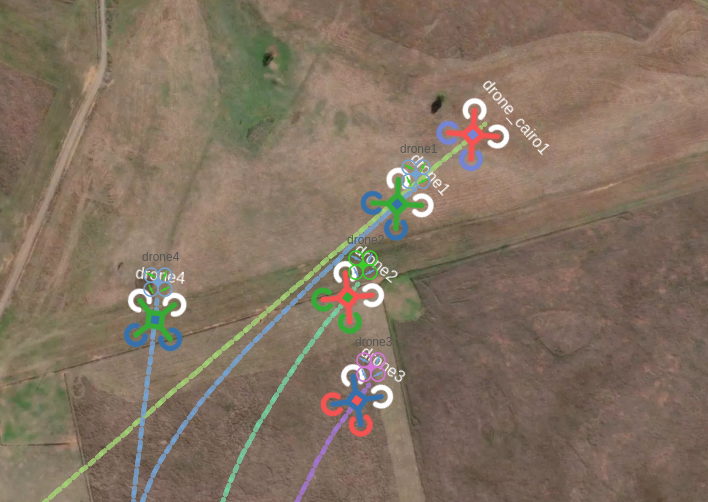
+
Then run the tool with:
|
|
23
31
|
|
|
24
|
-
|
|
32
|
+
```bash
|
|
33
|
+
npx mapcachetools --lat1=<lat> --lng1=<lng> --lat2=<lat> --lng2=<lng> --zin=<max_zoom> --folder=<output_folder> [options]
|
|
34
|
+
```
|
|
35
|
+
|
|
36
|
+
### Option 2: Install Globally via npm
|
|
25
37
|
Install the package globally to use the `mapcache-download` command from anywhere:
|
|
26
38
|
|
|
27
39
|
```bash
|
|
@@ -34,17 +46,24 @@ Then run the tool with:
|
|
|
34
46
|
mapcache-download --lat1=<lat> --lng1=<lng> --lat2=<lat> --lng2=<lng> --zin=<max_zoom> --folder=<output_folder> [options]
|
|
35
47
|
```
|
|
36
48
|
|
|
37
|
-
### Option
|
|
49
|
+
### Option 3: Clone and Run Locally
|
|
38
50
|
1. Clone the repository:
|
|
39
51
|
```bash
|
|
40
52
|
git clone https://github.com/HefnySco/mapcache.git
|
|
41
53
|
cd mapcache
|
|
42
54
|
```
|
|
43
55
|
|
|
44
|
-
2.
|
|
56
|
+
2. Run using `npx` from this local folder:
|
|
45
57
|
```bash
|
|
46
|
-
|
|
58
|
+
npx --package . mapcachetools --help
|
|
47
59
|
```
|
|
60
|
+
|
|
61
|
+
Or run using Node directly:
|
|
62
|
+
|
|
63
|
+
```bash
|
|
64
|
+
node ./bin/mapcache_download.js --help
|
|
65
|
+
```
|
|
66
|
+
|
|
48
67
|
Note: The `sharp` library is required for JPG-to-PNG conversion. Ensure system dependencies are installed:
|
|
49
68
|
- Ubuntu/Debian: `sudo apt-get install libvips-dev`
|
|
50
69
|
- macOS: `brew install libvips`
|
|
@@ -54,25 +73,43 @@ mapcache-download --lat1=<lat> --lng1=<lng> --lat2=<lat> --lng2=<lng> --zin=<max
|
|
|
54
73
|
Download map tiles for a geographic area defined by two coordinates (`lat1,lng1` to `lat2,lng2`), a zoom range, and an output folder. Run the script with:
|
|
55
74
|
|
|
56
75
|
```bash
|
|
57
|
-
|
|
76
|
+
npx mapcachetools --lat1=<lat> --lng1=<lng> --lat2=<lat> --lng2=<lng> --zin=<max_zoom> --folder=<output_folder> [options]
|
|
77
|
+
```
|
|
78
|
+
|
|
79
|
+
If you cloned the repo and want to run from the local folder, use:
|
|
80
|
+
|
|
81
|
+
```bash
|
|
82
|
+
npx --package . mapcachetools --lat1=<lat> --lng1=<lng> --lat2=<lat> --lng2=<lng> --zin=<max_zoom> --folder=<output_folder> [options]
|
|
83
|
+
```
|
|
84
|
+
|
|
85
|
+
If you installed globally, use:
|
|
86
|
+
|
|
87
|
+
```bash
|
|
88
|
+
mapcache-download --lat1=<lat> --lng1=<lng> --lat2=<lat> --lng2=<lng> --zin=<max_zoom> --folder=<output_folder> [options]
|
|
58
89
|
```
|
|
59
90
|
|
|
60
91
|
### Example: Download OSM Tiles
|
|
61
92
|
Download OpenStreetMap tiles for a small area with zoom levels 0 to 14:
|
|
62
93
|
```bash
|
|
63
|
-
|
|
94
|
+
npx mapcachetools --lat1=40.7128 --lng1=-74.0060 --lat2=40.7228 --lng2=-73.9960 --zin=14 --zout=0 --folder=./site/cachedMaps
|
|
64
95
|
```
|
|
65
96
|
|
|
66
97
|
### Example: Download Mapbox Satellite Tiles
|
|
67
98
|
Download Mapbox satellite tiles (saved as PNG, requires a Mapbox access token):
|
|
68
99
|
```bash
|
|
69
|
-
|
|
100
|
+
npx mapcachetools --lat1=40.7128 --lng1=-74.0060 --lat2=40.7228 --lng2=-73.9960 --zin=14 --folder=./site/cachedMaps --provider=1 --token=pk.eyJ1IjoibWhlZm55IiwiYSI6ImNrZW84Nm9rYTA2ZWgycm9mdmNscmFxYzcifQ.c-zxDjXCthXmRsErPzKhbQ
|
|
70
101
|
```
|
|
71
102
|
|
|
72
103
|
### Example: Download Mapbox Terrain RGB Tiles
|
|
73
104
|
Download Mapbox terrain RGB tiles for elevation data:
|
|
74
105
|
```bash
|
|
75
|
-
|
|
106
|
+
npx mapcachetools --lat1=40.7128 --lng1=-74.0060 --lat2=40.7228 --lng2=-73.9960 --zin=14 --folder=./site/cachedMaps --provider=2 --token=pk.eyJ1IjoibWhlZm55IiwiYSI6ImNrZW84Nm9rYTA2ZWgycm9mdmNscmFxYzcifQ.c-zxDjXCthXmRsErPzKhbQ
|
|
107
|
+
```
|
|
108
|
+
|
|
109
|
+
### Example: Download Stadiamaps Satellite Tiles
|
|
110
|
+
Download Stadiamaps satellite tiles (saved as PNG, requires a Stadiamaps API key):
|
|
111
|
+
```bash
|
|
112
|
+
npx mapcachetools --lat1=40.7128 --lng1=-74.0060 --lat2=40.7228 --lng2=-73.9960 --zin=14 --folder=./site/cachedMaps --provider=3 --token=<your-stadiamaps-api-key>
|
|
76
113
|
```
|
|
77
114
|
|
|
78
115
|
### Options
|
|
@@ -81,8 +118,8 @@ node mapcache_download.js --lat1=40.7128 --lng1=-74.0060 --lat2=40.7228 --lng2=-
|
|
|
81
118
|
- `--zin`: Maximum zoom level (required, e.g., 18).
|
|
82
119
|
- `--zout`: Minimum zoom level (default: 0).
|
|
83
120
|
- `--folder`: Output folder for tiles (required, e.g., `./site/cachedMaps`).
|
|
84
|
-
- `--provider`: Map provider (0=OSM, 1=Mapbox Satellite, 2=Mapbox Terrain RGB; default: 0).
|
|
85
|
-
- `--token`: Mapbox access token (required for provider 1 or
|
|
121
|
+
- `--provider`: Map provider (0=OSM, 1=Mapbox Satellite, 2=Mapbox Terrain RGB, 3=Stadiamaps Satellite; default: 0).
|
|
122
|
+
- `--token`: Mapbox or Stadiamaps access token (required for provider 1, 2, or 3).
|
|
86
123
|
- `--concurrency`: Number of parallel downloads (default: 5).
|
|
87
124
|
- `--retries`: Retry attempts for failed downloads (default: 3).
|
|
88
125
|
- `--force`: Redownload existing files (default: false).
|
|
@@ -103,6 +140,7 @@ Access the tiles at `http://localhost:8080/cachedMaps`. The folder `./site/cache
|
|
|
103
140
|
- OSM: `osm_<x>_<y>_<zoom>.png`
|
|
104
141
|
- Mapbox Satellite: `sat_<x>_<y>_<zoom>.png`
|
|
105
142
|
- Mapbox Terrain RGB: `terrain_<x>_<y>_<zoom>.png`
|
|
143
|
+
- Stadiamaps Satellite: `stadiamaps_<x>_<y>_<zoom>.png`
|
|
106
144
|
|
|
107
145
|
## Integration with 3D Mapping Projects
|
|
108
146
|
|
|
@@ -121,18 +159,45 @@ Ensure the output folder matches your project's tile cache directory, and use th
|
|
|
121
159
|
- **OpenStreetMap (OSM)**: Free, no token required. Tiles are natively PNG. [Website](https://www.openstreetmap.org/).
|
|
122
160
|
- **Mapbox Satellite**: High-quality satellite imagery, converted from JPG to PNG for consistency. Requires a Mapbox access token. [Website](https://api.mapbox.com/).
|
|
123
161
|
- **Mapbox Terrain RGB**: Elevation data encoded in RGB PNG tiles. Requires a Mapbox access token. [Website](https://docs.mapbox.com/data/tilesets/reference/mapbox-terrain-rgb-v1/).
|
|
162
|
+
- **Stadiamaps Satellite**: High-quality satellite imagery, converted from JPG to PNG. Requires a Stadiamaps API key. [Website](https://stadiamaps.com/).
|
|
124
163
|
|
|
125
|
-
Obtain a Mapbox token from [Mapbox Account](https://account.mapbox.com/).
|
|
164
|
+
Obtain a Mapbox token from [Mapbox Account](https://account.mapbox.com/) or a Stadiamaps API key from [Stadiamaps Account](https://stadiamaps.com/).
|
|
126
165
|
|
|
127
166
|
## Notes
|
|
128
167
|
|
|
129
|
-
- **Rate Limits**: Mapbox
|
|
168
|
+
- **Rate Limits**: Mapbox and Stadiamaps enforce rate limits. Adjust `--concurrency` to avoid being throttled.
|
|
130
169
|
- **File Overwrites**: Use `--force=true` to redownload tiles if they are outdated or corrupted.
|
|
131
|
-
- **File Size**: Mapbox Satellite tiles are converted to PNG, which may increase file size compared to JPG. Consider disk space for large areas.
|
|
170
|
+
- **File Size**: Mapbox Satellite and Stadiamaps tiles are converted to PNG, which may increase file size compared to JPG. Consider disk space for large areas.
|
|
132
171
|
- **Tile Validation**: For critical applications, validate PNG tiles post-download to ensure integrity (e.g., using `sharp` metadata).
|
|
133
172
|
|
|
173
|
+
## USE CASE
|
|
174
|
+
|
|
175
|
+
DroneEngage Airgap Server uses [MapCache](https://youtu.be/QivckjIQ9Sk) to cache map tiles for offline use in drone missions.
|
|
176
|
+
|
|
134
177
|
|
|
135
178
|
## Disclaimer
|
|
136
179
|
|
|
137
|
-
Please review the terms and conditions of your chosen map provider (e.g., [OpenStreetMap](https://www.openstreetmap.org/copyright), [Mapbox](https://www.mapbox.com/tos)). The author assumes no liability for any incidental, consequential, or other damages arising from the use of this tool.
|
|
180
|
+
Please review the terms and conditions of your chosen map provider (e.g., [OpenStreetMap](https://www.openstreetmap.org/copyright), [Mapbox](https://www.mapbox.com/tos), [Stadiamaps](https://stadiamaps.com/terms-of-service)). The author assumes no liability for any incidental, consequential, or other damages arising from the use of this tool.
|
|
181
|
+
|
|
182
|
+
## Package Sidebar
|
|
183
|
+
|
|
184
|
+
### Install
|
|
185
|
+
|
|
186
|
+
`npm i mapcachetools`
|
|
187
|
+
|
|
188
|
+
### Version
|
|
189
|
+
|
|
190
|
+
2.2.6
|
|
191
|
+
|
|
192
|
+
### License
|
|
193
|
+
|
|
194
|
+
ISC
|
|
195
|
+
|
|
196
|
+
### Unpacked Size
|
|
197
|
+
|
|
198
|
+
22.7 kB
|
|
199
|
+
|
|
200
|
+
### Total Files
|
|
201
|
+
|
|
202
|
+
6
|
|
138
203
|
|
package/package.json
CHANGED
|
@@ -1,10 +1,11 @@
|
|
|
1
1
|
{
|
|
2
2
|
"name": "mapcachetools",
|
|
3
|
-
"version": "2.
|
|
3
|
+
"version": "2.3.0",
|
|
4
4
|
"description": "A Node.js tool to download and cache map tiles (OSM, Mapbox Satellite, Mapbox Terrain RGB) as PNG images for offline use in mapping applications. Use at your own risk and comply with provider terms.",
|
|
5
5
|
"main": "bin/mapcache_download.js",
|
|
6
6
|
"bin": {
|
|
7
|
-
"mapcache-download": "./bin/mapcache_download.js"
|
|
7
|
+
"mapcache-download": "./bin/mapcache_download.js",
|
|
8
|
+
"mapcachetools": "./bin/mapcache_download.js"
|
|
8
9
|
},
|
|
9
10
|
"scripts": {
|
|
10
11
|
"start": "node ./bin/mapcache_download.js",
|