machinaos 0.0.30 → 0.0.32
This diff represents the content of publicly available package versions that have been released to one of the supported registries. The information contained in this diff is provided for informational purposes only and reflects changes between package versions as they appear in their respective public registries.
- package/README.md +42 -159
- package/client/dist/assets/{index-CrO9AyeN.js → index-BF5BD9DQ.js} +77 -77
- package/client/dist/index.html +1 -1
- package/client/package.json +1 -1
- package/client/src/components/CredentialsModal.tsx +40 -57
- package/client/src/components/ParameterRenderer.tsx +18 -6
- package/client/src/contexts/WebSocketContext.tsx +1 -0
- package/client/src/hooks/useApiKeys.ts +2 -0
- package/client/src/hooks/useParameterPanel.ts +0 -1
- package/client/src/nodeDefinitions/whatsappNodes.ts +8 -3
- package/package.json +1 -1
- package/scripts/start.js +12 -1
- package/scripts/stop.js +47 -0
- package/server/config/llm_defaults.json +32 -0
- package/server/core/database.py +17 -1
- package/server/models/database.py +1 -0
- package/server/models/nodes.py +5 -0
- package/server/routers/websocket.py +20 -2
- package/server/routers/whatsapp.py +74 -3
- package/server/services/ai.py +79 -19
- package/server/services/event_waiter.py +13 -2
- package/server/services/handlers/ai.py +4 -2
- package/server/services/handlers/whatsapp.py +13 -5
package/README.md
CHANGED
|
@@ -2,19 +2,19 @@
|
|
|
2
2
|
|
|
3
3
|
<a href="https://www.npmjs.com/package/machinaos" target="_blank"><img src="https://img.shields.io/npm/v/machinaos.svg" alt="npm version"></a>
|
|
4
4
|
<a href="https://opensource.org/licenses/MIT" target="_blank"><img src="https://img.shields.io/badge/License-MIT-yellow.svg" alt="License: MIT"></a>
|
|
5
|
-
<a href="https://discord.gg/
|
|
5
|
+
<a href="https://discord.gg/c9pCJ7d8Ce" target="_blank"><img src="https://img.shields.io/discord/1455977012308086895?logo=discord&logoColor=white&label=Discord" alt="Discord"></a>
|
|
6
6
|
|
|
7
|
-
|
|
7
|
+
Build your personal AI assistant. Connect AI Assistant to your email, calendar, messages, phone, and more.
|
|
8
8
|
|
|
9
|
-
|
|
9
|
+
Mashup of N8N + Openclaw but with better visibility of what it's doing and also tighter control of what your AI Assistant can do.
|
|
10
10
|
|
|
11
|
-
|
|
11
|
+
## See It In Action ↓
|
|
12
12
|
|
|
13
|
-
|
|
13
|
+
[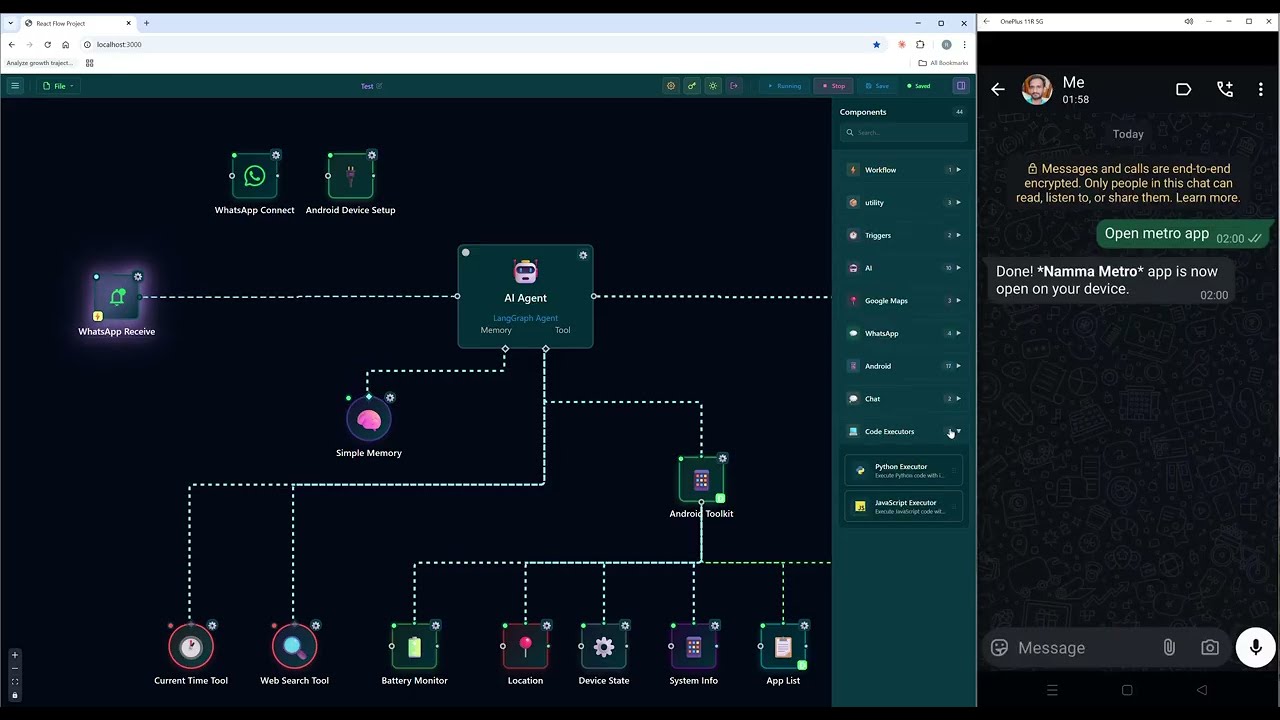](https://www.youtube.com/watch?v=z_TEyGmeuyQ)
|
|
14
14
|
|
|
15
|
-
|
|
15
|
+
## Full Capabilities ↓
|
|
16
16
|
|
|
17
|
-
|
|
17
|
+
<img width="1280" height="671" alt="Full Capabilities" src="https://github.com/user-attachments/assets/2f14b6c8-3995-4ccc-b076-e40749a83df2" />
|
|
18
18
|
|
|
19
19
|
## Prerequisites
|
|
20
20
|
|
|
@@ -30,7 +30,8 @@ machinaos start
|
|
|
30
30
|
|
|
31
31
|
Open http://localhost:3000
|
|
32
32
|
|
|
33
|
-
|
|
33
|
+
<details>
|
|
34
|
+
<summary><b>One-Line Install (auto-installs dependencies)</b></summary>
|
|
34
35
|
|
|
35
36
|
**Linux/macOS:**
|
|
36
37
|
```bash
|
|
@@ -42,7 +43,10 @@ curl -fsSL https://raw.githubusercontent.com/trohitg/MachinaOS/main/install.sh |
|
|
|
42
43
|
iwr -useb https://raw.githubusercontent.com/trohitg/MachinaOS/main/install.ps1 | iex
|
|
43
44
|
```
|
|
44
45
|
|
|
45
|
-
|
|
46
|
+
</details>
|
|
47
|
+
|
|
48
|
+
<details>
|
|
49
|
+
<summary><b>Clone & Run (for developers)</b></summary>
|
|
46
50
|
|
|
47
51
|
```bash
|
|
48
52
|
git clone https://github.com/trohitg/MachinaOS.git
|
|
@@ -51,177 +55,56 @@ npm run build
|
|
|
51
55
|
npm run start
|
|
52
56
|
```
|
|
53
57
|
|
|
54
|
-
|
|
55
|
-
|
|
56
|
-
### AI Integration (6 Providers)
|
|
57
|
-
|
|
58
|
-
| Provider | Models | Features |
|
|
59
|
-
|----------|--------|----------|
|
|
60
|
-
| **OpenAI** | GPT-5, GPT-4o, o1, o3, o4 | 128K output, reasoning effort |
|
|
61
|
-
| **Anthropic** | Claude Opus 4.6, Sonnet 4.5 | 128K output, extended thinking |
|
|
62
|
-
| **Google** | Gemini 3.0, 2.5 Pro/Flash | 65K output, 1M context |
|
|
63
|
-
| **OpenRouter** | 200+ models | Unified API for all providers |
|
|
64
|
-
| **Groq** | Llama, Qwen | Ultra-fast inference |
|
|
65
|
-
| **Cerebras** | Llama, Qwen | Ultra-fast on custom hardware |
|
|
58
|
+
</details>
|
|
66
59
|
|
|
67
|
-
|
|
60
|
+
## What You Can Build
|
|
68
61
|
|
|
69
|
-
|
|
70
|
-
|
|
71
|
-
- **AI Employee** - Team lead for intelligent task delegation to specialized agents
|
|
72
|
-
- **13 Specialized Agents** - Android, Coding, Web, Task, Social, Travel, Tool, Productivity, Payments, Consumer, Autonomous, Orchestrator
|
|
73
|
-
- **Agent Teams** - Multi-agent coordination with shared task management and delegation tools
|
|
74
|
-
- **11 Skills** - WhatsApp, Maps, HTTP, Scheduler, Android, Code, Memory, Web Search, Custom
|
|
75
|
-
- **Simple Memory** - Markdown-based conversation history with vector storage
|
|
62
|
+
### Personal AI Assistants
|
|
63
|
+
Create AI agents that remember conversations, use tools, and work together. Choose from OpenAI, Claude, Gemini, Groq, and 200+ models via OpenRouter.
|
|
76
64
|
|
|
77
|
-
###
|
|
65
|
+
### Automate Your Google Workspace
|
|
66
|
+
- Send and search emails
|
|
67
|
+
- Create calendar events
|
|
68
|
+
- Upload files to Drive
|
|
69
|
+
- Update spreadsheets
|
|
70
|
+
- Manage tasks and contacts
|
|
78
71
|
|
|
79
|
-
|
|
80
|
-
-
|
|
81
|
-
-
|
|
82
|
-
-
|
|
83
|
-
-
|
|
84
|
-
- **Google Maps** - Geocoding, nearby places, directions
|
|
72
|
+
### Control Your Devices
|
|
73
|
+
- Send WhatsApp messages automatically
|
|
74
|
+
- Post to Twitter/X
|
|
75
|
+
- Control your Android phone (WiFi, Bluetooth, apps, camera)
|
|
76
|
+
- Schedule tasks and reminders
|
|
85
77
|
|
|
86
|
-
###
|
|
78
|
+
### Process Documents
|
|
79
|
+
- Scrape websites
|
|
80
|
+
- Parse PDFs and documents
|
|
81
|
+
- Search your files with AI
|
|
87
82
|
|
|
88
|
-
Build
|
|
83
|
+
### Build Agent Teams
|
|
84
|
+
Create teams of specialized agents that delegate tasks to each other - a coding agent, a web agent, and a task agent working together.
|
|
89
85
|
|
|
90
|
-
|
|
91
|
-
+------------------+
|
|
92
|
-
| AI Employee |
|
|
93
|
-
| (Team Lead) |
|
|
94
|
-
+--------+---------+
|
|
95
|
-
| input-teammates
|
|
96
|
-
+-----------------+------------------+
|
|
97
|
-
| | |
|
|
98
|
-
+------v------+ +------v------+ +-------v-----+
|
|
99
|
-
| Coding Agent| | Web Agent | | Task Agent |
|
|
100
|
-
+-------------+ +-------------+ +-------------+
|
|
101
|
-
```
|
|
86
|
+
## Visual Workflow Builder
|
|
102
87
|
|
|
103
|
-
-
|
|
104
|
-
- **Intelligent Delegation** - AI decides when to delegate based on task
|
|
105
|
-
- **Delegation Tools** - Connected agents become `delegate_to_*` tools
|
|
106
|
-
- **Team Monitor** - Real-time visualization of team operations
|
|
107
|
-
|
|
108
|
-
### Document Processing (RAG Pipeline)
|
|
109
|
-
|
|
110
|
-
- **HTTP Scraper** - Scrape URLs with pagination and date ranges
|
|
111
|
-
- **File Downloader** - Parallel downloads with semaphore concurrency
|
|
112
|
-
- **Document Parser** - PyPDF, Marker (OCR), Unstructured, BeautifulSoup
|
|
113
|
-
- **Text Chunker** - Recursive, markdown, or token-based splitting
|
|
114
|
-
- **Embedding Generator** - HuggingFace, OpenAI, Ollama embeddings
|
|
115
|
-
- **Vector Store** - ChromaDB, Qdrant, Pinecone backends
|
|
116
|
-
|
|
117
|
-
## Node Categories
|
|
118
|
-
|
|
119
|
-
| Category | Count | Description |
|
|
120
|
-
|----------|-------|-------------|
|
|
121
|
-
| AI Models | 6 | OpenAI, Anthropic, Google, OpenRouter, Groq, Cerebras |
|
|
122
|
-
| AI Agents | 4 | AI Agent, Chat Agent, AI Employee, Simple Memory |
|
|
123
|
-
| Specialized Agents | 13 | Android, Coding, Web, Task, Social, Travel, Orchestrator, etc. |
|
|
124
|
-
| AI Skills | 11 | WhatsApp, Maps, HTTP, Scheduler, Android, Code, etc. |
|
|
125
|
-
| AI Tools | 9 | Calculator, Time, Search, Android Toolkit, Code Executors |
|
|
126
|
-
| Google Workspace | 26 | Gmail, Calendar, Drive, Sheets, Tasks, Contacts |
|
|
127
|
-
| WhatsApp | 3 | Send, Receive, Database |
|
|
128
|
-
| Twitter | 4 | Send, Search, User, Receive |
|
|
129
|
-
| Android | 16 | Device control and monitoring |
|
|
130
|
-
| Documents | 6 | RAG pipeline nodes |
|
|
131
|
-
| Utilities | 6 | HTTP, Webhooks, Chat Trigger, Console, Team Monitor |
|
|
132
|
-
| Location | 3 | Google Maps integration |
|
|
133
|
-
| Workflow | 2 | Start, Task Trigger |
|
|
134
|
-
|
|
135
|
-
**Total: 109 nodes**
|
|
136
|
-
|
|
137
|
-
## CLI Commands
|
|
138
|
-
|
|
139
|
-
| Command | Description |
|
|
140
|
-
|---------|-------------|
|
|
141
|
-
| `machinaos start` | Start all services (frontend, backend, WhatsApp) |
|
|
142
|
-
| `machinaos stop` | Stop all running services |
|
|
143
|
-
| `machinaos build` | Build for production |
|
|
144
|
-
| `machinaos clean` | Remove build artifacts and dependencies |
|
|
145
|
-
| `machinaos docker:up` | Start with Docker Compose |
|
|
146
|
-
| `machinaos docker:down` | Stop Docker containers |
|
|
147
|
-
| `machinaos help` | Show all available commands |
|
|
88
|
+
Drag-and-drop interface to connect AI models, services, and triggers. No code required.
|
|
148
89
|
|
|
149
90
|
## Configuration
|
|
150
91
|
|
|
151
|
-
|
|
152
|
-
|
|
153
|
-
**Environment:** Copy `.env.template` to `.env` and customize ports, auth settings, database location.
|
|
154
|
-
|
|
155
|
-
## Other Install Options
|
|
156
|
-
|
|
157
|
-
<details>
|
|
158
|
-
<summary><b>Docker</b></summary>
|
|
159
|
-
|
|
160
|
-
```bash
|
|
161
|
-
git clone https://github.com/trohitg/MachinaOS.git
|
|
162
|
-
cd MachinaOS
|
|
163
|
-
npm run docker:up
|
|
164
|
-
```
|
|
165
|
-
|
|
166
|
-
**Production Docker:**
|
|
167
|
-
```bash
|
|
168
|
-
npm run docker:prod:build
|
|
169
|
-
npm run docker:prod:up
|
|
170
|
-
```
|
|
171
|
-
|
|
172
|
-
**Redis (optional):** Set `REDIS_ENABLED=true` in `.env`
|
|
173
|
-
|
|
174
|
-
</details>
|
|
175
|
-
|
|
176
|
-
## Project Structure
|
|
177
|
-
|
|
178
|
-
```
|
|
179
|
-
MachinaOS/
|
|
180
|
-
├── client/ # React frontend (localhost:3000)
|
|
181
|
-
├── server/ # Python FastAPI backend (localhost:3010)
|
|
182
|
-
│ ├── services/ # Workflow execution, AI, handlers
|
|
183
|
-
│ └── routers/ # API endpoints, WebSocket
|
|
184
|
-
├── scripts/ # Cross-platform Node.js scripts
|
|
185
|
-
└── bin/cli.js # CLI entry point
|
|
186
|
-
```
|
|
187
|
-
|
|
188
|
-
## Tech Stack
|
|
189
|
-
|
|
190
|
-
- **Frontend:** React 19, TypeScript, React Flow, Zustand
|
|
191
|
-
- **Backend:** Python 3.12+, FastAPI, SQLite, LangChain/LangGraph
|
|
192
|
-
- **Services:** WhatsApp (whatsapp-rpc npm package), WebSocket relay
|
|
193
|
-
- **Package Manager:** uv (Python), npm (Node.js)
|
|
92
|
+
Click **Credentials** in the toolbar to add your API keys for AI providers, Google, WhatsApp, and Twitter.
|
|
194
93
|
|
|
195
|
-
##
|
|
196
|
-
|
|
197
|
-
**Port already in use:**
|
|
198
|
-
```bash
|
|
199
|
-
machinaos stop # Kill all services
|
|
200
|
-
machinaos start # Restart
|
|
201
|
-
```
|
|
202
|
-
|
|
203
|
-
**Missing dependencies:**
|
|
204
|
-
```bash
|
|
205
|
-
machinaos build # Install all dependencies
|
|
206
|
-
```
|
|
94
|
+
## Documentation
|
|
207
95
|
|
|
208
|
-
|
|
209
|
-
```bash
|
|
210
|
-
machinaos clean # Remove node_modules, .venv, dist
|
|
211
|
-
machinaos build # Reinstall everything
|
|
212
|
-
```
|
|
96
|
+
Full docs: https://docs.machinaos.dev
|
|
213
97
|
|
|
214
|
-
##
|
|
98
|
+
## Community
|
|
215
99
|
|
|
216
|
-
|
|
100
|
+
Join our [Discord](https://discord.gg/NHUEQVSC) for help, feedback, and updates.
|
|
217
101
|
|
|
218
102
|
## Contributing
|
|
219
103
|
|
|
220
104
|
1. Fork the repository
|
|
221
105
|
2. Create a feature branch
|
|
222
106
|
3. Make your changes
|
|
223
|
-
4.
|
|
224
|
-
5. Submit a pull request
|
|
107
|
+
4. Submit a pull request
|
|
225
108
|
|
|
226
109
|
## License
|
|
227
110
|
|