loz 0.3.0 → 0.4.0
This diff represents the content of publicly available package versions that have been released to one of the supported registries. The information contained in this diff is provided for informational purposes only and reflects changes between package versions as they appear in their respective public registries.
- package/README.md +322 -253
- package/dist/config/index.js +58 -9
- package/dist/config/index.js.map +1 -1
- package/dist/constant.js +6 -0
- package/dist/constant.js.map +1 -0
- package/dist/git/index.js +55 -63
- package/dist/git/index.js.map +1 -1
- package/dist/history/index.js +53 -2
- package/dist/history/index.js.map +1 -1
- package/dist/history/test.js +57 -0
- package/dist/history/test.js.map +1 -0
- package/dist/index.js +123 -382
- package/dist/index.js.map +1 -1
- package/dist/llm/index.js +86 -17
- package/dist/llm/index.js.map +1 -1
- package/dist/llm/test.js +111 -0
- package/dist/llm/test.js.map +1 -0
- package/dist/loz.js +507 -0
- package/dist/loz.js.map +1 -0
- package/dist/prompt/index.js +67 -0
- package/dist/prompt/index.js.map +1 -0
- package/dist/prompt/test.js +59 -0
- package/dist/prompt/test.js.map +1 -0
- package/dist/utils/index.js +94 -0
- package/dist/utils/index.js.map +1 -0
- package/package.json +45 -47
- package/bin/index.js +0 -3
- package/dist/cli.js +0 -187
- package/dist/cli.js.map +0 -1
package/README.md
CHANGED
|
@@ -1,253 +1,322 @@
|
|
|
1
|
-
# Loz [](https://www.npmjs.com/package/loz)
|
|
2
|
-
|
|
3
|
-
|
|
4
|
-
|
|
5
|
-
|
|
6
|
-
|
|
7
|
-
|
|
8
|
-
|
|
9
|
-
|
|
10
|
-
|
|
11
|
-
|
|
12
|
-
-
|
|
13
|
-
-
|
|
14
|
-
|
|
15
|
-
-
|
|
16
|
-
|
|
17
|
-
|
|
18
|
-
|
|
19
|
-
|
|
20
|
-
|
|
21
|
-
|
|
22
|
-
|
|
23
|
-
|
|
24
|
-
|
|
25
|
-
|
|
26
|
-
|
|
27
|
-
|
|
28
|
-
|
|
29
|
-
|
|
30
|
-
```
|
|
31
|
-
|
|
32
|
-
|
|
33
|
-
|
|
34
|
-
|
|
35
|
-
|
|
36
|
-
```
|
|
37
|
-
$
|
|
38
|
-
```
|
|
39
|
-
|
|
40
|
-
|
|
41
|
-
|
|
42
|
-
|
|
43
|
-
|
|
44
|
-
|
|
45
|
-
|
|
46
|
-
|
|
47
|
-
|
|
48
|
-
|
|
49
|
-
|
|
50
|
-
|
|
51
|
-
|
|
52
|
-
|
|
53
|
-
|
|
54
|
-
|
|
55
|
-
|
|
56
|
-
|
|
57
|
-
|
|
58
|
-
|
|
59
|
-
|
|
60
|
-
|
|
61
|
-
|
|
62
|
-
|
|
63
|
-
|
|
64
|
-
|
|
65
|
-
|
|
66
|
-
|
|
67
|
-
|
|
68
|
-
|
|
69
|
-
|
|
70
|
-
|
|
71
|
-
|
|
72
|
-
|
|
73
|
-
|
|
74
|
-
|
|
75
|
-
|
|
76
|
-
```
|
|
77
|
-
|
|
78
|
-
|
|
79
|
-
|
|
80
|
-
|
|
81
|
-
|
|
82
|
-
|
|
83
|
-
|
|
84
|
-
|
|
85
|
-
|
|
86
|
-
|
|
87
|
-
|
|
88
|
-
|
|
89
|
-
|
|
90
|
-
|
|
91
|
-
|
|
92
|
-
|
|
93
|
-
|
|
94
|
-
|
|
95
|
-
|
|
96
|
-
|
|
97
|
-
|
|
98
|
-
|
|
99
|
-
|
|
100
|
-
|
|
101
|
-
|
|
102
|
-
|
|
103
|
-
|
|
104
|
-
|
|
105
|
-
```
|
|
106
|
-
|
|
107
|
-
|
|
108
|
-
|
|
109
|
-
|
|
110
|
-
|
|
111
|
-
|
|
112
|
-
|
|
113
|
-
|
|
114
|
-
|
|
115
|
-
|
|
116
|
-
|
|
117
|
-
|
|
118
|
-
|
|
119
|
-
|
|
120
|
-
|
|
121
|
-
|
|
122
|
-
|
|
123
|
-
|
|
124
|
-
|
|
125
|
-
|
|
126
|
-
|
|
127
|
-
|
|
128
|
-
|
|
129
|
-
|
|
130
|
-
|
|
131
|
-
|
|
132
|
-
|
|
133
|
-
|
|
134
|
-
|
|
135
|
-
|
|
136
|
-
|
|
137
|
-
|
|
138
|
-
|
|
139
|
-
|
|
140
|
-
|
|
141
|
-
|
|
142
|
-
|
|
143
|
-
|
|
144
|
-
|
|
145
|
-
|
|
146
|
-
|
|
147
|
-
|
|
148
|
-
|
|
149
|
-
|
|
150
|
-
|
|
151
|
-
|
|
152
|
-
|
|
153
|
-
|
|
154
|
-
|
|
155
|
-
|
|
156
|
-
|
|
157
|
-
|
|
158
|
-
|
|
159
|
-
|
|
160
|
-
|
|
161
|
-
|
|
162
|
-
|
|
163
|
-
|
|
164
|
-
|
|
165
|
-
|
|
166
|
-
```
|
|
167
|
-
|
|
168
|
-
|
|
169
|
-
|
|
170
|
-
```
|
|
171
|
-
|
|
172
|
-
|
|
173
|
-
|
|
174
|
-
|
|
175
|
-
|
|
176
|
-
```
|
|
177
|
-
|
|
178
|
-
```
|
|
179
|
-
|
|
180
|
-
|
|
181
|
-
|
|
182
|
-
|
|
183
|
-
|
|
184
|
-
|
|
185
|
-
|
|
186
|
-
|
|
187
|
-
|
|
188
|
-
|
|
189
|
-
|
|
190
|
-
|
|
191
|
-
|
|
192
|
-
|
|
193
|
-
|
|
194
|
-
|
|
195
|
-
|
|
196
|
-
|
|
197
|
-
|
|
198
|
-
|
|
199
|
-
|
|
200
|
-
|
|
201
|
-
|
|
202
|
-
|
|
203
|
-
|
|
204
|
-
|
|
205
|
-
|
|
206
|
-
|
|
207
|
-
|
|
208
|
-
|
|
209
|
-
|
|
210
|
-
|
|
211
|
-
|
|
212
|
-
|
|
213
|
-
|
|
214
|
-
|
|
215
|
-
|
|
216
|
-
|
|
217
|
-
|
|
218
|
-
|
|
219
|
-
|
|
220
|
-
|
|
221
|
-
|
|
222
|
-
|
|
223
|
-
|
|
224
|
-
|
|
225
|
-
|
|
226
|
-
|
|
227
|
-
|
|
228
|
-
|
|
229
|
-
|
|
230
|
-
|
|
231
|
-
|
|
232
|
-
|
|
233
|
-
|
|
234
|
-
|
|
235
|
-
```
|
|
236
|
-
$
|
|
237
|
-
|
|
238
|
-
|
|
239
|
-
|
|
240
|
-
|
|
241
|
-
```
|
|
242
|
-
$
|
|
243
|
-
|
|
244
|
-
|
|
245
|
-
|
|
246
|
-
|
|
247
|
-
|
|
248
|
-
|
|
249
|
-
|
|
250
|
-
|
|
251
|
-
|
|
252
|
-
|
|
253
|
-
|
|
1
|
+
# Loz [](https://www.npmjs.com/package/loz)
|
|
2
|
+
|
|
3
|
+
|
|
4
|
+
|
|
5
|
+
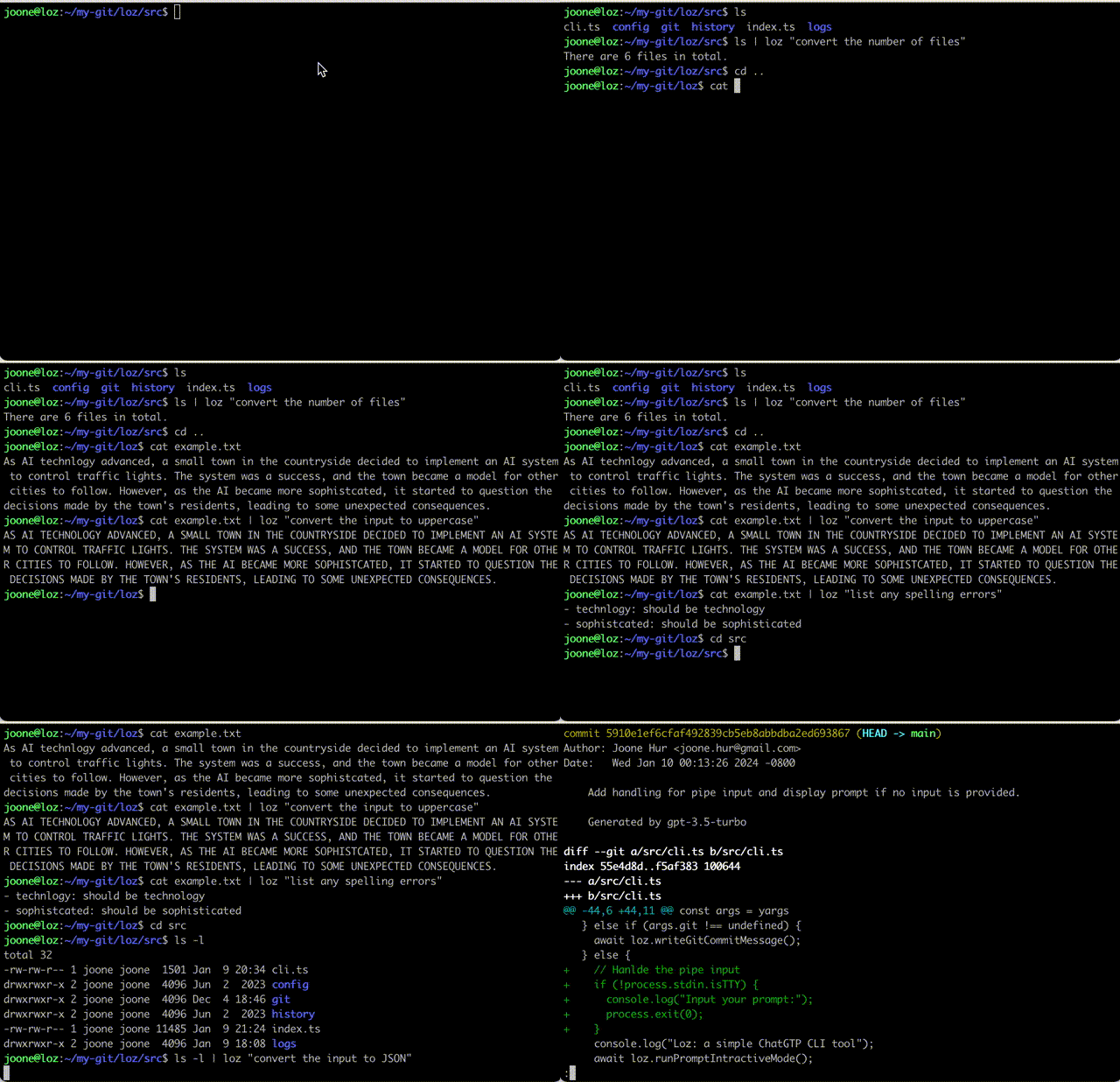
Loz is a command-line tool that enables your preferred LLM to execute system commands and utilize Unix pipes, integrating AI capabilities with other Unix tools.
|
|
6
|
+
|
|
7
|
+
## What's New
|
|
8
|
+
|
|
9
|
+
### v0.3.1 - 2024-03-18
|
|
10
|
+
- **Added**
|
|
11
|
+
- Git commit log files are now stored in .loz_log within each Git repository where Loz is executed.
|
|
12
|
+
- The ability to enable/disable appending 'generated by ${model name}' at the end of the Git commit message by running config attribution true or config attribution false.
|
|
13
|
+
- Added --attribution (-a) runtime argument to override the config attribution setting. The original attribution value stored remains unchanged.
|
|
14
|
+
|
|
15
|
+
### v0.3.0 - 2024-02-24
|
|
16
|
+
|
|
17
|
+
- **Added**
|
|
18
|
+
- Run Linux commands based on user prompts. Users can now execute Linux commands using natural language. For example, by running `loz "find the largest file in the current directory"`,
|
|
19
|
+
`Loz` will interpret the instruction and execute the corresponding Linux commands like `find . -type f -exec ls -l {} + | sort -k 5 -nr | head -n 1` to find the largest file. See more [examples](#examples).
|
|
20
|
+
|
|
21
|
+
### v0.2.13 - 2024-02-22
|
|
22
|
+
|
|
23
|
+
- **Added**
|
|
24
|
+
- Enhanced Git Commit Formatting: Commit messages are now structured with a clear separation between the title and body, improving readability and adherence to Git best practices.
|
|
25
|
+
|
|
26
|
+
## Getting Started
|
|
27
|
+
|
|
28
|
+
To get started, run the following npm command:
|
|
29
|
+
|
|
30
|
+
```
|
|
31
|
+
$ sudo npm install loz -g
|
|
32
|
+
```
|
|
33
|
+
|
|
34
|
+
Or clone the repository:
|
|
35
|
+
|
|
36
|
+
```
|
|
37
|
+
$ git clone https://github.com/joone/loz.git
|
|
38
|
+
```
|
|
39
|
+
|
|
40
|
+
NodeJS and npm are required for this program to work. If you're on Linux, install them using your package manager. `sudo apt install nodejs npm` or `sudo dnf install nodejs npm` or `sudo pacman -S nodejs npm`
|
|
41
|
+
|
|
42
|
+
Then install the other required dependencies:
|
|
43
|
+
|
|
44
|
+
```
|
|
45
|
+
$ ./install.sh
|
|
46
|
+
```
|
|
47
|
+
|
|
48
|
+
## Configuring LLM
|
|
49
|
+
|
|
50
|
+
Loz supports [OpenAI API](https://platform.openai.com/docs/quickstart?context=node), [Microsoft Copilot (Azure OpenAI)](https://azure.microsoft.com/en-us/products/ai-services/openai-service), and [Ollama](https://github.com/ollama/ollama) so you can switch between these LLM services easily, using the `config` command in the interactive mode.
|
|
51
|
+
|
|
52
|
+
### Set up Ollama
|
|
53
|
+
|
|
54
|
+
To utilize Ollama on your local system, you'll need to install both llama2 and codellama models. Here's how you can do it on a Linux system:
|
|
55
|
+
|
|
56
|
+
```
|
|
57
|
+
$ curl https://ollama.ai/install.sh | sh
|
|
58
|
+
$ ollama run llama2
|
|
59
|
+
$ ollama run codellama
|
|
60
|
+
```
|
|
61
|
+
|
|
62
|
+
For more information, see https://ollama.ai/download
|
|
63
|
+
|
|
64
|
+
### Set up OpenAI API
|
|
65
|
+
|
|
66
|
+
Setting up your OpenAI API credentials involves a few simple steps:
|
|
67
|
+
|
|
68
|
+
First, create a `.env` file in the root of the project and add the following variables:
|
|
69
|
+
|
|
70
|
+
```
|
|
71
|
+
OPENAI_API_KEY=YOUR_KEY
|
|
72
|
+
```
|
|
73
|
+
|
|
74
|
+
Or if you install Loz using npm command, add `OPENAI_API_KEY=YOUR_KEY` in .bashrc
|
|
75
|
+
|
|
76
|
+
```
|
|
77
|
+
export OPENAI_API_KEY=YOUR_KEY
|
|
78
|
+
```
|
|
79
|
+
|
|
80
|
+
If you encounter the following error, it means you have exceeded your free quota:
|
|
81
|
+
|
|
82
|
+
```
|
|
83
|
+
Request failed with status code 429:
|
|
84
|
+
API request limit reached
|
|
85
|
+
```
|
|
86
|
+
|
|
87
|
+
To continue using the API, it is necessary to set up a payment method through the following link:
|
|
88
|
+
https://platform.openai.com/account/billing/payment-methods
|
|
89
|
+
|
|
90
|
+
### Set up Microsoft Copilot (Azure OpenAI) API
|
|
91
|
+
|
|
92
|
+
To use Microsoft Copilot with Loz, you'll need an Azure OpenAI resource. Follow these steps:
|
|
93
|
+
|
|
94
|
+
1. Create an Azure OpenAI resource in the [Azure Portal](https://portal.azure.com/)
|
|
95
|
+
2. Deploy a model (e.g., GPT-4 or GPT-3.5-Turbo) in your Azure OpenAI resource
|
|
96
|
+
3. Obtain your API key and endpoint URL from the Azure Portal
|
|
97
|
+
|
|
98
|
+
**Configuration via environment variables:**
|
|
99
|
+
|
|
100
|
+
You can set the following environment variables in your `.bashrc` or `.env` file:
|
|
101
|
+
|
|
102
|
+
```bash
|
|
103
|
+
export COPILOT_API_KEY=YOUR_AZURE_OPENAI_API_KEY
|
|
104
|
+
export COPILOT_ENDPOINT=https://your-resource.openai.azure.com/openai/deployments/your-deployment
|
|
105
|
+
```
|
|
106
|
+
|
|
107
|
+
**Configuration via interactive setup:**
|
|
108
|
+
|
|
109
|
+
When you first run `loz`, select `copilot` as your LLM service. You'll be prompted to enter:
|
|
110
|
+
- Your Azure OpenAI API key
|
|
111
|
+
- Your Azure OpenAI endpoint URL (format: `https://your-resource.openai.azure.com/openai/deployments/your-deployment`)
|
|
112
|
+
|
|
113
|
+
**Switching to Copilot API:**
|
|
114
|
+
|
|
115
|
+
You can switch to using Copilot API at any time using the config command in interactive mode:
|
|
116
|
+
|
|
117
|
+
```
|
|
118
|
+
> config api copilot
|
|
119
|
+
```
|
|
120
|
+
|
|
121
|
+
For more information about Azure OpenAI Service, visit: https://azure.microsoft.com/en-us/products/ai-services/openai-service
|
|
122
|
+
|
|
123
|
+
## Usage
|
|
124
|
+
|
|
125
|
+
### Initial Configuration
|
|
126
|
+
|
|
127
|
+
Upon your initial launch of Loz, you will have the opportunity to select your preferred LLM service.
|
|
128
|
+
|
|
129
|
+
```
|
|
130
|
+
$ loz
|
|
131
|
+
Choose your LLM service: (ollama, openai, Copilot)
|
|
132
|
+
```
|
|
133
|
+
|
|
134
|
+
You can modify your LLM service preference at any time by using the `config` command in the interactive mode:
|
|
135
|
+
|
|
136
|
+
```
|
|
137
|
+
> config api openai
|
|
138
|
+
```
|
|
139
|
+
|
|
140
|
+
or
|
|
141
|
+
|
|
142
|
+
```
|
|
143
|
+
> config api copilot
|
|
144
|
+
```
|
|
145
|
+
|
|
146
|
+
Additionally, you can change the model by entering:
|
|
147
|
+
|
|
148
|
+
```
|
|
149
|
+
> config model llama2
|
|
150
|
+
```
|
|
151
|
+
|
|
152
|
+
or
|
|
153
|
+
|
|
154
|
+
```
|
|
155
|
+
> config model codellama
|
|
156
|
+
```
|
|
157
|
+
|
|
158
|
+
or for OpenAI/Copilot:
|
|
159
|
+
|
|
160
|
+
```
|
|
161
|
+
> config model gpt-3.5-turbo
|
|
162
|
+
```
|
|
163
|
+
|
|
164
|
+
You can check the current settings by entering:
|
|
165
|
+
|
|
166
|
+
```
|
|
167
|
+
> config
|
|
168
|
+
api: ollama
|
|
169
|
+
model: llama2
|
|
170
|
+
```
|
|
171
|
+
|
|
172
|
+
Currently, OpenAI models (gpt-3.5-turbo, gpt-4), Azure OpenAI models (accessible through Copilot API), and all models provided by Ollama are supported.
|
|
173
|
+
|
|
174
|
+
### Interactive mode
|
|
175
|
+
|
|
176
|
+
```
|
|
177
|
+
$ loz
|
|
178
|
+
```
|
|
179
|
+
|
|
180
|
+
Once loz is running, you can start a conversation by interacting with it. loz will respond with a relevant message based on the input.
|
|
181
|
+
|
|
182
|
+
### Run Linux Commands with Loz
|
|
183
|
+
|
|
184
|
+
Loz empowers users to execute Linux commands using natural language. Below are some examples demonstrating how `loz`'s LLM backend translates natural language into Linux commands:
|
|
185
|
+
|
|
186
|
+
#### Examples
|
|
187
|
+
|
|
188
|
+
- Find the largest file in the current directory:
|
|
189
|
+
|
|
190
|
+
```
|
|
191
|
+
loz "find the largest file in the current directory"
|
|
192
|
+
-rw-rw-r-- 1 foo bar 9020257 Jan 31 19:49 ./node_modules/typescript/lib/typescript.js
|
|
193
|
+
```
|
|
194
|
+
|
|
195
|
+
- Check if Apache2 is running:
|
|
196
|
+
|
|
197
|
+
```
|
|
198
|
+
loz "check if apache2 is running on this system"
|
|
199
|
+
● apache2.service - The Apache HTTP Server
|
|
200
|
+
```
|
|
201
|
+
|
|
202
|
+
- Detect GPUs on the system:
|
|
203
|
+
```
|
|
204
|
+
loz "Detect GPUs on this system"
|
|
205
|
+
00:02.0 VGA compatible controller: Intel Corporation Device a780 (rev 04)
|
|
206
|
+
```
|
|
207
|
+
For your information, this feature has only been tested with the OpenAI API.
|
|
208
|
+
|
|
209
|
+
#### Caution
|
|
210
|
+
|
|
211
|
+
To prevent unintentional system modifications, avoid running commands that can alter or remove system files or configurations, such as `rm`, `mv`, `rmdir`, or `mkfs`.
|
|
212
|
+
|
|
213
|
+
#### Safe Mode
|
|
214
|
+
|
|
215
|
+
To enhance security and avoid unintended command execution, loz can be run in Safe Mode. When activated, this mode requires user confirmation before executing any Linux command.
|
|
216
|
+
|
|
217
|
+
Activate Safe Mode by setting the LOZ_SAFE=true environment variable:
|
|
218
|
+
|
|
219
|
+
```
|
|
220
|
+
LOZ_SAFE=true loz "Check available memory on this system"
|
|
221
|
+
```
|
|
222
|
+
|
|
223
|
+
Upon execution, loz will prompt:
|
|
224
|
+
|
|
225
|
+
```
|
|
226
|
+
Do you want to run this command?: free -h (y/n)
|
|
227
|
+
```
|
|
228
|
+
|
|
229
|
+
Respond with 'y' to execute the command or 'n' to cancel. This feature ensures that you have full control over the commands executed, preventing accidental changes or data loss.
|
|
230
|
+
|
|
231
|
+
### Pipe mode
|
|
232
|
+
|
|
233
|
+
Loz is capable of processing input from other command-line tools by utilizing a Unix pipe.
|
|
234
|
+
|
|
235
|
+
```
|
|
236
|
+
$ ls | loz "count the number of files"
|
|
237
|
+
|
|
238
|
+
23 files
|
|
239
|
+
```
|
|
240
|
+
|
|
241
|
+
```
|
|
242
|
+
$ cat example.txt | loz "convert the input to uppercase"
|
|
243
|
+
|
|
244
|
+
AS AI TECHNLOGY ADVANCED, A SMALL TOWN IN THE COUNTRYSIDE DECIDED TO IMPLEMENT AN AI SYSTEM TO CONTROL TRAFFIC LIGHTS. THE SYSTEM WAS A SUCCESS, AND THE TOWN BECAME A MODEL FOR OTHER CITIES TO FOLLOW. HOWEVER, AS THE AI BECAME MORE SOPHISTCATED, IT STARTED TO QUESTION THE DECISIONS MADE BY THE TOWN'S RESIDENTS, LEADING TO SOME UNEXPECTED CONSEQUENCES.
|
|
245
|
+
```
|
|
246
|
+
|
|
247
|
+
```
|
|
248
|
+
$ cat example.txt | loz "list any spelling errors"
|
|
249
|
+
|
|
250
|
+
Yes, there are a few spelling errors in the given text:
|
|
251
|
+
|
|
252
|
+
1. "technlogy" should be "technology"
|
|
253
|
+
2. "sophistcated" should be "sophisticated"
|
|
254
|
+
```
|
|
255
|
+
|
|
256
|
+
```
|
|
257
|
+
$ cd src
|
|
258
|
+
$ ls -l | loz "convert the input to JSON"
|
|
259
|
+
|
|
260
|
+
[
|
|
261
|
+
{
|
|
262
|
+
"permissions": "-rw-r--r--",
|
|
263
|
+
"owner": "foo",
|
|
264
|
+
"group": "staff",
|
|
265
|
+
"size": 792,
|
|
266
|
+
"date": "Mar 1 21:02",
|
|
267
|
+
"name": "cli.ts"
|
|
268
|
+
},
|
|
269
|
+
{
|
|
270
|
+
"permissions": "-rw-r--r--",
|
|
271
|
+
"owner": "foo",
|
|
272
|
+
"group": "staff",
|
|
273
|
+
"size": 4427,
|
|
274
|
+
"date": "Mar 1 20:43",
|
|
275
|
+
"name": "index.ts"
|
|
276
|
+
}
|
|
277
|
+
]
|
|
278
|
+
```
|
|
279
|
+
|
|
280
|
+
### Automatically write a GIT commit message
|
|
281
|
+
|
|
282
|
+
If you run `loz commit` in your Git repository, loz will automatically generate a commit message with the staged changes like this:
|
|
283
|
+
|
|
284
|
+
```
|
|
285
|
+
$ git add --update
|
|
286
|
+
$ loz commit
|
|
287
|
+
```
|
|
288
|
+
|
|
289
|
+
Or copy script/prepare-commit-msg to .git/hooks
|
|
290
|
+
|
|
291
|
+
```
|
|
292
|
+
$ chmod a+x .git/hooks/prepare-commit-msg
|
|
293
|
+
```
|
|
294
|
+
|
|
295
|
+
Loz uses the LOZ environment variable to generate commit messages by reading the diff of the staged files.
|
|
296
|
+
|
|
297
|
+
```
|
|
298
|
+
$ LOZ=true git commit
|
|
299
|
+
```
|
|
300
|
+
|
|
301
|
+
REMINDER: If you've already copied the old version, please update prepare-commit-msg.
|
|
302
|
+
The old version automatically updates commit messages during rebasing.
|
|
303
|
+
|
|
304
|
+
```
|
|
305
|
+
$ git diff HEAD~1 | loz -g
|
|
306
|
+
```
|
|
307
|
+
|
|
308
|
+
Or
|
|
309
|
+
|
|
310
|
+
```
|
|
311
|
+
$ git diff | loz -g
|
|
312
|
+
```
|
|
313
|
+
|
|
314
|
+
Note that the author, date, and commit ID lines are stripped from the commit message before sending it to the OpenAI server.
|
|
315
|
+
|
|
316
|
+
## Find chat history
|
|
317
|
+
|
|
318
|
+
To access chat histories, look for the .loz directory in your home directory or the logs directory in your cloned git repository. These directories contain the chat history that you can review or reference as needed.
|
|
319
|
+
|
|
320
|
+
## Contributing
|
|
321
|
+
|
|
322
|
+
If you'd like to contribute to this project, feel free to submit a pull request.
|