linecraft 0.2.4 → 0.2.5
This diff represents the content of publicly available package versions that have been released to one of the supported registries. The information contained in this diff is provided for informational purposes only and reflects changes between package versions as they appear in their respective public registries.
- package/README.md +41 -7
- package/lib/components/code-debug.d.ts +2 -0
- package/lib/components/code-debug.d.ts.map +1 -1
- package/lib/components/code-debug.js +224 -255
- package/lib/components/code-debug.js.map +1 -1
- package/lib/components/code-debug.test.d.ts +2 -0
- package/lib/components/code-debug.test.d.ts.map +1 -0
- package/lib/components/code-debug.test.js +253 -0
- package/lib/components/code-debug.test.js.map +1 -0
- package/lib/components/styled.d.ts +1 -0
- package/lib/components/styled.d.ts.map +1 -1
- package/lib/components/styled.js +36 -7
- package/lib/components/styled.js.map +1 -1
- package/lib/layout/grid.d.ts +3 -2
- package/lib/layout/grid.d.ts.map +1 -1
- package/lib/layout/grid.js +93 -45
- package/lib/layout/grid.js.map +1 -1
- package/lib/layout/grid.test.js +67 -0
- package/lib/layout/grid.test.js.map +1 -1
- package/lib/native/diff.test.js.map +1 -1
- package/lib/native/region-renderer.d.ts +1 -0
- package/lib/native/region-renderer.d.ts.map +1 -1
- package/lib/native/region-renderer.js +31 -1
- package/lib/native/region-renderer.js.map +1 -1
- package/lib/region.d.ts.map +1 -1
- package/lib/region.js +0 -46
- package/lib/region.js.map +1 -1
- package/lib/utils/cursor-position.d.ts.map +1 -1
- package/lib/utils/cursor-position.js +4 -13
- package/lib/utils/cursor-position.js.map +1 -1
- package/lib/utils/text.d.ts +64 -2
- package/lib/utils/text.d.ts.map +1 -1
- package/lib/utils/text.js +670 -102
- package/lib/utils/text.js.map +1 -1
- package/lib/utils/text.test.d.ts +2 -0
- package/lib/utils/text.test.d.ts.map +1 -0
- package/lib/utils/text.test.js +237 -0
- package/lib/utils/text.test.js.map +1 -0
- package/lib/utils/wait-for-spacebar.d.ts.map +1 -1
- package/lib/utils/wait-for-spacebar.js +0 -7
- package/lib/utils/wait-for-spacebar.js.map +1 -1
- package/package.json +1 -1
package/README.md
CHANGED
|
@@ -142,6 +142,36 @@ ref.delete(); // Remove it
|
|
|
142
142
|
r.destroy(true); // Clean up and restore terminal (true = clear first)
|
|
143
143
|
```
|
|
144
144
|
|
|
145
|
+
## Semantic Themes
|
|
146
|
+
|
|
147
|
+
Linecraft includes a built-in semantic theme system that automatically adapts colors based on whether the terminal is in light or dark mode. Instead of hardcoding ANSI colors, you can use semantic tokens:
|
|
148
|
+
|
|
149
|
+
- `base`: The default text color (gray in both themes)
|
|
150
|
+
- `muted`: Dimmed text for line numbers or separators (dimmed white on dark, dimmed gray on light)
|
|
151
|
+
- `highlight`: Emphasized text (white on dark, bold black on light)
|
|
152
|
+
- `accent`: Primary accent color (bold blue in both themes)
|
|
153
|
+
- `location`: For file paths and locations (magenta in both themes)
|
|
154
|
+
- `success`: Success messages (bright green on dark, green on light)
|
|
155
|
+
- `warning`: Warning messages (bright yellow on dark, bright magenta on light)
|
|
156
|
+
- `error`: Error messages (bright red on dark, red on light)
|
|
157
|
+
- `info`: Informational messages (blue in both themes)
|
|
158
|
+
|
|
159
|
+
You can use these tokens anywhere a `Color` is expected:
|
|
160
|
+
|
|
161
|
+
```typescript
|
|
162
|
+
import { Styled } from 'linecraft';
|
|
163
|
+
|
|
164
|
+
// Automatically uses appropriate color based on terminal theme
|
|
165
|
+
const text = Styled({ color: 'base' }, 'Auto-themed text');
|
|
166
|
+
const error = Styled({ color: 'error' }, 'Error message');
|
|
167
|
+
const path = Styled({ color: 'location' }, '/path/to/file.ts');
|
|
168
|
+
|
|
169
|
+
// You can also resolve them manually if needed
|
|
170
|
+
import { autoColor, autoStyle } from 'linecraft';
|
|
171
|
+
const color = autoColor('warning'); // Returns just the color
|
|
172
|
+
const style = autoStyle('accent'); // Returns full TextStyle (color, bold, etc.)
|
|
173
|
+
```
|
|
174
|
+
|
|
145
175
|
## Components
|
|
146
176
|
|
|
147
177
|
### Styled
|
|
@@ -193,7 +223,7 @@ r.set(Section(
|
|
|
193
223
|
|
|
194
224
|
### CodeDebug
|
|
195
225
|
|
|
196
|
-
Display code errors and warnings with line numbers, context, and clickable file paths.
|
|
226
|
+
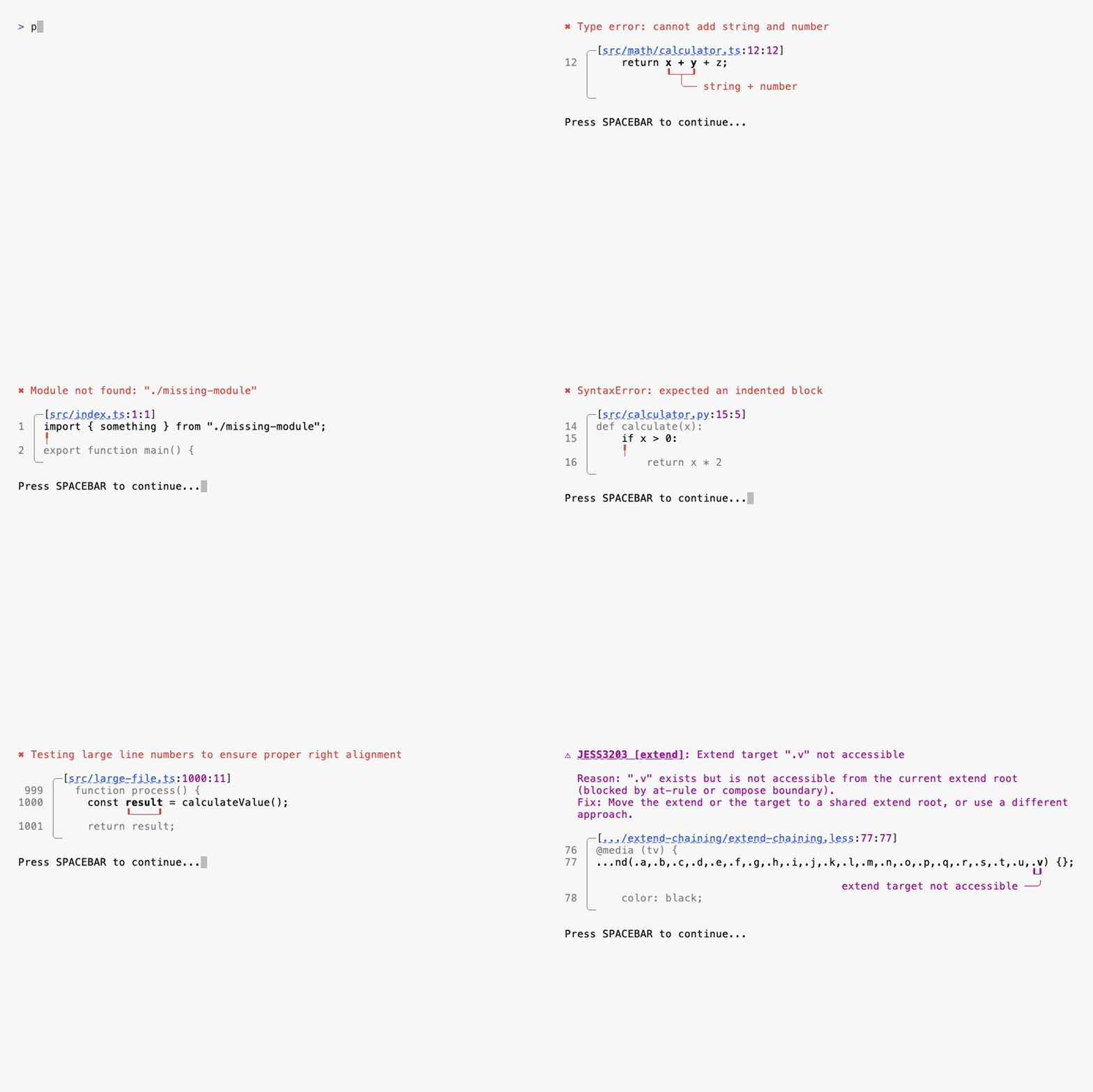
Display code errors and warnings with line numbers, context, and clickable file paths. Perfect for linters, compilers, and development tools that need to show diagnostic information.
|
|
197
227
|
|
|
198
228
|
|
|
199
229
|
|
|
@@ -209,6 +239,8 @@ r.set(CodeDebug({
|
|
|
209
239
|
lineBefore: ' async function load() {',
|
|
210
240
|
lineAfter: ' return process(result);',
|
|
211
241
|
message: 'Type error: fetchData is not defined',
|
|
242
|
+
errorCode: 'typescript(2304)', // Optional: error code with underline
|
|
243
|
+
shortMessage: 'not defined', // Optional: short message connected to underline
|
|
212
244
|
filePath: 'src/loaders/data.ts',
|
|
213
245
|
fullPath: '/absolute/path/to/src/loaders/data.ts',
|
|
214
246
|
baseDir: process.cwd(),
|
|
@@ -217,12 +249,14 @@ r.set(CodeDebug({
|
|
|
217
249
|
```
|
|
218
250
|
|
|
219
251
|
**Features:**
|
|
220
|
-
-
|
|
221
|
-
-
|
|
222
|
-
-
|
|
223
|
-
-
|
|
224
|
-
-
|
|
225
|
-
-
|
|
252
|
+
- **OSC 8 Hyperlinks**: File paths are clickable in modern terminals (VS Code, iTerm2, etc.). Ctrl+Click (or Cmd+Click) opens the file at the correct line and column.
|
|
253
|
+
- **Smart Line Overflow**: Long code lines automatically truncate with ellipsis while keeping the error range visible. Supports ellipsis at start, end, or both sides.
|
|
254
|
+
- **Error Range Highlighting**: The error range (startColumn to endColumn) is highlighted with a brighter color for easy identification.
|
|
255
|
+
- **Context Lines**: Show lines before and after the error for better context (slightly dimmed for visual hierarchy).
|
|
256
|
+
- **Message Wrapping**: Long error messages wrap across multiple lines while preserving ANSI styling and color codes.
|
|
257
|
+
- **Terminal Theme Adaptation**: Line numbers and colors adapt to dark/light terminal themes automatically.
|
|
258
|
+
- **Curved Underlines**: Visual indicators with curved edges (┖─┚) point to the exact error location, with optional T-bar for short messages.
|
|
259
|
+
- **Responsive Layout**: Automatically adjusts to terminal width, truncating paths and code as needed.
|
|
226
260
|
|
|
227
261
|
### Spinner
|
|
228
262
|
|
|
@@ -21,6 +21,8 @@ export interface CodeDebugOptions {
|
|
|
21
21
|
errorCode?: string;
|
|
22
22
|
/** Short message to show connected to underline (optional) */
|
|
23
23
|
shortMessage?: string;
|
|
24
|
+
/** Placement of short message: 'left' or 'right' (default: 'right', auto: 'left' when target is near end of long line) */
|
|
25
|
+
shortMessagePlacement?: 'left' | 'right' | 'auto';
|
|
24
26
|
/** Short file path to display */
|
|
25
27
|
filePath: string;
|
|
26
28
|
/** Full resolved file path for clickable link */
|
|
@@ -1 +1 @@
|
|
|
1
|
-
{"version":3,"file":"code-debug.d.ts","sourceRoot":"","sources":["../../src/components/code-debug.ts"],"names":[],"mappings":"AAEA,OAAO,KAAK,EAAiB,SAAS,EAAE,MAAM,iBAAiB,CAAC;AAWhE,MAAM,MAAM,aAAa,GAAG,OAAO,GAAG,SAAS,GAAG,MAAM,CAAC;AAEzD,MAAM,WAAW,gBAAgB;IAC/B,+CAA+C;IAC/C,SAAS,EAAE,MAAM,CAAC;IAClB,iDAAiD;IACjD,WAAW,EAAE,MAAM,CAAC;IACpB,uDAAuD;IACvD,OAAO,CAAC,EAAE,MAAM,CAAC;IACjB,yDAAyD;IACzD,SAAS,CAAC,EAAE,MAAM,CAAC;IACnB,wDAAwD;IACxD,UAAU,CAAC,EAAE,MAAM,GAAG,IAAI,CAAC;IAC3B,sCAAsC;IACtC,SAAS,EAAE,MAAM,CAAC;IAClB,uDAAuD;IACvD,SAAS,CAAC,EAAE,MAAM,GAAG,IAAI,CAAC;IAC1B,2DAA2D;IAC3D,OAAO,EAAE,MAAM,CAAC;IAChB,qHAAqH;IACrH,SAAS,CAAC,EAAE,MAAM,CAAC;IACnB,8DAA8D;IAC9D,YAAY,CAAC,EAAE,MAAM,CAAC;IACtB,iCAAiC;IACjC,QAAQ,EAAE,MAAM,CAAC;IACjB,iDAAiD;IACjD,QAAQ,EAAE,MAAM,CAAC;IACjB,mDAAmD;IACnD,OAAO,CAAC,EAAE,MAAM,CAAC;IACjB,6CAA6C;IAC7C,IAAI,CAAC,EAAE,aAAa,CAAC;IACrB,gFAAgF;IAChF,SAAS,CAAC,EAAE,MAAM,CAAC;CACpB;
|
|
1
|
+
{"version":3,"file":"code-debug.d.ts","sourceRoot":"","sources":["../../src/components/code-debug.ts"],"names":[],"mappings":"AAEA,OAAO,KAAK,EAAiB,SAAS,EAAE,MAAM,iBAAiB,CAAC;AAWhE,MAAM,MAAM,aAAa,GAAG,OAAO,GAAG,SAAS,GAAG,MAAM,CAAC;AAEzD,MAAM,WAAW,gBAAgB;IAC/B,+CAA+C;IAC/C,SAAS,EAAE,MAAM,CAAC;IAClB,iDAAiD;IACjD,WAAW,EAAE,MAAM,CAAC;IACpB,uDAAuD;IACvD,OAAO,CAAC,EAAE,MAAM,CAAC;IACjB,yDAAyD;IACzD,SAAS,CAAC,EAAE,MAAM,CAAC;IACnB,wDAAwD;IACxD,UAAU,CAAC,EAAE,MAAM,GAAG,IAAI,CAAC;IAC3B,sCAAsC;IACtC,SAAS,EAAE,MAAM,CAAC;IAClB,uDAAuD;IACvD,SAAS,CAAC,EAAE,MAAM,GAAG,IAAI,CAAC;IAC1B,2DAA2D;IAC3D,OAAO,EAAE,MAAM,CAAC;IAChB,qHAAqH;IACrH,SAAS,CAAC,EAAE,MAAM,CAAC;IACnB,8DAA8D;IAC9D,YAAY,CAAC,EAAE,MAAM,CAAC;IACtB,0HAA0H;IAC1H,qBAAqB,CAAC,EAAE,MAAM,GAAG,OAAO,GAAG,MAAM,CAAC;IAClD,iCAAiC;IACjC,QAAQ,EAAE,MAAM,CAAC;IACjB,iDAAiD;IACjD,QAAQ,EAAE,MAAM,CAAC;IACjB,mDAAmD;IACnD,OAAO,CAAC,EAAE,MAAM,CAAC;IACjB,6CAA6C;IAC7C,IAAI,CAAC,EAAE,aAAa,CAAC;IACrB,gFAAgF;IAChF,SAAS,CAAC,EAAE,MAAM,CAAC;CACpB;AAID;;GAEG;AACH,wBAAgB,SAAS,CAAC,OAAO,EAAE,gBAAgB,GAAG,SAAS,CA8Y9D"}
|