leaflet-polydraw 0.9.6 → 1.0.0
This diff represents the content of publicly available package versions that have been released to one of the supported registries. The information contained in this diff is provided for informational purposes only and reflects changes between package versions as they appear in their respective public registries.
- package/README.md +44 -1057
- package/dist/polydraw.es.js +1201 -157
- package/dist/polydraw.es.js.map +1 -1
- package/dist/polydraw.umd.min.js +1 -1
- package/dist/polydraw.umd.min.js.map +1 -1
- package/dist/types/buttons.d.ts.map +1 -1
- package/dist/types/compatibility/event-adapter.d.ts +46 -0
- package/dist/types/compatibility/event-adapter.d.ts.map +1 -0
- package/dist/types/compatibility/leaflet-adapter.d.ts +154 -0
- package/dist/types/compatibility/leaflet-adapter.d.ts.map +1 -0
- package/dist/types/compatibility/version-detector.d.ts +44 -0
- package/dist/types/compatibility/version-detector.d.ts.map +1 -0
- package/dist/types/coordinate-utils.d.ts +10 -0
- package/dist/types/coordinate-utils.d.ts.map +1 -1
- package/dist/types/enums.d.ts +7 -0
- package/dist/types/enums.d.ts.map +1 -1
- package/dist/types/icon-factory.d.ts.map +1 -1
- package/dist/types/index.d.ts +1 -1
- package/dist/types/managers/polygon-draw-manager.d.ts +8 -0
- package/dist/types/managers/polygon-draw-manager.d.ts.map +1 -1
- package/dist/types/managers/polygon-interaction-manager.d.ts.map +1 -1
- package/dist/types/managers/polygon-mutation-manager.d.ts.map +1 -1
- package/dist/types/polydraw.d.ts +22 -5
- package/dist/types/polydraw.d.ts.map +1 -1
- package/package.json +25 -11
package/README.md
CHANGED
|
@@ -2,1072 +2,59 @@
|
|
|
2
2
|
|
|
3
3
|
# Leaflet Polydraw
|
|
4
4
|
|
|
5
|
+
_A modern Leaflet plugin for intuitive freehand polygon drawing and advanced spatial editing — fully compatible with Leaflet 1.x and 2.x._
|
|
6
|
+
|
|
7
|
+
**Live Demo**: [https://polydraw.ao-tech.se](https://polydraw.ao-tech.se)
|
|
8
|
+
|
|
5
9
|
> **Advanced Leaflet plugin for freehand polygon drawing, with smart merging and powerful editing tools**
|
|
6
10
|
|
|
7
|
-
**Leaflet.Polydraw** lets you draw polygons directly on Leaflet maps in a natural
|
|
11
|
+
**Leaflet.Polydraw** lets you draw polygons directly on Leaflet maps in a natural freehand way — click and drag to sketch shapes.
|
|
12
|
+
It also supports point-to-point precision drawing, intelligent polygon merging, drag-and-drop repositioning, and a rich set of editing tools.
|
|
13
|
+
This makes it ideal for GIS platforms, mapping applications, and spatial data workflows.
|
|
8
14
|
|
|
9
15
|
[](https://www.npmjs.com/package/leaflet-polydraw)
|
|
10
16
|
[](https://opensource.org/licenses/MIT)
|
|
11
17
|
[](https://www.typescriptlang.org/)
|
|
12
18
|
[](https://github.com/AndreasOlausson/leaflet-polydraw/actions/workflows/ci.yml)
|
|
13
19
|
|
|
20
|
+
---
|
|
21
|
+
|
|
14
22
|
## Key Features
|
|
15
23
|
|
|
16
24
|
[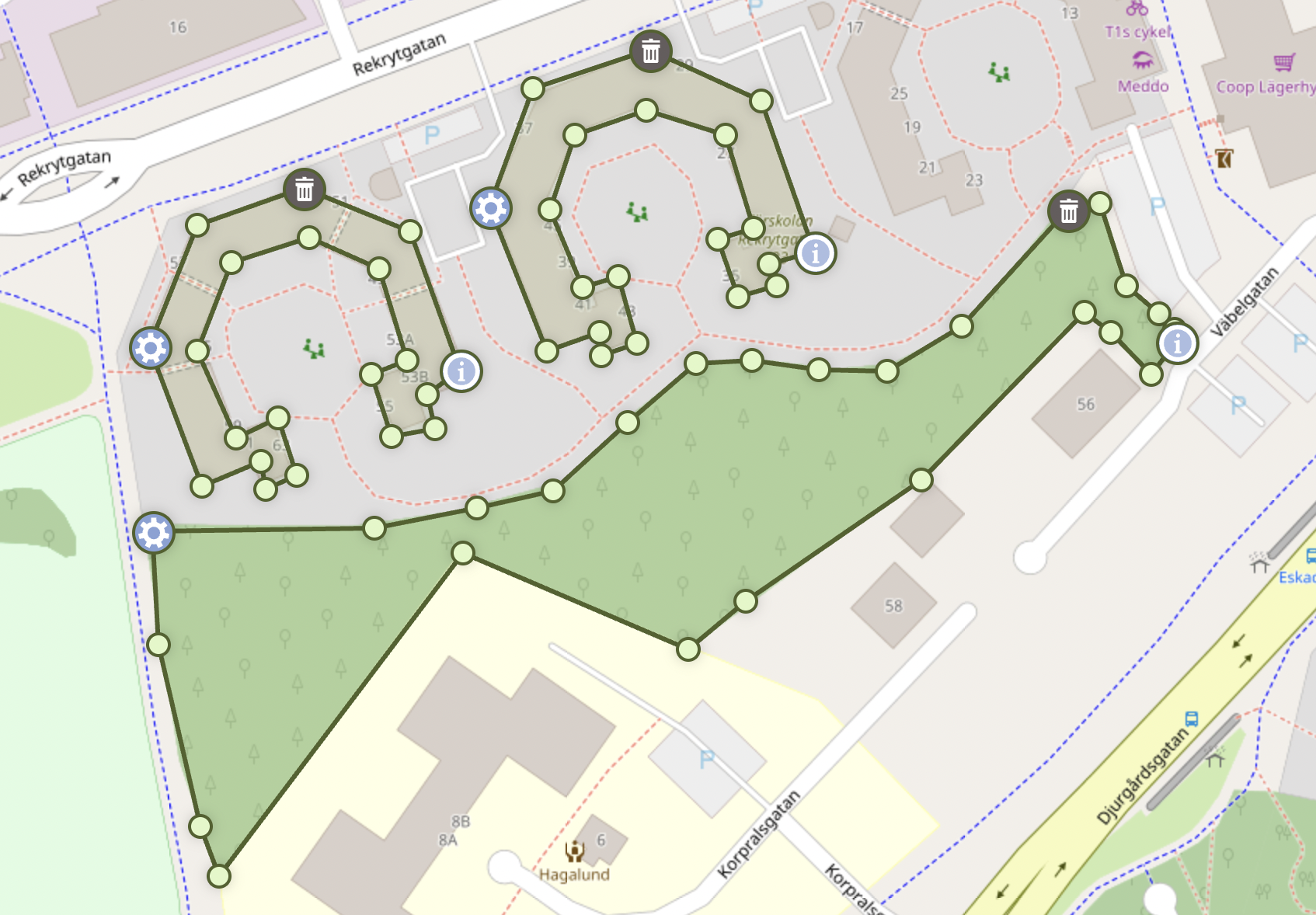](https://raw.githubusercontent.com/AndreasOlausson/leaflet-polydraw/main/Leaflet.Polydraw/docs/images/feature-overview.png)
|
|
17
25
|
|
|
18
|
-
- **
|
|
19
|
-
- **Smart Polygon Merging**:
|
|
20
|
-
- **Drag & Drop**: Intuitive polygon repositioning with intelligent spatial interactions
|
|
21
|
-
- **Advanced Editing**: Drag vertices, add
|
|
22
|
-
- **
|
|
23
|
-
- **Hole Support**: Create complex polygons with holes and nested
|
|
24
|
-
- **
|
|
25
|
-
- **Modifier
|
|
26
|
-
- **
|
|
27
|
-
|
|
28
|
-
|
|
29
|
-
|
|
30
|
-
|
|
31
|
-
|
|
32
|
-
|
|
33
|
-
|
|
34
|
-
|
|
35
|
-
|
|
36
|
-
|
|
37
|
-
|
|
38
|
-
|
|
39
|
-
|
|
40
|
-
|
|
41
|
-
|
|
42
|
-
|
|
43
|
-
|
|
44
|
-
|
|
45
|
-
|
|
46
|
-
|
|
47
|
-
|
|
48
|
-
|
|
49
|
-
|
|
50
|
-
|
|
51
|
-
|
|
52
|
-
|
|
53
|
-
```html
|
|
54
|
-
<link rel="stylesheet" href="https://cdn.jsdelivr.net/npm/leaflet@1.9.4/dist/leaflet.css" />
|
|
55
|
-
<link
|
|
56
|
-
rel="stylesheet"
|
|
57
|
-
href="https://cdn.jsdelivr.net/npm/leaflet.polydraw@latest/dist/styles/polydraw.css"
|
|
58
|
-
/>
|
|
59
|
-
<script src="https://cdn.jsdelivr.net/npm/leaflet@1.9.4/dist/leaflet.js"></script>
|
|
60
|
-
<script src="https://cdn.jsdelivr.net/npm/leaflet.polydraw@latest/dist/polydraw.umd.min.js"></script>
|
|
61
|
-
```
|
|
62
|
-
|
|
63
|
-
### Example Usage
|
|
64
|
-
|
|
65
|
-
```html
|
|
66
|
-
<script>
|
|
67
|
-
const map = L.map('map').setView([58.4, 15.6], 10);
|
|
68
|
-
L.tileLayer('https://tile.openstreetmap.org/{z}/{x}/{y}.png', {
|
|
69
|
-
attribution: '© OpenStreetMap contributors',
|
|
70
|
-
}).addTo(map);
|
|
71
|
-
|
|
72
|
-
const polydraw = new LeafletPolydraw();
|
|
73
|
-
map.addControl(polydraw);
|
|
74
|
-
</script>
|
|
75
|
-
```
|
|
76
|
-
|
|
77
|
-
> Note: All icons and styles are included automatically when using the CSS from the CDN.
|
|
78
|
-
|
|
79
|
-
## Quick Start
|
|
80
|
-
|
|
81
|
-
### Basic Usage
|
|
82
|
-
|
|
83
|
-
```javascript
|
|
84
|
-
import * as L from 'leaflet';
|
|
85
|
-
import Polydraw from 'leaflet-polydraw';
|
|
86
|
-
|
|
87
|
-
// Create your map
|
|
88
|
-
const map = L.map('map').setView([58.402514, 15.606188], 10);
|
|
89
|
-
L.tileLayer('https://tile.openstreetmap.org/{z}/{x}/{y}.png', {
|
|
90
|
-
attribution:
|
|
91
|
-
'© <a href="https://www.openstreetmap.org/copyright">OpenStreetMap</a> contributors',
|
|
92
|
-
}).addTo(map);
|
|
93
|
-
|
|
94
|
-
// Add the PolyDraw control (includes all drawing buttons)
|
|
95
|
-
const polydraw = new Polydraw();
|
|
96
|
-
polydraw.addTo(map);
|
|
97
|
-
|
|
98
|
-
// Optionally add some predefined polygons
|
|
99
|
-
const octagon = [
|
|
100
|
-
[
|
|
101
|
-
[
|
|
102
|
-
L.latLng(58.404493, 15.6),
|
|
103
|
-
L.latLng(58.402928, 15.602928),
|
|
104
|
-
L.latLng(58.4, 15.604493),
|
|
105
|
-
L.latLng(58.397072, 15.602928),
|
|
106
|
-
L.latLng(58.395507, 15.6),
|
|
107
|
-
L.latLng(58.397072, 15.597072),
|
|
108
|
-
L.latLng(58.4, 15.595507),
|
|
109
|
-
L.latLng(58.402928, 15.597072),
|
|
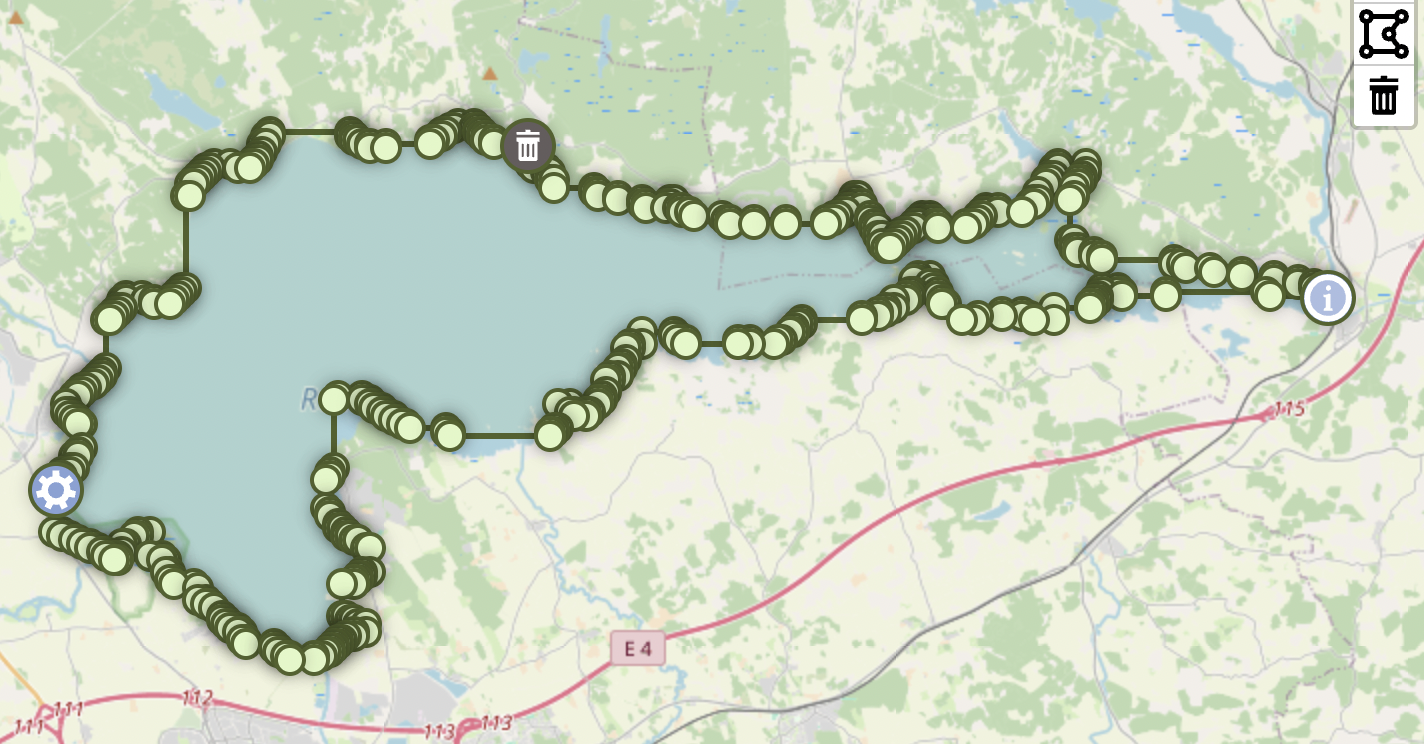
110
|
-
L.latLng(58.404493, 15.6),
|
|
111
|
-
],
|
|
112
|
-
],
|
|
113
|
-
];
|
|
114
|
-
|
|
115
|
-
polydraw.addPredefinedPolygon(octagon);
|
|
116
|
-
```
|
|
117
|
-
|
|
118
|
-
### Advanced Configuration
|
|
119
|
-
|
|
120
|
-
```javascript
|
|
121
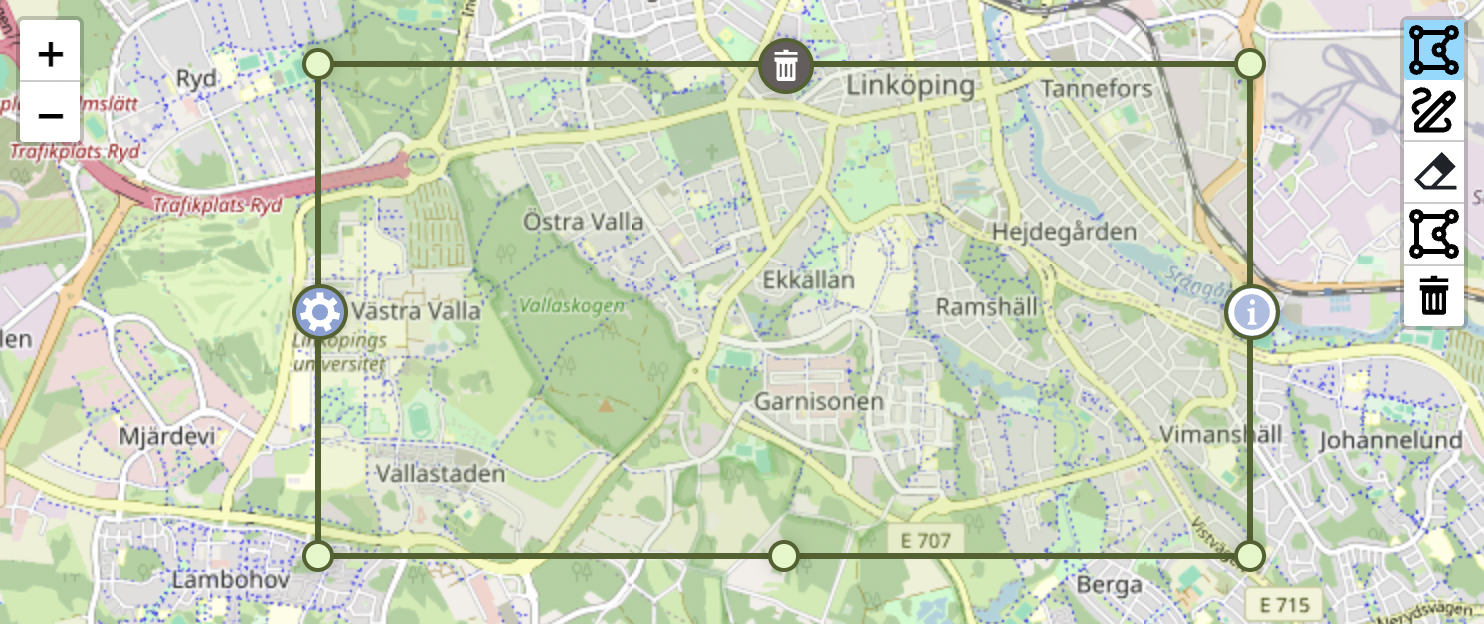
|
-
import Polydraw from 'leaflet-polydraw';
|
|
122
|
-
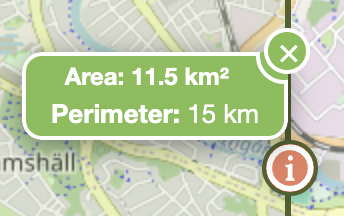
|
|
123
|
-
const polyDrawControl = L.control
|
|
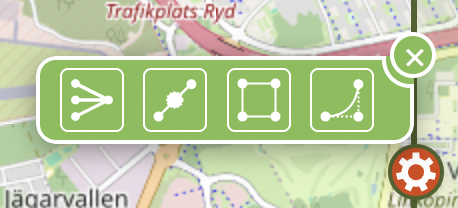
124
|
-
.polydraw({
|
|
125
|
-
position: 'topright',
|
|
126
|
-
config: {
|
|
127
|
-
mergePolygons: true,
|
|
128
|
-
modes: {
|
|
129
|
-
dragPolygons: true,
|
|
130
|
-
attachElbow: true,
|
|
131
|
-
dragElbow: true,
|
|
132
|
-
},
|
|
133
|
-
dragPolygons: {
|
|
134
|
-
markerBehavior: 'hide',
|
|
135
|
-
},
|
|
136
|
-
markers: {
|
|
137
|
-
deleteMarker: true,
|
|
138
|
-
infoMarker: true,
|
|
139
|
-
menuMarker: true,
|
|
140
|
-
markerDeleteIcon: {
|
|
141
|
-
position: 5, // North
|
|
142
|
-
},
|
|
143
|
-
markerInfoIcon: {
|
|
144
|
-
position: 4, // NorthEast
|
|
145
|
-
useMetrics: true,
|
|
146
|
-
},
|
|
147
|
-
},
|
|
148
|
-
polygonOptions: {
|
|
149
|
-
color: '#ff0000',
|
|
150
|
-
fillColor: '#ff0000',
|
|
151
|
-
fillOpacity: 0.3,
|
|
152
|
-
},
|
|
153
|
-
},
|
|
154
|
-
})
|
|
155
|
-
.addTo(map);
|
|
156
|
-
```
|
|
157
|
-
|
|
158
|
-
## Configuration
|
|
159
|
-
|
|
160
|
-
### Default Configuration
|
|
161
|
-
|
|
162
|
-
```javascript
|
|
163
|
-
{
|
|
164
|
-
"mergePolygons": true,
|
|
165
|
-
"kinks": false,
|
|
166
|
-
"modes": {
|
|
167
|
-
"draw": true,
|
|
168
|
-
"subtract": true,
|
|
169
|
-
"deleteAll": true,
|
|
170
|
-
"p2p": true,
|
|
171
|
-
"attachElbow": true,
|
|
172
|
-
"dragElbow": true,
|
|
173
|
-
"dragPolygons": true,
|
|
174
|
-
"edgeDeletion": true
|
|
175
|
-
},
|
|
176
|
-
"dragPolygons": {
|
|
177
|
-
"opacity": 0.7,
|
|
178
|
-
"dragCursor": "move",
|
|
179
|
-
"hoverCursor": "grab",
|
|
180
|
-
"markerBehavior": "hide",
|
|
181
|
-
"markerAnimationDuration": 200,
|
|
182
|
-
"modifierSubtract": {
|
|
183
|
-
"keys": {
|
|
184
|
-
"windows": "ctrlKey",
|
|
185
|
-
"mac": "metaKey",
|
|
186
|
-
"linux": "ctrlKey"
|
|
187
|
-
},
|
|
188
|
-
"hideMarkersOnDrag": true
|
|
189
|
-
}
|
|
190
|
-
},
|
|
191
|
-
"edgeDeletion": {
|
|
192
|
-
"keys": {
|
|
193
|
-
"windows": "ctrlKey",
|
|
194
|
-
"mac": "metaKey",
|
|
195
|
-
"linux": "ctrlKey"
|
|
196
|
-
},
|
|
197
|
-
"minVertices": 3
|
|
198
|
-
},
|
|
199
|
-
"markers": {
|
|
200
|
-
"deleteMarker": true,
|
|
201
|
-
"infoMarker": true,
|
|
202
|
-
"menuMarker": true,
|
|
203
|
-
"coordsTitle": true,
|
|
204
|
-
"zIndexOffset": 0,
|
|
205
|
-
"markerIcon": {
|
|
206
|
-
"styleClasses": ["polygon-marker"],
|
|
207
|
-
"zIndexOffset": null
|
|
208
|
-
},
|
|
209
|
-
"holeIcon": {
|
|
210
|
-
"styleClasses": ["polygon-marker", "hole"],
|
|
211
|
-
"zIndexOffset": null
|
|
212
|
-
},
|
|
213
|
-
"markerInfoIcon": {
|
|
214
|
-
"position": 3,
|
|
215
|
-
"showArea": true,
|
|
216
|
-
"showPerimeter": true,
|
|
217
|
-
"useMetrics": true,
|
|
218
|
-
"usePerimeterMinValue": false,
|
|
219
|
-
"areaLabel": "Area",
|
|
220
|
-
"perimeterLabel": "Perimeter",
|
|
221
|
-
"values": {
|
|
222
|
-
"min": {
|
|
223
|
-
"metric": "50",
|
|
224
|
-
"imperial": "100"
|
|
225
|
-
},
|
|
226
|
-
"unknown": {
|
|
227
|
-
"metric": "-",
|
|
228
|
-
"imperial": "-"
|
|
229
|
-
}
|
|
230
|
-
},
|
|
231
|
-
"units": {
|
|
232
|
-
"unknownUnit": "",
|
|
233
|
-
"metric": {
|
|
234
|
-
"onlyMetrics": true,
|
|
235
|
-
"perimeter": {
|
|
236
|
-
"m": "m",
|
|
237
|
-
"km": "km"
|
|
238
|
-
},
|
|
239
|
-
"area": {
|
|
240
|
-
"m2": "m²",
|
|
241
|
-
"km2": "km²",
|
|
242
|
-
"daa": "daa",
|
|
243
|
-
"ha": "ha"
|
|
244
|
-
}
|
|
245
|
-
},
|
|
246
|
-
"imperial": {
|
|
247
|
-
"perimeter": {
|
|
248
|
-
"feet": "ft",
|
|
249
|
-
"yards": "yd",
|
|
250
|
-
"miles": "mi"
|
|
251
|
-
},
|
|
252
|
-
"area": {
|
|
253
|
-
"feet2": "ft²",
|
|
254
|
-
"yards2": "yd²",
|
|
255
|
-
"acres": "ac",
|
|
256
|
-
"miles2": "mi²"
|
|
257
|
-
}
|
|
258
|
-
}
|
|
259
|
-
},
|
|
260
|
-
"styleClasses": ["polygon-marker", "info"],
|
|
261
|
-
"zIndexOffset": 10000
|
|
262
|
-
},
|
|
263
|
-
"markerMenuIcon": {
|
|
264
|
-
"position": 7,
|
|
265
|
-
"styleClasses": ["polygon-marker", "menu"],
|
|
266
|
-
"zIndexOffset": 10000
|
|
267
|
-
},
|
|
268
|
-
"markerDeleteIcon": {
|
|
269
|
-
"position": 5,
|
|
270
|
-
"styleClasses": ["polygon-marker", "delete"],
|
|
271
|
-
"zIndexOffset": 10000
|
|
272
|
-
},
|
|
273
|
-
"holeMarkers": {
|
|
274
|
-
"menuMarker": false,
|
|
275
|
-
"deleteMarker": true,
|
|
276
|
-
"infoMarker": false
|
|
277
|
-
},
|
|
278
|
-
"visualOptimization": {
|
|
279
|
-
"sharpAngleThreshold": 30,
|
|
280
|
-
"thresholdBoundingBox": 0.05,
|
|
281
|
-
"thresholdDistance": 0.05,
|
|
282
|
-
"useDistance": true,
|
|
283
|
-
"useBoundingBox": false,
|
|
284
|
-
"useAngles": false
|
|
285
|
-
}
|
|
286
|
-
},
|
|
287
|
-
"polyLineOptions": {
|
|
288
|
-
"opacity": 1,
|
|
289
|
-
"smoothFactor": 0,
|
|
290
|
-
"noClip": true,
|
|
291
|
-
"clickable": false,
|
|
292
|
-
"weight": 2
|
|
293
|
-
},
|
|
294
|
-
"subtractLineOptions": {
|
|
295
|
-
"opacity": 1,
|
|
296
|
-
"smoothFactor": 0,
|
|
297
|
-
"noClip": true,
|
|
298
|
-
"clickable": false,
|
|
299
|
-
"weight": 2
|
|
300
|
-
},
|
|
301
|
-
"polygonOptions": {
|
|
302
|
-
"smoothFactor": 0.3,
|
|
303
|
-
"noClip": true
|
|
304
|
-
},
|
|
305
|
-
"holeOptions": {
|
|
306
|
-
"weight": 2,
|
|
307
|
-
"opacity": 1,
|
|
308
|
-
"fillOpacity": 0.5
|
|
309
|
-
},
|
|
310
|
-
"polygonCreation": {
|
|
311
|
-
"method": "concaveman",
|
|
312
|
-
"simplification": {
|
|
313
|
-
"mode": "simple",
|
|
314
|
-
"tolerance": 0.00001,
|
|
315
|
-
"highQuality": false
|
|
316
|
-
}
|
|
317
|
-
},
|
|
318
|
-
"simplification": {
|
|
319
|
-
"simplifyTolerance": {
|
|
320
|
-
"tolerance": 0.0001,
|
|
321
|
-
"highQuality": false,
|
|
322
|
-
"mutate": false
|
|
323
|
-
},
|
|
324
|
-
"dynamicMode": {
|
|
325
|
-
"fractionGuard": 0.9,
|
|
326
|
-
"multiplier": 2
|
|
327
|
-
}
|
|
328
|
-
},
|
|
329
|
-
"menuOperations": {
|
|
330
|
-
"simplify": {
|
|
331
|
-
"processHoles": true
|
|
332
|
-
},
|
|
333
|
-
"doubleElbows": {
|
|
334
|
-
"processHoles": true
|
|
335
|
-
},
|
|
336
|
-
"bbox": {
|
|
337
|
-
"processHoles": true
|
|
338
|
-
}
|
|
339
|
-
},
|
|
340
|
-
"boundingBox": {
|
|
341
|
-
"addMidPointMarkers": true
|
|
342
|
-
},
|
|
343
|
-
"bezier": {
|
|
344
|
-
"resolution": 10000,
|
|
345
|
-
"sharpness": 0.75
|
|
346
|
-
},
|
|
347
|
-
"colors": {
|
|
348
|
-
"dragPolygons": {
|
|
349
|
-
"subtract": "#D9460F"
|
|
350
|
-
},
|
|
351
|
-
"p2p": {
|
|
352
|
-
"closingMarker": "#4CAF50"
|
|
353
|
-
},
|
|
354
|
-
"edgeHover": "#7a9441",
|
|
355
|
-
"edgeDeletion": {
|
|
356
|
-
"hover": "#D9460F"
|
|
357
|
-
},
|
|
358
|
-
"polyline": "#50622b",
|
|
359
|
-
"subtractLine": "#50622b",
|
|
360
|
-
"polygon": {
|
|
361
|
-
"border": "#50622b",
|
|
362
|
-
"fill": "#b4cd8a"
|
|
363
|
-
},
|
|
364
|
-
"hole": {
|
|
365
|
-
"border": "#aa0000",
|
|
366
|
-
"fill": "#ffcccc"
|
|
367
|
-
},
|
|
368
|
-
"styles": {
|
|
369
|
-
"controlButton": {
|
|
370
|
-
"backgroundColor": "#fff",
|
|
371
|
-
"color": "#000"
|
|
372
|
-
},
|
|
373
|
-
"controlButtonHover": {
|
|
374
|
-
"backgroundColor": "#f4f4f4"
|
|
375
|
-
},
|
|
376
|
-
"controlButtonActive": {
|
|
377
|
-
"backgroundColor": "rgb(128, 218, 255)",
|
|
378
|
-
"color": "#fff"
|
|
379
|
-
},
|
|
380
|
-
"indicatorActive": {
|
|
381
|
-
"backgroundColor": "#ffcc00"
|
|
382
|
-
},
|
|
383
|
-
"p2pMarker": {
|
|
384
|
-
"backgroundColor": "#fff",
|
|
385
|
-
"borderColor": "#50622b"
|
|
386
|
-
}
|
|
387
|
-
}
|
|
388
|
-
}
|
|
389
|
-
}
|
|
390
|
-
```
|
|
391
|
-
|
|
392
|
-
### Configuration Options
|
|
393
|
-
|
|
394
|
-
| Key | Type | Default | Description |
|
|
395
|
-
| ------------------------------------------------------------------ | ------- | ------------------------------ | --------------------------------------------------------- |
|
|
396
|
-
| **mergePolygons** | boolean | `true` | Auto-merge polygons during drawing when they intersect |
|
|
397
|
-
| **kinks** | boolean | `false` | Allow self-intersecting polygons |
|
|
398
|
-
| **modes** | object | | Feature toggles |
|
|
399
|
-
| draw | boolean | `true` | Enable draw mode button |
|
|
400
|
-
| subtract | boolean | `true` | Enable subtract mode button |
|
|
401
|
-
| deleteAll | boolean | `true` | Enable delete all button |
|
|
402
|
-
| p2p | boolean | `true` | Enable point-to-point drawing mode |
|
|
403
|
-
| attachElbow | boolean | `true` | Enable clicking on edges to add vertices |
|
|
404
|
-
| dragElbow | boolean | `true` | Enable dragging vertices |
|
|
405
|
-
| dragPolygons | boolean | `true` | Enable dragging entire polygons |
|
|
406
|
-
| edgeDeletion | boolean | `true` | Enable edge deletion with modifier keys |
|
|
407
|
-
| **dragPolygons** | object | | Polygon dragging configuration |
|
|
408
|
-
| opacity | number | `0.7` | Polygon opacity during drag (0-1) |
|
|
409
|
-
| dragCursor | string | `"move"` | Cursor during active dragging |
|
|
410
|
-
| hoverCursor | string | `"grab"` | Cursor when hovering over draggable polygons |
|
|
411
|
-
| markerBehavior | string | `"hide"` | Marker behavior during drag: `"hide"`, `"show"`, `"fade"` |
|
|
412
|
-
| markerAnimationDuration | number | `200` | Duration of marker animations in milliseconds |
|
|
413
|
-
| **modifierSubtract** | object | | Modifier key subtract configuration |
|
|
414
|
-
| **keys** | object | | Platform-specific modifier keys |
|
|
415
|
-
| windows | string | `"ctrlKey"` | Windows modifier key |
|
|
416
|
-
| mac | string | `"metaKey"` | Mac modifier key |
|
|
417
|
-
| linux | string | `"ctrlKey"` | Linux modifier key |
|
|
418
|
-
| subtractColor | string | `"#D9460F"` | Color for subtract mode visualization |
|
|
419
|
-
| hideMarkersOnDrag | boolean | `true` | Hide markers during subtract drag |
|
|
420
|
-
| **edgeDeletion** | object | | Edge deletion configuration |
|
|
421
|
-
| **keys** | object | | Platform-specific modifier keys |
|
|
422
|
-
| windows | string | `"ctrlKey"` | Windows modifier key |
|
|
423
|
-
| mac | string | `"metaKey"` | Mac modifier key |
|
|
424
|
-
| linux | string | `"ctrlKey"` | Linux modifier key |
|
|
425
|
-
| hoverColor | string | `"#D9460F"` | Color when hovering over deletable edges |
|
|
426
|
-
| minVertices | number | `3` | Minimum vertices required after deletion |
|
|
427
|
-
| **markers** | object | | Marker configuration |
|
|
428
|
-
| deleteMarker | boolean | `true` | Show delete marker |
|
|
429
|
-
| infoMarker | boolean | `true` | Show info marker with area/perimeter |
|
|
430
|
-
| menuMarker | boolean | `true` | Show menu marker with operations |
|
|
431
|
-
| coordsTitle | boolean | `true` | Show coordinate tooltips on markers |
|
|
432
|
-
| zIndexOffset | number | `0` | Global z-index offset for markers |
|
|
433
|
-
| **markerIcon** | object | | Standard marker configuration |
|
|
434
|
-
| styleClasses | array | `["polygon-marker"]` | CSS classes for standard markers |
|
|
435
|
-
| zIndexOffset | number | `null` | Z-index offset override |
|
|
436
|
-
| **holeIcon** | object | | Hole marker configuration |
|
|
437
|
-
| styleClasses | array | `["polygon-marker", "hole"]` | CSS classes for hole markers |
|
|
438
|
-
| zIndexOffset | number | `null` | Z-index offset override |
|
|
439
|
-
| **markerInfoIcon** | object | | Info marker configuration |
|
|
440
|
-
| position | number | `3` | Marker position (see MarkerPosition enum) |
|
|
441
|
-
| showArea | boolean | `true` | Display area information |
|
|
442
|
-
| showPerimeter | boolean | `true` | Display perimeter information |
|
|
443
|
-
| useMetrics | boolean | `true` | Use metric units |
|
|
444
|
-
| usePerimeterMinValue | boolean | `false` | Use minimum value for small perimeters |
|
|
445
|
-
| areaLabel | string | `"Area"` | Label for area display |
|
|
446
|
-
| perimeterLabel | string | `"Perimeter"` | Label for perimeter display |
|
|
447
|
-
| **values** | object | | Default values configuration |
|
|
448
|
-
| **min** | object | | Minimum value settings |
|
|
449
|
-
| metric | string | `"50"` | Minimum metric value |
|
|
450
|
-
| imperial | string | `"100"` | Minimum imperial value |
|
|
451
|
-
| **unknown** | object | | Unknown value settings |
|
|
452
|
-
| metric | string | `"-"` | Unknown metric placeholder |
|
|
453
|
-
| imperial | string | `"-"` | Unknown imperial placeholder |
|
|
454
|
-
| **units** | object | | Unit configuration |
|
|
455
|
-
| unknownUnit | string | `""` | Unknown unit placeholder |
|
|
456
|
-
| **metric** | object | | Metric units |
|
|
457
|
-
| onlyMetrics | boolean | `true` | Use only m² and km² for area |
|
|
458
|
-
| **perimeter** | object | | Perimeter units |
|
|
459
|
-
| m | string | `"m"` | Meter unit |
|
|
460
|
-
| km | string | `"km"` | Kilometer unit |
|
|
461
|
-
| **area** | object | | Area units |
|
|
462
|
-
| m2 | string | `"m²"` | Square meter unit |
|
|
463
|
-
| km2 | string | `"km²"` | Square kilometer unit |
|
|
464
|
-
| daa | string | `"daa"` | Decare unit |
|
|
465
|
-
| ha | string | `"ha"` | Hectare unit |
|
|
466
|
-
| **imperial** | object | | Imperial units |
|
|
467
|
-
| **perimeter** | object | | Perimeter units |
|
|
468
|
-
| feet | string | `"ft"` | Feet unit |
|
|
469
|
-
| yards | string | `"yd"` | Yards unit |
|
|
470
|
-
| miles | string | `"mi"` | Miles unit |
|
|
471
|
-
| **area** | object | | Area units |
|
|
472
|
-
| feet2 | string | `"ft²"` | Square feet unit |
|
|
473
|
-
| yards2 | string | `"yd²"` | Square yards unit |
|
|
474
|
-
| acres | string | `"ac"` | Acres unit |
|
|
475
|
-
| miles2 | string | `"mi²"` | Square miles unit |
|
|
476
|
-
| styleClasses | array | `["polygon-marker", "info"]` | CSS classes for info marker |
|
|
477
|
-
| zIndexOffset | number | `10000` | Z-index offset for info marker |
|
|
478
|
-
| **markerMenuIcon** | object | | Menu marker configuration |
|
|
479
|
-
| position | number | `7` | Marker position (see MarkerPosition enum) |
|
|
480
|
-
| styleClasses | array | `["polygon-marker", "menu"]` | CSS classes for menu marker |
|
|
481
|
-
| zIndexOffset | number | `10000` | Z-index offset for menu marker |
|
|
482
|
-
| **markerDeleteIcon** | object | | Delete marker configuration |
|
|
483
|
-
| position | number | `5` | Marker position (see MarkerPosition enum) |
|
|
484
|
-
| styleClasses | array | `["polygon-marker", "delete"]` | CSS classes for delete marker |
|
|
485
|
-
| zIndexOffset | number | `10000` | Z-index offset for delete marker |
|
|
486
|
-
| **holeMarkers** | object | | Configuration for markers on holes |
|
|
487
|
-
| menuMarker | boolean | `false` | Show menu marker on holes |
|
|
488
|
-
| deleteMarker | boolean | `true` | Show delete marker on holes |
|
|
489
|
-
| infoMarker | boolean | `false` | Show info marker on holes |
|
|
490
|
-
| **visualOptimization** | object | | Visual optimization settings |
|
|
491
|
-
| sharpAngleThreshold | number | `30` | Angle threshold for optimization |
|
|
492
|
-
| thresholdBoundingBox | number | `0.05` | Bounding box threshold |
|
|
493
|
-
| thresholdDistance | number | `0.05` | Distance threshold |
|
|
494
|
-
| useDistance | boolean | `true` | Use distance-based optimization |
|
|
495
|
-
| useBoundingBox | boolean | `false` | Use bounding box optimization |
|
|
496
|
-
| useAngles | boolean | `false` | Use angle-based optimization |
|
|
497
|
-
| **polyLineOptions** | object | | Polyline styling options |
|
|
498
|
-
| color | string | `"#50622b"` | Polyline color |
|
|
499
|
-
| opacity | number | `1` | Polyline opacity |
|
|
500
|
-
| smoothFactor | number | `0` | Polyline smoothing factor |
|
|
501
|
-
| noClip | boolean | `true` | Disable polyline clipping |
|
|
502
|
-
| clickable | boolean | `false` | Make polyline clickable |
|
|
503
|
-
| weight | number | `2` | Polyline weight in pixels |
|
|
504
|
-
| **subtractLineOptions** | object | | Subtract mode polyline styling |
|
|
505
|
-
| color | string | `"#50622b"` | Subtract polyline color |
|
|
506
|
-
| opacity | number | `1` | Subtract polyline opacity |
|
|
507
|
-
| smoothFactor | number | `0` | Subtract polyline smoothing |
|
|
508
|
-
| noClip | boolean | `true` | Disable subtract polyline clipping |
|
|
509
|
-
| clickable | boolean | `false` | Make subtract polyline clickable |
|
|
510
|
-
| weight | number | `2` | Subtract polyline weight |
|
|
511
|
-
| **polygonOptions** | object | | Polygon styling options |
|
|
512
|
-
| smoothFactor | number | `0.3` | Polygon smoothing factor |
|
|
513
|
-
| color | string | `"#50622b"` | Polygon border color |
|
|
514
|
-
| fillColor | string | `"#b4cd8a"` | Polygon fill color |
|
|
515
|
-
| noClip | boolean | `true` | Disable polygon clipping |
|
|
516
|
-
| **holeOptions** | object | | Hole styling options |
|
|
517
|
-
| color | string | `"#aa0000"` | Hole border color |
|
|
518
|
-
| fillColor | string | `"#ffcccc"` | Hole fill color |
|
|
519
|
-
| weight | number | `2` | Hole border weight |
|
|
520
|
-
| opacity | number | `1` | Hole border opacity |
|
|
521
|
-
| fillOpacity | number | `0.5` | Hole fill opacity |
|
|
522
|
-
| **polygonCreation** | object | | Polygon creation settings |
|
|
523
|
-
| method | string | `"concaveman"` | Creation method |
|
|
524
|
-
| **simplification** | object | | Creation simplification |
|
|
525
|
-
| mode | string | `"simple"` | Simplification mode |
|
|
526
|
-
| tolerance | number | `0.0001` | Simplification tolerance |
|
|
527
|
-
| highQuality | boolean | `false` | High quality simplification |
|
|
528
|
-
| **simplification** | object | | General simplification settings |
|
|
529
|
-
| **simplifyTolerance** | object | | Tolerance settings |
|
|
530
|
-
| tolerance | number | `0.0001` | Simplification tolerance |
|
|
531
|
-
| highQuality | boolean | `false` | High quality mode |
|
|
532
|
-
| mutate | boolean | `false` | Allow input mutation |
|
|
533
|
-
| **dynamicMode** | object | | Dynamic simplification |
|
|
534
|
-
| fractionGuard | number | `0.9` | Fraction guard value |
|
|
535
|
-
| multiplier | number | `2` | Tolerance multiplier |
|
|
536
|
-
| **menuOperations** | object | | Menu marker operation settings |
|
|
537
|
-
| **simplify** | object | | Simplify operation configuration |
|
|
538
|
-
| processHoles | boolean | `true` | Whether to simplify holes along with outer ring |
|
|
539
|
-
| **doubleElbows** | object | | Double elbows operation configuration |
|
|
540
|
-
| processHoles | boolean | `true` | Whether to add elbows to holes along with outer ring |
|
|
541
|
-
| **bbox** | object | | Bounding box operation configuration |
|
|
542
|
-
| processHoles | boolean | `true` | Whether to create rectangular holes or ignore them |
|
|
543
|
-
| **boundingBox** | object | | Bounding box settings |
|
|
544
|
-
| addMidPointMarkers | boolean | `true` | Add midpoint markers to bounding box |
|
|
545
|
-
| **bezier** | object | | Bezier curve settings |
|
|
546
|
-
| resolution | number | `10000` | Bezier curve resolution |
|
|
547
|
-
| sharpness | number | `0.75` | Bezier curve sharpness |
|
|
548
|
-
|
|
549
|
-
### External Configuration
|
|
550
|
-
|
|
551
|
-
Load configuration from an external JSON file:
|
|
552
|
-
|
|
553
|
-
```javascript
|
|
554
|
-
const polyDrawControl = L.control.polydraw({
|
|
555
|
-
configPath: 'path/to/your/polydraw.config.json',
|
|
556
|
-
});
|
|
557
|
-
```
|
|
558
|
-
|
|
559
|
-
You can also combine external configuration with inline configuration. Inline configuration takes precedence:
|
|
560
|
-
|
|
561
|
-
```javascript
|
|
562
|
-
const polyDrawControl = L.control.polydraw({
|
|
563
|
-
configPath: 'config/polydraw.json',
|
|
564
|
-
config: {
|
|
565
|
-
// These settings will override the external config
|
|
566
|
-
polygonOptions: {
|
|
567
|
-
color: '#ff0000',
|
|
568
|
-
},
|
|
569
|
-
},
|
|
570
|
-
});
|
|
571
|
-
```
|
|
572
|
-
|
|
573
|
-
**Configuration Priority (highest to lowest):**
|
|
574
|
-
|
|
575
|
-
1. Inline `config` parameter
|
|
576
|
-
2. External configuration file
|
|
577
|
-
3. Default configuration
|
|
578
|
-
|
|
579
|
-
If the external configuration file fails to load, the plugin will fall back to using the default configuration plus any inline configuration provided.
|
|
580
|
-
|
|
581
|
-
## Features
|
|
582
|
-
|
|
583
|
-
### Draw Mode
|
|
584
|
-
|
|
585
|
-
[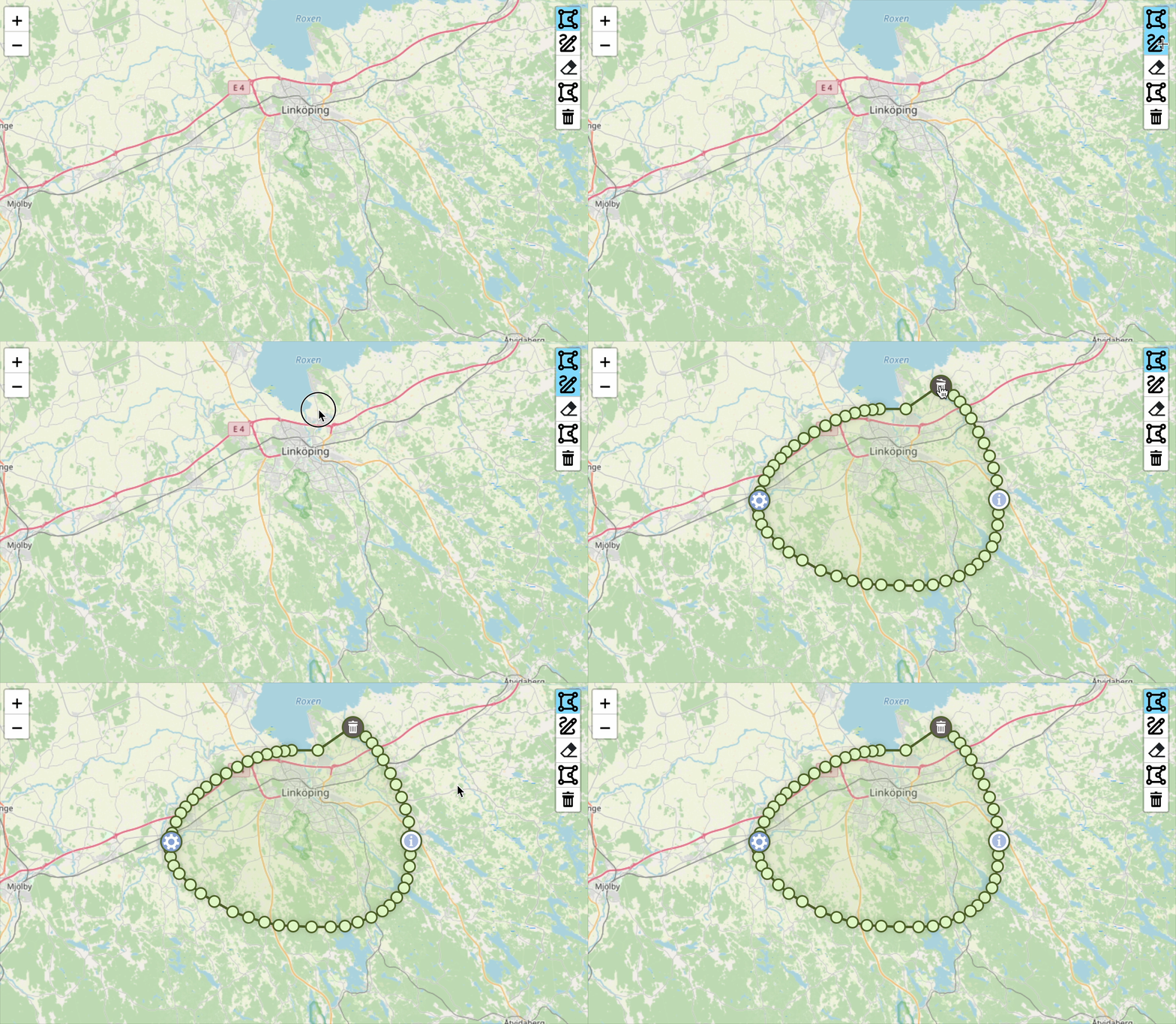](https://raw.githubusercontent.com/AndreasOlausson/leaflet-polydraw/main/Leaflet.Polydraw/docs/images/draw-mode.gif)
|
|
586
|
-
|
|
587
|
-
Create polygons by drawing freehand shapes on the map. Perfect for:
|
|
588
|
-
|
|
589
|
-
- Quick area sketching
|
|
590
|
-
- Rough boundary mapping
|
|
591
|
-
- Freehand polygon creation
|
|
592
|
-
- Natural drawing workflow
|
|
593
|
-
|
|
594
|
-
Simply click the draw button and drag your mouse/finger to create polygon shapes. The plugin automatically converts your drawn path into a clean polygon using advanced algorithms.
|
|
595
|
-
|
|
596
|
-
**Note**: The number of vertices in the final polygon is controlled by the `polygonCreation.simplification` settings in the configuration.
|
|
597
|
-
|
|
598
|
-
### Subtract Draw Mode
|
|
599
|
-
|
|
600
|
-
[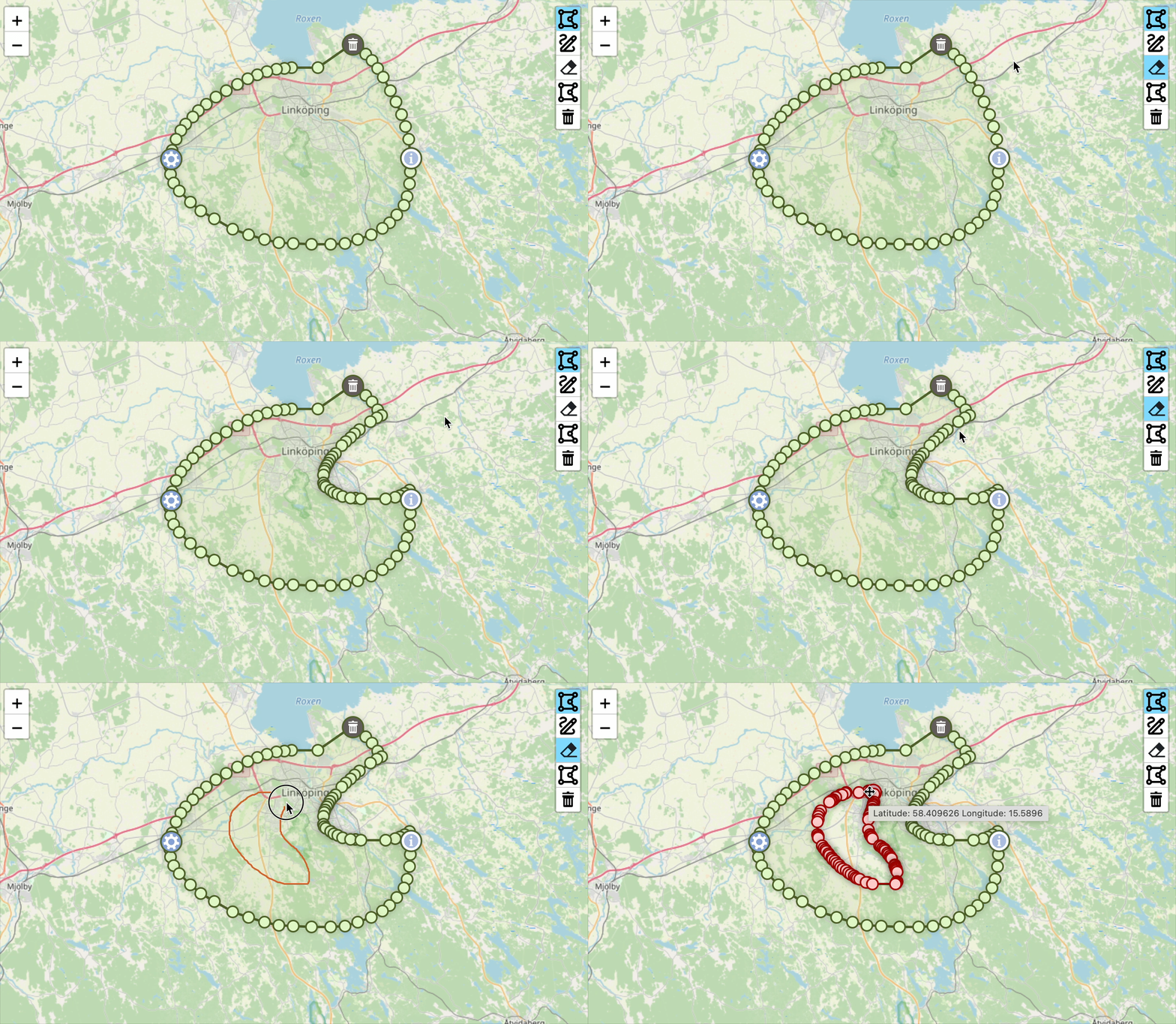](https://raw.githubusercontent.com/AndreasOlausson/leaflet-polydraw/main/Leaflet.Polydraw/docs/images/subtract-mode.gif)
|
|
601
|
-
|
|
602
|
-
Create holes and complex shapes by subtracting areas from existing polygons. Ideal for:
|
|
603
|
-
|
|
604
|
-
- Creating holes in polygons
|
|
605
|
-
- Removing unwanted areas
|
|
606
|
-
- Complex shape editing
|
|
607
|
-
- Precision area exclusion
|
|
608
|
-
|
|
609
|
-
Click the subtract button and draw over existing polygons to remove those areas, creating holes or splitting polygons into multiple parts.
|
|
610
|
-
|
|
611
|
-
### Point-to-Point Drawing (Desktop only)
|
|
612
|
-
|
|
613
|
-
[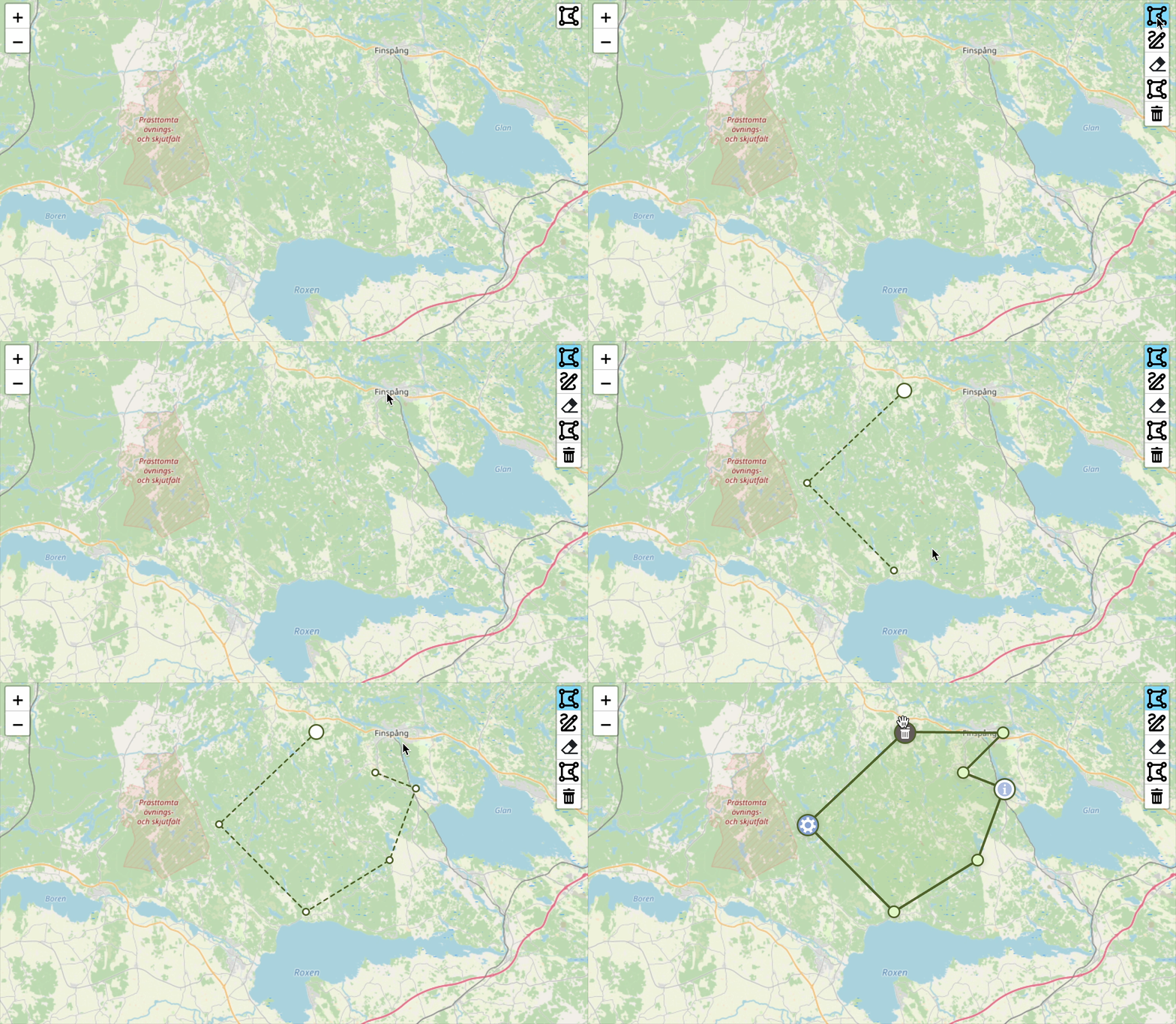](https://raw.githubusercontent.com/AndreasOlausson/leaflet-polydraw/main/Leaflet.Polydraw/docs/images/p2p.gif)
|
|
614
|
-
|
|
615
|
-
Create precise polygons by clicking to place each vertex. Perfect for:
|
|
616
|
-
|
|
617
|
-
- Accurate boundary mapping
|
|
618
|
-
- Property delineation
|
|
619
|
-
- Custom shape creation
|
|
620
|
-
|
|
621
|
-
**How it works:**
|
|
622
|
-
|
|
623
|
-
1. Click to place the first vertex.
|
|
624
|
-
2. Continue clicking to add more vertices.
|
|
625
|
-
3. To complete the polygon (requires minimum 3 points):
|
|
626
|
-
- Click on the first vertex again.
|
|
627
|
-
- **or** Double-click anywhere on the map.
|
|
628
|
-
4. Press `ESC` to cancel the current drawing.
|
|
629
|
-
|
|
630
|
-
You can also drag markers to adjust the shape and delete them by holding the modifier key (Cmd/Ctrl) and clicking on a marker, just like with regular polygon editing.
|
|
631
|
-
|
|
632
|
-
**Note**: This feature is currently available on desktop only due to issues with touch devices.
|
|
633
|
-
|
|
634
|
-
### Smart Polygon Merging
|
|
635
|
-
|
|
636
|
-
[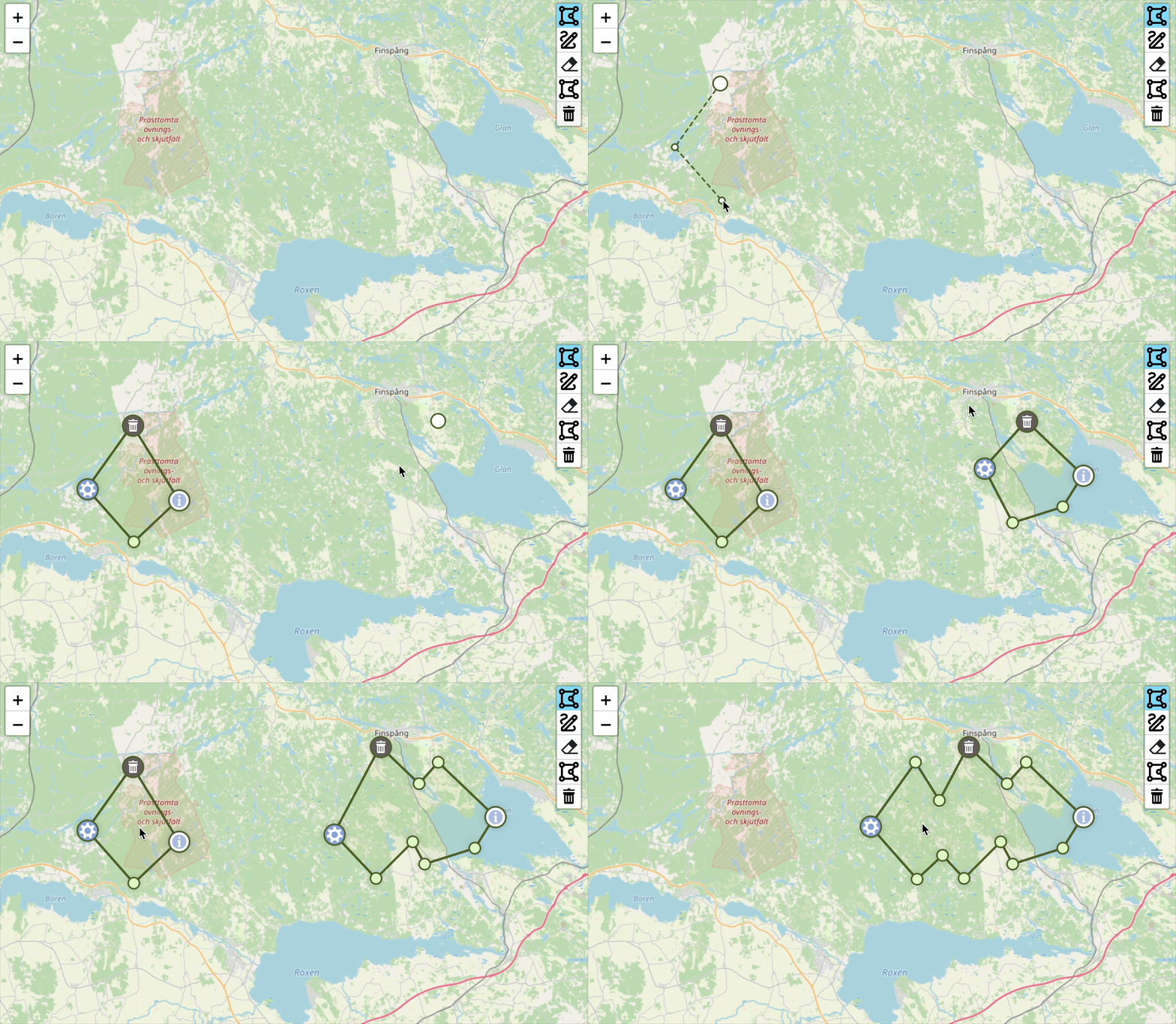](https://raw.githubusercontent.com/AndreasOlausson/leaflet-polydraw/main/Leaflet.Polydraw/docs/images/merge.gif)
|
|
637
|
-
|
|
638
|
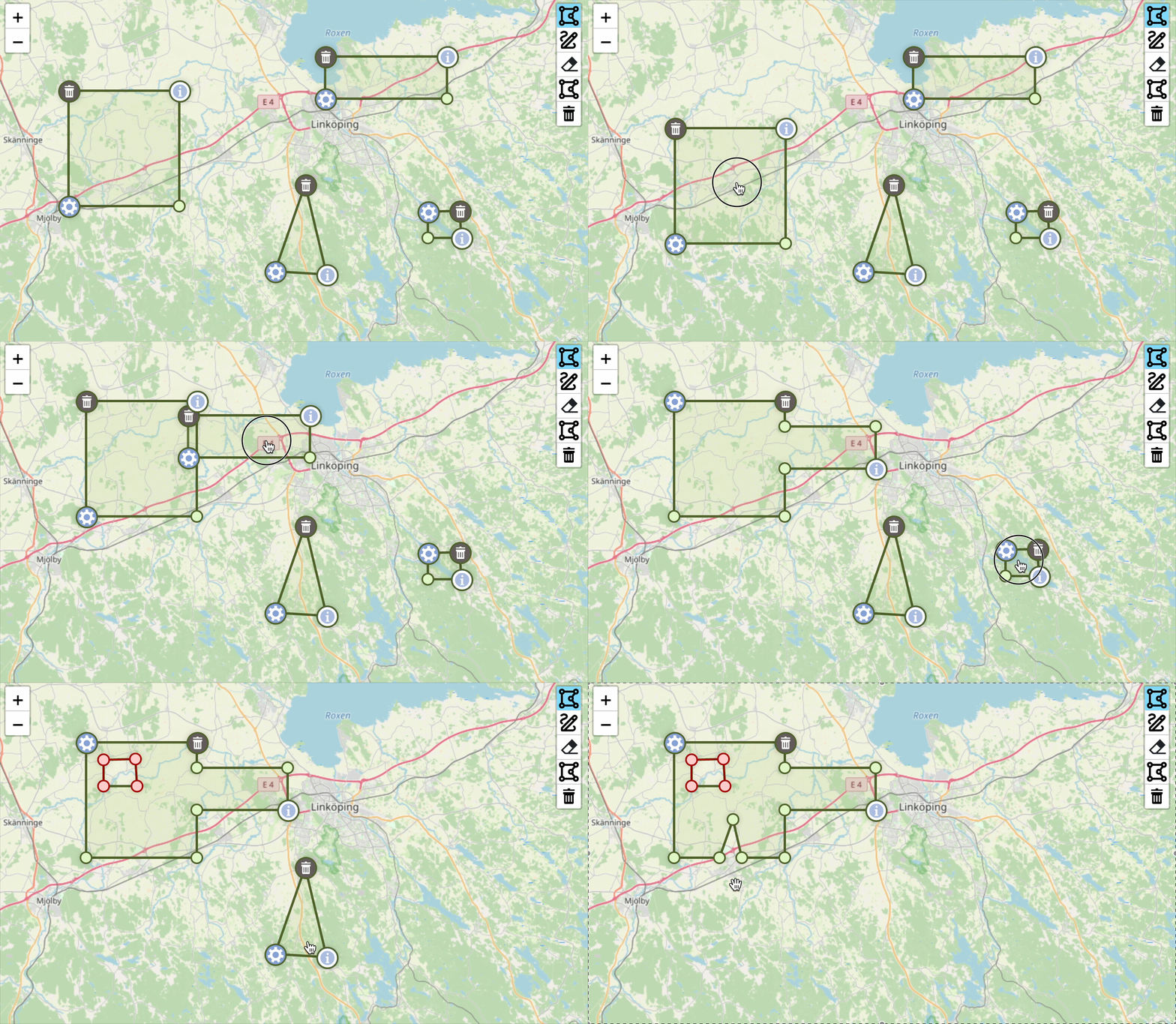
-
The plugin features **two independent merge systems**:
|
|
639
|
-
|
|
640
|
-
#### 1. Drawing Merge (`mergePolygons`)
|
|
641
|
-
|
|
642
|
-
- **When**: During polygon creation
|
|
643
|
-
- **Purpose**: Automatically merge new polygons with existing intersecting ones
|
|
644
|
-
- **Use case**: Streamlined drawing workflow
|
|
645
|
-
|
|
646
|
-
#### 2. Drag Merge (`autoMergeOnIntersect`)
|
|
647
|
-
|
|
648
|
-
- **When**: During polygon dragging
|
|
649
|
-
- **Purpose**: Merge polygons when dragged together
|
|
650
|
-
- **Use case**: Interactive editing and combining
|
|
651
|
-
|
|
652
|
-
### Drag & Drop Functionality
|
|
653
|
-
|
|
654
|
-
[](https://raw.githubusercontent.com/AndreasOlausson/leaflet-polydraw/main/Leaflet.Polydraw/docs/images/drag-drop.gif)
|
|
655
|
-
|
|
656
|
-
**Drag-to-Merge**: Drag polygons together to automatically merge them
|
|
657
|
-
|
|
658
|
-
**Drag-to-Hole**: Drag a polygon completely inside another to create a hole (requires a modifier key defined in `config.dragPolygons.modifierSubtract.keys`)
|
|
659
|
-
|
|
660
|
-
**Repositioning**: Drag to empty areas to simply reposition polygons
|
|
661
|
-
|
|
662
|
-
### Drag Elbows (Vertex Editing)
|
|
663
|
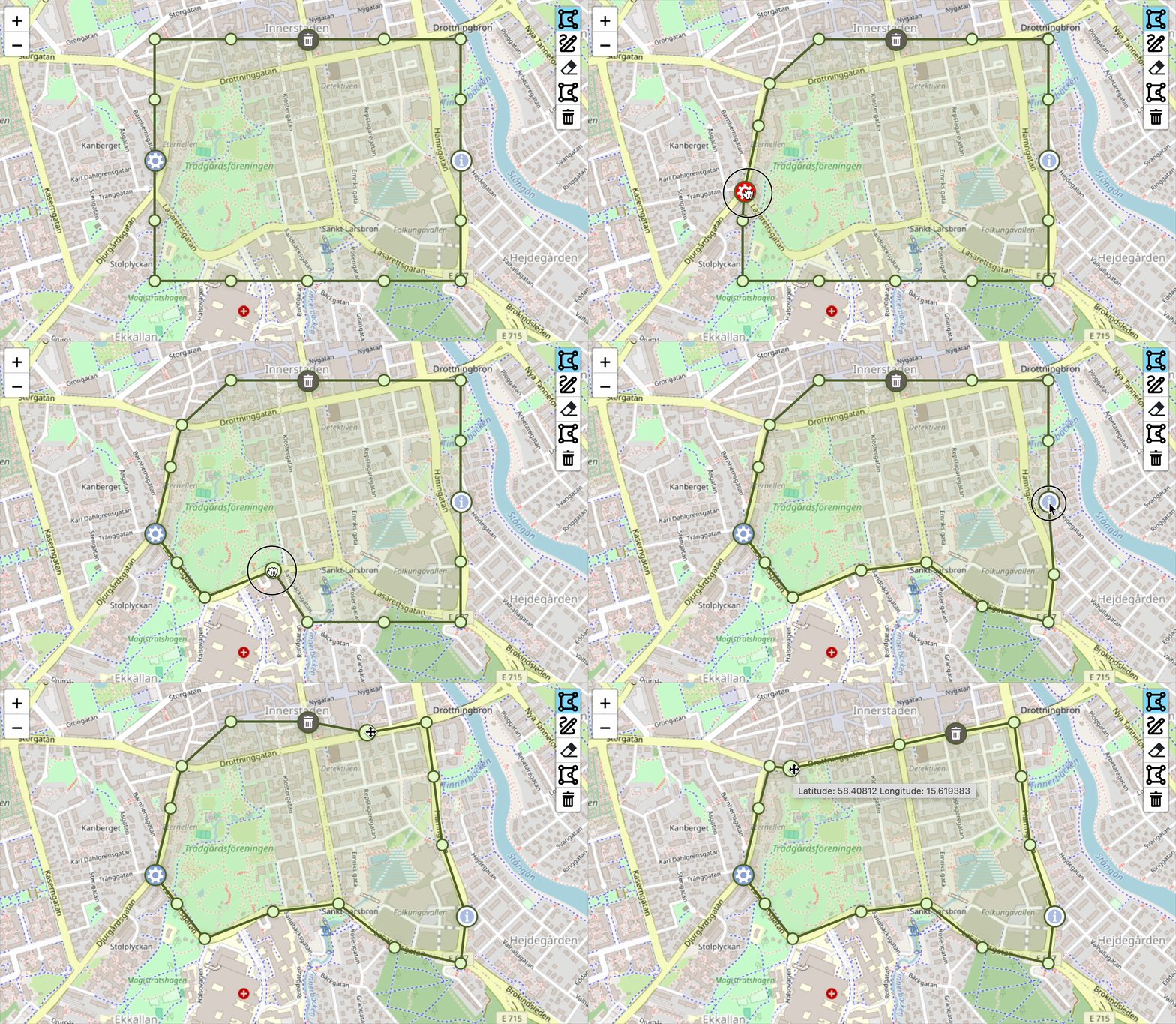
-
|
|
664
|
-
[](https://raw.githubusercontent.com/AndreasOlausson/leaflet-polydraw/main/Leaflet.Polydraw/docs/images/drag-elbows.gif)
|
|
665
|
-
|
|
666
|
-
Fine-tune polygon shapes by dragging individual vertices. Perfect for:
|
|
667
|
-
|
|
668
|
-
- Precision boundary adjustments
|
|
669
|
-
- Shape refinement after initial drawing
|
|
670
|
-
- Correcting polygon edges
|
|
671
|
-
- Detailed polygon editing
|
|
672
|
-
|
|
673
|
-
Click and drag any vertex (elbow) to reshape your polygons. To add a new vertex, click directly on the line between two existing points. To remove a vertex, hold the configured modifier key (defined in `config.dragPolygons.modifierSubtract.keys`) and click the vertex you want to delete. This provides full control over polygon geometry and shape refinement.
|
|
674
|
-
|
|
675
|
-
### Advanced Editing Tools
|
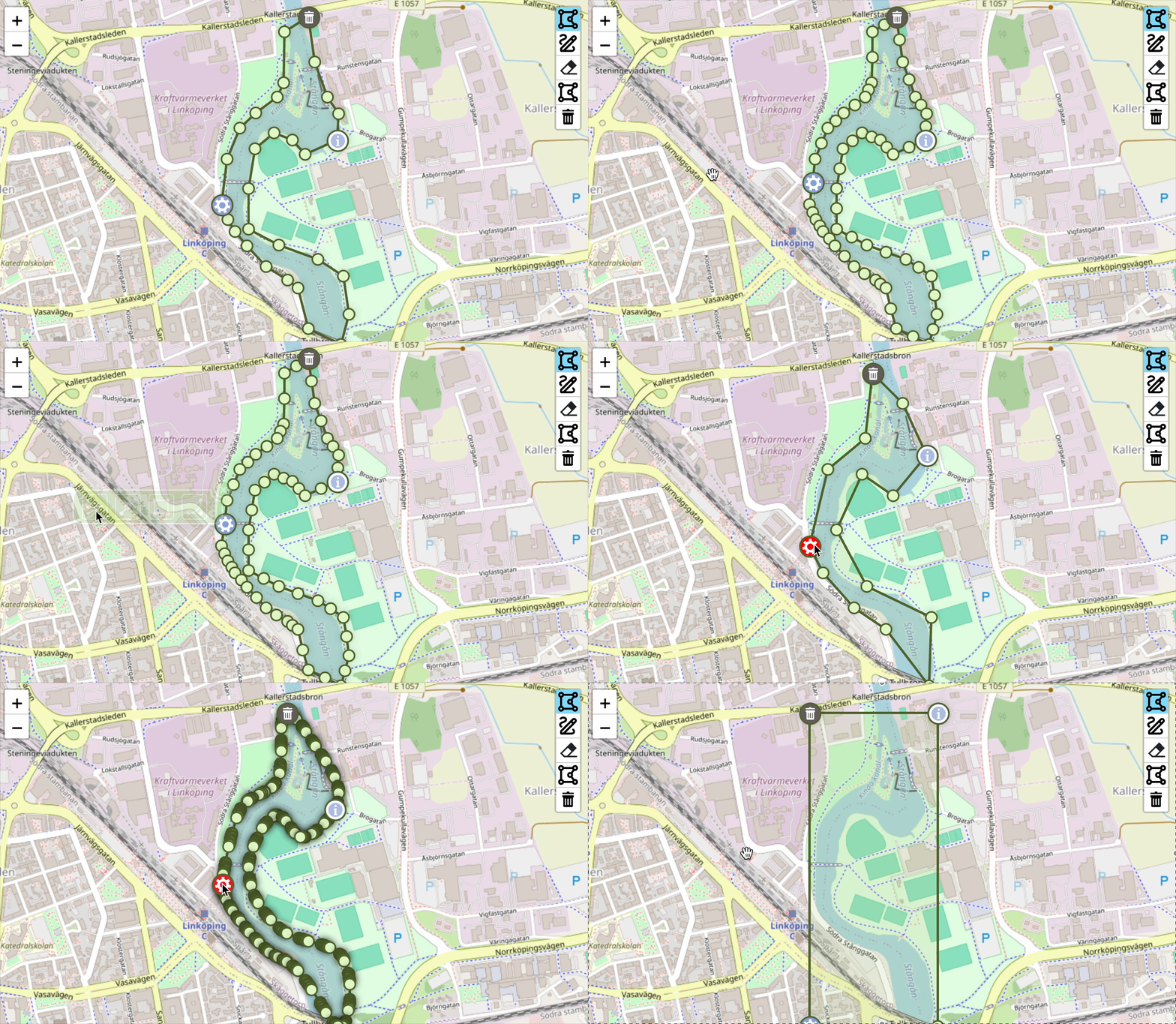
|
676
|
-
|
|
677
|
-
[](https://raw.githubusercontent.com/AndreasOlausson/leaflet-polydraw/main/Leaflet.Polydraw/docs/images/editing-tools.gif)
|
|
678
|
-
|
|
679
|
-
Access operations through the menu marker:
|
|
680
|
-
|
|
681
|
-
- **Simplify**: Reduce polygon complexity using Douglas-Peucker algorithm
|
|
682
|
-
- **Double Elbows**: Add intermediate vertices for higher resolution
|
|
683
|
-
- **Bounding Box**: Convert to rectangular bounds
|
|
684
|
-
- **Bezier Curves**: Apply smooth curve interpolation (alpha)
|
|
685
|
-
|
|
686
|
-
### Smart Marker System
|
|
687
|
-
|
|
688
|
-
[](https://raw.githubusercontent.com/AndreasOlausson/leaflet-polydraw/main/Leaflet.Polydraw/docs/images/smart-markers.png)
|
|
689
|
-
|
|
690
|
-
Intelligent marker positioning prevents overlapping on small polygons:
|
|
691
|
-
|
|
692
|
-
- **Automatic separation**: Detects potential overlaps and redistributes markers
|
|
693
|
-
- **Priority-based**: Resolves conflicts using info → delete → menu priority
|
|
694
|
-
- **Smooth animations**: Markers fade during drag operations
|
|
695
|
-
|
|
696
|
-
## API Reference
|
|
697
|
-
|
|
698
|
-
For most use cases, simply add the plugin and use the built-in buttons. However, these methods are available for programmatic control:
|
|
699
|
-
|
|
700
|
-
### Essential Methods
|
|
701
|
-
|
|
702
|
-
#### `addPredefinedPolygon(geographicBorders: L.LatLng[][][])`
|
|
703
|
-
|
|
704
|
-
Add polygons programmatically (useful for loading saved data).
|
|
705
|
-
|
|
706
|
-
```javascript
|
|
707
|
-
const polygon = [
|
|
708
|
-
[
|
|
709
|
-
[
|
|
710
|
-
{ lat: 59.903, lng: 10.724 },
|
|
711
|
-
{ lat: 59.908, lng: 10.728 },
|
|
712
|
-
{ lat: 59.91, lng: 10.72 },
|
|
713
|
-
{ lat: 59.903, lng: 10.724 },
|
|
714
|
-
],
|
|
715
|
-
],
|
|
716
|
-
];
|
|
717
|
-
polydraw.addPredefinedPolygon(polygon);
|
|
718
|
-
```
|
|
719
|
-
|
|
720
|
-
#### `getAllPolygons()`
|
|
721
|
-
|
|
722
|
-
Get all polygons for data export.
|
|
723
|
-
|
|
724
|
-
```javascript
|
|
725
|
-
const polygons = polydraw.getAllPolygons();
|
|
726
|
-
// Use for saving, exporting, or processing polygon data
|
|
727
|
-
```
|
|
728
|
-
|
|
729
|
-
### Advanced Methods (Optional)
|
|
730
|
-
|
|
731
|
-
#### `setDrawMode(mode: DrawMode)` & `getDrawMode()`
|
|
732
|
-
|
|
733
|
-
Programmatically control drawing modes (the buttons do this automatically).
|
|
734
|
-
|
|
735
|
-
```javascript
|
|
736
|
-
import { DrawMode } from 'leaflet-polydraw';
|
|
737
|
-
polydraw.setDrawMode(DrawMode.Add); // Same as clicking the draw button
|
|
738
|
-
```
|
|
739
|
-
|
|
740
|
-
#### `configurate(config: any)`
|
|
741
|
-
|
|
742
|
-
Update configuration after initialization.
|
|
743
|
-
|
|
744
|
-
```javascript
|
|
745
|
-
polydraw.configurate({
|
|
746
|
-
polygonOptions: { color: '#ff0000' },
|
|
747
|
-
});
|
|
748
|
-
```
|
|
749
|
-
|
|
750
|
-
## Markers
|
|
751
|
-
|
|
752
|
-
[](https://raw.githubusercontent.com/AndreasOlausson/leaflet-polydraw/main/Leaflet.Polydraw/docs/images/marker-positions.png)
|
|
753
|
-
|
|
754
|
-
### Delete Marker (Default: North)
|
|
755
|
-
|
|
756
|
-
- **Purpose**: Delete the entire polygon
|
|
757
|
-
- **Icon**: Trash/delete icon
|
|
758
|
-
- **Behavior**: Fades during drag operations
|
|
759
|
-
|
|
760
|
-
### Info Marker (Default: East)
|
|
761
|
-
|
|
762
|
-
- **Purpose**: Display polygon metrics
|
|
763
|
-
- **Features**: Area, perimeter, metric/imperial units
|
|
764
|
-
- **Popup**: Shows detailed measurements
|
|
765
|
-
|
|
766
|
-
[](https://raw.githubusercontent.com/AndreasOlausson/leaflet-polydraw/main/Leaflet.Polydraw/docs/images/info-marker-popup.png)
|
|
767
|
-
|
|
768
|
-
### Menu Marker (Default: West)
|
|
769
|
-
|
|
770
|
-
- **Purpose**: Access advanced polygon editing operations
|
|
771
|
-
- **Popup**: Interactive operation menu with the following tools:
|
|
772
|
-
- **Simplify**: Reduce polygon complexity by removing unnecessary vertices using Douglas-Peucker algorithm
|
|
773
|
-
- **Double Elbows**: Add intermediate vertices between existing points for higher resolution editing
|
|
774
|
-
- **Bounding Box**: Convert polygon to its rectangular bounding box
|
|
775
|
-
- **Bezier**: Apply smooth curve interpolation to polygon edges _(alpha feature)_
|
|
776
|
-
|
|
777
|
-
[](https://raw.githubusercontent.com/AndreasOlausson/leaflet-polydraw/main/Leaflet.Polydraw/docs/images/menu-marker-popup.png)
|
|
778
|
-
|
|
779
|
-
### Marker Positioning
|
|
780
|
-
|
|
781
|
-
Customize marker positions using the `MarkerPosition` enum:
|
|
782
|
-
|
|
783
|
-
```javascript
|
|
784
|
-
const polyDrawControl = L.control.polydraw({
|
|
785
|
-
config: {
|
|
786
|
-
markers: {
|
|
787
|
-
markerDeleteIcon: {
|
|
788
|
-
position: MarkerPosition.North,
|
|
789
|
-
styleClasses: ['custom-delete-marker'],
|
|
790
|
-
},
|
|
791
|
-
markerInfoIcon: {
|
|
792
|
-
position: MarkerPosition.East,
|
|
793
|
-
useMetrics: true,
|
|
794
|
-
areaLabel: 'Area',
|
|
795
|
-
perimeterLabel: 'Perimeter',
|
|
796
|
-
},
|
|
797
|
-
markerMenuIcon: {
|
|
798
|
-
position: MarkerPosition.West,
|
|
799
|
-
styleClasses: ['custom-menu-marker'],
|
|
800
|
-
},
|
|
801
|
-
},
|
|
802
|
-
},
|
|
803
|
-
});
|
|
804
|
-
```
|
|
805
|
-
|
|
806
|
-
This configuration gives this result.
|
|
807
|
-
|
|
808
|
-
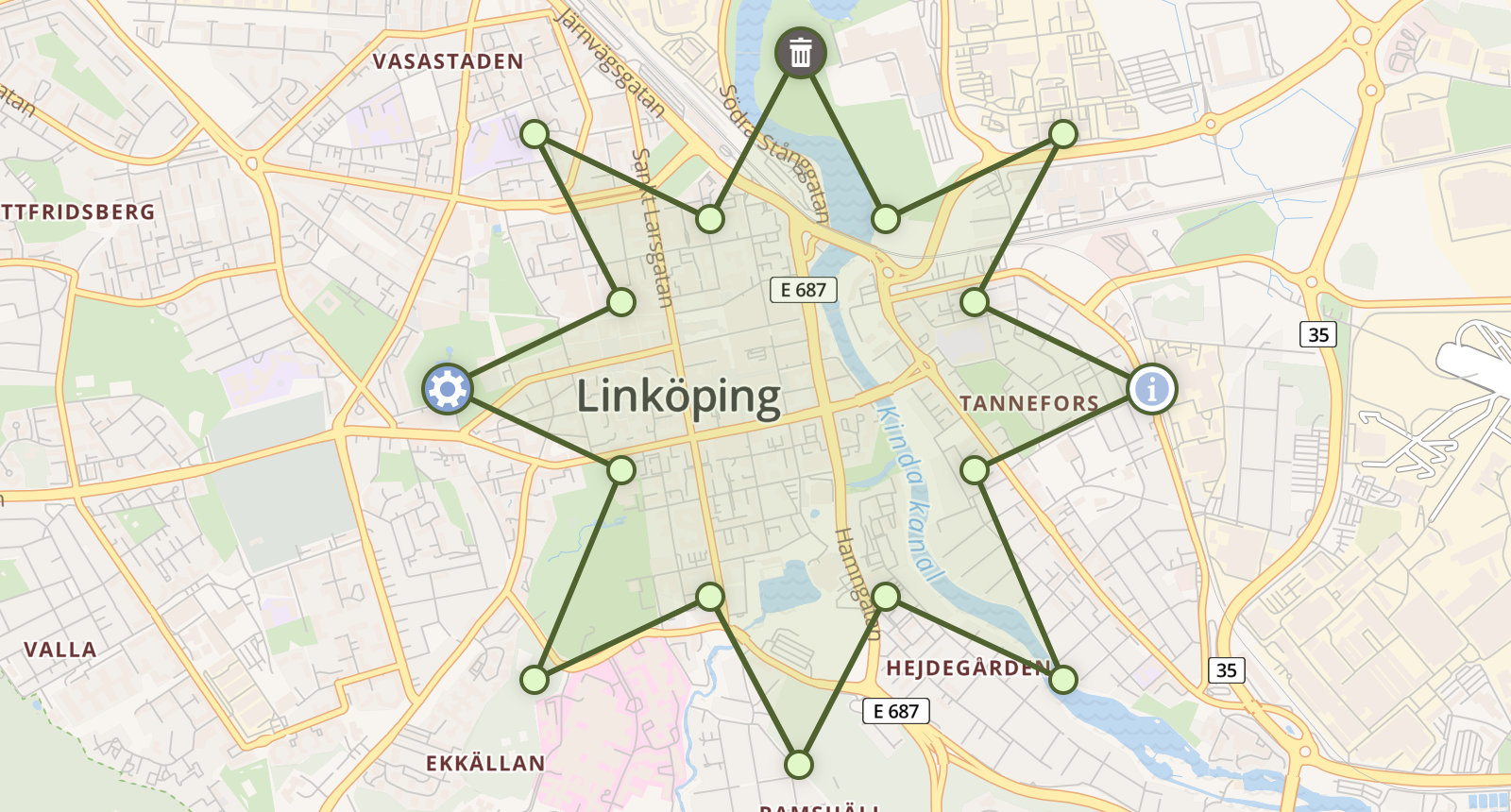
|
|
809
|
-
|
|
810
|
-
```javascript
|
|
811
|
-
MarkerPosition {
|
|
812
|
-
SouthWest = 0,
|
|
813
|
-
South = 1,
|
|
814
|
-
SouthEast = 2,
|
|
815
|
-
East = 3,
|
|
816
|
-
NorthEast = 4,
|
|
817
|
-
North = 5,
|
|
818
|
-
NorthWest = 6,
|
|
819
|
-
West = 7
|
|
820
|
-
}
|
|
821
|
-
```
|
|
822
|
-
|
|
823
|
-
## Events
|
|
824
|
-
|
|
825
|
-
Polydraw emits various events that allow you to respond to user interactions and polygon changes. These events are useful for implementing features like auto-save, validation, analytics, or custom UI updates.
|
|
826
|
-
|
|
827
|
-
### Draw Mode Events
|
|
828
|
-
|
|
829
|
-
Listen for drawing mode changes to update your UI or trigger specific behaviors:
|
|
830
|
-
|
|
831
|
-
```javascript
|
|
832
|
-
polydraw.onDrawModeChanged((mode) => {
|
|
833
|
-
console.log('Draw mode changed to:', mode);
|
|
834
|
-
|
|
835
|
-
// Update UI based on current mode
|
|
836
|
-
switch (mode) {
|
|
837
|
-
case DrawMode.Add:
|
|
838
|
-
updateStatusBar('Drawing mode: Add polygons');
|
|
839
|
-
break;
|
|
840
|
-
case DrawMode.Subtract:
|
|
841
|
-
updateStatusBar('Drawing mode: Create holes');
|
|
842
|
-
break;
|
|
843
|
-
case DrawMode.Off:
|
|
844
|
-
updateStatusBar('Drag mode: Move polygons');
|
|
845
|
-
break;
|
|
846
|
-
}
|
|
847
|
-
});
|
|
848
|
-
```
|
|
849
|
-
|
|
850
|
-
### Polygon Lifecycle Events
|
|
851
|
-
|
|
852
|
-
Track polygon creation, modification, and deletion:
|
|
853
|
-
|
|
854
|
-
```javascript
|
|
855
|
-
// Polygon created
|
|
856
|
-
map.on('polygon:created', (e) => {
|
|
857
|
-
console.log('New polygon created:', e.polygon);
|
|
858
|
-
// Auto-save, validate, or log the new polygon
|
|
859
|
-
savePolygonToDatabase(e.polygon);
|
|
860
|
-
});
|
|
861
|
-
|
|
862
|
-
// Polygon modified (vertices moved, simplified, etc.)
|
|
863
|
-
map.on('polygon:modified', (e) => {
|
|
864
|
-
console.log('Polygon modified:', e.polygon);
|
|
865
|
-
// Mark as unsaved, trigger validation
|
|
866
|
-
markAsUnsaved(e.polygon);
|
|
867
|
-
});
|
|
868
|
-
|
|
869
|
-
// Polygon deleted
|
|
870
|
-
map.on('polygon:deleted', (e) => {
|
|
871
|
-
console.log('Polygon deleted:', e.polygon);
|
|
872
|
-
// Remove from database, update counters
|
|
873
|
-
removeFromDatabase(e.polygonId);
|
|
874
|
-
});
|
|
875
|
-
```
|
|
876
|
-
|
|
877
|
-
### Drag & Drop Events
|
|
878
|
-
|
|
879
|
-
Monitor polygon dragging for real-time updates or validation:
|
|
880
|
-
|
|
881
|
-
```javascript
|
|
882
|
-
// Drag start - useful for showing drag indicators
|
|
883
|
-
map.on('polygon:dragstart', (e) => {
|
|
884
|
-
console.log('Drag started:', e.polygon);
|
|
885
|
-
showDragIndicator(true);
|
|
886
|
-
logUserAction('drag_start', e.polygon.id);
|
|
887
|
-
});
|
|
888
|
-
|
|
889
|
-
// Drag end - perfect for auto-save or validation
|
|
890
|
-
map.on('polygon:dragend', (e) => {
|
|
891
|
-
console.log('Drag ended:', e.polygon);
|
|
892
|
-
console.log('Moved from:', e.oldPosition, 'to:', e.newPosition);
|
|
893
|
-
|
|
894
|
-
showDragIndicator(false);
|
|
895
|
-
autoSavePolygon(e.polygon);
|
|
896
|
-
validatePolygonPosition(e.polygon);
|
|
897
|
-
});
|
|
898
|
-
|
|
899
|
-
// Real-time drag updates (if realTimeUpdate is enabled)
|
|
900
|
-
map.on('polygon:drag', (e) => {
|
|
901
|
-
console.log('Dragging:', e.polygon);
|
|
902
|
-
updateCoordinateDisplay(e.polygon.getLatLngs());
|
|
903
|
-
});
|
|
904
|
-
```
|
|
905
|
-
|
|
906
|
-
### Merge & Hole Events
|
|
907
|
-
|
|
908
|
-
Track automatic merging and hole creation:
|
|
909
|
-
|
|
910
|
-
```javascript
|
|
911
|
-
// Polygons merged automatically
|
|
912
|
-
map.on('polygons:merged', (e) => {
|
|
913
|
-
console.log('Polygons merged:', e.originalPolygons, '→', e.resultPolygon);
|
|
914
|
-
updatePolygonCount(-e.originalPolygons.length + 1);
|
|
915
|
-
});
|
|
916
|
-
|
|
917
|
-
// Hole created by dragging polygon inside another
|
|
918
|
-
map.on('polygon:hole-created', (e) => {
|
|
919
|
-
console.log('Hole created in:', e.parentPolygon, 'by:', e.holePolygon);
|
|
920
|
-
notifyUser('Hole created in polygon');
|
|
921
|
-
});
|
|
922
|
-
```
|
|
923
|
-
|
|
924
|
-
### Practical Use Cases
|
|
925
|
-
|
|
926
|
-
**Auto-save functionality:**
|
|
927
|
-
|
|
928
|
-
```javascript
|
|
929
|
-
map.on('polygon:created polygon:modified polygon:dragend', (e) => {
|
|
930
|
-
debounce(() => saveToLocalStorage(polydraw.getAllPolygons()), 1000);
|
|
931
|
-
});
|
|
932
|
-
```
|
|
933
|
-
|
|
934
|
-
**Validation and feedback:**
|
|
935
|
-
|
|
936
|
-
```javascript
|
|
937
|
-
map.on('polygon:created', (e) => {
|
|
938
|
-
const area = calculateArea(e.polygon);
|
|
939
|
-
if (area < MIN_AREA) {
|
|
940
|
-
showWarning('Polygon too small');
|
|
941
|
-
e.polygon.setStyle({ color: 'red' });
|
|
942
|
-
}
|
|
943
|
-
});
|
|
944
|
-
```
|
|
945
|
-
|
|
946
|
-
**Analytics tracking:**
|
|
947
|
-
|
|
948
|
-
```javascript
|
|
949
|
-
polydraw.onDrawModeChanged((mode) => {
|
|
950
|
-
analytics.track('draw_mode_changed', { mode: mode });
|
|
951
|
-
});
|
|
952
|
-
|
|
953
|
-
map.on('polygon:created', (e) => {
|
|
954
|
-
analytics.track('polygon_created', {
|
|
955
|
-
vertices: e.polygon.getLatLngs()[0].length,
|
|
956
|
-
area: calculateArea(e.polygon),
|
|
957
|
-
});
|
|
958
|
-
});
|
|
959
|
-
```
|
|
960
|
-
|
|
961
|
-
## Roadmap & Future Improvements
|
|
962
|
-
|
|
963
|
-
This section outlines planned fixes and new features. Contributions are highly welcome!
|
|
964
|
-
|
|
965
|
-
### Fixes and Core Improvements
|
|
966
|
-
|
|
967
|
-
- **Bezier Curve Refinement**: Improve the bezier curve algorithm for more intuitive results.
|
|
968
|
-
- **Simplification Algorithm Review**: Make simplification less aggressive and more predictable.
|
|
969
|
-
- **Mobile/Touch Support**: Enhance usability on touch devices, especially for p2p drawing.
|
|
970
|
-
- **Visual Optimization for Complex Polygons**: Smartly hide markers on complex polygons to reduce clutter while retaining functionality.
|
|
971
|
-
|
|
972
|
-
### New Features
|
|
973
|
-
|
|
974
|
-
- **Polygon Splitting Tool**: A mode to split a polygon by drawing a line across it.
|
|
975
|
-
- **Undo/Redo History**: Add undo/redo capabilities for all editing actions.
|
|
976
|
-
- **Measurement Tool**: A tool for measuring distances and areas without creating permanent polygons.
|
|
977
|
-
- **Multi-Select and Edit**: Allow users to edit multiple polygons at once.
|
|
978
|
-
- **Geo-data Format Integration**: Add helpers for importing/exporting GeoJSON, WKT, or KML.
|
|
979
|
-
|
|
980
|
-
### Low Priority Ideas
|
|
981
|
-
|
|
982
|
-
- **Topological Operations**: Add advanced GIS operations like intersection and buffering.
|
|
983
|
-
- **Drawing with Curves**: Allow drawing curved segments in point-to-point mode.
|
|
984
|
-
- **Theming and Customization**: Expand the config to allow for full theming.
|
|
985
|
-
- **Extensible Menu**: Allow developers to add custom actions to the menu.
|
|
986
|
-
- **Vertex Snapping**: Add snapping to a grid or other features.
|
|
987
|
-
|
|
988
|
-
## Browser Support
|
|
989
|
-
|
|
990
|
-
> ⚠️ Mobile support is considered **beta** in this version. While basic touch interaction is implemented, advanced workflows may behave inconsistently across mobile browsers. Full mobile compatibility is planned for a future release.
|
|
991
|
-
|
|
992
|
-
- **Modern Browsers**: Chrome 60+, Firefox 55+, Safari 12+, Edge 79+
|
|
993
|
-
- **Mobile**: iOS Safari 12+, Chrome Mobile 60+
|
|
994
|
-
- **Requirements**: ES6+ support, Leaflet 1.9+, Touch events, CSS transitions
|
|
995
|
-
|
|
996
|
-
## Demo
|
|
997
|
-
|
|
998
|
-
A local demo is included in the `demo/` directory for testing and development purposes.
|
|
999
|
-
|
|
1000
|
-
### Running the Demo
|
|
1001
|
-
|
|
1002
|
-
To run the local demo:
|
|
1003
|
-
|
|
1004
|
-
1. **Build the main library and types**:
|
|
1005
|
-
|
|
1006
|
-
```bash
|
|
1007
|
-
cd Leaflet.Polydraw
|
|
1008
|
-
npm run build
|
|
1009
|
-
npm run build:types
|
|
1010
|
-
```
|
|
1011
|
-
|
|
1012
|
-
2. **Run the demo**:
|
|
1013
|
-
```bash
|
|
1014
|
-
cd demo
|
|
1015
|
-
npm install
|
|
1016
|
-
npm run dev
|
|
1017
|
-
```
|
|
1018
|
-
|
|
1019
|
-
The demo will be available at `http://localhost:5173/` and includes examples of all major features.
|
|
1020
|
-
|
|
1021
|
-
## Contributing
|
|
1022
|
-
|
|
1023
|
-
Contributions are welcome! Please feel free to submit a Pull Request.
|
|
1024
|
-
|
|
1025
|
-
### Development Setup
|
|
1026
|
-
|
|
1027
|
-
```bash
|
|
1028
|
-
# Clone the repository
|
|
1029
|
-
git clone https://github.com/AndreasOlausson/leaflet-polydraw.git
|
|
1030
|
-
cd leaflet-polydraw
|
|
1031
|
-
|
|
1032
|
-
# Install dependencies
|
|
1033
|
-
npm install
|
|
1034
|
-
|
|
1035
|
-
# Run tests
|
|
1036
|
-
npm test
|
|
1037
|
-
|
|
1038
|
-
# Build the project
|
|
1039
|
-
npm run build
|
|
1040
|
-
npm run build:types
|
|
1041
|
-
|
|
1042
|
-
# For development with the demo project
|
|
1043
|
-
cd demo
|
|
1044
|
-
npm install
|
|
1045
|
-
npm run dev # Automatically builds plugin, generates typings, and installs them
|
|
1046
|
-
```
|
|
1047
|
-
|
|
1048
|
-
**Note**: The demo's `npm run dev` command automatically rebuilds the main plugin and type definitions, then installs them locally for immediate testing of your changes.
|
|
1049
|
-
|
|
1050
|
-
### Guidelines
|
|
1051
|
-
|
|
1052
|
-
- Follow the existing coding style
|
|
1053
|
-
- Add tests for new features
|
|
1054
|
-
- Update documentation when relevant
|
|
1055
|
-
- Ensure all tests pass before submitting
|
|
1056
|
-
|
|
1057
|
-
## License
|
|
1058
|
-
|
|
1059
|
-
This project is licensed under the [MIT License](./LICENSE).
|
|
1060
|
-
|
|
1061
|
-
## Acknowledgments
|
|
1062
|
-
|
|
1063
|
-
PolyDraw was initially inspired by:
|
|
1064
|
-
|
|
1065
|
-
- [Leaflet.FreeDraw](https://github.com/Wildhoney/Leaflet.FreeDraw) by Adam Timberlake "Wildhoney"
|
|
1066
|
-
- [leaflet-freehandshapes](https://github.com/bozdoz/leaflet-freehandshapes) by Benjamin DeLong "bozdoz"
|
|
1067
|
-
|
|
1068
|
-
Big thank you and kudos to these amazing developers!
|
|
1069
|
-
|
|
1070
|
-
**Created and maintained by [Andreas Olausson](https://github.com/AndreasOlausson)**
|
|
1071
|
-
|
|
1072
|
-
[](https://github.com/AndreasOlausson/leaflet-polydraw)
|
|
1073
|
-
[](https://github.com/AndreasOlausson/leaflet-polydraw/fork)
|
|
26
|
+
- **Freehand Drawing**: Draw polygons naturally by sketching directly on the map — click and drag to create shapes in real time.
|
|
27
|
+
- **Smart Polygon Merging**: Automatically detects and merges overlapping polygons (including smooth C-to-O shape completion).
|
|
28
|
+
- **Drag & Drop Editing**: Intuitive polygon repositioning with intelligent spatial interactions.
|
|
29
|
+
- **Advanced Vertex Editing**: Drag vertices, add or remove points, and reshape polygons seamlessly.
|
|
30
|
+
- **Point-to-Point Mode**: Optional precise vertex-by-vertex drawing for detailed or structured geometry.
|
|
31
|
+
- **Hole Support**: Create complex polygons with holes and nested structures effortlessly.
|
|
32
|
+
- **Smart Markers**: Adaptive marker placement prevents overlaps and maintains visual clarity.
|
|
33
|
+
- **Modifier Shortcuts**: Hold Ctrl or Cmd to toggle erase, subtract, or advanced edit modes for a smooth workflow.
|
|
34
|
+
- **Performance Optimized**: Efficient rendering and event handling even for large datasets.
|
|
35
|
+
- **Coordinate Auto-Detection**: Accepts multiple coordinate formats automatically (lat/lng, DMS, DDM, N/E, etc.).
|
|
36
|
+
- **Leaflet 1.x & 2.x Compatible**: Fully compatible with both generations of the Leaflet API.
|
|
37
|
+
- **TypeScript Ready**: Includes complete type definitions for modern development workflows.
|
|
38
|
+
|
|
39
|
+
---
|
|
40
|
+
|
|
41
|
+
**[Live Demo](https://polydraw.ao-tech.se)** · **[Quick Start](https://github.com/AndreasOlausson/leaflet-polydraw/blob/main/docs/QUICK_START.md)** · **[Full Documentation](https://github.com/AndreasOlausson/leaflet-polydraw/tree/main/docs)**
|
|
42
|
+
|
|
43
|
+
---
|
|
44
|
+
|
|
45
|
+
## Documentation
|
|
46
|
+
|
|
47
|
+
Full documentation and examples are available on GitHub:
|
|
48
|
+
|
|
49
|
+
- [Installation](https://github.com/AndreasOlausson/leaflet-polydraw/blob/main/docs/INSTALLATION.md)
|
|
50
|
+
- [Quick Start](https://github.com/AndreasOlausson/leaflet-polydraw/blob/main/docs/QUICK_START.md)
|
|
51
|
+
- [Configuration](https://github.com/AndreasOlausson/leaflet-polydraw/blob/main/docs/CONFIGURATION.md)
|
|
52
|
+
- [Features](https://github.com/AndreasOlausson/leaflet-polydraw/blob/main/docs/FEATURES.md)
|
|
53
|
+
- [API Reference](https://github.com/AndreasOlausson/leaflet-polydraw/blob/main/docs/API.md)
|
|
54
|
+
- [Markers](https://github.com/AndreasOlausson/leaflet-polydraw/blob/main/docs/MARKERS.md)
|
|
55
|
+
- [Events](https://github.com/AndreasOlausson/leaflet-polydraw/blob/main/docs/EVENTS.md)
|
|
56
|
+
- [Coordinate Formats](https://github.com/AndreasOlausson/leaflet-polydraw/blob/main/docs/COORDINATES.md)
|
|
57
|
+
- [Demo (Leaflet 1.x / 2.x)](https://github.com/AndreasOlausson/leaflet-polydraw/blob/main/docs/DEMO.md)
|
|
58
|
+
- [General — Browser Support, License, Acknowledgments](https://github.com/AndreasOlausson/leaflet-polydraw/blob/main/docs/GENERAL.md)
|
|
59
|
+
- [Roadmap](https://github.com/AndreasOlausson/leaflet-polydraw/blob/main/docs/ROADMAP.md)
|
|
60
|
+
- [Changelog](https://github.com/AndreasOlausson/leaflet-polydraw/blob/main/Leaflet.Polydraw/CHANGELOG.md)
|