layerweave 0.0.0-stage → 0.7.9-beta.2
This diff represents the content of publicly available package versions that have been released to one of the supported registries. The information contained in this diff is provided for informational purposes only and reflects changes between package versions as they appear in their respective public registries.
- package/LICENSE +21 -0
- package/README.en.md +182 -0
- package/README.md +182 -3
- package/bin/layerweave.mjs +9 -0
- package/lib/launch.mjs +132 -0
- package/package.json +15 -6
- package/runtime.json +9 -0
package/LICENSE
ADDED
|
@@ -0,0 +1,21 @@
|
|
|
1
|
+
MIT License
|
|
2
|
+
|
|
3
|
+
Copyright (c) 2026 LayerWeave contributors
|
|
4
|
+
|
|
5
|
+
Permission is hereby granted, free of charge, to any person obtaining a copy
|
|
6
|
+
of this software and associated documentation files (the "Software"), to deal
|
|
7
|
+
in the Software without restriction, including without limitation the rights
|
|
8
|
+
to use, copy, modify, merge, publish, distribute, sublicense, and/or sell
|
|
9
|
+
copies of the Software, and to permit persons to whom the Software is
|
|
10
|
+
furnished to do so, subject to the following conditions:
|
|
11
|
+
|
|
12
|
+
The above copyright notice and this permission notice shall be included in all
|
|
13
|
+
copies or substantial portions of the Software.
|
|
14
|
+
|
|
15
|
+
THE SOFTWARE IS PROVIDED "AS IS", WITHOUT WARRANTY OF ANY KIND, EXPRESS OR
|
|
16
|
+
IMPLIED, INCLUDING BUT NOT LIMITED TO THE WARRANTIES OF MERCHANTABILITY,
|
|
17
|
+
FITNESS FOR A PARTICULAR PURPOSE AND NONINFRINGEMENT. IN NO EVENT SHALL THE
|
|
18
|
+
AUTHORS OR COPYRIGHT HOLDERS BE LIABLE FOR ANY CLAIM, DAMAGES OR OTHER
|
|
19
|
+
LIABILITY, WHETHER IN AN ACTION OF CONTRACT, TORT OR OTHERWISE, ARISING FROM,
|
|
20
|
+
OUT OF OR IN CONNECTION WITH THE SOFTWARE OR THE USE OR OTHER DEALINGS IN THE
|
|
21
|
+
SOFTWARE.
|
package/README.en.md
ADDED
|
@@ -0,0 +1,182 @@
|
|
|
1
|
+
<!-- Generated from README.en.md; edit the repository source. -->
|
|
2
|
+
|
|
3
|
+
# LayerWeave
|
|
4
|
+
|
|
5
|
+
[简体中文](https://github.com/aceddad/LayerWeave/blob/v0.7.9b2/README.md) | **English**
|
|
6
|
+
|
|
7
|
+
[GitHub](https://github.com/aceddad/LayerWeave/tree/visualization) · [Gitee](https://gitee.com/emotion1354414/layer-weave/tree/visualization) · [Quick install](https://github.com/aceddad/LayerWeave/blob/v0.7.9b2/README.en.md#quick-install) · [Start using](https://github.com/aceddad/LayerWeave/blob/v0.7.9b2/README.en.md#start-using-layerweave) · [Connect an AI](https://github.com/aceddad/LayerWeave/blob/v0.7.9b2/README.en.md#connect-an-ai) · [Build your own tools](https://github.com/aceddad/LayerWeave/blob/v0.7.9b2/README.en.md#compose-the-parts-build-your-own-tools)
|
|
8
|
+
|
|
9
|
+
**Fewer distractions: look at the part that matters, and focus on the task at hand.**
|
|
10
|
+
|
|
11
|
+
LayerWeave is an information management toolkit that AI agents can use and extend. Text, media references, evidence, and comments are organized by time, paragraph, or reading order, then connected through layers and relationships. Agents query, edit, and capture views through MCP; people can browse, point, and comment on the same project.
|
|
12
|
+
|
|
13
|
+
|
|
14
|
+
|
|
15
|
+
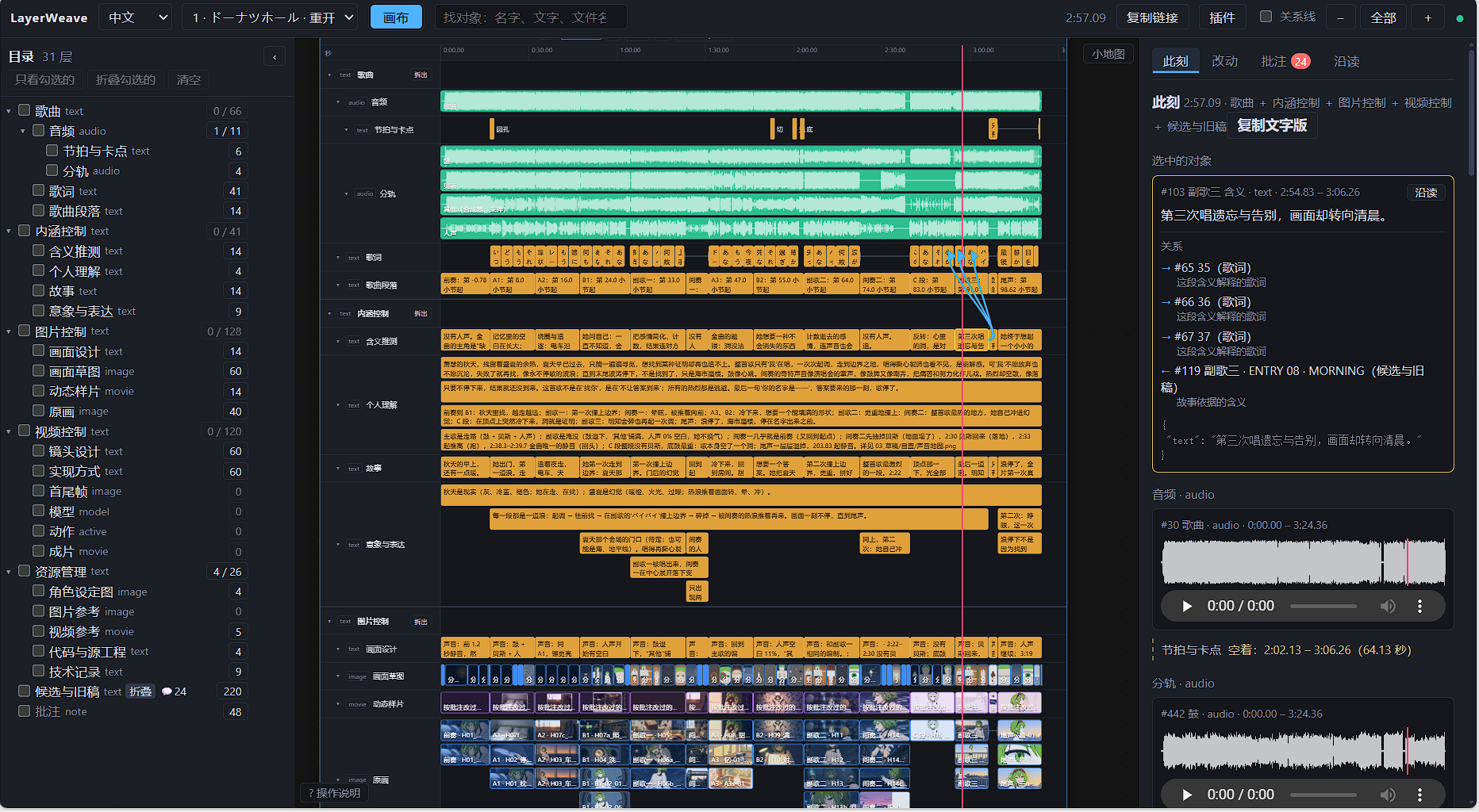
*A real hand-drawn MV project: audio, stems, story, storyboards, and artwork organized by time. The Now panel shows the selected item and content and relationships at the playhead. Full production media is not included in the download. [View full-size image](https://github.com/aceddad/LayerWeave/blob/v0.7.9b2/docs/images/handdraw-workspace.png).*
|
|
16
|
+
|
|
17
|
+
## Quick install
|
|
18
|
+
|
|
19
|
+
The current release is the **0.7.9b2 Windows preview**. Choose either installation method in PowerShell.
|
|
20
|
+
|
|
21
|
+
With [uv](https://docs.astral.sh/uv/getting-started/installation/), including MCP dependencies:
|
|
22
|
+
|
|
23
|
+
```powershell
|
|
24
|
+
uv tool install --python 3.11 "layerweave[mcp]==0.7.9b2"
|
|
25
|
+
```
|
|
26
|
+
|
|
27
|
+
With Node.js 20+ / npm on Windows x64:
|
|
28
|
+
|
|
29
|
+
```powershell
|
|
30
|
+
npm install -g layerweave@0.7.9-beta.2
|
|
31
|
+
```
|
|
32
|
+
|
|
33
|
+
After installation, use the `layerweave` command. uv prepares an isolated Python environment; npm installs a launcher that prepares Python and the required dependencies on first use. Initial setup needs internet access. **Installation does not create an example project or open the view.** If the command is not found, follow the installer's PATH instructions and reopen your terminal and MCP client.
|
|
34
|
+
|
|
35
|
+
## Start using LayerWeave
|
|
36
|
+
|
|
37
|
+
### Connect an AI
|
|
38
|
+
|
|
39
|
+
**MCP is the recommended way for AI agents to use LayerWeave.** Agents can discover tools as needed, query and edit projects, inspect relevant views, and work through comments. People can view the same project and leave feedback on the canvas. Python and CLI interfaces remain available for scripts and custom tools.
|
|
40
|
+
|
|
41
|
+
<details>
|
|
42
|
+
<summary>MCP configuration after installing with uv or npm</summary>
|
|
43
|
+
|
|
44
|
+
Choose a working directory. The example uses `D:/my-layerweave`; save an `mcp.json` in that directory:
|
|
45
|
+
|
|
46
|
+
```json
|
|
47
|
+
{"workspace": "D:/my-layerweave"}
|
|
48
|
+
```
|
|
49
|
+
|
|
50
|
+
After installing with uv, add this server to your client's MCP configuration:
|
|
51
|
+
|
|
52
|
+
```json
|
|
53
|
+
{
|
|
54
|
+
"mcpServers": {
|
|
55
|
+
"layerweave": {
|
|
56
|
+
"command": "layerweave",
|
|
57
|
+
"args": ["mcp", "--config", "D:/my-layerweave/mcp.json"]
|
|
58
|
+
}
|
|
59
|
+
}
|
|
60
|
+
}
|
|
61
|
+
```
|
|
62
|
+
|
|
63
|
+
After installing with npm, replace the `layerweave` server entry with this one on Windows:
|
|
64
|
+
|
|
65
|
+
```json
|
|
66
|
+
{
|
|
67
|
+
"command": "cmd",
|
|
68
|
+
"args": ["/c", "layerweave", "mcp", "--config", "D:/my-layerweave/mcp.json"]
|
|
69
|
+
}
|
|
70
|
+
```
|
|
71
|
+
|
|
72
|
+
The configuration location depends on your client. Replace the example paths. If the client cannot find the command, use `(Get-Command layerweave).Source` to locate the uv-installed program, or `(Get-Command layerweave.cmd).Source` to locate the npm launcher.
|
|
73
|
+
|
|
74
|
+
Once connected, have the AI call `layerweave_help` to find tools for your task, then create or open your own project. Running a demo is optional. The client manages the server process; starting MCP does not open the canvas.
|
|
75
|
+
|
|
76
|
+
Default databases and projects, tool exposure, uvx/npx, and existing Python environments are covered in the [MCP guide (Chinese)](https://github.com/aceddad/LayerWeave/blob/v0.7.9b2/src/layerweave/tool/builtin/shared/mcp/README.md) and [npm environment guide (Chinese)](https://github.com/aceddad/LayerWeave/blob/v0.7.9b2/src/layerweave/tool/builtin/shared/launcher/README.md#npm-%E8%BF%90%E8%A1%8C%E7%8E%AF%E5%A2%83).
|
|
77
|
+
|
|
78
|
+
</details>
|
|
79
|
+
|
|
80
|
+
### Open or create your own project
|
|
81
|
+
|
|
82
|
+
| Command | Purpose |
|
|
83
|
+
|---|---|
|
|
84
|
+
| `layerweave --help` | List available commands |
|
|
85
|
+
| `layerweave view ./project.sqlite3` | Open an existing database |
|
|
86
|
+
| `layerweave new ./my-project --template subtitles` | Create a project from the subtitles template and open its view |
|
|
87
|
+
| `layerweave help project_overview` | Read the project overview tool's help |
|
|
88
|
+
|
|
89
|
+
The view and MCP can work independently or access the same project together. Keep the terminal running while using the view; Ctrl+C stops the server. Add `--no-browser` to print the URL without opening a browser.
|
|
90
|
+
|
|
91
|
+
### Optional: try an example
|
|
92
|
+
|
|
93
|
+
```powershell
|
|
94
|
+
layerweave demo
|
|
95
|
+
```
|
|
96
|
+
|
|
97
|
+
This opens the article-reading example in `./layerweave-demo/article-reading`. **Running the same command again preserves your objects, comments, layout, and media edits.** Use `layerweave demo --list` to see all twelve examples. Others download on demand, for example with `layerweave demo comic-creation --dir ./my-comic`.
|
|
98
|
+
|
|
99
|
+
<details>
|
|
100
|
+
<summary>Try it without installing first</summary>
|
|
101
|
+
|
|
102
|
+
With uv or npm available, use either command directly:
|
|
103
|
+
|
|
104
|
+
```powershell
|
|
105
|
+
uvx layerweave@0.7.9b2 demo
|
|
106
|
+
```
|
|
107
|
+
|
|
108
|
+
```powershell
|
|
109
|
+
npx --yes layerweave@0.7.9-beta.2 demo
|
|
110
|
+
```
|
|
111
|
+
|
|
112
|
+
</details>
|
|
113
|
+
|
|
114
|
+
Project data stays separate from the download cache. More options are in the [launcher guide (Chinese)](https://github.com/aceddad/LayerWeave/blob/v0.7.9b2/src/layerweave/tool/builtin/shared/launcher/README.md); installation files are on [GitHub Releases](https://github.com/aceddad/LayerWeave/releases/tag/v0.7.9b2). To import or extend the kernel in a Python project, start with [development and extension](https://github.com/aceddad/LayerWeave/blob/v0.7.9b2/README.en.md#compose-the-parts-build-your-own-tools).
|
|
115
|
+
|
|
116
|
+
## Keep attention on the relevant part
|
|
117
|
+
|
|
118
|
+
### Collapse what you do not need right now
|
|
119
|
+
|
|
120
|
+
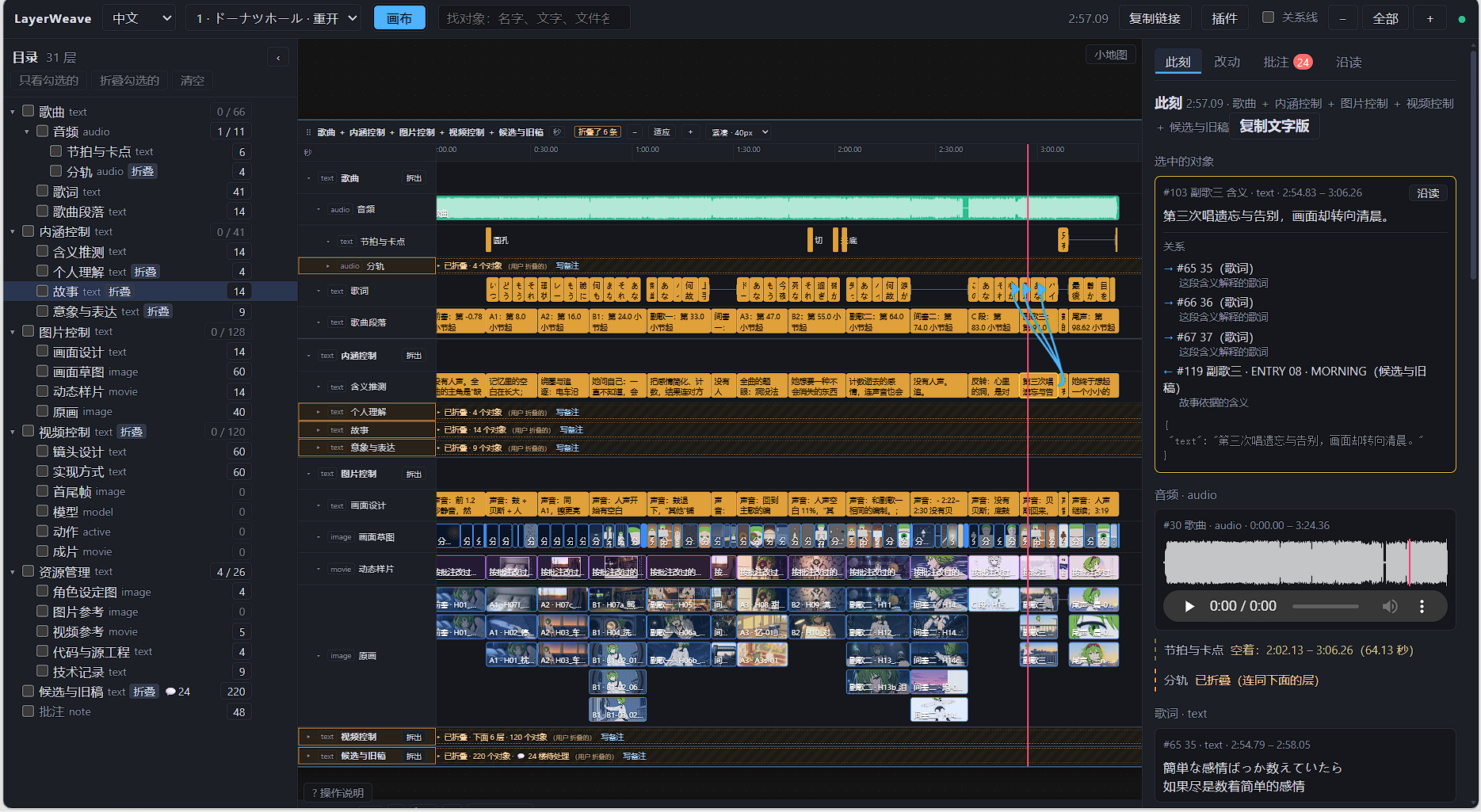
Collapse layers you are not working with while keeping their names, object counts, and expand controls visible. Make room for the current task and expand them again when needed.
|
|
121
|
+
|
|
122
|
+
|
|
123
|
+
|
|
124
|
+
*[View the full-size collapsed view](https://github.com/aceddad/LayerWeave/blob/v0.7.9b2/docs/images/handdraw-folded.png). Collapsing changes the display; it does not delete content.*
|
|
125
|
+
|
|
126
|
+
### Same data, different areas of focus
|
|
127
|
+
|
|
128
|
+
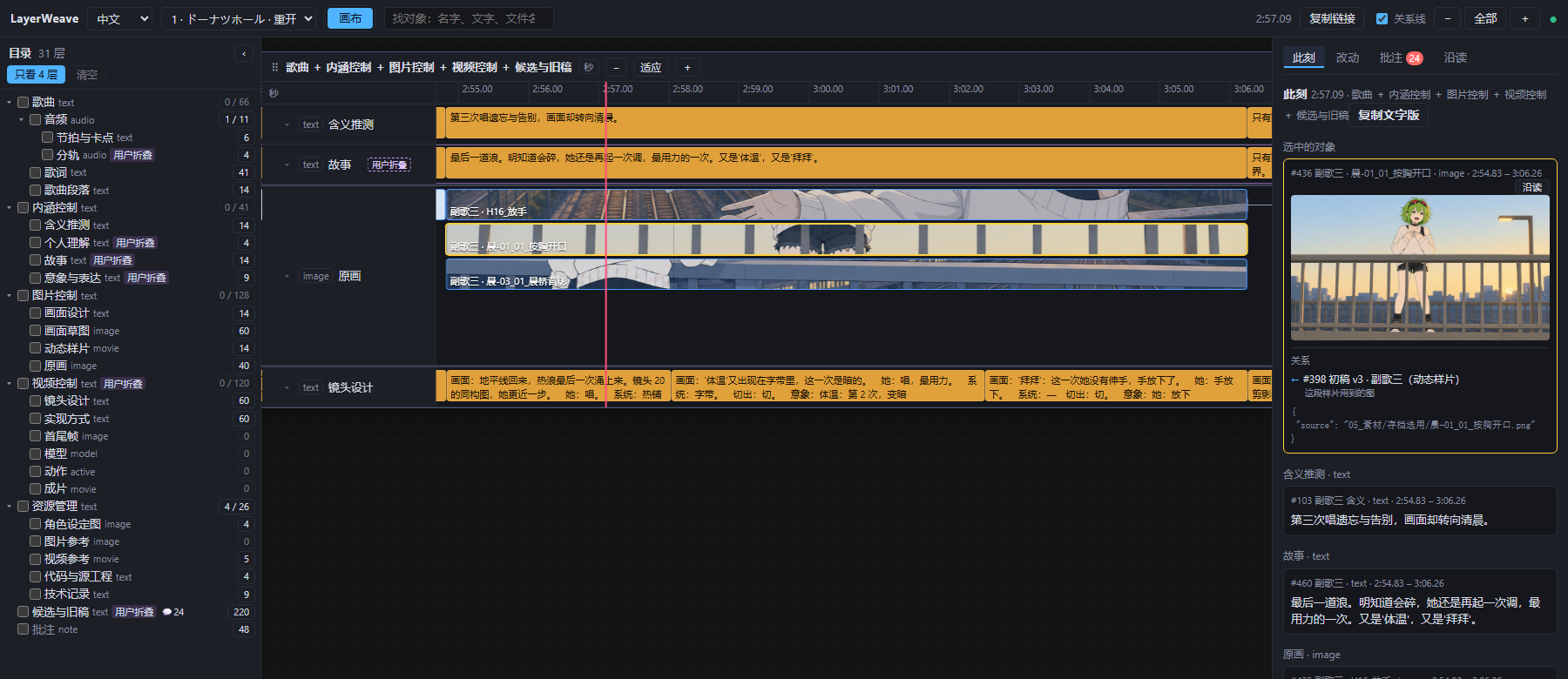
At the same **2:57** moment, the AI looks at four relevant layers and selects a different piece of artwork. It can read object text and relationships as well as capture screenshots. These temporary filters leave the person's browsing state unchanged.
|
|
129
|
+
|
|
130
|
+
|
|
131
|
+
|
|
132
|
+
*[View the full-size AI view](https://github.com/aceddad/LayerWeave/blob/v0.7.9b2/docs/images/ai-focus-177.png). “User collapsed” labels preserve the person's focus choices while allowing the AI to inspect that content for its task.*
|
|
133
|
+
|
|
134
|
+
| Need during work | What LayerWeave provides |
|
|
135
|
+
|---|---|
|
|
136
|
+
| Leave feedback that can be followed up | Comments, replies, and pending states attached to the relevant content |
|
|
137
|
+
| See how far the AI has got | A canvas that syncs project changes every two seconds |
|
|
138
|
+
| Correct an earlier edit | Change records, history, and undo, with explicit conflict reports |
|
|
139
|
+
|
|
140
|
+
Use seconds for video and music, paragraphs for articles, or pages and panels for comics. The project defines what each axis means; units are not converted automatically. Images, audio, and video are referenced by path or URL. Skills and external tools handle media generation and processing.
|
|
141
|
+
|
|
142
|
+
Understanding screenshots requires a vision-capable AI. The caller decides when to read comments and which agent handles them. Discover individual tools through help or the [view guide (Chinese)](https://github.com/aceddad/LayerWeave/blob/v0.7.9b2/src/layerweave/tool/builtin/view/GUIDE.md#%E7%BB%99-ai-%E7%94%A8).
|
|
143
|
+
|
|
144
|
+
## Try another setting
|
|
145
|
+
|
|
146
|
+
| Example | What you can do |
|
|
147
|
+
|---|---|
|
|
148
|
+
| [Article reading](https://github.com/aceddad/LayerWeave/blob/v0.7.9b2/examples/showcases/article-reading/README.md) · recommended start · [screenshot](https://github.com/aceddad/LayerWeave/blob/v0.7.9b2/docs/images/article-reading.png) | Compare text with its interpretation, then trace claims to evidence, illustrations, and discussion |
|
|
149
|
+
| [Storyboard and H3](https://github.com/aceddad/LayerWeave/blob/v0.7.9b2/examples/showcases/donut-hole-h3/README.md) | Compare shots, story sections, and implementation notes; trace shared assets |
|
|
150
|
+
| [Hand-drawn MV](https://github.com/aceddad/LayerWeave/blob/v0.7.9b2/examples/showcases/donut-hole-tegaki/README.md) | Keep listening notes, story, visual design, character sheets, and implementation records together |
|
|
151
|
+
| [Late Bloom](https://github.com/aceddad/LayerWeave/blob/v0.7.9b2/examples/showcases/late-bloom-scroll/README.md) | Follow four AIs using comments to coordinate seams and colors in one animated SVG scroll |
|
|
152
|
+
|
|
153
|
+
The twelve examples also cover fiction, comics, course study, research, interactive stories, requirements design, translation review, and code navigation. See the [full directory](https://github.com/aceddad/LayerWeave/blob/v0.7.9b2/examples/showcases/README.md). The article is an original essay; the hand-drawn and H3 examples use stills without the song or video files. Recreating the full films needs additional media. Example content and detailed guides are currently in Chinese.
|
|
154
|
+
|
|
155
|
+
## Compose the parts, build your own tools
|
|
156
|
+
|
|
157
|
+
LayerWeave aims to **reduce the attention spent on coordination**. Tools handle finding things, matching positions, and tracking changes. When building a new feature, you should be able to focus on its own logic, too.
|
|
158
|
+
|
|
159
|
+
The approach is **composition**: objects belong to layers, layers form a tree, and `bind` relationships connect them. The kernel provides the basic structure; the support layer handles storage, IDs, transactions, and change records. Tools, skills, and plugins can be added as needed. The core and support layer use only Python's standard library.
|
|
160
|
+
|
|
161
|
+
For example, a tool that lists “every shot featuring each character” can query the existing relationships. It can reuse the same storage and change records when saving results, with undo available through the undo tool. Tools can also declare their own tables for data that needs a different structure.
|
|
162
|
+
|
|
163
|
+
**You and your agents are welcome to build applications on this kernel.** This branch is a usable application example, and the view itself is a tool package. Built-in tools demonstrate how to reuse the kernel; separate view plugins demonstrate how to extend the application. Comments are one such example: `Note` extends the text object, replies use relationships, and read states and layout live in the view's own tables.
|
|
164
|
+
|
|
165
|
+
- [main development branch](https://github.com/aceddad/LayerWeave/tree/main): the kernel, support layer, and non-visual tools, with a minimal Python example.
|
|
166
|
+
- [Extension guide](https://github.com/aceddad/LayerWeave/blob/v0.7.9b2/docs/build-with-layerweave/README.md): add types or tables, compose tools, or consume incremental changes.
|
|
167
|
+
- [Public API](https://github.com/aceddad/LayerWeave/blob/v0.7.9b2/src/layerweave/support/API.md) and [tool-owned table example](https://github.com/aceddad/LayerWeave/blob/v0.7.9b2/examples/tool_tables.py): reuse the existing capabilities in your own features.
|
|
168
|
+
- [Official view plugins](https://github.com/aceddad/layerweave-plugins): overview, seams, preview, and web, all separately installed.
|
|
169
|
+
|
|
170
|
+
## Documentation and optional components
|
|
171
|
+
|
|
172
|
+
[Using tools](https://github.com/aceddad/LayerWeave/blob/v0.7.9b2/src/layerweave/tool/builtin/usage/README.md) · [JSON exchange and templates](https://github.com/aceddad/LayerWeave/blob/v0.7.9b2/src/layerweave/tool/builtin/usage/exchange/README.md) · [View and plugins](https://github.com/aceddad/LayerWeave/blob/v0.7.9b2/src/layerweave/tool/builtin/view/README.md) · [Source development](https://github.com/aceddad/LayerWeave/blob/v0.7.9b2/docs/developer-conventions.md) · [Documentation index](https://github.com/aceddad/LayerWeave/blob/v0.7.9b2/docs/README.md)
|
|
173
|
+
|
|
174
|
+
Ordinary data management and article reading need no API key, FFmpeg, or official view plugin. Server-side frame extraction, video thumbnails, and waveforms need [FFmpeg (Chinese guide)](https://github.com/aceddad/LayerWeave/blob/v0.7.9b2/src/layerweave/tool/builtin/view/GUIDE.md#%E9%80%89%E8%A3%85-ffmpeg); AI screenshots need Chrome, Edge, or Chromium. The web UI supports Chinese and English. This release includes view component 0.31.1. The detailed documentation, CLI/help descriptions, and templates are currently in Chinese; machine-readable names are unchanged.
|
|
175
|
+
|
|
176
|
+
## AI-assisted development
|
|
177
|
+
|
|
178
|
+
The maintainer leads the project's design and maintenance. Astra (Codex) and Claude assisted with development, testing, and documentation on this branch.
|
|
179
|
+
|
|
180
|
+
## License
|
|
181
|
+
|
|
182
|
+
LayerWeave itself is licensed under [MIT](https://github.com/aceddad/LayerWeave/blob/v0.7.9b2/LICENSE). Bundled web components keep their own licenses; see [third-party notices](https://github.com/aceddad/LayerWeave/blob/v0.7.9b2/THIRD_PARTY_NOTICES.md). Separate plugins, skills, and external services follow their own terms.
|
package/README.md
CHANGED
|
@@ -1,3 +1,182 @@
|
|
|
1
|
-
|
|
2
|
-
|
|
3
|
-
|
|
1
|
+
<!-- Generated from README.md; edit the repository source. -->
|
|
2
|
+
|
|
3
|
+
# LayerWeave
|
|
4
|
+
|
|
5
|
+
**简体中文** | [English](https://github.com/aceddad/LayerWeave/blob/v0.7.9b2/README.en.md)
|
|
6
|
+
|
|
7
|
+
[GitHub](https://github.com/aceddad/LayerWeave/tree/visualization) · [Gitee](https://gitee.com/emotion1354414/layer-weave/tree/visualization) · [快速安装](https://github.com/aceddad/LayerWeave/blob/v0.7.9b2/README.md#%E5%BF%AB%E9%80%9F%E5%AE%89%E8%A3%85) · [开始使用](https://github.com/aceddad/LayerWeave/blob/v0.7.9b2/README.md#%E5%BC%80%E5%A7%8B%E4%BD%BF%E7%94%A8) · [接入 AI](https://github.com/aceddad/LayerWeave/blob/v0.7.9b2/README.md#%E6%8E%A5%E5%85%A5-ai) · [开发与扩展](https://github.com/aceddad/LayerWeave/blob/v0.7.9b2/README.md#%E6%8C%89%E9%9C%80%E7%BB%84%E5%90%88%E5%BC%80%E5%8F%91%E8%87%AA%E5%B7%B1%E7%9A%84%E5%B7%A5%E5%85%B7)
|
|
8
|
+
|
|
9
|
+
**少分心:只看相关的那一段,只做眼前的那一件事。**
|
|
10
|
+
|
|
11
|
+
LayerWeave 是面向 AI 使用与开发的信息管理工具。正文、素材引用、证据和批注按时间、段落或阅读顺序组织,再通过层级和关联连接。AI 通过 MCP 按需查询、编辑和截图;人可以在同一份项目上查看、定位和留言。
|
|
12
|
+
|
|
13
|
+

|
|
14
|
+
|
|
15
|
+
*真实手书制作项目:音频、分轨、故事、分镜与原画按时间组织,右侧“此刻”查看选中对象及当前位置的内容和关联。完整制作素材不随安装包提供。[查看原图](https://github.com/aceddad/LayerWeave/blob/v0.7.9b2/docs/images/handdraw-workspace.png)。*
|
|
16
|
+
|
|
17
|
+
## 快速安装
|
|
18
|
+
|
|
19
|
+
当前为 **0.7.9b2 Windows 预览版**。在 PowerShell 中任选一种方式安装:
|
|
20
|
+
|
|
21
|
+
使用 [uv](https://docs.astral.sh/uv/getting-started/installation/),同时安装 MCP 依赖:
|
|
22
|
+
|
|
23
|
+
```powershell
|
|
24
|
+
uv tool install --python 3.11 "layerweave[mcp]==0.7.9b2"
|
|
25
|
+
```
|
|
26
|
+
|
|
27
|
+
使用 Node.js 20+ / npm(Windows x64):
|
|
28
|
+
|
|
29
|
+
```powershell
|
|
30
|
+
npm install -g layerweave@0.7.9-beta.2
|
|
31
|
+
```
|
|
32
|
+
|
|
33
|
+
安装完成后使用 `layerweave` 命令。uv 会准备独立 Python 环境;npm 安装启动器,首次执行时再自动准备 Python 和所需依赖。首次准备需要联网。**安装本身不会创建案例或打开视图。** 如果找不到命令,按安装器提示设置命令目录,再重新打开终端和 MCP 客户端。
|
|
34
|
+
|
|
35
|
+
## 开始使用
|
|
36
|
+
|
|
37
|
+
### 接入 AI
|
|
38
|
+
|
|
39
|
+
**推荐通过 MCP 让 AI 使用 LayerWeave。** AI 可以按需发现工具、查询和修改项目、查看相关画面并处理批注。配合视图,人可以查看同一份项目并留下反馈。Python/CLI 接口也可供脚本与自己的工具直接调用。
|
|
40
|
+
|
|
41
|
+
<details>
|
|
42
|
+
<summary>展开 MCP 接入配置(已通过 uv 或 npm 安装)</summary>
|
|
43
|
+
|
|
44
|
+
选择自己的工作目录,以下以 `D:/my-layerweave` 为例。在该目录保存 `mcp.json`:
|
|
45
|
+
|
|
46
|
+
```json
|
|
47
|
+
{"workspace": "D:/my-layerweave"}
|
|
48
|
+
```
|
|
49
|
+
|
|
50
|
+
通过 uv 安装后,在客户端的 MCP 配置中加入:
|
|
51
|
+
|
|
52
|
+
```json
|
|
53
|
+
{
|
|
54
|
+
"mcpServers": {
|
|
55
|
+
"layerweave": {
|
|
56
|
+
"command": "layerweave",
|
|
57
|
+
"args": ["mcp", "--config", "D:/my-layerweave/mcp.json"]
|
|
58
|
+
}
|
|
59
|
+
}
|
|
60
|
+
}
|
|
61
|
+
```
|
|
62
|
+
|
|
63
|
+
通过 npm 安装时,将其中的 `layerweave` 服务项替换为下面这项(Windows):
|
|
64
|
+
|
|
65
|
+
```json
|
|
66
|
+
{
|
|
67
|
+
"command": "cmd",
|
|
68
|
+
"args": ["/c", "layerweave", "mcp", "--config", "D:/my-layerweave/mcp.json"]
|
|
69
|
+
}
|
|
70
|
+
```
|
|
71
|
+
|
|
72
|
+
配置放在哪里取决于客户端,示例路径需要换成实际路径。若客户端找不到命令,通过 uv 安装的可用 `(Get-Command layerweave).Source` 查看程序位置;通过 npm 安装的可用 `(Get-Command layerweave.cmd).Source` 查看启动脚本位置。
|
|
73
|
+
|
|
74
|
+
接入后,先让 AI 调用 `layerweave_help`,按任务查找工具,再创建或打开你自己的项目。无需先运行 demo。客户端管理服务进程,MCP 启动本身不打开画布。
|
|
75
|
+
|
|
76
|
+
默认数据库、项目、工具暴露,以及 uvx/npx 和自管 Python 环境的接法见 [MCP 说明](https://github.com/aceddad/LayerWeave/blob/v0.7.9b2/src/layerweave/tool/builtin/shared/mcp/README.md)与[npm 运行环境](https://github.com/aceddad/LayerWeave/blob/v0.7.9b2/src/layerweave/tool/builtin/shared/launcher/README.md#npm-%E8%BF%90%E8%A1%8C%E7%8E%AF%E5%A2%83)。
|
|
77
|
+
|
|
78
|
+
</details>
|
|
79
|
+
|
|
80
|
+
### 打开或创建自己的项目
|
|
81
|
+
|
|
82
|
+
| 命令 | 用途 |
|
|
83
|
+
|---|---|
|
|
84
|
+
| `layerweave --help` | 查看可用命令 |
|
|
85
|
+
| `layerweave view ./project.sqlite3` | 打开已有数据库 |
|
|
86
|
+
| `layerweave new ./my-project --template subtitles` | 用字幕模板创建自己的项目并打开视图 |
|
|
87
|
+
| `layerweave help project_overview` | 查看项目概览工具的帮助 |
|
|
88
|
+
|
|
89
|
+
视图与 MCP 可以分别使用,也可以访问同一个项目。打开视图后保持终端运行,按 Ctrl+C 停止服务;加 `--no-browser` 可只打印访问地址。
|
|
90
|
+
|
|
91
|
+
### 可选:体验案例
|
|
92
|
+
|
|
93
|
+
```powershell
|
|
94
|
+
layerweave demo
|
|
95
|
+
```
|
|
96
|
+
|
|
97
|
+
默认打开文章解析案例,保存在 `./layerweave-demo/article-reading`。**再次运行同一条命令会保留对象、批注、布局和素材修改。** 用 `layerweave demo --list` 查看十二个案例,其他案例按需下载;例如 `layerweave demo comic-creation --dir ./my-comic`。
|
|
98
|
+
|
|
99
|
+
<details>
|
|
100
|
+
<summary>无需预先安装,直接体验</summary>
|
|
101
|
+
|
|
102
|
+
已有 uv 或 npm 时,也可任选一条直接运行:
|
|
103
|
+
|
|
104
|
+
```powershell
|
|
105
|
+
uvx layerweave@0.7.9b2 demo
|
|
106
|
+
```
|
|
107
|
+
|
|
108
|
+
```powershell
|
|
109
|
+
npx --yes layerweave@0.7.9-beta.2 demo
|
|
110
|
+
```
|
|
111
|
+
|
|
112
|
+
</details>
|
|
113
|
+
|
|
114
|
+
项目数据与下载缓存分开保存。更多参数见[统一入口说明](https://github.com/aceddad/LayerWeave/blob/v0.7.9b2/src/layerweave/tool/builtin/shared/launcher/README.md),安装文件见 [GitHub Releases](https://github.com/aceddad/LayerWeave/releases/tag/v0.7.9b2)。在 Python 工程中导入或扩展内核,请从[开发入口](https://github.com/aceddad/LayerWeave/blob/v0.7.9b2/README.md#%E6%8C%89%E9%9C%80%E7%BB%84%E5%90%88%E5%BC%80%E5%8F%91%E8%87%AA%E5%B7%B1%E7%9A%84%E5%B7%A5%E5%85%B7)开始。
|
|
115
|
+
|
|
116
|
+
## 把注意力留给当前这一段
|
|
117
|
+
|
|
118
|
+
### 按需收起内容
|
|
119
|
+
|
|
120
|
+
暂时不看的层可以折叠,名称、对象数量和展开入口仍然保留。把画面留给当前工作,需要时再展开。
|
|
121
|
+
|
|
122
|
+

|
|
123
|
+
|
|
124
|
+
*[查看折叠视图原图](https://github.com/aceddad/LayerWeave/blob/v0.7.9b2/docs/images/handdraw-folded.png)。折叠改变显示,不删除内容。*
|
|
125
|
+
|
|
126
|
+
### 同一份数据,各自选择关注范围
|
|
127
|
+
|
|
128
|
+
同一个 **2:57** 时刻,AI 只查看相关四层,并独立选择一张原画。它可以读取对象正文和关联,也可以按需要截图;这些临时筛选不改变人的浏览状态。
|
|
129
|
+
|
|
130
|
+

|
|
131
|
+
|
|
132
|
+
*[查看 AI 局部视图原图](https://github.com/aceddad/LayerWeave/blob/v0.7.9b2/docs/images/ai-focus-177.png)。图中的“用户折叠”标记保留了人的关注状态,AI 仍可按任务查看对应内容。*
|
|
133
|
+
|
|
134
|
+
| 工作中的需要 | LayerWeave 提供的能力 |
|
|
135
|
+
|---|---|
|
|
136
|
+
| 留下可追溯的反馈 | 批注、回复、待处理状态;意见挂在具体内容上,方便之后接着处理 |
|
|
137
|
+
| 查看 AI 改到哪里了 | 画布每两秒同步项目变化,按位置查看新增或修改的内容 |
|
|
138
|
+
| 修正已经写入的内容 | 改动记录、历史与撤销;覆盖冲突会明确报告 |
|
|
139
|
+
|
|
140
|
+
视频和歌曲可以按秒,文章按段落,漫画按页和格。轴的单位由项目解释,段落、页码与秒不会自动换算。图片和音视频通过路径或链接引用;生成、处理媒体由技能或外部工具完成。
|
|
141
|
+
|
|
142
|
+
截图理解需要有视觉能力的 AI;何时读取批注、由哪个 AI 处理,由调用方安排。具体工具与调用方式可以从 help 按需查询,或阅读[视图使用说明](https://github.com/aceddad/LayerWeave/blob/v0.7.9b2/src/layerweave/tool/builtin/view/GUIDE.md#%E7%BB%99-ai-%E7%94%A8)。
|
|
143
|
+
|
|
144
|
+
## 换一个场景试试
|
|
145
|
+
|
|
146
|
+
| 案例 | 可以怎样用 |
|
|
147
|
+
|---|---|
|
|
148
|
+
| [文章解析](https://github.com/aceddad/LayerWeave/blob/v0.7.9b2/examples/showcases/article-reading/README.md) · 推荐入门 · [截图](https://github.com/aceddad/LayerWeave/blob/v0.7.9b2/docs/images/article-reading.png) | 将正文与逐段解读对照,从论点追溯证据、配图和讨论 |
|
|
149
|
+
| [动态分镜与 H3](https://github.com/aceddad/LayerWeave/blob/v0.7.9b2/examples/showcases/donut-hole-h3/README.md) | 对照镜头、故事段落与实现方式,追溯共用的素材 |
|
|
150
|
+
| [手书制作](https://github.com/aceddad/LayerWeave/blob/v0.7.9b2/examples/showcases/donut-hole-tegaki/README.md) | 将听感、故事、画面设计、角色设定与实现记录放在一起 |
|
|
151
|
+
| [晚开的花](https://github.com/aceddad/LayerWeave/blob/v0.7.9b2/examples/showcases/late-bloom-scroll/README.md) | 四个 AI 通过批注核对接缝和配色,共同完成一幅动态 SVG 长卷 |
|
|
152
|
+
|
|
153
|
+
十二个案例还覆盖小说、漫画、课程、调查、互动故事、需求设计、翻译审校和代码梳理,见[完整案例目录](https://github.com/aceddad/LayerWeave/blob/v0.7.9b2/examples/showcases/README.md)。文章解析使用原创短论;手书与 H3 为不附歌曲和视频的静帧阅读版,完整影片需要另备素材。
|
|
154
|
+
|
|
155
|
+
## 按需组合,开发自己的工具
|
|
156
|
+
|
|
157
|
+
LayerWeave 的核心理念是**降低注意力的分散**。找东西、对位置、记改动这些事交给工具;开发一个新功能时,也应能专注它自身的逻辑。
|
|
158
|
+
|
|
159
|
+
做法是**按需组合**:对象放进层,层组成树,通过 `bind` 关联彼此;内核提供基本结构,基础支撑负责保存、编号、事务和改动记录,工具、技能与插件按用途接入。核心和基础支撑只依赖 Python 标准库。
|
|
160
|
+
|
|
161
|
+
比如,要汇总“每个角色出现在哪些镜头”,可以写一个工具查询现有关系;保存结果时复用已有的读写和记录能力,配合撤销工具恢复改动。工具也可以声明自己的表,不必把所有数据都塞进层和对象。
|
|
162
|
+
|
|
163
|
+
**欢迎你和 AI 基于这个内核开发自己的应用。** 本分支是一个可直接使用的上层应用示例,视图本身也是工具包。内置工具展示如何复用内核,独立视图插件进一步展示如何扩展应用。批注就是其中一个例子:`Note` 继承文字对象,回复通过关联表达,已读状态与布局保存在视图自己的表里。
|
|
164
|
+
|
|
165
|
+
- [main 开发分支](https://github.com/aceddad/LayerWeave/tree/main):无视图的内核、基础支撑与非视图工具,带最小 Python 示例。
|
|
166
|
+
- [扩展指南](https://github.com/aceddad/LayerWeave/blob/v0.7.9b2/docs/build-with-layerweave/README.md):新增类型、自己的表、组合工具或接入增量变化。
|
|
167
|
+
- [公共 API](https://github.com/aceddad/LayerWeave/blob/v0.7.9b2/src/layerweave/support/API.md)与[工具表例子](https://github.com/aceddad/LayerWeave/blob/v0.7.9b2/examples/tool_tables.py):复用已有能力开发功能。
|
|
168
|
+
- [官方视图插件](https://github.com/aceddad/layerweave-plugins):一览、接缝、预览和网页插件独立选装。
|
|
169
|
+
|
|
170
|
+
## 文档与可选组件
|
|
171
|
+
|
|
172
|
+
[使用工具](https://github.com/aceddad/LayerWeave/blob/v0.7.9b2/src/layerweave/tool/builtin/usage/README.md) · [JSON 交换与模板](https://github.com/aceddad/LayerWeave/blob/v0.7.9b2/src/layerweave/tool/builtin/usage/exchange/README.md) · [视图与插件](https://github.com/aceddad/LayerWeave/blob/v0.7.9b2/src/layerweave/tool/builtin/view/README.md) · [维护源码](https://github.com/aceddad/LayerWeave/blob/v0.7.9b2/docs/developer-conventions.md) · [文档目录](https://github.com/aceddad/LayerWeave/blob/v0.7.9b2/docs/README.md)
|
|
173
|
+
|
|
174
|
+
普通数据管理和文章案例不需要 API KEY、FFmpeg 或官方视图插件。服务端抽帧、视频缩略图和波形需要[选装 FFmpeg](https://github.com/aceddad/LayerWeave/blob/v0.7.9b2/src/layerweave/tool/builtin/view/GUIDE.md#%E9%80%89%E8%A3%85-ffmpeg);AI 截图需要 Chrome、Edge 或 Chromium。网页支持中英文,当前发行包的视图组件为 0.31.1。
|
|
175
|
+
|
|
176
|
+
## AI 协作开发
|
|
177
|
+
|
|
178
|
+
项目由维护者主导设计与维护,Astra(Codex)与 Claude 协助本分支的开发、测试和文档整理。
|
|
179
|
+
|
|
180
|
+
## 许可证
|
|
181
|
+
|
|
182
|
+
LayerWeave 自身采用 [MIT](https://github.com/aceddad/LayerWeave/blob/v0.7.9b2/LICENSE)。随包网页组件保留各自许可,见[第三方声明](https://github.com/aceddad/LayerWeave/blob/v0.7.9b2/THIRD_PARTY_NOTICES.md);独立插件、技能和外部服务遵循各自的说明。
|
package/lib/launch.mjs
ADDED
|
@@ -0,0 +1,132 @@
|
|
|
1
|
+
import { spawn, spawnSync } from 'node:child_process';
|
|
2
|
+
import { createHash } from 'node:crypto';
|
|
3
|
+
import { createReadStream, createWriteStream } from 'node:fs';
|
|
4
|
+
import { access, mkdir, mkdtemp, readFile, rename, rm } from 'node:fs/promises';
|
|
5
|
+
import { homedir } from 'node:os';
|
|
6
|
+
import path from 'node:path';
|
|
7
|
+
import { Readable } from 'node:stream';
|
|
8
|
+
import { pipeline } from 'node:stream/promises';
|
|
9
|
+
|
|
10
|
+
const metadata = JSON.parse(await readFile(new URL('../package.json', import.meta.url), 'utf8'));
|
|
11
|
+
const runtime = JSON.parse(await readFile(new URL('../runtime.json', import.meta.url), 'utf8'));
|
|
12
|
+
|
|
13
|
+
export function cacheRoot(env = process.env) {
|
|
14
|
+
return path.resolve(env.LAYERWEAVE_CACHE_DIR || path.join(env.LOCALAPPDATA || path.join(homedir(), 'AppData', 'Local'), 'LayerWeave', 'cache'));
|
|
15
|
+
}
|
|
16
|
+
|
|
17
|
+
async function exists(file) {
|
|
18
|
+
try { await access(file); return true; } catch { return false; }
|
|
19
|
+
}
|
|
20
|
+
|
|
21
|
+
export async function download(url, output, sha256) {
|
|
22
|
+
if (process.platform === 'win32' && url.startsWith('https:')) {
|
|
23
|
+
// Use the Windows proxy and certificate settings; do not disable TLS checks.
|
|
24
|
+
const powershell = path.join(process.env.SystemRoot || 'C:\\Windows', 'System32', 'WindowsPowerShell', 'v1.0', 'powershell.exe');
|
|
25
|
+
await new Promise((resolve, reject) => {
|
|
26
|
+
const child = spawn(powershell, ['-NoProfile', '-NonInteractive', '-Command',
|
|
27
|
+
"$ErrorActionPreference='Stop'; $ProgressPreference='SilentlyContinue'; [Console]::OutputEncoding=[Text.UTF8Encoding]::new(); Invoke-WebRequest -UseBasicParsing -TimeoutSec 120 -Uri $env:LAYERWEAVE_UV_URL -OutFile $env:LAYERWEAVE_UV_OUTPUT"],
|
|
28
|
+
{ env: { ...process.env, LAYERWEAVE_UV_URL: url, LAYERWEAVE_UV_OUTPUT: output }, stdio: ['ignore', 'ignore', 'pipe'], windowsHide: true });
|
|
29
|
+
let error = '';
|
|
30
|
+
child.stderr.setEncoding('utf8');
|
|
31
|
+
child.stderr.on('data', chunk => { error += chunk; });
|
|
32
|
+
child.once('error', reject);
|
|
33
|
+
child.once('close', code => code === 0 ? resolve() : reject(new Error(`uv download failed: ${error.trim()}`)));
|
|
34
|
+
});
|
|
35
|
+
} else {
|
|
36
|
+
const response = await fetch(url, { signal: AbortSignal.timeout(120_000) });
|
|
37
|
+
if (!response.ok) throw new Error(`Download failed: HTTP ${response.status} (${url})`);
|
|
38
|
+
await pipeline(Readable.fromWeb(response.body), createWriteStream(output));
|
|
39
|
+
}
|
|
40
|
+
const hash = createHash('sha256');
|
|
41
|
+
for await (const chunk of createReadStream(output)) hash.update(chunk);
|
|
42
|
+
if (hash.digest('hex') !== sha256) throw new Error('uv archive checksum mismatch; retry the command.');
|
|
43
|
+
}
|
|
44
|
+
|
|
45
|
+
function usableUv(command) {
|
|
46
|
+
const result = spawnSync(command, ['--version'], { encoding: 'utf8', windowsHide: true, timeout: 10_000 });
|
|
47
|
+
const version = /^uv (\d+)\.(\d+)\./.exec(result.stdout || '');
|
|
48
|
+
return result.status === 0 && version && (Number(version[1]) > 0 || Number(version[2]) >= 9);
|
|
49
|
+
}
|
|
50
|
+
|
|
51
|
+
export async function prepareUv(env = process.env) {
|
|
52
|
+
if (env.LAYERWEAVE_UV) {
|
|
53
|
+
if (!usableUv(env.LAYERWEAVE_UV)) throw new Error('LAYERWEAVE_UV must point to uv >= 0.9.');
|
|
54
|
+
return env.LAYERWEAVE_UV;
|
|
55
|
+
}
|
|
56
|
+
if (usableUv('uv')) return 'uv';
|
|
57
|
+
const spec = runtime.targets[`${process.platform}-${process.arch}`];
|
|
58
|
+
if (!spec) throw new Error('This npm preview supports Windows x64. Use the Python/uv distribution on other platforms.');
|
|
59
|
+
const parent = path.join(cacheRoot(env), 'runtime');
|
|
60
|
+
const directory = path.join(parent, `uv-${runtime.version}`);
|
|
61
|
+
const executable = path.join(directory, 'uv.exe');
|
|
62
|
+
if (await exists(executable)) return executable;
|
|
63
|
+
await mkdir(parent, { recursive: true });
|
|
64
|
+
const staging = await mkdtemp(path.join(parent, '.uv-'));
|
|
65
|
+
try {
|
|
66
|
+
console.error(`LayerWeave: preparing uv ${runtime.version} in ${directory}`);
|
|
67
|
+
const archive = path.join(staging, 'uv.zip');
|
|
68
|
+
await download(spec.url, archive, spec.sha256);
|
|
69
|
+
const extracted = path.join(staging, 'unpacked');
|
|
70
|
+
const powershell = path.join(env.SystemRoot || 'C:\\Windows', 'System32', 'WindowsPowerShell', 'v1.0', 'powershell.exe');
|
|
71
|
+
const result = spawnSync(powershell, ['-NoProfile', '-NonInteractive', '-Command',
|
|
72
|
+
"$ErrorActionPreference='Stop'; Expand-Archive -LiteralPath $env:LAYERWEAVE_UV_ARCHIVE -DestinationPath $env:LAYERWEAVE_UV_EXTRACT"],
|
|
73
|
+
{ env: { ...env, LAYERWEAVE_UV_ARCHIVE: archive, LAYERWEAVE_UV_EXTRACT: extracted }, encoding: 'utf8', windowsHide: true });
|
|
74
|
+
if (result.status !== 0) throw new Error(`Cannot extract uv: ${result.stderr || result.error?.message}`);
|
|
75
|
+
if (!(await exists(path.join(extracted, 'uv.exe')))) throw new Error('Downloaded uv archive is missing uv.exe.');
|
|
76
|
+
try { await rename(extracted, directory); }
|
|
77
|
+
catch (error) { if (!(await exists(executable))) throw error; }
|
|
78
|
+
return executable;
|
|
79
|
+
} finally {
|
|
80
|
+
// Only remove the unique staging directory created by this invocation.
|
|
81
|
+
await rm(staging, { recursive: true, force: true });
|
|
82
|
+
}
|
|
83
|
+
}
|
|
84
|
+
|
|
85
|
+
export function commandArgs(argv, env = process.env) {
|
|
86
|
+
const extra = argv[0] === 'mcp' ? '[mcp]' : '';
|
|
87
|
+
const requirement = env.LAYERWEAVE_PYTHON_PACKAGE || `layerweave${extra}==${metadata.layerweave.pythonVersion}`;
|
|
88
|
+
return ['tool', 'run', '--no-config', '--managed-python', '--python', '3.11', '--from', requirement, 'layerweave', ...argv];
|
|
89
|
+
}
|
|
90
|
+
|
|
91
|
+
export function forward(command, args, env = process.env) {
|
|
92
|
+
return new Promise((resolve, reject) => {
|
|
93
|
+
const child = spawn(command, args, { env, stdio: 'inherit', windowsHide: true });
|
|
94
|
+
let stopping;
|
|
95
|
+
let timer;
|
|
96
|
+
const handlers = new Map();
|
|
97
|
+
const cleanup = () => {
|
|
98
|
+
clearTimeout(timer);
|
|
99
|
+
for (const [signal, handler] of handlers) process.removeListener(signal, handler);
|
|
100
|
+
};
|
|
101
|
+
for (const signal of ['SIGINT', 'SIGTERM']) {
|
|
102
|
+
const handler = () => {
|
|
103
|
+
if (stopping) return;
|
|
104
|
+
stopping = signal;
|
|
105
|
+
if (process.platform !== 'win32') child.kill(signal);
|
|
106
|
+
// Windows console Ctrl+C reaches uv and Python too. Allow their normal
|
|
107
|
+
// shutdown first; terminate only this child tree if it does not exit.
|
|
108
|
+
timer = setTimeout(() => {
|
|
109
|
+
if (process.platform === 'win32' && child.pid) {
|
|
110
|
+
spawn('taskkill', ['/PID', String(child.pid), '/T', '/F'], { stdio: 'ignore', windowsHide: true });
|
|
111
|
+
} else child.kill('SIGKILL');
|
|
112
|
+
}, 5000).unref();
|
|
113
|
+
};
|
|
114
|
+
handlers.set(signal, handler);
|
|
115
|
+
process.on(signal, handler);
|
|
116
|
+
}
|
|
117
|
+
child.once('error', error => { cleanup(); reject(error); });
|
|
118
|
+
child.once('close', (code, signal) => {
|
|
119
|
+
cleanup();
|
|
120
|
+
resolve(stopping === 'SIGINT' ? 130 : stopping === 'SIGTERM' ? 143 : code ?? (signal ? 1 : 0));
|
|
121
|
+
});
|
|
122
|
+
});
|
|
123
|
+
}
|
|
124
|
+
|
|
125
|
+
export async function main(argv) {
|
|
126
|
+
const uv = await prepareUv();
|
|
127
|
+
const root = cacheRoot();
|
|
128
|
+
const env = { ...process.env, PYTHONUTF8: '1',
|
|
129
|
+
UV_CACHE_DIR: process.env.UV_CACHE_DIR || path.join(root, 'uv'),
|
|
130
|
+
UV_PYTHON_INSTALL_DIR: process.env.UV_PYTHON_INSTALL_DIR || path.join(root, 'python') };
|
|
131
|
+
return forward(uv, commandArgs(argv), env);
|
|
132
|
+
}
|
package/package.json
CHANGED
|
@@ -1,6 +1,15 @@
|
|
|
1
|
-
{
|
|
2
|
-
"name": "layerweave",
|
|
3
|
-
"version": "0.
|
|
4
|
-
"
|
|
5
|
-
"
|
|
6
|
-
}
|
|
1
|
+
{
|
|
2
|
+
"name": "layerweave",
|
|
3
|
+
"version": "0.7.9-beta.2",
|
|
4
|
+
"description": "One-command LayerWeave examples, projects and MCP with an automatically managed Python environment",
|
|
5
|
+
"type": "module",
|
|
6
|
+
"bin": {"layerweave": "bin/layerweave.mjs"},
|
|
7
|
+
"files": ["bin", "lib", "runtime.json", "README.md", "README.en.md", "LICENSE"],
|
|
8
|
+
"engines": {"node": ">=20"},
|
|
9
|
+
"os": ["win32"],
|
|
10
|
+
"cpu": ["x64"],
|
|
11
|
+
"scripts": {"test": "node --test test/*.test.mjs", "prepack": "python -X utf8 ../prepare_readmes.py"},
|
|
12
|
+
"license": "MIT",
|
|
13
|
+
"repository": {"type": "git", "url": "git+https://github.com/aceddad/LayerWeave.git", "directory": "distribution/npm"},
|
|
14
|
+
"layerweave": {"pythonVersion": "0.7.9b2"}
|
|
15
|
+
}
|
package/runtime.json
ADDED