lassiecoder 1.0.12 → 2.0.0
This diff represents the content of publicly available package versions that have been released to one of the supported registries. The information contained in this diff is provided for informational purposes only and reflects changes between package versions as they appear in their respective public registries.
- package/README.md +2 -2
- package/bin/index.js +239 -111
- package/package.json +3 -2
package/README.md
CHANGED
|
@@ -2,7 +2,7 @@
|
|
|
2
2
|
|
|
3
3
|
## Preview
|
|
4
4
|
|
|
5
|
-
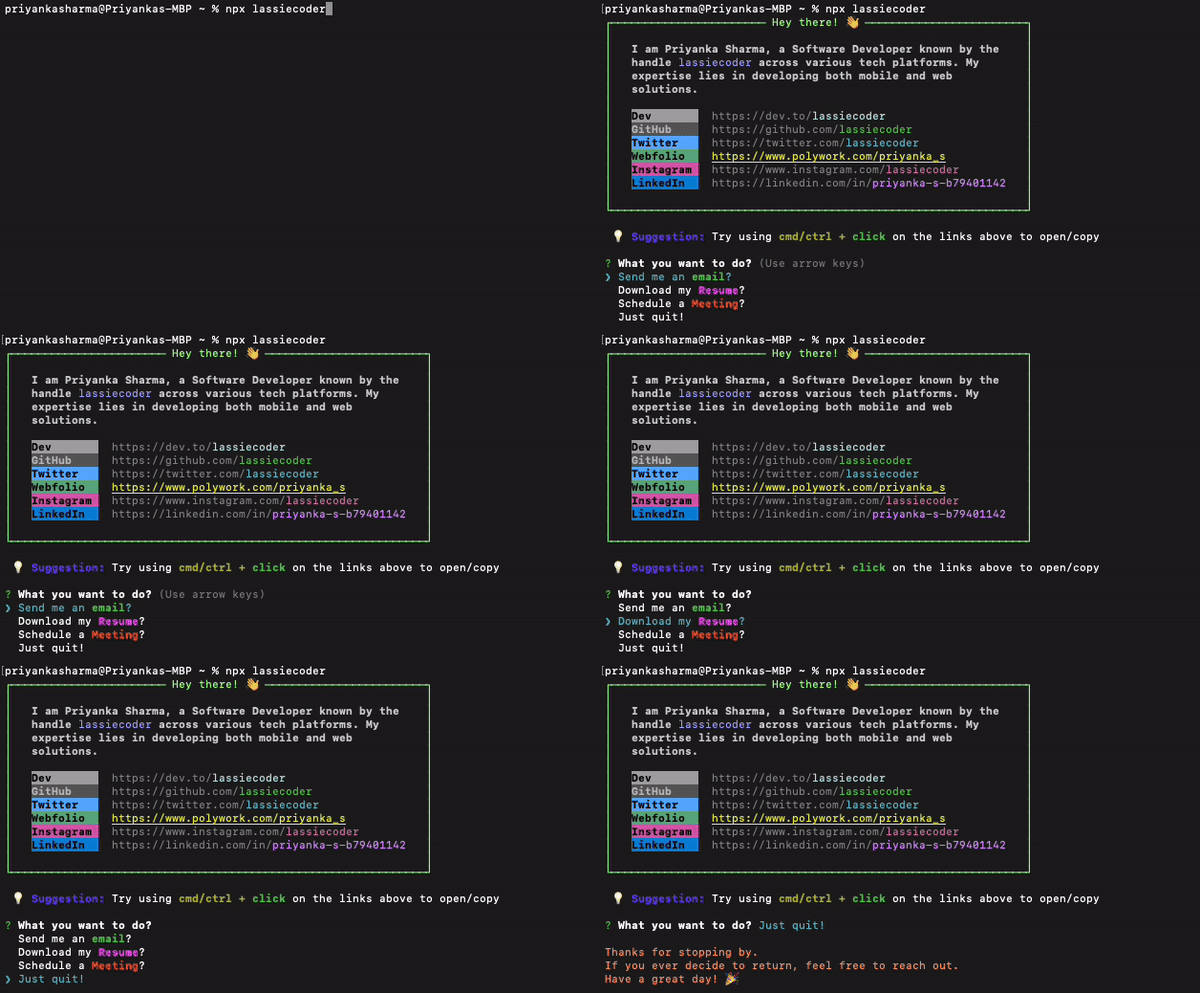
|
|
6
6
|
|
|
7
7
|
## Create your personalized NPX introduction card
|
|
8
8
|
|
|
@@ -88,4 +88,4 @@ npx username
|
|
|
88
88
|
|
|
89
89
|
Follow these steps to create your personalized NPX introduction command and share it with others!
|
|
90
90
|
|
|
91
|
-
***Happy coding! 🚀***
|
|
91
|
+
***Happy coding! 🚀***
|
package/bin/index.js
CHANGED
|
@@ -1,16 +1,17 @@
|
|
|
1
1
|
#!/usr/bin/env node
|
|
2
2
|
|
|
3
|
-
import fs from "fs";
|
|
3
|
+
import fs from "fs";
|
|
4
4
|
import os from "os";
|
|
5
|
-
import ora from
|
|
5
|
+
import ora from "ora";
|
|
6
6
|
import path from "path";
|
|
7
7
|
import open from "open";
|
|
8
8
|
import axios from "axios";
|
|
9
9
|
import boxen from "boxen";
|
|
10
10
|
import chalk from "chalk";
|
|
11
|
-
import dotenv from
|
|
11
|
+
import dotenv from "dotenv";
|
|
12
12
|
import inquirer from "inquirer";
|
|
13
|
-
import cliSpinners from
|
|
13
|
+
import cliSpinners from "cli-spinners";
|
|
14
|
+
import terminalLink from "terminal-link";
|
|
14
15
|
|
|
15
16
|
dotenv.config();
|
|
16
17
|
|
|
@@ -18,141 +19,268 @@ dotenv.config();
|
|
|
18
19
|
const prompt = inquirer.createPromptModule();
|
|
19
20
|
|
|
20
21
|
// Get the desktop directory path based on the operating system
|
|
21
|
-
const desktopDir = path.join(os.homedir(),
|
|
22
|
+
const desktopDir = path.join(os.homedir(), "Desktop");
|
|
22
23
|
|
|
23
|
-
// Define a suggestion
|
|
24
|
-
const suggestion = [
|
|
24
|
+
// Define a suggestion covering terminals that don't support clickable hyperlinks
|
|
25
|
+
const suggestion = [
|
|
26
|
+
`💡 ${chalk.blue.bold("Suggestion:")} The links above are clickable — if yours isn't, try ${chalk.yellow.bold("cmd/ctrl +")} ${chalk.green.bold("double click")} to open/copy`,
|
|
27
|
+
].join("\n");
|
|
28
|
+
|
|
29
|
+
// Make link text clickable via the terminal's native OSC 8 hyperlink support,
|
|
30
|
+
// falling back to the plain styled text (today's behavior) where unsupported.
|
|
31
|
+
const link = (text, url) =>
|
|
32
|
+
terminalLink(text, url, { fallback: (text) => text });
|
|
33
|
+
|
|
34
|
+
// Plain URLs, reused both for the clickable card links and the "Open a link" menu below
|
|
35
|
+
// (opening a link this way needs just Enter — no mouse click or modifier key required)
|
|
36
|
+
const urls = {
|
|
37
|
+
portfolio: "https://lassiecoder.com/",
|
|
38
|
+
x: "https://x.com/lassiecoder",
|
|
39
|
+
github: "https://github.com/lassiecoder",
|
|
40
|
+
medium: "https://medium.com/@lassiecoder",
|
|
41
|
+
youtube: "https://www.youtube.com/@lassiecoder",
|
|
42
|
+
instagram: "https://www.instagram.com/lassiecoder",
|
|
43
|
+
linkedin: "https://www.linkedin.com/in/lassiecoder",
|
|
44
|
+
book: "https://fable.co/book/x-9798231622320",
|
|
45
|
+
};
|
|
25
46
|
|
|
26
47
|
// Create a loader to indicate that the resume is being downloaded
|
|
27
48
|
const loader = ora({
|
|
28
|
-
|
|
29
|
-
|
|
30
|
-
})
|
|
49
|
+
text: " Downloading resume",
|
|
50
|
+
spinner: cliSpinners.aesthetic,
|
|
51
|
+
});
|
|
31
52
|
|
|
32
53
|
// Configuration options for the boxen module to customize the appearance of the box
|
|
33
54
|
const options = {
|
|
34
|
-
|
|
35
|
-
|
|
36
|
-
|
|
37
|
-
|
|
38
|
-
|
|
39
|
-
|
|
55
|
+
width: 64,
|
|
56
|
+
padding: 1,
|
|
57
|
+
borderStyle: "single",
|
|
58
|
+
title: "Hey there! 👋",
|
|
59
|
+
borderColor: "#66FF66",
|
|
60
|
+
titleAlignment: "center",
|
|
40
61
|
};
|
|
41
62
|
|
|
42
63
|
// Define an array of questions for user interaction, including options for various actions
|
|
43
64
|
const questions = [
|
|
44
|
-
|
|
45
|
-
|
|
46
|
-
|
|
47
|
-
|
|
48
|
-
|
|
49
|
-
|
|
50
|
-
|
|
51
|
-
|
|
52
|
-
|
|
53
|
-
|
|
54
|
-
|
|
55
|
-
|
|
56
|
-
|
|
57
|
-
|
|
58
|
-
|
|
59
|
-
|
|
60
|
-
|
|
61
|
-
|
|
62
|
-
|
|
63
|
-
|
|
64
|
-
|
|
65
|
-
|
|
66
|
-
|
|
67
|
-
|
|
68
|
-
|
|
69
|
-
|
|
70
|
-
|
|
71
|
-
|
|
72
|
-
|
|
73
|
-
|
|
74
|
-
|
|
75
|
-
|
|
76
|
-
|
|
77
|
-
|
|
78
|
-
|
|
79
|
-
|
|
80
|
-
|
|
81
|
-
|
|
82
|
-
|
|
83
|
-
|
|
84
|
-
|
|
85
|
-
|
|
86
|
-
|
|
87
|
-
|
|
88
|
-
|
|
89
|
-
|
|
90
|
-
|
|
91
|
-
|
|
92
|
-
|
|
93
|
-
|
|
94
|
-
|
|
95
|
-
|
|
96
|
-
|
|
97
|
-
}
|
|
98
|
-
|
|
99
|
-
|
|
100
|
-
|
|
101
|
-
|
|
102
|
-
|
|
103
|
-
|
|
104
|
-
|
|
105
|
-
|
|
106
|
-
|
|
65
|
+
{
|
|
66
|
+
type: "list",
|
|
67
|
+
name: "action",
|
|
68
|
+
message: "What you want to do?",
|
|
69
|
+
choices: [
|
|
70
|
+
{
|
|
71
|
+
name: `Send me an ${chalk.green.bold("email")}?`,
|
|
72
|
+
value: () => {
|
|
73
|
+
setTimeout(() => {
|
|
74
|
+
open("mailto:lassiecoder@gmail.com");
|
|
75
|
+
}, 2000);
|
|
76
|
+
console.log(
|
|
77
|
+
`\n${chalk.green.bold("Done")}, your email client should ${chalk.yellow.bold("open soon")}. \nI'll keep an eye out for your message! ${chalk.bold("👀")}\n`,
|
|
78
|
+
);
|
|
79
|
+
},
|
|
80
|
+
},
|
|
81
|
+
{
|
|
82
|
+
name: `Download my ${chalk.magentaBright.bold("Resume")}?`,
|
|
83
|
+
value: () => {
|
|
84
|
+
const resumePath = path.join(desktopDir, "lassiecoder-resume.pdf");
|
|
85
|
+
loader.start();
|
|
86
|
+
axios({
|
|
87
|
+
method: "get",
|
|
88
|
+
url: "https://drive.usercontent.google.com/download?id=1IM5U7HsQxKCYihSvW5QY5JBM0b0l1pmy&export=download&confirm=t",
|
|
89
|
+
responseType: "stream",
|
|
90
|
+
})
|
|
91
|
+
.then(function (response) {
|
|
92
|
+
// Google Drive can return a 200 HTML interstitial (e.g. quota/virus-scan
|
|
93
|
+
// notice) instead of the file, so guard on content-type before saving.
|
|
94
|
+
const contentType = response.headers["content-type"] || "";
|
|
95
|
+
if (
|
|
96
|
+
!contentType.includes("pdf") &&
|
|
97
|
+
!contentType.includes("octet-stream")
|
|
98
|
+
) {
|
|
99
|
+
throw new Error(
|
|
100
|
+
`Unexpected response type (${contentType || "unknown"}), download aborted`,
|
|
101
|
+
);
|
|
102
|
+
}
|
|
103
|
+
|
|
104
|
+
const writer = fs.createWriteStream(resumePath);
|
|
105
|
+
|
|
106
|
+
response.data.pipe(writer);
|
|
107
|
+
|
|
108
|
+
writer.on("finish", () => {
|
|
109
|
+
console.log(
|
|
110
|
+
"\n\nResume downloaded successfully to desktop 📂 ✅\n",
|
|
111
|
+
);
|
|
112
|
+
loader.stop();
|
|
113
|
+
setTimeout(() => {
|
|
114
|
+
open(resumePath);
|
|
115
|
+
}, 2000);
|
|
116
|
+
});
|
|
117
|
+
writer.on("error", (err) => {
|
|
118
|
+
console.error(`\nError saving resume: ${err.message}`);
|
|
119
|
+
loader.stop();
|
|
120
|
+
fs.unlink(resumePath, () => {});
|
|
121
|
+
});
|
|
122
|
+
})
|
|
123
|
+
.catch(function (error) {
|
|
124
|
+
const status = error.response
|
|
125
|
+
? ` (HTTP ${error.response.status})`
|
|
126
|
+
: "";
|
|
127
|
+
console.error(
|
|
128
|
+
`\nError downloading resume${status}: ${error.message}`,
|
|
129
|
+
);
|
|
130
|
+
loader.stop();
|
|
131
|
+
fs.unlink(resumePath, () => {});
|
|
132
|
+
});
|
|
133
|
+
},
|
|
134
|
+
},
|
|
135
|
+
{
|
|
136
|
+
name: `Schedule a ${chalk.yellowBright.bold("Meeting")}?`,
|
|
137
|
+
value: () => {
|
|
138
|
+
setTimeout(() => {
|
|
139
|
+
open("https://calendly.com/hirepriyankasharma/30min");
|
|
140
|
+
}, 2000);
|
|
141
|
+
console.log(
|
|
142
|
+
chalk.hex("#4CAF50")(
|
|
143
|
+
`\nWhen scheduling a meeting, please include the ${chalk.yellow("subject")} of our discussion. \nLooking forward to meeting you at the scheduled time! 🗓️\n \n`,
|
|
144
|
+
),
|
|
145
|
+
);
|
|
146
|
+
},
|
|
147
|
+
},
|
|
148
|
+
// {
|
|
149
|
+
// name: `Open a ${chalk.cyanBright.bold("link")} directly?`,
|
|
150
|
+
// value: async () => {
|
|
151
|
+
// const { link: chosenUrl } = await prompt([
|
|
152
|
+
// {
|
|
153
|
+
// type: "list",
|
|
154
|
+
// name: "link",
|
|
155
|
+
// message: "Which link would you like to open?",
|
|
156
|
+
// choices: [
|
|
157
|
+
// { name: "Portfolio", value: urls.portfolio },
|
|
158
|
+
// { name: "X", value: urls.x },
|
|
159
|
+
// { name: "GitHub", value: urls.github },
|
|
160
|
+
// { name: "Medium", value: urls.medium },
|
|
161
|
+
// { name: "YouTube", value: urls.youtube },
|
|
162
|
+
// { name: "Instagram", value: urls.instagram },
|
|
163
|
+
// { name: "LinkedIn", value: urls.linkedin },
|
|
164
|
+
// ],
|
|
165
|
+
// },
|
|
166
|
+
// ]);
|
|
167
|
+
// open(chosenUrl);
|
|
168
|
+
// console.log(
|
|
169
|
+
// `\n${chalk.green.bold("Done")}, opening it in your default browser now. 🔗\n`,
|
|
170
|
+
// );
|
|
171
|
+
// },
|
|
172
|
+
// },
|
|
173
|
+
{
|
|
174
|
+
name: "Just quit!",
|
|
175
|
+
value: () => {
|
|
176
|
+
console.log(
|
|
177
|
+
chalk.hex("#FF5733")(
|
|
178
|
+
"\nThanks for stopping by. \nIf you ever decide to return, feel free to reach out. \nHave a great day! 🎉\n",
|
|
179
|
+
),
|
|
180
|
+
);
|
|
181
|
+
},
|
|
182
|
+
},
|
|
183
|
+
],
|
|
184
|
+
},
|
|
107
185
|
];
|
|
108
186
|
|
|
109
187
|
// Define color-coded labels and their corresponding descriptions for various tech platforms
|
|
110
188
|
const data = {
|
|
111
|
-
|
|
112
|
-
|
|
113
|
-
|
|
114
|
-
|
|
115
|
-
|
|
116
|
-
|
|
117
|
-
|
|
118
|
-
|
|
119
|
-
|
|
120
|
-
|
|
121
|
-
|
|
122
|
-
|
|
123
|
-
|
|
124
|
-
|
|
125
|
-
|
|
126
|
-
|
|
127
|
-
|
|
128
|
-
|
|
189
|
+
// LABELS
|
|
190
|
+
labelPortfolio: chalk.bgHex("#4CAF50").black.bold("Portfolio "),
|
|
191
|
+
labelX: chalk.bgHex("#000000").white.bold("X "),
|
|
192
|
+
labelGitHub: chalk.bgHex("#24292e").white.bold("GitHub "),
|
|
193
|
+
labelMedium: chalk.bgHex("#02B875").black.bold("Medium "),
|
|
194
|
+
labelYouTube: chalk.bgHex("#FF0000").white.bold("YouTube "),
|
|
195
|
+
labelInstagram: chalk.bgHex("#C13584").black.bold("Instagram "),
|
|
196
|
+
labelLinkedIn: chalk.bgHex("#0b66c2").black.bold("LinkedIn "),
|
|
197
|
+
labelBook: chalk.bgHex("#FFB300").black.bold("e-Book "),
|
|
198
|
+
|
|
199
|
+
// LABEL DESCRIPTION
|
|
200
|
+
portfolio: link(chalk.yellowBright.underline(urls.portfolio), urls.portfolio),
|
|
201
|
+
x: link(
|
|
202
|
+
chalk.gray("https://x.com/") + chalk.whiteBright("lassiecoder"),
|
|
203
|
+
urls.x,
|
|
204
|
+
),
|
|
205
|
+
github: link(
|
|
206
|
+
chalk.gray("https://github.com/") + chalk.green("lassiecoder"),
|
|
207
|
+
urls.github,
|
|
208
|
+
),
|
|
209
|
+
medium: link(
|
|
210
|
+
chalk.gray("https://medium.com/@") + chalk.hex("#02B875")("lassiecoder"),
|
|
211
|
+
urls.medium,
|
|
212
|
+
),
|
|
213
|
+
youtube: link(
|
|
214
|
+
chalk.gray("https://www.youtube.com/@") + chalk.red("lassiecoder"),
|
|
215
|
+
urls.youtube,
|
|
216
|
+
),
|
|
217
|
+
instagram: link(
|
|
218
|
+
chalk.gray("https://www.instagram.com/") +
|
|
219
|
+
chalk.hex("#AB1E6B")("lassiecoder"),
|
|
220
|
+
urls.instagram,
|
|
221
|
+
),
|
|
222
|
+
linkedin: link(
|
|
223
|
+
chalk.gray("https://www.linkedin.com/in/") +
|
|
224
|
+
chalk.blueBright("lassiecoder"),
|
|
225
|
+
urls.linkedin,
|
|
226
|
+
),
|
|
227
|
+
book: link(chalk.yellowBright.underline(urls.book), urls.book),
|
|
228
|
+
intro:
|
|
229
|
+
chalk.white.bold("I'm Priyanka Sharma (") +
|
|
230
|
+
chalk.hex("#7B68EE")("lassiecoder") +
|
|
231
|
+
chalk.white.bold(
|
|
232
|
+
") — 6 years as a Software Developer crafting mobile & web experiences. I also write about AI + dev, and I'm the author of ",
|
|
233
|
+
) +
|
|
234
|
+
chalk.italic.yellowBright('"AI + Gemini for Web Developers"') +
|
|
235
|
+
chalk.white.bold("."),
|
|
129
236
|
};
|
|
130
237
|
|
|
131
238
|
// Concatenate data strings to display in the console output
|
|
132
239
|
const newline = "\n";
|
|
133
|
-
const working = `${data.work}`;
|
|
134
240
|
const introduction = `${data.intro}`;
|
|
135
|
-
const
|
|
241
|
+
const portfolio = `${data.labelPortfolio} ${data.portfolio}`;
|
|
242
|
+
const x = `${data.labelX} ${data.x}`;
|
|
136
243
|
const github = `${data.labelGitHub} ${data.github}`;
|
|
137
|
-
const
|
|
244
|
+
const medium = `${data.labelMedium} ${data.medium}`;
|
|
245
|
+
const youtube = `${data.labelYouTube} ${data.youtube}`;
|
|
138
246
|
const insta = `${data.labelInstagram} ${data.instagram}`;
|
|
139
|
-
const twitter = `${data.labelTwitter} ${data.twitter}`;
|
|
140
247
|
const linkedin = `${data.labelLinkedIn} ${data.linkedin}`;
|
|
248
|
+
const book = `${data.labelBook} ${data.book}`;
|
|
141
249
|
|
|
142
250
|
// Concatenating introduction, tech platform links, and online portfolio link
|
|
143
251
|
const output =
|
|
144
|
-
|
|
145
|
-
|
|
146
|
-
|
|
147
|
-
|
|
148
|
-
|
|
149
|
-
|
|
150
|
-
|
|
151
|
-
|
|
252
|
+
introduction +
|
|
253
|
+
newline +
|
|
254
|
+
newline +
|
|
255
|
+
portfolio +
|
|
256
|
+
newline +
|
|
257
|
+
x +
|
|
258
|
+
newline +
|
|
259
|
+
github +
|
|
260
|
+
newline +
|
|
261
|
+
medium +
|
|
262
|
+
newline +
|
|
263
|
+
youtube +
|
|
264
|
+
newline +
|
|
265
|
+
insta +
|
|
266
|
+
newline +
|
|
267
|
+
linkedin +
|
|
268
|
+
newline +
|
|
269
|
+
book;
|
|
270
|
+
|
|
271
|
+
// The "work with me" form link is too long to fit inside the boxed layout,
|
|
272
|
+
// so it's shown as its own call-to-action line beneath the box.
|
|
273
|
+
const formUrl =
|
|
274
|
+
"https://docs.google.com/forms/d/e/1FAIpQLSchB_qrGNgp8vs8l_EYZR84i_kGHyET0fIgu55idiX43kNmEg/viewform";
|
|
275
|
+
const workWithMe = [
|
|
276
|
+
`🤝 ${chalk.bold.hex("#FF6F00")("Want to work together?")} Fill out this form: ${link(chalk.cyan.underline(formUrl), formUrl)}`,
|
|
277
|
+
].join("\n");
|
|
152
278
|
|
|
153
279
|
// Display the formatted output in a box and prompt the user with the defined questions then execute the action based on the user's choice
|
|
154
280
|
console.log(chalk.white(boxen(output, options)));
|
|
155
281
|
|
|
156
|
-
console.log(`\n`,
|
|
282
|
+
console.log(`\n`, workWithMe, `\n`);
|
|
283
|
+
|
|
284
|
+
console.log(suggestion, `\n`);
|
|
157
285
|
|
|
158
|
-
prompt(questions).then(answer => answer.action());
|
|
286
|
+
prompt(questions).then((answer) => answer.action());
|
package/package.json
CHANGED
|
@@ -1,6 +1,6 @@
|
|
|
1
1
|
{
|
|
2
2
|
"name": "lassiecoder",
|
|
3
|
-
"version": "
|
|
3
|
+
"version": "2.0.0",
|
|
4
4
|
"description": "Priyanka's introduction on terminal.",
|
|
5
5
|
"exports": "./index.js",
|
|
6
6
|
"bin": {
|
|
@@ -42,6 +42,7 @@
|
|
|
42
42
|
"open": "^7.0.4",
|
|
43
43
|
"ora": "^8.0.1",
|
|
44
44
|
"os": "^0.1.2",
|
|
45
|
-
"path": "^0.12.7"
|
|
45
|
+
"path": "^0.12.7",
|
|
46
|
+
"terminal-link": "^5.0.0"
|
|
46
47
|
}
|
|
47
48
|
}
|