lassiecoder 1.0.0 → 1.0.1
This diff represents the content of publicly available package versions that have been released to one of the supported registries. The information contained in this diff is provided for informational purposes only and reflects changes between package versions as they appear in their respective public registries.
- package/LICENSE +21 -0
- package/README.md +93 -0
- package/bin/index.js +100 -4
- package/package.json +14 -4
package/LICENSE
ADDED
|
@@ -0,0 +1,21 @@
|
|
|
1
|
+
MIT License
|
|
2
|
+
|
|
3
|
+
Copyright (c) 2024 Priyanka Sharma
|
|
4
|
+
|
|
5
|
+
Permission is hereby granted, free of charge, to any person obtaining a copy
|
|
6
|
+
of this software and associated documentation files (the "Software"), to deal
|
|
7
|
+
in the Software without restriction, including without limitation the rights
|
|
8
|
+
to use, copy, modify, merge, publish, distribute, sublicense, and/or sell
|
|
9
|
+
copies of the Software, and to permit persons to whom the Software is
|
|
10
|
+
furnished to do so, subject to the following conditions:
|
|
11
|
+
|
|
12
|
+
The above copyright notice and this permission notice shall be included in all
|
|
13
|
+
copies or substantial portions of the Software.
|
|
14
|
+
|
|
15
|
+
THE SOFTWARE IS PROVIDED "AS IS", WITHOUT WARRANTY OF ANY KIND, EXPRESS OR
|
|
16
|
+
IMPLIED, INCLUDING BUT NOT LIMITED TO THE WARRANTIES OF MERCHANTABILITY,
|
|
17
|
+
FITNESS FOR A PARTICULAR PURPOSE AND NONINFRINGEMENT. IN NO EVENT SHALL THE
|
|
18
|
+
AUTHORS OR COPYRIGHT HOLDERS BE LIABLE FOR ANY CLAIM, DAMAGES OR OTHER
|
|
19
|
+
LIABILITY, WHETHER IN AN ACTION OF CONTRACT, TORT OR OTHERWISE, ARISING FROM,
|
|
20
|
+
OUT OF OR IN CONNECTION WITH THE SOFTWARE OR THE USE OR OTHER DEALINGS IN THE
|
|
21
|
+
SOFTWARE.
|
package/README.md
ADDED
|
@@ -0,0 +1,93 @@
|
|
|
1
|
+
# npx-lassiecoder
|
|
2
|
+
|
|
3
|
+
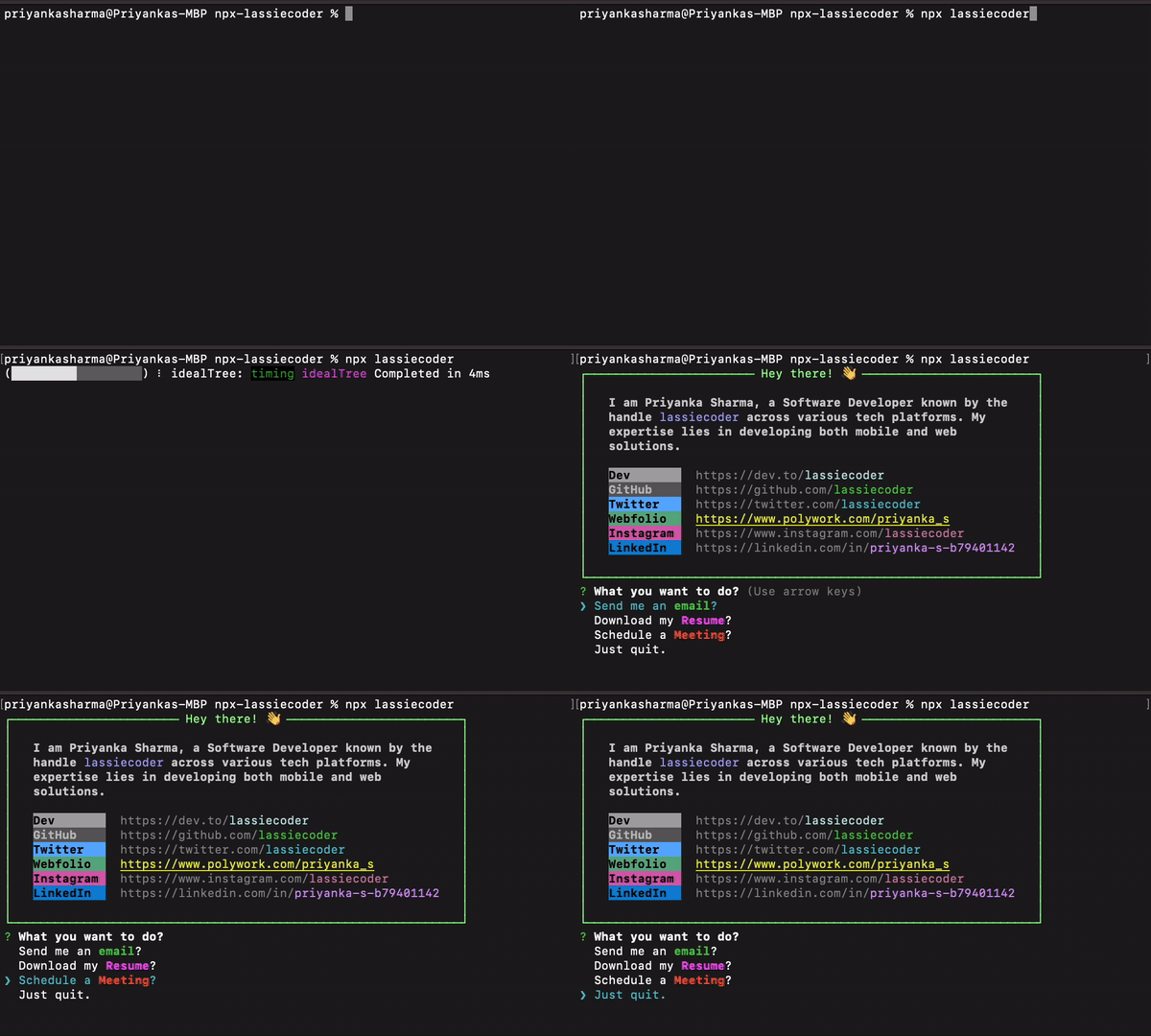
## Preview
|
|
4
|
+
|
|
5
|
+
|
|
6
|
+
|
|
7
|
+
## Create your personalized NPX introduction card
|
|
8
|
+
|
|
9
|
+
### Step 1: Select a Unique Package Name
|
|
10
|
+
|
|
11
|
+
Choose a distinctive name for your package, as it will be the identifier for invoking your introduction command using `npx`.
|
|
12
|
+
|
|
13
|
+
### Step 2: Establish a New Directory
|
|
14
|
+
|
|
15
|
+
Create a fresh directory for your package, naming it after the chosen package name.
|
|
16
|
+
|
|
17
|
+
```bash
|
|
18
|
+
mkdir npx-username
|
|
19
|
+
cd npx-username
|
|
20
|
+
```
|
|
21
|
+
|
|
22
|
+
### Step 3: Initialize Your Package
|
|
23
|
+
|
|
24
|
+
Initialize your project as a Node.js package using the command:
|
|
25
|
+
|
|
26
|
+
```bash
|
|
27
|
+
npm init -y
|
|
28
|
+
```
|
|
29
|
+
|
|
30
|
+
### Step 4: Develop an Executable Script
|
|
31
|
+
|
|
32
|
+
Within your project directory, create a JavaScript file named `index.js` and store it in a folder named `bin`. This file will function as the executable script for your npx command.
|
|
33
|
+
|
|
34
|
+
Ensure to specify the `bin` field in `package.json`:
|
|
35
|
+
|
|
36
|
+
```json
|
|
37
|
+
"bin": {
|
|
38
|
+
"username": "./bin/index.js"
|
|
39
|
+
}
|
|
40
|
+
```
|
|
41
|
+
|
|
42
|
+
**Ensuring Script Execution Capability:**
|
|
43
|
+
|
|
44
|
+
To enable script execution, follow these steps:
|
|
45
|
+
|
|
46
|
+
For Mac/Linux:
|
|
47
|
+
|
|
48
|
+
```bash
|
|
49
|
+
chmod +x bin/index.js
|
|
50
|
+
```
|
|
51
|
+
|
|
52
|
+
For Windows:
|
|
53
|
+
|
|
54
|
+
```bash
|
|
55
|
+
git update-index --chmod=+x bin/index.js
|
|
56
|
+
```
|
|
57
|
+
|
|
58
|
+
### Step 5: Add your script to execute and display in terminal
|
|
59
|
+
|
|
60
|
+
Execute your script with the following command:
|
|
61
|
+
|
|
62
|
+
```bash
|
|
63
|
+
node bin/index.js
|
|
64
|
+
```
|
|
65
|
+
|
|
66
|
+
### Step 6: Publish the package
|
|
67
|
+
|
|
68
|
+
Once your script runs successfully, publish the package:
|
|
69
|
+
|
|
70
|
+
**1. Log in to npm:**
|
|
71
|
+
|
|
72
|
+
```bash
|
|
73
|
+
npm adduser
|
|
74
|
+
```
|
|
75
|
+
|
|
76
|
+
**2. After logging in, return to the terminal and run:**
|
|
77
|
+
```bash
|
|
78
|
+
npm publish
|
|
79
|
+
```
|
|
80
|
+
|
|
81
|
+
### Step 7: Execute Your NPX Command
|
|
82
|
+
|
|
83
|
+
Once the package is published, run your npx command:
|
|
84
|
+
|
|
85
|
+
```bash
|
|
86
|
+
npx username
|
|
87
|
+
```
|
|
88
|
+
|
|
89
|
+
Replace `username` with the name you selected for your package.
|
|
90
|
+
|
|
91
|
+
Follow these steps to create your personalized NPX introduction command and share it with others!
|
|
92
|
+
|
|
93
|
+
***Happy coding! 🚀***
|
package/bin/index.js
CHANGED
|
@@ -1,8 +1,32 @@
|
|
|
1
1
|
#!/usr/bin/env node
|
|
2
2
|
|
|
3
|
-
import
|
|
3
|
+
import fs from "fs";
|
|
4
|
+
import os from "os";
|
|
5
|
+
import ora from 'ora';
|
|
6
|
+
import path from "path";
|
|
7
|
+
import open from "open";
|
|
8
|
+
import axios from "axios";
|
|
4
9
|
import boxen from "boxen";
|
|
10
|
+
import chalk from "chalk";
|
|
11
|
+
import inquirer from "inquirer";
|
|
12
|
+
import cliSpinners from 'cli-spinners';
|
|
13
|
+
|
|
14
|
+
// Create a prompt module for interacting with the user via the command line interface
|
|
15
|
+
const prompt = inquirer.createPromptModule();
|
|
16
|
+
|
|
17
|
+
// Get the desktop directory path based on the operating system
|
|
18
|
+
const desktopDir = path.join(os.homedir(), 'Desktop');
|
|
19
|
+
|
|
20
|
+
// Replace this URL with your Google Drive shareable link
|
|
21
|
+
const googleDriveUrl = "https://drive.google.com/uc?id=1TEapFw5YptU36UMnHLfHAxXO1ls3Zp-e";
|
|
5
22
|
|
|
23
|
+
// Create a loader to indicate that the resume is being downloaded
|
|
24
|
+
const loader = ora({
|
|
25
|
+
text: ' Downloading resume',
|
|
26
|
+
spinner: cliSpinners.aesthetic,
|
|
27
|
+
})
|
|
28
|
+
|
|
29
|
+
// Configuration options for the boxen module to customize the appearance of the box
|
|
6
30
|
const options = {
|
|
7
31
|
width: 64,
|
|
8
32
|
padding: 1,
|
|
@@ -12,6 +36,74 @@ const options = {
|
|
|
12
36
|
titleAlignment: "center",
|
|
13
37
|
};
|
|
14
38
|
|
|
39
|
+
// Define an array of questions for user interaction, including options for various actions
|
|
40
|
+
const questions = [
|
|
41
|
+
{
|
|
42
|
+
type: "list",
|
|
43
|
+
name: "action",
|
|
44
|
+
message: "What you want to do?",
|
|
45
|
+
choices: [
|
|
46
|
+
{
|
|
47
|
+
name: `Send me an ${chalk.green.bold("email")}?`,
|
|
48
|
+
value: () => {
|
|
49
|
+
setTimeout(() => {
|
|
50
|
+
open("mailto:sharmapriyanka84510@gmail.com");
|
|
51
|
+
}, 2000);
|
|
52
|
+
console.log(`\n${chalk.green.bold("Done")}, your email client should ${chalk.yellow.bold("open soon")}. \nI'll keep an eye out for your message! ${chalk.bold("👀")}\n`);
|
|
53
|
+
}
|
|
54
|
+
},
|
|
55
|
+
{
|
|
56
|
+
name: `Download my ${chalk.magentaBright.bold("Resume")}?`,
|
|
57
|
+
value: () => {
|
|
58
|
+
loader.start();
|
|
59
|
+
axios({
|
|
60
|
+
method: 'get',
|
|
61
|
+
url: googleDriveUrl,
|
|
62
|
+
responseType: 'stream'
|
|
63
|
+
})
|
|
64
|
+
.then(function (response) {
|
|
65
|
+
const writer = fs.createWriteStream(path.join(desktopDir, 'lassiecoder-resume.pdf'));
|
|
66
|
+
|
|
67
|
+
response.data.pipe(writer);
|
|
68
|
+
|
|
69
|
+
writer.on('finish', () => {
|
|
70
|
+
console.log('\n\nResume downloaded successfully to desktop 📂 ✅\n\n');
|
|
71
|
+
loader.stop();
|
|
72
|
+
setTimeout(() => {
|
|
73
|
+
open(path.join(desktopDir, 'lassiecoder-resume.pdf'));
|
|
74
|
+
}, 2000);
|
|
75
|
+
});
|
|
76
|
+
writer.on('error', (err) => {
|
|
77
|
+
console.error('Error downloading resume:', err);
|
|
78
|
+
loader.stop();
|
|
79
|
+
});
|
|
80
|
+
})
|
|
81
|
+
.catch(function (error) {
|
|
82
|
+
console.error('Error downloading resume:', error);
|
|
83
|
+
loader.stop();
|
|
84
|
+
});
|
|
85
|
+
}
|
|
86
|
+
},
|
|
87
|
+
{
|
|
88
|
+
name: `Schedule a ${chalk.redBright.bold("Meeting")}?`,
|
|
89
|
+
value: () => {
|
|
90
|
+
setTimeout(() => {
|
|
91
|
+
open('https://calendly.com/lassiecoder/30min')
|
|
92
|
+
}, 2000);
|
|
93
|
+
console.log(chalk.hex("#4CAF50")(`\nI'm available on ${chalk.yellow("Fridays from 6:00 PM to 6:15 PM")} for a connection. When scheduling a meeting, please include the ${chalk.yellow("subject")} of our discussion. \nLooking forward to meeting you at the scheduled time! 🗓️\n \n`));
|
|
94
|
+
}
|
|
95
|
+
},
|
|
96
|
+
{
|
|
97
|
+
name: "Just quit!",
|
|
98
|
+
value: () => {
|
|
99
|
+
console.log(chalk.hex("#FF5733")("\nThanks for stopping by. \nIf you ever decide to return, feel free to reach out. \nHave a great day! 🎉\n"));
|
|
100
|
+
}
|
|
101
|
+
}
|
|
102
|
+
]
|
|
103
|
+
}
|
|
104
|
+
];
|
|
105
|
+
|
|
106
|
+
// Define color-coded labels and their corresponding descriptions for various tech platforms
|
|
15
107
|
const data = {
|
|
16
108
|
// LABELS
|
|
17
109
|
labelWork: chalk.bgHex("#008080").black.bold("Work "),
|
|
@@ -33,6 +125,7 @@ const data = {
|
|
|
33
125
|
intro: chalk.white.bold("I am Priyanka Sharma, a Software Developer known by the handle ") + chalk.hex("#7B68EE")("lassiecoder") + chalk.white.bold(" across various tech platforms. My expertise lies in developing both mobile and web solutions."),
|
|
34
126
|
};
|
|
35
127
|
|
|
128
|
+
// Concatenate data strings to display in the console output
|
|
36
129
|
const newline = "\n";
|
|
37
130
|
const working = `${data.work}`;
|
|
38
131
|
const introduction = `${data.intro}`;
|
|
@@ -43,10 +136,10 @@ const insta = `${data.labelInstagram} ${data.instagram}`;
|
|
|
43
136
|
const twitter = `${data.labelTwitter} ${data.twitter}`;
|
|
44
137
|
const linkedin = `${data.labelLinkedIn} ${data.linkedin}`;
|
|
45
138
|
|
|
46
|
-
|
|
139
|
+
// Concatenating introduction, tech platform links, and online portfolio link
|
|
47
140
|
const output =
|
|
48
141
|
introduction + newline + newline +
|
|
49
|
-
working + newline + newline +
|
|
142
|
+
// working + newline + newline +
|
|
50
143
|
devto + newline +
|
|
51
144
|
github + newline +
|
|
52
145
|
twitter + newline +
|
|
@@ -54,4 +147,7 @@ const output =
|
|
|
54
147
|
insta + newline +
|
|
55
148
|
linkedin;
|
|
56
149
|
|
|
57
|
-
|
|
150
|
+
// Display the formatted output in a box and prompt the user with the defined questions then execute the action based on the user's choice
|
|
151
|
+
console.log(chalk.white(boxen(output, options)));
|
|
152
|
+
|
|
153
|
+
prompt(questions).then(answer => answer.action());
|
package/package.json
CHANGED
|
@@ -1,10 +1,10 @@
|
|
|
1
1
|
{
|
|
2
2
|
"name": "lassiecoder",
|
|
3
|
-
"version": "1.0.
|
|
3
|
+
"version": "1.0.1",
|
|
4
4
|
"description": "Priyanka's introduction on terminal.",
|
|
5
5
|
"exports": "./index.js",
|
|
6
6
|
"bin": {
|
|
7
|
-
"
|
|
7
|
+
"lassiecoderr": "./bin/index.js"
|
|
8
8
|
},
|
|
9
9
|
"type": "module",
|
|
10
10
|
"scripts": {
|
|
@@ -20,8 +20,9 @@
|
|
|
20
20
|
"business",
|
|
21
21
|
"npx-card",
|
|
22
22
|
"npm card",
|
|
23
|
-
"priyankash",
|
|
24
23
|
"lassiecoder",
|
|
24
|
+
"priyankasharma",
|
|
25
|
+
"npx lassiecoder",
|
|
25
26
|
"priyanka-sharma",
|
|
26
27
|
"npx business card"
|
|
27
28
|
],
|
|
@@ -31,7 +32,16 @@
|
|
|
31
32
|
"bin/index.js"
|
|
32
33
|
],
|
|
33
34
|
"dependencies": {
|
|
35
|
+
"axios": "^1.6.7",
|
|
34
36
|
"boxen": "^7.1.0",
|
|
35
|
-
"chalk": "^5.3.0"
|
|
37
|
+
"chalk": "^5.3.0",
|
|
38
|
+
"cli-spinners": "^2.9.2",
|
|
39
|
+
"fs": "^0.0.1-security",
|
|
40
|
+
"inquirer": "^9.2.15",
|
|
41
|
+
"node-fetch": "^3.3.2",
|
|
42
|
+
"open": "^10.1.0",
|
|
43
|
+
"ora": "^8.0.1",
|
|
44
|
+
"os": "^0.1.2",
|
|
45
|
+
"path": "^0.12.7"
|
|
36
46
|
}
|
|
37
47
|
}
|