langflower 0.1.3 → 0.2.0
This diff represents the content of publicly available package versions that have been released to one of the supported registries. The information contained in this diff is provided for informational purposes only and reflects changes between package versions as they appear in their respective public registries.
- package/README.md +567 -129
- package/dist/{chunk-WV2YWHOC.js → chunk-26UB55E5.js} +44 -4
- package/dist/{chunk-AO33IM2J.js → chunk-2LE3E2QP.js} +24 -23
- package/dist/{chunk-NIRPHJLO.js → chunk-3Z7Q6SQ5.js} +501 -242
- package/dist/{chunk-CVTPGIZE.js → chunk-RZUZX6PW.js} +2 -4
- package/dist/index.js +43935 -44199
- package/docs/public/extending.md +21 -3
- package/docs/public/getting-started.md +2 -1
- package/docs/public/how-it-works.md +2 -2
- package/docs/public/launcher.md +13 -12
- package/package.json +1 -1
- package/ui-dist/{chunk-EZTB7Q33.js → chunk-HEF6F5HN.js} +3 -3
- package/ui-dist/{chunk-BKIP5WRK.js → chunk-IASSR2ON.js} +1 -1
- package/ui-dist/index.html +2 -2
- package/ui-dist/main-NBS6BFBP.js +323 -0
- package/ui-dist/styles-M2URERWI.css +1 -0
- package/vendor/node-sdk/dist/node-factory/define-llm-node/default-llm-ports.js +1 -1
- package/vendor/node-sdk/dist/node-factory/define-llm-node/define-llm-node.d.ts +9 -21
- package/vendor/node-sdk/dist/node-factory/define-llm-node/define-llm-node.js +9 -3
- package/vendor/node-sdk/dist/node-factory/define-llm-node/recovery-notice.d.ts +0 -1
- package/vendor/node-sdk/dist/node-factory/define-llm-node/recovery-notice.js +0 -9
- package/vendor/node-sdk/dist/node-factory/define-node/define-node.d.ts +5 -1
- package/vendor/node-sdk/dist/node-factory/define-node/define-node.js +6 -3
- package/vendor/node-sdk/dist/node-factory/define-reactive-node/capabilities.d.ts +128 -0
- package/vendor/node-sdk/dist/node-factory/define-reactive-node/capabilities.js +25 -0
- package/vendor/node-sdk/dist/node-factory/define-reactive-node/define-reactive-node.d.ts +29 -17
- package/vendor/node-sdk/dist/node-factory/define-reactive-node/define-reactive-node.js +14 -6
- package/vendor/node-sdk/dist/node-factory/define-reactive-node/io-helpers.d.ts +19 -5
- package/vendor/node-sdk/dist/node-factory/define-reactive-node/io-helpers.js +4 -3
- package/vendor/node-sdk/dist/node-factory/define-reactive-node/port-meta.d.ts +6 -1
- package/vendor/node-sdk/dist/node-factory/define-reactive-node/types.d.ts +40 -22
- package/vendor/node-sdk/dist/node-factory/define-reactive-node/types.js +2 -0
- package/vendor/node-sdk/dist/node-factory/define-reactive-node/ui-schema-inference.d.ts +1 -1
- package/vendor/node-sdk/dist/node-factory/define-tool-registrations/define-tool-registrations.d.ts +13 -25
- package/vendor/node-sdk/dist/node-factory/define-tool-registrations/define-tool-registrations.js +9 -8
- package/vendor/node-sdk/dist/testing/create-node-harness.d.ts +9 -2
- package/vendor/node-sdk/dist/testing/create-node-harness.js +6 -2
- package/vendor/node-sdk/package.json +5 -0
- package/vendor/runtime/dist/bypass-ports.d.ts +0 -6
- package/vendor/runtime/dist/bypass-ports.js +0 -7
- package/vendor/runtime/dist/runtime-editor.d.ts +1 -1
- package/vendor/runtime/dist/runtime-editor.js +1 -1
- package/vendor/runtime/dist/runtime-helpers.d.ts +0 -1
- package/vendor/runtime/dist/runtime-helpers.js +0 -33
- package/vendor/runtime/dist/runtime-runner.d.ts +4 -0
- package/vendor/runtime/dist/runtime-runner.js +60 -36
- package/vendor/runtime/dist/runtime.d.ts +0 -1
- package/vendor/runtime/dist/runtime.js +0 -1
- package/vendor/runtime/dist/types.d.ts +27 -17
- package/vendor/server/skeleton/instructions.md +6 -0
- package/vendor/server/skeleton/nodes/my-nodes/README.md +19 -1
- package/vendor/server/skeleton/schemas/langflower-config.schema.json +1 -1
- package/vendor/server/skeleton/skills/langflower-helper/SKILL.md +35 -12
- package/vendor/server/skeleton/skills/langflower-helper/layout.md +6 -4
- package/vendor/server/skeleton/skills/langflower-node-writer/SKILL.md +47 -3
- package/vendor/server/skeleton/skills/langflower-workflow-writer/SKILL.md +29 -17
- package/vendor/server/skeleton/workflows/advanced-coder.json +24 -2
- package/vendor/server/skeleton/workflows/kb-create.json +24 -16
- package/vendor/server/skeleton/workflows/kb-manual-search.json +1 -1
- package/vendor/server/skeleton/workflows/kb-navigate.json +24 -2
- package/vendor/server/skeleton/workflows/kb-rag.json +1 -0
- package/vendor/server/skeleton/workflows/simple-coder.json +3 -0
- package/vendor/server/skeleton/workflows/starter.json +2 -0
- package/ui-dist/main-JJURZFKA.js +0 -318
- package/ui-dist/styles-VA3HMZK7.css +0 -1
- package/vendor/node-sdk/dist/node-factory/define-llm-node/llm-inventory-wire.d.ts +0 -5
- package/vendor/node-sdk/dist/node-factory/define-llm-node/llm-inventory-wire.js +0 -5
- package/vendor/node-sdk/dist/node-factory/define-llm-node/llm.d.ts +0 -3
- package/vendor/node-sdk/dist/node-factory/define-llm-node/llm.js +0 -2
- package/vendor/node-sdk/dist/node-factory/define-mcp/define-mcp.d.ts +0 -50
- package/vendor/node-sdk/dist/node-factory/define-mcp/define-mcp.js +0 -60
- package/vendor/node-sdk/dist/node-factory/define-mcp/mcp-handle.d.ts +0 -15
- package/vendor/node-sdk/dist/node-factory/define-mcp/mcp-handle.js +0 -2
- package/vendor/node-sdk/dist/node-factory/define-mcp/mcp-server-config.d.ts +0 -17
- package/vendor/node-sdk/dist/node-factory/define-mcp/mcp-server-config.js +0 -2
- package/vendor/node-sdk/dist/node-factory/define-mcp/mcp-transport.d.ts +0 -20
- package/vendor/node-sdk/dist/node-factory/define-mcp/mcp-transport.js +0 -2
- package/vendor/node-sdk/dist/node-factory/define-mcp/mcp.d.ts +0 -3
- package/vendor/node-sdk/dist/node-factory/define-mcp/mcp.js +0 -2
- package/vendor/node-sdk/dist/node-factory/define-node/test/samples/gate-node.d.ts +0 -20
- package/vendor/node-sdk/dist/node-factory/define-node/test/samples/gate-node.js +0 -22
- package/vendor/node-sdk/dist/node-factory/define-reactive-node/chat-completion-stream.d.ts +0 -50
- package/vendor/node-sdk/dist/node-factory/define-reactive-node/chat-completion-stream.js +0 -2
- package/vendor/node-sdk/dist/node-factory/define-reactive-node/crawl-context.d.ts +0 -22
- package/vendor/node-sdk/dist/node-factory/define-reactive-node/crawl-context.js +0 -2
- package/vendor/node-sdk/dist/node-factory/define-reactive-node/create-embedding.d.ts +0 -6
- package/vendor/node-sdk/dist/node-factory/define-reactive-node/create-embedding.js +0 -2
- package/vendor/node-sdk/dist/node-factory/define-reactive-node/define-tool-registrations.d.ts +0 -52
- package/vendor/node-sdk/dist/node-factory/define-reactive-node/define-tool-registrations.js +0 -52
- package/vendor/node-sdk/dist/node-factory/define-reactive-node/kb-context.d.ts +0 -111
- package/vendor/node-sdk/dist/node-factory/define-reactive-node/kb-context.js +0 -2
- package/vendor/node-sdk/dist/node-factory/define-reactive-node/memory-context.d.ts +0 -12
- package/vendor/node-sdk/dist/node-factory/define-reactive-node/memory-context.js +0 -2
- package/vendor/node-sdk/dist/node-factory/define-reactive-node/project-files-context.d.ts +0 -10
- package/vendor/node-sdk/dist/node-factory/define-reactive-node/project-files-context.js +0 -2
- package/vendor/node-sdk/dist/node-factory/define-reactive-node/project-harness.d.ts +0 -56
- package/vendor/node-sdk/dist/node-factory/define-reactive-node/project-harness.js +0 -2
- package/vendor/node-sdk/dist/node-factory/define-reactive-node/test/samples/agent-node.d.ts +0 -29
- package/vendor/node-sdk/dist/node-factory/define-reactive-node/test/samples/agent-node.js +0 -60
- package/vendor/node-sdk/dist/node-factory/define-reactive-node/test/samples/combine-node.d.ts +0 -29
- package/vendor/node-sdk/dist/node-factory/define-reactive-node/test/samples/combine-node.js +0 -26
- package/vendor/node-sdk/dist/node-factory/define-reactive-node/test/samples/constant-node.d.ts +0 -29
- package/vendor/node-sdk/dist/node-factory/define-reactive-node/test/samples/constant-node.js +0 -21
- package/vendor/node-sdk/dist/node-factory/define-reactive-node/test/samples/delay-node.d.ts +0 -29
- package/vendor/node-sdk/dist/node-factory/define-reactive-node/test/samples/delay-node.js +0 -27
- package/vendor/node-sdk/dist/node-factory/define-reactive-node/test/samples/finish-node.d.ts +0 -17
- package/vendor/node-sdk/dist/node-factory/define-reactive-node/test/samples/finish-node.js +0 -21
- package/vendor/node-sdk/dist/node-factory/define-reactive-node/test/samples/hitl-node.d.ts +0 -21
- package/vendor/node-sdk/dist/node-factory/define-reactive-node/test/samples/hitl-node.js +0 -43
- package/vendor/node-sdk/dist/node-factory/define-reactive-node/test/samples/join-node.d.ts +0 -29
- package/vendor/node-sdk/dist/node-factory/define-reactive-node/test/samples/join-node.js +0 -31
- package/vendor/node-sdk/dist/node-factory/define-reactive-node/test/samples/preview-node.d.ts +0 -17
- package/vendor/node-sdk/dist/node-factory/define-reactive-node/test/samples/preview-node.js +0 -19
- package/vendor/node-sdk/dist/node-factory/define-reactive-node/test/samples/router-node.d.ts +0 -18
- package/vendor/node-sdk/dist/node-factory/define-reactive-node/test/samples/router-node.js +0 -12
- package/vendor/node-sdk/dist/node-factory/define-reactive-node/tool-registration.d.ts +0 -36
- package/vendor/node-sdk/dist/node-factory/define-reactive-node/tool-registration.js +0 -2
- package/vendor/node-sdk/dist/node-factory/define-tool-registrations/tool-registration.d.ts +0 -46
- package/vendor/node-sdk/dist/node-factory/define-tool-registrations/tool-registration.js +0 -2
package/README.md
CHANGED
|
@@ -1,154 +1,592 @@
|
|
|
1
1
|
# Langflower
|
|
2
2
|
|
|
3
|
-
> **Disclaimer:** Langflower is currently in internal testing. Anyone can
|
|
4
|
-
|
|
5
|
-
|
|
6
|
-
|
|
7
|
-
that runs agents, tools, checks, and human gates on your machine.
|
|
8
|
-
|
|
9
|
-
is a node in that graph, not the product — the topology you wire decides
|
|
10
|
-
|
|
11
|
-
|
|
12
|
-
|
|
13
|
-
|
|
14
|
-
|
|
15
|
-
|
|
16
|
-
|
|
17
|
-
|
|
18
|
-
|
|
19
|
-
|
|
20
|
-
|
|
21
|
-
|
|
22
|
-
|
|
23
|
-
|
|
24
|
-
|
|
25
|
-
|
|
26
|
-
|
|
27
|
-
|
|
28
|
-
|
|
29
|
-
|
|
30
|
-
|
|
31
|
-
|
|
32
|
-
|
|
33
|
-
|
|
34
|
-
|
|
35
|
-
|
|
36
|
-
|
|
37
|
-
|
|
38
|
-
|
|
39
|
-
|
|
40
|
-
|
|
41
|
-
|
|
42
|
-
|
|
43
|
-
|
|
44
|
-
|
|
45
|
-
|
|
46
|
-
|
|
47
|
-
|
|
48
|
-
|
|
49
|
-
|
|
50
|
-
|
|
51
|
-
|
|
52
|
-
|
|
53
|
-
|
|
54
|
-
|
|
55
|
-
|
|
56
|
-
|
|
57
|
-
|
|
58
|
-
|
|
59
|
-
|
|
60
|
-
|
|
61
|
-
|
|
62
|
-
|
|
63
|
-
|
|
64
|
-
|
|
65
|
-
|
|
3
|
+
> **Disclaimer:** Langflower is currently in internal testing. Anyone can download and try it, but some functions may not be stable.
|
|
4
|
+
|
|
5
|
+
**AI workflows where the graph controls what happens next.**
|
|
6
|
+
|
|
7
|
+
Langflower is a local visual workflow for a project folder: a node graph that runs agents, tools, checks, and human gates on your machine.
|
|
8
|
+
|
|
9
|
+
You build the workflow on a canvas in the browser you already have. The LLM is a node in that graph, not the product — **the topology you wire decides what happens next.**
|
|
10
|
+
|
|
11
|
+
> **Not another chat harness. A local node graph.**
|
|
12
|
+
|
|
13
|
+
|
|
14
|
+
|
|
15
|
+
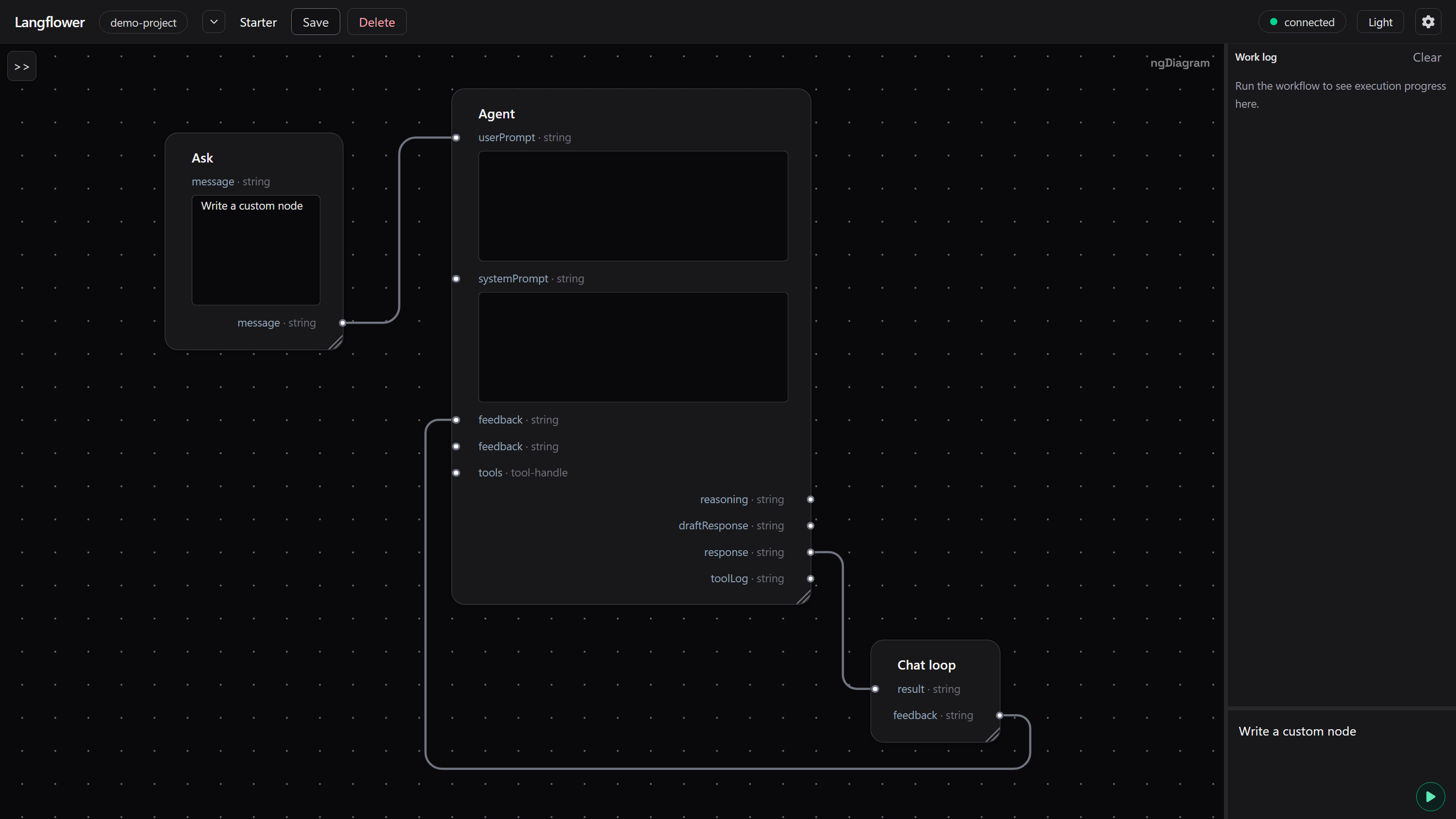
A chat loop is just a graph.
|
|
16
|
+
|
|
17
|
+
Connect an agent, route its output, add feedback, and let the graph decide what happens next.
|
|
18
|
+
|
|
19
|
+
From there, the same graph can grow into multi-agent workflows, review gates, parallel work, coding agents, custom tools, and long-running processes.
|
|
20
|
+
|
|
21
|
+
---
|
|
22
|
+
|
|
23
|
+
## From a chat loop to real workflows
|
|
24
|
+
|
|
25
|
+
The basic loop is only the beginning.
|
|
26
|
+
|
|
27
|
+
### Agents can talk to agents
|
|
28
|
+
|
|
29
|
+
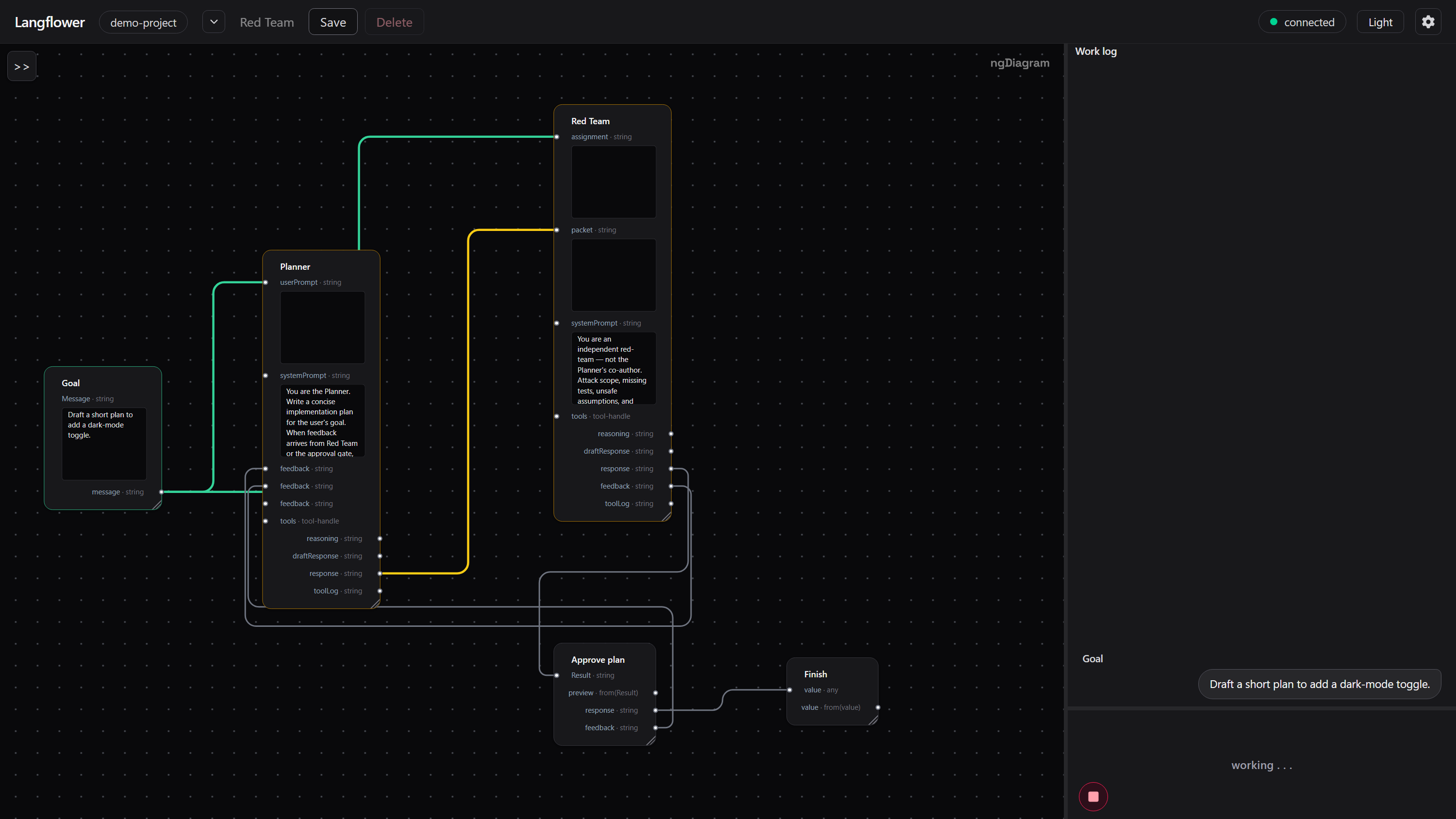
Agent-to-agent dialogue is just another graph pattern.
|
|
30
|
+
|
|
31
|
+
Connect one agent's output to another agent's input. Add feedback paths when the second agent needs to challenge or refine the first.
|
|
32
|
+
|
|
33
|
+
|
|
34
|
+
|
|
35
|
+
There is no special "multi-agent mode".
|
|
36
|
+
|
|
37
|
+
**Agents communicate through the graph.**
|
|
38
|
+
|
|
39
|
+
---
|
|
40
|
+
|
|
41
|
+
### Add capabilities
|
|
42
|
+
|
|
43
|
+
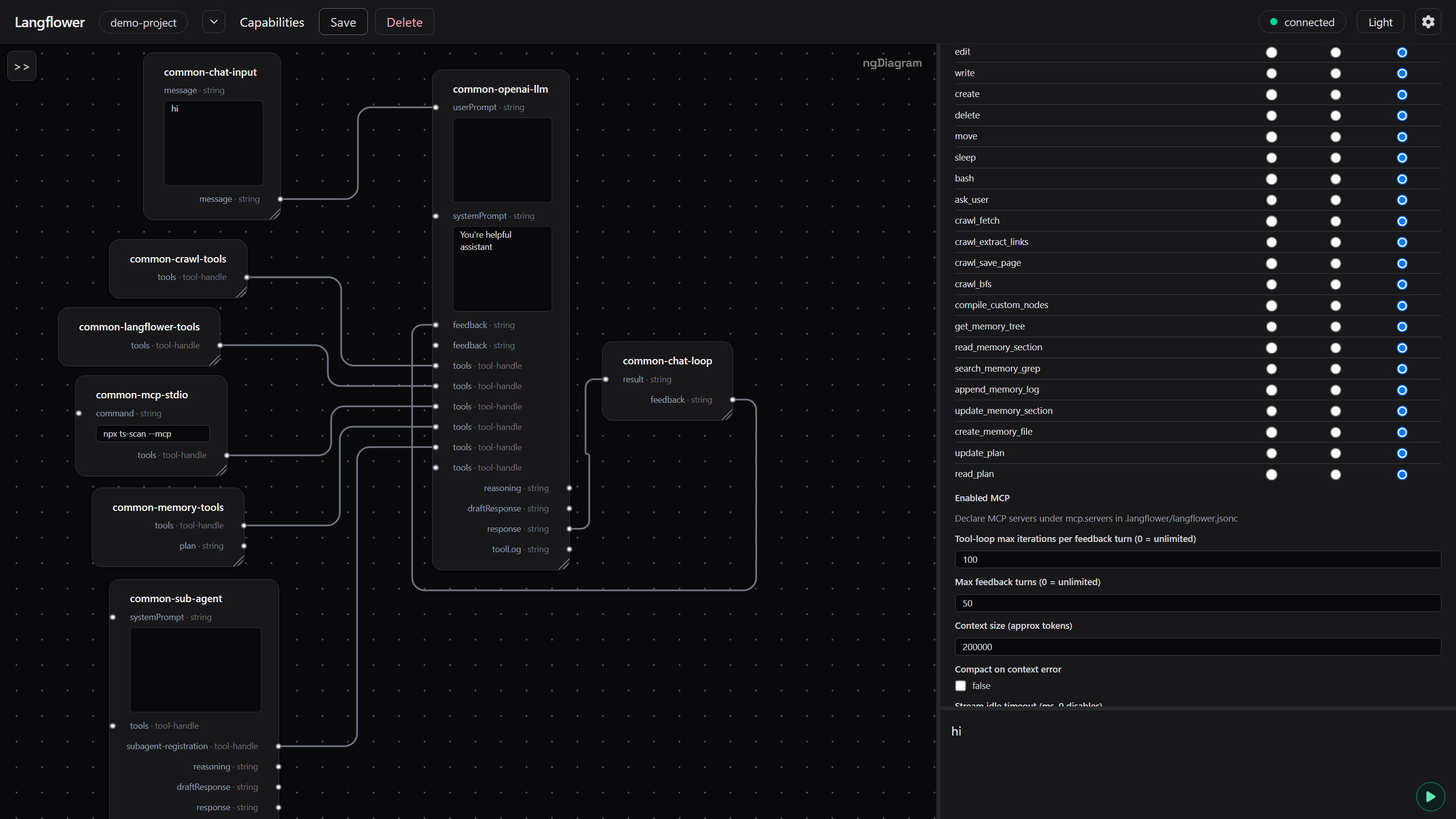
Start with an agent. Then add the capabilities your workflow needs.
|
|
44
|
+
|
|
45
|
+
Skills, tools, and specialized sub-agents can become parts of the same graph.
|
|
46
|
+
|
|
47
|
+
|
|
48
|
+
|
|
49
|
+
Tools live on the graph too. Wire a pack, an MCP server, or a sub-agent only to the agent that needs it.
|
|
50
|
+
|
|
51
|
+
The graph grows without changing the basic execution model.
|
|
52
|
+
|
|
53
|
+
---
|
|
54
|
+
|
|
55
|
+
### Put checks into the graph
|
|
56
|
+
|
|
57
|
+
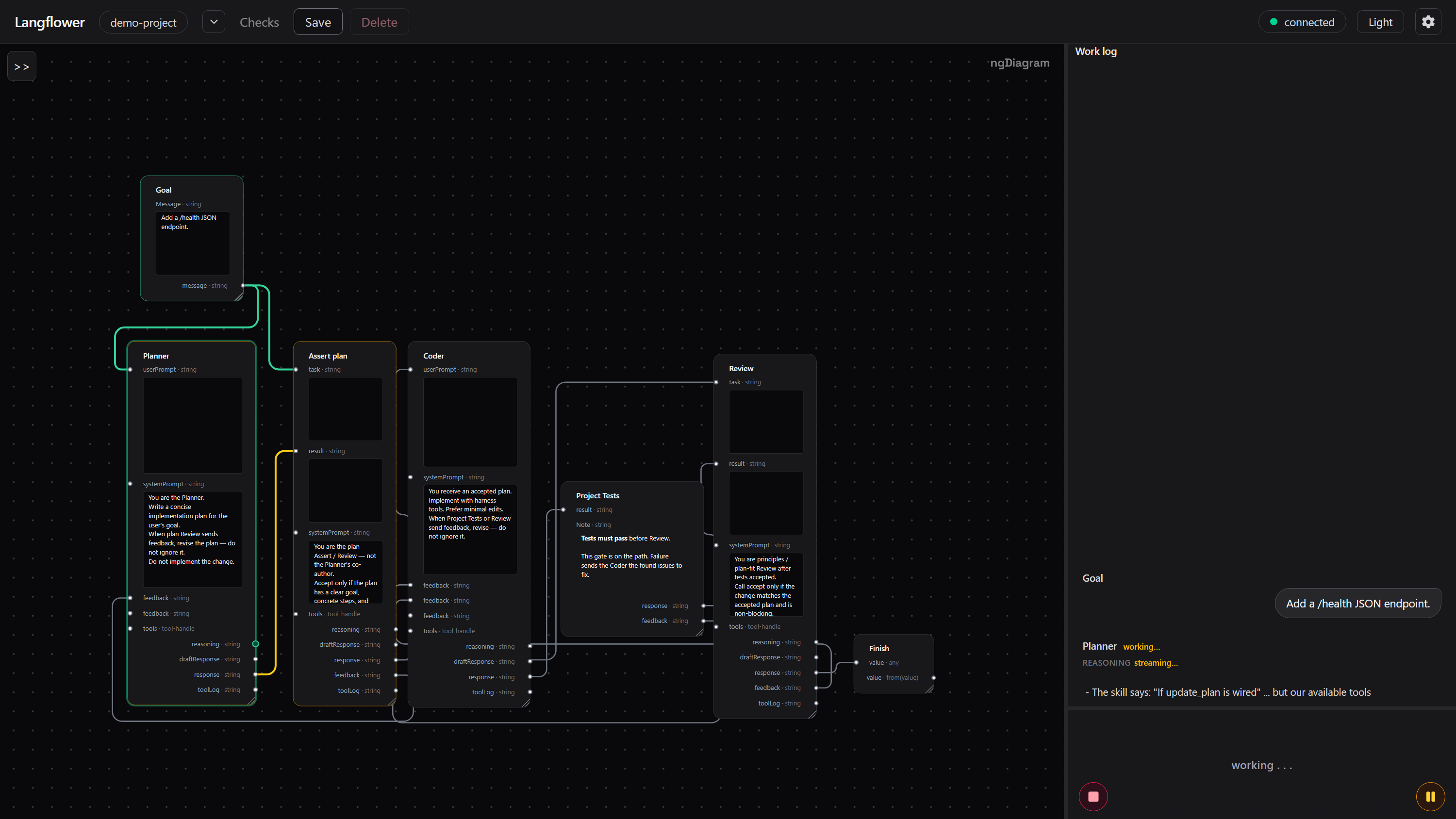
Don't ask an agent to certify its own work.
|
|
58
|
+
|
|
59
|
+
Put the check in the graph.
|
|
60
|
+
|
|
61
|
+
|
|
62
|
+
|
|
63
|
+
A check can:
|
|
64
|
+
|
|
65
|
+
- accept a result and continue;
|
|
66
|
+
- reject it;
|
|
67
|
+
- produce feedback;
|
|
68
|
+
- send the workflow back through another path.
|
|
69
|
+
|
|
70
|
+
The check is part of the topology, so there is no hidden path around it.
|
|
71
|
+
|
|
72
|
+
**A retry is a graph path.**
|
|
73
|
+
|
|
74
|
+
---
|
|
75
|
+
|
|
76
|
+
### Parallel work
|
|
77
|
+
|
|
78
|
+
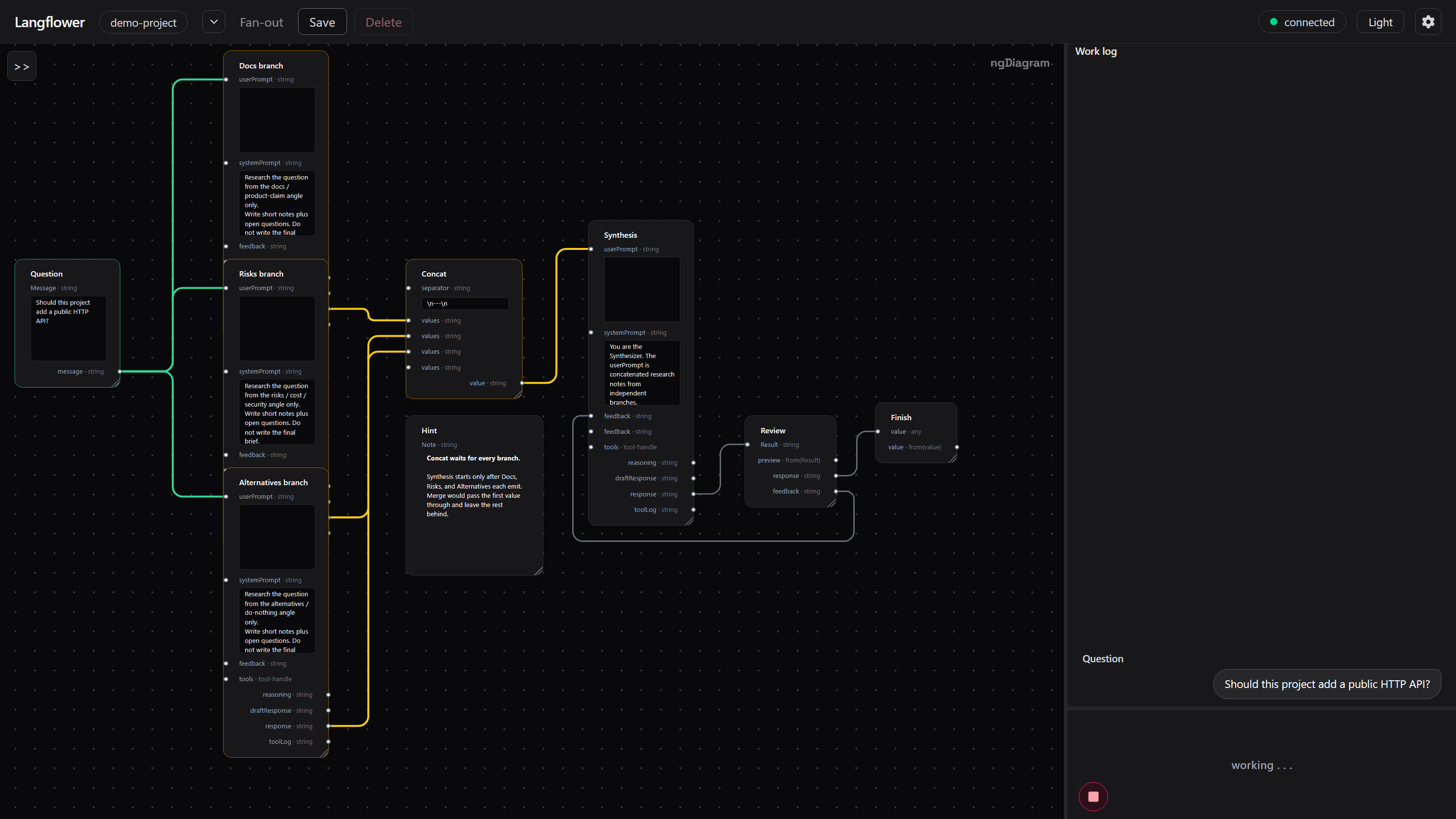
Graphs don't have to be linear.
|
|
79
|
+
|
|
80
|
+
A workflow can fan out into several independent pieces of work and later merge their results.
|
|
81
|
+
|
|
82
|
+
|
|
83
|
+
|
|
84
|
+
**Parallel work is a graph, too.**
|
|
85
|
+
|
|
86
|
+
---
|
|
87
|
+
|
|
88
|
+
### Give each agent only the capabilities it needs
|
|
89
|
+
|
|
90
|
+
Don't give every agent every tool.
|
|
91
|
+
|
|
92
|
+
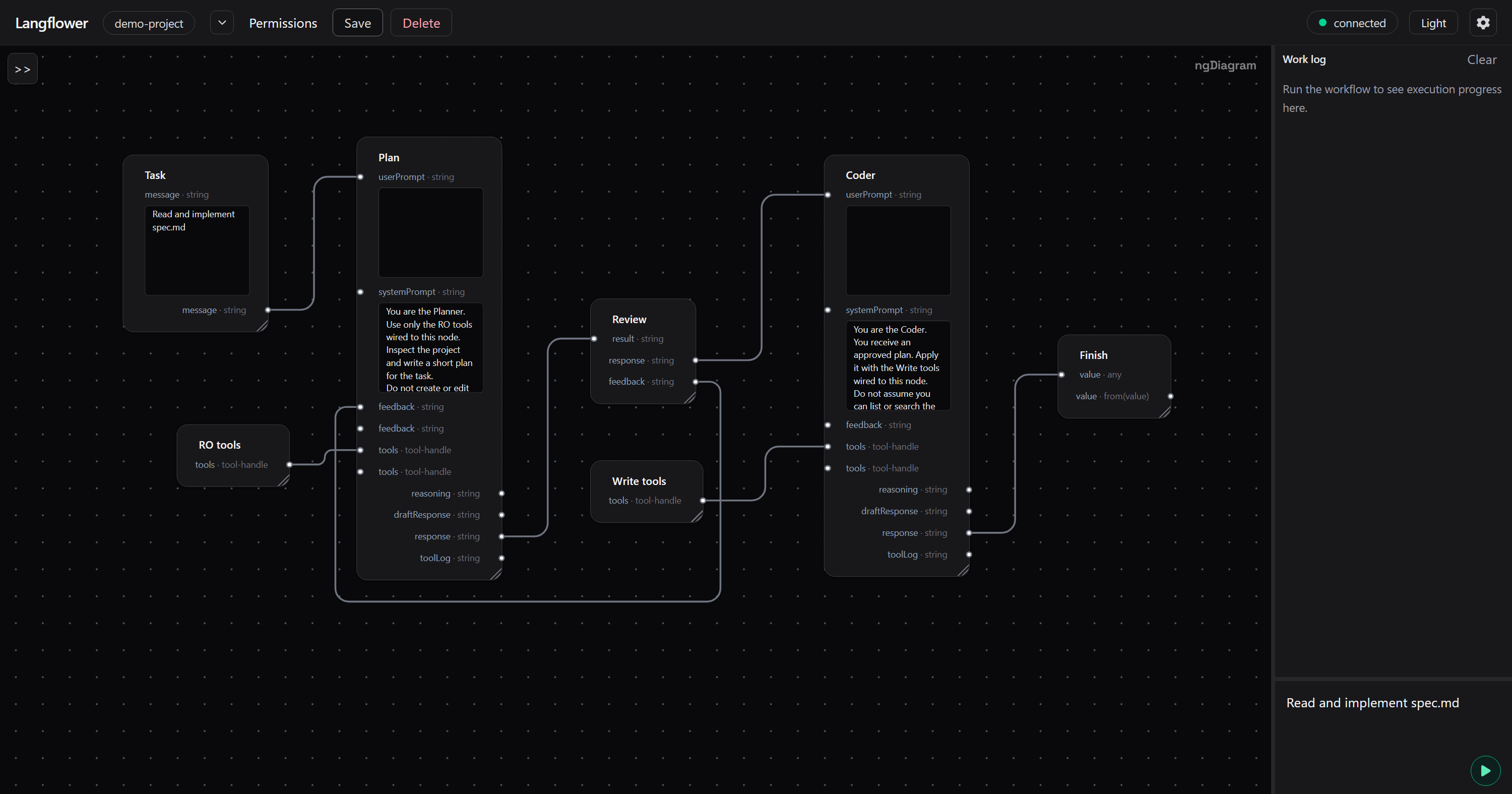
Give each stage the capabilities it needs.
|
|
93
|
+
|
|
94
|
+
|
|
95
|
+
|
|
96
|
+
A planning agent can inspect a project without being allowed to modify it.
|
|
97
|
+
|
|
98
|
+
After a human review, the next stage can receive the capabilities required to make changes.
|
|
99
|
+
|
|
100
|
+
**Permissions can follow the graph.**
|
|
101
|
+
|
|
102
|
+
---
|
|
103
|
+
|
|
104
|
+
### A complete coding-agent workflow
|
|
105
|
+
|
|
106
|
+
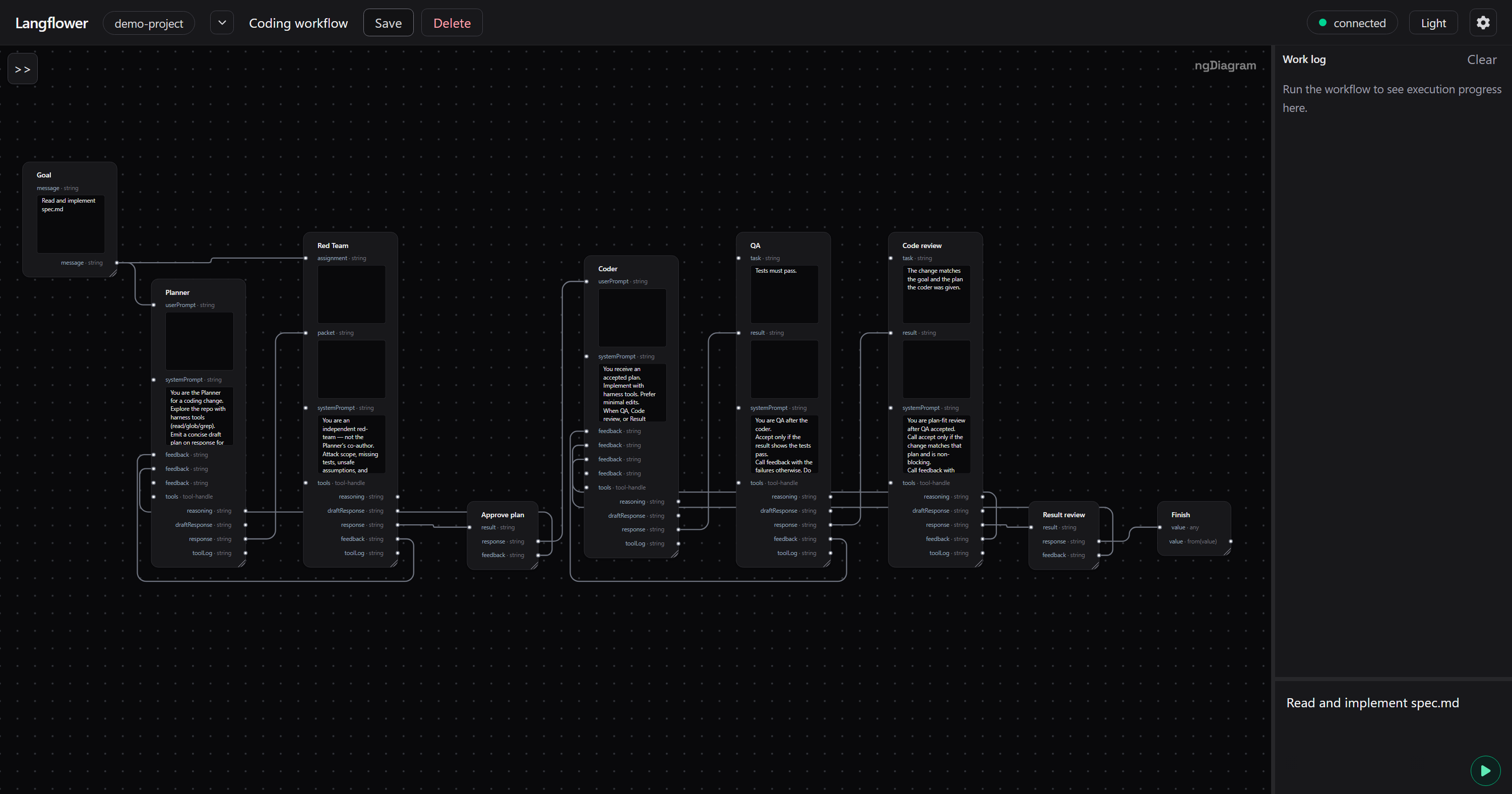
The same primitives can be combined into a complete development workflow:
|
|
107
|
+
|
|
108
|
+
- planning;
|
|
109
|
+
- coding;
|
|
110
|
+
- review;
|
|
111
|
+
- tests;
|
|
112
|
+
- tools;
|
|
113
|
+
- memory;
|
|
114
|
+
- human approval;
|
|
115
|
+
- feedback;
|
|
116
|
+
- parallel work;
|
|
117
|
+
- controlled capabilities.
|
|
118
|
+
|
|
119
|
+
|
|
120
|
+
|
|
121
|
+
The graph remains the same abstraction whether the workflow has three nodes or thirty.
|
|
122
|
+
|
|
123
|
+
---
|
|
124
|
+
|
|
125
|
+
# Watch the graph execute
|
|
126
|
+
|
|
127
|
+
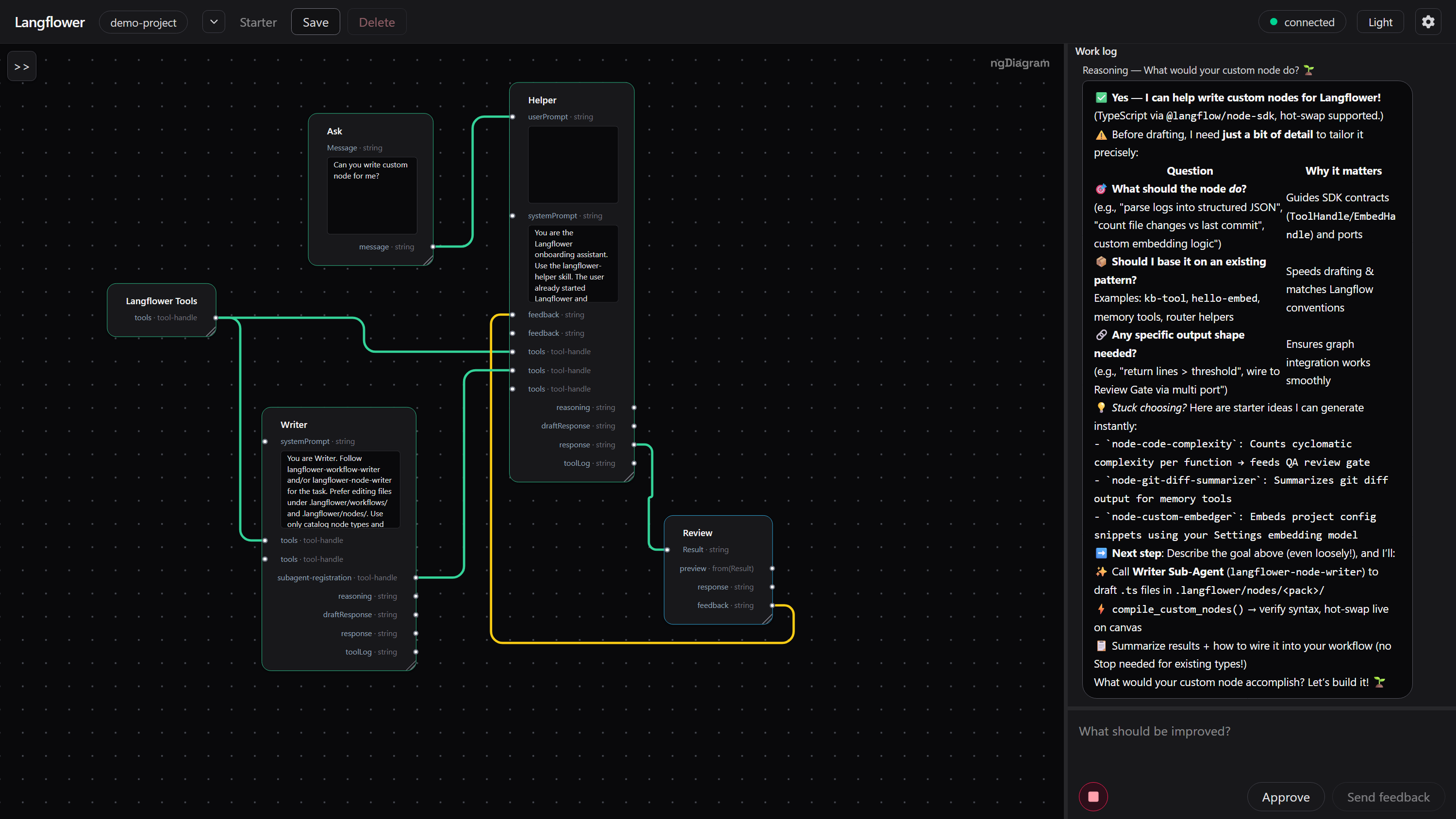
The graph is not just where you design the workflow.
|
|
128
|
+
|
|
129
|
+
**It's where you watch it run.**
|
|
130
|
+
|
|
131
|
+
|
|
132
|
+
|
|
133
|
+
### See execution on the graph
|
|
134
|
+
|
|
135
|
+
Langflower shows execution state directly on the canvas.
|
|
136
|
+
|
|
137
|
+
- **Green** — the node or connection has produced a result.
|
|
138
|
+
- **Yellow** — work is pending.
|
|
139
|
+
- **Gray** — the node or connection has not been activated yet.
|
|
140
|
+
- **Red** — an error occurred on the port.
|
|
141
|
+
|
|
142
|
+
Events also produce a short pulse animation on the node and port that handled them.
|
|
143
|
+
|
|
144
|
+
You can see the workflow executing instead of waiting for a final answer and trying to reconstruct what happened afterwards.
|
|
145
|
+
|
|
146
|
+
---
|
|
147
|
+
|
|
148
|
+
### Watch agent events
|
|
149
|
+
|
|
150
|
+
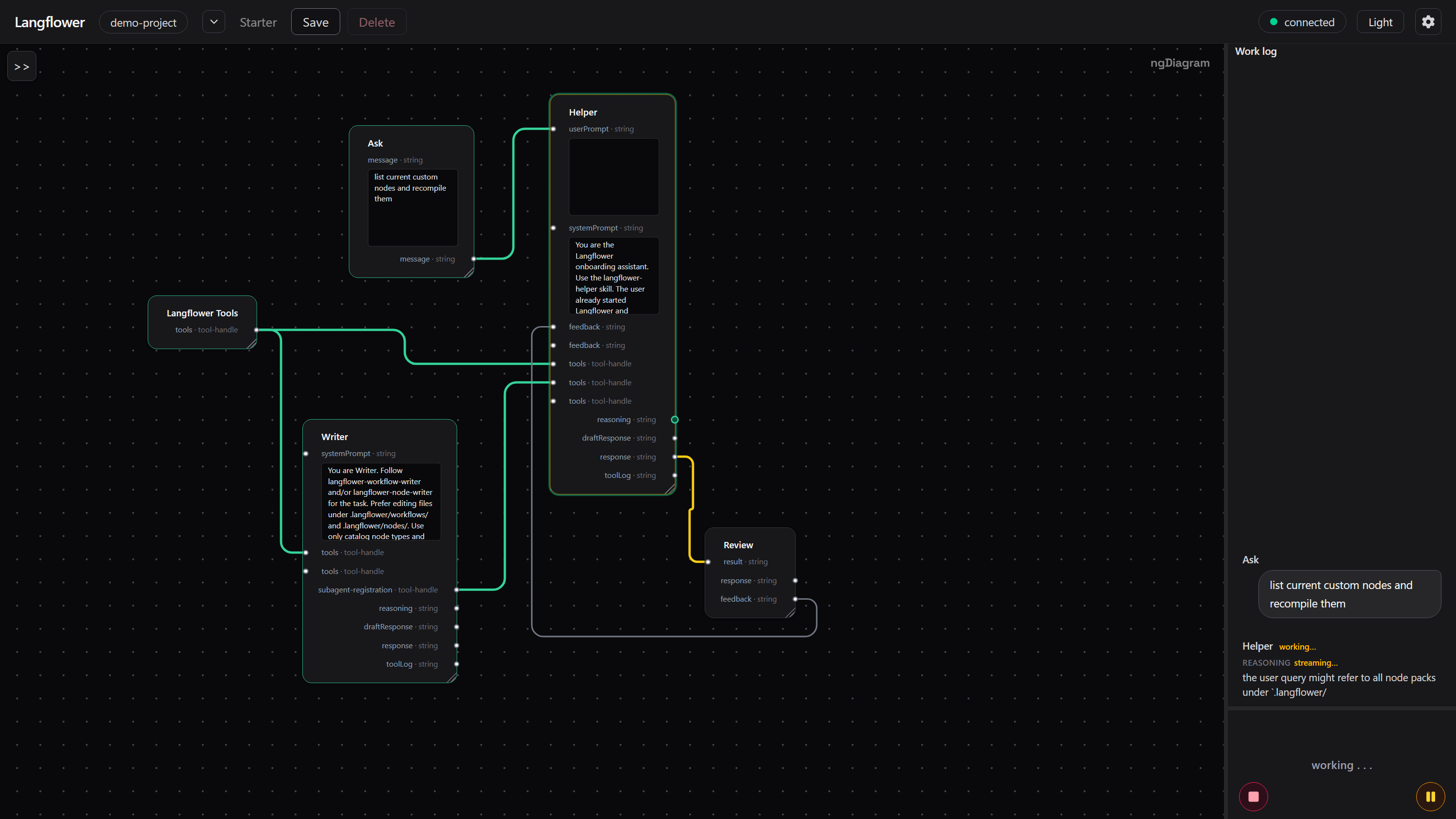
An agent does not have to produce only one final result.
|
|
151
|
+
|
|
152
|
+
Its output ports can represent different event streams:
|
|
153
|
+
|
|
154
|
+
- `reasoning`
|
|
155
|
+
- `draftResponse`
|
|
156
|
+
- `toolLog`
|
|
157
|
+
- `response`
|
|
158
|
+
|
|
159
|
+
As the agent runs, those events can appear in the Work log as they happen.
|
|
160
|
+
|
|
161
|
+
|
|
162
|
+
|
|
163
|
+
This makes intermediate work observable without turning it into a separate tracing system.
|
|
164
|
+
|
|
165
|
+
---
|
|
166
|
+
|
|
167
|
+
### Inspect any connection
|
|
168
|
+
|
|
169
|
+
Don't guess what a node received.
|
|
170
|
+
|
|
171
|
+
Inspect it.
|
|
172
|
+
|
|
173
|
+
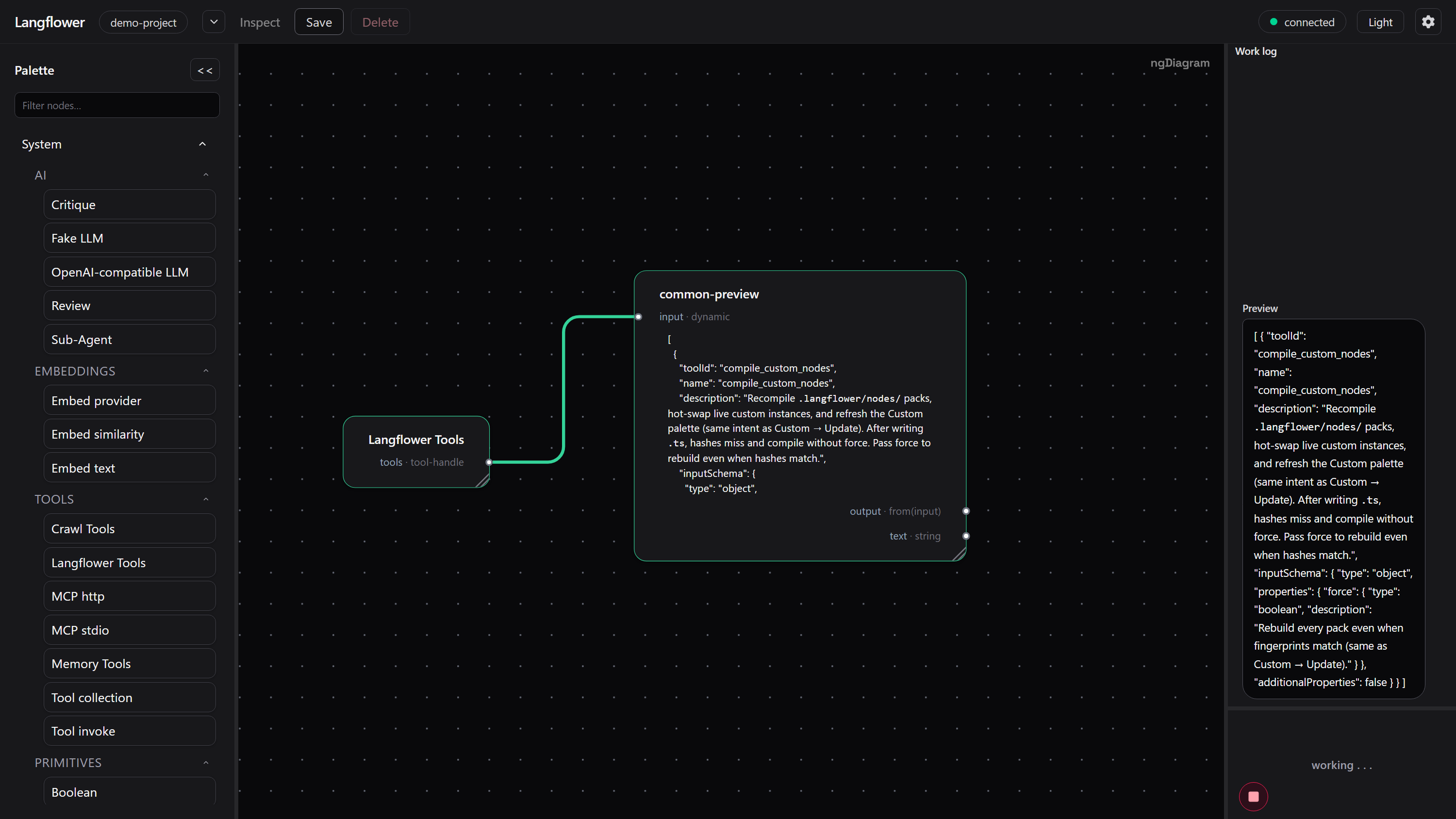
Any connection can be routed through a Preview node to see the payload of the event flowing through it.
|
|
174
|
+
|
|
175
|
+
|
|
176
|
+
|
|
177
|
+
This is useful when building and debugging workflows:
|
|
178
|
+
|
|
179
|
+
**What did this node actually receive?**
|
|
180
|
+
|
|
181
|
+
**What did the previous node actually emit?**
|
|
182
|
+
|
|
183
|
+
The answer is visible on the graph.
|
|
184
|
+
|
|
185
|
+
---
|
|
186
|
+
|
|
187
|
+
### The Work log is connected to the graph
|
|
188
|
+
|
|
189
|
+
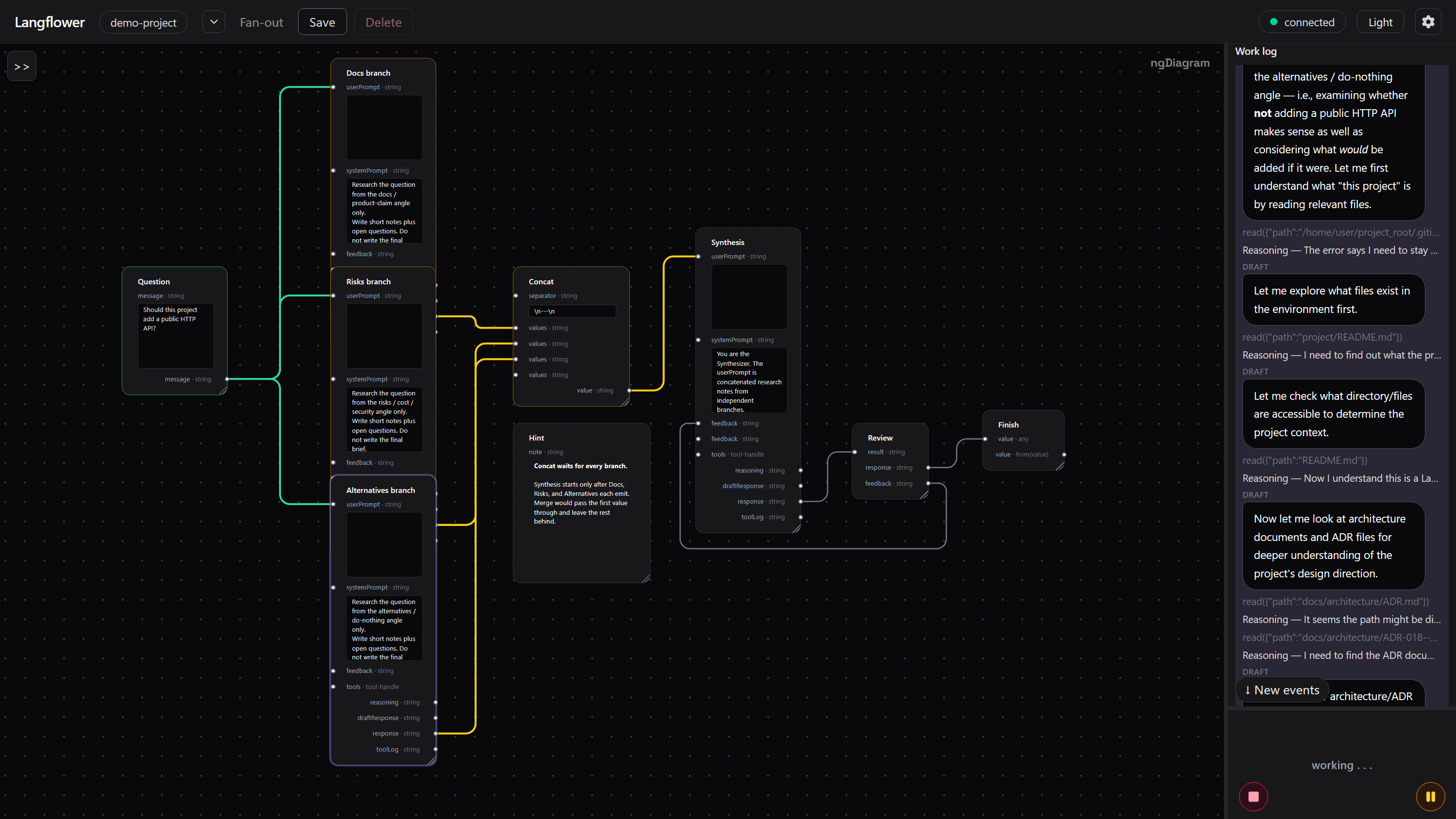
The Work log is not just a text stream detached from the canvas.
|
|
190
|
+
|
|
191
|
+
Hover an event in the Work log and Langflower highlights the node that produced the event.
|
|
192
|
+
|
|
193
|
+
|
|
194
|
+
|
|
195
|
+
You can move from:
|
|
196
|
+
|
|
197
|
+
**graph → event → payload**
|
|
198
|
+
|
|
199
|
+
or from:
|
|
200
|
+
|
|
201
|
+
**event → source node**
|
|
202
|
+
|
|
203
|
+
without losing the context of the workflow.
|
|
204
|
+
|
|
205
|
+
---
|
|
206
|
+
|
|
207
|
+
# Why the graph works
|
|
208
|
+
|
|
209
|
+
The execution model is built around events rather than a single return value.
|
|
210
|
+
|
|
211
|
+
### Nodes emit events
|
|
212
|
+
|
|
213
|
+
Nodes don't just return results.
|
|
214
|
+
|
|
215
|
+
They emit events.
|
|
216
|
+
|
|
217
|
+
An agent can emit reasoning, a draft, a tool log, and a final response as separate events during one execution.
|
|
218
|
+
|
|
219
|
+
### Every output port is an independent event stream
|
|
220
|
+
|
|
221
|
+
Each output port is an RxJS `Observable`.
|
|
222
|
+
|
|
223
|
+
A node can emit through one port without waiting for its other ports.
|
|
224
|
+
|
|
225
|
+
That means a single execution can produce different kinds of events independently.
|
|
226
|
+
|
|
227
|
+
### Edges route events
|
|
228
|
+
|
|
229
|
+
An edge connects an output stream to an input.
|
|
230
|
+
|
|
231
|
+
The graph determines where an event goes next.
|
|
232
|
+
|
|
233
|
+
This makes the graph itself the control flow.
|
|
234
|
+
|
|
235
|
+
### The graph contains the loop
|
|
236
|
+
|
|
237
|
+
Langflower workflows are graphs, not just pipelines.
|
|
238
|
+
|
|
239
|
+
Cycles are first-class.
|
|
240
|
+
|
|
241
|
+
Feedback, retries, review loops, and iterative agent workflows can all be represented directly as graph paths.
|
|
242
|
+
|
|
243
|
+
You don't need a special retry mechanism when the workflow itself contains the path back to an earlier node.
|
|
244
|
+
|
|
245
|
+
### Humans are part of the graph
|
|
246
|
+
|
|
247
|
+
Review and approval don't have to live outside the workflow.
|
|
248
|
+
|
|
249
|
+
A human gate can receive a result, wait for a decision, and emit acceptance or feedback back into the graph.
|
|
250
|
+
|
|
251
|
+
---
|
|
252
|
+
|
|
253
|
+
# Extend Langflower
|
|
254
|
+
|
|
255
|
+
If the node you need doesn't exist, build it.
|
|
256
|
+
|
|
257
|
+
Langflower has a public TypeScript API for writing custom nodes.
|
|
258
|
+
|
|
259
|
+
### A typed extension boundary
|
|
260
|
+
|
|
261
|
+
The node API is designed to make the extension contract explicit.
|
|
262
|
+
|
|
263
|
+
If an extension point is public, its contract should be visible in the types.
|
|
264
|
+
|
|
265
|
+
Custom nodes use the same runtime model as built-in nodes.
|
|
266
|
+
|
|
267
|
+
**Reactive at runtime. Typed at the extension boundary. Diagnosable before execution.**
|
|
268
|
+
|
|
269
|
+
---
|
|
270
|
+
|
|
271
|
+
### Compile before you run
|
|
272
|
+
|
|
273
|
+
Langflower includes a compiler for custom nodes and diagnostics for problems found before execution.
|
|
274
|
+
|
|
275
|
+
This gives a custom-node workflow a straightforward development loop:
|
|
276
|
+
|
|
277
|
+
```text
|
|
278
|
+
write
|
|
279
|
+
↓
|
|
280
|
+
compile
|
|
281
|
+
↓
|
|
282
|
+
diagnostics
|
|
283
|
+
↓
|
|
284
|
+
fix
|
|
285
|
+
↓
|
|
286
|
+
use in workflow
|
|
287
|
+
```
|
|
288
|
+
|
|
289
|
+
The compiler is part of the development experience, not something you have to reverse-engineer after a runtime failure.
|
|
290
|
+
|
|
291
|
+
---
|
|
292
|
+
|
|
293
|
+
### Build reusable node packs
|
|
294
|
+
|
|
295
|
+
Custom nodes live in node packs inside the project.
|
|
296
|
+
|
|
297
|
+
```text
|
|
298
|
+
.langflower/
|
|
299
|
+
└── nodes/
|
|
300
|
+
├── my-tools/
|
|
301
|
+
├── company-tools/
|
|
302
|
+
└── another-pack/
|
|
303
|
+
```
|
|
304
|
+
|
|
305
|
+
A node pack gives you a natural unit for developing and reusing a group of related capabilities.
|
|
306
|
+
|
|
307
|
+
**Build a capability once. Reuse it wherever the workflow needs it.**
|
|
308
|
+
|
|
309
|
+
---
|
|
310
|
+
|
|
311
|
+
### Built for coding agents
|
|
312
|
+
|
|
313
|
+
Langflower ships skills and instructions for coding agents that need to create or modify workflows and custom nodes.
|
|
314
|
+
|
|
315
|
+
An agent can:
|
|
316
|
+
|
|
317
|
+
1. inspect the project;
|
|
318
|
+
2. write a custom node;
|
|
319
|
+
3. compile it;
|
|
320
|
+
4. inspect diagnostics;
|
|
321
|
+
5. fix the implementation;
|
|
322
|
+
6. add it to a workflow.
|
|
323
|
+
|
|
324
|
+
The same environment can therefore be used by both humans and coding agents to extend the workflow system.
|
|
325
|
+
|
|
326
|
+
---
|
|
327
|
+
|
|
328
|
+
# Every project gets a starter environment
|
|
329
|
+
|
|
330
|
+
Langflower does not start with an empty canvas.
|
|
331
|
+
|
|
332
|
+
A project gets a `.langflower` environment containing workflows, nodes, skills, schemas, instructions, and configuration.
|
|
333
|
+
|
|
334
|
+
```text
|
|
335
|
+
.langflower/
|
|
336
|
+
├── instructions
|
|
337
|
+
├── workflows
|
|
338
|
+
├── nodes
|
|
339
|
+
├── skills
|
|
340
|
+
├── schemas
|
|
341
|
+
└── config
|
|
342
|
+
```
|
|
343
|
+
|
|
344
|
+
The exact contents can grow with the project.
|
|
345
|
+
|
|
346
|
+
The starter environment serves several purposes at once:
|
|
347
|
+
|
|
348
|
+
- a quick start;
|
|
349
|
+
- working examples;
|
|
350
|
+
- reference implementations;
|
|
351
|
+
- reusable custom nodes;
|
|
352
|
+
- context for coding agents;
|
|
353
|
+
- a place for project-specific workflows and capabilities.
|
|
354
|
+
|
|
355
|
+
**Langflower gives a project a working environment, not an empty canvas.**
|
|
356
|
+
|
|
357
|
+
---
|
|
358
|
+
|
|
359
|
+
# Tools and MCP
|
|
360
|
+
|
|
361
|
+
Tools are capabilities that can be connected to agents through the graph.
|
|
362
|
+
|
|
363
|
+
Built-in and custom nodes use the same `ToolHandle` contract.
|
|
364
|
+
|
|
365
|
+
MCP can provide additional tools without changing the workflow model.
|
|
366
|
+
|
|
367
|
+
This makes tools another graph-level capability:
|
|
368
|
+
|
|
369
|
+
> **The workflow decides which agent gets which capability.**
|
|
370
|
+
|
|
371
|
+
That also means tools can be controlled by the same permissions model used elsewhere in the workflow.
|
|
372
|
+
|
|
373
|
+
---
|
|
374
|
+
|
|
375
|
+
# Long-running workflows
|
|
376
|
+
|
|
377
|
+
The browser is a window into the workflow, not the workflow itself.
|
|
378
|
+
|
|
379
|
+
The Langflower server owns the live run.
|
|
380
|
+
|
|
381
|
+
You can close the browser tab while a workflow continues running, then open the UI again and reconnect to the running workflow.
|
|
382
|
+
|
|
383
|
+
This makes the same model useful for workflows that take longer than a single interactive conversation:
|
|
384
|
+
|
|
385
|
+
- long-running coding tasks;
|
|
386
|
+
- background jobs;
|
|
387
|
+
- resumable workflows;
|
|
388
|
+
- workflows that pause for human input;
|
|
389
|
+
- workflows that can be interrupted and continued.
|
|
390
|
+
|
|
391
|
+
The UI is there to observe and control the workflow.
|
|
392
|
+
|
|
393
|
+
It is not the workflow.
|
|
394
|
+
|
|
395
|
+
---
|
|
396
|
+
|
|
397
|
+
# Local architecture
|
|
398
|
+
|
|
399
|
+
Langflower is designed to run against a project folder on your machine.
|
|
400
|
+
|
|
401
|
+
```text
|
|
402
|
+
Browser
|
|
403
|
+
│
|
|
404
|
+
WebSocket
|
|
405
|
+
│
|
|
406
|
+
Langflower server
|
|
407
|
+
│
|
|
408
|
+
Project folder
|
|
409
|
+
```
|
|
410
|
+
|
|
411
|
+
The browser UI is a thin client over WebSocket.
|
|
412
|
+
|
|
413
|
+
The server owns:
|
|
414
|
+
|
|
415
|
+
- workflow execution;
|
|
416
|
+
- custom-node compilation;
|
|
417
|
+
- the live run;
|
|
418
|
+
- access to the project folder.
|
|
419
|
+
|
|
420
|
+
The workflow, custom nodes, and project data stay with the project.
|
|
421
|
+
|
|
422
|
+
There is no hosted workflow service required.
|
|
423
|
+
|
|
424
|
+
This also makes Langflower suitable for local environments and closed networks where the project and its providers need to stay on the machine or inside the network.
|
|
425
|
+
|
|
426
|
+
---
|
|
427
|
+
|
|
428
|
+
# Langflower builds Langflower
|
|
429
|
+
|
|
430
|
+
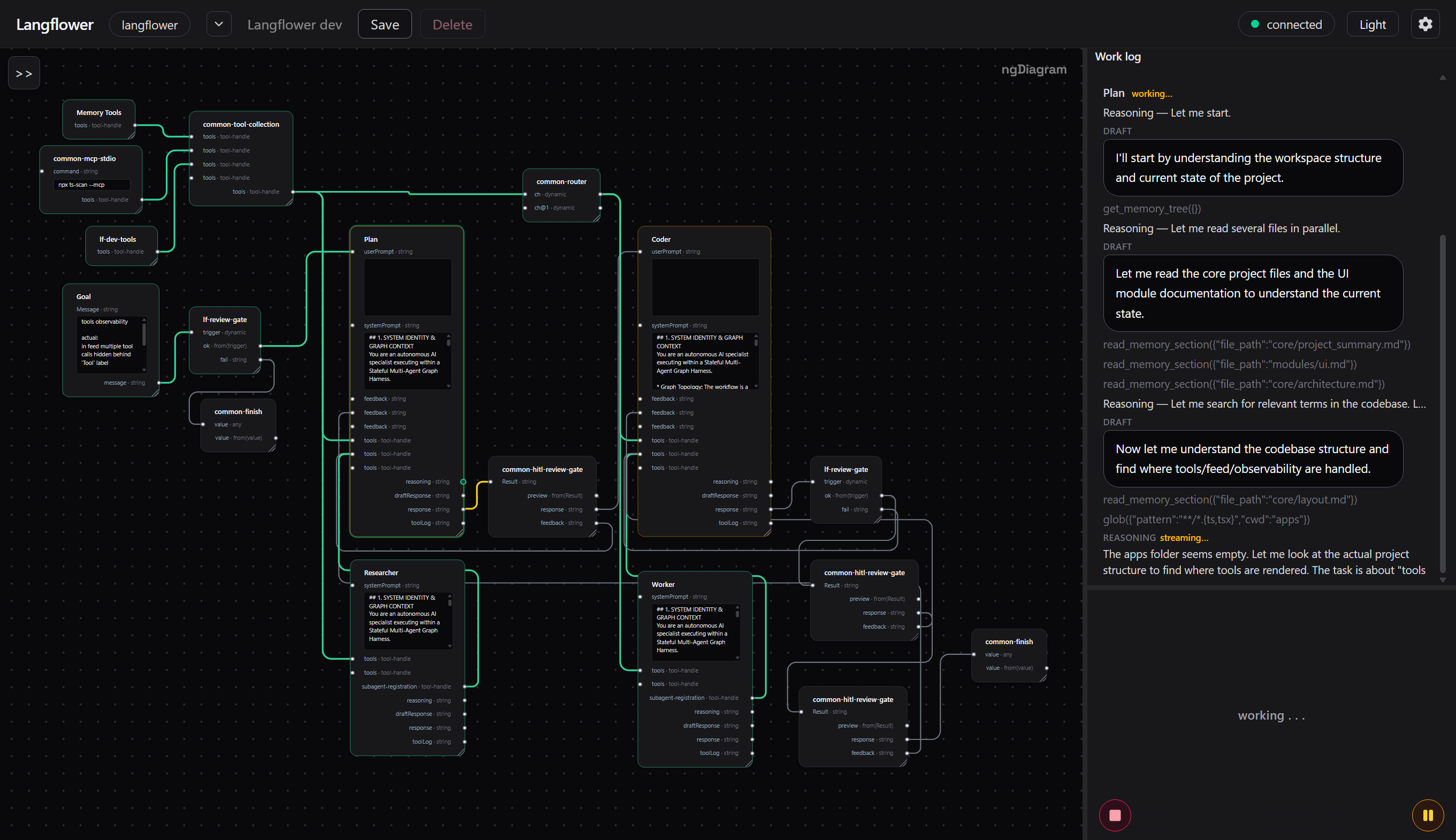
Langflower is developed using Langflower.
|
|
431
|
+
|
|
432
|
+
The project itself uses a workflow to coordinate planning, coding, review, tests, tools, and human gates.
|
|
433
|
+
|
|
434
|
+
|
|
435
|
+
|
|
436
|
+
The development workflow combines memory tools, MCP, custom Langflower development tools, review gates, and coding agents.
|
|
437
|
+
|
|
438
|
+
The point is simple:
|
|
439
|
+
|
|
440
|
+
**Langflower is not only a tool for building workflows. It is itself built as a workflow-driven system.**
|
|
441
|
+
|
|
442
|
+
---
|
|
443
|
+
|
|
444
|
+
# Desktop launcher
|
|
445
|
+
|
|
446
|
+
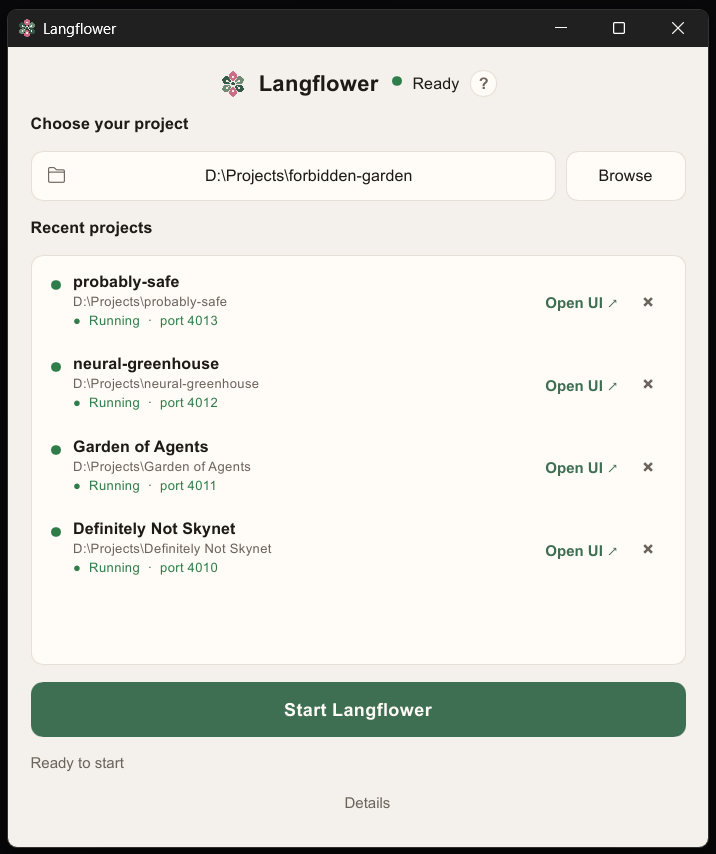
If you don't want to start Langflower from a terminal, use the desktop launcher.
|
|
66
447
|
|
|
67
448
|
|
|
68
449
|
|
|
69
|
-
|
|
70
|
-
|
|
71
|
-
|
|
72
|
-
|
|
73
|
-
|
|
74
|
-
|
|
75
|
-
|
|
450
|
+
Pick a project folder, start Langflower, and the editor opens in the browser you already have.
|
|
451
|
+
|
|
452
|
+
The launcher is designed to make local Langflower feel like a normal desktop application:
|
|
453
|
+
|
|
454
|
+
- choose a project folder;
|
|
455
|
+
- keep recent projects;
|
|
456
|
+
- start Langflower;
|
|
457
|
+
- open the UI again after closing the browser tab;
|
|
458
|
+
- run several project instances at once.
|
|
459
|
+
|
|
460
|
+
No bundled browser is required.
|
|
76
461
|
|
|
77
|
-
|
|
78
|
-
your own key** (BYOK): add an OpenAI-compatible provider in Settings (gear icon)
|
|
79
|
-
and paste the API key there. Pointing at an environment variable is
|
|
80
|
-
optional. Simple nodes and the Fake LLM work without a key.
|
|
462
|
+
---
|
|
81
463
|
|
|
82
|
-
|
|
464
|
+
# Quick start
|
|
83
465
|
|
|
84
|
-
|
|
85
|
-
|
|
466
|
+
## Desktop launcher
|
|
467
|
+
|
|
468
|
+
Download the Windows or macOS launcher from [GitHub Releases](https://github.com/earthdmitriy/langflower/releases) (tags `launcher-v*`).
|
|
469
|
+
|
|
470
|
+
[](https://github.com/earthdmitriy/langflower/releases)
|
|
471
|
+
|
|
472
|
+
Unpack it and run:
|
|
473
|
+
|
|
474
|
+
```text
|
|
475
|
+
langflower-launcher.exe
|
|
476
|
+
```
|
|
477
|
+
|
|
478
|
+
on Windows, or:
|
|
479
|
+
|
|
480
|
+
```text
|
|
481
|
+
langflower-launcher
|
|
482
|
+
```
|
|
483
|
+
|
|
484
|
+
on macOS.
|
|
485
|
+
|
|
486
|
+
The launcher is portable and does not require an installation.
|
|
487
|
+
|
|
488
|
+
On first use, choose the project folder you want to work with.
|
|
489
|
+
|
|
490
|
+
---
|
|
491
|
+
|
|
492
|
+
## From a terminal
|
|
493
|
+
|
|
494
|
+
Install Langflower globally:
|
|
86
495
|
|
|
87
496
|
```bash
|
|
88
497
|
npm install -g langflower
|
|
498
|
+
```
|
|
499
|
+
|
|
500
|
+
Then run it:
|
|
501
|
+
|
|
502
|
+
```bash
|
|
89
503
|
langflower
|
|
90
|
-
|
|
504
|
+
```
|
|
505
|
+
|
|
506
|
+
Or start it for a specific project:
|
|
507
|
+
|
|
508
|
+
```bash
|
|
91
509
|
langflower ./my-project
|
|
92
510
|
```
|
|
93
511
|
|
|
94
|
-
From
|
|
512
|
+
From the Langflower monorepo:
|
|
95
513
|
|
|
96
514
|
```bash
|
|
97
515
|
npm run install-local
|
|
98
516
|
npx langflower
|
|
99
517
|
```
|
|
100
518
|
|
|
101
|
-
The CLI opens
|
|
102
|
-
|
|
103
|
-
|
|
519
|
+
The CLI opens the local UI at:
|
|
520
|
+
|
|
521
|
+
```text
|
|
522
|
+
http://127.0.0.1:4010
|
|
523
|
+
```
|
|
524
|
+
|
|
525
|
+
You can change the port with `--port` or through `.langflower/config.json`.
|
|
526
|
+
|
|
527
|
+
Use `-p` to run multiple Langflower instances for different project folders at the same time.
|
|
528
|
+
|
|
529
|
+
---
|
|
104
530
|
|
|
105
|
-
|
|
531
|
+
## Bring your own model
|
|
106
532
|
|
|
107
|
-
|
|
533
|
+
Langflower does not host a model.
|
|
534
|
+
|
|
535
|
+
For live agent runs, configure an OpenAI-compatible provider in **Settings** and provide your API key.
|
|
536
|
+
|
|
537
|
+
You can also point the provider at an environment variable.
|
|
538
|
+
|
|
539
|
+
Simple nodes and the Fake LLM can be used without a model key.
|
|
540
|
+
|
|
541
|
+
---
|
|
542
|
+
|
|
543
|
+
# How it works
|
|
108
544
|
|
|
109
545
|
1. Start Langflower with a project folder.
|
|
110
|
-
2. Open
|
|
111
|
-
3. Run
|
|
112
|
-
|
|
113
|
-
|
|
114
|
-
|
|
115
|
-
|
|
116
|
-
|
|
117
|
-
|
|
118
|
-
|
|
119
|
-
|
|
120
|
-
|
|
121
|
-
|
|
122
|
-
|
|
123
|
-
|
|
124
|
-
|
|
125
|
-
|
|
126
|
-
|
|
127
|
-
|
|
128
|
-
|
|
129
|
-
|
|
130
|
-
|
|
131
|
-
|
|
132
|
-
|
|
133
|
-
|
|
134
|
-
|
|
135
|
-
|
|
136
|
-
|
|
137
|
-
|
|
138
|
-
|
|
139
|
-
|
|
140
|
-
|
|
141
|
-
|
|
142
|
-
|
|
143
|
-
|
|
144
|
-
|
|
145
|
-
|
|
146
|
-
|
|
147
|
-
|
|
148
|
-
|
|
149
|
-
|
|
150
|
-
|
|
151
|
-
|
|
152
|
-
|
|
153
|
-
|
|
154
|
-
|
|
546
|
+
2. Open an existing workflow or create one.
|
|
547
|
+
3. Run the workflow.
|
|
548
|
+
4. Watch events move through the visible graph.
|
|
549
|
+
5. Inspect event payloads when needed.
|
|
550
|
+
6. Approve, reject, or provide feedback when the workflow reaches a human gate.
|
|
551
|
+
7. Find the resulting files and data in the same project workspace.
|
|
552
|
+
|
|
553
|
+
---
|
|
554
|
+
|
|
555
|
+
# What it lacks
|
|
556
|
+
|
|
557
|
+
Langflower is intentionally still small, and some things are not implemented yet.
|
|
558
|
+
|
|
559
|
+
### Chat sessions
|
|
560
|
+
|
|
561
|
+
You cannot save a chat and reopen it tomorrow as a persistent conversation.
|
|
562
|
+
|
|
563
|
+
Agent state currently lives inside the node.
|
|
564
|
+
|
|
565
|
+
### Image and video
|
|
566
|
+
|
|
567
|
+
There is no asset-management layer for multimodal models yet.
|
|
568
|
+
|
|
569
|
+
### Built-in IDE or Git UI
|
|
570
|
+
|
|
571
|
+
Langflower is not trying to replace your editor or Git client.
|
|
572
|
+
|
|
573
|
+
Use the tools you already have for editing, reviewing, committing, and navigating the project.
|
|
574
|
+
|
|
575
|
+
---
|
|
576
|
+
|
|
577
|
+
# Learn more
|
|
578
|
+
|
|
579
|
+
- [Getting started](https://github.com/earthdmitriy/langflower/blob/master/docs/public/getting-started.md) — installation and first run
|
|
580
|
+
- [Product overview](https://github.com/earthdmitriy/langflower/blob/master/docs/public/product.md) — the product model and core concepts
|
|
581
|
+
- [Using the editor](https://github.com/earthdmitriy/langflower/blob/master/docs/public/using-the-editor.md) — canvas, workflows, and runs
|
|
582
|
+
- [Workflow ideas](https://github.com/earthdmitriy/langflower/blob/master/docs/public/workflows.md) — examples of workflows you can build
|
|
583
|
+
- [Configuration](https://github.com/earthdmitriy/langflower/blob/master/docs/public/configuration.md) — providers, keys, ports, and project configuration
|
|
584
|
+
- [Extending Langflower](https://github.com/earthdmitriy/langflower/blob/master/docs/public/extending.md) — custom nodes, node packs, MCP, and skills
|
|
585
|
+
- [How it works](https://github.com/earthdmitriy/langflower/blob/master/docs/public/how-it-works.md) — the builder/runtime architecture
|
|
586
|
+
- [Desktop launcher](https://github.com/earthdmitriy/langflower/blob/master/docs/public/launcher.md) — running Langflower without the CLI
|
|
587
|
+
|
|
588
|
+
---
|
|
589
|
+
|
|
590
|
+
## In one sentence
|
|
591
|
+
|
|
592
|
+
**Langflower turns an AI agent from a chat loop into a visible, inspectable workflow whose graph controls what happens next.**
|