langflower 0.1.2 → 0.1.3
This diff represents the content of publicly available package versions that have been released to one of the supported registries. The information contained in this diff is provided for informational purposes only and reflects changes between package versions as they appear in their respective public registries.
- package/README.md +27 -6
- package/dist/index.js +25 -4
- package/docs/public/README.md +1 -0
- package/docs/public/getting-started.md +8 -1
- package/docs/public/launcher.md +110 -0
- package/package.json +1 -1
- package/ui-dist/apple-touch-icon.png +0 -0
- package/ui-dist/favicon-32x32.png +0 -0
- package/ui-dist/favicon.ico +0 -0
- package/ui-dist/index.html +3 -0
- package/vendor/server/skeleton/skills/langflower-helper/SKILL.md +11 -0
- package/vendor/server/skeleton/skills/langflower-helper/architecture.md +4 -1
package/README.md
CHANGED
|
@@ -57,9 +57,29 @@ hosting a service.
|
|
|
57
57
|
|
|
58
58
|
## Quick start
|
|
59
59
|
|
|
60
|
-
|
|
61
|
-
|
|
62
|
-
the
|
|
60
|
+
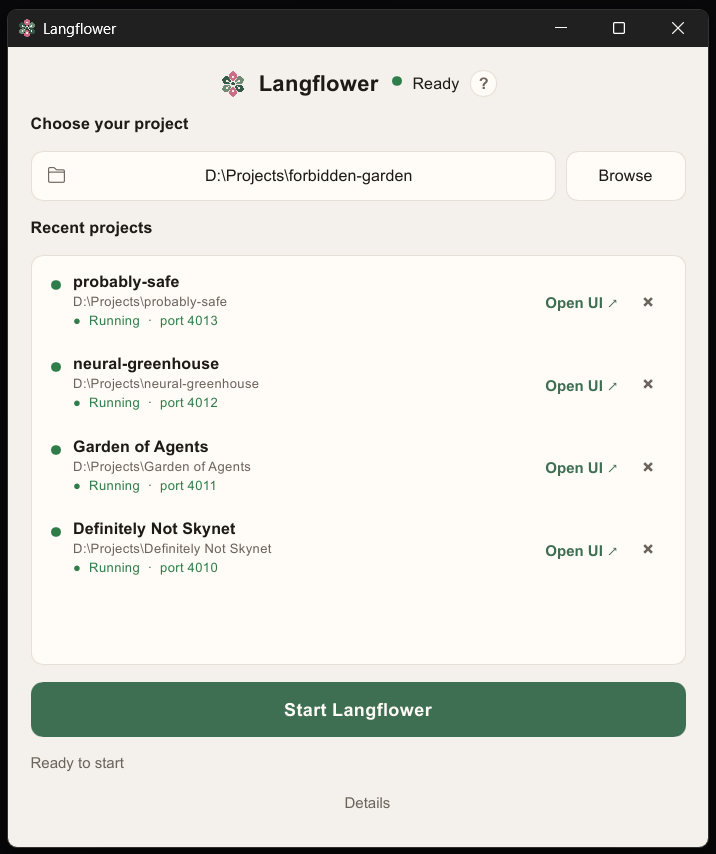
If you do not want to bother with a terminal, use the **desktop
|
|
61
|
+
launcher**. Pick a project folder, click **Start**, and the editor opens
|
|
62
|
+
in the browser you already have. Several folders can run at once, each
|
|
63
|
+
on its own port. The launcher takes care of missing Node.js and
|
|
64
|
+
Langflower, and checks for Langflower updates for you. It does not
|
|
65
|
+
update itself — download a newer zip when you want a new window.
|
|
66
|
+
|
|
67
|
+
|
|
68
|
+
|
|
69
|
+
Download a Windows or macOS zip from
|
|
70
|
+
[GitHub Releases](https://github.com/earthdmitriy/langflower/releases).
|
|
71
|
+
Unpack and run `langflower-launcher.exe` or `langflower-launcher`. It is
|
|
72
|
+
a portable app: no installation. The binary is unsigned, so Windows
|
|
73
|
+
Defender and macOS Gatekeeper might warn. On macOS: right-click the
|
|
74
|
+
file → **Open**. No Linux zip yet. Manual:
|
|
75
|
+
[Desktop launcher](https://github.com/earthdmitriy/langflower/blob/master/docs/public/launcher.md).
|
|
76
|
+
|
|
77
|
+
Langflower does not host a model. Live agent runs need you to **bring
|
|
78
|
+
your own key** (BYOK): add an OpenAI-compatible provider in Settings (gear icon)
|
|
79
|
+
and paste the API key there. Pointing at an environment variable is
|
|
80
|
+
optional. Simple nodes and the Fake LLM work without a key.
|
|
81
|
+
|
|
82
|
+
From a terminal:
|
|
63
83
|
|
|
64
84
|
One-shot OS installers (Node LTS if needed + global `langflower`):
|
|
65
85
|
[install/](install/) (`windows.ps1`, `linux.sh`, `macos.sh`).
|
|
@@ -78,9 +98,9 @@ npm run install-local
|
|
|
78
98
|
npx langflower
|
|
79
99
|
```
|
|
80
100
|
|
|
81
|
-
|
|
82
|
-
in `.langflower/config.json`) for the selected folder. Use `-p` to
|
|
83
|
-
instances from different folders at once.
|
|
101
|
+
The CLI opens a local UI at `http://127.0.0.1:4010` (or `--port` / the
|
|
102
|
+
port in `.langflower/config.json`) for the selected folder. Use `-p` to
|
|
103
|
+
run several instances from different folders at once.
|
|
84
104
|
|
|
85
105
|
Full walkthrough: [Getting started](https://github.com/earthdmitriy/langflower/blob/master/docs/public/getting-started.md).
|
|
86
106
|
|
|
@@ -124,6 +144,7 @@ Shipped with the npm package under [`docs/public/`](https://github.com/earthdmit
|
|
|
124
144
|
|
|
125
145
|
| Want to… | Start here |
|
|
126
146
|
| -------------------------------- | ---------------------------------------------------------------------------------------------------------- |
|
|
147
|
+
| Start without a terminal | [Desktop launcher](https://github.com/earthdmitriy/langflower/blob/master/docs/public/launcher.md) |
|
|
127
148
|
| Install and first run | [Getting started](https://github.com/earthdmitriy/langflower/blob/master/docs/public/getting-started.md) |
|
|
128
149
|
| Understand the product | [Product overview](https://github.com/earthdmitriy/langflower/blob/master/docs/public/product.md) |
|
|
129
150
|
| Use the canvas and runs | [Using the editor](https://github.com/earthdmitriy/langflower/blob/master/docs/public/using-the-editor.md) |
|
package/dist/index.js
CHANGED
|
@@ -58487,6 +58487,7 @@ var {
|
|
|
58487
58487
|
} = import_index.default;
|
|
58488
58488
|
|
|
58489
58489
|
// packages/cli/dist/start-command.js
|
|
58490
|
+
import { writeSync } from "node:fs";
|
|
58490
58491
|
import fs23 from "node:fs/promises";
|
|
58491
58492
|
import path22 from "node:path";
|
|
58492
58493
|
import { fileURLToPath as fileURLToPath3 } from "node:url";
|
|
@@ -80385,6 +80386,11 @@ var parseListenPort = (raw) => {
|
|
|
80385
80386
|
}
|
|
80386
80387
|
return port;
|
|
80387
80388
|
};
|
|
80389
|
+
var formatReadyLine = (input) => `LANGFLOWER_READY ${JSON.stringify({
|
|
80390
|
+
url: input.url,
|
|
80391
|
+
port: input.port,
|
|
80392
|
+
projectDir: input.projectDir
|
|
80393
|
+
})}`;
|
|
80388
80394
|
var startProject = async (projectDirArg, opts) => {
|
|
80389
80395
|
const projectDir = path22.resolve(projectDirArg);
|
|
80390
80396
|
if (!await hasLangflowerProject(projectDir)) {
|
|
@@ -80408,8 +80414,17 @@ var startProject = async (projectDirArg, opts) => {
|
|
|
80408
80414
|
console.warn(`Warning: --dev with --port ${String(opts.port)}: ng serve proxy still targets http://127.0.0.1:${String(DEFAULT_PORT)}/ws`);
|
|
80409
80415
|
}
|
|
80410
80416
|
} else {
|
|
80411
|
-
|
|
80412
|
-
|
|
80417
|
+
const url = `http://127.0.0.1:${port}`;
|
|
80418
|
+
if (opts.noOpen !== true) {
|
|
80419
|
+
await open_default(url);
|
|
80420
|
+
}
|
|
80421
|
+
console.log(`Langflower running at ${url}`);
|
|
80422
|
+
writeSync(1, `${formatReadyLine({
|
|
80423
|
+
url,
|
|
80424
|
+
port,
|
|
80425
|
+
projectDir
|
|
80426
|
+
})}
|
|
80427
|
+
`);
|
|
80413
80428
|
}
|
|
80414
80429
|
console.log(`Project: ${projectDir}`);
|
|
80415
80430
|
};
|
|
@@ -80418,6 +80433,7 @@ var runStartAction = async (projectDir, opts) => {
|
|
|
80418
80433
|
const port = opts.port !== void 0 ? parseListenPort(opts.port) : void 0;
|
|
80419
80434
|
await startProject(projectDir, {
|
|
80420
80435
|
dev: opts.dev === true,
|
|
80436
|
+
noOpen: opts.open === false,
|
|
80421
80437
|
...port !== void 0 ? { port } : {}
|
|
80422
80438
|
});
|
|
80423
80439
|
} catch (error) {
|
|
@@ -80430,9 +80446,14 @@ var PORT_OPTION = [
|
|
|
80430
80446
|
"-p, --port <number>",
|
|
80431
80447
|
"HTTP listen port (overrides .langflower/config.json for this run)"
|
|
80432
80448
|
];
|
|
80449
|
+
var NO_OPEN_OPTION = [
|
|
80450
|
+
"--no-open",
|
|
80451
|
+
"Do not open the system browser after listen"
|
|
80452
|
+
];
|
|
80453
|
+
var applyStartOptions = (command) => command.option("--dev", "Dev mode: API-only server, UI served by ng serve").option(...PORT_OPTION).option(...NO_OPEN_OPTION);
|
|
80433
80454
|
var registerStartCommand = (program2) => {
|
|
80434
|
-
program2.argument("[project-dir]", "Project directory", process.cwd())
|
|
80435
|
-
program2.command("start").description("Start Langflower server and open UI in browser (alias)").argument("[project-dir]", "Project directory", process.cwd())
|
|
80455
|
+
applyStartOptions(program2.argument("[project-dir]", "Project directory", process.cwd())).action(runStartAction);
|
|
80456
|
+
applyStartOptions(program2.command("start").description("Start Langflower server and open UI in browser (alias)").argument("[project-dir]", "Project directory", process.cwd())).action(runStartAction);
|
|
80436
80457
|
};
|
|
80437
80458
|
|
|
80438
80459
|
// packages/cli/dist/cli.js
|
package/docs/public/README.md
CHANGED
|
@@ -7,6 +7,7 @@ package).
|
|
|
7
7
|
| Manual | Topic |
|
|
8
8
|
| ------------------------------------------ | ----------------------------------------- |
|
|
9
9
|
| [Getting started](getting-started.md) | Install, first run, ports |
|
|
10
|
+
| [Desktop launcher](launcher.md) | Folder picker window, Start / Stop / Open |
|
|
10
11
|
| [Product overview](product.md) | Local node graph: pitch, compare, lacks |
|
|
11
12
|
| [Using the editor](using-the-editor.md) | Canvas, runs, human review, reconnect |
|
|
12
13
|
| [Workflow ideas](workflows.md) | Common scenarios you can build |
|
|
@@ -23,7 +23,14 @@ langflower ./my-project
|
|
|
23
23
|
```
|
|
24
24
|
|
|
25
25
|
Langflower starts a local server and opens the UI in your browser (default
|
|
26
|
-
`http://127.0.0.1:4010`).
|
|
26
|
+
`http://127.0.0.1:4010`). An optional desktop **launcher** can pick folders
|
|
27
|
+
and start the same CLI without a terminal — several projects at once, each
|
|
28
|
+
on its own port. User manual:
|
|
29
|
+
[Desktop launcher](launcher.md). Unsigned
|
|
30
|
+
Windows and macOS zips are on
|
|
31
|
+
[GitHub Releases](https://github.com/earthdmitriy/langflower/releases)
|
|
32
|
+
(tags `launcher-v*`, not the npm `v*` tags). You still need Node.js and
|
|
33
|
+
`npm install -g langflower`. On macOS, right-click the binary → Open.
|
|
27
34
|
|
|
28
35
|
Stop the process with Ctrl+C when you are done. There is no cloud account and
|
|
29
36
|
no background daemon.
|
|
@@ -0,0 +1,110 @@
|
|
|
1
|
+
# Desktop launcher
|
|
2
|
+
|
|
3
|
+
The launcher is a small window that starts Langflower **without a
|
|
4
|
+
terminal**. It picks a project folder, can install Node.js and the
|
|
5
|
+
global `langflower` CLI, then runs the **same** CLI a terminal user
|
|
6
|
+
would run. The editor still opens in your **system browser**.
|
|
7
|
+
|
|
8
|
+
This window is not the canvas. It does not embed the editor, and it
|
|
9
|
+
does not include Node.js or the CLI inside the zip.
|
|
10
|
+
|
|
11
|
+
## Download
|
|
12
|
+
|
|
13
|
+
Unsigned Windows and macOS zips are on
|
|
14
|
+
[GitHub Releases](https://github.com/earthdmitriy/langflower/releases)
|
|
15
|
+
(tags `launcher-v*`, not the npm `v*` tags).
|
|
16
|
+
|
|
17
|
+
- `langflower-launcher-windows-x64.zip`
|
|
18
|
+
- `langflower-launcher-windows-arm64.zip`
|
|
19
|
+
- `langflower-launcher-macos-arm64.zip`
|
|
20
|
+
- `langflower-launcher-macos-x64.zip`
|
|
21
|
+
|
|
22
|
+
Unpack and run `langflower-launcher.exe` (Windows) or
|
|
23
|
+
`langflower-launcher` (macOS). Windows SmartScreen and macOS Gatekeeper
|
|
24
|
+
will warn because the binary is unsigned. On macOS: right-click the
|
|
25
|
+
file → **Open**.
|
|
26
|
+
|
|
27
|
+
Linux has no published zip in v1.
|
|
28
|
+
|
|
29
|
+
## First run
|
|
30
|
+
|
|
31
|
+
You still need:
|
|
32
|
+
|
|
33
|
+
1. **Node.js ≥ 22**
|
|
34
|
+
2. The global CLI: `npm install -g langflower`
|
|
35
|
+
|
|
36
|
+
If Node is missing or too old, the window shows **Install Node.js**
|
|
37
|
+
(Windows: winget LTS; macOS: official Node `.pkg` from nodejs.org, which
|
|
38
|
+
asks for administrator permission). If Node is fine but Langflower is
|
|
39
|
+
missing, it shows **Install Langflower**. If a newer CLI is on npm, it
|
|
40
|
+
offers **Update** and **Skip**. Skip lasts for this session only.
|
|
41
|
+
|
|
42
|
+
Install buttons are hidden while any project the launcher started is
|
|
43
|
+
still running. Stop those first.
|
|
44
|
+
|
|
45
|
+
The **?** button in the title row opens this page on GitHub.
|
|
46
|
+
|
|
47
|
+
## Start a project
|
|
48
|
+
|
|
49
|
+
1. **Browse** to a folder, type a path, or click a **Recent** row.
|
|
50
|
+
**×** on a row removes it from recents only (it does not Stop a
|
|
51
|
+
running project).
|
|
52
|
+
2. Click **Start Langflower** (or press Enter in the path field).
|
|
53
|
+
3. Wait until the hint says the project is running on a port.
|
|
54
|
+
4. The system browser opens `http://127.0.0.1:<port>` after the CLI is
|
|
55
|
+
ready. Use **Open Langflower ↗** (or **Open UI ↗** on a recent row)
|
|
56
|
+
if you closed the tab.
|
|
57
|
+
|
|
58
|
+
An empty folder is fine: the CLI creates `.langflower/` on first start.
|
|
59
|
+
Your other files are left alone.
|
|
60
|
+
|
|
61
|
+
**Start** stays disabled until Node meets the minimum, a global
|
|
62
|
+
`langflower` is installed, and a folder is chosen.
|
|
63
|
+
|
|
64
|
+
## Several projects at once
|
|
65
|
+
|
|
66
|
+
Each folder gets its own Langflower process and port (starting at
|
|
67
|
+
**4010**, then the next free port through **4109**). Start, Stop, and
|
|
68
|
+
Open apply to the **selected** folder. Other rows keep running.
|
|
69
|
+
|
|
70
|
+
You cannot start the same folder twice. Select another recent and Start
|
|
71
|
+
it while the first is still up.
|
|
72
|
+
|
|
73
|
+
## Stop and close
|
|
74
|
+
|
|
75
|
+
- **Stop Langflower** ends the selected process only.
|
|
76
|
+
- **Closing the launcher window** stops **every** process this window
|
|
77
|
+
started.
|
|
78
|
+
- Closing a **browser tab** does not stop the server. Reopen the URL
|
|
79
|
+
while that row still says Running.
|
|
80
|
+
|
|
81
|
+
Processes you started from a terminal are not stopped by this window.
|
|
82
|
+
|
|
83
|
+
## Details
|
|
84
|
+
|
|
85
|
+
Open **Details** at the bottom for the CLI and installer log. **Copy**
|
|
86
|
+
puts the log on the clipboard (the text itself is not selectable).
|
|
87
|
+
|
|
88
|
+
Prefixes:
|
|
89
|
+
|
|
90
|
+
- `[launcher]` — version check and launcher messages
|
|
91
|
+
- `[install]` — Node or Langflower install output
|
|
92
|
+
- `[folder-name]` — that project’s CLI output
|
|
93
|
+
|
|
94
|
+
If Node and Langflower are already current, the first line says they
|
|
95
|
+
already have current versions — that is not an install.
|
|
96
|
+
|
|
97
|
+
## If something goes wrong
|
|
98
|
+
|
|
99
|
+
| What you see | What to try |
|
|
100
|
+
| -------------------------------- | --------------------------------------------------------- |
|
|
101
|
+
| Start stays grey | Install Node and/or Langflower; choose a folder |
|
|
102
|
+
| “That folder could not be found” | Browse again; the path must exist |
|
|
103
|
+
| “No free port is available” | Stop other Langflower instances using 4010–4109 |
|
|
104
|
+
| Gatekeeper / SmartScreen | Unsigned zip — Open anyway as above |
|
|
105
|
+
| Editor does not load | Wait for Running; open Details; try Open ↗ |
|
|
106
|
+
| Update offer every launch | Skip is session-only; Update installs `langflower@latest` |
|
|
107
|
+
|
|
108
|
+
Need the terminal path instead? See
|
|
109
|
+
[Getting started](getting-started.md). Once a project is running, use
|
|
110
|
+
[Using the editor](using-the-editor.md).
|
package/package.json
CHANGED
|
Binary file
|
|
Binary file
|
|
Binary file
|
package/ui-dist/index.html
CHANGED
|
@@ -5,6 +5,9 @@
|
|
|
5
5
|
<title>Langflower</title>
|
|
6
6
|
<base href="/">
|
|
7
7
|
<meta name="viewport" content="width=device-width, initial-scale=1">
|
|
8
|
+
<link rel="icon" href="favicon.ico" sizes="any">
|
|
9
|
+
<link rel="icon" type="image/png" sizes="32x32" href="favicon-32x32.png">
|
|
10
|
+
<link rel="apple-touch-icon" href="apple-touch-icon.png">
|
|
8
11
|
<style>@layer properties;:root{--ngd-colors-gray-100:#ffffff;--ngd-colors-gray-200:#f7f7f7;--ngd-colors-gray-300:#edeff3;--ngd-colors-gray-400:#d5d8e0;--ngd-colors-gray-450:#c2c0c0;--ngd-colors-gray-500:#6f7480;--ngd-colors-gray-600:#4d5059;--ngd-colors-gray-650:#383a40;--ngd-colors-gray-700:#27282b;--ngd-colors-gray-800:#151516;--ngd-colors-gray-900-5:rgba(7, 7, 8, .05);--ngd-colors-gray-900-20:rgba(7, 7, 8, .2);--ngd-colors-gray-900-50:rgba(7, 7, 8, .5);--ngd-colors-acc1-400:#a977ff;--ngd-colors-acc1-500:#9140ff;--ngd-colors-acc1-500-40:rgba(145, 64, 255, .4);--ngd-colors-acc1-500-50:rgba(145, 64, 255, .5);--ngd-colors-acc1-600:#891aff;--ngd-colors-acc4-500:#1096e7}:root{--ngd-shadow:var(--ngd-colors-gray-900-20);--ngd-txt-primary-default:var(--ngd-colors-gray-800);--ngd-nav-button-primary-default:var(--ngd-colors-gray-600);--ngd-nav-button-primary-pressed:var(--ngd-colors-acc1-600);--ngd-nav-button-primary-hover:var(--ngd-colors-gray-900-5);--ngd-nav-button-primary-disabled:var(--ngd-colors-gray-450);--ngd-diagram-background-color:var(--ngd-colors-gray-200);--ngd-ui-bg-primary-default:var(--ngd-colors-gray-100);--ngd-ui-bg-tertiary-default:var(--ngd-colors-gray-200);--ngd-ui-stroke-primary-focus:var(--ngd-colors-gray-500);--ngd-pt-stroke-primary-default:var(--ngd-colors-gray-600);--ngd-node-bg-primary-default:var(--ngd-colors-gray-100);--ngd-node-stroke-primary-default:var(--ngd-colors-gray-400);--ngd-node-stroke-primary-hover:var(--ngd-colors-acc1-500);--ngd-node-port-fill-default:var(--ngd-colors-gray-100);--ngd-node-port-fill-active:var(--ngd-colors-acc1-500);--ngd-node-port-stroke-default:var(--ngd-colors-gray-500);--ngd-node-port-stroke-active:var(--ngd-colors-gray-100);--ngd-transform-box:var(--ngd-colors-acc4-500);--ngd-focus-ring-node-active:var(--ngd-colors-acc1-500-40);--ngd-button-gray-bg-default:var(--ngd-colors-gray-500);--ngd-button-gray-bg-hover:var(--ngd-colors-gray-600);--ngd-button-gray-bg-active:var(--ngd-colors-gray-650);--ngd-default-edge-label-bg-primary-default:var(--ngd-colors-gray-100);--ngd-background-line-minor-color:var(--ngd-colors-gray-450);--ngd-background-line-major-color:var(--ngd-colors-gray-500);--ngd-ui-border-color:var(--ngd-colors-gray-300);--ngd-minimap-bg-primary-default:var(--ngd-colors-gray-100);--ngd-minimap-stroke-primary-default:var(--ngd-colors-gray-400)}:root{--ngd-node-background-color:var(--ngd-node-bg-primary-default);--ngd-node-border-color:var(--ngd-node-stroke-primary-default);--ngd-node-border-color-hover:var(--ngd-node-stroke-primary-hover);--ngd-node-border-radius:.75rem;--ngd-node-border-size:.0625rem;--ngd-group-border-color:var(--ngd-ui-stroke-primary-focus);--ngd-group-border-color-hover:var(--ngd-pt-stroke-primary-default);--ngd-group-border-color-highlight:var(--ngd-colors-acc1-500);--ngd-group-box-shadow-color-highlight:var(--ngd-colors-acc1-500-50);--ngd-group-background-color-highlight:var(--ngd-colors-gray-400);--ngd-group-border-radius:.75rem;--ngd-group-highlight-size:1.25rem;--ngd-selected-node-box-shadow:0 0 0 .25rem var(--ngd-focus-ring-node-active);--ngd-rotate-handle-size:2rem;--ngd-rotate-handle-distance:2rem;--ngd-rotate-handle-background-color:var(--ngd-button-gray-bg-default);--ngd-rotate-handle-background-color-hover:var(--ngd-button-gray-bg-hover);--ngd-rotate-handle-background-color-active:var(--ngd-button-gray-bg-active);--ngd-rotate-handle-xy:calc(-.7071 * var(--ngd-rotate-handle-distance));--ngd-rotate-handle-top:var(--ngd-rotate-handle-xy);--ngd-rotate-handle-right:var(--ngd-rotate-handle-xy);--ngd-resize-line-border-width:.0625rem;--ngd-resize-line-border-style:solid;--ngd-resize-line-border-color:var(--ngd-transform-box);--ngd-resize-handle-size:.375rem;--ngd-resize-handle-background-color:var(--ngd-ui-bg-primary-default);--ngd-resize-handle-border-size:.0625rem;--ngd-resize-handle-border-style:solid;--ngd-resize-handle-border-color:var(--ngd-transform-box);--ngd-resize-handle-border-radius:0;--ngd-port-size:.25rem;--ngd-port-background-color:var(--ngd-node-port-fill-default);--ngd-port-border-color:var(--ngd-node-port-stroke-default);--ngd-port-border-size:.125rem;--ngd-port-border-radius:50%;--ngd-port-background-color-hover:var(--ngd-node-port-fill-active);--ngd-port-border-color-hover:var(--ngd-node-port-stroke-active);--ngd-port-border-size-hover:.25rem;--ngd-default-edge-stroke:var(--ngd-colors-gray-500);--ngd-default-edge-stroke-hover:var(--ngd-colors-gray-700);--ngd-default-edge-stroke-selected:var(--ngd-colors-acc1-500);--ngd-box-selection-border-color:#961ce7;--ngd-box-selection-border-size:1px;--ngd-box-selection-background:rgba(43, 91, 213, .12);--ngd-default-edge-label-background-color:var(--ngd-default-edge-label-bg-primary-default);--ngd-default-edge-label-color:var(--ngd-txt-primary-default);--ngd-default-edge-label-border-color:var(--ngd-colors-gray-500);--ngd-background-dot-color:var(--ngd-colors-gray-500);--ngd-background-line-minor-width:.5;--ngd-background-line-major-width:1;--ngd-background-line-minor-opacity:.5;--ngd-background-line-major-opacity:.6;--ngd-minimap-background:var(--ngd-minimap-bg-primary-default);--ngd-minimap-border-color:var(--ngd-minimap-stroke-primary-default);--ngd-minimap-shadow-color:var(--ngd-shadow);--ngd-minimap-border-radius:1rem;--ngd-minimap-padding:.5rem;--ngd-minimap-margin:1rem;--ngd-minimap-node-color:var(--ngd-colors-gray-400);--ngd-minimap-node-opacity:.8;--ngd-minimap-diagram-bounds-opacity:.3;--ngd-minimap-diagram-bounds-color:var(--ngd-colors-gray-400);--ngd-minimap-viewport-stroke-color:var(--ngd-colors-gray-400);--ngd-minimap-viewport-stroke-width:1;--ngd-nav-button-color:var(--ngd-nav-button-primary-default);--ngd-nav-button-size:1.25rem;--ngd-nav-button-border-radius:.5rem;--ngd-nav-button-padding:.6875rem;--ngd-nav-button-background-color-hover:var(--ngd-nav-button-primary-hover);--ngd-nav-button-color-active:var(--ngd-nav-button-primary-pressed);--ngd-nav-button-color-disabled:var(--ngd-nav-button-primary-disabled);--ngd-zoom-controls-font-size:.8125rem;--ngd-zoom-controls-font-weight:500;--ngd-zoom-controls-color:var(--ngd-nav-button-primary-default)}@layer theme,base,components,utilities;@layer theme{:root{--font-sans:Inter, ui-sans-serif, system-ui, sans-serif;--font-mono:"JetBrains Mono", ui-monospace, SFMono-Regular, monospace;--color-red-300:oklch(80.8% .114 19.571);--color-red-700:oklch(50.5% .213 27.518);--color-amber-50:oklch(98.7% .022 95.277);--color-amber-100:oklch(96.2% .059 95.617);--color-amber-300:oklch(87.9% .169 91.605);--color-amber-400:oklch(82.8% .189 84.429);--color-amber-500:oklch(76.9% .188 70.08);--color-amber-600:oklch(66.6% .179 58.318);--color-amber-700:oklch(55.5% .163 48.998);--color-amber-800:oklch(47.3% .137 46.201);--color-amber-900:oklch(41.4% .112 45.904);--color-amber-950:oklch(27.9% .077 45.635);--color-emerald-50:oklch(97.9% .021 166.113);--color-emerald-100:oklch(95% .052 163.051);--color-emerald-300:oklch(84.5% .143 164.978);--color-emerald-400:oklch(76.5% .177 163.223);--color-emerald-500:oklch(69.6% .17 162.48);--color-emerald-600:oklch(59.6% .145 163.225);--color-emerald-700:oklch(50.8% .118 165.612);--color-emerald-950:oklch(26.2% .051 172.552);--color-sky-50:oklch(97.7% .013 236.62);--color-sky-100:oklch(95.1% .026 236.824);--color-sky-300:oklch(82.8% .111 230.318);--color-sky-400:oklch(74.6% .16 232.661);--color-sky-500:oklch(68.5% .169 237.323);--color-sky-700:oklch(50% .134 242.749);--color-sky-950:oklch(29.3% .066 243.157);--color-violet-400:oklch(70.2% .183 293.541);--color-rose-50:oklch(96.9% .015 12.422);--color-rose-100:oklch(94.1% .03 12.58);--color-rose-300:oklch(81% .117 11.638);--color-rose-400:oklch(71.2% .194 13.428);--color-rose-500:oklch(64.5% .246 16.439);--color-rose-600:oklch(58.6% .253 17.585);--color-rose-700:oklch(51.4% .222 16.935);--color-rose-800:oklch(45.5% .188 13.697);--color-rose-950:oklch(27.1% .105 12.094);--color-zinc-50:oklch(98.5% 0 0);--color-zinc-100:oklch(96.7% .001 286.375);--color-zinc-200:oklch(92% .004 286.32);--color-zinc-300:oklch(87.1% .006 286.286);--color-zinc-400:oklch(70.5% .015 286.067);--color-zinc-500:oklch(55.2% .016 285.938);--color-zinc-600:oklch(44.2% .017 285.786);--color-zinc-700:oklch(37% .013 285.805);--color-zinc-800:oklch(27.4% .006 286.033);--color-zinc-900:oklch(21% .006 285.885);--color-zinc-950:oklch(14.1% .005 285.823);--color-white:#fff;--spacing:.25rem;--container-md:28rem;--text-xs:.75rem;--text-xs--line-height:calc(1 / .75);--text-sm:.875rem;--text-sm--line-height:calc(1.25 / .875);--text-base:1rem;--text-base--line-height:1.5 ;--text-lg:1.125rem;--text-lg--line-height:calc(1.75 / 1.125);--font-weight-medium:500;--font-weight-semibold:600;--tracking-tight:-.025em;--tracking-normal:0em;--tracking-wide:.025em;--radius-md:.375rem;--radius-lg:.5rem;--radius-xl:.75rem;--radius-2xl:1rem;--default-transition-duration:.15s;--default-transition-timing-function:cubic-bezier(.4, 0, .2, 1);--default-font-family:var(--font-sans);--default-mono-font-family:var(--font-mono)}}@layer base{*,:after,:before{box-sizing:border-box;margin:0;padding:0;border:0 solid}html{line-height:1.5;-webkit-text-size-adjust:100%;tab-size:4;font-family:var(--default-font-family, ui-sans-serif, system-ui, sans-serif, "Apple Color Emoji", "Segoe UI Emoji", "Segoe UI Symbol", "Noto Color Emoji");font-feature-settings:var(--default-font-feature-settings, normal);font-variation-settings:var(--default-font-variation-settings, normal);-webkit-tap-highlight-color:transparent}}@layer utilities{}:root{--lf-control-h:2rem;--lf-btn-pad:calc(var(--lf-control-h) / 2)}@layer components{}html,body{height:100%;margin:0}body{background-color:var(--color-zinc-50);font-family:var(--font-sans);font-size:var(--text-sm);line-height:var(--tw-leading, var(--text-sm--line-height));color:var(--color-zinc-950);-webkit-font-smoothing:antialiased;-moz-osx-font-smoothing:grayscale}body:where([data-theme=dark],[data-theme=dark] *){background-color:var(--color-zinc-950)}body:where([data-theme=dark],[data-theme=dark] *){color:var(--color-zinc-100)}@layer base{}@layer components{}@property --tw-translate-x{syntax:"*";inherits:false;initial-value:0;}@property --tw-translate-y{syntax:"*";inherits:false;initial-value:0;}@property --tw-translate-z{syntax:"*";inherits:false;initial-value:0;}@property --tw-rotate-x{syntax:"*";inherits:false;}@property --tw-rotate-y{syntax:"*";inherits:false;}@property --tw-rotate-z{syntax:"*";inherits:false;}@property --tw-skew-x{syntax:"*";inherits:false;}@property --tw-skew-y{syntax:"*";inherits:false;}@property --tw-space-y-reverse{syntax:"*";inherits:false;initial-value:0;}@property --tw-border-style{syntax:"*";inherits:false;initial-value:solid;}@property --tw-gradient-position{syntax:"*";inherits:false;}@property --tw-gradient-from{syntax:"<color>";inherits:false;initial-value:#0000;}@property --tw-gradient-via{syntax:"<color>";inherits:false;initial-value:#0000;}@property --tw-gradient-to{syntax:"<color>";inherits:false;initial-value:#0000;}@property --tw-gradient-stops{syntax:"*";inherits:false;}@property --tw-gradient-via-stops{syntax:"*";inherits:false;}@property --tw-gradient-from-position{syntax:"<length-percentage>";inherits:false;initial-value:0%;}@property --tw-gradient-via-position{syntax:"<length-percentage>";inherits:false;initial-value:50%;}@property --tw-gradient-to-position{syntax:"<length-percentage>";inherits:false;initial-value:100%;}@property --tw-leading{syntax:"*";inherits:false;}@property --tw-font-weight{syntax:"*";inherits:false;}@property --tw-tracking{syntax:"*";inherits:false;}@property --tw-shadow{syntax:"*";inherits:false;initial-value:0 0 #0000;}@property --tw-shadow-color{syntax:"*";inherits:false;}@property --tw-shadow-alpha{syntax:"<percentage>";inherits:false;initial-value:100%;}@property --tw-inset-shadow{syntax:"*";inherits:false;initial-value:0 0 #0000;}@property --tw-inset-shadow-color{syntax:"*";inherits:false;}@property --tw-inset-shadow-alpha{syntax:"<percentage>";inherits:false;initial-value:100%;}@property --tw-ring-color{syntax:"*";inherits:false;}@property --tw-ring-shadow{syntax:"*";inherits:false;initial-value:0 0 #0000;}@property --tw-inset-ring-color{syntax:"*";inherits:false;}@property --tw-inset-ring-shadow{syntax:"*";inherits:false;initial-value:0 0 #0000;}@property --tw-ring-inset{syntax:"*";inherits:false;}@property --tw-ring-offset-width{syntax:"<length>";inherits:false;initial-value:0px;}@property --tw-ring-offset-color{syntax:"*";inherits:false;initial-value:#fff;}@property --tw-ring-offset-shadow{syntax:"*";inherits:false;initial-value:0 0 #0000;}@property --tw-blur{syntax:"*";inherits:false;}@property --tw-brightness{syntax:"*";inherits:false;}@property --tw-contrast{syntax:"*";inherits:false;}@property --tw-grayscale{syntax:"*";inherits:false;}@property --tw-hue-rotate{syntax:"*";inherits:false;}@property --tw-invert{syntax:"*";inherits:false;}@property --tw-opacity{syntax:"*";inherits:false;}@property --tw-saturate{syntax:"*";inherits:false;}@property --tw-sepia{syntax:"*";inherits:false;}@property --tw-drop-shadow{syntax:"*";inherits:false;}@property --tw-drop-shadow-color{syntax:"*";inherits:false;}@property --tw-drop-shadow-alpha{syntax:"<percentage>";inherits:false;initial-value:100%;}@property --tw-drop-shadow-size{syntax:"*";inherits:false;}@layer properties{@supports ((-webkit-hyphens: none) and (not (margin-trim: inline))) or ((-moz-orient: inline) and (not (color:rgb(from red r g b)))){*,:before,:after{--tw-translate-x:0;--tw-translate-y:0;--tw-translate-z:0;--tw-rotate-x:initial;--tw-rotate-y:initial;--tw-rotate-z:initial;--tw-skew-x:initial;--tw-skew-y:initial;--tw-space-y-reverse:0;--tw-border-style:solid;--tw-gradient-position:initial;--tw-gradient-from:#0000;--tw-gradient-via:#0000;--tw-gradient-to:#0000;--tw-gradient-stops:initial;--tw-gradient-via-stops:initial;--tw-gradient-from-position:0%;--tw-gradient-via-position:50%;--tw-gradient-to-position:100%;--tw-leading:initial;--tw-font-weight:initial;--tw-tracking:initial;--tw-shadow:0 0 #0000;--tw-shadow-color:initial;--tw-shadow-alpha:100%;--tw-inset-shadow:0 0 #0000;--tw-inset-shadow-color:initial;--tw-inset-shadow-alpha:100%;--tw-ring-color:initial;--tw-ring-shadow:0 0 #0000;--tw-inset-ring-color:initial;--tw-inset-ring-shadow:0 0 #0000;--tw-ring-inset:initial;--tw-ring-offset-width:0px;--tw-ring-offset-color:#fff;--tw-ring-offset-shadow:0 0 #0000;--tw-blur:initial;--tw-brightness:initial;--tw-contrast:initial;--tw-grayscale:initial;--tw-hue-rotate:initial;--tw-invert:initial;--tw-opacity:initial;--tw-saturate:initial;--tw-sepia:initial;--tw-drop-shadow:initial;--tw-drop-shadow-color:initial;--tw-drop-shadow-alpha:100%;--tw-drop-shadow-size:initial}}}</style><link rel="stylesheet" href="styles-VA3HMZK7.css" media="print" onload="this.media='all'"><noscript><link rel="stylesheet" href="styles-VA3HMZK7.css"></noscript></head>
|
|
9
12
|
<body>
|
|
10
13
|
<lf-root></lf-root>
|
|
@@ -70,6 +70,17 @@ You only answer when an LLM provider is already configured. That means coding
|
|
|
70
70
|
templates in the skeleton are **already usable** once copied into the project —
|
|
71
71
|
do not say coding pipelines “don’t exist” or are unavailable.
|
|
72
72
|
|
|
73
|
+
- **Can:** Optional **desktop launcher** (Slint) picks a project folder
|
|
74
|
+
and runs the same CLI (`--no-open -p <port>`), then opens the editor in
|
|
75
|
+
the **system browser** after the instance is listening. Several
|
|
76
|
+
projects can run at once, each on its own port. Unsigned Windows/macOS
|
|
77
|
+
zips ship on GitHub Releases (`launcher-v*` tags, not npm `v*`). Closing
|
|
78
|
+
the launcher stops instances **it** started. Closing a browser tab does
|
|
79
|
+
not. The **?** control opens the user manual on GitHub
|
|
80
|
+
(`docs/public/launcher.md`).
|
|
81
|
+
- **Cannot:** Claim the launcher embeds the canvas, or that it is a
|
|
82
|
+
Tauri / Electron / WebView app. (Tauri was tried for the thin window
|
|
83
|
+
and rejected; the shipped launcher is Slint.)
|
|
73
84
|
- **Can:** `langflower start [project-dir]` (default port **4010**) creates
|
|
74
85
|
`.langflower/`, config, `instructions.md`, packs `nodes/my-nodes/` and
|
|
75
86
|
`nodes/hello-embed/`, skills
|
|
@@ -13,10 +13,13 @@ this file over inventing infrastructure.
|
|
|
13
13
|
|
|
14
14
|
## Layers (user-facing)
|
|
15
15
|
|
|
16
|
-
1. CLI — `langflower start` (default port **4010**)
|
|
16
|
+
1. CLI — `langflower start` (default port **4010**). Optional **Slint
|
|
17
|
+
launcher** can spawn several of these CLIs (one per project folder);
|
|
18
|
+
it does not embed the editor.
|
|
17
19
|
2. Local **server** — owns runtime, project I/O under `.langflower/`
|
|
18
20
|
3. **WebSocket bus** — control plane between server and editor
|
|
19
21
|
4. Angular **editor** — canvas, feed, inspector, Settings, composer
|
|
22
|
+
(system browser; not a WebView inside the launcher)
|
|
20
23
|
|
|
21
24
|
Project product data for Langflower lives under **`.langflower/`**.
|
|
22
25
|
|