langflower 0.0.4 → 0.0.6
This diff represents the content of publicly available package versions that have been released to one of the supported registries. The information contained in this diff is provided for informational purposes only and reflects changes between package versions as they appear in their respective public registries.
- package/README.md +20 -15
- package/docs/public/README.md +15 -0
- package/docs/public/configuration.md +56 -0
- package/docs/public/extending.md +58 -0
- package/docs/public/getting-started.md +61 -0
- package/docs/public/how-it-works.md +39 -0
- package/docs/public/product.md +43 -0
- package/docs/public/using-the-editor.md +53 -0
- package/docs/public/workflows.md +49 -0
- package/package.json +3 -2
- package/ui-dist/chunk-6DQ2XSRW.js +4 -0
- package/ui-dist/{chunk-2AICAC67.js → chunk-Y6VMBLSJ.js} +1 -1
- package/ui-dist/index.html +2 -2
- package/ui-dist/main-RCFTD5AZ.js +311 -0
- package/ui-dist/styles-EOXODOI7.css +1 -0
- package/vendor/common-nodes/dist/ai/critique/node.d.ts +141 -23
- package/vendor/common-nodes/dist/ai/critique/node.js +33 -31
- package/vendor/common-nodes/dist/ai/fake-llm/node.d.ts +6 -6
- package/vendor/common-nodes/dist/ai/llm-compaction-ui-schema.d.ts +1 -1
- package/vendor/common-nodes/dist/ai/llm-compaction-ui-schema.js +2 -1
- package/vendor/common-nodes/dist/ai/llm-panel-ui-schema.d.ts +7 -21
- package/vendor/common-nodes/dist/ai/llm-panel-ui-schema.js +8 -4
- package/vendor/common-nodes/dist/ai/llm-session-shell.d.ts +2 -0
- package/vendor/common-nodes/dist/ai/llm-session-shell.js +3 -3
- package/vendor/common-nodes/dist/ai/normalize-max-iterations.d.ts +4 -3
- package/vendor/common-nodes/dist/ai/normalize-max-iterations.js +4 -3
- package/vendor/common-nodes/dist/ai/openai/normalize-compaction-params.d.ts +2 -2
- package/vendor/common-nodes/dist/ai/openai/normalize-compaction-params.js +1 -1
- package/vendor/common-nodes/dist/ai/openai-llm/node.d.ts +9 -9
- package/vendor/common-nodes/dist/ai/resolve-chat-provider-model.d.ts +10 -0
- package/vendor/common-nodes/dist/ai/resolve-chat-provider-model.js +8 -0
- package/vendor/common-nodes/dist/ai/review/node.d.ts +138 -15
- package/vendor/common-nodes/dist/ai/review/node.js +29 -22
- package/vendor/common-nodes/dist/ai/run-host-services.d.ts +8 -0
- package/vendor/common-nodes/dist/ai/sub-agent/node.d.ts +9 -9
- package/vendor/common-nodes/dist/ai/sub-agent/node.js +4 -3
- package/vendor/common-nodes/dist/hitl/chat-input/node.js +1 -0
- package/vendor/common-nodes/dist/hitl/review-gate/node.js +5 -0
- package/vendor/node-sdk/dist/node-factory/define-llm-node/default-llm-ports.js +2 -0
- package/vendor/node-sdk/dist/node-factory/define-reactive-node/define-reactive-node.d.ts +1 -1
- package/vendor/node-sdk/dist/node-factory/define-reactive-node/io-helpers.d.ts +5 -12
- package/vendor/node-sdk/dist/node-factory/define-reactive-node/port-meta.d.ts +13 -0
- package/vendor/runtime/dist/runtime-runner.js +7 -4
- package/vendor/runtime/dist/runtime.d.ts +1 -1
- package/vendor/runtime/dist/types.d.ts +12 -0
- package/vendor/server/dist/bridge/attach-langflower-bridge.d.ts +4 -1
- package/vendor/server/dist/bridge/attach-langflower-bridge.js +16 -5
- package/vendor/server/dist/bridge/bridge-event-log.d.ts +12 -0
- package/vendor/server/dist/bridge/bridge-event-log.js +199 -0
- package/vendor/server/dist/bridge/build-execution-context.d.ts +1 -1
- package/vendor/server/dist/bridge/build-execution-context.js +3 -0
- package/vendor/server/dist/bridge/emit-bootstrap.d.ts +4 -2
- package/vendor/server/dist/bridge/emit-bootstrap.js +6 -2
- package/vendor/server/dist/bridge/settings-draft-controller.d.ts +14 -0
- package/vendor/server/dist/bridge/settings-draft-controller.js +178 -0
- package/vendor/server/dist/bridge/wire-config-handlers.d.ts +8 -1
- package/vendor/server/dist/bridge/wire-config-handlers.js +44 -16
- package/vendor/server/dist/bridge/wire-editor-handlers.d.ts +8 -1
- package/vendor/server/dist/bridge/wire-editor-handlers.js +40 -1
- package/vendor/server/dist/bridge/wire-runner-handlers.js +3 -1
- package/vendor/server/dist/config/langflower-config.service.d.ts +2 -0
- package/vendor/server/dist/config/langflower-config.service.js +24 -1
- package/vendor/server/dist/config/resolve-draft-provider-credentials.d.ts +18 -0
- package/vendor/server/dist/config/resolve-draft-provider-credentials.js +60 -0
- package/vendor/server/dist/create-server.js +5 -3
- package/vendor/server/dist/session/build-session-bootstrap.d.ts +3 -1
- package/vendor/server/dist/session/build-session-bootstrap.js +9 -0
- package/vendor/server/dist/session/langflower-session.d.ts +7 -2
- package/vendor/server/dist/session/langflower-session.js +9 -1
- package/vendor/server/dist/session/settings-draft-session.d.ts +24 -0
- package/vendor/server/dist/session/settings-draft-session.js +82 -0
- package/vendor/server/skeleton/schemas/langflower-config.schema.json +4 -0
- package/vendor/server/skeleton/skills/langflower-helper/SKILL.md +20 -8
- package/vendor/server/skeleton/skills/langflower-helper/architecture.md +5 -0
- package/vendor/server/skeleton/skills/langflower-helper/layout.md +18 -16
- package/vendor/server/skeleton/workflows/simple-coder.json +249 -19
- package/vendor/server/skeleton/workflows/starter.json +31 -20
- package/vendor/shared/dist/langflower-bus-config.d.ts +50 -10
- package/vendor/shared/dist/langflower-bus-config.js +52 -11
- package/vendor/shared/dist/langflower-config/merge-langflower-config-layers.test.js +4 -0
- package/vendor/shared/dist/langflower-config/parse-default-chat-model.d.ts +14 -0
- package/vendor/shared/dist/langflower-config/parse-default-chat-model.js +38 -0
- package/vendor/shared/dist/langflower-config/parse-default-chat-model.test.d.ts +1 -0
- package/vendor/shared/dist/langflower-config/parse-default-chat-model.test.js +41 -0
- package/vendor/shared/dist/langflower-config/resolve-server-logs-enabled.d.ts +6 -0
- package/vendor/shared/dist/langflower-config/resolve-server-logs-enabled.js +5 -0
- package/vendor/shared/dist/langflower-config/resolve-server-logs-enabled.test.d.ts +1 -0
- package/vendor/shared/dist/langflower-config/resolve-server-logs-enabled.test.js +11 -0
- package/vendor/shared/dist/langflower-config/settings-draft.d.ts +44 -0
- package/vendor/shared/dist/langflower-config/settings-draft.js +143 -0
- package/vendor/shared/dist/langflower.d.ts +7 -2
- package/vendor/shared/dist/langflower.js +3 -0
- package/vendor/shared/dist/types/langflower-bootstrap.d.ts +6 -1
- package/vendor/shared/dist/types/langflower-config.d.ts +65 -0
- package/vendor/shared/dist/types/langflower-editor.d.ts +19 -0
- package/ui-dist/chunk-6ZABW4JL.js +0 -4
- package/ui-dist/main-XI7IOZKZ.js +0 -311
- package/ui-dist/styles-TQGRAC7Q.css +0 -1
package/README.md
CHANGED
|
@@ -11,6 +11,8 @@ canvas and decide what must happen before the next stage begins.
|
|
|
11
11
|
|
|
12
12
|
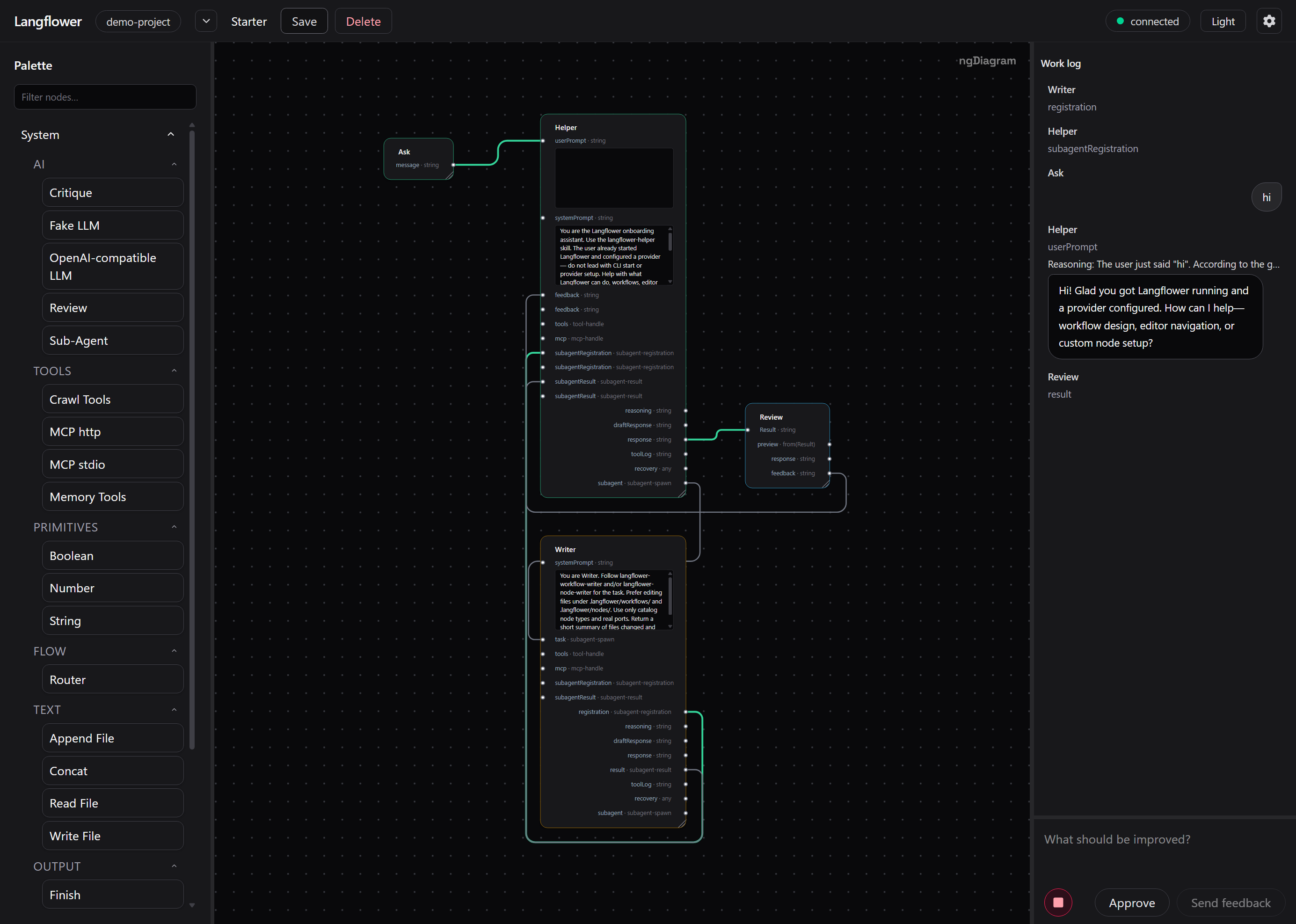
The workflow decides the process — not a model deciding it is “done.”
|
|
13
13
|
|
|
14
|
+
|
|
15
|
+
|
|
14
16
|
## What can you use it for?
|
|
15
17
|
|
|
16
18
|
### Ship a code change
|
|
@@ -32,7 +34,7 @@ proposed changes, and maintain a project wiki or Obsidian vault.
|
|
|
32
34
|
|
|
33
35
|
Langflower also supports research fan-out and synthesis, reusable skills,
|
|
34
36
|
prompt refinement, regression gates, and multi-agent review. Browse the
|
|
35
|
-
[workflow
|
|
37
|
+
[workflow ideas](https://github.com/earthdmitriy/langflower/blob/master/docs/public/workflows.md).
|
|
36
38
|
|
|
37
39
|
## How it works
|
|
38
40
|
|
|
@@ -75,10 +77,8 @@ The server owns the active session, while the browser is a view of it. Closing
|
|
|
75
77
|
or reopening a tab does not create a competing workflow state or cancel a
|
|
76
78
|
long-running job; the UI reconnects to the current progress.
|
|
77
79
|
|
|
78
|
-
For
|
|
79
|
-
|
|
80
|
-
and runtime events. See [Architecture](docs/ARCHITECTURE.md) and
|
|
81
|
-
[Execution architecture](docs/EXECUTION_ARCHITECTURE.md).
|
|
80
|
+
For a short builder-oriented picture, see
|
|
81
|
+
[How it works](https://github.com/earthdmitriy/langflower/blob/master/docs/public/how-it-works.md).
|
|
82
82
|
|
|
83
83
|
## How it compares
|
|
84
84
|
|
|
@@ -113,19 +113,24 @@ Langflower opens a local UI at `http://127.0.0.1:4010` (or `--port` / the port
|
|
|
113
113
|
in `.langflower/config.json`) for the selected folder. Use `-p` to run several
|
|
114
114
|
instances from different folders at once.
|
|
115
115
|
|
|
116
|
-
|
|
117
|
-
|
|
116
|
+
Full walkthrough: [Getting started](https://github.com/earthdmitriy/langflower/blob/master/docs/public/getting-started.md).
|
|
117
|
+
|
|
118
|
+
Maintainers (monorepo only): [docs/RELEASE.md](https://github.com/earthdmitriy/langflower/blob/master/docs/RELEASE.md),
|
|
119
|
+
[packages/cli/README.md](https://github.com/earthdmitriy/langflower/blob/master/packages/cli/README.md).
|
|
118
120
|
|
|
119
121
|
## Learn more
|
|
120
122
|
|
|
121
|
-
|
|
122
|
-
|
|
123
|
-
|
|
|
124
|
-
|
|
|
125
|
-
|
|
|
126
|
-
|
|
|
127
|
-
|
|
|
128
|
-
|
|
|
123
|
+
Shipped with the npm package under [`docs/public/`](https://github.com/earthdmitriy/langflower/tree/master/docs/public):
|
|
124
|
+
|
|
125
|
+
| Want to… | Start here |
|
|
126
|
+
| ---------------------------- | ---------------------------------------------------------------------------------------------------------- |
|
|
127
|
+
| Install and first run | [Getting started](https://github.com/earthdmitriy/langflower/blob/master/docs/public/getting-started.md) |
|
|
128
|
+
| Understand the product | [Product overview](https://github.com/earthdmitriy/langflower/blob/master/docs/public/product.md) |
|
|
129
|
+
| Use the canvas and runs | [Using the editor](https://github.com/earthdmitriy/langflower/blob/master/docs/public/using-the-editor.md) |
|
|
130
|
+
| Browse workflow ideas | [Workflow ideas](https://github.com/earthdmitriy/langflower/blob/master/docs/public/workflows.md) |
|
|
131
|
+
| Configure providers and keys | [Configuration](https://github.com/earthdmitriy/langflower/blob/master/docs/public/configuration.md) |
|
|
132
|
+
| Add skills or custom nodes | [Extending](https://github.com/earthdmitriy/langflower/blob/master/docs/public/extending.md) |
|
|
133
|
+
| Builder runtime picture | [How it works](https://github.com/earthdmitriy/langflower/blob/master/docs/public/how-it-works.md) |
|
|
129
134
|
|
|
130
135
|
## What Langflower is not
|
|
131
136
|
|
|
@@ -0,0 +1,15 @@
|
|
|
1
|
+
# Langflower manuals
|
|
2
|
+
|
|
3
|
+
Short **user manuals** for people who install Langflower from npm. Deeper
|
|
4
|
+
engineering docs live in the monorepo under [`docs/`](../) (not shipped in the
|
|
5
|
+
package).
|
|
6
|
+
|
|
7
|
+
| Manual | Topic |
|
|
8
|
+
| ------------------------------------------ | ----------------------------------------- |
|
|
9
|
+
| [Getting started](getting-started.md) | Install, first run, ports |
|
|
10
|
+
| [Product overview](product.md) | What Langflower is (and is not) |
|
|
11
|
+
| [Using the editor](using-the-editor.md) | Canvas, runs, human review, reconnect |
|
|
12
|
+
| [Workflow ideas](workflows.md) | Common scenarios you can build |
|
|
13
|
+
| [Configuration](configuration.md) | Providers, models, keys, project settings |
|
|
14
|
+
| [Extending Langflower](extending.md) | Skills and custom nodes |
|
|
15
|
+
| [How it works (builders)](how-it-works.md) | Short runtime picture for extenders |
|
|
@@ -0,0 +1,56 @@
|
|
|
1
|
+
# Configuration
|
|
2
|
+
|
|
3
|
+
## Where settings live
|
|
4
|
+
|
|
5
|
+
| Scope | Typical path |
|
|
6
|
+
| --------- | --------------------------------------------------------------- |
|
|
7
|
+
| Project | `<project>/.langflower/langflower.jsonc` |
|
|
8
|
+
| Global | OS app-data `langflower.jsonc` (Settings → Global) |
|
|
9
|
+
| Port / UI | `.langflower/config.json` (CLI `--port` overrides for that run) |
|
|
10
|
+
|
|
11
|
+
Project settings override global for the same keys. Prefer the **Settings**
|
|
12
|
+
gear in the UI for providers and models; hand-editing JSONC remains valid.
|
|
13
|
+
|
|
14
|
+
Schemas are copied into `.langflower/schemas/` on bootstrap so editors that
|
|
15
|
+
honour `$schema` get autocomplete.
|
|
16
|
+
|
|
17
|
+
## Providers and models
|
|
18
|
+
|
|
19
|
+
Add an OpenAI-compatible provider (OpenAI, LM Studio, or similar `baseURL`).
|
|
20
|
+
Cursor does not expose an official OpenAI-compatible chat API for this path.
|
|
21
|
+
|
|
22
|
+
API keys should stay in the environment. Reference them from config:
|
|
23
|
+
|
|
24
|
+
```jsonc
|
|
25
|
+
{
|
|
26
|
+
"provider": {
|
|
27
|
+
"openai": {
|
|
28
|
+
"options": {
|
|
29
|
+
"apiKey": "{env:OPENAI_API_KEY}",
|
|
30
|
+
},
|
|
31
|
+
},
|
|
32
|
+
},
|
|
33
|
+
}
|
|
34
|
+
```
|
|
35
|
+
|
|
36
|
+
## Permissions
|
|
37
|
+
|
|
38
|
+
Project `permission` entries set a **floor** for harness tools (read, write,
|
|
39
|
+
bash, and so on). Agents and the Inspector can only tighten from there
|
|
40
|
+
(ask / deny), not widen a project-level deny.
|
|
41
|
+
|
|
42
|
+
Use this to keep explore-only runs from writing until you open that stage in
|
|
43
|
+
the workflow.
|
|
44
|
+
|
|
45
|
+
## Custom nodes and skills
|
|
46
|
+
|
|
47
|
+
- Skills: markdown under `.langflower/skills/<name>/`
|
|
48
|
+
- Custom nodes: packs under `.langflower/nodes/<pack>/`
|
|
49
|
+
|
|
50
|
+
See [Extending Langflower](extending.md).
|
|
51
|
+
|
|
52
|
+
## Logs
|
|
53
|
+
|
|
54
|
+
Optional `serverLogs` in project or global config controls bridge diagnostics
|
|
55
|
+
under `.langflower/logs/`. Use Settings radios (Off / On / Default) unless you
|
|
56
|
+
prefer editing JSONC by hand.
|
|
@@ -0,0 +1,58 @@
|
|
|
1
|
+
# Extending Langflower
|
|
2
|
+
|
|
3
|
+
## Skills
|
|
4
|
+
|
|
5
|
+
Skills are markdown playbooks the agent can load. Add a folder:
|
|
6
|
+
|
|
7
|
+
```text
|
|
8
|
+
.langflower/skills/my-skill/
|
|
9
|
+
SKILL.md
|
|
10
|
+
```
|
|
11
|
+
|
|
12
|
+
First-run bootstrap already seeds helper skills (for example
|
|
13
|
+
`langflower-helper`). Keep skill text concrete: what the agent can and cannot
|
|
14
|
+
do in your project.
|
|
15
|
+
|
|
16
|
+
## Custom nodes
|
|
17
|
+
|
|
18
|
+
Built-in catalog nodes and your packs share the same authoring SDK. Default
|
|
19
|
+
path for a simple node:
|
|
20
|
+
|
|
21
|
+
```ts
|
|
22
|
+
import { defineNode } from '@langflower/node-sdk';
|
|
23
|
+
|
|
24
|
+
export const myNode = defineNode({
|
|
25
|
+
type: 'my-pack/example',
|
|
26
|
+
displayName: 'Example',
|
|
27
|
+
category: 'Custom',
|
|
28
|
+
uiSchema: [] as const,
|
|
29
|
+
inputs: {
|
|
30
|
+
text: { wireType: 'string', required: true },
|
|
31
|
+
},
|
|
32
|
+
outputs: {
|
|
33
|
+
text: { wireType: 'string' },
|
|
34
|
+
},
|
|
35
|
+
run: async ({ inputs }) => ({
|
|
36
|
+
text: inputs.text,
|
|
37
|
+
}),
|
|
38
|
+
});
|
|
39
|
+
```
|
|
40
|
+
|
|
41
|
+
Pack layout lives under `.langflower/nodes/<pack>/` (see the seeded
|
|
42
|
+
`my-nodes` pack). Run `npm install` inside a pack when you add dependencies —
|
|
43
|
+
Langflower does not auto-install pack deps.
|
|
44
|
+
|
|
45
|
+
Use `defineReactiveNode` only when you need streaming / RxJS ports. Prefer
|
|
46
|
+
`defineNode` for sync or Promise work.
|
|
47
|
+
|
|
48
|
+
## After you change a pack
|
|
49
|
+
|
|
50
|
+
Restart Langflower (or follow the product’s pack reload path when available)
|
|
51
|
+
so the runtime picks up new node types. New nodes should appear in the node
|
|
52
|
+
library for that project.
|
|
53
|
+
|
|
54
|
+
## Deeper guides (monorepo)
|
|
55
|
+
|
|
56
|
+
Full SDK and packaging details live in the Langflower repository (not in this
|
|
57
|
+
npm package), under `docs/HOW_TO_WRITE_REACTIVE_NODES.md` and
|
|
58
|
+
`docs/NODES.md`.
|
|
@@ -0,0 +1,61 @@
|
|
|
1
|
+
# Getting started
|
|
2
|
+
|
|
3
|
+
## Requirements
|
|
4
|
+
|
|
5
|
+
- **Node.js ≥ 22**
|
|
6
|
+
- A project folder on your machine (code, docs, or any workspace you want
|
|
7
|
+
Langflower to work in)
|
|
8
|
+
|
|
9
|
+
## Install and run
|
|
10
|
+
|
|
11
|
+
```bash
|
|
12
|
+
npm install -g langflower
|
|
13
|
+
langflower
|
|
14
|
+
# or point at a folder:
|
|
15
|
+
langflower ./my-project
|
|
16
|
+
```
|
|
17
|
+
|
|
18
|
+
Langflower starts a local server and opens the UI in your browser (default
|
|
19
|
+
`http://127.0.0.1:4010`).
|
|
20
|
+
|
|
21
|
+
Stop the process with Ctrl+C when you are done. There is no cloud account and
|
|
22
|
+
no background daemon.
|
|
23
|
+
|
|
24
|
+
### Several projects at once
|
|
25
|
+
|
|
26
|
+
Use a different port for each instance:
|
|
27
|
+
|
|
28
|
+
```bash
|
|
29
|
+
langflower ./project-a -p 4010
|
|
30
|
+
langflower ./project-b -p 4011
|
|
31
|
+
```
|
|
32
|
+
|
|
33
|
+
You can also set a port in `.langflower/config.json`; a CLI `-p` / `--port`
|
|
34
|
+
overrides that for the current run only.
|
|
35
|
+
|
|
36
|
+
## First run in a folder
|
|
37
|
+
|
|
38
|
+
If the folder has no `.langflower/` directory yet, Langflower creates one with:
|
|
39
|
+
|
|
40
|
+
- Default config and schemas
|
|
41
|
+
- Starter workflows (default open: **starter**)
|
|
42
|
+
- Helper skills and a seed custom-node pack under `.langflower/nodes/my-nodes/`
|
|
43
|
+
|
|
44
|
+
Your own project files are left alone. Later starts reuse the existing
|
|
45
|
+
`.langflower/` data.
|
|
46
|
+
|
|
47
|
+
## Add an LLM provider
|
|
48
|
+
|
|
49
|
+
Simple nodes and the Fake LLM work without a provider. Live agent runs need an
|
|
50
|
+
OpenAI-compatible provider (OpenAI, LM Studio, or similar).
|
|
51
|
+
|
|
52
|
+
1. Open **Settings** (gear) in the UI.
|
|
53
|
+
2. Add a provider and model.
|
|
54
|
+
3. Keep API keys in environment variables and reference them from config as
|
|
55
|
+
`{env:VAR_NAME}` — see [Configuration](configuration.md).
|
|
56
|
+
|
|
57
|
+
## Next steps
|
|
58
|
+
|
|
59
|
+
- [Using the editor](using-the-editor.md) — run a workflow and answer reviews
|
|
60
|
+
- [Workflow ideas](workflows.md) — what to build next
|
|
61
|
+
- [Configuration](configuration.md) — providers and permissions
|
|
@@ -0,0 +1,39 @@
|
|
|
1
|
+
# How it works (builders)
|
|
2
|
+
|
|
3
|
+
A short picture for people extending Langflower. This is not a full
|
|
4
|
+
architecture spec.
|
|
5
|
+
|
|
6
|
+
## Pieces you interact with
|
|
7
|
+
|
|
8
|
+
1. **CLI** — starts a local server for one project folder and opens the UI.
|
|
9
|
+
2. **Server** — owns the session, workflows on disk, and the live run.
|
|
10
|
+
3. **Runtime** — executes the graph: nodes exchange data on typed ports.
|
|
11
|
+
4. **UI** — canvas + feed are views of server-owned state over a WebSocket
|
|
12
|
+
contract. Reconnecting the browser does not invent a second run.
|
|
13
|
+
|
|
14
|
+
## Why review “just works”
|
|
15
|
+
|
|
16
|
+
Steps are a live exchange of data. A node can wait for human input on a port
|
|
17
|
+
and continue when you reply. That is ordinary graph behaviour, not a bolted-on
|
|
18
|
+
interrupt mode.
|
|
19
|
+
|
|
20
|
+
## Hard harness
|
|
21
|
+
|
|
22
|
+
Edges and logic nodes define order. If QA or approval is on the graph, the
|
|
23
|
+
model cannot skip it by claiming it is finished.
|
|
24
|
+
|
|
25
|
+
## Extensibility surface
|
|
26
|
+
|
|
27
|
+
| You add… | Where |
|
|
28
|
+
| ------------ | ------------------------------ |
|
|
29
|
+
| Skills | `.langflower/skills/` |
|
|
30
|
+
| Custom nodes | `.langflower/nodes/<pack>/` |
|
|
31
|
+
| Workflows | `.langflower/workflows/` |
|
|
32
|
+
| Providers | `.langflower/langflower.jsonc` |
|
|
33
|
+
|
|
34
|
+
See [Extending](extending.md) and [Configuration](configuration.md).
|
|
35
|
+
|
|
36
|
+
## Monorepo deep dives
|
|
37
|
+
|
|
38
|
+
In the Langflower source tree (not shipped here): `docs/ARCHITECTURE.md`,
|
|
39
|
+
`docs/EXECUTION_ARCHITECTURE.md`, and `docs/PRINCIPLES.md`.
|
|
@@ -0,0 +1,43 @@
|
|
|
1
|
+
# Product overview
|
|
2
|
+
|
|
3
|
+
Langflower turns a **local folder** into a **repeatable AI workflow**.
|
|
4
|
+
|
|
5
|
+
You point it at a workspace, open or create a visual workflow on a canvas, and
|
|
6
|
+
let agents read, create, review, and update files there. You see every stage
|
|
7
|
+
and decide what must happen before the next stage begins.
|
|
8
|
+
|
|
9
|
+
**The workflow decides the process — not a model deciding it is “done.”**
|
|
10
|
+
|
|
11
|
+
## Who it is for
|
|
12
|
+
|
|
13
|
+
- **Near term:** developers running Langflower against an existing code repo
|
|
14
|
+
- **Also useful for:** writing and refining files, research-style fan-out, and
|
|
15
|
+
maintaining project documentation in the same folder
|
|
16
|
+
|
|
17
|
+
## What makes it different
|
|
18
|
+
|
|
19
|
+
| Chat-style agent harnesses | Cloud / ETL graph tools |
|
|
20
|
+
| ---------------------------------------------------- | ---------------------------------------------------- |
|
|
21
|
+
| Pipeline order is fixed on the canvas (hard harness) | Aimed at **local daily work**, not hosting a service |
|
|
22
|
+
| Review and QA stages cannot be skipped by the model | Bootstrap into a real project folder quickly |
|
|
23
|
+
| You stay on your files, not only in chat history | Same idea: reusable process, local folder centre |
|
|
24
|
+
|
|
25
|
+
### Hard harness
|
|
26
|
+
|
|
27
|
+
1. The **graph** is the law — stages and edges are authored, not chosen by the
|
|
28
|
+
model at runtime.
|
|
29
|
+
2. Logic nodes (gates, asserts, branches) can fail closed between agents when
|
|
30
|
+
you need a check.
|
|
31
|
+
|
|
32
|
+
## What Langflower is not
|
|
33
|
+
|
|
34
|
+
- Not a hosted multi-tenant cloud product
|
|
35
|
+
- Not a generic cloud ETL clone
|
|
36
|
+
- Not a replacement for your editor — it works **with** the files in your
|
|
37
|
+
project folder
|
|
38
|
+
|
|
39
|
+
## Learn more
|
|
40
|
+
|
|
41
|
+
- [Getting started](getting-started.md)
|
|
42
|
+
- [Workflow ideas](workflows.md)
|
|
43
|
+
- [How it works (builders)](how-it-works.md)
|
|
@@ -0,0 +1,53 @@
|
|
|
1
|
+
# Using the editor
|
|
2
|
+
|
|
3
|
+
## Open a project
|
|
4
|
+
|
|
5
|
+
Start Langflower with your folder (see [Getting started](getting-started.md)).
|
|
6
|
+
The toolbar shows which project directory is active. Switching projects means
|
|
7
|
+
restarting the CLI with a different path.
|
|
8
|
+
|
|
9
|
+
## Canvas and workflows
|
|
10
|
+
|
|
11
|
+
- Pick a workflow from the project’s list, or create one.
|
|
12
|
+
- Nodes are steps (agents, tools, review, logic). Edges define order and data
|
|
13
|
+
flow.
|
|
14
|
+
- Open a node to edit its settings in the inspector.
|
|
15
|
+
|
|
16
|
+
Built-in nodes appear in the node library. You can also add custom packs under
|
|
17
|
+
`.langflower/nodes/` — see [Extending](extending.md).
|
|
18
|
+
|
|
19
|
+
## Run a workflow
|
|
20
|
+
|
|
21
|
+
1. Start a run from the editor.
|
|
22
|
+
2. Watch progress on the canvas and in the feed (timeline of steps, messages,
|
|
23
|
+
and file activity).
|
|
24
|
+
3. When a step asks for a human decision, answer in the feed / composer
|
|
25
|
+
(approve, reject, or send feedback).
|
|
26
|
+
4. When the run finishes, find outputs in the same project folder.
|
|
27
|
+
|
|
28
|
+
You can stop or pause a run from the UI when you need to redirect the work.
|
|
29
|
+
|
|
30
|
+
## Human review
|
|
31
|
+
|
|
32
|
+
Review is a normal part of the graph, not a special “interrupt mode.” If a
|
|
33
|
+
workflow includes approval, fact check, or rewrite stages, the run waits for
|
|
34
|
+
you and continues when you reply.
|
|
35
|
+
|
|
36
|
+
Sensitive file edits or shell commands can also ask permission before they
|
|
37
|
+
run — configure the floor in project settings
|
|
38
|
+
([Configuration](configuration.md)).
|
|
39
|
+
|
|
40
|
+
## Close the browser and come back
|
|
41
|
+
|
|
42
|
+
The **server** owns the active session. Closing the browser tab does not cancel
|
|
43
|
+
a long-running job. Reopen the same UI URL while the CLI process is still
|
|
44
|
+
running; the editor reconnects to current progress.
|
|
45
|
+
|
|
46
|
+
When you stop the CLI process (Ctrl+C), that session ends.
|
|
47
|
+
|
|
48
|
+
## Tips
|
|
49
|
+
|
|
50
|
+
- Keep one Langflower process per project (or use different ports).
|
|
51
|
+
- Prefer small, reusable workflows you can apply to similar folders.
|
|
52
|
+
- Put durable instructions in skills under `.langflower/skills/` rather than
|
|
53
|
+
only in chat — see [Extending](extending.md).
|
|
@@ -0,0 +1,49 @@
|
|
|
1
|
+
# Workflow ideas
|
|
2
|
+
|
|
3
|
+
Examples of processes people build on the canvas. Status of each scenario in
|
|
4
|
+
the monorepo may still be Partial — treat this list as a **menu of shapes**,
|
|
5
|
+
not a guarantee that every Expect is production-ready.
|
|
6
|
+
|
|
7
|
+
## Coding change
|
|
8
|
+
|
|
9
|
+
Clarify the request → implement → review → QA → accept. Use human gates where
|
|
10
|
+
you need a plan check or final approval. The graph keeps review and QA in the
|
|
11
|
+
pipeline so the model cannot skip them.
|
|
12
|
+
|
|
13
|
+
## Write and refine a file
|
|
14
|
+
|
|
15
|
+
Topic or brief → draft file in the workspace → tone / fact review → revise in
|
|
16
|
+
place. The useful result is a file you own, not only a chat transcript.
|
|
17
|
+
|
|
18
|
+
## Prompt or skill refinement
|
|
19
|
+
|
|
20
|
+
Draft a prompt or skill markdown file, run it against fixtures or a short
|
|
21
|
+
eval loop, improve it, and keep the improved file in the project.
|
|
22
|
+
|
|
23
|
+
## Research fan-out
|
|
24
|
+
|
|
25
|
+
Map several research branches, collect results, then synthesize (and optionally
|
|
26
|
+
review conflicts) before writing a summary into the folder.
|
|
27
|
+
|
|
28
|
+
## Permission-staged ops
|
|
29
|
+
|
|
30
|
+
Explore with read-only tools first, then allow writes, then shell — each stage
|
|
31
|
+
tightened with permission asks so destructive steps stay explicit.
|
|
32
|
+
|
|
33
|
+
## Checkpoints and long runs
|
|
34
|
+
|
|
35
|
+
For longer jobs, place explicit checkpoint boundaries and resume from the
|
|
36
|
+
picker when you return. Closing the browser mid-run is fine while the Langflower
|
|
37
|
+
process stays up — see [Using the editor](using-the-editor.md).
|
|
38
|
+
|
|
39
|
+
## Multi-agent review
|
|
40
|
+
|
|
41
|
+
Wire more than one model or Sub-Agent path for adversarial or swarm-style
|
|
42
|
+
review, then merge through a review gate before accepting a result.
|
|
43
|
+
|
|
44
|
+
## Getting started templates
|
|
45
|
+
|
|
46
|
+
A new project seeds starter workflows under `.langflower/workflows/`. Open
|
|
47
|
+
**starter** first, then copy or adapt graphs for your task. Refresh packaged
|
|
48
|
+
templates from Settings → Bootstrap when you want newer seeds (it does not
|
|
49
|
+
rewrite your main `langflower.jsonc`).
|
package/package.json
CHANGED
|
@@ -1,6 +1,6 @@
|
|
|
1
1
|
{
|
|
2
2
|
"name": "langflower",
|
|
3
|
-
"version": "0.0.
|
|
3
|
+
"version": "0.0.6",
|
|
4
4
|
"description": "Visual LLM-chain builder",
|
|
5
5
|
"type": "module",
|
|
6
6
|
"bin": {
|
|
@@ -11,7 +11,8 @@
|
|
|
11
11
|
"dist",
|
|
12
12
|
"bin",
|
|
13
13
|
"ui-dist",
|
|
14
|
-
"vendor"
|
|
14
|
+
"vendor",
|
|
15
|
+
"docs/public"
|
|
15
16
|
],
|
|
16
17
|
"engines": {
|
|
17
18
|
"node": ">=22.22.3"
|