koishi-plugin-newapi-status 0.1.0 → 0.2.1
This diff represents the content of publicly available package versions that have been released to one of the supported registries. The information contained in this diff is provided for informational purposes only and reflects changes between package versions as they appear in their respective public registries.
- package/LICENSE +31 -20
- package/lib/api/relay.js +37 -3
- package/lib/api/shared.d.ts +5 -1
- package/lib/api/shared.js +14 -2
- package/lib/config.d.ts +5 -0
- package/lib/config.js +13 -1
- package/lib/index.js +85 -9
- package/lib/log.d.ts +39 -0
- package/lib/log.js +39 -0
- package/lib/monitor.d.ts +1 -0
- package/lib/monitor.js +3 -1
- package/lib/render/index.js +2 -1
- package/package.json +3 -2
- package/readme.md +12 -14
package/LICENSE
CHANGED
|
@@ -1,20 +1,31 @@
|
|
|
1
|
-
|
|
2
|
-
|
|
3
|
-
|
|
4
|
-
|
|
5
|
-
|
|
6
|
-
|
|
7
|
-
|
|
8
|
-
|
|
9
|
-
|
|
10
|
-
|
|
11
|
-
|
|
12
|
-
|
|
13
|
-
|
|
14
|
-
|
|
15
|
-
|
|
16
|
-
|
|
17
|
-
|
|
18
|
-
|
|
19
|
-
|
|
20
|
-
|
|
1
|
+
专有软件许可协议 / Proprietary License
|
|
2
|
+
Copyright (c) 2025 acmuhan. All rights reserved.
|
|
3
|
+
|
|
4
|
+
本软件(koishi-plugin-newapi-status)及其源代码、编译产物、文档与示例图片
|
|
5
|
+
均为版权持有人 acmuhan 的专有财产。未经版权持有人事先书面授权,任何人不得:
|
|
6
|
+
|
|
7
|
+
1. 复制、转载、镜像、摘录本软件源代码的全部或任何部分;
|
|
8
|
+
2. 修改、翻译、演绎本软件,或基于本软件创作衍生作品;
|
|
9
|
+
3. 分发、发布、公开传播、出售、转售、出租或以其他方式再许可本软件;
|
|
10
|
+
4. 将本软件或其衍生作品用于商业用途,或以此对外提供收费服务;
|
|
11
|
+
5. 移除、掩盖或更改本软件中的任何版权、许可声明。
|
|
12
|
+
|
|
13
|
+
无需单独授权即可进行的行为(仅限以下):
|
|
14
|
+
|
|
15
|
+
- 通过 npm / 包管理器安装本软件,并在自用环境中运行;
|
|
16
|
+
- 在未修改本软件的前提下,将本软件作为依赖随自己的 Koishi 实例部署;
|
|
17
|
+
- 阅读源代码用于学习与评估(不得复制、摘录或再分发)。
|
|
18
|
+
|
|
19
|
+
任何超出上述范围的使用——包括但不限于二次开发、修改后发布、
|
|
20
|
+
把源码并入其他项目、商业部署或对外提供服务——必须先取得书面授权。
|
|
21
|
+
授权申请请通过以下地址联系版权持有人:
|
|
22
|
+
|
|
23
|
+
https://github.com/acmuhan/koishi-plugin-newapi-status/issues
|
|
24
|
+
|
|
25
|
+
取得授权后,双方另行签署书面许可协议,本协议不构成任何默示授权。
|
|
26
|
+
|
|
27
|
+
免责声明:本软件按"原样"提供,不附带任何明示或默示的担保,包括但不限于
|
|
28
|
+
适销性、特定用途适用性与不侵权的担保。在任何情况下,版权持有人均不对
|
|
29
|
+
因使用或无法使用本软件而产生的任何直接、间接、附带或后果性损害承担责任。
|
|
30
|
+
|
|
31
|
+
SPDX-License-Identifier: LicenseRef-Proprietary
|
package/lib/api/relay.js
CHANGED
|
@@ -3,6 +3,34 @@ Object.defineProperty(exports, "__esModule", { value: true });
|
|
|
3
3
|
exports.listRelayModels = listRelayModels;
|
|
4
4
|
exports.relayTest = relayTest;
|
|
5
5
|
const shared_1 = require("./shared");
|
|
6
|
+
/**
|
|
7
|
+
* 把上游的错误响应体读成一段文本。
|
|
8
|
+
* responseType=stream 时 axios 的 error.response.data 是流不是字符串,
|
|
9
|
+
* 直接 String() 只会得到 "[object ReadableStream]",定位问题全靠这段。
|
|
10
|
+
*/
|
|
11
|
+
async function readErrorBody(raw, limit = 400) {
|
|
12
|
+
const stream = raw;
|
|
13
|
+
const reader = stream?.getReader?.();
|
|
14
|
+
if (!reader)
|
|
15
|
+
return typeof raw === 'string' ? raw.slice(0, limit) : undefined;
|
|
16
|
+
const decoder = new TextDecoder();
|
|
17
|
+
let text = '';
|
|
18
|
+
try {
|
|
19
|
+
while (text.length < limit) {
|
|
20
|
+
const { done, value } = await reader.read();
|
|
21
|
+
if (done)
|
|
22
|
+
break;
|
|
23
|
+
if (value)
|
|
24
|
+
text += decoder.decode(value, { stream: true });
|
|
25
|
+
}
|
|
26
|
+
text += decoder.decode();
|
|
27
|
+
}
|
|
28
|
+
catch {
|
|
29
|
+
// 读失败就用已读到的部分
|
|
30
|
+
}
|
|
31
|
+
text = text.trim();
|
|
32
|
+
return text ? text.slice(0, limit) : undefined;
|
|
33
|
+
}
|
|
6
34
|
/**
|
|
7
35
|
* 取这一条 SSE 里的「首个有效增量」。
|
|
8
36
|
* 推理模型(实测 deepseek-v4.1-flash)先吐 reasoning_content 再吐 content,
|
|
@@ -41,11 +69,12 @@ async function listRelayModels(ctx, options) {
|
|
|
41
69
|
}
|
|
42
70
|
catch (error) {
|
|
43
71
|
const status = error?.response?.status;
|
|
72
|
+
const hint = status === 404 ? `(404:请确认 baseUrl 只填站点根地址;本次实际请求 ${url})` : '';
|
|
44
73
|
return {
|
|
45
74
|
ok: false,
|
|
46
75
|
models: [],
|
|
47
76
|
status: status ?? 0,
|
|
48
|
-
error: (0, shared_1.sanitize)(String(error?.message ?? '请求失败'), options.apiKey),
|
|
77
|
+
error: (0, shared_1.sanitize)(String(error?.message ?? '请求失败') + hint, options.apiKey),
|
|
49
78
|
};
|
|
50
79
|
}
|
|
51
80
|
}
|
|
@@ -131,14 +160,19 @@ async function relayTest(ctx, options) {
|
|
|
131
160
|
const totalMs = Date.now() - started;
|
|
132
161
|
const status = error?.response?.status;
|
|
133
162
|
const raw = error?.response?.data;
|
|
134
|
-
const
|
|
163
|
+
const detail = typeof raw === 'string' ? raw : await readErrorBody(raw);
|
|
164
|
+
const base = detail ? `${detail}` : String(error?.message ?? '请求失败');
|
|
165
|
+
// 404 几乎都是 baseUrl 多写了 /v1 或 /api,直接把排查方向写进错误里
|
|
166
|
+
const hint = status === 404
|
|
167
|
+
? `(404:请确认 baseUrl 只填站点根地址、不带 /v1 或 /api;本次实际请求 ${url})`
|
|
168
|
+
: '';
|
|
135
169
|
return {
|
|
136
170
|
ok: false,
|
|
137
171
|
model: options.model,
|
|
138
172
|
firstTokenMs: totalMs,
|
|
139
173
|
totalMs,
|
|
140
174
|
status: status ?? 0,
|
|
141
|
-
error: (0, shared_1.sanitize)(
|
|
175
|
+
error: (0, shared_1.sanitize)(base + hint, options.apiKey),
|
|
142
176
|
};
|
|
143
177
|
}
|
|
144
178
|
}
|
package/lib/api/shared.d.ts
CHANGED
|
@@ -1,5 +1,9 @@
|
|
|
1
1
|
import { Context } from 'koishi';
|
|
2
|
-
/**
|
|
2
|
+
/**
|
|
3
|
+
* 站点 URL 归一化:补全协议、去掉尾部斜杠,并剥掉误粘进来的 /v1、/api 后缀。
|
|
4
|
+
* 插件自己会拼 /api/status、/v1/chat/completions,用户多写一段就会变成
|
|
5
|
+
* /v1/v1/chat/completions 这类 404 —— 这是最常见的配置错误,直接在这里吃掉。
|
|
6
|
+
*/
|
|
3
7
|
export declare function resolveBaseUrl(input: string): string;
|
|
4
8
|
/**
|
|
5
9
|
* 把令牌从任意文本里抹掉。所有对外报错、日志、卡片都必须先过这一层,
|
package/lib/api/shared.js
CHANGED
|
@@ -5,14 +5,26 @@ exports.resolveBaseUrl = resolveBaseUrl;
|
|
|
5
5
|
exports.sanitize = sanitize;
|
|
6
6
|
exports.request = request;
|
|
7
7
|
exports.probe = probe;
|
|
8
|
-
/**
|
|
8
|
+
/**
|
|
9
|
+
* 站点 URL 归一化:补全协议、去掉尾部斜杠,并剥掉误粘进来的 /v1、/api 后缀。
|
|
10
|
+
* 插件自己会拼 /api/status、/v1/chat/completions,用户多写一段就会变成
|
|
11
|
+
* /v1/v1/chat/completions 这类 404 —— 这是最常见的配置错误,直接在这里吃掉。
|
|
12
|
+
*/
|
|
9
13
|
function resolveBaseUrl(input) {
|
|
10
14
|
let url = (input || '').trim();
|
|
11
15
|
if (!url)
|
|
12
16
|
throw new NewApiError('未配置 baseUrl:请在插件配置里填写 New API 站点地址');
|
|
13
17
|
if (!/^https?:\/\//i.test(url))
|
|
14
18
|
url = 'https://' + url;
|
|
15
|
-
|
|
19
|
+
url = url.replace(/\/+$/, '');
|
|
20
|
+
// 只剥末尾那一段,保留 /newapi 这类真实子路径
|
|
21
|
+
for (;;) {
|
|
22
|
+
const matched = url.match(/\/(v1|api)$/i);
|
|
23
|
+
if (!matched)
|
|
24
|
+
break;
|
|
25
|
+
url = url.slice(0, -matched[0].length);
|
|
26
|
+
}
|
|
27
|
+
return url;
|
|
16
28
|
}
|
|
17
29
|
/**
|
|
18
30
|
* 把令牌从任意文本里抹掉。所有对外报错、日志、卡片都必须先过这一层,
|
package/lib/config.d.ts
CHANGED
|
@@ -1,4 +1,5 @@
|
|
|
1
1
|
import { Schema } from 'koishi';
|
|
2
|
+
import type { LogLevelName } from './log';
|
|
2
3
|
/** 系统配置里预设的测试凭据 */
|
|
3
4
|
export interface TestPreset {
|
|
4
5
|
/** 展示用的名称,指令里通过 -k/第二个参数引用 */
|
|
@@ -48,6 +49,10 @@ export interface Config {
|
|
|
48
49
|
perfHours: number;
|
|
49
50
|
healthHours: number;
|
|
50
51
|
healthThreshold: number;
|
|
52
|
+
/** 日志过滤档位:silent / error / info / debug(对应 reggol 的 0/1/2/3) */
|
|
53
|
+
logLevel: LogLevelName;
|
|
54
|
+
/** 追加在 /newapi help 底部的自定义文本,留空则不追加 */
|
|
55
|
+
helpText: string;
|
|
51
56
|
monitor: MonitorConfig;
|
|
52
57
|
test: TestConfig;
|
|
53
58
|
}
|
package/lib/config.js
CHANGED
|
@@ -5,7 +5,7 @@ const koishi_1 = require("koishi");
|
|
|
5
5
|
exports.Config = koishi_1.Schema.intersect([
|
|
6
6
|
koishi_1.Schema.object({
|
|
7
7
|
baseUrl: koishi_1.Schema.string()
|
|
8
|
-
.description('New API 站点地址,例如 https://api.example.com
|
|
8
|
+
.description('New API 站点地址,例如 https://api.example.com。只填到站点根即可;末尾误带的 /v1、/api 会被自动剥掉')
|
|
9
9
|
.required(),
|
|
10
10
|
accessToken: koishi_1.Schema.string()
|
|
11
11
|
.role('secret')
|
|
@@ -20,6 +20,14 @@ exports.Config = koishi_1.Schema.intersect([
|
|
|
20
20
|
timeout: koishi_1.Schema.natural()
|
|
21
21
|
.description('单次 HTTP 请求超时(毫秒)')
|
|
22
22
|
.default(10000),
|
|
23
|
+
logLevel: koishi_1.Schema.union([
|
|
24
|
+
koishi_1.Schema.const('silent').description('完全不输出'),
|
|
25
|
+
koishi_1.Schema.const('error').description('只输出 success / error'),
|
|
26
|
+
koishi_1.Schema.const('info').description('输出 success / error / info / warn(默认)'),
|
|
27
|
+
koishi_1.Schema.const('debug').description('全部输出,含请求耗时等诊断细节'),
|
|
28
|
+
])
|
|
29
|
+
.description('日志等级过滤。日志命名空间固定为 newapi-status,在 Koishi 控制台「日志」页按此过滤')
|
|
30
|
+
.default('info'),
|
|
23
31
|
}).description('基础设置'),
|
|
24
32
|
koishi_1.Schema.object({
|
|
25
33
|
render: koishi_1.Schema.union([
|
|
@@ -41,6 +49,10 @@ exports.Config = koishi_1.Schema.intersect([
|
|
|
41
49
|
healthThreshold: koishi_1.Schema.natural()
|
|
42
50
|
.description('model health 的成功率阈值(0-100)')
|
|
43
51
|
.default(95),
|
|
52
|
+
helpText: koishi_1.Schema.string()
|
|
53
|
+
.role('textarea')
|
|
54
|
+
.description('追加在 /newapi help 输出底部的自定义文本,支持换行。留空则不追加')
|
|
55
|
+
.default(''),
|
|
44
56
|
}).description('展示设置'),
|
|
45
57
|
koishi_1.Schema.object({
|
|
46
58
|
monitor: koishi_1.Schema.object({
|
package/lib/index.js
CHANGED
|
@@ -7,6 +7,7 @@ const koishi_1 = require("koishi");
|
|
|
7
7
|
const config_1 = require("./config");
|
|
8
8
|
const api_1 = require("./api");
|
|
9
9
|
const format_1 = require("./format");
|
|
10
|
+
const log_1 = require("./log");
|
|
10
11
|
const monitor_1 = require("./monitor");
|
|
11
12
|
const render_1 = require("./render");
|
|
12
13
|
const text_1 = require("./text");
|
|
@@ -66,7 +67,8 @@ function clampHours(value, fallback) {
|
|
|
66
67
|
return Math.min(Math.max(1, Math.floor(hours)), api_1.MAX_PERF_HOURS);
|
|
67
68
|
}
|
|
68
69
|
function apply(ctx, config) {
|
|
69
|
-
|
|
70
|
+
// 5 等级 logger(success/error/info/warn/debug),命名空间 newapi-status 注册给 Koishi
|
|
71
|
+
const logger = (0, log_1.createLogger)(ctx, config.logLevel);
|
|
70
72
|
const prefixes = normalizePrefix(config.commandPrefix);
|
|
71
73
|
const client = {
|
|
72
74
|
baseUrl: config.baseUrl,
|
|
@@ -91,7 +93,15 @@ function apply(ctx, config) {
|
|
|
91
93
|
catch (error) {
|
|
92
94
|
const raw = error instanceof api_1.NewApiError ? error.message : String(error?.message ?? error);
|
|
93
95
|
const message = (0, api_1.sanitize)(raw, ...secrets());
|
|
94
|
-
|
|
96
|
+
if (error instanceof api_1.NewApiError) {
|
|
97
|
+
// 上游明确拒绝(4xx/网络),属于可恢复的业务失败
|
|
98
|
+
logger.warn('%s', message);
|
|
99
|
+
}
|
|
100
|
+
else {
|
|
101
|
+
logger.error('指令执行异常:%s', message);
|
|
102
|
+
if (error instanceof Error && error.stack)
|
|
103
|
+
logger.debug('%s', (0, api_1.sanitize)(error.stack, ...secrets()));
|
|
104
|
+
}
|
|
95
105
|
return koishi_1.h.text((0, text_1.renderError)('查询失败', message));
|
|
96
106
|
}
|
|
97
107
|
};
|
|
@@ -450,6 +460,12 @@ function apply(ctx, config) {
|
|
|
450
460
|
maxTokens: config.test.maxTokens,
|
|
451
461
|
timeout: config.test.timeout || config.timeout,
|
|
452
462
|
});
|
|
463
|
+
if (result.ok) {
|
|
464
|
+
logger.success('连通性测试通过:%s,总耗时 %dms,首 Token %dms', targetModel, result.totalMs, result.firstTokenMs);
|
|
465
|
+
}
|
|
466
|
+
else {
|
|
467
|
+
logger.warn('连通性测试失败:%s,HTTP %s,%s', targetModel, result.status || '--', result.error ?? '未知错误');
|
|
468
|
+
}
|
|
453
469
|
const rows = [
|
|
454
470
|
{ name: '结果', value: result.ok ? '成功' : '失败', level: result.ok ? 'ok' : 'fail' },
|
|
455
471
|
{ name: '模型', value: result.model },
|
|
@@ -467,18 +483,46 @@ function apply(ctx, config) {
|
|
|
467
483
|
note: 'POST /v1/chat/completions',
|
|
468
484
|
}));
|
|
469
485
|
}
|
|
486
|
+
// ── 帮助 ──────────────────────────────────────────────────────
|
|
487
|
+
/**
|
|
488
|
+
* 帮助正文交给 Koishi 自己的 help 指令生成,不再自己拼一份文本。
|
|
489
|
+
* session.execute(..., true) 只取返回值、不发送(core: shouldEmit=false → h.normalize),
|
|
490
|
+
* 避免一次调用发出两条消息;再把 config.helpText 追加到最末尾。
|
|
491
|
+
* 宿主没装 @koishijs/plugin-help(或 help 指令被禁用)时,回退到内置清单。
|
|
492
|
+
*/
|
|
493
|
+
async function koishiHelp(argv, target, fallback) {
|
|
494
|
+
const footer = (config.helpText || '').trim();
|
|
495
|
+
let body = null;
|
|
496
|
+
const session = argv?.session;
|
|
497
|
+
if (session && typeof session.execute === 'function') {
|
|
498
|
+
try {
|
|
499
|
+
body = koishi_1.h.normalize(await session.execute({ name: 'help', args: [target] }, true));
|
|
500
|
+
}
|
|
501
|
+
catch (error) {
|
|
502
|
+
logger.debug('Koishi help 不可用,回退内置清单:%s', (0, api_1.sanitize)(String(error?.message), ...secrets()));
|
|
503
|
+
}
|
|
504
|
+
}
|
|
505
|
+
if (!body || !body.length)
|
|
506
|
+
body = koishi_1.h.normalize(fallback());
|
|
507
|
+
if (!footer)
|
|
508
|
+
return body;
|
|
509
|
+
return concat(body, koishi_1.h.text('\n' + (0, api_1.sanitize)(footer, ...secrets())));
|
|
510
|
+
}
|
|
470
511
|
// ── 指令注册 ──────────────────────────────────────────────────
|
|
471
512
|
for (const prefix of prefixes) {
|
|
472
|
-
const
|
|
473
|
-
const
|
|
474
|
-
|
|
475
|
-
|
|
513
|
+
const fullList = () => commandList(prefix, clampHours(config.healthHours, 1));
|
|
514
|
+
const root = ctx.command(prefix, 'New API 站点状态查询')
|
|
515
|
+
.usage(`输入 ${prefix} help 查看全部子指令;任意子指令加 -h 查看详细帮助。`);
|
|
516
|
+
root.action(action(argv => koishiHelp(argv, prefix, () => koishi_1.h.text((0, text_1.renderHelp)(prefix, fullList())))));
|
|
517
|
+
ctx.command(`${prefix}.help`, '列出全部指令和用法')
|
|
518
|
+
.example(`${prefix} help`)
|
|
519
|
+
.action(action(argv => koishiHelp(argv, prefix, () => koishi_1.h.text((0, text_1.renderHelp)(prefix, fullList())))));
|
|
476
520
|
ctx.command(`${prefix}.status`, '查询站点状态').action(action(statusAction));
|
|
477
521
|
ctx.command(`${prefix}.notice`, '查看最新时间线与公告').action(action(noticeAction));
|
|
478
522
|
ctx.command(`${prefix}.about`, '关于本插件').action(action(aboutAction));
|
|
479
|
-
const modelRoot = ctx.command(`${prefix}.model`, '模型相关查询')
|
|
480
|
-
|
|
481
|
-
|
|
523
|
+
const modelRoot = ctx.command(`${prefix}.model`, '模型相关查询')
|
|
524
|
+
.usage(`输入 ${prefix} model 查看模型相关子指令。`);
|
|
525
|
+
modelRoot.action(action(argv => koishiHelp(argv, `${prefix}.model`, () => koishi_1.h.text((0, text_1.renderHelp)(prefix, fullList().filter(item => item.usage.includes(`${prefix} model`)))))));
|
|
482
526
|
ctx.command(`${prefix}.model.search <keyword>`, '模糊搜索模型名')
|
|
483
527
|
.action(action(async (_argv, keyword) => modelSearchAction(String(keyword ?? ''))));
|
|
484
528
|
ctx.command(`${prefix}.model.list [vendor]`, '站点可用模型列表')
|
|
@@ -509,6 +553,38 @@ function apply(ctx, config) {
|
|
|
509
553
|
return testAction(model ? String(model) : undefined, credential ? String(credential) : undefined);
|
|
510
554
|
}));
|
|
511
555
|
}
|
|
556
|
+
/**
|
|
557
|
+
* Koishi help 的 formatCommands 只迭代 command.children——只列一层子指令,
|
|
558
|
+
* 所以 `nekoapi` 的帮助里看不到 `nekoapi model status` 这类二级指令。
|
|
559
|
+
* showHelp 会 emit('help/command', output, command, session),这里从指令注册表里
|
|
560
|
+
* 把二级指令补进同一个 output;仍然是一条 Koishi help 消息,不额外多发一条。
|
|
561
|
+
*/
|
|
562
|
+
// 事件名由 @koishijs/plugin-help 声明,宿主没装它时类型里没有这个 key,这里放宽类型
|
|
563
|
+
ctx.on('help/command', (output, command, session) => {
|
|
564
|
+
const scope = String(command?.name ?? '');
|
|
565
|
+
if (!prefixes.includes(scope))
|
|
566
|
+
return;
|
|
567
|
+
const lines = [];
|
|
568
|
+
for (const child of command.children ?? []) {
|
|
569
|
+
for (const grand of child.children ?? []) {
|
|
570
|
+
if (session && session.resolve(grand.config?.hidden))
|
|
571
|
+
continue;
|
|
572
|
+
const title = String(grand.displayName ?? grand.name).replace(/\./g, ' ');
|
|
573
|
+
const desc = session ? session.text([`commands.${grand.name}.description`, '']) : '';
|
|
574
|
+
lines.push(` /${title}${grand.declaration ?? ''}${desc ? ' ' + desc : ''}`);
|
|
575
|
+
}
|
|
576
|
+
}
|
|
577
|
+
// `test list` 不是独立指令,但它是最常用的用法之一,单独补一行
|
|
578
|
+
const usage = commandList(scope, clampHours(config.healthHours, 1))
|
|
579
|
+
.find(item => item.usage === `${scope} test list`);
|
|
580
|
+
if (usage && (command.children ?? []).some((child) => child.name === `${scope}.test`)) {
|
|
581
|
+
lines.push(` /${usage.usage} ${(0, api_1.sanitize)(usage.desc, ...secrets())}`);
|
|
582
|
+
}
|
|
583
|
+
if (!lines.length)
|
|
584
|
+
return;
|
|
585
|
+
output.push('', '二级子指令:', ...lines);
|
|
586
|
+
});
|
|
587
|
+
logger.info('插件已加载:前缀 %s,站点 %s,渲染 %s,日志等级 %s', prefixes.join(', '), (0, view_1.hostOf)(config.baseUrl), config.render, config.logLevel);
|
|
512
588
|
if (config.monitor.enabled) {
|
|
513
589
|
ctx.on('ready', () => {
|
|
514
590
|
try {
|
package/lib/log.d.ts
ADDED
|
@@ -0,0 +1,39 @@
|
|
|
1
|
+
import type { Context } from 'koishi';
|
|
2
|
+
/**
|
|
3
|
+
* 日志命名空间。Koishi 控制台「日志」页按这个名字分组,
|
|
4
|
+
* 用 `ctx.logger('newapi-status')` 打出来的每一行都会落在这里。
|
|
5
|
+
*/
|
|
6
|
+
export declare const LOGGER_NAME = "newapi-status";
|
|
7
|
+
/** reggol 提供的 5 个日志等级,顺序即语义强度 */
|
|
8
|
+
export declare const LOG_METHODS: readonly ["success", "error", "info", "warn", "debug"];
|
|
9
|
+
export type LogMethod = typeof LOG_METHODS[number];
|
|
10
|
+
/**
|
|
11
|
+
* 配置里的过滤档位 → reggol 的数值等级。
|
|
12
|
+
* reggol 常量:SILENT=0,SUCCESS/ERROR=1,INFO/WARN=2,DEBUG=3
|
|
13
|
+
* (info 与 warn 同档,success 与 error 同档,这是上游定义,插件不另造)。
|
|
14
|
+
*/
|
|
15
|
+
export declare const LOG_LEVELS: {
|
|
16
|
+
readonly silent: 0;
|
|
17
|
+
readonly error: 1;
|
|
18
|
+
readonly info: 2;
|
|
19
|
+
readonly debug: 3;
|
|
20
|
+
};
|
|
21
|
+
export type LogLevelName = keyof typeof LOG_LEVELS;
|
|
22
|
+
export declare const LOG_LEVEL_NAMES: LogLevelName[];
|
|
23
|
+
export interface PluginLogger {
|
|
24
|
+
/** 达成类事件:连通性测试通过、巡检恢复 */
|
|
25
|
+
success(message: string, ...args: any[]): void;
|
|
26
|
+
/** 真正的异常:未预期错误、栈信息 */
|
|
27
|
+
error(message: string, ...args: any[]): void;
|
|
28
|
+
/** 常规事件:插件加载、巡检启动、基线建立 */
|
|
29
|
+
info(message: string, ...args: any[]): void;
|
|
30
|
+
/** 可恢复的降级:接口不可用、卡片渲染失败、巡检失败 */
|
|
31
|
+
warn(message: string, ...args: any[]): void;
|
|
32
|
+
/** 诊断细节:请求耗时、回退路径 */
|
|
33
|
+
debug(message: string, ...args: any[]): void;
|
|
34
|
+
}
|
|
35
|
+
/**
|
|
36
|
+
* 创建插件的 5 等级 logger,并在注册时把配置里的档位写回 Koishi 的全局等级表。
|
|
37
|
+
* 所有日志都经这一个入口,脱敏责任留给调用方(sanitize)。
|
|
38
|
+
*/
|
|
39
|
+
export declare function createLogger(ctx: Context, level?: LogLevelName): PluginLogger;
|
package/lib/log.js
ADDED
|
@@ -0,0 +1,39 @@
|
|
|
1
|
+
"use strict";
|
|
2
|
+
Object.defineProperty(exports, "__esModule", { value: true });
|
|
3
|
+
exports.LOG_LEVEL_NAMES = exports.LOG_LEVELS = exports.LOG_METHODS = exports.LOGGER_NAME = void 0;
|
|
4
|
+
exports.createLogger = createLogger;
|
|
5
|
+
/**
|
|
6
|
+
* 日志命名空间。Koishi 控制台「日志」页按这个名字分组,
|
|
7
|
+
* 用 `ctx.logger('newapi-status')` 打出来的每一行都会落在这里。
|
|
8
|
+
*/
|
|
9
|
+
exports.LOGGER_NAME = 'newapi-status';
|
|
10
|
+
/** reggol 提供的 5 个日志等级,顺序即语义强度 */
|
|
11
|
+
exports.LOG_METHODS = ['success', 'error', 'info', 'warn', 'debug'];
|
|
12
|
+
/**
|
|
13
|
+
* 配置里的过滤档位 → reggol 的数值等级。
|
|
14
|
+
* reggol 常量:SILENT=0,SUCCESS/ERROR=1,INFO/WARN=2,DEBUG=3
|
|
15
|
+
* (info 与 warn 同档,success 与 error 同档,这是上游定义,插件不另造)。
|
|
16
|
+
*/
|
|
17
|
+
exports.LOG_LEVELS = { silent: 0, error: 1, info: 2, debug: 3 };
|
|
18
|
+
exports.LOG_LEVEL_NAMES = Object.keys(exports.LOG_LEVELS);
|
|
19
|
+
/**
|
|
20
|
+
* 创建插件的 5 等级 logger,并在注册时把配置里的档位写回 Koishi 的全局等级表。
|
|
21
|
+
* 所有日志都经这一个入口,脱敏责任留给调用方(sanitize)。
|
|
22
|
+
*/
|
|
23
|
+
function createLogger(ctx, level = 'info') {
|
|
24
|
+
const raw = ctx.logger(exports.LOGGER_NAME);
|
|
25
|
+
const numeric = exports.LOG_LEVELS[level] ?? exports.LOG_LEVELS.info;
|
|
26
|
+
try {
|
|
27
|
+
raw.level = numeric;
|
|
28
|
+
}
|
|
29
|
+
catch {
|
|
30
|
+
// 旧版 reggol 没有 level setter,忽略即可,不影响日志输出
|
|
31
|
+
}
|
|
32
|
+
return {
|
|
33
|
+
success: (message, ...args) => raw.success(message, ...args),
|
|
34
|
+
error: (message, ...args) => raw.error(message, ...args),
|
|
35
|
+
info: (message, ...args) => raw.info(message, ...args),
|
|
36
|
+
warn: (message, ...args) => raw.warn(message, ...args),
|
|
37
|
+
debug: (message, ...args) => raw.debug(message, ...args),
|
|
38
|
+
};
|
|
39
|
+
}
|
package/lib/monitor.d.ts
CHANGED
|
@@ -2,6 +2,7 @@ import type { Context } from 'koishi';
|
|
|
2
2
|
import type { Config } from './config';
|
|
3
3
|
import { getSiteStatus } from './api';
|
|
4
4
|
import { renderError } from './text';
|
|
5
|
+
/** 与控制台日志页一致的命名空间;任何模块都用这一个,别自己拼字符串 */
|
|
5
6
|
export declare const loggerName = "newapi-status";
|
|
6
7
|
export interface MonitorState {
|
|
7
8
|
/** 连续失败次数 */
|
package/lib/monitor.js
CHANGED
|
@@ -8,9 +8,11 @@ exports.describeUptime = describeUptime;
|
|
|
8
8
|
const api_1 = require("./api");
|
|
9
9
|
Object.defineProperty(exports, "getSiteStatus", { enumerable: true, get: function () { return api_1.getSiteStatus; } });
|
|
10
10
|
const format_1 = require("./format");
|
|
11
|
+
const log_1 = require("./log");
|
|
11
12
|
const text_1 = require("./text");
|
|
12
13
|
Object.defineProperty(exports, "renderError", { enumerable: true, get: function () { return text_1.renderError; } });
|
|
13
|
-
|
|
14
|
+
/** 与控制台日志页一致的命名空间;任何模块都用这一个,别自己拼字符串 */
|
|
15
|
+
exports.loggerName = log_1.LOGGER_NAME;
|
|
14
16
|
function normalizeChannels(channels) {
|
|
15
17
|
return channels.map(channel => channel.trim()).filter(Boolean);
|
|
16
18
|
}
|
package/lib/render/index.js
CHANGED
|
@@ -8,6 +8,7 @@ const server_1 = require("react-dom/server");
|
|
|
8
8
|
const text_1 = require("../text");
|
|
9
9
|
const ChannelCard_1 = require("./ChannelCard");
|
|
10
10
|
const StatusCard_1 = require("./StatusCard");
|
|
11
|
+
const log_1 = require("../log");
|
|
11
12
|
const styles_1 = require("./styles");
|
|
12
13
|
Object.defineProperty(exports, "CARD_WIDTH", { enumerable: true, get: function () { return styles_1.CARD_WIDTH; } });
|
|
13
14
|
function puppeteerOf(ctx) {
|
|
@@ -56,7 +57,7 @@ async function render(ctx, mode, body, title, fallback) {
|
|
|
56
57
|
return await puppeteer.render(wrap(body, title));
|
|
57
58
|
}
|
|
58
59
|
catch (error) {
|
|
59
|
-
ctx.logger(
|
|
60
|
+
ctx.logger(log_1.LOGGER_NAME).warn('卡片渲染失败,降级为文字输出:%s', error?.message);
|
|
60
61
|
return koishi_1.h.text(`${fallback()}\n\n(卡片渲染失败,已降级为文字)`);
|
|
61
62
|
}
|
|
62
63
|
}
|
package/package.json
CHANGED
|
@@ -1,6 +1,6 @@
|
|
|
1
1
|
{
|
|
2
2
|
"name": "koishi-plugin-newapi-status",
|
|
3
|
-
"version": "0.1
|
|
3
|
+
"version": "0.2.1",
|
|
4
4
|
"description": "查询 New API 站点的运行状态、模型表现、分组倍率与监控可用性",
|
|
5
5
|
"main": "lib/index.js",
|
|
6
6
|
"typings": "lib/index.d.ts",
|
|
@@ -8,7 +8,7 @@
|
|
|
8
8
|
"lib",
|
|
9
9
|
"readme.md"
|
|
10
10
|
],
|
|
11
|
-
"license": "
|
|
11
|
+
"license": "SEE LICENSE IN LICENSE",
|
|
12
12
|
"author": "acmuhan",
|
|
13
13
|
"repository": {
|
|
14
14
|
"type": "git",
|
|
@@ -47,6 +47,7 @@
|
|
|
47
47
|
},
|
|
48
48
|
"devDependencies": {
|
|
49
49
|
"@koishijs/plugin-database-memory": "^3.7.0",
|
|
50
|
+
"@koishijs/plugin-help": "^2.4.6",
|
|
50
51
|
"@koishijs/plugin-http": "^0.6.3",
|
|
51
52
|
"@koishijs/plugin-mock": "^2.6.6",
|
|
52
53
|
"@types/node": "^22.10.0",
|
package/readme.md
CHANGED
|
@@ -10,18 +10,6 @@
|
|
|
10
10
|
- 可选定时巡检:站点从「可用 → 不可用」时告警、恢复时通知;填了 `monitor.apiKey` 还会对 `/v1/models` 做差集轮询,模型因渠道被禁而消失时告警、恢复时通知
|
|
11
11
|
- 装了 puppeteer 出图片卡片,没装自动降级为纯文本
|
|
12
12
|
|
|
13
|
-
## 效果预览
|
|
14
|
-
|
|
15
|
-
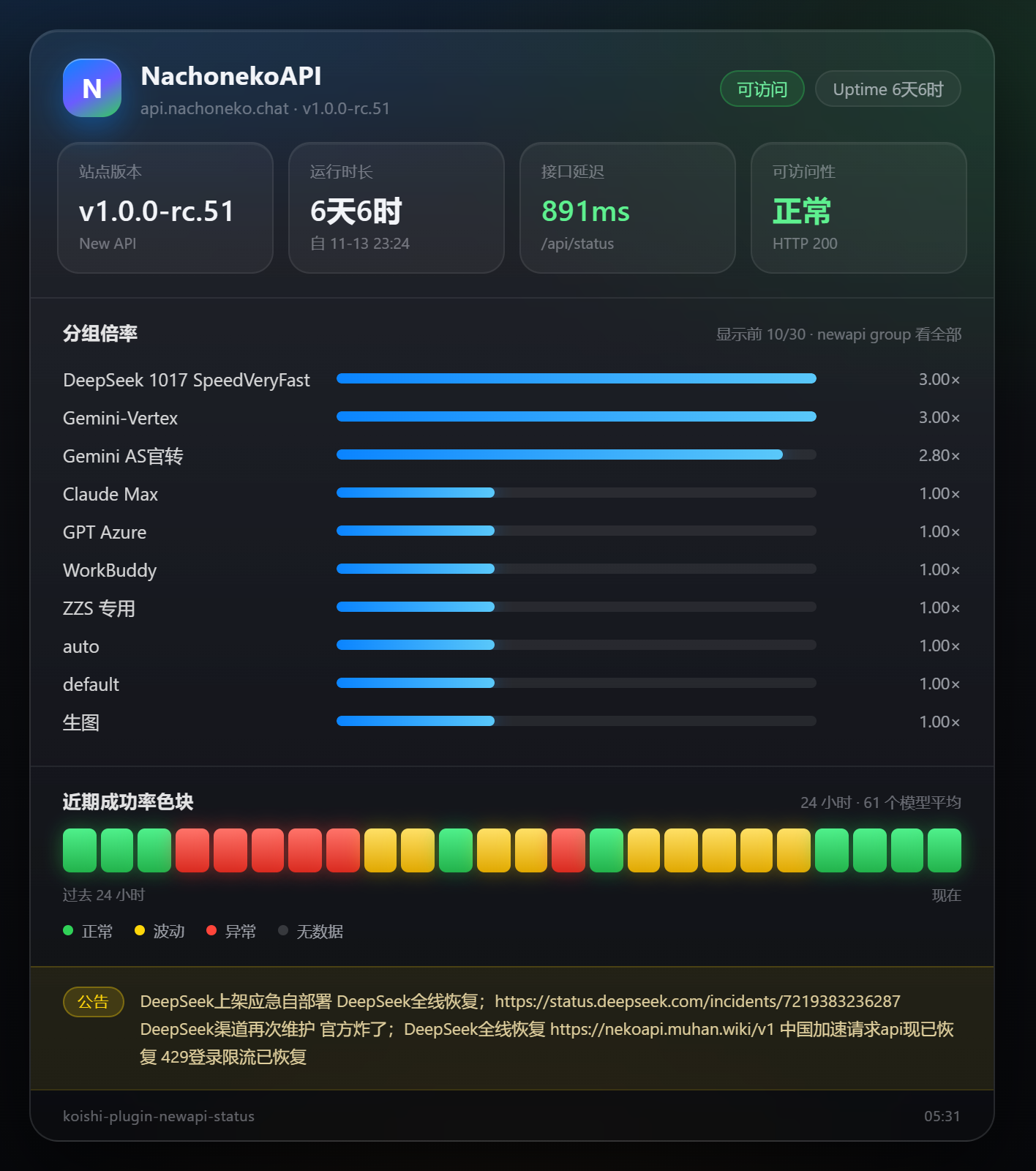
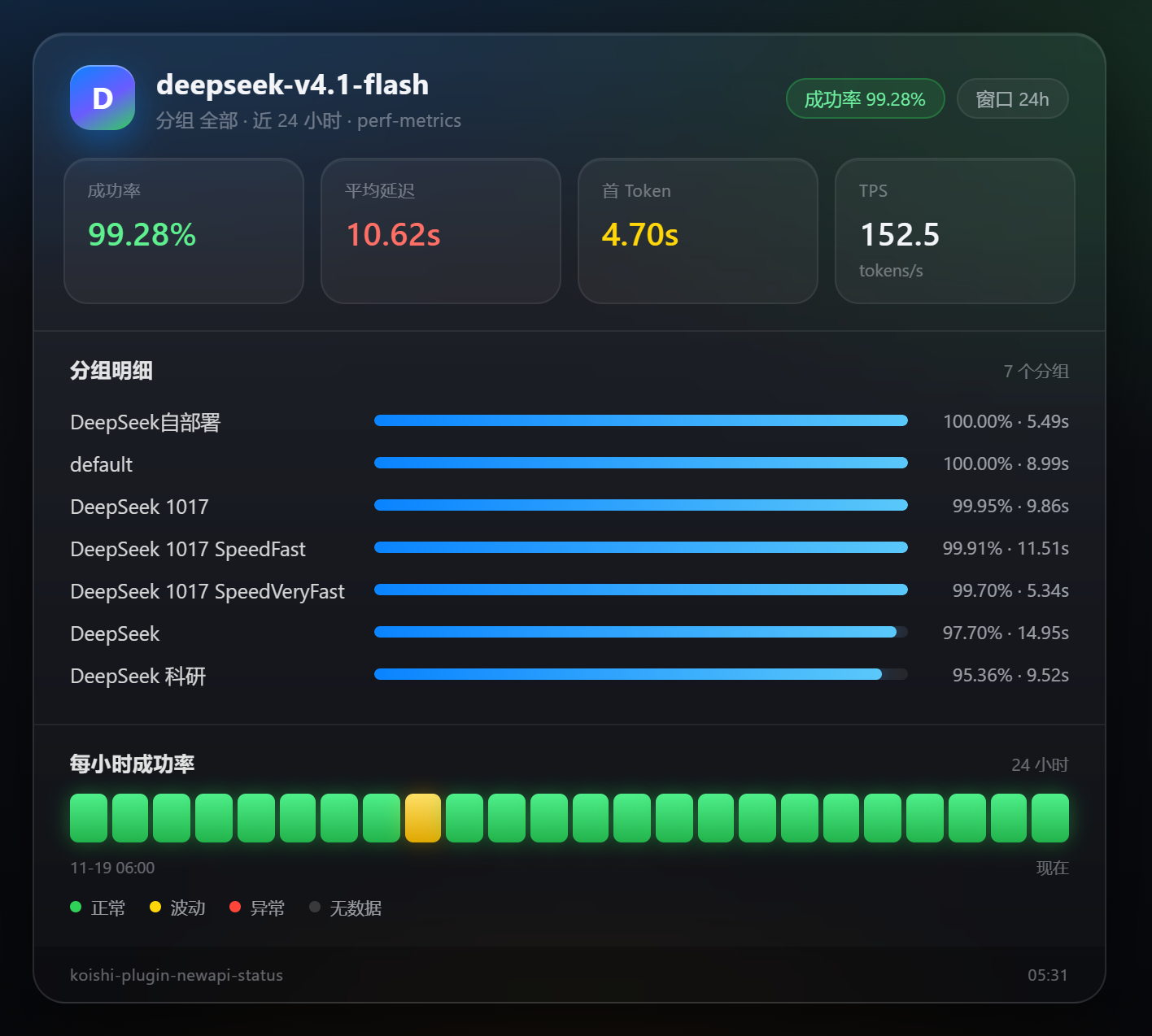
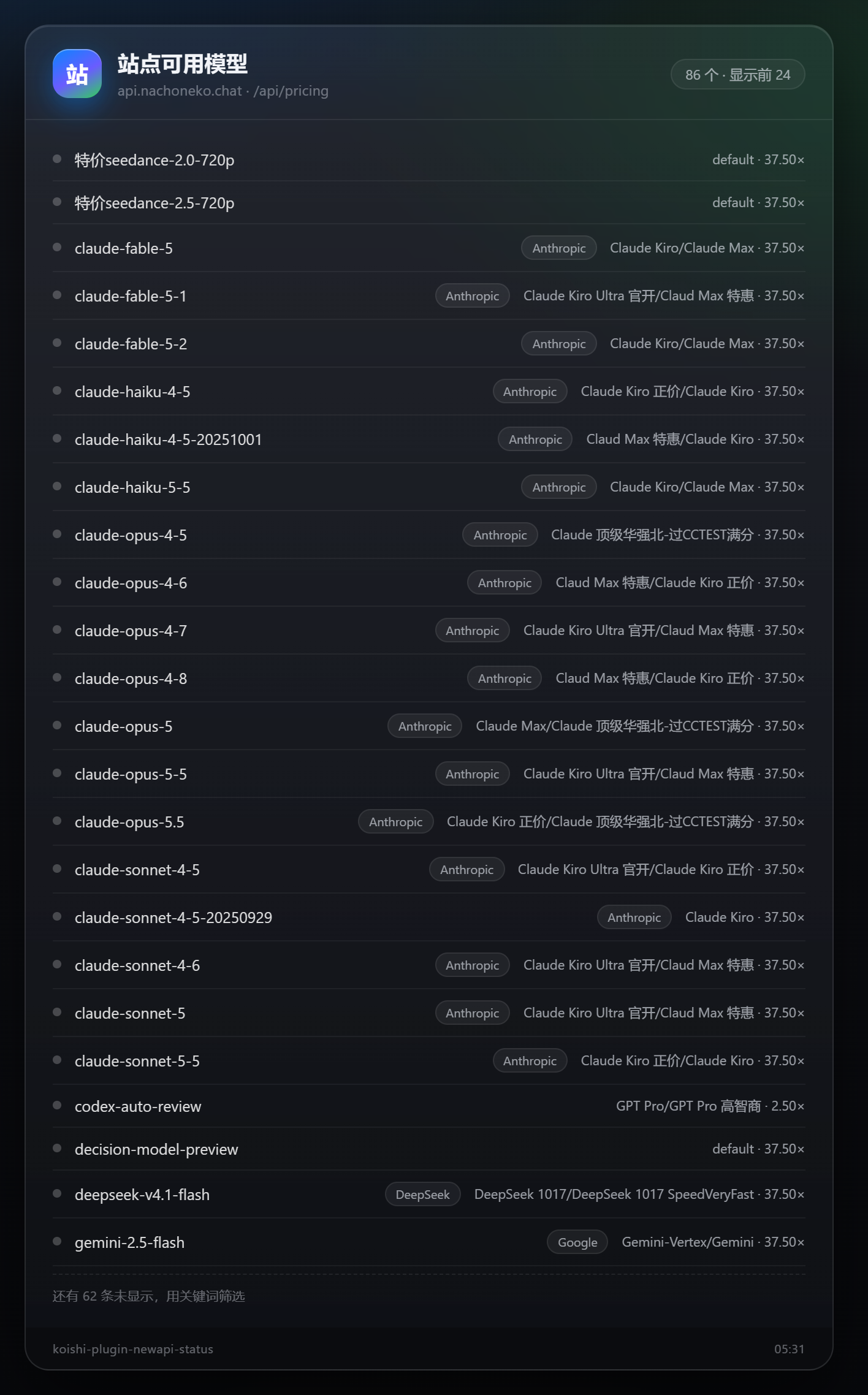
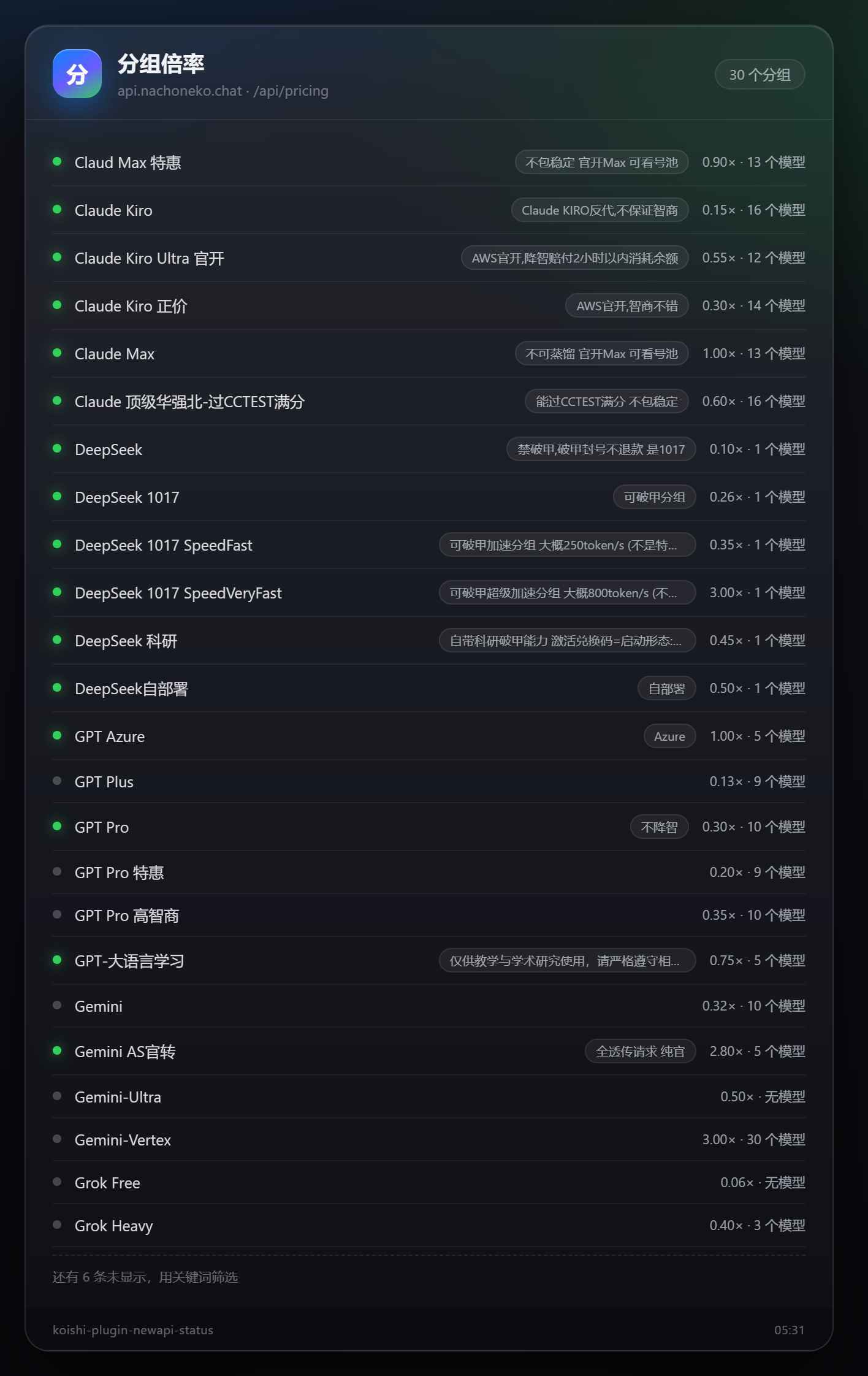
装了 puppeteer 时输出暗色玻璃拟态卡片,没装自动降级为纯文本。
|
|
16
|
-
|
|
17
|
-
|
|
18
|
-
|
|
19
|
-
|
|
20
|
-
|
|
21
|
-
| 模型列表 | 分组倍率 | 站点线路 |
|
|
22
|
-
| --- | --- | --- |
|
|
23
|
-
|  |  | 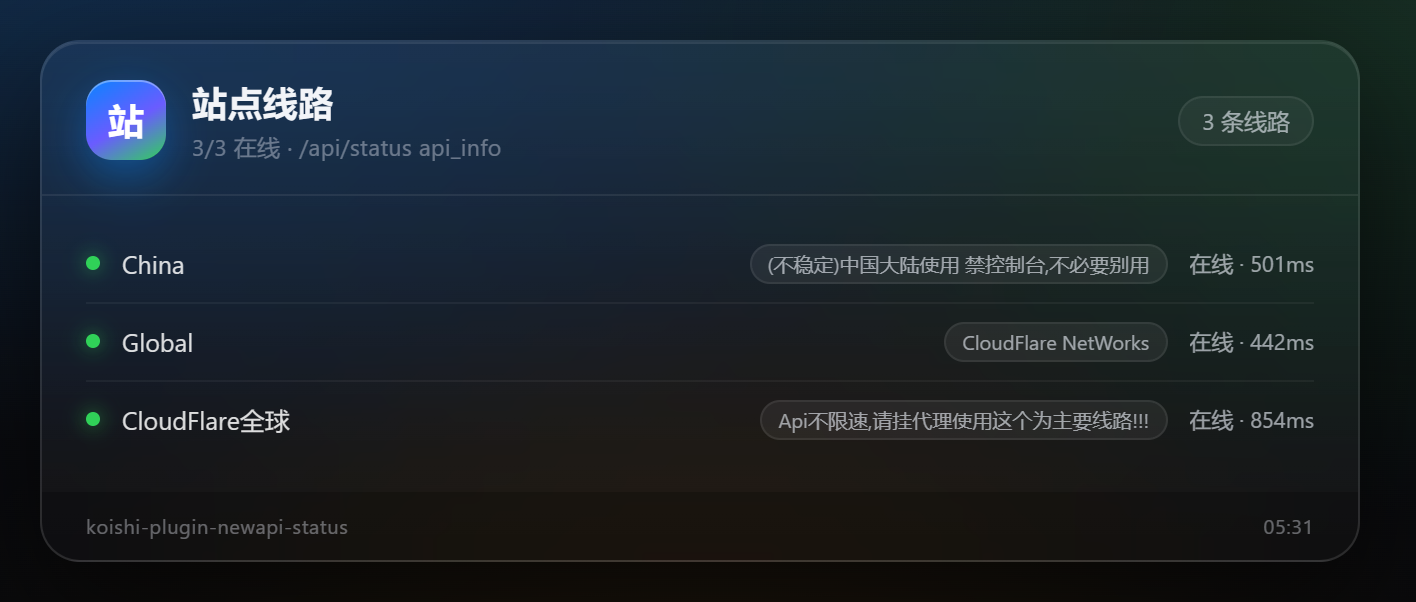 |
|
|
24
|
-
|
|
25
13
|
## 安装
|
|
26
14
|
|
|
27
15
|
```bash
|
|
@@ -104,6 +92,8 @@ New API 有两套完全不同的凭据,填错了只会看到 401 / 403:
|
|
|
104
92
|
|
|
105
93
|
`newapi test` 需要 **3 级权限**(`authority:3`)。低权限用户调用会被 Koishi 拒绝,回复「权限不足」,且不会把 key 写进任何输出。
|
|
106
94
|
|
|
95
|
+
> `newapi help` 不自己拼文本,而是调用 Koishi 官方的 [help 插件](https://help.koishi.chat/)(`session.execute({ name: 'help' }, true)`)渲染,再把你配置的 `helpText` 追加在末尾。装了 help 插件就拿到它完整的排版与分页能力;没装则退回插件内置的清单。
|
|
96
|
+
|
|
107
97
|
> `newapi test list` 之所以能匹配到 `newapi test`:Koishi 的命令解析遇到带参数的命令会先停在该命令上,所以 `list` 会作为参数传进 `test`,由插件内部特判。这是 Koishi 的既定行为,不是 bug。
|
|
108
98
|
|
|
109
99
|
## 配置项
|
|
@@ -112,11 +102,12 @@ New API 有两套完全不同的凭据,填错了只会看到 401 / 403:
|
|
|
112
102
|
|
|
113
103
|
| 字段 | 类型 | 默认 | 说明 |
|
|
114
104
|
| --- | --- | --- | --- |
|
|
115
|
-
| `baseUrl` | string | 必填 | 站点地址,如 `https://api.example.com
|
|
105
|
+
| `baseUrl` | string | 必填 | 站点地址,如 `https://api.example.com`。填到站点根即可,末尾误带的 `/v1`、`/api` 会自动剥掉 |
|
|
116
106
|
| `accessToken` | string(secret) | `''` | 面板 access_token / PAT。**不是 `sk-` 开头的调用令牌** |
|
|
117
107
|
| `userId` | number | `0` | 面板用户 ID。v0.13 及以前必须填(用于 `New-Api-User` 头),v1.0+ 可留 0 |
|
|
118
108
|
| `commandPrefix` | string | `newapi` | 指令前缀,支持逗号分隔多个 |
|
|
119
109
|
| `timeout` | number | `10000` | 单次 HTTP 请求超时(毫秒) |
|
|
110
|
+
| `logLevel` | `silent` \| `error` \| `info` \| `debug` | `info` | 注册给 Koishi 的日志等级,作用于 `ctx.logger('newapi-status')`。`debug` 会额外打出每次请求的地址与耗时 |
|
|
120
111
|
|
|
121
112
|
### 展示设置
|
|
122
113
|
|
|
@@ -127,6 +118,7 @@ New API 有两套完全不同的凭据,填错了只会看到 401 / 403:
|
|
|
127
118
|
| `perfHours` | number | `24` | `model status` 默认统计窗口(小时),上限 720(New API 的上限是 30 天) |
|
|
128
119
|
| `healthHours` | number | `1` | `model health` 的统计窗口(小时) |
|
|
129
120
|
| `healthThreshold` | number | `95` | `model health` 的成功率阈值(0–100) |
|
|
121
|
+
| `helpText` | string | `''` | 追加在 `help` 输出最末尾的自定义文本,支持多行。留空则不加 |
|
|
130
122
|
|
|
131
123
|
延迟配色:`< 1500ms` 绿、`1500–5000ms` 黄、`> 5000ms` 红、无数据灰。
|
|
132
124
|
|
|
@@ -224,4 +216,10 @@ src/
|
|
|
224
216
|
|
|
225
217
|
## License
|
|
226
218
|
|
|
227
|
-
|
|
219
|
+
本项目**不是**开源软件。代码版权归 acmuhan 所有,许可证为自定义的《专有软件许可协议》
|
|
220
|
+
(`LicenseRef-Proprietary`,见仓库根目录 `LICENSE`)。
|
|
221
|
+
|
|
222
|
+
- 允许:通过 npm 安装并在自用 Koishi 实例中运行、未修改地随自己的实例部署、阅读源码学习与评估。
|
|
223
|
+
- 需要事先书面授权:复制或摘录源码、修改/二次开发后使用、分发或再发布、商业用途、对外提供收费服务。
|
|
224
|
+
|
|
225
|
+
授权申请请到 <https://github.com/acmuhan/koishi-plugin-newapi-status/issues> 提交 issue。
|