keystra 0.1.0 → 0.1.1
This diff represents the content of publicly available package versions that have been released to one of the supported registries. The information contained in this diff is provided for informational purposes only and reflects changes between package versions as they appear in their respective public registries.
- package/CHANGELOG.md +4 -0
- package/README.md +32 -131
- package/package.json +1 -1
package/CHANGELOG.md
CHANGED
package/README.md
CHANGED
|
@@ -1,11 +1,20 @@
|
|
|
1
1
|
# Keystra
|
|
2
2
|
|
|
3
|
-
|
|
3
|
+
Keyboard navigation, focus and selection for any DOM UI.
|
|
4
|
+
|
|
5
|
+
- Works with vanilla JS, TypeScript and any DOM-based framework.
|
|
6
|
+
- Arrow keys, Home/End, typeahead, shortcuts and key sequences.
|
|
7
|
+
- Roving tabindex, focus restore, and single, multiple or range selection.
|
|
8
|
+
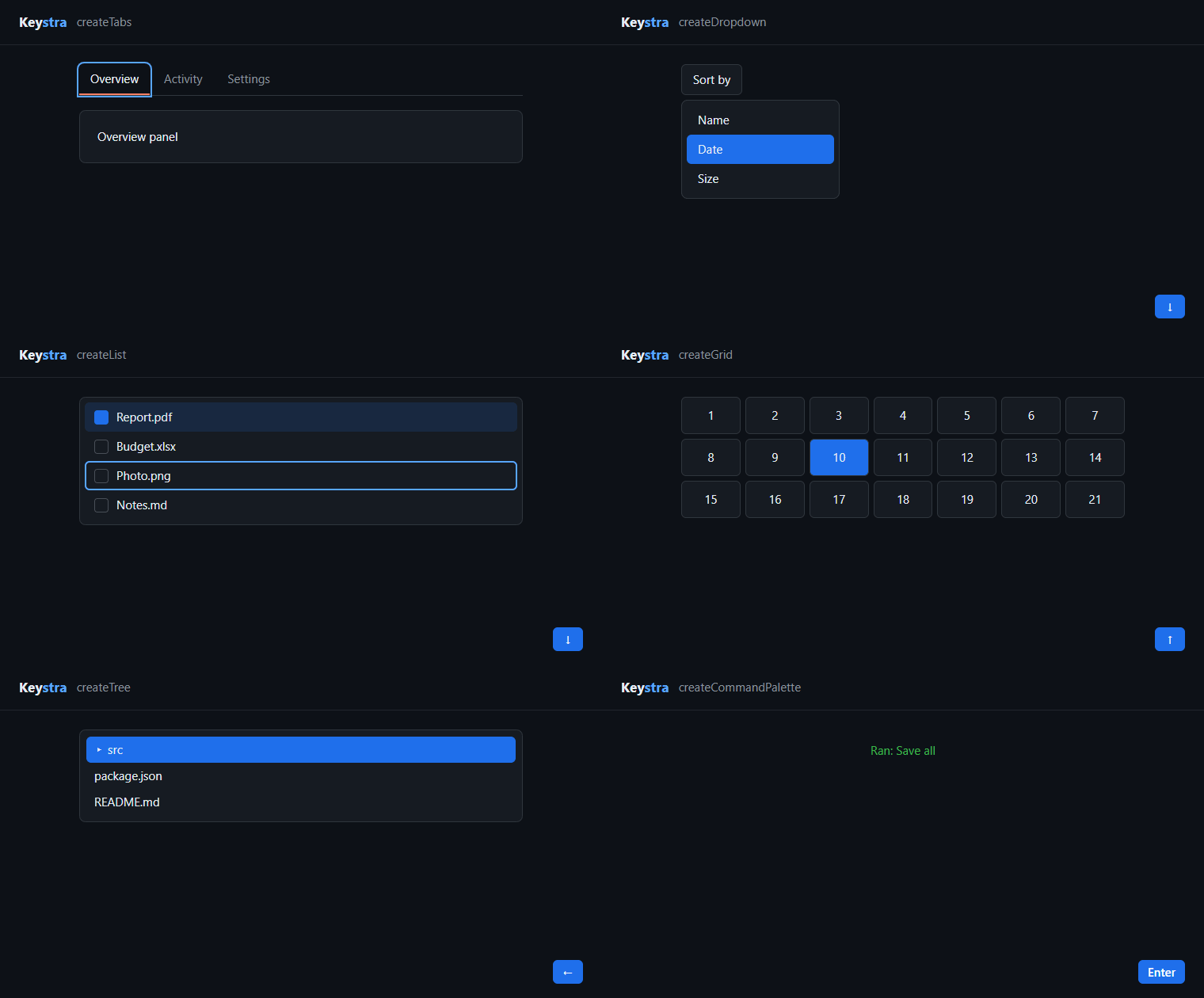
- Ready-made tabs, menus, dropdowns, lists, grids, trees and command palettes.
|
|
9
|
+
- Skips disabled and hidden items, and keeps up with DOM changes.
|
|
10
|
+
- No dependencies, and no UI or styling of its own.
|
|
11
|
+
|
|
12
|
+
|
|
4
13
|
|
|
5
14
|
## Install
|
|
6
15
|
|
|
7
|
-
```
|
|
8
|
-
npm
|
|
16
|
+
```bash
|
|
17
|
+
npm i keystra
|
|
9
18
|
```
|
|
10
19
|
|
|
11
20
|
## Quick start
|
|
@@ -23,156 +32,48 @@ import { createKeystra } from 'keystra';
|
|
|
23
32
|
|
|
24
33
|
const nav = createKeystra({
|
|
25
34
|
container: '#actions',
|
|
26
|
-
mode: 'vertical',
|
|
27
35
|
loop: true,
|
|
28
|
-
onFocus: (element, index) => console.log('focus', index, element),
|
|
29
36
|
onSelect: (element) => console.log('activate', element),
|
|
30
37
|
});
|
|
38
|
+
|
|
31
39
|
nav.focusFirst();
|
|
40
|
+
|
|
32
41
|
// When the UI is removed:
|
|
33
42
|
nav.destroy();
|
|
34
43
|
```
|
|
35
44
|
|
|
36
|
-
|
|
37
|
-
|
|
38
|
-
Enter and Space are consumed only when something acts on them: `onSelect`, `onAction`, a selection manager or a pattern. Otherwise links and buttons keep their native activation. Escape is likewise left to the surrounding page, such as a dialog, unless `onEscape`, `onAction` or a pattern handles it. Subscribing with `nav.on(...)` does not count, so call `preventDefault()` on the event yourself if you need to.
|
|
39
|
-
|
|
40
|
-
## Core API
|
|
41
|
-
|
|
42
|
-
`createKeystra(options)` returns an instance with `next()`, `previous()`, `focusFirst()`, `focusLast()`, `focusIndex(index)`, `focusElement(element)`, `move(direction)`, `perform(action)`, `refresh()`, `enable()`, `disable()`, `update(...)`, `restoreFocus()` and `destroy()`. Read `items`, `activeElement`, `activeIndex`, and `currentIndex`. `activeIndex` normally reflects DOM focus, while `currentIndex` retains the navigation cursor when focus leaves. With `activeDescendant`, focus remains on its owner and the cursor is exposed as the active index.
|
|
43
|
-
|
|
44
|
-
`selection: { enabled: true, mode: 'multiple' }` enables state independent of styling. Use `nav.selection` for `select`, `toggle`, `selectRange`, `selectAll`, `clear`, and `selected`; set `aria`, `attribute`, or `selectedClass` in selection options only if the widget needs them. Supported modes are `single`, `multiple`, `range`, and `none`.
|
|
45
|
-
|
|
46
|
-
Events can be subscribed with `nav.on('action', handler)` and removed with `nav.off(...)`. Options include `onFocus`, `onSelect`, `onAction`, `onEscape` and `onRefresh`. For dynamic items call `refresh()` after a change, or set `observe: true` to watch mutations; otherwise navigation revalidates the item collection lazily. `add`, `remove`, and `setItems` allow explicit registration. `update` supports `keys`, `loop`, `mode`, `columns`, `pageSize`, `enabled`, and `container`.
|
|
47
|
-
|
|
48
|
-
## Navigation and keys
|
|
49
|
-
|
|
50
|
-
Modes include `vertical` (default), `horizontal`, `sequential`, `grid`, `directional`, and `custom`. Grid can use `columns` to avoid geometry reads; directional navigation and a grid without columns use element geometry. `loop` controls wraparound. Supply `strategy(context)` to replace the built-in strategy; return an item index or `null` to decline movement.
|
|
51
|
-
|
|
52
|
-
```ts
|
|
53
|
-
const nav = createKeystra({
|
|
54
|
-
container: '#actions',
|
|
55
|
-
keys: { next: 'j', previous: 'k', first: 'Ctrl+Home' },
|
|
56
|
-
sequences: [{ binding: ['g', 'g'], action: 'first' }],
|
|
57
|
-
onAction: (action, event, element, index) => {
|
|
58
|
-
// Custom action names are forwarded here.
|
|
59
|
-
},
|
|
60
|
-
});
|
|
61
|
-
```
|
|
62
|
-
|
|
63
|
-
Key maps override individual actions; `false` removes an action, and `useDefaultKeys: false` disables the whole default map. Modifiers, `KeyboardEvent.code`, sequences and custom actions are supported. Binding Tab or overriding keys in editable fields is opt-in. `createKeyBinding('Ctrl+K', handler)` provides a document-level shortcut with `disable`, `enable`, and `destroy`.
|
|
45
|
+
Arrow keys now move through the buttons and skip the disabled one, Tab leaves the group in one stop, and Enter calls `onSelect`.
|
|
64
46
|
|
|
65
47
|
## Patterns
|
|
66
48
|
|
|
67
|
-
`createTabs`, `createMenu`, `createDropdown`, `createList`, `createGrid`, `createTree`, `createCommandPalette`, and `createRovingFocus` provide pattern-specific defaults. For example:
|
|
68
|
-
|
|
69
49
|
```ts
|
|
70
|
-
import { createTabs } from 'keystra
|
|
71
|
-
const tabs = createTabs({ container: '#tabs', items: '[role="tab"]' });
|
|
72
|
-
// Later: tabs.activate(1); tabs.destroy();
|
|
73
|
-
```
|
|
74
|
-
|
|
75
|
-
Menus and dropdowns remove a `hidden` attribute on open and restore it on close; pass `toggleHidden: false` to control visibility yourself. Pattern defaults can fill in missing ARIA roles and state; pass `aria: false` where supported to manage those yourself. Appropriate markup, roles, names, relationships and widget behavior remain the application's responsibility. Follow the [WAI-ARIA Authoring Practices](https://www.w3.org/WAI/ARIA/apg/) for the specific pattern and test with real browsers and assistive technology. A grid should have valid row/cell structure. For a combobox, `activeDescendant` keeps DOM focus on the input while moving its virtual cursor; ensure the active item has the proper ownership relationship. A command palette's search field should sit outside the listbox, so when it lives inside `container`, point `list` at the element that holds the results.
|
|
50
|
+
import { createTabs } from 'keystra';
|
|
76
51
|
|
|
77
|
-
|
|
78
|
-
|
|
79
|
-
|
|
80
|
-
|
|
81
|
-
|
|
82
|
-
container: '#actions', items: 'button', loop: true,
|
|
83
|
-
};
|
|
84
|
-
const nav = createKeystra<HTMLButtonElement>(options);
|
|
52
|
+
const tabs = createTabs({
|
|
53
|
+
container: '#tabs',
|
|
54
|
+
items: '[role="tab"]',
|
|
55
|
+
panels: '[role="tabpanel"]',
|
|
56
|
+
});
|
|
85
57
|
```
|
|
86
58
|
|
|
87
|
-
|
|
88
|
-
|
|
89
|
-
```tsx
|
|
90
|
-
// React
|
|
91
|
-
function Actions() {
|
|
92
|
-
const ref = useRef<HTMLDivElement>(null);
|
|
93
|
-
useEffect(() => {
|
|
94
|
-
const nav = createKeystra({ container: ref.current, items: 'button' });
|
|
95
|
-
return () => nav.destroy();
|
|
96
|
-
}, []);
|
|
97
|
-
return <div ref={ref}>...</div>;
|
|
98
|
-
}
|
|
99
|
-
```
|
|
59
|
+
Also available: `createMenu`, `createDropdown`, `createList`, `createGrid`, `createTree`, `createCommandPalette` and `createRovingFocus`. See [Patterns](docs/patterns.md).
|
|
100
60
|
|
|
101
|
-
|
|
102
|
-
// Vue, in <script setup>
|
|
103
|
-
const root = ref<HTMLElement>();
|
|
104
|
-
let nav: KeystraInstance;
|
|
105
|
-
onMounted(() => { nav = createKeystra({ container: root.value, items: 'button' }); });
|
|
106
|
-
onBeforeUnmount(() => nav.destroy());
|
|
107
|
-
```
|
|
61
|
+
## Shortcuts
|
|
108
62
|
|
|
109
63
|
```ts
|
|
110
|
-
|
|
111
|
-
let root: HTMLElement;
|
|
112
|
-
onMount(() => {
|
|
113
|
-
const nav = createKeystra({ container: root, items: 'button' });
|
|
114
|
-
return () => nav.destroy();
|
|
115
|
-
});
|
|
116
|
-
```
|
|
64
|
+
import { createKeyBinding } from 'keystra';
|
|
117
65
|
|
|
118
|
-
|
|
119
|
-
// Angular
|
|
120
|
-
ngAfterViewInit() { this.nav = createKeystra({ container: this.root.nativeElement, items: 'button' }); }
|
|
121
|
-
ngOnDestroy() { this.nav?.destroy(); }
|
|
66
|
+
const palette = createKeyBinding('Ctrl+K', () => openPalette());
|
|
122
67
|
```
|
|
123
68
|
|
|
124
|
-
##
|
|
125
|
-
|
|
126
|
-
`destroy()` removes every listener and observer and puts `tabindex` and `aria-activedescendant` back as they were. Call it once, when the UI goes away; the instance cannot be reused. `disable()` and `enable()` pause an instance and resume it.
|
|
127
|
-
|
|
128
|
-
The `useKeystra` helper suits an element that does not exist yet: `attach(element)` creates the instance on first use, `detach()` stops listening and allows a later `attach`, and `destroy()` is permanent. Despite the name it is not a React hook and is safe to call anywhere. When reusing a handle in development, account for framework lifecycle replay.
|
|
129
|
-
|
|
130
|
-
Groups can be nested. Items inside an inner group's container belong to that group, even when the outer selector matches them, and keys the inner group does not bind bubble to the outer one.
|
|
131
|
-
|
|
132
|
-
## Accessibility and browser support
|
|
133
|
-
|
|
134
|
-
Keystra does not make arbitrary markup accessible automatically. Supply valid native elements or appropriate ARIA, accessible labels and state; preserve visible focus and check keyboard behavior with screen readers. Native behavior is preserved for unmatched keys; configure bindings carefully, particularly for text inputs. A chord does not claim a longer one: `Ctrl+S` ignores `Ctrl+Shift+S`. Hidden items are detected with `checkVisibility()`, so stylesheet changes are seen on the next key press without `refresh()`. Keystra's focus behavior is tested in Chrome only, and it has not been tested with screen readers; validate both in your target environments.
|
|
135
|
-
|
|
136
|
-
Targets modern browsers with ES2020, DOM and standard event APIs; optional mutation observation needs `MutationObserver`. Importing modules in Node does not require DOM globals, but interaction requires a DOM. Working on Keystra itself needs Node 22.12+, because of Vitest 5.
|
|
137
|
-
|
|
138
|
-
## Size and benchmarks
|
|
139
|
-
|
|
140
|
-
`npm run size` measured these consumer bundles. Unused patterns are tree-shaken, but `createKeystra` always includes every navigation mode, selection and typeahead.
|
|
141
|
-
|
|
142
|
-
| Import | Minified | Gzip |
|
|
143
|
-
| --- | --- | --- |
|
|
144
|
-
| `createKeyBinding` | 10.22 kB | 3.79 kB |
|
|
145
|
-
| `createKeystra` | 45.21 kB | 13.27 kB |
|
|
146
|
-
| `createRovingFocus` | 45.48 kB | 13.38 kB |
|
|
147
|
-
| Everything | 66.29 kB | 18.55 kB |
|
|
148
|
-
|
|
149
|
-
`npm run bench` compares roving focus and shortcuts in real Chrome. These are median milliseconds per key press, measured on one Windows machine:
|
|
150
|
-
|
|
151
|
-
| Items | Native baseline | roving-ux | Keystra | Keystra with `observe: true` |
|
|
152
|
-
| --- | --- | --- | --- | --- |
|
|
153
|
-
| 100 | 0.1 | 0.1 | 0.4 | 0.2 |
|
|
154
|
-
| 1,000 | 0.1 | 0.1 | 3.0 | 0.2 |
|
|
155
|
-
| 10,000 | 0.1 | 0.1 | 21.4 | 0.2 |
|
|
156
|
-
|
|
157
|
-
The comparison shows the cost of features, not a winner. The baseline and roving-ux (0.69 kB gzip) never re-read the DOM, so they miss added, disabled or hidden items, while Keystra checks them on every press. With `observe: true` a `MutationObserver` does that work instead, so use it for lists of about 1,000 items or more. Startup is also slower: 8.7 ms for 1,000 items against 0.8 ms for roving-ux, and a 10,000-item group retains about 420 kB.
|
|
158
|
-
|
|
159
|
-
For 20 shortcuts, a press took 68 µs with `createKeyBinding`, 34 µs with tinykeys (0.93 kB gzip) and 37 µs with hotkeys-js (3.6 kB gzip). If shortcuts are all you need, those libraries are smaller and faster. Keystra's case is one engine for navigation, focus and selection, not the smallest size for any single job.
|
|
160
|
-
|
|
161
|
-
## Development
|
|
162
|
-
|
|
163
|
-
```sh
|
|
164
|
-
npm install
|
|
165
|
-
npm run typecheck
|
|
166
|
-
npm test
|
|
167
|
-
npm run build
|
|
168
|
-
npm run test:browser
|
|
169
|
-
npm run size
|
|
170
|
-
npm run bench
|
|
171
|
-
npm run verify
|
|
172
|
-
```
|
|
69
|
+
## Docs
|
|
173
70
|
|
|
174
|
-
|
|
71
|
+
- [API](docs/api.md): options, methods, keys, selection and lifecycle.
|
|
72
|
+
- [Patterns](docs/patterns.md): each ready-made widget.
|
|
73
|
+
- [Frameworks](docs/frameworks.md): React, Vue, Svelte and Angular.
|
|
74
|
+
- [Accessibility](docs/accessibility.md): what Keystra does and what stays yours, plus browser support.
|
|
75
|
+
- [Performance](docs/performance.md): bundle size and large lists.
|
|
175
76
|
|
|
176
77
|
## License
|
|
177
78
|
|
|
178
|
-
MIT
|
|
79
|
+
MIT
|