kangentic 0.45.0 → 0.47.0
This diff represents the content of publicly available package versions that have been released to one of the supported registries. The information contained in this diff is provided for informational purposes only and reflects changes between package versions as they appear in their respective public registries.
- package/README.md +23 -33
- package/bin/kangentic.js +46 -5
- package/package.json +6 -2
package/README.md
CHANGED
|
@@ -1,61 +1,51 @@
|
|
|
1
1
|
# Kangentic
|
|
2
2
|
|
|
3
|
-
**
|
|
3
|
+
**Drag a card. An agent starts.**
|
|
4
4
|
|
|
5
|
-
|
|
5
|
+
An agentic development environment for AI coding agents. This package installs the desktop app and opens it.
|
|
6
6
|
|
|
7
|
-
|
|
7
|
+
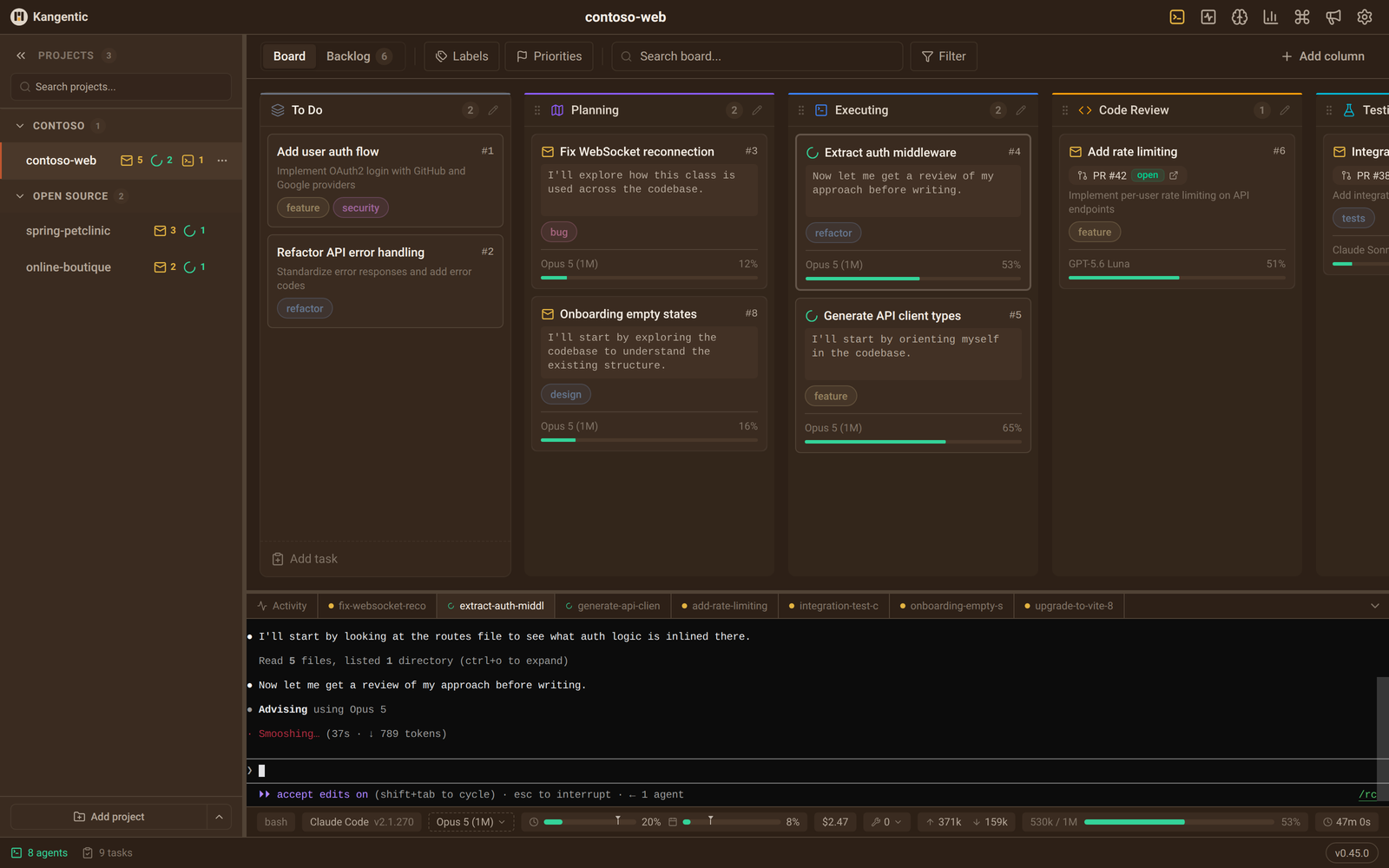
|
|
8
|
+
|
|
9
|
+
## Install and run
|
|
8
10
|
|
|
9
11
|
```bash
|
|
10
12
|
npx kangentic
|
|
11
13
|
```
|
|
12
14
|
|
|
13
|
-
|
|
15
|
+
The launcher downloads the release that matches its own version from [GitHub Releases](https://github.com/Kangentic/kangentic/releases), installs it, and opens it:
|
|
16
|
+
|
|
17
|
+
- **Windows.** A per-user install to `%LOCALAPPDATA%\Programs\Kangentic`.
|
|
18
|
+
- **macOS.** `Kangentic.app` in `~/Applications`. An x64 Node running under Rosetta on Apple Silicon still gets the Apple Silicon build.
|
|
19
|
+
- **Linux.** The `.rpm` package (dnf, zypper, or rpm) or the `.deb` package (apt or dpkg). This asks for your password.
|
|
14
20
|
|
|
15
|
-
|
|
21
|
+
To open a project directly:
|
|
16
22
|
|
|
17
23
|
```bash
|
|
18
24
|
npx kangentic /path/to/your/project
|
|
19
25
|
```
|
|
20
26
|
|
|
21
|
-
|
|
22
|
-
|
|
23
|
-
1. Detects your platform (Windows, macOS, Linux) and architecture (x64, arm64)
|
|
24
|
-
2. Downloads the matching installer from [GitHub Releases](https://github.com/Kangentic/kangentic/releases)
|
|
25
|
-
3. Installs per platform:
|
|
26
|
-
- **Windows:** Runs NSIS installer silently to `%LOCALAPPDATA%\Programs\Kangentic\`
|
|
27
|
-
- **macOS:** Extracts .zip to `~/Applications/Kangentic.app`
|
|
28
|
-
- **Linux:** Installs .rpm on RPM-family systems (`sudo dnf install` on Fedora/RHEL,
|
|
29
|
-
`sudo zypper install` on openSUSE, falling back to `sudo rpm -Uvh`) or .deb elsewhere
|
|
30
|
-
(`sudo apt install`, falling back to `sudo dpkg -i`); prompts for password
|
|
31
|
-
4. Launches the app
|
|
27
|
+
To install a specific release, run `npx kangentic@<version>`. The launcher version matches the app version.
|
|
32
28
|
|
|
33
29
|
## Updates
|
|
34
30
|
|
|
35
|
-
|
|
36
|
-
|
|
37
|
-
- **Windows:** electron-updater installs new versions silently on restart.
|
|
38
|
-
- **macOS:** Built-in auto-updater downloads in the background and prompts to restart. (Requires code signing.)
|
|
39
|
-
- **Linux:** The app downloads the new deb/rpm and installs it when you click "Restart to update", asking for your password once. If that fails (no polkit agent, for example), re-run `npx kangentic@latest` (the `@latest` matters: a cached launcher reinstalls its own version), then quit and reopen the app.
|
|
31
|
+
The app updates itself. On Windows and macOS a downloaded update installs when you quit. On Linux, click **Restart to update** and enter your password. If that fails, run `npx kangentic@latest`, then quit and reopen the app.
|
|
40
32
|
|
|
41
|
-
|
|
42
|
-
|
|
43
|
-
```bash
|
|
44
|
-
npx kangentic@0.2.0
|
|
45
|
-
```
|
|
33
|
+
## Requirements
|
|
46
34
|
|
|
47
|
-
|
|
35
|
+
- Windows x64, macOS 13 or later on Apple Silicon or Intel, or Linux x64 or arm64.
|
|
36
|
+
- Node.js 20 or later, and Git 2.26 or later.
|
|
37
|
+
- At least one supported agent CLI, such as Claude Code, Codex CLI, or Gemini CLI, installed and signed in.
|
|
48
38
|
|
|
49
|
-
##
|
|
39
|
+
## Privacy
|
|
50
40
|
|
|
51
|
-
|
|
52
|
-
- **[Git 2.26+](https://git-scm.com/)** for worktree support
|
|
41
|
+
Release builds send anonymous usage events and error reports by default. Set `KANGENTIC_TELEMETRY=0` to turn them off. See the [privacy page](https://www.kangentic.com/privacy/).
|
|
53
42
|
|
|
54
43
|
## Links
|
|
55
44
|
|
|
56
|
-
- [
|
|
57
|
-
- [
|
|
58
|
-
- [
|
|
45
|
+
- [Source code and full README](https://github.com/Kangentic/kangentic)
|
|
46
|
+
- [Live demo](https://kangentic.github.io/kangentic/)
|
|
47
|
+
- [Quickstart](https://www.kangentic.com/getting-started/)
|
|
48
|
+
- [Installation guide](https://www.kangentic.com/guide/installation/)
|
|
59
49
|
|
|
60
50
|
## License
|
|
61
51
|
|
package/bin/kangentic.js
CHANGED
|
@@ -39,18 +39,54 @@ function isUnsupportedMacOS(platform, osRelease) {
|
|
|
39
39
|
return Number.isFinite(darwinMajor) && darwinMajor < MINIMUM_DARWIN_MAJOR;
|
|
40
40
|
}
|
|
41
41
|
|
|
42
|
+
// The Linux arches a release ships, under electron-builder's per-format names
|
|
43
|
+
// (amd64 / x86_64 for x64, arm64 / aarch64 for arm64), which is how the deb and
|
|
44
|
+
// rpm files are named. scripts/release-assets.js lists the same pairs, and
|
|
45
|
+
// tests/unit/release-asset-manifest.test.ts pins the two together.
|
|
46
|
+
const LINUX_PACKAGE_ARCHES = {
|
|
47
|
+
x64: { deb: 'amd64', rpm: 'x86_64' },
|
|
48
|
+
arm64: { deb: 'arm64', rpm: 'aarch64' },
|
|
49
|
+
};
|
|
50
|
+
|
|
51
|
+
// The macOS arches a release ships, one zip each.
|
|
52
|
+
const MAC_ARCHES = ['arm64', 'x64'];
|
|
53
|
+
|
|
54
|
+
/**
|
|
55
|
+
* Whether this process is an x64 binary translated by Rosetta on Apple
|
|
56
|
+
* silicon. An x64 Node reports process.arch 'x64' there, and installing the
|
|
57
|
+
* Intel build would run the whole app under translation. The sysctl key is
|
|
58
|
+
* 1 under Rosetta, 0 for a native process, and absent on Intel Macs, so any
|
|
59
|
+
* failure reads as "not translated". Called by its absolute path, where macOS
|
|
60
|
+
* always ships it, so a PATH without /usr/sbin cannot turn the probe off.
|
|
61
|
+
*/
|
|
62
|
+
function isTranslatedByRosetta() {
|
|
63
|
+
try {
|
|
64
|
+
const output = execFileSync('/usr/sbin/sysctl', ['-n', 'sysctl.proc_translated'], {
|
|
65
|
+
encoding: 'utf8',
|
|
66
|
+
stdio: ['ignore', 'pipe', 'ignore'],
|
|
67
|
+
});
|
|
68
|
+
return String(output).trim() === '1';
|
|
69
|
+
} catch {
|
|
70
|
+
return false;
|
|
71
|
+
}
|
|
72
|
+
}
|
|
73
|
+
|
|
42
74
|
function getPlatformInfo() {
|
|
43
75
|
const platform = process.platform;
|
|
44
76
|
const arch = process.arch;
|
|
45
77
|
|
|
46
78
|
if (platform === 'win32') {
|
|
79
|
+
// x64 only. Windows on ARM runs it under emulation.
|
|
47
80
|
return { platform: 'win32', arch: 'x64', extension: 'exe' };
|
|
48
81
|
}
|
|
49
82
|
if (platform === 'darwin') {
|
|
50
|
-
|
|
83
|
+
const macArch = arch === 'x64' && isTranslatedByRosetta() ? 'arm64' : arch;
|
|
84
|
+
if (!MAC_ARCHES.includes(macArch)) return null;
|
|
85
|
+
return { platform: 'darwin', arch: macArch, extension: 'zip' };
|
|
51
86
|
}
|
|
52
87
|
if (platform === 'linux') {
|
|
53
|
-
|
|
88
|
+
if (!Object.prototype.hasOwnProperty.call(LINUX_PACKAGE_ARCHES, arch)) return null;
|
|
89
|
+
return { platform: 'linux', arch };
|
|
54
90
|
}
|
|
55
91
|
|
|
56
92
|
return null;
|
|
@@ -102,10 +138,12 @@ function getArtifactFilename(platformInfo) {
|
|
|
102
138
|
return `Kangentic-${version}-${platformInfo.arch}-mac.zip`;
|
|
103
139
|
}
|
|
104
140
|
if (platformInfo.platform === 'linux') {
|
|
141
|
+
if (!Object.prototype.hasOwnProperty.call(LINUX_PACKAGE_ARCHES, platformInfo.arch)) return null;
|
|
142
|
+
const packageArches = LINUX_PACKAGE_ARCHES[platformInfo.arch];
|
|
105
143
|
if (commandExists('rpm') && !commandExists('apt')) {
|
|
106
|
-
return `kangentic-${version}-1.
|
|
144
|
+
return `kangentic-${version}-1.${packageArches.rpm}.rpm`;
|
|
107
145
|
}
|
|
108
|
-
return `kangentic_${version}
|
|
146
|
+
return `kangentic_${version}_${packageArches.deb}.deb`;
|
|
109
147
|
}
|
|
110
148
|
return null;
|
|
111
149
|
}
|
|
@@ -456,7 +494,8 @@ async function main() {
|
|
|
456
494
|
const platformInfo = getPlatformInfo();
|
|
457
495
|
if (!platformInfo) {
|
|
458
496
|
console.error(`Unsupported platform: ${process.platform} ${process.arch}`);
|
|
459
|
-
console.error(
|
|
497
|
+
console.error('Kangentic ships for Windows x64, macOS on Apple silicon or Intel, and Linux x64 or arm64.');
|
|
498
|
+
console.error(`Releases: https://github.com/${REPO_OWNER}/${REPO_NAME}/releases`);
|
|
460
499
|
process.exit(1);
|
|
461
500
|
}
|
|
462
501
|
|
|
@@ -552,6 +591,8 @@ module.exports = {
|
|
|
552
591
|
getTempDir,
|
|
553
592
|
getPlatformInfo,
|
|
554
593
|
getArtifactFilename,
|
|
594
|
+
LINUX_PACKAGE_ARCHES,
|
|
595
|
+
MAC_ARCHES,
|
|
555
596
|
installLinux,
|
|
556
597
|
isAppRunning,
|
|
557
598
|
shouldAdviseReopen,
|
package/package.json
CHANGED
|
@@ -1,7 +1,7 @@
|
|
|
1
1
|
{
|
|
2
2
|
"name": "kangentic",
|
|
3
|
-
"version": "0.
|
|
4
|
-
"description": "Install and launch Kangentic
|
|
3
|
+
"version": "0.47.0",
|
|
4
|
+
"description": "Install and launch Kangentic, an agentic development environment for AI coding agents",
|
|
5
5
|
"bin": {
|
|
6
6
|
"kangentic": "bin/kangentic.js"
|
|
7
7
|
},
|
|
@@ -14,6 +14,10 @@
|
|
|
14
14
|
"kanban",
|
|
15
15
|
"claude",
|
|
16
16
|
"claude-code",
|
|
17
|
+
"codex",
|
|
18
|
+
"gemini-cli",
|
|
19
|
+
"coding-agent",
|
|
20
|
+
"ai-agents",
|
|
17
21
|
"agent",
|
|
18
22
|
"electron",
|
|
19
23
|
"desktop"
|