kanban-lite 1.0.4
This diff represents the content of publicly available package versions that have been released to one of the supported registries. The information contained in this diff is provided for informational purposes only and reflects changes between package versions as they appear in their respective public registries.
- package/.editorconfig +9 -0
- package/.github/workflows/ci.yml +59 -0
- package/.github/workflows/release.yml +75 -0
- package/.prettierignore +6 -0
- package/.prettierrc.yaml +4 -0
- package/.vscode/extensions.json +3 -0
- package/.vscode/launch.json +17 -0
- package/.vscode/settings.json +21 -0
- package/.vscode/tasks.json +22 -0
- package/.vscodeignore +11 -0
- package/CHANGELOG.md +184 -0
- package/CLAUDE.md +58 -0
- package/CONTRIBUTING.md +114 -0
- package/LICENSE +22 -0
- package/README.md +482 -0
- package/SKILL.md +237 -0
- package/dist/cli.js +8716 -0
- package/dist/extension.js +8463 -0
- package/dist/mcp-server.js +1327 -0
- package/dist/standalone-webview/icons-Dx9MGYqN.js +180 -0
- package/dist/standalone-webview/icons-Dx9MGYqN.js.map +1 -0
- package/dist/standalone-webview/index.js +85 -0
- package/dist/standalone-webview/index.js.map +1 -0
- package/dist/standalone-webview/react-vendor-DkYdDBET.js +25 -0
- package/dist/standalone-webview/react-vendor-DkYdDBET.js.map +1 -0
- package/dist/standalone-webview/style.css +1 -0
- package/dist/standalone.js +7513 -0
- package/dist/webview/icons-Dx9MGYqN.js +180 -0
- package/dist/webview/icons-Dx9MGYqN.js.map +1 -0
- package/dist/webview/index.js +85 -0
- package/dist/webview/index.js.map +1 -0
- package/dist/webview/react-vendor-DkYdDBET.js +25 -0
- package/dist/webview/react-vendor-DkYdDBET.js.map +1 -0
- package/dist/webview/style.css +1 -0
- package/docs/images/board-overview.png +0 -0
- package/docs/images/editor-view.png +0 -0
- package/docs/plans/2026-02-20-kanban-json-config-design.md +74 -0
- package/docs/plans/2026-02-20-kanban-json-config.md +690 -0
- package/eslint.config.mjs +31 -0
- package/package.json +161 -0
- package/postcss.config.js +6 -0
- package/resources/icon-light.png +0 -0
- package/resources/icon-light.svg +105 -0
- package/resources/icon.png +0 -0
- package/resources/icon.svg +105 -0
- package/resources/kanban-dark.svg +21 -0
- package/resources/kanban-light.svg +21 -0
- package/resources/kanban.svg +21 -0
- package/src/cli/index.ts +846 -0
- package/src/extension/FeatureHeaderProvider.ts +370 -0
- package/src/extension/KanbanPanel.ts +973 -0
- package/src/extension/SidebarViewProvider.ts +507 -0
- package/src/extension/featureFileUtils.ts +82 -0
- package/src/extension/index.ts +234 -0
- package/src/mcp-server/index.ts +632 -0
- package/src/sdk/KanbanSDK.ts +349 -0
- package/src/sdk/__tests__/KanbanSDK.test.ts +468 -0
- package/src/sdk/__tests__/parser.test.ts +170 -0
- package/src/sdk/fileUtils.ts +76 -0
- package/src/sdk/index.ts +6 -0
- package/src/sdk/parser.ts +70 -0
- package/src/sdk/types.ts +15 -0
- package/src/shared/config.ts +113 -0
- package/src/shared/editorTypes.ts +14 -0
- package/src/shared/types.ts +120 -0
- package/src/standalone/__tests__/server.integration.test.ts +1916 -0
- package/src/standalone/__tests__/webhooks.test.ts +357 -0
- package/src/standalone/fileUtils.ts +70 -0
- package/src/standalone/index.ts +71 -0
- package/src/standalone/server.ts +1046 -0
- package/src/standalone/webhooks.ts +135 -0
- package/src/webview/App.tsx +469 -0
- package/src/webview/assets/main.css +329 -0
- package/src/webview/assets/standalone-theme.css +130 -0
- package/src/webview/components/ColumnDialog.tsx +119 -0
- package/src/webview/components/CreateFeatureDialog.tsx +524 -0
- package/src/webview/components/DatePicker.tsx +185 -0
- package/src/webview/components/FeatureCard.tsx +186 -0
- package/src/webview/components/FeatureEditor.tsx +623 -0
- package/src/webview/components/KanbanBoard.tsx +144 -0
- package/src/webview/components/KanbanColumn.tsx +159 -0
- package/src/webview/components/MarkdownEditor.tsx +291 -0
- package/src/webview/components/PrioritySelect.tsx +39 -0
- package/src/webview/components/QuickAddInput.tsx +72 -0
- package/src/webview/components/SettingsPanel.tsx +284 -0
- package/src/webview/components/Toolbar.tsx +175 -0
- package/src/webview/components/UndoToast.tsx +70 -0
- package/src/webview/index.html +12 -0
- package/src/webview/lib/utils.ts +6 -0
- package/src/webview/main.tsx +11 -0
- package/src/webview/standalone-main.tsx +13 -0
- package/src/webview/standalone-shim.ts +132 -0
- package/src/webview/standalone.html +12 -0
- package/src/webview/store/index.ts +241 -0
- package/tailwind.config.js +53 -0
- package/tsconfig.json +22 -0
- package/vite.config.ts +36 -0
- package/vite.standalone.config.ts +62 -0
- package/vitest.config.ts +15 -0
package/README.md
ADDED
|
@@ -0,0 +1,482 @@
|
|
|
1
|
+
# Kanban Lite
|
|
2
|
+
|
|
3
|
+
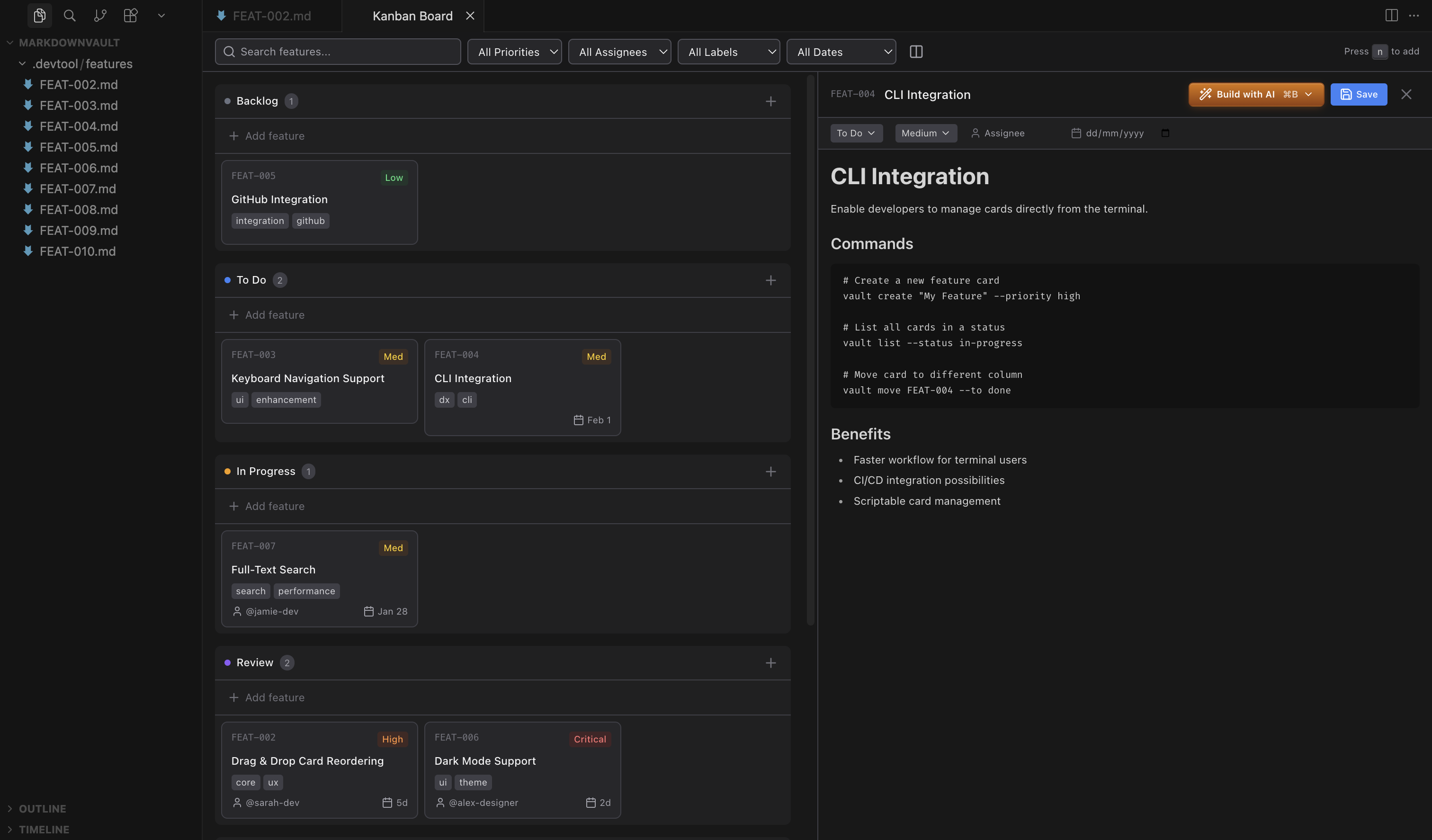
A VSCode/Cursor extension that brings a full-featured kanban board directly into your editor. Features are stored as human-readable markdown files, making them version-controllable and easy to edit outside the board.
|
|
4
|
+
|
|
5
|
+
[](https://marketplace.visualstudio.com/items?itemName=borgius.kanban-lite)
|
|
6
|
+
[](https://open-vsx.org/extension/borgius/kanban-lite)
|
|
7
|
+

|
|
8
|
+
|
|
9
|
+
|
|
10
|
+
|
|
11
|
+
## Kanban Skill
|
|
12
|
+
|
|
13
|
+
Install the kanban skill via [skills.sh](https://skills.sh) to give your AI agent full context of your board and the ability to create, update, and move features directly from the terminal. Works with Claude Code, Codex, OpenCode, and any skills.sh-compatible agent.
|
|
14
|
+
|
|
15
|
+
```bash
|
|
16
|
+
npx skills add https://github.com/borgius/kanban-lite
|
|
17
|
+
```
|
|
18
|
+
|
|
19
|
+
See [SKILL.md](SKILL.md) for the full skill reference covering MCP tools, CLI, and REST API.
|
|
20
|
+
|
|
21
|
+
## Features
|
|
22
|
+
|
|
23
|
+
### Kanban Board
|
|
24
|
+
|
|
25
|
+
- **5-column workflow**: Backlog, To Do, In Progress, Review, Done
|
|
26
|
+
- **Sidebar view**: Access the board from the activity bar without opening a panel
|
|
27
|
+
- **Drag-and-drop**: Move cards between columns and reorder within columns
|
|
28
|
+
- **Split-view editor**: Board on left, inline markdown editor on right
|
|
29
|
+
- **Layout toggle**: Switch between horizontal and vertical board layouts
|
|
30
|
+
- **Keyboard shortcuts**:
|
|
31
|
+
- `N` - Create new feature
|
|
32
|
+
- `Esc` - Close dialogs
|
|
33
|
+
- `Cmd/Ctrl + Enter` - Submit create dialog
|
|
34
|
+
- `Enter` in title - Move to description field
|
|
35
|
+
- `Shift + Enter` in title - Add new line
|
|
36
|
+
|
|
37
|
+
|
|
38
|
+
### Feature Cards
|
|
39
|
+
|
|
40
|
+
|
|
41
|
+
|
|
42
|
+
|
|
43
|
+
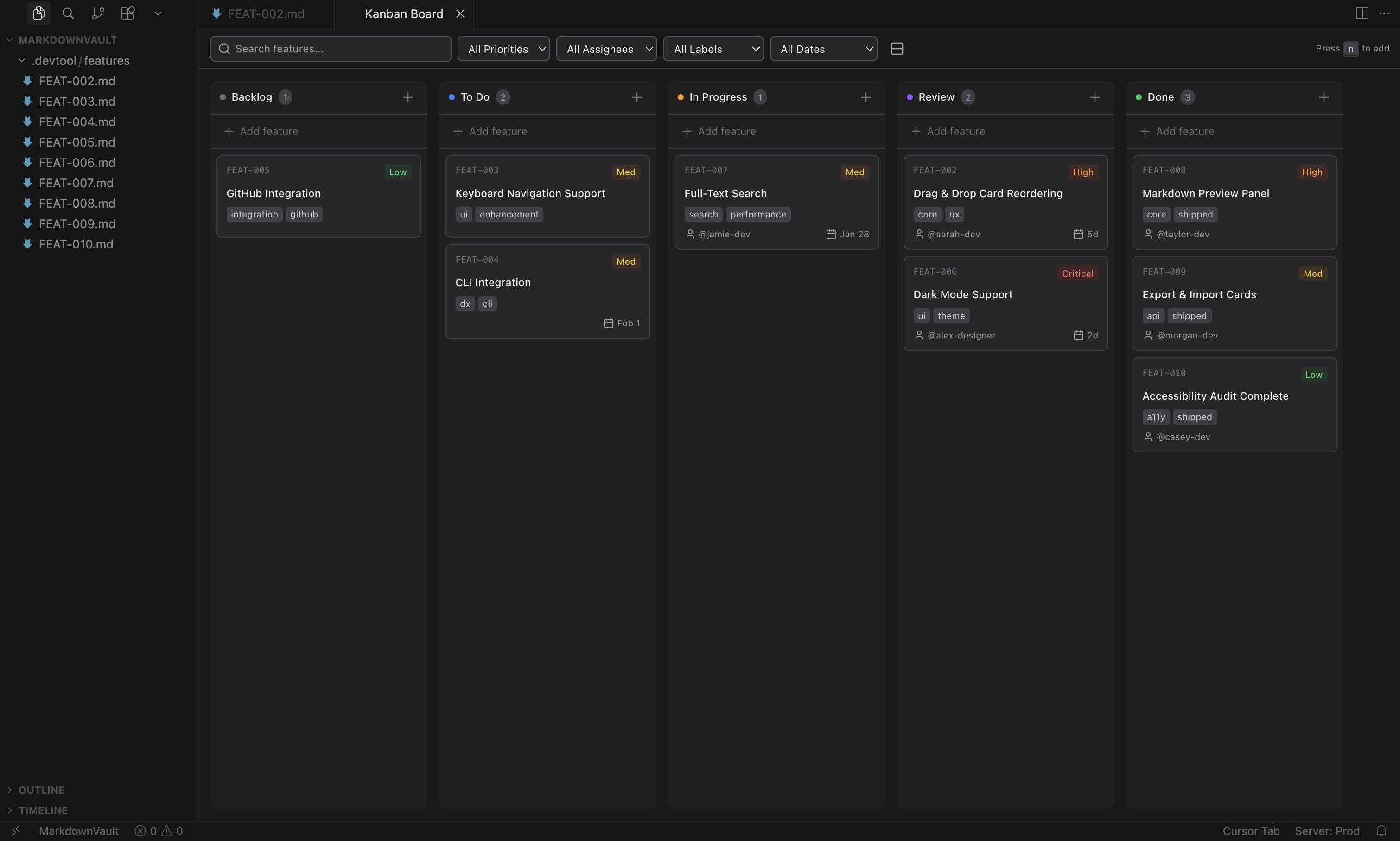
- **Priority levels**: Critical, High, Medium, Low (color-coded badges)
|
|
44
|
+
- **Assignees**: Assign team members to features
|
|
45
|
+
- **Due dates**: Smart formatting (Overdue, Today, Tomorrow, "5d", etc.)
|
|
46
|
+
- **Labels**: Tag features with multiple labels (shows up to 3 with "+X more")
|
|
47
|
+
- **Auto-generated IDs**: Based on title and timestamp (e.g., `implement-dark-mode-2026-01-29`)
|
|
48
|
+
- **Timestamps**: Created and modified dates tracked automatically
|
|
49
|
+
|
|
50
|
+
### Filtering & Search
|
|
51
|
+
- **Full-text search**: Search across content, IDs, assignees, and labels
|
|
52
|
+
- **Priority filter**: Show only critical, high, medium, or low items
|
|
53
|
+
- **Assignee filter**: Filter by team member or show unassigned items
|
|
54
|
+
- **Label filter**: Filter by specific labels
|
|
55
|
+
- **Due date filters**: Overdue, due today, due this week, or no due date
|
|
56
|
+
- **Clear filters button**: Reset all filters at once
|
|
57
|
+
|
|
58
|
+
### File Organization
|
|
59
|
+
- **Status subfolders**: Features are automatically organized into subfolders by status (with migration of existing files)
|
|
60
|
+
|
|
61
|
+
### Editor Integration
|
|
62
|
+
- Rich text editing with Tiptap markdown editor
|
|
63
|
+
- Inline frontmatter editing (dropdowns for status/priority, inputs for assignee/due date/labels)
|
|
64
|
+
- Auto-save functionality
|
|
65
|
+
- Live settings updates without reopening the board
|
|
66
|
+
- Auto-refresh when files change externally
|
|
67
|
+
- Theme integration with VSCode/Cursor (light & dark mode)
|
|
68
|
+
|
|
69
|
+
### AI Agent Integration
|
|
70
|
+
- **Claude Code**: Default, Plan, Auto-edit, and Full Auto modes
|
|
71
|
+
- **Codex**: Suggest, Auto-edit, and Full Auto modes
|
|
72
|
+
- **OpenCode**: Agent integration support
|
|
73
|
+
- AI receives feature context (title, priority, labels, description) for informed assistance
|
|
74
|
+
|
|
75
|
+
## Installation
|
|
76
|
+
|
|
77
|
+
### VS Code Marketplace
|
|
78
|
+
Install from the [VS Code Marketplace](https://marketplace.visualstudio.com/items?itemName=borgius.kanban-lite) or search for "Kanban Lite" in the Extensions view.
|
|
79
|
+
|
|
80
|
+
### Open VSX (VSCodium, Cursor, etc.)
|
|
81
|
+
Install from [Open VSX](https://open-vsx.org/extension/borgius/kanban-lite) or search for "Kanban Lite" in the Extensions view.
|
|
82
|
+
|
|
83
|
+
### From VSIX (Manual)
|
|
84
|
+
1. Download the `.vsix` file from the releases
|
|
85
|
+
2. In VSCode: Extensions > `...` > Install from VSIX
|
|
86
|
+
3. Select the downloaded file
|
|
87
|
+
|
|
88
|
+
## Usage
|
|
89
|
+
|
|
90
|
+
1. Open the command palette (`Cmd+Shift+P` / `Ctrl+Shift+P`)
|
|
91
|
+
2. Run **"Open Kanban Board"**
|
|
92
|
+
3. Start creating and managing features
|
|
93
|
+
|
|
94
|
+
Features are stored as markdown files in `.kanban/` within your workspace, organized into status subfolders:
|
|
95
|
+
|
|
96
|
+
```markdown
|
|
97
|
+
---
|
|
98
|
+
id: "implement-dark-mode-toggle-2026-01-25"
|
|
99
|
+
status: "todo"
|
|
100
|
+
priority: "high"
|
|
101
|
+
assignee: "john"
|
|
102
|
+
dueDate: "2026-01-25"
|
|
103
|
+
created: "2026-01-25T10:30:00.000Z"
|
|
104
|
+
modified: "2026-01-25T14:20:00.000Z"
|
|
105
|
+
labels: ["feature", "ui"]
|
|
106
|
+
order: 0
|
|
107
|
+
---
|
|
108
|
+
|
|
109
|
+
# Implement dark mode toggle
|
|
110
|
+
|
|
111
|
+
Add a toggle in settings to switch between light and dark themes...
|
|
112
|
+
```
|
|
113
|
+
|
|
114
|
+
## Configuration
|
|
115
|
+
|
|
116
|
+
Board configuration is stored in `.kanban.json` at your workspace root. This file is shared across all interfaces (VSCode extension, standalone server, CLI).
|
|
117
|
+
|
|
118
|
+
```json
|
|
119
|
+
{
|
|
120
|
+
"columns": [
|
|
121
|
+
{ "id": "backlog", "name": "Backlog", "color": "#6b7280" },
|
|
122
|
+
{ "id": "todo", "name": "To Do", "color": "#3b82f6" },
|
|
123
|
+
{ "id": "in-progress", "name": "In Progress", "color": "#f59e0b" },
|
|
124
|
+
{ "id": "review", "name": "Review", "color": "#8b5cf6" },
|
|
125
|
+
{ "id": "done", "name": "Done", "color": "#22c55e" }
|
|
126
|
+
],
|
|
127
|
+
"showPriorityBadges": true,
|
|
128
|
+
"showAssignee": true,
|
|
129
|
+
"showDueDate": true,
|
|
130
|
+
"showLabels": true,
|
|
131
|
+
"compactMode": false
|
|
132
|
+
}
|
|
133
|
+
```
|
|
134
|
+
|
|
135
|
+
Columns are fully customizable — add, remove, rename, or recolor them from the board UI, CLI, or REST API.
|
|
136
|
+
|
|
137
|
+
## CLI
|
|
138
|
+
|
|
139
|
+
Manage your kanban board from the terminal. After installing with `npm install -g kanban-lite`, use `kanban-lite` or the shorthand `kl`:
|
|
140
|
+
|
|
141
|
+
```bash
|
|
142
|
+
# List all cards
|
|
143
|
+
kl list
|
|
144
|
+
|
|
145
|
+
# List with filters
|
|
146
|
+
kl list --status todo --priority high
|
|
147
|
+
|
|
148
|
+
# Create a card
|
|
149
|
+
kl add --title "Implement search" --priority high --label "frontend,search"
|
|
150
|
+
|
|
151
|
+
# Show card details
|
|
152
|
+
kl show implement-search
|
|
153
|
+
|
|
154
|
+
# Move to a different column
|
|
155
|
+
kl move implement-search in-progress
|
|
156
|
+
|
|
157
|
+
# Update fields
|
|
158
|
+
kl edit implement-search --assignee alice --due 2026-03-01
|
|
159
|
+
|
|
160
|
+
# Delete a card
|
|
161
|
+
kl delete implement-search
|
|
162
|
+
|
|
163
|
+
# Attachments
|
|
164
|
+
kl attach implement-search # List attachments
|
|
165
|
+
kl attach add implement-search ./screenshot.png # Attach a file
|
|
166
|
+
kl attach remove implement-search screenshot.png # Remove attachment
|
|
167
|
+
|
|
168
|
+
# Manage columns
|
|
169
|
+
kl columns # List columns
|
|
170
|
+
kl columns add --id testing --name Testing # Add column
|
|
171
|
+
kl columns update testing --color "#ff9900" # Update column
|
|
172
|
+
kl columns remove testing # Remove column
|
|
173
|
+
|
|
174
|
+
# Webhooks
|
|
175
|
+
kl webhooks # List webhooks
|
|
176
|
+
kl webhooks add --url https://example.com/hook # Register webhook
|
|
177
|
+
kl webhooks add --url https://example.com/hook \
|
|
178
|
+
--events task.created,task.moved --secret mykey # With event filter and secret
|
|
179
|
+
kl webhooks remove wh_abc123 # Remove webhook
|
|
180
|
+
|
|
181
|
+
# Settings
|
|
182
|
+
kl settings # Show current settings
|
|
183
|
+
kl settings update --compactMode true # Update a setting
|
|
184
|
+
|
|
185
|
+
# Workspace
|
|
186
|
+
kl pwd # Print workspace root path
|
|
187
|
+
|
|
188
|
+
# Start standalone web server
|
|
189
|
+
kl serve # Start on port 3000
|
|
190
|
+
kl serve --port 8080 --no-browser # Custom port, no auto-open
|
|
191
|
+
|
|
192
|
+
# Initialize features directory
|
|
193
|
+
kl init
|
|
194
|
+
```
|
|
195
|
+
|
|
196
|
+
Use `--json` for machine-readable output. Use `--dir <path>` to specify a custom features directory.
|
|
197
|
+
|
|
198
|
+
## Standalone Server
|
|
199
|
+
|
|
200
|
+
Run the kanban board as a standalone web application with a full REST API, outside of VSCode:
|
|
201
|
+
|
|
202
|
+
```bash
|
|
203
|
+
# Using the CLI
|
|
204
|
+
kl serve
|
|
205
|
+
|
|
206
|
+
# Or directly
|
|
207
|
+
kanban-md
|
|
208
|
+
|
|
209
|
+
# With options
|
|
210
|
+
kanban-md --port 8080 --dir .kanban --no-browser
|
|
211
|
+
```
|
|
212
|
+
|
|
213
|
+
The server provides:
|
|
214
|
+
- **Web UI** at `http://localhost:3000` — the same React board as the VSCode extension
|
|
215
|
+
- **REST API** at `http://localhost:3000/api` — full programmatic access
|
|
216
|
+
- **WebSocket** — real-time updates for connected clients
|
|
217
|
+
|
|
218
|
+
### REST API
|
|
219
|
+
|
|
220
|
+
All responses follow the format `{ "ok": true, "data": ... }` or `{ "ok": false, "error": "message" }`. CORS is enabled for all origins.
|
|
221
|
+
|
|
222
|
+
#### Tasks
|
|
223
|
+
|
|
224
|
+
| Method | Endpoint | Description |
|
|
225
|
+
|--------|----------|-------------|
|
|
226
|
+
| `GET` | `/api/tasks` | List all tasks (query: `?status=&priority=&assignee=&label=`) |
|
|
227
|
+
| `GET` | `/api/tasks/:id` | Get a single task |
|
|
228
|
+
| `POST` | `/api/tasks` | Create a task |
|
|
229
|
+
| `PUT` | `/api/tasks/:id` | Update task properties |
|
|
230
|
+
| `PATCH` | `/api/tasks/:id/move` | Move task to column/position |
|
|
231
|
+
| `DELETE` | `/api/tasks/:id` | Delete a task |
|
|
232
|
+
|
|
233
|
+
#### Columns
|
|
234
|
+
|
|
235
|
+
| Method | Endpoint | Description |
|
|
236
|
+
|--------|----------|-------------|
|
|
237
|
+
| `GET` | `/api/columns` | List all columns |
|
|
238
|
+
| `POST` | `/api/columns` | Add a column |
|
|
239
|
+
| `PUT` | `/api/columns/:id` | Update a column |
|
|
240
|
+
| `DELETE` | `/api/columns/:id` | Delete a column |
|
|
241
|
+
|
|
242
|
+
#### Settings
|
|
243
|
+
|
|
244
|
+
| Method | Endpoint | Description |
|
|
245
|
+
|--------|----------|-------------|
|
|
246
|
+
| `GET` | `/api/settings` | Get board settings |
|
|
247
|
+
| `PUT` | `/api/settings` | Update board settings |
|
|
248
|
+
|
|
249
|
+
#### Webhooks
|
|
250
|
+
|
|
251
|
+
| Method | Endpoint | Description |
|
|
252
|
+
|--------|----------|-------------|
|
|
253
|
+
| `GET` | `/api/webhooks` | List registered webhooks |
|
|
254
|
+
| `POST` | `/api/webhooks` | Register a webhook |
|
|
255
|
+
| `DELETE` | `/api/webhooks/:id` | Remove a webhook |
|
|
256
|
+
|
|
257
|
+
#### Workspace
|
|
258
|
+
|
|
259
|
+
| Method | Endpoint | Description |
|
|
260
|
+
|--------|----------|-------------|
|
|
261
|
+
| `GET` | `/api/workspace` | Get workspace root path |
|
|
262
|
+
|
|
263
|
+
#### Attachments
|
|
264
|
+
|
|
265
|
+
| Method | Endpoint | Description |
|
|
266
|
+
|--------|----------|-------------|
|
|
267
|
+
| `POST` | `/api/tasks/:id/attachments` | Upload attachment(s) |
|
|
268
|
+
| `GET` | `/api/tasks/:id/attachments/:filename` | Download an attachment |
|
|
269
|
+
| `DELETE` | `/api/tasks/:id/attachments/:filename` | Remove an attachment |
|
|
270
|
+
|
|
271
|
+
### Example: Create a task via API
|
|
272
|
+
|
|
273
|
+
```bash
|
|
274
|
+
curl -X POST http://localhost:3000/api/tasks \
|
|
275
|
+
-H "Content-Type: application/json" \
|
|
276
|
+
-d '{"content": "# My Task\n\nDescription here", "status": "todo", "priority": "high"}'
|
|
277
|
+
```
|
|
278
|
+
|
|
279
|
+
## Webhooks
|
|
280
|
+
|
|
281
|
+
Register webhooks to receive HTTP POST notifications when tasks or columns change. Webhooks work with both the standalone server and the CLI.
|
|
282
|
+
|
|
283
|
+
### Events
|
|
284
|
+
|
|
285
|
+
| Event | Trigger |
|
|
286
|
+
|-------|---------|
|
|
287
|
+
| `task.created` | A new task is created |
|
|
288
|
+
| `task.updated` | Task properties are changed |
|
|
289
|
+
| `task.moved` | Task is moved to a different column |
|
|
290
|
+
| `task.deleted` | A task is deleted |
|
|
291
|
+
| `column.created` | A new column is added |
|
|
292
|
+
| `column.updated` | Column name or color is changed |
|
|
293
|
+
| `column.deleted` | A column is removed |
|
|
294
|
+
|
|
295
|
+
### Payload
|
|
296
|
+
|
|
297
|
+
```json
|
|
298
|
+
{
|
|
299
|
+
"event": "task.created",
|
|
300
|
+
"timestamp": "2026-02-21T10:30:00.000Z",
|
|
301
|
+
"data": { "id": "my-task", "status": "todo", "priority": "high", "..." : "..." }
|
|
302
|
+
}
|
|
303
|
+
```
|
|
304
|
+
|
|
305
|
+
### Headers
|
|
306
|
+
|
|
307
|
+
- `Content-Type: application/json`
|
|
308
|
+
- `X-Webhook-Event: task.created`
|
|
309
|
+
- `X-Webhook-Signature: sha256=<hmac>` (if a secret is configured)
|
|
310
|
+
|
|
311
|
+
### Register via CLI or API
|
|
312
|
+
|
|
313
|
+
```bash
|
|
314
|
+
# CLI
|
|
315
|
+
kl webhooks add --url https://example.com/hook --events task.created,task.moved --secret mykey
|
|
316
|
+
|
|
317
|
+
# API
|
|
318
|
+
curl -X POST http://localhost:3000/api/webhooks \
|
|
319
|
+
-H "Content-Type: application/json" \
|
|
320
|
+
-d '{"url": "https://example.com/hook", "events": ["task.created", "task.moved"], "secret": "mykey"}'
|
|
321
|
+
```
|
|
322
|
+
|
|
323
|
+
Webhook registrations are stored in `.kanban-webhooks.json` at the workspace root.
|
|
324
|
+
|
|
325
|
+
## MCP Server
|
|
326
|
+
|
|
327
|
+
Expose your kanban board to AI agents (Claude, Cursor, etc.) via the [Model Context Protocol](https://modelcontextprotocol.io/).
|
|
328
|
+
|
|
329
|
+
### Setup with Claude Code
|
|
330
|
+
|
|
331
|
+
Add to your `.claude/settings.json`:
|
|
332
|
+
|
|
333
|
+
```json
|
|
334
|
+
{
|
|
335
|
+
"mcpServers": {
|
|
336
|
+
"kanban": {
|
|
337
|
+
"command": "npx",
|
|
338
|
+
"args": ["kanban-lite", "kanban-mcp"],
|
|
339
|
+
"env": {
|
|
340
|
+
"KANBAN_FEATURES_DIR": "/path/to/your/project/.kanban"
|
|
341
|
+
}
|
|
342
|
+
}
|
|
343
|
+
}
|
|
344
|
+
}
|
|
345
|
+
```
|
|
346
|
+
|
|
347
|
+
Or run directly:
|
|
348
|
+
|
|
349
|
+
```bash
|
|
350
|
+
kanban-mcp --dir .kanban
|
|
351
|
+
```
|
|
352
|
+
|
|
353
|
+
### Available Tools
|
|
354
|
+
|
|
355
|
+
| Tool | Description |
|
|
356
|
+
|------|-------------|
|
|
357
|
+
| `list_cards` | List/filter cards by status, priority, assignee, or label |
|
|
358
|
+
| `get_card` | Get full details of a card (supports partial ID matching) |
|
|
359
|
+
| `create_card` | Create a new card with title, body, status, priority, etc. |
|
|
360
|
+
| `update_card` | Update fields of an existing card |
|
|
361
|
+
| `move_card` | Move a card to a different status column |
|
|
362
|
+
| `delete_card` | Permanently delete a card |
|
|
363
|
+
| `list_attachments` | List attachments on a card |
|
|
364
|
+
| `add_attachment` | Attach a file to a card (copies to card directory) |
|
|
365
|
+
| `remove_attachment` | Remove an attachment reference from a card |
|
|
366
|
+
| `list_columns` | List all board columns |
|
|
367
|
+
| `add_column` | Add a new column to the board |
|
|
368
|
+
| `update_column` | Update a column's name or color |
|
|
369
|
+
| `remove_column` | Remove a column (must be empty) |
|
|
370
|
+
| `get_settings` | Get board display settings |
|
|
371
|
+
| `update_settings` | Update board display settings |
|
|
372
|
+
| `list_webhooks` | List registered webhooks |
|
|
373
|
+
| `add_webhook` | Register a new webhook |
|
|
374
|
+
| `remove_webhook` | Remove a webhook |
|
|
375
|
+
| `get_workspace_info` | Get workspace root path and features directory |
|
|
376
|
+
|
|
377
|
+
## SDK
|
|
378
|
+
|
|
379
|
+
Use the kanban SDK programmatically in your own tools:
|
|
380
|
+
|
|
381
|
+
```typescript
|
|
382
|
+
import { KanbanSDK } from 'kanban-lite/dist/sdk'
|
|
383
|
+
|
|
384
|
+
const sdk = new KanbanSDK('/path/to/.kanban')
|
|
385
|
+
|
|
386
|
+
// List all cards
|
|
387
|
+
const cards = await sdk.listCards()
|
|
388
|
+
|
|
389
|
+
// Create a card
|
|
390
|
+
const card = await sdk.createCard({
|
|
391
|
+
content: '# My Card\n\nDescription here.',
|
|
392
|
+
status: 'todo',
|
|
393
|
+
priority: 'high',
|
|
394
|
+
labels: ['backend']
|
|
395
|
+
})
|
|
396
|
+
|
|
397
|
+
// Move a card
|
|
398
|
+
await sdk.moveCard('card-id', 'in-progress')
|
|
399
|
+
|
|
400
|
+
// Update fields
|
|
401
|
+
await sdk.updateCard('card-id', { assignee: 'alice' })
|
|
402
|
+
|
|
403
|
+
// Delete
|
|
404
|
+
await sdk.deleteCard('card-id')
|
|
405
|
+
|
|
406
|
+
// Attachments
|
|
407
|
+
await sdk.addAttachment('card-id', '/path/to/file.png')
|
|
408
|
+
await sdk.removeAttachment('card-id', 'file.png')
|
|
409
|
+
const attachments = await sdk.listAttachments('card-id')
|
|
410
|
+
|
|
411
|
+
// Manage columns
|
|
412
|
+
const columns = await sdk.listColumns()
|
|
413
|
+
await sdk.addColumn({ id: 'testing', name: 'Testing', color: '#ff9900' })
|
|
414
|
+
await sdk.updateColumn('testing', { name: 'QA' })
|
|
415
|
+
await sdk.removeColumn('testing')
|
|
416
|
+
```
|
|
417
|
+
|
|
418
|
+
## Development
|
|
419
|
+
|
|
420
|
+
### Prerequisites
|
|
421
|
+
- Node.js 18+
|
|
422
|
+
- pnpm
|
|
423
|
+
|
|
424
|
+
### Setup
|
|
425
|
+
|
|
426
|
+
```bash
|
|
427
|
+
# Install dependencies
|
|
428
|
+
pnpm install
|
|
429
|
+
|
|
430
|
+
# Start development (watch mode)
|
|
431
|
+
pnpm dev
|
|
432
|
+
|
|
433
|
+
# Build for production (extension + CLI + MCP server)
|
|
434
|
+
pnpm build
|
|
435
|
+
|
|
436
|
+
# Build individually
|
|
437
|
+
pnpm build:extension
|
|
438
|
+
pnpm build:cli
|
|
439
|
+
pnpm build:mcp
|
|
440
|
+
|
|
441
|
+
# Run tests
|
|
442
|
+
pnpm test
|
|
443
|
+
|
|
444
|
+
# Type checking
|
|
445
|
+
pnpm typecheck
|
|
446
|
+
|
|
447
|
+
# Linting
|
|
448
|
+
pnpm lint
|
|
449
|
+
```
|
|
450
|
+
|
|
451
|
+
### Debugging
|
|
452
|
+
|
|
453
|
+
1. Press `F5` in VSCode to launch the Extension Development Host
|
|
454
|
+
2. Open the command palette and run "Open Kanban Board"
|
|
455
|
+
3. Make changes and reload the window (`Cmd+R`) to see updates
|
|
456
|
+
|
|
457
|
+
### Tech Stack
|
|
458
|
+
|
|
459
|
+
**Extension**: TypeScript, VSCode API, esbuild
|
|
460
|
+
**Webview**: React 18, Vite, Tailwind CSS, Zustand, Tiptap
|
|
461
|
+
**SDK/CLI/MCP**: TypeScript, Node.js, @modelcontextprotocol/sdk
|
|
462
|
+
|
|
463
|
+
### Architecture
|
|
464
|
+
|
|
465
|
+
```
|
|
466
|
+
src/
|
|
467
|
+
sdk/ # Standalone SDK (no VSCode dependency)
|
|
468
|
+
cli/ # CLI tool (built on SDK)
|
|
469
|
+
mcp-server/ # MCP server (built on SDK)
|
|
470
|
+
extension/ # VSCode extension (uses SDK for parsing)
|
|
471
|
+
standalone/ # Standalone web server (uses SDK for parsing)
|
|
472
|
+
webview/ # React frontend (shared by extension + standalone)
|
|
473
|
+
shared/ # Shared types
|
|
474
|
+
```
|
|
475
|
+
|
|
476
|
+
## Acknowledgments
|
|
477
|
+
|
|
478
|
+
This project was originally created by [LachyFS](https://github.com/LachyFS). Thank you for building the foundation that made Kanban Lite possible.
|
|
479
|
+
|
|
480
|
+
## License
|
|
481
|
+
|
|
482
|
+
MIT
|