jupyterlab_advanced_image_viewer_extension 1.0.5 → 1.0.7
This diff represents the content of publicly available package versions that have been released to one of the supported registries. The information contained in this diff is provided for informational purposes only and reflects changes between package versions as they appear in their respective public registries.
- package/README.md +5 -1
- package/lib/controller.d.ts +0 -4
- package/lib/controller.js +3 -25
- package/lib/index.js +3 -3
- package/package.json +1 -1
- package/src/controller.ts +3 -29
- package/src/index.ts +3 -3
package/README.md
CHANGED
|
@@ -10,11 +10,15 @@
|
|
|
10
10
|
|
|
11
11
|
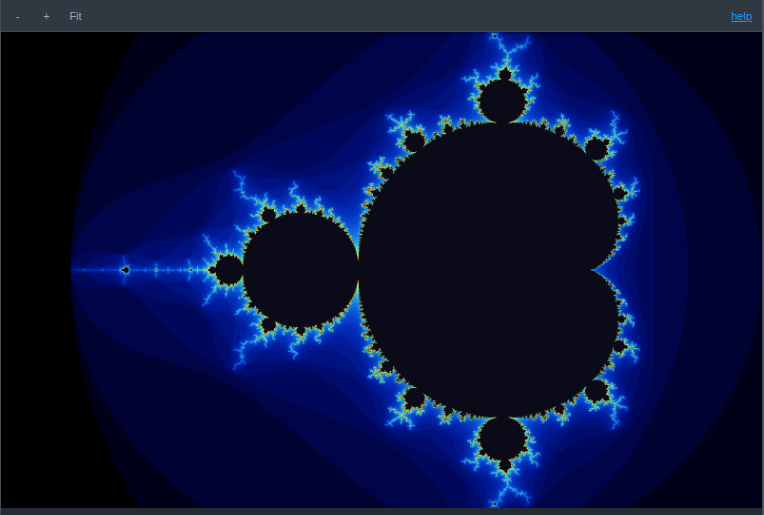
A JupyterLab 4 extension that makes the built-in image viewer interactive. Images open fitted to the panel just like the stock viewer, then you can zoom with the wheel, pan by dragging, and step through a folder of images with the arrow keys - all in a single viewer tab.
|
|
12
12
|
|
|
13
|
+
|
|
14
|
+
|
|
15
|
+
The viewer toolbar adds zoom in / out / fit controls and a `help` link that lists every keybinding.
|
|
16
|
+
|
|
13
17
|
## Features
|
|
14
18
|
|
|
15
19
|
- **Fit to screen** - every image opens scaled to fit the panel (same result as the stock viewer), and reset returns to that fit
|
|
16
20
|
- **Wheel zoom** - scroll to zoom in and out, anchored at the cursor; zoom out as far as you like
|
|
17
|
-
- **Drag to pan** - hold and drag to move
|
|
21
|
+
- **Drag to pan** - hold and drag to move the image at any zoom (canvas-style); the grab cursor is always available and Fit recenters
|
|
18
22
|
- **Toolbar controls** - zoom in, zoom out, and reset-to-fit buttons on the viewer toolbar
|
|
19
23
|
- **Arrow-key navigation** - Left and Right open the previous and next image in the same folder, advancing within one viewer instead of opening new tabs
|
|
20
24
|
|
package/lib/controller.d.ts
CHANGED
|
@@ -7,7 +7,6 @@ export declare class ViewerController {
|
|
|
7
7
|
private panning;
|
|
8
8
|
private start;
|
|
9
9
|
private zoomStep;
|
|
10
|
-
private ro;
|
|
11
10
|
private disposed;
|
|
12
11
|
constructor(host: HTMLElement, img: HTMLImageElement, zoomStep: number);
|
|
13
12
|
setZoomStep(zoomStep: number): void;
|
|
@@ -18,12 +17,9 @@ export declare class ViewerController {
|
|
|
18
17
|
private onWheel;
|
|
19
18
|
zoomIn(): void;
|
|
20
19
|
zoomOut(): void;
|
|
21
|
-
private canPan;
|
|
22
|
-
private clampPan;
|
|
23
20
|
private onDown;
|
|
24
21
|
private onMove;
|
|
25
22
|
private onUp;
|
|
26
|
-
private onResize;
|
|
27
23
|
private updateCursor;
|
|
28
24
|
private apply;
|
|
29
25
|
dispose(): void;
|
package/lib/controller.js
CHANGED
|
@@ -23,9 +23,6 @@ export class ViewerController {
|
|
|
23
23
|
this.zoomAt(factor, e.clientX - r.left, e.clientY - r.top);
|
|
24
24
|
};
|
|
25
25
|
this.onDown = (e) => {
|
|
26
|
-
if (!this.canPan()) {
|
|
27
|
-
return;
|
|
28
|
-
}
|
|
29
26
|
e.preventDefault();
|
|
30
27
|
this.panning = true;
|
|
31
28
|
this.start = { x: e.clientX, y: e.clientY, tx: this.tx, ty: this.ty };
|
|
@@ -39,7 +36,6 @@ export class ViewerController {
|
|
|
39
36
|
}
|
|
40
37
|
this.tx = this.start.tx + (e.clientX - this.start.x);
|
|
41
38
|
this.ty = this.start.ty + (e.clientY - this.start.y);
|
|
42
|
-
this.clampPan();
|
|
43
39
|
this.apply();
|
|
44
40
|
};
|
|
45
41
|
this.onUp = () => {
|
|
@@ -65,8 +61,6 @@ export class ViewerController {
|
|
|
65
61
|
this.layer = layer;
|
|
66
62
|
this.host.addEventListener('wheel', this.onWheel, { passive: false });
|
|
67
63
|
this.host.addEventListener('mousedown', this.onDown);
|
|
68
|
-
this.ro = new ResizeObserver(() => this.onResize());
|
|
69
|
-
this.ro.observe(this.host);
|
|
70
64
|
this.apply();
|
|
71
65
|
}
|
|
72
66
|
setZoomStep(zoomStep) {
|
|
@@ -99,7 +93,6 @@ export class ViewerController {
|
|
|
99
93
|
this.tx = ax - cx - k * (ax - cx - this.tx);
|
|
100
94
|
this.ty = ay - cy - k * (ay - cy - this.ty);
|
|
101
95
|
this.s = sNew;
|
|
102
|
-
this.clampPan();
|
|
103
96
|
this.apply();
|
|
104
97
|
}
|
|
105
98
|
zoomIn() {
|
|
@@ -110,24 +103,10 @@ export class ViewerController {
|
|
|
110
103
|
const { vw, vh } = this.viewport();
|
|
111
104
|
this.zoomAt(1 / (1 + this.zoomStep), vw / 2, vh / 2);
|
|
112
105
|
}
|
|
113
|
-
|
|
114
|
-
|
|
115
|
-
}
|
|
116
|
-
// Bound the translate to the overflow implied by the zoom so the image
|
|
117
|
-
// cannot be panned out of view. Range collapses to 0 as s approaches 1.
|
|
118
|
-
clampPan() {
|
|
119
|
-
const { vw, vh } = this.viewport();
|
|
120
|
-
const mx = (Math.max(this.s, 1) - 1) * vw * 0.5;
|
|
121
|
-
const my = (Math.max(this.s, 1) - 1) * vh * 0.5;
|
|
122
|
-
this.tx = Math.min(mx, Math.max(-mx, this.tx));
|
|
123
|
-
this.ty = Math.min(my, Math.max(-my, this.ty));
|
|
124
|
-
}
|
|
125
|
-
onResize() {
|
|
126
|
-
this.clampPan();
|
|
127
|
-
this.apply();
|
|
128
|
-
}
|
|
106
|
+
// Pan is always available (canvas-style): show grab normally, grabbing
|
|
107
|
+
// while a drag is in progress (apply() re-runs on every pan move).
|
|
129
108
|
updateCursor() {
|
|
130
|
-
this.host.style.cursor = this.
|
|
109
|
+
this.host.style.cursor = this.panning ? 'grabbing' : 'grab';
|
|
131
110
|
}
|
|
132
111
|
apply() {
|
|
133
112
|
this.layer.style.transformOrigin = 'center center';
|
|
@@ -139,7 +118,6 @@ export class ViewerController {
|
|
|
139
118
|
return;
|
|
140
119
|
}
|
|
141
120
|
this.disposed = true;
|
|
142
|
-
this.ro.disconnect();
|
|
143
121
|
this.host.removeEventListener('wheel', this.onWheel);
|
|
144
122
|
this.host.removeEventListener('mousedown', this.onDown);
|
|
145
123
|
window.removeEventListener('mousemove', this.onMove);
|
package/lib/index.js
CHANGED
|
@@ -52,16 +52,16 @@ const plugin = {
|
|
|
52
52
|
'<p class="jp-AdvancedImageViewer-help-section">This extension</p>',
|
|
53
53
|
'<ul>',
|
|
54
54
|
'<li><b>Wheel up / down</b> - zoom in / out at the cursor</li>',
|
|
55
|
-
'<li><b>Click and drag</b> - pan
|
|
56
|
-
'<li><b
|
|
55
|
+
'<li><b>Click and drag</b> - pan the image at any zoom</li>',
|
|
56
|
+
'<li><b>Toolbar buttons</b> - zoom in, zoom out, reset to fit</li>',
|
|
57
57
|
'<li><b>Left / Right arrows</b> - previous / next image in the folder</li>',
|
|
58
58
|
'</ul>',
|
|
59
59
|
'<p class="jp-AdvancedImageViewer-help-section">Standard viewer keys (compose with the above)</p>',
|
|
60
60
|
'<ul>',
|
|
61
|
+
'<li><b>= / - / 0</b> - zoom in / out / reset</li>',
|
|
61
62
|
'<li><b>] / [</b> - rotate clockwise / counter-clockwise</li>',
|
|
62
63
|
'<li><b>H / V</b> - flip horizontal / vertical</li>',
|
|
63
64
|
'<li><b>I</b> - invert colours</li>',
|
|
64
|
-
'<li><b>= / - / 0</b> - zoom in / out / reset</li>',
|
|
65
65
|
'</ul>'
|
|
66
66
|
].join('');
|
|
67
67
|
void showDialog({
|
package/package.json
CHANGED
|
@@ -1,6 +1,6 @@
|
|
|
1
1
|
{
|
|
2
2
|
"name": "jupyterlab_advanced_image_viewer_extension",
|
|
3
|
-
"version": "1.0.
|
|
3
|
+
"version": "1.0.7",
|
|
4
4
|
"description": "JupyterLab extension for advanced image viewing: fit-to-screen, cursor-anchored wheel zoom, drag-to-pan, and Left/Right arrow keys to move to the previous and next image in a folder",
|
|
5
5
|
"keywords": [
|
|
6
6
|
"jupyter",
|
package/src/controller.ts
CHANGED
|
@@ -19,7 +19,6 @@ export class ViewerController {
|
|
|
19
19
|
private panning = false;
|
|
20
20
|
private start = { x: 0, y: 0, tx: 0, ty: 0 };
|
|
21
21
|
private zoomStep: number;
|
|
22
|
-
private ro: ResizeObserver;
|
|
23
22
|
private disposed = false;
|
|
24
23
|
|
|
25
24
|
constructor(host: HTMLElement, img: HTMLImageElement, zoomStep: number) {
|
|
@@ -40,8 +39,6 @@ export class ViewerController {
|
|
|
40
39
|
this.layer = layer;
|
|
41
40
|
this.host.addEventListener('wheel', this.onWheel, { passive: false });
|
|
42
41
|
this.host.addEventListener('mousedown', this.onDown);
|
|
43
|
-
this.ro = new ResizeObserver(() => this.onResize());
|
|
44
|
-
this.ro.observe(this.host);
|
|
45
42
|
this.apply();
|
|
46
43
|
}
|
|
47
44
|
|
|
@@ -79,7 +76,6 @@ export class ViewerController {
|
|
|
79
76
|
this.tx = ax - cx - k * (ax - cx - this.tx);
|
|
80
77
|
this.ty = ay - cy - k * (ay - cy - this.ty);
|
|
81
78
|
this.s = sNew;
|
|
82
|
-
this.clampPan();
|
|
83
79
|
this.apply();
|
|
84
80
|
}
|
|
85
81
|
|
|
@@ -100,24 +96,7 @@ export class ViewerController {
|
|
|
100
96
|
this.zoomAt(1 / (1 + this.zoomStep), vw / 2, vh / 2);
|
|
101
97
|
}
|
|
102
98
|
|
|
103
|
-
private canPan(): boolean {
|
|
104
|
-
return this.s > 1;
|
|
105
|
-
}
|
|
106
|
-
|
|
107
|
-
// Bound the translate to the overflow implied by the zoom so the image
|
|
108
|
-
// cannot be panned out of view. Range collapses to 0 as s approaches 1.
|
|
109
|
-
private clampPan(): void {
|
|
110
|
-
const { vw, vh } = this.viewport();
|
|
111
|
-
const mx = (Math.max(this.s, 1) - 1) * vw * 0.5;
|
|
112
|
-
const my = (Math.max(this.s, 1) - 1) * vh * 0.5;
|
|
113
|
-
this.tx = Math.min(mx, Math.max(-mx, this.tx));
|
|
114
|
-
this.ty = Math.min(my, Math.max(-my, this.ty));
|
|
115
|
-
}
|
|
116
|
-
|
|
117
99
|
private onDown = (e: MouseEvent): void => {
|
|
118
|
-
if (!this.canPan()) {
|
|
119
|
-
return;
|
|
120
|
-
}
|
|
121
100
|
e.preventDefault();
|
|
122
101
|
this.panning = true;
|
|
123
102
|
this.start = { x: e.clientX, y: e.clientY, tx: this.tx, ty: this.ty };
|
|
@@ -132,7 +111,6 @@ export class ViewerController {
|
|
|
132
111
|
}
|
|
133
112
|
this.tx = this.start.tx + (e.clientX - this.start.x);
|
|
134
113
|
this.ty = this.start.ty + (e.clientY - this.start.y);
|
|
135
|
-
this.clampPan();
|
|
136
114
|
this.apply();
|
|
137
115
|
};
|
|
138
116
|
|
|
@@ -143,13 +121,10 @@ export class ViewerController {
|
|
|
143
121
|
window.removeEventListener('mouseup', this.onUp);
|
|
144
122
|
};
|
|
145
123
|
|
|
146
|
-
|
|
147
|
-
|
|
148
|
-
this.apply();
|
|
149
|
-
}
|
|
150
|
-
|
|
124
|
+
// Pan is always available (canvas-style): show grab normally, grabbing
|
|
125
|
+
// while a drag is in progress (apply() re-runs on every pan move).
|
|
151
126
|
private updateCursor(): void {
|
|
152
|
-
this.host.style.cursor = this.
|
|
127
|
+
this.host.style.cursor = this.panning ? 'grabbing' : 'grab';
|
|
153
128
|
}
|
|
154
129
|
|
|
155
130
|
private apply(): void {
|
|
@@ -163,7 +138,6 @@ export class ViewerController {
|
|
|
163
138
|
return;
|
|
164
139
|
}
|
|
165
140
|
this.disposed = true;
|
|
166
|
-
this.ro.disconnect();
|
|
167
141
|
this.host.removeEventListener('wheel', this.onWheel);
|
|
168
142
|
this.host.removeEventListener('mousedown', this.onDown);
|
|
169
143
|
window.removeEventListener('mousemove', this.onMove);
|
package/src/index.ts
CHANGED
|
@@ -89,16 +89,16 @@ const plugin: JupyterFrontEndPlugin<void> = {
|
|
|
89
89
|
'<p class="jp-AdvancedImageViewer-help-section">This extension</p>',
|
|
90
90
|
'<ul>',
|
|
91
91
|
'<li><b>Wheel up / down</b> - zoom in / out at the cursor</li>',
|
|
92
|
-
'<li><b>Click and drag</b> - pan
|
|
93
|
-
'<li><b
|
|
92
|
+
'<li><b>Click and drag</b> - pan the image at any zoom</li>',
|
|
93
|
+
'<li><b>Toolbar buttons</b> - zoom in, zoom out, reset to fit</li>',
|
|
94
94
|
'<li><b>Left / Right arrows</b> - previous / next image in the folder</li>',
|
|
95
95
|
'</ul>',
|
|
96
96
|
'<p class="jp-AdvancedImageViewer-help-section">Standard viewer keys (compose with the above)</p>',
|
|
97
97
|
'<ul>',
|
|
98
|
+
'<li><b>= / - / 0</b> - zoom in / out / reset</li>',
|
|
98
99
|
'<li><b>] / [</b> - rotate clockwise / counter-clockwise</li>',
|
|
99
100
|
'<li><b>H / V</b> - flip horizontal / vertical</li>',
|
|
100
101
|
'<li><b>I</b> - invert colours</li>',
|
|
101
|
-
'<li><b>= / - / 0</b> - zoom in / out / reset</li>',
|
|
102
102
|
'</ul>'
|
|
103
103
|
].join('');
|
|
104
104
|
void showDialog({
|