jswidthbreakpoints 1.0.0
This diff represents the content of publicly available package versions that have been released to one of the supported registries. The information contained in this diff is provided for informational purposes only and reflects changes between package versions as they appear in their respective public registries.
- package/.vscode/settings.json +20 -0
- package/LICENSE +21 -0
- package/README.md +193 -0
- package/demo/index.html +76 -0
- package/demo/style.css +59 -0
- package/dist/JsWidthBreakpoints.min.js +9 -0
- package/gulpfile.js +50 -0
- package/images/screen.png +0 -0
- package/package.json +30 -0
- package/src/JsWidthBreakpoints.js +219 -0
|
@@ -0,0 +1,20 @@
|
|
|
1
|
+
{
|
|
2
|
+
"filewatcher.commands": [
|
|
3
|
+
{
|
|
4
|
+
"match": "\\.*/src/.*.js",
|
|
5
|
+
"isAsync": true,
|
|
6
|
+
"cmd": "cd ${workspaceRoot} && gulp",
|
|
7
|
+
"event": "onFileChange"
|
|
8
|
+
},
|
|
9
|
+
{
|
|
10
|
+
"match": "package\\.json",
|
|
11
|
+
"isAsync": false,
|
|
12
|
+
"cmd": "cd ${workspaceRoot} && gulp updateStatusBar",
|
|
13
|
+
"event": "onFileChange"
|
|
14
|
+
}
|
|
15
|
+
],
|
|
16
|
+
"statusbartext": {
|
|
17
|
+
"active": true,
|
|
18
|
+
"text": "🏷️ JsWidthBreakpoints v1.0.0"
|
|
19
|
+
}
|
|
20
|
+
}
|
package/LICENSE
ADDED
|
@@ -0,0 +1,21 @@
|
|
|
1
|
+
MIT License
|
|
2
|
+
|
|
3
|
+
Copyright (c) 2025 Marcelo de Souza Lima
|
|
4
|
+
|
|
5
|
+
Permission is hereby granted, free of charge, to any person obtaining a copy
|
|
6
|
+
of this software and associated documentation files (the "Software"), to deal
|
|
7
|
+
in the Software without restriction, including without limitation the rights
|
|
8
|
+
to use, copy, modify, merge, publish, distribute, sublicense, and/or sell
|
|
9
|
+
copies of the Software, and to permit persons to whom the Software is
|
|
10
|
+
furnished to do so, subject to the following conditions:
|
|
11
|
+
|
|
12
|
+
The above copyright notice and this permission notice shall be included in all
|
|
13
|
+
copies or substantial portions of the Software.
|
|
14
|
+
|
|
15
|
+
THE SOFTWARE IS PROVIDED "AS IS", WITHOUT WARRANTY OF ANY KIND, EXPRESS OR
|
|
16
|
+
IMPLIED, INCLUDING BUT NOT LIMITED TO THE WARRANTIES OF MERCHANTABILITY,
|
|
17
|
+
FITNESS FOR A PARTICULAR PURPOSE AND NONINFRINGEMENT. IN NO EVENT SHALL THE
|
|
18
|
+
AUTHORS OR COPYRIGHT HOLDERS BE LIABLE FOR ANY CLAIM, DAMAGES OR OTHER
|
|
19
|
+
LIABILITY, WHETHER IN AN ACTION OF CONTRACT, TORT OR OTHERWISE, ARISING FROM,
|
|
20
|
+
OUT OF OR IN CONNECTION WITH THE SOFTWARE OR THE USE OR OTHER DEALINGS IN THE
|
|
21
|
+
SOFTWARE.
|
package/README.md
ADDED
|
@@ -0,0 +1,193 @@
|
|
|
1
|
+
# JsWidthBreakpoints
|
|
2
|
+
|
|
3
|
+
|
|
4
|
+
|
|
5
|
+

|
|
6
|
+

|
|
7
|
+
|
|
8
|
+
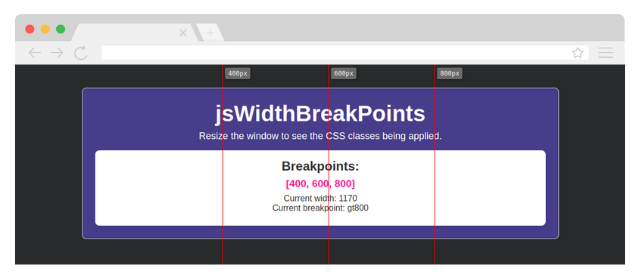
**JsWidthBreakpoints** is a lightweight, vanilla JavaScript library for handling responsive breakpoints with dynamic CSS classes and visual rules. It allows you to define custom breakpoints, apply CSS classes dynamically based on the window width, and visualize breakpoints with a customizable rule.
|
|
9
|
+
|
|
10
|
+
---
|
|
11
|
+
|
|
12
|
+
## Features
|
|
13
|
+
|
|
14
|
+
- **Dynamic CSS Classes**: Automatically apply CSS classes based on the current window width.
|
|
15
|
+
- **Visual Rule**: Display vertical lines and labels for each breakpoint to help with responsive design.
|
|
16
|
+
- **Customizable**: Configure breakpoints, rule color, opacity, and more.
|
|
17
|
+
- **No Dependencies**: Written in pure JavaScript (Vanilla JS), no jQuery or other libraries required.
|
|
18
|
+
- **Callback Support**: Execute custom logic when a breakpoint is reached.
|
|
19
|
+
|
|
20
|
+
---
|
|
21
|
+
|
|
22
|
+
## Installation
|
|
23
|
+
|
|
24
|
+
### Via CDN
|
|
25
|
+
You can include the library directly in your project using a CDN:
|
|
26
|
+
|
|
27
|
+
```html
|
|
28
|
+
<script src="https://cdn.jsdelivr.net/gh/marceloxp/JsWidthBreakpoints@main/dist/JsWidthBreakpoints.min.js"></script>
|
|
29
|
+
```
|
|
30
|
+
|
|
31
|
+
### Manual Installation
|
|
32
|
+
Include the library directly in your project:
|
|
33
|
+
|
|
34
|
+
1. Download the latest version from the [GitHub repository](https://github.com/marceloxp/JsWidthBreakpoints).
|
|
35
|
+
2. Add the script to your HTML file:
|
|
36
|
+
|
|
37
|
+
```html
|
|
38
|
+
<script src="path/to/JsWidthBreakpoints.js"></script>
|
|
39
|
+
```
|
|
40
|
+
|
|
41
|
+
---
|
|
42
|
+
|
|
43
|
+
## Usage
|
|
44
|
+
|
|
45
|
+
### Basic Setup
|
|
46
|
+
1. Include the library in your HTML file.
|
|
47
|
+
2. Initialize the library with your desired breakpoints.
|
|
48
|
+
|
|
49
|
+
```html
|
|
50
|
+
<!DOCTYPE html>
|
|
51
|
+
<html lang="en">
|
|
52
|
+
<head>
|
|
53
|
+
<meta charset="UTF-8">
|
|
54
|
+
<meta name="viewport" content="width=device-width, initial-scale=1.0">
|
|
55
|
+
<title>JsWidthBreakpoints Demo</title>
|
|
56
|
+
<style>
|
|
57
|
+
.width-lt400 { background-color: lightcoral; }
|
|
58
|
+
.width-b400a600 { background-color: lightblue; }
|
|
59
|
+
.width-b600a800 { background-color: lightgreen; }
|
|
60
|
+
.width-gt800 { background-color: lightyellow; }
|
|
61
|
+
</style>
|
|
62
|
+
</head>
|
|
63
|
+
<body>
|
|
64
|
+
<h1>JsWidthBreakpoints</h1>
|
|
65
|
+
<p>Resize the window to see the CSS classes being applied.</p>
|
|
66
|
+
<p>Breakpoints: [400, 600, 800]</p>
|
|
67
|
+
<p id="current-width"></p>
|
|
68
|
+
|
|
69
|
+
<script src="https://cdn.jsdelivr.net/gh/marceloxp/JsWidthBreakpoints@main/dist/JsWidthBreakpoints.min.js"></script>
|
|
70
|
+
<script>
|
|
71
|
+
JsWidthBreakpoints.init({
|
|
72
|
+
widths: [400, 600, 800],
|
|
73
|
+
applyClasses: true,
|
|
74
|
+
classPrefix: 'width-',
|
|
75
|
+
rule: {
|
|
76
|
+
show: true, // Show the rule
|
|
77
|
+
opacity: 0.6, // Set opacity
|
|
78
|
+
color: 'red', // Set line color
|
|
79
|
+
},
|
|
80
|
+
onBreakPoint: (event) => {
|
|
81
|
+
console.log('Breakpoint reached:', event);
|
|
82
|
+
},
|
|
83
|
+
});
|
|
84
|
+
|
|
85
|
+
const drawInfo = () => {
|
|
86
|
+
document.getElementById('current-width').innerHTML = `
|
|
87
|
+
<p>Current width: ${window.innerWidth}
|
|
88
|
+
<br>
|
|
89
|
+
Current breakpoint: ${JsWidthBreakpoints.currentClass}</p>
|
|
90
|
+
`;
|
|
91
|
+
};
|
|
92
|
+
|
|
93
|
+
// Update current width display
|
|
94
|
+
window.addEventListener('resize', (event) => {
|
|
95
|
+
drawInfo();
|
|
96
|
+
});
|
|
97
|
+
|
|
98
|
+
drawInfo();
|
|
99
|
+
</script>
|
|
100
|
+
</body>
|
|
101
|
+
</html>
|
|
102
|
+
```
|
|
103
|
+
|
|
104
|
+
---
|
|
105
|
+
|
|
106
|
+
## Understanding Breakpoints
|
|
107
|
+
|
|
108
|
+
The library dynamically applies CSS classes based on the current window width. Here's how the breakpoint classes are generated:
|
|
109
|
+
|
|
110
|
+
- **`lt{min-width}`**: Applied when the window width is **less than** the specified breakpoint.
|
|
111
|
+
- Example: `lt400` (less than 400px).
|
|
112
|
+
|
|
113
|
+
- **`b{min-width}a{max-width}`**: Applied when the window width is **between** two breakpoints.
|
|
114
|
+
- Example: `b400a600` (between 400px and 600px).
|
|
115
|
+
|
|
116
|
+
- **`gt{max-width}`**: Applied when the window width is **greater than** the specified breakpoint.
|
|
117
|
+
- Example: `gt800` (greater than 800px).
|
|
118
|
+
|
|
119
|
+
### Example
|
|
120
|
+
If you define breakpoints as `[400, 600, 800]`, the library will apply the following classes:
|
|
121
|
+
|
|
122
|
+
- `width-lt400` for widths **less than 400px**.
|
|
123
|
+
- `width-b400a600` for widths **between 400px and 600px**.
|
|
124
|
+
- `width-b600a800` for widths **between 600px and 800px**.
|
|
125
|
+
- `width-gt800` for widths **greater than 800px**.
|
|
126
|
+
|
|
127
|
+
---
|
|
128
|
+
|
|
129
|
+
## Configuration Options
|
|
130
|
+
|
|
131
|
+
The `JsWidthBreakpoints.init()` method accepts the following options:
|
|
132
|
+
|
|
133
|
+
| Option | Type | Default | Description |
|
|
134
|
+
|----------------|------------|---------------|-----------------------------------------------------------------------------|
|
|
135
|
+
| `widths` | `number[]` | `[]` | Array of breakpoints (e.g., `[400, 600, 800]`). |
|
|
136
|
+
| `applyClasses` | `boolean` | `true` | Whether to dynamically apply CSS classes based on the current breakpoint. |
|
|
137
|
+
| `classPrefix` | `string` | `'width-'` | Prefix for the CSS classes (e.g., `width-lt400`, `width-b400a600`). |
|
|
138
|
+
| `rule.show` | `boolean` | `false` | Whether to display the visual rule. |
|
|
139
|
+
| `rule.opacity` | `number` | `1` | Opacity of the rule lines and labels. |
|
|
140
|
+
| `rule.color` | `string` | `'red'` | Color of the rule lines. |
|
|
141
|
+
| `onBreakPoint` | `function` | `null` | Callback function executed when a breakpoint is reached. |
|
|
142
|
+
|
|
143
|
+
---
|
|
144
|
+
|
|
145
|
+
## Callback Function
|
|
146
|
+
|
|
147
|
+
The `onBreakPoint` callback receives an object with the following properties:
|
|
148
|
+
|
|
149
|
+
```javascript
|
|
150
|
+
{
|
|
151
|
+
oldBreakpoint: string, // Previous breakpoint class (empty string on initialization)
|
|
152
|
+
currentWidth: number, // Current window width
|
|
153
|
+
currentBreakpoint: string // New breakpoint class (e.g., 'lt400', 'b600a800')
|
|
154
|
+
}
|
|
155
|
+
```
|
|
156
|
+
|
|
157
|
+
---
|
|
158
|
+
|
|
159
|
+
## Visual Rule
|
|
160
|
+
|
|
161
|
+
When `rule.show` is `true`, the library displays vertical lines and labels for each breakpoint. This helps you visualize where the breakpoints are located on the page.
|
|
162
|
+
|
|
163
|
+
### Example
|
|
164
|
+
```javascript
|
|
165
|
+
rule: {
|
|
166
|
+
show: true,
|
|
167
|
+
opacity: 0.6,
|
|
168
|
+
color: 'blue',
|
|
169
|
+
}
|
|
170
|
+
```
|
|
171
|
+
|
|
172
|
+
---
|
|
173
|
+
|
|
174
|
+
## Contributing
|
|
175
|
+
|
|
176
|
+
Contributions are welcome! If you'd like to contribute to **JsWidthBreakpoints**, please follow these steps:
|
|
177
|
+
|
|
178
|
+
1. Fork the repository.
|
|
179
|
+
2. Create a new branch for your feature or bugfix.
|
|
180
|
+
3. Commit your changes.
|
|
181
|
+
4. Submit a pull request.
|
|
182
|
+
|
|
183
|
+
---
|
|
184
|
+
|
|
185
|
+
## License
|
|
186
|
+
|
|
187
|
+
This project is licensed under the MIT License. See the [LICENSE](LICENSE) file for details.
|
|
188
|
+
|
|
189
|
+
---
|
|
190
|
+
|
|
191
|
+
## Support
|
|
192
|
+
|
|
193
|
+
If you find this library useful, consider giving it a ⭐️ on [GitHub](https://github.com/marceloxp/JsWidthBreakpoints). For questions or issues, please open an issue on the repository.
|
package/demo/index.html
ADDED
|
@@ -0,0 +1,76 @@
|
|
|
1
|
+
<!DOCTYPE html>
|
|
2
|
+
<html lang="en">
|
|
3
|
+
|
|
4
|
+
<head>
|
|
5
|
+
<meta charset="UTF-8">
|
|
6
|
+
<meta name="viewport" content="width=device-width, initial-scale=1.0">
|
|
7
|
+
<title>JsWidthBreakpoints - Demo</title>
|
|
8
|
+
<link rel="stylesheet" href="style.css">
|
|
9
|
+
<style>
|
|
10
|
+
/* Custom styles for breakpoints */
|
|
11
|
+
.width-lt400 .area {
|
|
12
|
+
background-color: lightcoral;
|
|
13
|
+
}
|
|
14
|
+
|
|
15
|
+
.width-b400a600 .area {
|
|
16
|
+
background-color: cornflowerblue;
|
|
17
|
+
}
|
|
18
|
+
|
|
19
|
+
.width-b600a800 .area {
|
|
20
|
+
background-color: lightseagreen;
|
|
21
|
+
}
|
|
22
|
+
|
|
23
|
+
.width-gt800 .area {
|
|
24
|
+
background-color: darkslateblue;
|
|
25
|
+
}
|
|
26
|
+
</style>
|
|
27
|
+
</head>
|
|
28
|
+
|
|
29
|
+
<body>
|
|
30
|
+
<div class="container">
|
|
31
|
+
<div class="area">
|
|
32
|
+
<h1>JsWidthBreakpoints</h1>
|
|
33
|
+
<p>Resize the window to see the CSS classes being applied.</p>
|
|
34
|
+
<div class="card">
|
|
35
|
+
<h2>Breakpoints:</h2>
|
|
36
|
+
<p id="widths">[400, 600, 800]</p>
|
|
37
|
+
<p id="current-width">Current width: <span id="width">861</span></p>
|
|
38
|
+
</div>
|
|
39
|
+
</div>
|
|
40
|
+
</div>
|
|
41
|
+
|
|
42
|
+
<!-- JsWidthBreakpoints Library -->
|
|
43
|
+
<script src="../dist/JsWidthBreakpoints.js"></script>
|
|
44
|
+
<script>
|
|
45
|
+
JsWidthBreakpoints.init({
|
|
46
|
+
widths: [400, 600, 800],
|
|
47
|
+
applyClasses: true,
|
|
48
|
+
classPrefix: 'width-',
|
|
49
|
+
rule: {
|
|
50
|
+
show: true, // Show the rule
|
|
51
|
+
opacity: 1, // Opacity of the rule
|
|
52
|
+
color: 'red', // Color of the rule
|
|
53
|
+
},
|
|
54
|
+
onBreakPoint: (event) => {
|
|
55
|
+
console.log('Breakpoint reached:', event);
|
|
56
|
+
},
|
|
57
|
+
});
|
|
58
|
+
|
|
59
|
+
const drawInfo = () => {
|
|
60
|
+
document.getElementById('current-width').innerHTML = `
|
|
61
|
+
<p>Current width: ${window.innerWidth}
|
|
62
|
+
<br>
|
|
63
|
+
Current breakpoint: ${JsWidthBreakpoints.currentClass}</p>
|
|
64
|
+
`;
|
|
65
|
+
};
|
|
66
|
+
|
|
67
|
+
// Update current width display
|
|
68
|
+
window.addEventListener('resize', (event) => {
|
|
69
|
+
drawInfo();
|
|
70
|
+
});
|
|
71
|
+
|
|
72
|
+
drawInfo();
|
|
73
|
+
</script>
|
|
74
|
+
</body>
|
|
75
|
+
|
|
76
|
+
</html>
|
package/demo/style.css
ADDED
|
@@ -0,0 +1,59 @@
|
|
|
1
|
+
body {
|
|
2
|
+
margin: 0;
|
|
3
|
+
font-family: Arial, sans-serif;
|
|
4
|
+
background-color: #282a2b;
|
|
5
|
+
color: #fff;
|
|
6
|
+
display: flex;
|
|
7
|
+
justify-content: center;
|
|
8
|
+
height: 100vh;
|
|
9
|
+
text-align: center;
|
|
10
|
+
}
|
|
11
|
+
|
|
12
|
+
.container {
|
|
13
|
+
width: 80vw;
|
|
14
|
+
max-width: 900px;
|
|
15
|
+
min-width: 300px;
|
|
16
|
+
margin-top: 5vh;
|
|
17
|
+
}
|
|
18
|
+
|
|
19
|
+
.area {
|
|
20
|
+
padding: 1.5rem;
|
|
21
|
+
border-radius: 8px;
|
|
22
|
+
border: 1px solid #ccc;
|
|
23
|
+
}
|
|
24
|
+
|
|
25
|
+
h1 {
|
|
26
|
+
font-size: clamp(1.2rem, calc(1.2rem + 2vw), 42px);
|
|
27
|
+
margin: 0;
|
|
28
|
+
}
|
|
29
|
+
|
|
30
|
+
div.container > .area > p {
|
|
31
|
+
font-size: clamp(1rem, calc(0.1rem + 1.6vw), 18px);
|
|
32
|
+
}
|
|
33
|
+
|
|
34
|
+
p {
|
|
35
|
+
margin: 0.5rem 0;
|
|
36
|
+
}
|
|
37
|
+
|
|
38
|
+
.card {
|
|
39
|
+
background-color: #fff;
|
|
40
|
+
color: #333;
|
|
41
|
+
padding: 1rem;
|
|
42
|
+
border-radius: 8px;
|
|
43
|
+
box-shadow: 0 4px 6px rgba(0, 0, 0, 0.1);
|
|
44
|
+
margin-top: 1rem;
|
|
45
|
+
}
|
|
46
|
+
|
|
47
|
+
.card h2 {
|
|
48
|
+
margin: 0 0 0.5rem;
|
|
49
|
+
}
|
|
50
|
+
|
|
51
|
+
#widths {
|
|
52
|
+
font-weight: bold;
|
|
53
|
+
font-size: larger;
|
|
54
|
+
color: deeppink;
|
|
55
|
+
}
|
|
56
|
+
|
|
57
|
+
.card span {
|
|
58
|
+
font-weight: bold;
|
|
59
|
+
}
|
|
@@ -0,0 +1,9 @@
|
|
|
1
|
+
/**
|
|
2
|
+
* JsWidthBreakpoints - A lightweight, vanilla JavaScript library for handling responsive breakpoints with dynamic CSS classes and visual rules.
|
|
3
|
+
* Version: 1.0.0
|
|
4
|
+
* Repository: https://github.com/marceloxp/JsWidthBreakpoints
|
|
5
|
+
* License: MIT
|
|
6
|
+
* Author: Marcelo XP
|
|
7
|
+
* Build Date: 2025-01-21
|
|
8
|
+
*/
|
|
9
|
+
class JsWidthBreakpoints{static defaults={widths:[],onBreakPoint:null,applyClasses:!0,classPrefix:"width-",rule:{show:!1,opacity:1,color:"red"}};static init(t={}){this.options={...this.defaults,...t},this.breakpoints=this.options.widths.sort(((t,s)=>s-t)),this.breakpoints_length=this.breakpoints.length,this.biggestBreakpoint=this.breakpoints[0],this.smallestBreakpoint=this.breakpoints[this.breakpoints_length-1],this.hasCallback="function"==typeof this.options.onBreakPoint,this.currentWidth=this.getWindowWidth(),this.allBreakpointClasses=this.getAllBreakpointClasses(),this.currentClass=null,this.setupEventListeners(),this.checkBreakpoints(!0),this.options.rule.show&&(this.injectRuleStyles(),this.createRule())}static getAllBreakpointClasses(){const t=[`lt${this.smallestBreakpoint}`,`gt${this.biggestBreakpoint}`];for(let s=this.breakpoints_length-1;s>0;s--)t.push(`b${this.breakpoints[s]}a${this.breakpoints[s-1]}`);return t}static getWindowWidth(){return window.innerWidth}static setupEventListeners(){window.addEventListener("resize",(()=>{this.checkBreakpoints()}))}static checkBreakpoints(t=!1){const s=this.getWindowWidth();if(s!==this.currentWidth||t){this.currentWidth=s;const t=this.getCurrentBreakpoint();if(this.options.applyClasses&&t!==this.currentClass){const s=this.currentClass;this.currentClass=t,this.hasCallback&&this.options.onBreakPoint({oldBreakpoint:s||"",currentWidth:this.currentWidth,currentBreakpoint:t}),this.applyBreakpointClasses(t)}}}static getCurrentBreakpoint(){if(this.currentWidth<=this.smallestBreakpoint)return`lt${this.smallestBreakpoint}`;if(this.currentWidth>=this.biggestBreakpoint)return`gt${this.biggestBreakpoint}`;for(let t=0;t<this.breakpoints_length;t++)if(this.currentWidth>=this.breakpoints[t])return`b${this.breakpoints[t]}a${this.breakpoints[t-1]}`;return null}static applyBreakpointClasses(t){const s=document.body,e=this.options.classPrefix;this.allBreakpointClasses.forEach((t=>{s.classList.remove(`${e}${t}`)})),t&&s.classList.add(`${e}${t}`)}static injectRuleStyles(){const t="jsWidthBreakpointsRuleStyles";if(document.getElementById(t))return;const s=`\n .JsWidthBreakpoints-rule {\n position: fixed;\n top: 0;\n left: 0;\n width: 100%;\n height: 100%;\n pointer-events: none; /* Ensure the rule doesn't interfere with clicks */\n z-index: 1000;\n }\n\n .JsWidthBreakpoints-rule-line {\n position: absolute;\n top: 0;\n height: 100%;\n width: 1px;\n background-color: ${this.options.rule.color};\n opacity: ${this.options.rule.opacity};\n }\n\n .JsWidthBreakpoints-rule-label {\n position: absolute;\n top: 10px;\n left: 5px;\n background-color: dimgrey;\n color: white;\n padding: 4px 6px;\n font-size: 12px;\n border-radius: 3px;\n font-family: monospace;\n box-shadow: 1px 1px 1px 0px rgba(0,0,0,0.75);\n opacity: ${this.options.rule.opacity};\n }\n `,e=document.createElement("style");e.id=t,e.textContent=s,document.head.appendChild(e)}static createRule(){const t=document.createElement("div");t.className="JsWidthBreakpoints-rule",this.breakpoints.forEach((s=>{const e=document.createElement("div");e.className="JsWidthBreakpoints-rule-line",e.style.left=`${s}px`;const i=document.createElement("div");i.className="JsWidthBreakpoints-rule-label",i.textContent=`${s}px`,i.style.left=`${s+5}px`,t.appendChild(e),t.appendChild(i)})),document.body.appendChild(t)}}window.JsWidthBreakpoints=JsWidthBreakpoints;
|
package/gulpfile.js
ADDED
|
@@ -0,0 +1,50 @@
|
|
|
1
|
+
const fs = require('fs');
|
|
2
|
+
const path = require('path');
|
|
3
|
+
const gulp = require('gulp');
|
|
4
|
+
const concat = require('gulp-concat');
|
|
5
|
+
const terser = require('gulp-terser');
|
|
6
|
+
const header = require('gulp-header');
|
|
7
|
+
const rename = require('gulp-rename');
|
|
8
|
+
const package = require('./package.json');
|
|
9
|
+
const settingsPath = path.join(__dirname, '.vscode', 'settings.json');
|
|
10
|
+
|
|
11
|
+
// Cabeçalho personalizado
|
|
12
|
+
const banner = `/**
|
|
13
|
+
* JsWidthBreakpoints - A lightweight, vanilla JavaScript library for handling responsive breakpoints with dynamic CSS classes and visual rules.
|
|
14
|
+
* Version: ${package.version}
|
|
15
|
+
* Repository: https://github.com/marceloxp/JsWidthBreakpoints
|
|
16
|
+
* License: MIT
|
|
17
|
+
* Author: Marcelo XP
|
|
18
|
+
* Build Date: ${new Date().toISOString().split('T')[0]}
|
|
19
|
+
*/
|
|
20
|
+
`;
|
|
21
|
+
|
|
22
|
+
// Tarefa principal: compila e minifica o código
|
|
23
|
+
function build() {
|
|
24
|
+
return gulp
|
|
25
|
+
.src('src/JsWidthBreakpoints.js') // Arquivo de entrada
|
|
26
|
+
.pipe(concat('JsWidthBreakpoints.js')) // Concatena (útil se houver múltiplos arquivos)
|
|
27
|
+
.pipe(terser()) // Minifica o código usando Terser
|
|
28
|
+
.pipe(rename({ suffix: '.min' })) // Adiciona o sufixo .min ao nome do arquivo
|
|
29
|
+
.pipe(header(banner)) // Adiciona o cabeçalho personalizado
|
|
30
|
+
.pipe(gulp.dest('dist')); // Salva o arquivo minificado
|
|
31
|
+
}
|
|
32
|
+
|
|
33
|
+
async function updateStatusBar() {
|
|
34
|
+
const settings = JSON.parse(fs.readFileSync(settingsPath, 'utf8'));
|
|
35
|
+
|
|
36
|
+
const version = package.version;
|
|
37
|
+
settings.statusbartext = {
|
|
38
|
+
active: true,
|
|
39
|
+
text: `🏷️ JsWidthBreakpoints v${version}`
|
|
40
|
+
};
|
|
41
|
+
|
|
42
|
+
fs.writeFileSync(settingsPath, JSON.stringify(settings, null, 4));
|
|
43
|
+
console.log(`Status bar updated to version v${version}`);
|
|
44
|
+
|
|
45
|
+
await Promise.resolve();
|
|
46
|
+
}
|
|
47
|
+
|
|
48
|
+
// Tarefa padrão: executa a tarefa de build
|
|
49
|
+
exports.default = build;
|
|
50
|
+
exports.updateStatusBar = updateStatusBar;
|
|
Binary file
|
package/package.json
ADDED
|
@@ -0,0 +1,30 @@
|
|
|
1
|
+
{
|
|
2
|
+
"name": "jswidthbreakpoints",
|
|
3
|
+
"version": "1.0.0",
|
|
4
|
+
"description": "A lightweight, vanilla JavaScript library for handling responsive breakpoints with dynamic CSS classes and visual rules.",
|
|
5
|
+
"main": "index.js",
|
|
6
|
+
"scripts": {
|
|
7
|
+
"test": "echo \"Error: no test specified\" && exit 1"
|
|
8
|
+
},
|
|
9
|
+
"keywords": [
|
|
10
|
+
"responsive",
|
|
11
|
+
"breakpoints",
|
|
12
|
+
"javascript",
|
|
13
|
+
"vanilla-js",
|
|
14
|
+
"css-classes",
|
|
15
|
+
"media-queries",
|
|
16
|
+
"responsive-design",
|
|
17
|
+
"frontend",
|
|
18
|
+
"web-development"
|
|
19
|
+
],
|
|
20
|
+
"author": "Marcelo XP",
|
|
21
|
+
"homepage": "https://github.com/marceloxp/JsWidthBreakpoints",
|
|
22
|
+
"license": "MIT",
|
|
23
|
+
"devDependencies": {
|
|
24
|
+
"gulp": "^5.0.0",
|
|
25
|
+
"gulp-concat": "^2.6.1",
|
|
26
|
+
"gulp-header": "^2.0.9",
|
|
27
|
+
"gulp-rename": "^2.0.0",
|
|
28
|
+
"gulp-terser": "^2.1.0"
|
|
29
|
+
}
|
|
30
|
+
}
|
|
@@ -0,0 +1,219 @@
|
|
|
1
|
+
class JsWidthBreakpoints {
|
|
2
|
+
// Default settings
|
|
3
|
+
static defaults = {
|
|
4
|
+
widths: [], // Array of breakpoints (e.g., [400, 600, 800])
|
|
5
|
+
onBreakPoint: null, // Callback executed when a breakpoint is reached
|
|
6
|
+
applyClasses: true, // Dynamically apply CSS classes
|
|
7
|
+
classPrefix: 'width-', // Prefix for CSS classes
|
|
8
|
+
rule: { // Rule configuration
|
|
9
|
+
show: false, // Whether to display the rule
|
|
10
|
+
opacity: 1, // Opacity of the rule
|
|
11
|
+
color: 'red', // Color of the rule
|
|
12
|
+
},
|
|
13
|
+
};
|
|
14
|
+
|
|
15
|
+
// Initialize the library
|
|
16
|
+
static init(options = {}) {
|
|
17
|
+
// Merge default options with user-provided options
|
|
18
|
+
this.options = { ...this.defaults, ...options };
|
|
19
|
+
|
|
20
|
+
// Sort breakpoints in descending order
|
|
21
|
+
this.breakpoints = this.options.widths.sort((a, b) => b - a);
|
|
22
|
+
|
|
23
|
+
// Store the length of the breakpoints array
|
|
24
|
+
this.breakpoints_length = this.breakpoints.length;
|
|
25
|
+
|
|
26
|
+
// Get the biggest breakpoint
|
|
27
|
+
this.biggestBreakpoint = this.breakpoints[0];
|
|
28
|
+
|
|
29
|
+
// Get the smallest breakpoint
|
|
30
|
+
this.smallestBreakpoint = this.breakpoints[this.breakpoints_length - 1];
|
|
31
|
+
|
|
32
|
+
// Check if the callback is a function
|
|
33
|
+
this.hasCallback = typeof this.options.onBreakPoint === 'function';
|
|
34
|
+
|
|
35
|
+
// Get the current window width
|
|
36
|
+
this.currentWidth = this.getWindowWidth();
|
|
37
|
+
|
|
38
|
+
// Get all possible breakpoint class names
|
|
39
|
+
this.allBreakpointClasses = this.getAllBreakpointClasses();
|
|
40
|
+
|
|
41
|
+
// Store the current class name
|
|
42
|
+
this.currentClass = null;
|
|
43
|
+
|
|
44
|
+
// Set up the window resize listener
|
|
45
|
+
this.setupEventListeners();
|
|
46
|
+
|
|
47
|
+
// Check and apply breakpoints immediately
|
|
48
|
+
this.checkBreakpoints(true); // Pass `true` to force callback execution
|
|
49
|
+
|
|
50
|
+
// Initialize the rule if enabled
|
|
51
|
+
if (this.options.rule.show) {
|
|
52
|
+
this.injectRuleStyles(); // Inject CSS styles
|
|
53
|
+
this.createRule(); // Create the rule
|
|
54
|
+
}
|
|
55
|
+
}
|
|
56
|
+
|
|
57
|
+
// Get all possibles breakpoint class names
|
|
58
|
+
static getAllBreakpointClasses() {
|
|
59
|
+
const result = [
|
|
60
|
+
`lt${this.smallestBreakpoint}`,
|
|
61
|
+
`gt${this.biggestBreakpoint}`,
|
|
62
|
+
];
|
|
63
|
+
|
|
64
|
+
for (let i = this.breakpoints_length - 1; i > 0; i--) {
|
|
65
|
+
result.push(`b${this.breakpoints[i]}a${this.breakpoints[i - 1]}`);
|
|
66
|
+
}
|
|
67
|
+
|
|
68
|
+
return result;
|
|
69
|
+
}
|
|
70
|
+
|
|
71
|
+
// Get the current window width
|
|
72
|
+
static getWindowWidth() {
|
|
73
|
+
return window.innerWidth; // Use window.innerWidth directly
|
|
74
|
+
}
|
|
75
|
+
|
|
76
|
+
// Set up the window resize listener
|
|
77
|
+
static setupEventListeners() {
|
|
78
|
+
window.addEventListener('resize', () => {
|
|
79
|
+
this.checkBreakpoints();
|
|
80
|
+
});
|
|
81
|
+
}
|
|
82
|
+
|
|
83
|
+
// Check breakpoints and execute actions
|
|
84
|
+
static checkBreakpoints(forceCallback = false) {
|
|
85
|
+
const newWidth = this.getWindowWidth();
|
|
86
|
+
|
|
87
|
+
// Check if the width has changed or if the callback should be forced
|
|
88
|
+
if (newWidth !== this.currentWidth || forceCallback) {
|
|
89
|
+
this.currentWidth = newWidth;
|
|
90
|
+
const breakpoint = this.getCurrentBreakpoint();
|
|
91
|
+
|
|
92
|
+
// Apply CSS classes if enabled
|
|
93
|
+
if (this.options.applyClasses) {
|
|
94
|
+
// Check if the breakpoint has changed
|
|
95
|
+
if (breakpoint !== this.currentClass) {
|
|
96
|
+
const oldBreakpoint = this.currentClass;
|
|
97
|
+
this.currentClass = breakpoint;
|
|
98
|
+
|
|
99
|
+
// Execute the callback if defined
|
|
100
|
+
if (this.hasCallback) {
|
|
101
|
+
this.options.onBreakPoint({
|
|
102
|
+
oldBreakpoint: oldBreakpoint || '',
|
|
103
|
+
currentWidth: this.currentWidth,
|
|
104
|
+
currentBreakpoint: breakpoint,
|
|
105
|
+
});
|
|
106
|
+
}
|
|
107
|
+
|
|
108
|
+
// Apply CSS classes based on the breakpoint
|
|
109
|
+
this.applyBreakpointClasses(breakpoint);
|
|
110
|
+
}
|
|
111
|
+
}
|
|
112
|
+
}
|
|
113
|
+
}
|
|
114
|
+
|
|
115
|
+
// Get the current breakpoint
|
|
116
|
+
static getCurrentBreakpoint() {
|
|
117
|
+
if (this.currentWidth <= this.smallestBreakpoint) {
|
|
118
|
+
return `lt${this.smallestBreakpoint}`;
|
|
119
|
+
} else if (this.currentWidth >= this.biggestBreakpoint) {
|
|
120
|
+
return `gt${this.biggestBreakpoint}`;
|
|
121
|
+
} else {
|
|
122
|
+
for (let i = 0; i < this.breakpoints_length; i++) {
|
|
123
|
+
if (this.currentWidth >= this.breakpoints[i]) {
|
|
124
|
+
return `b${this.breakpoints[i]}a${this.breakpoints[i - 1]}`;
|
|
125
|
+
}
|
|
126
|
+
}
|
|
127
|
+
}
|
|
128
|
+
return null;
|
|
129
|
+
}
|
|
130
|
+
|
|
131
|
+
// Apply CSS classes based on the breakpoint
|
|
132
|
+
static applyBreakpointClasses(breakpoint) {
|
|
133
|
+
const body = document.body;
|
|
134
|
+
const classPrefix = this.options.classPrefix;
|
|
135
|
+
|
|
136
|
+
// Remove old classes
|
|
137
|
+
this.allBreakpointClasses.forEach((cls) => {
|
|
138
|
+
body.classList.remove(`${classPrefix}${cls}`);
|
|
139
|
+
});
|
|
140
|
+
|
|
141
|
+
// Add the new class
|
|
142
|
+
if (breakpoint) {
|
|
143
|
+
body.classList.add(`${classPrefix}${breakpoint}`);
|
|
144
|
+
}
|
|
145
|
+
}
|
|
146
|
+
|
|
147
|
+
// Inject CSS styles for the rule
|
|
148
|
+
static injectRuleStyles() {
|
|
149
|
+
const styleId = 'jsWidthBreakpointsRuleStyles';
|
|
150
|
+
if (document.getElementById(styleId)) return; // Avoid duplicate injection
|
|
151
|
+
|
|
152
|
+
const styles = `
|
|
153
|
+
.JsWidthBreakpoints-rule {
|
|
154
|
+
position: fixed;
|
|
155
|
+
top: 0;
|
|
156
|
+
left: 0;
|
|
157
|
+
width: 100%;
|
|
158
|
+
height: 100%;
|
|
159
|
+
pointer-events: none; /* Ensure the rule doesn't interfere with clicks */
|
|
160
|
+
z-index: 1000;
|
|
161
|
+
}
|
|
162
|
+
|
|
163
|
+
.JsWidthBreakpoints-rule-line {
|
|
164
|
+
position: absolute;
|
|
165
|
+
top: 0;
|
|
166
|
+
height: 100%;
|
|
167
|
+
width: 1px;
|
|
168
|
+
background-color: ${this.options.rule.color};
|
|
169
|
+
opacity: ${this.options.rule.opacity};
|
|
170
|
+
}
|
|
171
|
+
|
|
172
|
+
.JsWidthBreakpoints-rule-label {
|
|
173
|
+
position: absolute;
|
|
174
|
+
top: 10px;
|
|
175
|
+
left: 5px;
|
|
176
|
+
background-color: dimgrey;
|
|
177
|
+
color: white;
|
|
178
|
+
padding: 4px 6px;
|
|
179
|
+
font-size: 12px;
|
|
180
|
+
border-radius: 3px;
|
|
181
|
+
font-family: monospace;
|
|
182
|
+
box-shadow: 1px 1px 1px 0px rgba(0,0,0,0.75);
|
|
183
|
+
opacity: ${this.options.rule.opacity};
|
|
184
|
+
}
|
|
185
|
+
`;
|
|
186
|
+
|
|
187
|
+
const styleElement = document.createElement('style');
|
|
188
|
+
styleElement.id = styleId;
|
|
189
|
+
styleElement.textContent = styles;
|
|
190
|
+
document.head.appendChild(styleElement);
|
|
191
|
+
}
|
|
192
|
+
|
|
193
|
+
// Create the rule (régua)
|
|
194
|
+
static createRule() {
|
|
195
|
+
const ruleContainer = document.createElement('div');
|
|
196
|
+
ruleContainer.className = 'JsWidthBreakpoints-rule';
|
|
197
|
+
|
|
198
|
+
// Add lines for each breakpoint
|
|
199
|
+
this.breakpoints.forEach((width) => {
|
|
200
|
+
const line = document.createElement('div');
|
|
201
|
+
line.className = 'JsWidthBreakpoints-rule-line';
|
|
202
|
+
line.style.left = `${width}px`;
|
|
203
|
+
|
|
204
|
+
const label = document.createElement('div');
|
|
205
|
+
label.className = 'JsWidthBreakpoints-rule-label';
|
|
206
|
+
label.textContent = `${width}px`;
|
|
207
|
+
label.style.left = `${width + 5}px`; // Offset the label slightly
|
|
208
|
+
|
|
209
|
+
ruleContainer.appendChild(line);
|
|
210
|
+
ruleContainer.appendChild(label);
|
|
211
|
+
});
|
|
212
|
+
|
|
213
|
+
// Add the rule container to the body
|
|
214
|
+
document.body.appendChild(ruleContainer);
|
|
215
|
+
}
|
|
216
|
+
}
|
|
217
|
+
|
|
218
|
+
// Expose the class globally
|
|
219
|
+
window.JsWidthBreakpoints = JsWidthBreakpoints;
|