jssm 5.35.4 → 5.42.0
This diff represents the content of publicly available package versions that have been released to one of the supported registries. The information contained in this diff is provided for informational purposes only and reflects changes between package versions as they appear in their respective public registries.
- package/.codeclimate.yml +22 -22
- package/.editorconfig +12 -12
- package/.eslintrc +20 -20
- package/.nycrc +6 -6
- package/.travis.yml +8 -8
- package/LICENSE.md +21 -21
- package/README.md +997 -993
- package/dist/es6/jssm-dot.d.ts +6 -6
- package/dist/es6/jssm-dot.js +1 -1
- package/dist/es6/jssm.d.ts +100 -100
- package/dist/es6/jssm.js +792 -792
- package/dist/es6/jssm_types.d.ts +151 -151
- package/dist/es6/jssm_types.js +1 -1
- package/dist/es6/jssm_util.d.ts +8 -8
- package/dist/es6/jssm_util.js +34 -34
- package/dist/es6/version.d.ts +2 -2
- package/dist/es6/version.js +2 -2
- package/dist/jssm.es5.cjs.js +1 -1
- package/dist/jssm.es5.iife.js +1 -0
- package/jest-spec.config.js +27 -27
- package/jest-stoch.config.js +27 -27
- package/jssm-dot.d.ts +6 -6
- package/jssm.d.ts +100 -100
- package/jssm_types.d.ts +151 -151
- package/jssm_util.d.ts +8 -8
- package/package.json +125 -122
- package/rollup.config.iife.js +44 -44
- package/rollup.config.js +44 -44
- package/src/demo/index.html +38 -38
- package/src/demo/style.css +1 -1
- package/src/ts/jssm-dot.peg +928 -874
- package/src/ts/jssm.ts +1120 -1120
- package/src/ts/jssm_types.ts +346 -346
- package/src/ts/jssm_util.ts +100 -100
- package/src/ts/tests/actions.spec.ts +167 -167
- package/src/ts/tests/arrange.spec.ts +72 -72
- package/src/ts/tests/arrange.stoch.ts +4 -4
- package/src/ts/tests/array_box_if_string.spec.ts +30 -31
- package/src/ts/tests/array_transitions.spec.ts +129 -129
- package/src/ts/tests/arrow unicode.spec.ts +88 -88
- package/src/ts/tests/arrow.spec.ts +124 -124
- package/src/ts/tests/colors.spec.ts +58 -58
- package/src/ts/tests/comment.spec.ts +134 -134
- package/src/ts/tests/compile.spec.ts +79 -79
- package/src/ts/tests/constants.spec.ts +98 -98
- package/src/ts/tests/cycles.spec.ts +153 -153
- package/src/ts/tests/dot_preamble.spec.ts +16 -16
- package/src/ts/tests/embedded_sm.spec.ts +36 -36
- package/src/ts/tests/flow.spec.ts +22 -22
- package/src/ts/tests/forced transitions.spec.ts +26 -26
- package/src/ts/tests/general.spec.ts +933 -933
- package/src/ts/tests/graph node lists.spec.ts +21 -21
- package/src/ts/tests/histo.spec.ts +24 -24
- package/src/ts/tests/hooks.spec.ts +28 -0
- package/src/ts/tests/language.spec.ts +37 -37
- package/src/ts/tests/language_data/belarussian.json +13 -13
- package/src/ts/tests/language_data/bengali.json +15 -15
- package/src/ts/tests/language_data/emoji.json +21 -21
- package/src/ts/tests/language_data/english.json +16 -16
- package/src/ts/tests/language_data/french.json +16 -16
- package/src/ts/tests/language_data/german.json +16 -16
- package/src/ts/tests/language_data/hebrew.json +16 -16
- package/src/ts/tests/language_data/portuguese.json +12 -12
- package/src/ts/tests/language_data/russian.json +12 -12
- package/src/ts/tests/language_data/spanish.json +17 -17
- package/src/ts/tests/language_data/ukrainian.json +18 -18
- package/src/ts/tests/layout.spec.ts +29 -29
- package/src/ts/tests/machine_attributes.spec.ts +398 -398
- package/src/ts/tests/machine_name.spec.ts +14 -14
- package/src/ts/tests/named lists.spec.ts +24 -19
- package/src/ts/tests/nominated states.spec.ts +133 -133
- package/src/ts/tests/parse actions.spec.ts +32 -32
- package/src/ts/tests/parse.spec.ts +94 -94
- package/src/ts/tests/probability.spec.ts +146 -146
- package/src/ts/tests/r639.spec.ts +27 -27
- package/src/ts/tests/sample_select.spec.ts +173 -173
- package/src/ts/tests/seq.spec.ts +14 -16
- package/src/ts/tests/seq.stoch.ts +83 -0
- package/src/ts/tests/shapes.spec.ts +63 -63
- package/src/ts/tests/sm_tag.spec.ts +37 -37
- package/src/ts/tests/special characters.spec.ts +39 -39
- package/src/ts/tests/state_declaration.spec.ts +214 -200
- package/src/ts/tests/state_style.spec.ts +82 -39
- package/src/ts/tests/stop light.spec.ts +157 -157
- package/src/ts/tests/stripes.spec.ts +52 -52
- package/src/ts/tests/theme.spec.ts +45 -45
- package/src/ts/tests/weighted_histo_key.spec.ts +22 -22
- package/src/ts/tests/weighted_rand_select.spec.ts +27 -27
- package/src/ts/tests/weighted_sample_select.spec.ts +24 -26
- package/src/ts/version.ts +1 -1
- package/tree.txt +1794 -1794
- package/tsconfig.json +27 -27
- package/version.d.ts +2 -2
package/README.md
CHANGED
|
@@ -1,993 +1,997 @@
|
|
|
1
|
-
# jssm
|
|
2
|
-
|
|
3
|
-
Easy. Small. Fast. TS, es6, es5. Node, Browser. 100% coverage. Property
|
|
4
|
-
tests. Fuzz tests. Language tests for a dozen languages and emoji. Easy to
|
|
5
|
-
share online. Easy to embed.
|
|
6
|
-
|
|
7
|
-
Readable, useful state machines as one-liner strings.
|
|
8
|
-
|
|
9
|
-
***Meet your new state machine library.***
|
|
10
|
-
|
|
11
|
-
<a href="https://stonecypher.github.io/jssm-viz-demo/graph_explorer.html" target="_blank" rel="noopener noreferrer">TRY THE LIVE EDITOR</a>
|
|
12
|
-
|
|
13
|
-
<
|
|
14
|
-
|
|
15
|
-
|
|
16
|
-
|
|
17
|
-
|
|
18
|
-
|
|
19
|
-
|
|
20
|
-
|
|
21
|
-
```
|
|
22
|
-
|
|
23
|
-
|
|
24
|
-
|
|
25
|
-
|
|
26
|
-
|
|
27
|
-
|
|
28
|
-
|
|
29
|
-
|
|
30
|
-
|
|
31
|
-
|
|
32
|
-
|
|
33
|
-
|
|
34
|
-
|
|
35
|
-
|
|
36
|
-
|
|
37
|
-
|
|
38
|
-
|
|
39
|
-
|
|
40
|
-
|
|
41
|
-
|
|
42
|
-
|
|
43
|
-
|
|
44
|
-
|
|
45
|
-
TrafficLightWithActions
|
|
46
|
-
|
|
47
|
-
|
|
48
|
-
|
|
49
|
-
|
|
50
|
-
|
|
51
|
-
|
|
52
|
-
|
|
53
|
-
|
|
54
|
-
|
|
55
|
-
|
|
56
|
-
|
|
57
|
-
|
|
58
|
-
|
|
59
|
-
|
|
60
|
-
|
|
61
|
-
|
|
62
|
-
|
|
63
|
-
|
|
64
|
-
AnotherTrafficLight
|
|
65
|
-
|
|
66
|
-
|
|
67
|
-
|
|
68
|
-
|
|
69
|
-
|
|
70
|
-
|
|
71
|
-
|
|
72
|
-
|
|
73
|
-
|
|
74
|
-
|
|
75
|
-
|
|
76
|
-
|
|
77
|
-
|
|
78
|
-
|
|
79
|
-
|
|
80
|
-
|
|
81
|
-
|
|
82
|
-
|
|
83
|
-
|
|
84
|
-
|
|
85
|
-
|
|
86
|
-
|
|
87
|
-
|
|
88
|
-
|
|
89
|
-
|
|
90
|
-
|
|
91
|
-
|
|
92
|
-
|
|
93
|
-
|
|
94
|
-
<br/>
|
|
95
|
-
|
|
96
|
-
|
|
97
|
-
|
|
98
|
-
|
|
99
|
-
|
|
100
|
-
|
|
101
|
-
|
|
102
|
-
|
|
103
|
-
|
|
104
|
-
|
|
105
|
-
|
|
106
|
-
|
|
107
|
-
|
|
108
|
-
|
|
109
|
-
state
|
|
110
|
-
|
|
111
|
-
|
|
112
|
-
|
|
113
|
-
|
|
114
|
-
|
|
115
|
-
|
|
116
|
-
|
|
117
|
-
|
|
118
|
-
|
|
119
|
-
|
|
120
|
-
|
|
121
|
-
|
|
122
|
-
<br/>
|
|
123
|
-
|
|
124
|
-
|
|
125
|
-
|
|
126
|
-
<
|
|
127
|
-
|
|
128
|
-
|
|
129
|
-
|
|
130
|
-
|
|
131
|
-
|
|
132
|
-
|
|
133
|
-
|
|
134
|
-
* What if the machine
|
|
135
|
-
|
|
136
|
-
|
|
137
|
-
|
|
138
|
-
|
|
139
|
-
|
|
140
|
-
|
|
141
|
-
|
|
142
|
-
|
|
143
|
-
|
|
144
|
-
|
|
145
|
-
|
|
146
|
-
|
|
147
|
-
|
|
148
|
-
|
|
149
|
-
|
|
150
|
-
|
|
151
|
-
|
|
152
|
-
|
|
153
|
-
|
|
154
|
-
|
|
155
|
-
|
|
156
|
-
|
|
157
|
-
|
|
158
|
-
<
|
|
159
|
-
|
|
160
|
-
|
|
161
|
-
|
|
162
|
-
|
|
163
|
-
|
|
164
|
-
|
|
165
|
-
|
|
166
|
-
|
|
167
|
-
|
|
168
|
-
|
|
169
|
-
|
|
170
|
-
|
|
171
|
-
|
|
172
|
-
|
|
173
|
-
|
|
174
|
-
|
|
175
|
-
|
|
176
|
-
|
|
177
|
-
|
|
178
|
-
|
|
179
|
-
[</a>
|
|
16
|
+
|
|
17
|
+
<br/><br/>
|
|
18
|
+
|
|
19
|
+
Wouldn't it be nice if your TypeScript and Javascript state machines were simple and readable one-liners?
|
|
20
|
+
|
|
21
|
+
```javascript
|
|
22
|
+
import { sm } from 'jssm';
|
|
23
|
+
|
|
24
|
+
const TrafficLight = sm`Red -> Green -> Yellow -> Red;`;
|
|
25
|
+
```
|
|
26
|
+
|
|
27
|
+
<br/>
|
|
28
|
+
|
|
29
|
+
Wouldn't it be great if they were easy to work with?
|
|
30
|
+
|
|
31
|
+
```javascript
|
|
32
|
+
const log = s => console.log(s);
|
|
33
|
+
|
|
34
|
+
log( TrafficLight.state() ); // 'Red'
|
|
35
|
+
|
|
36
|
+
Machine.transition('Green'); // true
|
|
37
|
+
log( TrafficLight.state() ); // 'Green'
|
|
38
|
+
```
|
|
39
|
+
|
|
40
|
+
<br/>
|
|
41
|
+
|
|
42
|
+
What if the notation supported action names easily?
|
|
43
|
+
|
|
44
|
+
```javascript
|
|
45
|
+
const TrafficLightWithActions = sm`Red 'next' -> Green 'next' -> Yellow 'next' -> Red;`;
|
|
46
|
+
|
|
47
|
+
log( TrafficLightWithActions.state() ); // 'Red'
|
|
48
|
+
|
|
49
|
+
TrafficLightWithActions.action('next'); // true
|
|
50
|
+
log( TrafficLightWithActions.state() ); // 'Green'
|
|
51
|
+
|
|
52
|
+
TrafficLightWithActions.action('next'); // true
|
|
53
|
+
log( TrafficLightWithActions.state() ); // 'Yellow'
|
|
54
|
+
|
|
55
|
+
TrafficLightWithActions.action('next'); // true
|
|
56
|
+
log( TrafficLightWithActions.state() ); // 'Red'
|
|
57
|
+
```
|
|
58
|
+
|
|
59
|
+
<br/>
|
|
60
|
+
|
|
61
|
+
What if the machine followed JS standards, and distinguished refusals as `false` from mistakes as `throw`n?
|
|
62
|
+
|
|
63
|
+
```javascript
|
|
64
|
+
const AnotherTrafficLight = sm`Red -> Green -> Yellow -> Red;`;
|
|
65
|
+
|
|
66
|
+
log( AnotherTrafficLight.state() ); // 'Red' - uses 1st state unless told otherwise
|
|
67
|
+
AnotherTrafficLight.transition('Yellow'); // false (Yellow isn't allowed from Red)
|
|
68
|
+
AnotherTrafficLight.transition('Blue'); // throws (Blue isn't a state at all)
|
|
69
|
+
```
|
|
70
|
+
|
|
71
|
+
<br/>
|
|
72
|
+
|
|
73
|
+
What if there were easy convenience notations for lists, and for designating main-path `=>` vs available path `->` vs
|
|
74
|
+
only-when-forced `~>` ?
|
|
75
|
+
|
|
76
|
+
```javascript
|
|
77
|
+
const TrafficLightWithOff = sm`
|
|
78
|
+
Red => Green => Yellow => Red;
|
|
79
|
+
[Red Yellow Green] ~> Off -> Red;
|
|
80
|
+
`;
|
|
81
|
+
```
|
|
82
|
+
|
|
83
|
+
<br/>
|
|
84
|
+
|
|
85
|
+
What if that were easy to render visually?
|
|
86
|
+
|
|
87
|
+
```javascript
|
|
88
|
+
const TrafficLightWithOff = sm`
|
|
89
|
+
Red => Green => Yellow => Red;
|
|
90
|
+
[Red Yellow Green] ~> Off -> Red;
|
|
91
|
+
`;
|
|
92
|
+
```
|
|
93
|
+
|
|
94
|
+
<br/>
|
|
95
|
+
|
|
96
|
+
<img src="https://raw.githubusercontent.com/StoneCypher/jssm/master/src/assets/doc%20light%20unstyled.png"/>
|
|
97
|
+
|
|
98
|
+
<br/>
|
|
99
|
+
|
|
100
|
+
What if that were easy to render visually, with styling, in PNG, JPEG, or SVG?
|
|
101
|
+
|
|
102
|
+
```javascript
|
|
103
|
+
const TrafficLightWithOff = sm`
|
|
104
|
+
Red => Green => Yellow => Red;
|
|
105
|
+
[Red Yellow Green] ~> Off -> Red;
|
|
106
|
+
|
|
107
|
+
flow: left;
|
|
108
|
+
|
|
109
|
+
state Red : { background-color: pink; corners: rounded; };
|
|
110
|
+
state Yellow : { background-color: lightyellow; corners: rounded; };
|
|
111
|
+
state Green : { background-color: lightgreen; corners: rounded; };
|
|
112
|
+
|
|
113
|
+
state Off : {
|
|
114
|
+
background-color : steelblue;
|
|
115
|
+
text-color : white;
|
|
116
|
+
shape : octagon;
|
|
117
|
+
linestyle : dashed;
|
|
118
|
+
};
|
|
119
|
+
`;
|
|
120
|
+
```
|
|
121
|
+
|
|
122
|
+
<br/>
|
|
123
|
+
|
|
124
|
+
<img src="https://raw.githubusercontent.com/StoneCypher/jssm/master/src/assets/doc%20light%20styled.png"/>
|
|
125
|
+
|
|
126
|
+
<br/>
|
|
127
|
+
|
|
128
|
+
What if the machine was lighting fast, able to do tens of millions of transitions per second?
|
|
129
|
+
|
|
130
|
+
<img src="https://raw.githubusercontent.com/StoneCypher/jssm/master/src/assets/speed%20claim.png"/>
|
|
131
|
+
|
|
132
|
+
<br/>
|
|
133
|
+
|
|
134
|
+
* What if the machine and language had [extensive 100% test coverage](https://coveralls.io/github/StoneCypher/jssm)
|
|
135
|
+
with [thousands of cases](https://github.com/StoneCypher/jssm/tree/main/src/ts/tests)?
|
|
136
|
+
* What if the machine gave extensive Typescript introspection support?
|
|
137
|
+
* What if the machine had been around and active since May 2017?
|
|
138
|
+
* What if the machine was MIT licensed, end to end?
|
|
139
|
+
|
|
140
|
+
But, above all else:
|
|
141
|
+
|
|
142
|
+
`What if it was easy?`
|
|
143
|
+
|
|
144
|
+
|
|
145
|
+
|
|
146
|
+
|
|
147
|
+
|
|
148
|
+
<br/><br/>
|
|
149
|
+
|
|
150
|
+
# Introducing JSSM
|
|
151
|
+
|
|
152
|
+
Meet JSSM: the <b><u>J</u></b>ava<b><u>s</u></b>cript <b><u>S</u></b>tate <b><u>M</u></b>achine.
|
|
153
|
+
|
|
154
|
+
State machines can make your code cleaner, safer, and more trustworthy.
|
|
155
|
+
|
|
156
|
+
And, with the right language, state machines can be easy and fun.
|
|
157
|
+
|
|
158
|
+
<a href="https://stonecypher.github.io/jssm-viz-demo/graph_explorer.html" target="_blank" rel="noopener noreferrer">TRY THE LIVE EDITOR</a>
|
|
159
|
+
|
|
160
|
+
|
|
161
|
+
|
|
162
|
+
<br/>
|
|
163
|
+
|
|
164
|
+
## What is JSSM?
|
|
165
|
+
|
|
166
|
+
JSSM is a Javascript state machine implementing [Finite State Language](https://fsl.tools/), with a terse DSL and a simple API.
|
|
167
|
+
100% test coverage; typed with Flowtype. MIT licensed.
|
|
168
|
+
|
|
169
|
+
The NPM package includes pure `es6`, a `cjs es5` bundle, and `.d.ts` typings. The repository includes the original typescript, the bundle, the es6, documentation, tests, tutorials, and so on.
|
|
170
|
+
|
|
171
|
+
[Try it live!](https://stonecypher.github.io/jssm-viz-demo/graph_explorer.html)
|
|
172
|
+
|
|
173
|
+
Visualize with [jssm-viz](https://github.com/StoneCypher/jssm-viz), or at the command line with [jssm-viz-cli](https://github.com/StoneCypher/jssm-viz-cli).
|
|
174
|
+
|
|
175
|
+
Language test cases for Belorussian, English, German, Hebrew, Italian, Russian, Spanish, Ukrainian, and Emoji. Please help to make sure that your language is well handled!
|
|
176
|
+
|
|
177
|
+
<div id="badge_style_hook">
|
|
178
|
+
|
|
179
|
+
[](https://github.com/StoneCypher/jssm/actions)
|
|
180
|
+
|
|
181
|
+
[]()
|
|
182
|
+
[]()
|
|
183
|
+
[]()
|
|
184
|
+
[]()
|
|
185
|
+
|
|
186
|
+
[](https://github.com/StoneCypher/jssm/blob/master/LICENSE.md)
|
|
187
|
+
[](https://github.com/StoneCypher/jssm/issues)
|
|
188
|
+
[](https://github.com/StoneCypher/jssm/issues?q=is%3Aissue+is%3Aclosed)
|
|
189
|
+
[](https://travis-ci.org/StoneCypher/jssm)
|
|
190
|
+
[](https://coveralls.io/github/StoneCypher/jssm)
|
|
191
|
+
|
|
192
|
+
[](https://www.npmjs.com/package/jssm)
|
|
193
|
+
[](https://img.shields.io/cdnjs/v/jquery.svg)
|
|
194
|
+
[](https://www.npmjs.com/package/jssm)
|
|
195
|
+
|
|
196
|
+
<img src="https://starchart.cc/StoneCypher/jssm.svg" width="50%">
|
|
197
|
+
|
|
198
|
+
</div>
|
|
199
|
+
|
|
200
|
+
|
|
201
|
+
|
|
202
|
+
<br/><br/>
|
|
203
|
+
|
|
204
|
+
## TL;DR
|
|
205
|
+
Specify finite state machines with a brief syntax. Run them; they're fast. Make mistakes; they're strict. Derive
|
|
206
|
+
charts. Save and load states, and histories. Make machine factories to churn out dozens or thousands of instances.
|
|
207
|
+
Impress friends and loved ones. Cure corns and callouses.
|
|
208
|
+
|
|
209
|
+
```fsl
|
|
210
|
+
Red 'Proceed' -> Green 'Proceed' -> Yellow 'Proceed' -> Red;
|
|
211
|
+
```
|
|
212
|
+
|
|
213
|
+
This will produce the following FSM (graphed with [jssm-viz](https://github.com/StoneCypher/jssm-viz)):
|
|
214
|
+
|
|
215
|
+
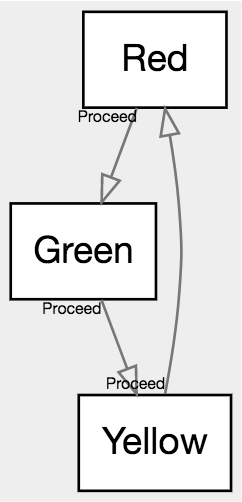
|
|
216
|
+
|
|
217
|
+
You'll build an executable state machine.
|
|
218
|
+
|
|
219
|
+
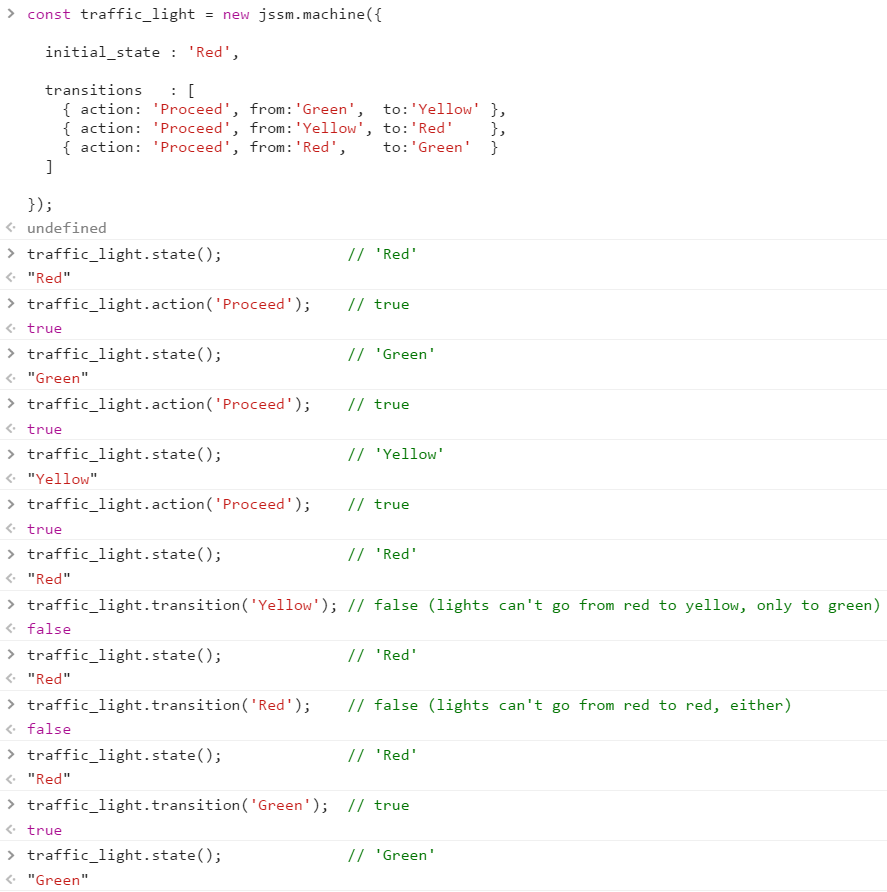
|
|
220
|
+
|
|
221
|
+
|
|
222
|
+
|
|
223
|
+
<br/><br/>
|
|
224
|
+
|
|
225
|
+
## Why
|
|
226
|
+
|
|
227
|
+
As usual, a valid question.
|
|
228
|
+
|
|
229
|
+
|
|
230
|
+
|
|
231
|
+
<br/>
|
|
232
|
+
|
|
233
|
+
### Why state machines
|
|
234
|
+
|
|
235
|
+
State machines are a method of making your software better able to prevent illegal states. Similar to type systems, SQL
|
|
236
|
+
constraints, and linters, state machines are a way to teach the software to catch mistakes in ways you define, to help
|
|
237
|
+
lead to better software.
|
|
238
|
+
|
|
239
|
+
The major mechanism of a state machine is to define `states`, the `transitions` between them, and sometimes associated
|
|
240
|
+
`data` and other niceties. The minor mechanism of state machines is to attach `actions` to the transitions, such that
|
|
241
|
+
the state machine can partially run itself.
|
|
242
|
+
|
|
243
|
+

|
|
244
|
+
|
|
245
|
+
So, to look at the same traffic light as above, you'll notice some things.
|
|
246
|
+
|
|
247
|
+
1. A sufficiently smart implementation will know that it's okay for `Green` to switch to `Yellow`, but not to `Red`
|
|
248
|
+
1. A sufficiently smart implementation knows there's no such thing as `Blue`
|
|
249
|
+
1. A sufficiently smart implementation knows that when in `Green`, to be told to `Proceed` means to go to `Yellow`, but
|
|
250
|
+
when in `Yellow`, it means to go to `Red` instead
|
|
251
|
+
|
|
252
|
+
Along with other common sense things, a good state machine implementation can help eliminate large classes of error in
|
|
253
|
+
software. State machines are often applied when the stakes on having things correct are high.
|
|
254
|
+
|
|
255
|
+
|
|
256
|
+
|
|
257
|
+
<br/>
|
|
258
|
+
|
|
259
|
+
### Why this implementation
|
|
260
|
+
|
|
261
|
+
Brevity.
|
|
262
|
+
|
|
263
|
+
High quality testing. JSSM has 100% coverage, and has partial stochastic test coverage.
|
|
264
|
+
|
|
265
|
+
Feature parity, especially around the DSL and data control.
|
|
266
|
+
|
|
267
|
+
Data integrity. JSSM allows a much stricter form of state machine than is common, with a relatively low performance
|
|
268
|
+
and storage overhead. It also offers an extremely terse domain specific language (though it does not require said DSL)
|
|
269
|
+
to produce state machines in otherwise comparatively tiny and easily read code.
|
|
270
|
+
|
|
271
|
+
|
|
272
|
+
|
|
273
|
+
<br/><br/>
|
|
274
|
+
|
|
275
|
+
## Quick Start
|
|
276
|
+
|
|
277
|
+
> A state machine in `JSSM` is defined in one of two ways: through the DSL, or through a datastructure.
|
|
278
|
+
|
|
279
|
+
So yeah, let's start by getting some terminology out of the way, and then we can go right back to that impenetrable
|
|
280
|
+
sentence, so that it'll make sense.
|
|
281
|
+
|
|
282
|
+
|
|
283
|
+
|
|
284
|
+
<br/>
|
|
285
|
+
|
|
286
|
+
### Quick Terminology
|
|
287
|
+
|
|
288
|
+
Finite state machines have been around forever, are used by everyone, and are hugely important. As a result, the
|
|
289
|
+
terminology is a mess, is in conflict, and is very poorly chosen, in accordince with everything-is-horrible law.
|
|
290
|
+
|
|
291
|
+
This section describes the terminology *as used by this library*. The author has done his best to choose a terminology
|
|
292
|
+
that matches common use and will be familiar to most. Conflicts are explained in the following section, to keep this
|
|
293
|
+
simple.
|
|
294
|
+
|
|
295
|
+
For this quick overview, we'll define six basic concepts:
|
|
296
|
+
|
|
297
|
+
1. `Finite state machine`s
|
|
298
|
+
1. `Machine`s
|
|
299
|
+
1. `State`s
|
|
300
|
+
1. `Current state`
|
|
301
|
+
1. `Transition`s
|
|
302
|
+
1. `Action`s
|
|
303
|
+
|
|
304
|
+
There's other stuff, of course, but these five are enough to wrap your head around `finite state machine`s.
|
|
305
|
+
|
|
306
|
+
|
|
307
|
+
|
|
308
|
+
<br/>
|
|
309
|
+
|
|
310
|
+
#### Basic concepts
|
|
311
|
+
|
|
312
|
+
This is a trivial traffic light `FSM`, with three states, three transitions, and one action:
|
|
313
|
+
|
|
314
|
+
```fsl
|
|
315
|
+
Red 'Proceed' -> Green 'Proceed' -> Yellow 'Proceed' -> Red;
|
|
316
|
+
```
|
|
317
|
+
|
|
318
|
+

|
|
319
|
+
|
|
320
|
+
Let's review its pieces.
|
|
321
|
+
|
|
322
|
+
* `finite state machine`s
|
|
323
|
+
* A `finite state machine` (or `FSM`) is a collection of `state`s, and rules about how you can `transition` between
|
|
324
|
+
the `state`s.
|
|
325
|
+
* We tend to refer to a design for a machine as "an `FSM`."
|
|
326
|
+
* In this example, the traffic light's structure is "a traffic light `FSM`."
|
|
327
|
+
|
|
328
|
+
* `state`s
|
|
329
|
+
* `FSM`s always have at least one `state`, and nearly always many `state`s
|
|
330
|
+
* In this example,
|
|
331
|
+
* the `state`s are **Red**, **Yellow**, and **Green**
|
|
332
|
+
* Something made from this `FSM` will only ever be one of those colors - not, say, **Blue**
|
|
333
|
+
|
|
334
|
+
* `machine`s
|
|
335
|
+
* Single instances of an `FSM` are referred to as a `machine`
|
|
336
|
+
* We might have a thousand instances of the traffic light designed above
|
|
337
|
+
* We would say "My intersection has four `machines` of the standard three color light `FSM`."
|
|
338
|
+
|
|
339
|
+
* `current state`
|
|
340
|
+
* A `machine` has a `current state`, though an `FSM` does not
|
|
341
|
+
* "This specific traffic light is currently **Red**"
|
|
342
|
+
* Traffic lights in general do not have a current color, only specific lights
|
|
343
|
+
* `FSM`s do not have a current state, only specific `machine`s
|
|
344
|
+
* A given `machine` will always have exactly one `state` - never multiple, never none
|
|
345
|
+
|
|
346
|
+
* `transitions`
|
|
347
|
+
* `FSM`s nearly always have `transition`s
|
|
348
|
+
* Transitions govern whether a `state` may be reached from another `state`
|
|
349
|
+
* This restriction is much of the value of `FSM`s
|
|
350
|
+
* In this example,
|
|
351
|
+
* the `transition`s are
|
|
352
|
+
* **Green** → **Yellow**
|
|
353
|
+
* **Yellow** → **Red**
|
|
354
|
+
* **Red** → **Green**
|
|
355
|
+
* a `machine` whose `current state` is **Green** may switch to **Yellow**, because there is an appropriate transition
|
|
356
|
+
* a `machine` whose `current state` is **Green** may not switch to **Red**, or to **Green** anew, because there is no
|
|
357
|
+
such transition
|
|
358
|
+
* A `machine` in **Yellow** which is told to `transition` to **Green** (which isn't legal) will know to refuse
|
|
359
|
+
* This makes `FSM`s an effective tool for error prevention
|
|
360
|
+
|
|
361
|
+
* `actions`
|
|
362
|
+
* Many `FSM`s have `action`s, which represent events from the outside world.
|
|
363
|
+
* In this example, there is only one action - **Proceed**
|
|
364
|
+
* The `action` **Proceed** is available from all three colors
|
|
365
|
+
* At any time we may indicate to this light to go to its next color, without
|
|
366
|
+
taking the time to know what it is.
|
|
367
|
+
* This allows `FSM`s like the light to self-manage.
|
|
368
|
+
* A `machine` in **Yellow** which is told to take the `action` **Proceed** will
|
|
369
|
+
know on its own to switch its `current state` to **Red**.
|
|
370
|
+
* This makes `FSM`s an effective tool for complexity reduction
|
|
371
|
+
|
|
372
|
+
Those six ideas in hand - `FSM`s, `state`s, `machine`s, `current state`, `transition`s, and `action`s - and you're ready
|
|
373
|
+
to move forwards.
|
|
374
|
+
|
|
375
|
+
One other quick definition - a `DSL`, or `domain specific language`, is when someone makes a language and embeds it into
|
|
376
|
+
a different language, for the purpose of attacking a specific job. When `React` uses a precompiler to embed stuff that
|
|
377
|
+
looks like HTML in Javascript, that's a DSL.
|
|
378
|
+
|
|
379
|
+
This library implements a simple language for `defining finite state machine`s inside of strings. For example, this
|
|
380
|
+
`DSL` defines that `'a -> b;'` actually means "create two states, create a transition between them, assign the first as
|
|
381
|
+
the initial state", et cetera. That micro-language is the `DSL` that we'll be referring to a lot, coming up. This
|
|
382
|
+
`DSL`'s formal name is `jssm-dot`, because it's a descendant-in-spirit of an older flowcharting language
|
|
383
|
+
[DOT](http://www.graphviz.org/content/dot-language), from [graphviz](graphviz.org), which is also used to make the
|
|
384
|
+
visualizations in [jssm-viz](https://github.com/StoneCypher/jssm-viz) by way of [viz-js](viz-js.com).
|
|
385
|
+
|
|
386
|
+
Enough history lesson. On with the tooling.
|
|
387
|
+
|
|
388
|
+
|
|
389
|
+
|
|
390
|
+
<br/>
|
|
391
|
+
|
|
392
|
+
### And now, that Quick Start we were talking about
|
|
393
|
+
|
|
394
|
+
So let's put together a trivial four-state traffic light: the three colors, plus **Off**. This will give us an
|
|
395
|
+
opportunity to go over the basic facilities in the language.
|
|
396
|
+
|
|
397
|
+
At any time, you can take the code and put it into the
|
|
398
|
+
[graph explorer](https://stonecypher.github.io/jssm-viz-demo/graph_explorer.html) for an opportunity to mess with the
|
|
399
|
+
code as you see fit.
|
|
400
|
+
|
|
401
|
+
|
|
402
|
+
|
|
403
|
+
<br/>
|
|
404
|
+
|
|
405
|
+
#### 0: Lights always have an off state
|
|
406
|
+
|
|
407
|
+
Our light will start in the **Off** `state`, with the ability to switch to the **Red** `state`.
|
|
408
|
+
|
|
409
|
+
Since that's a normal, not-notable thing, we'll just make it a regular `-> legal transition`.
|
|
410
|
+
|
|
411
|
+
```fsl
|
|
412
|
+
Off -> Red;
|
|
413
|
+
```
|
|
414
|
+
|
|
415
|
+
We will give that `transition` an `action`, and call it **TurnOn**.
|
|
416
|
+
|
|
417
|
+
```fsl
|
|
418
|
+
Off 'TurnOn' -> Red;
|
|
419
|
+
```
|
|
420
|
+
|
|
421
|
+
So far, our machine is simple:
|
|
422
|
+
|
|
423
|
+
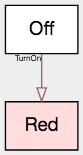
|
|
424
|
+
|
|
425
|
+
|
|
426
|
+
|
|
427
|
+
<br/>
|
|
428
|
+
|
|
429
|
+
#### 1: Traffic lights have a three-color cycle
|
|
430
|
+
|
|
431
|
+
The main path of a traffic light is cycling from **Green** to **Yellow**, then to **Red**, then back again. Because
|
|
432
|
+
this is the main path, we'll mark these steps `=> main transition`s.
|
|
433
|
+
|
|
434
|
+
```fsl
|
|
435
|
+
Off 'TurnOn' -> Red => Green => Yellow => Red;
|
|
436
|
+
```
|
|
437
|
+
|
|
438
|
+
We will give those all the same action name, **Proceed**, indicating "next color" without needing to know what we're
|
|
439
|
+
currently on.
|
|
440
|
+
|
|
441
|
+
```fsl
|
|
442
|
+
Off 'TurnOn' -> Red 'Proceed' => Green 'Proceed' => Yellow 'Proceed' => Red;
|
|
443
|
+
```
|
|
444
|
+
|
|
445
|
+
Machine's still pretty simple:
|
|
446
|
+
|
|
447
|
+
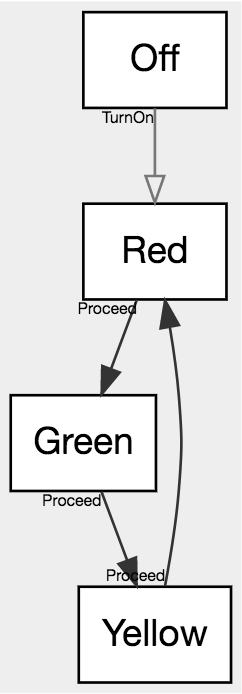
|
|
448
|
+
|
|
449
|
+
|
|
450
|
+
|
|
451
|
+
<br/>
|
|
452
|
+
|
|
453
|
+
#### 2: Traffic lights can be shut down
|
|
454
|
+
|
|
455
|
+
We'd also like to be able to turn this light back off. Because that's expected to be a rarity, we'll require that it
|
|
456
|
+
be a `~> forced transition`.
|
|
457
|
+
|
|
458
|
+
We could write
|
|
459
|
+
|
|
460
|
+
```fsl
|
|
461
|
+
Off 'TurnOn' -> Red 'Proceed' => Green 'Proceed' => Yellow 'Proceed' => Red;
|
|
462
|
+
Red ~> Off;
|
|
463
|
+
Yellow ~> Off;
|
|
464
|
+
Green ~> Off;
|
|
465
|
+
```
|
|
466
|
+
|
|
467
|
+
But that takes a lot of space even with this short list, so, instead we'll use the array notation
|
|
468
|
+
|
|
469
|
+
```fsl
|
|
470
|
+
Off 'TurnOn' -> Red 'Proceed' => Green 'Proceed' => Yellow 'Proceed' => Red;
|
|
471
|
+
[Red Yellow Green] ~> Off;
|
|
472
|
+
```
|
|
473
|
+
|
|
474
|
+
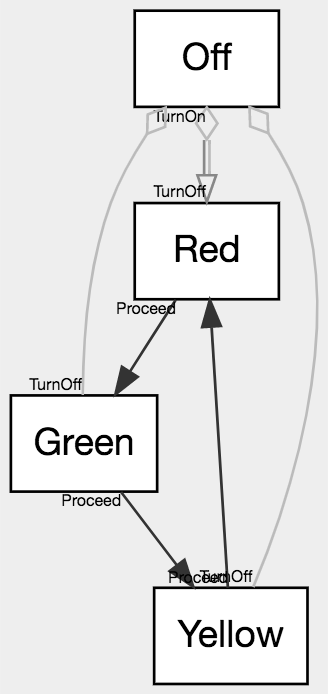
And we'd like those all to have the action **TurnOff**, so
|
|
475
|
+
|
|
476
|
+
```fsl
|
|
477
|
+
Off 'TurnOn' -> Red 'Proceed' => Green 'Proceed' => Yellow 'Proceed' => Red;
|
|
478
|
+
[Red Yellow Green] 'TurnOff' ~> Off;
|
|
479
|
+
```
|
|
480
|
+
|
|
481
|
+
Machine's still not too bad:
|
|
482
|
+
|
|
483
|
+
|
|
484
|
+
|
|
485
|
+
|
|
486
|
+
|
|
487
|
+
<br/>
|
|
488
|
+
|
|
489
|
+
### Let's actually use the traffic light
|
|
490
|
+
|
|
491
|
+
That's actually the bulk of the language. There are other little add-ons here and there, but, primarily you now know
|
|
492
|
+
how to write a state machine.
|
|
493
|
+
|
|
494
|
+
Let's load it and use it! 😀
|
|
495
|
+
|
|
496
|
+
#### loading into node
|
|
497
|
+
#### loading into html
|
|
498
|
+
#### jssm-viz
|
|
499
|
+
#### redistribution on npm
|
|
500
|
+
|
|
501
|
+
|
|
502
|
+
|
|
503
|
+
<br/>
|
|
504
|
+
|
|
505
|
+
### An introduction to machine design
|
|
506
|
+
|
|
507
|
+
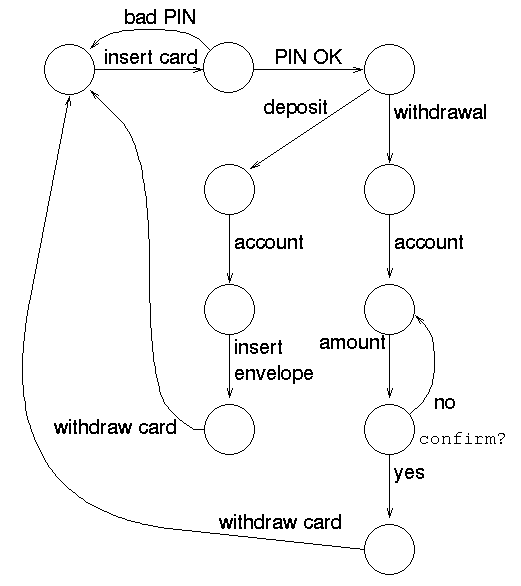
Let's make a `state machine` for ATMs. In the process, we will use a lot of core concepts of `finite state machine`s
|
|
508
|
+
and of `jssm-dot`, this library's `DSL`.
|
|
509
|
+
|
|
510
|
+
We're going to improve on this [NCSU ATM diagram](https://people.engr.ncsu.edu/efg/210/s99/Notes/fsm/atm.gif) that I
|
|
511
|
+
found:
|
|
512
|
+
|
|
513
|
+
|
|
514
|
+
|
|
515
|
+
Remember, at any time, you can take the code and put it into the
|
|
516
|
+
[graph explorer](https://stonecypher.github.io/jssm-viz-demo/graph_explorer.html) for an opportunity to mess with the
|
|
517
|
+
code as you see fit.
|
|
518
|
+
|
|
519
|
+
|
|
520
|
+
|
|
521
|
+
<br/>
|
|
522
|
+
|
|
523
|
+
#### 0: Empty machine
|
|
524
|
+
|
|
525
|
+
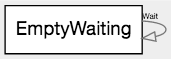
We'll start with an [empty machine](https://github.com/StoneCypher/jssm/blob/master/src/machines/atm%20quick%20start%20tutorial/1_EmptyWaiting.jssm).
|
|
526
|
+
|
|
527
|
+
```fsl
|
|
528
|
+
EmptyWaiting 'Wait' -> EmptyWaiting;
|
|
529
|
+
```
|
|
530
|
+
|
|
531
|
+
|
|
532
|
+
|
|
533
|
+
|
|
534
|
+
|
|
535
|
+
<br/>
|
|
536
|
+
|
|
537
|
+
#### 1: Should be able to eject cards
|
|
538
|
+
|
|
539
|
+
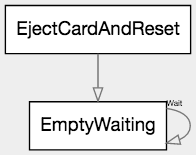
We'll add the ability to physically eject the user's card and reset to the empty and waiting state. Right now it'll
|
|
540
|
+
dangle around un-used at the top, but later it'll become useful.
|
|
541
|
+
|
|
542
|
+
This is expressed as the path `EjectCardAndReset -> EmptyWaiting;`
|
|
543
|
+
|
|
544
|
+
```fsl
|
|
545
|
+
EmptyWaiting 'Wait' -> EmptyWaiting;
|
|
546
|
+
EjectCardAndReset -> EmptyWaiting;
|
|
547
|
+
```
|
|
548
|
+
|
|
549
|
+
|
|
550
|
+
|
|
551
|
+
|
|
552
|
+
|
|
553
|
+
<br/>
|
|
554
|
+
|
|
555
|
+
#### 2: Should be able to insert cards
|
|
556
|
+
|
|
557
|
+
We'll add the ability to physically insert a card, next. You know, the, uh, thing ATMs are pretty much for.
|
|
558
|
+
|
|
559
|
+
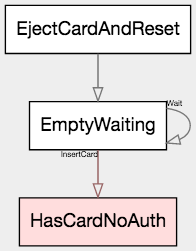
To get this, add the path leg `EmptyWaiting 'InsertCard' -> HasCardNoAuth;`
|
|
560
|
+
|
|
561
|
+
```fsl
|
|
562
|
+
EmptyWaiting 'Wait' -> EmptyWaiting 'InsertCard' -> HasCardNoAuth;
|
|
563
|
+
EjectCardAndReset -> EmptyWaiting;
|
|
564
|
+
```
|
|
565
|
+
|
|
566
|
+
Notice that the new `state`, **HasCardNoAuth**, has been rendered red. This is because it is `terminal` - there is
|
|
567
|
+
no exit from this node currently. (**EmptyAndWaiting** did not render that way because it had a transition to itself.)
|
|
568
|
+
That will change as we go back to adding more nodes. `terminal node`s are usually either mistakes or the last single
|
|
569
|
+
`state` of a given `FSM`.
|
|
570
|
+
|
|
571
|
+
|
|
572
|
+
|
|
573
|
+
|
|
574
|
+
|
|
575
|
+
<br/>
|
|
576
|
+
|
|
577
|
+
#### 3: Should be able to cancel and recover the card
|
|
578
|
+
|
|
579
|
+
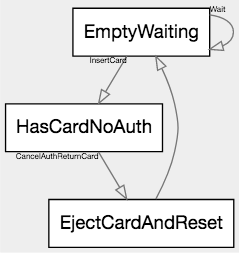
Next, we should have a cancel, because the ATM's <key>7</key> key is broken, and we need our card back. Cancel will
|
|
580
|
+
exit to the main menu, and return our card credential.
|
|
581
|
+
|
|
582
|
+
To that end, we add the path `HasCardNoAuth 'CancelAuthReturnCard' -> EjectCardAndReset;`
|
|
583
|
+
|
|
584
|
+
```fsl
|
|
585
|
+
EmptyWaiting 'Wait' -> EmptyWaiting 'InsertCard' -> HasCardNoAuth;
|
|
586
|
+
|
|
587
|
+
HasCardNoAuth 'CancelAuthReturnCard' -> EjectCardAndReset;
|
|
588
|
+
|
|
589
|
+
EjectCardAndReset -> EmptyWaiting;
|
|
590
|
+
```
|
|
591
|
+
|
|
592
|
+
|
|
593
|
+
|
|
594
|
+
|
|
595
|
+
|
|
596
|
+
<br/>
|
|
597
|
+
|
|
598
|
+
#### 4: Can give the wrong PIN
|
|
599
|
+
|
|
600
|
+
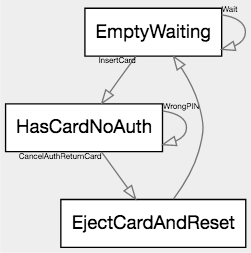
Next, let's give the ability to get the password ... wrong. 😂 Because we all know that one ATM that only has the
|
|
601
|
+
wrong-PIN path, so, apparently that's a product to someone.
|
|
602
|
+
|
|
603
|
+
When they get the PIN wrong, they're prompted to try again (or to cancel.)
|
|
604
|
+
|
|
605
|
+
We'll add the path `HasCardNoAuth 'WrongPIN' -> HasCardNoAuth;`
|
|
606
|
+
|
|
607
|
+
```fsl
|
|
608
|
+
EmptyWaiting 'Wait' -> EmptyWaiting 'InsertCard' -> HasCardNoAuth;
|
|
609
|
+
|
|
610
|
+
HasCardNoAuth 'CancelAuthReturnCard' -> EjectCardAndReset;
|
|
611
|
+
HasCardNoAuth 'WrongPIN' -> HasCardNoAuth;
|
|
612
|
+
|
|
613
|
+
EjectCardAndReset -> EmptyWaiting;
|
|
614
|
+
```
|
|
615
|
+
|
|
616
|
+
|
|
617
|
+
|
|
618
|
+
|
|
619
|
+
|
|
620
|
+
|
|
621
|
+
|
|
622
|
+
<br/>
|
|
623
|
+
|
|
624
|
+
#### 5: Can give the correct PIN
|
|
625
|
+
|
|
626
|
+
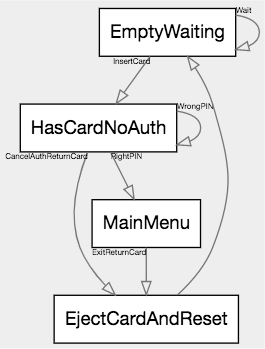
Next, let's give the ability to get the password right.
|
|
627
|
+
|
|
628
|
+
We'll add two paths. The first gets the password right: `HasCardNoAuth 'RightPIN' -> MainMenu;`
|
|
629
|
+
|
|
630
|
+
The second, from our new `state` **MainMenu**, gives people the ability to leave: `MainMenu 'ExitReturnCard' -> EjectCardAndReset;`
|
|
631
|
+
|
|
632
|
+
|
|
633
|
+
```fsl
|
|
634
|
+
EmptyWaiting 'Wait' -> EmptyWaiting 'InsertCard' -> HasCardNoAuth;
|
|
635
|
+
|
|
636
|
+
HasCardNoAuth 'CancelAuthReturnCard' -> EjectCardAndReset;
|
|
637
|
+
HasCardNoAuth 'WrongPIN' -> HasCardNoAuth;
|
|
638
|
+
HasCardNoAuth 'RightPIN' -> MainMenu;
|
|
639
|
+
|
|
640
|
+
MainMenu 'ExitReturnCard' -> EjectCardAndReset;
|
|
641
|
+
|
|
642
|
+
EjectCardAndReset -> EmptyWaiting;
|
|
643
|
+
```
|
|
644
|
+
|
|
645
|
+
|
|
646
|
+
|
|
647
|
+
|
|
648
|
+
|
|
649
|
+
<br/>
|
|
650
|
+
|
|
651
|
+
#### 6: Can check balance from main menu
|
|
652
|
+
|
|
653
|
+
Hooray, now we're getting somewhere.
|
|
654
|
+
|
|
655
|
+
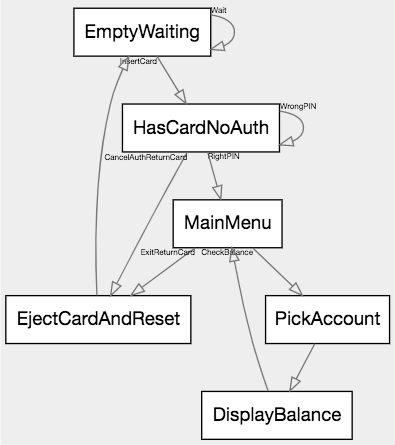
Let's add the ability to check your balance. First pick that from the main menu, then pick which account to see the
|
|
656
|
+
balance of, then you're shown a screen with the information you requested; then go back to the main menu.
|
|
657
|
+
|
|
658
|
+
That's `MainMenu 'CheckBalance' -> PickAccount -> DisplayBalance -> MainMenu;`.
|
|
659
|
+
|
|
660
|
+
```fsl
|
|
661
|
+
EmptyWaiting 'Wait' -> EmptyWaiting 'InsertCard' -> HasCardNoAuth;
|
|
662
|
+
|
|
663
|
+
HasCardNoAuth 'CancelAuthReturnCard' -> EjectCardAndReset;
|
|
664
|
+
HasCardNoAuth 'WrongPIN' -> HasCardNoAuth;
|
|
665
|
+
HasCardNoAuth 'RightPIN' -> MainMenu;
|
|
666
|
+
|
|
667
|
+
MainMenu 'ExitReturnCard' -> EjectCardAndReset;
|
|
668
|
+
MainMenu 'CheckBalance' -> PickAccount -> DisplayBalance -> MainMenu;
|
|
669
|
+
|
|
670
|
+
EjectCardAndReset -> EmptyWaiting;
|
|
671
|
+
```
|
|
672
|
+
|
|
673
|
+
|
|
674
|
+
|
|
675
|
+
|
|
676
|
+
|
|
677
|
+
<br/>
|
|
678
|
+
|
|
679
|
+
#### 7: Can deposit money from main menu
|
|
680
|
+
|
|
681
|
+
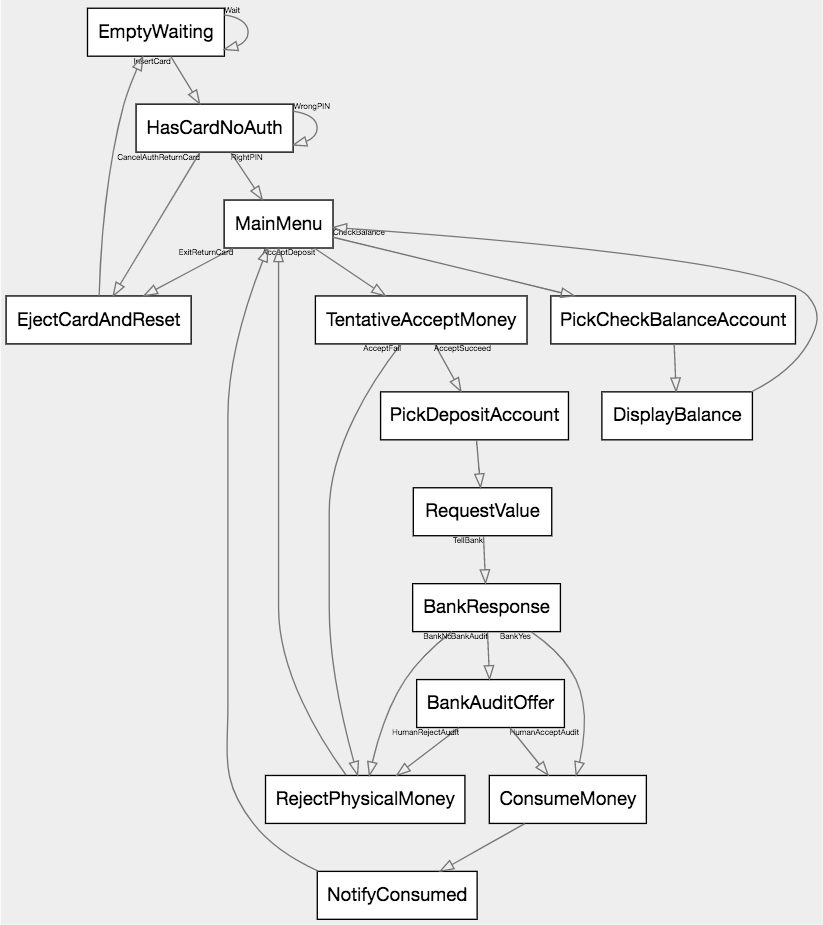
Let's add something difficult. Their state machine just proceeds assuming everything is okay.
|
|
682
|
+
|
|
683
|
+
To desposit money:
|
|
684
|
+
|
|
685
|
+
1. Accept physical money
|
|
686
|
+
2. If accept failed (eg door jammed,) reject physical object, go to main menu
|
|
687
|
+
3. If accept succeeded, ask human expected value
|
|
688
|
+
4. Pick an account this should go into
|
|
689
|
+
5. Contact bank. Request to credit for theoretical physical money.
|
|
690
|
+
6. Three results: yes, no, offer-after-audit.
|
|
691
|
+
7. If no, reject physical object, go to main menu.
|
|
692
|
+
8. If yes, consume physical object, tell user consumed, go to main menu
|
|
693
|
+
9. If offer-after-audit, ask human what to do
|
|
694
|
+
10. if human-yes, consume physical object, tell user consumed, go to main menu
|
|
695
|
+
11. if human-no, reject physical object, go to main menu
|
|
696
|
+
|
|
697
|
+
Writing this out in code is not only generally longer than the text form, but also error prone and hard to maintain.
|
|
698
|
+
|
|
699
|
+
... or there's the `FSM` `DSL`, which is usually as-brief-as the text, and frequently both briefer and more explicit.
|
|
700
|
+
|
|
701
|
+
* Rules 1-2: `MainMenu 'AcceptDeposit' -> TentativeAcceptMoney 'AcceptFail' -> RejectPhysicalMoney -> MainMenu;`
|
|
702
|
+
* Rules 3-6: `TentativeAcceptMoney 'AcceptSucceed' -> PickDepositAccount -> RequestValue 'TellBank' -> BankResponse;`
|
|
703
|
+
* Rule 7: `BankResponse 'BankNo' -> RejectPhysicalMoney;`
|
|
704
|
+
* Rule 8: `BankResponse 'BankYes' -> ConsumeMoney -> NotifyConsumed -> MainMenu;`
|
|
705
|
+
* Rules 9-10: `BankResponse 'BankAudit' -> BankAuditOffer 'HumanAcceptAudit' -> ConsumeMoney;`
|
|
706
|
+
* Rule 11: `BankAuditOffer 'HumanRejectAudit' -> RejectPhysicalMoney;`
|
|
707
|
+
|
|
708
|
+
Or, as a block,
|
|
709
|
+
|
|
710
|
+
```fsl
|
|
711
|
+
MainMenu 'AcceptDeposit' -> TentativeAcceptMoney;
|
|
712
|
+
|
|
713
|
+
TentativeAcceptMoney 'AcceptFail' -> RejectPhysicalMoney -> MainMenu;
|
|
714
|
+
TentativeAcceptMoney 'AcceptSucceed' -> PickDepositAccount -> RequestValue 'TellBank' -> BankResponse;
|
|
715
|
+
|
|
716
|
+
BankResponse 'BankNo' -> RejectPhysicalMoney;
|
|
717
|
+
BankResponse 'BankYes' -> ConsumeMoney -> NotifyConsumed -> MainMenu;
|
|
718
|
+
BankResponse 'BankAudit' -> BankAuditOffer 'HumanAcceptAudit' -> ConsumeMoney;
|
|
719
|
+
|
|
720
|
+
BankAuditOffer 'HumanRejectAudit' -> RejectPhysicalMoney;
|
|
721
|
+
```
|
|
722
|
+
|
|
723
|
+
Which leaves us with the total code
|
|
724
|
+
|
|
725
|
+
|
|
726
|
+
```fsl
|
|
727
|
+
EmptyWaiting 'Wait' -> EmptyWaiting 'InsertCard' -> HasCardNoAuth;
|
|
728
|
+
|
|
729
|
+
HasCardNoAuth 'CancelAuthReturnCard' -> EjectCardAndReset;
|
|
730
|
+
HasCardNoAuth 'WrongPIN' -> HasCardNoAuth;
|
|
731
|
+
HasCardNoAuth 'RightPIN' -> MainMenu;
|
|
732
|
+
|
|
733
|
+
MainMenu 'AcceptDeposit' -> TentativeAcceptMoney;
|
|
734
|
+
MainMenu 'ExitReturnCard' -> EjectCardAndReset;
|
|
735
|
+
MainMenu 'CheckBalance' -> PickCheckBalanceAccount -> DisplayBalance -> MainMenu;
|
|
736
|
+
|
|
737
|
+
TentativeAcceptMoney 'AcceptFail' -> RejectPhysicalMoney -> MainMenu;
|
|
738
|
+
TentativeAcceptMoney 'AcceptSucceed' -> PickDepositAccount -> RequestValue 'TellBank' -> BankResponse;
|
|
739
|
+
|
|
740
|
+
BankResponse 'BankNo' -> RejectPhysicalMoney;
|
|
741
|
+
BankResponse 'BankYes' -> ConsumeMoney -> NotifyConsumed -> MainMenu;
|
|
742
|
+
BankResponse 'BankAudit' -> BankAuditOffer 'HumanAcceptAudit' -> ConsumeMoney;
|
|
743
|
+
|
|
744
|
+
BankAuditOffer 'HumanRejectAudit' -> RejectPhysicalMoney;
|
|
745
|
+
|
|
746
|
+
EjectCardAndReset -> EmptyWaiting;
|
|
747
|
+
```
|
|
748
|
+
|
|
749
|
+
|
|
750
|
+
|
|
751
|
+
|
|
752
|
+
|
|
753
|
+
<br/>
|
|
754
|
+
|
|
755
|
+
#### 8: Can withdraw money from main menu
|
|
756
|
+
|
|
757
|
+
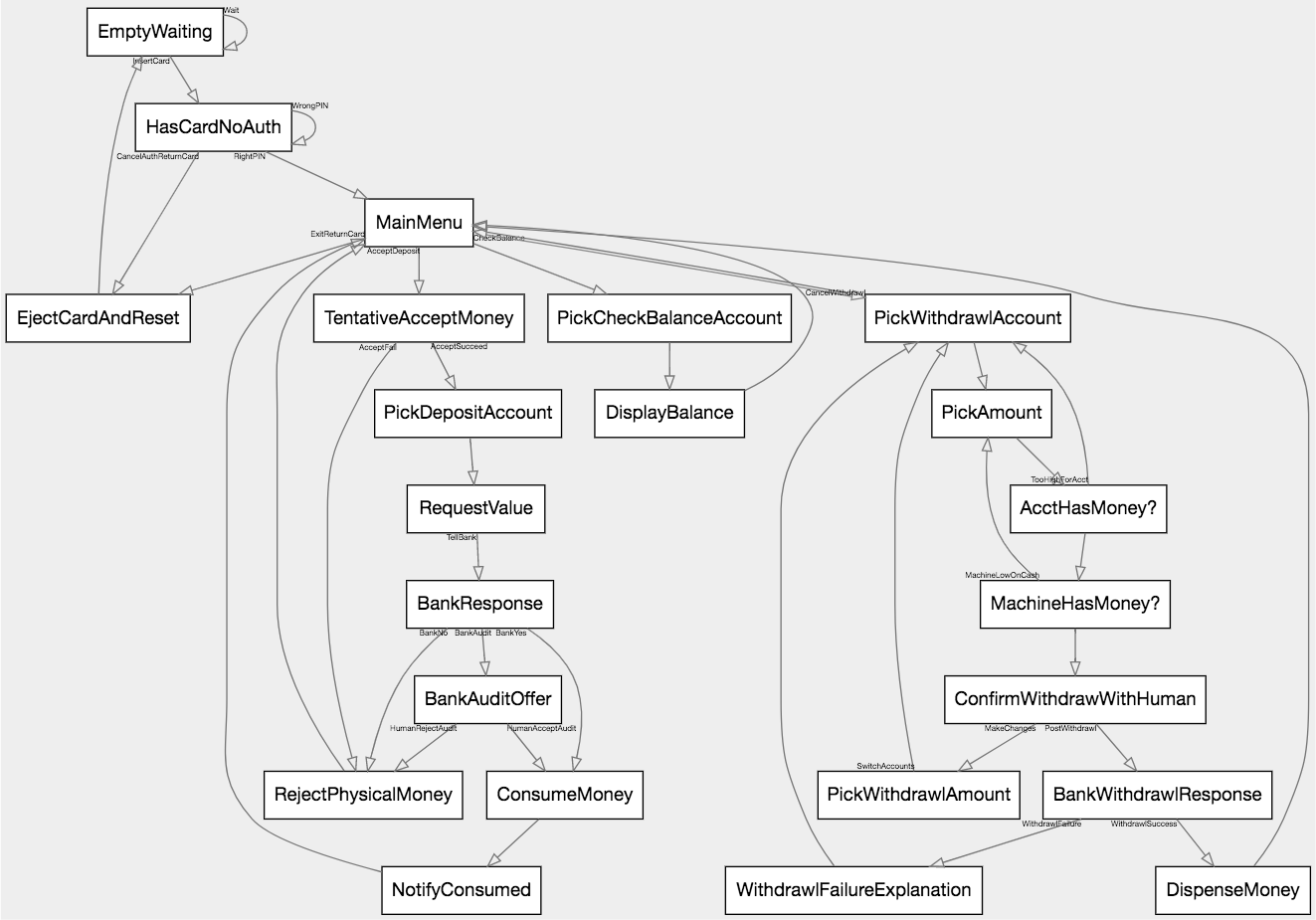
Let's also be able to take money from the machine. After this, we'll move on, since our example is pretty squarely made
|
|
758
|
+
by now.
|
|
759
|
+
|
|
760
|
+
1. Pick a withdrawl account, or cancel to the main menu
|
|
761
|
+
2. Shown a balance, pick a withdrawl amount, or cancel to acct picker
|
|
762
|
+
3. Is the withdrawl account too high? If so go to 2
|
|
763
|
+
4. Does the machine actually have the money? If not go to 2
|
|
764
|
+
5. Otherwise confirm intent w/ human
|
|
765
|
+
6. Attempt to post the transaction.
|
|
766
|
+
7. If fail, display reason and go to 1
|
|
767
|
+
8. If succeed, dispense money and go to main menu
|
|
768
|
+
|
|
769
|
+
* Rules 1-3: `MainMenu -> PickWithdrawlAccount -> PickAmount -> AcctHasMoney? 'TooHighForAcct' -> PickWithdrawlAccount;`
|
|
770
|
+
* Rule 4: `AcctHasMoney? -> MachineHasMoney? 'MachineLowOnCash' -> PickAmount;`
|
|
771
|
+
* Rule 5: `MachineHasMoney? -> ConfirmWithdrawWithHuman 'MakeChanges' -> PickWithdrawlAmount;`
|
|
772
|
+
* Rule 6: `ConfirmWithdrawWithHuman 'PostWithdrawl' -> BankWithdrawlResponse;`
|
|
773
|
+
* Rule 7: `BankWithdrawlResponse 'WithdrawlFailure' -> WithdrawlFailureExplanation -> PickWithdrawlAccount;`
|
|
774
|
+
* Rule 8: `BankWithdrawlResponse 'WithdrawlSuccess' -> DispenseMoney -> MainMenu;`
|
|
775
|
+
|
|
776
|
+
Rule 1 canceller: `PickWithdrawlAccount 'CancelWithdrawl' -> MainMenu;`
|
|
777
|
+
Rule 2 canceller: `PickWithdrawlAmount 'SwitchAccounts' -> PickWithdrawlAccount;`
|
|
778
|
+
|
|
779
|
+
Or as a whole, we're adding
|
|
780
|
+
|
|
781
|
+
```fsl
|
|
782
|
+
MainMenu -> PickWithdrawlAccount -> PickAmount -> AcctHasMoney? 'TooHighForAcct' -> PickWithdrawlAccount;
|
|
783
|
+
AcctHasMoney? -> MachineHasMoney? 'MachineLowOnCash' -> PickAmount;
|
|
784
|
+
MachineHasMoney? -> ConfirmWithdrawWithHuman 'MakeChanges' -> PickWithdrawlAmount;
|
|
785
|
+
ConfirmWithdrawWithHuman 'PostWithdrawl' -> BankWithdrawlResponse;
|
|
786
|
+
BankWithdrawlResponse 'WithdrawlFailure' -> WithdrawlFailureExplanation -> PickWithdrawlAccount;
|
|
787
|
+
BankWithdrawlResponse 'WithdrawlSuccess' -> DispenseMoney -> MainMenu;
|
|
788
|
+
|
|
789
|
+
PickWithdrawlAccount 'CancelWithdrawl' -> MainMenu;
|
|
790
|
+
PickWithdrawlAmount 'SwitchAccounts' -> PickWithdrawlAccount;
|
|
791
|
+
```
|
|
792
|
+
|
|
793
|
+
Which leaves us with
|
|
794
|
+
|
|
795
|
+
```fsl
|
|
796
|
+
EmptyWaiting 'Wait' -> EmptyWaiting 'InsertCard' -> HasCardNoAuth;
|
|
797
|
+
|
|
798
|
+
HasCardNoAuth 'CancelAuthReturnCard' -> EjectCardAndReset;
|
|
799
|
+
HasCardNoAuth 'WrongPIN' -> HasCardNoAuth;
|
|
800
|
+
HasCardNoAuth 'RightPIN' -> MainMenu;
|
|
801
|
+
|
|
802
|
+
MainMenu 'AcceptDeposit' -> TentativeAcceptMoney;
|
|
803
|
+
MainMenu 'ExitReturnCard' -> EjectCardAndReset;
|
|
804
|
+
MainMenu 'CheckBalance' -> PickCheckBalanceAccount -> DisplayBalance -> MainMenu;
|
|
805
|
+
|
|
806
|
+
TentativeAcceptMoney 'AcceptFail' -> RejectPhysicalMoney -> MainMenu;
|
|
807
|
+
TentativeAcceptMoney 'AcceptSucceed' -> PickDepositAccount -> RequestValue 'TellBank' -> BankResponse;
|
|
808
|
+
|
|
809
|
+
BankResponse 'BankNo' -> RejectPhysicalMoney;
|
|
810
|
+
BankResponse 'BankYes' -> ConsumeMoney -> NotifyConsumed -> MainMenu;
|
|
811
|
+
BankResponse 'BankAudit' -> BankAuditOffer 'HumanAcceptAudit' -> ConsumeMoney;
|
|
812
|
+
|
|
813
|
+
BankAuditOffer 'HumanRejectAudit' -> RejectPhysicalMoney;
|
|
814
|
+
|
|
815
|
+
MainMenu -> PickWithdrawlAccount -> PickAmount -> AcctHasMoney? 'TooHighForAcct' -> PickWithdrawlAccount;
|
|
816
|
+
AcctHasMoney? -> MachineHasMoney? 'MachineLowOnCash' -> PickAmount;
|
|
817
|
+
MachineHasMoney? -> ConfirmWithdrawWithHuman 'MakeChanges' -> PickWithdrawlAmount;
|
|
818
|
+
ConfirmWithdrawWithHuman 'PostWithdrawl' -> BankWithdrawlResponse;
|
|
819
|
+
BankWithdrawlResponse 'WithdrawlFailure' -> WithdrawlFailureExplanation -> PickWithdrawlAccount;
|
|
820
|
+
BankWithdrawlResponse 'WithdrawlSuccess' -> DispenseMoney -> MainMenu;
|
|
821
|
+
|
|
822
|
+
PickWithdrawlAccount 'CancelWithdrawl' -> MainMenu;
|
|
823
|
+
PickWithdrawlAmount 'SwitchAccounts' -> PickWithdrawlAccount;
|
|
824
|
+
|
|
825
|
+
EjectCardAndReset -> EmptyWaiting;
|
|
826
|
+
```
|
|
827
|
+
|
|
828
|
+
|
|
829
|
+
|
|
830
|
+
As you can see, building up even very complex state machines is actually relatively straightforward, in a short
|
|
831
|
+
amount of time.
|
|
832
|
+
|
|
833
|
+
|
|
834
|
+
|
|
835
|
+
<br/><br/>
|
|
836
|
+
|
|
837
|
+
## Features
|
|
838
|
+
### DSL
|
|
839
|
+
### States
|
|
840
|
+
### Transitions
|
|
841
|
+
### Cycles
|
|
842
|
+
### Stripes
|
|
843
|
+
### Named Ordered Lists
|
|
844
|
+
### Atoms
|
|
845
|
+
### Strings
|
|
846
|
+
### Arrow types
|
|
847
|
+
### Unicode representations
|
|
848
|
+
### Node declarations
|
|
849
|
+
### All the styling bullshit
|
|
850
|
+
### Named edges
|
|
851
|
+
### URL callouts
|
|
852
|
+
### The 9 or whatever directives
|
|
853
|
+
### How to publish a machine
|
|
854
|
+
#### Legal, main, and forced
|
|
855
|
+
### Validators
|
|
856
|
+
### State history
|
|
857
|
+
### Automatic visualization
|
|
858
|
+
|
|
859
|
+
|
|
860
|
+
|
|
861
|
+
<br/><br/>
|
|
862
|
+
|
|
863
|
+
## How to think in state machines
|
|
864
|
+
|
|
865
|
+
|
|
866
|
+
|
|
867
|
+
<br/><br/>
|
|
868
|
+
|
|
869
|
+
## Example Machines
|
|
870
|
+
### Door lock
|
|
871
|
+
### Traffic lights
|
|
872
|
+
#### Basic three-state
|
|
873
|
+
#### RYG, Off, Flash-red, Flash-yellow
|
|
874
|
+
#### RYG, Off, Flash-red, Flash-yellow, Green-left, Yellow-left
|
|
875
|
+
#### Heirarchal intersection
|
|
876
|
+
### [ATM](https://people.engr.ncsu.edu/efg/210/s99/Notes/fsm/atm.gif)
|
|
877
|
+
### [HTTP](https://www.w3.org/Library/User/Architecture/HTTP.gif)
|
|
878
|
+
#### Better HTTP
|
|
879
|
+
### [TCP](http://www.texample.net/media/tikz/examples/PNG/tcp-state-machine.png)
|
|
880
|
+
### Coin-op vending machine (data)
|
|
881
|
+
### Video games
|
|
882
|
+
#### Pac-man Ghost (sensors)
|
|
883
|
+
#### Weather (probabilistics)
|
|
884
|
+
#### Roguelike monster (interface satisfaction)
|
|
885
|
+
### Candy crush clone game flow (practical large use)
|
|
886
|
+
### Vegas locked 21 dealer behavior
|
|
887
|
+
### React SPA website (practical large use)
|
|
888
|
+
### [BGP](https://upload.wikimedia.org/wikipedia/commons/thumb/a/a8/BGP_FSM.svg/549px-BGP_FSM.svg.png)
|
|
889
|
+
### [LibGCrypt FIPS mode FSM](https://www.gnupg.org/documentation/manuals/gcrypt/fips-fsm.png)
|
|
890
|
+
|
|
891
|
+
|
|
892
|
+
|
|
893
|
+
<br/><br/>
|
|
894
|
+
|
|
895
|
+
## How to debug
|
|
896
|
+
|
|
897
|
+
|
|
898
|
+
|
|
899
|
+
<br/><br/>
|
|
900
|
+
|
|
901
|
+
## How to publish
|
|
902
|
+
It's really quite simple.
|
|
903
|
+
|
|
904
|
+
1. Make a github repository.
|
|
905
|
+
1. Put your code in a file inside, with the extension `.fsl`
|
|
906
|
+
1. Make sure your code contains a `machine_name`
|
|
907
|
+
|
|
908
|
+
Once done, your work should show up [here](https://github.com/search?utf8=%E2%9C%93&q=extension%3Afsl+machine_name&type=Code).
|
|
909
|
+
|
|
910
|
+
|
|
911
|
+
|
|
912
|
+
<br/><br/>
|
|
913
|
+
|
|
914
|
+
## Notation Comparison
|
|
915
|
+
### Their notations, one by one
|
|
916
|
+
### Apples to Apples - Traffic Light
|
|
917
|
+
|
|
918
|
+
|
|
919
|
+
|
|
920
|
+
<br/><br/>
|
|
921
|
+
|
|
922
|
+
## Other state machines
|
|
923
|
+
There are a lot of state machine impls for JS, many quite a bit more mature than this one. Here are some options:
|
|
924
|
+
|
|
925
|
+
1. [Finity](https://github.com/nickuraltsev/finity) 😮
|
|
926
|
+
1. [Stately.js](https://github.com/fschaefer/Stately.js)
|
|
927
|
+
1. [machina.js](https://github.com/ifandelse/machina.js)
|
|
928
|
+
1. [Pastafarian](https://github.com/orbitbot/pastafarian)
|
|
929
|
+
1. [Henderson](https://github.com/orbitbot/henderson)
|
|
930
|
+
1. [fsm-as-promised](https://github.com/vstirbu/fsm-as-promised)
|
|
931
|
+
1. [state-machine](https://github.com/DEADB17/state-machine)
|
|
932
|
+
1. [mood](https://github.com/bredele/mood)
|
|
933
|
+
1. [FSM Workbench](https://github.com/MatthewHepburn/FSM-Workbench)
|
|
934
|
+
1. [SimpleStateMachine](https://github.com/ccnokes/SimpleStateMachine)
|
|
935
|
+
1. shime/[micro-machine](https://github.com/shime/micro-machine)
|
|
936
|
+
1. soveran/[micromachine](https://github.com/soveran/micromachine) (ruby)
|
|
937
|
+
1. fabiospampinato/[FSM](https://github.com/fabiospampinato/FSM)
|
|
938
|
+
1. HQarroum/[FSM](https://github.com/HQarroum/Fsm)
|
|
939
|
+
1. [Finite-State-Automata](https://github.com/RolandR/Finite-State-Automata)
|
|
940
|
+
1. [finite-state-machine](https://github.com/MarkH817/finite-state-machine)
|
|
941
|
+
1. [nfm](https://github.com/ajauhri/nfm)
|
|
942
|
+
|
|
943
|
+
|
|
944
|
+
And some similar stuff:
|
|
945
|
+
1. [redux-machine](https://github.com/mheiber/redux-machine)
|
|
946
|
+
1. [ember-fsm](https://github.com/heycarsten/ember-fsm)
|
|
947
|
+
1. [State machine cat](https://github.com/sverweij/state-machine-cat)
|
|
948
|
+
1. [Workty](https://github.com/AlexLevshin/workty) 😮
|
|
949
|
+
1. [sam-simpler](https://github.com/sladiri/sam-simpler)
|
|
950
|
+
1. [event_chain](https://github.com/quilin/event_chain)
|
|
951
|
+
1. [DRAKON](https://en.wikipedia.org/wiki/DRAKON)
|
|
952
|
+
1. [Yakindu Statechart Tools](https://github.com/Yakindu/statecharts)
|
|
953
|
+
1. [GraphViz](http://www.graphviz.org/)
|
|
954
|
+
1. [Viz.js](https://github.com/mdaines/viz.js/), which we use
|
|
955
|
+
|
|
956
|
+
|
|
957
|
+
|
|
958
|
+
<br/><br/><br/>
|
|
959
|
+
|
|
960
|
+
# Thanks
|
|
961
|
+
|
|
962
|
+
JSSM and FSL have had a lot of help.
|
|
963
|
+
|
|
964
|
+
|
|
965
|
+
|
|
966
|
+
<br/><br/>
|
|
967
|
+
|
|
968
|
+
## Internationalization
|
|
969
|
+
|
|
970
|
+
* [Mykhaylo Les](https://github.com/miles91) provided three translation test cases ([Ukrainian](https://github.com/StoneCypher/jssm/blob/master/src/js/tests/language_data/ukrainian.json), [Belarussian](https://github.com/StoneCypher/jssm/blob/master/src/js/tests/language_data/belarussian.json), and [Russian](https://github.com/StoneCypher/jssm/blob/master/src/js/tests/language_data/russian.json),) and the corresponding Traffic Light translations (also [Ukrainian](https://github.com/StoneCypher/fsl_traffic_light_ukrainian/blob/master/traffic%20light.fsl), [Belarussian](https://github.com/StoneCypher/fsl_traffic_light_belarussian/blob/master/traffic_light.fsl), and [Russian](https://github.com/StoneCypher/fsl_traffic_light_russian/blob/master/traffic%20light.fsl).)
|
|
971
|
+
* [Tanvir Islam](https://github.com/tanvirrb) provided the [Bengali test case](https://github.com/StoneCypher/jssm/blob/master/src/js/tests/language_data/bengali.json), translated the [Traffic Light](https://github.com/tanvirrb/fsl-traffic-light-bengali/blob/master/traffic_light.fsl) to Bengali, and published the first non-English `FSL` machine, in Bengali.
|
|
972
|
+
* [Francisco Junior](https://github.com/fcojr) provided the [Portuguese test case](https://github.com/StoneCypher/jssm/blob/master/src/js/tests/language_data/portuguese.json) and translated the [Traffic Light](https://github.com/StoneCypher/fsl_traffic_light_portuguese/blob/master/traffic_light.fsl) to Portuguese
|
|
973
|
+
* [Jeff Katz](https://github.com/kraln) provided the [German test case](https://github.com/StoneCypher/jssm/blob/master/src/js/tests/language_data/german.json).
|
|
974
|
+
* [Alex Cresswell](https://github.com/technophile77) provdied the [Spanish test case](https://github.com/StoneCypher/jssm/blob/master/src/js/tests/language_data/spanish.json)
|
|
975
|
+
* [Dvir Cohen](https://github.com/cohendvir) provided the [Hebrew test case](https://github.com/StoneCypher/jssm/blob/master/src/js/tests/language_data/hebrew.json).
|
|
976
|
+
* [David de la Peña](https://github.com/daviddelapena) provided the [French test case](https://github.com/StoneCypher/jssm/blob/master/src/js/tests/language_data/french.json)
|
|
977
|
+
|
|
978
|
+
If I've overlooked you, please let me know.
|
|
979
|
+
|
|
980
|
+
If you'd like to help, it's straightforward.
|
|
981
|
+
|
|
982
|
+
1. Easy mode: open a PR with [this file](https://github.com/StoneCypher/jssm/blob/master/src/js/tests/language_data/english.json) translated into your language
|
|
983
|
+
1. Extra mile: create a new repo containing [this file](https://github.com/StoneCypher/fsl_traffic_light/blob/master/traffic_light.fsl) translated
|
|
984
|
+
|
|
985
|
+
|
|
986
|
+
|
|
987
|
+
<br/><br/>
|
|
988
|
+
|
|
989
|
+
## Code and Language
|
|
990
|
+
|
|
991
|
+
[Forest Belton](https://github.com/forestbelton) has provided guidance, bugfixes, parser and language commentary.
|
|
992
|
+
|
|
993
|
+
[Jordan Harbrand](https://github.com/ljharb) suggested two interesting features and provided strong feedback on the initial tutorial draft.
|
|
994
|
+
|
|
995
|
+
The biggest thanks must go to [Michael Morgan](https://github.com/msmorgan/), who has debated significant sections of
|
|
996
|
+
the notation, invented several concepts and operators, helped with the parser, with system nomenclature, for having published
|
|
997
|
+
the first not-by-me `FSL` machine, for encouragement, and generally just for having been as interested as he has been.
|