jsmdcui 0.8.0 → 0.9.0
This diff represents the content of publicly available package versions that have been released to one of the supported registries. The information contained in this diff is provided for informational purposes only and reflects changes between package versions as they appear in their respective public registries.
- package/CHANGELOG.md +66 -0
- package/README.md +77 -1
- package/cdp-maze.js +141 -0
- package/demos/maze.md +6 -1
- package/llm-maze.txt +94 -0
- package/package.json +1 -1
- package/runtime/help/cdp.md +5 -0
- package/runtime/help/help.md +77 -1
- package/runtime/jsplugins/cdp/cdp-server.js +26 -2
- package/runtime/jsplugins/cdp/cdp.js +55 -49
- package/runtime/jsplugins/chapter/chapter.js +2 -1
- package/runtime/jsplugins/example/example.js +2 -0
- package/single-exe/README.md +223 -45
- package/single-exe/compiled.js +6 -3
- package/single-exe/entry.mjs +4 -3
- package/single-exe/packAssets.sh +1 -1
- package/src/cui/kitty-debug.mjs +1 -1
- package/src/index.js +46 -10
- package/src/lua/engine.js +1 -4
- package/src/plugins/js-bridge.js +43 -0
- package/tests/compiled-runtime.test.js +8 -0
- package/tests/demo.test.js +40 -0
- package/tests/kitty-demo.md +1 -1
- package/demo.resized.jpg +0 -0
- package/src/runtime/compiled.js +0 -25
package/CHANGELOG.md
CHANGED
|
@@ -2,6 +2,72 @@
|
|
|
2
2
|
|
|
3
3
|
All notable user-visible changes to jsmdcui are documented here.
|
|
4
4
|
|
|
5
|
+
## [0.9.0] - 2026-07-21
|
|
6
|
+
|
|
7
|
+
This update expands Chrome DevTools Protocol automation for the terminal UI,
|
|
8
|
+
adds a complete maze-solving example, and makes the optional Bun single-file
|
|
9
|
+
executable bootstrap easier to reuse and more reliable across platforms.
|
|
10
|
+
|
|
11
|
+
### Added
|
|
12
|
+
|
|
13
|
+
- Add CDP automation support for reading the rendered ANSI document, activating
|
|
14
|
+
a 1-based terminal-buffer cell, and sending keyboard input through the TUI's
|
|
15
|
+
normal input parser and event pipeline. Key presses support Alt, Ctrl, Meta,
|
|
16
|
+
Shift, navigation keys, editing keys, text, and auto-repeat without emitting
|
|
17
|
+
duplicate input for paired CDP `keyDown` and `char` events.
|
|
18
|
+
- Add `micro.getAllAnsiText()` and `micro.clickBufferCell(x, y)` to the JS
|
|
19
|
+
plugin bridge. MDCUI cell clicks now activate the same callbacks as mouse
|
|
20
|
+
input, while clicks in ordinary buffers retain the previous `goto` behavior.
|
|
21
|
+
- Add `cdp-maze.js` and `llm-maze.txt`, a documented Bun.WebView example that
|
|
22
|
+
reads the maze from the running TUI, solves it with breadth-first search, and
|
|
23
|
+
completes it by clicking controls and sending arrow-key events through CDP.
|
|
24
|
+
- Add `--cdp-maze` to open the bundled maze, start a local CDP server on port
|
|
25
|
+
9222, and automatically import and run the maze solver after a three-second
|
|
26
|
+
delay. The completed result is returned to the main program and displayed in
|
|
27
|
+
the TUI status message.
|
|
28
|
+
- Add `--export-cdp-maze` to write or overwrite `./cdp-maze.js` from the
|
|
29
|
+
bundled asset first, with a source-tree fallback, then exit. Include the
|
|
30
|
+
solver in the single-executable asset archive.
|
|
31
|
+
- Add a dedicated CDP automation section to the README and bundled help,
|
|
32
|
+
covering command-line and command-prompt startup, bind-address safety,
|
|
33
|
+
connection methods, and the maze solver workflow.
|
|
34
|
+
- Add a reusable single-file executable guide covering asset packing, embedded
|
|
35
|
+
and external resource fallbacks, build commands, cross-compilation, Node.js
|
|
36
|
+
compatibility, and adapting the bootstrap to another project.
|
|
37
|
+
|
|
38
|
+
### Changed
|
|
39
|
+
|
|
40
|
+
- Move responsibility for awaiting bundled assets into the Bun-only
|
|
41
|
+
`single-exe/entry.mjs` bootstrap, then dynamically import the regular main
|
|
42
|
+
module. This keeps the main module free of Bun-specific asset-loader state
|
|
43
|
+
and preserves its uncompiled Node.js execution path.
|
|
44
|
+
- Detect Bun's compiled virtual paths on both POSIX (`/$bunfs/`) and Windows
|
|
45
|
+
(`B:/~BUN`) when resolving single-executable resources, and consolidate
|
|
46
|
+
compiled-runtime handling in `single-exe/compiled.js`.
|
|
47
|
+
- When initially launched with Node.js, restart under Bun with inherited stdio
|
|
48
|
+
and propagate its exit status instead of replacing the current process with
|
|
49
|
+
`process.execve()`.
|
|
50
|
+
- Display the maze completion message inside the game instead of opening a
|
|
51
|
+
blocking alert, and include reset instructions in the result.
|
|
52
|
+
- Export the maze solver as a reusable `runCdpMaze()` function while retaining
|
|
53
|
+
direct `bun cdp-maze.js` execution. Suppress its console result while stdin
|
|
54
|
+
is in terminal raw mode so TUI rendering is not corrupted.
|
|
55
|
+
- Replace the manual two-process maze automation instructions with the single
|
|
56
|
+
`--cdp-maze` workflow in the README and bundled help.
|
|
57
|
+
- Update the homepage and Kitty test images to use the smaller current demo and
|
|
58
|
+
maze screenshots; exclude the maze screenshot from the npm package.
|
|
59
|
+
- Document theme preview from the TUI command prompt and state Bun 1.3.12 as
|
|
60
|
+
the minimum required version.
|
|
61
|
+
|
|
62
|
+
### Fixed
|
|
63
|
+
|
|
64
|
+
- Make CDP `view.click()` activate MDCUI links and controls at the requested
|
|
65
|
+
buffer coordinate instead of only moving the cursor there.
|
|
66
|
+
- Allow CDP input dispatch without an explicit session ID by selecting the
|
|
67
|
+
implicit target, matching other single-target CDP operations.
|
|
68
|
+
- Wait until the embedded asset archive is ready before starting the compiled
|
|
69
|
+
application, preventing startup from racing bundled resource loading.
|
|
70
|
+
|
|
5
71
|
## [0.8.0] - 2026-07-20
|
|
6
72
|
|
|
7
73
|
This update adds portable inline keydown handling to Markdown text controls,
|
package/README.md
CHANGED
|
@@ -1,5 +1,10 @@
|
|
|
1
1
|
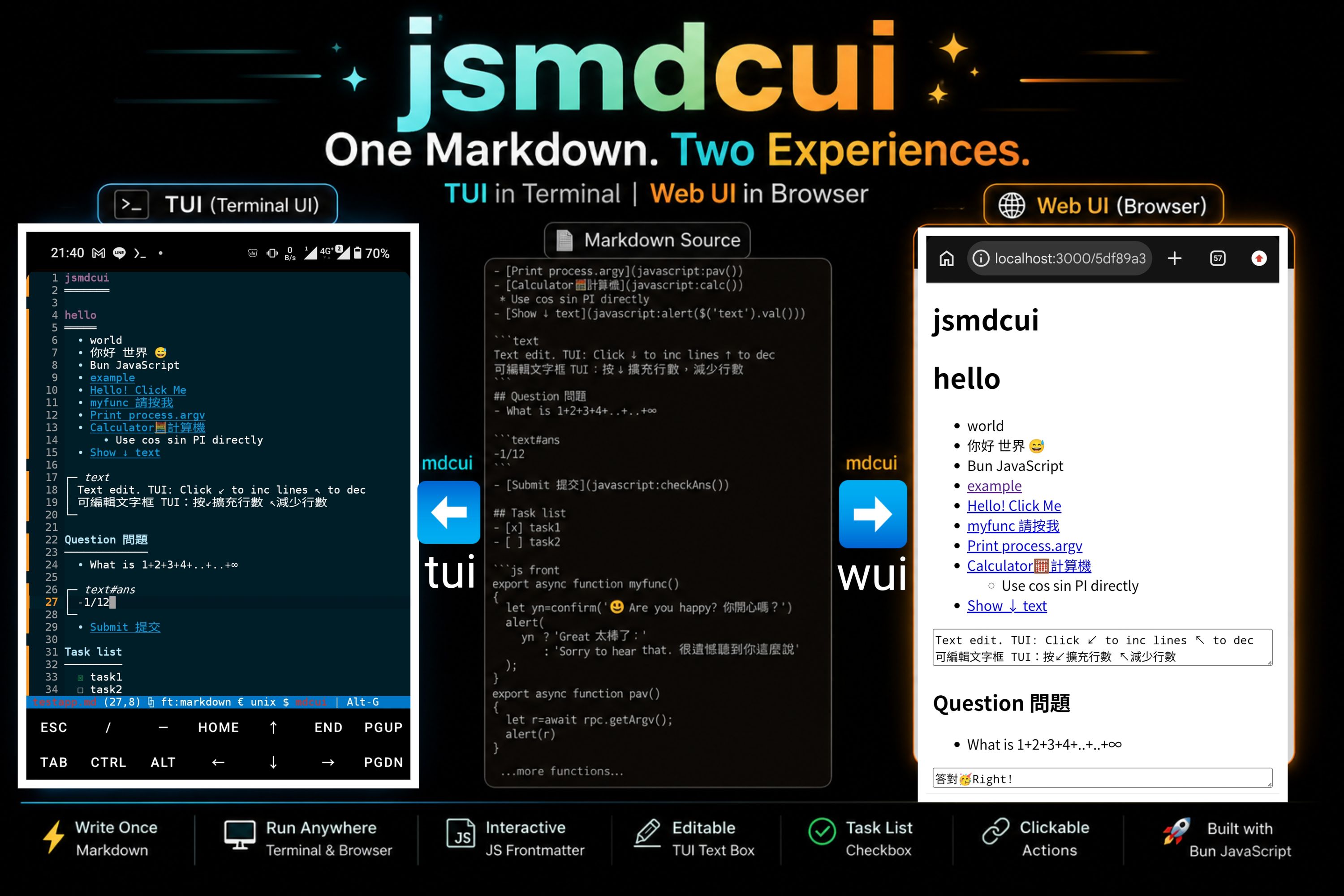
|
|
2
2
|
|
|
3
|
+
- Maze Game
|
|
4
|
+
* The TUI can be controlled through the Chrome DevTools Protocol (CDP). Codex successfully solved this maze using it.
|
|
5
|
+
|
|
6
|
+
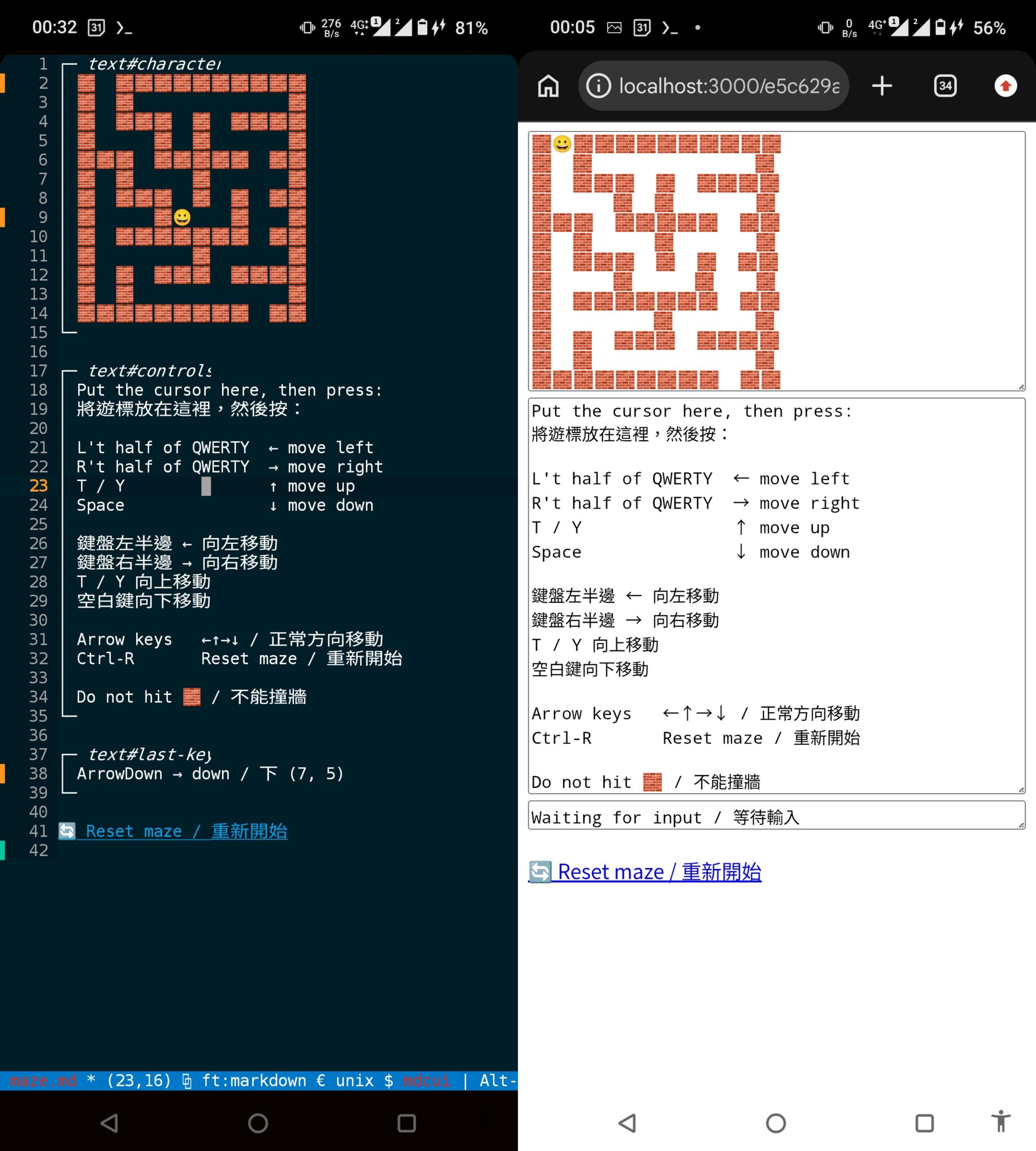
|
|
7
|
+
|
|
3
8
|
# Demo App
|
|
4
9
|
## My app
|
|
5
10
|
|
|
@@ -36,7 +41,8 @@ npx jsmdcui@latest README.md
|
|
|
36
41
|
|
|
37
42
|
## Quick start
|
|
38
43
|
|
|
39
|
-
jsmdcui requires [Bun](https://bun.com).
|
|
44
|
+
jsmdcui requires [Bun ≥ 1.3.12](https://bun.com).
|
|
45
|
+
On Android, install it in Termux:
|
|
40
46
|
|
|
41
47
|
```sh
|
|
42
48
|
npm install -g bun
|
|
@@ -94,6 +100,13 @@ npx jsmdcui --demo-imgtool-zh
|
|
|
94
100
|
npx jsmdcui --demo-maze
|
|
95
101
|
```
|
|
96
102
|
|
|
103
|
+
To watch jsmdcui start the maze with a local CDP server and solve it
|
|
104
|
+
automatically after three seconds, run:
|
|
105
|
+
|
|
106
|
+
```sh
|
|
107
|
+
npx jsmdcui --cdp-maze
|
|
108
|
+
```
|
|
109
|
+
|
|
97
110
|
```sh
|
|
98
111
|
# WUI(Web User Interface) Demo
|
|
99
112
|
npx jsmdcui --wui
|
|
@@ -147,11 +160,13 @@ bun src/index.js --wui testapp.md
|
|
|
147
160
|
| `bun src/index.js --cat app.md` | Render the terminal version to stdout, write five generated files beside it, and exit. |
|
|
148
161
|
| `bun src/index.js --testapp.md` | Write the bundled `testapp.md` source to stdout and exit. |
|
|
149
162
|
| `bun src/index.js --export-readme` | Write or overwrite `./README.md` with the bundled README source and exit. |
|
|
163
|
+
| `bun src/index.js --export-cdp-maze` | Write or overwrite `./cdp-maze.js` with the bundled CDP maze solver and exit. |
|
|
150
164
|
| `bun src/index.js --demo-list` | List `testapp.md` and every bundled `demos/*.md` example with its command-line option, then exit. |
|
|
151
165
|
| `bun src/index.js --demo` | Use local `testapp.md` when present, otherwise write the bundled demo; open it in the terminal UI and write five generated files beside it. |
|
|
152
166
|
| `bun src/index.js --demo-<filename>` | Load `demos/<filename>.md`; preserve an existing local copy or write the bundled copy, then open it and generate its five companion files. New files added under `demos/` work automatically. |
|
|
153
167
|
| `bun src/index.js --demo-imgtool` | Compatibility alias for `--demo-image-processor`. |
|
|
154
168
|
| `bun src/index.js --demo-imgtool-zh` | Compatibility alias for `--demo-image-processor.zh-TW`. |
|
|
169
|
+
| `bun src/index.js --cdp-maze` | Load the maze demo, start CDP on `127.0.0.1:9222`, and run the bundled solver after three seconds. |
|
|
155
170
|
| `bun src/index.js --allow-url URL.md` | Download HTTP(S) Markdown to the current directory and, with Kitty mode enabled, download its HTTP(S) images; write 5 generated files and allow embedded code to run. Only use trusted URLs. |
|
|
156
171
|
| `bun src/index.js --wui` | Use local `testapp.md` when present, otherwise write the bundled demo; write five generated files in the current directory, then print and serve a random URL. |
|
|
157
172
|
| `bun src/index.js --wui app.md` | Write five generated files beside `app.md`, then print and serve a random URL. |
|
|
@@ -537,6 +552,10 @@ selection, search, and copy remain available.
|
|
|
537
552
|
| `Alt-G` | Show or hide the shortcut bar. |
|
|
538
553
|
| `Ctrl-Q` or `Alt-Q` | Close the current UI. |
|
|
539
554
|
|
|
555
|
+
To preview another color theme, press `Ctrl-E` or click on `€`, type `theme `, then use `Tab`
|
|
556
|
+
and the arrow keys to browse the available themes. Press `Enter` to switch to
|
|
557
|
+
the selected theme, or `Esc` to cancel and restore the previous one.
|
|
558
|
+
|
|
540
559
|
The terminal automatically reflows the Markdown when its width changes.
|
|
541
560
|
Only `javascript:` links execute in the TUI; ordinary web links behave as
|
|
542
561
|
normal links in the browser.
|
|
@@ -554,6 +573,63 @@ supported HTTP(S) images with Kitty graphics, combine the options:
|
|
|
554
573
|
bun src/index.js --kitty --allow-url https://example.com/app.md
|
|
555
574
|
```
|
|
556
575
|
|
|
576
|
+
### CDP control for TUI automation
|
|
577
|
+
|
|
578
|
+
The terminal UI can expose a Chrome DevTools Protocol (CDP) server, so another
|
|
579
|
+
Bun process can inspect the terminal buffer, click buffer coordinates, and send
|
|
580
|
+
real keyboard events to the running TUI.
|
|
581
|
+
|
|
582
|
+
Start CDP from the command line when launching jsmdcui:
|
|
583
|
+
|
|
584
|
+
```sh
|
|
585
|
+
bun src/index.js --remote-debugging-port=9222 demos/maze.md
|
|
586
|
+
bun src/index.js --remote-debugging-port=9222 --remote-debugging-address=127.0.0.1 demos/maze.md
|
|
587
|
+
```
|
|
588
|
+
|
|
589
|
+
Or start it from inside the TUI editor command prompt(Ctrl-E or €):
|
|
590
|
+
|
|
591
|
+
```text
|
|
592
|
+
Ctrl-E cdp
|
|
593
|
+
Ctrl-E cdp 9000
|
|
594
|
+
Ctrl-E cdp --address=127.0.0.1
|
|
595
|
+
Ctrl-E cdp 9000 --public
|
|
596
|
+
```
|
|
597
|
+
|
|
598
|
+
The default bind address is `127.0.0.1` and the default port is `9222`.
|
|
599
|
+
Use `--public` or `--address=0.0.0.0` only on a trusted network.
|
|
600
|
+
|
|
601
|
+
Once CDP is running, control the TUI with `Bun.WebView`. For more info, enter
|
|
602
|
+
jsmdcui and use `Ctrl-E` or `€` → `help cdp`.
|
|
603
|
+
|
|
604
|
+
The cli flag `--cdp-maze` is a combination of
|
|
605
|
+
1. Start the demos/maze.md
|
|
606
|
+
2. Start a local CDP server
|
|
607
|
+
3. Wait three seconds
|
|
608
|
+
4. Run the solver cdp-maze.js automatically
|
|
609
|
+
|
|
610
|
+
The solver was
|
|
611
|
+
generated from the `llm-maze.txt` instructions; it focuses the maze controls,
|
|
612
|
+
resets the game, reads the maze from the TUI, solves it with breadth-first
|
|
613
|
+
search, and sends arrow-key input until the maze is escaped:
|
|
614
|
+
|
|
615
|
+
```sh
|
|
616
|
+
npx jsmdcui@latest --cdp-maze
|
|
617
|
+
```
|
|
618
|
+
|
|
619
|
+
From the source tree, run:
|
|
620
|
+
|
|
621
|
+
```sh
|
|
622
|
+
bun src/index.js --cdp-maze
|
|
623
|
+
```
|
|
624
|
+
|
|
625
|
+
Useful automation methods used by `cdp-maze.js`:
|
|
626
|
+
|
|
627
|
+
- `view.evaluate(js)`
|
|
628
|
+
- `view.evaluate("micro.getAllText()")`
|
|
629
|
+
- `view.evaluate("micro.getAllAnsiText()")`
|
|
630
|
+
- `view.click(column, line)`
|
|
631
|
+
- `view.press(key, options)`
|
|
632
|
+
|
|
557
633
|
## Browser interaction
|
|
558
634
|
|
|
559
635
|
The WUI uses normal browser mouse and keyboard behavior. Clicking a
|
package/cdp-maze.js
ADDED
|
@@ -0,0 +1,141 @@
|
|
|
1
|
+
#!/usr/bin/env bun
|
|
2
|
+
|
|
3
|
+
// Generated from llm-maze.txt instructions.
|
|
4
|
+
// Start the maze TUI first:
|
|
5
|
+
// bun src/index.js --remote-debugging-port=9222 demos/maze.md
|
|
6
|
+
// Then run:
|
|
7
|
+
// bun cdp-maze.js
|
|
8
|
+
|
|
9
|
+
const DEFAULT_CDP_URL = "ws://127.0.0.1:9222/devtools/browser/cdp-server";
|
|
10
|
+
|
|
11
|
+
const dirs = [
|
|
12
|
+
[1, 0, "ArrowDown"],
|
|
13
|
+
[-1, 0, "ArrowUp"],
|
|
14
|
+
[0, 1, "ArrowRight"],
|
|
15
|
+
[0, -1, "ArrowLeft"],
|
|
16
|
+
];
|
|
17
|
+
|
|
18
|
+
function parseMaze(text) {
|
|
19
|
+
return text.trimEnd().split("\n").map(line => {
|
|
20
|
+
const cells = [];
|
|
21
|
+
|
|
22
|
+
for (let i = 0; i < line.length;) {
|
|
23
|
+
const ch = String.fromCodePoint(line.codePointAt(i));
|
|
24
|
+
|
|
25
|
+
if (ch === "🧱" || ch === "😀") {
|
|
26
|
+
cells.push(ch);
|
|
27
|
+
i += ch.length;
|
|
28
|
+
} else if (line[i] === " ") {
|
|
29
|
+
cells.push(" ");
|
|
30
|
+
i += 2;
|
|
31
|
+
} else {
|
|
32
|
+
cells.push(ch);
|
|
33
|
+
i += ch.length;
|
|
34
|
+
}
|
|
35
|
+
}
|
|
36
|
+
|
|
37
|
+
return cells;
|
|
38
|
+
});
|
|
39
|
+
}
|
|
40
|
+
|
|
41
|
+
function solveMaze(grid) {
|
|
42
|
+
let start;
|
|
43
|
+
|
|
44
|
+
for (let row = 0; row < grid.length; row++) {
|
|
45
|
+
for (let col = 0; col < grid[row].length; col++) {
|
|
46
|
+
if (grid[row][col] === "😀") start = [row, col];
|
|
47
|
+
}
|
|
48
|
+
}
|
|
49
|
+
|
|
50
|
+
if (!start) throw new Error("Maze start not found");
|
|
51
|
+
|
|
52
|
+
const queue = [{ row: start[0], col: start[1], path: [] }];
|
|
53
|
+
const seen = new Set([start.join(",")]);
|
|
54
|
+
|
|
55
|
+
while (queue.length) {
|
|
56
|
+
const { row, col, path } = queue.shift();
|
|
57
|
+
|
|
58
|
+
for (const [dr, dc, key] of dirs) {
|
|
59
|
+
const nextRow = row + dr;
|
|
60
|
+
const nextCol = col + dc;
|
|
61
|
+
|
|
62
|
+
if (
|
|
63
|
+
nextRow < 0 ||
|
|
64
|
+
nextRow >= grid.length ||
|
|
65
|
+
nextCol < 0 ||
|
|
66
|
+
nextCol >= grid[row].length
|
|
67
|
+
) {
|
|
68
|
+
if (path.length > 0) return path.concat(key);
|
|
69
|
+
continue;
|
|
70
|
+
}
|
|
71
|
+
|
|
72
|
+
if (nextCol >= grid[nextRow].length) continue;
|
|
73
|
+
if (grid[nextRow][nextCol] === "🧱") continue;
|
|
74
|
+
|
|
75
|
+
const id = `${nextRow},${nextCol}`;
|
|
76
|
+
if (seen.has(id)) continue;
|
|
77
|
+
|
|
78
|
+
seen.add(id);
|
|
79
|
+
queue.push({
|
|
80
|
+
row: nextRow,
|
|
81
|
+
col: nextCol,
|
|
82
|
+
path: path.concat(key),
|
|
83
|
+
});
|
|
84
|
+
}
|
|
85
|
+
}
|
|
86
|
+
|
|
87
|
+
throw new Error("No path found");
|
|
88
|
+
}
|
|
89
|
+
|
|
90
|
+
export async function runCdpMaze(cdpUrl = DEFAULT_CDP_URL) {
|
|
91
|
+
const view = new Bun.WebView({
|
|
92
|
+
backend: {
|
|
93
|
+
type: "chrome",
|
|
94
|
+
url: cdpUrl,
|
|
95
|
+
},
|
|
96
|
+
});
|
|
97
|
+
|
|
98
|
+
try {
|
|
99
|
+
const control = await view.evaluate(`
|
|
100
|
+
(() => {
|
|
101
|
+
const lines = micro.getAllText().split("\\n");
|
|
102
|
+
const y = lines.findIndex(line =>
|
|
103
|
+
line.includes("Put the cursor here")
|
|
104
|
+
);
|
|
105
|
+
|
|
106
|
+
return {
|
|
107
|
+
x: lines[y].indexOf("Put the cursor here") + 1,
|
|
108
|
+
y: y + 1,
|
|
109
|
+
};
|
|
110
|
+
})()
|
|
111
|
+
`);
|
|
112
|
+
|
|
113
|
+
await view.click(control.x, control.y);
|
|
114
|
+
await view.press("r", { modifiers: ["Control"] });
|
|
115
|
+
await Bun.sleep(100);
|
|
116
|
+
|
|
117
|
+
const mazeText = await view.evaluate(`$("#character").val()`);
|
|
118
|
+
const path = solveMaze(parseMaze(mazeText));
|
|
119
|
+
|
|
120
|
+
for (const key of path) {
|
|
121
|
+
await view.press(key);
|
|
122
|
+
await Bun.sleep(100);
|
|
123
|
+
|
|
124
|
+
const status = await view.evaluate(`$("#last-key").val()`);
|
|
125
|
+
if (status.includes("Escaped the maze")) break;
|
|
126
|
+
if (status.includes("Wall")) {
|
|
127
|
+
throw new Error(`Hit a wall after ${key}: ${status}`);
|
|
128
|
+
}
|
|
129
|
+
}
|
|
130
|
+
|
|
131
|
+
const result = await view.evaluate(`$("#last-key").val()`);
|
|
132
|
+
if (!process.stdin.isRaw) console.log(result);
|
|
133
|
+
return result;
|
|
134
|
+
} finally {
|
|
135
|
+
view.close();
|
|
136
|
+
}
|
|
137
|
+
}
|
|
138
|
+
|
|
139
|
+
if (import.meta.main) {
|
|
140
|
+
await runCdpMaze(Bun.argv[2] ?? DEFAULT_CDP_URL);
|
|
141
|
+
}
|
package/demos/maze.md
CHANGED
|
@@ -126,7 +126,8 @@ export function handle(event) {
|
|
|
126
126
|
if (row === GOAL.row && col === GOAL.col) {
|
|
127
127
|
completed = true;
|
|
128
128
|
$('#last-key').val('🎉🏆🌟 Escaped the maze! / 成功走出迷宮!🌟🏆🎉');
|
|
129
|
-
|
|
129
|
+
$('#character').val([
|
|
130
|
+
'',
|
|
130
131
|
'🎆🎇🎉 恭 喜 過 關 ! 🎉🎇🎆',
|
|
131
132
|
'',
|
|
132
133
|
'🥳 你成功逃出迷宮了! 🥳',
|
|
@@ -135,6 +136,10 @@ export function handle(event) {
|
|
|
135
136
|
'🎈 🎊 🎁 🪩 🎁 🎊 🎈',
|
|
136
137
|
'',
|
|
137
138
|
'🚀 ESCAPED THE MAZE! 🚀',
|
|
139
|
+
'',
|
|
140
|
+
'Press Ctrl-R to reset',
|
|
141
|
+
'按 Ctrl-R 重新開始',
|
|
142
|
+
''
|
|
138
143
|
].join('\n'));
|
|
139
144
|
} else {
|
|
140
145
|
const label = event.key === ' ' ? 'Space' : event.key;
|
package/llm-maze.txt
ADDED
|
@@ -0,0 +1,94 @@
|
|
|
1
|
+
你正在透過 Bun.WebView 操作 jsmdcui TUI App。
|
|
2
|
+
|
|
3
|
+
CDP 連線位址:
|
|
4
|
+
|
|
5
|
+
ws://127.0.0.1:9222/devtools/browser/cdp-server
|
|
6
|
+
|
|
7
|
+
可用操作:
|
|
8
|
+
|
|
9
|
+
1. 取得完整純文字 UI:
|
|
10
|
+
|
|
11
|
+
await view.evaluate("micro.getAllText()")
|
|
12
|
+
|
|
13
|
+
2. 取得包含 ANSI 樣式與 OSC 8 link 的完整 UI:
|
|
14
|
+
|
|
15
|
+
await view.evaluate("micro.getAllAnsiText()")
|
|
16
|
+
|
|
17
|
+
3. 點擊 buffer 座標:
|
|
18
|
+
|
|
19
|
+
await view.click(column, line)
|
|
20
|
+
|
|
21
|
+
column 與 line 都是 1-based。
|
|
22
|
+
這是整份 buffer 的座標,不是螢幕 pixel。
|
|
23
|
+
不支援 selector click。
|
|
24
|
+
|
|
25
|
+
4. 發送真正的鍵盤事件:
|
|
26
|
+
|
|
27
|
+
await view.press("ArrowUp")
|
|
28
|
+
await view.press("ArrowDown")
|
|
29
|
+
await view.press("ArrowLeft")
|
|
30
|
+
await view.press("ArrowRight")
|
|
31
|
+
await view.press("r", { modifiers: ["Control"] })
|
|
32
|
+
|
|
33
|
+
5. 每次 click 或 press 後,重新取得 UI 快照確認結果。
|
|
34
|
+
|
|
35
|
+
Maze 操作方式:
|
|
36
|
+
|
|
37
|
+
先在 micro.getAllText() 中找到包含 "Put the cursor here" 的行,計算該文字的
|
|
38
|
+
1-based column/line,然後 click 該位置,讓 Maze controls 取得焦點。
|
|
39
|
+
|
|
40
|
+
Maze controls 取得焦點後:
|
|
41
|
+
|
|
42
|
+
- ArrowUp:上
|
|
43
|
+
- ArrowDown:下
|
|
44
|
+
- ArrowLeft:左
|
|
45
|
+
- ArrowRight:右
|
|
46
|
+
- Ctrl-R:重新開始
|
|
47
|
+
|
|
48
|
+
每次移動後可讀取狀態:
|
|
49
|
+
|
|
50
|
+
await view.evaluate("$('#last-key').val()")
|
|
51
|
+
|
|
52
|
+
取得完整迷宮畫面:
|
|
53
|
+
|
|
54
|
+
await view.evaluate("$('#character').val()")
|
|
55
|
+
|
|
56
|
+
看到狀態包含 "Escaped the maze" 代表成功。抵達終點時不會呼叫 alert;大型
|
|
57
|
+
慶祝內容會直接顯示在 character 區域,並提示使用 Ctrl-R 重新開始。
|
|
58
|
+
|
|
59
|
+
初始化與聚焦 controls 的範例:
|
|
60
|
+
|
|
61
|
+
const view = new Bun.WebView({
|
|
62
|
+
backend: {
|
|
63
|
+
type: "chrome",
|
|
64
|
+
url: "ws://127.0.0.1:9222/devtools/browser/cdp-server",
|
|
65
|
+
},
|
|
66
|
+
});
|
|
67
|
+
|
|
68
|
+
const cell = await view.evaluate(`
|
|
69
|
+
(() => {
|
|
70
|
+
const lines = micro.getAllText().split("\\n");
|
|
71
|
+
const y = lines.findIndex(line =>
|
|
72
|
+
line.includes("Put the cursor here")
|
|
73
|
+
);
|
|
74
|
+
|
|
75
|
+
return {
|
|
76
|
+
x: lines[y].indexOf("Put the cursor here") + 1,
|
|
77
|
+
y: y + 1,
|
|
78
|
+
};
|
|
79
|
+
})()
|
|
80
|
+
`);
|
|
81
|
+
|
|
82
|
+
await view.click(cell.x, cell.y);
|
|
83
|
+
await view.press("r", { modifiers: ["Control"] });
|
|
84
|
+
|
|
85
|
+
alert 注意事項:
|
|
86
|
+
|
|
87
|
+
Maze 抵達終點不會觸發 alert。不過 jsmdcui 其他操作若呼叫同步 alert(),CDP
|
|
88
|
+
operation 會等待使用者直接在實際 terminal 按 Enter 關閉;alert 阻塞期間,無法
|
|
89
|
+
再透過 view.press("Enter") 關閉它。無人值守自動化應避免觸發同步 alert,或預先
|
|
90
|
+
提供替代的 dialog handling。
|
|
91
|
+
|
|
92
|
+
操作完成後呼叫:
|
|
93
|
+
|
|
94
|
+
view.close();
|
package/package.json
CHANGED
package/runtime/help/cdp.md
CHANGED
|
@@ -22,6 +22,11 @@
|
|
|
22
22
|
// Once running, status bar shows: CDP@<port> server running
|
|
23
23
|
// Running cdp again shows: CDP@<port> already running
|
|
24
24
|
//
|
|
25
|
+
// ── Maze demo from the source tree ─────────────────────────────────────────
|
|
26
|
+
//
|
|
27
|
+
// Start the maze, local CDP server, and automatic solver together:
|
|
28
|
+
// bun src/index.js --cdp-maze
|
|
29
|
+
//
|
|
25
30
|
// ── Connecting ─────────────────────────────────────────────────────────────
|
|
26
31
|
//
|
|
27
32
|
// Bun.WebView:
|
package/runtime/help/help.md
CHANGED
|
@@ -1,5 +1,10 @@
|
|
|
1
1
|

|
|
2
2
|
|
|
3
|
+
- Maze Game
|
|
4
|
+
* The TUI can be controlled through the Chrome DevTools Protocol (CDP). Codex successfully solved this maze using it.
|
|
5
|
+
|
|
6
|
+

|
|
7
|
+
|
|
3
8
|
# Demo App
|
|
4
9
|
## My app
|
|
5
10
|
|
|
@@ -36,7 +41,8 @@ npx jsmdcui@latest README.md
|
|
|
36
41
|
|
|
37
42
|
## Quick start
|
|
38
43
|
|
|
39
|
-
jsmdcui requires [Bun](https://bun.com).
|
|
44
|
+
jsmdcui requires [Bun ≥ 1.3.12](https://bun.com).
|
|
45
|
+
On Android, install it in Termux:
|
|
40
46
|
|
|
41
47
|
```sh
|
|
42
48
|
npm install -g bun
|
|
@@ -94,6 +100,13 @@ npx jsmdcui --demo-imgtool-zh
|
|
|
94
100
|
npx jsmdcui --demo-maze
|
|
95
101
|
```
|
|
96
102
|
|
|
103
|
+
To watch jsmdcui start the maze with a local CDP server and solve it
|
|
104
|
+
automatically after three seconds, run:
|
|
105
|
+
|
|
106
|
+
```sh
|
|
107
|
+
npx jsmdcui --cdp-maze
|
|
108
|
+
```
|
|
109
|
+
|
|
97
110
|
```sh
|
|
98
111
|
# WUI(Web User Interface) Demo
|
|
99
112
|
npx jsmdcui --wui
|
|
@@ -147,11 +160,13 @@ bun src/index.js --wui testapp.md
|
|
|
147
160
|
| `bun src/index.js --cat app.md` | Render the terminal version to stdout, write five generated files beside it, and exit. |
|
|
148
161
|
| `bun src/index.js --testapp.md` | Write the bundled `testapp.md` source to stdout and exit. |
|
|
149
162
|
| `bun src/index.js --export-readme` | Write or overwrite `./README.md` with the bundled README source and exit. |
|
|
163
|
+
| `bun src/index.js --export-cdp-maze` | Write or overwrite `./cdp-maze.js` with the bundled CDP maze solver and exit. |
|
|
150
164
|
| `bun src/index.js --demo-list` | List `testapp.md` and every bundled `demos/*.md` example with its command-line option, then exit. |
|
|
151
165
|
| `bun src/index.js --demo` | Use local `testapp.md` when present, otherwise write the bundled demo; open it in the terminal UI and write five generated files beside it. |
|
|
152
166
|
| `bun src/index.js --demo-<filename>` | Load `demos/<filename>.md`; preserve an existing local copy or write the bundled copy, then open it and generate its five companion files. New files added under `demos/` work automatically. |
|
|
153
167
|
| `bun src/index.js --demo-imgtool` | Compatibility alias for `--demo-image-processor`. |
|
|
154
168
|
| `bun src/index.js --demo-imgtool-zh` | Compatibility alias for `--demo-image-processor.zh-TW`. |
|
|
169
|
+
| `bun src/index.js --cdp-maze` | Load the maze demo, start CDP on `127.0.0.1:9222`, and run the bundled solver after three seconds. |
|
|
155
170
|
| `bun src/index.js --allow-url URL.md` | Download HTTP(S) Markdown to the current directory and, with Kitty mode enabled, download its HTTP(S) images; write 5 generated files and allow embedded code to run. Only use trusted URLs. |
|
|
156
171
|
| `bun src/index.js --wui` | Use local `testapp.md` when present, otherwise write the bundled demo; write five generated files in the current directory, then print and serve a random URL. |
|
|
157
172
|
| `bun src/index.js --wui app.md` | Write five generated files beside `app.md`, then print and serve a random URL. |
|
|
@@ -537,6 +552,10 @@ selection, search, and copy remain available.
|
|
|
537
552
|
| `Alt-G` | Show or hide the shortcut bar. |
|
|
538
553
|
| `Ctrl-Q` or `Alt-Q` | Close the current UI. |
|
|
539
554
|
|
|
555
|
+
To preview another color theme, press `Ctrl-E` or click on `€`, type `theme `, then use `Tab`
|
|
556
|
+
and the arrow keys to browse the available themes. Press `Enter` to switch to
|
|
557
|
+
the selected theme, or `Esc` to cancel and restore the previous one.
|
|
558
|
+
|
|
540
559
|
The terminal automatically reflows the Markdown when its width changes.
|
|
541
560
|
Only `javascript:` links execute in the TUI; ordinary web links behave as
|
|
542
561
|
normal links in the browser.
|
|
@@ -554,6 +573,63 @@ supported HTTP(S) images with Kitty graphics, combine the options:
|
|
|
554
573
|
bun src/index.js --kitty --allow-url https://example.com/app.md
|
|
555
574
|
```
|
|
556
575
|
|
|
576
|
+
### CDP control for TUI automation
|
|
577
|
+
|
|
578
|
+
The terminal UI can expose a Chrome DevTools Protocol (CDP) server, so another
|
|
579
|
+
Bun process can inspect the terminal buffer, click buffer coordinates, and send
|
|
580
|
+
real keyboard events to the running TUI.
|
|
581
|
+
|
|
582
|
+
Start CDP from the command line when launching jsmdcui:
|
|
583
|
+
|
|
584
|
+
```sh
|
|
585
|
+
bun src/index.js --remote-debugging-port=9222 demos/maze.md
|
|
586
|
+
bun src/index.js --remote-debugging-port=9222 --remote-debugging-address=127.0.0.1 demos/maze.md
|
|
587
|
+
```
|
|
588
|
+
|
|
589
|
+
Or start it from inside the TUI editor command prompt(Ctrl-E or €):
|
|
590
|
+
|
|
591
|
+
```text
|
|
592
|
+
Ctrl-E cdp
|
|
593
|
+
Ctrl-E cdp 9000
|
|
594
|
+
Ctrl-E cdp --address=127.0.0.1
|
|
595
|
+
Ctrl-E cdp 9000 --public
|
|
596
|
+
```
|
|
597
|
+
|
|
598
|
+
The default bind address is `127.0.0.1` and the default port is `9222`.
|
|
599
|
+
Use `--public` or `--address=0.0.0.0` only on a trusted network.
|
|
600
|
+
|
|
601
|
+
Once CDP is running, control the TUI with `Bun.WebView`. For more info, enter
|
|
602
|
+
jsmdcui and use `Ctrl-E` or `€` → `help cdp`.
|
|
603
|
+
|
|
604
|
+
The cli flag `--cdp-maze` is a combination of
|
|
605
|
+
1. Start the demos/maze.md
|
|
606
|
+
2. Start a local CDP server
|
|
607
|
+
3. Wait three seconds
|
|
608
|
+
4. Run the solver cdp-maze.js automatically
|
|
609
|
+
|
|
610
|
+
The solver was
|
|
611
|
+
generated from the `llm-maze.txt` instructions; it focuses the maze controls,
|
|
612
|
+
resets the game, reads the maze from the TUI, solves it with breadth-first
|
|
613
|
+
search, and sends arrow-key input until the maze is escaped:
|
|
614
|
+
|
|
615
|
+
```sh
|
|
616
|
+
npx jsmdcui@latest --cdp-maze
|
|
617
|
+
```
|
|
618
|
+
|
|
619
|
+
From the source tree, run:
|
|
620
|
+
|
|
621
|
+
```sh
|
|
622
|
+
bun src/index.js --cdp-maze
|
|
623
|
+
```
|
|
624
|
+
|
|
625
|
+
Useful automation methods used by `cdp-maze.js`:
|
|
626
|
+
|
|
627
|
+
- `view.evaluate(js)`
|
|
628
|
+
- `view.evaluate("micro.getAllText()")`
|
|
629
|
+
- `view.evaluate("micro.getAllAnsiText()")`
|
|
630
|
+
- `view.click(column, line)`
|
|
631
|
+
- `view.press(key, options)`
|
|
632
|
+
|
|
557
633
|
## Browser interaction
|
|
558
634
|
|
|
559
635
|
The WUI uses normal browser mouse and keyboard behavior. Clicking a
|
|
@@ -554,8 +554,30 @@ async function dispatch(ctx, state, method, params, sessionId, emit) {
|
|
|
554
554
|
return {};
|
|
555
555
|
}
|
|
556
556
|
case "Input.dispatchKeyEvent": {
|
|
557
|
-
|
|
558
|
-
|
|
557
|
+
const target = getSessionTarget(state, sessionId);
|
|
558
|
+
const key = params.key ?? params.text ?? "";
|
|
559
|
+
const signature = `${params.code ?? key}:${params.modifiers ?? 0}`;
|
|
560
|
+
if (params.type === "rawKeyDown" || params.type === "keyDown") {
|
|
561
|
+
if (target.cdpKeyDown !== signature || params.autoRepeat) {
|
|
562
|
+
await ctx.press?.(key, {
|
|
563
|
+
modifiers: params.modifiers ?? 0,
|
|
564
|
+
text: params.text ?? "",
|
|
565
|
+
code: params.code ?? "",
|
|
566
|
+
repeat: !!params.autoRepeat,
|
|
567
|
+
});
|
|
568
|
+
target.cdpKeyDown = signature;
|
|
569
|
+
}
|
|
570
|
+
} else if (params.type === "char") {
|
|
571
|
+
if (!target.cdpKeyDown) {
|
|
572
|
+
await ctx.press?.(key, {
|
|
573
|
+
modifiers: params.modifiers ?? 0,
|
|
574
|
+
text: params.text ?? "",
|
|
575
|
+
code: params.code ?? "",
|
|
576
|
+
repeat: !!params.autoRepeat,
|
|
577
|
+
});
|
|
578
|
+
}
|
|
579
|
+
} else if (params.type === "keyUp") {
|
|
580
|
+
target.cdpKeyDown = null;
|
|
559
581
|
}
|
|
560
582
|
return {};
|
|
561
583
|
}
|
|
@@ -695,6 +717,8 @@ function navigateTarget(state, target, url, emit, options = {}) {
|
|
|
695
717
|
}
|
|
696
718
|
|
|
697
719
|
function getSessionTarget(state, sessionId) {
|
|
720
|
+
if (!sessionId) return getImplicitTarget(state);
|
|
721
|
+
|
|
698
722
|
const targetId = state.sessions.get(sessionId);
|
|
699
723
|
const target = state.targets.get(targetId);
|
|
700
724
|
if (!target) throw new Error(`No target for session: ${sessionId}`);
|