jsmdcui 0.4.0 → 0.6.3
This diff represents the content of publicly available package versions that have been released to one of the supported registries. The information contained in this diff is provided for informational purposes only and reflects changes between package versions as they appear in their respective public registries.
- package/CHANGELOG.md +225 -0
- package/README.md +267 -25
- package/image-processor.md +360 -0
- package/image-processor.zh-TW.md +360 -0
- package/package.json +1 -1
- package/runmd.mjs +147 -10
- package/runtime/help/help.md +267 -25
- package/runtime/syntax/markdown.yaml +12 -0
- package/select.md +61 -0
- package/single-exe/packAssets.sh +1 -1
- package/src/config/defaults.js +1 -1
- package/src/cui/id-collision.mjs +151 -0
- package/src/cui/rpc.mjs +207 -2
- package/src/cui/task-checkbox.mjs +16 -0
- package/src/index.js +256 -22
- package/src/plugins/js-bridge.js +283 -0
- package/testapp.md +23 -0
- package/tests/demo.test.js +110 -1
- package/tests/id-collision.test.js +146 -0
- package/tests/wui.test.js +30 -0
package/runtime/help/help.md
CHANGED
|
@@ -1,3 +1,20 @@
|
|
|
1
|
+
|
|
2
|
+
|
|
3
|
+
# Demo App
|
|
4
|
+
## My app
|
|
5
|
+
|
|
6
|
+
- [Say hello](javascript:sayHello())
|
|
7
|
+
- [Get server time](javascript:showServerTime())
|
|
8
|
+
- [Update text box](javascript:updateText())
|
|
9
|
+
- [Show selected](javascript:alert(JSON.stringify($('#my-app').val())))
|
|
10
|
+
- [x] task1
|
|
11
|
+
- [x] task2
|
|
12
|
+
- [ ] unselected task
|
|
13
|
+
|
|
14
|
+
```text#myid.myclass
|
|
15
|
+
Editable in both TUI and WUI
|
|
16
|
+
```
|
|
17
|
+
|
|
1
18
|
# Introduction
|
|
2
19
|
- jsmdcui stands for:
|
|
3
20
|
- JavaScript Markdown Cross-environment User Interface
|
|
@@ -10,6 +27,12 @@
|
|
|
10
27
|
- Original projects:
|
|
11
28
|
- https://github.com/jjtseng93/bunmicro
|
|
12
29
|
- https://github.com/micro-editor/micro
|
|
30
|
+
- .
|
|
31
|
+
- This README is itself a runnable app.
|
|
32
|
+
|
|
33
|
+
```sh
|
|
34
|
+
npx jsmdcui@latest README.md
|
|
35
|
+
```
|
|
13
36
|
|
|
14
37
|
## Quick start
|
|
15
38
|
|
|
@@ -24,28 +47,52 @@ On other platforms, follow the [official Bun installation guide](https://bun.com
|
|
|
24
47
|
Choose either of these two ways to run jsmdcui.
|
|
25
48
|
|
|
26
49
|
> **Important:** Opening or rendering a local `.md` file writes or overwrites
|
|
27
|
-
>
|
|
28
|
-
>
|
|
50
|
+
> 5 generated files beside it. Starting `--wui` without a file writes the
|
|
51
|
+
> 5 files generated from `testapp.md` in the current directory. The source
|
|
29
52
|
> Markdown is not changed, but you should run the demo in a directory where
|
|
30
53
|
> overwriting generated files is safe.
|
|
31
54
|
|
|
32
55
|
### Route 1: Run with npx
|
|
33
56
|
|
|
34
|
-
This route requires both `npx` and `bun` on your `PATH`; no source checkout is
|
|
35
|
-
required.
|
|
57
|
+
- This route requires both `npx` and `bun` on your `PATH`; no source checkout is
|
|
58
|
+
required.
|
|
59
|
+
|
|
60
|
+
#### Open the normal terminal editor
|
|
36
61
|
|
|
37
62
|
```sh
|
|
38
63
|
npx jsmdcui
|
|
39
64
|
```
|
|
40
65
|
|
|
41
|
-
|
|
66
|
+
#### Start `testapp.md` as the TUI/WUI demo
|
|
67
|
+
- If `testapp.md` is missing, the bundled copy is written to the current working directory
|
|
68
|
+
- If `testapp.md` already exists, it will be used and won't be overwritten.
|
|
69
|
+
|
|
70
|
+
```sh
|
|
71
|
+
# TUI(Terminal User Interface) Demo
|
|
72
|
+
npx jsmdcui --demo
|
|
73
|
+
```
|
|
74
|
+
|
|
75
|
+
```sh
|
|
76
|
+
# Heading and task-list selector demo
|
|
77
|
+
npx jsmdcui --demo-select
|
|
78
|
+
```
|
|
42
79
|
|
|
43
80
|
```sh
|
|
81
|
+
# Bun.Image processor demo
|
|
82
|
+
npx jsmdcui --demo-imgtool
|
|
83
|
+
```
|
|
84
|
+
|
|
85
|
+
```sh
|
|
86
|
+
# Traditional Chinese Bun.Image processor demo
|
|
87
|
+
npx jsmdcui --demo-imgtool-zh
|
|
88
|
+
```
|
|
89
|
+
|
|
90
|
+
```sh
|
|
91
|
+
# WUI(Web User Interface) Demo
|
|
44
92
|
npx jsmdcui --wui
|
|
45
93
|
```
|
|
46
94
|
|
|
47
|
-
|
|
48
|
-
instead of the bundled demo. To open your own Markdown UI, pass its path:
|
|
95
|
+
#### Open your own Markdown CUI App
|
|
49
96
|
|
|
50
97
|
```sh
|
|
51
98
|
npx jsmdcui app.md
|
|
@@ -60,30 +107,37 @@ cd jsmdcui
|
|
|
60
107
|
bun src/index.js testapp.md
|
|
61
108
|
```
|
|
62
109
|
|
|
63
|
-
The last command opens the included demo in the terminal
|
|
64
|
-
|
|
65
|
-
|
|
110
|
+
- The last command opens the included demo in the terminal
|
|
111
|
+
- Use arrow keys to move around
|
|
112
|
+
- `Enter`, `Space`, or mouse click to activate an item, and `Ctrl-Q` to quit.
|
|
113
|
+
- To open the same demo in a browser instead:
|
|
66
114
|
|
|
67
115
|
```sh
|
|
68
116
|
bun src/index.js --wui testapp.md
|
|
69
117
|
```
|
|
70
118
|
|
|
71
|
-
After starting `--wui`, open the last printed `http://...` URL in a browser.
|
|
72
|
-
Keep the command running while using the
|
|
73
|
-
terminal to stop the server.
|
|
119
|
+
- After starting `--wui`, open the last printed `http://...` URL in a browser.
|
|
120
|
+
- Keep the command running while using the CUI App, and press `Ctrl-C` in that terminal to stop the server.
|
|
74
121
|
|
|
75
|
-
|
|
76
|
-
|
|
122
|
+
### Usage table
|
|
123
|
+
|
|
124
|
+
- The command table below uses the cloned-source form.
|
|
125
|
+
- If you use npx, replace `bun src/index.js` with `npx jsmdcui`
|
|
77
126
|
|
|
78
127
|
| Command | Result |
|
|
79
128
|
| --- | --- |
|
|
80
129
|
| `bun src/index.js app.md` | Render `app.md` as a read-only terminal UI and write five generated files beside it. |
|
|
130
|
+
| `bun src/index.js --check app.md` | Check heading and fenced-block IDs for collisions, print line-by-line details, and exit. |
|
|
81
131
|
| `bun src/index.js --edit app.md` | Open `app.md` as editable UTF-8 source, overriding automatic Markdown UI detection. |
|
|
82
132
|
| `bun src/index.js --cat app.md` | Render the terminal version to stdout, write five generated files beside it, and exit. |
|
|
83
133
|
| `bun src/index.js --testapp.md` | Write the bundled `testapp.md` source to stdout and exit. |
|
|
84
|
-
| `bun src/index.js --
|
|
134
|
+
| `bun src/index.js --export-readme` | Write or overwrite `./README.md` with the bundled README source and exit. |
|
|
135
|
+
| `bun src/index.js --demo` | Use local `testapp.md` when present, otherwise write the bundled demo; open it in the terminal UI and write five generated files beside it. |
|
|
136
|
+
| `bun src/index.js --demo-select` | Use local `select.md` when present, otherwise write the bundled selector demo; open it in the terminal UI and write five generated files beside it. |
|
|
137
|
+
| `bun src/index.js --demo-imgtool` | Use local `image-processor.md` when present, otherwise write the bundled Bun.Image processor; open it in the terminal UI and write five generated files beside it. |
|
|
138
|
+
| `bun src/index.js --demo-imgtool-zh` | Use local `image-processor.zh-TW.md` when present, otherwise write the bundled Traditional Chinese Bun.Image processor; open it in the terminal UI and write five generated files beside it. |
|
|
85
139
|
| `bun src/index.js --allow-url URL.md` | Download HTTP(S) Markdown to the current directory, write 5 generated files, and allow its embedded code to run. Only use trusted URLs. |
|
|
86
|
-
| `bun src/index.js --wui` | Use local `testapp.md` when present, otherwise
|
|
140
|
+
| `bun src/index.js --wui` | Use local `testapp.md` when present, otherwise write the bundled demo; write five generated files in the current directory, then print and serve a random URL. |
|
|
87
141
|
| `bun src/index.js --wui app.md` | Write five generated files beside `app.md`, then print and serve a random URL. |
|
|
88
142
|
| `PORT=8080 bun src/index.js --wui app.md` | Start the browser UI on another port. |
|
|
89
143
|
| `bun src/index.js` | Open the normal terminal editor with an empty buffer. |
|
|
@@ -96,10 +150,19 @@ options.
|
|
|
96
150
|
Create `app.md`:
|
|
97
151
|
|
|
98
152
|
````md
|
|
99
|
-
|
|
153
|
+
## My app
|
|
100
154
|
|
|
101
155
|
- [Say hello](javascript:sayHello())
|
|
102
156
|
- [Get server time](javascript:showServerTime())
|
|
157
|
+
- [Update text box](javascript:updateText())
|
|
158
|
+
- [Show selected](javascript:alert(JSON.stringify($('#my-app').val())))
|
|
159
|
+
- [x] task1
|
|
160
|
+
- [x] task2
|
|
161
|
+
- [ ] unselected task
|
|
162
|
+
|
|
163
|
+
```text#myid.myclass
|
|
164
|
+
Editable in both TUI and WUI
|
|
165
|
+
```
|
|
103
166
|
|
|
104
167
|
```js front
|
|
105
168
|
export function sayHello() {
|
|
@@ -111,6 +174,10 @@ export async function showServerTime() {
|
|
|
111
174
|
const time = await rpc.getServerTime();
|
|
112
175
|
alert(time);
|
|
113
176
|
}
|
|
177
|
+
|
|
178
|
+
export function updateText() {
|
|
179
|
+
$('#myid').val($('.myclass').val() + ' ✓');
|
|
180
|
+
}
|
|
114
181
|
```
|
|
115
182
|
|
|
116
183
|
```js back
|
|
@@ -127,12 +194,149 @@ bun src/index.js app.md
|
|
|
127
194
|
bun src/index.js --wui app.md
|
|
128
195
|
```
|
|
129
196
|
|
|
197
|
+
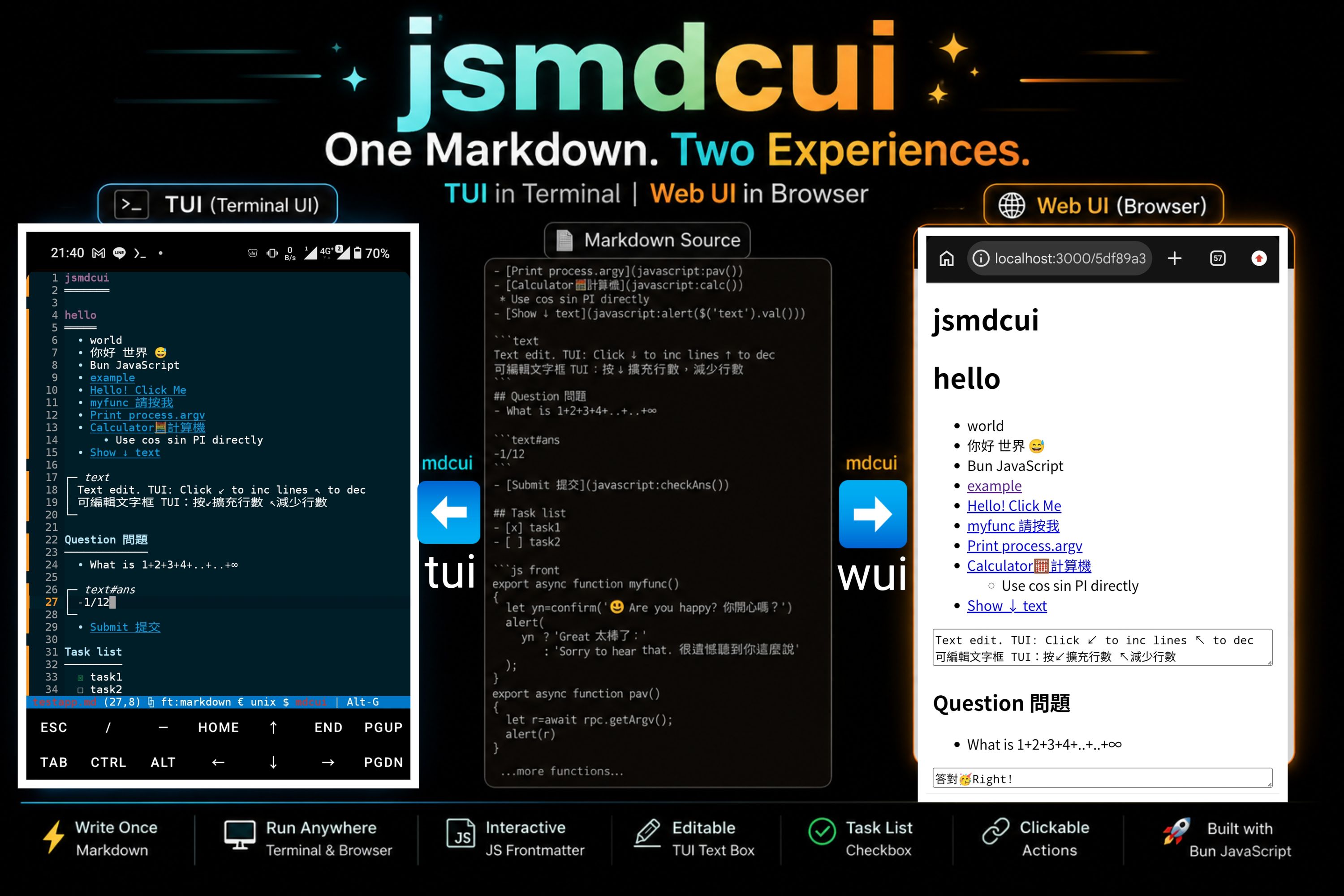
- The resulting App UI is shown at the beginning of this README.md
|
|
198
|
+
- Run this demo app directly by:
|
|
199
|
+
* bun src/index.js README.md
|
|
200
|
+
* If you didn't clone the repo, use --export-readme to write README.md to the current folder
|
|
201
|
+
|
|
202
|
+
### Text blocks
|
|
203
|
+
|
|
204
|
+
Both `text` and `textarea` fenced blocks define editable text fields:
|
|
205
|
+
|
|
206
|
+
````md
|
|
207
|
+
```text#message.note
|
|
208
|
+
Initial value
|
|
209
|
+
```
|
|
210
|
+
````
|
|
211
|
+
|
|
212
|
+
A fenced-block declaration must include a tag. Its supported identity syntax is
|
|
213
|
+
`tag`, optionally followed by `#id` and one or more `.class` names, for
|
|
214
|
+
example `text#message.note` or `textarea#notes.readonly`. Tags, IDs, and class
|
|
215
|
+
names must begin with an ASCII letter or underscore; their remaining
|
|
216
|
+
characters may also include digits, `_`, `-`, and `:`. Declarations such as
|
|
217
|
+
`#message` and `#message.note` have no tag and are therefore not recognized as
|
|
218
|
+
selectable fenced blocks.
|
|
219
|
+
|
|
220
|
+
The currently supported fenced-block tags are only `text` and `textarea` so
|
|
221
|
+
the same control works consistently in both the TUI and WUI. Selector queries
|
|
222
|
+
may omit the tag or classes after a valid declaration, so all of
|
|
223
|
+
`$('text#message.note')`, `$('text#message')`, `$('#message.note')`, and
|
|
224
|
+
`$('#message')` can select the example above.
|
|
225
|
+
|
|
226
|
+
The same Markdown works in both interfaces. In the browser WUI it becomes a
|
|
227
|
+
native `<textarea>` with the declared ID and classes. Long text wraps
|
|
228
|
+
automatically, and the field height is recalculated when the user types, the
|
|
229
|
+
window is resized, or frontend code calls `.val(value)`.
|
|
230
|
+
|
|
231
|
+
In the terminal TUI, only content after the protected `│ ` or `| ` prefix can
|
|
232
|
+
be edited. The frame prefix cannot be deleted, Enter cannot insert a newline,
|
|
233
|
+
Delete at the end of a row cannot join the next row, and multiline paste is
|
|
234
|
+
blocked. Activate the lower-left frame corner to add a row. Activate the
|
|
235
|
+
upper-left frame corner to remove the trailing row only when it is empty;
|
|
236
|
+
non-empty content is never removed.
|
|
237
|
+
|
|
238
|
+
### Heading task lists and selector API
|
|
239
|
+
|
|
240
|
+
Headings can act as form-group selectors. jsmdcui uses the IDs generated by
|
|
241
|
+
`Bun.markdown.html(..., { headings: { ids: true } })`; for example,
|
|
242
|
+
`## Select Color` becomes `#select-color`. A heading selection reads the first
|
|
243
|
+
task list directly following that heading and stops at the next heading. Nested
|
|
244
|
+
task items are not included in the outer list's value.
|
|
245
|
+
|
|
246
|
+
Heading IDs share the same selector namespace as all explicitly named fenced
|
|
247
|
+
blocks, not only `text` and `textarea`, so avoid name collisions between them.
|
|
248
|
+
For example, `## Write Status` generates `#write-status` and must not be used
|
|
249
|
+
together with a block such as `text#write-status` or
|
|
250
|
+
`textarea#write-status`.
|
|
251
|
+
Otherwise, `$('#write-status')` may select the heading instead of the block and
|
|
252
|
+
updates can appear to do nothing. Rename either declaration so every
|
|
253
|
+
selectable ID is unique.
|
|
254
|
+
|
|
255
|
+
Duplicate source headings are also treated as collisions when they generate
|
|
256
|
+
the same base ID. Although Bun would automatically rename later headings with
|
|
257
|
+
suffixes such as `-1` and `-2`, those implicit selector names are not visible
|
|
258
|
+
in the Markdown source and should not be relied on. Give each heading a name
|
|
259
|
+
that produces a unique ID before rendering.
|
|
260
|
+
|
|
261
|
+
Run `bun src/index.js --check app.md` (or `jsmdcui --check app.md`) to
|
|
262
|
+
check these IDs without opening either UI or writing generated files. The
|
|
263
|
+
command prints each collision with its source type, line number, and original
|
|
264
|
+
declaration, then exits immediately. Its exit status is `0` when all IDs are
|
|
265
|
+
unique, `1` when collisions are found, and `2` for invalid arguments or read
|
|
266
|
+
errors.
|
|
267
|
+
|
|
268
|
+
If the heading ID begins with `select`, `.val()` behaves like a single select:
|
|
269
|
+
it returns the first checked item or `null`. Other heading IDs behave like a
|
|
270
|
+
multiple select and return all checked items as an array, or `[]` when none are
|
|
271
|
+
checked.
|
|
272
|
+
|
|
273
|
+
Heading values contain the complete visible label, including any explanatory
|
|
274
|
+
text. When interpreting a selection, prefer `value.includes(...)` (or another
|
|
275
|
+
deliberate prefix/token parser) unless labels are guaranteed to be exact,
|
|
276
|
+
stable identifiers. For example, `yes(flip vertically)` should not be tested
|
|
277
|
+
with `value === "yes"`.
|
|
278
|
+
|
|
279
|
+
````md
|
|
280
|
+
## Select Color
|
|
281
|
+
|
|
282
|
+
- [ ] Red
|
|
283
|
+
- [x] Green
|
|
284
|
+
- [ ] Blue
|
|
285
|
+
|
|
286
|
+
## Features
|
|
287
|
+
|
|
288
|
+
- [x] Search
|
|
289
|
+
- [ ] Notifications
|
|
290
|
+
- [x] Offline mode
|
|
291
|
+
|
|
292
|
+
```js front
|
|
293
|
+
export function showValues() {
|
|
294
|
+
alert(JSON.stringify({
|
|
295
|
+
color: $('#select-color').val(),
|
|
296
|
+
features: $('#features').val(),
|
|
297
|
+
}));
|
|
298
|
+
}
|
|
299
|
+
```
|
|
300
|
+
````
|
|
301
|
+
|
|
302
|
+
The same getter works in TUI and WUI:
|
|
303
|
+
|
|
304
|
+
```js
|
|
305
|
+
$('#select-color').val() // "Green"
|
|
306
|
+
$('#features').val() // ["Search", "Offline mode"]
|
|
307
|
+
```
|
|
308
|
+
|
|
309
|
+
The bundled `select.md` is a multilevel runnable example. Use `--demo-select`
|
|
310
|
+
to write it into the current directory when missing and open it in the TUI, or
|
|
311
|
+
open it explicitly in either interface:
|
|
312
|
+
|
|
313
|
+
```sh
|
|
314
|
+
bun src/index.js --demo-select
|
|
315
|
+
bun src/index.js select.md
|
|
316
|
+
bun src/index.js --wui select.md
|
|
317
|
+
```
|
|
318
|
+
|
|
319
|
+
The available selector methods are:
|
|
320
|
+
|
|
321
|
+
| Method | TUI | WUI |
|
|
322
|
+
| --- | --- | --- |
|
|
323
|
+
| `.val()` | Read text blocks or heading task-list values. | Read textareas/controls or heading task-list values. |
|
|
324
|
+
| `.val(value)` | Replace text-block contents and resize multiline values. | Set textarea/control values and resize textareas. |
|
|
325
|
+
| `.html()` | Return a selected heading's inner HTML. | Return any successfully selected DOM element's `innerHTML`. |
|
|
326
|
+
| `.line()` | Return a heading's current 1-based TUI row, or `0` if missing. | Not available. |
|
|
327
|
+
|
|
328
|
+
TUI heading rows are recalculated after text-block rows are added, removed, or
|
|
329
|
+
replaced with multiline `.val(value)` content.
|
|
330
|
+
|
|
130
331
|
The three UI building blocks are:
|
|
131
332
|
|
|
132
333
|
- Regular Markdown provides headings, text, lists, task checkboxes, code, and
|
|
133
334
|
links.
|
|
134
335
|
- A `js front` block contains UI code. Exported functions can use
|
|
135
336
|
`alert`, `confirm`, `prompt`, and the generated `rpc` client.
|
|
337
|
+
- A front module may export `async function onMdcuiExit({ reason, path, $ })`.
|
|
338
|
+
The terminal UI awaits it before closing an `mdcui` buffer. Modified
|
|
339
|
+
`mdcui` buffers close without a save prompt.
|
|
136
340
|
- A `js back` block exports trusted backend functions. In the browser WUI,
|
|
137
341
|
`rpc` publishes only exported functions whose exported names do not start
|
|
138
342
|
with `_`. Call a published function from the front end with
|
|
@@ -149,6 +353,22 @@ Use a `javascript:` Markdown link to run front-end code:
|
|
|
149
353
|
[Button label](javascript:exportedFunction())
|
|
150
354
|
```
|
|
151
355
|
|
|
356
|
+
Use `onMdcuiExit` when a terminal Markdown app needs to submit or otherwise
|
|
357
|
+
process edited fields before it closes:
|
|
358
|
+
|
|
359
|
+
```js
|
|
360
|
+
export async function onMdcuiExit({ reason, path, $ }) {
|
|
361
|
+
await rpc.saveDraft({
|
|
362
|
+
reason,
|
|
363
|
+
path,
|
|
364
|
+
message: $('#message').val(),
|
|
365
|
+
});
|
|
366
|
+
}
|
|
367
|
+
```
|
|
368
|
+
|
|
369
|
+
The callback is optional, may be asynchronous, and is called at most once for
|
|
370
|
+
each mdcui buffer.
|
|
371
|
+
|
|
152
372
|
The front and back code blocks are extracted and are not shown in the rendered
|
|
153
373
|
UI. In the terminal, `rpc` calls the generated backend module directly. In the
|
|
154
374
|
browser, it sends the call to the relative `rpc` endpoint under the printed
|
|
@@ -156,14 +376,15 @@ UUID URL (`/<uuid>/rpc`).
|
|
|
156
376
|
|
|
157
377
|
## Terminal interaction
|
|
158
378
|
|
|
159
|
-
Markdown files automatically use `mdcui` mode.
|
|
160
|
-
|
|
379
|
+
Markdown files automatically use `mdcui` mode. Most rendered content remains
|
|
380
|
+
protected, while `text` block content rows can be edited. Navigation,
|
|
381
|
+
selection, search, and copy remain available.
|
|
161
382
|
|
|
162
383
|
| Input | Result |
|
|
163
384
|
| --- | --- |
|
|
164
385
|
| Arrow keys, `Home`, `End`, `PageUp`, `PageDown` | Move through the rendered UI. |
|
|
165
|
-
| `Enter` or `Space` | Activate the cell under the cursor. Put the cursor on a `javascript:` link to run it. |
|
|
166
|
-
| Left click | Move to and activate the clicked cell. A `javascript:` link runs immediately. |
|
|
386
|
+
| `Enter` or `Space` | Activate the cell under the cursor. Put the cursor on a `javascript:` link to run it, or on or to the right of `☐` or `☒` to toggle that task. |
|
|
387
|
+
| Left click | Move to and activate the clicked cell. A `javascript:` link runs immediately; clicking on or to the right of `☐` or `☒` toggles that task. |
|
|
167
388
|
| Mouse wheel | Scroll three rows at a time. |
|
|
168
389
|
| `Shift` + arrow keys | Select rendered text. |
|
|
169
390
|
| `Ctrl-C` | Copy the selection, or the current line when nothing is selected. |
|
|
@@ -181,9 +402,10 @@ normal links in the browser.
|
|
|
181
402
|
|
|
182
403
|
The WUI uses normal browser mouse and keyboard behavior. Clicking a
|
|
183
404
|
`javascript:` link calls its front-end function, regular links navigate
|
|
184
|
-
normally, and task checkboxes can be toggled
|
|
185
|
-
use the browser's built-in
|
|
186
|
-
|
|
405
|
+
normally, and task checkboxes can be toggled by clicking either the checkbox or
|
|
406
|
+
its associated text. `alert`, `confirm`, and `prompt` use the browser's built-in
|
|
407
|
+
dialogs. Checkbox changes exist only in the current page: refreshing does not
|
|
408
|
+
preserve them and does not update the Markdown file.
|
|
187
409
|
|
|
188
410
|
The WUI uses port `3000` by default and accepts connections through the
|
|
189
411
|
machine's available network interfaces. The printed `localhost` URL is for the
|
|
@@ -209,6 +431,26 @@ app.md-server.js
|
|
|
209
431
|
They are regenerated from `app.md`, so edit the Markdown source rather than the
|
|
210
432
|
generated files. The source directory must be writable.
|
|
211
433
|
|
|
434
|
+
### Generated heading sections
|
|
435
|
+
|
|
436
|
+
WUI output wraps each h1-h6 and its content in a hierarchical `<section>`.
|
|
437
|
+
Lower-level headings create nested sections; the next equal or higher-level
|
|
438
|
+
heading closes the applicable sections. Content before the first heading stays
|
|
439
|
+
outside all generated sections.
|
|
440
|
+
|
|
441
|
+
```html
|
|
442
|
+
<section>
|
|
443
|
+
<h1 id="chapter">Chapter</h1>
|
|
444
|
+
<section>
|
|
445
|
+
<h2 id="topic">Topic</h2>
|
|
446
|
+
</section>
|
|
447
|
+
</section>
|
|
448
|
+
```
|
|
449
|
+
|
|
450
|
+
This structure provides stable boundaries for CSS, DOM queries, and heading
|
|
451
|
+
task-list values. Heading-like text inside comments, scripts, styles, code,
|
|
452
|
+
textareas, and templates is protected and does not create sections.
|
|
453
|
+
|
|
212
454
|
## Security
|
|
213
455
|
|
|
214
456
|
A Markdown UI is an executable application, not a passive document. Starting a
|
|
@@ -47,3 +47,15 @@ rules:
|
|
|
47
47
|
start: "`"
|
|
48
48
|
end: "`"
|
|
49
49
|
rules: []
|
|
50
|
+
|
|
51
|
+
|
|
52
|
+
# keywords
|
|
53
|
+
# javascript alert confirm prompt rpc
|
|
54
|
+
# front back
|
|
55
|
+
# console log error JSON stringify parse
|
|
56
|
+
# async await Promise
|
|
57
|
+
# textarea text password search
|
|
58
|
+
# email url tel number range color
|
|
59
|
+
# date time datetime-local month week
|
|
60
|
+
# checkbox radio file hidden image button submit reset
|
|
61
|
+
|
package/select.md
ADDED
|
@@ -0,0 +1,61 @@
|
|
|
1
|
+
# Select and Task List Demo
|
|
2
|
+
|
|
3
|
+
Use `Enter` or `Space` to toggle a task item in the TUI, then activate these
|
|
4
|
+
links to read the values under headings at different levels.
|
|
5
|
+
|
|
6
|
+
- [Read primary color (h2 single value)](javascript:showHeadingValue('select-primary-color'))
|
|
7
|
+
- [Read enabled features (h3 array)](javascript:showHeadingValue('enabled-features'))
|
|
8
|
+
- [Read log level (h4 single value)](javascript:showHeadingValue('select-log-level'))
|
|
9
|
+
- [Read permissions (h2 array)](javascript:showHeadingValue('permissions'))
|
|
10
|
+
- [Read every group](javascript:showAllHeadingValues())
|
|
11
|
+
|
|
12
|
+
## Select Primary Color
|
|
13
|
+
|
|
14
|
+
- [ ] Red
|
|
15
|
+
- [x] Green
|
|
16
|
+
- [x] Nested green detail (ignored)
|
|
17
|
+
- [ ] Another nested detail (ignored)
|
|
18
|
+
- [x] Blue (ignored because select returns the first checked value)
|
|
19
|
+
|
|
20
|
+
### Enabled Features
|
|
21
|
+
|
|
22
|
+
- [x] Search
|
|
23
|
+
- [ ] Notifications
|
|
24
|
+
- [x] Nested notification option (ignored)
|
|
25
|
+
- [x] Offline mode
|
|
26
|
+
- [x] Sync
|
|
27
|
+
|
|
28
|
+
#### Select Log Level
|
|
29
|
+
|
|
30
|
+
- [ ] Debug
|
|
31
|
+
- [x] Info
|
|
32
|
+
- [ ] Warning
|
|
33
|
+
- [ ] Error
|
|
34
|
+
|
|
35
|
+
## Permissions
|
|
36
|
+
|
|
37
|
+
- [x] Read
|
|
38
|
+
- [x] Write
|
|
39
|
+
- [x] Write temporary files (ignored)
|
|
40
|
+
- [ ] Write system files (ignored)
|
|
41
|
+
- [ ] Execute
|
|
42
|
+
- [x] Share
|
|
43
|
+
|
|
44
|
+
```js front
|
|
45
|
+
export function showHeadingValue(id)
|
|
46
|
+
{
|
|
47
|
+
const value = $('#'+id).val();
|
|
48
|
+
alert(id+': '+JSON.stringify(value));
|
|
49
|
+
}
|
|
50
|
+
|
|
51
|
+
export function showAllHeadingValues()
|
|
52
|
+
{
|
|
53
|
+
const values = {
|
|
54
|
+
primaryColor: $('#select-primary-color').val(),
|
|
55
|
+
enabledFeatures: $('#enabled-features').val(),
|
|
56
|
+
logLevel: $('#select-log-level').val(),
|
|
57
|
+
permissions: $('#permissions').val(),
|
|
58
|
+
};
|
|
59
|
+
alert(JSON.stringify(values, null, 2));
|
|
60
|
+
}
|
|
61
|
+
```
|
package/single-exe/packAssets.sh
CHANGED
|
@@ -4,4 +4,4 @@ sd=$(dirname "$0")
|
|
|
4
4
|
|
|
5
5
|
cd "$sd"/..
|
|
6
6
|
|
|
7
|
-
tar -cvf single-exe/assets.tar runtime README.md CHANGELOG.md src/cui/server.mjs src/cui/rpc.mjs testapp.md
|
|
7
|
+
tar -cvf single-exe/assets.tar runtime README.md CHANGELOG.md src/cui/server.mjs src/cui/rpc.mjs testapp.md select.md image-processor.md image-processor.zh-TW.md
|
package/src/config/defaults.js
CHANGED
|
@@ -38,7 +38,7 @@ export const DEFAULT_COMMON_SETTINGS = {
|
|
|
38
38
|
scrollspeed: 2,
|
|
39
39
|
showchars: "",
|
|
40
40
|
smartpaste: true,
|
|
41
|
-
softwrap:
|
|
41
|
+
softwrap: true,
|
|
42
42
|
splitbottom: true,
|
|
43
43
|
splitright: true,
|
|
44
44
|
statusformatl: "$(filename) $(modified)$(overwrite)($(line),$(col)) $(status.paste)| ft:$(opt:filetype) | $(opt:fileformat) | $(opt:encoding)",
|
|
@@ -0,0 +1,151 @@
|
|
|
1
|
+
function markdownHeadingDeclarations(markdown) {
|
|
2
|
+
const lines = String(markdown).split(/\r?\n/);
|
|
3
|
+
const declarations = [];
|
|
4
|
+
let fence = null;
|
|
5
|
+
|
|
6
|
+
for (let index = 0; index < lines.length; index++) {
|
|
7
|
+
const line = lines[index];
|
|
8
|
+
const fenceMatch = line.match(/^ {0,3}(`{3,}|~{3,})/);
|
|
9
|
+
if (fenceMatch) {
|
|
10
|
+
const marker = fenceMatch[1][0];
|
|
11
|
+
const length = fenceMatch[1].length;
|
|
12
|
+
if (!fence) fence = { marker, length };
|
|
13
|
+
else if (marker === fence.marker && length >= fence.length) fence = null;
|
|
14
|
+
continue;
|
|
15
|
+
}
|
|
16
|
+
if (fence) continue;
|
|
17
|
+
|
|
18
|
+
const atx = line.match(/^ {0,3}(#{1,6})(?:[ \t]+(.*?)\s*#*\s*|[ \t]*)$/);
|
|
19
|
+
if (atx) {
|
|
20
|
+
declarations.push({
|
|
21
|
+
line: index + 1,
|
|
22
|
+
source: line.trim(),
|
|
23
|
+
markdown: line,
|
|
24
|
+
});
|
|
25
|
+
continue;
|
|
26
|
+
}
|
|
27
|
+
|
|
28
|
+
if (index + 1 < lines.length && line.trim() && /^ {0,3}(?:=+|-+)\s*$/.test(lines[index + 1])) {
|
|
29
|
+
declarations.push({
|
|
30
|
+
line: index + 1,
|
|
31
|
+
source: `${line.trim()} / ${lines[index + 1].trim()}`,
|
|
32
|
+
markdown: `${line}\n${lines[index + 1]}`,
|
|
33
|
+
});
|
|
34
|
+
index++;
|
|
35
|
+
}
|
|
36
|
+
}
|
|
37
|
+
|
|
38
|
+
if (!declarations.length) return [];
|
|
39
|
+
return declarations.map((item) => {
|
|
40
|
+
// Render headings independently so Bun cannot hide a source-level
|
|
41
|
+
// collision by suffixing later duplicates as "-1", "-2", and so on.
|
|
42
|
+
const html = String(Bun.markdown.html(item.markdown, { headings: { ids: true } }));
|
|
43
|
+
const id = html.match(/<h[1-6]\b[^>]*\bid="([^"]*)"[^>]*>/i)?.[1] ?? "";
|
|
44
|
+
return {
|
|
45
|
+
id,
|
|
46
|
+
kind: "heading",
|
|
47
|
+
line: item.line,
|
|
48
|
+
source: item.source,
|
|
49
|
+
};
|
|
50
|
+
}).filter((item) => item.id);
|
|
51
|
+
}
|
|
52
|
+
|
|
53
|
+
function fencedBlockDeclarations(markdown) {
|
|
54
|
+
const lines = String(markdown).split(/\r?\n/);
|
|
55
|
+
const declarations = [];
|
|
56
|
+
let fence = null;
|
|
57
|
+
|
|
58
|
+
for (let index = 0; index < lines.length; index++) {
|
|
59
|
+
const line = lines[index];
|
|
60
|
+
if (!fence) {
|
|
61
|
+
const opening = line.match(/^ {0,3}(`{3,}|~{3,})\s*(\S+)?\s*$/);
|
|
62
|
+
if (!opening) continue;
|
|
63
|
+
fence = { marker: opening[1][0], length: opening[1].length };
|
|
64
|
+
const identity = String(opening[2] ?? "").match(/^([A-Za-z_][\w:-]*)(?:#([A-Za-z_][\w:-]*))?(?:\.[A-Za-z_][\w:-]*)*$/);
|
|
65
|
+
if (identity?.[2]) {
|
|
66
|
+
declarations.push({
|
|
67
|
+
id: identity[2],
|
|
68
|
+
kind: `${identity[1]} fenced block`,
|
|
69
|
+
line: index + 1,
|
|
70
|
+
source: line.trim(),
|
|
71
|
+
});
|
|
72
|
+
}
|
|
73
|
+
continue;
|
|
74
|
+
}
|
|
75
|
+
|
|
76
|
+
const closing = line.match(/^ {0,3}(`{3,}|~{3,})\s*$/);
|
|
77
|
+
if (closing && closing[1][0] === fence.marker && closing[1].length >= fence.length)
|
|
78
|
+
fence = null;
|
|
79
|
+
}
|
|
80
|
+
|
|
81
|
+
return declarations;
|
|
82
|
+
}
|
|
83
|
+
|
|
84
|
+
export function checkMarkdownIdCollisions(markdown) {
|
|
85
|
+
const declarations = [
|
|
86
|
+
...markdownHeadingDeclarations(markdown),
|
|
87
|
+
...fencedBlockDeclarations(markdown),
|
|
88
|
+
].sort((a, b) => a.line - b.line);
|
|
89
|
+
const byId = new Map();
|
|
90
|
+
for (const declaration of declarations) {
|
|
91
|
+
if (!byId.has(declaration.id)) byId.set(declaration.id, []);
|
|
92
|
+
byId.get(declaration.id).push(declaration);
|
|
93
|
+
}
|
|
94
|
+
const collisions = [...byId.entries()]
|
|
95
|
+
.filter(([, items]) => items.length > 1)
|
|
96
|
+
.map(([id, items]) => ({ id, declarations: items }));
|
|
97
|
+
return { declarations, collisions };
|
|
98
|
+
}
|
|
99
|
+
|
|
100
|
+
function inlineCode(value) {
|
|
101
|
+
const text = String(value);
|
|
102
|
+
const longest = Math.max(0, ...[...text.matchAll(/`+/g)].map((match) => match[0].length));
|
|
103
|
+
const delimiter = "`".repeat(longest + 1);
|
|
104
|
+
const padding = text.startsWith("`") || text.endsWith("`") ? " " : "";
|
|
105
|
+
return `${delimiter}${padding}${text}${padding}${delimiter}`;
|
|
106
|
+
}
|
|
107
|
+
|
|
108
|
+
export function formatMarkdownIdCheck(path, result) {
|
|
109
|
+
const headings = result.declarations.filter((item) => item.kind === "heading").length;
|
|
110
|
+
const fencedBlocks = result.declarations.length - headings;
|
|
111
|
+
const lines = [
|
|
112
|
+
"# Markdown UI ID Check",
|
|
113
|
+
"",
|
|
114
|
+
`- File: ${inlineCode(path)}`,
|
|
115
|
+
`- Selectable IDs: **${result.declarations.length}**`,
|
|
116
|
+
` * Headings: **${headings}**`,
|
|
117
|
+
` * Fenced blocks: **${fencedBlocks}**`,
|
|
118
|
+
];
|
|
119
|
+
|
|
120
|
+
if (!result.collisions.length) {
|
|
121
|
+
lines.push("", "## No ID collisions found");
|
|
122
|
+
return lines.join("\n");
|
|
123
|
+
}
|
|
124
|
+
|
|
125
|
+
lines.push("", `## FAIL — Found ${result.collisions.length} colliding ID(s)`);
|
|
126
|
+
for (const collision of result.collisions) {
|
|
127
|
+
lines.push("", `### ID ${inlineCode(`#${collision.id}`)}`);
|
|
128
|
+
lines.push("", `- Declarations: **${collision.declarations.length}**`);
|
|
129
|
+
for (const declaration of collision.declarations) {
|
|
130
|
+
lines.push(` * Line **${declaration.line}**`);
|
|
131
|
+
lines.push(` - Type: ${declaration.kind}`);
|
|
132
|
+
lines.push(` - Source: ${inlineCode(declaration.source)}`);
|
|
133
|
+
}
|
|
134
|
+
}
|
|
135
|
+
lines.push("", "## Suggested fix", "", "- Rename the heading or fenced block so every selectable ID is unique.");
|
|
136
|
+
return lines.join("\n");
|
|
137
|
+
}
|
|
138
|
+
|
|
139
|
+
function statusBanner(label, color, fallbackColor) {
|
|
140
|
+
const foreground = Bun.color?.(color, "ansi-16m") || fallbackColor;
|
|
141
|
+
return `${foreground}\x1b[1m${label}\x1b[0m\n${foreground}\x1b[2m${"═".repeat(label.length)}\x1b[0m\n`;
|
|
142
|
+
}
|
|
143
|
+
|
|
144
|
+
export function formatMarkdownIdCheckAnsi(path, result) {
|
|
145
|
+
let output = String(Bun.markdown.ansi(formatMarkdownIdCheck(path, result)));
|
|
146
|
+
if (!output.endsWith("\n")) output += "\n";
|
|
147
|
+
output += "\n" + (result.collisions.length
|
|
148
|
+
? statusBanner("FAILED", "#ff3030", "\x1b[31m")
|
|
149
|
+
: statusBanner("PASSED", "#00d75f", "\x1b[32m"));
|
|
150
|
+
return output;
|
|
151
|
+
}
|