jquerylistadecompras 1.0.1 → 3.0.7
This diff represents the content of publicly available package versions that have been released to one of the supported registries. The information contained in this diff is provided for informational purposes only and reflects changes between package versions as they appear in their respective public registries.
- package/README.md +149 -133
- package/{src/jquery.listadecompras.css → jquery.listadecompras.css} +329 -329
- package/{src/jquery.listadecompras.js → jquery.listadecompras.js} +461 -461
- package/package.json +18 -12
- package/.wakatime +0 -1
- package/LICENSE +0 -201
package/README.md
CHANGED
|
@@ -1,133 +1,149 @@
|
|
|
1
|
-
# jQuery.ListaDeCompras
|
|
2
|
-
|
|
3
|
-
jQuery plugin of the Lista de Compras platform
|
|
4
|
-
|
|
5
|
-
|
|
6
|
-
|
|
7
|
-
|
|
8
|
-
|
|
9
|
-
[
|
|
10
|
-
[
|
|
11
|
-
|
|
12
|
-
|
|
13
|
-
|
|
14
|
-
|
|
15
|
-
|
|
16
|
-
|
|
17
|
-
|
|
18
|
-
|
|
19
|
-
|
|
20
|
-
|
|
21
|
-
|
|
22
|
-
|
|
23
|
-
|
|
24
|
-
|
|
25
|
-
|
|
26
|
-
|
|
27
|
-
|
|
28
|
-
|
|
29
|
-
|
|
30
|
-
----------
|
|
31
|
-
|
|
32
|
-
##
|
|
33
|
-
|
|
34
|
-
|
|
35
|
-
|
|
36
|
-
|
|
37
|
-
|
|
38
|
-
|
|
39
|
-
|
|
40
|
-
|
|
41
|
-
|
|
42
|
-
|
|
43
|
-
|
|
44
|
-
|
|
45
|
-
|
|
46
|
-
|
|
47
|
-
|
|
48
|
-
|
|
49
|
-
|
|
50
|
-
|
|
51
|
-
|
|
52
|
-
|
|
53
|
-
|
|
54
|
-
|
|
55
|
-
|
|
|
56
|
-
|
|
|
57
|
-
|
|
|
58
|
-
|
|
|
59
|
-
|
|
|
60
|
-
|
|
|
61
|
-
|
|
|
62
|
-
|
|
63
|
-
|
|
64
|
-
|
|
65
|
-
|
|
66
|
-
|
|
67
|
-
|
|
68
|
-
|
|
69
|
-
|
|
70
|
-
|
|
71
|
-
|
|
72
|
-
|
|
73
|
-
|
|
74
|
-
|
|
75
|
-
|
|
76
|
-
|
|
77
|
-
|
|
78
|
-
|
|
79
|
-
|
|
80
|
-
|
|
81
|
-
|
|
82
|
-
|
|
83
|
-
|
|
84
|
-
|
|
85
|
-
|
|
86
|
-
|
|
87
|
-
```
|
|
88
|
-
|
|
89
|
-
|
|
90
|
-
|
|
91
|
-
|
|
92
|
-
```
|
|
93
|
-
|
|
94
|
-
```
|
|
95
|
-
|
|
96
|
-
```
|
|
97
|
-
|
|
98
|
-
|
|
99
|
-
|
|
100
|
-
|
|
101
|
-
```
|
|
102
|
-
|
|
103
|
-
|
|
104
|
-
|
|
105
|
-
|
|
106
|
-
|
|
107
|
-
|
|
108
|
-
|
|
109
|
-
**
|
|
110
|
-
```js
|
|
111
|
-
|
|
112
|
-
|
|
113
|
-
|
|
114
|
-
|
|
115
|
-
|
|
116
|
-
|
|
117
|
-
|
|
118
|
-
|
|
119
|
-
|
|
120
|
-
|
|
121
|
-
|
|
122
|
-
|
|
123
|
-
```
|
|
124
|
-
|
|
125
|
-
**
|
|
126
|
-
```js
|
|
127
|
-
$("#target").listaDeCompras("
|
|
128
|
-
|
|
129
|
-
|
|
130
|
-
|
|
131
|
-
|
|
132
|
-
|
|
133
|
-
|
|
1
|
+
# jQuery.ListaDeCompras
|
|
2
|
+
|
|
3
|
+
jQuery plugin of the Lista de Compras platform
|
|
4
|
+
|
|
5
|
+
[](https://ci.appveyor.com/project/guibranco/jquery-listadecompras/branch/master)
|
|
6
|
+
[](https://wakatime.com/badge/github/InovacaoMediaBrasil/jQuery.ListaDeCompras)
|
|
7
|
+
[](https://www.npmjs.com/package/jquerylistadecompras)
|
|
8
|
+
[](https://www.nuget.org/packages/jQuery.ListaDeCompras/)
|
|
9
|
+
[](https://www.nuget.org/packages/jQuery.ListaDeCompras/)
|
|
10
|
+
[](https://github.com/guibranco/jQuery.ListaDeCompras)
|
|
11
|
+
|
|
12
|
+
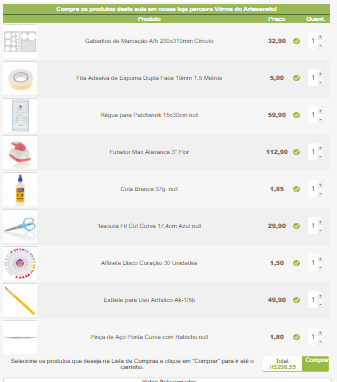
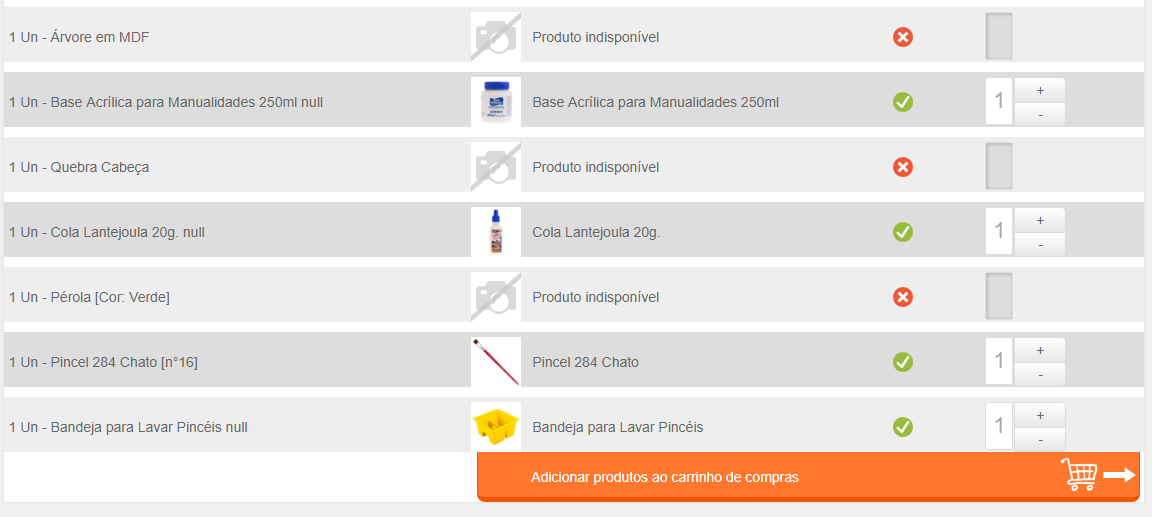
Lista de Compras (Editora Inovação) is a application that allows you create a list of available products selling in Vitrine do Artesanto or Tania Silva store and show it on any website with a link to the cart of the store.
|
|
13
|
+
|
|
14
|
+
With this plugin you can manage your lists, [TODO] account preferences and get the available products for building new lists.
|
|
15
|
+
|
|
16
|
+
[Lista de Compras platform](https://listadecompras.editorainovacao.com.br)
|
|
17
|
+
|
|
18
|
+
[Lista de Compras API documentation](http://ti.editorainovacao.com.br/Docs/ListaDeCompras/API.pdf)
|
|
19
|
+
|
|
20
|
+
[Lista de Compras .NET SDK](http://ti.editorainovacao.com.br/Docs/ListaDeCompras/SDK/)
|
|
21
|
+
|
|
22
|
+
The plugin working on Programa Arte Brasil:
|
|
23
|
+
|
|
24
|
+
|
|
25
|
+
|
|
26
|
+
And in the Canal do Artesanato:
|
|
27
|
+
|
|
28
|
+
|
|
29
|
+
|
|
30
|
+
----------
|
|
31
|
+
|
|
32
|
+
## Usage ##
|
|
33
|
+
To simple show a list in your page, creates a simple HTML element and call the plugin:
|
|
34
|
+
|
|
35
|
+
```html
|
|
36
|
+
<div id="showListaDeCompras"></div>
|
|
37
|
+
```
|
|
38
|
+
Now call the plugin:
|
|
39
|
+
```js
|
|
40
|
+
var listaDeCompras = $("#showListaDeCompras").listaDeCompras({
|
|
41
|
+
readKey : "your-read-key",
|
|
42
|
+
listId : 1, //The list ID
|
|
43
|
+
theme: "oliveDrab" //The list theme (availables: red, orange, green, blue, oliveDrab and default)
|
|
44
|
+
});
|
|
45
|
+
```
|
|
46
|
+
----------
|
|
47
|
+
|
|
48
|
+
## Options ##
|
|
49
|
+
|
|
50
|
+
You can pass options by the constructor or by the *options* method (see * Methods * above for more info)
|
|
51
|
+
|
|
52
|
+
| Option | Description | Default value | Values |
|
|
53
|
+
|:-:|:-:|:-:|:-:|
|
|
54
|
+
| useProduction | Sets the platform environment | **true** | **boolean**:true\|false |
|
|
55
|
+
| readKey | The platform API key | **null** | **string**:your api key |
|
|
56
|
+
| type | The display type (use table or ul/li elements) | **table** | **string**:table\|list |
|
|
57
|
+
| showPrices | Flag to show products prices or not | **true** | **boolean**:true\|false |
|
|
58
|
+
| listLoadSuccesfullyCallback | A callback function to trigger when the lists load succesfully | **null** | **function** |
|
|
59
|
+
| listLoadErrorCallback | A callback function to trigger when cannot load the list (error \| list dosen't exists) | **null** | **function** |
|
|
60
|
+
| debug | A flag to enable or disable debugging | **false** | **boolean**:true\|false |
|
|
61
|
+
| maxProducts | Limit the maximum number of products displayed in the list | **-1** | **integer**: -1 show all \| N shows N |
|
|
62
|
+
| theme | The plugin CSS theme | **default** | **string**: red, orange, blue, green, oliveDrab, default |
|
|
63
|
+
| customCampaign | The utm_campaign string for the buy link | **null** | **string** |
|
|
64
|
+
| headerText | The plugin header text | **null** | **string** |
|
|
65
|
+
| css | This option allows you set custom CSS classes for some items of the plugin | ** default plugin classes ** | **object**: see table below |
|
|
66
|
+
|
|
67
|
+
** The CSS classes ** can be overrrinding by setting the CSS option with the following object:
|
|
68
|
+
|
|
69
|
+
| Property | Description | Default value |
|
|
70
|
+
|:-:|:-:|:-:|:-:|
|
|
71
|
+
| itemQuantity | The item quantity field | **quantity** |
|
|
72
|
+
| itemQuantityPlus | The item quantity increase button | **plus** |
|
|
73
|
+
| itemQuantityLess | The item quantity decrease button | **less** |
|
|
74
|
+
| itemAvailability | The item availability class to enable\|disable the quantity field & buttons | **availability** |
|
|
75
|
+
| itemAvailabilityIcon | The item availability icon | **stockIcon** |
|
|
76
|
+
| buyButton | The buy button | **buy** |
|
|
77
|
+
| cartTotal | The cart total descriptor | **amount** |
|
|
78
|
+
|
|
79
|
+
|
|
80
|
+
----------
|
|
81
|
+
|
|
82
|
+
## Methods ##
|
|
83
|
+
|
|
84
|
+
There are a few methods that can be called to operate the plugin programmatically
|
|
85
|
+
|
|
86
|
+
**init**: Initializes the plugin
|
|
87
|
+
```js
|
|
88
|
+
$("#target").listaDeCompras("init");
|
|
89
|
+
```
|
|
90
|
+
|
|
91
|
+
**destroy**: Destroys the plugin (the list itself is also removed from the page)
|
|
92
|
+
```js
|
|
93
|
+
$("#target").listaDeCompras("destroy");
|
|
94
|
+
```
|
|
95
|
+
**load**: Loads a specific list by it's id
|
|
96
|
+
```js
|
|
97
|
+
$("#target").listaDeCompras("load", 1234); //try to load the list 1234
|
|
98
|
+
```
|
|
99
|
+
|
|
100
|
+
**updateQuantity**: Updates the selected quantity for a specified SKU in the list
|
|
101
|
+
```js
|
|
102
|
+
$("#target").listaDeCompras("updateQuantity", 1, 10); //updates the quantity of SKU 1 to 10 units
|
|
103
|
+
```
|
|
104
|
+
|
|
105
|
+
**addToCart**: adds a sku to the cart, this is the same of adding 1 item of the product
|
|
106
|
+
```js
|
|
107
|
+
$("#target").listaDeCompras("addToCart", new { SalesChannelId: 1000001, Stock: 10, Quantity: 1, Price: 10.9});//You should pass the sales channel id, available quantity, desired quantity and the price of the SKU
|
|
108
|
+
```
|
|
109
|
+
**clearCart**: Removes all products from the cart
|
|
110
|
+
```js
|
|
111
|
+
$("#target").listaDeCompras("clearCart");
|
|
112
|
+
```
|
|
113
|
+
|
|
114
|
+
**addEventListeners**: Add event listeners to the plugin increase & decrease buttons, quantity fields and buy button
|
|
115
|
+
```js
|
|
116
|
+
$("#target").listaDeCompras("addEventListeners");
|
|
117
|
+
```
|
|
118
|
+
|
|
119
|
+
**getBuyLink**: Gets the link to the store cart (with all sku & quantity) selecteds and the SEO params
|
|
120
|
+
```js
|
|
121
|
+
var link = $("#target").listaDeCompras("getBuyLink");
|
|
122
|
+
window.open(link);
|
|
123
|
+
```
|
|
124
|
+
|
|
125
|
+
**getCartTotal**: Gets the current cart total
|
|
126
|
+
```js
|
|
127
|
+
var total = $("#target").listaDeCompras("getCartTotal");
|
|
128
|
+
window.alert("Current cart is R$ " + total);
|
|
129
|
+
```
|
|
130
|
+
|
|
131
|
+
**updateCartTotal**: Updates the cart total (only if **showPrices** option is set to true), usefull when you add products or change the quantity of a product via JS
|
|
132
|
+
```js
|
|
133
|
+
$("#target").listaDeCompras("updateCartTotal");
|
|
134
|
+
```
|
|
135
|
+
|
|
136
|
+
**set**: Sets an option after the plugin has been initialized
|
|
137
|
+
```js
|
|
138
|
+
$("#target").listaDeCompras("set", "optionName", "optionValue");
|
|
139
|
+
```
|
|
140
|
+
|
|
141
|
+
**get**: Gets the current value for a option
|
|
142
|
+
```js
|
|
143
|
+
$("#target").listaDeCompras("get","optionName");
|
|
144
|
+
```
|
|
145
|
+
|
|
146
|
+
**debug**: Debugs the current plugin to the console.log
|
|
147
|
+
```js
|
|
148
|
+
$("#target").listaDeCompras("debug");
|
|
149
|
+
```
|